technical data SKODA ROOMSTER 2010 1.G Owner's Guide
[x] Cancel search | Manufacturer: SKODA, Model Year: 2010, Model line: ROOMSTER, Model: SKODA ROOMSTER 2010 1.GPages: 231, PDF Size: 12.91 MB
Page 42 of 231
Unlocking and locking41
Using the system
Safety
Driving Tips
General Maintenance
Breakdown assistance
Praktik
Technical Data
The safe securing system along with the anti-theft alarm system* are, however, deac-
tivated during these 30 seconds.
When the vehicle is unlocked or locked, the interior lights in the door contact are auto-
matically switched on or off.
Display of the locking
The turn signal lights flash once to confir
m that the vehicle has been correctly locked.
If the vehicle is locked by pressing the bu tton and some doors or the boot lid are
not closed, the turn signal lights flash only after closing.
WARNING
If the vehicle is locked from the outside and the safe securing system is acti-
vated, there must not be any person in the vehicle as it is then not possible to
open either a door or a window from the inside. The locked doors make it more
difficult for rescuers to get into the vehicle in an emergency - hazard!
Note
Operate the radio remote control only when the doors and boot lid are closed and
you have visual contact with the vehicle.
Once in the vehicle, you must not press the lock button
of the master key before
inserting the key into the ignition lock in order to avoid the vehicle being inadvertently
locked and the anti-theft alarm system* being switched on. Should this happen, press
the unlock button
of the master key.
Synchronisation of the remote controlIf the vehicle cannot be unlocked by actuatin g the remote control system then it is
possible that the code in the key and the co ntrol unit in the vehicle are no longer
synchronised. This can occur when the buttons on the radio-operated key are actuated
a number of times outside of the operative range of the equipment or the battery on
the remote control was replaced.
This means it is necessary to synchronise the code as follows:
press any button on the remote control;
pressing of the button means that the door will unlock with the key within 1
minute.
Anti-theft alarm system*DescriptionThe anti-theft alarm system increases the level of protection against people seeking to
break into the vehicle. The system triggers audible and visual warning signals if an
attempt is made to break into the vehicle.
How is the alarm system activated?
The anti-theft alarm system is activated au tomatically when the unlocked vehicle is
locked with the key inserted in the driver's door or with the remote control key. It is
activated 30 seconds after locking the door.
How is the alarm system deactivated?
The anti-theft alarm system is deactivated if the vehicle is unlocked by only using the
radio remote control. The anti-theft alarm system is reactivated if the vehicle is not
opened within 30 seconds after transmitting the radio signal.
Once you unlock the vehicle by inserting the ke y into the driver door you then have to
insert the key into the ignition lock and sw itch the ignition on within 15 seconds after
opening the door in order to deactivate the anti-theft alarm system. The alarm will be
triggered if you do not switch on the ignition within 15 seconds.
When is the alarm triggered?
The following security areas of the locked vehicle are monitored:
bonnet;
boot lid;
doors;
ignition lock;
vehicle interior* page 42;
Angle of the vehicle* page 42;
Decoupling of the attached trailer;
A3
s16g.4.book Page 41 Wednesda y, February 10, 2010 3:53 PM
Page 44 of 231
Unlocking and locking43
Using the system
Safety
Driving Tips
General Maintenance
Breakdown assistance
Praktik
Technical Data
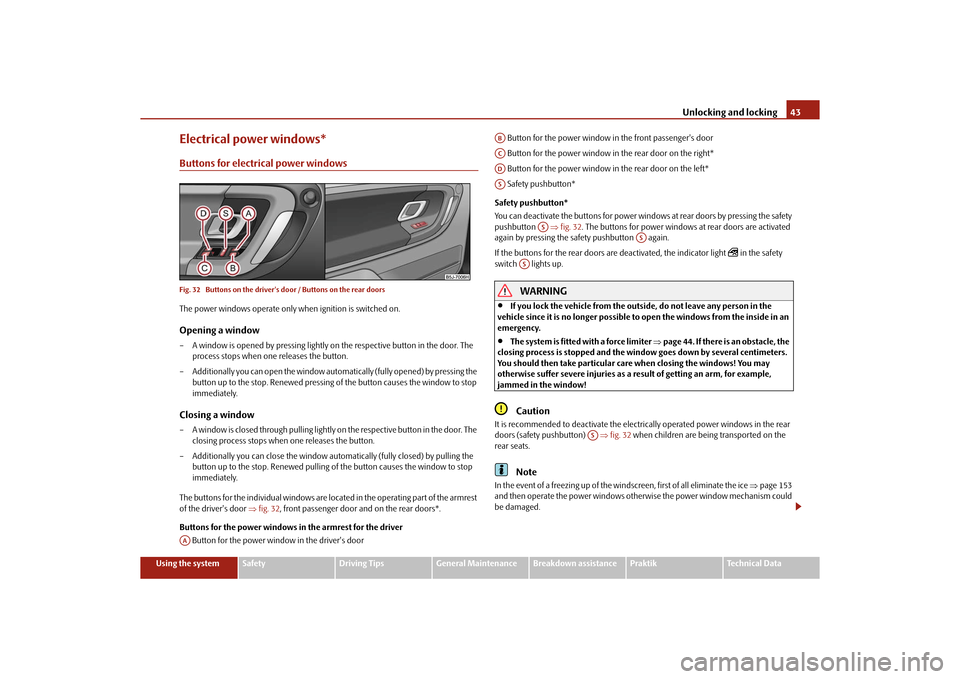
Electrical power windows*Buttons for electrical power windowsFig. 32 Buttons on the driver's door / Buttons on the rear doorsThe power windows operate only when ignition is switched on.Opening a window– A window is opened by pressing lightly on the respective button in the door. The
process stops when one releases the button.
– Additionally you can open the window automatically (fully opened) by pressing the button up to the stop. Renewe d pressing of the button causes the window to stop
immediately.Closing a window– A window is closed through pulling lightly on the respective button in the door. The
closing process stops when one releases the button.
– Additionally you can close the window auto matically (fully closed) by pulling the
button up to the stop. Renewed pulling of the button causes the window to stop
immediately.
The buttons for the individual windows are located in the operating part of the armrest
of the driver's door fig. 32 , front passenger door and on the rear doors*.
Buttons for the power windows in the armrest for the driver Button for the power window in the driver's door Button for the power window in the front passenger's door
Button for the power window in the rear door on the right*
Button for the power window in the rear door on the left*
Safety pushbutton*
Safety pushbutton*
You can deactivate the buttons for power wind ows at rear doors by pressing the safety
pushbutton fig. 32 . The buttons for power windows at rear doors are activated
again by pressing the safety pushbutton again.
If the buttons for the rear doors are deactivated, the indicator light
in the safety
switch lights up.
WARNING
If you lock the vehicle from the outside, do not leave any person in the
vehicle since it is no longer possible to open the windows from the inside in an
emergency.
The system is fitted with a force limiter page 44. If there is an obstacle, the
closing process is stopped and the window goes down by several centimeters.
You should then take particular care when closing the windows! You may
otherwise suffer severe injuries as a re sult of getting an arm, for example,
jammed in the window!Caution
It is recommended to deactivate the electrically operated power windows in the rear
doors (safety pushbutton) fig. 32 when children are being transported on the
rear seats.
Note
In the event of a freezing up of the windscreen, first of all eliminate the ice page 153
and then operate the power windows otherwise the power window mechanism could
be damaged.
AA
ABACADAS
AS
AS
AS
AS
s16g.4.book Page 43 Wednesda y, February 10, 2010 3:53 PM
Page 46 of 231
Unlocking and locking45
Using the system
Safety
Driving Tips
General Maintenance
Breakdown assistance
Praktik
Technical Data
Proceed as follows to close the window fully:
Switch on the ignition;
Press the relevant switch at the top and ho
ld it pressed as long as necessary until
the window is closed.
If the window goes down/stops, repeat th e cycle (it is necessary to put the force
limiter out of operation page 44 - now the window closes with full force!)
WARNING
The system is fitted with a force limiter page 44. If there is an obstacle, the
closing process is stopped and the window goes down by several centimeters.
You should then take particular care when closing the windows! You may
otherwise suffer severe injuries as a re sult of getting an arm, for example,
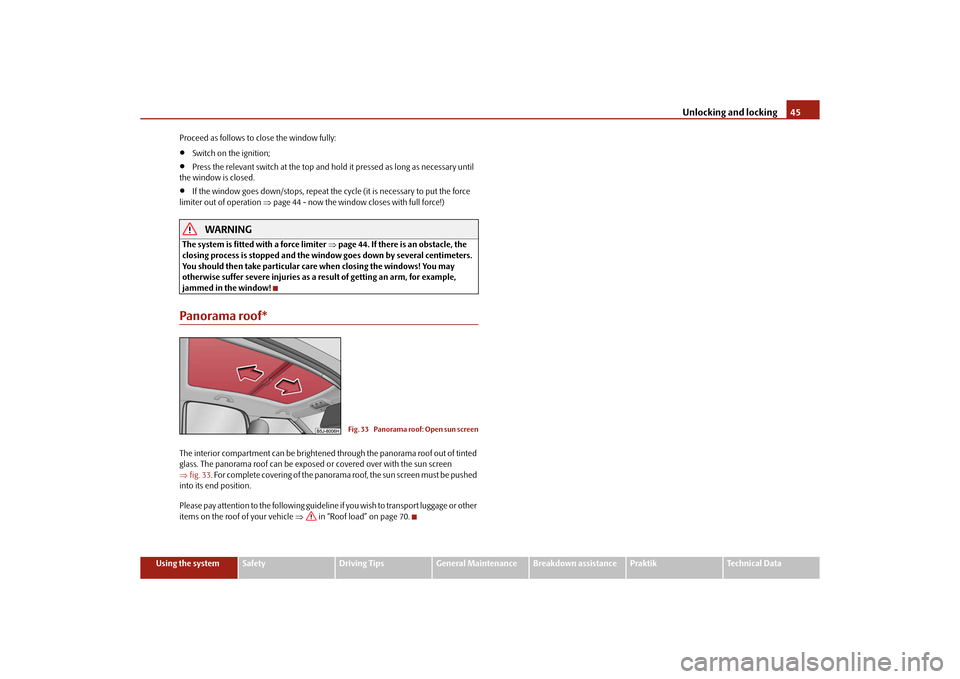
jammed in the window!Panorama roof*The interior compartment can be brightened through the panorama roof out of tinted
glass. The panorama roof can be exposed or covered over with the sun screen
fig. 33 . For complete covering of the panorama roof, the sun screen must be pushed
into its end position.
Please pay attention to the following guideline if you wish to transport luggage or other
items on the roof of your vehicle in “Roof load” on page 70.
Fig. 33 Panorama roof: Open sun screen
s16g.4.book Page 45 Wednesda y, February 10, 2010 3:53 PM
Page 48 of 231
Lights and Visibility47
Using the system
Safety
Driving Tips
General Maintenance
Breakdown assistance
Praktik
Technical Data
Switching on daylight driving lights*– Remove the cover of the fuse box on the left side of the dash panel page 191.
– Turn the light switch into position O page 46, fig. 34.
– Switch on the switch for daylight driving lights page 46, fig. 34 .Switching off daylight driving lights*– Switch off the switch for the daylight driving lights page 46, fig. 34 .
– Turn the light switch to the position side lights
or low beam
page 46,
fig. 34 .
When the daylight driving lights are switch ed on, also the low beam shines together
with the side lights (valid for vehicles without fog lights).
On vehicles which are fitted with bulbs for daylight driving lights
6) in the fog lights*,
the side lights and the low beam
7) do not come on when activating the function
daylight driving lights.
Halogen projector headlights with cornering light function*For a better cornering illumination, the ha logen projector headlights with cornering
light function are set in the optimal positi on in line with the vehicle speed and the
steering angle.
If the warning light
comes on while driving or after the ignition is switched on, a
fault is confirmed.
WARNING
If there is a fault in the halogen projec tor headlights with cornering light func-
tion, the warning light
lights up in the instrument cluster. The halogen
projector headlights with cornering light function are automatically lowered to
the emergency position, which prevents a possible dazzling of oncoming traffic.
Thus the illuminated length of the road is shortened. Drive carefully and have
the car inspected immediatel y by a specialist garage.
Tourist light*Halogen projector headlights with cornering light functionThis mode makes it possible to drive in countries with opposing traffic system, driving
on the left/right, without dazzling the oncoming vehicles. When the mode “tourist
light” is active, the side to side swivel of the headlights is deactivated.Activating tourist lightBefore activating the tourist light, the following conditions must be met:
Ignition switched off, light switched off (light switch in the position O), control dial for
the headlamp beam adjustment in the position 0, no gear engaged or selector lever in
the position N (automatic gearbox), tourist light deactivated.
– Switch on the ignition.
Up to 10 seconds after the ignition is switched on:
– Turn the light switch to the position
page 46.
– Engage the reverse gear (manual gearbox) or move the selector lever into the posi- tion R (automatic gearbox).
– Turn the control dial for headlamp beam adjustment from the position 0 to the
position 3 page 49.
Deactivating tourist lightBefore deactivating the tourist light, the following conditions must be met:
Ignition switched off, light switched off (light switch in the position O), control dial for
the headlamp beam adjustment in the position 3, no gear engaged or selector lever in
the position N (automatic gearbox), tourist light activated.
– Switch on the ignition.
Up to 10 seconds after the ignition is switched on:
– Turn the light switch to the position
page 46.
– Engage the reverse gear (manual gearbox) or move the selector lever into the posi- tion R (automatic gearbox).
– Turn the control dial for headlamp beam adjustment from the position 3 to the
position 0 page 49.
6)Valid for vehicles Scout.7)Only valid for some countries.
s16g.4.book Page 47 Wednesda y, February 10, 2010 3:53 PM
Page 50 of 231
Lights and Visibility49
Using the system
Safety
Driving Tips
General Maintenance
Breakdown assistance
Praktik
Technical Data
Headlamp range adjustment
Once the low beam is switched on you can then adapt the range of the
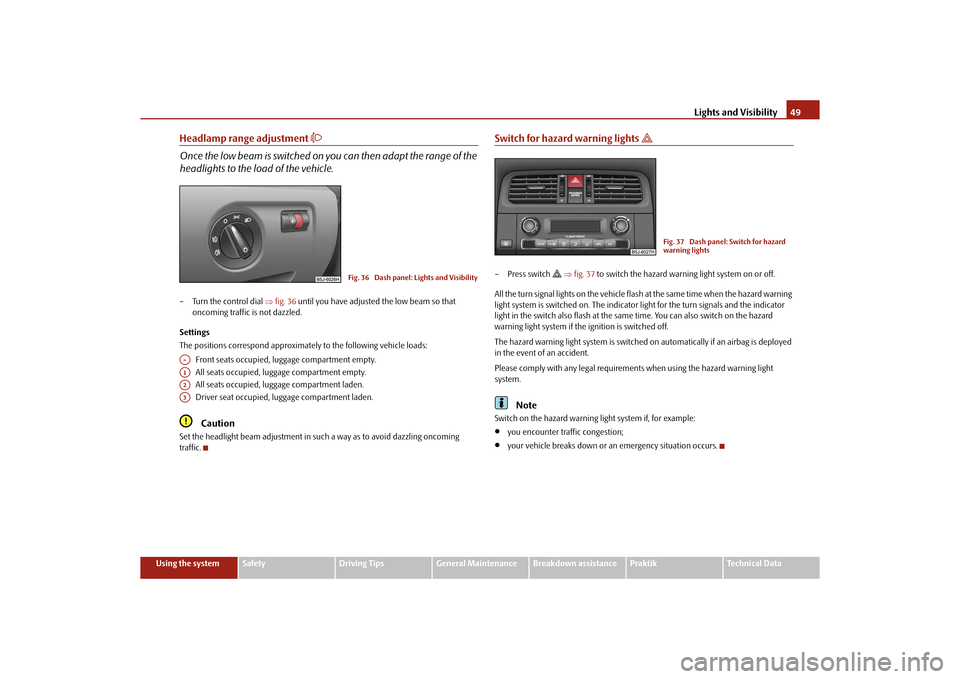
headlights to the lo ad of the vehicle.– Turn the control dial fig. 36 until you have adjusted the low beam so that
oncoming traffic is not dazzled.
Settings
The positions correspond approximately to the following vehicle loads:
Front seats occupied, luggage compartment empty.
All seats occupied, luggage compartment empty.
All seats occupied, luggage compartment laden.
Driver seat occupied, lu ggage compartment laden.
Caution
Set the headlight beam adjustment in su ch a way as to avoid dazzling oncoming
traffic.
Switch for hazard warning lights
– Press switch
fig. 37 to switch the hazard warning light system on or off.
All the turn signal lights on the vehicle flas h at the same time when the hazard warning
light system is switched on. The indicator light for the turn signals and the indicator
light in the switch also flash at the same time. You can also switch on the hazard
warning light system if the ignition is switched off.
The hazard warning light system is switched on automatically if an airbag is deployed
in the event of an accident.
Please comply with any legal requirements when using the hazard warning light
system.
Note
Switch on the hazard warning light system if, for example:
you encounter traffic congestion;
your vehicle breaks down or an emergency situation occurs.
Fig. 36 Dash panel: Lights and Visibility
A-A1A2A3
Fig. 37 Dash panel: Switch for hazard
warning lights
s16g.4.book Page 49 Wednesda y, February 10, 2010 3:53 PM
Page 52 of 231
Lights and Visibility51
Using the system
Safety
Driving Tips
General Maintenance
Breakdown assistance
Praktik
Technical Data
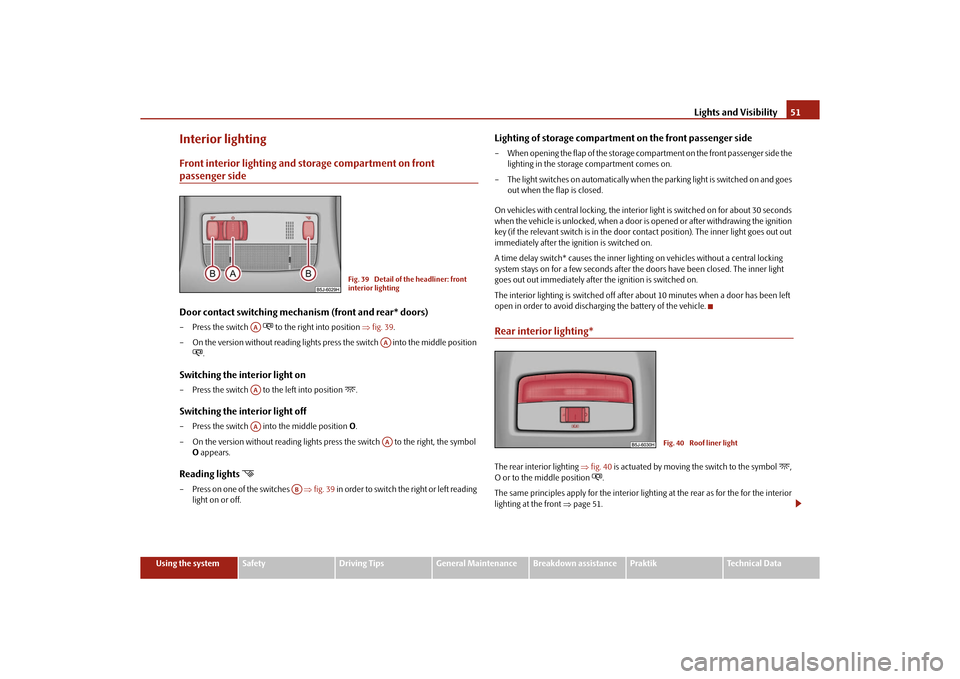
Interior lightingFront interior lighting and storage compartment on front passenger sideDoor contact switching mechanism (front and rear* doors)– Press the switch
to the right into position fig. 39 .
– On the version without reading lights press the switch into the middle position
.
Switching the interior light on– Press the switch to the left into position
.
Switching the interior light off– Press the switch into the middle position O.
– On the version without reading lights press the switch to the right, the symbol O appears.Reading lights
– Press on one of the switches fig. 39 in order to switch the right or left reading
light on or off.
Lighting of storage compartme nt on the front passenger side– When opening the flap of the storage compartment on the front passenger side the
lighting in the storage compartment comes on.
– The light switches on automatically when the parking light is switched on and goes
out when the flap is closed.
On vehicles with central locking, the interior light is switched on for about 30 seconds
when the vehicle is unlocked, when a door is opened or after withdrawing the ignition
key (if the relevant switch is in the door contact position). The inner light goes out out
immediately after the ignition is switched on.
A time delay switch* causes the inner lighting on vehicles without a central locking
system stays on for a few seconds after the doors have been closed. The inner light
goes out out immediately after the ignition is switched on.
The interior lighting is switched off after about 10 minutes when a door has been left
open in order to avoid discharg ing the battery of the vehicle.Rear interior lighting*The rear interior lighting fig. 40 is actuated by moving the switch to the symbol
,
O or to the middle position
.
The same principles apply for th e interior lighting at the rear as for the for the interior
lighting at the front page 51.
Fig. 39 Detail of the headliner: front
interior lighting
AA
AA
AAAA
AA
AB
Fig. 40 Roof liner light
s16g.4.book Page 51 Wednesda y, February 10, 2010 3:53 PM
Page 54 of 231
Lights and Visibility53
Using the system
Safety
Driving Tips
General Maintenance
Breakdown assistance
Praktik
Technical Data
Windshield wiper and wash systemWindshield wiper
You can operate the windscreen wipers and automatic wipe/wash
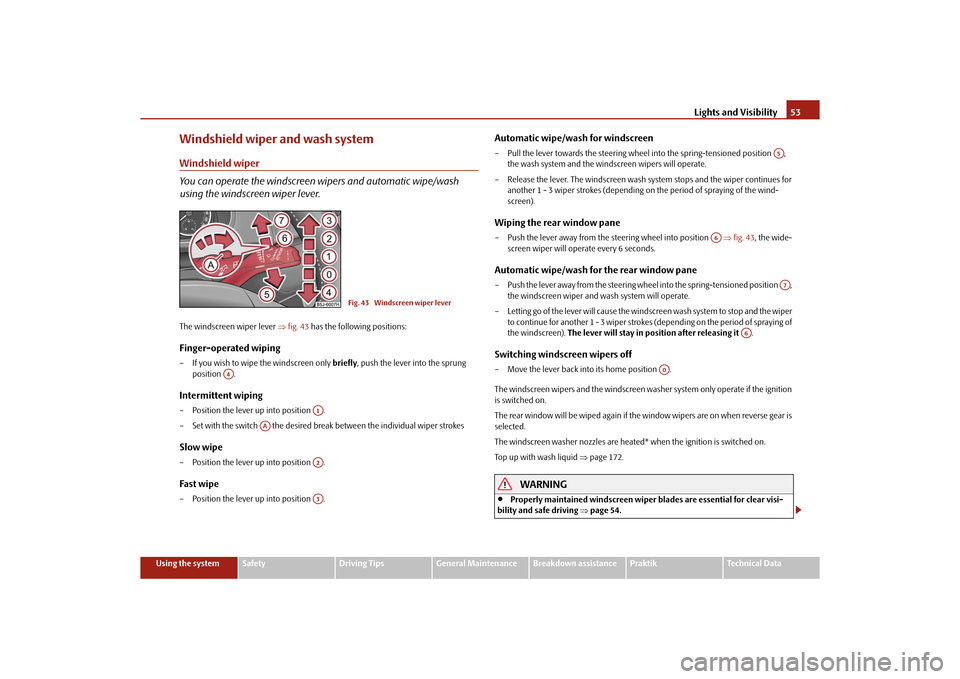
using the windscreen wiper lever.The windscreen wiper lever fig. 43 has the following positions:Finger-operated wiping– If you wish to wipe the windscreen only briefly, push the lever into the sprung
position .Intermittent wiping– Position the lever up into position .
– Set with the switch the desired brea k between the individual wiper strokesSlow wipe– Position the lever up into position .Fast wipe– Position the lever up into position .
Automatic wipe/wash for windscreen– Pull the lever towards the steering wheel into the spring-tensioned position ,
the wash system and the windscreen wipers will operate.
– Release the lever. The windscreen wash system stops and the wiper continues for another 1 - 3 wiper strokes (depending on the period of spraying of the wind-
screen).Wiping the rear window pane– Push the lever away from the st eering wheel into position fig. 43 , the wide-
screen wiper will operate every 6 seconds.Automatic wipe/wash for the rear window pane– Push the lever away from the steering wheel into the spring-tensioned position , the windscreen wiper and wash system will operate.
– Letting go of the lever will cause the windscreen wash system to stop and the wiper to continue for another 1 - 3 wiper strokes (depending on the period of spraying of
the windscreen). The lever will stay in position after releasing it .Switching windscreen wipers off– Move the lever back into its home position .
The windscreen wipers and the windscreen washer system only operate if the ignition
is switched on.
The rear window will be wiped again if the window wipers are on when reverse gear is
selected.
The windscreen washer nozzles are heated* when the ignition is switched on.
Top up with wash liquid page 172.
WARNING
Properly maintained windscreen wiper blades are essential for clear visi-
bility and safe driving page 54.
Fig. 43 Windscreen wiper lever
A4
A1
AA
A2A3
A5
A6
A7
A6
A0
s16g.4.book Page 53 Wednesda y, February 10, 2010 3:53 PM
Page 56 of 231
Lights and Visibility55
Using the system
Safety
Driving Tips
General Maintenance
Breakdown assistance
Praktik
Technical Data
You should clean the wiper blades regularly with a windscreen cleaner in
order to avoid any smears. Clean a wiper blad e with a sponge or cloth if it is very
dirty, for example from insect residues.
Replace the wiper blades once or twice a year for safety reasons. The wiper
blades are available from specialist garages.
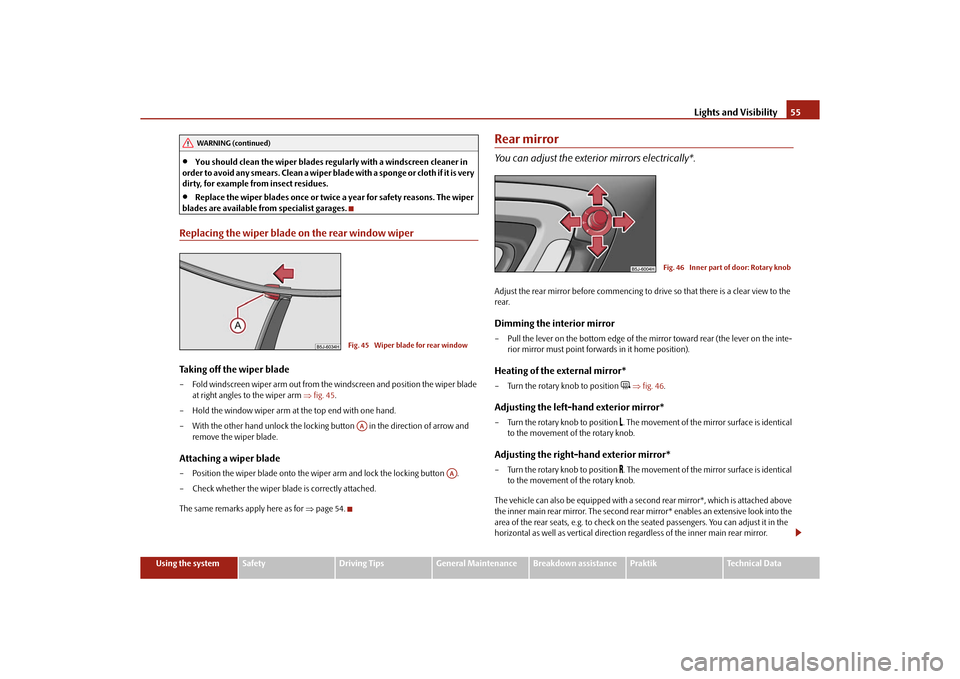
Replacing the wiper blade on the rear window wiperTaking off the wiper blade– Fold windscreen wiper arm out from the windscreen and position the wiper blade at right angles to the wiper arm fig. 45 .
– Hold the window wiper arm at the top end with one hand.
– With the other hand unlock the locking button in the direction of arrow and remove the wiper blade.Attaching a wiper blade– Position the wiper blade onto the wiper arm and lock the locking button .
– Check whether the wiper bl ade is correctly attached.
The same remarks apply here as for page 54.
Rear mirrorYou can adjust the exterior mirrors electrically*.Adjust the rear mirror before commencing to drive so that there is a clear view to the
rear.Dimming the interior mirror– Pull the lever on the bottom edge of the mirror toward rear (the lever on the inte-
rior mirror must point forwards in it home position).Heating of the external mirror*– Turn the rotary knob to position
fig. 46 .
Adjusting the left-hand exterior mirror*– Turn the rotary knob to position
. The movement of the mirror surface is identical
to the movement of the rotary knob.
Adjusting the right-hand exterior mirror*– Turn the rotary knob to position
. The movement of the mirror surface is identical
to the movement of the rotary knob.
The vehicle can also be equipp ed with a second rear mirror*, which is attached above
the inner main rear mirror. The second rear mirror* enables an extensive look into the
area of the rear seats, e.g. to check on the seated passengers. You can adjust it in the
horizontal as well as vertical direction re gardless of the inner main rear mirror.
WARNING (continued)
Fig. 45 Wiper blade for rear windowAA
AA
Fig. 46 Inner part of door: Rotary knob
s16g.4.book Page 55 Wednesday, February 10, 2010 3:53 PM
Page 58 of 231
Seats and Storage57
Using the system
Safety
Driving Tips
General Maintenance
Breakdown assistance
Praktik
Technical Data
Seats and StorageFront seatsBasic informationThe front seats have a wide range of differ ent settings and can thus be matched to the
physical characteristics of the driver and front passenger. Correct adjustment of the
seats is particularly important for:
safely and quickly reaching the controls;
a relaxed, fatigue-free body position;
achieving the maximum protection offered by the seat belts and the airbag
system.
The chapters which follow describe the procedure which you should adopt for
adjusting the seats.
WARNING
Never transport more occupants than the maximum seating in the vehicle.
Each occupant must correctly fasten the seat belt belonging to the seat.
Children must be fastened page 126, “Transporting children safely” with a
suitable restraint system.
The front seats and the head restraints must always be adjusted to match
the body size of the seat occupant as well as the seat belts must always be
correctly fastened in order to provide an optimal protection for you and your
occupants.
Always keep your feet in the footwell when the vehicle is being driven -
never place your feet on the instrument panel, out of the window or on the
surfaces of the seats. This is particular ly important for the front seat passenger.
You will be exposed to increased risk of injury if it becomes necessary to apply
the brake or in the event of an accident. If an airbag is deployed, you may suffer
fatal injuries when adopting an incorrect seated position!
It is important for the driver and front passenger to maintain a distance of at
least 25 cm from the steering wheel or dash panel. Not maintaining this
minimum distance will mean that the airbag system will not be able to properly protect you - hazard! The front seats and the head restraints must always also
be correctly adjusted to match the body size of the occupant.
Ensure that there are no objects in
the footwell as any objects may get
behind the pedals during a driving or braking manoeuvre. You would then no
longer be able to operate the clutch, to brake or accelerate.
Do not transport any objects on the front passenger seat except those
provided for this purpose (e.g. child safety seat) - risk of accident!
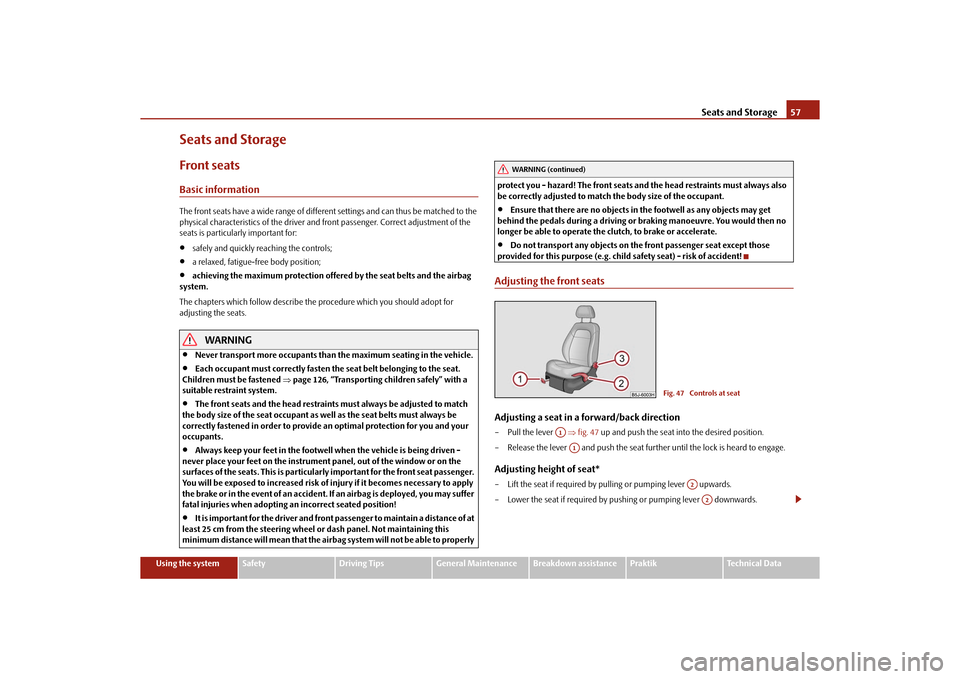
Adjusting the front seatsAdjusting a seat in a forward/back direction–Pull the lever fig. 47 up and push the seat into the desired position.
– Release the lever and push the seat further until the lock is heard to engage.Adjusting height of seat*– Lift the seat if required by pulling or pumping lever upwards.
– Lower the seat if required by pushing or pumping lever downwards.
WARNING (continued)
Fig. 47 Controls at seat
A1A1
A2A2
s16g.4.book Page 57 Wednesda y, February 10, 2010 3:53 PM
Page 60 of 231
Seats and Storage59
Using the system
Safety
Driving Tips
General Maintenance
Breakdown assistance
Praktik
Technical Data
Heating the front seats*You can electrically heat the seat cushions and the seat backrests of the front seats.
– By pressing the rocker switch in the posi tion or switch on the front seat
heating to 25% or 100% of its power output fig. 49 .
– To switch off the heating shift the rocker switch into the horizontal position.
WARNING
If, as an occupant, you have a subdued pain and/or temperature sensitivity,
e.g. through medication, paralysis or beca use of chronic illness (e.g. diabetes),
we recommend not to use the seat heating of the driver or front passenger seat.
This can lead to burns on the back, the posterior and the legs which are difficult
to heal. If the seat heating is used, we recommend to make regular breaks in
your journey when driving long distances, so that the body can recuperate from
the stress of the journey. Please consult your doctor, who can evaluate your
specific condition.Caution
You should not kneel on the seats or otherwise apply pressure at specific points in
order to avoid damaging the heating elements of the seat heaters.
Do not use the seat heating if the seats are not occupied by persons or if objects
are fastened or stored on them, for example a child seat, a bag etc. A fault of the heating
elements in the seat heating can occur.
Do not clean the seats moist page 156.
Note
The seat heating should only be switched on when the engine is running. This has a
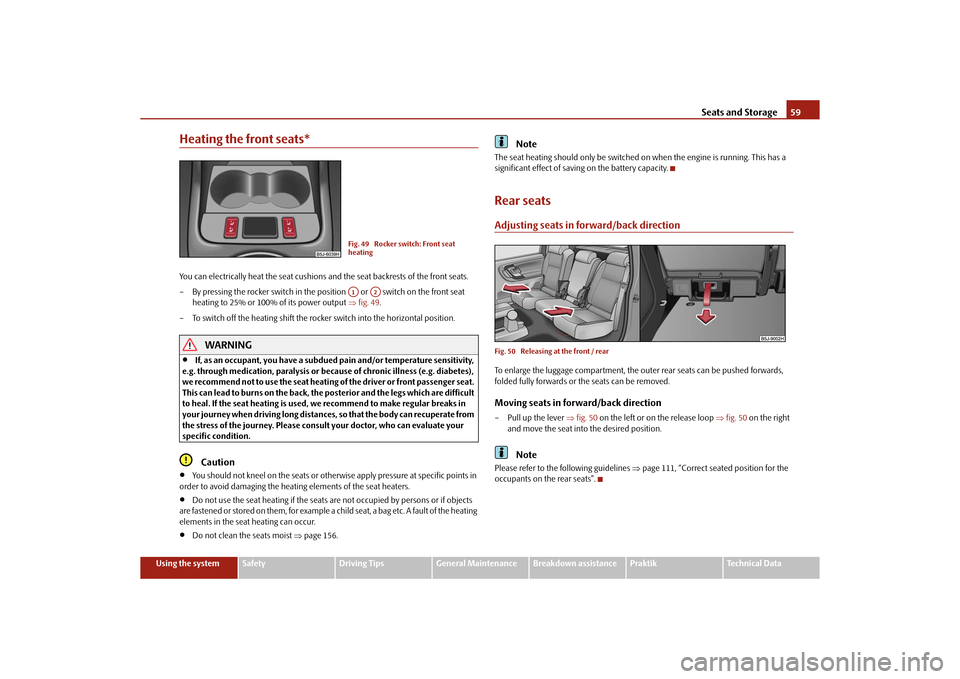
significant effect of saving on the battery capacity.Rear seatsAdjusting seats in forward/back directionFig. 50 Releasing at the front / rearTo enlarge the luggage compartment, the ou ter rear seats can be pushed forwards,
folded fully forwards or the seats can be removed.Moving seats in forward/back direction– Pull up the lever fig. 50 on the left or on the release loop fig. 50 on the right
and move the seat into the desired position.
Note
Please refer to the following guidelines page 111, “Correct seated position for the
occupants on the rear seats”.
Fig. 49 Rocker switch: Front seat
heatingA1
A2
s16g.4.book Page 59 Wednesda y, February 10, 2010 3:53 PM