technical data SKODA SUPERB 2008 2.G / (B6/3T) Owner's Guide
[x] Cancel search | Manufacturer: SKODA, Model Year: 2008, Model line: SUPERB, Model: SKODA SUPERB 2008 2.G / (B6/3T)Pages: 272, PDF Size: 18.25 MB
Page 48 of 272

Unlocking and locking47
Using the systemSafetyDriving TipsGeneral MaintenanceBreakdown assistanceTechnical Data
•The opened storage compartment for spectacles reduces the effectiveness of
the interior monitor. In order to ensure th e function to be fully operational, close
the storage compartment for specta cles before locking the vehicle.
Power windows
Buttons on the driver's door
The power windows operate only when ignition is switched on.
Opening a window
– A window is opened by pres sing lightly on the respective butto n in the
door. The process stops when one releases the button.
– Additionally you can open the window automatically (fully opened) by pressing the button up to the stop. Renewed pressing of the button
causes the window to stop immediately.
Closing a window
– A window is closed through pulling lightly on the respective button in
the door. The closing process stop s when one releases the button. – Additionally you can close the window automatically (fully closed) by
pulling the button up to the stop. Renewed pulling of the button
causes the window to stop immediately.
The switches for the individual windows are located in the armrest of the driver's
door ⇒fig. 36 , front passenger door and in the rear doors ⇒page 48, fig. 37
Buttons for the power window in the armrest of the driver's door Button for the power window in the driver's door
Button for the power window in the front passenger's door
Button for the power window at the rear right door
Button for the power window at the rear left door
Safety switch
Safety pushbutton
You can deactivate the switches for power windows at rear doors by pressing the
safety pushbutton ⇒fig. 36 . The buttons for power windows at rear doors are
activated again by pressing th e safety pushbutton again.
If the buttons for the rear doors are deactivated, the indicator light
in the safety
switch lights up.
WARNING
•If you lock the vehicle from the outside, do not leave any person in the
vehicle since it is no longer possible to open the windows from the inside in
an emergency.
•The system is fitted with a force limiter ⇒page 48. The closing process
will be stop if an obstruction is detected and the window will open again. You
should then take particular care when closing the windows! You may other-
wis e suf fe r se v e re inj uri es a s a re s ult of g e tt ing a n ar m , for e xa m ple , ja m m e d
in the window!
•It is recommended to deactivate the electrically operated power
windows in the rear doors (safety pushbutton) ⇒fig. 36 when children
are being transported on the rear seats.
Fig. 36 Buttons on the
driver's door
AA
AB
AC
AD
AS
ASAS
AS
AS
NKO B6 20.book Page 47 Wednesday, March 26, 2008 3:15 PM
Page 50 of 272

Unlocking and locking49
Using the systemSafetyDriving TipsGeneral MaintenanceBreakdown assistanceTechnical Data
is stopped. During this time it is not possible to automatically close the window. The
force limiter is still switched on.
The force limiter is only switched off, if you attempt to close the window within the
next 10 seconds -
the window closes now with full strength!
If you wait longer than 10 seconds, the force limiter is switched on again.
WARNING
You should take particular care when closing the windows! You may other-
wi se s uffe r s e ve re i njur ie s a s a re sul t of getting an arm, for example, jammed
in the window!
Window convenience operation
You can open and close the electrically powered windows as follows when
unlocking and locking the vehicle (j ust closing of the sliding roof).
Opening a window
•by holding the pressed unlock button on the remote control,
•by holding the pressed top part of the button for the central locking system in
the driver door,
•by holding the key in the driver's lock in the unlock position ⇒page 40, “Emer-
gency unlocking and lockin g of the driver's door”.
Closing a window
•by holding the pressed lock button on the remote control,
•by holding the pressed bottom part of th e button for the central locking system
in the driver door,
•by holding the key in the driver's lock in the lock position ⇒page 40.
You can interrupt the opening or closing operation of the windows immediately by
releasing the key or the closing button.
WARNING
The system is fitted with a force limiter ⇒page 48. The closing process will
be stop if an obstruction is detected and the window will open again. You
should then take particular care when closing the windows! You may other-
wis e suf fe r se v e re inj uri es a s a re s ult of g e tt ing a n ar m , for e xa m ple , ja m m e d
in the window!
Note
•The convenience opening of the windows with the aid of the key in the driver's
lock is only possible 45 seconds after deactivating or activating the alarm system.
Operational faults
Electrically operated power windows do not operate
If the battery has been disconnected and then reconnected while the window was
opened, the electrically operated power windows do not operate. The system must
be activated. Proceed as follows in order to re-establish the function:
•you can close the window by pull ing the switch on the top edge.
•release the switch
•you must pull the switch again for approx. 3 seconds
Operation in winter
Ice accumulating on the surface of the wi ndows during the winter may result in a
greater resistance when closing the windows and the window may stop and move
back several centimetres
Proceed as follows to close the window fully:
•Turn the key in the lock of the driver d oor into the closing position and hold it
there until all of the windows are closed.
•If the window closing is interrupted, it is necessary to put the force limiter out of
operation ⇒page 48.
NKO B6 20.book Page 49 Wednesday, March 26, 2008 3:15 PM
Page 52 of 272

Unlocking and locking51
Using the systemSafetyDriving TipsGeneral MaintenanceBreakdown assistanceTechnical Data
Closing
Sliding closed/closing the sliding/tilting roof
– Turn the switch to position ⇒page 50, fig. 38 .
Safety closing
The sliding/tilting roof is equipped with an overload protection system. If an
obstacle (e.g. ice) prevents closing, the sliding/tilting roof stops and opens
completely. You can close the sliding/tilting roof completely without overload
protection by pressing the switch to the position ⇒page 50, fig. 38 at the front
for as long as it takes for the sliding/tilting roof to shut completely ⇒.
WARNING
Close the sliding/tilting roof carefully - risk of injury!
Convenience operation
You can also close an open sliding/tilting roof from the outside.
– Keep pressed the lock button on th e remote control or hold down the
key in the driver's door in the lock position until the sliding/tilting roof
is closed ⇒.
The closing process stops when one releases the key or the closing button.
WARNING
Close the sliding/tilting roof carefully - risk of injury! The overload protec-
tion system does not function with the convenience closing.
Emergency operation
You can close and/or open the sliding/tilting roof by hand if the system is
defect.
– Position the flat blade of a screwdriver carefully against the rear edge
of the cover of th e electrical drive ⇒fig. 39 .
– Pull the cover down.
– Take the crank out of the holder on the safety cover at the side of the
dash panel. Insert the crank up to the stop into the opening ⇒fig. 40
and close and/or open the sliding/tilting roof ⇒fig. 40 .
AA
AAFig. 39 Detail of the head-
liner: point for positioning
screwdriver
Fig. 40 Detail of the head-
liner: Emergency operation
NKO B6 20.book Page 51 Wednesday, March 26, 2008 3:15 PM
Page 54 of 272

Lights and Visibility53
Using the systemSafetyDriving TipsGeneral MaintenanceBreakdown assistanceTechnical Data
Lights and Visibility
Lights
Switching lights on and off
Switching on side lights
– Turn the light switch into position
.
Switching on the low beam and main beam
– Switch on the ignition.
– Turn the light switch into position
.
– Press the main beam lever forward in order to switch on the main beam ⇒page 60, fig. 47 .
Switching off lights (except daylight driving lights)
– Turn the light switch into position.
When the parking lights are switched on, the symbol next to the light switch is
illuminated. Low beam comes on only if the ignition is
switched on. After switching off the igni-
tion, the low beam is switched off automati cally and only the side lights come on.
On models fitted with right-hand steering the position of certain switches differs
from that shown in ⇒fig. 41 . The symbols which mark the switch positions are
identical, however.
WARNING
Never drive with side lights on - risk of accident! The side lights are not
bright enough to light up the road suffic iently in front of you or to be seen by
other oncoming traffic. In this case, always switch on the low beam when it
is dark or if visibility is poor.
Note
•An audible warning will sound if you wi thdraw the ignition key and open the
driver's door when the vehicle lights are still on.
•The acoustic warning signal is switched off over the door contact when the
driver's door is closed (ignition off). The vehicle can be parked with the side lights
on.
•If the car is parked for a lengthy period , we recommend switching off all lights,
or leaving only the parking lights switched on.
•The switching on of the described lights should only be undertaken in accord-
ance with the legal requirements.
•If a fault occurs in the light switch , the low beam comes on automatically
•In the event of cool or humid weather co nditions, the headlights can be misted
up from inside.
−The temperature difference between interior and external area of the head-
light lenses is decisive.
− When the driving lights are switched on , the light outlet surfaces are free
from mist after a short period. The headlight lenses can possibly mist up at the
border areas.
Fig. 41 Dash panel: Light
switch
NKO B6 20.book Page 53 Wednesday, March 26, 2008 3:15 PM
Page 56 of 272
Lights and Visibility55
Using the systemSafetyDriving TipsGeneral MaintenanceBreakdown assistanceTechnical Data
If the vehicle speed is below 65 km/h for at least 2 minutes, the lights are switched
off.
Rain lights
If you move the windshield
wiper lever in the position slow wipe for more than 5
seconds, the side lights and low beam ar e automatically switched on. The light is
switched off when the windsh ield wiper lever is no longer than 4 minutes in the
position for slow or intermittent wipe.
If you switch on the windscreen wipe in the operation rain sensor* for longer than
10 seconds or in the operation permanent wipe (position 2 or 3) ⇒page 65
switching on for longer than 15 seconds, th e side lights and low beam are switched
on automatically. The light switches off if the windscreen wipe is in operation rain
sensor* for more than 4 minutes or is no t switched on in the operation permanent
wipe.
WARNING
The automatic light control only operates as a support. The driver is not
released from his responsibility to inspect the light and if necessary to switch
on the light depending on the light conditions. The light sensor cannot
detect for example rain or snow. For these conditions we recommend to
switch on the low beam
!
Note
•Do not affix any stickers in front of the light sensor, so that you do not impair its
function or put it out of operation.
•The same principles as fo r using the automatic light control also apply to the
light which is switched on manually ⇒page 53.
Coming Home Function
The function makes it possible to switch on the lights in the darkness for
a short time after leaving the vehicle. Switching on Coming Home Function
– The light switch is in the position automatic driving lamp control
and the low beam illuminates.
– Switch off the ignition.
– After opening the driver's door , the function Coming Home is
switched on.
– Close all the doors and the boot lid and lock the vehicle. After a short time, switch all lights off.
Depending on equipment fitted the function Coming Home switches on the
following lights:
•Parking lights,
•Low beam,
•Entry lighting in the exterior mirrors,
•Licence plate light.
Coming Home Function
The lights go out 10 seconds after cl osing all the doors and the boot lid.
If a door or the boot lid remains open, th e lights go out 60 seconds after switching
off the ignition.
On vehicles fitted with automatic driving la mp control you can also switch the light
switch in the position
. The function Coming Home is controlled with the light
sensor in the mount of the interior rear mirror. If the light intensity is higher than the
set value of the light sensor, the Coming Home Function is not switched on after
switching off the ignition.
Note
•If the Coming Home Functi on is switched on constantly, the battery will be
heavily discharged particularly in short-haul traffic.
•The switching on of the described lights should only be undertaken in accord-
ance with the legal requirements.
NKO B6 20.book Page 55 Wednesday, March 26, 2008 3:15 PM
Page 58 of 272
Lights and Visibility57
Using the systemSafetyDriving TipsGeneral MaintenanceBreakdown assistanceTechnical Data
Mode city
In the mode “city”, the dispersion of the cone
of light in front of the vehicle is wider
and the width of illumination is shorter. It has as an aim to illuminate the adjacent
footpaths, crossings, pedestrian crossings etc. The mode is active at speeds of 15 -
50 km/h.
Mode motorway
In the mode “motorway” the dispersion of the cone of light is so widespread, that it
illuminates also the left (and right)
6) lane of the motorway, so that the driver can
react in time to an obstacle or any other danger. The mode is activated stepwise as
of a speed of 90 km/h. It gains its greatest effectiveness at speeds above 120 km/h.
Tourist light
When driving in countries with opposing traffic system, driving on the left/right, it is
possible to switch on the mode “tourist light” electronically. This mode makes it
possible to drive in the particular count ry without dazzling the oncoming vehicles.
When the mode “tourist light” is active, the above mentioned modes and the side
to side swivel of the headlight is deactivated.
The mode “tourist light” is activated in the information display* in the menu
⇒ page 19:
„SETUP (Settings)
„Automatic light (Automat. Lights)
Note
•The functions of the side to side swivel of the headlight* (activation at a speed
of 10 km/h), fog lights with the function “corner” ⇒page 57 and the function
dynamic headlight beam range* add to the System AHL*.
•The System AHL* is solely delivered with Bi-Xenon gas discharge bulbs for low
beam and main beam lights.
Fog lights
Switching on the fog lights
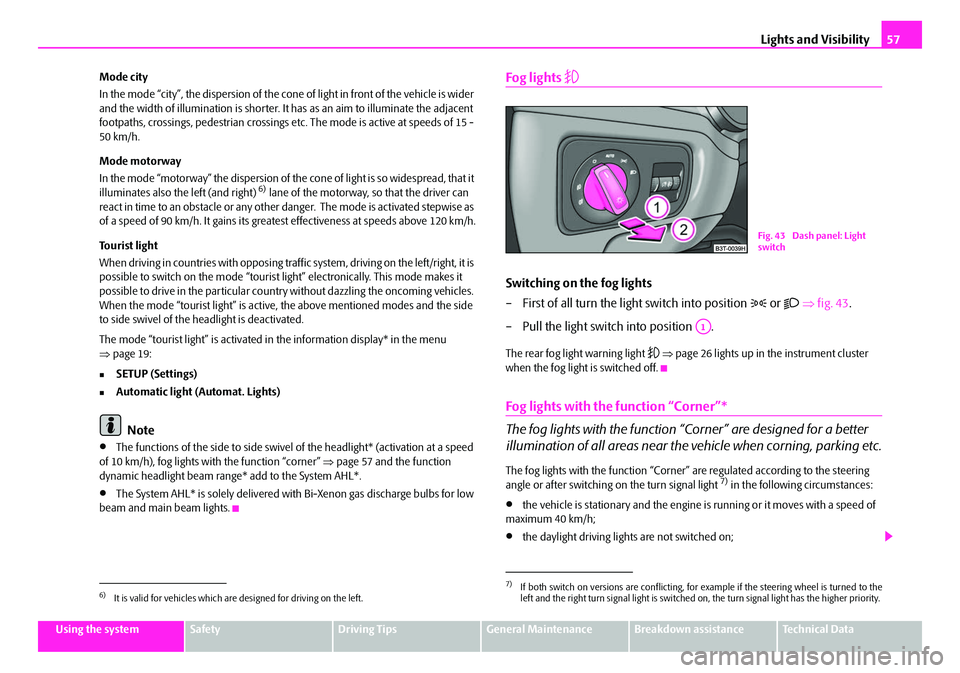
– First of all turn the light switch into position
or ⇒ fig. 43 .
– Pull the light switch into position .
The rear fog light warning light ⇒ page 26 lights up in the instrument cluster
when the fog light is switched off.
Fog lights with the function “Corner”*
The fog lights with the function “Corner” are designed for a better
illumination of all areas near the vehicle when corning, parking etc.
The fog lights with the function “Corner” are regulated according to the steering
angle or after switching on the turn signal light 7) in the following circumstances:
•the vehicle is stationary and the engine is running or it moves with a speed of
maximum 40 km/h;
•the daylight driving lights are not switched on;
6)It is valid for vehicles which are designed for driving on the left.
7)If both switch on versions are conflicting, for example if the steering wheel is turned to the
left and the right turn signal light is switched on, the turn signal light has the higher priority.
Fig. 43 Dash panel: Light
switch
A1
NKO B6 20.book Page 57 Wednesday, March 26, 2008 3:15 PM
Page 60 of 272

Lights and Visibility59
Using the systemSafetyDriving TipsGeneral MaintenanceBreakdown assistanceTechnical Data
Headlamp range adjustment*
Once the low beam is switched on you can then adapt the range of
the headlights to the load of the vehicle.
– Turn the control dial ⇒fig. 45 until you have adjusted the low beam
so that oncoming traffic is not dazzled.
Settings
The positions correspond approximat ely to the following vehicle loads:
Front seats occupied, luggage compartment empty.
All seats occupied, lugg age compartment empty.
All seats occupied, lugg age compartment laden.
Driver seat occupied, luggage compartment laden.
Caution
Set the headlight beam adjustment in such a way as to avoid dazzling oncoming
traffic.
Note
The Bi-Xenon bulbs* adapt automatically to the load and driving state of the vehicle
(e.g. speed, accelerating, braking) when the ignition is switched on and when driving. Vehicles which are not equipped
with Bi-Xenon bulbs* do not have a
manual headlight rang e adjustment control.
Switch for hazard warning lights
–Press switch ⇒ fig. 46 to switch the hazard warning light system on
or off.
All the turn signal lights on the vehicle flash at the same time when the hazard
warning light system is switched on. The indicator light for the turn signals and the
indicator light in the switch also flash at the same time. You can also switch on the
hazard warning light system if the ignition is switched off.
The hazard warning light system is switched on automatically if an airbag is
deployed in the event of an accident.
Please comply with any legal requirements when using the hazard warning light
system.
Note
Switch on the hazard warning light system if, for example:
•you encounter traffic congestion,
•your vehicle breaks down or an emergency situation occurs.
Fig. 45 Dash panel: Lights
and Visibility
A-
A1
A2
A3
Fig. 46 Dash panel: Switch
for hazard warning lights
NKO B6 20.book Page 59 Wednesday, March 26, 2008 3:15 PM
Page 62 of 272

Lights and Visibility61
Using the systemSafetyDriving TipsGeneral MaintenanceBreakdown assistanceTechnical Data
Interior lighting
Front interior lighting and lighting of storage compartment on
front passenger side
Switching the interior light on
– Press the switch at the point of the symbol
⇒ fig. 48 or ⇒fig. 49 .
Switching the interior light off
– Press the switch at the point of the symbol O. Door contact setting
– Position the switch into middle position
.
Lighting of storage compartment on the front passenger side
– When opening the flap of the storage compartment on the front passenger side the lighting in the storage compartment comes on.
– The light switches on automatically when the parking light is switched on and goes out when the flap is closed.
The interior light comes on as soon as yo u unlock the car or open a door or when
the ignition key has been removed. The li ght goes out again about 30 seconds after
all the doors have been closed. The interior lighting is switched off when you lock
the car or switch the ignition on. This on ly applies when the switch for the corre-
sponding interior lights is standing n the door contact setting.
The interior lighting goes off after about 10 minutes when a door has been left open
in order to avoid discharging the battery of the vehicle.
If the switch is in the position
(permanent lights), the interior lighting goes off at
the latest after 10 minutes in order to avoid discharging the battery of the vehicle.
Two LEDs are integrated in the interior lighting, which illuminates the shift lever and
the middle of the dash panel. They are sw itched on automatically when switching
on the parking light.
In addition, the lighting of the door handle is switched on after the ignition is
switched on when the side lights are switched on.
Together with the front interior light, the rear interior light is simultaniously
switched on or off.
Note
We recommend having these bulbs re placed by a specialist garage.
Fig. 48 Detail of the head-
liner: front interior lighting
Fig. 49 Detail of the head-
liner: front interior lighting
NKO B6 20.book Page 61 Wednesday, March 26, 2008 3:15 PM
Page 64 of 272

Lights and Visibility63
Using the systemSafetyDriving TipsGeneral MaintenanceBreakdown assistanceTechnical Data
The warning light is located in the door trim panel below
⇒page 62, fig. 53 .
The warning light goes on every time the door is opened. The light goes out about
10 minutes after opening the door in order to avoid discharging the battery of the
vehicle.
Luggage compartment light
The lighting comes on automatically when the boot lid is opened. The luggage
compartment lighting will switch off agai n automatically if the boot lid remains
open for more than about 30 minutes.
Entry lighting*
The lighting is positioned on the bottom edge of the exterior mirror.
The light beam is directed towards the entry area of the front door.
The light comes on after the doors have been locked or on opening the boot lid. The
light goes out after switching on the ignition or up to 30 seconds after closing all the
doors, the bonnet and the boot lid.
If a door, the bonnet or the boot lid re mains open, the light goes out within 2
minutes if the ignition is switched off.
WARNING
If the entry light comes on, do not touch its cover - risk of burns!
Visibility
Rear window heater
– You can switch the rear window heater on or off by pressing the switch
⇒ fig. 54 - the indicator light in the switch comes on or goes out.
The rear window heater only oper ates when the engine is running.
The rear window heater switches off automatically after 10 minutes.
For the sake of the environment
You should switch off the rear window heater as soon as the rear window is clear.
The reduced current consumption will have a favourable effect on fuel economy
⇒ page 191, “Saving electricity”.
Note
•The position and the shape of the switch can differ depending on equipment
installed in the vehicle.
•If the on-board voltage drops, the rear window heater is switched off automat-
ically, in order to provide sufficient electrical energy for the engine control.
Fig. 54 Switch for rear
window heater
NKO B6 20.book Page 63 Wednesday, March 26, 2008 3:15 PM
Page 66 of 272

Lights and Visibility65
Using the systemSafetyDriving TipsGeneral MaintenanceBreakdown assistanceTechnical Data
Sun screen in the rear doors*
Unrolling
– Pull the sun screen at the handle ⇒fig. 57 and hang it in the
bracket on the top edge of the door.
Rolling up
– Take the sun screen out at the handle and hold it in such a way that it can roll up slowly and without damage.
Windshield wiper and wash system
Windshield wiper
You can operate the windscreen wipers and automatic wipe/wash
using the windscreen wiper lever.
The windscreen wiper lever ⇒ fig. 58 has the following positions:
Finger-operated wiping
– If you wish to wipe the windscreen only briefly, push the lever into the
sprung position . If you hold the le ver in the lower position for more
than 1 second, the wiper wipes faster.
Intermittent wiping
– Position the lever up into position .
– Set with the switch the desired break between the individual wiper strokes
Slow wipe
– Position the lever up into position .
Fig. 57 Rear door: Sun
screen
AA
AA
Fig. 58 Windscreen wiper
lever
A4
A1
AA
A2
NKO B6 20.book Page 65 Wednesday, March 26, 2008 3:15 PM