technical data SKODA SUPERB 2008 2.G / (B6/3T) Workshop Manual
[x] Cancel search | Manufacturer: SKODA, Model Year: 2008, Model line: SUPERB, Model: SKODA SUPERB 2008 2.G / (B6/3T)Pages: 272, PDF Size: 18.25 MB
Page 108 of 272

The air conditioning system107
Using the systemSafetyDriving TipsGeneral MaintenanceBreakdown assistanceTechnical Data
Using the system
So that the auxiliary heating (auxiliary heating and ventilation) func-
tions according to your expectations, it is necessary to carry out the
basic setting before its programming.
Basic setting
– In the information display, select from the menu Main menu the
Menu Setup (settings) .
– In the menu Settings select the menu Aux. heating.
– In the menu Aux. heating ⇒ fig. 116 select the menu Weekday and
set the current day.
– Return to a higher level by selecting the menu Back, i. e. in the menu
Aux. Heating .
– In the menu Aux. Heating select the menu Running time and set the
desired operating period in steps of 1 minute. The operating period
can be 5 to 60 minutes.
– Return to a higher level by selecting the menu Back in the menu
Aux. heating .
– In the menu Aux. heating select the menu Mode . – In the menu
Mode select the desired mode Heating or Ventilation .
Programming
For the programming of the auxiliary heating (auxiliary heating and ventilation) in
the menu Aux. heating there are three pre-set times:
•Pre-set time 1
•Pre-set time 2
•Pre-set time 3
In each pre-set time, the day (if necessary each day = daily) and the time (hour and
minute) can be set for the operating period of the auxiliary heating and/or ventila-
tion.
If you leave the pre-set menu by selecting menu Back or do not operate the display
for longer than 10 seconds, the set values are stored, but the pre-set time is not
active.
Both other pre-set times can be prog rammed and stored in the same way.
If you select the menu Activate after setting the desired values, Pre-set time
(weekday, hours, minute) activated! is displayed in the display and the set pre-
set time is active.
Only one programmed pre-set time can be active.
The last programmed pre-set time remains active.
The active pre-set time can be changed in the menu Aux. heating in the menu
Activation by selecting a pre-set time.
The prerequisite for the correct switching on of the auxiliary heating (auxiliary
heating and ventilation) according to th e programmed pre-set time is the correct
setting of the current time and the weekday ⇒page 107.
If the system is running, a warning light in the button for direct switching on/off of
the auxiliary heating lights up.
The running system deactivates after expiration of the operating period or is deac-
tivated earlier by pres sing the button for direct swit ching on/off of the auxiliary
heating ⇒page 109.
Fig. 116 Information
display: Aux. Heating (auxil-
iary heating)
NKO B6 20.book Page 107 Wednesday, March 26, 2008 3:15 PM
Page 110 of 272

The air conditioning system109
Using the systemSafetyDriving TipsGeneral MaintenanceBreakdown assistanceTechnical Data
– Place a coin into the gap of the battry cover and by turning to the left,
unlock the cover.
– Change the battery, insert the cover and lock it by turning to the right.
For the sake of the environment
Dispose of an old battery in accordance with environm ental regulations.
Note
•Pay attention to the correct polarity when changing the battery.
•The replacement battery must have the same specification as the original
battery.
Direct switching on/off
The auxiliary heating (auxiliary heating and ve ntilation) can be switched on or off at
any time directly using the button on the operating part of the Climatic
⇒ fig. 118 or on the operating part of the Climatronic.
The auxiliary heating system (auxiliary heating and ventilation) switches off auto-
matically after expiration of the set operating period in the menu Running time, if
it is not switched of f beforehand by you.
Fig. 118 Button for direct
switching on/off of the auxil-
iary heating (auxiliary
heating and ventilation) on
the operating part of the
Climatic
NKO B6 20.book Page 109 Wednesday, March 26, 2008 3:15 PM
Page 112 of 272

Starting-off and Driving111
Using the systemSafetyDriving TipsGeneral MaintenanceBreakdown assistanceTechnical Data
Ignition lock
Petrol engines
- ignition switched off, engine off, the steering can be locked
- ignition switched on
- start engine
Diesel engines - interruption of fuel supply, ignition switched off, engine off, the steering can
be locked.
- heating glow plugs on, ignition switched on
•You should not switch on any major elec trical components during the heating
period otherwise the vehicle batter y will be drained unnecessarily.
- start engine
Applies to all models:
Position
To lock the steering , with the ignition key withdrawn, turn the steering wheel until
the steering locking pin is heard to engage. You should always lock the steering as
a general rule if you leave your vehicle. This acts as a deterrent against possible theft
of your vehicle ⇒.
Position Move the steering wheel back and forward
a little if the ignition key cannot, or
cannot easily be turned into this position, in order to release the steering lock.
Position
The engine is started in this position. At the same time switched on low beam or
main beam or other electrical compon ents with major power consumption are
briefly switched off. The ignition key moves back into position when one
releases the key.
The ignition key must be turned back into position each time before starting the
engine again. The starter repeat lock in th e ignition lock prevents the starter being
engaged when the engine is ru nning and thus getting damaged.
Ignition key withdrawal lock (automatic gearbox)
You can only withdraw the ignition key after switching off the ignition if the selector
lever is in position P.
WARNING
•When driving, the ignition key must always be in the position (igni-
tion switched on) without the engine running. This position is indicated by
the warning lights coming on. If this is not the case, it could result in unex-
pected locking of the steering wheel - risk of accident!
•Only remove the ignition key from the ignition lock when the vehicle has
come to a standstill (put on the handbrake or select the selector lever posi-
tion P). The steering lock can enga ge immediately - risk of accident!
•Always withdraw the ignition key if you are going to leave the vehicle,
even for a short time. This is particularly important if children are left in the
vehicle. The children might otherwise star t the engine or switch on electrical
equipment (e.g. power windows) - risk of accident or injury!
Fig. 121 Ignition lock posi-
tions
A1
A2
A3
A1
A2
A3
A1
A2
A3
A2
A1
A2
NKO B6 20.book Page 111 Wednesday, March 26, 2008 3:15 PM
Page 114 of 272
Starting-off and Driving113
Using the systemSafetyDriving TipsGeneral MaintenanceBreakdown assistanceTechnical Data
You should not switch on any major electrical components during the heating
period otherwise the vehicle battery will be drained unnecessarily.
•You should start the engine immediately after the glow plug warning light
has gone out.
•The glow plug warning light will come on for about one second if the engine is
at a normal operating temperature or if th e outside temperature is above +5°C. This
means that you can start the engine right away.
•Interrupt the attempt at starting after 10 seconds if the engine does not start
right awayand wait for about 30 seconds before repeating the attempt.
•It is possible that the fuse on the diesel preglow system is defect if the engine
still does not start. Check the fuse and replace it if necessary ⇒page 241.
•Contact the nearest specialist garage to obtain professional assistance.
Starting the engine after the fuel tank has run dry
It may take longer than normal to start the engine after refuelling if the fuel tank has
run completely dry - up to one minute. This is because the fuel system must first of
all be filled while the attempting to start the engine.
Switching off the engine
– The engine can be switched off by turning the ignition key from posi- tion into ⇒page 111, fig. 121 .
WARNING
•Never switch off the engine before the vehicle is stationary - risk of acci-
dent!
•The brake booster only operates when the engine is running. Greater
physical effort for braking is required when engine is switched off. Because
if you do not stop as normal, this can cause an accident and severe injuries.
Caution
you should not switch the engine off right away at the end of your journey after the
engine has been operated for a lengthy peri od at high loads but should be allowed
it to run at idling speed for about 2 minutes. This prevents any accumulation of heat
when the engine is switched off.
Note
•The radiator fan may continue running fo r a further 10 minutes or so after the
engine and the ignition have been switched off. The coolant fan may, however, also
switch on again after some time if the coolant temperature rises because of an
accumulation of heat in the engine or if the engine is warm and the engine
compartment is additionally heated by strong sunlight.
•This is why particular care is required when carrying out any work in the engine
compartment ⇒page 209, “Working in the engine compartment”.
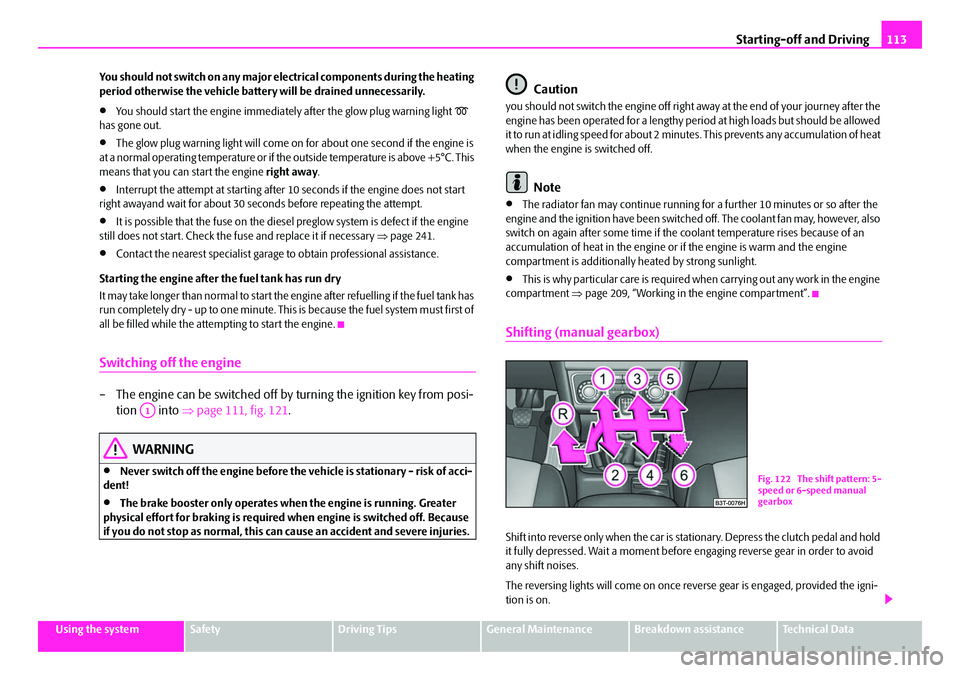
Shifting (manual gearbox)
Shift into reverse only when the car is stationary. Depress the clutch pedal and hold
it fully depressed. Wait a moment before engaging reverse gear in order to avoid
any shift noises.
The reversing lights will come on once re verse gear is engaged, provided the igni-
tion is on.
A1
Fig. 122 The shift pattern: 5-
speed or 6-speed manual
gearbox
NKO B6 20.book Page 113 Wednesday, March 26, 2008 3:15 PM
Page 116 of 272

Starting-off and Driving115
Using the systemSafetyDriving TipsGeneral MaintenanceBreakdown assistanceTechnical Data
Rear parking aid*
The parking aid provides a warning of obstacles behind the vehicle.
The audible parking aid determines the distance between the rear bumper and an
obstacle located behind the vehicle with the aid of ultrasound sensors. The tones
of the parking aid can be adapted in the menu of the information display*
⇒ page 23. The sensors are integrated in the rear bumper.
Range of sensors
The clearance warning begins at a distance of about 160 cm from the obstacle (area
⇒ fig. 124 ). The interval between the warning signals becomes shorter as the
clearance is reduced.
A continuous tone sounds from a clearanc e of just 30 cm (Bereich ) - danger
area. You should not reverse any further after this signal sounds! If the vehicle
is equipped with a factory-fi tted towing device*, the border of the danger area
starts - continuous tone - 5 cm further behind the vehicle. The vehicle can be
extended through an installe d detachable towing device.
On vehicles equipped with a factory-fitted radio* or navigation*, the distance to the
obstruction is shown graphically on the disp lay. On vehicles with a factory-fitted
towing device, the sensors are deactivated when towing a trailer. The driver is also
informed of the radio* or the navigation* by a graphic display (vehicle towing a
trailer) on the display. The radio* or navi gation*, which is factory-fitted, can be set
so that the play function volume decrea ses when activating the parking aid, see Owner's Manual radio* or navigation*. This
improves the audibility of the parking
aid.
Activating
The parking aid is activated automatically when reverse gear is engaged and the
ignition is turned on. This is conf irmed by a brief acknowledgement signal.
Deactivating
The parking aid is deactivated by removing the reverse gear.
WARNING
•The parking aid is not a substitute for the driver paying proper attention
and it is always the driver's responsibility to take care when parking the
vehicle or carrying ou t similar manoeuvres.
•You should therefore satisfy yourself, before reversing, that there is no
small obstacle, such as a rock, thin po st, trailer drawbar etc., behind your
vehicle. Such an obstacle might not be within the range detected by the
sensors.
•Under certain circumstances, surfaces of certain objects and types of
clothing cannot reflect the signal of the parking aid. Thus, these objects or
people who wear such clothing are not recognised by the sensors of the
parking aid.
Note
•The parking aid does not operate if you are towing a trailer (applies to models
which feature a factory-fi tted towing device*).
•If a warning signal sounds for about 3 seconds after switching the ignition on
and engaging reverse gear, and there is no obstacle close to your car, this indicates
a system fault. Have the fault rectified by a specialist workshop.
•The sensors must be kept clean and free of ice to enable the parking aid to
operate properly.
•If the parking aid is activated and the selector lever of the automatic gearbox is
in the position , warning signal indicates interruption (vehicle can no longer
move).
Fig. 124 Parking aid: Detec-
tion range of rear sensors
AA
AB
AP
NKO B6 20.book Page 115 Wednesday, March 26, 2008 3:15 PM
Page 118 of 272

Starting-off and Driving117
Using the systemSafetyDriving TipsGeneral MaintenanceBreakdown assistanceTechnical Data
people who wear such clothing are not recognised by the sensors of the
parking aid.
Note
•Only the front parking aid operates if you are towing a trailer (applies only to
models which feature a factory-fitted towing device*).
•If a warning signal sounds for about 3 seconds after activating the system and
there is no obstacle close to your car, th is indicates a system fault. The fault is
confirmed additionally when the symbol
flashes in the button ⇒page 116,
fig. 125 . Have the fault rectified by a specialist workshop.
•The sensors must be kept clean and free of ice to enable the parking aid to
operate properly.
•If the parking aid is activated and the se lector lever of the automatic gearbox is
in the position , warning signal indicates interruption (vehicle can no longer
move).
Park Assist*
Description and important information
The park assist assists you when parkin g in a suitable parallel parking place
between two vehicles or behind a vehicle.
The park assist automatically searches fo r suitable parking spaces after switching
on the ignition and when driving up to 30 km/h.
During the parking procedure the park assist only takes over the steering move-
ments, the pedals continue to be operated by the driver.
Function of the system is based on:
•Length and depth measurement of the parking spaces when driving
•Evaluation of the size of the parking space
•Definition of the correct position of the vehicle for parking
•Calculating the line on which the vehi cle drives backwards into the parking
place
•Actuation of the steering force assistance , automatic spinning of the wheels of
the front axle when parking.
WARNING
The park assist does not take away th e responsability from the driver when
parking.
•Pay particular attention to small chil dren and animals as they would not
be recognised by the sensors of the parking aid.
•Under certain circumstances, surfaces of certain objects and types of
clothing cannot reflect the signal of the park assist or the parking aid. Thus,
these objects or people who wear such clothing are not recognised by the
sensors of the parking aid.
•The external sound source of the park assist and the parking aid can be
disruptively influenced and under unfavourable conditions, objects or
people cannot be recognised by the sensors of the parking aid.
Caution
•If other vehicles are parked behind or on the kurb, th e park assist guides your
vehicle beyond the kurb or onto it. Make su re that the wheels or the wheel rims of
your vehicle are not damaged and if necessary intervene in time.
•You should satisfy yourself before parking that there is no small obstacle, such
as a rock, thin post, trailer drawbar etc., in front or behind your vehicle. Such an
obstacle might not be within the range detected by the sensors.
•Under certain circumstances, surfaces or structures of certain objects such as
wire mesh fences, powder snow etc..., cannot be recognised by the system.
•The evaluation of the parking place an d the parking procedure depends on the
circumference of the wheels. The system does not function correctly if your vehicle
is mounted with wheels of non-permissible size, snow chains or a temporary spare
wheel (in order to reach the nearest work shop). If the tyres other than those
excepted by the manufacturer are mounted, the resulting position of the vehicle in
WARNING (continued)
AP
NKO B6 20.book Page 117 Wednesday, March 26, 2008 3:15 PM
Page 120 of 272

Starting-off and Driving119
Using the systemSafetyDriving TipsGeneral MaintenanceBreakdown assistanceTechnical Data
Parking with the help of the park assist and concluding the
parking procedure
The time limit for the parking procedure with the help of the park assist
lasts 180 seconds.
– If the park assist has recognized a suitable parking place, the parking
place is shown in the information display* ⇒fig. 129 .
– Drive on further until the display ⇒fig. 130 appears.
– Bring the vehicle to a stop for at least 1 second.
– Engage the reverse gear or set the selector lever* in the position R. – As soon as the following message is indicated in the information
display*: Steering intervention! Check area around veh.! let go of
the steering wheel, the steering will be taken over by the system.
– Observe the surroundings and drive backwards with a speed of maximum 7 km/h, at the same time operate the pedal.
– End the parking procedure from a distance on the basis of the infor- mation of the system.
As soon as the parking procedure is comple ted, an audible signal sounds and in the
information display* the following message appears: Steering intervention
finished! Please take over steering! .
If your vehicle is not properly parked, the position of the wheels is corrected by the
system after disengaging the reverse gear when your vehicle is stationary, so that
you can align the vehicle yourself during a forward movement after taking over the
steering.
Switch off park assist
The park assist switches off during one of the following occurences:
•A speed of 30 km/h exceeded
•A speed of 7 km/h exceeded during the parking procedure
•A time limit of 180 seconds exceeded for engaging the reverse gear after
switching on the park assist
•A time limit of 180 seconds exceeded for the parking procedure
•The button pressed for the park assist
•Parking aid activated
•Switch off ESP
•Intervention of the driver in the automatic steering procedure (stop the steering
wheel)
•Disengage reverse gear or take out selector lever* out of the position R during
the parking procedure.
Further warning and information texts of the park assist in the information
display*:
Fig. 129 Information
display: Parking place recog-
nized with the information to
drive on
Fig. 130 Information
display: Parking place recog-
nized with the information to
engage the reverse gear
NKO B6 20.book Page 119 Wednesday, March 26, 2008 3:15 PM
Page 122 of 272

Starting-off and Driving121
Using the systemSafetyDriving TipsGeneral MaintenanceBreakdown assistanceTechnical Data
Note
•Models fitted with a manual gearbox: Al ways depress the clutch pedal if you
switch on the cruise control system when the gearbox is in Neutral. Otherwise the
engine can rev up unintentionally.
•The cruise control system is not able to maintain a constant speed when driving
on steep downhill sections. The weight of the vehicle increases the speed at which
it travels. One should shift down in good time to a lower gear or slow the vehicle
down by applying the foot brake.
•It is not possible on vehicles fitted with an automatic gearbox to switch on the
cruise control system if the se lector lever is in the position P, N or R.
Storing a speed
The cruise control system is operated by means of the switch and
rocker button in the left lever of the multi-functional switch.
– Press the switch ⇒fig. 131 into the position ON.
– After the desired speed has been reached, press the rocker button into the SET position.
After you have released the rocker button out of the position SET, the speed you
have just stored is maintained at a cons tant speed without having to depress the
accelerator.
You can increase the speed by depressing the accelerator. Releasing the acceler-
ator will cause the speed to drop again to the set speed.
This does not apply, however, if you drive at a speed which is more than 10 km/h
higher than the set speed for a period of longer than 5 minutes. The stored speed
will be cancelled in the memory. You then have to re-store the desired speed.
One can reduce the speed in the usual manner. The system is switched off tempo-
rarily by actuating the brake or clutch pedal ⇒page 122.
WARNING
First ensure that it is not too high for the traffic conditions which exist at that
moment before resuming the stored speed.
Changing a stored speed
You can also change the speed of the vehicle without depressing the
accelerator.
Fa s t er
–You can increase the stored speed without depressing the acceler-
ator, by pressing the rocker button ⇒fig. 131 into the RES posi-
tion.
– The speed of the car will increase co ntinuously if you hold the rocker
button pressed in the RES position. Once the car has reached the
desired speed, release the rocker butto n. The set speed is then stored
in the memory.
Slower
–You can decrease the stored speed by pressing the rocker button
in the SET position.Fig. 131 Operating lever:
Rocker button and switch of
cruise control system
AA
AB
AA
AB
AB
AB
AB
NKO B6 20.book Page 121 Wednesday, March 26, 2008 3:15 PM
Page 124 of 272

Automatic gearbox DSG*123
Using the systemSafetyDriving TipsGeneral MaintenanceBreakdown assistanceTechnical Data
Automatic gearbox DSG*
Automatic gearbox DSG*
Introduction
Your car is equipped with an automatic gearbox DSG. The abbreviation DSG means
Direct shift gearbox (Direct shift gearbox).
Two independent clutches are needed for the power transmission between the
engine and the gearbox. These replace the torque converter of the conventional
automatic gearbox. Their shifting is matched in such a way that there are no jerks
when shifting the gear and the power transm ission of the engine to the front wheels
is not interrupted.
Information for driving with the automatic gearbox DSG
Shifting up and down through the gears is performed automatically.
You can also, however, switch the gearbox over into the Tiptronic mode.
This mode makes it possible for you to also shift gears manually
⇒ page 126.
Starting-off and Driving
– Depress the brake pedal and hold it depressed.
– Press the Shiftlock button (button in handle of the selector lever),
move the selector lever into the desired position, e.g. D ⇒ page 124,
and then release the Shiftlock button.
– Release the brake pedal and depress the accelerator ⇒. Stopping for a short time
– The selector lever position
N does not have to be selected when stop-
ping just for a short time, such as at a cross roads. It is sufficient to hold
the vehicle stationary using the foot brake. The engine can, however,
be allowed just to idle.
Parking
– Depress the brake pedal and hold it depressed.
– Apply the handbrake firmly.
– Press and Shiftlock button in the selector lever, move the selector
lever to P and then release the Shiftlock button.
The engine can only be started when the selector lever is in position P or N
⇒ page 112. At temperatures below -10 °C the engine can only be started in the
selector lever position P.
It is sufficient to engage selector lever position P when parking on a flat surface.
When parking on a slope you should first apply the handbrake firmly and then
move the selector lever into position P. This is to ensure that there is no excessive
pressure acting on the lock mechanism and that it is easier to subsequently move
the selector lever out of position P.
If the selector lever position N is selected by accident while driving it is first neces-
sary to release pressure on the accelerato r pedal and wait for idling speed of the
engine to be reached before engaging a drive position in the selector lever.
WARNING
•Do not depress the accelerator when changing the position of the
selector lever if the car is stationary an d the engine is running - risk of acci-
dent!
•Never move the selector lever into position R or P when driving - risk of
an accident!
NKO B6 20.book Page 123 Wednesday, March 26, 2008 3:15 PM
Page 126 of 272

Automatic gearbox DSG*125
Using the systemSafetyDriving TipsGeneral MaintenanceBreakdown assistanceTechnical Data
D
, with the ignition switched on, on a vehicle travelling at less than 5 km/hour or on
a stationary vehicle.
The brake pedal must be depressed (if the le ver is in its position for longer than 2
seconds) in order to move the selector lever out of the position N into the position
R , with the ignition switched on, on a vehicl e travelling at less than 5 km/hour or on
a stationary vehicle.
D - Drive, position for driving forward
When the selector lever is in this position, the forward gears are shifted up and
down automatically in line with engine load, vehicle speed and the dynamic shift
programme.
You must depress the brake pedal if you wise to move into position D from N when
the vehicle is travelling at less than 5 km/hour or is stationary ⇒.
In certain circumstances (e.g. when driving in mountainous regions or when towing
a trailer) it may be beneficial to select the manual shift programme for a short time
in order to adapt the gearbox ratios manually to the driving situations.
S - Position for sporty style of driving
Shifting up later into a higher gear makes it possible to fully exploit the power
potential of the engine. The gearbox also then shifts down at higher engine speeds
as in the position D.
The Shiftlock on the selector lever grip must be pressed when moving the selector
lever out of the position D into the position S.
WARNING
•Never move the selector lever into position R or P when driving - risk of
an accident!
•When the engine is running and the vehicle is stationary, it is necessary
to hold the car with the brake pedal in all the positions of the selector lever
(except P and N) since the power transmission is never completely inter-
rupted, also not when the engine is idling - the vehicle "creeps".
•You must on no account unintentionally operate the throttle (e.g. by
hand from the engine compartment) if a drive position is engaged when the car is stationary. The vehicle would ot
herwise immediately start off - also
when the handbrake is firmly applied - risk of an accident!
•You must move the selector lever into position P and firmly apply the
handbrake first before you or any othe r person opens the bonnet and starts
working on the engine when it is runn ing - risk of accident! Pay particular
attention to the warning instructions.
Selector lever lock
Automatic selector lever lock
With the ignition on, the selector lever is locked when it is in the positions P and N .
You must first of all depress the brake pedal in order to move the selector lever out
of this position. The warning light
⇒ page 26 lights up in the instrument cluster
as a reminder for the driver when the selector lever is in position P and N:
A time delay element ensures that the sele ctor lever is not blocked when rapidly
switching over the position N (e.g. from R to D). This does, for example, allow one
to seesaw out a stuck vehicle. The selector lever lock will click into place if the lever
is in the N position for more than 2 seconds without the brake pedal being pressed.
The selector lever lock is only active if th e vehicle is stationary or moving at speed
of less than 5 km/hour. The lock is switched off automatically into position N when
the car is travelling at a higher speed.
Shiftlock button
The Shiftlock button in the handle of selector lever prevents certain selector lever
positions being engaged inadvertently. The selector lever lock is cancelled when
you press the Shiftlock button.
Keylock - Ignition key withdrawal lock
You can only withdraw the ignition key after switching off the ignition if the selector
lever is in position P. If the ignition key is withdrawn, the selector lever is blocked in
position P.
WARNING (continued)
NKO B6 20.book Page 125 Wednesday, March 26, 2008 3:15 PM