technical data SKODA SUPERB 2008 2.G / (B6/3T) Repair Manual
[x] Cancel search | Manufacturer: SKODA, Model Year: 2008, Model line: SUPERB, Model: SKODA SUPERB 2008 2.G / (B6/3T)Pages: 272, PDF Size: 18.25 MB
Page 128 of 272

Automatic gearbox DSG*127
Using the systemSafetyDriving TipsGeneral MaintenanceBreakdown assistanceTechnical Data
The selector lever position you have engaged is indicated in the informa-
tion display of the instrument clus ter together with the engaged gear
⇒ fig. 135 .
Switching over to manual shifting
– Push the selector lever to the right out of position D. After switching
over, the current engaged gear is indicated in the display.
Shifting up gears
– One-touch forward of the selector lever (in the Tiptronic position) ⇒page 126, fig. 134 .
Shifting down gears
– One-touch back of the selector lever (in the Tiptronic position) .
It is possible to switch over to manual both when the car is stationary and also when
driving.
When you accelerate, the gearbox shifts up automatically into the higher gear just
before the maximum permissible engine speed is reached.
If you select a lower gear, the automatic ge arbox does not shift down until there is
no risk of the engine overrevving. If you operate the kickdown function, the gearbox shifts into a lower gear in line
with the vehicle speed and engine speed.
Manual shifting on the multifunction steering wheel*
Switching over to manual shifting
– Push the selector lever to the right out of position
D. After switching
over, the current engaged gear is indicated in the display.
Shifting up gears
– Press the right rocker switch ⇒fig. 136 for the multifunction
steering wheel.
Shifting down gears
– Press the left rocker switch ⇒fig. 136 for the multifunction
steering wheel.
Temporarily switching over to manual shifting
– If the selector lever is in position D or S, press the left rocker switch
or the right rocker switch fo r the multifunction steering wheel.
Fig. 135 Information
display: Manual shifting of
gears
A+
A-
Fig. 136 Multifunction
steering wheel: Manual
shifting of gears
+
+
-
+
NKO B6 20.book Page 127 Wednesday, March 26, 2008 3:15 PM
Page 130 of 272

Automatic gearbox DSG*129
Using the systemSafetyDriving TipsGeneral MaintenanceBreakdown assistanceTechnical Data
NKO B6 20.book Page 129 Wednesday, March 26, 2008 3:15 PM
Page 132 of 272

Communication131
Using the systemSafetyDriving TipsGeneral MaintenanceBreakdown assistanceTechnical Data
ButtonActionRadio, traffic informationCDThe CD changer / MP3Navigation
press brieflySwitch off/on tone
press button for long time switch off/on*
turn upwardsIncrease volume
turn downwardsDecrease volume
press brieflyChanging to the next stored radio station
Changing to the next stored traffic information
Interrupting the traffic reportChanging to the next title
press button for long timeInterruption of the traffic reportFa s t fo r w a rd
press brieflyChanging to the previously stored radio station
Changing to the previously stored traffic information Interrupting the traffic reportChanging to the previous title
press button for long timeInterruption of the traffic reportFa s t re w i n d
Changing between the audio sources
press brieflyCalling up the main menu press button for long time
press brieflyInterruption of the traffic reportWithout function press button for long time
turn upwardsDisplay of the station listscroll upwards
Interruption of the traffic reportsChanging to the previous title
Without function
turn downwardsDisplay of the station list scroll downwards
Interruption of the traffic reportChanging to the next title
A1
A1
A1
A1
A2
A2
A3
A3
A4
A5
A5
A6
A6
A6
A6
NKO B6 20.book Page 131 Wednesday, March 26, 2008 3:15 PM
Page 134 of 272

Communication133
Using the systemSafetyDriving TipsGeneral MaintenanceBreakdown assistanceTechnical Data
on the adapter with an interval of 2 seconds or pressing the button
twice on the
multifunction steering wheel* with an interval of 2 seconds.
While connecting the mobile phone with the hands-free system by means of Blue-
tooth
®, no other phone can be connected wi th the hands-free system via Blue-
tooth®.
Up to seven mobile phones and four mu ltimedia units can be connected by the
hands-free system via Bluetooth
® whereby only one mobile phone or multimedia
unit can communicate simultaniously via Bluetooth® with the hands-free system.
If an eighth mobile phone is connected to the handsfree-system, then the tele-
phone, which has not been used together with the handsfree system for the longest
period, is disconnected by means of Bluetooth
®.
Establish Bluetooth
® connection
After switching on the ignition, the Blue tooth connection is automatically estab-
lished for the already adapted mobile phone
12). Check on the mobile unit if the
automatic connection was established.
Disconnect Bluetooth
® connection
After withdrawing the ignition key, the Bluetooth® connection is disonnected.
WARNING
•Pay attention primarily to the traffic si tuation! As the driver you are fully
responsible for road safety. Use the telephone system only to such an extent,
so that you are in full control of your vehicle at any time - risk of accident!
•In the event of air transport, the Bluetooth® function of the handsfree-
system must be switched off by a specialist garage!
Caution
Taking the mobile phone out of the adapter during the call can lead to interruption
of the connection. When taking out the mobile phone, the connection to the
factory-fitted antenna is interrupted, this reduces the quality of the transmitting
and receiving signal. This might result additionally in harmful radiation from the
mobile phone in the interior of the ve hicle and the charging of the telephone
battery is interrupted.
Note
•Not valid for all mobile phones which enable a communication via Bluetooth®.
•Please operate your mobile phone exclusively with a suitable adapter, in order
to keep a low radiation in the vehicle.
•Inserting the mobile phone into the adapter ensures an optimal sending and
receiving power and offers at the same ti me the advantage of the battery charging.
•Note that the range of the Bluetooth® connection to the handsfree-system is
limited to the vehicle interior. The range is dependent on local factors, e.g. obstacles
between the devices and interferences with other devices. If your mobile phone is
e.g. in a jacket pocket, this can lead to difficulties when establishing the Bluetooth
®
connection with the handsfree-sy stem or the data transfer.
Erase the list of connected units
Erase previously connected mobile or multimedia units
– Switch on the ignition. A connectio n to a mobile or multimedia unit
must not be established.
– Press the button SOS on the adapter or the button
on the multi-
function steering wheel* for more than 10 seconds.
– Erasing is confirmed with an audible signal.
NKO B6 20.book Page 133 Wednesday, March 26, 2008 3:15 PM
Page 136 of 272
Communication135
Using the systemSafetyDriving TipsGeneral MaintenanceBreakdown assistanceTechnical Data
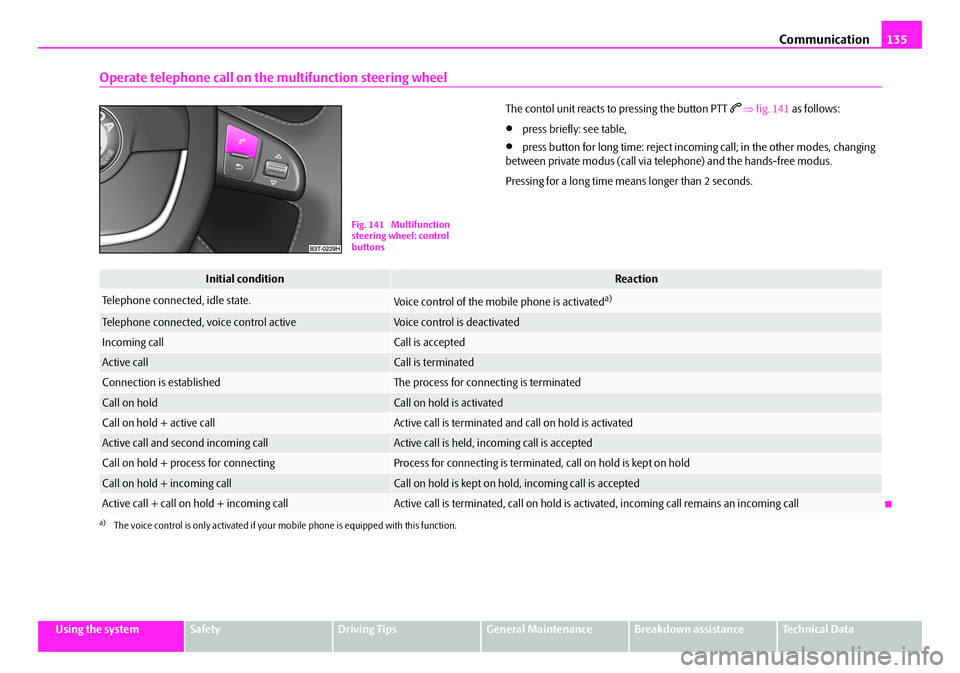
Operate telephone call on the multifunction steering wheel
The contol unit reacts to pressing the button PTT ⇒ fig. 141 as follows:
•press briefly: see table,
•press button for long time: reject incomi ng call; in the other modes, changing
between private modus (call via telephone) and the hands-free modus.
Pressing for a long time means longer than 2 seconds.
Fig. 141 Multifunction
steering wheel: control
buttons
Initial conditionReaction
Telephone connected, idle state.Voice control of the mobile phone is activateda)
a)The voice control is only activated if your mo bile phone is equipped with this function.
Telephone connected, voice control activeVoice control is deactivated
Incoming callCall is accepted
Active callCall is terminated
Connection is establishedThe process for connecting is terminated
Call on holdCall on hold is activated
Call on hold + active callActive call is terminated and call on hold is activated
Active call and second incoming callActive call is held, incoming call is accepted
Call on hold + process for connectingProcess for connecting is terminated, call on hold is kept on hold
Call on hold + incoming callCall on hold is kept on hold, incoming call is accepted
Active call + call on hold + incoming callActive call is terminated, call on hold is activated, incoming call re mains an incoming call
NKO B6 20.book Page 135 Wednesday, March 26, 2008 3:15 PM
Page 138 of 272

Communication137
Using the systemSafetyDriving TipsGeneral MaintenanceBreakdown assistanceTechnical Data
Bluetooth®
The equipment enables the wireless connection to the control unit of a
telephone with Bluetooth® function which supports the rSAP profile.
Process of connection
– Switch on the ignition.
– If you have not switched on Bluetooth
® on your telephone, switch it
on.
– For certain mobile phones it is necessary to switch on first the rSAP
function.
– Press the button
on the multifunction steering wheel and select
device search . The system searches mobile devices and shows these
in the information display*.
– Select your telephone in the information display by turning the hand- wheel and select it by pressing the handwheel.
– Within 30 seconds enter in your te lephone the 30 digit PIN of your
control unit, which is indicated in your information display* and
confirm it according to the instructions on the display of your tele-
phone.
– If your SIM card is blocked by a PIN code, enter the PIN of the SIM card of your telephone. The telephone connects to the control unit (during
the first connection you can only se lect in the information display*
and when the vehicle is stationary , if the PIN should be stored).
– For the first storage of a new user follow the instructions in the infor-
mation display.
– To download the telephone book and the indentification data of the SIM card into the new control unit, confirm again the command rSAP
in your mobile phone. The system reads the telephone book.
If you do not want to confirm the command rSAP during each connection of the
telephone to the control unit, then you must carry out in the menu of the mobile
phone an authorization using the control unit.
The telephone deregisters from the GSM network and only the control unit ensures
the communication with the network. In th e telephone only the interface for Blue-
tooth
® remains active. In this case, you can only select to separate from the device,
switch off the Bluetooth® connection or the number of the emergency call 112.
If the PIN was stored, an automatic selection and connection of the telephone take
place the next time the ignition is swit ched. Check on your mobile phone if the
automatic connectio n was established.
Connection terminated
The connection of the handsfree-system is terminated by means of Bluetooth
®:
•When removing the key from the igniti on lock (during a telephone call, the
connection is disconnected).
•By switching off the Bluetooth® in the mobile phone.
•By selecting “separate telephone” in the menu of the mobile phone.
On vehicles which are fitted out with radio or navigation at the factory, it is possible
to terminate the telephone call after remo ving the key from the ignition lock by
pressing the icon on the touch-screen of the radio
13) or the navigation, see oper-
ating instructions for radio or for navigation.
WARNING
•Pay attention primarily to the traffic situation! As the driver you are fully
responsible for road safety. Use the tele phone system only to such an extent,
so that you are in full control of your vehicle at any time - risk of accident!
•In the event of air transport, the Bluetooth® function of the handsfree-
system must be switched of f by a specialist garage!
13)Does not apply for Radio Swing.
NKO B6 20.book Page 137 Wednesday, March 26, 2008 3:15 PM
Page 140 of 272
Communication139
Using the systemSafetyDriving TipsGeneral MaintenanceBreakdown assistanceTechnical Data
The buttons operate the functions for
the operating mode of the current
telephone.
ButtonActionOperation
press brieflyActivation and deactivation of the voice control (Button PTT - Push to talk)
press button for long time
turn upwardsIncrease volume
turn downwardsDecrease volume
press brieflyAccept call, terminate call, entry in the main menu of the telephone, list of selected numbers
press button for long
timeReject call, list of the last calls, entry in the main menu of the telephone, list of selected numbers
press brieflyReach one level higher in the menu (according to the current position in the menu)
press button for long timeReturn in the main menu of the information display
press brieflyConfirm menu selection press button for long time
turn upwardsThe last chosen menu selection, name
turn downwardsThe next menu selection, name
quickly turn upwardsTo the previous initial letter in the telephone book
quickly turn downwardsTo the next initial letter in the telephone book
A1
A1
A1
A1
A2
A2
A3
A3
A4
A4
A4
A4
A4
A4
NKO B6 20.book Page 139 Wednesday, March 26, 2008 3:15 PM
Page 142 of 272

Communication141
Using the systemSafetyDriving TipsGeneral MaintenanceBreakdown assistanceTechnical Data
„List
„Surname
„First name
„Own no. send - the possibility to suppress one's own number on the unit called
„Signal settings
„Ring tone
„Volume
„Phone settings
„Select operator
„Automatic
„Manual
„Off time
„+ 5 Minutes
„- 5 Minutes
„GPRS - Setting of the access point of the user
„Switch off ph. - switching off the telephone unit (telephone remains
connected)
Back
Return in the main menu of the information display.
Voice commands
Voice commands for operating the telephone control unit Other possible commands
Select number
–Press the button PTT
⇒page 139, fig. 142 .
– Give the command DIAL NUMBER after the signal tone.
After giving this command, the system re quests the entry of a telephone number.
The telephone number can be entered as an interconnected spoken row of digits
Voice commandActivity
HELPAfter this command the sy stem repeats all possible
commands.
LO N G D I A LO G U EHelp is not reduced (s uitable for beginners).
SHORT DIALOGUEHelp is clearly reduced (good operating knowledge
provided).
CALL NAMEAfter this command a name can be entered which
establishes a connection to the requested partner
⇒page 144.
DIAL NUMBERAfter this command a telephone number can be
entered which establishes a connection to the
requested partner ⇒page 142.
REDIALAfter this command the system selects the last
selected number ⇒page 143.
Voice commandActivity
CALLS (SELECT)The telephone number is selected.
REPEATThe entered name or the digits are repeated. Then
the system requests with voice response “ please
proceed ” the entry of further digits or commands.
BACK
The entered name or the last entered order of digits is
erased. Previously entered groups of digits are
repeated. Then the system requests with voice
response “ and proceed? ” the entry of further digits
or commands.
DELETEAll entered digits are erased.
CANCELThe dialogue is ended.
Voice commandActivity
A1
NKO B6 20.book Page 141 Wednesday, March 26, 2008 3:15 PM
Page 144 of 272

Communication143
Using the systemSafetyDriving TipsGeneral MaintenanceBreakdown assistanceTechnical Data
In the phone voice phonebook up to 15 entries can be stored.
For similar names additional information (e.g. first names) should be stored.
Voice commands for operating the phone voice phone book
Example for storing the recordin
g in the phone voice phonebook
You can interrupt the dialogue at any time by pressing the PTT button or with the
voice command CANCEL.
Select name
– Press the button PTT ⇒page 139, fig. 142 .
– Give the command CALL NAME after the signal tone.
After giving this command, the system requ ests the entry of the name to be called. Example for the selection of a name
In the case that the list is empty, the message “
The name list is empty.” sounds.
If the system does not recognize the name called, it asks you to repeat using the
command “ Pardon?”. If the system has not recognized the name to be called after
repeating, the message sounds “ The name does not exist. You receive the curren
name list with LISTEN TO ALL THE NAMES. ”.
You can interrupt the dialogue at any time by pressing the PTT button or with the
voice command CANCEL.
Listening-in to the voice phonebook
– Press the PTT button.
– Give the command LISTEN TO ALL THE NAMES after the signal tone.
After giving this command, all voice record ings are replayed from the list of the
control unit. By pressing the PTT button when announcing the desired name, the
corresponding telephone number is be ing dialed; the system answers: “Call set-
up ”.
Example for the selection of a name
In the case that the list is empty, the system announces “ The name list is empty.”.
You can interrupt the dialogue at any time by pressing the PTT button or with the
voice command CANCEL.
Voice commandActivity
LISTEN TO ALL THE
NAMESAfter this command the cont rol unit repeats all stored
names.
DELETE NAMEAfter this command, you can enter a name which you
would like to erase from the internal phone voice
phonebook.
DELETE ALL NAMESAfter this command, you can erase the complete list
of the stored names.
Voice commandAnnouncement
STORE NAME“ The name please ”
Name XYZ“Please repeat the name ”
Name XYZ“The name XYZ is stored ”
A1
Voice commandAnnouncement
CALL NAME“Call name ”
Name XYZ“Do you want to call XYZ? ”
CALLS (SELECT)“The name is being dialed ”
Voice commandAnnouncement
LISTEN TO ALL THE NAMES“Interrupt using the voice button ”
NKO B6 20.book Page 143 Wednesday, March 26, 2008 3:15 PM
Page 146 of 272

Communication145
Using the systemSafetyDriving TipsGeneral MaintenanceBreakdown assistanceTechnical Data
WARNING
•If a mobile phone or two-way radio sy stem is operated inside the vehicle
without using an external aerial, or wi th an external aerial which has been
incorrectly installed, the result can be excessive electromagnetic fields
which may cause harm to your health.
•Please concentrate fully at all times on your driving!
•You must not install two-way radio systems, mobile phones or mounts
on the covers of the airbags or within the immediate deployment range of
airbags. This might result in injuries to the occupants in the event of an acci-
dent.
Note
Please also refer to the operating instructions of the mobile phones and two-way
radio systems.
Input AUX-IN
The input for external audio sources AUX- IN is located below the armrest of the
front seat and is marked with This input serves for connecting external audio
sources (e.g. portable mp3 player) to the your radio system. The equipment AUX-
IN can only be used in combination with a radio or navigation system installed in
the factory. The description on how to oper ate AUX-IN can be found in the relevant
operating instructions of the radio or the navigation system.
Note
•If an external audio source is connected via AUX-IN, which has a separate
power supply, this can lead to an interfer ence of the audio signals. It depends on
the properties of the adapter.
•The loudspeakers in the vehicle are matched to a power output of 30 W.
CD changer*
The CD changer for the radio and navigation system is located in the right
side compartment of the luggage compartment.
Loading a CD
– Touch the button and guide the CD (compact disc) into the CD-
case . The CD is automatically loaded onto the next free position in
the CD-changer. The LED in the corresponding button stops
flashing.
Loading all CDs
– Hold the button pressed and guide all CDs one after the other into the CD-case . The LEDs in the bu ttons are no longer flashing.
Loading a CD to one definite position
– Touch button . The LEDs in the buttons light up at the memory spaces, which are already assigned and flash in the case of free
memory spaces.
– Touch the desired button and guide the CD into the CD-case .
Fig. 144 The CD changer
AC
AB
AD
AC
ABAD
ACAD
ADAB
NKO B6 20.book Page 145 Wednesday, March 26, 2008 3:15 PM