oil temperature SKODA SUPERB 2013 2.G / (B6/3T) Owner's Manual
[x] Cancel search | Manufacturer: SKODA, Model Year: 2013, Model line: SUPERB, Model: SKODA SUPERB 2013 2.G / (B6/3T)Pages: 274, PDF Size: 17.31 MB
Page 17 of 274
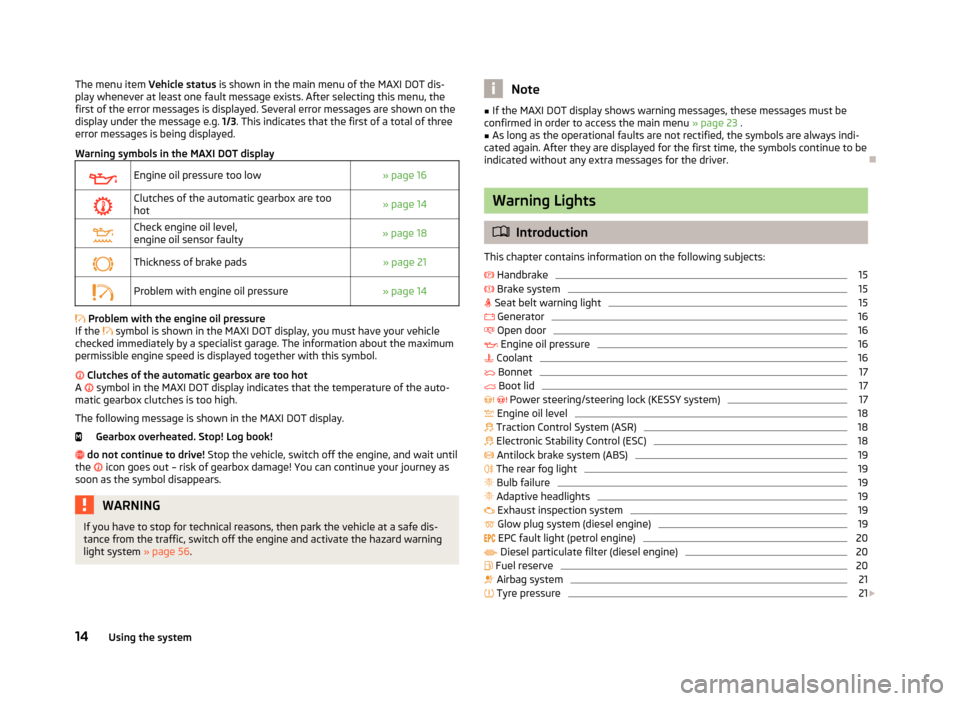
The menu item Vehicle status is shown in the main menu of the MAXI DOT dis-
play whenever at least one fault message exists. After selecting this menu, the
first of the error messages is displayed. Several error messages are shown on the
display under the message e.g. 1/3. This indicates that the first of a total of three
error messages is being displayed.
Warning symbols in the MAXI DOT displayEngine oil pressure too low» page 16Clutches of the automatic gearbox are too hot» page 14Check engine oil level,
engine oil sensor faulty» page 18Thickness of brake pads» page 21Problem with engine oil pressure» page 14
Problem with the engine oil pressure
If the
symbol is shown in the MAXI DOT display, you must have your vehicle
checked immediately by a specialist garage. The information about the maximum
permissible engine speed is displayed together with this symbol.
Clutches of the automatic gearbox are too hot
A
symbol in the MAXI DOT display indicates that the temperature of the auto-
matic gearbox clutches is too high.
The following message is shown in the MAXI DOT display.
Gearbox overheated. Stop! Log book!
do not continue to drive! Stop the vehicle, switch off the engine, and wait until
the
icon goes out – risk of gearbox damage! You can continue your journey as
soon as the symbol disappears.
WARNINGIf you have to stop for technical reasons, then park the vehicle at a safe dis-
tance from the traffic, switch off the engine and activate the hazard warning
light system » page 56.Note■
If the MAXI DOT display shows warning messages, these messages must be
confirmed in order to access the main menu » page 23 .■
As long as the operational faults are not rectified, the symbols are always indi-
cated again. After they are displayed for the first time, the symbols continue to be indicated without any extra messages for the driver.
Warning Lights
Introduction
This chapter contains information on the following subjects:
Handbrake
15
Brake system
15
Seat belt warning light
15
Generator
16
Open door
16
Engine oil pressure
16
Coolant
16
Bonnet
17
Boot lid
17
Power steering/steering lock (KESSY system)
17
Engine oil level
18
Traction Control System (ASR)
18
Electronic Stability Control (ESC)
18
Antilock brake system (ABS)
19
The rear fog light
19
Bulb failure
19
Adaptive headlights
19
Exhaust inspection system
19
Glow plug system (diesel engine)
19
EPC fault light (petrol engine)
20
Diesel particulate filter (diesel engine)
20
Fuel reserve
20
Airbag system
21
Tyre pressure
21
14Using the system
Page 19 of 274
GeneratorFirst read and observe the introductory information and safety warn-ings
on page 14.
If the indicator light lights up when the engine is running, the vehicle battery is
not being charged.
Seek help from a specialist garage. The electrical system requires checking.
WARNINGIf you have to stop for technical reasons, then park the vehicle at a safe dis-
tance from the traffic, switch off the engine and activate the hazard warning
light system » page 56, Hazard warning light system .
CAUTION
If the warning light (cooling system fault) lights up in addition to the warn-
ing light while driving, do not continue to drive! Stop the engine - there is a
risk of engine damage!
Open door
First read and observe the introductory information and safety warn-ings
on page 14.
The indicator light
comes on, if one or several doors are opened.
WARNINGIf you have to stop for technical reasons, then park the vehicle at a safe dis-
tance from the traffic, switch off the engine and activate the hazard warning
light system » page 56.
Engine oil pressure
First read and observe the introductory information and safety warn-
ings
on page 14.
When the indicator light is flashing , the engine oil pressure is too low.
The following message is shown in the MAXI DOT display.
Oil pressure: Log book!
Stop the vehicle, switch off the engine, and check the level of the engine
oil » page 211 .
Even if the oil level is correct, do not drive any further if the indicator light is
flashing . Also do not leave the engine running at an idling speed.
Seek help from a specialist garage.WARNINGIf you have to stop for technical reasons, then park the vehicle at a safe dis-
tance from the traffic, switch off the engine and activate the hazard warning
light system » page 56.
Coolant
First read and observe the introductory information and safety warn-ings
on page 14.
If the indicator light
lights up or flashes, either the coolant temperature is too
high or the coolant level is too low.
The following message is shown in the MAXI DOT display. Check coolant! Log book!
Stop the vehicle, switch off the engine, check the level of the coolant » page 213,
and refill the coolant if necessary » page 214.
If the coolant is within the specified range, the increased temperature may be caused by an operating problem at the radiator fan. Check the fuse for the radia-
tor fan, replace if necessary » page 246, Fuses in the engine compartment .
Do not continue driving if the warning light
is lit, even though the coolant level
is correct and the fuse for the fan is in working order
!
Seek help from a specialist garage.
16Using the system
Page 30 of 274

Driving time
The driving time which has elapsed since the memory was last erased appears in
the display. If you want to measure the time travelled from a particular moment in time on, at this moment, reset the memory by setting the button tozero » page 26 , Memory .
The maximum time indicated in both memories is 19 hours and 59 minutes and on vehicles which are fitted with a MAXI DOT display, it is 99 hours and 59 minutes.
The indicator is set back to zero if this period is exceeded.
Current fuel consumption
The current fuel consumption level is displayed in litres/100 km 1)
. You can use this
information to adapt your driving style to the desired fuel consumption.
The display appears in litres/hour if the vehicle is stationary or driving at a lowspeed 2)
.
Average fuel consumption
The average fuel consumption since the memory was last erased is displayed in
litres/100 km 1)
.
If you wish to determine the average fuel consumption over a certain period of
time, you must set the memory at the start of the new measurement to
zero » page 26 , Memory . After erasing the memory, no value is displayed until you
have driven approx. 300 m.
The display is updated regularly while you are driving.
Range
The estimated range is displayed in kilometres. It indicates the distance you can still drive with your vehicle based on the level of fuel in the tank and the same
style of driving.
The display is shown in steps of 10 km. After lighting up of the indicator light
the display is shown in steps of 5 km.
The fuel consumption over the last 50 km is used to calculate the information. The range will increase if you drive in a more economical manner.
If the memory is set to zero (after disconnecting the battery), a fuel consumptionof 10 l./100 km is calculated for the range; afterwards the value is updated ac-
cording to the style of driving.Distance travelled
The distance travelled since the memory was last erased is displayed » page 26,
Memory . If you want to measure the distance travelled from a particular moment
in time on, at this moment, reset the memory by setting the button to
zero » page 26 , Memory .
The maximum distance indicated in both memories is 1 999 km or 9 999 km on vehicles with a MAXI DOT display. The indicator is set back to zero if this period is
exceeded.
Average speed
The average speed since the memory was last erased is displayed in km/
hour » page 26 , Memory . To determine the average speed over a certain period of
time, set the memory to zero at the start of the measurement » page 26, Memory .
After erasing this data, no value appears in the display until you have driven ap- prox. 300 m.
The display is updated regularly while you are driving.
Current speed
The current speed, which is identical to the display of the speedometer 2
» Fig. 2
on page 10 is displayed.
Oil temperature 3)
The current engine oil temperature is displayed. If the oil temperature is lower
than 50 °C or if a fault in the system for checking the oil temperature is present,
only - -.- is displayed instead of the oil temperature.
Warning against excessive speeds
The warning that the speed limit is being exceeded can be enabled / disa-
bled » page 28 , Warning against excessive speeds in the display.
1)
On some models in certain countries, the display appears in kilometres/litre.
2)
On some models in certain countries, - -.- km/ltr. is displayed when the vehicle is stationary.
3)
Applies to vehicles using the MAXI DOT display.
27Information system
Page 33 of 274
Time
The time, time format (12 or 24 hour indicator) and the changeover between sum-
mer/winter time can be set here.
Winter tyres
Here, you can set the speed at which an audible signal should sound. This func-
tion is, for example, used for winter tyres where the maximum permissible speed
is lower than the maximum speed of the vehicle » page 220.
The following message appears in the display when exceeding the speed limit: Winter tyres: maximum ... km/h.
Units of measurement
The units for the temperature, consumption and distance driven can be set here.
Assistants
The tones of the audible signals for the parking aid can be adjusted here.
Alt. speed dis.
Here, the display of the second speed in mph 1)
can be activated.
Service
Here you can have the remaining kilometres and days until the next service inter-
val displayed, and reset the Service Interval Display.
Factory setting
Here, the factory settings of the display can be restored.
Service Interval Display
Introduction
This chapter contains information on the following subjects:
Prompt in the segment display
30
Prompt in the MAXI DOT display
31
Before the next service interval is reached, a message concerning the kilometres
and days remaining until the next service is due is shown for about 10 seconds
after the ignition is switched on.
The kilometre indicator or the days indicator reduces in steps of 100 km or, where
applicable, days until the service due date is reached.
Note
■ Information is retained in the Service Interval Display even after the vehicle bat-
tery is disconnected.■
If the instrument cluster is exchanged after a repair, the correct values must be
entered in the counter for the Service Interval Display. This work is carried out by a specialist garage.
■
For more information on the service intervals » page 191, Service intervals .
Prompt in the segment display
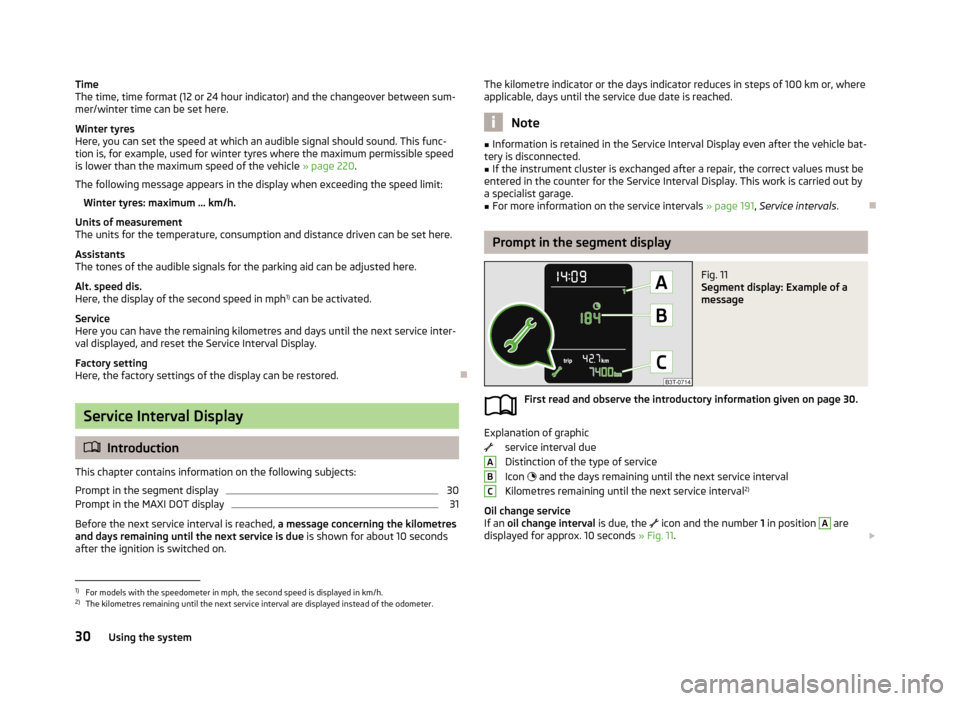
Fig. 11
Segment display: Example of a
message
First read and observe the introductory information given on page 30.
Explanation of graphic
service interval due
Distinction of the type of service
Icon
and the days remaining until the next service interval
Kilometres remaining until the next service interval 2)
Oil change service
If an oil change interval is due, the
icon and the number 1 in position
A
are
displayed for approx. 10 seconds » Fig. 11.
ABC1)
For models with the speedometer in mph, the second speed is displayed in km/h.
2)
The kilometres remaining until the next service interval are displayed instead of the odometer.
30Using the system
Page 65 of 274

Note■Each time the ignition switches off for the third time, the position of the wind-
screen wipers changes. This counteracts an early fatigue of the wiper rubbers.■
The rear window wiper only operates if the boot lid is closed.
■
Keep the wiper blades clean. They may become soiled, e.g., with wax residues
after washing in automatic car wash systems » page 197.
■
The windscreen washer nozzles for the windscreen are heated when the en-
gine is running and the outside temperature is less than approx. +10 °C.
Windscreen wipers and washers
Fig. 44
Operating lever: Windscreen
wipers and washer settings
First read and observe the introductory information and safety warn-
ings on page 61.
Lever positions » Fig. 44
Wipers off
Periodic windscreen wiping/automatic wiping in rain
slow windscreen wiping
rapid windscreen wiping
Flick windscreen wiping (spring-tensioned position)
Automatic wipe/wash for windscreen (spring-tensioned position) Wiping the rear window pane (the windscreen wiper wipes at regular inter- vals after a few seconds)
Automatic wipe/wash for the rear window (spring-tensioned position)
Switches for setting the required break between the individual wiper strokes
(
1
periodic windscreen wiping) or the wiper speed in rain (
1
automatic
windscreen wiping in rain)
01234567AAutomatic wipe/wash for windscreen
The wash system operates immediately, the windscreen wipers wipe somewhat
later. The wash system and the windscreen wiper operate simultaneously at a
speed of more than 120 km/h.
Letting go of the lever will cause the windscreen wash system to stop and the wiper to continue for another 3-4 wiper strokes (depending on the period of
spraying of the windscreen).
At a speed of more than 2 km/h, the wiper wipes once again 5 seconds after the
last wiper stroke in order to wipe the last drops from the windscreen. This func-
tion can be activated/deactivated by a specialist garage.
Automatic wipe/wash for the rear window (Superb Combi)The wash system operates immediately, the windscreen wiper wipes somewhat later.
Letting go of the lever will cause the windscreen wash system to stop and the
wiper to continue for another 2-3 wiper strokes (depending on the period of
spraying of the windscreen). The lever remains in position 6
» Fig. 44 .
Automatic rear window wiper (Superb Combi)
If the lever is in position
2
» Fig. 44 or
3
the rear window is wiped every
30 or 10 seconds if the vehicle's speed exceeds 5 km/h.
If automatic windscreen wiping in rain is activated (the lever is in the position
1
)
the function is only active if the windscreen wipers operate in continuous mode
(no break between each wiping process).
Automatic rear window wiping can be activated/deactivated via the MAXI DOT
display in the menu item Rear wiper » page 29 .
Winter setting of the windscreen wiper If the windscreen wipers are in rest position, they cannot be folded out from the
windscreen. For this reason we recommend adjusting the windscreen wipers in
winter so that they can be folded out from the windscreen easily.
› Switch on the windscreen wipers.
› Switch off the ignition.
The windscreen wipers remain in the position in which they were when switching
off the ignition.
The service position can also be used as a winter position » page 243.
62Using the system
Page 200 of 274
Washing by handFirst read and observe the introductory information and safety warn-
ings
on page 196.
Soak the dirt with plenty of water and rinse as well as possible.
Clean the vehicle with a soft sponge, a washing glove or a washing brush . Work
from the top to the bottom - starting with the roof.
Only use a car shampoo for stubborn dirt.
Wash out the sponge or washing glove thoroughly at short intervals.
Clean wheels, door sills and similar parts last. Use a second sponge for such
areas.
Give the vehicle a good rinse after washing it and dry it off using a chamois leath- er.
CAUTION
■ When washing the car by hand, protect your hands and arms from sharp-edged
metal parts (e.g. when cleaning the underfloor, the inside of the wheel housings
or the wheel trims, etc.) - risk of cuts!■
Only apply slight pressure when cleaning the vehicle's paintwork.
Automatic car wash systems
First read and observe the introductory information and safety warn-
ings
on page 196.
The usual precautionary measures must be taken before washing the vehicle in
an automatic car wash system (e.g. closing the windows and the sliding/tilting
roof etc.).
If your vehicle is fitted with any particular attached parts, such as a spoiler, roof
rack system, two-way radio aerial etc., it is best to consult the operator of the car
wash system beforehand.
After an automatic wash with wax treatment, the lips of the wipers should be cleaned with cleaning agents specially designed for the purpose, and then de-
greased.
WARNINGFold in the exterior mirrors to prevent damage before washing the vehicle in
an automatic car wash system. Never manually fold in electric exterior mirrors - always use the electric controls.
Washing with a high-pressure cleaner
First read and observe the introductory information and safety warn-
ings
on page 196.
When washing the vehicle with a high-pressure cleaner, the instructions for use
of the equipment must be observed. This applies in particular to the pressure
used and to the spraying distance .
Maintain a sufficiently large distance to the parking aid sensors and soft materials
such as rubber hoses or insulation material.
WARNINGNever use circular spray nozzles or dirt cutters!
CAUTION
■ If washing the vehicle in the winter using a hose or high-pressure cleaner, en-
sure that the jet of water is not aimed directly at the locking cylinders or the
door/panel joints – risk of freezing!■
To avoid damaging the parking aid sensors while cleaning with high-pressure
cleaners or steam jets, the sensors must only be directly sprayed for short periods
while a minimum distance of 10 cm must be observed.
■
The temperature of the water used for cleaning must not exceed 60 °C – risk of
damaging the vehicle.
■
See also Washing cars with decorative films using a high-pressure clean-
er » page 199 .
197Car care
Page 212 of 274
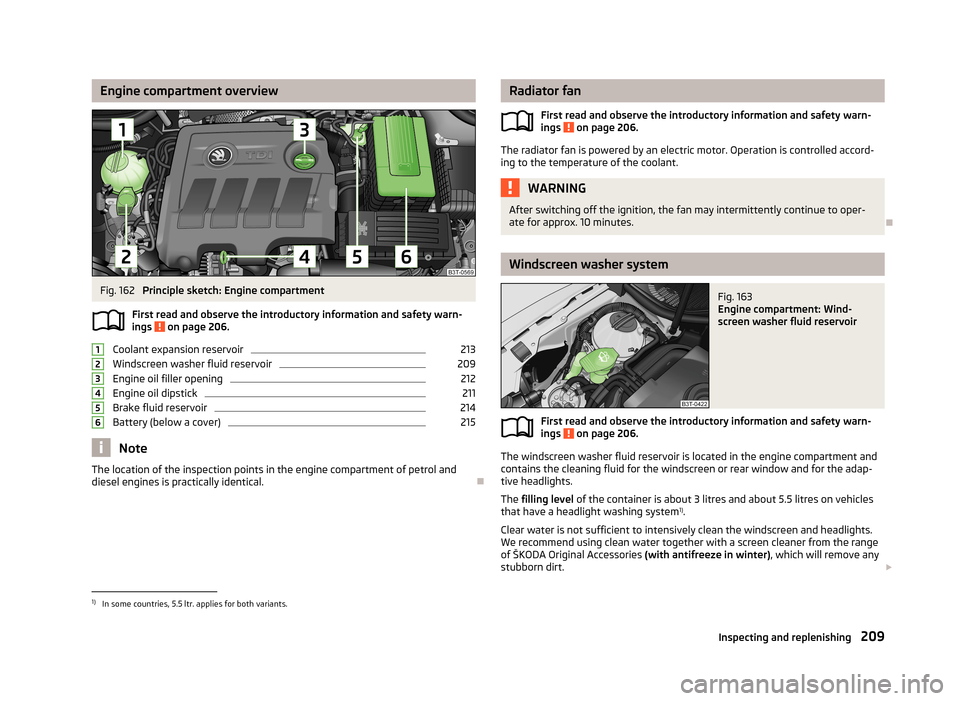
Engine compartment overviewFig. 162
Principle sketch: Engine compartment
First read and observe the introductory information and safety warn- ings
on page 206.
Coolant expansion reservoir
213
Windscreen washer fluid reservoir
209
Engine oil filler opening
212
Engine oil dipstick
211
Brake fluid reservoir
214
Battery (below a cover)
215
Note
The location of the inspection points in the engine compartment of petrol and
diesel engines is practically identical.
123456Radiator fan
First read and observe the introductory information and safety warn-
ings
on page 206.
The radiator fan is powered by an electric motor. Operation is controlled accord-
ing to the temperature of the coolant.
WARNINGAfter switching off the ignition, the fan may intermittently continue to oper-
ate for approx. 10 minutes.
Windscreen washer system
Fig. 163
Engine compartment: Wind-
screen washer fluid reservoir
First read and observe the introductory information and safety warn- ings on page 206.
The windscreen washer fluid reservoir is located in the engine compartment and
contains the cleaning fluid for the windscreen or rear window and for the adap-
tive headlights.
The filling level of the container is about 3 litres and about 5.5 litres on vehicles
that have a headlight washing system 1)
.
Clear water is not sufficient to intensively clean the windscreen and headlights. We recommend using clean water together with a screen cleaner from the range
of ŠKODA Original Accessories (with antifreeze in winter), which will remove any
stubborn dirt.
1)
In some countries, 5.5 ltr. applies for both variants.
209Inspecting and replenishing
Page 214 of 274

Diesel enginesa)SpecificationFilling level1.6 l./77 kW TDI CRVW 507 004.32.0 ltr/103 kW TDI CR DPFVW 507 004.32.0 ltr/125 kW TDI CR DPFVW 507 004.3a)
Engine oil VW 505 01 can optionally be used in diesel engines
without a DPF.
Specifications and capacity (in l) for vehicles with fixed service intervals
Petrol enginesSpecificationFilling lev- el1.4 ltr./92 kW TSIVW 501 01, VW 502 003.61.8 ltr/112 kW TSI
1.8 ltr/118 kW TSIVW 502 004.62.0 l/147 kW TSIVW 502 004.63.6 l/191 kW FSIVW 502 005.5Diesel engines a)SpecificationFilling lev-
el1.6 l./77 kW TDI CRVW 507 004.32.0 ltr/103 kW TDI CR DPFVW 507 004.32.0 ltr/125 kW TDI CR DPFVW 507 004.3a)
Engine oil VW 505 01 can optionally be used in diesel engines without a DPF.
CAUTION
■
If the above engine oils are not available, a different engine oil can be used in
an emergency. To prevent damage to the engine, a maximum of 0.5 litres only of
the following engine oils may be used until the next oil change: ■ For petrol engine models: ACEA A3/ACEA B4 or API SN/API SM;
■ For diesel engine models: ACEA C3 or API CJ-4.
Checking the oil levelFig. 164
Dipstick
First read and observe the introductory information and safety warn-
ings on page 210.
The dipstick indicates the level of oil in the engine » Fig. 164.
Checking the oil level
Ensure that the vehicle is positioned on a level surface and the engine has reached its operating temperature.
›
Switch off the engine.
Wait a few minutes until the engine oil flows back into the oil trough.
›
Open the bonnet.
›
Pull out the dipstick.
›
Wipe the dipstick with a clean cloth and insert it again to the stop.
›
Pull the dipstick out again and check the oil level.
Oil level within range
A
No oil must be refilled.
Oil level within range
B
Oil can be refilled. Afterwards, the oil level can lie in the range
A
.
Oil level within range
C
The engine must be topped up with oil so that the oil level at least reaches the
range
B
.
The engine consumes a little oil. The oil consumption may be as much as 0.5 l/
1 000 km depending on your style of driving and the conditions under which you operate your vehicle. Consumption may be slightly higher than this during the
first 5 000 kilometres.
211Inspecting and replenishing
Page 264 of 274
BootAutomatic retraction (Superb Combi)89
Class N1 vehicles85
Extending variable loading floor92
Folding hook86
Non-closable side pocket (Superb Combi)90
Removable Light (Superb Combi)91
Roll-up boot cover (Superb Combi)88
Side compartment with battery90
Boot cover (Superb Combi)88
Boot lid40
Automatic locking41
Warning light17
(Superb Combi)41
Brake booster138
Brake fluid214
Changing215
Checking214
display messaes15
Brake pads warning light
21
Brakes Brake assist systems
150
Brake booster138
Brake fluid214
Handbrake138
Indicator light15
Running in143
Braking Information on braking
137
Breakdown kit233
Break recommendation See Fatigue detection
161
Bulbs Replacing
247
Button in the driver's door Electric power windows
44
C
Car care
191
Car computer see multifunction display25
Car park ticket holder75
Carrier96
Cavity protection200
CD changer128
Central locking button36
Changing Brake fluid
215
Engine oil212
Wheels229
Changing a wheel Follow-up work
230
Preliminary work229
Remove and attaching a wheel230
Charging a vehicle battery217
Check Fit ball head properly
164
Checking Battery electrolyte level
217
Brake fluid214
Coolant213
Engine oil211
Oil level211
Windscreen washer fluid209
Children and safety186
Child safety Side airbag
187
Child safety lock36
Child seat Classification
188
ISOFIX189
on the front passenger seat187
TOP TETHER190
Use of child seats188
Use of ISOFIX child seats189
Chrome parts refer to Taking care of your vehicle
199
Cigarette lighter77
Cleaning191
Alcantara202
Artificial leather202
cloths202
Covers of electrically heated seats203
Headlight lenses200
Natural leather202
Plastic parts199
Wheels201
Climatronic103
Air recirculation105, 106
automatic mode104
Control elements103
Controlling blower106
Cooling system104
Defrosting windscreen106
Setting the temperature104
Clock13
Clothes hook81
Cockpit 12-Volt power outlet
78
Ashtray77
Cigarette lighter77
General view9
Lighting57
Practical equipment74
Storage compartments74
COMING HOME55
Compartments74
Compass display25
Computer see multifunction display
25
Convenience operation of sliding/tilting roof48
Convenience operation of sliding/tilting roof (Su- perb Combi)
50
Coolant212
Checking213
display messaes16
Replenishing214
Coolant temperature gauge display
11
261Index
Page 268 of 274
N
Net partition
95
Behind the front seats96
Behind the rear seats95
Removing and refitting the housing96
Nets86
Non-closable side pocket (Superb Combi)90
O
Oil See Engine oil
211
Oil pressure display messaes
16
On-board computer see multifunction display
25
Operation in winter Diesel fuel
206
Vehicle battery217
Outside temperature26
Overview Engine compartment
209
P
Paintwork See Paintwork care
198
Paintwork care198
Panoramic sliding roof (Combi) Closing
48
Opening48
Sun screen48
Park assist153
Finding a parking space154
Information messages156
Parking155
Parking Automatic brake assist
156
Manoeuvring out of a parallel parking space156
Park assist153
Parking aid152
Parking aid152
Function153
Parking lights51
Parking vehicle38
Part replacement193
Passive safety Before setting off
169
Driving safety170
Safety equipment169
Passive Safety169
Pedals139
Footmats139
Petrol refer to Fuel
205
Polishing the paintwork See Taking care of your vehicle
198
Power outlet 12 V
78
Power steering131
Power windows Button in the front passenger door
45
Operational faults46
Practical features74
12-Volt power outlet78
Storage compartment for umbrella82
Storage compartment in rear centre console82
Storage compartment on the passenger side80
Storage compartment under the armrest, front79
Storage compartment under the passenger seat81
Storage net in the front centre console79
Storage pockets on the front seats82
R
Radiator fan
209
Radio reception See windows
200
Radio remote control Auxiliary heating
109
Raise vehicle231
Rear-view mirror Exterior mirrors
65
Rear fog light55
Rear interior light58
Rear mirror63
Interior mirror64
Rear seats Seat folded forward Combi
74
Rear window - heater59
Recirculated air mode Manual air conditioning
102
Recommended gear24
Refuelling204
Fuel204
Remote control lock
33
Replacing the battery239
Synchronisation process239
unlock33
Remote control key Replacing the battery
239
Removable lights (Superb Combi) Changing rechargeable light batteries
91
Removable Light (Superb Combi) Remove light
91
Removable ski bag84
Removable variable loading floor Fit and remove
94
Repairs and technical alterations193
Replace Vehicle battery
218
Replacing Bulb for main beam
249
Bulb for main beam and daytime running lights249
Bulb for the fog light250
Bulb for the licence plate light250
Bulb in rear light (Superb Combi)251
Bulbs247
Fuses244
265Index