fuel SKODA YETI 2014 1.G / 5L Owner's Manual
[x] Cancel search | Manufacturer: SKODA, Model Year: 2014, Model line: YETI, Model: SKODA YETI 2014 1.G / 5LPages: 248, PDF Size: 29.49 MB
Page 6 of 248
Cleaning vehicle exterior170Interior care174
Inspecting and replenishing
177
Fuel
177
Engine compartment
180
Engine oil
183
Coolant
184
Brake fluid
186
Vehicle battery
187
Wheels
191
Tyres and wheel rims
191
Manufacturer-approved tyre variants
193
Winter operation
195
Do-it-yourself
Emergency equipment and self-help
197
Emergency equipment
197
Reserve and temporary spare
199
Changing a wheel
200
Puncture repair kit
203
Jump-starting
206
Towing the vehicle
207
Remote control and removable light
209
Emergency unlocking/locking
211
Replacing windscreen wiper blades
212
Fuses and light bulbs
214
Fuses
214
Replacing bulbs
217
Technical data
Technical data
222
Vehicle data
222
Index
3Table of Contents
Page 10 of 248
AbbreviationsAbbreviationDefinitionrpmEngine revolutions per minuteA2DPa Bluetooth software profile for a one-way transfer of audio
dataABSAnti-lock brake systemAFMulti-purpose vehiclesAFSAdaptive headlightsAGAutomatic gearboxAGMVehicle battery typeAPNAn access point name for the Wi-Fi connectionTCSTraction controlCO 2Carbon dioxideDPFDiesel particle filterDSGAutomatic double clutch gearboxDSRActive driver-steering recommendationEDLElectronic differential lockECEEconomic Commission for EuropeEPCEPC fault lightESCElectronic Stability ControlDRim depthEUEuropean UnionGSMGlobal system for mobile communicationsHBAHydraulic brake assistHFPConnection of a mobile device by means of its Bluetooth ®
profileHHCUphill start assistKESSYkeyless unlocking, starting and lockingkWKilowatt, measuring unit for the engine outputMDIInputs for connecting external devicesMFDMultifunction displayMGManual gearboxAbbreviationDefinitionMPIGasoline engine with a multi-point fuel injectionN1Panel van intended exclusively or mainly for the transporta-
tion of goodsNmNewton meter, measuring unit for the engine torquePINpersonal identification numberrSAPa Bluetooth ®
software profile for the remote transmission
of the SIM dataSIM carda card for the identification of the mobile network operatorSSPConnect two devices using Bluetooth ®
profileTDI CRDiesel engine with turbo-charging and common rail injection
systemTSATrailer stabilisationTSIPetrol engine with turbocharging and direct injectionUMTSthe next generation of the GSM network (3G)VINVehicle identification numberWi-Fiwireless data networkWLANwireless connection of electronic devices for data transfer
(wireless)WPSwireless connection of devices for electronic data transfer
(WiFi) using an automatically generated key7Abbreviations
Page 20 of 248
System descriptionRead and observe
on page 16 first.
The functional status of the airbag system is indicated by the
indicator light
in the instrument cluster » page 40.
When the airbags are deployed, they fill with gas and inflate.
A grey white or red, non-harmful gas is released when the airbag is inflated.
This is perfectly normal and is not an indication of a fire in the vehicle.
Depending on the vehicle equipment, the airbag system consists of the
following modules.
› Electronic control unit.
› Front airbag for the driver and the front passenger
» page 18.
› Driver’s knee airbag
» page 19.
› Side airbags
» page 19.
› Head airbags
» page 20.
› Airbag warning light in the instrument cluster
» page 40.
› Key switch for the front passenger airbag
» page 22.
› Warning light for the front passenger airbag deactivation/activation in the
middle of the dash panel » page 22.
Note
■
The airbag system needs no maintenance during its working life.■If you sell your vehicle, provide the complete vehicle documentation to the
new owner. Please note that the information relating to the possibility of de-
activating the front passenger airbag must be included!■
When disposing of vehicle or parts of the airbag system, it is important to
comply with the national legal requirements.
Airbag deployment
Read and observe
on page 16 first.
The airbags inflate in fractions of a second and at a high speed in order to beable to offer additional protection in the event of an accident.
The airbag system is only functional when the ignition is switched on.
In certain accident situations, the several airbags may be deployed simultane-
ously.
The airbags are not deployed in the case of minor frontal and side collisions,
rear-end collisions, tilting of the vehicle and vehicle rollover.
Deployment factors
It is not possible to generally determine which deployment conditions apply to
the airbag system in every situation. An important role is played by factors
such as the type of object that the vehicle hits (hard/soft), the impact angle,
vehicle speed etc.
A decisive factor for the deployment of the airbags is the deceleration which
occurs. The control unit analyses the nature of the collision and activates the
relevant restraint system.
If the vehicle deceleration which occurs and is measured during the collision
remains below the prescribed reference values specified in the control unit,
the airbags are not deployed although the vehicle may well suffer severe dam-
age to the bodywork as a consequence of the accident.
The following airbags will be deployed in the event of a severe frontal
collision.
› Driver’s front airbag.
› Front passenger airbag.
› Driver’s knee airbag.
The following airbags will be deployed in the event of a severe side collision.
› Front side airbag on the side of the accident.
› Rear side airbag on the side of the accident.
› Head airbags on the side of the accident.
When an airbag is deployed, the following events occur.
› The interior lighting comes on (if the switch for the interior light is in the door
contact position).
› The hazard warning lights are switched on.
› All doors are unlocked.
› The fuel supply to the engine is interrupted.
Airbag overview
Introduction
This chapter contains information on the following subjects:
Front airbags
18
Driver’s knee airbag
19
17Airbag system
Page 33 of 248
Instruments and Indicator Lights
Instrument cluster
Introduction
This chapter contains information on the following subjects:
Overview
30
Revolutions counter
31
Speedometer
31
Coolant temperature gauge
31
Display
32
Fuel gauge
32
Counter for distance driven
33
33
Display of the second speed
33
Auto Check Control
33
The instrument cluster gives the driver basic information such as the current
speed, engine speed, the state of some vehicle systems and the like.
Fault display
If there is a fault in the instrument cluster, the Error message will appear in
the display.
Seek help from a specialist garage.
WARNINGConcentrate fully at all times on your driving! As the driver, you are fully re-
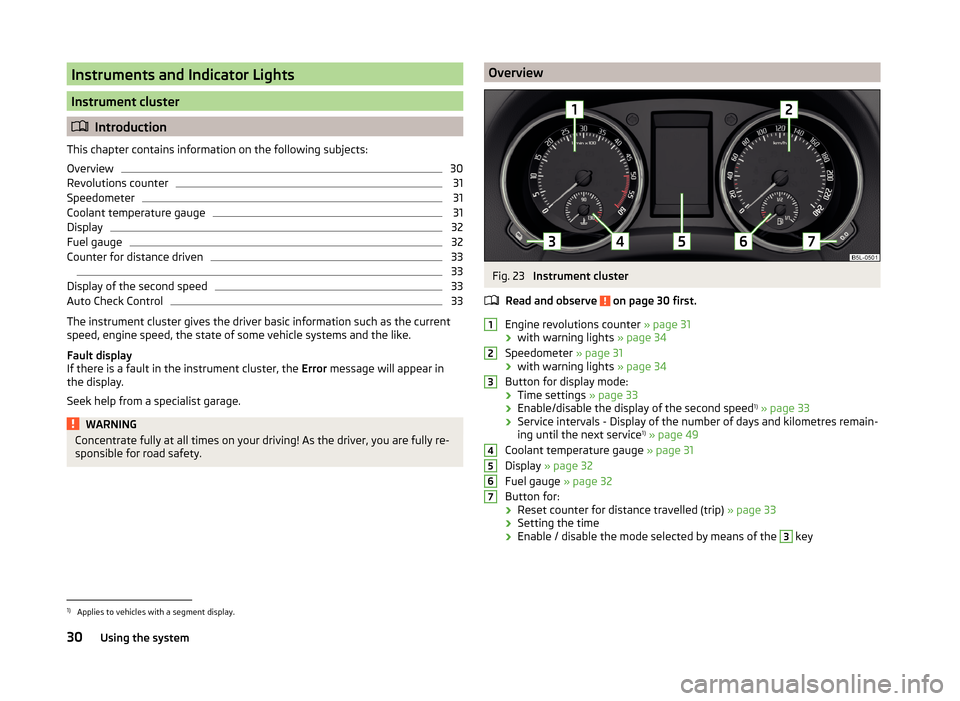
sponsible for road safety.OverviewFig. 23
Instrument cluster
Read and observe
on page 30 first.
Engine revolutions counter » page 31
› with warning lights
» page 34
Speedometer » page 31
› with warning lights
» page 34
Button for display mode:
› Time settings
» page 33
› Enable/disable the display of the second speed 1)
» page 33
› Service intervals - Display of the number of days and kilometres remain-
ing until the next service 1)
» page 49
Coolant temperature gauge » page 31
Display » page 32
Fuel gauge » page 32
Button for: › Reset counter for distance travelled (trip)
» page 33
› Setting the time
› Enable / disable the mode selected by means of the
3
key
12345671)
Applies to vehicles with a segment display.
30Using the system
Page 35 of 248

DisplayFig. 25
Display types
Read and observe on page 30 first.
Display types » Fig. 25
MAXI DOT display.
Segment display
The following information will be displayed.
› Distance travelled
» page 33
› Time
» page 33
› Information system data
» page 42
› Service interval display data
» page 49
CAUTION
Pull out the ignition key if coming in contact with the display (e.g. when clean-
ing) to prevent any possible damage. On vehicles with the KESSY system,
switch off the ignition and open the driver's door.Fuel gaugeFig. 26
Fuel gauge
Read and observe on page 30 first.
The display » Fig. 26 provides information on the fuel supply in the container.
The display only works if the ignition is switched on.
The fuel tank has a capacity of about 55 litres or 60 litres 1)
.
If the amount of fuel reaches the reserve area (the pointer reaches the red
scale range), the indicator symbol is illuminated
» page 40 .
CAUTION
Never drive until the fuel tank is completely empty! The irregular supply of fuel
can cause misfiring. This can result in considerable damage to parts of the en-
gine and the exhaust system.
Note
After filling up, it can occur that during dynamic driving (e.g. numerous curves,
braking, driving downhill and climbing a steep hill) the fuel gauge indicates ap-
prox. a fraction less. When stopping or during less dynamic driving, the fuel
gauge displays the correct fuel level again. This is not a fault.1)
Valid for Yeti 4x4.
32Using the system
Page 37 of 248
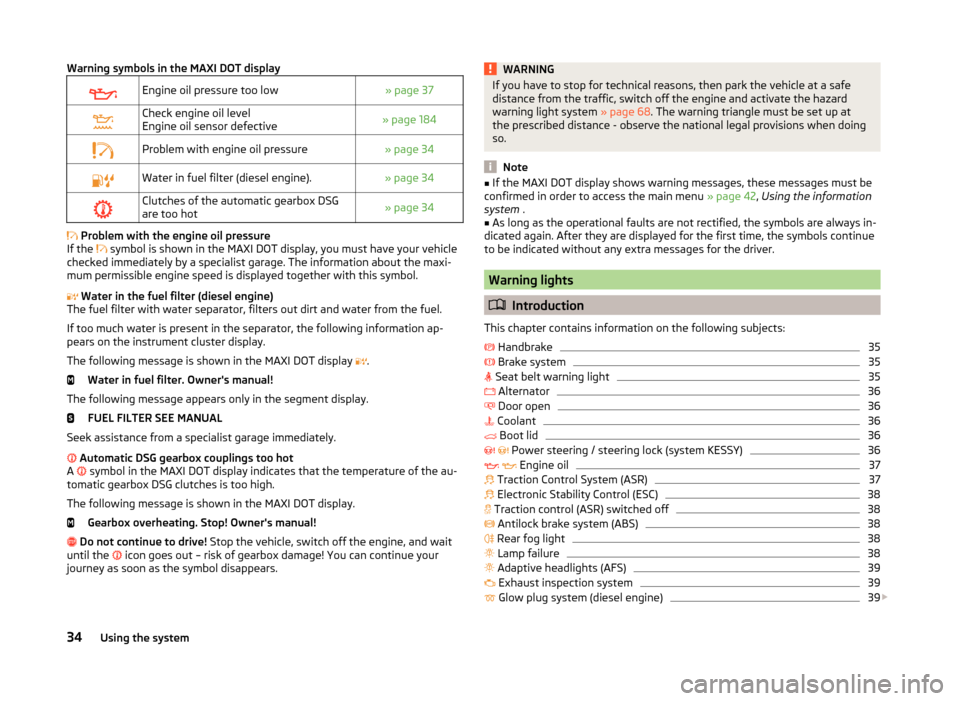
Warning symbols in the MAXI DOT displayEngine oil pressure too low» page 37Check engine oil level
Engine oil sensor defective» page 184Problem with engine oil pressure» page 34Water in fuel filter (diesel engine).» page 34Clutches of the automatic gearbox DSG
are too hot» page 34
Problem with the engine oil pressure
If the symbol is shown in the MAXI DOT display, you must have your vehicle
checked immediately by a specialist garage. The information about the maxi-
mum permissible engine speed is displayed together with this symbol.
Water in the fuel filter (diesel engine)
The fuel filter with water separator, filters out dirt and water from the fuel.
If too much water is present in the separator, the following information ap-
pears on the instrument cluster display.
The following message is shown in the MAXI DOT display .
Water in fuel filter. Owner's manual!
The following message appears only in the segment display. FUEL FILTER SEE MANUAL
Seek assistance from a specialist garage immediately.
Automatic DSG gearbox couplings too hot
A symbol in the MAXI DOT display indicates that the temperature of the au-
tomatic gearbox DSG clutches is too high.
The following message is shown in the MAXI DOT display. Gearbox overheating. Stop! Owner's manual!
Do not continue to drive! Stop the vehicle, switch off the engine, and wait
until the icon goes out – risk of gearbox damage! You can continue your
journey as soon as the symbol disappears.
WARNINGIf you have to stop for technical reasons, then park the vehicle at a safe
distance from the traffic, switch off the engine and activate the hazard
warning light system » page 68. The warning triangle must be set up at
the prescribed distance - observe the national legal provisions when doing
so.
Note
■ If the MAXI DOT display shows warning messages, these messages must be
confirmed in order to access the main menu » page 42, Using the information
system .■
As long as the operational faults are not rectified, the symbols are always in-
dicated again. After they are displayed for the first time, the symbols continue
to be indicated without any extra messages for the driver.
Warning lights
Introduction
This chapter contains information on the following subjects:
Handbrake
35
Brake system
35
Seat belt warning light
35
Alternator
36
Door open
36
Coolant
36
Boot lid
36
Power steering / steering lock (system KESSY)
36
Engine oil
37
Traction Control System (ASR)
37
Electronic Stability Control (ESC)
38
Traction control (ASR) switched off
38
Antilock brake system (ABS)
38
Rear fog light
38
Lamp failure
38
Adaptive headlights (AFS)
39
Exhaust inspection system
39
Glow plug system (diesel engine)
39
34Using the system
Page 38 of 248
Check engine electronics (petrol engine)39 Diesel particulate filter (diesel engine)39
Fuel reserve
40
Airbag system
40
Tyre pressure
40
Windscreen washer fluid level
41
Turn-signal system
41
Fog lights
41
Cruise control system
41
Brake pedal (automatic gearbox)
41
OFF ROADmode
41
Main beam
41
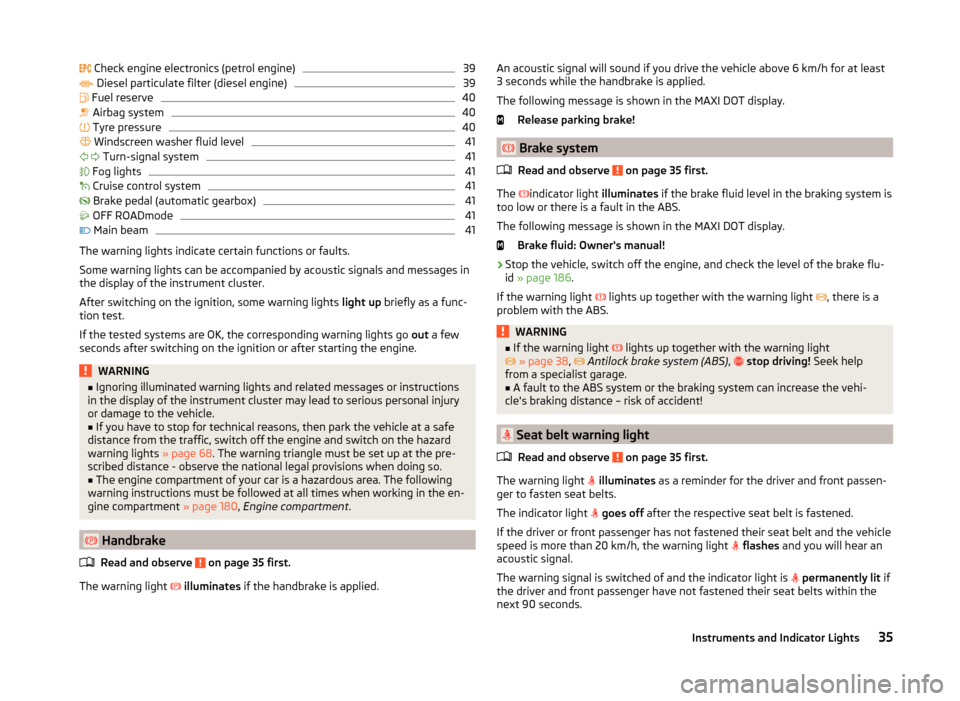
The warning lights indicate certain functions or faults.
Some warning lights can be accompanied by acoustic signals and messages in
the display of the instrument cluster.
After switching on the ignition, some warning lights light up briefly as a func-
tion test.
If the tested systems are OK, the corresponding warning lights go out a few
seconds after switching on the ignition or after starting the engine.
WARNING■ Ignoring illuminated warning lights and related messages or instructions
in the display of the instrument cluster may lead to serious personal injury
or damage to the vehicle.■
If you have to stop for technical reasons, then park the vehicle at a safe
distance from the traffic, switch off the engine and switch on the hazard
warning lights » page 68. The warning triangle must be set up at the pre-
scribed distance - observe the national legal provisions when doing so.
■
The engine compartment of your car is a hazardous area. The following
warning instructions must be followed at all times when working in the en-
gine compartment » page 180, Engine compartment .
Handbrake
Read and observe
on page 35 first.
The warning light
illuminates if the handbrake is applied.
An acoustic signal will sound if you drive the vehicle above 6 km/h for at least
3 seconds while the handbrake is applied.
The following message is shown in the MAXI DOT display. Release parking brake!
Brake system
Read and observe
on page 35 first.
The
indicator light illuminates if the brake fluid level in the braking system is
too low or there is a fault in the ABS.
The following message is shown in the MAXI DOT display. Brake fluid: Owner's manual!
›
Stop the vehicle, switch off the engine, and check the level of the brake flu-
id » page 186 .
If the warning light lights up together with the warning light
, there is a
problem with the ABS.
WARNING■ If the warning light lights up together with the warning light
» page 38 , Antilock brake system (ABS) , stop driving! Seek help
from a specialist garage.■
A fault to the ABS system or the braking system can increase the vehi-
cle's braking distance – risk of accident!
Seat belt warning light
Read and observe
on page 35 first.
The warning light
illuminates as a reminder for the driver and front passen-
ger to fasten seat belts.
The indicator light
goes off after the respective seat belt is fastened.
If the driver or front passenger has not fastened their seat belt and the vehicle
speed is more than 20 km/h, the warning light
flashes and you will hear an
acoustic signal.
The warning signal is switched of and the indicator light is
permanently lit if
the driver and front passenger have not fastened their seat belts within the
next 90 seconds.
35Instruments and Indicator Lights
Page 42 of 248
Adaptive headlights (AFS)Read and observe
on page 35 first.
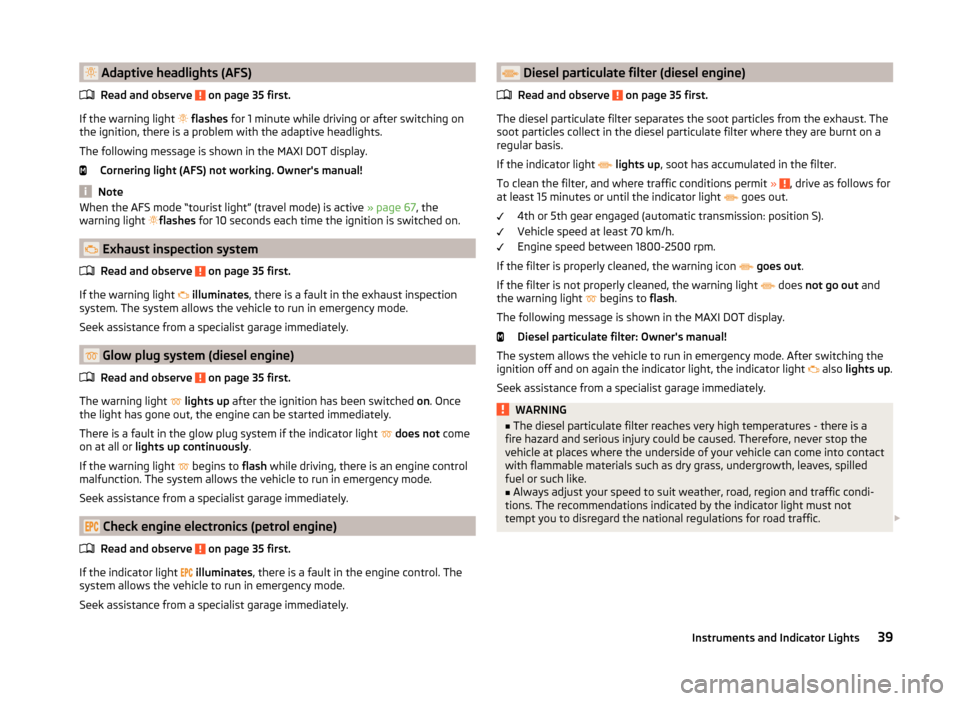
If the warning light
flashes for 1 minute while driving or after switching on
the ignition, there is a problem with the adaptive headlights.
The following message is shown in the MAXI DOT display.
Cornering light (AFS) not working. Owner's manual!
Note
When the AFS mode “tourist light” (travel mode) is active » page 67, the
warning light flashes for 10 seconds each time the ignition is switched on.
Exhaust inspection system
Read and observe
on page 35 first.
If the warning light
illuminates , there is a fault in the exhaust inspection
system. The system allows the vehicle to run in emergency mode.
Seek assistance from a specialist garage immediately.
Glow plug system (diesel engine)
Read and observe
on page 35 first.
The warning light
lights up after the ignition has been switched on. Once
the light has gone out, the engine can be started immediately.
There is a fault in the glow plug system if the indicator light
does not come
on at all or lights up continuously .
If the warning light begins to
flash while driving, there is an engine control
malfunction. The system allows the vehicle to run in emergency mode.
Seek assistance from a specialist garage immediately.
Check engine electronics (petrol engine)
Read and observe
on page 35 first.
If the indicator light
illuminates , there is a fault in the engine control. The
system allows the vehicle to run in emergency mode.
Seek assistance from a specialist garage immediately.
Diesel particulate filter (diesel engine)
Read and observe
on page 35 first.
The diesel particulate filter separates the soot particles from the exhaust. The soot particles collect in the diesel particulate filter where they are burnt on a
regular basis.
If the indicator light
lights up , soot has accumulated in the filter.
To clean the filter, and where traffic conditions permit »
, drive as follows for
at least 15 minutes or until the indicator light
goes out.
4th or 5th gear engaged (automatic transmission: position S).
Vehicle speed at least 70 km/h.
Engine speed between 1800-2500 rpm.
If the filter is properly cleaned, the warning icon
goes out .
If the filter is not properly cleaned, the warning light does
not go out and
the warning light begins to
flash.
The following message is shown in the MAXI DOT display. Diesel particulate filter: Owner's manual!
The system allows the vehicle to run in emergency mode. After switching the
ignition off and on again the indicator light, the indicator light also
lights up .
Seek assistance from a specialist garage immediately.
WARNING■ The diesel particulate filter reaches very high temperatures - there is a
fire hazard and serious injury could be caused. Therefore, never stop the
vehicle at places where the underside of your vehicle can come into contact
with flammable materials such as dry grass, undergrowth, leaves, spilled
fuel or such like.■
Always adjust your speed to suit weather, road, region and traffic condi-
tions. The recommendations indicated by the indicator light must not
tempt you to disregard the national regulations for road traffic.
39Instruments and Indicator Lights
Page 43 of 248

CAUTION■As long as the indicator light lights up, one must take into account an in-
creased fuel consumption and in certain circumstances a power reduction of
the engine.■
Using diesel fuel with an increased sulphur content can considerably reduce
the life of the diesel particle filter. A ŠKODA partner will be able to tell you
which countries use diesel fuel with a high sulphur content.
Note
■ To assist the combustion process of the soot particles in the filter, we recom-
mend that regularly driving short distances be avoided.■
If the engine is turned off during the filter cleaning process or shortly after-
wards, the cooling fan may turn on automatically for a few minutes.
Fuel reserve
Read and observe
on page 35 first.
The warning light
is lit when there is less than 9 litres of remaining fuel.
An audible signal sounds as a warning.
The following message is shown in the MAXI DOT display. Please refuel. Range: ... km
CAUTION
Never drive until the fuel tank is completely empty! The irregular supply of fuel
can cause misfiring. This can result in considerable damage to parts of the en-
gine and the exhaust system.
Note
The text in the display goes out only after refuelling and driving a short dis-
tance.
Airbag system
Read and observe
on page 35 first.
If the warning light
lights up , there is a fault in the airbag system.
The following message is shown in the MAXI DOT display. Error: Airbag
The operational capability of the airbag system is monitored electronically, in-
cluding when one of the airbags is switched off.
The front passenger airbag has been disabled with the key switch
› The indicator light
comes on for around 4 seconds after the ignition has
been switched on;
› The warning light
in the display
in the middle of the dash
panel lights up after switching on the ignition » page 22.
One of the airbags or a belt tensioner has been disabled by the diagnostic
tool
› The warning
lights up for approx. 4 seconds after switching on the igni-
tion and then flashes again for approx. 12 seconds.
The following message is shown in the MAXI DOT display. Airbag / belt tensioner deactivated.WARNINGWhen a fault in the airbag system occurs, there is a risk of the system not
being triggered in the event of an accident. Therefore, this must be
checked immediately by a specialized company.
Tyre pressure
Read and observe
on page 35 first.
The warning light is lit
If the warning light comes on while driving, it means one of the tyres has
undergone a pressure change.
An audible signal sounds as a warning.
›
Immediately reduce speed and avoid sudden steering and braking manoeu-
vres.
›
Stop the vehicle, turn the ignition off and check the tyres and their inflation
pressures » page 191.
›
Correct the tyre pressure if necessary or replace the affected
wheel » page 200 or use the repair kit » page 203.
›
Save the tyre pressure values in the system » page 158.
The warning light flashes for about 1 min. and remains lit
If the warning light flashes for approximately 1 minute and stays on, there
may be a fault in the tyre pressure monitoring system.
›
Stop the vehicle, turn the ignition off and start the engine again.
40Using the system
Page 46 of 248
Button /adjust- ment
wheel
ActionOperation
DTurn upwards or down- wardsSelect data / set data valuesPress brieflyView information / confirm specifica- tion
Display a low temperature
Read and observe
on page 42 first.
Prompt in the MAXI DOT display
If the outside temperature while driving drops to below +4°C, the following
icon appears on the display in front of the temperature display . An audible
signal is emitted.
If the outside temperature is already below +4°C when turning the ignition on,
the icon appears immediately.
Prompt in the segment display
If the outside temperature while driving drops to below +4°C, the temperature
display will show up with the following icon before this occurs . An audible
signal is emitted.
If the outside temperature is already below +4°C when turning the ignition on,
the temperature display and the icon appear immediately.
After pressing button
A
» Fig. 28 on page 42 , the most recently displayed da-
ta is shown.
WARNINGEven at temperatures around +4 °C, black ice may still be on the road sur-
face! Do not only rely upon the information given on the outside tempera-
ture display that there is no ice on the road.Gear recommendationFig. 29
Information on the selected gear / Gear recommendation
Read and observe
on page 42 first.
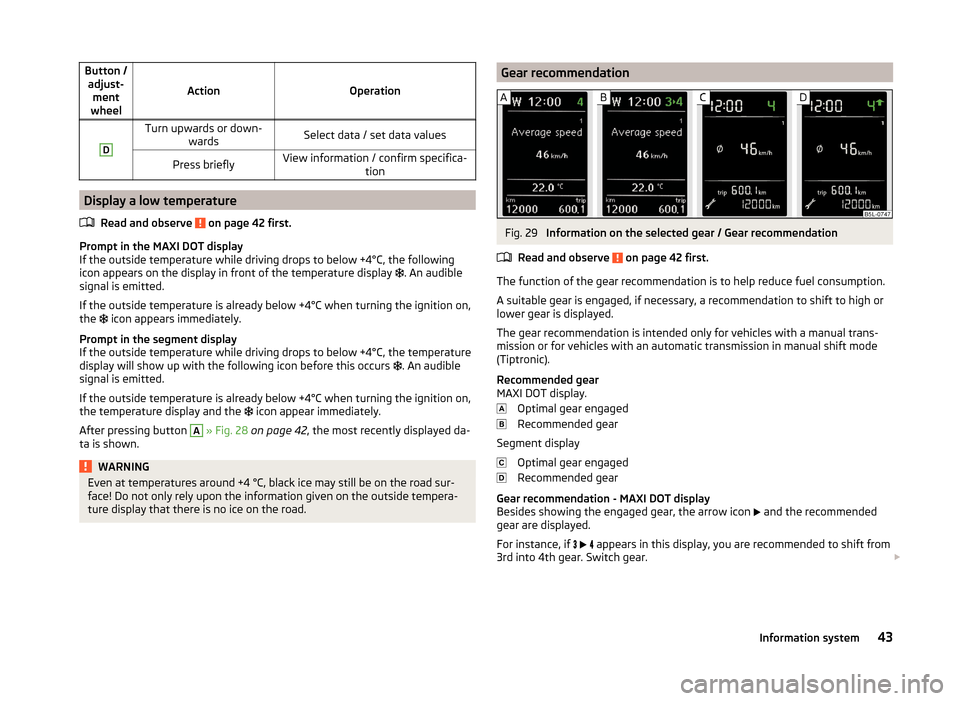
The function of the gear recommendation is to help reduce fuel consumption.
A suitable gear is engaged, if necessary, a recommendation to shift to high or
lower gear is displayed.
The gear recommendation is intended only for vehicles with a manual trans-
mission or for vehicles with an automatic transmission in manual shift mode
(Tiptronic).
Recommended gear
MAXI DOT display.
Optimal gear engaged
Recommended gear
Segment display
Optimal gear engaged
Recommended gear
Gear recommendation - MAXI DOT display
Besides showing the engaged gear, the arrow icon and the recommended
gear are displayed.
For instance, if
appears in this display, you are recommended to shift from
3rd into 4th gear. Switch gear.
43Information system