center SMART FORTWO 2016 Owner's Manual
[x] Cancel search | Manufacturer: SMART, Model Year: 2016, Model line: FORTWO, Model: SMART FORTWO 2016Pages: 214, PDF Size: 4.93 MB
Page 145 of 214
RAll closable stowage compartments
should be closed before beginning your
journey.
RAlways stow and secure heavy, hard, poin-
ted, sharp-edged, fragile objects or
objects which are too large behind the
last bench seat or under the passenger
seats.
Observe the loading guidelines (
Ypage 142).
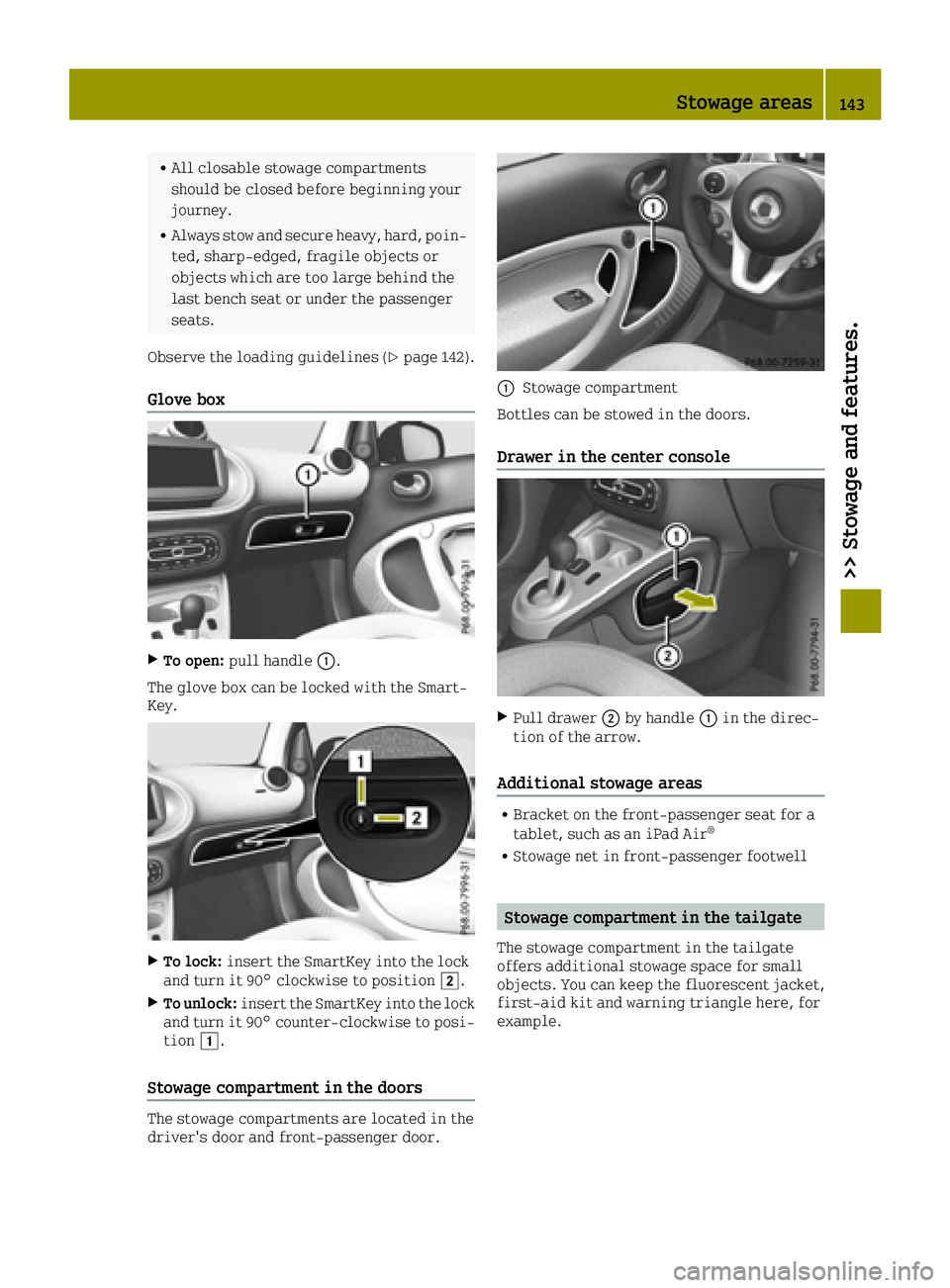
Glove box
XTo open: pull handle 0043.
The glove box can be locked with the Smart-
Key.
XTo lock: insert the SmartKey into the lock
and turn it 90° clockwise to position 0048.
XTo unlock:insert the SmartKey into the lock
and turn it 90° counter-clockwise to posi-
tion 0047.
Stowage compartment in the doors
The stowage compartments are located in the
driver's door and front-passenger door.
0043Stowage compartment
Bottles can be stowed in the doors.
Drawer in the center console
XPull drawer 0044by handle 0043in the direc-
tion of the arrow.
Additional stowage areas
RBracket on the front-passenger seat for a
tablet, such as an iPad Air®
RStowage net in front-passenger footwell
Stowage compartment in the tailgate
The stowage compartment in the tailgate
offers additional stowage space for small
objects. You can keep the fluorescent jacket,
first-aid kit and warning triangle here, for
example.
Stowage areas143
>> Stowage and features.
Z
Page 148 of 214
XDisconnect plug0043.
XTake out subwoofer 0043.
Features
Cup holder
Important safety notes
GWARNING
The cup holder cannot hold a container
secure whilst traveling. If you use a cup
holder whilst traveling, the container may
be flung around and liquid may be spilled.
The vehicle occupants may come into con-
tact with the liquid and if it is hot, they
may be scalded. You may be distracted from
the traffic conditions and you could lose
control of the vehicle. There is a risk of an
accident and injury.
Only use the cup holder when the vehicle is stationary. Only use the cup holder for con-
tainers of the right size. Always close the
container, particularly if the liquid is
hot.
GWARNING
If you transport objects in the vehicle
interior and these are not adequately
secured, they could slip or be flung around
and thereby strike vehicle occupants. In
addition, cup holders, open stowage spaces and mobile phone brackets may not always
be able to hold the objects placed in them
in the event of an accident. There is a risk
of injury, particularly in the event of sharp
braking or sudden changes of direction.
RAlways stow objects in such a way that
they cannot be tossed about in these or
similar situations.
RAlways make sure that objects do not pro-
trude out of the stowage spaces, luggage
nets or stowage nets.
REnsure that closable stowage spaces are
shut before beginning your journey.
RAlways stow and secure heavy, hard, poin-
ted, sharp-edged, fragile or large
objects in the cargo compartment.
!Only use the cup holders for containers of
the right size and which have lids. The
drinks could otherwise spill.
Observe the loading guidelines (
Ypage 142).
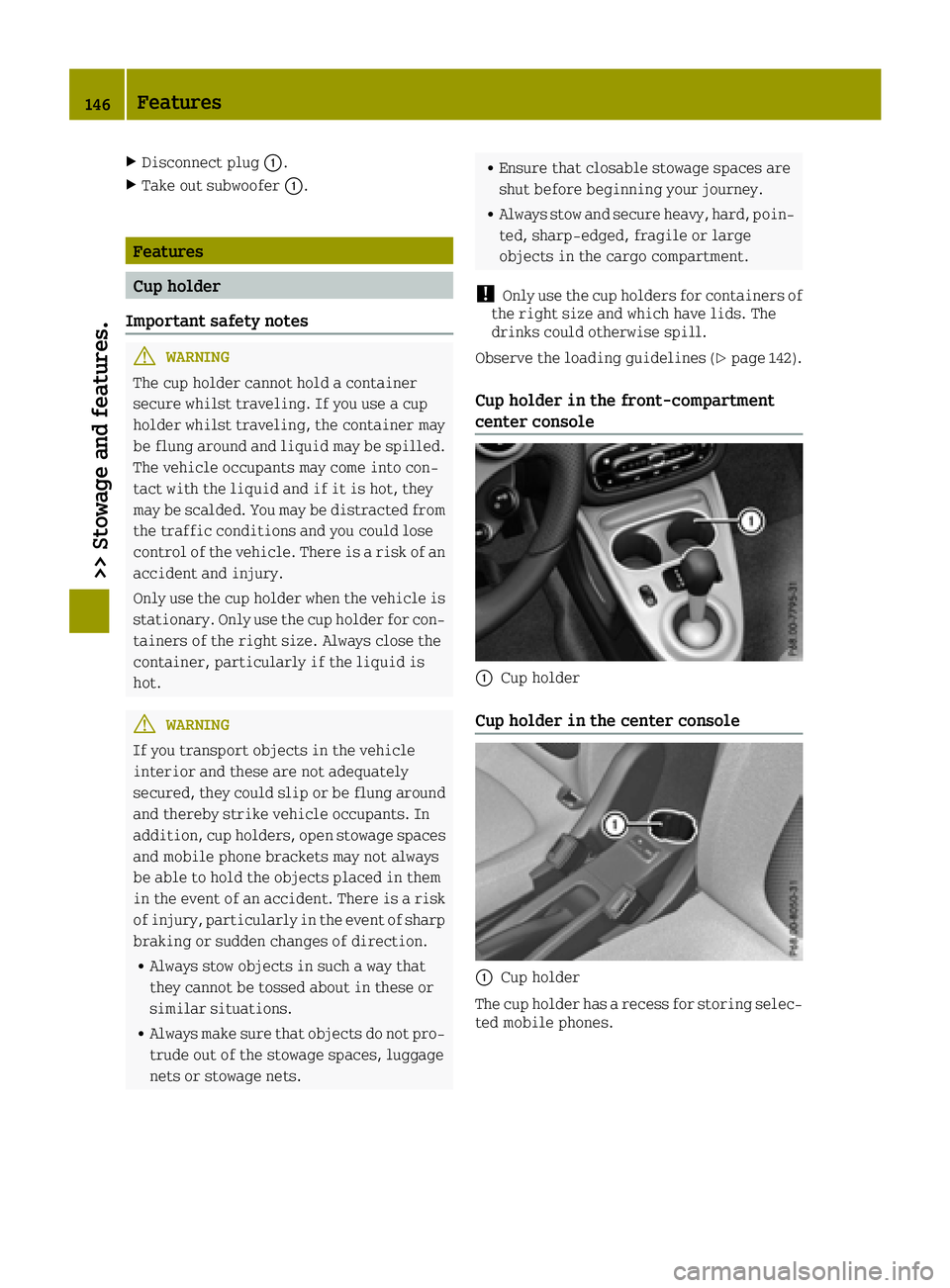
Cup holder in the front-compartment
center console
0043Cup holder
Cup holder in the center console
0043Cup holder
The cup holder has a recess for storing selec-
ted mobile phones.
146Features
>> Stowage and features.
Page 149 of 214
Sun visors
Overview
GWARNING
If the mirror cover of the vanity mirror is
folded up when the vehicle is in motion, you
could be blinded by incident light. There
is a risk of an accident.
Always keep the mirror cover folded down
while driving.
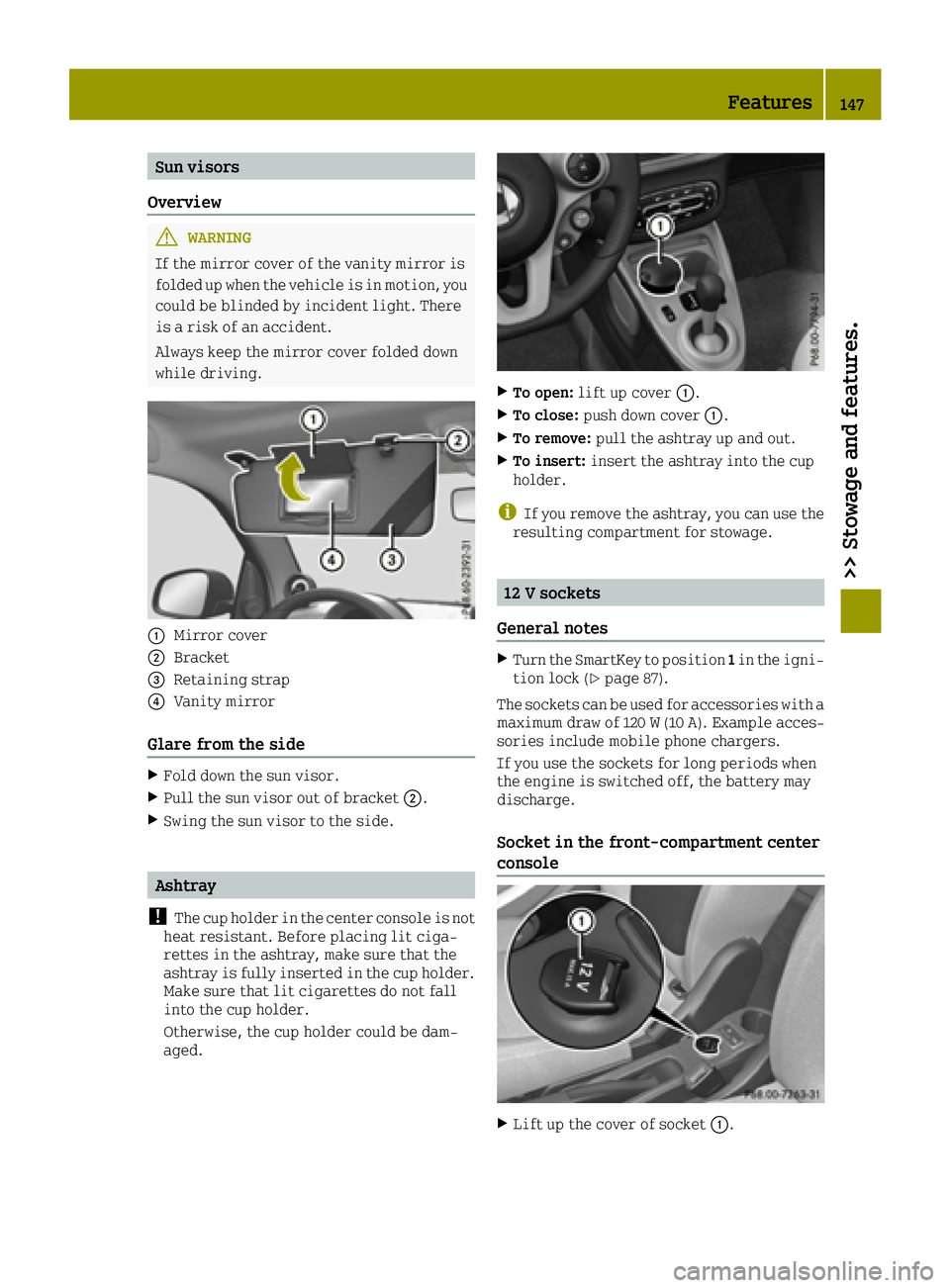
0043Mirror cover
0044Bracket
0087Retaining strap
0085Vanity mirror
Glare from the side
XFold down the sun visor.
XPull the sun visor out of bracket 0044.
XSwing the sun visor to the side.
Ashtray
!
The cup holder in the center console is not
heat resistant. Before placing lit ciga-
rettes in the ashtray, make sure that the
ashtray is fully inserted in the cup holder.
Make sure that lit cigarettes do not fall
into the cup holder.
Otherwise, the cup holder could be dam-
aged.
XTo open: lift up cover 0043.
XTo close:push down cover 0043.
XTo remove:pull the ashtray up and out.
XTo insert:insert the ashtray into the cup
holder.
iIf you remove the ashtray, you can use the
resulting compartment for stowage.
12 V sockets
General notes
XTurn the SmartKey to position 1in the igni-
tion lock (Ypage 87).
The sockets can be used for accessories with a
maximum draw of 120 W(10A). Example acces-
sories include mobile phone chargers.
If you use the sockets for long periods when
the engine is switched off, the battery may
discharge.
Socket in the front-compartment center
console
XLift up the cover of socket 0043.
Features147
>> Stowage and features.
Z
Page 156 of 214
Information on the type of service and ser-
vice intervals (see the separate Maintenance
Booklet).
For further information inquire at any smart
center or look under
http://www.smartUSA.com (only USA).
iThe service display does not show any
information on the engine oil level.
Observe the notes on the engine oil level
(
Ypage 150).
Whenever a service is due, this is shown
approximately 30 days or 1500 km (1000 miles)
beforehand. After starting the engine, a ser-
vice message appears in the instrument clus-
ter display for a few seconds; see the follow-
ing example.
Next
Servicein.. Daystogether with the
0099 or009A symbol. If the service due date
has been exceeded, Service Due .. Days
Ago.
The symbol shows the type of service. 0099
stands for a minor service and 009Afor a
major service.
The service display does not take into
account any periods of time during which the
battery is disconnected.
Maintaining the time-dependent service
schedule:
XNote down the service due date in the ser-
vice display before disconnecting the bat-
tery.
or
XAfter reconnecting the battery, subtract
the battery disconnection periods from the
service date shown on the display.
Hiding a service message
XPress the 0076button on the multifunction
steering wheel.
Calling up the service display
XSwitch on the ignition.
XPress the 0063or0064 button on the steer-
ing wheel to select the MessagesandSer‐vicemenu.
The service display shows when the service
is due.
Information about Service
Resetting the service display
!Have service work carried out as descri-
bed in the Maintenance Booklet. This may
otherwise lead to increased wear and dam-
age to the major assemblies or the vehicle.
A qualified specialist workshop, e.g. a smart center, will reset the service interval dis-
play after the service work has been carried
out. You can also obtain further information
on maintenance work, for example.
Special service requirements
The prescribed service interval is based on
normal operation of the vehicle. Service work
will need to be performed more often if the
vehicle is operated under arduous conditions
or increased loads, for example:
Rregular city driving with frequent inter-
mediate stops
Rif the vehicle is primarily used to travel
short distances
Rfor frequent operation in mountainous ter-
rain or on poor road surfaces
Rif the engine is often left idling for long
periods
In these or similar operating conditions,
have, for example, the air filter, engine oil
and oil filter changed more frequently. The
tires must be checked more frequently if the
vehicle is operated under increased loads.
You can obtain further information at a
qualified specialist workshop, e.g. a smart
center.
Driving abroad
An extensive smart service network is also
available in other countries. For further
information inquire at any smart center.
Care
General notes
HEnvironmental note
Dispose of empty packaging and cleaning
cloths in an environmentally responsible
manner.
154Care
>> Maintenance and care.
Page 169 of 214
Only charge the fitted battery with a battery
charger which has been tested and approved
by smart. A battery charger specially adapted
for smart vehicles, and tested and approved
by smart, is available as an accessory. It per-
mits the charging of the battery in its instal-
led position. Contact a smart center for fur-
ther information and availability. Read the
battery charger's operating instructions
before charging the battery.
Battery (vehicle)167
>> Breakdown assistance.
Z
Page 175 of 214
XRemove the towing eye (Ypage 171).
XSwitch off the hazard warning lamps.
Fuses
Important safety notes
GWARNING
If you manipulate or bridge a faulty fuse or if you replace it with a fuse with a higher
amperage, the electric cables could be
overloaded. This could result in a fire.
There is a risk of an accident and injury.
Always replace faulty fuses with the speci-
fied new fuses having the correct amper-
age.
!Only use fuses that have been approved for
smart vehicles and which have the correct
fuse rating for the system concerned. Oth-
erwise, components or systems could be
damaged.
The fuses in your vehicle serve to close down
faulty circuits. If a fuse blows, all the com-
ponents on the circuit and their functions
stop operating.
Blown fuses must be replaced with fuses of the
same rating, which you can recognize by the
color and value. The fuse ratings are listed in
the fuse allocation chart (
Ypage 175).
If a newly inserted fuse also blows, have the
cause traced and rectified at a qualified
specialist workshop, e.g. an authorized
Mercedes-Benz Center.
Before changing a fuse
XSecure the vehicle against rolling away
(Ypage 100).
XSwitch off all electrical consumers.
XTurn the key to position 0in the ignition
lock and remove it (Ypage 87). All indica-
tor lamps in the instrument cluster must be off.
The fuses are located in various fuse boxes:
RFuse box in the front area
RFuse box in the glove compartment
Fuse box in the front area
Pay attention to the "Important safety notes"
(Ypage 173).
GWARNING
If the windshield wipers begin to operate
while the service cover is open, there is a
danger of injury from the wiper arms. There
is a risk of injury.
Always switch off the windshield wipers
and the ignition before opening the ser-
vice cover.
!Make sure that no moisture can enter the
fuse box when the cover is open.
!When closing the cover, make sure that it
is lying correctly on the fuse box. Moisture
seeping in or dirt could otherwise impair
the operation of the fuses.
XMake sure that the windshield wipers are
turned off.
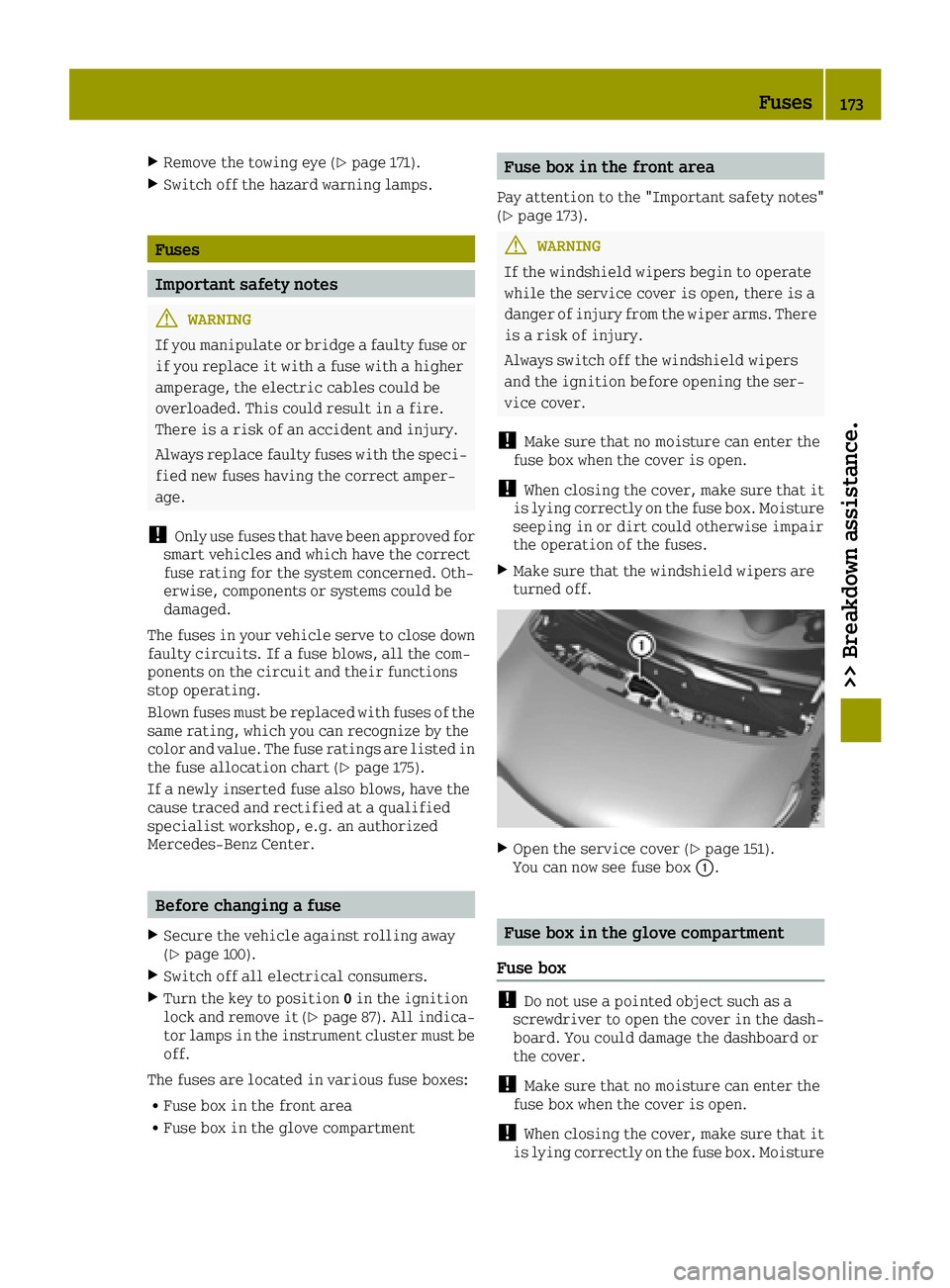
XOpen the service cover (Ypage 151).
You can now see fuse box 0043.
Fuse box in the glove compartment
Fuse box
!Do not use a pointed object such as a
screwdriver to open the cover in the dash-
board. You could damage the dashboard or
the cover.
!Make sure that no moisture can enter the
fuse box when the cover is open.
!When closing the cover, make sure that it
is lying correctly on the fuse box. Moisture
Fuses173
>> Breakdown assistance.
Z
Page 182 of 214
!Vehicles with steel wheels:if you mount
snow chains on steel wheels, you may dam-
age the hub caps. Remove the hub caps from
the relevant wheels before mounting the
snow chains.
smart recommends that you only use snow
chains that have been specially approved for
smart. For more information, please contact
the smart center or a qualified specialist
workshop.
Bear in mind that snow chains are designed
for a certain wheel size. If you mount tires
that are larger or smaller than the original
tires, you will require new snow chains of the
correct size.
If you intend to mount snow chains, please
bear the following points in mind:
RSnow chains may not be mounted on all
wheel/tire combinations. Permissible
wheel-tire combinations (
Ypage 200).
ROnly use snow chains when driving on roads
completely covered by snow. Remove the
snow chains as soon as possible when you
come to a road that is not snow-covered.
RLocal regulations may restrict the use of
snow chains. Observe the appropriate reg-
ulations if you wish to mount snow chains.
Rdo not exceed the maximum permissible
speed of 30 mph (50 km/h).
Tire pressure
Tire pressure specifications
GWARNING
Underinflated or overinflated tires pose
the following risks:
Rthe tires may burst, especially as the
load and vehicle speed increase.
Rthe tires may wear excessively and/or
unevenly, which may greatly impair tire
traction.
Rthe driving characteristics, as well as
steering and braking, may be greatly
impaired.
There is a risk of an accident.
Follow recommended tire inflation pres-
sures and check the pressure of all the tires including the spare wheel:
Rmonthly, at least
Rif the load changes
Rbefore beginning a long journey
Runder different operating conditions,
e.g. off-road driving
If necessary, correct the tire pressure.
The specifications on the sample Tire and
Loading Information placard and tire pres-
sure tables are examples. Tire pressure spec-
ifications are vehicle-specific and may
deviate from the data shown here. The tire
pressure specifications that are valid for
your vehicle can be found on the Tire and
Loading Information placard and tire pres-
sure table on the vehicle.
The recommended tire pressures for the tires
mounted at the factory can be found on the
labels described here.
Further information on tire pressures can be
obtained at a qualified specialist workshop.
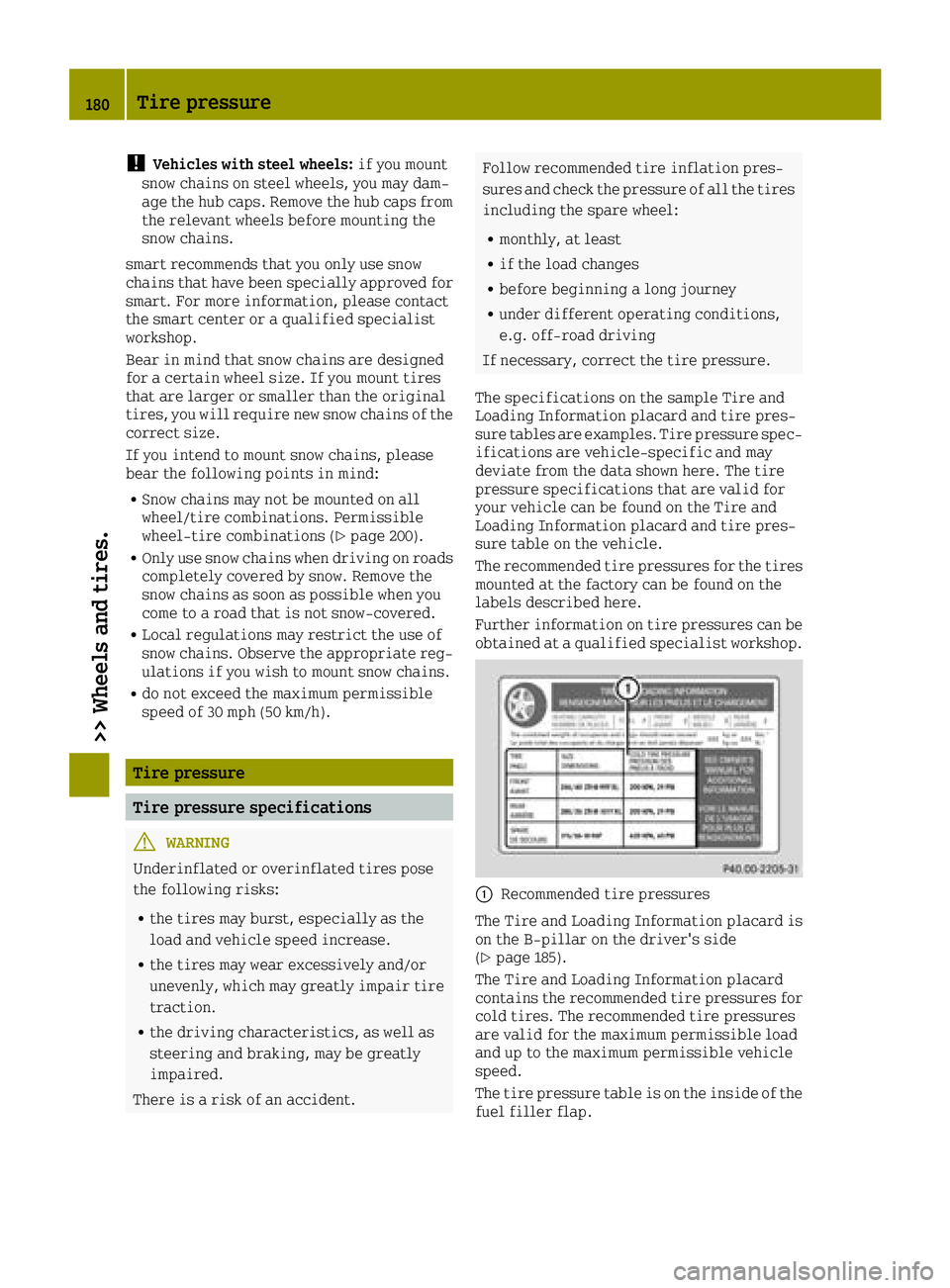
0043Recommended tire pressures
The Tire and Loading Information placard is
on the B-pillar on the driver's side
(
Ypage 185).
The Tire and Loading Information placard
contains the recommended tire pressures for
cold tires. The recommended tire pressures
are valid for the maximum permissible load
and up to the maximum permissible vehicle
speed.
The tire pressure table is on the inside of the
fuel filler flap.
180Tire pressure
>> Wheels and tires.
Page 198 of 214
Tread
The part of the tire that comes into contact
with the road.
Bead
The tire bead ensures that the tire sits
securely on the wheel. There are several steel
wires in the bead to prevent the tire from
coming loose from the wheel rim.
Sidewall
The part of the tire between the tread and the
bead.
Weight of optional extras
The combined weight of those optional extras
that weigh more than the replaced standard
parts and more than 5 lbs (2.3 kilograms).
These optional extras, such as high-perform-
ance brakes, level control, a roof rack or a
high-performance battery, are not included
in the curb weight and the weight of the
accessories.
TIN (Tire Identification Number)
This is a unique identifier which can be used
by a tire manufacturer to identify tires, for
example for a product recall, and thus iden-
tify the purchasers. The TIN is made up of the manufacturer's identity code, tire size, tire
type code and the manufacturing date.
Load bearing index
The load bearing index (also load index) is a
code that contains the maximum load bearing
capacity of a tire.
Traction
Traction is the result of friction between the
tires and the road surface.
Treadwear indicators
Narrow bars (tread wear bars) that are dis-
tributed over the tire tread. If the tire tread
is level with the bars, the wear limit of 00CDin
(1.6 mm) has been reached.
Occupant distribution
The distribution of occupants in a vehicle at
their designated seating positions.
Total load limit
Nominal load and luggage load plus 68 kg
(150 lbs) multiplied by the number of seats in
the vehicle.
Changing a wheel
Flat tire
You can find information on what to do in the
event of a flat tire in the "Flat tire" section
(
Ypage 161).
Rotating the wheels
GWARNING
Never interchange the front and rear wheels
as they have different dimensions, e.g.
size, wheel offset etc. Otherwise, there
could be a negative effect on the road hold- ing and you could endanger yourself or oth-
ers.
!On vehicles equipped with a tire pressure
monitor, electronic components are loca-
ted in the wheel.
Tire-mounting tools should not be used
near the valve. This could damage the elec-
tronic components.
Only have tires changed at a qualified spe-
cialist workshop.
Various types of steel wheel can be fitted on
your vehicle. Some steel wheels have a red
mark in the hub cap area. The hub cap has to be
removed to see the red mark, see "Raising the
vehicle" in the "Wheel change" section
(
Ypage 197). When changing the wheels,
always fit wheels of the same type on all axles.
Always pay attention to the instructions and
safety notes when changing a wheel
(
Ypage 196).
The wear patterns on the front and rear tires
differ, depending on the operating condi-
tions. Front tires typically wear more on the
shoulders and the rear tires in the center.
Clean the contact surfaces of the wheel and
the brake disc thoroughly every time a wheel
is rotated. Check the tire pressure and reac-
tivate the tire pressure monitor if necessary.
196Changing a wheel
>> Wheels and tires.
Page 199 of 214
Direction of rotation
Tires with a specified direction of rotation
have additional benefits, e.g. if there is a
risk of hydroplaning. These advantages can
only be gained if the tires are fitted corre-
sponding to the direction of rotation.
An arrow on the sidewall of the tire indicates
its correct direction of rotation.
Storing wheels
Store wheels that are not being used in a cool,
dry and preferably dark place. Protect the
tires from oil, grease, gasoline and diesel.
Mounting a wheel
Preparing the vehicle
XMake sure that you have the appropriate
tire-changing tools. For further informa-
tion inquire at any smart center.
XStop the vehicle on solid, non-slippery and
level ground.
XApply the parking brake (Ypage 101).
XBring the front wheels into the straight-
ahead position.
XVehicles with automatic transmission:
shift the transmission to position P.
XVehicles with manual transmission:
depress the clutch pedal fully and engage
first or reverse gear.
XSwitch off the engine.
XRemove the SmartKey from the ignition
lock.
XAlso secure the vehicle against rolling
away.
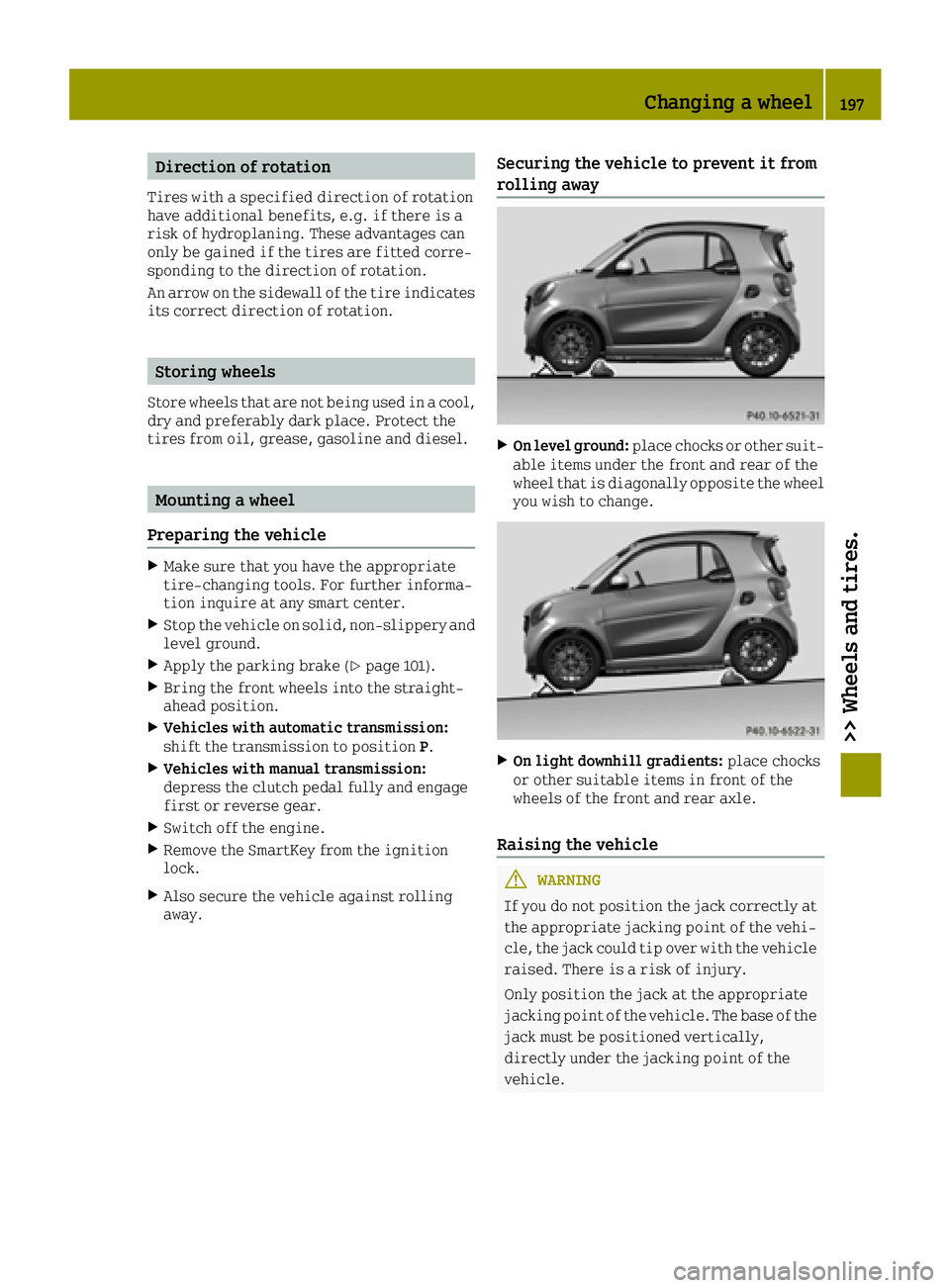
Securing the vehicle to prevent it from
rolling away
XOn level ground:place chocks or other suit-
able items under the front and rear of the
wheel that is diagonally opposite the wheel
you wish to change.
XOn light downhill gradients: place chocks
or other suitable items in front of the
wheels of the front and rear axle.
Raising the vehicle
GWARNING
If you do not position the jack correctly at
the appropriate jacking point of the vehi- cle, the jack could tip over with the vehicle
raised. There is a risk of injury.
Only position the jack at the appropriate
jacking point of the vehicle. The base of the jack must be positioned vertically,
directly under the jacking point of the
vehicle.
Changing a wheel197
>> Wheels and tires.
Z
Page 200 of 214

Observe the following when raising the vehi-
cle:
Rmake sure you have a suitable jack and
wheel wrench. If used incorrectly, the jack
could tip over with the vehicle raised.
For further information inquire at any
smart center.
Rthe jack is designed only to raise and hold
the vehicle for a short time while a wheel
is being changed. It is not suited for per-
forming maintenance work under the vehi-
cle.
Ravoid changing the wheel on uphill and
downhill slopes.
Rbefore raising the vehicle, secure it from
rolling away by applying the parking brake
and inserting wheel chocks. Never disen-
gage the parking brake while the vehicle is
raised.
Rthe jack must be placed on a firm, flat and
non-slip surface. On a loose surface, a
large, flat load-bearing underlay must be
used. On a slippery surface, a non-slip
underlay must be used, e.g. rubber mats.
Rdo not use wooden blocks or similar objects
as a jack underlay. Otherwise, the jack will
not be able to achieve its load-bearing
capacity due to the restricted height.
Rmake sure that the distance between the
underside of the tires and the ground does
not exceed 1.2 in (3 cm).
Rnever place your hands and feet under the
raised vehicle.
Rdo not lie under the vehicle.
Rdo not start the engine when the vehicle is
raised.
Rdo not open or close a door or the tailgate
while the vehicle is raised.
Rmake sure that no persons are present in the
vehicle when the vehicle is raised.
!The jack is designed exclusively for
jacking up the vehicle at the jacking
points. Otherwise, your vehicle could be
damaged.
Steel wheel with hub cap
XVehicles with steel wheels and hub caps:
carefully reach into two of the hub cap
openings and remove the hub cap.
Steel wheel with hub cap
XVehicles with steel wheels and hub caps:
remove the hub cap.
XUsing wheel wrench 0043, loosen the bolts on
the wheel you wish to change by about one
full turn. Do not unscrew the bolts com-
pletely.
198Changing a wheel
>> Wheels and tires.