service SMART FORTWO COUPE 2010 User Guide
[x] Cancel search | Manufacturer: SMART, Model Year: 2010, Model line: FORTWO COUPE, Model: SMART FORTWO COUPE 2010Pages: 216, PDF Size: 9.7 MB
Page 40 of 216
iIf the seat, including the trim cover and
cushion, needs to be serviced in any way,
take the vehicle to an authorized smart
center. Only seat accessories approved
by smart may be used.
Both driver and the passenger should
always use the 007F 007B indicator
lamp as an indication of whether or not
the passenger is properly positioned
( Y page 40).GWarning!
If the 007F 007B indicator lamp
illuminates when an adult or someone
larger than a small individual is in the
passenger seat, have the passenger re-
position himself or herself in the seat
until the 007F 007B indicator lamp
goes out.
In the event of a collision, the air bag
control unit will not allow passenger front
air bag deployment when the OCS has
classified the passenger seat occupant as
being up to or less than the weight of a
typical 12‑month‑old child in a standard
child restraint, or if the passenger seat is
sensed as being empty.
When the OCS senses that the passenger seat
occupant is classified as being up to or
less than the weight of a typical
12‑month‑old child in a standard child
restraint, the 007F 007B indicator
lamp will illuminate when the ignition is
switched on and remain illuminated,
indicating that the passenger front air bag
is deactivated.
When the OCS senses that the passenger seat
is classified as being empty, the
007F 007B indicator lamp will
illuminate and remains illuminated.
When the OCS senses that the passenger seat
occupant is classified as being heavier
than the weight of a typical 12‑month‑old
child seated in a standard child restraint
or as being a small individual (such as a
young teenager or a small adult), the
007F 007B indicator lamp will
illuminate for approximately 4 seconds
when the ignition is switched on and then,
depending on occupant weight sensor
readings from the seat, remains
illuminated or goes out.
When the 007F 007B indicator lamp is
illuminated, the passenger front air bag is
deactivated.
When the 007F 007B indicator lamp is
out and the passenger seat is occupied by
an adult or someone larger than a small
individual, the passenger front air bag is
activated.
When the OCS senses that the passenger seat
occupant is classified as an adult or
someone larger than a small individual, the
007F 007B indicator lamp will
illuminate for approximately 4 seconds
when the ignition is switched on and then
goes out, indicating that the passenger
front air bag is activated.
If the 007F 007B indicator lamp is
illuminated, the passenger front air bag is
deactivated and will not be deployed.
If the 007F 007B indicator lamp is not
illuminated, the passenger front air bag is
activated and will be deployed
R in the event of certain frontal impacts
R if impact exceeds a preset deployment
threshold
R independently of the head-thorax air
bags
If the passenger front air bag is deployed,
the rate of inflation will be influenced by
R the rate of vehicle deceleration and a
fastened or unfastened seat belt as
assessed by the air bag control unit
R the passenger’s weight category as
identified by the OCS38Occupant safety>> Safety.
451_AKB; 3; 22, en-USd2ureepe,Version: 2.11.8.12009-07-27T09:36:34+02:00 - Seite 38
Page 78 of 216
fumes are entering the vehicle while
driving, have the cause determined and
corrected immediately. If you must drive
under these conditions, drive only with at
least one window fully open at all times.
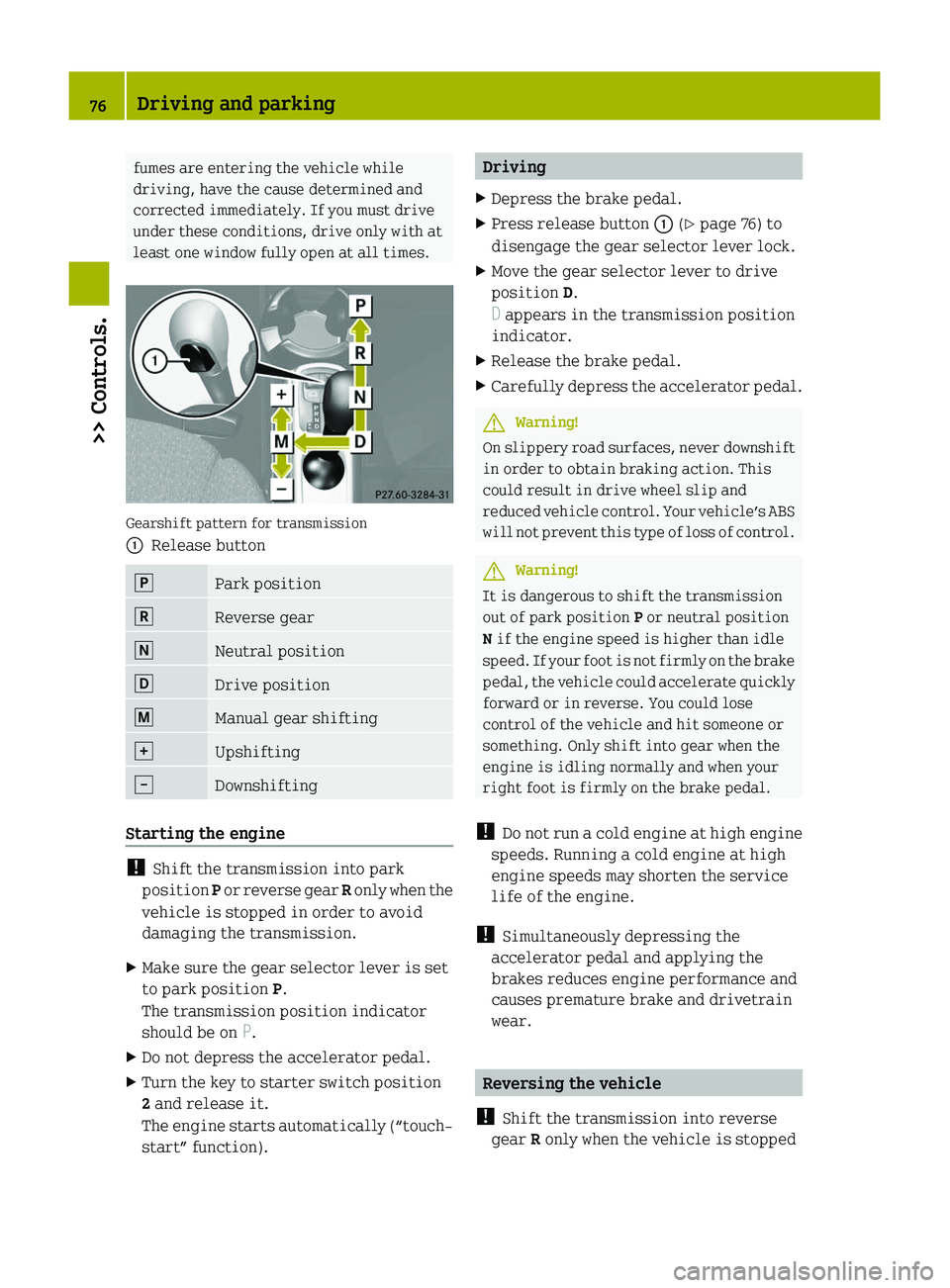
Gearshift pattern for transmission
0046Release button0060Park position0061Reverse gear005FNeutral position005EDrive position0066Manual gear shifting0067Upshifting0044Downshifting
Starting the engine
! Shift the transmission into park
position P or reverse gear R only when the
vehicle is stopped in order to avoid
damaging the transmission.
XMake sure the gear selector lever is set
to park position P.
The transmission position indicator
should be on P.XDo not depress the accelerator pedal.XTurn the key to starter switch position
2 and release it.
The engine starts automatically (“touch-
start” function).DrivingXDepress the brake pedal.XPress release button 0046 (Y page 76) to
disengage the gear selector lever lock.XMove the gear selector lever to drive
position D.
D appears in the transmission position
indicator.XRelease the brake pedal.XCarefully depress the accelerator pedal.GWarning!
On slippery road surfaces, never downshift
in order to obtain braking action. This
could result in drive wheel slip and
reduced vehicle control. Your vehicle’s ABS
will not prevent this type of loss of control.
GWarning!
It is dangerous to shift the transmission
out of park position P or neutral position
N if the engine speed is higher than idle
speed. If your foot is not firmly on the brake
pedal, the vehicle could accelerate quickly
forward or in reverse. You could lose
control of the vehicle and hit someone or
something. Only shift into gear when the
engine is idling normally and when your
right foot is firmly on the brake pedal.
! Do not run a cold engine at high engine
speeds. Running a cold engine at high
engine speeds may shorten the service
life of the engine.
! Simultaneously depressing the
accelerator pedal and applying the
brakes reduces engine performance and
causes premature brake and drivetrain
wear.
Reversing the vehicle
! Shift the transmission into reverse
gear R only when the vehicle is stopped
76Driving and parking>> Controls.
451_AKB; 3; 22, en-USd2ureepe,Version: 2.11.8.12009-07-27T09:36:34+02:00 - Seite 76
Page 86 of 216

XRestart the engine
Three bars instead of P appear in the
multifunction display.XWait at least 30 seconds.
The transmission is taught in.
When teaching-in was successful:
P appears in the multifunction display
again and normal transmission operating
is restored.
XContinue to drive.
After an unsuccessful teaching-in:
Three bars instead of P appear in the
multifunction display.
XDo not continue to drive.XTurn off the engine.XEngage the parking brake when leaving
the vehicle.XContact Roadside Assistance or an
authorized smart center.
Instrument cluster
Multifunction display
The following displays and indicators
appear in the multifunction display:
Multifunction display (U.S. vehicles)
0046Main odometer display, or when active,
days or distance to next maintenance
service0047Transmission position indicator008ADigital clock0088Outside temperature display0086Fuel level display0087Status indicator with:• Trip odometer display• Reserve fuel indicator006ESymbol for type of maintenance service
Multifunction display (Canada vehicles)
0046Main odometer display, or when active,
days or distance to next maintenance
service0047Transmission position indicator008ADigital clock0088Outside temperature display0086Freeze warning0087Fuel level display006EStatus indicator with:• Trip odometer display• Reserve fuel indicator006FSymbol for type of maintenance serviceGWarning!
No messages will be displayed if either the
instrument cluster or the multifunction
display is inoperative.
As a result, you will not be able to see
information about your driving
conditions, such as speed, outside
temperature, or warning/indicator lamps.
Driving characteristics may be impaired.
If you must continue to drive, please do so
with added caution. Visit an authorized
smart center as soon as possible.
84Instrument cluster>> Controls.
451_AKB; 3; 22, en-USd2ureepe,Version: 2.11.8.12009-07-27T09:36:34+02:00 - Seite 84
Page 87 of 216
Multifunction display illumination
The multifunction display illumination
comes on when the starter switch is in
position 1. It goes out after approximately
30 seconds when the starter switch is in
position 0.
For adjusting the multifunction display
illumination, see “Adjusting instrument
cluster illumination” ( Y page 89).
Main odometer display
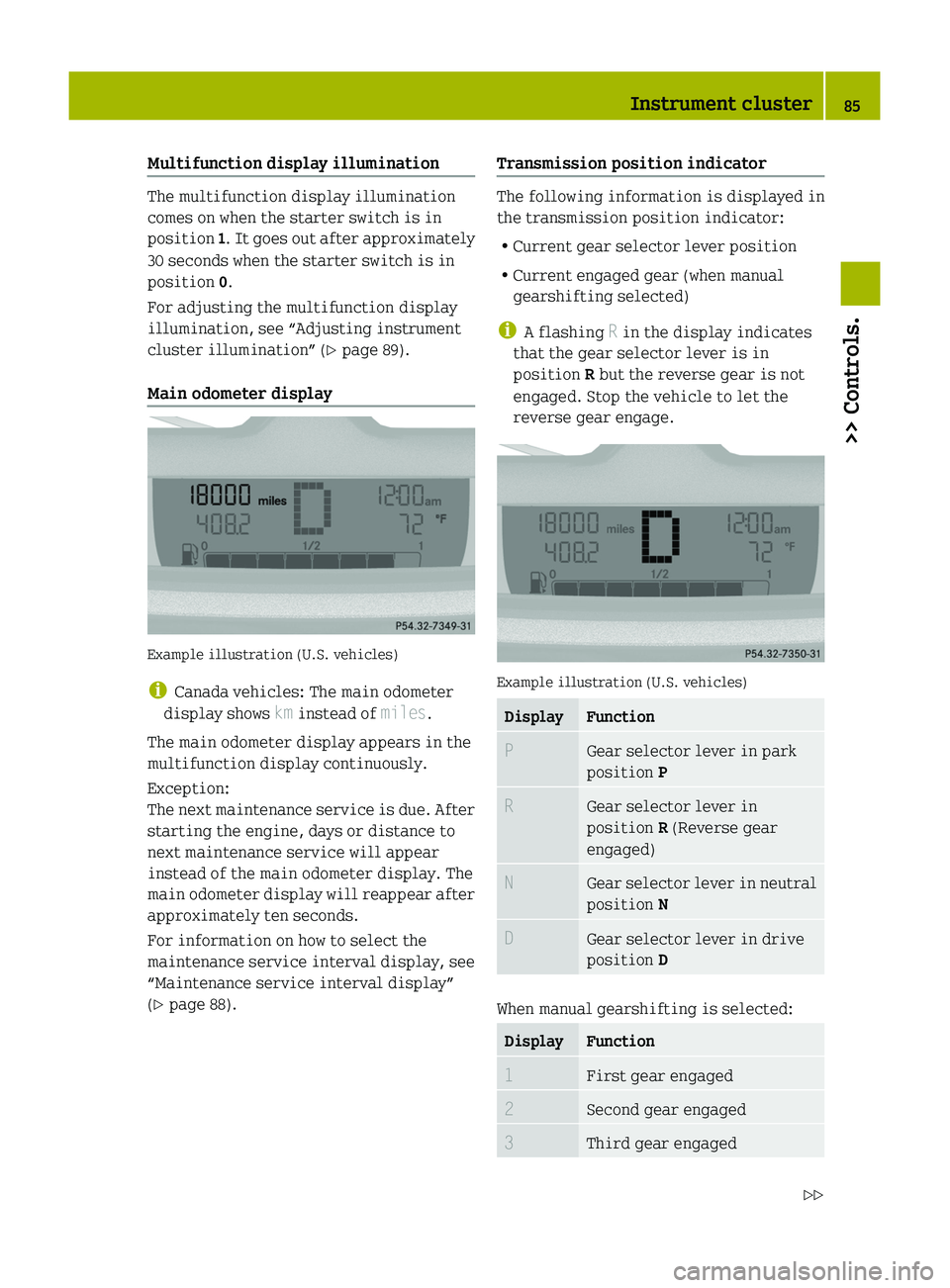
Example illustration (U.S. vehicles)
i Canada vehicles: The main odometer
display shows km instead of miles.
The main odometer display appears in the
multifunction display continuously.
Exception:
The next maintenance service is due. After
starting the engine, days or distance to
next maintenance service will appear
instead of the main odometer display. The
main odometer display will reappear after
approximately ten seconds.
For information on how to select the
maintenance service interval display, see
“Maintenance service interval display”
( Y page 88).
Transmission position indicator
The following information is displayed in
the transmission position indicator:
R Current gear selector lever position
R Current engaged gear (when manual
gearshifting selected)
i A flashing R in the display indicates
that the gear selector lever is in
position R but the reverse gear is not
engaged. Stop the vehicle to let the
reverse gear engage.
Example illustration (U.S. vehicles)
DisplayFunctionPGear selector lever in park
position PRGear selector lever in
position R (Reverse gear
engaged)NGear selector lever in neutral
position NDGear selector lever in drive
position D
When manual gearshifting is selected:
DisplayFunction1First gear engaged2Second gear engaged3Third gear engagedInstrument cluster85>> Controls.451_AKB; 3; 22, en-USd2ureepe,Version: 2.11.8.12009-07-27T09:36:34+02:00 - Seite 85Z
Page 89 of 216

Indicated temperatures just above the
freezing point do not guarantee that the
road surface is free of ice. The road may
still be icy, especially in wooded areas or
on bridges. Your vehicle could start to skid
if you do not adjust your driving style
accordingly.
Therefore, always adjust your driving style
to the prevailing road and weather
conditions.
Freeze warning (Canada vehicles only)
When the outside temperature falls below
3 ¥ , the multifunction display makes you
aware of the fact that the road may be icy.
An additional freeze warning, i.e. an ice
crystal symbol, in the multifunction
display flashes. After 60 seconds, the
freeze warning stops flashing but
continues to be displayed. When the
outside temperature rises above 3 ¥, the
freeze warning goes out.
Fuel level display
Example illustration (U.S. vehicles)
The fuel level display shows the tank’s fuel
level with the aid of eight segments. The
number of dark segments indicates the fuel
level in the tank. If all eight segments are
dark, the tank is full.
You are driving on reserve fuel if there are
no more than 1.0 US gal (3.78 l) of fuel in the
tank.
If this occurs,
R the fuel pump symbol in the fuel level
display flashes
R the reserve fuel indicator shows the fuel
level in the tank in 0.1 US gal (0.5 l)
increments
For selecting the reserve fuel indicator to
be displayed in the status indicator, see
“Reserve fuel indicator” ( Y page 88).
Selecting display for status indicator
You can select the information to be
displayed in the status indicator:
R Trip odometer display ( Y page 88)
R Maintenance service interval display
( Y page 88)
R Reserve fuel indicator ( Y page 88)
0046Selecting display for status indicator,
setting the clock, activating
maintenance service interval display0047Setting the clock, adjusting instrument
cluster illuminationInstrument cluster87>> Controls.451_AKB; 3; 22, en-USd2ureepe,Version: 2.11.8.12009-07-27T09:36:34+02:00 - Seite 87Z
Page 90 of 216

Trip odometer display
Example illustration (U.S. vehicles)
XSelecting trip odometer display: Press
left button 0046 (Y page 87) repeatedly
until the trip odometer display appears
in the status indicator.XResetting trip odometer display: Press
and hold left button 0046 (Y page 87) until
the value is set to 0.
Maintenance service interval display
Example illustration (U.S. vehicles)
i Canada vehicles: The maintenance
service interval display shows km
instead of miles.
The maintenance service interval display
will notify you approximately one month
before the next maintenance service is
due.
The following information will be
displayed after starting the engine:
R Days or distance to next maintenance
service
This information will be displayed
instead of the main odometer display.
The main odometer display will reappear
after approximately ten seconds
( Y page 85).
R Type of service that is due
This information will be displayed in
the status indicator.XStart the engine.XSelecting maintenance service interval
display: Press left button 0046 (Y page 87)
repeatedly until the maintenance
service interval display appears in the
status indicator.
Depending on the type of maintenance
service that is due, symbol ¬ or } is
displayed.XClearing maintenance service interval
display: Press left button 0046 (Y page 87)
once.
The maintenance service interval
display is cleared.XActivating maintenance service
interval display: Press left button 0046
( Y page 87) twice in quick succession.
Reserve fuel indicator
Example illustration (U.S. vehicles)
88Instrument cluster>> Controls.
451_AKB; 3; 22, en-USd2ureepe,Version: 2.11.8.12009-07-27T09:36:34+02:00 - Seite 88
Page 109 of 216
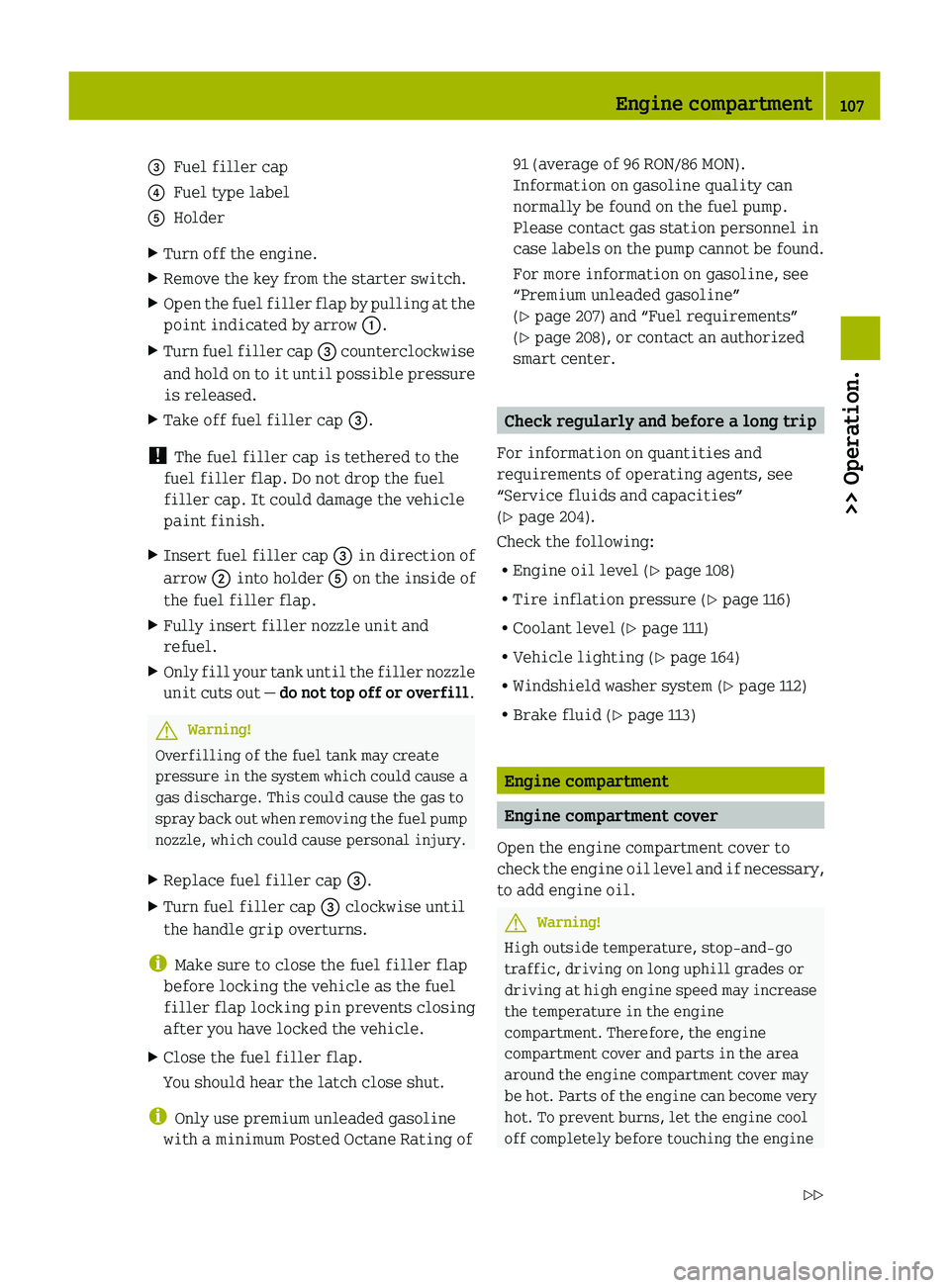
008AFuel filler cap0088Fuel type label0086HolderXTurn off the engine.XRemove the key from the starter switch.XOpen the fuel filler flap by pulling at the
point indicated by arrow 0046.XTurn fuel filler cap 008A counterclockwise
and hold on to it until possible pressure
is released.XTake off fuel filler cap 008A.
!
The fuel filler cap is tethered to the
fuel filler flap. Do not drop the fuel
filler cap. It could damage the vehicle
paint finish.
XInsert fuel filler cap 008A in direction of
arrow 0047 into holder 0086 on the inside of
the fuel filler flap.XFully insert filler nozzle unit and
refuel.XOnly fill your tank until the filler nozzle
unit cuts out — do not top off or overfill .GWarning!
Overfilling of the fuel tank may create
pressure in the system which could cause a
gas discharge. This could cause the gas to
spray back out when removing the fuel pump
nozzle, which could cause personal injury.
XReplace fuel filler cap 008A.XTurn fuel filler cap 008A clockwise until
the handle grip overturns.
i Make sure to close the fuel filler flap
before locking the vehicle as the fuel
filler flap locking pin prevents closing
after you have locked the vehicle.
XClose the fuel filler flap.
You should hear the latch close shut.
i Only use premium unleaded gasoline
with a minimum Posted Octane Rating of
91 (average of 96 RON/86 MON).
Information on gasoline quality can
normally be found on the fuel pump.
Please contact gas station personnel in
case labels on the pump cannot be found.
For more information on gasoline, see
“Premium unleaded gasoline”
( Y page 207) and “Fuel requirements”
( Y page 208), or contact an authorized
smart center.
Check regularly and before a long trip
For information on quantities and
requirements of operating agents, see
“Service fluids and capacities”
( Y page 204).
Check the following:
R Engine oil level ( Y page 108)
R Tire inflation pressure ( Y page 116)
R Coolant level ( Y page 111)
R Vehicle lighting ( Y page 164)
R Windshield washer system ( Y page 112)
R Brake fluid ( Y page 113)
Engine compartment
Engine compartment cover
Open the engine compartment cover to
check the engine oil level and if necessary,
to add engine oil.
GWarning!
High outside temperature, stop-and-go
traffic, driving on long uphill grades or
driving at high engine speed may increase
the temperature in the engine
compartment. Therefore, the engine
compartment cover and parts in the area
around the engine compartment cover may
be hot. Parts of the engine can become very
hot. To prevent burns, let the engine cool
off completely before touching the engine
Engine compartment107>> Operation.451_AKB; 3; 22, en-USd2ureepe,Version: 2.11.8.12009-07-27T09:36:34+02:00 - Seite 107Z
Page 112 of 216
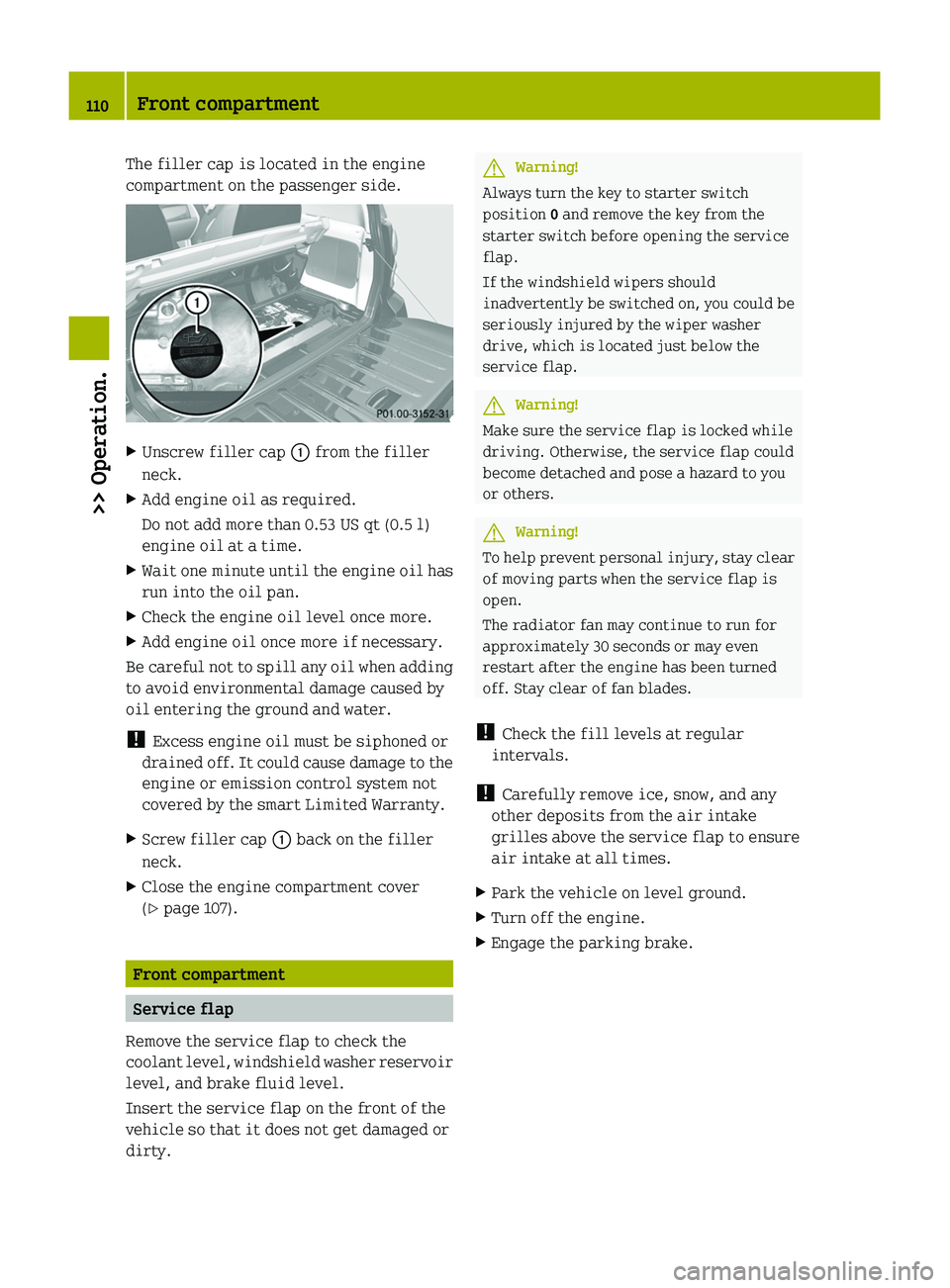
The filler cap is located in the engine
compartment on the passenger side.XUnscrew filler cap 0046 from the filler
neck.XAdd engine oil as required.
Do not add more than 0.53 US qt (0.5 l)
engine oil at a time.XWait one minute until the engine oil has
run into the oil pan.XCheck the engine oil level once more.XAdd engine oil once more if necessary.
Be careful not to spill any oil when adding
to avoid environmental damage caused by
oil entering the ground and water.
! Excess engine oil must be siphoned or
drained off. It could cause damage to the
engine or emission control system not
covered by the smart Limited Warranty.
XScrew filler cap 0046 back on the filler
neck.XClose the engine compartment cover
( Y page 107).
Front compartment
Service flap
Remove the service flap to check the
coolant level, windshield washer reservoir
level, and brake fluid level.
Insert the service flap on the front of the
vehicle so that it does not get damaged or
dirty.
GWarning!
Always turn the key to starter switch
position 0 and remove the key from the
starter switch before opening the service
flap.
If the windshield wipers should
inadvertently be switched on, you could be
seriously injured by the wiper washer
drive, which is located just below the
service flap.
GWarning!
Make sure the service flap is locked while
driving. Otherwise, the service flap could
become detached and pose a hazard to you
or others.
GWarning!
To help prevent personal injury, stay clear
of moving parts when the service flap is
open.
The radiator fan may continue to run for
approximately 30 seconds or may even
restart after the engine has been turned
off. Stay clear of fan blades.
! Check the fill levels at regular
intervals.
! Carefully remove ice, snow, and any
other deposits from the air intake
grilles above the service flap to ensure
air intake at all times.
XPark the vehicle on level ground.XTurn off the engine.XEngage the parking brake.110Front compartment>> Operation.
451_AKB; 3; 22, en-USd2ureepe,Version: 2.11.8.12009-07-27T09:36:34+02:00 - Seite 110
Page 113 of 216
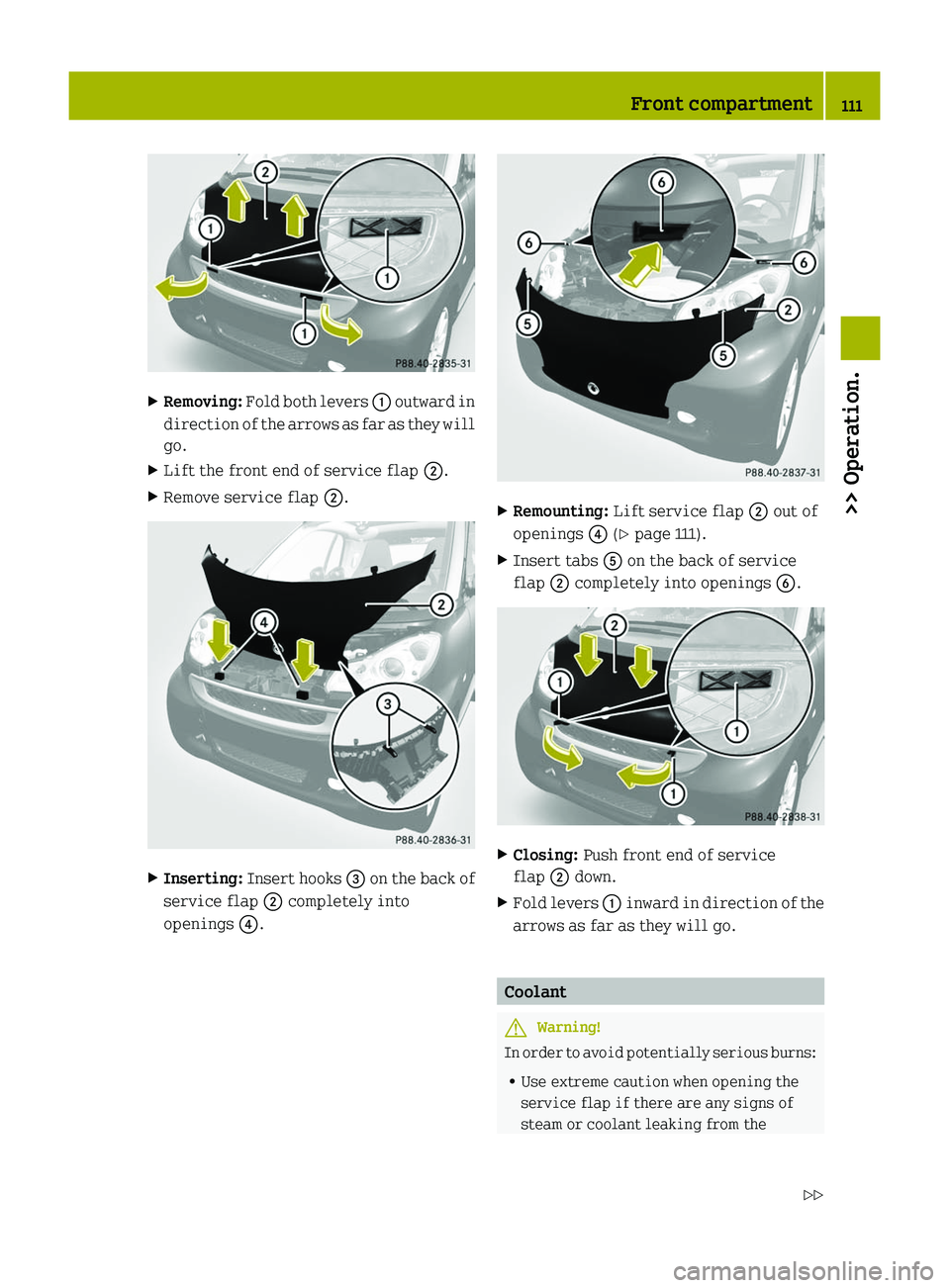
XRemoving: Fold both levers 0046 outward in
direction of the arrows as far as they will
go.XLift the front end of service flap 0047.XRemove service flap 0047.XInserting: Insert hooks 008A on the back of
service flap 0047 completely into
openings 0088.XRemounting: Lift service flap 0047 out of
openings 0088 (Y page 111).XInsert tabs 0086 on the back of service
flap 0047 completely into openings 0087.XClosing: Push front end of service
flap 0047 down.XFold levers 0046 inward in direction of the
arrows as far as they will go.
Coolant
GWarning!
In order to avoid potentially serious burns:
R Use extreme caution when opening the
service flap if there are any signs of
steam or coolant leaking from the
Front compartment111>> Operation.451_AKB; 3; 22, en-USd2ureepe,Version: 2.11.8.12009-07-27T09:36:34+02:00 - Seite 111Z
Page 114 of 216
cooling system, or if the coolant
temperature warning lamp 00AE in the
instrument cluster indicates that the
coolant is overheated.
R Do not remove the pressure cap on coolant
reservoir if coolant temperature is
above 158 ¦ (70 ¥). Allow engine to cool
down before removing cap. The coolant
reservoir contains hot fluid and is under
pressure.
R Using a rag, slowly turn the cap
approximately 1
/ 2 turn to relieve excess
pressure. If opened immediately,
scalding hot fluid and steam will be
blown out under pressure.
The engine coolant is a mixture of water
and anticorrosion/antifreeze. To check the
coolant level the vehicle must be parked on
level ground and the engine must have
cooled down. For more information, see
“Coolants” ( Y page 209).
Checking coolant levelXRemove the service flap and insert it on
the front of the vehicle ( Y page 110).
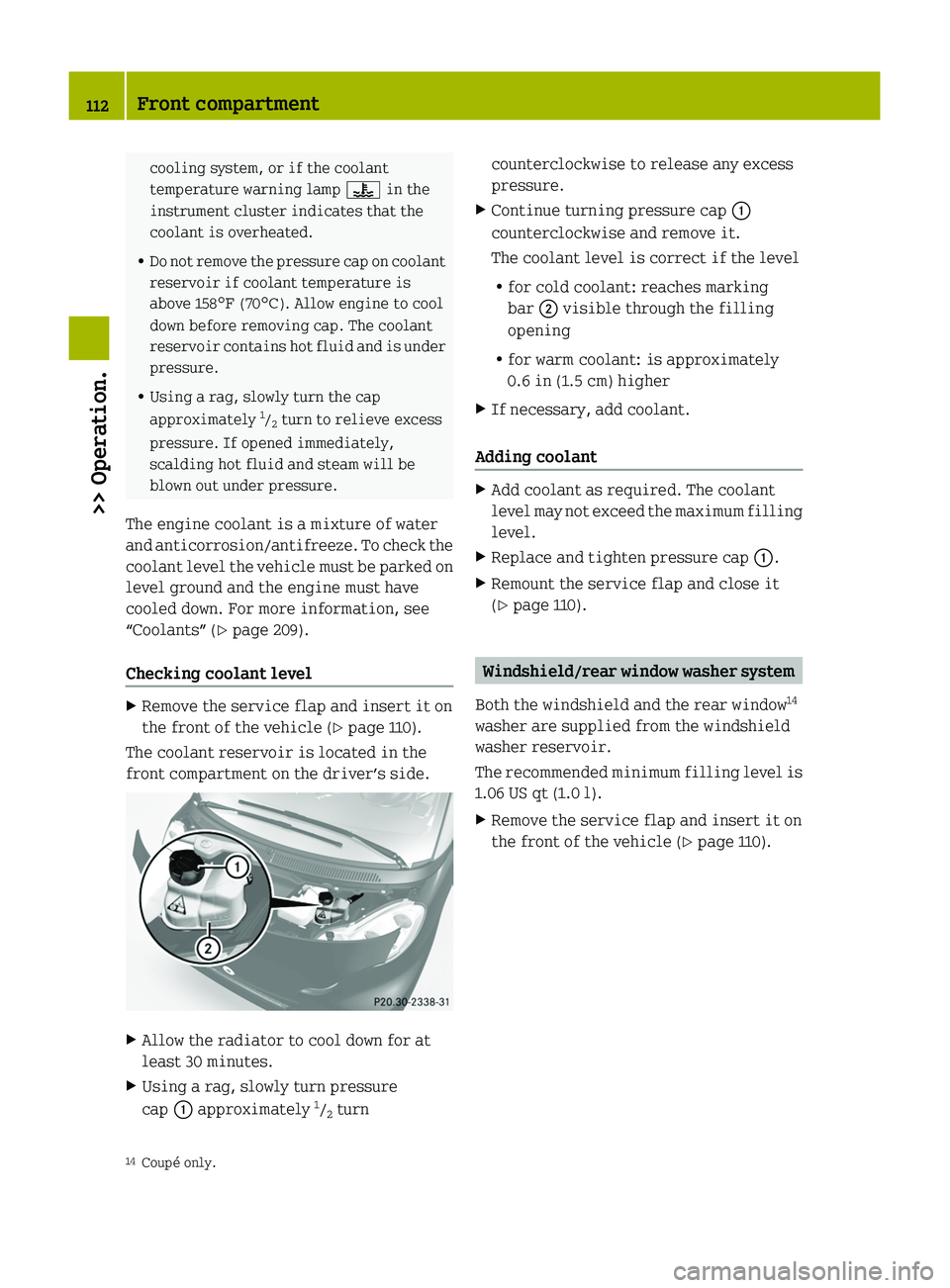
The coolant reservoir is located in the
front compartment on the driver’s side.
XAllow the radiator to cool down for at
least 30 minutes.XUsing a rag, slowly turn pressure
cap 0046 approximately 1
/ 2 turncounterclockwise to release any excess
pressure.XContinue turning pressure cap 0046
counterclockwise and remove it.
The coolant level is correct if the level
R for cold coolant: reaches marking
bar 0047 visible through the filling
opening
R for warm coolant: is approximately
0.6 in (1.5 cm) higherXIf necessary, add coolant.
Adding coolant
XAdd coolant as required. The coolant
level may not exceed the maximum filling
level.XReplace and tighten pressure cap 0046.XRemount the service flap and close it
( Y page 110).
Windshield/rear window washer system
Both the windshield and the rear window 14
washer are supplied from the windshield
washer reservoir.
The recommended minimum filling level is
1.06 US qt (1.0 l).
XRemove the service flap and insert it on
the front of the vehicle ( Y page 110).14
Coupé only.112Front compartment>> Operation.
451_AKB; 3; 22, en-USd2ureepe,Version: 2.11.8.12009-07-27T09:36:34+02:00 - Seite 112