transmission SMART FORTWO COUPE 2012 User Guide
[x] Cancel search | Manufacturer: SMART, Model Year: 2012, Model line: FORTWO COUPE, Model: SMART FORTWO COUPE 2012Pages: 228, PDF Size: 12.76 MB
Page 85 of 228
control of the vehicle and hit someone or
something. Only shift into gear when the
engine is idling normally and when your
right foot is firmly on the brake pedal.
Shifting procedure
The transmission selects individual gears
automatically, depending on:
R the gear selector lever position D
(Y page 83)
R the position of the accelerator pedal
(Y page 84)
R the vehicle speed
R uphill or downhill grades
Press release button : (Y page 82) to
disengage the gear selector lever lock
when moving the gear selector lever from
R P to R, N, or D
R R to P
R N to R or P
! Allow the engine to warm up under low
load use. Do not place full load on the
engine until the operating temperature
has been reached.
Shift into reverse gear R or parking
position P only when the vehicle is
stopped.
Avoid spinning of a drive wheel for an
extended period when driving off on
slippery road surfaces. Otherwise, the
drivetrain could be damaged, which is
not covered by the smart Limited
Warranty.
With manual gearshifting M selected
(Y page 84), you can use the gear selector
lever or steering wheel gearshift control
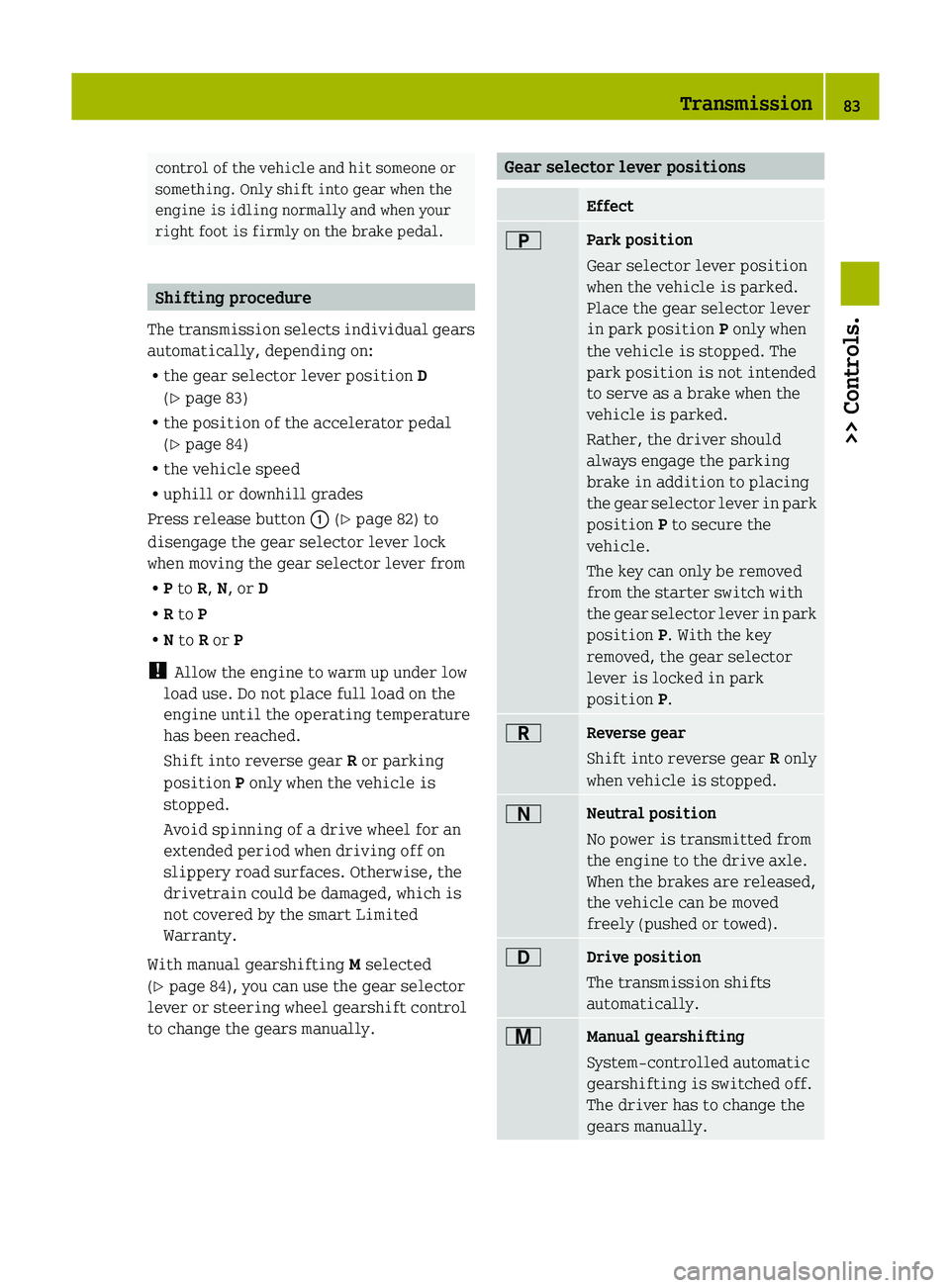
to change the gears manually. Gear selector lever positions
Effect
B
Park position
Gear selector lever position
when the vehicle is parked.
Place the gear selector lever
in park position
P only when
the vehicle is stopped. The
park position is not intended
to serve as a brake when the
vehicle is parked.
Rather, the driver should
always engage the parking
brake in addition to placing
the
gear selector lever in park
position P to secure the
vehicle.
The key can only be removed
from the starter switch with
the gear selector lever in park
position P. With the key
removed, the gear selector
lever is locked in park
position P. C
Reverse gear
Shift into reverse gear
R only
when vehicle is stopped. A
Neutral position
No power is transmitted from
the engine to the drive axle.
When the brakes are released,
the vehicle can be moved
freely (pushed or towed).
7
Drive position
The transmission shifts
automatically.
x
Manual gearshifting
System-controlled automatic
gearshifting is switched off.
The driver has to change the
gears manually. Transmission
83
>> Controls. Z
Page 86 of 228
The current gear selector lever position
appears in the transmission position
indicator (Y page 88).
Driving tips
Accelerator pedal position Your driving style influences the
transmission’s shifting behavior:
Less throttle earlier upshifting
More throttle later upshifting
Kickdown
Use kickdown when you want maximum
acceleration.
X
Press the accelerator pedal past the
point of resistance.
Depending on the engine speed the
transmission shifts into a lower gear.
X Ease up on the accelerator pedal when you
have reached the desired speed.
The transmission shifts up again.
Stopping When you stop briefly, e.g. at traffic
lights:
X
Leave the transmission in gear.
X Hold the vehicle with the brake.
When you stop for a longer period with the
engine idling and/or on a hill:
X Engage the parking brake.
X Move the gear selector lever to park
position P.
Working on the vehicle G
WARNING
When working on the vehicle, engage the
parking brake and move the gear selector
lever to park position P. Otherwise the
vehicle could roll away which could result in an accident and/or serious personal
injury.
Driving on uphill grades Your vehicle has a hill‑start assist system.
G
WARNING
The hill-start assist system is not
designed to function as a parking brake and
does not prevent the vehicle from moving
when parked on an incline.
Always engage the parking brake in
addition to shifting to park position P.
On uphill grades the hill‑start assist
system maintains the pressure in the brake
system for approximately one second after
you have released the brake pedal.
Therefore, you can start off smoothly
without the vehicle moving immediately
after releasing the brake pedal.
X Release the brake pedal.
X Apply sufficient pressure to the
accelerator pedal.
! After approximately one second, the
hill‑start assist system stops braking
the vehicle, which then can roll
backwards. If you open the driver’s door
within this time, the hill‑start assist
system is deactivated and a warning
signal sounds.
i The
hill‑start assist system is inactive
if you start off with the parking brake
engaged. Manual gearshifting
With manual gearshifting M selected,
system-controlled automatic gearshifting
is switched off and you need to change the
gears by upshifting or downshifting
manually using the gear selector lever or
the steering wheel gearshift control 10
.
10 Model passion and BRABUS only. 84
Transmission
>> Controls.
Page 87 of 228
!
Allow the engine to warm up under low
load use. Do not place full load on the
engine until the operating temperature
has been reached.
Shift into reverse gear R or parking
position P only when the vehicle is
stopped.
Avoid spinning of a drive wheel for an
extended period when driving off on
slippery road surfaces. Otherwise, the
drivetrain could be damaged, which is
not covered by the smart Limited
Warranty. Activating manual gearshifting
X
Move the gear selector lever to drive
position D (Y page 82).
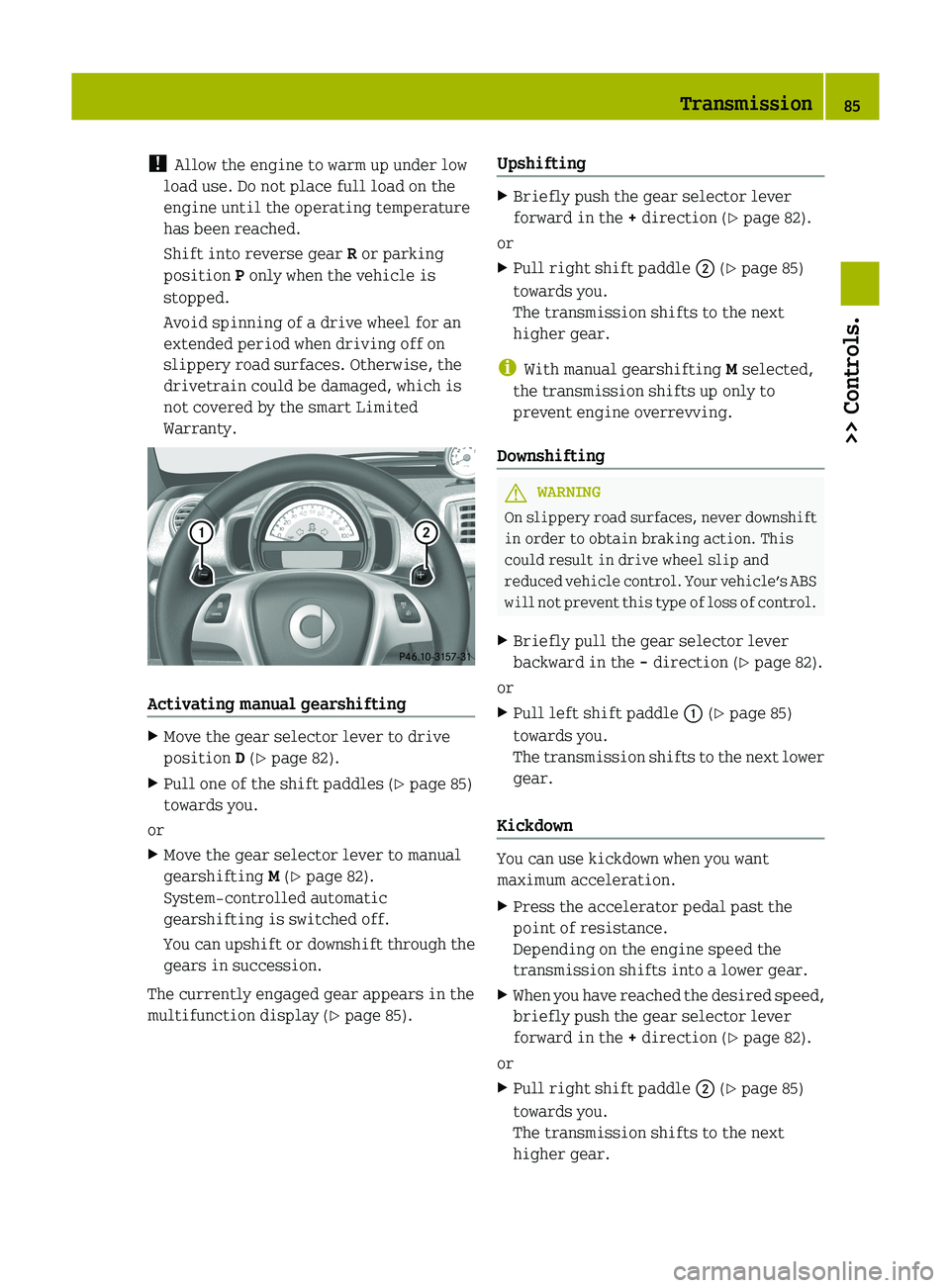
X Pull one of the shift paddles (Y page 85)
towards you.
or
X Move the gear selector lever to manual
gearshifting M (Y page 82).
System-controlled automatic
gearshifting is switched off.
You
can upshift or downshift through the
gears in succession.
The currently engaged gear appears in the
multifunction display ( Y page 85).Upshifting X
Briefly push the gear selector lever
forward in the + direction (Y page 82).
or
X Pull right shift paddle ; (Y page 85)
towards you.
The transmission shifts to the next
higher gear.
i With manual gearshifting M selected,
the transmission shifts up only to
prevent engine overrevving.
Downshifting G
WARNING
On slippery road surfaces, never downshift
in order to obtain braking action. This
could result in drive wheel slip and
reduced
vehicle control. Your vehicle’s ABS
will not prevent this type of loss of control.
X Briefly pull the gear selector lever
backward in the - direction (Y page 82).
or
X Pull left shift paddle : (Y page 85)
towards you.
The
transmission shifts to the next lower
gear.
Kickdown You can use kickdown when you want
maximum acceleration.
X
Press the accelerator pedal past the
point of resistance.
Depending on the engine speed the
transmission shifts into a lower gear.
X When you have reached the desired speed,
briefly push the gear selector lever
forward in the + direction (Y page 82).
or
X Pull right shift paddle ; (Y page 85)
towards you.
The transmission shifts to the next
higher gear. Transmission
85
>> Controls. Z
Page 88 of 228
Deactivating manual gearshifting
X
With drive position D selected: Pull and
hold right shift paddle ; (Y page 85)
towards you for longer than two seconds.
or
X With manual gearshifting M selected:
Move the gear selector lever to drive
position D (Y page 82).
System-controlled automatic
gearshifting is switched on again. Emergency operation (limp-home
mode)
In this mode only a certain gear or a
certain
gear combination can be selected.
This mode is triggered in case of
transmission malfunctions and enables you
driving to the nearest workshop such as a
smart center.
If vehicle acceleration becomes less
responsive or sluggish or the transmission
no longer shifts, the transmission is most
likely operating in limp-home (emergency
operation) mode. The transmission
position indicator flashes and the ¬
symbol appears in the multifunction
display.
Driving in limp-home mode:
X Move the gear selector lever to drive
position D (Y page 82).
X Continue to drive.
X Have the transmission checked at an
authorized smart center as soon as
possible.
i It is possible that a gear combination
including the reverse gear can not be
selected. Keep in mind when parking,
that reversing the vehicle might be
impossible.
In case of a minor transmission
malfunction,
it might be possible to teach-
in the transmission in order to restore the
normal transmission mode. i
If the attempt to teach-in the
transmission fails, you cannot continue
to drive. Therefore we strongly
recommend that you have the
transmission taught-in at a qualified
workshop or at an authorized smart
center.
Teaching-in the transmission system:
X Stop the vehicle in a safe location.
X Move the gear selector lever to park
position P.
X Turn off the engine.
X Wait at least 30 seconds before
restarting.
X Press the brake pedal.
X Restart the engine
Three bars instead of P appear in the
multifunction display.
X Wait at least 30 seconds.
The transmission is taught in.
When teaching-in was successful: P
appears
in the multifunction display again
and normal transmission operating is
restored.
X Continue to drive.
After an unsuccessful teaching-in: Three
bars instead of P appear in the
multifunction display.
X Do not continue to drive.
X Turn off the engine.
X Engage the parking brake when leaving
the vehicle.
X Contact Roadside Assistance or an
authorized smart center. Instrument cluster
Multifunction display
The following displays and indicators
appear in the multifunction display: 86
Instrument cluster
>> Controls.
Page 89 of 228
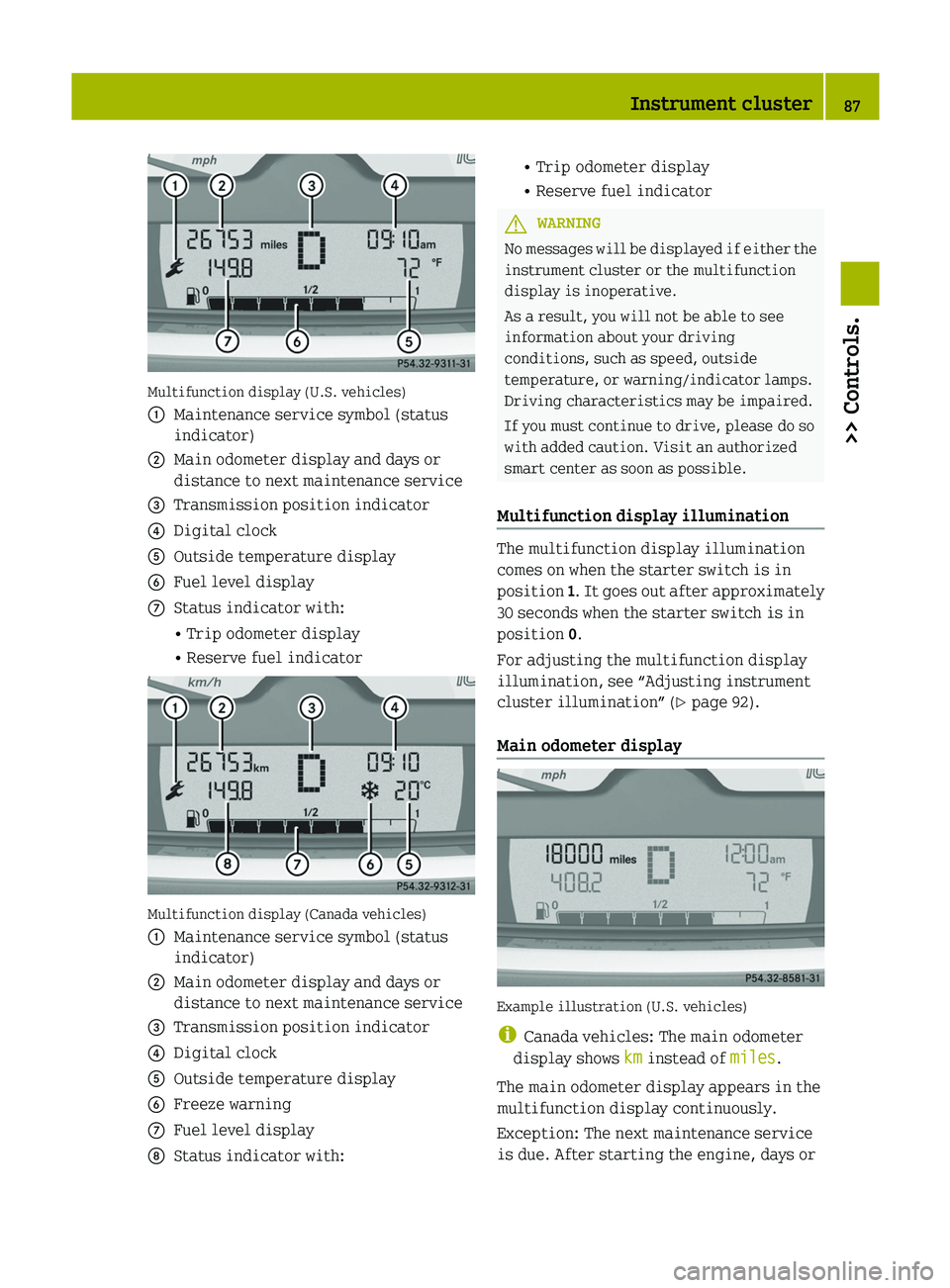
Multifunction display (U.S. vehicles)
:
Maintenance service symbol (status
indicator)
; Main odometer display and days or
distance to next maintenance service
= Transmission position indicator
? Digital clock
A Outside temperature display
B Fuel level display
C Status indicator with:
• Trip odometer display
• Reserve fuel indicator Multifunction display (Canada vehicles)
:
Maintenance service symbol (status
indicator)
; Main odometer display and days or
distance to next maintenance service
= Transmission position indicator
? Digital clock
A Outside temperature display
B Freeze warning
C Fuel level display
D Status indicator with: • Trip odometer display
• Reserve fuel indicator
G
WARNING
No messages will be displayed if either the
instrument cluster or the multifunction
display is inoperative.
As a result, you will not be able to see
information about your driving
conditions, such as speed, outside
temperature, or warning/indicator lamps.
Driving characteristics may be impaired.
If you must continue to drive, please do so
with added caution. Visit an authorized
smart center as soon as possible.
Multifunction display illumination The multifunction display illumination
comes on when the starter switch is in
position
1.
It goes out after approximately
30 seconds when the starter switch is in
position 0.
For adjusting the multifunction display
illumination, see “Adjusting instrument
cluster illumination” ( Y page 92).
Main odometer display Example illustration (U.S. vehicles)
i
Canada vehicles: The main odometer
display shows km instead of miles.
The main odometer display appears in the
multifunction display continuously.
Exception: The next maintenance service
is due. After starting the engine, days or Instrument cluster
87
>> Controls. Z
Page 90 of 228
distance to next maintenance service will
appear instead of the main odometer
display. The main odometer display will
reappear
after approximately ten seconds.
For information on how to select the
maintenance service interval display, see
“Maintenance service interval display”
(Y page 91).
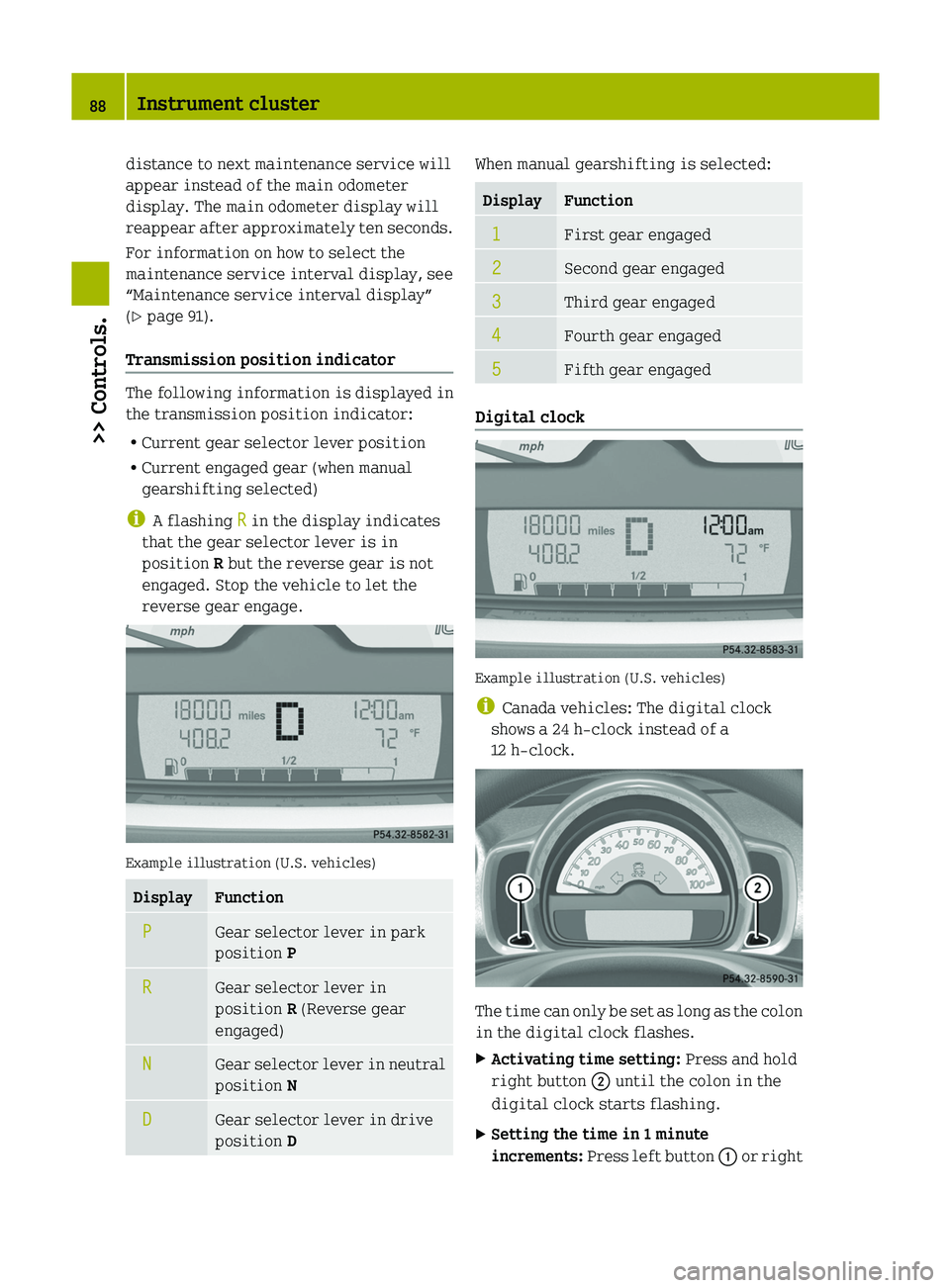
Transmission position indicator The following information is displayed in
the transmission position indicator:
R
Current gear selector lever position
R Current engaged gear (when manual
gearshifting selected)
i A flashing R in the display indicates
that the gear selector lever is in
position R but the reverse gear is not
engaged. Stop the vehicle to let the
reverse gear engage. Example illustration (U.S. vehicles)
Display Function
P Gear selector lever in park
position P
R Gear selector lever in
position R (Reverse gear
engaged) N Gear selector lever in neutral
position N
D Gear selector lever in drive
position D When manual gearshifting is selected:
Display Function
1 First gear engaged
2 Second gear engaged
3 Third gear engaged
4 Fourth gear engaged
5 Fifth gear engaged
Digital clock
Example illustration (U.S. vehicles)
i
Canada vehicles: The digital clock
shows a 24 h-clock instead of a
12 h-clock. The time can only be set as long as the colon
in the digital clock flashes.
X
Activating time setting: Press and hold
right button ; until the colon in the
digital clock starts flashing.
X Setting the time in 1 minute
increments:
Press left button : or right88
Instrument cluster
>> Controls.
Page 130 of 228

As an added safety feature, your vehicle has
been equipped with a tire pressure
monitoring system (TPMS) that illuminates
a low tire pressure telltale when one or
more of your tires is significantly
underinflated.
Accordingly, when the low tire pressure
telltale illuminates, you should stop and
check your tires as soon as possible, and
inflate them to the proper pressure.
Driving on a significantly underinflated
tire
causes the tire to overheat and can lead
to tire failure.
Underinflation also reduces fuel
efficiency and tire tread life, and may
affect the vehicle’s handling and stopping
ability. Please note that the TPMS is not a
substitute for proper tire maintenance,
and it is the driver’s responsibility to
maintain correct tire pressure, even if
underinflation has not reached the level to
trigger illumination of the TPMS low tire
pressure telltale.
Your vehicle has also been equipped with a
TPMS malfunction indicator to indicate
when the system is not operating properly.
The TPMS malfunction indicator is
combined with the low tire pressure
telltale. When the system detects a
malfunction, the telltale will flash for
approximately 1 minute and then remain
continuously illuminated.
This sequence will continue upon
subsequent vehicle start-ups as long as the
malfunction exists. When the malfunction
indicator is illuminated, the system may
not be able to detect or signal low tire
pressure as intended.
TPMS malfunctions may occur for a variety
of reasons, including the installation of
incompatible replacement or alternate
tires or wheels on the vehicle that prevent
the TPMS from functioning properly. Always
check the TPMS malfunction telltale after
replacing one or more tires or wheels on
your vehicle to ensure that the replacement or alternate tires and wheels allow the
TPMS to continue to function properly.
i If a condition causing the TPMS to
malfunction develops, it may take up to
10 minutes for the system to signal a
malfunction using the TPMS telltale
flashing and illumination sequence.
The telltale extinguishes after a few
minutes driving if the malfunction has
been corrected.
i Operating radio transmission
equipment (e.g. wireless headsets, two-
way radios) in or near the vehicle could
cause the TPMS to malfunction.
i USA only:
This device complies with Part 15 of the
FCC Rules. Operation is subject to the
following two conditions:
R This device may not cause harmful
interference, and
R this device must accept any
interference received, including
interference
that may cause undesired
operation.
Any unauthorized modification to this
device could void the user’s authority to
operate the equipment.
i Canada only:
This device complies with RSS‑210 of
Industry Canada. Operation is subject to
the following two conditions:
R This device may not cause
interference, and
R this device must accept any
interference received, including
interference that may cause undesired
operation of the device.
Any unauthorized modification to this
device could void the user’s authority to
operate the equipment. 128
Tires and wheels
>> Operation.
Page 141 of 228
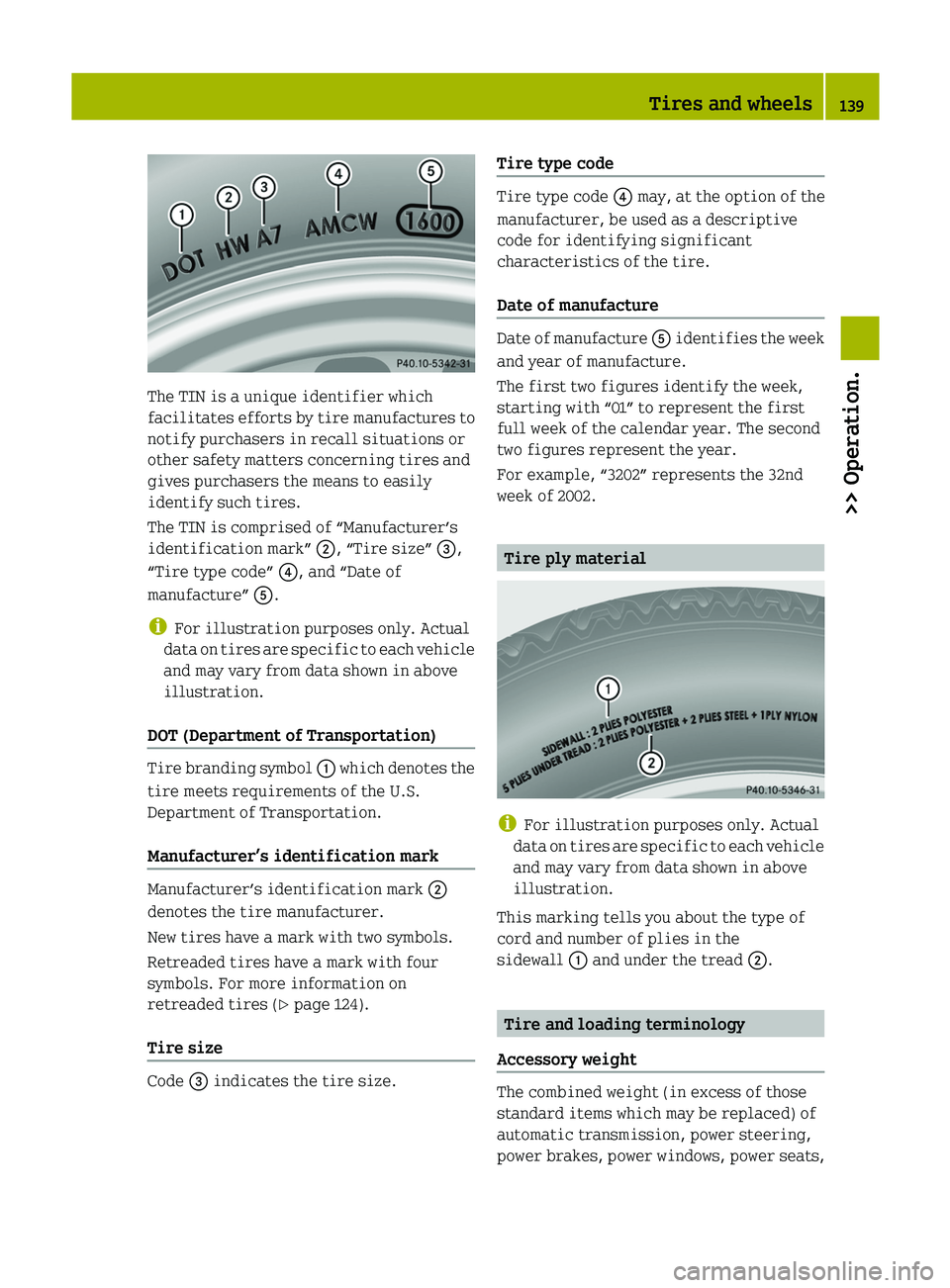
The TIN is a unique identifier which
facilitates
efforts by tire manufactures to
notify purchasers in recall situations or
other safety matters concerning tires and
gives purchasers the means to easily
identify such tires.
The TIN is comprised of “Manufacturer’s
identification mark” ;, “Tire size” =,
“Tire type code” ?, and “Date of
manufacture” A.
i For illustration purposes only. Actual
data on tires are specific to each vehicle
and may vary from data shown in above
illustration.
DOT (Department of Transportation) Tire branding symbol
:
which denotes the
tire meets requirements of the U.S.
Department of Transportation.
Manufacturer’s identification mark Manufacturer’s identification mark
;
denotes the tire manufacturer.
New tires have a mark with two symbols.
Retreaded tires have a mark with four
symbols. For more information on
retreaded tires ( Y page 124).
Tire size Code = indicates the tire size. Tire type code Tire type code
? may, at the option of the
manufacturer, be used as a descriptive
code for identifying significant
characteristics of the tire.
Date of manufacture Date of manufacture
A
identifies the week
and year of manufacture.
The first two figures identify the week,
starting with “01” to represent the first
full week of the calendar year. The second
two figures represent the year.
For example, “3202” represents the 32nd
week of 2002. Tire ply material
i
For illustration purposes only. Actual
data
on tires are specific to each vehicle
and may vary from data shown in above
illustration.
This marking tells you about the type of
cord and number of plies in the
sidewall : and under the tread ;. Tire and loading terminology
Accessory weight The combined weight (in excess of those
standard items which may be replaced) of
automatic transmission, power steering,
power brakes, power windows, power seats, Tires and wheels
139
>> Operation. Z
Page 150 of 228
(Y page 217), for example when purchasing
new tires.
For
information on how to identify the tire
speed rating on a tire’s sidewall, see “Tire
size designation, load and speed rating”
(Y page 136).
If you are uncertain about the correct
reading of the information given on a
tire’s sidewall, any authorized smart
center will be glad to assist you.
i For information on speed ratings for
winter tires, see “All-season and winter
tires” ( Y page 137). Winter driving instructions
The
most important rule for slippery or icy
roads is to drive sensibly and to avoid
abrupt acceleration, braking and steering
maneuvers.
When the vehicle is in danger of skidding,
move gear selector lever to neutral
position N. Try to keep the vehicle under
control by corrective steering action.
For information on driving with snow
chains*, see “Snow chains*” (Y page 142). G
WARNING
On slippery road surfaces, never downshift
in order to obtain braking action. This
could result in drive wheel slip and
reduced
vehicle control. Your vehicle’s ABS
will not prevent this type of loss of control.
Road salts and chemicals can adversely
affect braking efficiency. Increased pedal
force may become necessary to produce the
normal braking effect.
Depressing the brake pedal periodically
when traveling at length on salt-strewn
roads can bring road-salt-impaired
braking efficiency back to normal.
If the vehicle is parked after being driven
on salt-treated roads, the braking
efficiency should be tested as soon as
possible after driving is resumed. G
WARNING
Make sure not to endanger any other road
users when carrying out these braking
maneuvers. G
WARNING
If the vehicle becomes stuck in snow, make
sure
snow is kept clear of the exhaust pipe
and from around the vehicle with the engine
running. Otherwise, deadly carbon
monoxide (CO) gases may enter vehicle
interior resulting in unconsciousness and
death.
To assure sufficient fresh air ventilation,
open a window slightly on the side of the
vehicle not facing the wind. G
WARNING
The outside temperature display is not
designed
to serve as an ice-warning device
and is therefore unsuitable for that
purpose. Indicated temperatures just
above the freezing point do not guarantee
that the road surface is free of ice.
For more information, see “Winter driving”
(Y page 142). Standing water
! Do not drive through flooded areas or
water of unknown depth. Before driving
through water, determine its depth.
Never accelerate before driving into
water. The bow wave could force water
into the engine and auxiliary
equipment, thus damaging them.
If you must drive through standing water,
drive
slowly to prevent water from entering
R the front compartment
R the engine compartment
R the passenger compartment
Water in these areas could cause damage to
electrical components or wiring of the
engine or transmission, or could result in 148
Driving instructions
>> Operation.
* optional
Page 161 of 228
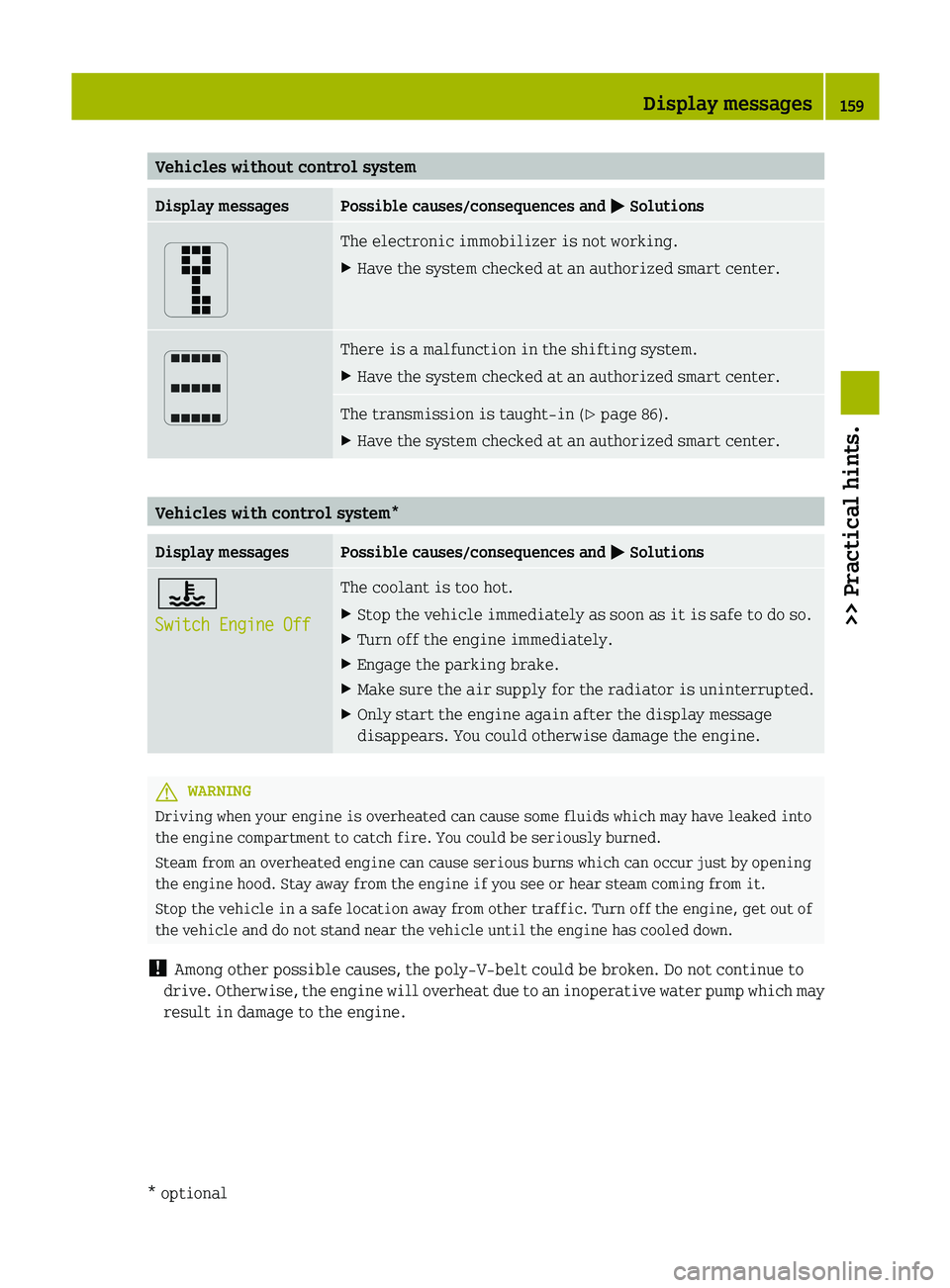
Vehicles without control system
Display messages Possible causes/consequences and
M Solutions The electronic immobilizer is not working.
X
Have the system checked at an authorized smart center. There is a malfunction in the shifting system.
X
Have the system checked at an authorized smart center. The transmission is taught-in (
Y page 86).
X Have the system checked at an authorized smart center. Vehicles with control system*
Display messages Possible causes/consequences and
M Solutions?
Switch Engine Off The coolant is too hot.
X
Stop the vehicle immediately as soon as it is safe to do so.
X Turn off the engine immediately.
X Engage the parking brake.
X Make sure the air supply for the radiator is uninterrupted.
X Only start the engine again after the display message
disappears. You could otherwise damage the engine. G
WARNING
Driving when your engine is overheated can cause some fluids which may have leaked into
the engine compartment to catch fire. You could be seriously burned.
Steam from an overheated engine can cause serious burns which can occur just by opening
the engine hood. Stay away from the engine if you see or hear steam coming from it.
Stop the vehicle in a safe location away from other traffic. Turn off the engine, get out of
the vehicle and do not stand near the vehicle until the engine has cooled down.
! Among other possible causes, the poly-V-belt could be broken. Do not continue to
drive.
Otherwise, the engine will overheat due to an inoperative water pump which may
result in damage to the engine. Display messages
159
>> Practical hints.
* optional Z