phone SUBARU BRZ 2016 1.G Navigation Manual
[x] Cancel search | Manufacturer: SUBARU, Model Year: 2016, Model line: BRZ, Model: SUBARU BRZ 2016 1.GPages: 336, PDF Size: 10.83 MB
Page 55 of 336
Introduction 53
Before Use
Ending a call
On the Talking screen, touch to end the call. You can also end the
call by hanging up the cell phone. When a call ends, the handsfree
screen disappears.
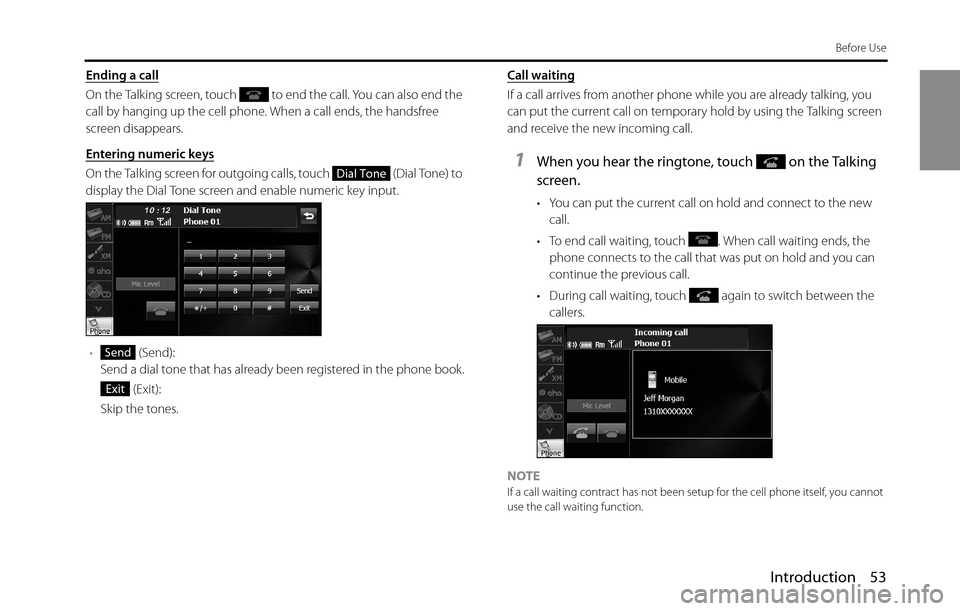
Entering numeric keys
On the Talking screen for outgoing calls, touch (Dial Tone) to
display the Dial Tone screen and enable numeric key input.
• (Send):
Send a dial tone that has already been registered in the phone book.
(Exit):
Skip the tones.Call waiting
If a call arrives from another phone while you are already talking, you
can put the current call on temporary hold by using the Talking screen
and receive the new incoming call.
1When you hear the ringtone, touch on the Talking
screen.
• You can put the current call on hold and connect to the new
call.
• To end call waiting, touch . When call waiting ends, the
phone connects to the call that was put on hold and you can
continue the previous call.
• During call waiting, touch again to switch between the
callers.
NOTE
If a call waiting contract has not been setup for the cell phone itself, you cannot
use the call waiting function.
Dial Tone
Send
Exit
Page 56 of 336
54 Introduction
Before Use
Setting and Editing Bluetooth Handsfree
■Handsfree settings
You can perform settings for handsfree operation on the phone
Settings screen. You can perform settings individually for each
registered cell phone. For details on switching the cell phone, see
“Connecting a cell phone” on Page 44.
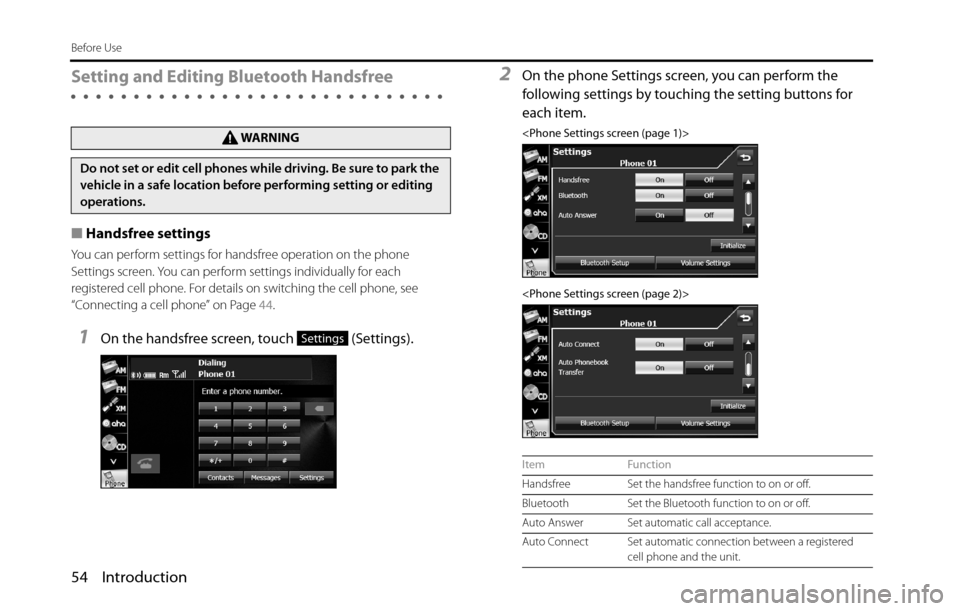
1On the handsfree screen, touch (Settings).
2On the phone Settings screen, you can perform the
following settings by touching the setting buttons for
each item.
Do not set or edit cell phones while driving. Be sure to park the
vehicle in a safe location before performing setting or editing
operations.
Settings
Item Function
Handsfree Set the handsfree function to on or off.
Bluetooth Set the Bluetooth function to on or off.
Auto Answer Set automatic call acceptance.
Auto Connect Set automatic connection between a registered
cell phone and the unit.
Page 57 of 336
Introduction 55
Before Use
Handsfree setting
Set the handsfree function to on or off.
•When handsfree is set to “Off”, you cannot be sent a telephone
number from a this unit.
1Touch (On) or (Off ).
Bluetooth setting
Set the Bluetooth function to on or off.
1Touch (On) or (Off ).
Auto Answer setting
Start the call automatically 5 seconds after the arrival of an incoming
call.
1Touch (On) or (Off ).
Auto Connect setting
Set automatic connection between a registered cell phone and the
unit.
1Touch (On) or (Off ).
Auto Phonebook Transfer setting
Automatically transfer the phone book to the unit when a cell phone is
registered.
1Touch (On) or (Off ).
Setting Initialization
Touch (Initialize) to return the “Handsfree”, “Bluetooth”, “Auto
Answer”, “Auto Connect” and “Auto Phonebook Transfer” settings to
their initial values.
Auto Phonebook
TransferAutomatically transfer the phone book to the unit
when a cell phone is registered.
Initialize Return the settings displayed on the phone
Settings screen to their initial values.
Bluetooth Setup Display the Bluetooth setting screen to register a
cell phone or perform connection settings. (See
Page 44.)
Volume Settings Display the Volume Settings screen to perform
settings for the ringtone or call volume. (See Page
56.) Item Function
OnOff
OnOff
OnOff
OnOff
OnOff
Initialize
Page 58 of 336
56 Introduction
Before Use
■Volume setting (handsfree)
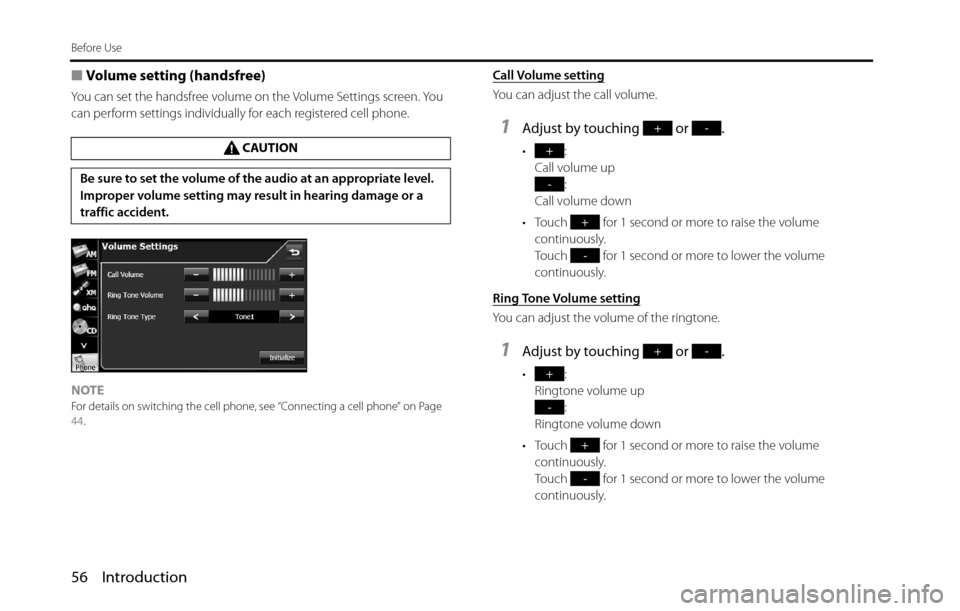
You can set the handsfree volume on the Volume Settings screen. You
can perform settings individually for each registered cell phone.
NOTE
For details on switching the cell phone, see “Connecting a cell phone” on Page
44.
Call Volume setting
You can adjust the call volume.
1Adjust by touching or .
•:
Call volume up
:
Call volume down
• Touch for 1 second or more to raise the volume
continuously.
Touch for 1 second or more to lower the volume
continuously.
Ring Tone Volume setting
You can adjust the volume of the ringtone.
1Adjust by touching or .
•:
Ringtone volume up
:
Ringtone volume down
• Touch for 1 second or more to raise the volume
continuously.
Touch for 1 second or more to lower the volume
continuously. CAUTION
Be sure to set the volume of the audio at an appropriate level.
Improper volume setting may result in hearing damage or a
traffic accident.
+-
+
-
+
-
+-
+
-
+
-
Page 59 of 336
Introduction 57
Before Use
Ring Tone Type setting
You can set the ringtone.
1Touch or .
•Tone 1 Q To n e 2 Q Tone 3 Q Tone 1 Q ...
Initializing the settings
Touch (Initialize) to return the sound settings (handsfree) to
their initial values.
■Editing the phone book
You can register telephone numbers in the phone book of the unit by
transferring the phone book that is registered in the cell phone.
Transferring the phone book data from a cell phone
You can transfer the telephone numbers (phone book data) that are
registered in the cell phone to the unit. In the phone book of this unit,
you can register up to 4 telephone numbers for each person in each
registered cell phone, and you can register data for up to 1000 persons.
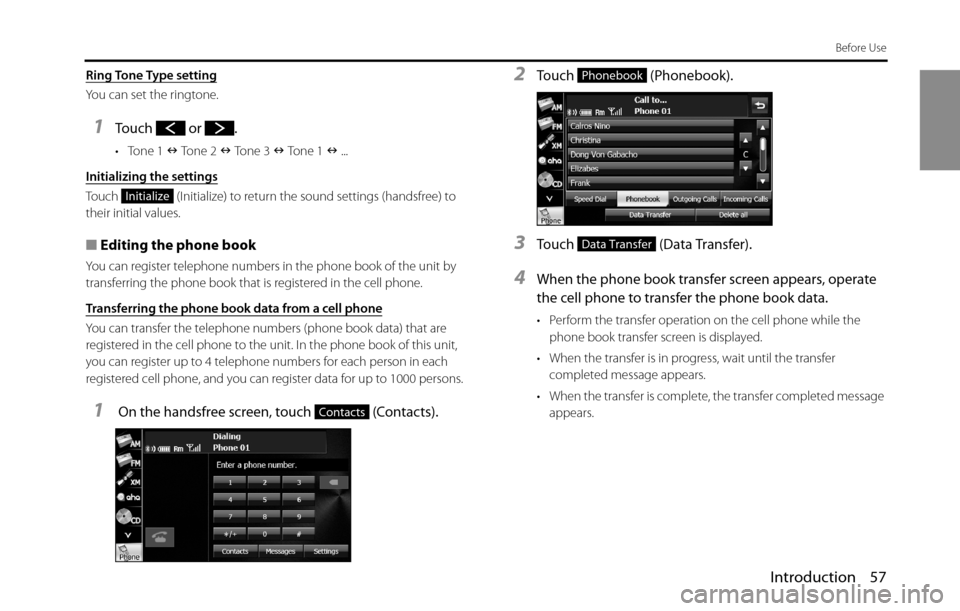
1 On the handsfree screen, touch (Contacts).
2Touch (Phonebook).
3Touch (Data Transfer).
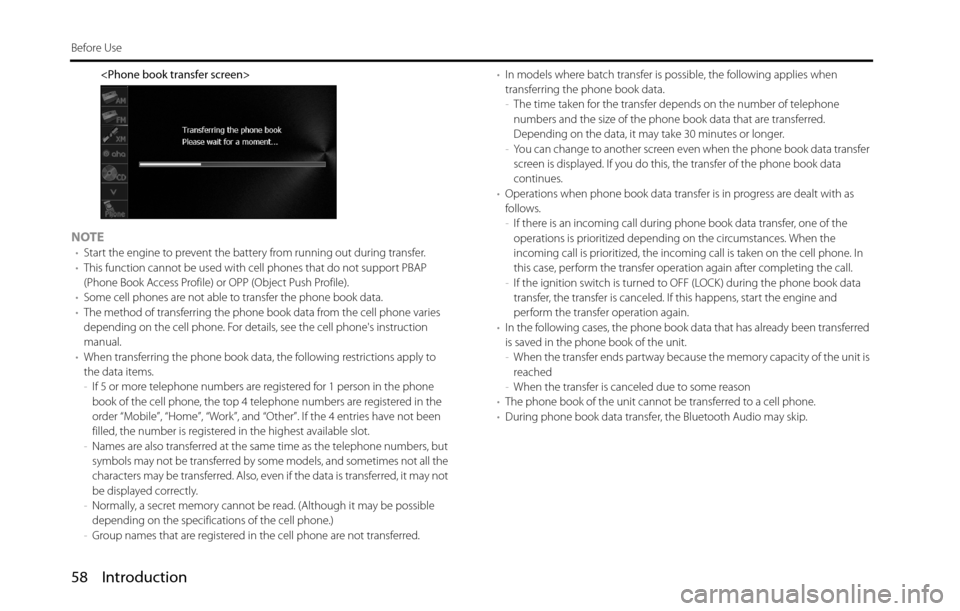
4When the phone book transfer screen appears, operate
the cell phone to transfer the phone book data.
• Perform the transfer operation on the cell phone while the
phone book transfer screen is displayed.
• When the transfer is in progress, wait until the transfer
completed message appears.
• When the transfer is complete, the transfer completed message
appears.
Initialize
Contacts
Phonebook
Data Transfer
Page 60 of 336
58 Introduction
Before Use
NOTE•Start the engine to prevent the battery from running out during transfer.
•This function cannot be used with cell phones that do not support PBAP
(Phone Book Access Profile) or OPP (Object Push Profile).
•Some cell phones are not able to transfer the phone book data.
•The method of transferring the phone book data from the cell phone varies
depending on the cell phone. For details, see the cell phone's instruction
manual.
•When transferring the phone book data, the following restrictions apply to
the data items.
-If 5 or more telephone numbers are registered for 1 person in the phone
book of the cell phone, the top 4 telephone numbers are registered in the
order “Mobile”, “Home”, “Work”, and “Other”. If the 4 entries have not been
filled, the number is registered in the highest available slot.
-Names are also transferred at the same time as the telephone numbers, but
symbols may not be transferred by some models, and sometimes not all the
characters may be transferred. Also, even if the data is transferred, it may not
be displayed correctly.
-Normally, a secret memory cannot be read. (Although it may be possible
depending on the specifications of the cell phone.)
-Group names that are registered in the cell phone are not transferred.•In models where batch transfer is possible, the following applies when
transferring the phone book data.
-The time taken for the transfer depends on the number of telephone
numbers and the size of the phone book data that are transferred.
Depending on the data, it may take 30 minutes or longer.
-You can change to another screen even when the phone book data transfer
screen is displayed. If you do this, the transfer of the phone book data
continues.
•Operations when phone book data transfer is in progress are dealt with as
follows.
-If there is an incoming call during phone book data transfer, one of the
operations is prioritized depending on the circumstances. When the
incoming call is prioritized, the incoming call is taken on the cell phone. In
this case, perform the transfer operation again after completing the call.
-If the ignition switch is turned to OFF (LOCK) during the phone book data
transfer, the transfer is canceled. If this happens, start the engine and
perform the transfer operation again.
•In the following cases, the phone book data that has already been transferred
is saved in the phone book of the unit.
-When the transfer ends partway because the memory capacity of the unit is
reached
-When the transfer is canceled due to some reason
•The phone book of the unit cannot be transferred to a cell phone.
•During phone book data transfer, the Bluetooth Audio may skip.
Page 61 of 336
Introduction 59
Before Use
Deleting the phone book data
You can delete the phone book data by selecting 1 number from a
phone book, or by deleting all the phone book data.
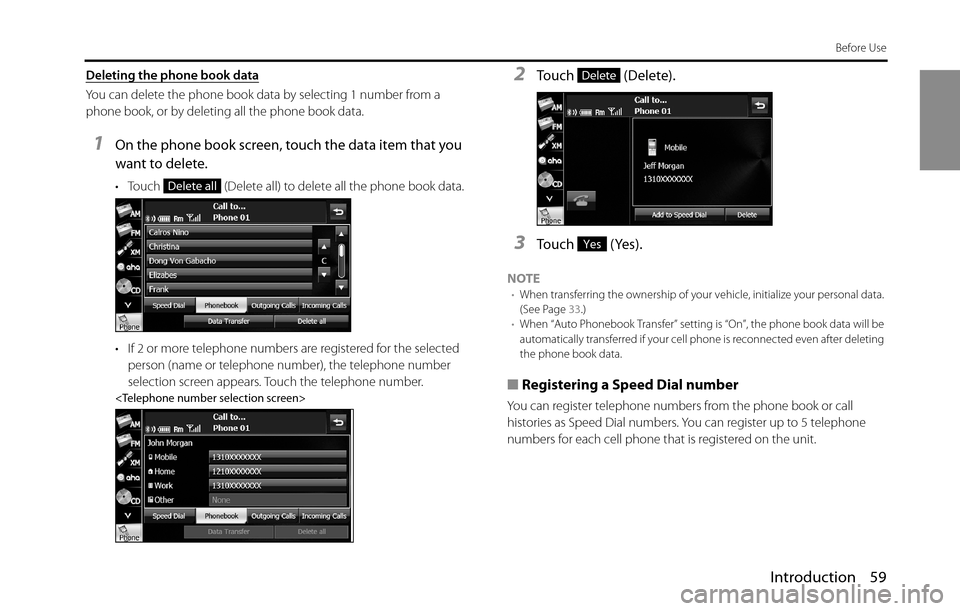
1On the phone book screen, touch the data item that you
want to delete.
• Touch (Delete all) to delete all the phone book data.
• If 2 or more telephone numbers are registered for the selected
person (name or telephone number), the telephone number
selection screen appears. Touch the telephone number.
2Touch (Delete).
3Touch (Yes).
NOTE•When transferring the ownership of your vehicle, initialize your personal data.
(See Page 33.)
•When “Auto Phonebook Transfer” setting is “On”, the phone book data will be
automatically transferred if your cell phone is reconnected even after deleting
the phone book data.
■
Registering a Speed Dial number
You can register telephone numbers from the phone book or call
histories as Speed Dial numbers. You can register up to 5 telephone
numbers for each cell phone that is registered on the unit.
Delete all
Delete
Yes
Page 62 of 336
60 Introduction
Before Use
Registering a Speed Dial number from the phone book
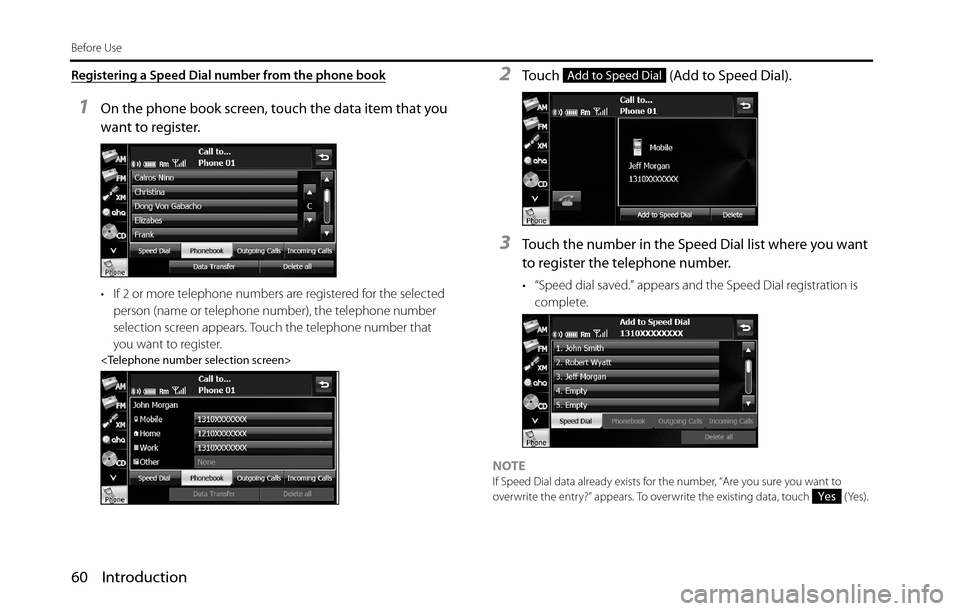
1On the phone book screen, touch the data item that you
want to register.
• If 2 or more telephone numbers are registered for the selected
person (name or telephone number), the telephone number
selection screen appears. Touch the telephone number that
you want to register.
2Touch (Add to Speed Dial).
3Touch the number in the Speed Dial list where you want
to register the telephone number.
• “Speed dial saved.” appears and the Speed Dial registration is
complete.
NOTE
If Speed Dial data already exists for the number, “Are you sure you want to
overwrite the entry?” appears. To overwrite the existing data, touch (Yes).
Add to Speed Dial
Yes
Page 63 of 336
Introduction 61
Before Use
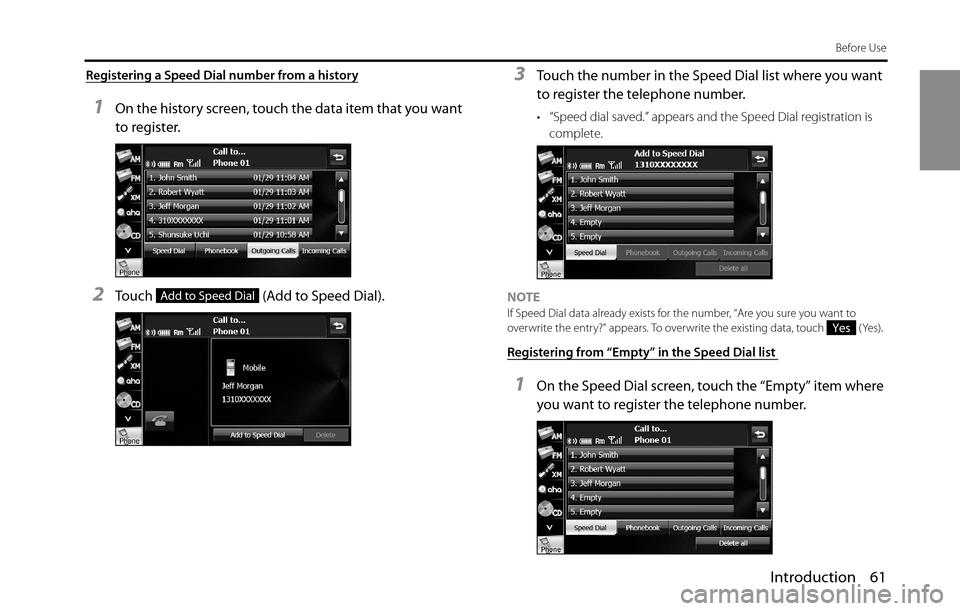
Registering a Speed Dial number from a history
1On the history screen, touch the data item that you want
to register.
2Touch (Add to Speed Dial).
3Touch the number in the Speed Dial list where you want
to register the telephone number.
• “Speed dial saved.” appears and the Speed Dial registration is
complete.
NOTE
If Speed Dial data already exists for the number, “Are you sure you want to
overwrite the entry?” appears. To overwrite the existing data, touch (Yes).
Registering from “Empty” in the Speed Dial list
1On the Speed Dial screen, touch the “Empty” item where
you want to register the telephone number.
Add to Speed Dial
Yes
Page 64 of 336
62 Introduction
Before Use
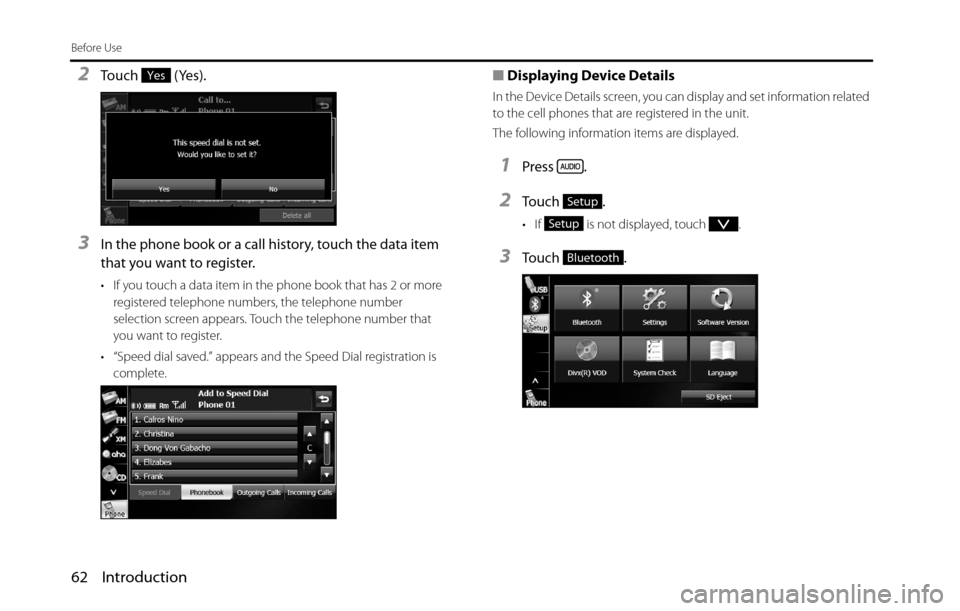
2Touch (Yes).
3In the phone book or a call history, touch the data item
that you want to register.
• If you touch a data item in the phone book that has 2 or more
registered telephone numbers, the telephone number
selection screen appears. Touch the telephone number that
you want to register.
• “Speed dial saved.” appears and the Speed Dial registration is
complete.
■Displaying Device Details
In the Device Details screen, you can display and set information related
to the cell phones that are registered in the unit.
The following information items are displayed.
1Press .
2To u c h .
• If is not displayed, touch .
3To u c h .
Yes
Setup
Setup
Bluetooth