phone SUBARU BRZ 2016 1.G Navigation Manual
[x] Cancel search | Manufacturer: SUBARU, Model Year: 2016, Model line: BRZ, Model: SUBARU BRZ 2016 1.GPages: 336, PDF Size: 10.83 MB
Page 65 of 336
Introduction 63
Before Use
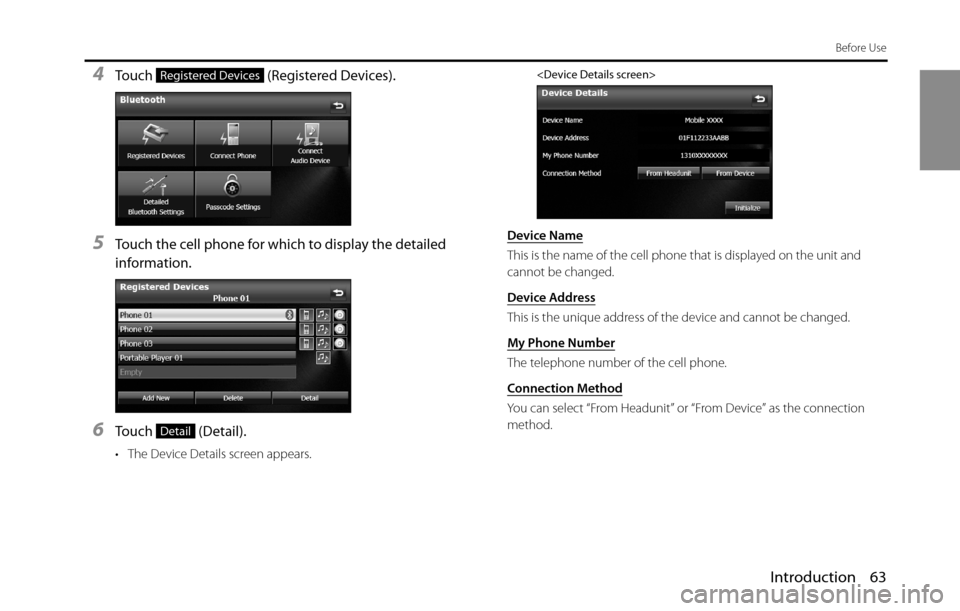
4Touch (Registered Devices).
5Touch the cell phone for which to display the detailed
information.
6Touch (Detail).
• The Device Details screen appears.
Device Name
This is the name of the cell phone that is displayed on the unit and
cannot be changed.
Device Address
This is the unique address of the device and cannot be changed.
My Phone Number
The telephone number of the cell phone.
Connection Method
You can select “From Headunit” or “From Device” as the connection
method.
Registered Devices
Detail
Page 66 of 336
64 Introduction
Before Use
■Displaying Detailed Bluetooth Settings for the unit
In the Detailed Bluetooth Settings screen, you can display and set
information related to Bluetooth devices that are registered on the unit.
The following information items are displayed.
1Press .
2To u c h .
• If is not displayed, touch .
3To u c h .
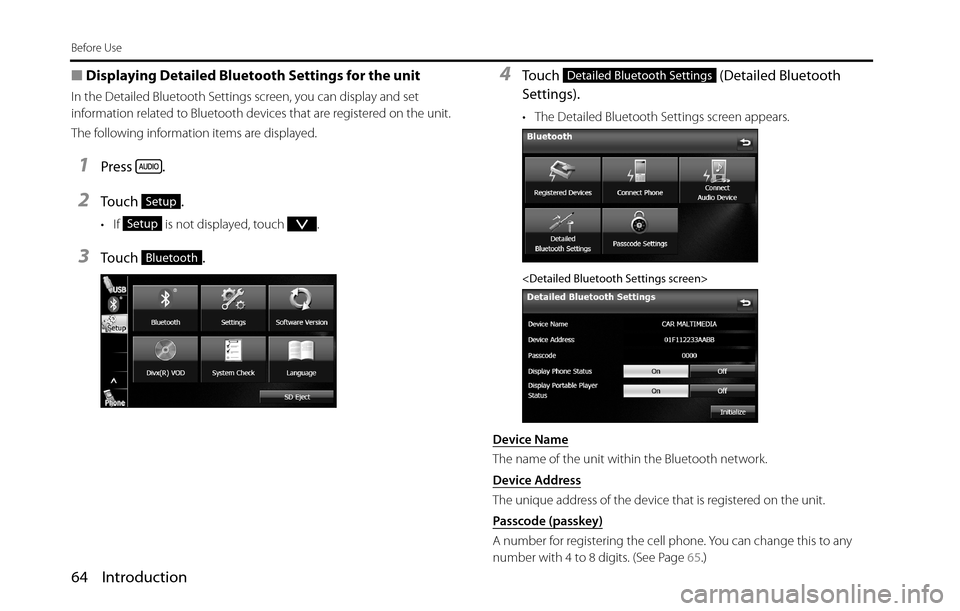
4Touch (Detailed Bluetooth
Settings).
• The Detailed Bluetooth Settings screen appears.
Device Name
The name of the unit within the Bluetooth network.
Device Address
The unique address of the device that is registered on the unit.
Passcode (passkey)
A number for registering the cell phone. You can change this to any
number with 4 to 8 digits. (See Page 65.)
Setup
Setup
Bluetooth
Detailed Bluetooth Settings
Page 67 of 336
Introduction 65
Before Use
Display Phone Status
You can set whether or not to display the result of connecting via
Bluetooth to a cell phone when turning the ignition switch from OFF
(LOCK) to ACC or ON.
Display Portable Player Status
You can set whether or not to display the result of connecting via
Bluetooth to a portable player when turning the ignition switch from
OFF (LOCK) to ACC or ON.
■Changing the passcode (passkey)
You can change the passcode (passkey) for cell phone registration to
any number with 4 to 8 digits.
1Press .
2To u c h .
• If is not displayed, touch .
3To u c h .
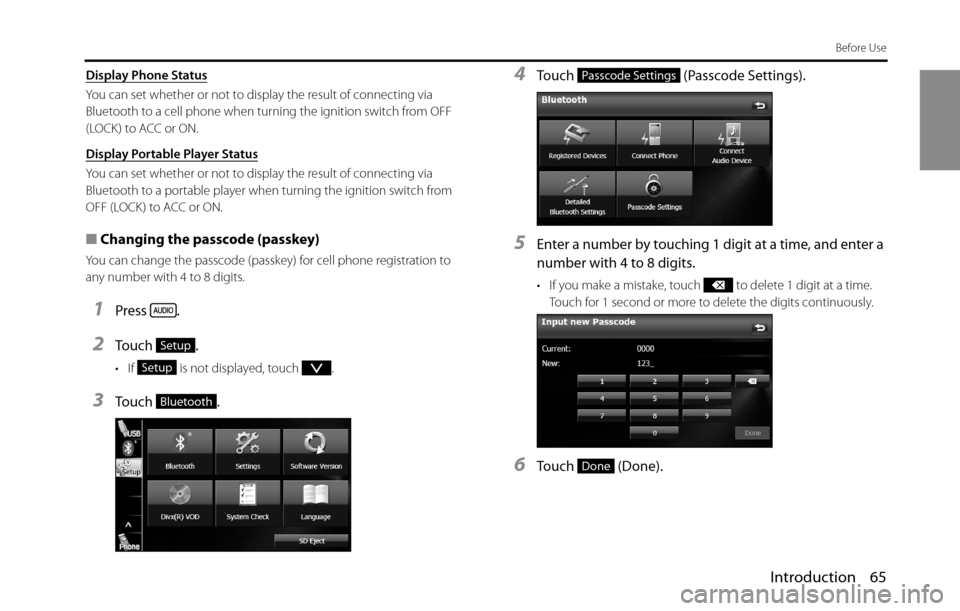
4Touch (Passcode Settings).
5Enter a number by touching 1 digit at a time, and enter a
number with 4 to 8 digits.
• If you make a mistake, touch to delete 1 digit at a time.
Touch for 1 second or more to delete the digits continuously.
6Touch (Done).
Setup
Setup
Bluetooth
Passcode Settings
Done
Page 68 of 336
66 Introduction
Before Use
Using the messaging function
You can read messages that are received on the cell phone or send
messages that are created on the unit.
3 message types can be used on this unit: SMS (Short Message Service),
MMS (Multimedia Messaging Service) and e-mail.
You can also check received messages through audio playback.
This function cannot be used with cell phones that do not support HFP
(Hands Free Profile) and MAP (Message Access Profile). For details, see
the cell phone's instruction manual.
•Supported Profiles
-HFP (Hands Free Profile) Ver.1.0 or later (Conformed Ver.1.5)
-MAP (Message Access Profile)
■Displaying the Messages screen
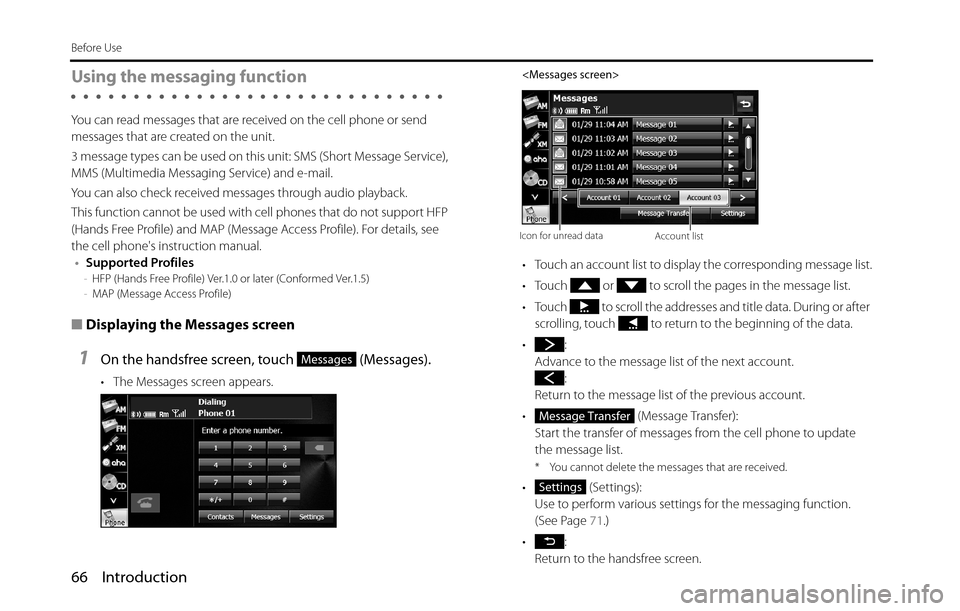
1On the handsfree screen, touch (Messages).
• The Messages screen appears.
• Touch an account list to display the corresponding message list.
• Touch or to scroll the pages in the message list.
• Touch to scroll the addresses and title data. During or after
scrolling, touch to return to the beginning of the data.
•:
Advance to the message list of the next account.
:
Return to the message list of the previous account.
• (Message Transfer):
Start the transfer of messages from the cell phone to update
the message list.
* You cannot delete the messages that are received.
• (Settings):
Use to perform various settings for the messaging function.
(See Page 71.)
•:
Return to the handsfree screen.
Messages
Icon for unread dataAccount list
Message Transfer
Settings
Page 69 of 336
Introduction 67
Before Use
■Checking received messages
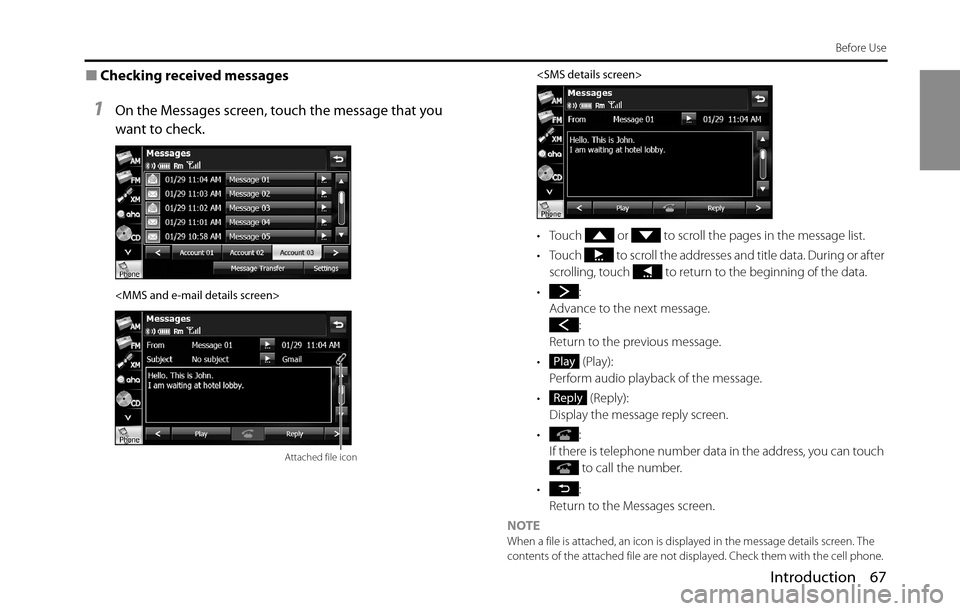
1On the Messages screen, touch the message that you
want to check.
• Touch or to scroll the pages in the message list.
• Touch to scroll the addresses and title data. During or after
scrolling, touch to return to the beginning of the data.
•:
Advance to the next message.
:
Return to the previous message.
• (Play):
Perform audio playback of the message.
• (Reply):
Display the message reply screen.
•:
If there is telephone number data in the address, you can touch
to call the number.
•:
Return to the Messages screen.
NOTE
When a file is attached, an icon is displayed in the message details screen. The
contents of the attached file are not displayed. Check them with the cell phone.
Attached file icon
Play
Reply
Page 73 of 336
Introduction 71
Before Use
■Various message settings
You can perform message settings on the Message Settings screen. You
can perform message settings individually for each registered cell
phone. For details on switching the cell phone, see “Connecting a cell
phone” on Page 44.
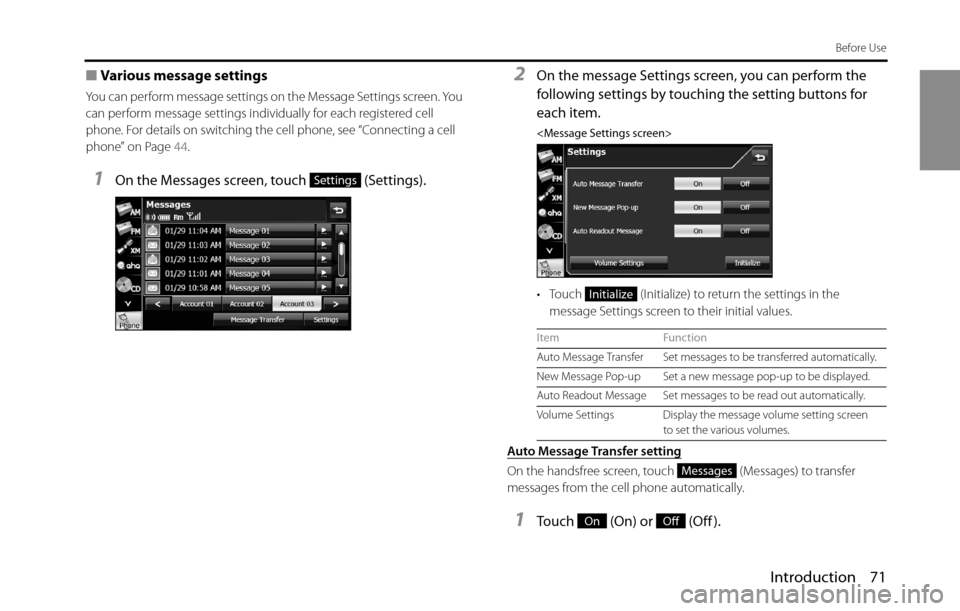
1On the Messages screen, touch (Settings).
2On the message Settings screen, you can perform the
following settings by touching the setting buttons for
each item.
• Touch (Initialize) to return the settings in the
message Settings screen to their initial values.
Auto Message Transfer setting
On the handsfree screen, touch (Messages) to transfer
messages from the cell phone automatically.
1Touch (On) or (Off ).
Settings
Item Function
Auto Message Transfer Set messages to be transferred automatically.
New Message Pop-up Set a new message pop-up to be displayed.
Auto Readout Message Set messages to be read out automatically.
Volume Settings Display the message volume setting screen
to set the various volumes.
Initialize
Messages
OnOff
Page 74 of 336
72 Introduction
Before Use
New Message Pop-up setting
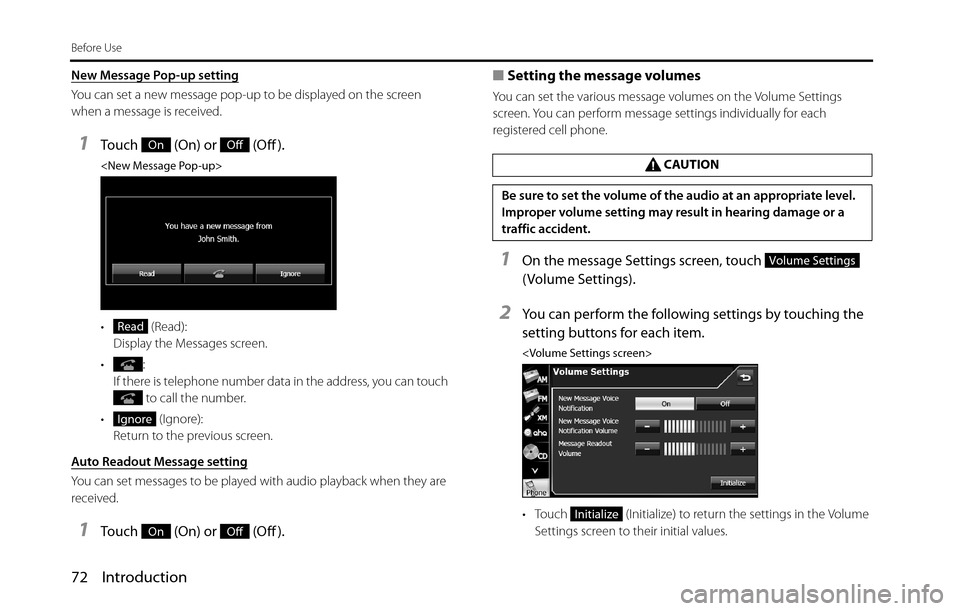
You can set a new message pop-up to be displayed on the screen
when a message is received.
1Touch (On) or (Off ).
• (Read):
Display the Messages screen.
•:
If there is telephone number data in the address, you can touch
to call the number.
• (Ignore):
Return to the previous screen.
Auto Readout Message setting
You can set messages to be played with audio playback when they are
received.
1Touch (On) or (Off ).■Setting the message volumes
You can set the various message volumes on the Volume Settings
screen. You can perform message settings individually for each
registered cell phone.
1On the message Settings screen, touch
( Volume Settings).
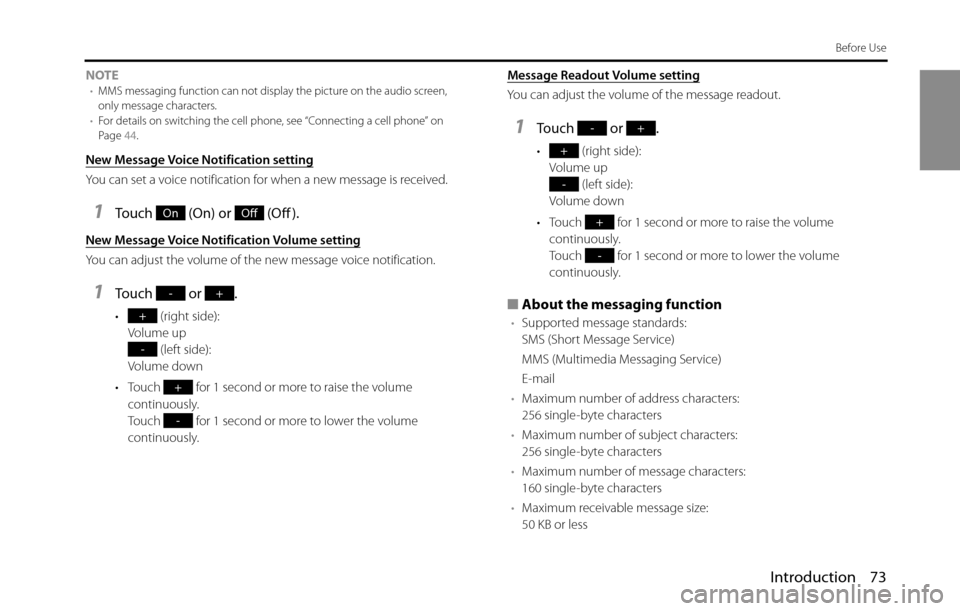
2You can perform the following settings by touching the
setting buttons for each item.
• Touch (Initialize) to return the settings in the Volume
Settings screen to their initial values.
OnOff
Read
Ignore
OnOff
CAUTION
Be sure to set the volume of the audio at an appropriate level.
Improper volume setting may result in hearing damage or a
traffic accident.
Volume Settings
Initialize
Page 75 of 336
Introduction 73
Before Use
NOTE•MMS messaging function can not display the picture on the audio screen,
only message characters.
•For details on switching the cell phone, see “Connecting a cell phone” on
Page 44.
New Message Voice Notification setting
You can set a voice notification for when a new message is received.
1Touch (On) or (Off ).
New Message Voice Notification Volume setting
You can adjust the volume of the new message voice notification.
1Touch or .
• (right side):
Volume up
(left side):
Volume down
• Touch for 1 second or more to raise the volume
continuously.
Touch for 1 second or more to lower the volume
continuously.Message Readout Volume setting
You can adjust the volume of the message readout.
1Touch or .
• (right side):
Volume up
(left side):
Volume down
• Touch for 1 second or more to raise the volume
continuously.
Touch for 1 second or more to lower the volume
continuously.
■About the messaging function
•Supported message standards:
SMS (Short Message Service)
MMS (Multimedia Messaging Service)
E-mail
•Maximum number of address characters:
256 single-byte characters
•Maximum number of subject characters:
256 single-byte characters
•Maximum number of message characters:
160 single-byte characters
•Maximum receivable message size:
50 KB or less
OnOff
-+
+
-
+
-
-+
+
-
+
-
Page 151 of 336
Navigation 149
Navigation
Voice Control Navigation
By using the voice control system (voice input microphone
and button), you can set the destination by giving voice
commands. This enables you to use functions that are usually
inoperable while driving.
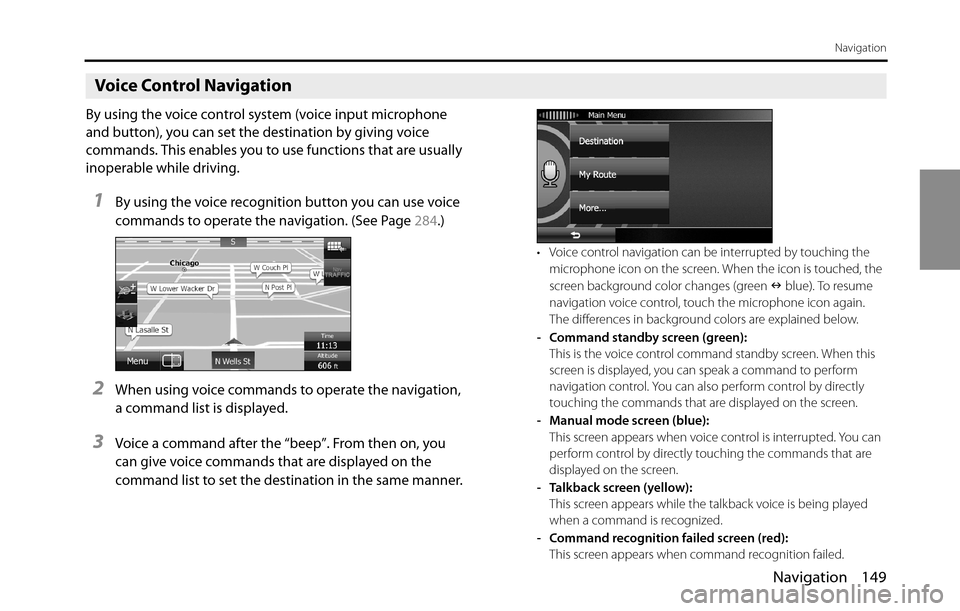
1By using the voice recognition button you can use voice
commands to operate the navigation. (See Page 284.)
2When using voice commands to operate the navigation,
a command list is displayed.
3Voice a command after the “beep”. From then on, you
can give voice commands that are displayed on the
command list to set the destination in the same manner.
• Voice control navigation can be interrupted by touching the
microphone icon on the screen. When the icon is touched, the
screen background color changes (green Q blue). To resume
navigation voice control, touch the microphone icon again.
The differences in background colors are explained below.
- Command standby screen (green):
This is the voice control command standby screen. When this
screen is displayed, you can speak a command to perform
navigation control. You can also perform control by directly
touching the commands that are displayed on the screen.
- Manual mode screen (blue):
This screen appears when voice control is interrupted. You can
perform control by directly touching the commands that are
displayed on the screen.
- Talkback screen (yellow):
This screen appears while the talkback voice is being played
when a command is recognized.
- Command recognition failed screen (red):
This screen appears when command recognition failed.
Page 250 of 336
248 Audio and Visual
How to Operate Portable Audio Devices
Using the iPod“ Player
Using the iPod Player
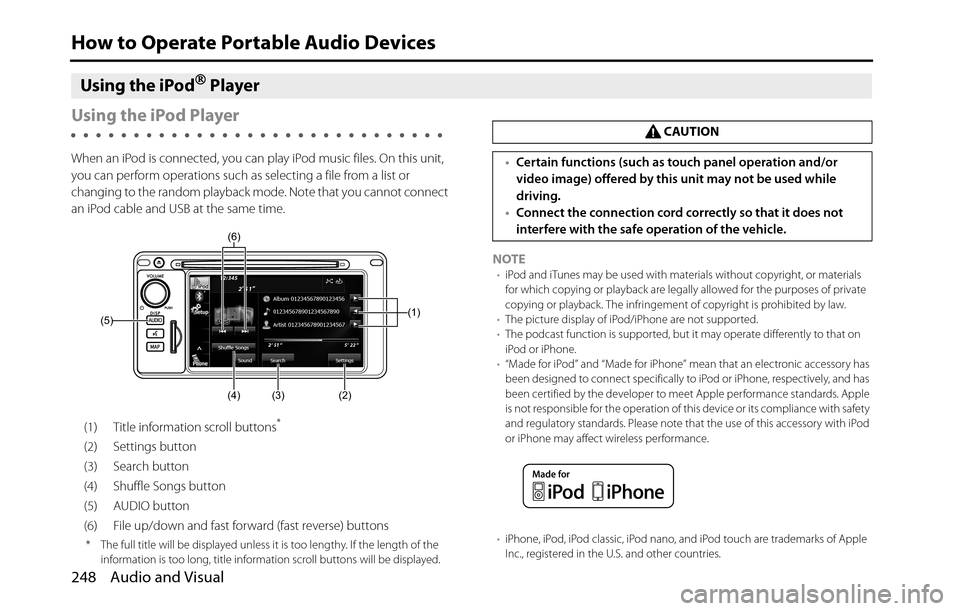
When an iPod is connected, you can play iPod music files. On this unit,
you can perform operations such as selecting a file from a list or
changing to the random playback mode. Note that you cannot connect
an iPod cable and USB at the same time.
(1) Title information scroll buttons
*
(2) Settings button
(3) Search button
(4) Shuffle Songs button
(5) AUDIO button
(6) File up/down and fast forward (fast reverse) buttons
* The full title will be displayed unless it is too lengthy. If the length of the
information is too long, title information scroll buttons will be displayed.
NOTE•iPod and iTunes may be used with materials without copyright, or materials
for which copying or playback are legally allowed for the purposes of private
copying or playback. The infringement of copyright is prohibited by law.
•The picture display of iPod/iPhone are not supported.
•The podcast function is supported, but it may operate differently to that on
iPod or iPhone.
•“Made for iPod” and “Made for iPhone” mean that an electronic accessory has
been designed to connect specifically to iPod or iPhone, respectively, and has
been certified by the developer to meet Apple performance standards. Apple
is not responsible for the operation of this device or its compliance with safety
and regulatory standards. Please note that the use of this accessory with iPod
or iPhone may affect wireless performance.
•iPhone, iPod, iPod classic, iPod nano, and iPod touch are trademarks of Apple
Inc., registered in the U.S. and other countries.
(1)
(2) (3) (4) (5)(6)
CAUTION
•Certain functions (such as touch panel operation and/or
video image) offered by this unit may not be used while
driving.
•Connect the connection cord correctly so that it does not
interfere with the safe operation of the vehicle.