phone SUBARU BRZ 2016 1.G Navigation Manual
[x] Cancel search | Manufacturer: SUBARU, Model Year: 2016, Model line: BRZ, Model: SUBARU BRZ 2016 1.GPages: 336, PDF Size: 10.83 MB
Page 326 of 336
324 Other
Reference
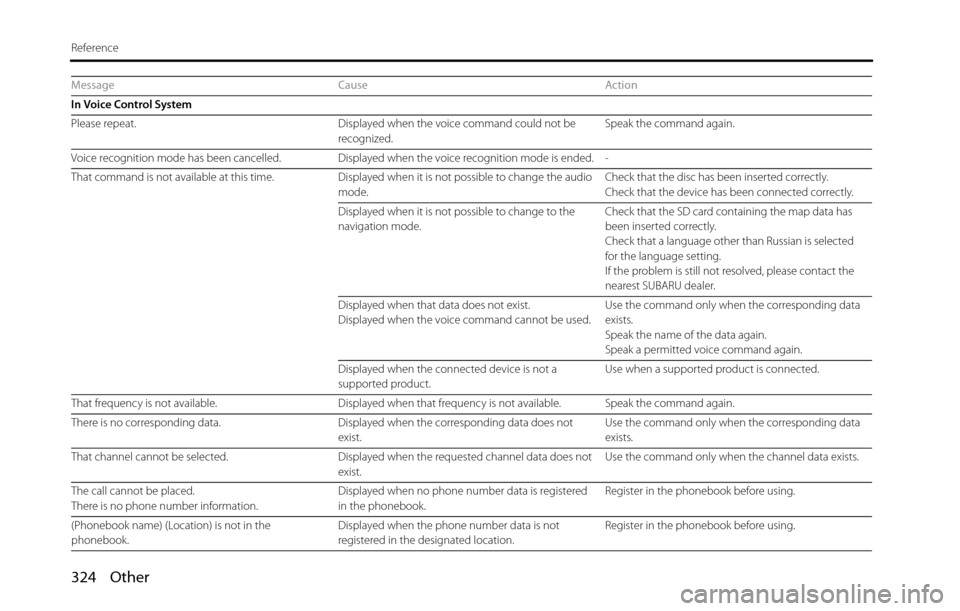
Message Cause Action
In Voice Control System
Please repeat. Displayed when the voice command could not be
recognized.Speak the command again.
Voice recognition mode has been cancelled. Displayed when the voice recognition mode is ended. -
That command is not available at this time. Displayed when it is not possible to change the audio
mode.Check that the disc has been inserted correctly.
Check that the device has been connected correctly.
Displayed when it is not possible to change to the
navigation mode.Check that the SD card containing the map data has
been inserted correctly.
Check that a language other than Russian is selected
for the language setting.
If the problem is still not resolved, please contact the
nearest SUBARU dealer.
Displayed when that data does not exist.
Displayed when the voice command cannot be used.Use the command only when the corresponding data
exists.
Speak the name of the data again.
Speak a permitted voice command again.
Displayed when the connected device is not a
supported product.Use when a supported product is connected.
That frequency is not available. Displayed when that frequency is not available. Speak the command again.
There is no corresponding data. Displayed when the corresponding data does not
exist.Use the command only when the corresponding data
exists.
That channel cannot be selected. Displayed when the requested channel data does not
exist.Use the command only when the channel data exists.
The call cannot be placed.
There is no phone number information.Displayed when no phone number data is registered
in the phonebook.Register in the phonebook before using.
(Phonebook name) (Location) is not in the
phonebook.Displayed when the phone number data is not
registered in the designated location.Register in the phonebook before using.
Page 327 of 336
Other 325
Reference
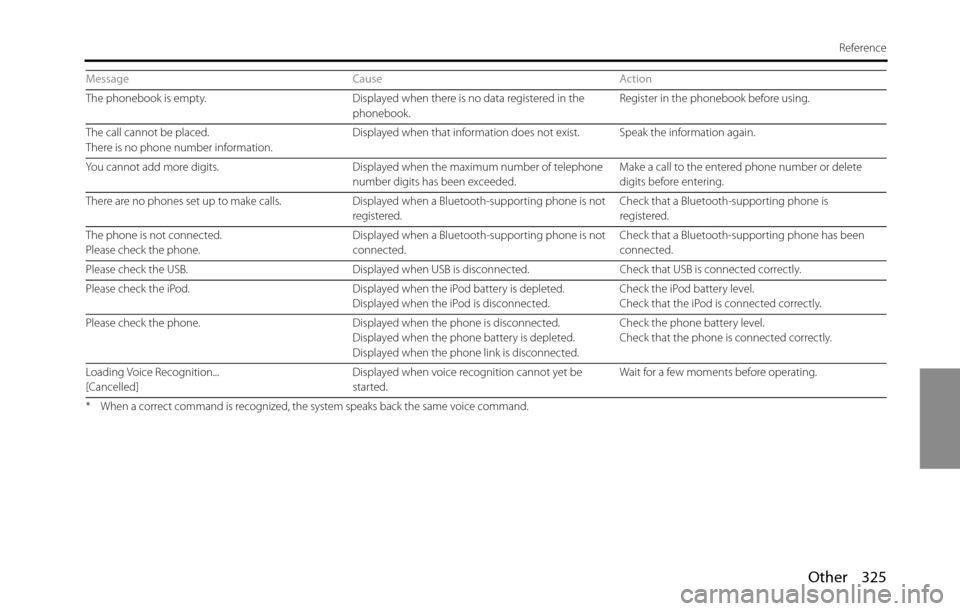
The phonebook is empty. Displayed when there is no data registered in the
phonebook.Register in the phonebook before using.
The call cannot be placed.
There is no phone number information.Displayed when that information does not exist. Speak the information again.
You cannot add more digits. Displayed when the maximum number of telephone
number digits has been exceeded.Make a call to the entered phone number or delete
digits before entering.
There are no phones set up to make calls. Displayed when a Bluetooth-supporting phone is not
registered.Check that a Bluetooth-supporting phone is
registered.
The phone is not connected.
Please check the phone.Displayed when a Bluetooth-supporting phone is not
connected.Check that a Bluetooth-supporting phone has been
connected.
Please check the USB. Displayed when USB is disconnected. Check that USB is connected correctly.
Please check the iPod. Displayed when the iPod battery is depleted.
Displayed when the iPod is disconnected.Check the iPod battery level.
Check that the iPod is connected correctly.
Please check the phone. Displayed when the phone is disconnected.
Displayed when the phone battery is depleted.
Displayed when the phone link is disconnected.Check the phone battery level.
Check that the phone is connected correctly.
Loading Voice Recognition...
[Cancelled]Displayed when voice recognition cannot yet be
started.Wait for a few moments before operating.
* When a correct command is recognized, the system speaks back the same voice command.
Message Cause Action