Battery SUBARU CROSSTREK 2017 1.G User Guide
[x] Cancel search | Manufacturer: SUBARU, Model Year: 2017, Model line: CROSSTREK, Model: SUBARU CROSSTREK 2017 1.GPages: 572, PDF Size: 41.52 MB
Page 112 of 572
Keys and doors/Keyless access with push–button start system
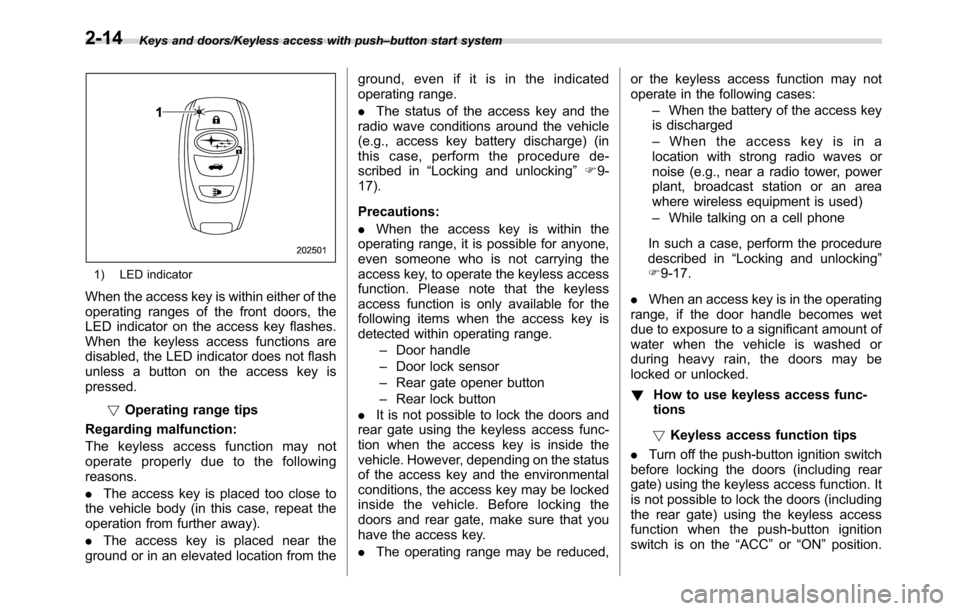
1) LED indicator
When the access key is within either of the
operating ranges of the front doors, the
LED indicator on the access key flashes.
When the keyless access functions are
disabled, the LED indicator does not flash
unless a button on the access key is
pressed.
!Operating range tips
Regarding malfunction:
The keyless access function may not
operate properly due to the following
reasons.
.The access key is placed too close to
the vehicle body (in this case, repeat the
operation from further away).
.The access key is placed near the
ground or in an elevated location from theground, even if it is in the indicated
operating range.
.The status of the access key and the
radio wave conditions around the vehicle
(e.g., access key battery discharge) (in
this case, perform the procedure de-
scribed in“Locking and unlocking”F9-
17).
Precautions:
.When the access key is within the
operating range, it is possible for anyone,
even someone who is not carrying the
access key, to operate the keyless access
function. Please note that the keyless
access function is only available for the
following items when the access key is
detected within operating range.
–Door handle
–Door lock sensor
–Rear gate opener button
–Rear lock button
.It is not possible to lock the doors and
rear gate using the keyless access func-
tion when the access key is inside the
vehicle. However, depending on the status
of the access key and the environmental
conditions, the access key may be locked
inside the vehicle. Before locking the
doors and rear gate, make sure that you
have the access key.
.The operating range may be reduced,or the keyless access function may not
operate in the following cases:
–When the battery of the access key
is discharged
–When the access key is in a
location with strong radio waves or
noise (e.g., near a radio tower, power
plant, broadcast station or an area
where wireless equipment is used)
–While talking on a cell phone
In such a case, perform the procedure
described in“Locking and unlocking”
F9-17.
.When an access key is in the operating
range, if the door handle becomes wet
due to exposure to a significant amount of
water when the vehicle is washed or
during heavy rain, the doors may be
locked or unlocked.
!How to use keyless access func-
tions
!Keyless access function tips
.Turn off the push-button ignition switch
before locking the doors (including rear
gate) using the keyless access function. It
is not possible to lock the doors (including
the rear gate) using the keyless access
function when the push-button ignition
switch is on the“ACC”or“ON”position.
2-14
Page 114 of 572
Keys and doors/Keyless access with push–button start system
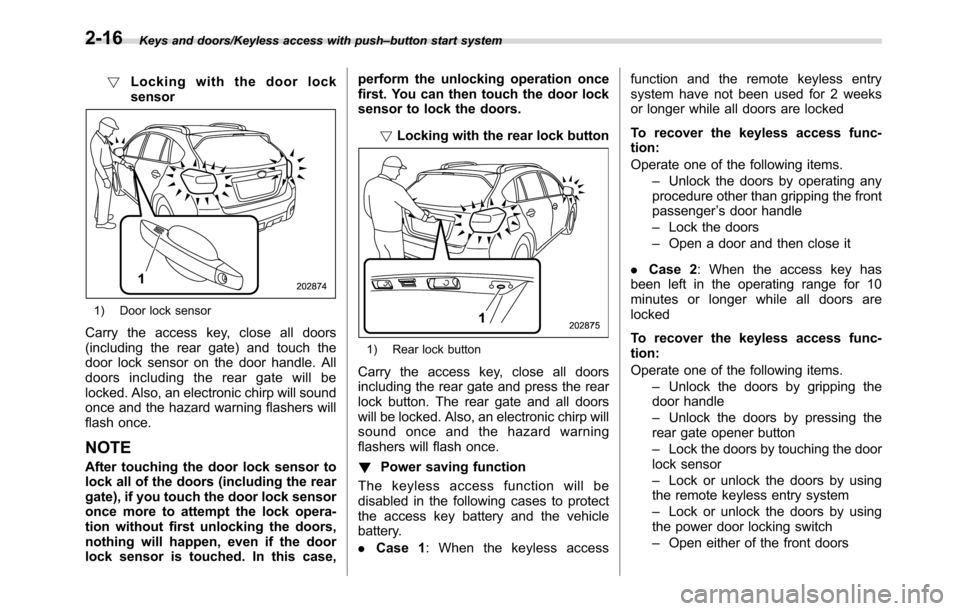
!Locking with the door lock
sensor
1) Door lock sensor
Carry the access key, close all doors
(including the rear gate) and touch the
door lock sensor on the door handle. All
doors including the rear gate will be
locked. Also, an electronic chirp will sound
once and the hazard warning flashers will
flash once.
NOTE
After touching the door lock sensor to
lock all of the doors (including the rear
gate), if you touch the door lock sensor
once more to attempt the lock opera-
tion without first unlocking the doors,
nothing will happen, even if the door
lock sensor is touched. In this case,perform the unlocking operation once
first. You can then touch the door lock
sensor to lock the doors.
!Locking with the rear lock button
1) Rear lock button
Carry the access key, close all doors
including the rear gate and press the rear
lock button. The rear gate and all doors
will be locked. Also, an electronic chirp will
sound once and the hazard warning
flashers will flash once.
!Power saving function
The keyless access function will be
disabled in the following cases to protect
the access key battery and the vehicle
battery.
.Case 1: When the keyless accessfunction and the remote keyless entry
system have not been used for 2 weeks
or longer while all doors are locked
To recover the keyless access func-
tion:
Operate one of the following items.
–Unlock the doors by operating any
procedure other than gripping the front
passenger’s door handle
–Lock the doors
–Open a door and then close it
.Case 2: When the access key has
been left in the operating range for 10
minutes or longer while all doors are
locked
To recover the keyless access func-
tion:
Operate one of the following items.
–Unlock the doors by gripping the
door handle
–Unlock the doors by pressing the
rear gate opener button
–Lock the doors by touching the door
lock sensor
–Lock or unlock the doors by using
the remote keyless entry system
–Lock or unlock the doors by using
the power door locking switch
–Open either of the front doors
2-16
Page 117 of 572
side) of the power door locking switch
twice while the door is open.
7. Within 10 seconds after step 6 is
performed, close and open the driver’s
door once.
8. Within 5 seconds after step 7 is
performed, close the door.
A chirp sound will be heard, and the
functions will be disabled.
NOTE
In steps 4 and 6, press the power door
locking switch slowly. If the switch is
pressed quickly, the functions may not
be disabled.
!Enabling functions
When the procedure to disable the func-
tions is performed again, a chirp sound will
be heard, and the functions are enabled.
NOTE
.The keyless access function will be
enabled only if you perform the proce-
dure in the same manner you disabled
the function (for example, when dis-
abling by operating the driver’s door,
the function will not be enabled even if
you operate the access key).
.Press the push-button ignition
switch if you do not know the proce-
dure in which the keyless accessfunction was disabled.
–When disabling by operating the
driver’s door: a chirp will not be
heard
–When disabling by operating the
access key: a chirp will be heard
&When access key does not
operate properly
Refer to“Access key–if access key does
not operate properly”F9-17.
&Replacing battery of access
key
Refer to“Replacing battery of access key”
F11-42.
&Replacing access key
Access keys can be replaced at SUBARU
dealers. For more details, contact a
SUBARU dealer.
&Certification for keyless ac-
cess with push-button start
system
.U.S.-spec. models
FCC ID: HYQ14AHC
FCC ID: HYQ13CZZ
FCC ID: Y8PSSPIMB02
FCC ID: Y8PSSPLF02
CAUTION
FCC WARNING
Changes or modifications not ex-
pressly approved by the party re-
sponsible for compliance could void
the user’s authority to operate the
equipment.
NOTE
This device complies with part 15 of the
FCC Rules. Operation is subject to the
following two conditions: (1) This de-
vice may not cause harmful interfer-
ence, and (2) this device must accept
any interference received, including
interference that may cause undesired
operation.
Keys and doors/Keyless access with push–button start system
–CONTINUED–2-19
Page 120 of 572
Keys and doors/Remote keyless entry system
&Unlocking
Perform steps 1 to 5 described in“Regis-
tration”.
NOTE
.You cannot unlock by PIN Code
Access in the following cases.
–when the access key is within the
operating ranges
–when the ignition switch is in the
“ACC”or“ON”position
.If you make an operation error
during the unlocking procedure, start
over with the unlocking procedure after
waiting for 5 seconds or longer.
.To protect your vehicle from theft, a
buzzer will sound if incorrect PIN codes
are entered five times continuously. If
this occurs, you cannot unlock the
doors by PIN Code Access for 5
minutes.
Remote keyless entry system
CAUTION
.Do not expose the remote trans-
mitter to severe shocks, such as
those experienced as a result of
dropping or throwing.
.Do not take the remote transmit-
ter apart except when replacing
the battery.
.Do not get the remote transmitter
wet. If it gets wet, wipe it dry with
a cloth immediately.
.When you carry the remote trans-
mitteronanairplane,donot
press the button of the remote
transmitter while in the airplane.
When any button of the remote
transmitter is pressed, radio
waves are sent and may affect
the operation of the airplane.
When you carry the remote trans-
mitter in a bag on an airplane,
take measures to prevent the
buttons of the remote transmitter
from being pressed.
For models with“keyless access with
push-button start system”, the accesskey is used as the transmitter for the
remote keyless entry system. For models
without“keyless access with push-button
start system”, the transmitter for the
remote keyless entry system is located
inside the key head.
The remote keyless entry system has the
following functions.
.Locking and unlocking the doors (and
rear gate) without a key
.Sounding a panic alarm
.Arming and disarming the alarm sys-
tem. For detailed information, refer to
“Alarm system”F2-26.
The operable distance of the remote
keyless entry system is approximately 30
feet (10 meters). However, this distance
will vary depending on environmental
conditions. The system’s operable dis-
tance will be shorter in areas near a
facility or electronic equipment emitting
strong radio waves such as a power plant,
broadcast station, TV tower, or remote
controller of home electronic appliances.
NOTE
.For models with“keyless access
with push-button start system”,the
remote keyless entry system will not
be activated when the push-button
ignition switch is in any position other
2-22
Page 123 of 572
the ignition switch at least 6 times within
10 seconds after Step 2.
4. Open and close the driver’s door once
within 10 seconds after Step 3.
5. The hazard warning flashers flash 3
times to indicate completion of the setting.
You may have the above settings done by
your SUBARU dealer. Also, for models
with a multi function display, the setting
can be changed using the display. For
details, refer to“Keyless buzzer volume
setting”F3-78.
&Replacing the battery
Refer to“Replacing key battery”F11-42.
&Replacing lost transmitters
If you lose a transmitter or want to
purchase additional transmitters (up to
four can be programmed), your transmit-
ters should be reprogrammed for security
reasons. For details, contact your
SUBARU dealer and have the transmitters
programmed into the remote keyless entry
system.
&Certification for remote key-
less entry system
!U.S.-spec. models
FCC ID: CWTWB1U811
FCC ID: CWTWD1U781
CAUTION
FCC WARNING
Changes or modifications not ex-
pressly approved by the party re-
sponsible for compliance could void
the user’s authority to operate the
equipment.
NOTE
This device complies with part 15 of the
FCC Rules. Operation is subject to the
following two conditions: (1) This de-
vice may not cause harmful interfer-
ence, and (2) this device must accept
any interference received, including
interference that may cause undesired
operation.!Canada-spec. models
Keys and doors/Remote keyless entry system
–CONTINUED–2-25
Page 129 of 572
The flashing of the security indicator light
will then change slowly (once approxi-
mately every 3 seconds from twice ap-
proximately every 2 seconds), indicating
that the alarm system has been disarmed.
To unlock all other doors and the rear
gate, briefly press the disarm button a
second time within 5 seconds.
!Emergency disarming
If you cannot disarm the system using the
access key/transmitter (i.e. the transmitter
is lost, broken or the transmitter battery is
too weak), you can disarm the system
without using the access key/remote
transmitter.
The system can be disarmed if you turn
the ignition switch from the“LOCK”/“OFF”
to the“ON”position with a registered key/
access key.
NOTE
For models with“keyless access with
push-button start system”, if the ac-
cess key battery is discharged, perform
the procedure described in“Switching
power status”F9-17. In such a case,
replace the battery immediately. Refer
to“Replacing battery of access key”
F11-42.
&Valet mode
When you choose the valet mode, the
alarm system does not operate. In valet
mode, the remote transmitter is used only
for locking and unlocking the doors and
rear gate and panic activation.
To enter the valet mode, change the
setting of your vehicle’s alarm system for
deactivation mode. Refer to“Activating
and deactivating the alarm system”F2-
27. The security indicator light will con-
tinue to flash once every 3 seconds
indicating that the system is in the valet
mode.
To exit valet mode, change the setting of
your vehicle’s alarm system for activation
mode. Refer to“Activating and deactivat-
ing the alarm system”F2-27.
&Passive arming (models
without“keyless access with
push-button start system”)
!Passive arming mode
When passive arming mode has been
programmed by the dealer, arming of the
system is automatically accomplished
without using the remote transmitter. Note
that in this mode, DOORS MUST BE
MANUALLY LOCKED.!To enter the passive mode
If you wish to program the passive arming
mode, have it done by your SUBARU
dealer.
!Arming the system
CAUTION
In passive mode, the system will
automatically activate the alarm but
WILL NOT automatically lock the
doors. In order to lock the doors
you must either lock them as in-
dicated in step 4 below or with the
key once they have been closed.
Failure to lock the doors manually
will result in a higher security risk.
1. Turn the ignition switch to the“ON”
position.
Keys and doors/Alarm system
–CONTINUED–2-31
Page 133 of 572
switch up until it clicks and then release it.
To stop the window halfway, push the
switch down lightly.
NOTE
.If the vehicle’s battery is discon-
nected due to situations such as
battery or fuse replacement, the one-
touch auto up/down function will be
deactivated. Initialize the power win-
dow to reactivate the one-touch auto
up/down function. Refer to“Initializa-
tion of power window”F2-37.
.When the following operations are
performed, the power window breaker
will operate and it may not be possible
to open or close the window.
–After the driver’s window is fully
closed or fully opened, the switch is
continuously operated in the same
direction for a few seconds.
–After the windows for three or
more seats are fully closed or fully
opened, each switch is continu-
ously operated in the same direc-
tion simultaneously for a few sec-
onds.
In this case, after the breaker recovers,
be sure to initialize the power windows.
If they are not initialized, the one-touch
auto up/down function will not operate.
Refer to“Initialization of power win-dow”F2-37.
!Anti-entrapment function
CAUTION
.Never attempt to test this func-
tion using fingers, hands or other
parts of your body.
.The anti-entrapment function
may not operate properly if some
object gets trapped just before
the window fully closes.
NOTE
.If a window detects an impact simi-
lar to that caused by trapping an object
(for example, when the vehicle encoun-
ters a deep pothole), the anti-entrap-
ment function may operate.
.The window cannot be operated for
a few seconds after the anti-entrap-
ment function operates.
.If the vehicle’s battery is discon-
nected due to situations such as
battery or fuse replacement, the anti-
entrapment function is deactivated.
Initialize the power window to reacti-
vate the anti-entrapment function. Re-
fer to“Initialization of power window”
F2-37.While closing the driver’s window auto-
matically, if the window senses a sub-
stantial enough object trapped between
the window and the window frame, it
automatically moves down slightly and
stops.
Keys and doors/Windows
–CONTINUED–2-35
Page 135 of 572
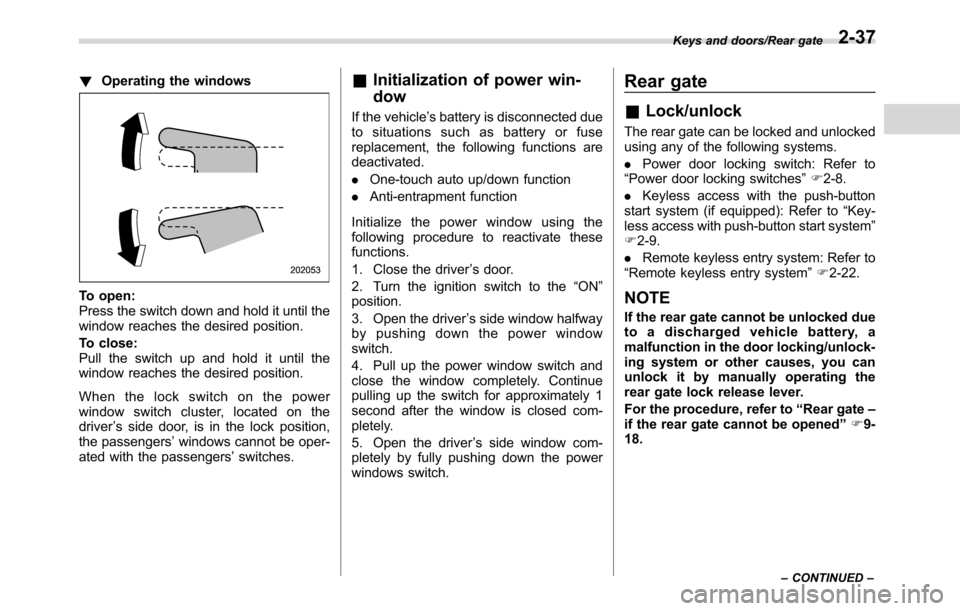
!Operating the windows
To open:
Press the switch down and hold it until the
window reaches the desired position.
To close:
Pull the switch up and hold it until the
window reaches the desired position.
When the lock switch on the power
window switch cluster, located on the
driver’s side door, is in the lock position,
the passengers’windows cannot be oper-
ated with the passengers’switches.
&Initialization of power win-
dow
If the vehicle’s battery is disconnected due
to situations such as battery or fuse
replacement, the following functions are
deactivated.
.One-touch auto up/down function
.Anti-entrapment function
Initialize the power window using the
following procedure to reactivate these
functions.
1. Close the driver’s door.
2. Turn the ignition switch to the“ON”
position.
3. Open the driver’s side window halfway
by pushing down the power window
switch.
4. Pull up the power window switch and
close the window completely. Continue
pulling up the switch for approximately 1
second after the window is closed com-
pletely.
5. Open the driver’s side window com-
pletely by fully pushing down the power
windows switch.
Rear gate
&Lock/unlock
The rear gate can be locked and unlocked
using any of the following systems.
.Power door locking switch: Refer to
“Power door locking switches”F2-8.
.Keyless access with the push-button
start system (if equipped): Refer to“Key-
less access with push-button start system”
F2-9.
.Remote keyless entry system: Refer to
“Remote keyless entry system”F2-22.
NOTE
If the rear gate cannot be unlocked due
to a discharged vehicle battery, a
malfunction in the door locking/unlock-
ing system or other causes, you can
unlock it by manually operating the
rear gate lock release lever.
For the procedure, refer to“Rear gate–
if the rear gate cannot be opened”F9-
18.
Keys and doors/Rear gate
–CONTINUED–2-37
Page 136 of 572
Keys and doors/Rear gate
&Open/close
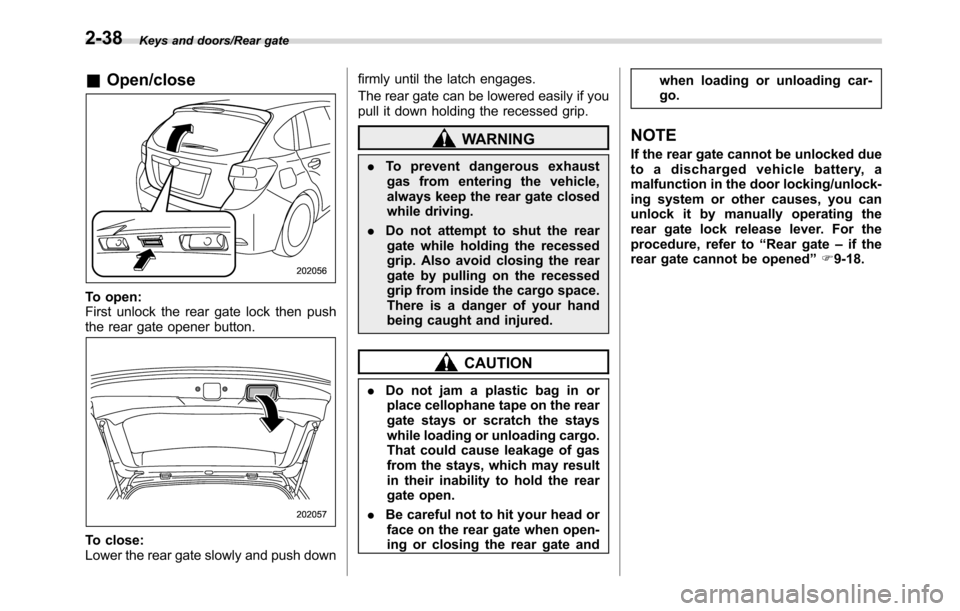
To open:
First unlock the rear gate lock then push
the rear gate opener button.
To close:
Lower the rear gate slowly and push downfirmly until the latch engages.
The rear gate can be lowered easily if you
pull it down holding the recessed grip.
WARNING
.To prevent dangerous exhaust
gas from entering the vehicle,
always keep the rear gate closed
while driving.
.Do not attempt to shut the rear
gate while holding the recessed
grip. Also avoid closing the rear
gate by pulling on the recessed
grip from inside the cargo space.
There is a danger of your hand
being caught and injured.
CAUTION
.Do not jam a plastic bag in or
place cellophane tape on the rear
gate stays or scratch the stays
while loading or unloading cargo.
That could cause leakage of gas
from the stays, which may result
in their inability to hold the rear
gate open.
.Be careful not to hit your head or
face on the rear gate when open-
ing or closing the rear gate andwhen loading or unloading car-
go.
NOTE
If the rear gate cannot be unlocked due
to a discharged vehicle battery, a
malfunction in the door locking/unlock-
ing system or other causes, you can
unlock it by manually operating the
rear gate lock release lever. For the
procedure, refer to“Rear gate–if the
rear gate cannot be opened”F9-18.
2-38
Page 142 of 572
Instruments and controls/Ignition switch (models without“keyless access with push–button start system”)
Ignition switch (models with-
out“keyless access with
push-button start system”)
WARNING
.Never turn the ignition switch to
the“LOCK”position while the
vehicle is being driven or towed
because that will lock the steer-
ing wheel, preventing steering
control. And when the engine is
turned off, it takes a much great-
er effort than usual to steer.
.Before leaving the vehicle, al-
ways remove the key from the
ignition switch for safety and
never allow an unattended child
to remain in the vehicle. Failure
to follow this procedure could
result in injury to a child or
others. Children could operate
the power windows, the moon-
roof or other controls or even
make the vehicle move.
CAUTION
Do not attach a large key holder or
key case to either key. If it banged
against your knees or hands while
you are driving, it could turn the
ignition switch from the“ON”posi-
tion to the“ACC”or“LOCK”posi-
tion, thereby stopping the engine.
Also, if the key is attached to a key
holder or to a large bunch of other
keys, centrifugal force may act on it
as the vehicle moves, resulting in
unwanted turning of the ignition
switch.
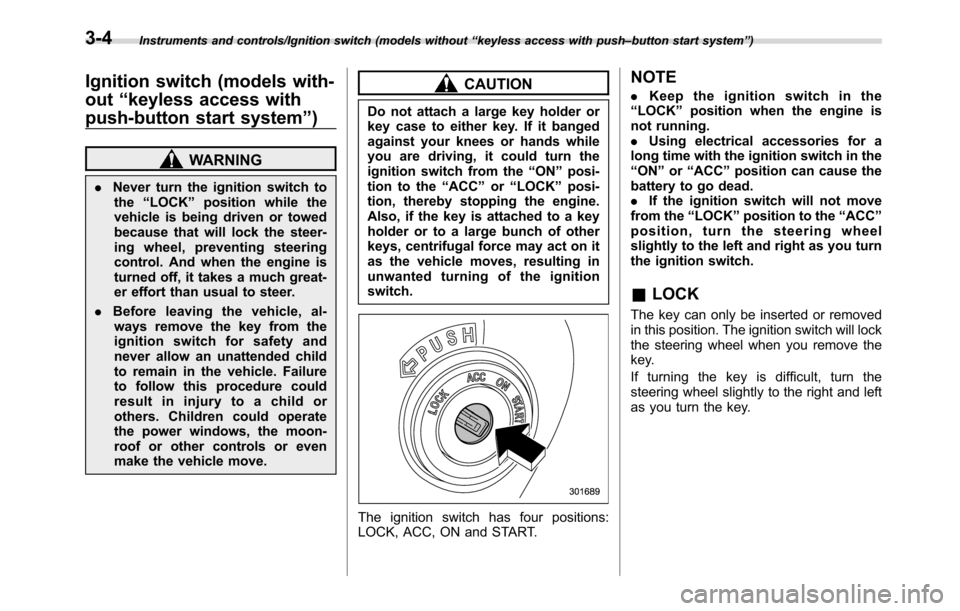
The ignition switch has four positions:
LOCK, ACC, ON and START.
NOTE
.Keep the ignition switch in the
“LOCK”position when the engine is
not running.
.Using electrical accessories for a
long time with the ignition switch in the
“ON”or“ACC”position can cause the
battery to go dead.
.If the ignition switch will not move
from the“LOCK”position to the“ACC”
position, turn the steering wheel
slightly to the left and right as you turn
the ignition switch.
&LOCK
The key can only be inserted or removed
in this position. The ignition switch will lock
the steering wheel when you remove the
key.
If turning the key is difficult, turn the
steering wheel slightly to the right and left
as you turn the key.
3-4