ECO mode SUBARU CROSSTREK 2017 1.G User Guide
[x] Cancel search | Manufacturer: SUBARU, Model Year: 2017, Model line: CROSSTREK, Model: SUBARU CROSSTREK 2017 1.GPages: 572, PDF Size: 41.52 MB
Page 88 of 572
Seat, seatbelt and SRS airbags/*SRS airbag (Supplemental Restraint System airbag)
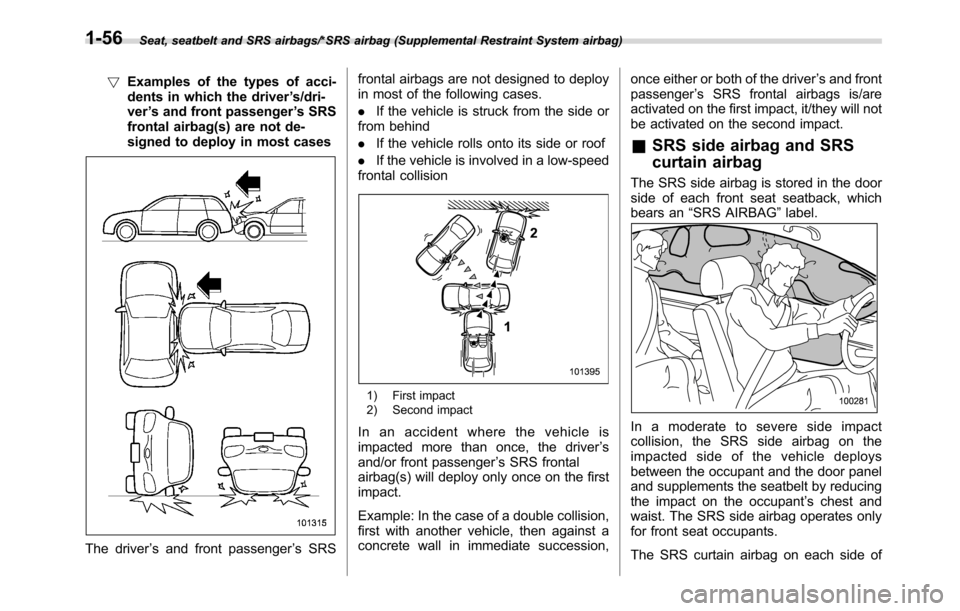
!Examples of the types of acci-
dents in which the driver’s/dri-
ver’s and front passenger’s SRS
frontal airbag(s) are not de-
signed to deploy in most cases
The driver’s and front passenger’s SRSfrontal airbags are not designed to deploy
in most of the following cases.
.If the vehicle is struck from the side or
from behind
.If the vehicle rolls onto its side or roof
.If the vehicle is involved in a low-speed
frontal collision
1) First impact
2) Second impact
In an accident where the vehicle is
impacted more than once, the driver’s
and/or front passenger’s SRS frontal
airbag(s) will deploy only once on the first
impact.
Example: In the case of a double collision,
first with another vehicle, then against a
concrete wall in immediate succession,once either or both of the driver’s and front
passenger’s SRS frontal airbags is/are
activated on the first impact, it/they will not
be activated on the second impact.
&SRS side airbag and SRS
curtain airbag
The SRS side airbag is stored in the door
side of each front seat seatback, which
bears an“SRS AIRBAG”label.
Inamoderatetoseveresideimpact
collision, the SRS side airbag on the
impacted side of the vehicle deploys
between the occupant and the door panel
and supplements the seatbelt by reducing
the impact on the occupant’s chest and
waist. The SRS side airbag operates only
for front seat occupants.
The SRS curtain airbag on each side of
1-56
Page 101 of 572
Keys
NOTE
For models with“keyless access with
push-button start system”, refer to
“Keyless access with push-button start
system”F2-9.
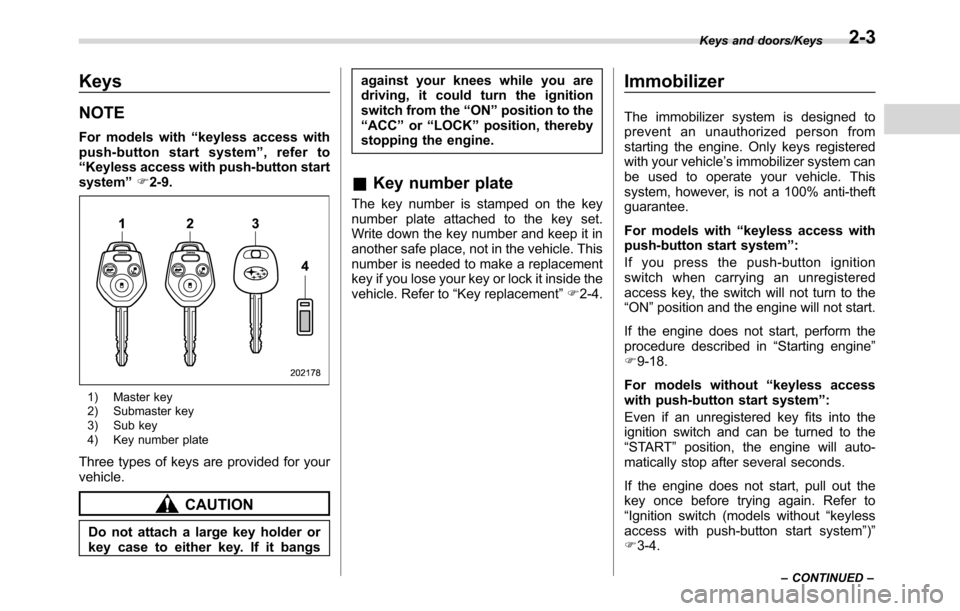
1) Master key
2) Submaster key
3) Sub key
4) Key number plate
Three types of keys are provided for your
vehicle.
CAUTION
Do not attach a large key holder or
key case to either key. If it bangsagainst your knees while you are
driving, it could turn the ignition
switch from the“ON”position to the
“ACC”or“LOCK”position, thereby
stopping the engine.
&Key number plate
The key number is stamped on the key
number plate attached to the key set.
Write down the key number and keep it in
another safe place, not in the vehicle. This
number is needed to make a replacement
key if you lose your key or lock it inside the
vehicle. Refer to“Key replacement”F2-4.
Immobilizer
The immobilizer system is designed to
prevent an unauthorized person from
starting the engine. Only keys registered
with your vehicle’s immobilizer system can
be used to operate your vehicle. This
system, however, is not a 100% anti-theft
guarantee.
For models with“keyless access with
push-button start system”:
If you press the push-button ignition
switch when carrying an unregistered
access key, the switch will not turn to the
“ON”position and the engine will not start.
If the engine does not start, perform the
procedure described in“Starting engine”
F9-18.
For models without“keyless access
with push-button start system”:
Even if an unregistered key fits into the
ignition switch and can be turned to the
“START”position, the engine will auto-
matically stop after several seconds.
If the engine does not start, pull out the
key once before trying again. Refer to
“Ignition switch (models without“keyless
access with push-button start system”)”
F3-4.
Keys and doors/Keys
–CONTINUED–2-3
Page 102 of 572
Keys and doors/Immobilizer
CAUTION
.Do not place the key under direct
sunlight or anywhere it may
become hot.
.Do not get the key wet. If the key
gets wet, wipe it dry with a cloth
immediately.
NOTE
.To protect your vehicle from theft,
please pay close attention to the fol-
lowing security precautions:
–Never leave your vehicle unat-
tended with its keys inside.
–Before leaving your vehicle,
close all windows and the moon-
roof, and lock the doors and rear
gate.
–Do not leave spare keys or any
record of your key number in the
vehicle.
.The vehicle has a maintenance-free
type immobilizer system.
&Security indicator light
Refer to“Security indicator light”F3-30.
&Key replacement
Your key number plate will be required if
you ever need a replacement key made.
Any new key must be registered for use
with your vehicle’s immobilizer system
before it can be used. The maximum
number of keys that can be registered
for use with one vehicle is as follows.
.Four (models without“keyless access
with push-button start system”)
.Seven (models with“keyless access
with push-button start system”)
One key that has already been registered
is required in order to register a new key.
If you lose a key, the lost key’s ID code still
remains in the memory of the vehicle’s
immobilizer system. For security reasons,
the lost key’s ID code should be erased
from the memory. To erase the lost key’s
ID code, all keys that will be used are
required.
For details about new key registration and
erasing the lost key’s ID code, contact
your SUBARU dealer.
&Certification for immobilizer
system
.For models with“keyless access
with push-button start system”:
Refer to“Certification for keyless access
with push-button start system”F2-19.
.For models without“keyless access
with push-button start system”:
–U.S.-spec. models
FCC ID: MOZRI-38BFH
CAUTION
FCC WARNING
Changes or modifications not ex-
pressly approved by the party re-
sponsible for compliance could void
the user’s authority to operate the
equipment.
This device complies with part 15 of the
FCC Rules. Operation is subject to the
following two conditions: (1) This de-
vice may not cause harmful interfer-
ence, and (2) this device must accept
any interference received, including
interference that may cause undesired
operation.
2-4
Page 110 of 572
Keys and doors/Keyless access with push–button start system
near personal computers or
home electric appliances.
NOTE
After the vehicle battery is discharged
or replaced, initialization of the steering
lock system may be required to start
the engine. In this case, perform the
following procedure to initialize the
steering lock.
1) Turn the push-button ignition
switch to the“OFF”position. For de-
tails, refer to“Switching power status”
F3-7.
2) Open and close the driver’s door.
3) Wait for approximately 10 seconds.
When the steering is locked, the initi-
alization is completed.
!Regarding access key
CAUTION
If the access key is dropped, the
integrated mechanical key inside
may become loose. Be careful not
to lose the mechanical key.
NOTE
.The access key is always commu-
nicating with the vehicle and is con-
tinuously using the battery. Although
the life of the battery varies depending
on the operating conditions, it is ap-
proximately 1 to 2 years. If the battery
becomes fully discharged, replace it
with a new one.
.If an access key is lost, it is
recommended that all of the remaining
access keys be reregistered. For rere-
gistration of an access key, contact a
SUBARU dealer.
.Up to 7 access keys can be regis-
tered for one vehicle. For a spare
access key, contact a SUBARU dealer.
.Carefully store the key number plate
supplied with the access key. It is
necessary for vehicle repair and addi-
tional registration of access keys.
.Do not leave the access key in the
storage spaces inside the vehicle.
Vibrations may damage the key or turn
on the switch, possibly resulting in a
lockout.
.Do not leave the access key in the
following places.
–On the instrument panel
–On the floor
–Inside the glove box
–Inside the door trim pocket–On the rear seat
–In the cargo area
If you do, the following situations
may occur.
–The access key is mistakenly
locked inside the vehicle.
–A false warning is issued
although no malfunction actually
occurs.
–No warning is issued even when
any malfunction occurs.
!Regarding setting
NOTE
.The operational/non-operational
setting for the keyless access function
can be changed. For the setting proce-
dure, refer to“Disabling keyless ac-
cess function”F2-17. The setting can
also be changed by a SUBARU dealer.
For more details, contact a SUBARU
dealer.
.For detailed information about the
operation method for the push-button
ignition switch while the keyless ac-
cess function is switched to the non-
operational mode, refer to“Access key
–if access key does not operate
properly”F9-17.
2-12
Page 113 of 572
For details about turning off the push-
button ignition switch, refer to“Switching
power status”F3-7.
.If the door handle is gripped with a
gloved hand, the door lock may not be
released.
.If the door lock sensor is touched three
times or more repeatedly, the system will
ignore the sensor operation.
.When performing the locking proce-
dure too quickly, locking may not have
been completed. After performing the
locking procedure, it is recommended to
pull the REAR door handle to confirm that
the doors have been locked.
.It is possible to lock the doors even
when one of the doors is open. After
performing the locking procedure, close
the opened door or rear gate to lock it.
.Within 3 seconds after locking the
doors and the rear gate by using the
keyless access function, it is not possible
to unlock doors and/or the rear gate by
using the keyless access function.
.When locking, be sure to carry the
access key to prevent locking the access
key in the vehicle.
.The setting of the hazard warning
flasher operation and the volume of the
audible signal can be changed by your
SUBARU dealer. We recommend that you
contact your SUBARU dealer for details..For models with the multi function
display, the setting of the hazard warning
flasher operation can be changed by
operating the multi function display. For
details, refer to“Hazard warning flasher
setting”F3-78.
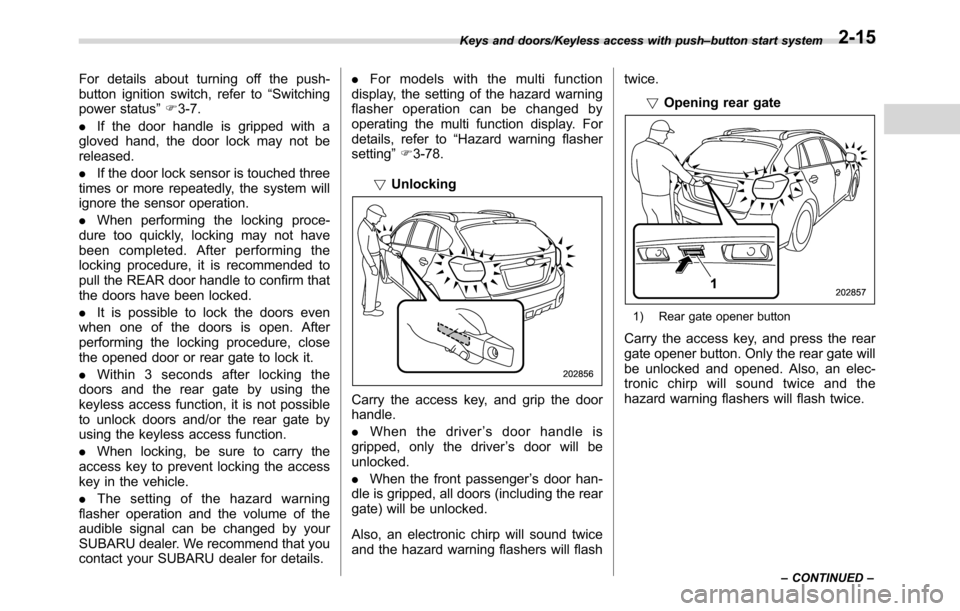
!Unlocking
Carry the access key, and grip the door
handle.
.When the driver’s door handle is
gripped, only the driver’s door will be
unlocked.
.When the front passenger’s door han-
dle is gripped, all doors (including the rear
gate) will be unlocked.
Also, an electronic chirp will sound twice
and the hazard warning flashers will flashtwice.
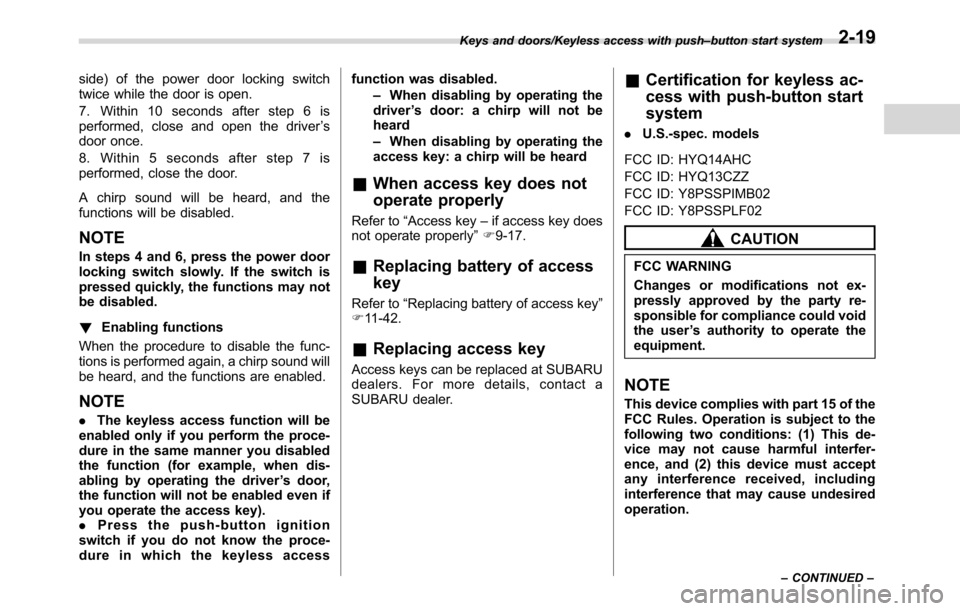
!Opening rear gate
1) Rear gate opener button
Carry the access key, and press the rear
gate opener button. Only the rear gate will
be unlocked and opened. Also, an elec-
tronic chirp will sound twice and the
hazard warning flashers will flash twice.
Keys and doors/Keyless access with push–button start system
–CONTINUED–2-15
Page 117 of 572
side) of the power door locking switch
twice while the door is open.
7. Within 10 seconds after step 6 is
performed, close and open the driver’s
door once.
8. Within 5 seconds after step 7 is
performed, close the door.
A chirp sound will be heard, and the
functions will be disabled.
NOTE
In steps 4 and 6, press the power door
locking switch slowly. If the switch is
pressed quickly, the functions may not
be disabled.
!Enabling functions
When the procedure to disable the func-
tions is performed again, a chirp sound will
be heard, and the functions are enabled.
NOTE
.The keyless access function will be
enabled only if you perform the proce-
dure in the same manner you disabled
the function (for example, when dis-
abling by operating the driver’s door,
the function will not be enabled even if
you operate the access key).
.Press the push-button ignition
switch if you do not know the proce-
dure in which the keyless accessfunction was disabled.
–When disabling by operating the
driver’s door: a chirp will not be
heard
–When disabling by operating the
access key: a chirp will be heard
&When access key does not
operate properly
Refer to“Access key–if access key does
not operate properly”F9-17.
&Replacing battery of access
key
Refer to“Replacing battery of access key”
F11-42.
&Replacing access key
Access keys can be replaced at SUBARU
dealers. For more details, contact a
SUBARU dealer.
&Certification for keyless ac-
cess with push-button start
system
.U.S.-spec. models
FCC ID: HYQ14AHC
FCC ID: HYQ13CZZ
FCC ID: Y8PSSPIMB02
FCC ID: Y8PSSPLF02
CAUTION
FCC WARNING
Changes or modifications not ex-
pressly approved by the party re-
sponsible for compliance could void
the user’s authority to operate the
equipment.
NOTE
This device complies with part 15 of the
FCC Rules. Operation is subject to the
following two conditions: (1) This de-
vice may not cause harmful interfer-
ence, and (2) this device must accept
any interference received, including
interference that may cause undesired
operation.
Keys and doors/Keyless access with push–button start system
–CONTINUED–2-19
Page 118 of 572
Keys and doors/PIN Code Access (models with“keyless access with push–button start system”)
.Canada-spec. models.Mexico-spec. models
IFT
RLVDE1413-2269
14AHC
DENSO
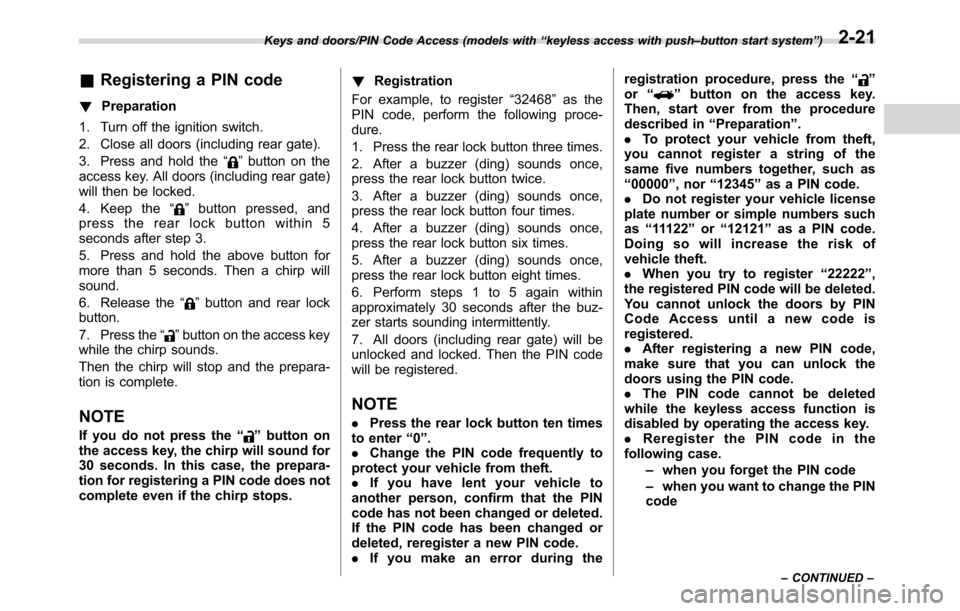
PIN Code Access (models
with“keyless access with
push-button start system”)
1) Rear lock button
While all doors (including the rear gate)
are locked, you can unlock the doors
(including the rear gate) without a key by
pressing the rear lock button.
NOTE
PIN Code Access will be helpful if the
key is accidentally left in the vehicle. It
is recommended that a 5-digit security
code (PIN code) is registered.
2-20
Page 119 of 572
&Registering a PIN code
!Preparation
1. Turn off the ignition switch.
2. Close all doors (including rear gate).
3. Press and hold the“
”button on the
access key. All doors (including rear gate)
will then be locked.
4. Keep the“
”button pressed, and
press the rear lock button within 5
seconds after step 3.
5. Press and hold the above button for
more than 5 seconds. Then a chirp will
sound.
6. Release the“
”button and rear lock
button.
7. Press the“
”button on the access key
while the chirp sounds.
Then the chirp will stop and the prepara-
tion is complete.
NOTE
If you do not press the“”button on
the access key, the chirp will sound for
30 seconds. In this case, the prepara-
tion for registering a PIN code does not
complete even if the chirp stops.!Registration
For example, to register“32468”as the
PIN code, perform the following proce-
dure.
1. Press the rear lock button three times.
2. After a buzzer (ding) sounds once,
press the rear lock button twice.
3. After a buzzer (ding) sounds once,
press the rear lock button four times.
4. After a buzzer (ding) sounds once,
press the rear lock button six times.
5. After a buzzer (ding) sounds once,
press the rear lock button eight times.
6. Perform steps 1 to 5 again within
approximately 30 seconds after the buz-
zer starts sounding intermittently.
7. All doors (including rear gate) will be
unlocked and locked. Then the PIN code
will be registered.
NOTE
.Press the rear lock button ten times
to enter“0”.
.Change the PIN code frequently to
protect your vehicle from theft.
.If you have lent your vehicle to
another person, confirm that the PIN
code has not been changed or deleted.
If the PIN code has been changed or
deleted, reregister a new PIN code.
.If you make an error during theregistration procedure, press the“
”
or“”button on the access key.
Then, start over from the procedure
described in“Preparation”.
.To protect your vehicle from theft,
you cannot register a string of the
same five numbers together, such as
“00000”, nor“12345”as a PIN code.
.Do not register your vehicle license
plate number or simple numbers such
as“11122”or“12121”as a PIN code.
Doing so will increase the risk of
vehicle theft.
.When you try to register“22222”,
the registered PIN code will be deleted.
You cannot unlock the doors by PIN
Code Access until a new code is
registered.
.After registering a new PIN code,
make sure that you can unlock the
doors using the PIN code.
.The PIN code cannot be deleted
while the keyless access function is
disabled by operating the access key.
.Reregister the PIN code in the
following case.
–when you forget the PIN code
–when you want to change the PIN
code
Keys and doors/PIN Code Access (models with“keyless access with push–button start system”)
–CONTINUED–2-21
Page 120 of 572
Keys and doors/Remote keyless entry system
&Unlocking
Perform steps 1 to 5 described in“Regis-
tration”.
NOTE
.You cannot unlock by PIN Code
Access in the following cases.
–when the access key is within the
operating ranges
–when the ignition switch is in the
“ACC”or“ON”position
.If you make an operation error
during the unlocking procedure, start
over with the unlocking procedure after
waiting for 5 seconds or longer.
.To protect your vehicle from theft, a
buzzer will sound if incorrect PIN codes
are entered five times continuously. If
this occurs, you cannot unlock the
doors by PIN Code Access for 5
minutes.
Remote keyless entry system
CAUTION
.Do not expose the remote trans-
mitter to severe shocks, such as
those experienced as a result of
dropping or throwing.
.Do not take the remote transmit-
ter apart except when replacing
the battery.
.Do not get the remote transmitter
wet. If it gets wet, wipe it dry with
a cloth immediately.
.When you carry the remote trans-
mitteronanairplane,donot
press the button of the remote
transmitter while in the airplane.
When any button of the remote
transmitter is pressed, radio
waves are sent and may affect
the operation of the airplane.
When you carry the remote trans-
mitter in a bag on an airplane,
take measures to prevent the
buttons of the remote transmitter
from being pressed.
For models with“keyless access with
push-button start system”, the accesskey is used as the transmitter for the
remote keyless entry system. For models
without“keyless access with push-button
start system”, the transmitter for the
remote keyless entry system is located
inside the key head.
The remote keyless entry system has the
following functions.
.Locking and unlocking the doors (and
rear gate) without a key
.Sounding a panic alarm
.Arming and disarming the alarm sys-
tem. For detailed information, refer to
“Alarm system”F2-26.
The operable distance of the remote
keyless entry system is approximately 30
feet (10 meters). However, this distance
will vary depending on environmental
conditions. The system’s operable dis-
tance will be shorter in areas near a
facility or electronic equipment emitting
strong radio waves such as a power plant,
broadcast station, TV tower, or remote
controller of home electronic appliances.
NOTE
.For models with“keyless access
with push-button start system”,the
remote keyless entry system will not
be activated when the push-button
ignition switch is in any position other
2-22
Page 122 of 572
Keys and doors/Remote keyless entry system
&Unlocking the doors
Press the unlock/disarm button to unlock
the driver’s door. An electronic chirp will
sound twice and the hazard warning
flashers will flash twice. To unlock all
doors and the rear gate, briefly press the
unlock/disarm button a second time within
5 seconds.
NOTE
If the interval between the first and
second presses of the unlock/disarm
button (for unlocking of all of the doors
and the rear gate) is extremely short,
the system may not respond.
&Unlocking the rear gate
Press the rear gate unlock button to
unlock the rear gate.
An electronic chirp will sound twice and
the hazard warning flashers will flash
twice.
&Vehicle finder function
Use this function to find your vehicle
parked among many vehicles in a large
parking lot. Provided you are within 30 feet
(10 meters) of the vehicle, pressing the
lock/arm button three times in a 5-second
period will cause your vehicle’s horn to
sound once and its hazard warningflashers to flash three times.
NOTE
If the interval between presses is too
short when you press the lock/arm
button three times, the system may
not respond to the signals from the
remote transmitter.
&Sounding a panic alarm
To activate the alarm, press the“PANIC”
button once.
The horn will sound and the hazard
warning flashers will flash.
To deactivate the panic alarm, press any
button on the remote transmitter. Unless a
button on the remote transmitter is
pressed, the alarm will be deactivated
after approximately 30 seconds.
&Selecting audible signal op-
eration (models without
“keyless access with push-
button start system”)
Using an electronic chirp, the system will
give you an audible signal when the doors
lock and unlock. If desired, you may turn
the audible signal off.
Perform the following steps to deactivate
the audible signal. You can also use the
same steps to restore the function.
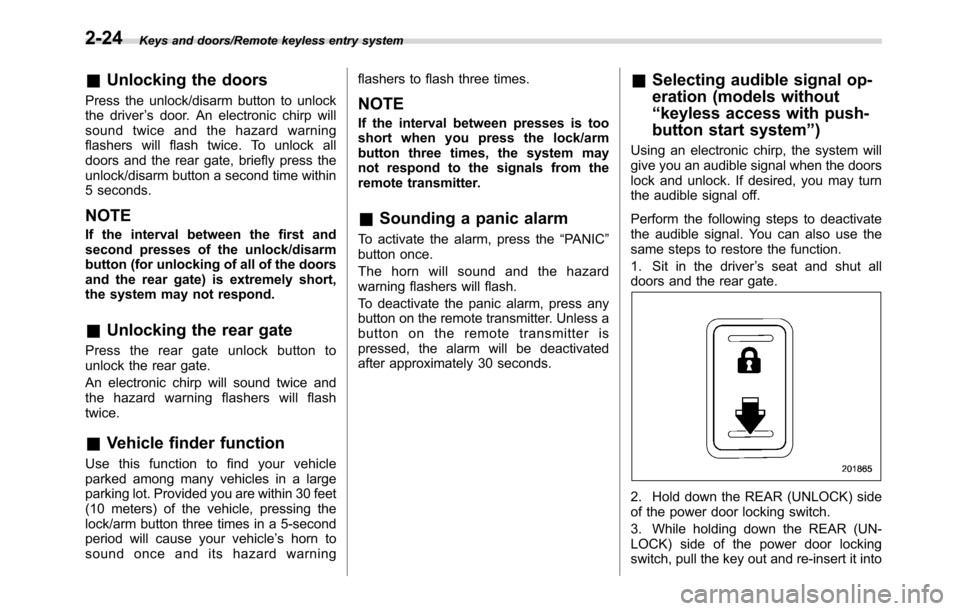
1. Sit in the driver’s seat and shut all
doors and the rear gate.
2. Hold down the REAR (UNLOCK) side
of the power door locking switch.
3. While holding down the REAR (UN-
LOCK) side of the power door locking
switch, pull the key out and re-insert it into
2-24