control panel SUBARU CROSSTREK 2017 1.G User Guide
[x] Cancel search | Manufacturer: SUBARU, Model Year: 2017, Model line: CROSSTREK, Model: SUBARU CROSSTREK 2017 1.GPages: 572, PDF Size: 41.52 MB
Page 229 of 572
&Headlight flasher
CAUTION
Do not hold the lever in the flashing
position for more than just a few
seconds.
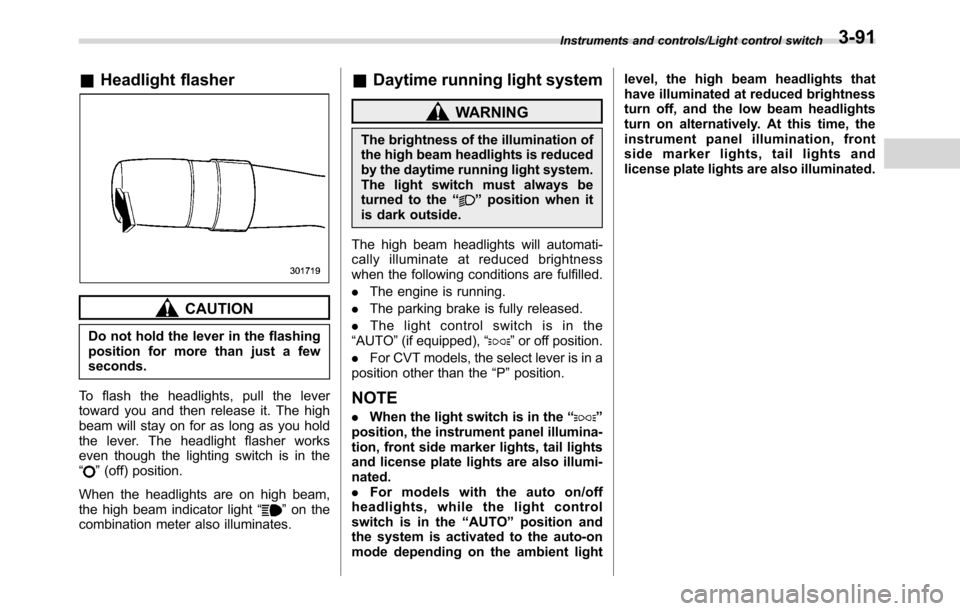
To flash the headlights, pull the lever
toward you and then release it. The high
beam will stay on for as long as you hold
the lever. The headlight flasher works
even though the lighting switch is in the
“
”(off) position.
When the headlights are on high beam,
the high beam indicator light“
”on the
combination meter also illuminates.
&Daytime running light system
WARNING
The brightness of the illumination of
the high beam headlights is reduced
by the daytime running light system.
The light switch must always be
turned to the“
”position when it
is dark outside.
The high beam headlights will automati-
cally illuminate at reduced brightness
when the following conditions are fulfilled.
.The engine is running.
.The parking brake is fully released.
.The light control switch is in the
“AUTO”(if equipped),“
”or off position.
.For CVT models, the select lever is in a
position other than the“P”position.
NOTE
.When the light switch is in the“”
position, the instrument panel illumina-
tion, front side marker lights, tail lights
and license plate lights are also illumi-
nated.
.For models with the auto on/off
headlights, while the light control
switch is in the“AUTO”position and
the system is activated to the auto-on
mode depending on the ambient lightlevel, the high beam headlights that
have illuminated at reduced brightness
turn off, and the low beam headlights
turn on alternatively. At this time, the
instrument panel illumination, front
side marker lights, tail lights and
license plate lights are also illuminated.
Instruments and controls/Light control switch3-91
Page 230 of 572
Instruments and controls/Turn signal lever
Turn signal lever
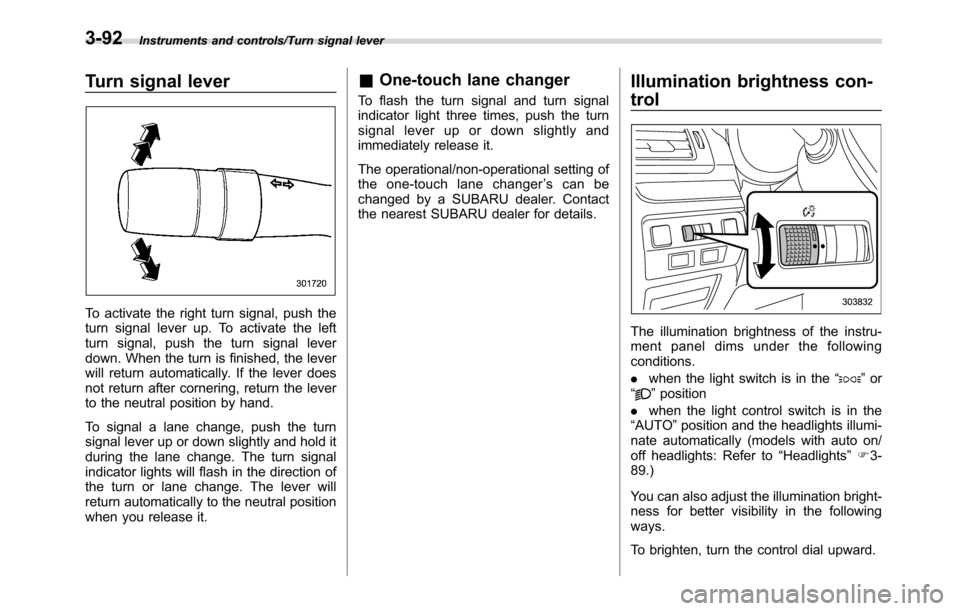
To activate the right turn signal, push the
turn signal lever up. To activate the left
turn signal, push the turn signal lever
down. When the turn is finished, the lever
will return automatically. If the lever does
not return after cornering, return the lever
to the neutral position by hand.
To signal a lane change, push the turn
signal lever up or down slightly and hold it
during the lane change. The turn signal
indicator lights will flash in the direction of
the turn or lane change. The lever will
return automatically to the neutral position
when you release it.
&One-touch lane changer
To flash the turn signal and turn signal
indicator light three times, push the turn
signal lever up or down slightly and
immediately release it.
The operational/non-operational setting of
the one-touch lane changer’s can be
changed by a SUBARU dealer. Contact
the nearest SUBARU dealer for details.
Illumination brightness con-
trol
The illumination brightness of the instru-
ment panel dims under the following
conditions.
.when the light switch is in the“
”or
“”position
.when the light control switch is in the
“AUTO”position and the headlights illumi-
nate automatically (models with auto on/
off headlights: Refer to“Headlights”F3-
89.)
You can also adjust the illumination bright-
ness for better visibility in the following
ways.
To brighten, turn the control dial upward.
3-92
Page 239 of 572
Climate control system type C and type D
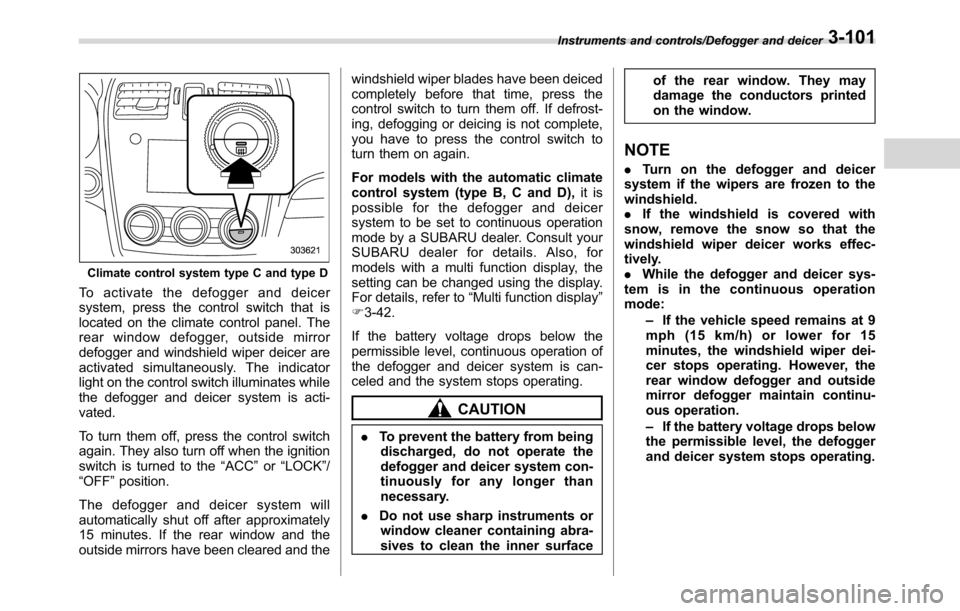
To activate the defogger and deicer
system, press the control switch that is
located on the climate control panel. The
rear window defogger, outside mirror
defogger and windshield wiper deicer are
activated simultaneously. The indicator
light on the control switch illuminates while
the defogger and deicer system is acti-
vated.
To turn them off, press the control switch
again. They also turn off when the ignition
switch is turned to the“ACC”or“LOCK”/
“OFF”position.
The defogger and deicer system will
automatically shut off after approximately
15 minutes. If the rear window and the
outside mirrors have been cleared and thewindshield wiper blades have been deiced
completely before that time, press the
control switch to turn them off. If defrost-
ing, defogging or deicing is not complete,
you have to press the control switch to
turn them on again.
For models with the automatic climate
control system (type B, C and D),it is
possible for the defogger and deicer
system to be set to continuous operation
mode by a SUBARU dealer. Consult your
SUBARU dealer for details. Also, for
models with a multi function display, the
setting can be changed using the display.
For details, refer to“Multi function display”
F3-42.
If the battery voltage drops below the
permissible level, continuous operation of
the defogger and deicer system is can-
celed and the system stops operating.
CAUTION
.To prevent the battery from being
discharged, do not operate the
defogger and deicer system con-
tinuously for any longer than
necessary.
.Do not use sharp instruments or
window cleaner containing abra-
sives to clean the inner surfaceof the rear window. They may
damage the conductors printed
on the window.
NOTE
.Turn on the defogger and deicer
system if the wipers are frozen to the
windshield.
.If the windshield is covered with
snow, remove the snow so that the
windshield wiper deicer works effec-
tively.
.While the defogger and deicer sys-
tem is in the continuous operation
mode:
–If the vehicle speed remains at 9
mph (15 km/h) or lower for 15
minutes, the windshield wiper dei-
cer stops operating. However, the
rear window defogger and outside
mirror defogger maintain continu-
ous operation.
–If the battery voltage drops below
the permissible level, the defogger
and deicer system stops operating.
Instruments and controls/Defogger and deicer3-101
Page 241 of 572
Ventilator control................................................. 4-2
Center and side ventilators.................................. 4-2
Climate control panel.......................................... 4-3Type A ................................................................ 4-3
Type B ................................................................ 4-4
Type C ................................................................ 4-5
Type D ................................................................ 4-6
Automatic climate control operation (type
B, C and D) ....................................................... 4-7
Type B ................................................................ 4-7
Type C and D ...................................................... 4-7
Operation tips..................................................... 4-7
Sensors.............................................................. 4-8
Manual climate control operation...................... 4-8Airflow mode selection........................................ 4-8
Temperature control............................................ 4-9
Fan speed control.............................................. 4-10
Air conditioner control....................................... 4-10
Air inlet selection............................................... 4-10
Defrosting........................................................... 4-11Type A and B..................................................... 4-11
Type C............................................................... 4-11
Type D............................................................... 4-11
Operating tips for heater and air
conditioner...................................................... 4-11
Cleaning ventilation grille................................... 4-11
Efficient cooling after parking in direct
sunlight........................................................... 4-11
Lubrication oil circulation in the refrigerant
circuit.............................................................. 4-12
Checking air conditioning system before summer
season............................................................ 4-12
Cooling and dehumidifying in high humidity and
low temperature weather conditions................. 4-12
Air conditioner compressor shut-off when engine
is heavily loaded.............................................. 4-12
Refrigerant for your climate control system ........ 4-12
Air filtration system........................................... 4-12Replacing an air filter......................................... 4-13
Climate control
4
Page 243 of 572
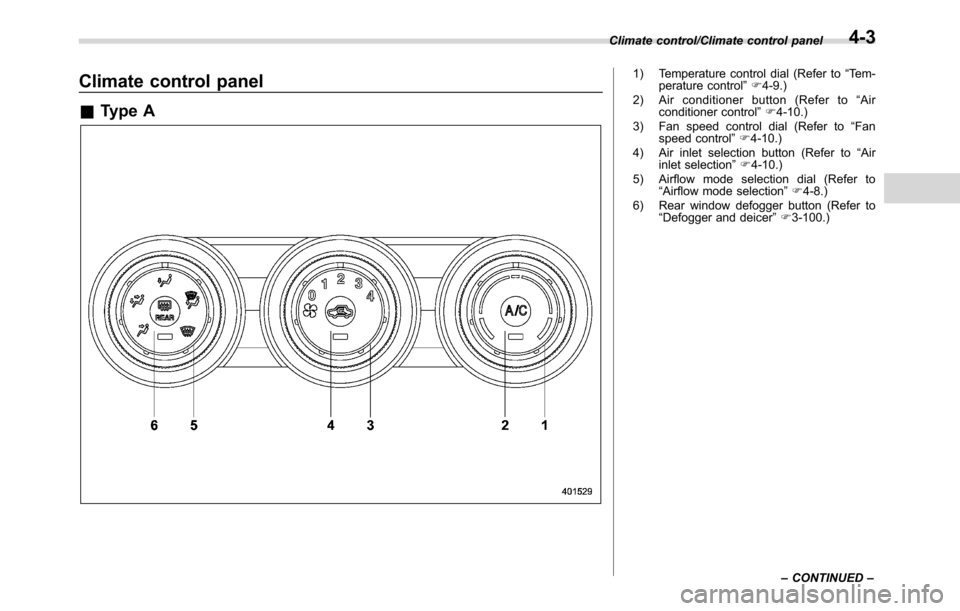
Climate control panel
&Type A
1) Temperature control dial (Refer to“Tem-
perature control”F4-9.)
2) Air conditioner button (Refer to“Air
conditioner control”F4-10.)
3) Fan speed control dial (Refer to“Fan
speed control”F4-10.)
4) Air inlet selection button (Refer to“Air
inlet selection”F4-10.)
5) Airflow mode selection dial (Refer to
“Airflow mode selection”F4-8.)
6) Rear window defogger button (Refer to
“Defogger and deicer”F3-100.) Climate control/Climate control panel
–CONTINUED–
4-3
Page 244 of 572
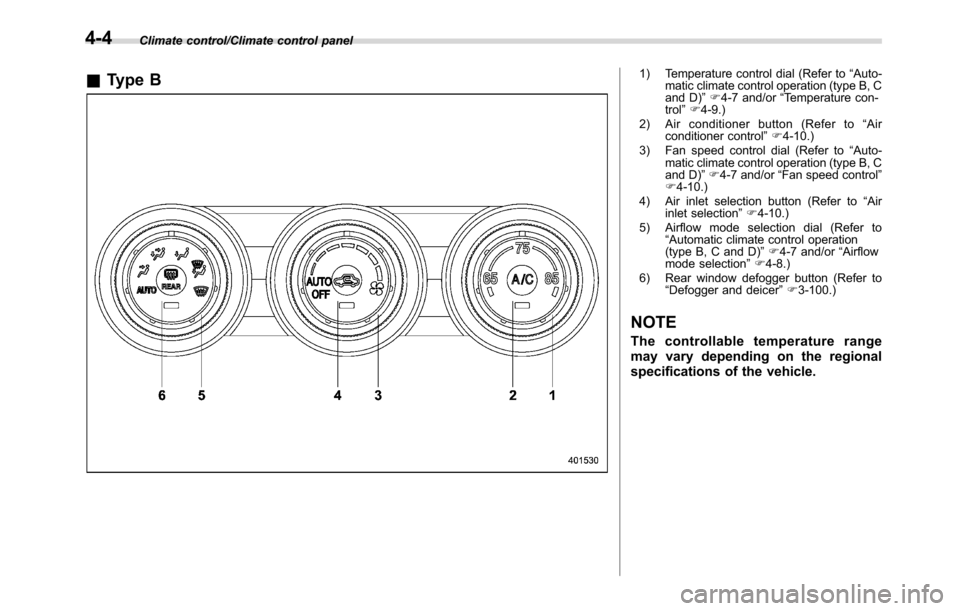
Climate control/Climate control panel
&Type B1) Temperature control dial (Refer to“Auto-
matic climate control operation (type B, C
and D)”F4-7 and/or“Temperature con-
trol”F4-9.)
2) Air conditioner button (Refer to“Air
conditioner control”F4-10.)
3) Fan speed control dial (Refer to“Auto-
matic climate control operation (type B, C
and D)”F4-7 and/or“Fan speed control”
F4-10.)
4) Air inlet selection button (Refer to“Air
inlet selection”F4-10.)
5) Airflow mode selection dial (Refer to
“Automatic climate control operation
(type B, C and D)”F4-7 and/or“Airflow
mode selection”F4-8.)
6) Rear window defogger button (Refer to
“Defogger and deicer”F3-100.)
NOTE
The controllable temperature range
may vary depending on the regional
specifications of the vehicle.
4-4
Page 245 of 572
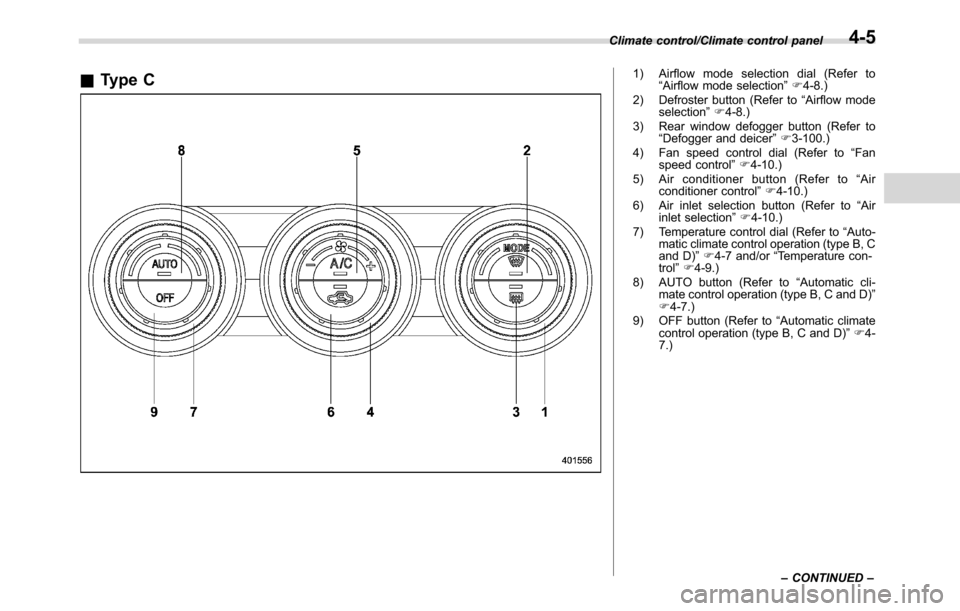
&Type C1) Airflow mode selection dial (Refer to
“Airflow mode selection”F4-8.)
2) Defroster button (Refer to“Airflow mode
selection”F4-8.)
3) Rear window defogger button (Refer to
“Defogger and deicer”F3-100.)
4) Fan speed control dial (Refer to“Fan
speed control”F4-10.)
5) Air conditioner button (Refer to“Air
conditioner control”F4-10.)
6) Air inlet selection button (Refer to“Air
inlet selection”F4-10.)
7) Temperature control dial (Refer to“Auto-
matic climate control operation (type B, C
and D)”F4-7 and/or“Temperature con-
trol”F4-9.)
8) AUTO button (Refer to“Automatic cli-
mate control operation (type B, C and D)”
F4-7.)
9) OFF button (Refer to“Automatic climate
control operation (type B, C and D)”F4-
7.) Climate control/Climate control panel
–CONTINUED–
4-5
Page 246 of 572
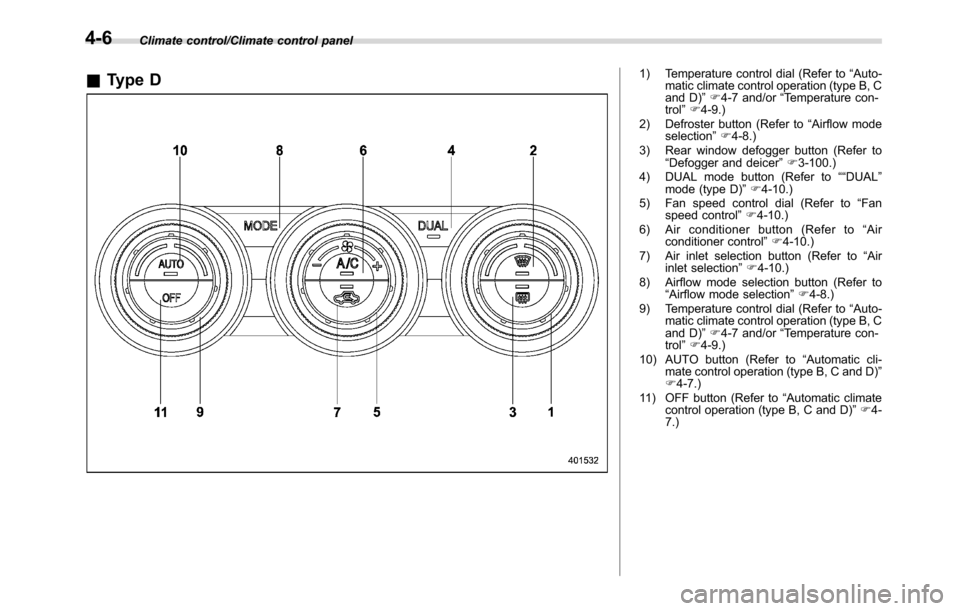
Climate control/Climate control panel
&Type D1) Temperature control dial (Refer to“Auto-
matic climate control operation (type B, C
and D)”F4-7 and/or“Temperature con-
trol”F4-9.)
2) Defroster button (Refer to“Airflow mode
selection”F4-8.)
3) Rear window defogger button (Refer to
“Defogger and deicer”F3-100.)
4) DUAL mode button (Refer to““DUAL”
mode (type D)”F4-10.)
5) Fan speed control dial (Refer to“Fan
speed control”F4-10.)
6) Air conditioner button (Refer to“Air
conditioner control”F4-10.)
7) Air inlet selection button (Refer to“Air
inlet selection”F4-10.)
8) Airflow mode selection button (Refer to
“Airflow mode selection”F4-8.)
9) Temperature control dial (Refer to“Auto-
matic climate control operation (type B, C
and D)”F4-7 and/or“Temperature con-
trol”F4-9.)
10) AUTO button (Refer to“Automatic cli-
mate control operation (type B, C and D)”
F4-7.)
11) OFF button (Refer to“Automatic climate
control operation (type B, C and D)”F4-
7.)
4-6
Page 247 of 572
Automatic climate control
operation (type B, C and D)
When this mode is selected, the fan
speed, airflow distribution, air-inlet control,
and air conditioner compressor operation
are automatically controlled. To activate
this mode, perform the following.
&Type B
1. Turn the airflow mode selection dial
and fan speed control dial to the“AUTO”
position.
2. Set the preferred temperature using
the temperature control dial.
NOTE
.Each function can be individually
set to the AUTO mode independently of
the other functions. Any function set to
the AUTO mode is controlled automa-
tically. Any function not set to the
AUTO mode can be manually adjusted
as desired.
.The controllable temperature range
may vary depending on the regional
specifications of the vehicle.
To turn off the climate control system, turn
the fan speed control dial to the“OFF”
position. Then the air inlet selection will beset as follows.
.when the AUTO mode is selected: OFF
(outside air)
.when the AUTO mode is not selected:
the mode that was selected when turning
off the climate system will be selected.
&Type C and D
1. Depress the“AUTO”button. The
indicator light“FULL AUTO”on the display
illuminates.
2. Set the preferred temperature using
the temperature control dial.
NOTE
.The controllable temperature range
may vary depending on the regional
specifications of the vehicle.
.If you operate any of the buttons on
the control panel other than the“OFF”
button, rear window defogger button
and temperature control dial(s) during
FULL AUTO mode operation, the
“FULL”indicator light on the control
panel will turn off and the“AUTO”
indicator light will remain illuminated.
You can then manually control the
system as desired using the button
you operated. To change the system
back to the FULL AUTO mode, press
the“AUTO”button.To turn off the climate control system,
press the“OFF”button. Then the air inlet
selection will be set to OFF (outside air).
&Operation tips
.Operate the automatic climate control
system when the engine is running.
.Even when cooling is not necessary,
the air conditioner compressor will auto-
matically turn on if the temperature is set
much lower than the current outlet air
temperature. Even in this case, the“A/C”
indicator light on the control panel illumi-
nates.
Climate control/Automatic climate control operation (type B, C and D)
–CONTINUED–4-7
Page 248 of 572
Climate control/Manual climate control operation
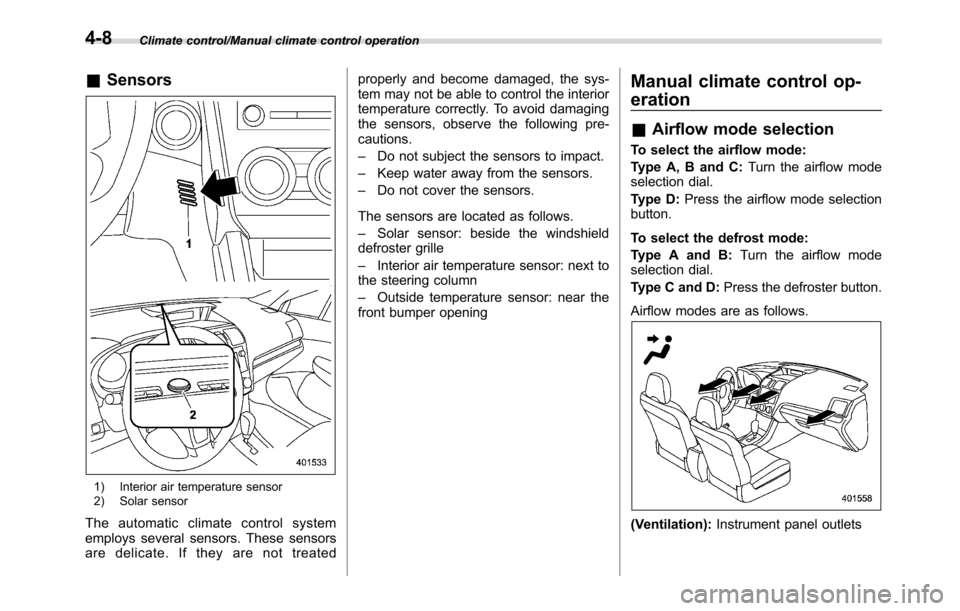
&Sensors
1) Interior air temperature sensor
2) Solar sensor
The automatic climate control system
employs several sensors. These sensors
are delicate. If they are not treatedproperly and become damaged, the sys-
tem may not be able to control the interior
temperature correctly. To avoid damaging
the sensors, observe the following pre-
cautions.
–Do not subject the sensors to impact.
–Keep water away from the sensors.
–Do not cover the sensors.
The sensors are located as follows.
–Solar sensor: beside the windshield
defroster grille
–Interior air temperature sensor: next to
the steering column
–Outside temperature sensor: near the
front bumper opening
Manual climate control op-
eration
&Airflow mode selection
To select the airflow mode:
Type A, B and C:Turn the airflow mode
selection dial.
Type D:Press the airflow mode selection
button.
To select the defrost mode:
Type A and B:Turn the airflow mode
selection dial.
Type C and D:Press the defroster button.
Airflow modes are as follows.
(Ventilation):Instrument panel outlets
4-8