tow SUBARU CROSSTREK 2017 1.G Owners Manual
[x] Cancel search | Manufacturer: SUBARU, Model Year: 2017, Model line: CROSSTREK, Model: SUBARU CROSSTREK 2017 1.GPages: 572, PDF Size: 41.52 MB
Page 18 of 572
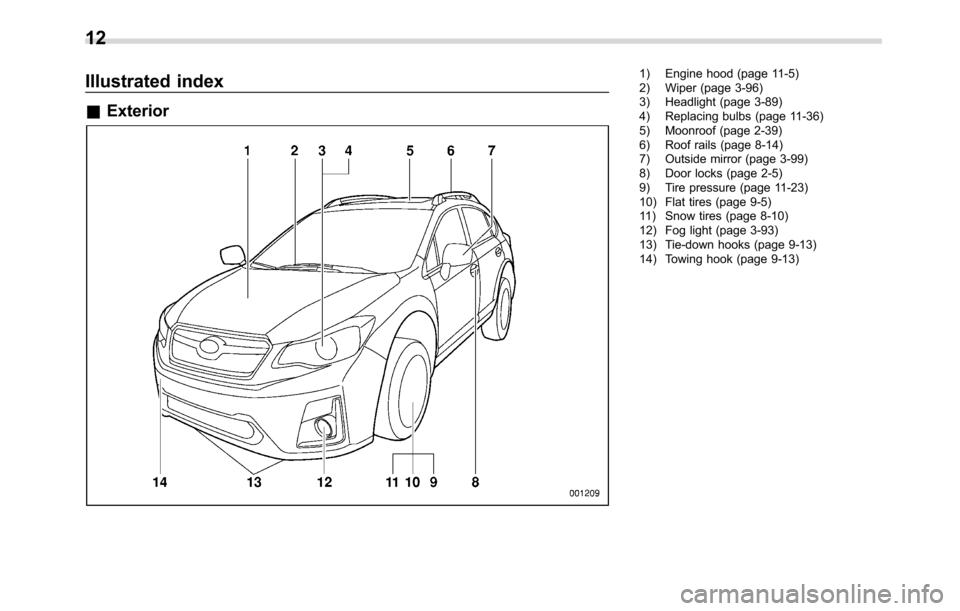
Illustrated index
&Exterior
1) Engine hood (page 11-5)
2) Wiper (page 3-96)
3) Headlight (page 3-89)
4) Replacing bulbs (page 11-36)
5) Moonroof (page 2-39)
6) Roof rails (page 8-14)
7) Outside mirror (page 3-99)
8) Door locks (page 2-5)
9) Tire pressure (page 11-23)
10) Flat tires (page 9-5)
11) Snow tires (page 8-10)
12) Fog light (page 3-93)
13) Tie-down hooks (page 9-13)
14) Towing hook (page 9-13)
12
Page 19 of 572
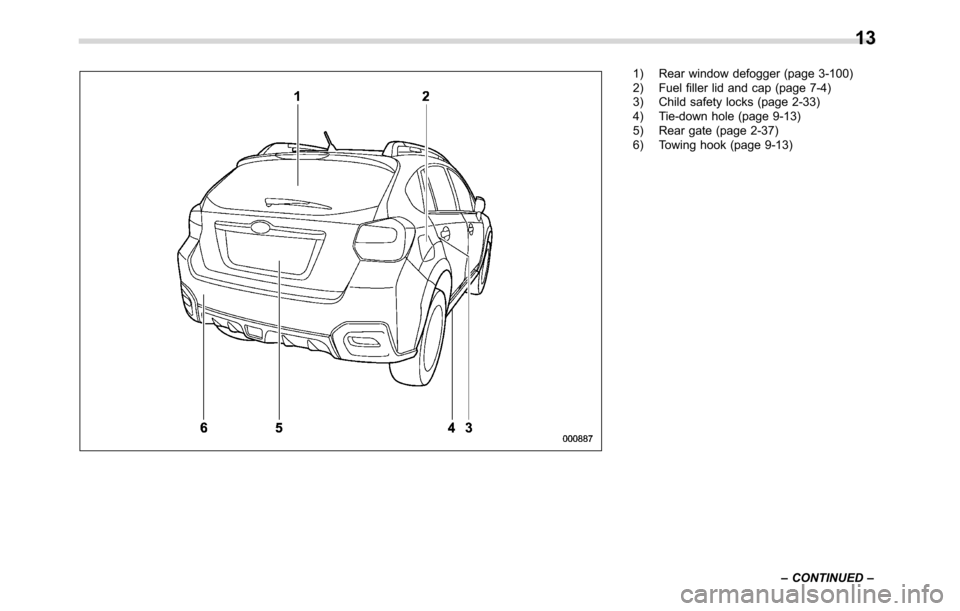
1) Rear window defogger (page 3-100)
2) Fuel filler lid and cap (page 7-4)
3) Child safety locks (page 2-33)
4) Tie-down hole (page 9-13)
5) Rear gate (page 2-37)
6) Towing hook (page 9-13)
–CONTINUED–
13
Page 72 of 572
Seat, seatbelt and SRS airbags/*SRS airbag (Supplemental Restraint System airbag)
vehicle, causing injury.
.Do not put any objects under the
driver’s side of the instrument
panel. If the SRS knee airbag
deploys, those objects could in-
terfere with its proper operation
and could be propelled inside the
vehicle, causing injury.
.The key must not be attached to
heavy, sharp or hard acces-
sories, or another key. If the
SRS knee airbag deploys, those
objects could interfere with its
proper operation and could be
propelled inside the vehicle and
cause injury.WARNING
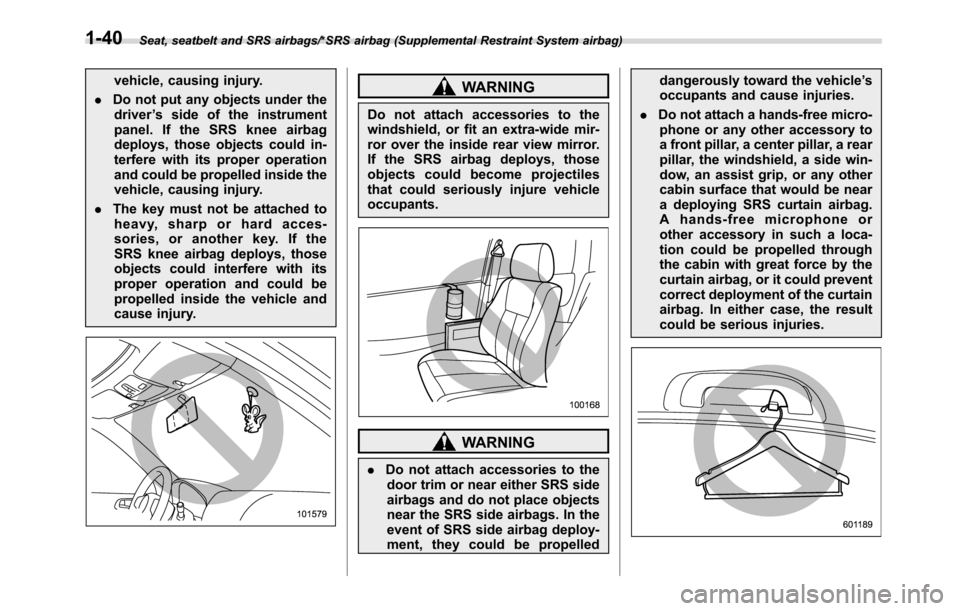
Do not attach accessories to the
windshield, or fit an extra-wide mir-
ror over the inside rear view mirror.
If the SRS airbag deploys, those
objects could become projectiles
that could seriously injure vehicle
occupants.
WARNING
.Do not attach accessories to the
door trim or near either SRS side
airbags and do not place objects
near the SRS side airbags. In the
event of SRS side airbag deploy-
ment, they could be propelleddangerously toward the vehicle’s
occupants and cause injuries.
.Do not attach a hands-free micro-
phone or any other accessory to
a front pillar, a center pillar, a rear
pillar, the windshield, a side win-
dow, an assist grip, or any other
cabin surface that would be near
a deploying SRS curtain airbag.
A hands-free microphone or
other accessory in such a loca-
tion could be propelled through
the cabin with great force by the
curtain airbag, or it could prevent
correct deployment of the curtain
airbag. In either case, the result
could be serious injuries.
1-40
Page 76 of 572
Seat, seatbelt and SRS airbags/*SRS airbag (Supplemental Restraint System airbag)
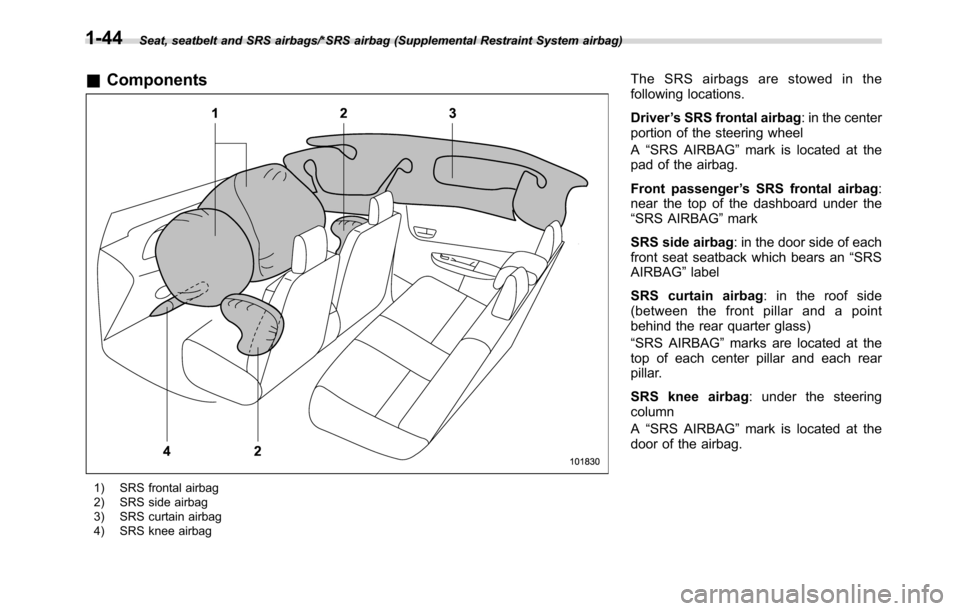
&Components
1) SRS frontal airbag
2) SRS side airbag
3) SRS curtain airbag
4) SRS knee airbag
The SRS airbags are stowed in the
following locations.
Driver’s SRS frontal airbag: in the center
portion of the steering wheel
A“SRS AIRBAG”mark is located at the
pad of the airbag.
Front passenger’s SRS frontal airbag:
near the top of the dashboard under the
“SRS AIRBAG”mark
SRS side airbag: in the door side of each
front seat seatback which bears an“SRS
AIRBAG”label
SRS curtain airbag: in the roof side
(between the front pillar and a point
behind the rear quarter glass)
“SRS AIRBAG”marks are located at the
top of each center pillar and each rear
pillar.
SRS knee airbag: under the steering
column
A“SRS AIRBAG”mark is located at the
door of the airbag.
1-44
Page 104 of 572
Keys and doors/Door locks
“ON”.
For details about the alarm system,
refer to“Alarm system”F2-26.
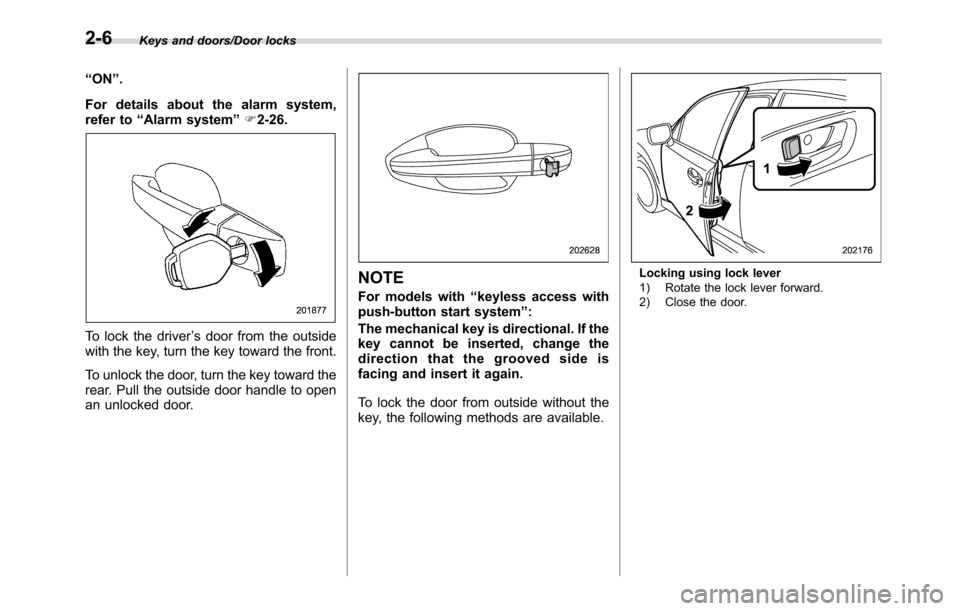
To lock the driver’s door from the outside
with the key, turn the key toward the front.
To unlock the door, turn the key toward the
rear. Pull the outside door handle to open
an unlocked door.
NOTE
For models with“keyless access with
push-button start system”:
The mechanical key is directional. If the
key cannot be inserted, change the
direction that the grooved side is
facing and insert it again.
To lock the door from outside without the
key, the following methods are available.
Locking using lock lever
1) Rotate the lock lever forward.
2) Close the door.
2-6
Page 112 of 572
Keys and doors/Keyless access with push–button start system
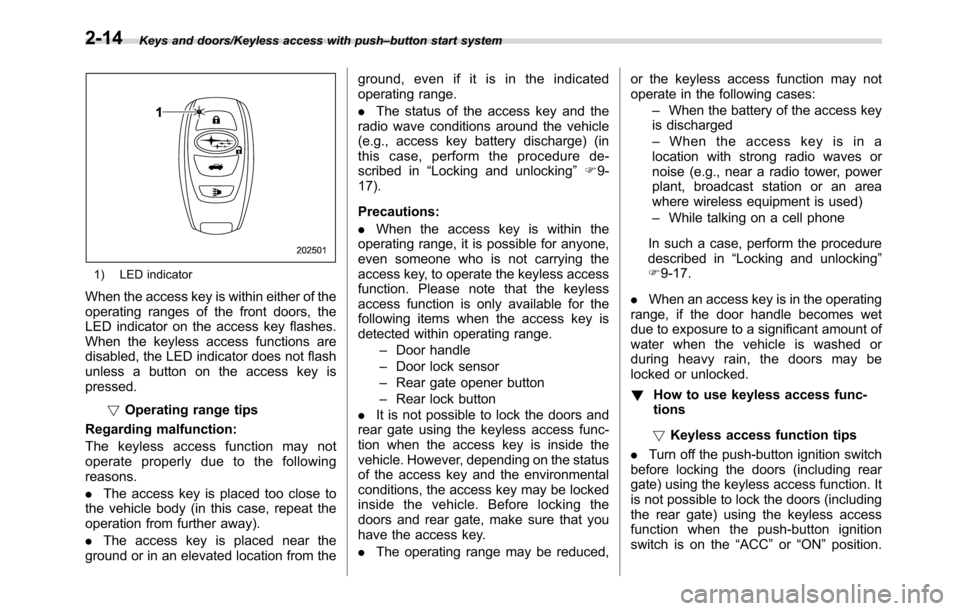
1) LED indicator
When the access key is within either of the
operating ranges of the front doors, the
LED indicator on the access key flashes.
When the keyless access functions are
disabled, the LED indicator does not flash
unless a button on the access key is
pressed.
!Operating range tips
Regarding malfunction:
The keyless access function may not
operate properly due to the following
reasons.
.The access key is placed too close to
the vehicle body (in this case, repeat the
operation from further away).
.The access key is placed near the
ground or in an elevated location from theground, even if it is in the indicated
operating range.
.The status of the access key and the
radio wave conditions around the vehicle
(e.g., access key battery discharge) (in
this case, perform the procedure de-
scribed in“Locking and unlocking”F9-
17).
Precautions:
.When the access key is within the
operating range, it is possible for anyone,
even someone who is not carrying the
access key, to operate the keyless access
function. Please note that the keyless
access function is only available for the
following items when the access key is
detected within operating range.
–Door handle
–Door lock sensor
–Rear gate opener button
–Rear lock button
.It is not possible to lock the doors and
rear gate using the keyless access func-
tion when the access key is inside the
vehicle. However, depending on the status
of the access key and the environmental
conditions, the access key may be locked
inside the vehicle. Before locking the
doors and rear gate, make sure that you
have the access key.
.The operating range may be reduced,or the keyless access function may not
operate in the following cases:
–When the battery of the access key
is discharged
–When the access key is in a
location with strong radio waves or
noise (e.g., near a radio tower, power
plant, broadcast station or an area
where wireless equipment is used)
–While talking on a cell phone
In such a case, perform the procedure
described in“Locking and unlocking”
F9-17.
.When an access key is in the operating
range, if the door handle becomes wet
due to exposure to a significant amount of
water when the vehicle is washed or
during heavy rain, the doors may be
locked or unlocked.
!How to use keyless access func-
tions
!Keyless access function tips
.Turn off the push-button ignition switch
before locking the doors (including rear
gate) using the keyless access function. It
is not possible to lock the doors (including
the rear gate) using the keyless access
function when the push-button ignition
switch is on the“ACC”or“ON”position.
2-14
Page 120 of 572
Keys and doors/Remote keyless entry system
&Unlocking
Perform steps 1 to 5 described in“Regis-
tration”.
NOTE
.You cannot unlock by PIN Code
Access in the following cases.
–when the access key is within the
operating ranges
–when the ignition switch is in the
“ACC”or“ON”position
.If you make an operation error
during the unlocking procedure, start
over with the unlocking procedure after
waiting for 5 seconds or longer.
.To protect your vehicle from theft, a
buzzer will sound if incorrect PIN codes
are entered five times continuously. If
this occurs, you cannot unlock the
doors by PIN Code Access for 5
minutes.
Remote keyless entry system
CAUTION
.Do not expose the remote trans-
mitter to severe shocks, such as
those experienced as a result of
dropping or throwing.
.Do not take the remote transmit-
ter apart except when replacing
the battery.
.Do not get the remote transmitter
wet. If it gets wet, wipe it dry with
a cloth immediately.
.When you carry the remote trans-
mitteronanairplane,donot
press the button of the remote
transmitter while in the airplane.
When any button of the remote
transmitter is pressed, radio
waves are sent and may affect
the operation of the airplane.
When you carry the remote trans-
mitter in a bag on an airplane,
take measures to prevent the
buttons of the remote transmitter
from being pressed.
For models with“keyless access with
push-button start system”, the accesskey is used as the transmitter for the
remote keyless entry system. For models
without“keyless access with push-button
start system”, the transmitter for the
remote keyless entry system is located
inside the key head.
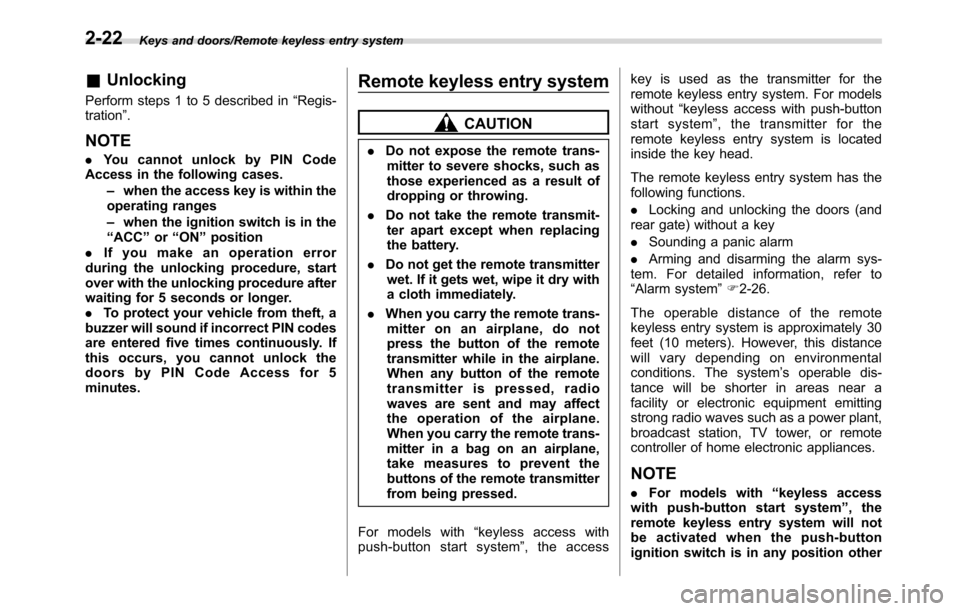
The remote keyless entry system has the
following functions.
.Locking and unlocking the doors (and
rear gate) without a key
.Sounding a panic alarm
.Arming and disarming the alarm sys-
tem. For detailed information, refer to
“Alarm system”F2-26.
The operable distance of the remote
keyless entry system is approximately 30
feet (10 meters). However, this distance
will vary depending on environmental
conditions. The system’s operable dis-
tance will be shorter in areas near a
facility or electronic equipment emitting
strong radio waves such as a power plant,
broadcast station, TV tower, or remote
controller of home electronic appliances.
NOTE
.For models with“keyless access
with push-button start system”,the
remote keyless entry system will not
be activated when the push-button
ignition switch is in any position other
2-22
Page 142 of 572
Instruments and controls/Ignition switch (models without“keyless access with push–button start system”)
Ignition switch (models with-
out“keyless access with
push-button start system”)
WARNING
.Never turn the ignition switch to
the“LOCK”position while the
vehicle is being driven or towed
because that will lock the steer-
ing wheel, preventing steering
control. And when the engine is
turned off, it takes a much great-
er effort than usual to steer.
.Before leaving the vehicle, al-
ways remove the key from the
ignition switch for safety and
never allow an unattended child
to remain in the vehicle. Failure
to follow this procedure could
result in injury to a child or
others. Children could operate
the power windows, the moon-
roof or other controls or even
make the vehicle move.
CAUTION
Do not attach a large key holder or
key case to either key. If it banged
against your knees or hands while
you are driving, it could turn the
ignition switch from the“ON”posi-
tion to the“ACC”or“LOCK”posi-
tion, thereby stopping the engine.
Also, if the key is attached to a key
holder or to a large bunch of other
keys, centrifugal force may act on it
as the vehicle moves, resulting in
unwanted turning of the ignition
switch.
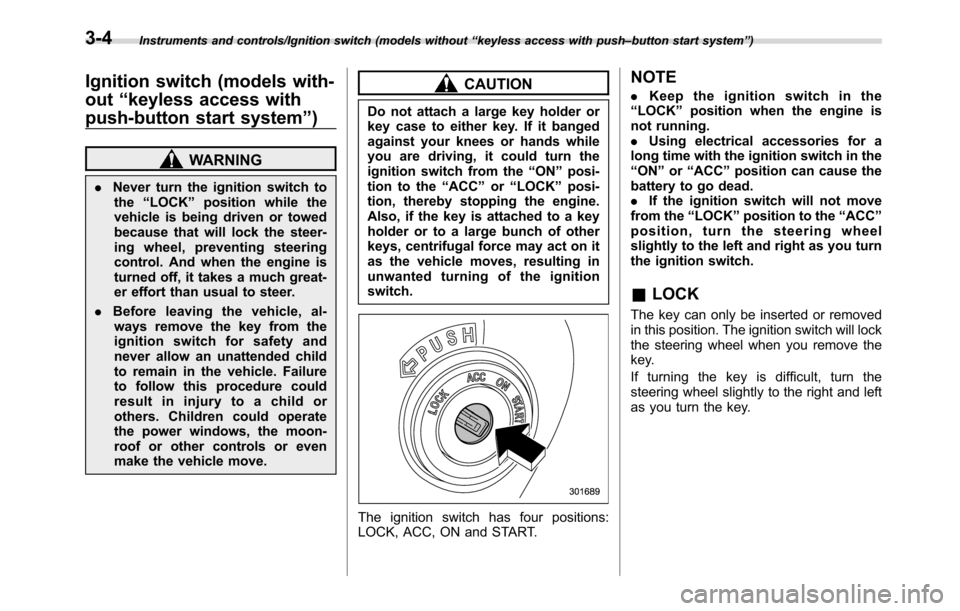
The ignition switch has four positions:
LOCK, ACC, ON and START.
NOTE
.Keep the ignition switch in the
“LOCK”position when the engine is
not running.
.Using electrical accessories for a
long time with the ignition switch in the
“ON”or“ACC”position can cause the
battery to go dead.
.If the ignition switch will not move
from the“LOCK”position to the“ACC”
position, turn the steering wheel
slightly to the left and right as you turn
the ignition switch.
&LOCK
The key can only be inserted or removed
in this position. The ignition switch will lock
the steering wheel when you remove the
key.
If turning the key is difficult, turn the
steering wheel slightly to the right and left
as you turn the key.
3-4
Page 150 of 572
Instruments and controls/Meters and gauges
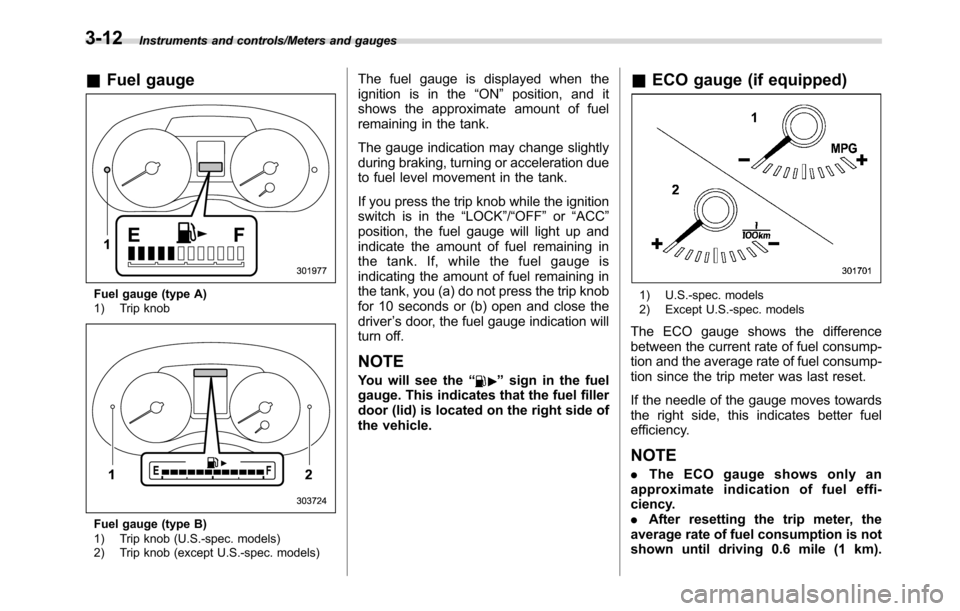
&Fuel gauge
Fuel gauge (type A)
1) Trip knob
Fuel gauge (type B)
1) Trip knob (U.S.-spec. models)
2) Trip knob (except U.S.-spec. models)
The fuel gauge is displayed when the
ignition is in the“ON”position, and it
shows the approximate amount of fuel
remaining in the tank.
The gauge indication may change slightly
during braking, turning or acceleration due
to fuel level movement in the tank.
If you press the trip knob while the ignition
switch is in the“LOCK”/“OFF”or“ACC”
position, the fuel gauge will light up and
indicate the amount of fuel remaining in
the tank. If, while the fuel gauge is
indicating the amount of fuel remaining in
the tank, you (a) do not press the trip knob
for 10 seconds or (b) open and close the
driver’s door, the fuel gauge indication will
turn off.
NOTE
You will see the“”sign in the fuel
gauge. This indicates that the fuel filler
door (lid) is located on the right side of
the vehicle.
&ECO gauge (if equipped)
1) U.S.-spec. models
2) Except U.S.-spec. models
The ECO gauge shows the difference
between the current rate of fuel consump-
tion and the average rate of fuel consump-
tion since the trip meter was last reset.
If the needle of the gauge moves towards
the right side, this indicates better fuel
efficiency.
NOTE
.The ECO gauge shows only an
approximate indication of fuel effi-
ciency.
.After resetting the trip meter, the
average rate of fuel consumption is not
shown until driving 0.6 mile (1 km).
3-12
Page 155 of 572
NOTE
This light also illuminates when the fuel
filler cap is not tightened until it clicks.
If you have recently refueled your vehicle,
the cause of the CHECK ENGINE warning
light/malfunction indicator light illuminating
could be a loose or missing fuel filler cap.
Remove the cap and retighten it until it
clicks. Make sure nothing is interfering
with the sealing of the cap. Tightening the
cap will not make the CHECK ENGINE
warning light turn off immediately. It may
take several driving trips. If the light does
not turn off, take your vehicle to your
authorized SUBARU dealer immediately.
!If the light is blinking
If the light is blinking while driving, an
engine misfire condition has been de-
tected which may damage the emission
control system.
To prevent serious damage to the emis-
sion control system, you should do the
following.
.Reduce vehicle speed.
.Avoid hard acceleration.
.Avoid steep uphill grades.
.Reduce the amount of cargo, if possi-
ble.
.If towing a trailer, stop doing so as soon
as possible.The CHECK ENGINE warning light may
stop blinking and illuminate steadily after
several driving trips. You should have your
vehicle checked by an authorized
SUBARU dealer immediately.
&Coolant temperature
low indicator light/Cool-
ant temperature high
warning light
CAUTION
.After turning the ignition switch
to the“ON”position, if this
indicator light/warning light be-
haves in any of the following
ways, the electrical system may
be malfunctioning. Contact your
SUBARU dealer immediately for
an inspection.
–It remains blinking in RED.
–It remains illuminated in RED
for more than 2 seconds.
–It remains blinking in RED and
BLUE alternately.
.While driving, if this indicator
light/warning light behaves in
any of the following ways, take
the specified appropriate mea-
sure listed below.–Blinking or illuminated in
RED:
Safely stop the vehicle as
soon as possible, and refer
to the emergency steps to
take in the case of engine
overheating. After that, have
the system checked by your
nearest SUBARU dealer. Refer
to“Engine overheating”F9-
12.
–Blinking in RED and BLUE
alternately:
The electrical system may be
malfunctioning. Contact your
SUBARU dealer for an inspec-
tion.
This coolant temperature low indicator
light/coolant temperature high warning
light has the following three functions.
.Illumination inBLUEindicates insuffi-
cient warming up of the engine
.Blinking inREDindicates that the
engine is close to overheating
.Illumination inREDindicates overheat-
ing condition of the engine
For a system check, this indicator light/
warning light illuminates inREDfor
approximately 2 seconds when the igni-
tion switch is turned to the“ON”position.
Instruments and controls/Warning and indicator lights
–CONTINUED–3-17