ECO mode SUBARU CROSSTREK 2018 Workshop Manual
[x] Cancel search | Manufacturer: SUBARU, Model Year: 2018, Model line: CROSSTREK, Model: SUBARU CROSSTREK 2018Pages: 474, PDF Size: 20.76 MB
Page 153 of 474
(158,1)
北米Model "A1320BE-C" EDITED: 2017/ 10/ 10
the TPMS is unable to monitor all
four road wheels. Contact your
SUBARU dealer as soon as possible
for tire and sensor replacement and/
or system resetting.
If the light illuminates steadily after
blinking for approximately one min-
ute, promptly contact a SUBARU
dealer to have the system inspected.
CAUTION
The tire pressure monitoring system
is NOT a substitute for manually
checking tire pressure. The tire
pressure should be checked peri-
odically (at least monthly) using a
tire gauge. After any change to tire
pressure(s), the tire pressure mon-
itoring system will not re-check tire
inflation pressures until the vehicle
is first driven more than 20 mph (32
km/h). After adjusting the tire pres-
sures, increase the vehicle speed to
at least 20 mph (32 km/h) to start the
TPMS re-checking of the tire infla-
tion pressures. If the tire pressures
are now above the severe low pres-
sure threshold, the low tire pressure
warning light should turn off a few
minutes later. Therefore, be sure to
install the specified size for the frontand rear tires.
&ABS warning light
CAUTION
.If any of the following conditions
occur, we recommend that you
have the ABS repaired at the first
available opportunity by your
SUBARU dealer.
–The warning light does not
illuminate when the ignition
switch is turned to the“ON”
position.
–The warning light illuminates
when the ignition switch is
turned to the“ON”position,
but it does not turn off even
after the vehicle is started.
–The warning light illuminates
during driving.
.When the warning light is on (and
the brake system warning light is
off), the ABS function shuts
down. However, the conventional
brake system continues to oper-
ate normally.
The ABS warning light, Vehicle Dynamics
Control warning light, and brake systemwarning light illuminate simultaneously if
the EBD system malfunctions. For further
details of the EBD system malfunction
warning, refer to“Electronic Brake Force
Distribution (EBD) system warning”F3-
21.
NOTEIf the warning light behavior is as
described in the following conditions,
the ABS may be considered normal.
.The warning light illuminates when
the ignition switch is turned to the“ON”
position and turns off approximately 2
seconds after the engine has started.
.The warning light illuminates right
after the engine is started but turns off
immediately, remaining off.
.The warning light remains illumi-
nated after the engine has been started,
but it turns off while driving.
.The warning light illuminates during
driving, but it turns off immediately and
remains off.
When driving with an insufficient battery
voltage such as when the engine is jump
started, the ABS warning light may illumi-
nate. This is due to the low battery voltage
and does not indicate a malfunction. When
the battery becomes fully charged, the
light will turn off.
Instruments and controls/Warning and indicator
3-20
Page 154 of 474
(159,1)
北米Model "A1320BE-C" EDITED: 2017/ 10/ 10
&Brake system
warning light (red)This light illuminates with the parking
brake applied while the ignition switch is
in the“ON”position. It turns off when the
parking brake is fully released.
WARNING
.Driving with the brake system
warning light on is dangerous.
This indicates your brake system
may not be working properly. If
the light remains illuminated,
have the brakes inspected by a
SUBARU dealer immediately.
.If at all in doubt about whether the
brakes are operating properly, do
not drive the vehicle. Have your
vehicle towed to the nearest
SUBARU dealer for repair.
The brake system warning light has the
following functions.
!Brake fluid level warningThis light illuminates when the brake fluid
level has dropped to near the“MIN”level of
the brake fluid reservoir with the ignition
switch in the“ON”position and with the
parking brake fully released.If the brake system warning light should
illuminate while driving (with the parking
brake fully released and with the ignition
switch positioned in“ON”), it could be an
indication of leaking of brake fluid or worn
brake pads. If this occurs, immediately
stop the vehicle at the nearest safe
location and check the brake fluid level. If
the fluid level is below the“MIN”mark in
the reservoir, do not drive the vehicle.
Have the vehicle towed to the nearest
SUBARU dealer for repair.
!Electronic Brake Force Distribution
(EBD) system warning
The EBD system may be malfunctioning if
the brake system warning light
/
,
Vehicle Dynamics Control warning light
and ABS warning light
/
illuminate
simultaneously during driving.
Even if the EBD system fails, the conven-
tional braking system will still function.
However, the rear wheels will be more
prone to locking when the brakes are
applied harder than usual and the vehicle’s
motion may therefore become somewhat
harder to control.
If the brake system warning light
/
,
Vehicle Dynamics Control warning light
and ABS warning light
/
illuminate
simultaneously, take the following steps.
1. Stop the vehicle in the nearest safe, flatlocation.
2. Shut down the engine, apply the
parking brake and then restart it.
3. Fully release the parking brake.
4. Even if all the warning lights do not
come back on, the EBD system may have
a possible malfunction. Drive carefully to
the nearest SUBARU dealer and have the
system inspected.
5. If all the warning lights stay illuminated
or come back on after approximately 2
seconds, shut down the engine, apply the
parking brake and check the brake fluid
level.
.If the brake fluid level is not below the
“MIN”mark, the EBD system may be
malfunctioning. Drive carefully to the
nearest SUBARU dealer and have the
system inspected.
.If the brake fluid level is below the“MIN”
mark, DO NOT drive the vehicle. Instead,
have the vehicle towed to the nearest
SUBARU dealer for repair.
!Vacuum pressure system warning
The brake system warning light
/
will
illuminate when the vacuum pressure
sensor is malfunctioning or brake booster
pressure is decreasing.
If the brake warning light continues to
illuminate for several minutes after starting
–CONTINUED–
Instruments and controls/Warning and indicator
3-21
3
Page 156 of 474
(161,1)
北米Model "A1320BE-C" EDITED: 2017/ 10/ 10
&Power steering warning
lightWhile the engine is running, this warning
light illuminates when a malfunction has
been detected in the electric power steer-
ing system.
CAUTION
When the power steering warning
light is illuminated, there may be
more resistance when the steering
wheel is operated. Drive carefully to
the nearest SUBARU dealer and
have the vehicle inspected immedi-
ately.NOTEIf the steering wheel is operated in the
following ways, the power steering
control system may temporarily limit
the power assist in order to prevent the
system components, such as the con-
trol computer and drive motor, from
overheating.
.The steering wheel is operated fre-
quently and turned sharply while the
vehicle is maneuvered at extremely low
speeds, such as while frequently turn-
ing the steering wheel during parallel
parking..The steering wheel remains in the
fully turned position for a long period of
time.
At this time, there will be more resis-
tance when steering. However this is
not a malfunction. Normal steering
force will be restored after the steering
wheel is not operated for a while and
the power steering control system has
an opportunity to cool down. However,
if the power steering is operated in a
non-standard way which causes power
assist limitation to occur too frequently,
that may result in a malfunction of the
power steering control system.
&Vehicle Dynamics Con-
trol warning light/Vehicle
Dynamics Control op-
eration indicator light!Vehicle Dynamics Control warning
light
CAUTION
The Vehicle Dynamics Control sys-
tem provides its ABS control
through the electrical circuit of the
ABS. Accordingly, if the ABS is
inoperative, the Vehicle DynamicsControl system becomes unable to
provide ABS control. As a result, the
Vehicle Dynamics Control system
also becomes inoperative, causing
the warning light to illuminate.
Although both the Vehicle Dynamics
Control system and ABS are inop-
erative in this case, the ordinary
functions of the brake system are
still available. You will be safe while
driving with this condition, but drive
carefully and have your vehicle
checked at a SUBARU dealer as
soon as possible.
NOTE.If the electrical circuit of the Vehicle
Dynamics Control system itself mal-
functions, the warning light only illumi-
nates. At this time, the ABS (Anti-lock
BrakeSystem)remainsfullyopera-
tional.
.The warning light illuminates when
the electronic control system of the
ABS/Vehicle Dynamics Control system
malfunctions.
.The Vehicle Dynamics Control warn-
ing light, ABS warning light, and brake
system warning light illuminate simul-
taneously if the EBD system malfunc-
tions. For further details of the EBD
system malfunction warning, refer to
–CONTINUED–
Instruments and controls/Warning and indicator
3-23
3
Page 157 of 474
(162,1)
北米Model "A1320BE-C" EDITED: 2017/ 10/ 10
“Electronic Brake Force Distribution
(EBD) system warning”F3-21.
The Vehicle Dynamics Control system is
probably inoperative under any of the
following conditions. Have your vehicle
checked at a SUBARU dealer immedi-
ately.
.The warning light does not illuminate
when the ignition switch is turned to the
“ON”position.
.The warning light illuminates while the
vehicle is running.NOTEIf the warning light behavior is as
described in the following examples,
the Vehicle Dynamics Control system
may be considered normal.
.The warning light illuminates when
the ignition switch is turned to the“ON”
position and turns off approximately 2
seconds after the engine has started.
.The warning light illuminates right
after the engine is started but turns off
immediately, remaining off.
.The warning light illuminates after
the engine has started and turns off
while the vehicle is subsequently being
driven.
.The warning light illuminates during
driving, but it turns off immediately and
remains off..The warning light illuminates when
the engine has stalled and continues to
illuminate after the engine has been
restarted. However, it will turn off once
the vehicle starts moving.
!Vehicle Dynamics Control operation
indicator light
The indicator light flashes during activation
of the skid suppression function and during
activation of the traction control function.
NOTE.The light may remain illuminated for
a short period of time after the engine
has been started, especially in cold
weather. This does not indicate the
existence of a problem. The light
should turn off as soon as the engine
has warmed up.
.The indicator light illuminates when
the engine has developed a problem
and the CHECK ENGINE warning light/
malfunction indicator light is on.
The Vehicle Dynamics Control system is
probably malfunctioning under the follow-
ing condition. Have your vehicle checked
at a SUBARU dealer as soon as possible.
.The light does not turn off even after the
lapse of several minutes (the engine has
warmed up) after the engine has started.
&Vehicle Dynamics Con-
trol OFF indicator lightThe light illuminates when the Vehicle
Dynamics Control OFF switch is pressed
to deactivate the Vehicle Dynamics Con-
trol system.
The Vehicle Dynamics Control system is
probably malfunctioning under any of the
following conditions. Have your vehicle
checked at a SUBARU dealer immedi-
ately.
.The light does not illuminate when the
ignition switch is turned to the“ON”
position.
.The light does not turn off even once
several seconds have elapsed after the
ignition switch has been turned to the“ON”
position.
Instruments and controls/Warning and indicator
3-24
Page 159 of 474
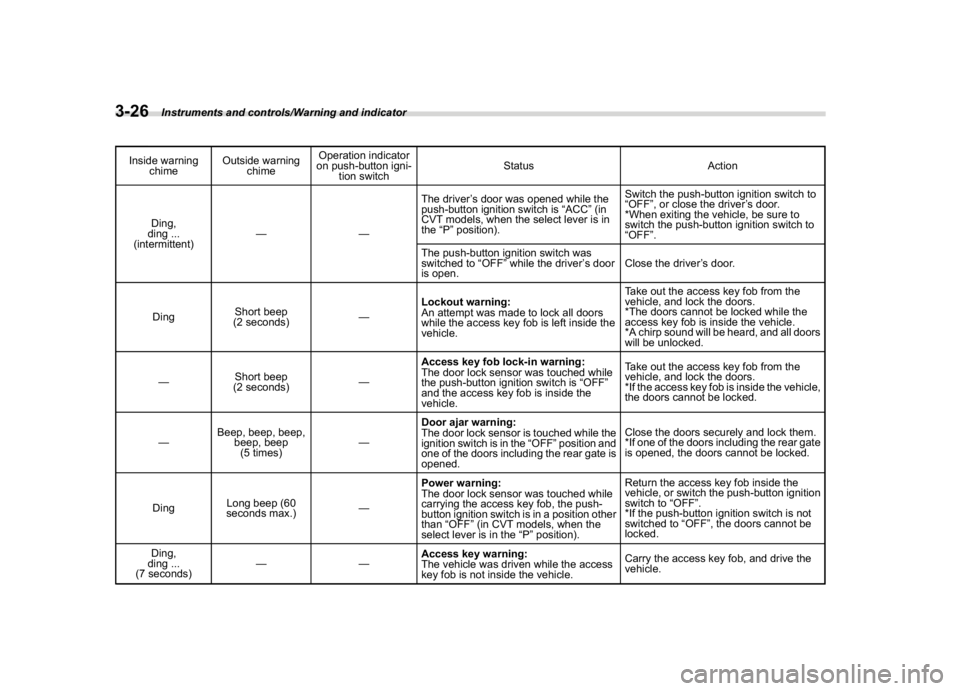
(164,1)
北米Model "A1320BE-C" EDITED: 2017/ 10/ 10
Inside warning
chimeOutside warning
chimeOperation indicator
on push-button igni-
tion switchStatus Action
Ding,
ding ...
(intermittent)——The driver’s door was opened while the
push-button ignition switch is“ACC”(in
CVT models, when the select lever is in
the“P”position).Switch the push-button ignition switch to
“OFF”, or close the driver’s door.
*When exiting the vehicle, be sure to
switch the push-button ignition switch to
“OFF”.
The push-button ignition switch was
switched to“OFF”while the driver’s door
is open.Close the driver’s door.
DingShort beep
(2 seconds)—Lockout warning:
An attempt was made to lock all doors
while the access key fob is left inside the
vehicle.Take out the access key fob from the
vehicle, and lock the doors.
*The doors cannot be locked while the
access key fob is inside the vehicle.
*A chirp sound will be heard, and all doors
will be unlocked.
—Short beep
(2 seconds)—Access key fob lock-in warning:
The door lock sensor was touched while
the push-button ignition switch is“OFF”
and the access key fob is inside the
vehicle.Take out the access key fob from the
vehicle, and lock the doors.
*If the access key fob is inside the vehicle,
the doors cannot be locked.
—Beep, beep, beep,
beep, beep
(5 times)—Door ajar warning:
The door lock sensor is touched while the
ignition switch is in the“OFF”position and
one of the doors including the rear gate is
opened.Close the doors securely and lock them.
*If one of the doors including the rear gate
is opened, the doors cannot be locked.
DingLong beep (60
seconds max.)—
Power warning:
The door lock sensor was touched while
carrying the access key fob, the push-
button ignition switch is in a position other
than“OFF”(in CVT models, when the
select lever is in the“P”position).Return the access key fob inside the
vehicle, or switch the push-button ignition
switch to“OFF”.
*If the push-button ignition switch is not
switched to“OFF”, the doors cannot be
locked.
Ding,
ding ...
(7 seconds)——Access key warning:
The vehicle was driven while the access
key fob is not inside the vehicle.Carry the access key fob, and drive the
vehicle.
Instruments and controls/Warning and indicator
3-26
Page 161 of 474
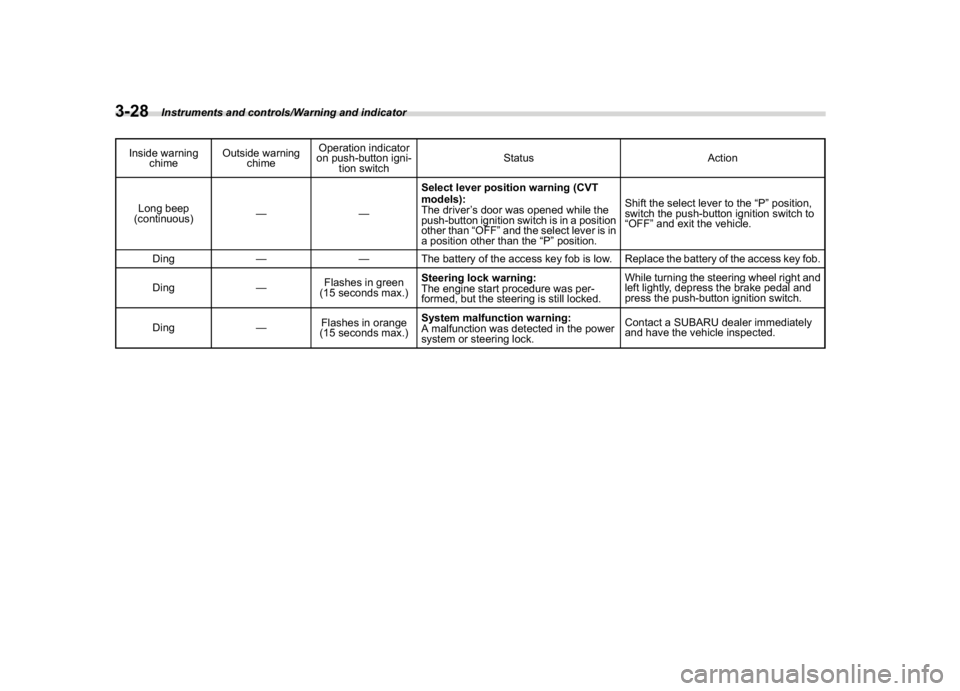
(166,1)
北米Model "A1320BE-C" EDITED: 2017/ 10/ 10
Inside warning
chimeOutside warning
chimeOperation indicator
on push-button igni-
tion switchStatus Action
Long beep
(continuous)——Select lever position warning (CVT
models):
The driver’s door was opened while the
push-button ignition switch is in a position
other than“OFF”and the select lever is in
a position other than the“P”position.Shift the select lever to the“P”position,
switch the push-button ignition switch to
“OFF”and exit the vehicle.
Ding——The battery of the access key fob is low. Replace the battery of the access key fob.
Ding—Flashes in green
(15 seconds max.)Steering lock warning:
The engine start procedure was per-
formed, but the steering is still locked.While turning the steering wheel right and
left lightly, depress the brake pedal and
press the push-button ignition switch.
Ding—Flashes in orange
(15 seconds max.)System malfunction warning:
A malfunction was detected in the power
system or steering lock.Contact a SUBARU dealer immediately
and have the vehicle inspected.
Instruments and controls/Warning and indicator
3-28
Page 162 of 474
(167,1)
北米Model "A1320BE-C" EDITED: 2017/ 10/ 10
&Security indicator lightThis indicator light shows the status of the
alarm system. It also indicates operation of
the immobilizer system.
!Alarm system
It blinks to show the driver the operational
status of the alarm system. For detailed
information, refer to“Alarm system”F2-
24.
!Immobilizer system
The security indicator light starts blinking
in the following conditions.
For models with“keyless access with
push-button start system”:
.Immediately after the push-button igni-
tion switch is turned to the“OFF”position.
.Immediately after the driver’s door is
opened or closed when all of the following
conditions are met.
–The push-button ignition switch is in
the“ON”or“ACC”position.
–The access key fob is outside the
vehicle.
–The engine is not running.
In the event that an unauthorized key is
used (for example, the key is unregistered
or the ID code does not match), the power
is not switched to“ON”and the security
indicator light continues blinking.For models without“keyless access
with push-button start system”:
.Immediately after the key is pulled out.
.Approximately 60 seconds after the
ignition switch is turned from the“ON”
position to the“ACC”or“LOCK”position.
If the indicator light does not blink in the
above conditions, it may indicate that
immobilizer system may be malfunction-
ing. Contact your nearest SUBARU dealer
immediately.
In the event that an unauthorized key (for
example, an unauthorized duplicate) is
used to start the engine, the security
indicator light illuminates. For details about
the immobilizer system, refer to“Immobi-
lizer”F2-15.
NOTE.The security indicator light remains
off in the following conditions. It means
that the matching of the ID code is
completed and the immobilizer system
is deactivated, and it does not indicate
a malfunction.
Models with“keyless access with
push-button start system”:
–while the engine is running
–the push-button ignition switch
has been turned to the“ON”or“ACC”position and the driver’s
door has not been opened or closed
Models without“keyless access
with push-button start system”:
–while the engine is running
–when the ignition switch is in the
“ON”position.
–for approximately 60 seconds
after the ignition switch is turned
from the“ON”position to the“ACC”
or“LOCK”position
.Even if a malfunction occurs, such
as the security indicator light flashes
irregularly, it will not affect the func-
tionality of the immobilizer system.
–CONTINUED–
Instruments and controls/Warning and indicator
3-29
3
Page 166 of 474
(171,1)
北米Model "A1320BE-C" EDITED: 2017/ 10/ 10
Combination meter display
(color LCD) (if equipped)
WARNING
Always pay adequate attention to
safe driving when operating the
combination meter display (color
LCD) while the vehicle is in motion.
When operation of the combination
meter display (color LCD) interferes
with your ability to concentrate on
driving, stop the vehicle before
performing operations on the
screen. Also, do not concentrate on
the display while driving. Doing so
may cause you to look away from the
road and could result in an accident.
Various information will be shown on the
combination meter display (color LCD).
Also, a warning message will appear on
the display if a malfunction, etc. is
detected. In addition, several settings for
the displayed content can be performed.
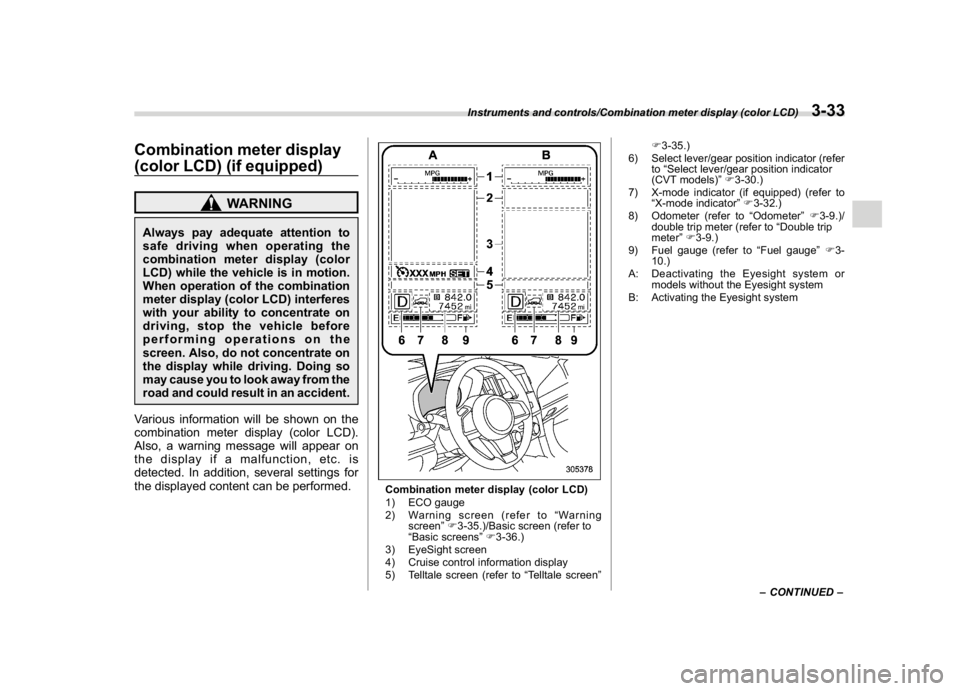
Combination meter display (color LCD)
1) ECO gauge
2) Warning screen (refer to“Warning
screen”F3-35.)/Basic screen (refer to
“Basic screens”F3-36.)
3) EyeSight screen
4) Cruise control information display
5) Telltale screen (refer to“Telltale screen”F3-35.)
6) Select lever/gear position indicator (refer
to“Select lever/gear position indicator
(CVT models)”F3-30.)
7) X-mode indicator (if equipped) (refer to
“X-mode indicator”F3-32.)
8) Odometer (refer to“Odometer”F3-9.)/
double trip meter (refer to“Double trip
meter”F3-9.)
9) Fuel gauge (refer to“Fuel gauge”F3-
10.)
A: Deactivating the Eyesight system or
models without the Eyesight system
B: Activating the Eyesight system
–CONTINUED–
Instruments and controls/Combination meter display (color LCD)
3-33
3
Page 167 of 474
(172,1)
北米Model "A1320BE-C" EDITED: 2017/ 10/ 10
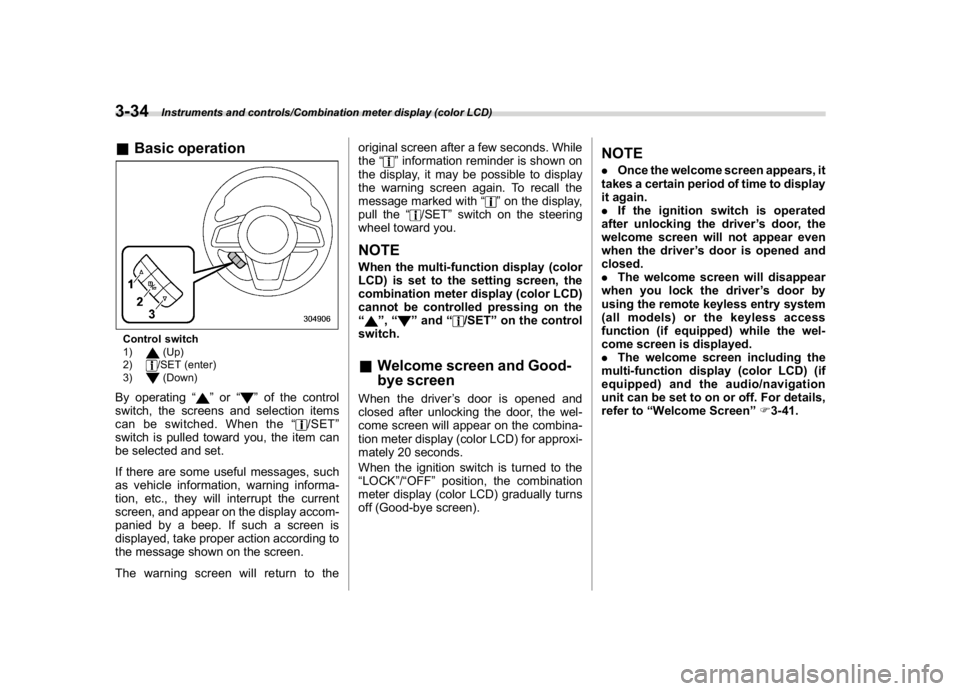
&Basic operationControl switch
1)
(Up)
2)/SET (enter)
3)(Down)
By operating“
”or“
”of the control
switch, the screens and selection items
can be switched. When the“
/SET”
switch is pulled toward you, the item can
be selected and set.
If there are some useful messages, such
as vehicle information, warning informa-
tion, etc., they will interrupt the current
screen, and appear on the display accom-
panied by a beep. If such a screen is
displayed, take proper action according to
the message shown on the screen.
The warning screen will return to theoriginal screen after a few seconds. While
the“
”information reminder is shown on
the display, it may be possible to display
the warning screen again. To recall the
message marked with“
”on the display,
pull the“
/SET”switch on the steering
wheel toward you.
NOTEWhen the multi-function display (color
LCD) is set to the setting screen, the
combination meter display (color LCD)
cannot be controlled pressing on the
“
”,“
”and“
/SET”on the control
switch.
&Welcome screen and Good-
bye screenWhen the driver’s door is opened and
closed after unlocking the door, the wel-
come screen will appear on the combina-
tion meter display (color LCD) for approxi-
mately 20 seconds.
When the ignition switch is turned to the
“LOCK”/“OFF”position, the combination
meter display (color LCD) gradually turns
off (Good-bye screen).
NOTE.Once the welcome screen appears, it
takes a certain period of time to display
it again.
.If the ignition switch is operated
after unlocking the driver’s door, the
welcome screen will not appear even
when the driver’s door is opened and
closed.
.The welcome screen will disappear
when you lock the driver’s door by
using the remote keyless entry system
(all models) or the keyless access
function (if equipped) while the wel-
come screen is displayed.
.The welcome screen including the
multi-function display (color LCD) (if
equipped) and the audio/navigation
unit can be set to on or off. For details,
refer to“Welcome Screen”F3-41.
Instruments and controls/Combination meter display (color LCD)
3-34
Page 174 of 474
(179,1)
北米Model "A1320BE-C" EDITED: 2017/ 10/ 10
By operating the“
”or“
”switch on the
steering wheel, you can select the menu.
Pull the“
/SET”switch to enter the
selected menu.
NOTEIf you enter the“Go Back”menu, the
system will return to the previous
screen.
!Screen Settings
After entering the“Screen Settings”menu,
select one of the following menus.
!Welcome Screen
The welcome screen can be activated or
deactivated.
!Good-bye Screen
The good-bye screen can be activated or
deactivated.
!Gauge Initial Movement
The movement of the meter needles and
gauge needles that occurs when the
ignition switch is turned to the“ON”
position can be activated or deactivated.
!Units
Changes the units displayed in the combi-
nation meter display (color LCD), the type
A multi-function display (black and white)
and the type B multi-function display (colorLCD).
!Tire Pressure Units (if equipped)
Changes the units displayed in the Tire
Pressure Monitoring system.
!Languages
Changes the language displayed in the
combination meter display (color LCD)
and the multi-function display (color LCD).
!Warning Volume (if equipped)
Sets the EyeSight warning volume, the
BSD/RCTA warning volume and the RAB
warning volume.
!EyeSight (models with EyeSight
system)
NOTEFor models with the EyeSight system,
refer to the Owner’s Manual supple-
ment for the EyeSight system.
!RAB (models with EyeSight system)
The Sonar Audible Alarm can be set to on
or off.NOTEFor models with Reverse Automatic
Braking system, refer to“Reverse
Automatic Braking System”F7-61.!Sonar Audible Alarm
When the Reverse Automatic Braking
system is in operation, the warning sound
to notify that an obstacle is detected in the
rear can be activated or deactivated.
!Vehicle Setting
After entering the“Vehicle Setting”menu,
select one of the following menus.
!Keyless Entry System
Sets the settings used when the keyless
access function was operated.
.Audible Signal (if equipped)
Sets the electronic chirp that sounds when
the door is locked or unlocked.
.Hazard Warning Flasher
Sets the operation of the hazard warning
flasher that blinks when the door is locked
or unlocked.
.Security Relocking (if equipped)
The automatic locking operation period
can be set or customized. Select the
preferred seconds to customize the opera-
tion period.
.Driver Door Unlock (if equipped)
Select only the driver’s door to unlock or all
doors to unlock simultaneously when the
driver’s door is unlocked.
.Rear Gate/Trunk Unlock (if equipped)
Select only the rear gate to unlock or all
–CONTINUED–
Instruments and controls/Combination meter display (color LCD)
3-41
3