check engine SUBARU FORESTER 2004 Service Owners Manual
[x] Cancel search | Manufacturer: SUBARU, Model Year: 2004, Model line: FORESTER, Model: SUBARU FORESTER 2004Pages: 2870, PDF Size: 38.67 MB
Page 1134 of 2870

EN(H4SO)-36
ENGINE (DIAGNOSTIC)
Read Diagnostic Trouble Code (DTC)
11.Read Diagnostic Trouble
Code (DTC)
A: OPERATION
1. SUBARU SELECT MONITOR (NORMAL
MODE)
1) On the «Main Menu» display screen, select the
{Each System Check} and press the [YES] key.
2) On the «System Selection Menu» display screen,
select the {Engine} and press the [YES] key.
3) Press the [YES] key after the information of en-
gine type was displayed.
4) On the «Engine Diagnosis» screen, select the
{DTC Display}, and then press the [YES] key.
5) On the «Diagnostic Code(s) Display» screen,
select the {Current Diagnostic Code(s)} or {History
Diagnostic Code(s)}, and then press the [YES] key.
NOTE:
For detailed operation procedure, refer to the “SUB-
ARU SELECT MONITOR OPERATION MANUAL”.
For details concerning DTC, refer to the List of Di-
agnostic Trouble Code (DTC).
2. SUBARU SELECT MONITOR (OBD
MODE)
1) On the «Main Menu» display screen, select the
{Each System Check} and press the [YES] key.
2) On the «System Selection Menu» display screen,
select the {Engine} and press the [YES] key.
3) Press the [YES] key after the information of en-
gine type was displayed.
4) On the «Engine Diagnosis» display screen, se-
lect the {OBD System} and press the [YES] key.
5) On the «OBD Menu» display screen, select the
{DTC Display} and press the [YES] key.
6) Make sure DTC is shown on the screen.
NOTE:
For detailed operation procedure, refer to the
“SUBARU SELECT MONITOR OPERATION
MANUAL”.
For details concerning DTC, refer to the List of Di-
agnostic Trouble Code (DTC).
3. OBD-II GENERAL SCAN TOOL
Refers to data denoting emission-related power-
train DTC.
For details concerning DTC, refer to the List of Di-
agnostic Trouble Code (DTC).
Refer to OBD-II general scan tool manufacturer’s
instruction manual to access powertrain DTC
(MODE $03).
Page 1137 of 2870
EN(H4SO)-39
ENGINE (DIAGNOSTIC)
Inspection Mode
1. PREPARATION FOR THE INSPECTION
MODE
1) Check battery voltage is more than 12 V and fuel
remains half [20 — 402 (5.3 — 10.6 US gal, 4.4 —
8.8 Imp gal)].
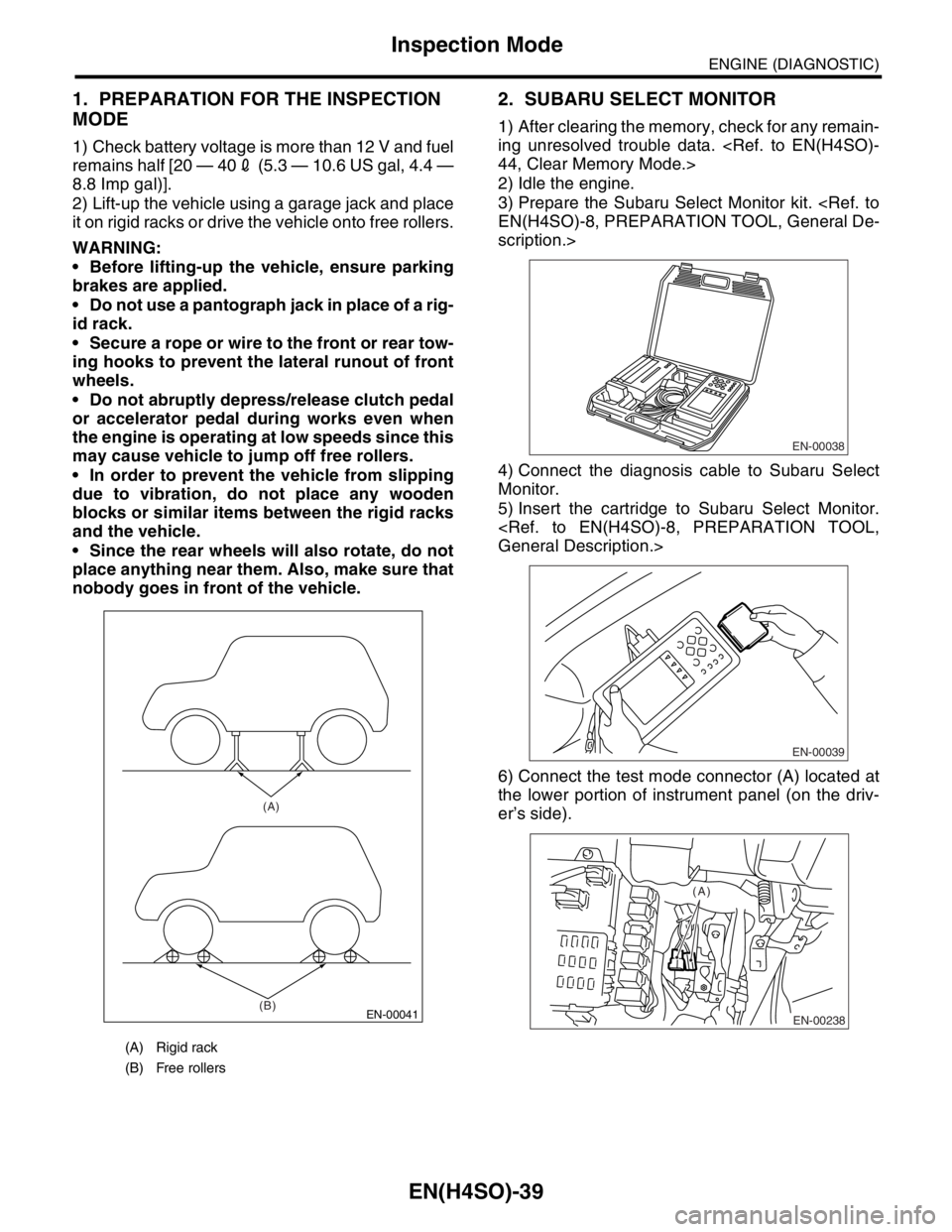
2) Lift-up the vehicle using a garage jack and place
it on rigid racks or drive the vehicle onto free rollers.
WARNING:
Before lifting-up the vehicle, ensure parking
brakes are applied.
Do not use a pantograph jack in place of a rig-
id rack.
Secure a rope or wire to the front or rear tow-
ing hooks to prevent the lateral runout of front
wheels.
Do not abruptly depress/release clutch pedal
or accelerator pedal during works even when
the engine is operating at low speeds since this
may cause vehicle to jump off free rollers.
In order to prevent the vehicle from slipping
due to vibration, do not place any wooden
blocks or similar items between the rigid racks
and the vehicle.
Since the rear wheels will also rotate, do not
place anything near them. Also, make sure that
nobody goes in front of the vehicle.
2. SUBARU SELECT MONITOR
1) After clearing the memory, check for any remain-
ing unresolved trouble data.
2) Idle the engine.
3) Prepare the Subaru Select Monitor kit.
scription.>
4) Connect the diagnosis cable to Subaru Select
Monitor.
5) Insert the cartridge to Subaru Select Monitor.
6) Connect the test mode connector (A) located at
the lower portion of instrument panel (on the driv-
er’s side).
(A) Rigid rack
(B) Free rollers
EN-00041
(A)
(B)
EN-00038
EN-00039
EN-00238
(A)
Page 1138 of 2870
EN(H4SO)-40
ENGINE (DIAGNOSTIC)
Inspection Mode
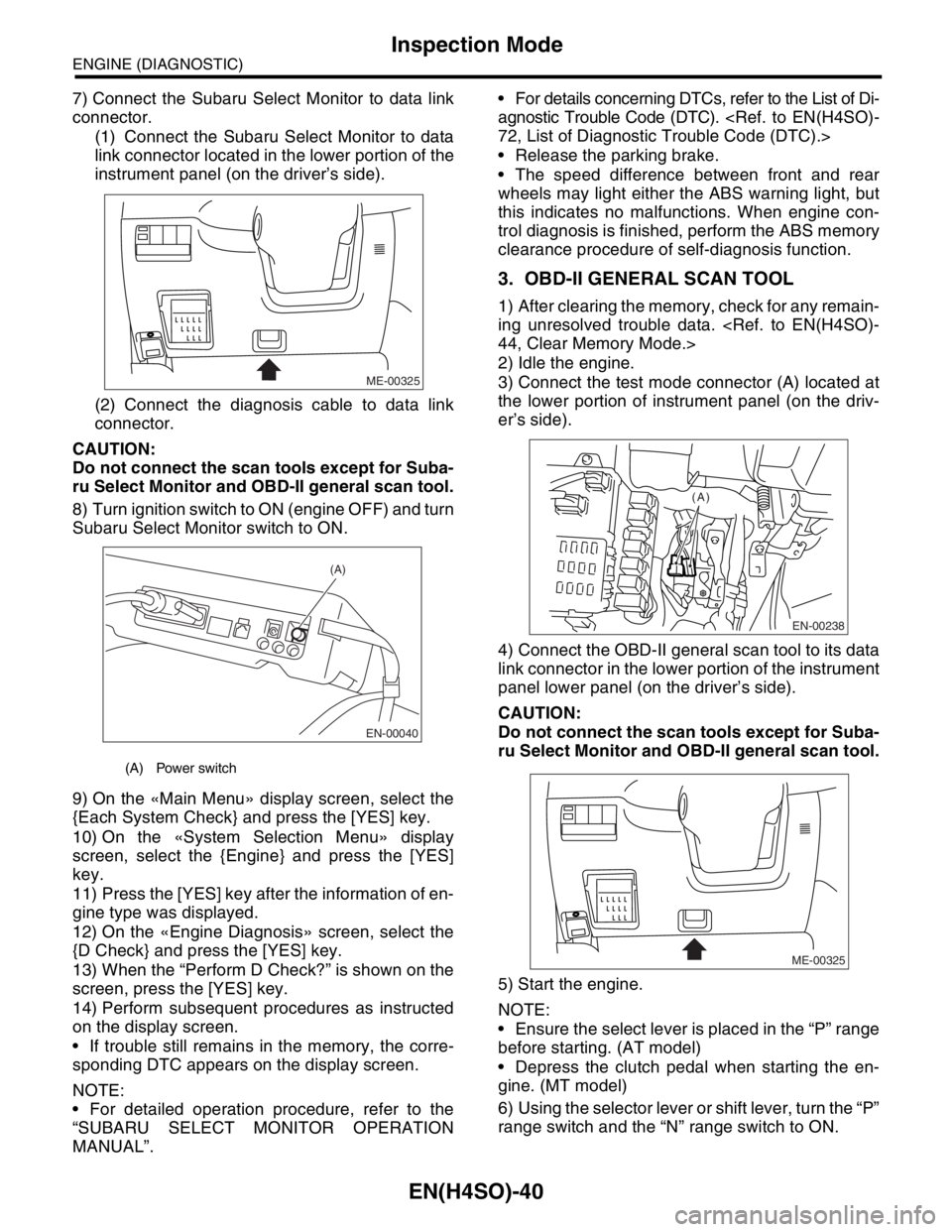
7) Connect the Subaru Select Monitor to data link
connector.
(1) Connect the Subaru Select Monitor to data
link connector located in the lower portion of the
instrument panel (on the driver’s side).
(2) Connect the diagnosis cable to data link
connector.
CAUTION:
Do not connect the scan tools except for Suba-
ru Select Monitor and OBD-II general scan tool.
8) Turn ignition switch to ON (engine OFF) and turn
Subaru Select Monitor switch to ON.
9) On the «Main Menu» display screen, select the
{Each System Check} and press the [YES] key.
10) On the «System Selection Menu» display
screen, select the {Engine} and press the [YES]
key.
11) Press the [YES] key after the information of en-
gine type was displayed.
12) On the «Engine Diagnosis» screen, select the
{D Check} and press the [YES] key.
13) When the “Perform D Check?” is shown on the
screen, press the [YES] key.
14) Perform subsequent procedures as instructed
on the display screen.
If trouble still remains in the memory, the corre-
sponding DTC appears on the display screen.
NOTE:
For detailed operation procedure, refer to the
“SUBARU SELECT MONITOR OPERATION
MANUAL”. For details concerning DTCs, refer to the List of Di-
agnostic Trouble Code (DTC).
Release the parking brake.
The speed difference between front and rear
wheels may light either the ABS warning light, but
this indicates no malfunctions. When engine con-
trol diagnosis is finished, perform the ABS memory
clearance procedure of self-diagnosis function.
3. OBD-II GENERAL SCAN TOOL
1) After clearing the memory, check for any remain-
ing unresolved trouble data.
2) Idle the engine.
3) Connect the test mode connector (A) located at
the lower portion of instrument panel (on the driv-
er’s side).
4) Connect the OBD-II general scan tool to its data
link connector in the lower portion of the instrument
panel lower panel (on the driver’s side).
CAUTION:
Do not connect the scan tools except for Suba-
ru Select Monitor and OBD-II general scan tool.
5) Start the engine.
NOTE:
Ensure the select lever is placed in the “P” range
before starting. (AT model)
Depress the clutch pedal when starting the en-
gine. (MT model)
6) Using the selector lever or shift lever, turn the “P”
range switch and the “N” range switch to ON.
(A) Power switch
ME-00325
EN-00040
(A)
EN-00238
(A)
ME-00325
Page 1139 of 2870

EN(H4SO)-41
ENGINE (DIAGNOSTIC)
Inspection Mode
7) Depress the brake pedal to turn the brake switch
ON. (AT model)
8) Keep the engine speed in the 2,500 — 3,000
rpm range for 40 seconds.
9) Place the select lever or shift lever in the “D”
range (AT model) or “1st” gear (MT model) and
drive the vehicle at 5 to 10 km/h (3 to 6 MPH).
NOTE:
On AWD vehicles, release the parking brake.
The speed difference between front and rear
wheels may light either the ABS warning light, but
this indicates no malfunctions. When engine con-
trol diagnosis is finished, perform the ABS memory
clearance procedure of self-diagnosis system.
10) Using the OBD-II general scan tool, check
DTC(s) and record the result(s).
NOTE:
For detailed operation procedures, refer to the
OBD-II General Scan Tool Operation Manual.
For details concerning DTCs, refer to the List of Di-
agnostic Trouble Code (DTC).
Page 1140 of 2870

EN(H4SO)-42
ENGINE (DIAGNOSTIC)
Drive Cycle
13.Drive Cycle
A: OPERATION
There are three driving patterns on diagnosis. Fol-
lowing trouble can be diagnosed with driving spec-
ified patterns. After repair the following trouble, be
sure to check that the trouble is cleared correctly by
the driving specified patterns.
1. PREPARATION FOR DRIVE CYCLE
1) Check battery voltage is more than 12 V and fuel
remains half [20 — 402 (5.3 — 10.6 US gal, 4.4 —
8.8 Imp gal)].2) After clearing the memory, check for any remain-
ing unresolved trouble data.
3) Separate the test mode connector.
NOTE:
Be sure to perform the diagnosis after idling from
starting the cooled engine except when the engine
coolant temperature is specified.
Perform the diagnosis twice when the DTC is
marked with *. After the completion of first diagno-
sis, stop the engine and perform the second diag-
nosis on same condition.
2. DRIVE THE VEHICLE 20 MINUTES AT THE SPEED OF 80 KM/H (50 MPH), AND THEN IDLE
THE ENGINE 1 MINUTE.
3. 10 MINUTES IDLING
NOTE:
Drive the vehicle more than 4 km/h (6 MPH) before diagnosis.
DTC Item On condition
*P0030 HO2S Heater Control Circuit (Bank 1 Sensor 1) —
*P0111Intake Air Temperature Sensor Circuit Range/Per-
formance ProblemEngine coolant temperature at start is less than 30°C (86°F)
*P0125Insufficient coolant temperature for closed loop
fuel controlEngine coolant temperature at start is less than 20°C (68°F)
*P0130O
2 Sensor Circuit (Bank 1 Sensor 1)
—
*P0133O
2 Sensor Circuit Slow Response (Bank 1 Sensor
1)—
*P0420Catalyst System Efficiency Below Threshold
(Bank 1)—
P0459Evaporative Emission Control System Purge Con-
trol Valve Circuit High—
*P0461 Fuel Level Sensor Circuit Range/Performance —
*P0464 Fuel Level Sensor Circuit Intermittent —
*P1137O
2 Sensor Circuit (Bank 1 Sensor 1)
—
DTC Item On condition
*P0483 Cooling Fan Rationality Check —
*P0506 Idle Control System RPM Lower Than Expected —
*P0507 Idle Control System RPM Higher Than Expected —
Page 1142 of 2870

EN(H4SO)-44
ENGINE (DIAGNOSTIC)
Clear Memory Mode
14.Clear Memory Mode
A: OPERATION
1. SUBARU SELECT MONITOR (NORMAL
MODE)
1) On the «Main Menu» display screen, select the
{Each System Check} and press the [YES] key.
2) On the «System Selection Menu» display
screen, select the {Engine} and press the [YES]
key.
3) Press the [YES] key after the information of en-
gine type was displayed.
4) On the «Engine Diagnosis» display screen, se-
lect the {Memory Clear} and press the [YES] key.
5) When the “Done” and “Turn Ignition Switch OFF”
are shown on the display screen, turn the ignition
switch to OFF and then Subaru Select Monitor
switch to OFF.
NOTE:
After the memory has been cleared, the idle air
control solenoid valve must be initialized. To do
this, turn the ignition switch to the ON position. Wait
3 seconds before starting the engine.
For detailed operation procedure, refer to the
“SUBARU SELECT MONITOR OPERATION
MANUAL”.
2. SUBARU SELECT MONITOR (OBD
MODE)
1) On the «Main Menu» display screen, select the
{Each System Check} and press the [YES] key.
2) On the «System Selection Menu» display
screen, select the {Engine} and press the [YES]
key.
3) Press the [YES] key after the information of en-
gine type was displayed.
4) On the «Engine Diagnosis» display screen, se-
lect the {OBD System} and press the [YES] key.
5) On the «OBD Menu» display screen, select the
{DTC Clear} and press the [YES] key.
6) When the “Perform Diagnostic Code(s) Clear?”
is shown on the screen, press the [YES] key.
7) Turn the ignition switch to OFF and then turn the
Subaru Select Monitor to OFF.
NOTE:
After the memory has been cleared, the idle air
control solenoid valve must be initialized. To do
this, turn the ignition switch to the ON position. Wait
3 seconds before starting the engine.
For detailed operation procedure, refer to the
“SUBARU SELECT MONITOR OPERATION
MANUAL”.
3. OBD-II GENERAL SCAN TOOL
For clear memory procedures using the OBD-II
general scan tool, refer to the OBD-II General Scan
Tool Instruction Manual.
After the memory has been cleared, the idle air
control solenoid valve must be initialized. To do
this, turn the ignition switch to the ON position. Wait
3 seconds before starting the engine.
Page 1143 of 2870
EN(H4SO)-45
ENGINE (DIAGNOSTIC)
Compulsory Valve Operation Check Mode
15.Compulsory Valve Operation
Check Mode
A: OPERATION
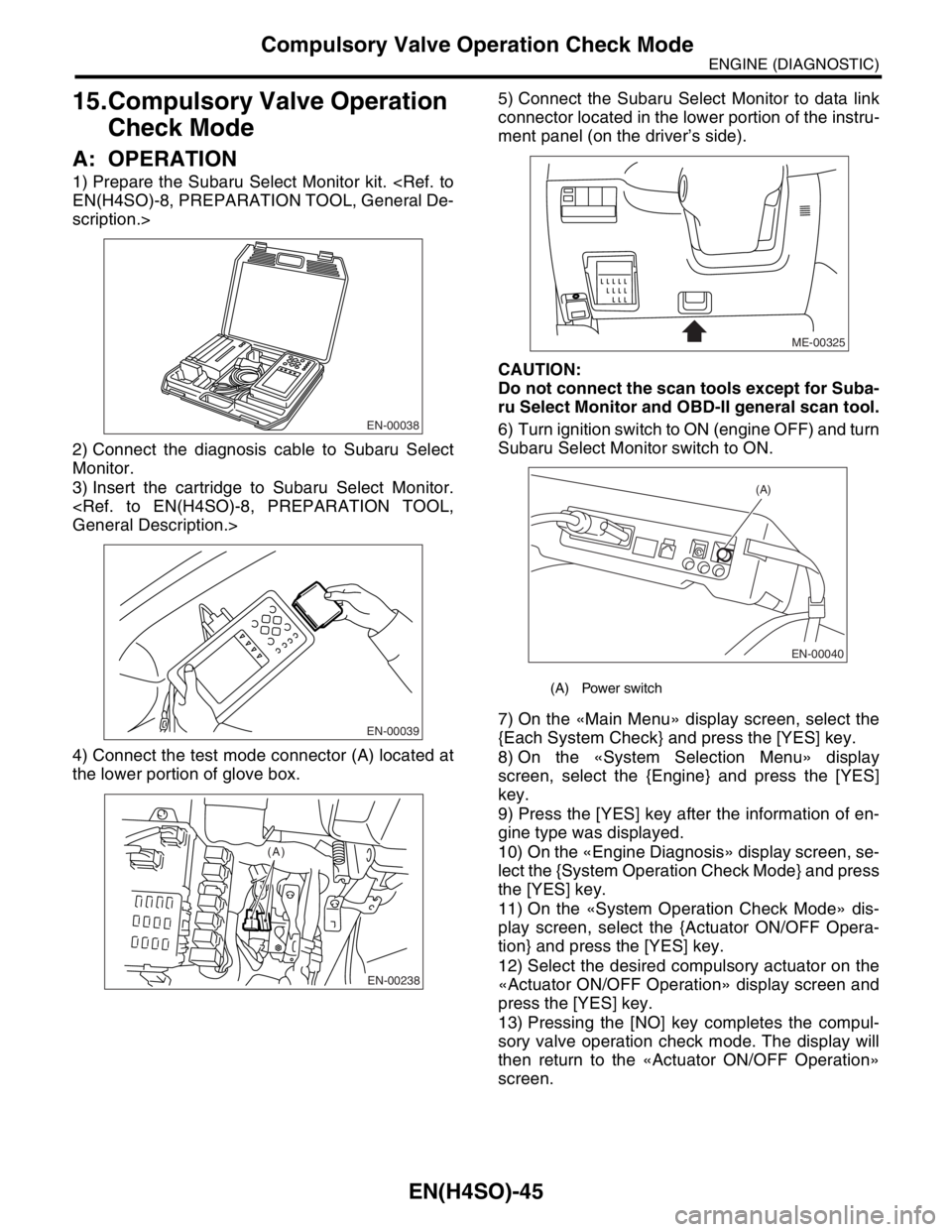
1) Prepare the Subaru Select Monitor kit.
scription.>
2) Connect the diagnosis cable to Subaru Select
Monitor.
3) Insert the cartridge to Subaru Select Monitor.
4) Connect the test mode connector (A) located at
the lower portion of glove box.5) Connect the Subaru Select Monitor to data link
connector located in the lower portion of the instru-
ment panel (on the driver’s side).
CAUTION:
Do not connect the scan tools except for Suba-
ru Select Monitor and OBD-II general scan tool.
6) Turn ignition switch to ON (engine OFF) and turn
Subaru Select Monitor switch to ON.
7) On the «Main Menu» display screen, select the
{Each System Check} and press the [YES] key.
8) On the «System Selection Menu» display
screen, select the {Engine} and press the [YES]
key.
9) Press the [YES] key after the information of en-
gine type was displayed.
10) On the «Engine Diagnosis» display screen, se-
lect the {System Operation Check Mode} and press
the [YES] key.
11) On the «System Operation Check Mode» dis-
play screen, select the {Actuator ON/OFF Opera-
tion} and press the [YES] key.
12) Select the desired compulsory actuator on the
«Actuator ON/OFF Operation» display screen and
press the [YES] key.
13) Pressing the [NO] key completes the compul-
sory valve operation check mode. The display will
then return to the «Actuator ON/OFF Operation»
screen.
EN-00038
EN-00039
EN-00238
(A)
(A) Power switch
ME-00325
EN-00040
(A)
Page 1144 of 2870

EN(H4SO)-46
ENGINE (DIAGNOSTIC)
Compulsory Valve Operation Check Mode
A list of the support data is shown in the following
table.
NOTE:
“EGR solenoid” is not indicated but EGR sole-
noid valve is installed to the vehicle.
The following parts will be displayed but not func-
tional because vehicle are not equipped with them.
For detailed operation procedure, refer to the
SUBARU SELECT MONITOR OPERATION MAN-
UAL.
Description Display
Compulsory fuel pump relay oper-
ation checkFuel Pump
Compulsory radiator fan relay
operation checkRadiator Fan Relay
Compulsory air conditioning relay
operation checkA/C Compressor Relay
Compulsory purge control sole-
noid valve operation checkCPC Solenoid
Display
ASV Solenoid
FICD Solenoid
Pressure switching solenoid 1
Pressure switching solenoid 2
PCV Solenoid
Vent Control Solenoid
Atmospheric pressure switching solenoid
Page 1145 of 2870
EN(H4SO)-47
ENGINE (DIAGNOSTIC)
Malfunction Indicator Light
16.Malfunction Indicator Light
A: PROCEDURE
B: ACTIVATION OF MALFUNCTION
INDICATOR LIGHT
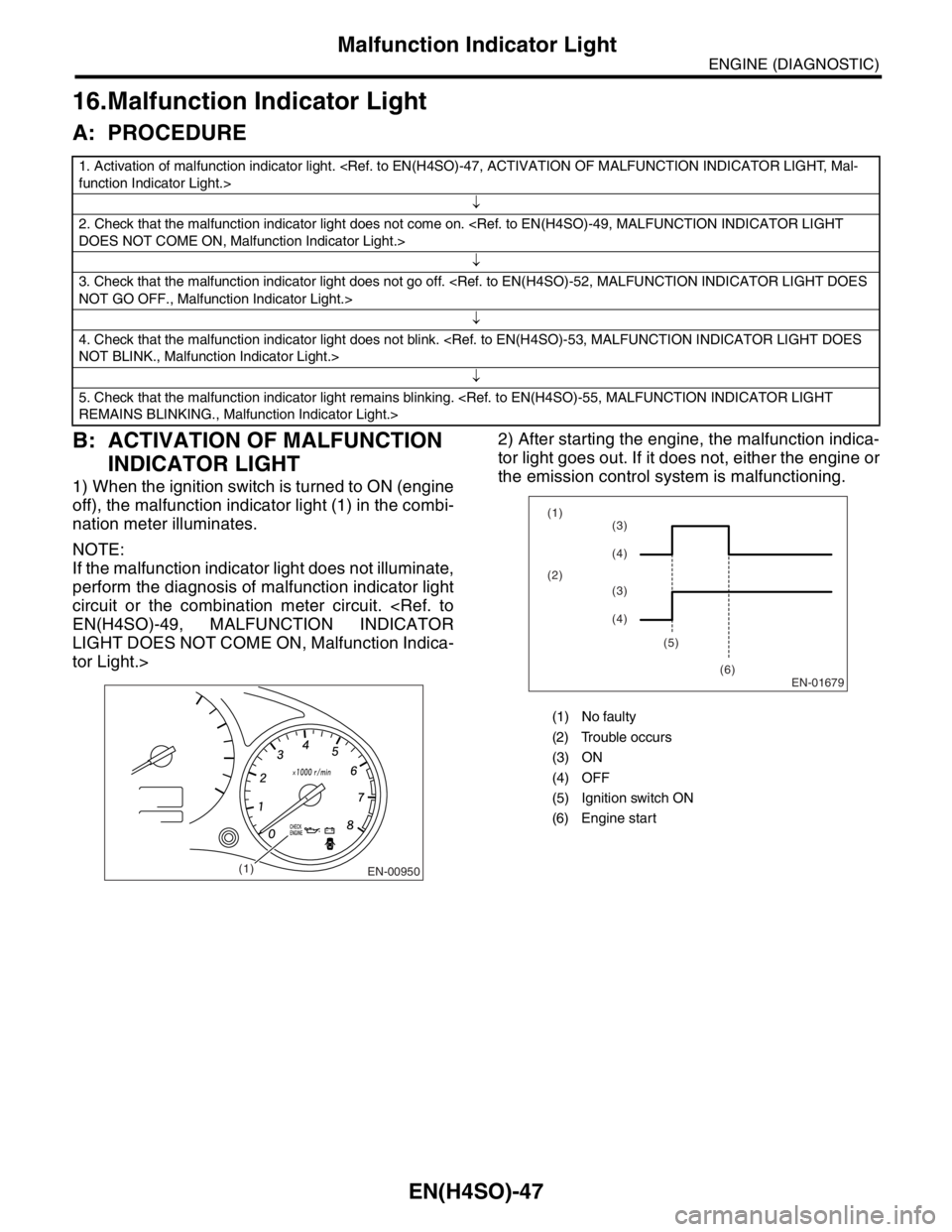
1) When the ignition switch is turned to ON (engine
off), the malfunction indicator light (1) in the combi-
nation meter illuminates.
NOTE:
If the malfunction indicator light does not illuminate,
perform the diagnosis of malfunction indicator light
circuit or the combination meter circuit.
LIGHT DOES NOT COME ON, Malfunction Indica-
tor Light.>2) After starting the engine, the malfunction indica-
tor light goes out. If it does not, either the engine or
the emission control system is malfunctioning.
1. Activation of malfunction indicator light.
↓
2. Check that the malfunction indicator light does not come on.
↓
3. Check that the malfunction indicator light does not go off.
↓
4. Check that the malfunction indicator light does not blink.
↓
5. Check that the malfunction indicator light remains blinking.
EN-00950(1)
(1) No faulty
(2) Trouble occurs
(3) ON
(4) OFF
(5) Ignition switch ON
(6) Engine start
EN-01679
(1)
(2)
(5)
(6)(3)
(4)
(3)
(4)
Page 1148 of 2870

EN(H4SO)-50
ENGINE (DIAGNOSTIC)
Malfunction Indicator Light
Step Check Yes No
1 CHECK OUTPUT SIGNAL FROM ECM.
1) Turn the ignition switch to ON.
2) Measure the voltage between ECM con-
nector and chassis ground.
Connector & terminal
(B134) No. 28 (+) — Chassis ground (
−):Is the voltage less than 1 V? Go to step 4.Go to step 2.
2 CHECK POOR CONTACT.
Check for poor connection when shaking or
pulling ECM connector and harness.Does malfunction indicator
light illuminate?Repair the poor
contact in ECM
connector.Go to step 3.
3 CHECK ECM CONNECTOR.
Check the connection of ECM connector.Is the ECM connector correctly
connected?Replace the ECM.
Engine Control
Module (ECM).>Repair the con-
nection of ECM
connector.
4 CHECK HARNESS BETWEEN COMBINA-
TION METER AND ECM CONNECTOR.
1) Turn the ignition switch to OFF.
2) Remove the combination meter.
3) Disconnect the connector from ECM and
combination meter.
4) Measure the resistance of harness
between ECM and combination meter connec-
tor.
Connector & terminal
(B134) No. 28 — (i12) No. 1:Is the resistance less than 1
Ω?Go to step 5.Repair harness
and connector.
N
OTE:
In this case repair
the following:
Open circuit in
harness between
ECM and combi-
nation meter con-
nector
Poor contact in
coupling connector
5 CHECK POOR CONTACT.
Check poor contact in combination meter con-
nector.Is there poor contact in combi-
nation meter connector?Repair poor con-
tact in combination
meter connector.Go to step 6.