display SUBARU FORESTER 2004 Service Repair Manual
[x] Cancel search | Manufacturer: SUBARU, Model Year: 2004, Model line: FORESTER, Model: SUBARU FORESTER 2004Pages: 2870, PDF Size: 38.67 MB
Page 2461 of 2870

4AT(H4SO)-2
AUTOMATIC TRANSMISSION (DIAGNOSTIC)
Basic Diagnostic Procedure
1. Basic Diagnostic Procedure
A: PROCEDURE
Step Check Yes No
1 CHECK PRE-INSPECTION.
1) Ask the customer when and how trouble
occurred using interview checklist.
2) Before performing the diagnosis, inspect
following items which might influence the AT
problems.
General inspection
Disconnection of harness connector
Visually check the damage of harness
Oil leak
Stall speed test
Line pressure test
Transfer clutch pressure test
Time lag test
Road test
Inhibitor switch
AT problem normal?Go to step 2.Repair or replace
each item.
2 CHECK POWER INDICATOR LIGHT.
Turn the ignition switch to ON.Does the POWER indicator
light illuminate?Go to step 4.Go to step 3.
3 CHECK POWER INDICATOR LIGHT.
1) Turn the ignition switch to OFF.
2) Repair the POWER indicator light circuit or
power supply and ground line circuit.
3) Turn the ignition switch to ON.Is the POWER indicator light
illuminate?Go to step 4.Go to step 5.
4 CHECK INDICATION OF DTC.
Calling up the DTC.
Without Subaru Select Monitor
Diagnostic Trouble Code (DTC).>
With Subaru Select Monitor
Diagnostic Trouble Code (DTC).>
NOTE:
If the communication function of select monitor
cannot be executed normally, check the communi-
cation circuit.
Diagnostic Procedure for Subaru Select Monitor
Communication.>Is the DTC displayed? Go to step 6.
NOTE:
Record all DTC.Go to step 5.
Page 2462 of 2870

4AT(H4SO)-3
AUTOMATIC TRANSMISSION (DIAGNOSTIC)
Basic Diagnostic Procedure
5 PERFORM THE GENERAL DIAGNOSTICS.
1) Inspect using “Diagnostic Procedure with-
out DTC”.
(DTC).>
2) Inspect using “Symptom Related Diagnostic”.
3) Perform the clear memory mode.
Without Subaru Select Monitor
Memory Mode.>
With Subaru Select Monitor
Memory Mode.>
4) Perform the inspection mode.
5) Calling up the DTC.
Without Subaru Select Monitor
Diagnostic Trouble Code (DTC).>
With Subaru Select Monitor
Diagnostic Trouble Code (DTC).>Is the DTC displayed? Go to step 6.Complete the
diagnosis.
6 PERFORM THE DIAGNOSIS.
1) Inspect using “Diagnostics Chart with
DTC”.
NOTE:
For DTC table, refer to “List of Diagnostic Trou-
ble Code (DTC)”.
2) Repair the trouble cause.
3) Perform the clear memory mode.
Without Subaru Select Monitor
Memory Mode.>
With Subaru Select Monitor
Memory Mode.>
4) Perform the inspection mode.
5) Calling up the DTC.
Without Subaru Select Monitor
Diagnostic Trouble Code (DTC).>
With Subaru Select Monitor
Diagnostic Trouble Code (DTC).>Is the DTC displayed? Inspect using “Diag-
nostics Chart with
Diagnostic Connec-
tor”.
Diagnostic Proce-
dure with Diagnos-
tic Trouble Code
(DTC).>Complete the
diagnosis. Step Check Yes No
Page 2476 of 2870
4AT(H4SO)-17
AUTOMATIC TRANSMISSION (DIAGNOSTIC)
Subaru Select Monitor
6. Subaru Select Monitor
A: OPERATION
1. READ DIAGNOSTIC TROUBLE CODE
(DTC)
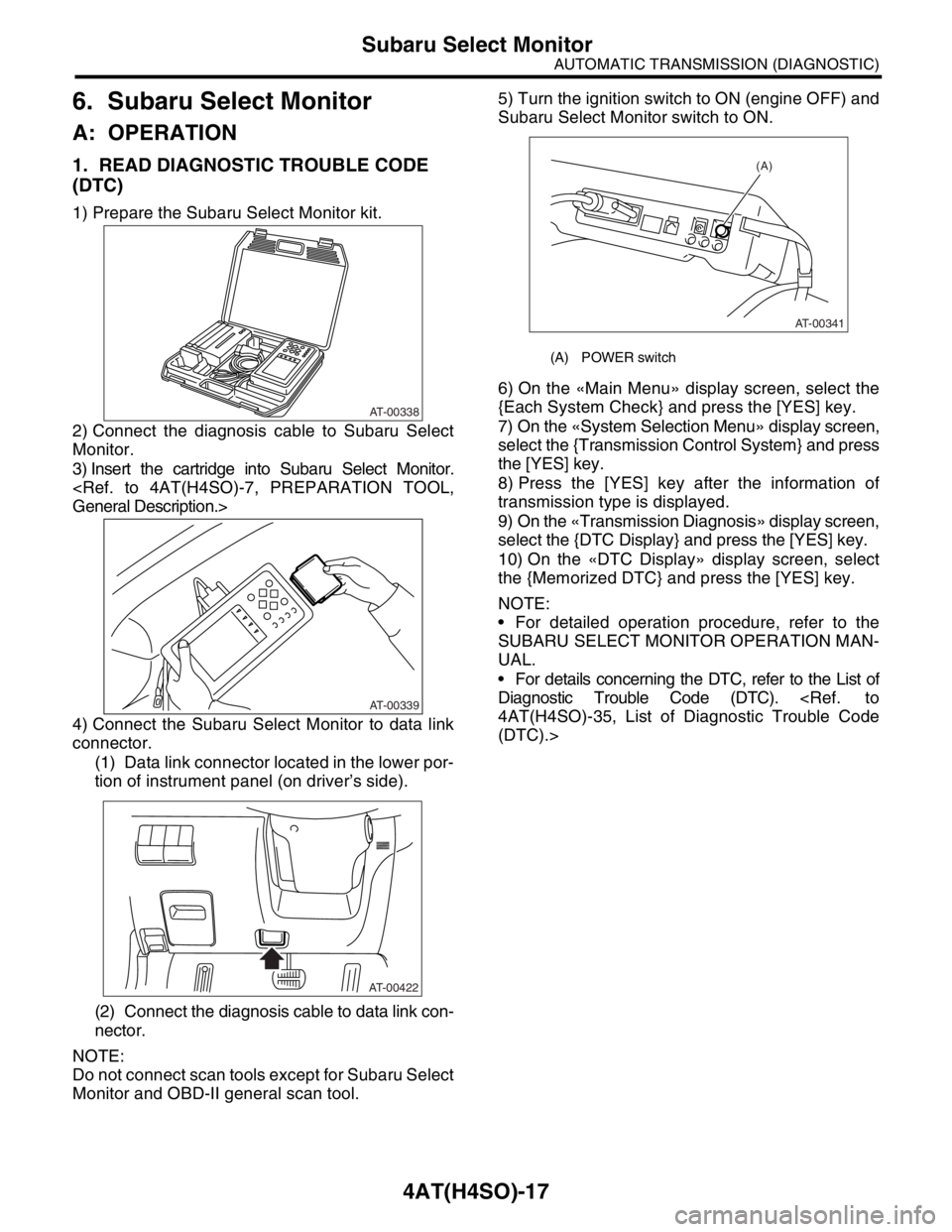
1) Prepare the Subaru Select Monitor kit.
2) Connect the diagnosis cable to Subaru Select
Monitor.
3) Insert the cartridge into Subaru Select Monitor.
4) Connect the Subaru Select Monitor to data link
connector.
(1) Data link connector located in the lower por-
tion of instrument panel (on driver’s side).
(2) Connect the diagnosis cable to data link con-
nector.
NOTE:
Do not connect scan tools except for Subaru Select
Monitor and OBD-II general scan tool.5) Turn the ignition switch to ON (engine OFF) and
Subaru Select Monitor switch to ON.
6) On the «Main Menu» display screen, select the
{Each System Check} and press the [YES] key.
7) On the «System Selection Menu» display screen,
select the {Transmission Control System} and press
the [YES] key.
8) Press the [YES] key after the information of
transmission type is displayed.
9) On the «Transmission Diagnosis» display screen,
select the {DTC Display} and press the [YES] key.
10) On the «DTC Display» display screen, select
the {Memorized DTC} and press the [YES] key.
NOTE:
For detailed operation procedure, refer to the
SUBARU SELECT MONITOR OPERATION MAN-
UAL.
For details concerning the DTC, refer to the List of
Diagnostic Trouble Code (DTC).
(DTC).>
AT-00338
AT-00339
AT-00422
(A) POWER switch
(A)
AT-00341
Page 2477 of 2870
![SUBARU FORESTER 2004 Service Repair Manual 4AT(H4SO)-18
AUTOMATIC TRANSMISSION (DIAGNOSTIC)
Subaru Select Monitor
2. READ CURRENT DATA
1) On the «Main Menu» display screen, select the {Each System Check} and press the [YES] key.
2) On the «](/img/17/57426/w960_57426-2476.png "SUBARU FORESTER 2004 Service Repair Manual 4AT(H4SO)-18
AUTOMATIC TRANSMISSION (DIAGNOSTIC)
Subaru Select Monitor
2. READ CURRENT DATA
1) On the «Main Menu» display screen, select the {Each System Check} and press the [YES] key.
2) On the «")
4AT(H4SO)-18
AUTOMATIC TRANSMISSION (DIAGNOSTIC)
Subaru Select Monitor
2. READ CURRENT DATA
1) On the «Main Menu» display screen, select the {Each System Check} and press the [YES] key.
2) On the «System Selection Menu» display screen, select the {Transmission Control System} and press the
[YES] key.
3) Press the [YES] key after the information of transmission type is displayed.
4) On the «Transmission Diagnosis» display screen, select the {Current Data Display & Save} and press the
[YES] key.
5) On the «Data Display Menu» display screen, select the {Data Display} and press the [YES] key.
6) Using the scroll key, move the display screen up or down until desired data is shown.
A list of the support data is shown in the following table.
NOTE:
For detailed operation procedure, refer to the SUBARU SELECT MONITOR OPERATION MANUAL.
Contents Display Unit of measure
Battery voltage Battery Voltage V
Rear vehicle speed sensor signal Rear Wheel Speed km/h or MPH
Front vehicle speed sensor signal Front Wheel Speed km/h or MPH
Engine speed signal Engine Speed rpm
Automatic transmission fluid temperature signal ATF Temp.°C or °F
Throttle position signal Throttle Sensor Voltage V
Gear position Gear Position —
Line pressure control duty ratio Line Pressure Duty Ratio %
Lock up clutch control duty ratio Lock Up Duty Ratio %
Transfer clutch control duty ratio (AWD model) Transfer Duty Ratio %
Power supply for throttle position sensor Throttle Sensor Power V
Torque converter turbine speed signal Turbine Revolution Speed rpm
2-4 brake timing pressure control duty ratio Brake Clutch Duty Ratio %
Intake manifold pressure sensor voltage Mani. Pressure Voltage V
FWD switch signal FWD Switch ON or OFF
Stop light switch signal Stop Light Switch ON or OFF
Anti lock brake system signal ABS Signal ON or OFF
Cruise control system signal Cruise Control Signal ON or OFF
Parking range signal P Range Signal ON or OFF
Neutral range signal N Range Signal ON or OFF
Reverse range signal R Range Signal ON or OFF
Drive range signal D Range Signal ON or OFF
3rd range signal 3rd Range Signal ON or OFF
2nd range signal 2nd Range Signal ON or OFF
1st range signal 1st Range Signal ON or OFF
Shift control solenoid A Shift Solenoid #1 ON or OFF
Shift control solenoid B Shift Solenoid #2 ON or OFF
Torque control output signal #1 Torque Control Signal 1 ON or OFF
Torque control output signal #2 Torque Control Signal 2 ON or OFF
Torque control cut signal Torque Control Cut Sig. ON or OFF
2-4 brake timing control solenoid valve 2-4 Brake Timing Sol. ON or OFF
Low clutch timing control solenoid valve Low Clutch Timing Sol. ON or OFF
Automatic transmission diagnosis indicator lamp Diagnosis Lamp ON or OFF
Power mode switch signal Power Mode Switch ON or OFF
Hold mode switch signal Hold Mode Switch ON or OFF
Kick down switch signal Kick Down Switch ON or OFF
Automatic transmission fluid temperature lamp ATF Temperature Lamp ON or OFF
Page 2478 of 2870
![SUBARU FORESTER 2004 Service Repair Manual 4AT(H4SO)-19
AUTOMATIC TRANSMISSION (DIAGNOSTIC)
Subaru Select Monitor
3. CLEAR MEMORY MODE
1) On the «Main Menu» display screen, select the
{2. Each System Check} and press the [YES] key.
2) On the](/img/17/57426/w960_57426-2477.png "SUBARU FORESTER 2004 Service Repair Manual 4AT(H4SO)-19
AUTOMATIC TRANSMISSION (DIAGNOSTIC)
Subaru Select Monitor
3. CLEAR MEMORY MODE
1) On the «Main Menu» display screen, select the
{2. Each System Check} and press the [YES] key.
2) On the")
4AT(H4SO)-19
AUTOMATIC TRANSMISSION (DIAGNOSTIC)
Subaru Select Monitor
3. CLEAR MEMORY MODE
1) On the «Main Menu» display screen, select the
{2. Each System Check} and press the [YES] key.
2) On the «System Selection Menu» display screen,
select the {Transmission Control System} and press
the [YES] key.
3) Press the [YES] key after the information of
transmission type is displayed.
4) On the «Transmission Diagnosis» display screen,
select the {Clear Memory} and press the [YES] key.
5) When the “Done” and “Turn Ignition Switch OFF”
are shown on display screen, turn the Subaru Se-
lect Monitor and ignition switch to OFF.
NOTE:
For detailed operation procedure, refer to the SUB-
ARU SELECT MONITOR OPERATION MANUAL.
Page 2479 of 2870

4AT(H4SO)-20
AUTOMATIC TRANSMISSION (DIAGNOSTIC)
Read Diagnostic Trouble Code (DTC)
7. Read Diagnostic Trouble Code (DTC)
A: OPERATION
1. WITHOUT SUBARU SELECT MONITOR
Step Check Yes No
1 PERFORM READ DTC.
1) Warm-up the engine.
2) Turn the ignition switch to OFF.
3) Turn the ignition switch to ON.
4) Start the engine.
5) Drive the vehicle at speeds greater than 20
km/h (12 MPH).
6) Stop the vehicle.
7) The brake pedal depressed and move
select lever to 1 range.
8) Turn the ignition switch to OFF.
9) Turn the ignition switch to ON.
10)Move the select lever “2” range.
11)Move the select lever “1” range.
12)Move the select lever “2” range.
13)Move the select lever “3” range.
14)Move the select lever “D” range.Does the POWER indicator
light blink at 4 Hz intervals?
NOTE: Blinks every 0.125 (1/8)
seconds (until the ignition
switch is turned OFF).Go to step 2.Repair the power
supply and ground
circuit.
CHECK POWER
SUPPLY AND
GROUND LINE,
INSPECTION,
Power Indicator
Light Display.>
2 CHECK POWER INDICATOR LIGHT.Does the POWER indicator
light blink at 2 Hz intervals?
NOTE: Blinks every 0.25 (1/4)
seconds (until ignition switch is
turned to OFF).The AT system is
normal.Go to step 3.
3 CHECK POWER INDICATOR LIGHT.Is the DTC outputted by the
blink of POWER indicator
light?Inspect the prob-
lem correspond-
ing with DTC.
N
OTE:
Record all DTCs.Go to step 4.
4 CHECK POWER INDICATOR LIGHT.Does the POWER indicator
light remain illuminated?Repair the
POWER indicator
light circuit
INSPECTION,
Power Indicator
Light Display.>, or
Inspect inhibitor
switch, wiring,
TCM, etc.Calling up the DTC
again.
Page 2482 of 2870

4AT(H4SO)-23
AUTOMATIC TRANSMISSION (DIAGNOSTIC)
Clear Memory Mode
9. Clear Memory Mode
A: OPERATION
1. WITHOUT SUBARU SELECT MONITOR
Current DTC shown on display are cleared by turn-
ing the ignition switch to OFF after conducting on-
board diagnostics operation. Previous DTC, how-
ever, cannot be cleared since they are stored in the
TCM memory which is operating on back-up power
supply. These DTC can be cleared by removing the
specified TCM connector for at least two minutes.
CLEAR MEMORY:
Remove the TCM connector (B56) for at least
two minutes.
TCM connector (B56) is located in the line to
memory back-up power supply of TCM. Removal of
this connector clears the previous DTC stored in
TCM memory.
Be sure to remove TCM connector (B56) for at
least the specified length of time. Otherwise, the
DTC may not be cleared.
2. WITH SUBARU SELECT MONITOR
Refer to Subaru Select Monitor for information
about how to clear DTC.
Page 2483 of 2870
4AT(H4SO)-24
AUTOMATIC TRANSMISSION (DIAGNOSTIC)
Power Indicator Light Display
10.Power Indicator Light Display
A: OPERATION
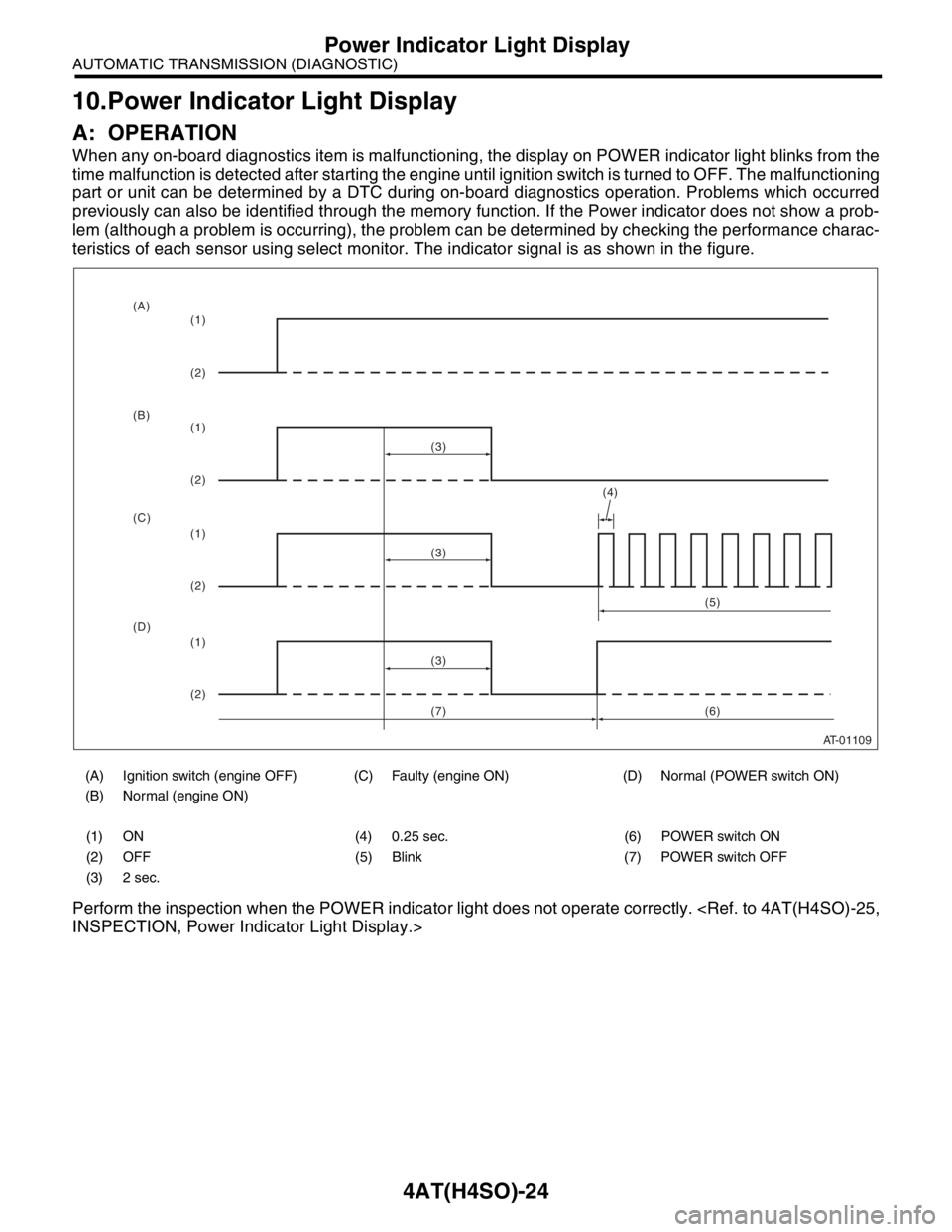
When any on-board diagnostics item is malfunctioning, the display on POWER indicator light blinks from the
time malfunction is detected after starting the engine until ignition switch is turned to OFF. The malfunctioning
part or unit can be determined by a DTC during on-board diagnostics operation. Problems which occurred
previously can also be identified through the memory function. If the Power indicator does not show a prob-
lem (although a problem is occurring), the problem can be determined by checking the performance charac-
teristics of each sensor using select monitor. The indicator signal is as shown in the figure.
Perform the inspection when the POWER indicator light does not operate correctly.
(A) Ignition switch (engine OFF) (C) Faulty (engine ON) (D) Normal (POWER switch ON)
(B) Normal (engine ON)
(1) ON (4) 0.25 sec. (6) POWER switch ON
(2) OFF (5) Blink (7) POWER switch OFF
(3) 2 sec.
AT-01109
(4)
(3)
(1)
(2)
(1)
(2)
(1)
(2)
(1)
(2)(3)
(3)(5)
(6) (A)
(B)
(C)
(D)
(7)
Page 2484 of 2870

4AT(H4SO)-25
AUTOMATIC TRANSMISSION (DIAGNOSTIC)
Power Indicator Light Display
B: INSPECTION
1. INSPECTION OF POWER INDICATOR LIGHT
DETECTING CONDITION:
The Power Indicator light circuit is open or shorted.
TROUBLE SYMPTOM:
When the ignition switch is turned to ON (engine OFF), POWER indicator light does not illuminate.
When the on-board diagnostics is performed, POWER indicator light remains illuminated.
Page 2485 of 2870
4AT(H4SO)-26
AUTOMATIC TRANSMISSION (DIAGNOSTIC)
Power Indicator Light Display
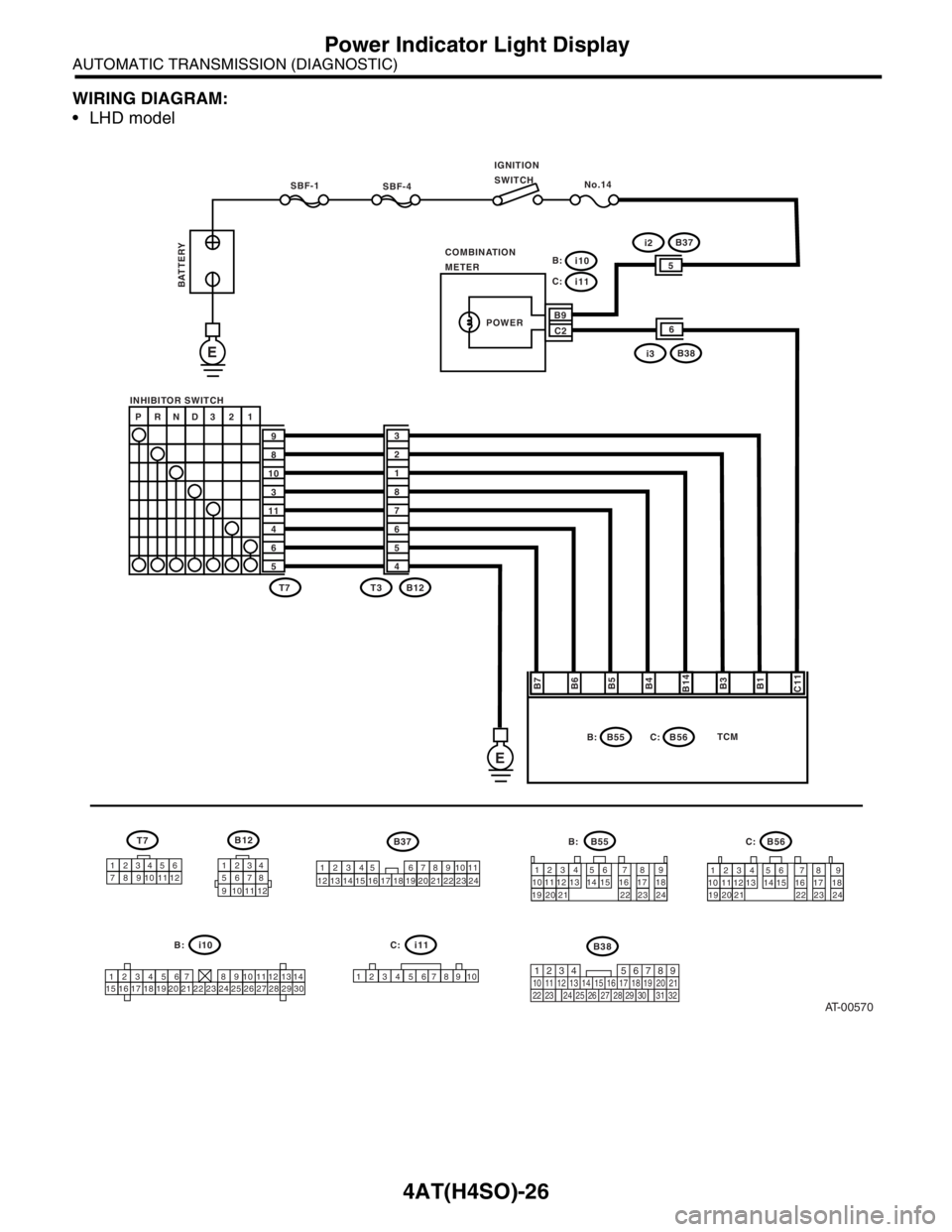
WIRING DIAGRAM:
LHD model
AT-00570
SBF-4No.14
COMBINATION
METERIGNITION
SWITCH
SBF-1
INHIBITOR SWITCH
E
E
BATTERY
B7
B6
B5
B4
B14
B3
B1
C11
P RND3 2 1
9
8
10
3
11
4
6
53
2
1
8
7
6
5
4
T7
T7B12
B55
B55 B37B56 T3 B12
1234
1234 56
12345656 12345
789
71234567891
0 897 7
8 8
9 9
10 11 12
10 11 10 11
12
13
10 11 12 1312 13
14
1415 14 15
16 16
17 18 17 18
19 20 21 19 20 21
22 23 24 22 23 241234 56 7 8 9
101112
13
1415
1516
1617
1718
1819
1920
2021
2122
2223
2324
24 25 26 27 28 29 30
B:
C:
B9
C2i2B37
POWER
B:
B56 C:TCM
i10 B:i11
1234
5678
9 101112
i10
i11
C:
i3B38
5
6
219
32
1234 5610 11 12 13 14 15716
23 3019 20
22 26 27 28 29817
24 3118
25
B38
6
C: B: