ECU SUBARU FORESTER 2004 Service Manual PDF
[x] Cancel search | Manufacturer: SUBARU, Model Year: 2004, Model line: FORESTER, Model: SUBARU FORESTER 2004Pages: 2870, PDF Size: 38.67 MB
Page 436 of 2870

SL-16
SECURITY AND LOCK
Keyless Entry System
2. CHECK TRANSMITTER BATTERY
3. CHECK FUSE
The room light and ignition switch illu-
mination operation does not activate.1. Check the room light operation.
Keyless Entry System.>
2. Check the ignition switch illumination circuit.
INSPECTION, Keyless Entry Sys-
tem.>
3. Replace the keyless entry control module.
(without double lock)
4. Replace the double lock module. (with double
lock)
Step Check Yes No
1 CHECK TRANSMITTER BATTERY.
1) Remove the battery from transmitter.
2) Check the battery voltage.
NOTE:
If the transmitter battery voltage is 2.5 V or less,
the range of transmission becomes very short.Is the voltage more than 2.5 V? If further inspec-
tion is necessary,
refer to “SYMP-
TOM CHART”.
CHART, INSPEC-
TION, Keyless
Entry System.>Replace the trans-
mitter battery.
Step Check Yes No
1 CHECK FUSE.
Remove and visually check the fuse No. 2 (in
the main fuse box), No. 3 (in the fuse and relay
box) and SBF-6 (in the main fuse box)Is the fuse blown out? Replace the fuse
with a new one.Check the power
supply and ground
circuit.
POWER SUPPLY
AND GROUND
CIRCUIT,
INSPECTION,
Keyless Entry Sys-
tem.> Symptom Repair order Reference
Page 437 of 2870

SL-17
SECURITY AND LOCK
Keyless Entry System
4. CHECK POWER SUPPLY AND GROUND CIRCUIT
5. CHECK REGISTRATION CONNECTOR CIRCUIT
Step Check Yes No
1 CHECK POWER SUPPLY.
1) Disconnect the keyless entry control mod-
ule harness connector.
2) Measure the voltage between harness con-
nector terminal and chassis ground.
Connector & terminal
(B176) No. 5, No. 16 (+) — Chassis
ground (
−):Is the voltage more than 10 V? Go to step 2.Check the harness
for open circuits or
shorts between
keyless entry con-
trol module and
fuse.
2 CHECK GROUND CIRCUIT.
Measure the resistance between harness con-
nector terminal and chassis ground.
Connector & terminal
(B176) No. 6, No. 14 — Chassis ground:Is the resistance less than 10
Ω?The power supply
and ground circuit
are OK.Repair the har-
ness.
Step Check Yes No
1 REGISTRATION CONNECTOR INPUT VOLT-
AGE INSPECTION
1) Disconnect the registration connector.
2) Measure the voltage between keyless entry
control module harness connector and chassis
ground.
Connector & terminal
(B176) No. 2 (+) — Chassis ground (
−):Is the voltage more than 10 V? Go to step 2.Repair the har-
ness, and (or) con-
nector.
2 REGISTRATION CONNECTOR INPUT VOLT-
AGE INSPECTION
1) Connect the registration connector.
2) Measure the voltage between keyless entry
control module harness connector and chassis
ground.
Connector & terminal
(B176) No. 2 (+) — Chassis ground (
−):Is the voltage less than 0 V? Registration con-
nector circuit is
OK.Repair the har-
ness, and (or) con-
nector.
Page 438 of 2870

SL-18
SECURITY AND LOCK
Keyless Entry System
6. CHECK DOOR SWITCH
Step Check Yes No
1 CHECK DOOR SWITCH CIRCUIT.
Measure the voltage between keyless entry
control module harness connector terminal
and chassis ground.
N
OTE:
The voltage is not 0 V due to noise, etc.
Connector & terminal
(B176) No. 3 (+) — Chassis ground (
−):Is the voltage approx. less than
0 V when any one of the doors
or rear gate is opened?Go to step 2.Go to step 3.
2 CHECK DOOR SWITCH CIRCUIT.
Measure the voltage between keyless entry
control module harness connector terminal
and chassis ground.
Connector & terminal
(B176) No. 3 (+) — Chassis ground (
−):Is the voltage more than 10 V
when all doors and rear gate
are closed?The door switch is
OK.Go to step 3.
3 CHECK DOOR SWITCH.
1) Disconnect the door switch harness con-
nector.
2) Measure the resistance between door
switch terminals.
Te r m i n a l
Door switch No. 1 — No. 3:
Rear gate latch switch No. 1 — No. 2:Is the resistance more than 1
MΩ when the door switch is
pressed?Go to step 4.Replace the door
switch.
4 CHECK DOOR SWITCH.
Measure the resistance between door switch
terminals.
Te r m i n a l
Door switch No. 1 — No. 3:
Rear gate latch switch No. 1 — No. 2:Is the resistance less than 1 Ω
when the door switch is
released?Check the harness
for open circuits or
shorts between
keyless entry con-
trol module and
door switch.Replace the door
switch.
Page 439 of 2870

SL-19
SECURITY AND LOCK
Keyless Entry System
7. CHECK KEY WARNING SWITCH
Step Check Yes No
1 CHECK FUSE.
Remove and visually check the fuse No. 6 (in
the main fuse box).Is the fuse blown out? Go to step 2.Replace the fuse
with a new one.
2 CHECK KEY WARNING SWITCH CIRCUIT.
1) Disconnect the keyless entry control mod-
ule harness connector.
2) Insert the key into ignition switch. (LOCK
position)
3) Measure the voltage between harness con-
nector terminal and chassis ground.
Connector & terminal
(B176) No. 1 (+) — Chassis ground (
−):Is the voltage more than 10 V? Go to step 3.Go to step 4.
3 CHECK KEY WARNING SWITCH CIRCUIT.
1) Remove the key from ignition switch.
2) Measure the voltage between harness con-
nector terminal and chassis ground.
NOTE:
The voltage is not 0 V due to noise, etc.
Connector & terminal
(B176) No. 1 (+) — Chassis ground (
−):Is the voltage approx. less than
0 V?The key warning
switch is OK.Go to step 4.
4 CHECK KEY WARNING SWITCH.
1) Disconnect the key warning switch harness
connector.
2) Insert the key into ignition switch. (LOCK
position)
3) Measure the resistance between key warn-
ing switch terminals.
Te r m i n a l
No. 1 — No. 2:Is the resistance less than 1
Ω?Go to step 5.Replace the key
warning switch.
5 CHECK KEY WARNING SWITCH.
1) Remove the key from ignition switch.
2) Measure the resistance between key warn-
ing switch terminals.
Te r m i n a l
No. 1 — No. 2:Is the resistance less than 1
MΩ?Check the follow-
ing:
Harness for
open circuits or
shorts between
the key warn-
ing switch and
fuse
Harness for
open circuits
and shorts
between the
keyless entry
control module
and key warn-
ing switchReplace the key
warning switch.
Page 440 of 2870

SL-20
SECURITY AND LOCK
Keyless Entry System
8. CHECK HAZARD LIGHT OPERATION
9. CHECK ROOM LIGHT OPERATION
Step Check Yes No
1 CHECK HAZARD LIGHT OPERATION.
Make sure the hazard light blinks when hazard
switch is turned ON.Does the hazard light blink? Go to step 2.Check the hazard
light circuit.
2 CHECK OUTPUT SIGNAL.
1) Remove the key from ignition switch.
2) Close all doors and rear gate.
3) Measure the voltage between keyless entry
control module harness connector terminal
and chassis ground when LOCK or OPEN but-
ton of transmitter is pressed.
Connector & terminal
(B176) No. 12, No. 13 (+) — Chassis
ground (
−):Is the voltage more than 10 V? Check the harness
for open or short
between keyless
entry control mod-
ule and turn signal
lights.Replace the key-
less entry control
module.
Step Check Yes No
1 CHECK ROOM LIGHT OPERATION.
Make sure the room light illuminates when the
room light switch is turned ON.Does the room light illuminate? Go to step 2.Check the room
light circuit.
2 CHECK HARNESS BETWEEN ROOM LIGHT
AND KEYLESS ENTRY CONTROL MODULE
(WITHOUT DOUBLE LOCK) OR DOUBLE
LOCK MODULE (WITH DOUBLE LOCK).
1) Disconnect the keyless entry control mod-
ule or double lock module harness connector
and room light harness connector.
2) Measure the resistance between keyless
entry control module or double lock module
harness connector terminal and room light har-
ness connector terminal.
Connector & terminal
Without double lock:
(B176) No. 11 — (R52) No. 2:
With double lock:
(B325) No. 1 — (R52) No. 2:Is the resistance less than 10
Ω?The room light
operation circuit is
OK.Check the harness
for open circuits or
shorts between
keyless entry con-
trol module (With-
out double lock) or
double lock mod-
ule (With double
lock) and room
light.
Page 441 of 2870

SL-21
SECURITY AND LOCK
Keyless Entry System
10.CHECK IGNITION SWITCH ILLUMINATION CIRCUIT
11.CHECK OUTPUT SIGNAL TO DOUBLE LOCK MODULE
Step Check Yes No
1 CHECK IGNITION SWITCH ILLUMINATION
POWER SUPPLY.
1) Disconnect the ignition switch illumination
harness connector.
2) Measure the voltage between ignition
switch illumination harness connector terminal
and chassis ground.
Connector & terminal
(B224) No. 1 (+) — Chassis ground (
−):Is the voltage more than 10 V? Go to step 2.Check the harness
for open circuit or
shorts between
ignition switch illu-
mination and fuse.
2 CHECK HARNESS BETWEEN IGNITION
SWITCH ILLUMINATION AND KEYLESS EN-
TRY CONTROL MODULE (WITHOUT DOU-
BLE LOCK) OR DOUBLE LOCK MODULE
(WITH DOUBLE LOCK).
1) Disconnect the keyless entry control mod-
ule or double lock module harness connector.
2) Measure the resistance between keyless
entry or double lock module harness connector
terminal and ignition switch illumination har-
ness connector.
Connector & terminal
Without double lock:
(B176) No. 11 — (R224) No. 1:
With double lock:
(B325) No. 1 — (R224) No. 2:Is the resistance less than 10
Ω?Check the ignition
switch illumina-
tion. If NG, replace
the ignition switch
illumination.Repair the har-
ness.
Step Check Yes No
1 CHECK OUTPUT SIGNAL.
Measure the voltage between the keyless
entry control module harness connector termi-
nal and chassis ground when OPEN button of
transmitter is pressed.
Connector & terminal
(B176) No. 17 (+) — Chassis ground (
−):Is the voltage more than 10 V? Go to step 2.Replace the key-
less entry control
module.
2 CHECK OUTPUT SIGNAL.
Measure the voltage between the keyless
entry control module harness connector termi-
nal and chassis ground when LOCK button of
transmitter is pressed.
Connector & terminal
(B176) No. 18 (+) — Chassis ground (–):Is the voltage more than 10 V? Replace the dou-
ble lock module.Check the harness
for open circuit or
shorts between
the keyless entry
control module
and double lock
module.
Page 442 of 2870
SL-22
SECURITY AND LOCK
Front Inner Remote
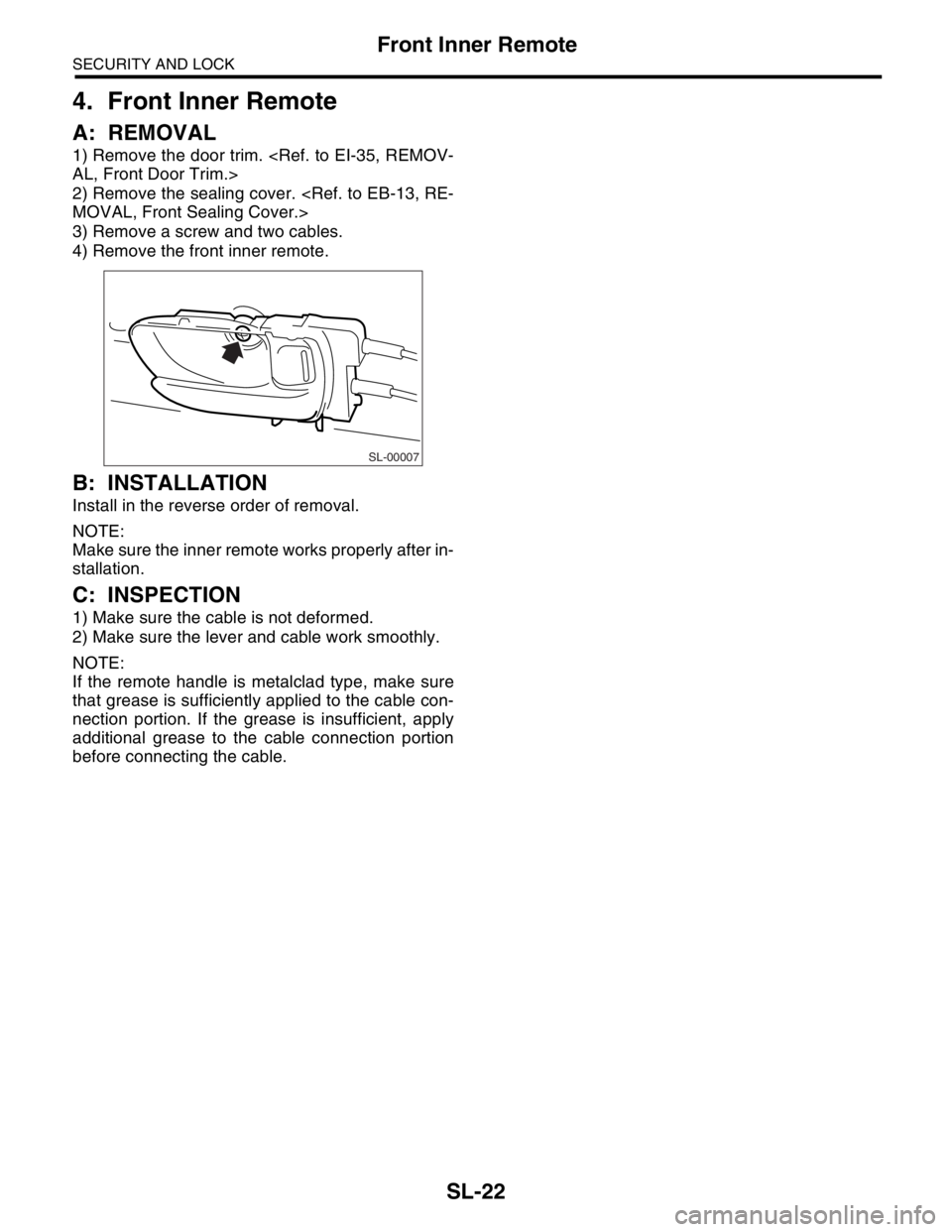
4. Front Inner Remote
A: REMOVAL
1) Remove the door trim.
2) Remove the sealing cover.
3) Remove a screw and two cables.
4) Remove the front inner remote.
B: INSTALLATION
Install in the reverse order of removal.
NOTE:
Make sure the inner remote works properly after in-
stallation.
C: INSPECTION
1) Make sure the cable is not deformed.
2) Make sure the lever and cable work smoothly.
NOTE:
If the remote handle is metalclad type, make sure
that grease is sufficiently applied to the cable con-
nection portion. If the grease is insufficient, apply
additional grease to the cable connection portion
before connecting the cable.
SL-00007
Page 443 of 2870
SL-23
SECURITY AND LOCK
Front Outer Handle
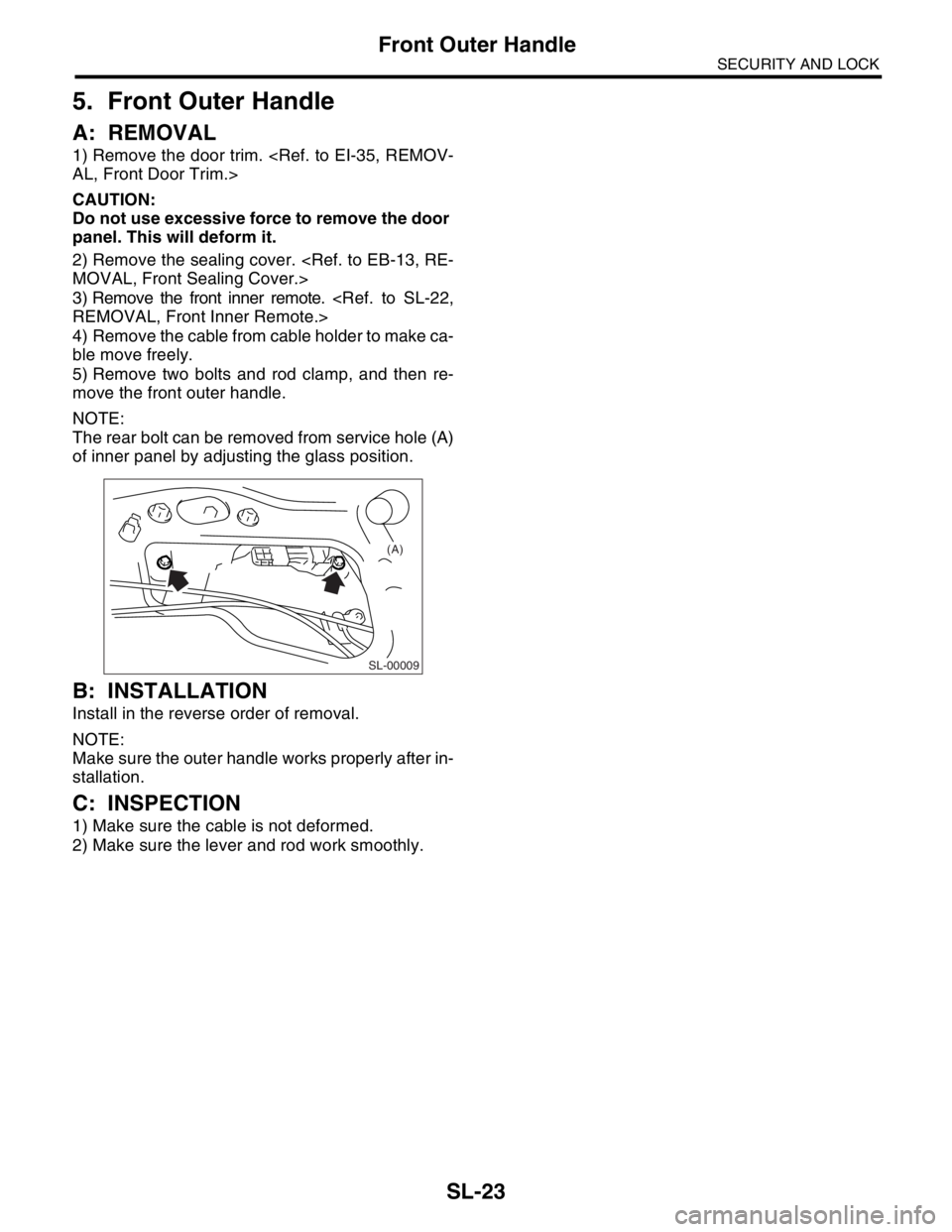
5. Front Outer Handle
A: REMOVAL
1) Remove the door trim.
CAUTION:
Do not use excessive force to remove the door
panel. This will deform it.
2) Remove the sealing cover.
3) Remove the front inner remote.
4) Remove the cable from cable holder to make ca-
ble move freely.
5) Remove two bolts and rod clamp, and then re-
move the front outer handle.
NOTE:
The rear bolt can be removed from service hole (A)
of inner panel by adjusting the glass position.
B: INSTALLATION
Install in the reverse order of removal.
NOTE:
Make sure the outer handle works properly after in-
stallation.
C: INSPECTION
1) Make sure the cable is not deformed.
2) Make sure the lever and rod work smoothly.
SL-00009
(A)
Page 444 of 2870
SL-24
SECURITY AND LOCK
Front Door Latch Assembly
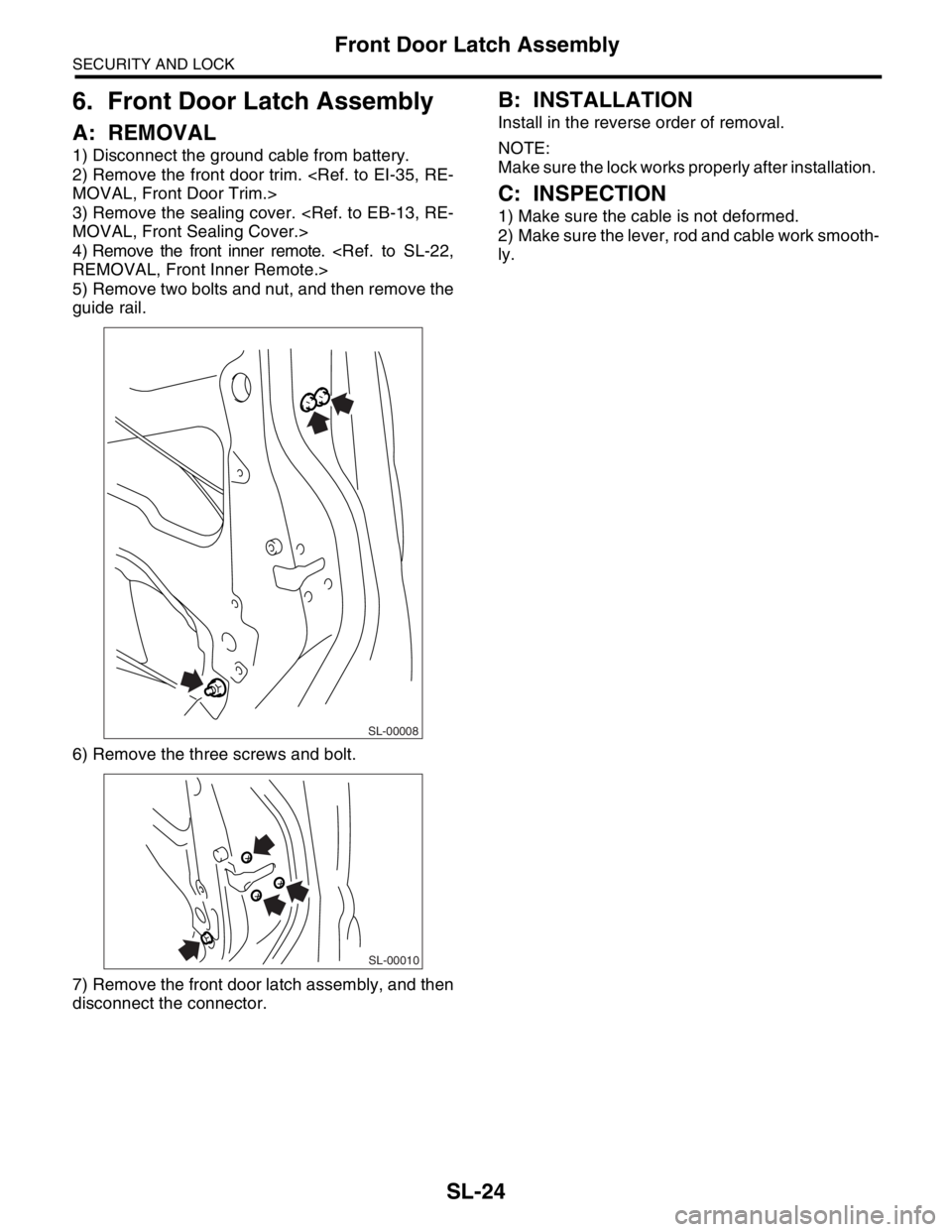
6. Front Door Latch Assembly
A: REMOVAL
1) Disconnect the ground cable from battery.
2) Remove the front door trim.
3) Remove the sealing cover.
4) Remove the front inner remote.
5) Remove two bolts and nut, and then remove the
guide rail.
6) Remove the three screws and bolt.
7) Remove the front door latch assembly, and then
disconnect the connector.
B: INSTALLATION
Install in the reverse order of removal.
NOTE:
Make sure the lock works properly after installation.
C: INSPECTION
1) Make sure the cable is not deformed.
2) Make sure the lever, rod and cable work smooth-
ly.
SL-00008
SL-00010
Page 445 of 2870
SL-25
SECURITY AND LOCK
Front Door Lock Actuator
7. Front Door Lock Actuator
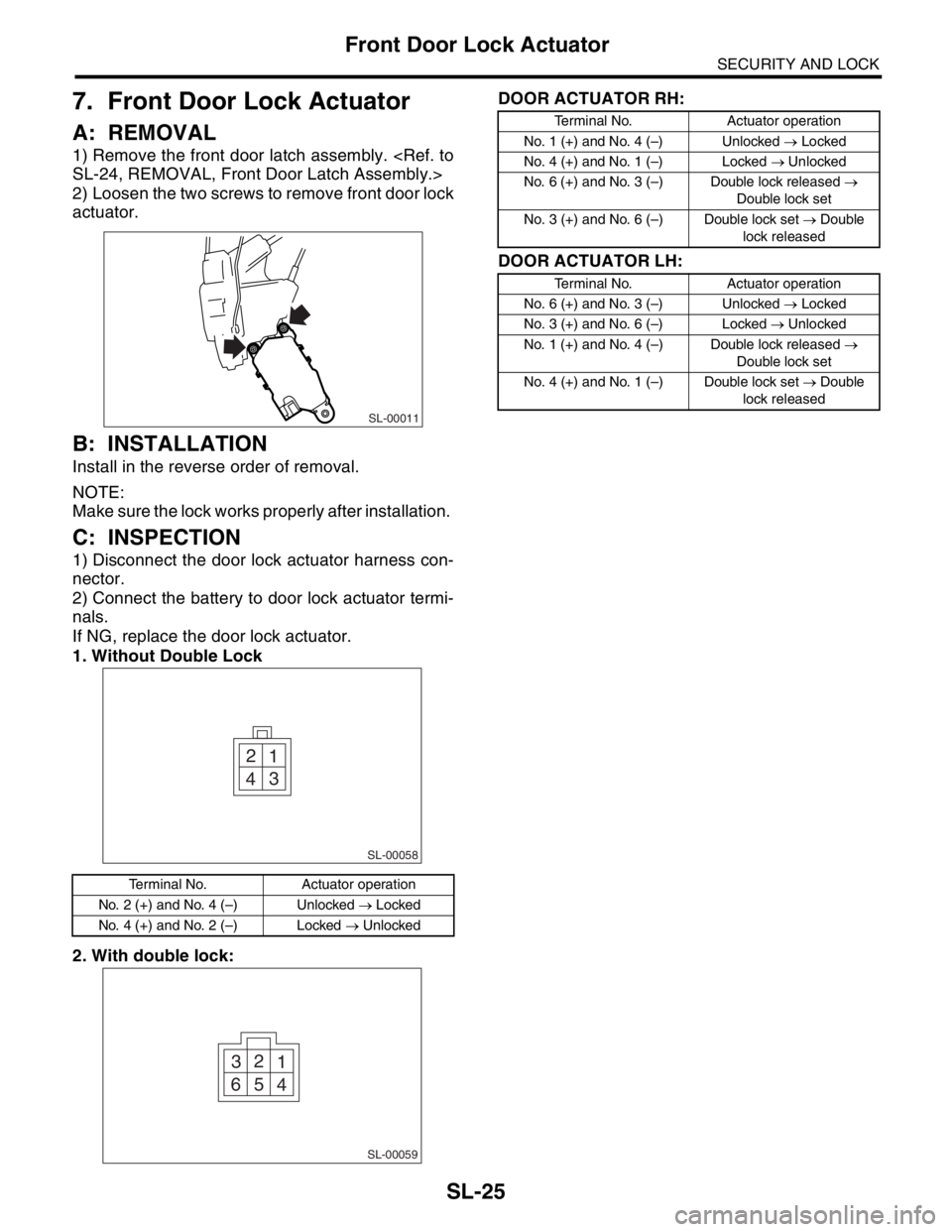
A: REMOVAL
1) Remove the front door latch assembly.
2) Loosen the two screws to remove front door lock
actuator.
B: INSTALLATION
Install in the reverse order of removal.
NOTE:
Make sure the lock works properly after installation.
C: INSPECTION
1) Disconnect the door lock actuator harness con-
nector.
2) Connect the battery to door lock actuator termi-
nals.
If NG, replace the door lock actuator.
1. Without Double Lock
2. With double lock:DOOR ACTUATOR RH:
DOOR ACTUATOR LH:
Terminal No. Actuator operation
No. 2 (+) and No. 4 (–) Unlocked → Locked
No. 4 (+) and No. 2 (–) Locked → Unlocked
SL-00011
1 2
3
4
SL-00058
1 2
3
4 5 6
SL-00059
Terminal No. Actuator operation
No. 1 (+) and No. 4 (–) Unlocked → Locked
No. 4 (+) and No. 1 (–) Locked → Unlocked
No. 6 (+) and No. 3 (–) Double lock released →
Double lock set
No. 3 (+) and No. 6 (–) Double lock set → Double
lock released
Terminal No. Actuator operation
No. 6 (+) and No. 3 (–) Unlocked → Locked
No. 3 (+) and No. 6 (–) Locked → Unlocked
No. 1 (+) and No. 4 (–) Double lock released →
Double lock set
No. 4 (+) and No. 1 (–) Double lock set → Double
lock released