start SUBARU FORESTER 2022 Getting Started Guide
[x] Cancel search | Manufacturer: SUBARU, Model Year: 2022, Model line: FORESTER, Model: SUBARU FORESTER 2022Pages: 156, PDF Size: 45.35 MB
Page 1 of 156
2022
Getting Started Guide
Forester
Subaru of America, Inc.
One Subaru Drive
Camden, NJ 08103-9800
MSA5B2202A
Issued August 2021
Printed in USA 08/21
Love. It’s what makes Subaru, Subaru.
Page 2 of 156

© 2021 Subaru of America, Inc. Printed in USA. All rights reserved. Contents may not be
reproduced in whole or in part without prior written permission of publisher\
. Specifications
in this Guide are based on the latest product information available at the time of publication.
Some images shown are for illustration purposes only. Some equipment shown in
photography within this Guide is optional at extra cost. Specific opti\
ons may be available
only in combination with other options. Specific combinations of equip\
ment or features may
vary from time to time, and by geographic area. Subaru of America, Inc. reserves the right
to change or discontinue at any time, without notice: Prices, colors, ma\
terials, equipment,
accessories, specifications, models and packages, without incurring an\
y obligation to
make the same or similar changes on vehicles previously sold. Colors shown may vary
due to reproduction and printing processes. Subaru of America, Inc. is not responsible for
typographical errors.
Aha
™ is a trademark of Harman International Industries, Incorporated. Alcantara® is a
registered trademark of Alcantara S.p.A., and Alcantara is produced by the Toray Group. App
Store
® is a registered trademark of Apple, Inc. Apple® is a registered trademark of Apple,
Inc. Apple CarPlay® is a registered trademark of Apple, Inc. Android Auto™ is a trademark of
Google, LLC. BBS® is a registered trademark of BBS Kraftahrzeugtechnik, AG. Bluetooth® is
a registered trademark of Bluetooth SIG, Inc. BRIN NAUB® is a registered trademark of TB
Kawashima Co., Ltd. Brembo® is a registered trademark of Freni Brembo, S.p.A. GreenEdge®
is a registered trademark of Harman International Industries, Incorporated. Glympse® is a
registered trademark of Glympse, Inc. Grand Luxe® is a registered trademark of Seiren Co.,
Ltd. HARMAN® is a registered trademark of HARMAN International Industries, Incorporated.
Harman Kardon® is a registered trademark of Harman International Industries, Incorporated.
Quantum logic™ is a trademark of Harman International Industries, Incorporated. HD Radio®
is a registered trademark of iBiquity Digital Corporation. HomeLink® and the HomeLink®
house icon are registered trademarks of Gentex Corporation. iHeartRadio® is a registered
trademark of iHeartMedia, Inc. iPod® is a registered trademark of Apple, Inc. iTunes® is a
registered trademark of Apple, Inc. Magellan® is a registered trademark of MiTAC International
Corporation. Michelin® is a registered trademark of Compagnie Générale des Etablissments
Michelin. Metal-Matrix Diaphragm (MMD®) is a registered trademark of Harman International
Industries, Incorporated. MirrorLink™ is a trademark of Car Connectivity Consortium, LLC.
Pandora® is a registered trademark of Pandora Media, Inc. SACHS® is a registered trademark
of ZF Friedrichshafen AG. Siri® is a registered trademark of Apple, Inc. Smart Way® is a
registered trademark of the U.S. Environmental Protection Agency. StitcherTM is a trademark
of StitcherTM, Inc. TomTom® is a registered trademark of TomTom International BV. TORSEN
LSD® is a registered trademark of JTEKT TORSEN North America, Inc. SiriusXM® All Access
Radio is a registered trademark of Sirius XM Radio, Inc. SiriusXM Traffic® is a registered
trademark of Sirius XM Radio, Inc. SiriusXM Travel Link® is a registered trademark of Sirius XM
Radio, Inc. Ultrasuede® is a registered trademark of Toray Industries, Inc. Yelp® is a registered
trademark of Yelp, Inc. Ascent is a trademark of Subaru of America, Inc. Added Securit\
y,
DriverFocus, Crosstrek, Forester, Outback, StarTex and StarDrive are registered trademarks
of Subaru of America, Inc. Forester Wilderness and Outback Wilderness are trademarks
of Subaru of America, Inc. BRZ, EyeSight, Impreza, Lineartronic, Legacy, S209, Subaru,
SUBARU STARLINK, Starlink, SUBARU BOXER, tS (Design), WRX, STI and X-MODE are
registered trademarks of Subaru Corporation.
Page 3 of 156
PURPOSE OF THIS GUIDE
WELCOME................. 4
IMPORTANT SAFETY
INFORMATION .............. 4
OWNER’S RESOURCES ....... 4
IN CASE OF EMERGENCY ..... 5
TOWING YOUR ALL-WHEEL
DRIVE SUBARU ............. 6
ENTRY AND EXIT
KEYLESS ENTRY ............ 7
KEYLESS ACCESS WITH PUSH
BUTTON START ............. 9
POWER REAR GATE (PRG) ....11
INSTRUMENT PANEL........14
GAUGES AND WARNING
LIGHTS
COMBINATION METER .......16
WARNING AND INDICATOR
LIGHTS ....................17
CONTROLS
INSTRUMENT PANEL SWITCHES
(LOWER LEFT) ..............18
AUDIO CONTROLS ...........18
ADVANCED ADAPTIVE CRUISE
CONTROL .................19
i/SET SWITCH ...............19
INFO SWITCH ...............20
LIGHT CONTROLS ...........20
TURN SIGNALS .............21
WINDSHIELD WIPERS ........22
REAR WINDOW WIPER .......22
OVERHEAD CONSOLE ........23
GETTING COMFORTABLE
SEATING...................25
TILT AND TELESCOPIC
STEERING COLUMN .........27
POWER EXTERIOR MIRRORS . . 28
REAR VIEW MIRROR .........29
POWER WINDOWS ..........30
POWER MOONROOF ........30
CLIMATE CONTROL ..........31
ACCESSORY CONNECTIONS . . 38
TABLE OF CONTENTS
Page 4 of 156
OPERATING THE VEHICLE
IGNITION SWITCH...........39
PUSH-BUTTON IGNITION
SWITCH ...................39
STARTING THE VEHICLE ......39
DRIVING THE VEHICLE .......40
AUTO START–STOP .........42
ELECTRONIC PARKING BRAKE
(EPB) .....................44
X-MODE
®..................45
TURNING OFF THE VEHICLE ...48
REFUELING
FUEL FILLER LID............49
FUEL SPECIFICATIONS AND
CAPACITY ..................49
PASSENGER/CARGO AREAS
FOLDING THE REAR SEATS ...50
CHILD SAFETY LOCKS .......50
LATCH/ANCHOR ............51
REAR SEAT REMINDER .......52
CARGO AREA AND COVER ...53
SPARE TIRE AND JACK .......53
ENGINE COMPARTMENT
HOOD PROP................54
2.5 L ENGINE ...............55
ADDITIONAL SPECIFICATIONS
NEW VEHICLE BREAK-IN ......56
ENGINE OIL ................56
ENGINE OIL CAPACITY .......56
ROOF RAIL CAPACITY .......57
TRAILER TOWING CAPACITY . . 57
TIRE PRESSURE MONITORING
SYSTEM (TPMS) .............58
STARLINK OVERVIEW
OVERVIEW OF YOUR
MULTIMEDIA SYSTEM ........60
BUTTONS ..................60
TOUCHSCREEN .............62
STEERING WHEEL CONTROLS . 63
VOICE RECOGNITION ........64
STARLINK HOME
HOME SCREEN ICONS .......66
REARRANGING ICONS .......66
ADDING SHORTCUTS ........67
DRIVER PROFILE
CREATING A DRIVER PROFILE . . 68
MULTIMEDIA
RADIO.....................70
MEDIA .....................71
PHONE
PAIRING A PHONE ...........72
MAKING A CALL .............72
RECEIVING A CALL ..........73
TEXT MESSAGES ............74
APPS
SUBARU STARLINK®
IN-VEHICLE APPS ...........75
SUBARU STARLINK®
MOBILE APP ................77
MYSUBARU ................77
MAPS (if equipped)
MAPS OVERVIEW ............79
CREATING HOME AND
WORK PROFILES ............79
STARLINK SAFETY AND
SECURITY
SAFETY AND SECURITY
OVERVIEW.................80
ENROLLMENT ..............81
MYSUBARU INTEGRATION ....82
SUBARU STARLINK
®
WI-FI HOTSPOT .............82
SETTINGS AND UPDATES
SETTINGS AND UPDATES
OVERVIEW.................83
SOUND ....................84
PHONE ....................84
MAPS/NAVIGATION ..........85
CLOCK ....................87
TABLE OF CONTENTS
2
Page 6 of 156
WELCOME
Congratulations on choosing a Subaru Forester and welcome to the Subaru family!
Subaru is more than a car company™. We are committed to making the world a better
place, and the Subaru Love Promise is our vision to show love and respect to all people at
every interaction with Subaru. We believe in building lifelong relationships with our
customers, earning your trust and exceeding your expectations by providing customer
service with integrity and compassion.
This Getting Started Guide will introduce you to your new Subaru Forester by providing
information on the basic operation and key features of your Subaru as well as the
STARLINK
®and EyeSight®systems in your vehicle.
IMPORTANT SAFETY INFORMATION
The Getting Started Guide is not intended as a substitute for your Owner’s Manuals. We
strongly encourage you to review your Vehicle, STARLINK®, and EyeSight®Owner’s
Manuals to ensure complete understanding.
OWNER’S RESOURCES
If you’re having difficulty using any of the functions outlined in this guide, or want to learn
more, you can get additional information from the
following sources:
Your Subaru Owner’s Manuals:
Located in the glovebox
Online Subaru Owner’s Resources:
www.subaru.com/owners
Subaru Customer Support:
www.subaru.com/customer-support
1-800-782-2783 (1-800-SUBARU3 )
PURPOSE OF THIS GUIDE
4
Page 7 of 156
IN CASE OF EMERGENCY
SUBARU STARLINK®Safety and Security(subscription required)
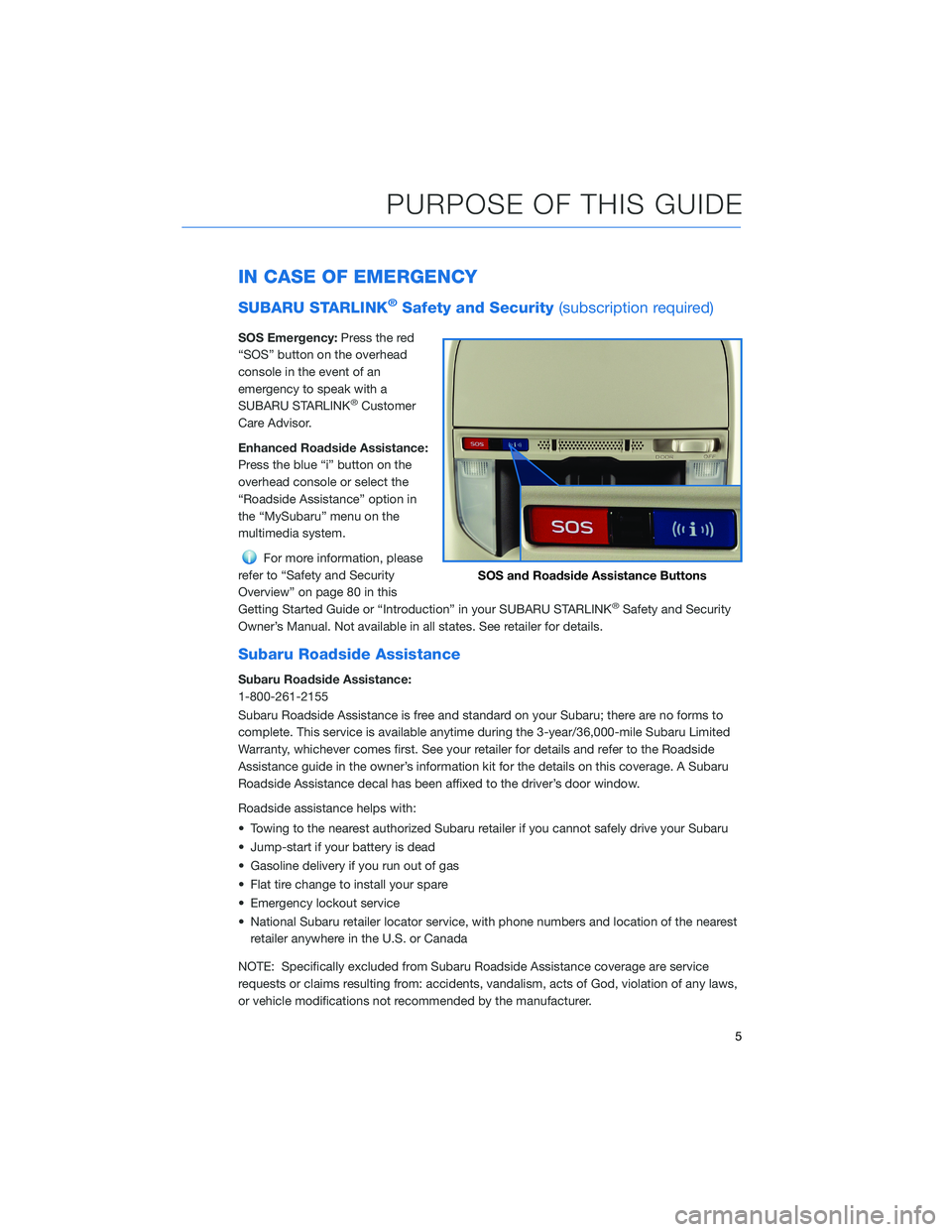
SOS Emergency:Press the red
“SOS” button on the overhead
console in the event of an
emergency to speak with a
SUBARU STARLINK
®Customer
Care Advisor.
Enhanced Roadside Assistance:
Press the blue “i” button on the
overhead console or select the
“Roadside Assistance” option in
the “MySubaru” menu on the
multimedia system.
For more information, please
refer to “Safety and Security
Overview” on page 80 in this
Getting Started Guide or “Introduction” in your SUBARU STARLINK
®Safety and Security
Owner’s Manual. Not available in all states. See retailer for details.
Subaru Roadside Assistance
Subaru Roadside Assistance:
1-800-261-2155
Subaru Roadside Assistance is free and standard on your Subaru; there are no forms to
complete. This service is available anytime during the 3-year/36,000-mile Subaru Limited
Warranty, whichever comes first. See your retailer for details and refer to the Roadside
Assistance guide in the owner’s information kit for the details on this coverage. A Subaru
Roadside Assistance decal has been affixed to the driver’s door window.
Roadside assistance helps with:
• Towing to the nearest authorized Subaru retailer if you cannot safely drive your Subaru
• Jump-start if your battery is dead
• Gasoline delivery if you run out of gas
• Flat tire change to install your spare
• Emergency lockout service
• National Subaru retailer locator service, with phone numbers and location of the nearest retailer anywhere in the U.S. or Canada
NOTE: Specifically excluded from Subaru Roadside Assistance coverage are service
requests or claims resulting from: accidents, vandalism, acts of God, violation of any laws,
or vehicle modifications not recommended by the manufacturer.
SOS and Roadside Assistance Buttons
PURPOSE OF THIS GUIDE
5
Page 11 of 156
KEYLESS ACCESS WITH PUSH BUTTON START
(if equipped)
The Keyless Access with Push-Button Start system features the following touch-activated
door locking or unlocking functions without the key ever leaving your pocket or purse;
simply carry the access key fob with you. You can customize the touch-activated door
locking or unlocking settings using the Combination Meter Display or through the
STARLINK
®Touchscreen by selecting “Settings” then “Vehicle”.
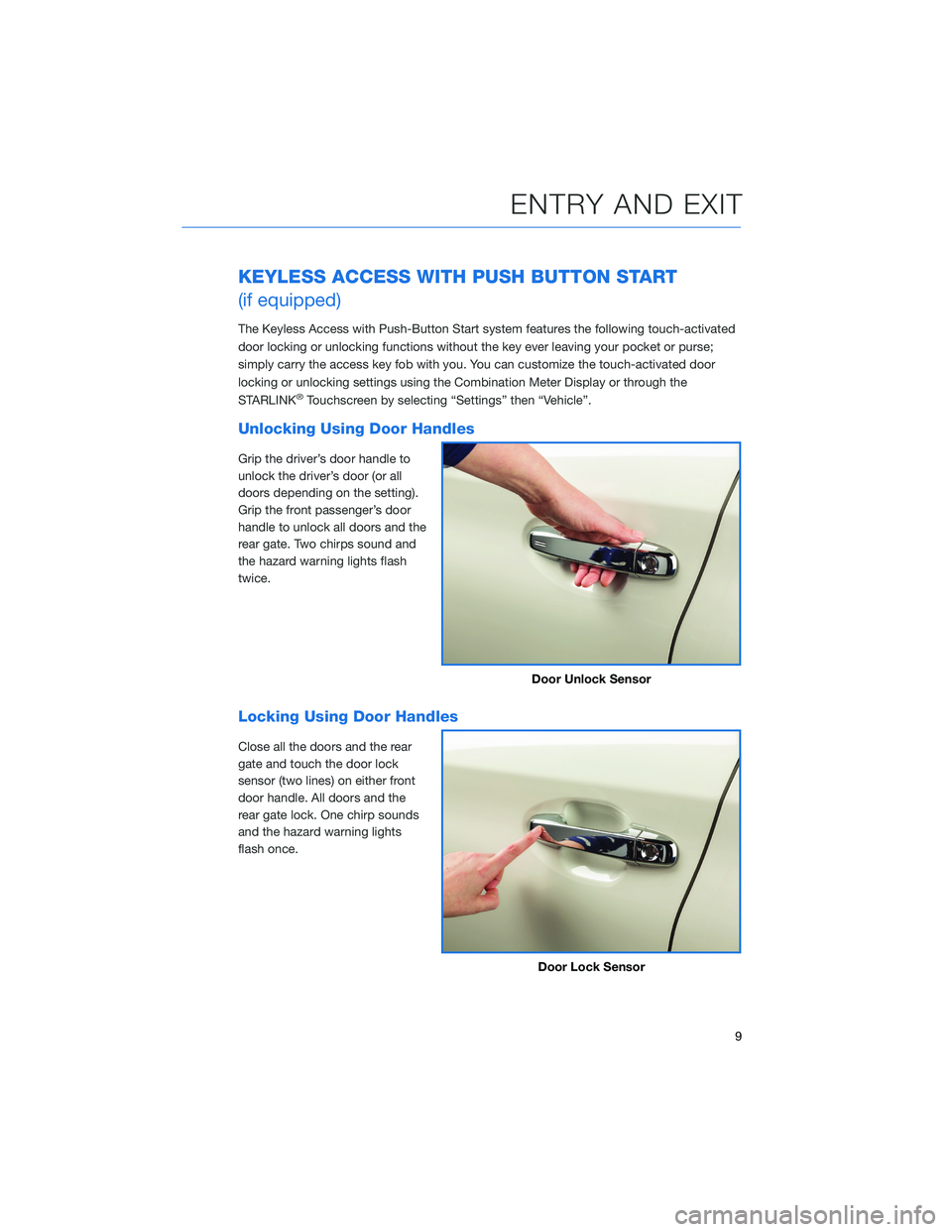
Unlocking Using Door Handles
Grip the driver’s door handle to
unlock the driver’s door (or all
doors depending on the setting).
Grip the front passenger’s door
handle to unlock all doors and the
rear gate. Two chirps sound and
the hazard warning lights flash
twice.
Locking Using Door Handles
Close all the doors and the rear
gate and touch the door lock
sensor (two lines) on either front
door handle. All doors and the
rear gate lock. One chirp sounds
and the hazard warning lights
flash once.
Door Unlock Sensor
Door Lock Sensor
ENTRY AND EXIT
9
Page 20 of 156
INSTRUMENT PANEL SWITCHES (LOWER LEFT)
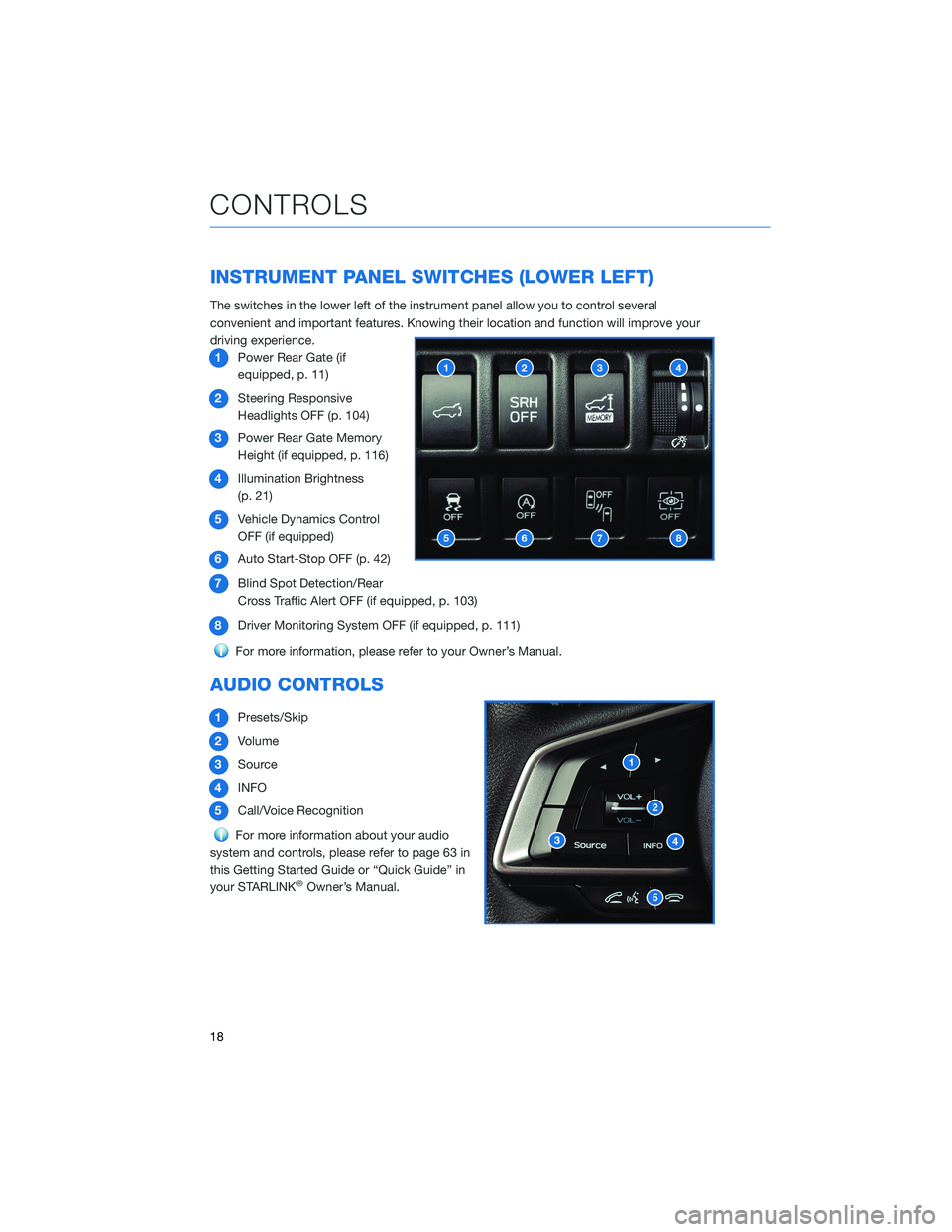
The switches in the lower left of the instrument panel allow you to control several
convenient and important features. Knowing their location and function will improve your
driving experience.1 Power Rear Gate (if
equipped, p. 11)
2 Steering Responsive
Headlights OFF (p. 104)
3 Power Rear Gate Memory
Height (if equipped, p. 116)
4 Illumination Brightness
(p. 21)
5 Vehicle Dynamics Control
OFF (if equipped)
6 Auto Start-Stop OFF (p. 42)
7 Blind Spot Detection/Rear
Cross Traffic Alert OFF (if equipped, p. 103)
8 Driver Monitoring System OFF (if equipped, p. 111)
For more information, please refer to your Owner’s Manual.
AUDIO CONTROLS
1Presets/Skip
2 Volume
3 Source
4 INFO
5 Call/Voice Recognition
For more information about your audio
system and controls, please refer to page 63 in
this Getting Started Guide or “Quick Guide” in
your STARLINK
®Owner’s Manual.
CONTROLS
18
Page 21 of 156
ADVANCED ADAPTIVE CRUISE CONTROL
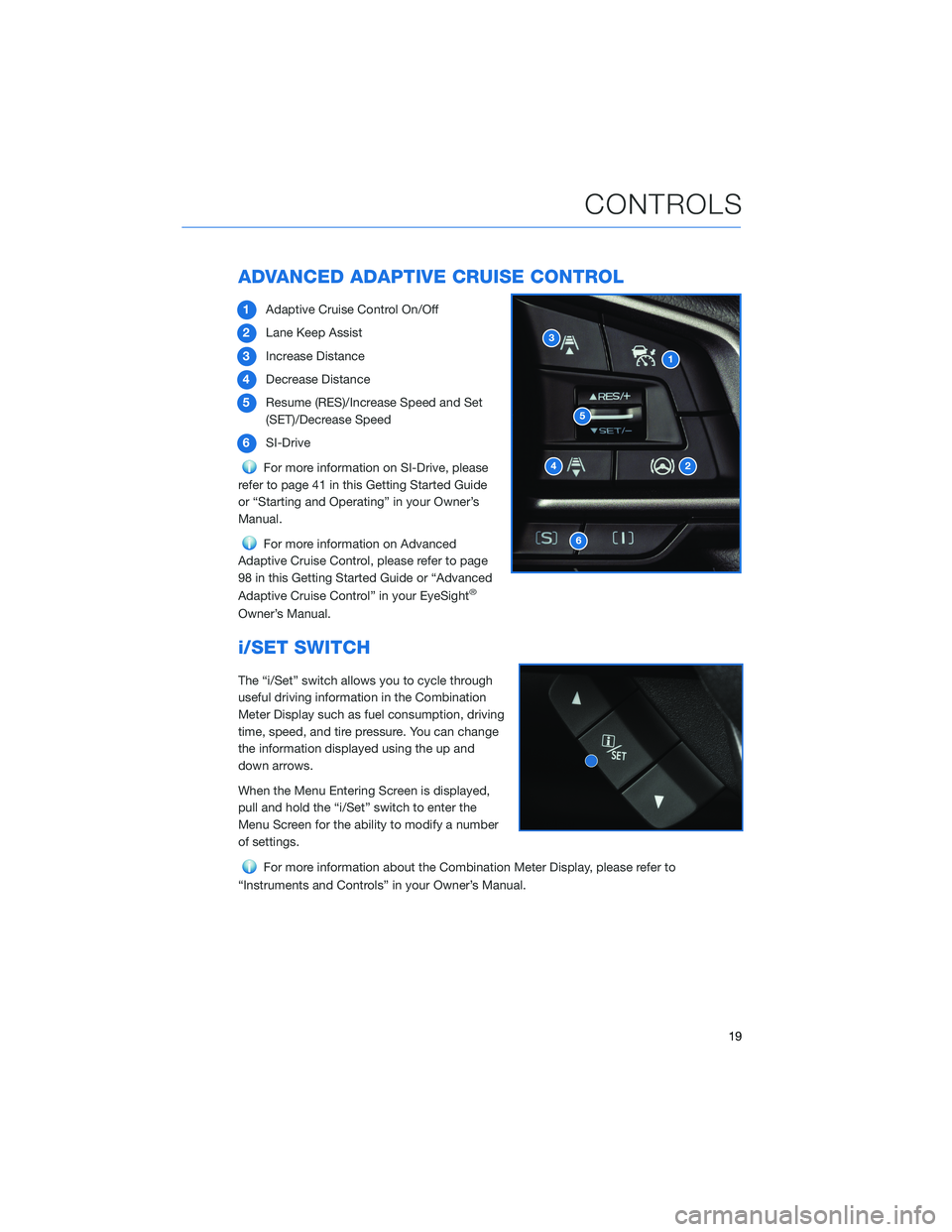
1Adaptive Cruise Control On/Off
2 Lane Keep Assist
3 Increase Distance
4 Decrease Distance
5 Resume (RES)/Increase Speed and Set
(SET)/Decrease Speed
6 SI-Drive
For more information on SI-Drive, please
refer to page 41 in this Getting Started Guide
or “Starting and Operating” in your Owner’s
Manual.
For more information on Advanced
Adaptive Cruise Control, please refer to page
98 in this Getting Started Guide or “Advanced
Adaptive Cruise Control” in your EyeSight
®
Owner’s Manual.
i/SET SWITCH
The “i/Set” switch allows you to cycle through
useful driving information in the Combination
Meter Display such as fuel consumption, driving
time, speed, and tire pressure. You can change
the information displayed using the up and
down arrows.
When the Menu Entering Screen is displayed,
pull and hold the “i/Set” switch to enter the
Menu Screen for the ability to modify a number
of settings.
For more information about the Combination Meter Display, please refer to
“Instruments and Controls” in your Owner’s Manual.
CONTROLS
19
Page 22 of 156
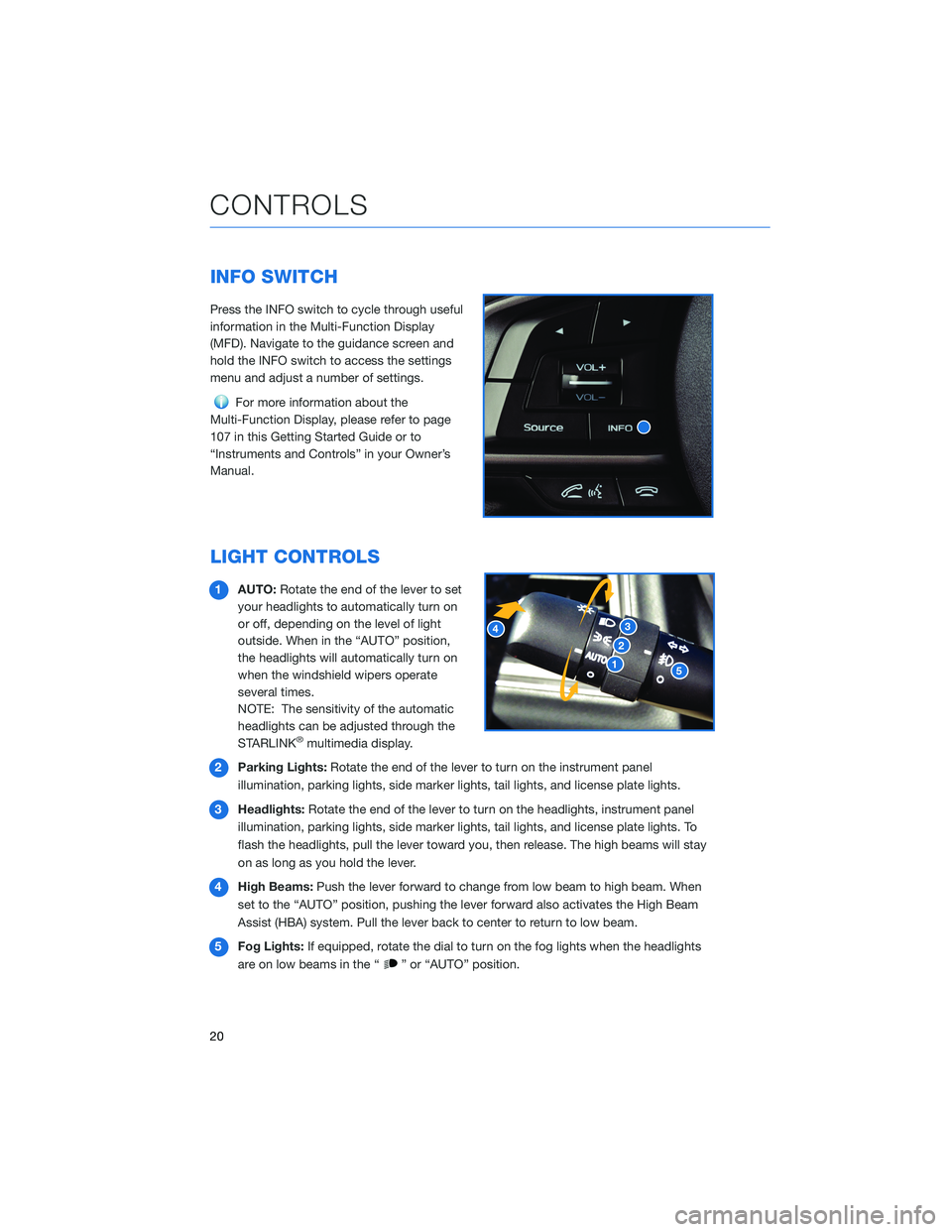
INFO SWITCH
Press the INFO switch to cycle through useful
information in the Multi-Function Display
(MFD). Navigate to the guidance screen and
hold the INFO switch to access the settings
menu and adjust a number of settings.
For more information about the
Multi-Function Display, please refer to page
107 in this Getting Started Guide or to
“Instruments and Controls” in your Owner’s
Manual.
LIGHT CONTROLS
1 AUTO: Rotate the end of the lever to set
your headlights to automatically turn on
or off, depending on the level of light
outside. When in the “AUTO” position,
the headlights will automatically turn on
when the windshield wipers operate
several times.
NOTE: The sensitivity of the automatic
headlights can be adjusted through the
STARLINK
®multimedia display.
2 Parking Lights: Rotate the end of the lever to turn on the instrument panel
illumination, parking lights, side marker lights, tail lights, and license plate lights.
3 Headlights: Rotate the end of the lever to turn on the headlights, instrument panel
illumination, parking lights, side marker lights, tail lights, and license plate lights. To
flash the headlights, pull the lever toward you, then release. The high beams will stay
on as long as you hold the lever.
4 High Beams: Push the lever forward to change from low beam to high beam. When
set to the “AUTO” position, pushing the lever forward also activates the High Beam
Assist (HBA) system. Pull the lever back to center to return to low beam.
5 Fog Lights: If equipped, rotate the dial to turn on the fog lights when the headlights
are on low beams in the “
” or “AUTO” position.
CONTROLS
20