display SUBARU IMPREZA 2016 5.G Owners Manual
[x] Cancel search | Manufacturer: SUBARU, Model Year: 2016, Model line: IMPREZA, Model: SUBARU IMPREZA 2016 5.GPages: 594, PDF Size: 5.36 MB
Page 19 of 594
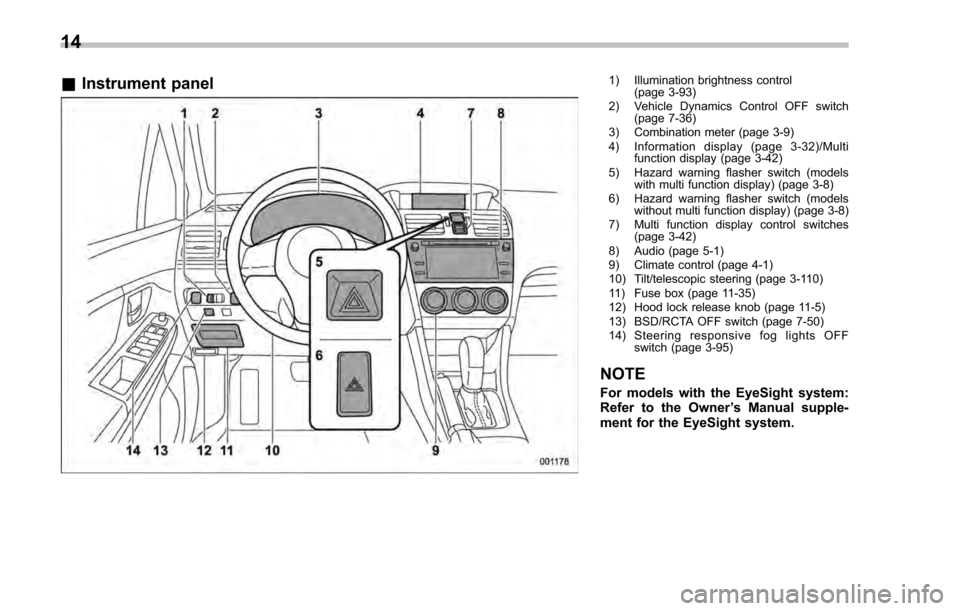
&Instrument panel1) Illumination brightness control
(page 3-93)
2) Vehicle Dynamics Control OFF switch (page 7-36)
3) Combination meter (page 3-9)
4) Information display (page 3-32)/Multi function display (page 3-42)
5) Hazard warning flasher switch (models with multi function display) (page 3-8)
6) Hazard warning flasher switch (models without multi function display) (page 3-8)
7) Multi function display control switches (page 3-42)
8) Audio (page 5-1)
9) Climate control (page 4-1)
10) Tilt/telescopic steering (page 3-110)
11) Fuse box (page 11-35)
12) Hood lock release knob (page 11-5)
13) BSD/RCTA OFF switch (page 7-50)
14) Steering responsive fog lights OFF switch (page 3-95)
NOTE
For models with the EyeSight system:
Refer to the Owner ’s Manual supple-
ment for the EyeSight system.
14
Page 20 of 594
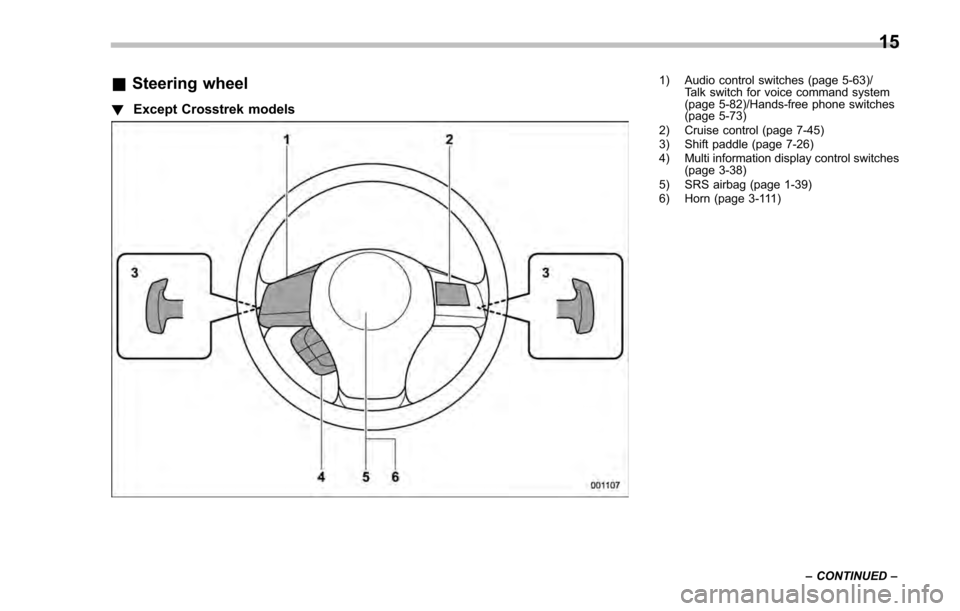
&Steering wheel
! Except Crosstrek models
1) Audio control switches (page 5-63)/
Talk switch for voice command system
(page 5-82)/Hands-free phone switches
(page 5-73)
2) Cruise control (page 7-45)
3) Shift paddle (page 7-26)
4) Multi information display control switches (page 3-38)
5) SRS airbag (page 1-39)
6) Horn (page 3-111)
–CONTINUED –
15
Page 21 of 594
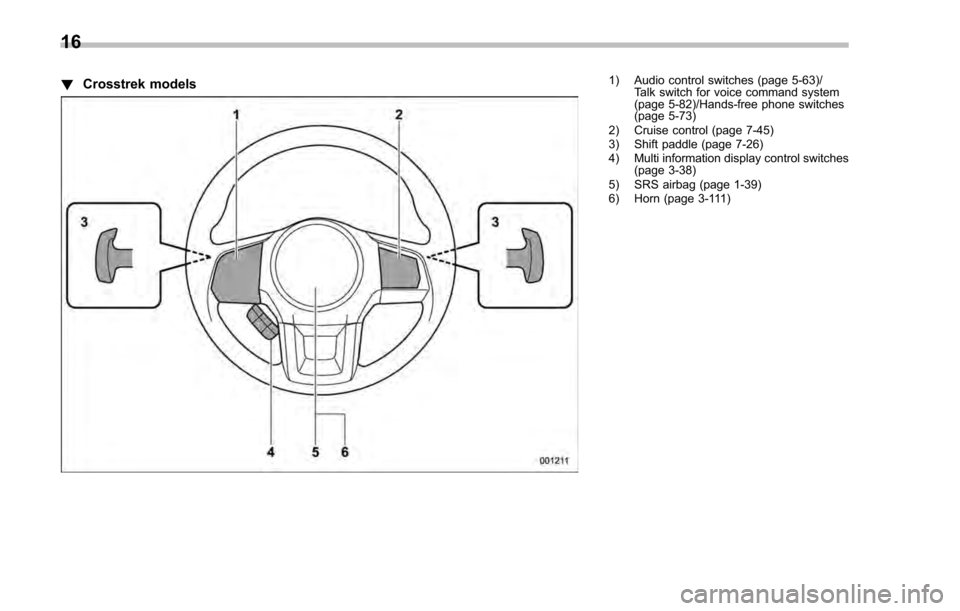
!Crosstrek models1) Audio control switches (page 5-63)/
Talk switch for voice command system
(page 5-82)/Hands-free phone switches
(page 5-73)
2) Cruise control (page 7-45)
3) Shift paddle (page 7-26)
4) Multi information display control switches (page 3-38)
5) SRS airbag (page 1-39)
6) Horn (page 3-111)
16
Page 23 of 594

&Combination meter
! U.S.-spec. models (type A)
The illustration above is a typical example. For some models, the combination meter
may be slightly different than that shown in the illustration.
1) Tachometer (page 3-11)
2) Trip meter and odometer (page 3-10)
3) Select lever/gear position indicator
(page 3-30)
4) Speedometer (page 3-10)
5) Information display selection knob (page 3-32)
6) ECO gauge (page 3-12)
7) Fuel gauge (page 3-12)
8) Trip meter A/B selection and trip meter reset knob (page 3-11)
18
Page 24 of 594

!U.S.-spec. models (type B)
The illustration above is a typical example. For some models, the combination meter
may be slightly different than that shown in the illustration.
1) Tachometer (page 3-11)
2) Multi information display (page 3-38)
3) Fuel gauge (page 3-12)
4) Select lever/gear position indicator
(page 3-30)
5) Speedometer (page 3-10)
6) Information display selection knob (page 3-32)
7) ECO gauge (page 3-12)
8) Trip meter and odometer (page 3-10)
9) Trip meter A/B selection and trip meter reset knob (page 3-11)
–CONTINUED –
19
Page 25 of 594

!Except U.S.-spec. models (type A)
The illustration above is a typical example. For some models, the combination meter
may be slightly different than that shown in the illustration.
1) Tachometer (page 3-11)
2) Trip meter and odometer (page 3-10)
3) Select lever/gear position indicator
(page 3-30)
4) Speedometer (page 3-10)
5) Information display selection knob (page 3-32)
6) ECO gauge (page 3-12)
7) Fuel gauge (page 3-12)
8) Trip meter A/B selection and trip meter reset knob (page 3-11)
20
Page 26 of 594

!Except U.S.-spec. models (type B)
The illustration above is a typical example. For some models, the combination meter
may be slightly different than that shown in the illustration.
1) Tachometer (page 3-11)
2) Multi information display (page 3-38)
3) Fuel gauge (page 3-12)
4) Select lever/gear position indicator
(page 3-30)
5) Speedometer (page 3-10)
6) Trip meter A/B selection and trip meter reset knob (page 3-11)
7) ECO gauge (page 3-12)
8) Trip meter and odometer (page 3-10)
–CONTINUED –
21
Page 29 of 594

Function settings
A SUBARU dealer can change the settings of the functions shown in the following table to meet your personal requirements. Contact
the nearest SUBARU dealer for details. If your vehicle is equipped with a multi function display, the settings for some of these functions
can be changed using the display. For details, refer to“Multi function display”F 3-42.
Item Function Possible settingsDefault setting
Alarm system Alarm system Operation/Non-operationOperation
Monitoring start delay time (after
closure of doors) 0 seconds/30 seconds
30 seconds
Impact sensor operation (only
models with shock sensors (dealer
option)) Operation/Non-operation
Non-operation
Passive arming (models without
“ Keyless Access with Push-button
Start system ”) Operation/Non-operation
Non-operation
Dome light and map lights illumina-
tion (models with moonroof) ON/OFF
OFF
Dome light illumination (models
without moonroof)
Keyless Access (if equipped) Hazard warning flasher Operation/Non-operationOperation
Audible signal Operation/Non-operationOperation
Audible signal volume Level 1 to 7Level 5
Door unlock selection function (dri-
ver ’s door unlock) Driver
’s door only/All doors Driver ’s door only
Door unlock selection function (rear
gate unlock) Rear gate only/All doors
Rear gate only
Remote keyless entry system Hazard warning flasher Operation/Non-operationOperation
Audible signal Operation/Non-operationOperation
Audible signal volume Level 1 to 7Level 5
24
Page 116 of 594
less equipment is used), or while talking
on a cell phone, the operating ranges may
be reduced, or the keyless access func-
tion may not operate.
In such a case, perform the procedure
described in“Locking and unlocking ”F 9-
18.
. When an access key is in the operating
range, if the door handle becomes wet
due to exposure to a significant amount of
water when the vehicle is washed or
during heavy rain, the doors may be
locked or unlocked.
. The keyless access function may not
operate properly depending on the status
of the access key and the radio wave
conditions around the vehicle. In such a
case, perform the procedure described in
“Locking and unlocking ”F 9-18.
! How to use keyless access func-
tions
! Keyless access function tips
. When you lock the doors and rear gate
(5-door) using the keyless access func-
tion, turn the push-button ignition switch
off. It is not possible to lock the doors and
rear gate using the keyless access func-
tion when the push-button ignition switch
is on the “ACC ”or “ON ”position. Refer to
“Switching power ”F 3-7.
. If the door handle is gripped with a gloved hand, the door lock may not be
released.
.
If the door lock sensor is touched three
times or more repeatedly, the system will
ignore the sensor operation.
. When performing the locking proce-
dure too quickly, locking may not have
been completed. After performing the
locking procedure, it is recommended to
pull the REAR door handle to confirm that
the doors have been locked.
. It is possible to lock the doors even
when one of the doors is open. After
performing the locking procedure, close
the opened door or rear gate to lock it.
. Within 3 seconds after locking the
doors and the rear gate by using the
keyless access function, it is not possible
to unlock doors and/or the rear gate by
using the keyless access function.
. When locking, be sure to carry the
access key to prevent locking the access
key in the vehicle.
. The setting of the hazard warning
flasher operation and the volume of the
audible signal can be changed by your
SUBARU dealer. We recommend that you
contact your SUBARU dealer for details.
. For models with the multi function
display, the setting of the hazard warning
flasher operation can be changed by
operating the multi function display. For details, refer to
“Hazard warning flasher
setting ”F 3-79.
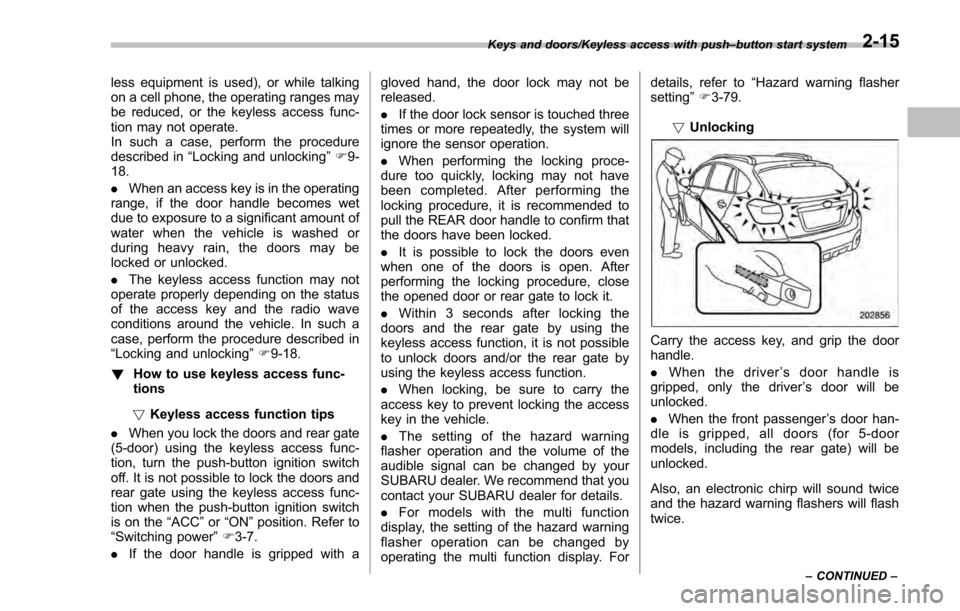
! Unlocking
Carry the access key, and grip the door
handle.
. When the driver ’s door handle is
gripped, only the driver ’s door will be
unlocked.
. When the front passenger ’s door han-
dle is gripped, all doors (for 5-door
models, including the rear gate) will be
unlocked.
Also, an electronic chirp will sound twice
and the hazard warning flashers will flash
twice.
Keys and doors/Keyless access with push –button start system
–CONTINUED –2-15
Page 119 of 594
Keys and doors/Keyless access with push–button start system
dealer.
NOTE
The setting can be changed by your
SUBARU dealer. Contact your SUBARU
dealer for details. Also, for models with
the multi function display, the setting
can be changed by operating the multi
function display. For details, refer to
“Keyless access setting (models with
“keyless access with push-button start
system ”)”F3-84.
& Selecting audible signal op-
eration
Using an electronic chirp, the system will
give you an audible signal when the doors
lock and unlock. If desired, you may turn
the audible signal off. For more details,
contact a SUBARU dealer.
NOTE
For models with the multi function
display, the setting can be changed by
operating the multi function display.
For details, refer to “Keyless buzzer
volume setting ”F 3-79.
& Warning chimes and warning
indicator
The keyless access with push-button start
system sounds a warning chime and
flashes the access key warning indicator
on the combination meter in order to
minimize improper operations and help
protect your vehicle from theft.
For details, refer to “Warning chimes and
warning indicator of the keyless access
with push-button start system ”F 3-25.
& Disabling keyless access
function
WARNING
If you wear an implanted pacemaker
or an implanted defibrillator, per-
form the procedure described in
“By operating the driver ’s door ”
F 2-19 to disable the keyless access
function. If you perform the proce-
dure described in “By operating the
access key ”F 2-18, the operation of
an implanted pacemaker or im-
planted defibrillator may be affected
by the radio waves from the trans-
mitter antenna.
When the vehicle is not going to be used
for a long time, or when you choose not to use the keyless access function, the
keyless access function can be disabled.
NOTE
.
The locking and unlocking function
by the remote keyless entry system is
not disabled.
. The setting can also be changed at
SUBARU dealers. For more details,
contact a SUBARU dealer.
. To start the engine while the func-
tions are disabled, perform the proce-
dure described in “Starting engine”
F 9-19.
. We recommend that you disable the
keyless access functions under the
following conditions.
–When the vehicle is not going to
be used for an extended period of
time
– When the keyless access func-
tions are not going to be used
! Disabling functions
! By operating the access key
If you have registered a PIN code for PIN
Code Access, you can disable the keyless
access function by operating the access
key. For details about registering a PIN
code, refer to “Registering a PIN code”
F 2-22.
1. Open the driver ’s door.
2-18