wheel SUBARU OUTBACK 2016 6.G Service Manual
[x] Cancel search | Manufacturer: SUBARU, Model Year: 2016, Model line: OUTBACK, Model: SUBARU OUTBACK 2016 6.GPages: 572, PDF Size: 21.79 MB
Page 307 of 572
by operating the cell phone directly.
.Transferring methods and opera-
tions will be different depending on
the type of cell phone you have.
.For the operation of the cell phone,
see the manual that comes with it.
.The sound quality of the voice heard
from the other party’s speaker may be
negatively impacted.
&Phone settings
You can transfer the phonebook informa-
tion and adjust the volume of your phone
using the Buletooth phone system.
NOTE
.The ringer volume for outgoing and
incoming calls, as well as the volume
while on hold or during a call are
controlled independently from the vo-
lume of the audio source. The volume
setting in the phone setting is applied.
.When making a call, receiving a call
or while talking on the phone, you can
adjust the volume by using the AUDIO/
TUNE knob on the audio panel or the
volume control switch on the steering
wheel.!Phone volume settings
The call and ringtone volume can be
adjusted. A ringtone can be selected.
1. Display the“PHONE”screen. Refer to
“How to change the hands-free phone
system”F5-73.
2. Touch the
key.
3. Select the desired item to be set.
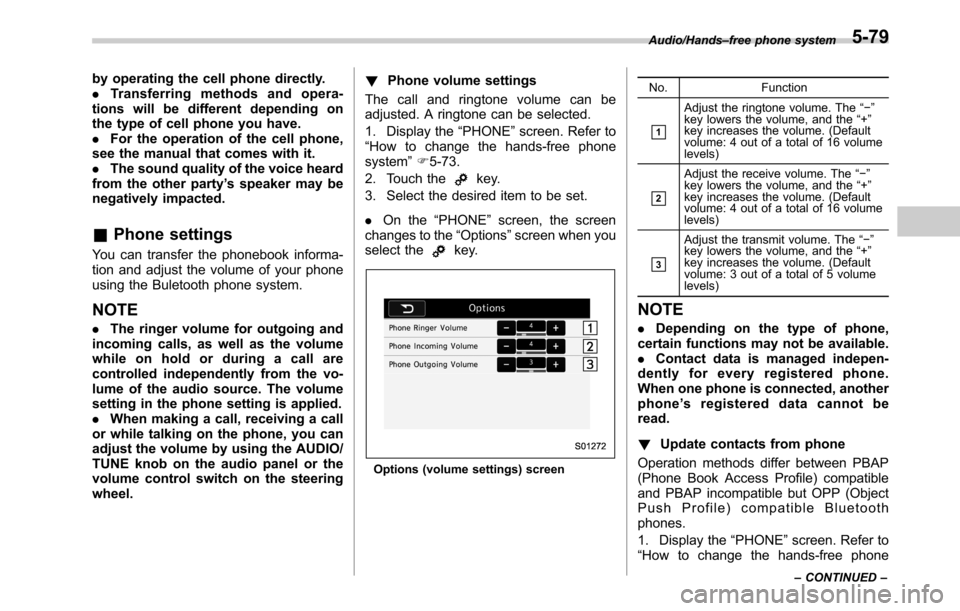
.On the“PHONE”screen, the screen
changes to the“Options”screen when you
select the
key.
Options (volume settings) screenNo. Function
&1
Adjust the ringtone volume. The“−”
key lowers the volume, and the“+”
key increases the volume. (Default
volume: 4 out of a total of 16 volume
levels)
&2
Adjust the receive volume. The“−”
key lowers the volume, and the“+”
key increases the volume. (Default
volume: 4 out of a total of 16 volume
levels)
&3
Adjust the transmit volume. The“−”
key lowers the volume, and the“+”
key increases the volume. (Default
volume: 3 out of a total of 5 volume
levels)
NOTE
.Depending on the type of phone,
certain functions may not be available.
.Contact data is managed indepen-
dently for every registered phone.
When one phone is connected, another
phone’s registered data cannot be
read.
!Update contacts from phone
Operation methods differ between PBAP
(Phone Book Access Profile) compatible
and PBAP incompatible but OPP (Object
Push Profile) compatible Bluetooth
phones.
1. Display the“PHONE”screen. Refer to
“How to change the hands-free phone
Audio/Hands–free phone system
–CONTINUED–5-79
Page 310 of 572
Audio/Voice command system
open.
–Passengers are talking while
voice commands are spoken.
–The air conditioning speed is set
high.
–The air conditioning vents are
turned towards the microphone.
.In the following conditions, the sys-
tem may not recognize the command
properly and using voice commands
may not be possible:
–The command is incorrect or
unclear. Note that certain words,
accents or speech patterns may be
difficult for the system to recognize.
–There is excessive background
noise, such as wind noise.&Voice command system op-
eration
1. Press the talk switch on the steering
wheel.
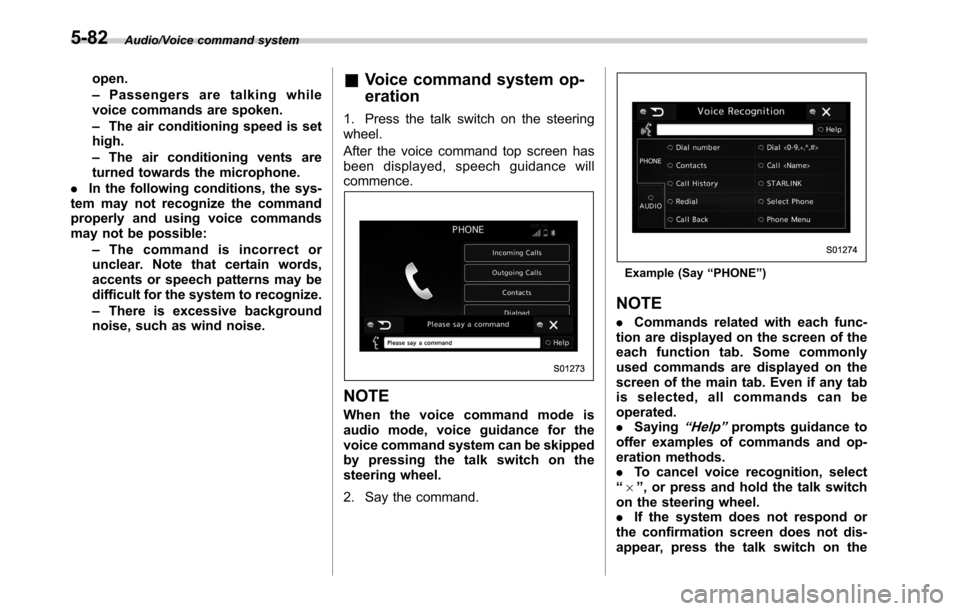
After the voice command top screen has
been displayed, speech guidance will
commence.
NOTE
When the voice command mode is
audio mode, voice guidance for the
voice command system can be skipped
by pressing the talk switch on the
steering wheel.
2. Say the command.
Example (Say“PHONE”)
NOTE
.Commands related with each func-
tion are displayed on the screen of the
each function tab. Some commonly
used commands are displayed on the
screen of the main tab. Even if any tab
is selected, all commands can be
operated.
.Saying
“Help”prompts guidance to
offer examples of commands and op-
eration methods.
.To cancel voice recognition, select
“6”, or press and hold the talk switch
on the steering wheel.
.If the system does not respond or
the confirmation screen does not dis-
appear, press the talk switch on the
5-82
Page 311 of 572

steering wheel and try again.
.The notations used in the com-
mands are as follows.
–< >: Numbers, titles or names to
be spoken
!Voice command example: Call
name
1. Press the talk switch on the steering
wheel.
2. Say
“Call
.A confirmation screen will be dis-
played showing the recognition re-
sults. If multiple matching items are
found, a selection screen will be
displayed. Say
“
the number.
NOTE
.In the same manner as it is dis-
played on the screen,“Call
“Call a contact”say the name of a contact. For exam-
ple:“Call a contact”,“John Smith”or“Call a contact”,“Mary Davis”.Short or abbreviated names in the
contacts list may not be recognized.
Change names in the contacts list to
full names.
.Sometimes a voice recognition re-
sult confirmation screen will be dis-
played. After confirming the result, say
“Ye s”or“No”.
.When the system recognizes multi-
ple names from the contacts list, a
name candidate list will be displayed
on the screen. If the desired name is
not displayed on the top of the screen,
say or select the number of the name
from the candidate list (number 1,
number 2, etc.) to select a name from
the candidate list.
.When a contact has multiple phone
numbers registered in the contacts list,
a candidate list will be displayed. If the
desired phone number is not displayed
on the top of the screen, say or select
the number of the desired phone
number from the candidate list (num-
ber 1, number 2, etc.) to select a phone
number from the candidate list.
!Voice command example: Dial
number
1. Press the talk switch on the steering
wheel.
2. Say
“Dial a number”.
3. Say
“Dial
For example, if the phone number is
2345678:
Say
“two three four five six seven
eight”
Do not say“twenty three forty five sixty
seven eight”
4. Say“Call”or press the off hook switch
on the steering wheel.
NOTE
.When the system recognizes multi-
ple phone numbers, a phone number
candidate list will be displayed on the
screen. Pressing the off hook switch on
the steering wheel makes a call to the
top entry on the list. If the desired
phone number is not displayed on the
top of the screen, say the number of
the desired phone number from the
candidate list to select a phone number
from the candidate list.
.Calling to the following phone num-
bers
–3 digit numbers (911, 411, 611)
–7 digit numbers (Local phone
numbers)
–10 digit numbers (Area code +
Local phone number)
–11 digit phone numbers (1 + Area
code + Local phone number)
.As the system cannot recognize
additional numbers, say the complete
number without stopping.
Audio/Voice command system
–CONTINUED–5-83
Page 355 of 572
as a result of an empty tank
could cause damage to the en-
gine. Continuing to operate your
vehicle at an extremely low fuel
level may result in a reduction of
engine performance.State emission testing (U.S.
only)
WARNING
Testing of an All-Wheel Drive model
must NEVER be performed on a
single two-wheel dynamometer. At-
tempting to do so will result in
uncontrolled vehicle movement and
may cause an accident or injuries to
persons nearby.
CAUTION
.At state inspection time, remem-
ber to tell your inspection or
service station in advance not to
place your SUBARU AWD vehicle
on a two-wheel dynamometer.
Otherwise, serious transmission
damage will result.
.Resultant vehicle damage due to
improper testing is not covered
under the SUBARU Limited War-
ranty and is the responsibility of
the state inspection program or
its contractors or licensees.
California and a number of federal stateshave Inspection/Maintenance programs to
inspect your vehicle’s emission control
system. If your vehicle does not pass this
test, some states may deny renewal of
your vehicle’s registration.
Your vehicle is equipped with a computer
that monitors the performance of the
engine’s emission control system. Certi-
fied emission inspectors will inspect the
On-Board Diagnostic (OBDII) system as
part of the state emission inspection
process. The OBDII system is designed
to detect engine and transmission pro-
blems that might cause the vehicle emis-
sions to exceed allowable limits. OBDII
inspections apply to all 1996 model year
and newer passenger cars and trucks.
Over 30 states plus the District of Colum-
bia have implemented emission inspec-
tion of the OBDII system.
.The inspection of the OBDII system
consists of a visual operational check of
the“CHECK ENGINE”warning light/mal-
function indicator light (MIL) and an
examination of the OBDII system with an
electronic scan tool.
.A vehicle
passes the OBDII system
inspection if proper operation of the
“CHECK ENGINE”warning light is ob-
served, there are no stored diagnostic
trouble codes, and the OBDII readiness
monitors are all complete.
Starting and operating/State emission testing (U.S. only)
–CONTINUED–7-7
Page 356 of 572

Starting and operating/Preparing to drive
.A vehiclefails the OBDII inspection if
the“CHECK ENGINE”warning light is not
properly operating (light is illuminated or is
not working due to a burned out bulb) or
there is one or more diagnostic trouble
codes stored in the vehicle’s computer.
.A state emission inspection may reject
(not pass or fail) a vehicle if the number of
OBDII system readiness monitors“NOT
READY”is greater than one. If the
vehicle’s battery has been recently re-
placed or disconnected, the OBDII system
inspection may indicate that the vehicle is
not ready for the emission test. Under this
condition, the vehicle driver should be
instructed to drive his/her vehicle for a few
days to reset the readiness monitors and
return for an emission re-inspection.
.Owners of rejected or failing vehicles
should contact their SUBARU Dealer for
service.
Some states still use dynamometers in
their emission inspection program. A
dynamometer is a treadmill or roller-like
testing device that allows your vehicle’s
wheels to turn while the vehicle remains in
one place. Prior to your vehicle being put
on a dynamometer, tell your emission
inspector
not to place your SUBARU
AWD vehicle on a two-wheel dynam-
ometer.Otherwise, serious transmis-
sion damage will result.The U.S. Environmental Protection
Agency (EPA) and states using two-wheel
dynamometers in their emission testing
program have EXEMPTED SUBARU
AWD vehicles from the portion of the
testing program that involves a two-wheel
dynamometer. There are some states that
use four-wheel dynamometers in their
testing program. When properly used, this
equipment should not damage a SUBARU
AWD vehicle.
Under no circumstances should the rear
wheels be jacked off the ground, nor
should the driveshaft be disconnected for
state emission testing.
Preparing to drive
You should perform the following checks
and adjustments every day before you
start driving.
1. Check that all windows, mirrors, and
lights are clean and unobstructed.
2. Check the appearance and condition
of the tires. Also check tires for proper
inflation.
3. Look under the vehicle for any sign of
leaks.
4. Check that the hood, trunk (Legacy)
and rear gate (Outback) are fully closed.
5. Check the adjustment of the seat.
6. Check the adjustment of the inside
and outside mirrors.
7. Fasten your seatbelt. Check that your
passengers have fastened their seatbelts.
8. Check the operation of the warning
and indicator lights when the ignition
switch is turned to the“ON”position.
9. Check the gauges, indicator and warn-
ing lights after starting the engine.
10. Check that no small animals enter the
engine compartment.
7-8
Page 359 of 572
1. Apply the parking brake.
2. Turn off unnecessary lights and ac-
cessories.
3. Shift the select lever to the“P”or“N”
position (preferably“P”position). The
starter will only operate when the select
lever is at the“P”or“N”position.
4. Turn the ignition switch to the“ON”
position and check the operation of the
warning and indicator lights. Refer to
“Warning and indicator lights”F3-12.
5. Turn the ignition switch to the“START”
positionwithoutdepressing the accelera-
tor pedal. Release the key immediately
after the engine has started.
If the engine does not start, perform the
following procedure.
(1) Turn the ignition switch to the
“LOCK”position and wait for at least
10 seconds. After checking that the
parking brake is applied, turn the
ignition switch to the“START”position
while depressing the accelerator pedal
slightly (approximately a quarter of the
full stroke). Release the accelerator
pedal as soon as the engine starts.
(2) If this fails to start the engine, turn
the ignition switch back to the“LOCK”
position and wait for at least 10
seconds. Then fully depress the accel-
erator pedal and turn the ignition
switch to the“START”position. If theengine starts, quickly release the
accelerator pedal.
(3) If this fails to start the engine, turn
the ignition switch again to the“LOCK”
position. After waiting for 10 seconds
or longer, turn the ignition switch to the
“START”position without depressing
the accelerator pedal.
(4) If the engine still refuses to start,
contact your nearest SUBARU dealer
for assistance.
6. Confirm that all warning and indicator
lights have turned off after the engine has
started. The fuel injection system auto-
matically lowers the idle speed as the
engine warms up.
While the engine is warming up, make
sure that the select lever is at the“P”or
“N”position and that the parking brake is
applied.
&Stopping the engine
WARNING
Do not stop the engine when the
vehicle is moving. This will cause
loss of power to the power steering
and the brake booster, making steer-
ing and braking more difficult. It
could also result in accidental acti-
vation of the“LOCK”position on theignition switch, causing the steering
wheel to lock.
The ignition switch should be turned off
only when the vehicle is stopped and the
engine is idling.
&Steering lock (models with-
out“keyless access with
push-button start system”)
After stopping the engine and the key is
removed from ignition switch, the steering
wheel will be locked due to the steering
lock function.
When the engine is restarted, the steering
lock will be automatically canceled.
!When the steering lock cannot be
released
When you cannot restart the engine due to
the steering lock, perform the following
steps.
!MT models
1. Check that the parking brake is ap-
plied.
2. Turn off unnecessary lights and ac-
cessories.
3. Depress the clutch pedal to the floor
and shift the shift lever into neutral. Hold
the clutch pedal to the floor while starting
the engine.
Starting and operating/Starting and stopping the engine (models without push–button ignition switch)
–CONTINUED–7-11
Page 360 of 572
Starting and operating/Starting and stopping engine (models with push–button start system)
4. Turn the ignition switch to the“ON”
position while turning the steering wheel
left and right.
5. Check the operation of the warning
and indicator lights.
6. Turn the ignition switch to the“START”
positionwithoutdepressing the accelera-
tor pedal.
7. Release the key immediately after the
engine has started.
If you cannot start the engine, there may
be a malfunction in the steering lock
function. Immediately contact your nearest
SUBARU dealer.
!CVT models
1. Check that the parking brake is ap-
plied.
2. Turn off unnecessary lights and ac-
cessories.
3. Check that the select lever is set in the
“P”position.
4. Depress the brake pedal and keep it.
5. Turn the ignition switch to the“ON”
position while turning the steering wheel
left and right.
6. Check the operation of the warning
and indicator lights.
7. Turn the ignition switch to the“START”
positionwithoutdepressing the accelera-
tor pedal.8. Release the key immediately after the
engine has started.
If you cannot start the engine, there may
be a malfunction in the steering lock
function. Immediately contact your nearest
SUBARU dealer.Starting and stopping engine
(models with push-button
start system)
&Safety precautions
Refer to“Safety precautions”F2-10.
&Operating range for push-
button start system
Refer to“Operating range for push-button
start system”F3-5.
&Starting engine
WARNING
.There are some general precau-
tions when starting the engine.
Carefully read the precautions
described in“General precau-
tions when starting engine”F7-
9.
.If the indicator on the push-
button ignition switch flashes in
green after the engine has
started, never drive the vehicle.
The steering is still locked, and it
may result in an accident.
7-12
Page 361 of 572
CAUTION
.When the operation indicator on
the push-button ignition switch is
flashing in orange, there may be
a malfunction with the vehicle.
Contact a SUBARU dealer imme-
diately.
.If the indicator on the push-
button ignition switch is flashing
in green after the engine has
started, it means that the steering
is still locked. While moving the
steering wheel right and left,
depress the brake pedal, and
press the push-button ignition
switch.
.Do not continue pushing the
push-button ignition switch for
more than 10 seconds. Doing so
could cause a malfunction. If the
engine does not start, stop push-
ing the push-button ignition
switch and turn off the engine.
Wait 10 seconds, and then push
the push-button ignition switch
to start the engine.
NOTE
.When the push-button ignition
switch is pressed while depressing
thebrakepedal,theenginestarter
operates for a maximum of 10 seconds
and after starting the engine, the starter
stops automatically.
.When the push-button ignition
switch is pressed while depressing
the brake pedal, the engine can be
started regardless of the power status.
.If the security indicator light illumi-
nates when you attempt to start the
engine but the engine does not start,
press the push-button ignition switch
to switch the power to“OFF”and then
try to start the engine again.
.If the engine does not start, press
the push-button ignition switch without
depressing the brake pedal to switch
the power to“OFF”. Then, while de-
pressing the brake pedal more force-
fully, press the push-button ignition
switch.
.The engine start procedures may
not function depending on the radio
wave conditions around the vehicle. In
such a case, refer to“Starting engine”
F9-19.
.If the vehicle battery is discharged,
the steering cannot be unlocked.
Charge the battery.
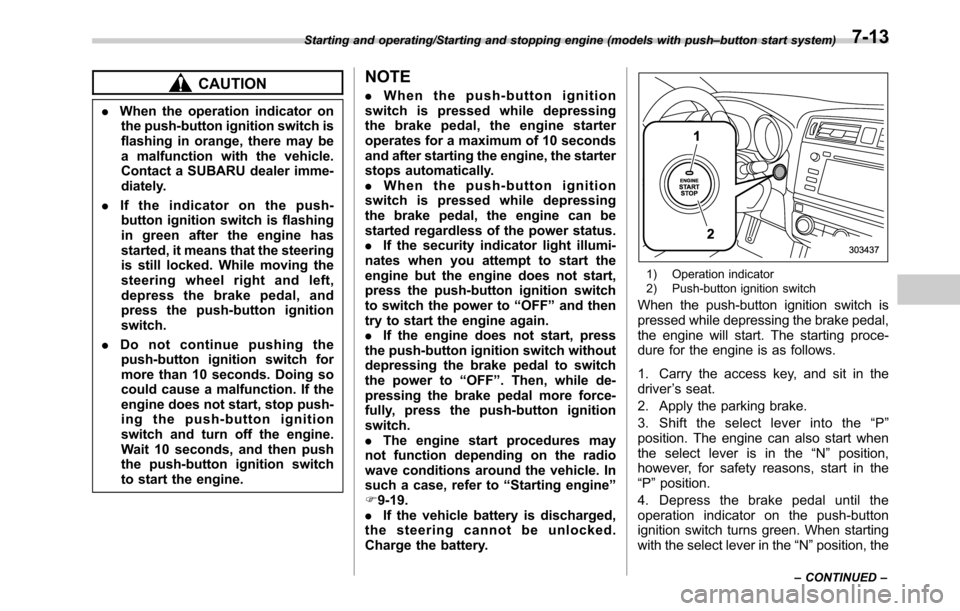
1) Operation indicator
2) Push-button ignition switch
When the push-button ignition switch is
pressed while depressing the brake pedal,
the engine will start. The starting proce-
dure for the engine is as follows.
1. Carry the access key, and sit in the
driver’s seat.
2. Apply the parking brake.
3. Shift the select lever into the“P”
position. The engine can also start when
the select lever is in the“N”position,
however, for safety reasons, start in the
“P”position.
4. Depress the brake pedal until the
operation indicator on the push-button
ignition switch turns green. When starting
with the select lever in the“N”position, the
Starting and operating/Starting and stopping engine (models with push–button start system)
–CONTINUED–7-13
Page 363 of 572
&Steering lock (models with
“keyless access with push-
button start system”)
After stopping the engine and the driver’s
door is open, the steering wheel will be
locked due to the steering lock function.
When the engine is restarted, the steering
lock will be automatically canceled.
!When the steering lock cannot be
released
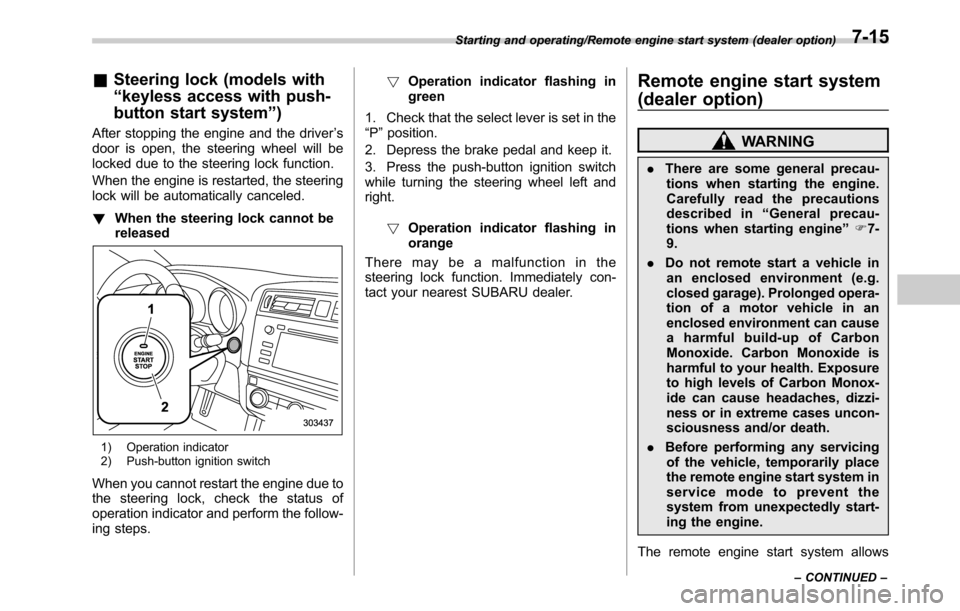
1) Operation indicator
2) Push-button ignition switch
When you cannot restart the engine due to
the steering lock, check the status of
operation indicator and perform the follow-
ing steps.!Operation indicator flashing in
green
1. Check that the select lever is set in the
“P”position.
2. Depress the brake pedal and keep it.
3. Press the push-button ignition switch
while turning the steering wheel left and
right.
!Operation indicator flashing in
orange
There may be a malfunction in the
steering lock function. Immediately con-
tact your nearest SUBARU dealer.
Remote engine start system
(dealer option)
WARNING
.There are some general precau-
tions when starting the engine.
Carefully read the precautions
described in“General precau-
tions when starting engine”F7-
9.
.Do not remote start a vehicle in
an enclosed environment (e.g.
closed garage). Prolonged opera-
tion of a motor vehicle in an
enclosed environment can cause
a harmful build-up of Carbon
Monoxide. Carbon Monoxide is
harmful to your health. Exposure
to high levels of Carbon Monox-
ide can cause headaches, dizzi-
ness or in extreme cases uncon-
sciousness and/or death.
.Before performing any servicing
of the vehicle, temporarily place
the remote engine start system in
service mode to prevent the
system from unexpectedly start-
ing the engine.
The remote engine start system allows
Starting and operating/Remote engine start system (dealer option)
–CONTINUED–7-15
Page 372 of 572
Starting and operating/Manual transmission
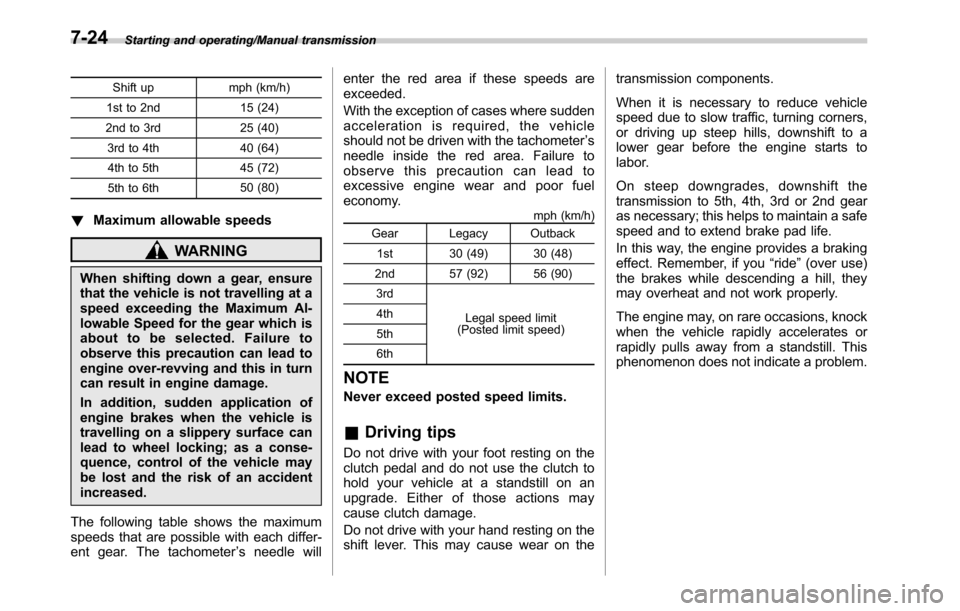
Shift up mph (km/h)
1st to 2nd 15 (24)
2nd to 3rd 25 (40)
3rd to 4th 40 (64)
4th to 5th 45 (72)
5th to 6th50 (80)
!Maximum allowable speeds
WARNING
When shifting down a gear, ensure
that the vehicle is not travelling at a
speed exceeding the Maximum Al-
lowable Speed for the gear which is
about to be selected. Failure to
observe this precaution can lead to
engine over-revving and this in turn
can result in engine damage.
In addition, sudden application of
engine brakes when the vehicle is
travelling on a slippery surface can
lead to wheel locking; as a conse-
quence, control of the vehicle may
be lost and the risk of an accident
increased.
The following table shows the maximum
speeds that are possible with each differ-
ent gear. The tachometer’s needle willenter the red area if these speeds are
exceeded.
With the exception of cases where sudden
acceleration is required, the vehicle
should not be driven with the tachometer’s
needle inside the red area. Failure to
observe this precaution can lead to
excessive engine wear and poor fuel
economy.
mph (km/h)
Gear Legacy Outback
1st 30 (49) 30 (48)
2nd 57 (92) 56 (90)
3rd
Legal speed limit
(Posted limit speed) 4th
5th
6th
NOTE
Never exceed posted speed limits.
&Driving tips
Do not drive with your foot resting on the
clutch pedal and do not use the clutch to
hold your vehicle at a standstill on an
upgrade. Either of those actions may
cause clutch damage.
Do not drive with your hand resting on the
shift lever. This may cause wear on thetransmission components.
When it is necessary to reduce vehicle
speed due to slow traffic, turning corners,
or driving up steep hills, downshift to a
lower gear before the engine starts to
labor.
On steep downgrades, downshift the
transmission to 5th, 4th, 3rd or 2nd gear
as necessary; this helps to maintain a safe
speed and to extend brake pad life.
In this way, the engine provides a braking
effect. Remember, if you“ride”(over use)
the brakes while descending a hill, they
may overheat and not work properly.
The engine may, on rare occasions, knock
when the vehicle rapidly accelerates or
rapidly pulls away from a standstill. This
phenomenon does not indicate a problem.
7-24