si DRIVE SUBARU OUTBACK 2017 6.G Manual Online
[x] Cancel search | Manufacturer: SUBARU, Model Year: 2017, Model line: OUTBACK, Model: SUBARU OUTBACK 2017 6.GPages: 610, PDF Size: 10.28 MB
Page 183 of 610
Instruments and controls/Warning and indicator lights
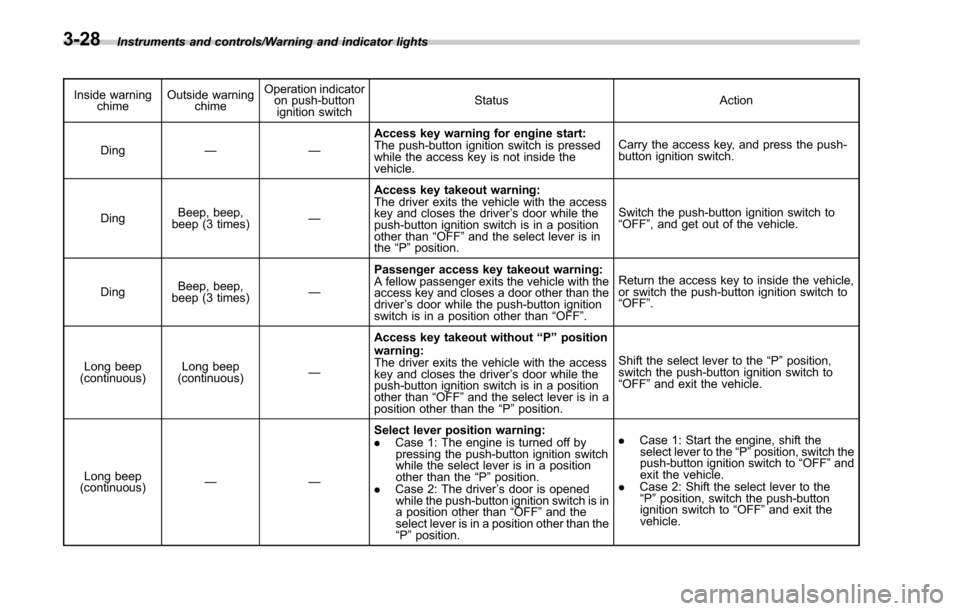
Inside warningchime Outside warning
chime Operation indicator
on push-button
ignition switch Status Action
Ding —— Access key warning for engine start:
The push-button ignition switch is pressed
while the access key is not inside the
vehicle. Carry the access key, and press the push-
button ignition switch.
Ding Beep, beep,
beep (3 times) —Access key takeout warning:
The driver exits the vehicle with the access
key and closes the driver
’s door while the
push-button ignition switch is in a position
other than “OFF ”and the select lever is in
the “P ”position. Switch the push-button ignition switch to
“
OFF” , and get out of the vehicle.
Ding Beep, beep,
beep (3 times) —Passenger access key takeout warning:
A fellow passenger exits the vehicle with the
access key and closes a door other than the
driver
’s door while the push-button ignition
switch is in a position other than “OFF ”. Return the access key to inside the vehicle,
or switch the push-button ignition switch to
“
OFF” .
Long beep
(continuous) Long beep
(continuous) —Access key takeout without
“P ” position
warning:
The driver exits the vehicle with the access
key and closes the driver ’s door while the
push-button ignition switch is in a position
other than “OFF ”and the select lever is in a
position other than the “P ”position. Shift the select lever to the
“P ”position,
switch the push-button ignition switch to
“ OFF” and exit the vehicle.
Long beep
(continuous) —— Select lever position warning:
.
Case
1: The engine is turned off by
pressing the push-button ignition switch
while the select lever is in a position
other than the “P ”position.
. Case 2: The driver ’s door is opened
while the push-button ignition switch is in
a position other than “OFF ”and the
select lever is in a position other than the
“ P ”position. .
Case 1: Start the engine, shift the
select lever to the “P ”position, switch the
push-button ignition switch to “OFF ”and
exit the vehicle.
. Case 2: Shift the select lever to the
“ P ”position, switch the push-button
ignition switch to “OFF ”and exit the
vehicle.
3-28
Page 185 of 610
Instruments and controls/Warning and indicator lights
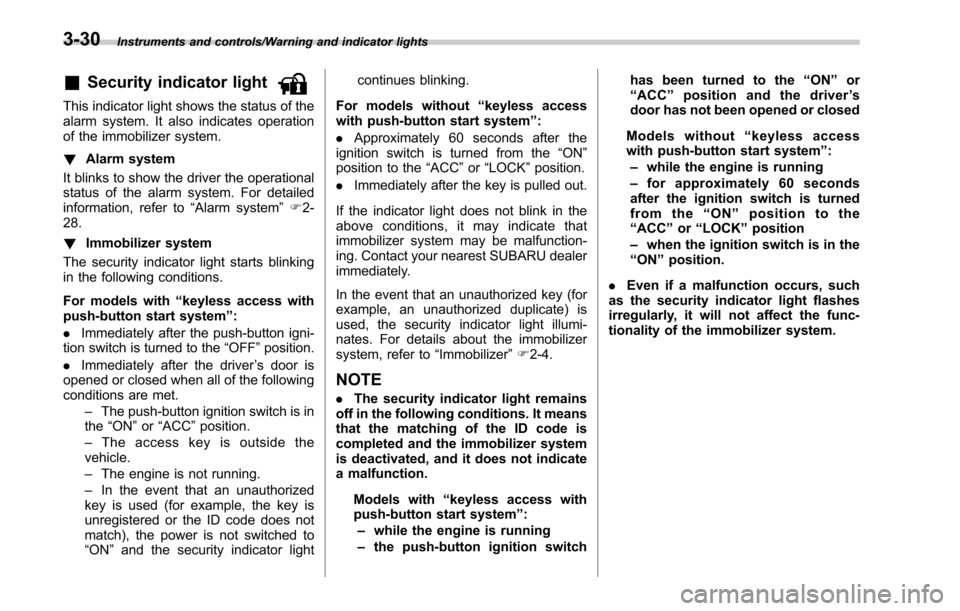
&Security indicator light
This indicator light shows the status of the
alarm system. It also indicates operation
of the immobilizer system.
!Alarm system
It blinks to show the driver the operational
status of the alarm system. For detailed
information, refer to “Alarm system”F 2-
28.
! Immobilizer system
The security indicator light starts blinking
in the following conditions.
For models with “keyless access with
push-button start system ”:
. Immediately after the push-button igni-
tion switch is turned to the “OFF”position.
. Immediately after the driver ’s door is
opened or closed when all of the following
conditions are met.
–The push-button ignition switch is in
the “ON ”or “ACC ”position.
– The access key is outside the
vehicle.
– The engine is not running.
– In the event that an unauthorized
key is used (for example, the key is
unregistered or the ID code does not
match), the power is not switched to
“ON ”and the security indicator light continues blinking.
For models without “keyless access
with push-button start system ”:
. Approximately 60 seconds after the
ignition switch is turned from the “ON ”
position to the “ACC”or “LOCK ”position.
. Immediately after the key is pulled out.
If the indicator light does not blink in the
above conditions, it may indicate that
immobilizer system may be malfunction-
ing. Contact your nearest SUBARU dealer
immediately.
In the event that an unauthorized key (for
example, an unauthorized duplicate) is
used, the security indicator light illumi-
nates. For details about the immobilizer
system, refer to “Immobilizer”F 2-4.
NOTE
. The security indicator light remains
off in the following conditions. It means
that the matching of the ID code is
completed and the immobilizer system
is deactivated, and it does not indicate
a malfunction.
Models with “keyless access with
push-button start system ”:
– while the engine is running
– the push-button ignition switch has been turned to the
“ON ”or
“ ACC” position and the driver ’s
door has not been opened or closed
Models without “keyless access
with push-button start system ”:
– while the engine is running
– for approximately 60 seconds
after the ignition switch is turned
from the “ON ”position to the
“ ACC ”or “LOCK ”position
– when the ignition switch is in the
“ ON ”position.
. Even if a malfunction occurs, such
as the security indicator light flashes
irregularly, it will not affect the func-
tionality of the immobilizer system.
3-30
Page 186 of 610
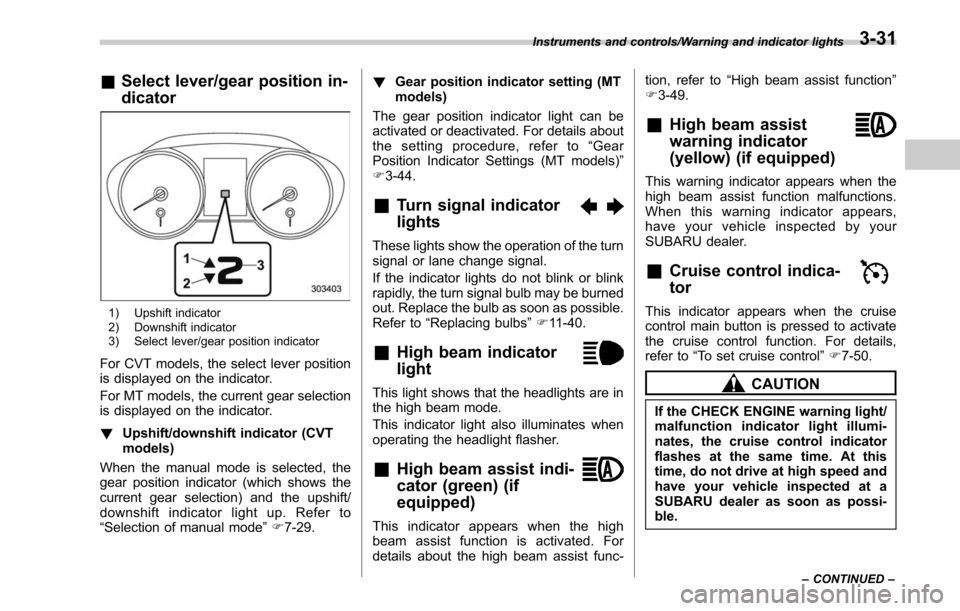
&Select lever/gear position in-
dicator
1) Upshift indicator
2) Downshift indicator
3) Select lever/gear position indicator
For CVT models, the select lever position
is displayed on the indicator.
For MT models, the current gear selection
is displayed on the indicator.
! Upshift/downshift indicator (CVT
models)
When the manual mode is selected, the
gear position indicator (which shows the
current gear selection) and the upshift/
downshift indicator light up. Refer to
“Selection of manual mode ”F 7-29. !
Gear position indicator setting (MT
models)
The gear position indicator light can be
activated or deactivated. For details about
the setting procedure, refer to “Gear
Position Indicator Settings (MT models) ”
F 3-44.
&Turn signal indicator
lights
These lights show the operation of the turn
signal or lane change signal.
If the indicator lights do not blink or blink
rapidly, the turn signal bulb may be burned
out. Replace the bulb as soon as possible.
Refer to “Replacing bulbs ”F 11-40.
&High beam indicator
light
This light shows that the headlights are in
the high beam mode.
This indicator light also illuminates when
operating the headlight flasher.
&High beam assist indi-
cator (green) (if
equipped)
This indicator appears when the high
beam assist function is activated. For
details about the high beam assist func- tion, refer to
“High beam assist function ”
F 3-49.
&High beam assist
warning indicator
(yellow) (if equipped)
This warning indicator appears when the
high beam assist function malfunctions.
When this warning indicator appears,
have your vehicle inspected by your
SUBARU dealer.
&Cruise control indica-
tor
This indicator appears when the cruise
control main button is pressed to activate
the cruise control function. For details,
refer to “To set cruise control ”F 7-50.
CAUTION
If the CHECK ENGINE warning light/
malfunction indicator light illumi-
nates, the cruise control indicator
flashes at the same time. At this
time, do not drive at high speed and
have your vehicle inspected at a
SUBARU dealer as soon as possi-
ble.
Instruments and controls/Warning and indicator lights
–CONTINUED –3-31
Page 187 of 610
Instruments and controls/Warning and indicator lights
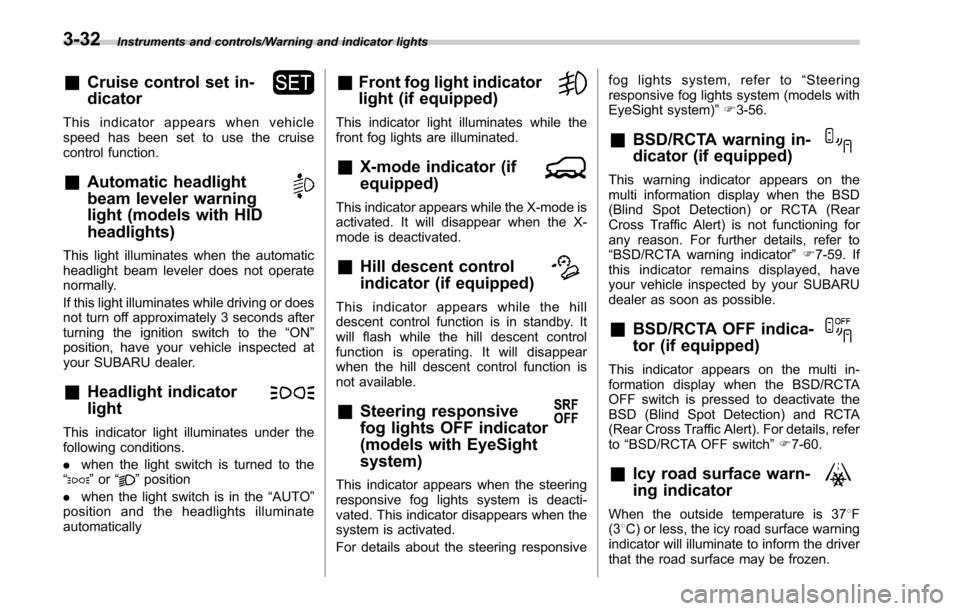
&Cruise control set in-
dicator
This indicator appears when vehicle
speed has been set to use the cruise
control function.
&Automatic headlight
beam leveler warning
light (models with HID
headlights)
This light illuminates when the automatic
headlight beam leveler does not operate
normally.
If this light illuminates while driving or does
not turn off approximately 3 seconds after
turning the ignition switch to the“ON”
position, have your vehicle inspected at
your SUBARU dealer.
&Headlight indicator
light
This indicator light illuminates under the
following conditions.
. when the light switch is turned to the
“
” or “”position
. when the light switch is in the “AUTO”
position and the headlights illuminate
automatically
&Front fog light indicator
light (if equipped)
This indicator light illuminates while the
front fog lights are illuminated.
&X-mode indicator (if
equipped)
This indicator appears while the X-mode is
activated. It will disappear when the X-
mode is deactivated.
&Hill descent control
indicator (if equipped)
This indicator appears while the hill
descent control function is in standby. It
will flash while the hill descent control
function is operating. It will disappear
when the hill descent control function is
not available.
&Steering responsive
fog lights OFF indicator
(models with EyeSight
system)
This indicator appears when the steering
responsive fog lights system is deacti-
vated. This indicator disappears when the
system is activated.
For details about the steering responsive fog lights system, refer to
“Steering
responsive fog lights system (models with
EyeSight system) ”F 3-56.
&BSD/RCTA warning in-
dicator (if equipped)
This warning indicator appears on the
multi information display when the BSD
(Blind Spot Detection) or RCTA (Rear
Cross Traffic Alert) is not functioning for
any reason. For further details, refer to
“BSD/RCTA warning indicator ”F 7-59. If
this indicator remains displayed, have
your vehicle inspected by your SUBARU
dealer as soon as possible.
&BSD/RCTA OFF indica-
tor (if equipped)
This indicator appears on the multi in-
formation display when the BSD/RCTA
OFF switch is pressed to deactivate the
BSD (Blind Spot Detection) and RCTA
(Rear Cross Traffic Alert). For details, refer
to “BSD/RCTA OFF switch ”F 7-60.
&Icy road surface warn-
ing indicator
When the outside temperature is 37 8F
(3 8C) or less, the icy road surface warning
indicator will illuminate to inform the driver
that the road surface may be frozen.
3-32
Page 190 of 610
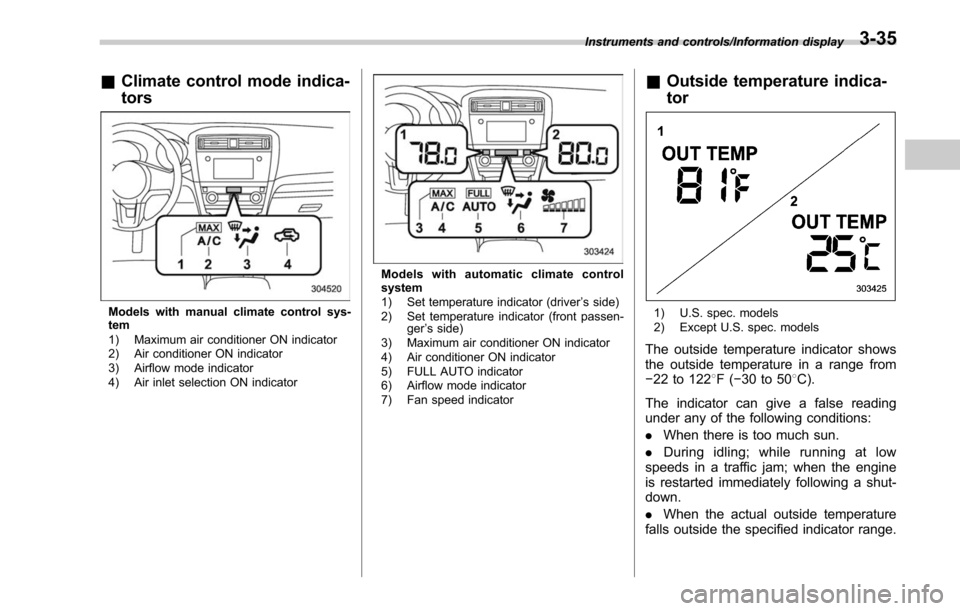
&Climate control mode indica-
tors
Models with manual climate control sys-
tem
1) Maximum air conditioner ON indicator
2) Air conditioner ON indicator
3) Airflow mode indicator
4) Air inlet selection ON indicator
Models with automatic climate control
system
1) Set temperature indicator (driver ’s side)
2) Set temperature indicator (front passen- ger’s side)
3) Maximum air conditioner ON indicator
4) Air conditioner ON indicator
5) FULL AUTO indicator
6) Airflow mode indicator
7) Fan speed indicator
& Outside temperature indica-
tor
1) U.S. spec. models
2) Except U.S. spec. models
The outside temperature indicator shows
the outside temperature in a range from
−22 to 122 8F( −30 to 50 8C).
The indicator can give a false reading
under any of the following conditions:
. When there is too much sun.
. During idling; while running at low
speeds in a traffic jam; when the engine
is restarted immediately following a shut-
down.
. When the actual outside temperature
falls outside the specified indicator range.
Instruments and controls/Information display3-35
Page 192 of 610
as vehicle information, warning informa-
tion, etc., they will interrupt the current
screen, and appear on the display accom-
panied by a beep. If such a screen is
displayed, take proper action according to
the message shown on the screen.
The warning screen will return to the
original screen after a few seconds. While
the“
”information reminder is shown on
the display, it may be possible to display
the warning screen again. To recall the
message marked with “
”on the display,
pull the “/SET”switch on the steering
wheel toward you.
& Welcome screen and Good-
bye screen
When the driver ’s door is opened and
closed after unlocking the door, the
welcome screen will appear on the multi
information display for approximately 20
seconds.
When the ignition switch is turned to the
“LOCK”/ “OFF ”position, the multi informa-
tion display gradually turns off (Good-bye
screen).
NOTE
. The basic screen will be shown
when the ignition switch is turned to
the “ON ”position while the welcome screen is displayed.
.
Once the welcome screen appears,
it takes a certain period of time to
display it again.
. If the ignition switch is operated
after unlocking the driver ’s door, the
welcome screen will not appear even
when the driver ’s door is opened and
closed.
. The welcome screen will disappear
when you lock the driver ’s door by
using the remote keyless entry system
(all models) or the keyless access
function (if equipped) while the wel-
come screen is displayed.
. If any of the doors (including the
rear gate) is opened while the welcome
screen is displayed, the door ajar
warning will appear.
. The welcome screen can be set to
on or off. For details, refer to “Welcome
Screen ”F 3-44.
. The Good-bye screen can be set to
on or off. For details, refer to “Good-
bye Screen ”F 3-44.
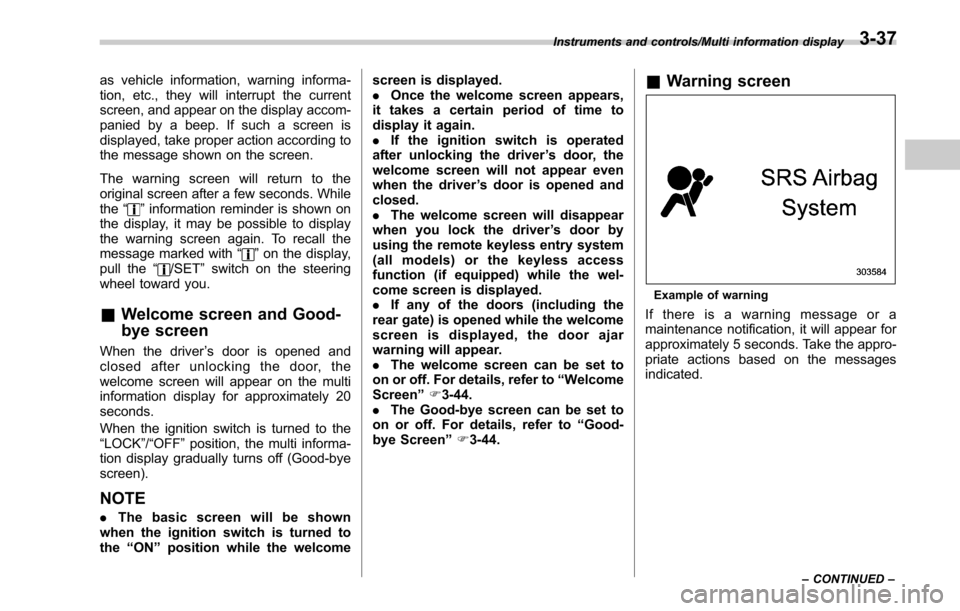
& Warning screen
Example of warning
If there is a warning message or a
maintenance notification, it will appear for
approximately 5 seconds. Take the appro-
priate actions based on the messages
indicated.
Instruments and controls/Multi information display
–CONTINUED –3-37
Page 194 of 610
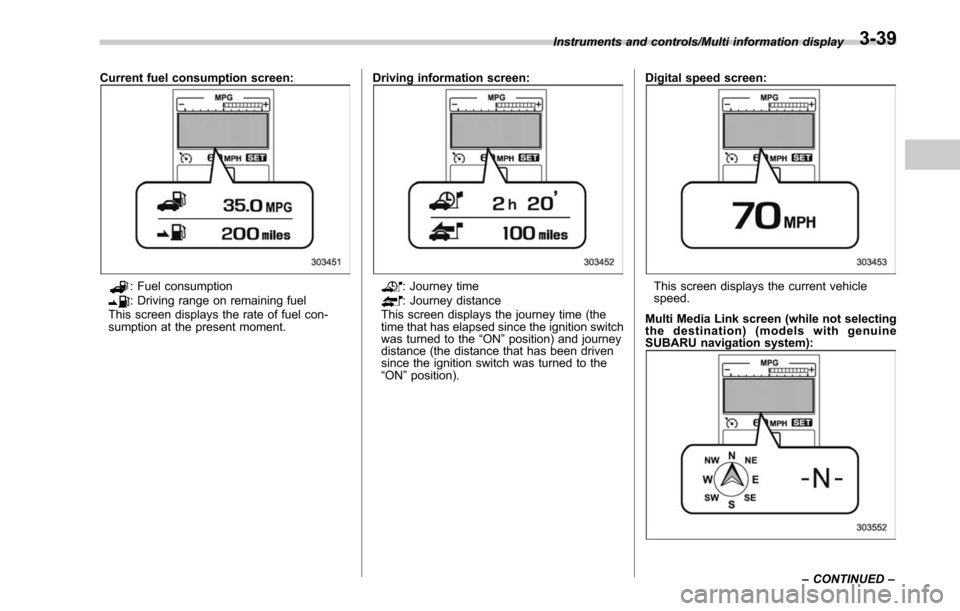
Current fuel consumption screen:
: Fuel consumption: Driving range on remaining fuel
This screen displays the rate of fuel con-
sumption at the present moment. Driving information screen:: Journey time: Journey distance
This screen displays the journey time (the
time that has elapsed since the ignition switch
was turned to the “ON ”position) and journey
distance (the distance that has been driven
since the ignition switch was turned to the
“ ON ”position). Digital speed screen:This screen displays the current vehicle
speed.
Multi Media Link screen (while not selecting
the destination) (models with genuine
SUBARU navigation system):
Instruments and controls/Multi information display
–CONTINUED –3-39
Page 198 of 610
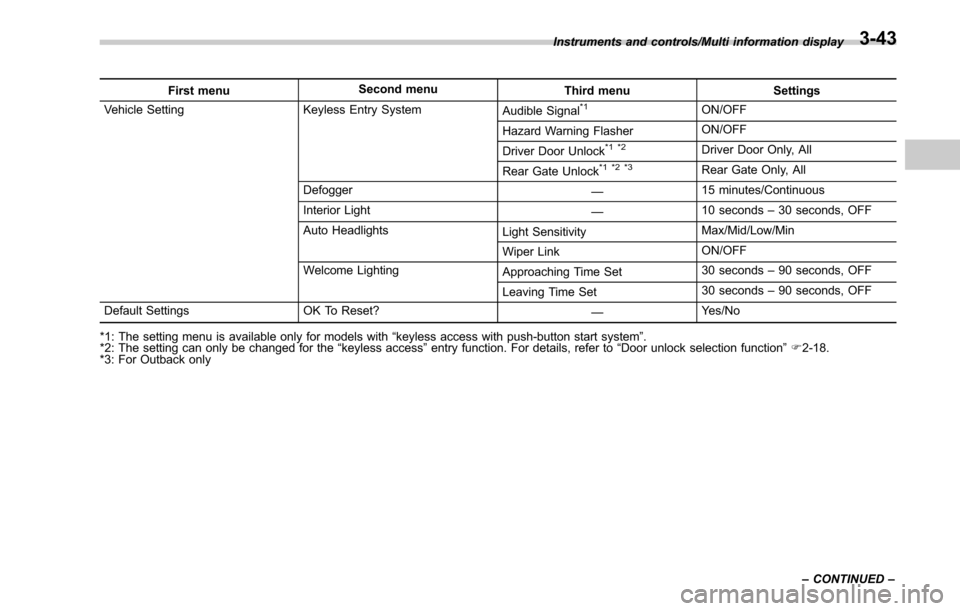
First menuSecond menu
Third menu Settings
Vehicle Setting Keyless Entry System Audible Signal*1ON/OFF
Hazard Warning Flasher ON/OFF
Driver Door Unlock
*1 *2Driver Door Only, All
Rear Gate Unlock
*1 *2 *3Rear Gate Only, All
Defogger —15 minutes/Continuous
Interior Light —10 seconds
–30 seconds, OFF
Auto Headlights Light SensitivityMax/Mid/Low/Min
Wiper Link ON/OFF
Welcome Lighting Approaching Time Set30 seconds
–90 seconds, OFF
Leaving Time Set 30 seconds
–90 seconds, OFF
Default Settings OK To Reset? —Yes/No
*1: The setting menu is available only for models with “keyless access with push-button start system ”.
*2: The setting can only be changed for the “keyless access ”entry function. For details, refer to “Door unlock selection function ”F 2-18.
*3: For Outback only Instruments and controls/Multi information display
–CONTINUED –
3-43
Page 200 of 610
!BSD/RCTA (if equipped)
After entering the “BSD/RCTA ”menu,
select the “Warning Volume ”menu. You
can set the volume of the warning buzzer
for RCTA (Rear Cross Traffic Alert). You
can select “Max”,“Mid ”or “Min ”.
! RAB (if equipped)
After entering the “RAB”menu, select one
of the following menus.
NOTE
For models with RAB (Reverse Auto-
matic Braking) system, refer to “Re-
verse Automatic Braking System ”F 7-
63.
!Warning Volume
The volume of the warning buzzer that
sounds when the RAB (Reverse Auto-
matic Braking) system is in operation can
be set in 3 stages (“Max ”,“Mid ”and “Min ”).
! Sonar Audible Alarm
When the RAB (Reverse Automatic Brak-
ing) system is in operation, the buzzer that
sounds if an obstacle is detected in the
rear or if detection is not possible can be
activated or deactivated. Select “On”to
activate the buzzer. Select “Off”to deac-
tivate the buzzer. !
Vehicle Setting
After entering the “Vehicle Setting”menu,
select one of the following menus.
!Keyless Entry System
After entering the “Keyless Entry System ”
menu, select one of the following menus.
. Audible Signal (models with “key-
less access with push-button start
system ”):
The audible signal can be activated or
deactivated. Select “On”to activate. Se-
lect “Off”to deactivate.
. Hazard Warning Flasher (all mod-
els):
The hazard warning flasher operation can
be activated or deactivated. Select “On”to
activate. Select “Off ”to deactivate.
. Driver Door Unlock (models with
“ keyless access with push-button start
system ”):
The door unlock selection function is
available for the “keyless access”entry
function. For details, refer to “Door
unlock
selection function ”F 2-18. On this setting
menu, the door unlock selection function
for the driver ’s door can be customized.
Select “Driver Door Only ”to set as
“Operational ”. Select “All”to set as “Non-
operational ”. .
Rear Gate Unlock (Outback with
“ keyless access with push-button start
system ”):
The door unlock selection function is
available for the “keyless access”entry
function. For details, refer to “Door unlock
selection function ”F 2-18. On this setting
menu, the door unlock selection function
for the rear gate can be customized.
Select “Rear Gate Only ”to set as “Opera-
tional ”. Select “All”to set as “Non-opera-
tional ”.
! Defogger
The defogger and deicer system can be
set for the continuous operation mode or
automatic shut-off mode. Select “Contin-
uous” to select the continuous operation
mode. Select “15 minutes”to select the
automatic shut-off mode.
!Interior Light
The setting for the period of time in which
the interior lights remain on (OFF delay
timer) after closing the doors and/or the
rear gate can be set or customized. Select
the preferred seconds to customize the
operation period. Select “Off”to deactivate
the OFF delay timer.
Instruments and controls/Multi information display
–CONTINUED –3-45
Page 202 of 610
Regardless of the position of the light
control switch, the illuminated lights are
turned off when the key is removed from
the ignition switch.
NOTE
The light control switch can be oper-
ated (except auto on/off headlights),
even under the following conditions.
.when the push-button ignition
switch is turned off (models with “key-
less access with push-button start
system ”)
. when the key is not inserted into the
ignition switch (models without “key-
less access with push-button start
system ”)
If the driver ’s door is opened while the
headlights are illuminated under such
conditions, a chirp sound will inform
the driver that the lights are illumi-
nated.
& Headlights
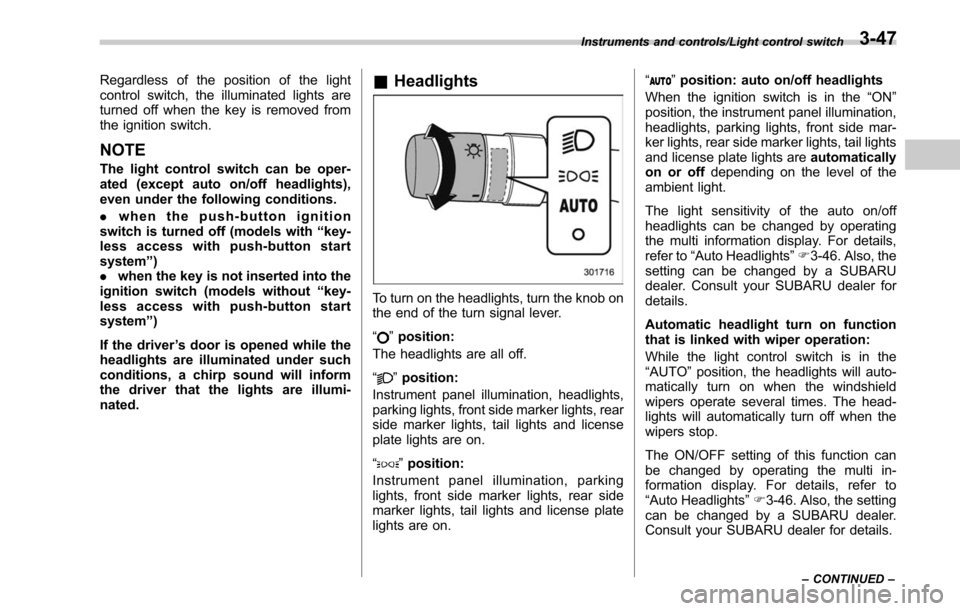
To turn on the headlights, turn the knob on
the end of the turn signal lever.
“
”position:
The headlights are all off.
“
” position:
Instrument panel illumination, headlights,
parking lights, front side marker lights, rear
side marker lights, tail lights and license
plate lights are on.
“
” position:
Instrument panel illumination, parking
lights, front side marker lights, rear side
marker lights, tail lights and license plate
lights are on. “
”
position: auto on/off headlights
When the ignition switch is in the “ON”
position, the instrument panel illumination,
headlights, parking lights, front side mar-
ker lights, rear side marker lights, tail lights
and license plate lights are automatically
on or off depending on the level of the
ambient light.
The light sensitivity of the auto on/off
headlights can be changed by operating
the multi information display. For details,
refer to “Auto Headlights ”F 3-46. Also, the
setting can be changed by a SUBARU
dealer. Consult your SUBARU dealer for
details.
Automatic headlight turn on function
that is linked with wiper operation:
While the light control switch is in the
“AUTO ”position, the headlights will auto-
matically turn on when the windshield
wipers operate several times. The head-
lights will automatically turn off when the
wipers stop.
The ON/OFF setting of this function can
be changed by operating the multi in-
formation display. For details, refer to
“Auto Headlights ”F 3-46. Also, the setting
can be changed by a SUBARU dealer.
Consult your SUBARU dealer for details.
Instruments and controls/Light control switch
–CONTINUED –3-47