si DRIVE SUBARU OUTBACK 2017 6.G Service Manual
[x] Cancel search | Manufacturer: SUBARU, Model Year: 2017, Model line: OUTBACK, Model: SUBARU OUTBACK 2017 6.GPages: 610, PDF Size: 10.28 MB
Page 108 of 610
Keys
NOTE
For models with“keyless access with
push-button start system ”, refer to
“ Keyless access with push-button start
system ”F 2-10.
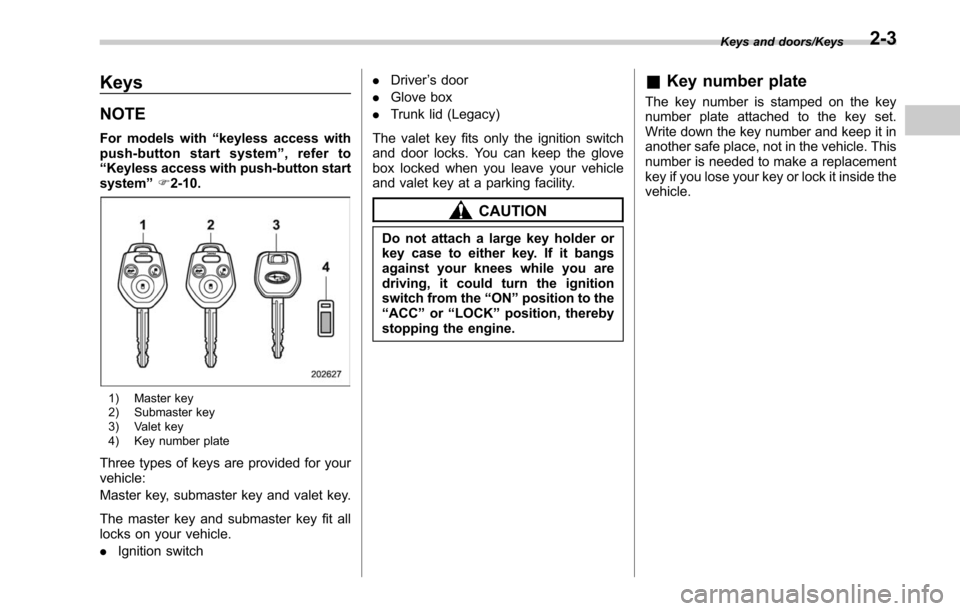
1) Master key
2) Submaster key
3) Valet key
4) Key number plate
Three types of keys are provided for your
vehicle:
Master key, submaster key and valet key.
The master key and submaster key fit all
locks on your vehicle.
. Ignition switch .
Driver ’s door
. Glove box
. Trunk lid (Legacy)
The valet key fits only the ignition switch
and door locks. You can keep the glove
box locked when you leave your vehicle
and valet key at a parking facility.
CAUTION
Do not attach a large key holder or
key case to either key. If it bangs
against your knees while you are
driving, it could turn the ignition
switch from the “ON ”position to the
“ ACC ”or “LOCK ”position, thereby
stopping the engine.
& Key number plate
The key number is stamped on the key
number plate attached to the key set.
Write down the key number and keep it in
another safe place, not in the vehicle. This
number is needed to make a replacement
key if you lose your key or lock it inside the
vehicle.
Keys and doors/Keys2-3
Page 111 of 610
Keys and doors/Door locks
Door locks
&Locking and unlocking from
the outside
NOTE
If you unlock the driver ’s door with a
key (including a mechanical key) and
open the door while the alarm system
is armed, the alarm system is triggered
and the vehicle ’s horn sounds. In this
case, perform any of the following
operations:
Models with “keyless access with
push-button start system ”:
. Press any button on the access key
(except when the access key battery is
discharged).
. Turn the push-button ignition switch
to the “ACC ”position.
. Carry the access key and perform
either of the following procedures.
–Grip the front door handle
– Press the rear gate opener button
Models without “keyless access with
push-button start system ”:
. Press any button on the remote
transmitter (except when the transmit-
ter battery is discharged).
. Insert the key into the ignition
switch and turn the ignition switch to the
“ON ”position.
For details about the alarm system,
refer to “Alarm system ”F 2-28.
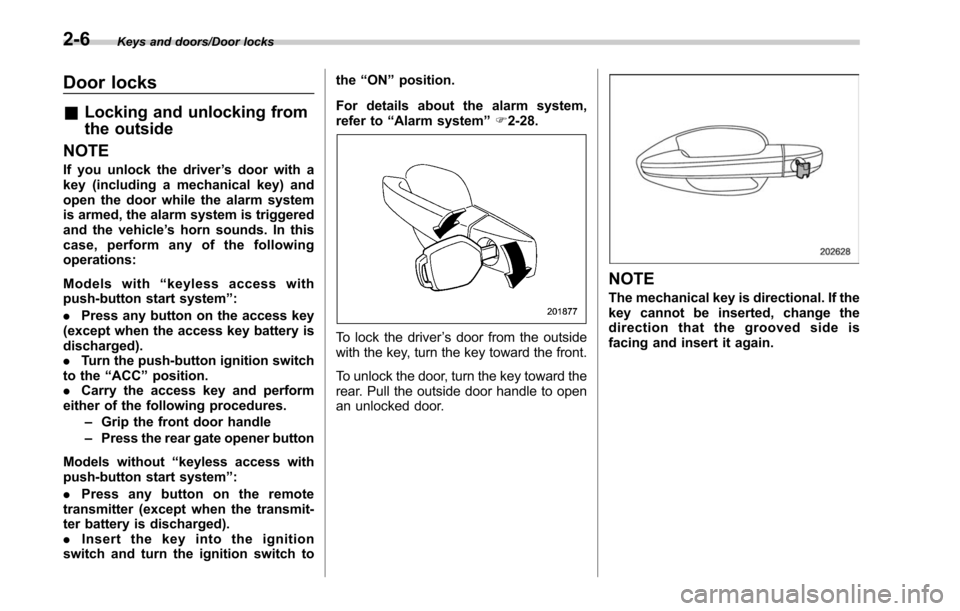
To lock the driver ’s door from the outside
with the key, turn the key toward the front.
To unlock the door, turn the key toward the
rear. Pull the outside door handle to open
an unlocked door.
NOTE
The mechanical key is directional. If the
key cannot be inserted, change the
direction that the grooved side is
facing and insert it again.
2-6
Page 112 of 610
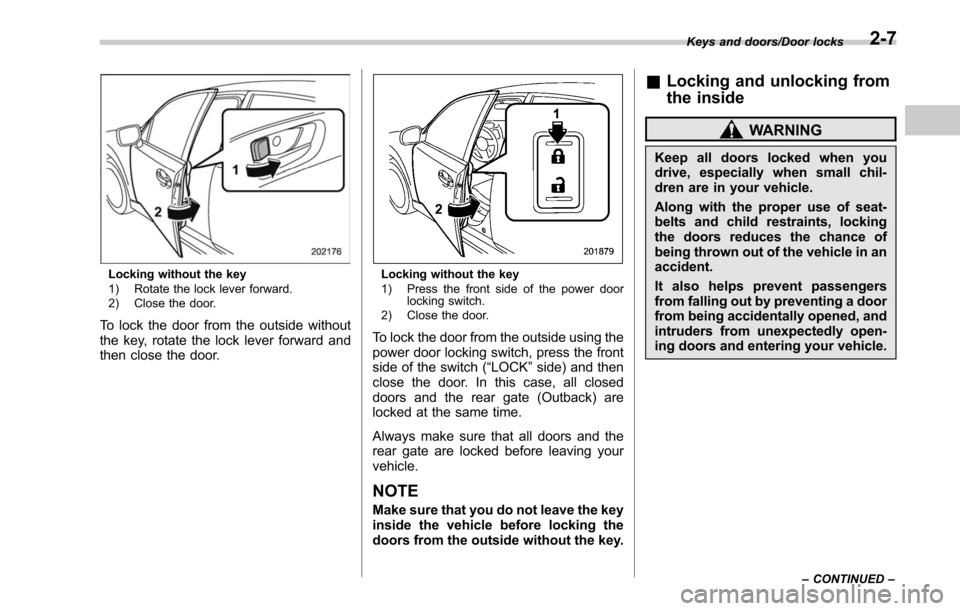
Locking without the key
1) Rotate the lock lever forward.
2) Close the door.
To lock the door from the outside without
the key, rotate the lock lever forward and
then close the door.
Locking without the key
1) Press the front side of the power doorlocking switch.
2) Close the door.
To lock the door from the outside using the
power door locking switch, press the front
side of the switch (“LOCK” side) and then
close the door. In this case, all closed
doors and the rear gate (Outback) are
locked at the same time.
Always make sure that all doors and the
rear gate are locked before leaving your
vehicle.
NOTE
Make sure that you do not leave the key
inside the vehicle before locking the
doors from the outside without the key.
& Locking and unlocking from
the inside
WARNING
Keep all doors locked when you
drive, especially when small chil-
dren are in your vehicle.
Along with the proper use of seat-
belts and child restraints, locking
the doors reduces the chance of
being thrown out of the vehicle in an
accident.
It also helps prevent passengers
from falling out by preventing a door
from being accidentally opened, and
intruders from unexpectedly open-
ing doors and entering your vehicle.
Keys and doors/Door locks
–CONTINUED –2-7
Page 113 of 610
Keys and doors/Door locks
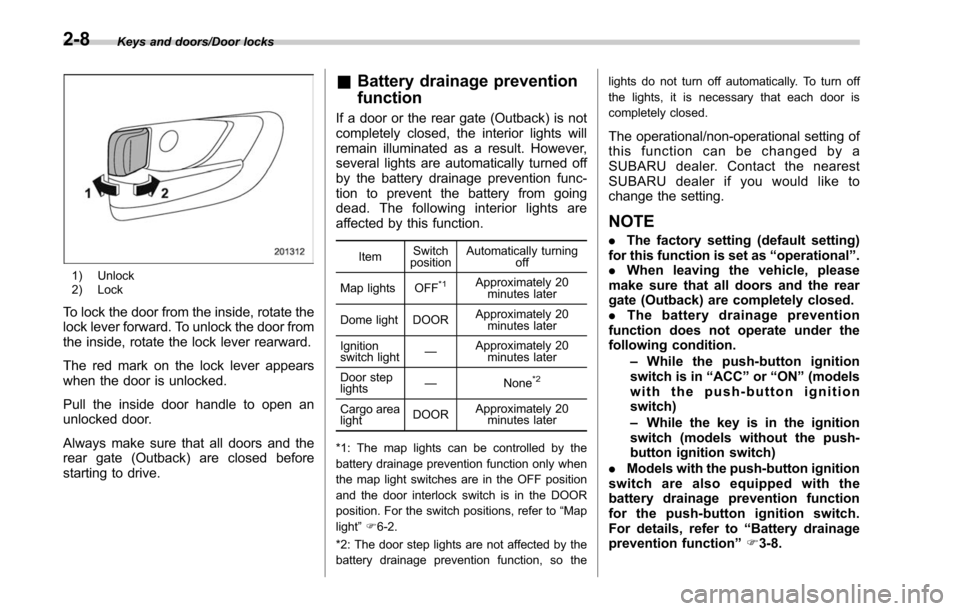
1) Unlock
2) Lock
To lock the door from the inside, rotate the
lock lever forward. To unlock the door from
the inside, rotate the lock lever rearward.
The red mark on the lock lever appears
when the door is unlocked.
Pull the inside door handle to open an
unlocked door.
Always make sure that all doors and the
rear gate (Outback) are closed before
starting to drive.
&Battery drainage prevention
function
If a door or the rear gate (Outback) is not
completely closed, the interior lights will
remain illuminated as a result. However,
several lights are automatically turned off
by the battery drainage prevention func-
tion to prevent the battery from going
dead. The following interior lights are
affected by this function.
Item Switch
position Automatically turning
off
Map lights OFF
*1Approximately 20 minutes later
Dome light DOOR Approximately 20
minutes later
Ignition
switch light —
Approximately 20
minutes later
Door step
lights —
None
*2
Cargo area
lightDOORApproximately 20
minutes later
*1: The map lights can be controlled by the
battery drainage prevention function only when
the map light switches are in the OFF position
and the door interlock switch is in the DOOR
position. For the switch positions, refer to “Map
light ”F 6-2.
*2: The door step lights are not affected by the
battery drainage prevention function, so the lights do not turn off automatically. To turn off
the lights, it is necessary that each door is
completely closed.
The operational/non-operational setting of
this function can be changed by a
SUBARU dealer. Contact the nearest
SUBARU dealer if you would like to
change the setting.
NOTE
.
The factory setting (default setting)
for this function is set as “operational ”.
. When leaving the vehicle, please
make sure that all doors and the rear
gate (Outback) are completely closed.
. The battery drainage prevention
function does not operate under the
following condition.
–While the push-button ignition
switch is in “ACC ”or “ON ”(models
with the push-button ignition
switch)
– While the key is in the ignition
switch (models without the push-
button ignition switch)
. Models with the push-button ignition
switch are also equipped with the
battery drainage prevention function
for the push-button ignition switch.
For details, refer to “Battery drainage
prevention function” F3-8.
2-8
Page 114 of 610
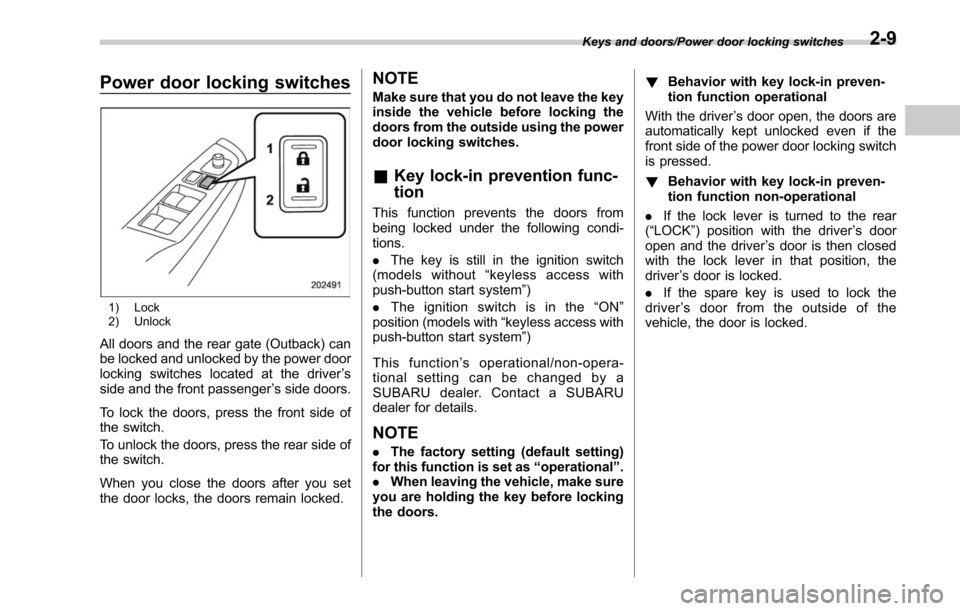
Power door locking switches
1) Lock
2) Unlock
All doors and the rear gate (Outback) can
be locked and unlocked by the power door
locking switches located at the driver’s
side and the front passenger ’s side doors.
To lock the doors, press the front side of
the switch.
To unlock the doors, press the rear side of
the switch.
When you close the doors after you set
the door locks, the doors remain locked.
NOTE
Make sure that you do not leave the key
inside the vehicle before locking the
doors from the outside using the power
door locking switches.
& Key lock-in prevention func-
tion
This function prevents the doors from
being locked under the following condi-
tions.
. The key is still in the ignition switch
(models without “keyless access with
push-button start system ”)
. Theignitionswitchisinthe “ON ”
position (models with “keyless access with
push-button start system ”)
This function ’s operational/non-opera-
tional setting can be changed by a
SUBARU dealer. Contact a SUBARU
dealer for details.
NOTE
. The factory setting (default setting)
for this function is set as “operational ”.
. When leaving the vehicle, make sure
you are holding the key before locking
the doors. !
Behavior with key lock-in preven-
tion function operational
With the driver ’s door open, the doors are
automatically kept unlocked even if the
front side of the power door locking switch
is pressed.
! Behavior with key lock-in preven-
tion function non-operational
. If the lock lever is turned to the rear
(“LOCK ”) position with the driver ’s door
open and the driver ’s door is then closed
with the lock lever in that position, the
driver ’s door is locked.
. If the spare key is used to lock the
driver ’s door from the outside of the
vehicle, the door is locked.
Keys and doors/Power door locking switches2-9
Page 115 of 610
Keys and doors/Keyless access with push–button start system
Keyless access with push-
button start system (if
equipped)
The keyless access with push-button start
system allows you to perform the following
functions when you are carrying the
access key.
. Locking and unlocking of the doors and
rear gate (Outback)
. Opening the trunk (Legacy)
. Starting and stopping the engine. For
detailed information, refer to “Starting and
stopping engine (models with push-button
start system) ”F 7-12.
. Arming and disarming the alarm sys-
tem. For detailed information, refer to
“Alarm system ”F 2-28.
Locking and unlocking by the remote
keyless entry system can also be con-
trolled with the buttons on the access key.
For detailed information, refer to “Remote
keyless entry system ”F 2-24.
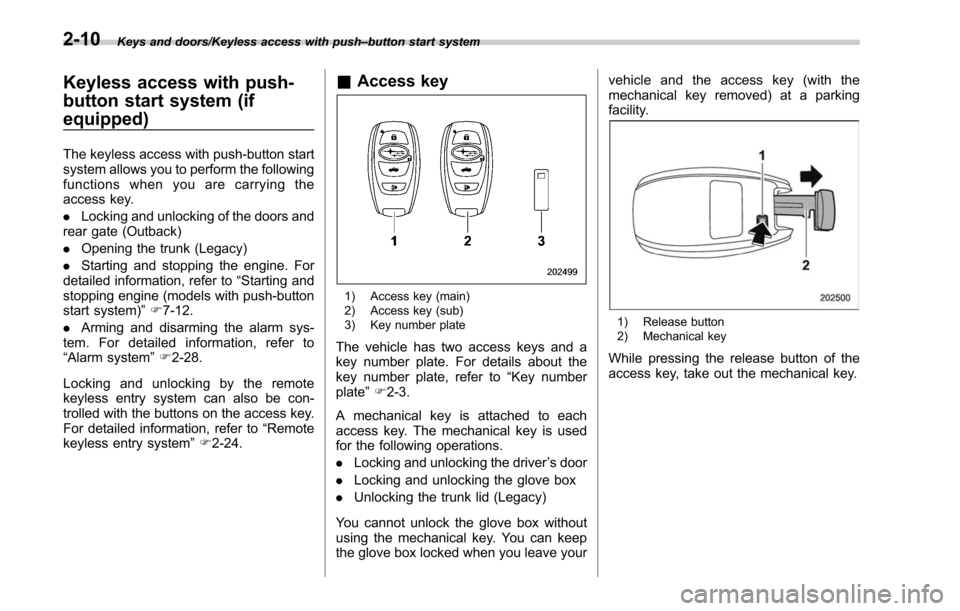
& Access key
1) Access key (main)
2) Access key (sub)
3) Key number plate
The vehicle has two access keys and a
key number plate. For details about the
key number plate, refer to “Key number
plate ”F 2-3.
A mechanical key is attached to each
access key. The mechanical key is used
for the following operations.
. Locking and unlocking the driver ’s door
. Locking and unlocking the glove box
. Unlocking the trunk lid (Legacy)
You cannot unlock the glove box without
using the mechanical key. You can keep
the glove box locked when you leave your vehicle and the access key (with the
mechanical key removed) at a parking
facility.
1) Release button
2) Mechanical key
While pressing the release button of the
access key, take out the mechanical key.
2-10
Page 117 of 610
Keys and doors/Keyless access with push–button start system
following precautions to prevent
malfunctions or battery dis-
charge.
– Although you can replace the
battery of the access key by
yourself, it is recommended
that the battery be replaced by
a SUBARU dealer to avoid the
risk of damage at the time of
replacement.
– Do not get the access key wet.
If the access key gets wet,
wipe it off immediately and let
it dry completely.
– Do not apply strong impacts
to the access key.
– Keep the access key away
from magnetic sources.
– Never leave the access key in
direct sunlight or anywhere
that may become hot, such
as on the dashboard. It may
damage the battery or cause
circuit malfunctions.
– Do not wash the access key in
an ultrasonic washer.
– Do not leave the access key in
humid or dusty locations, or
near personal computers or
home electric appliances.NOTE
After the vehicle battery is discharged
or replaced, initialization of the steering
lock system may be required to start
the engine. In this case, perform the
following procedure to initialize the
steering lock.
1) Turn the push-button ignition
switch to the “OFF ”position. For de-
tails, refer to “Switching power status ”
F 3-7.
2) Open and close the driver ’s door.
3) Wait for approximately 10 seconds.
When the steering is locked, the initi-
alization is completed.
! Regarding access key
CAUTION
If the access key is dropped, the
integrated mechanical key inside
may become loose. Be careful not
to lose the mechanical key.
NOTE
.The access key is always commu-
nicating with the vehicle and is con-
tinuously using the battery. Although
the life of the battery varies depending
on the operating conditions, it is ap- proximately 1 to 2 years. If the battery
becomes fully discharged, replace it
with a new one.
.
If an access key is lost, it is
recommended that the access key be
reregistered. For reregistration of an
access key, contact a SUBARU dealer.
. Up to 7 access keys can be regis-
tered for one vehicle. For a spare
access key, contact a SUBARU dealer.
. Carefully store the key number plate
supplied with the access key. It is
necessary for vehicle repair and addi-
tional registration of access keys.
. Do not leave the access key in the
storage spaces inside the vehicle.
Vibrations may damage the key or turn
on the switch, possibly resulting in a
lockout.
! Regarding setting
NOTE
.The operational/non-operational
setting for the keyless access function
can be changed. For the setting proce-
dure, refer to “Disabling keyless ac-
cess function” F2-18. The setting can
also be changed by a SUBARU dealer.
For more details, contact a SUBARU
dealer.
. For detailed information about the
operation method for the push-button
2-12
Page 121 of 610
Keys and doors/Keyless access with push–button start system
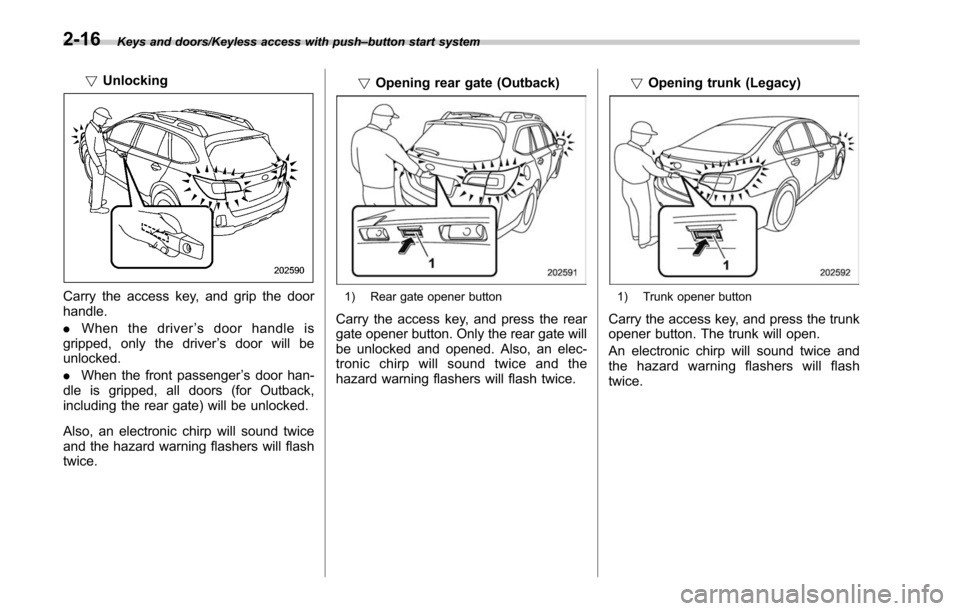
! Unlocking
Carry the access key, and grip the door
handle.
. When the driver ’s door handle is
gripped, only the driver ’s door will be
unlocked.
. When the front passenger ’s door han-
dle is gripped, all doors (for Outback,
including the rear gate) will be unlocked.
Also, an electronic chirp will sound twice
and the hazard warning flashers will flash
twice. !
Opening rear gate (Outback)1) Rear gate opener button
Carry the access key, and press the rear
gate opener button. Only the rear gate will
be unlocked and opened. Also, an elec-
tronic chirp will sound twice and the
hazard warning flashers will flash twice. !
Opening trunk (Legacy)
1) Trunk opener button
Carry the access key, and press the trunk
opener button. The trunk will open.
An electronic chirp will sound twice and
the hazard warning flashers will flash
twice.
2-16
Page 123 of 610
Keys and doors/Keyless access with push–button start system
! Door unlock selection function
The door unlock selection function makes
the following operations possible.
. Unlocking the driver ’s door without
unlocking any other doors (including the
rear gate) when gripping the driver ’s door
handle
. For Outback, opening the rear gate
without unlocking any doors when press-
ing the rear gate opener button
The operational/non-operational setting
for this function can be changed by
operating the multi information display.
For details, refer to “Keyless Entry Sys-
tem ”F3-45. The setting can also be
changed by a SUBARU dealer. Consult
your SUBARU dealer for details.
Operational:
. Only the driver ’s door will be unlocked
when the driver ’s door handle is gripped.
. For Outback, the rear gate will open,
but the other doors will remain locked
when the rear gate opener button is
pressed.
Non-operational:
. All doors and the rear gate will be
unlocked when the driver ’s door handle is
gripped.
. For Outback, the rear gate will open
and all doors will be unlocked when the rear gate opener button is pressed.
The factory setting (default setting) is set
as
“operational ”.
&Selecting audible signal op-
eration
Using an electronic chirp, the system will
give you an audible signal when the doors
are locked or unlocked. If desired, you can
turn the audible signal off by operating the
multi information display. For details, refer
to“Keyless Entry System ”F 3-45.
Furthermore, the volume setting of the
audible signal can also be changed by a
SUBARU dealer. Consult your SUBARU
dealer for details.
& Selecting hazard warning
flasher operation
Using the hazard warning flasher, the
system will give you a visible signal when
the doors are locked or unlocked. If
desired, you can turn the hazard warning
flashers off by operating the multi informa-
tion display. For details, refer to “Keyless
Entry System ”F3-45. The setting can
also be changed by a SUBARU dealer.
Consult your SUBARU dealer for details.
& Warning chimes and warning
indicator
The keyless access with push-button start
system is equipped with a warning chime
and the access key warning indicator in
order to minimize improper operations and
help protect your vehicle from theft.
For details, refer to “Warning chimes and
warning indicator of the keyless access
with push-button start system ”F 3-25.
& Disabling keyless access
function
When the vehicle is not going to be used
for a long time, or when you choose not to
use the keyless access function, the
keyless access function can be disabled.
2-18
Page 124 of 610
WARNING
If you have an implanted pacemaker
or an implanted defibrillator, per-
form the procedure“By operating
the driver ’s door ”F 2-20 to disable
the keyless access function. If you
perform the procedure “By operat-
ing the access key ”F2-19, the
operation of an implanted pace-
maker or implanted defibrillator
may be affected by the radio waves
from the transmitter antenna.
NOTE
. The locking and unlocking function
by the remote keyless entry system is
not disabled.
. The setting can also be changed at
SUBARU dealers. For more details,
contact a SUBARU dealer.
. To start the engine while the func-
tions are disabled, perform the proce-
dure described in “Starting engine ”
F 9-19.
. We recommend that you disable the
keyless access functions under the
following conditions.
–When the vehicle is not going to
be used for an extended period of
time –
When the keyless access func-
tions are not going to be used
! Disabling functions
! By operating the access key
If you have registered a PIN code for PIN
Code Access, you can disable the keyless
access function by operating the access
key. For details about registering a PIN
code, refer to “Registering a PIN code”
F 2-22.
1. Open the driver ’s door.
2. Rotate the lock lever forward.
3. Press and hold the “”button and
“” button on the access key simulta-
neously for more than 5 seconds.
A chirp sound will be heard, and the
function will be disabled.
Keys and doors/Keyless access with push –button start system
–CONTINUED –2-19