si DRIVE SUBARU OUTBACK 2017 6.G Workshop Manual
[x] Cancel search | Manufacturer: SUBARU, Model Year: 2017, Model line: OUTBACK, Model: SUBARU OUTBACK 2017 6.GPages: 610, PDF Size: 10.28 MB
Page 125 of 610
Keys and doors/Keyless access with push–button start system
! By operating the driver ’s door
1. Sit in the driver ’s seat, and close the
door.
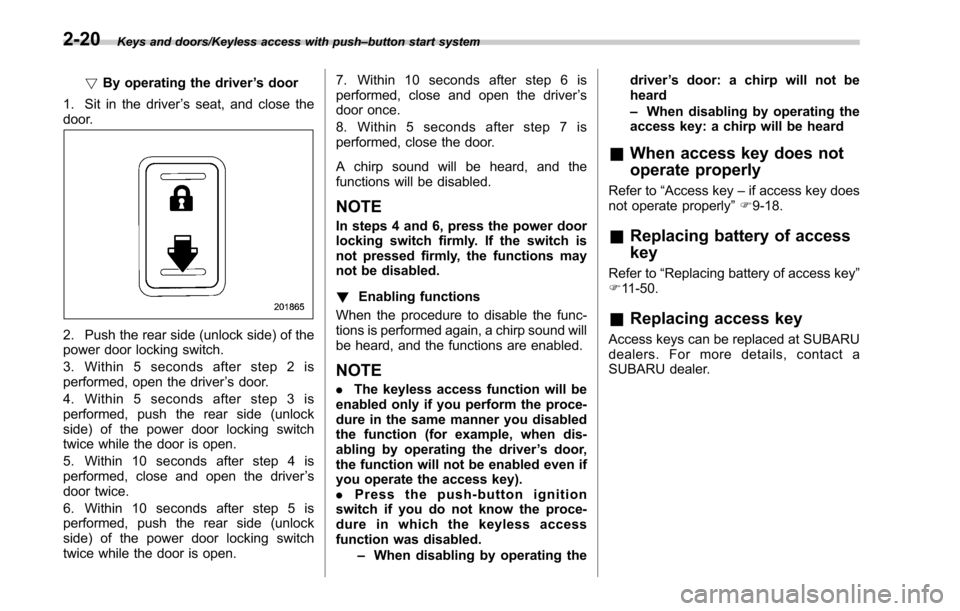
2. Push the rear side (unlock side) of the
power door locking switch.
3. Within 5 seconds after step 2 is
performed, open the driver ’s door.
4. Within 5 seconds after step 3 is
performed, push the rear side (unlock
side) of the power door locking switch
twice while the door is open.
5. Within 10 seconds after step 4 is
performed, close and open the driver ’s
door twice.
6. Within 10 seconds after step 5 is
performed, push the rear side (unlock
side) of the power door locking switch
twice while the door is open. 7. Within 10 seconds after step 6 is
performed, close and open the driver
’s
door once.
8. Within 5 seconds after step 7 is
performed, close the door.
A chirp sound will be heard, and the
functions will be disabled.
NOTE
In steps 4 and 6, press the power door
locking switch firmly. If the switch is
not pressed firmly, the functions may
not be disabled.
! Enabling functions
When the procedure to disable the func-
tions is performed again, a chirp sound will
be heard, and the functions are enabled.
NOTE
. The keyless access function will be
enabled only if you perform the proce-
dure in the same manner you disabled
the function (for example, when dis-
abling by operating the driver ’s door,
the function will not be enabled even if
you operate the access key).
. Press the push-button ignition
switch if you do not know the proce-
dure in which the keyless access
function was disabled.
–When disabling by operating the driver
’s door: a chirp will not be
heard
– When disabling by operating the
access key: a chirp will be heard
& When access key does not
operate properly
Refer to “Access key –if access key does
not operate properly ”F 9-18.
& Replacing battery of access
key
Refer to “Replacing battery of access key ”
F 11-50.
& Replacing access key
Access keys can be replaced at SUBARU
dealers. For more details, contact a
SUBARU dealer.
2-20
Page 130 of 610
&Operating the access key
NOTE
The remote keyless entry system will
not be activated when the push-button
ignition switch is in any position other
than the “OFF ”position.
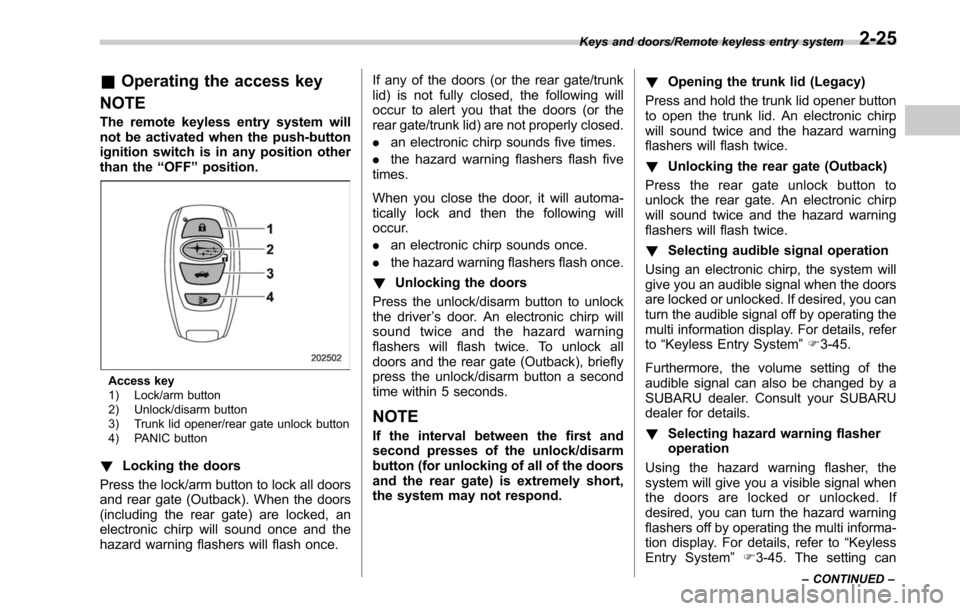
Access key
1) Lock/arm button
2) Unlock/disarm button
3) Trunk lid opener/rear gate unlock button
4) PANIC button
! Locking the doors
Press the lock/arm button to lock all doors
and rear gate (Outback). When the doors
(including the rear gate) are locked, an
electronic chirp will sound once and the
hazard warning flashers will flash once. If any of the doors (or the rear gate/trunk
lid) is not fully closed, the following will
occur to alert you that the doors (or the
rear gate/trunk lid) are not properly closed.
.
an electronic chirp sounds five times.
. the hazard warning flashers flash five
times.
When you close the door, it will automa-
tically lock and then the following will
occur.
. an electronic chirp sounds once.
. the hazard warning flashers flash once.
! Unlocking the doors
Press the unlock/disarm button to unlock
the driver ’s door. An electronic chirp will
sound twice and the hazard warning
flashers will flash twice. To unlock all
doors and the rear gate (Outback), briefly
press the unlock/disarm button a second
time within 5 seconds.
NOTE
If the interval between the first and
second presses of the unlock/disarm
button (for unlocking of all of the doors
and the rear gate) is extremely short,
the system may not respond. !
Opening the trunk lid (Legacy)
Press and hold the trunk lid opener button
to open the trunk lid. An electronic chirp
will sound twice and the hazard warning
flashers will flash twice.
! Unlocking the rear gate (Outback)
Press the rear gate unlock button to
unlock the rear gate. An electronic chirp
will sound twice and the hazard warning
flashers will flash twice.
! Selecting audible signal operation
Using an electronic chirp, the system will
give you an audible signal when the doors
are locked or unlocked. If desired, you can
turn the audible signal off by operating the
multi information display. For details, refer
to “Keyless Entry System ”F 3-45.
Furthermore, the volume setting of the
audible signal can also be changed by a
SUBARU dealer. Consult your SUBARU
dealer for details.
! Selecting hazard warning flasher
operation
Using the hazard warning flasher, the
system will give you a visible signal when
the doors are locked or unlocked. If
desired, you can turn the hazard warning
flashers off by operating the multi informa-
tion display. For details, refer to “Keyless
Entry System ”F3-45. The setting can
Keys and doors/Remote keyless entry system
–CONTINUED –2-25
Page 131 of 610
Keys and doors/Remote keyless entry system
also be changed by a SUBARU dealer.
Consult your SUBARU dealer for details.
!Vehicle finder function
Use this function to find your vehicle
parked among many vehicles in a large
parking lot. Provided you are within 30 feet
(10 meters) of the vehicle, pressing the
lock/arm button three times in a 5-second
period will cause your vehicle’ s horn to
sound once and its hazard warning
flashers to flash three times.
NOTE
If the interval between presses is too
short when you press the lock/arm
button three times, the system may
not respond to the signals from the
remote transmitter.
! Sounding a panic alarm
To activate the alarm, press the “PANIC ”
button once.
The horn will sound and the hazard
warning flashers will flash.
To deactivate the panic alarm, press any
button on the remote transmitter. If a
button on the remote transmitter is not
pressed, the alarm will be deactivated
after approximately 30 seconds.
& Operating the transmitter
NOTE
The remote keyless entry system will
not be activated when the key is
inserted in the ignition switch.
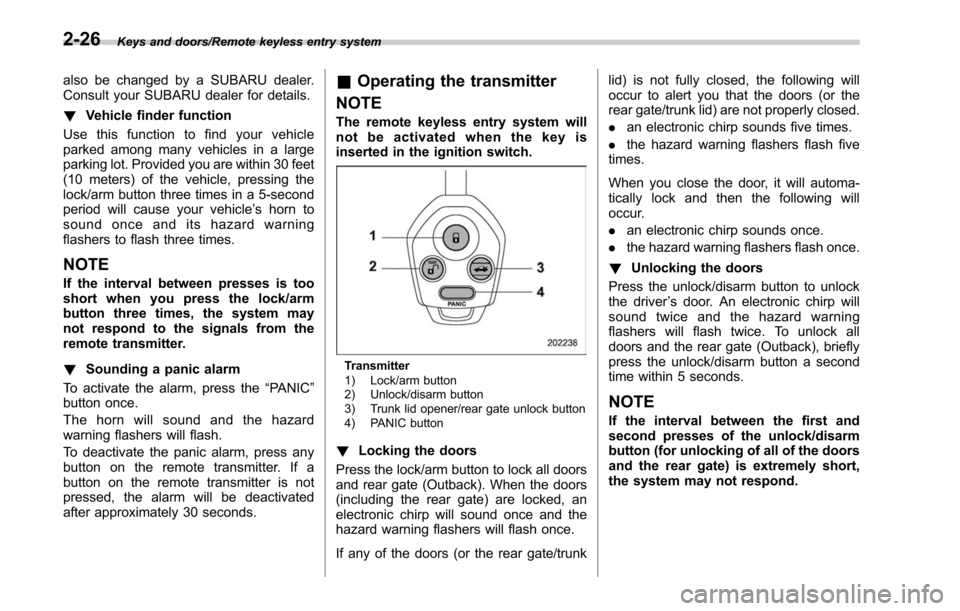
Transmitter
1) Lock/arm button
2) Unlock/disarm button
3) Trunk lid opener/rear gate unlock button
4) PANIC button
! Locking the doors
Press the lock/arm button to lock all doors
and rear gate (Outback). When the doors
(including the rear gate) are locked, an
electronic chirp will sound once and the
hazard warning flashers will flash once.
If any of the doors (or the rear gate/trunk lid) is not fully closed, the following will
occur to alert you that the doors (or the
rear gate/trunk lid) are not properly closed.
.
an electronic chirp sounds five times.
. the hazard warning flashers flash five
times.
When you close the door, it will automa-
tically lock and then the following will
occur.
. an electronic chirp sounds once.
. the hazard warning flashers flash once.
! Unlocking the doors
Press the unlock/disarm button to unlock
the driver ’s door. An electronic chirp will
sound twice and the hazard warning
flashers will flash twice. To unlock all
doors and the rear gate (Outback), briefly
press the unlock/disarm button a second
time within 5 seconds.
NOTE
If the interval between the first and
second presses of the unlock/disarm
button (for unlocking of all of the doors
and the rear gate) is extremely short,
the system may not respond.
2-26
Page 134 of 610
&System alarm operation
The alarm system will give the following
alarms when triggered.
. The vehicle’ s horn will sound for 30
seconds.
. The hazard warning flashers will flash
for 30 seconds.
If any of the doors (or the rear gate/trunk
lid) remains open after the 30-second
period, the horn will continue to sound
for a maximum of 3 minutes. If the door (or
the rear gate/trunk lid) is closed while the
horn is sounding, the horn will stop
sounding with a delay of up to 30 seconds.
The alarm is triggered by:
. Opening any of the doors, rear gate or
the trunk lid
. Physical impact to the vehicle, such as
forced entry (only models with shock
sensors (dealer option))
NOTE
The alarm system can be set to trigger
the illumination of the following interior
lights.
. Map lights
. Dome light (illuminates only when
the dome light switch is in the “DOOR ”
position)
. Cargo area light (Outback) The notifications regarding the map
lights, dome light and cargo area light
(Outback) are deactivated as the fac-
tory setting. A SUBARU dealer can
activate the system. Contact your
SUBARU dealer for details.
&
Activating and deactivating
the alarm system
To change the setting of your vehicle’ s
alarm system for activation or deactiva-
tion, do the following.
1. Disarm the alarm system. Refer to
“Disarming the system ”F 2-32.
2. Sit in the driver ’s seat and shut all
doors (and the rear gate (Outback)).
3. Turn the ignition switch to the “ON”
position.
4. Hold down the REAR (UNLOCK) side
of the driver ’s power door locking switch,
open the driver ’s door within the following
1 second, and wait 10 seconds without
releasing the switch. The setting will then
be changed as follows:
If the system was previously activated:
The odometer screen displays “ALOF ”
and the horn sounds twice, indicating that
the system is now deactivated. If the system was previously deacti-
vated:
The odometer screen displays
“ALON”
and the horn sounds once, indicating that
the system is now activated.
NOTE
You may have the above setting
change done by your SUBARU dealer.
& If you have accidentally trig-
gered the alarm system
! To stop the alarm
Perform any of the following operations.
. Press any button on the access key/
remote transmitter.
. Turn the ignition switch to the “ON”
position (models without “keyless access
with push-button start system ”).
. Turn the push-button ignition switch to
the “ACC ”position (models with “keyless
access with push-button start system ”).
NOTE
Only registered keys will stop the
alarm. If the key is not registered, the
alarm will not stop.
Keys and doors/Alarm system
–CONTINUED –2-29
Page 136 of 610
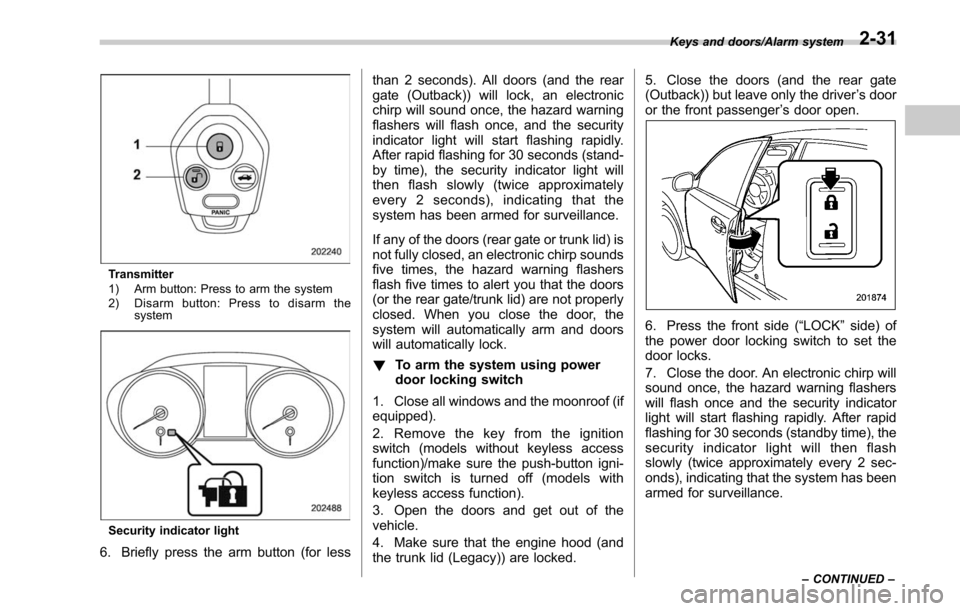
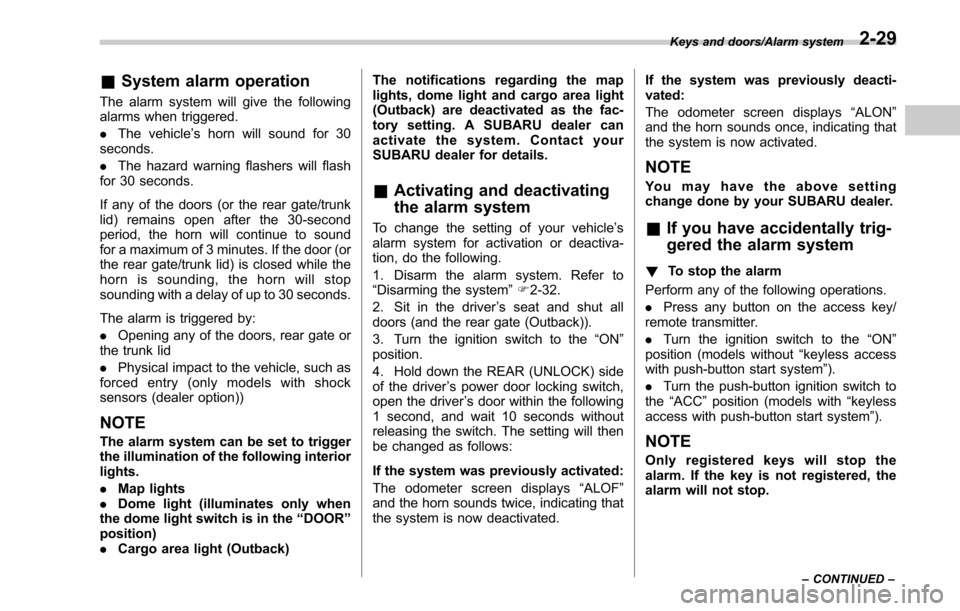
Transmitter
1) Arm button: Press to arm the system
2) Disarm button: Press to disarm thesystem
Security indicator light
6. Briefly press the arm button (for less than 2 seconds). All doors (and the rear
gate (Outback)) will lock, an electronic
chirp will sound once, the hazard warning
flashers will flash once, and the security
indicator light will start flashing rapidly.
After rapid flashing for 30 seconds (stand-
by time), the security indicator light will
then flash slowly (twice approximately
every 2 seconds), indicating that the
system has been armed for surveillance.
If any of the doors (rear gate or trunk lid) is
not fully closed, an electronic chirp sounds
five times, the hazard warning flashers
flash five times to alert you that the doors
(or the rear gate/trunk lid) are not properly
closed. When you close the door, the
system will automatically arm and doors
will automatically lock.
!
To arm the system using power
door locking switch
1. Close all windows and the moonroof (if
equipped).
2. Remove the key from the ignition
switch (models without keyless access
function)/make sure the push-button igni-
tion switch is turned off (models with
keyless access function).
3. Open the doors and get out of the
vehicle.
4. Make sure that the engine hood (and
the trunk lid (Legacy)) are locked. 5. Close the doors (and the rear gate
(Outback)) but leave only the driver
’s door
or the front passenger ’s door open.
6. Press the front side (“LOCK” side) of
the power door locking switch to set the
door locks.
7. Close the door. An electronic chirp will
sound once, the hazard warning flashers
will flash once and the security indicator
light will start flashing rapidly. After rapid
flashing for 30 seconds (standby time), the
security indicator light will then flash
slowly (twice approximately every 2 sec-
onds), indicating that the system has been
armed for surveillance.
Keys and doors/Alarm system
–CONTINUED –2-31
Page 139 of 610
Keys and doors/Child safety locks
Child safety locks
WARNING
Always turn the child safety locks to
the“LOCK ”position when children
sit on the rear seat. Serious injury
could result if a child accidentally
opens the door and falls out.
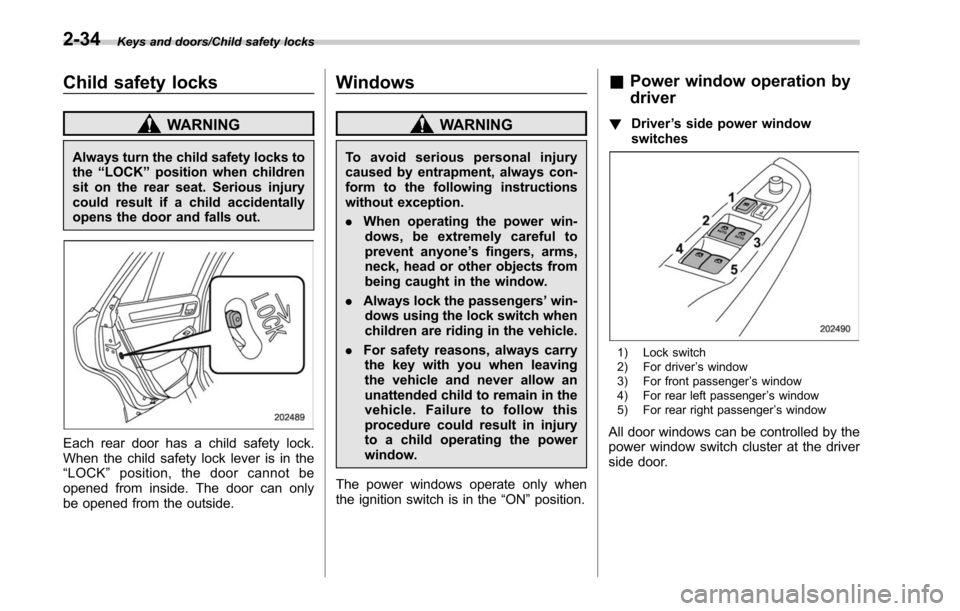
Each rear door has a child safety lock.
When the child safety lock lever is in the
“ LOCK ”position, the door cannot be
opened from inside. The door can only
be opened from the outside.
Windows
WARNING
To avoid serious personal injury
caused by entrapment, always con-
form to the following instructions
without exception.
. When operating the power win-
dows, be extremely careful to
prevent anyone ’s fingers, arms,
neck, head or other objects from
being caught in the window.
. Always lock the passengers ’win-
dows using the lock switch when
children are riding in the vehicle.
. For safety reasons, always carry
the key with you when leaving
the vehicle and never allow an
unattended child to remain in the
vehicle. Failure to follow this
procedure could result in injury
to a child operating the power
window.
The power windows operate only when
the ignition switch is in the “ON”position.
& Power window operation by
driver
! Driver ’s side power window
switches
1) Lock switch
2) For driver ’s window
3) For front passenger ’s window
4) For rear left passenger ’s window
5) For rear right passenger ’s window
All door windows can be controlled by the
power window switch cluster at the driver
side door.
2-34
Page 140 of 610
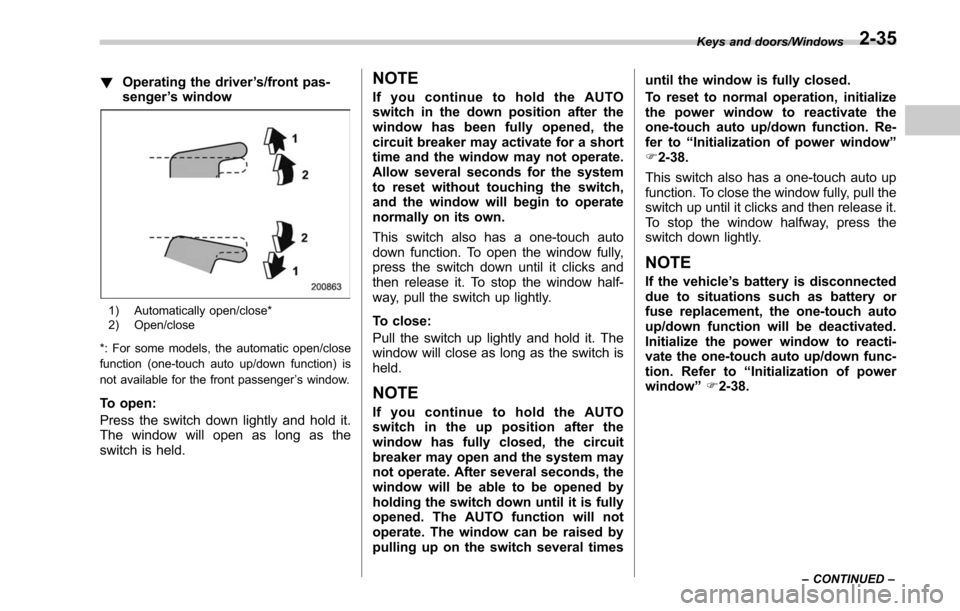
!Operating the driver ’s/front pas-
senger ’s window
1) Automatically open/close*
2) Open/close
*: For some models, the automatic open/close
function (one-touch auto up/down function) is
not available for the front passenger ’s window.
To open:
Press the switch down lightly and hold it.
The window will open as long as the
switch is held.
NOTE
If you continue to hold the AUTO
switch in the down position after the
window has been fully opened, the
circuit breaker may activate for a short
time and the window may not operate.
Allow several seconds for the system
to reset without touching the switch,
and the window will begin to operate
normally on its own.
This switch also has a one-touch auto
down function. To open the window fully,
press the switch down until it clicks and
then release it. To stop the window half-
way, pull the switch up lightly.
To close:
Pull the switch up lightly and hold it. The
window will close as long as the switch is
held.
NOTE
If you continue to hold the AUTO
switch in the up position after the
window has fully closed, the circuit
breaker may open and the system may
not operate. After several seconds, the
window will be able to be opened by
holding the switch down until it is fully
opened. The AUTO function will not
operate. The window can be raised by
pulling up on the switch several times until the window is fully closed.
To reset to normal operation, initialize
the power window to reactivate the
one-touch auto up/down function. Re-
fer to
“Initialization of power window ”
F 2-38.
This switch also has a one-touch auto up
function. To close the window fully, pull the
switch up until it clicks and then release it.
To stop the window halfway, press the
switch down lightly.
NOTE
If the vehicle ’s battery is disconnected
due to situations such as battery or
fuse replacement, the one-touch auto
up/down function will be deactivated.
Initialize the power window to reacti-
vate the one-touch auto up/down func-
tion. Refer to “Initialization of power
window ”F 2-38.
Keys and doors/Windows
–CONTINUED –2-35
Page 143 of 610
Keys and doors/Trunk lid (Legacy)
!Operating the rear passenger ’s
windows
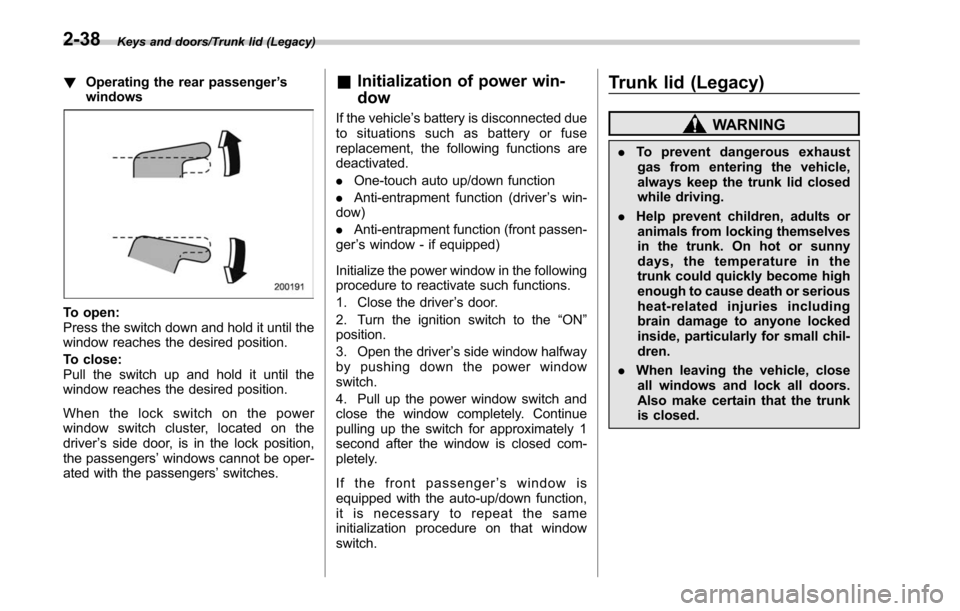
To open:
Press the switch down and hold it until the
window reaches the desired position.
To close:
Pull the switch up and hold it until the
window reaches the desired position.
When the lock switch on the power
window switch cluster, located on the
driver ’s side door, is in the lock position,
the passengers’ windows cannot be oper-
ated with the passengers’ switches.
&Initialization of power win-
dow
If the vehicle’ s battery is disconnected due
to situations such as battery or fuse
replacement, the following functions are
deactivated.
. One-touch auto up/down function
. Anti-entrapment function (driver ’s win-
dow)
. Anti-entrapment function (front passen-
ger ’s window - if equipped)
Initialize the power window in the following
procedure to reactivate such functions.
1. Close the driver ’s door.
2. Turn the ignition switch to the “ON”
position.
3. Open the driver ’s side window halfway
by pushing down the power window
switch.
4. Pull up the power window switch and
close the window completely. Continue
pulling up the switch for approximately 1
second after the window is closed com-
pletely.
If the front passenger ’s window is
equipped with the auto-up/down function,
it is necessary to repeat the same
initialization procedure on that window
switch.
Trunk lid (Legacy)
WARNING
. To prevent dangerous exhaust
gas from entering the vehicle,
always keep the trunk lid closed
while driving.
. Help prevent children, adults or
animals from locking themselves
in the trunk. On hot or sunny
days, the temperature in the
trunk could quickly become high
enough to cause death or serious
heat-related injuries including
brain damage to anyone locked
inside, particularly for small chil-
dren.
. When leaving the vehicle, close
all windows and lock all doors.
Also make certain that the trunk
is closed.
2-38
Page 145 of 610
Keys and doors/Trunk lid (Legacy)
WARNING
Never allow any child to get in the
trunk and play with the release
handle. If the driver starts the vehi-
cle without knowing that a child is
inside the trunk and the child opens
the lid using the release handle, the
child could fall out and be killed or
seriously injured.
CAUTION
.Do not close the lid while grip-
ping the release handle. The
handle may be damaged.
. Do not use the handle as a hook
to fasten straps or ropes to
secure your cargo in the trunk.
Such use may result in damage
of the handle.
. Load the trunk so that cargo
cannot strike the release handle.
If the cargo hits the handle while
the vehicle is being driven, the
handle may be pulled and the
trunk lid may open. That may
cause cargo to fall out of the
trunk, which could create a traffic
safety hazard. !
Inspection
Perform the following steps at least twice
a year to check the release handle for
correct operation.
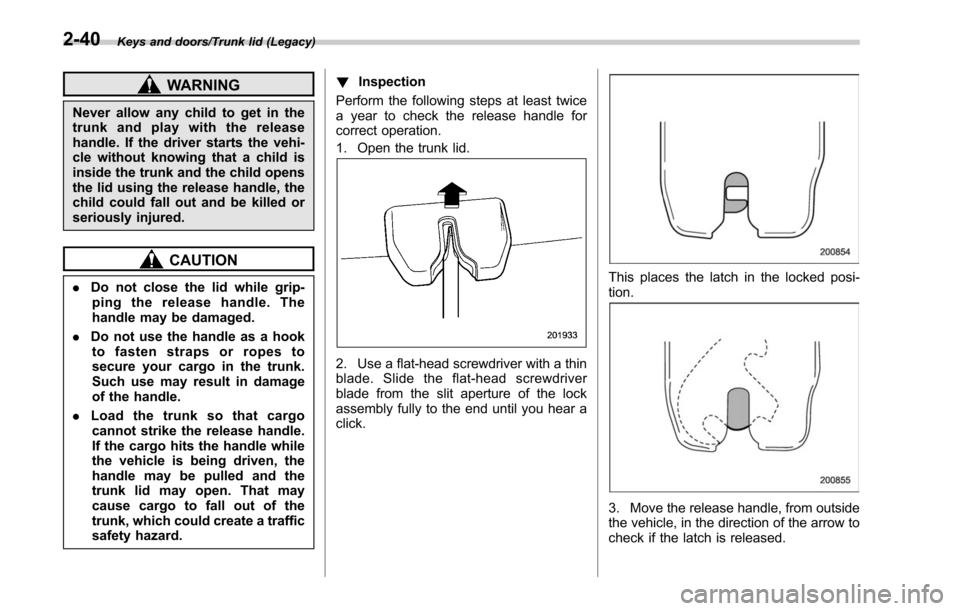
1. Open the trunk lid.
2. Use a flat-head screwdriver with a thin
blade. Slide the flat-head screwdriver
blade from the slit aperture of the lock
assembly fully to the end until you hear a
click.
This places the latch in the locked posi-
tion.
3. Move the release handle, from outside
the vehicle, in the direction of the arrow to
check if the latch is released.
2-40
Page 147 of 610
Keys and doors/Rear gate (Outback)
pull it down holding the handle.
WARNING
.To prevent dangerous exhaust
gas from entering the vehicle,
always keep the rear gate closed
while driving.
. Do not attempt to shut the rear
gate while holding the recessed
grip. Also do not close the rear
gate by pulling the handle from
inside the cargo space. There is a
danger of your hand being
caught and injured.
CAUTION
. Do not jam a plastic bag in or
place cellophane tape on the rear
gate stays or scratch the stays
while loading or unloading cargo.
That could cause leakage of gas
from the stays, which may result
in their inability to hold the rear
gate open.
. Be careful not to hit your head or
face on the rear gate when open-
ing or closing the rear gate and
when loading or unloading car-
go.
& Power rear gate (if equipped)
WARNING
. When operating the power rear
gate, observe the following pre-
cautions. Ignoring the precau-
tions may result in an injury (e.
g., anyone ’s body is hit against
the rear gate or is caught in the
rear gate, etc.)
– Make sure there are no people
around the rear gate.
– Never let anyone get close to
the rear gate.
. When closing the rear gate, be
extremely careful to prevent any-
one ’s fingers, arms, neck, head
or other objects from being
caught in the rear gate. Other-
wise, serious personal injury
may be caused by entrapment.
. After opening the rear gate on a
slope by using the power rear
gate feature, the rear gate may
close. Make sure that the rear
gate has stopped completely
after opening it.
. When leaving the vehicle, always
carry the key for safety and never
allow an unattended child to remain in the vehicle. Failure to
follow this procedure could re-
sult in injury to a child operating
the power rear gate.
. The driver should be aware of
and pay careful attention to his/
her responsibilities.
. Use the power rear gate only
when the area around the rear
gate is clearly visible and when
you have checked that there is
no danger of people being
caught in the gate.
CAUTION
. When closing the rear gate after
opening it, make sure to use the
power rear gate. If you close the
rear gate manually with extra
force, the power rear gate may
be damaged.
. Do not install any accessories
other than genuine SUBARU
parts on the rear gate. If the
weight of rear gate increases
excessively, the rear gate stay
cannot support the rear gate
sufficiently when opening the
rear gate. Also, the power rear
gate may not function properly or
2-42