change time SUBARU SOLTERRA 2023 Workshop Manual
[x] Cancel search | Manufacturer: SUBARU, Model Year: 2023, Model line: SOLTERRA, Model: SUBARU SOLTERRA 2023Pages: 628, PDF Size: 11.91 MB
Page 319 of 628
3195-4. Using the driving support systems
Owners Manual_USA_M42C01_en
5
Driving
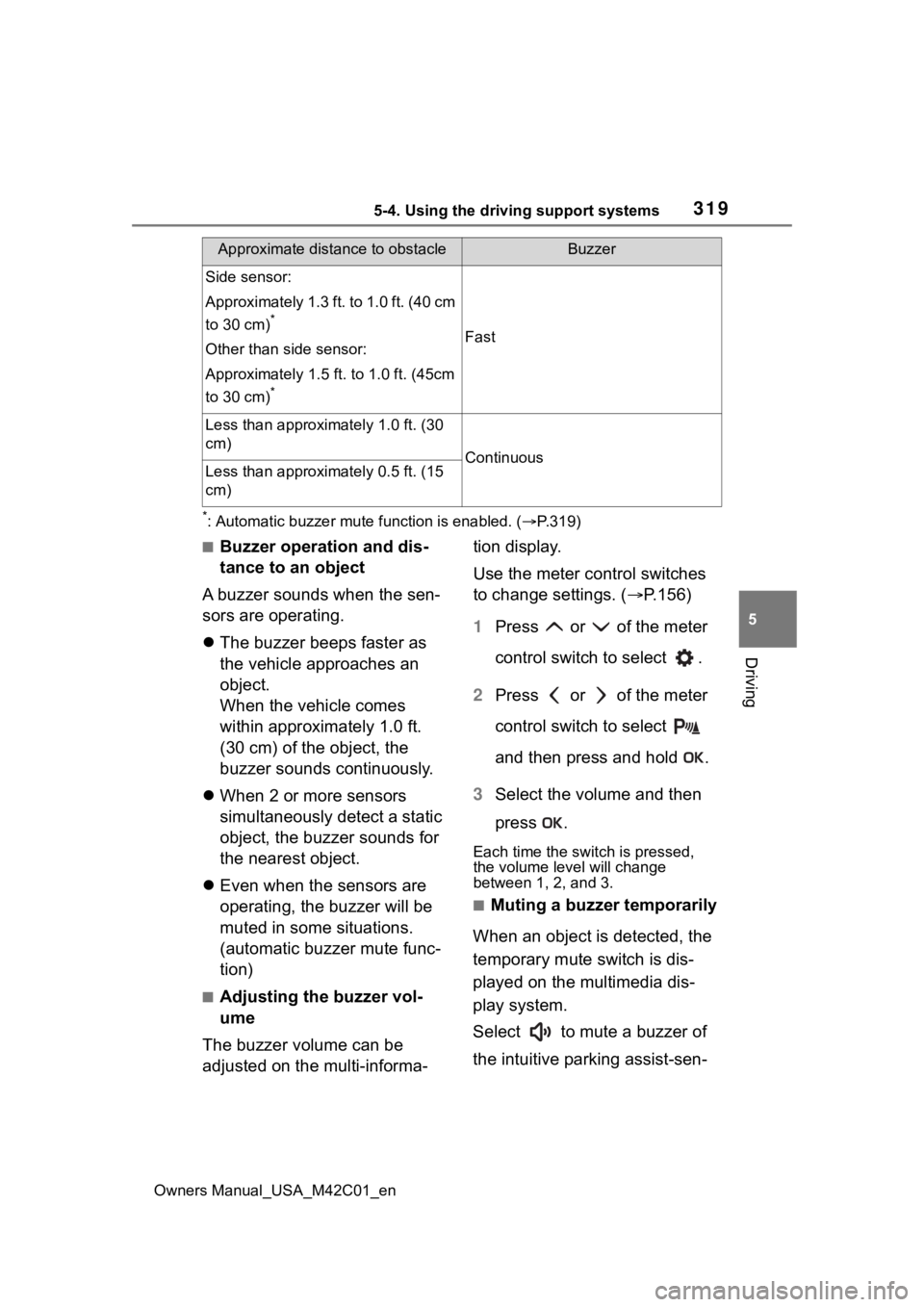
*: Automatic buzzer mute function is enabled. ( P.319)
■Buzzer operation and dis-
tance to an object
A buzzer sounds when the sen-
sors are operating.
The buzzer beeps faster as
the vehicle approaches an
object.
When the vehicle comes
within approximately 1.0 ft.
(30 cm) of the object, the
buzzer sounds continuously.
When 2 or more sensors
simultaneously detect a static
object, the buzzer sounds for
the nearest object.
Even when the sensors are
operating, the buzzer will be
muted in some situations.
(automatic buzzer mute func-
tion)
■Adjusting the buzzer vol-
ume
The buzzer volume can be
adjusted on the multi-informa- tion display.
Use the meter control switches
to change settings. (
P.156)
1 Press or of the meter
control switch to select .
2 Press or of the meter
control switch to select
and then press and hold .
3 Select the volume and then
press .
Each time the switch is pressed,
the volume level will change
between 1, 2, and 3.
■Muting a buzzer temporarily
When an object is detected, the
temporary mute switch is dis-
played on the multimedia dis-
play system.
Select to mute a buzzer of
the intuitive parking assist-sen-
Side sensor:
Approximately 1.3 ft. to 1.0 ft. (40 cm
to 30 cm)
*
Other than side sensor:
Approximately 1.5 ft. to 1.0 ft. (45cm
to 30 cm)
*
Fast
Less than approximately 1.0 ft. (30
cm)
ContinuousLess than approximately 0.5 ft. (15
cm)
Approximate distance to obstacleBuzzer
Page 325 of 628
3255-4. Using the driving support systems
Owners Manual_USA_M42C01_en
5
Driving
mation display. ( P.319)
■Muting a buzzer temporarily
When an object is detected, the
temporary mute switch is displayed
on the multimedia display system.
Select to mute a buzzer of the
intuitive parking assist-sensor,
RCTA and RCD all together.
Mute will be canceled automatically
in the followin g situations:
●When the shift position is
changed.
●When the vehicle speed exceeds
a certain speed.
●When there is a malfunction in a
sensor or the system is temporar-
ily unavailable.
●When the operating function is
disabled manually.
●When the power switch is turned
off.
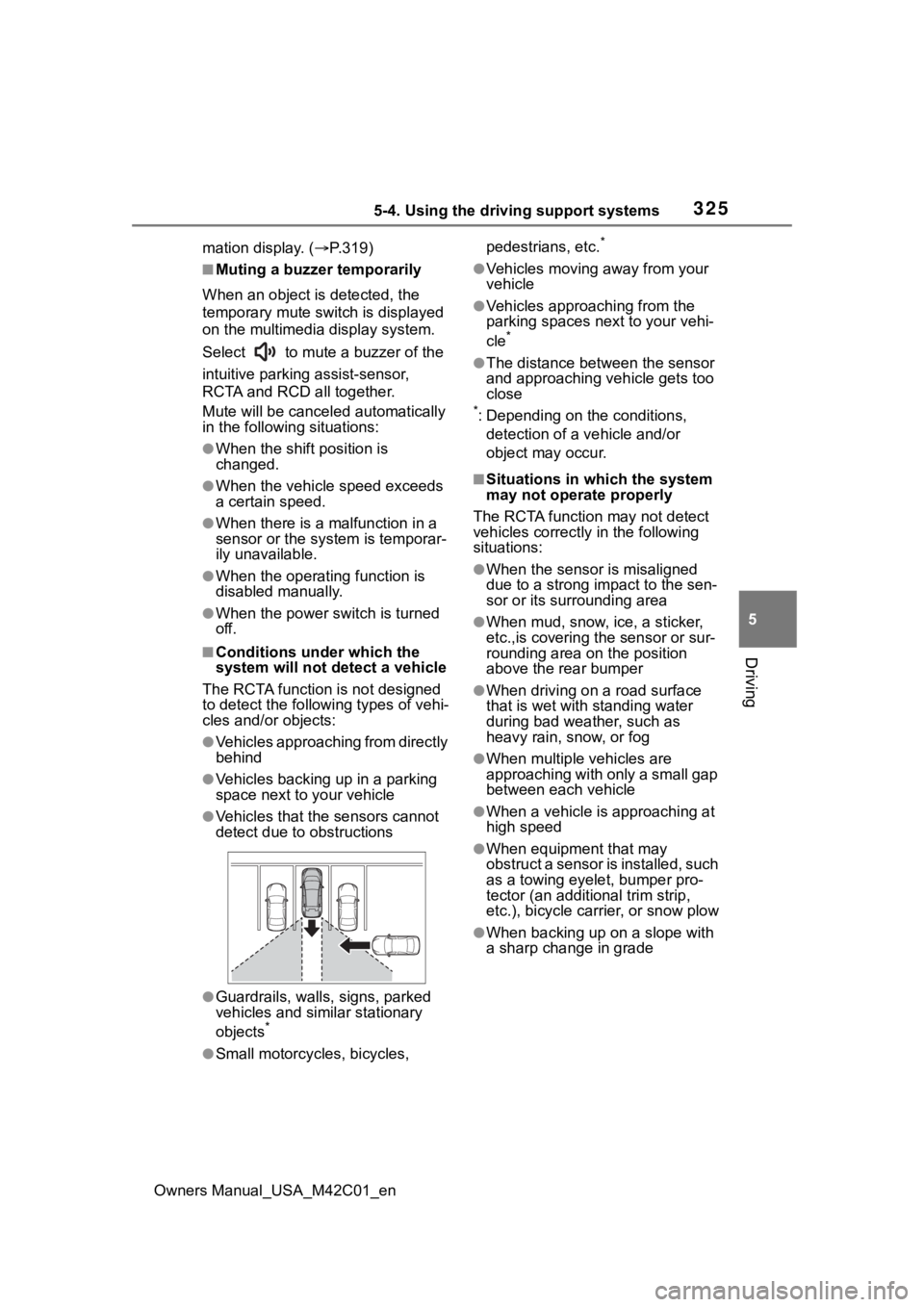
■Conditions under which the
system will not detect a vehicle
The RCTA function is not designed
to detect the following types of vehi-
cles and/or objects:
●Vehicles approaching from directly
behind
●Vehicles backing up in a parking
space next to your vehicle
●Vehicles that the sensors cannot
detect due to obstructions
●Guardrails, walls, signs, parked
vehicles and similar stationary
objects
*
●Small motorcycles, bicycles, pedestrians, etc.
*
●Vehicles moving away from your
vehicle
●Vehicles approaching from the
parking spaces nex
t to your vehi-
cle
*
●The distance between the sensor
and approaching vehicle gets too
close
*: Depending on the conditions, detection of a v ehicle and/or
object may occur.
■Situations in which the system
may not operate properly
The RCTA function may not detect
vehicles correctly in the following
situations:
●When the sensor is misaligned
due to a strong impact to the sen-
sor or its surrounding area
●When mud, snow, ice, a sticker,
etc.,is covering the sensor or sur-
rounding area on the position
above the rear bumper
●When driving on a road surface
that is wet with standing water
during bad weather, such as
heavy rain, snow, or fog
●When multiple vehicles are
approaching with only a small gap
between each vehicle
●When a vehicle is approaching at
high speed
●When equipment that may
obstruct a sensor is installed, such
as a towing eyelet, bumper pro-
tector (an additional trim strip,
etc.), bicycle car rier, or snow plow
●When backing up on a slope with
a sharp change in grade
Page 328 of 628
3285-4. Using the driving support systems
Owners Manual_USA_M42C01_en
*: If equipped
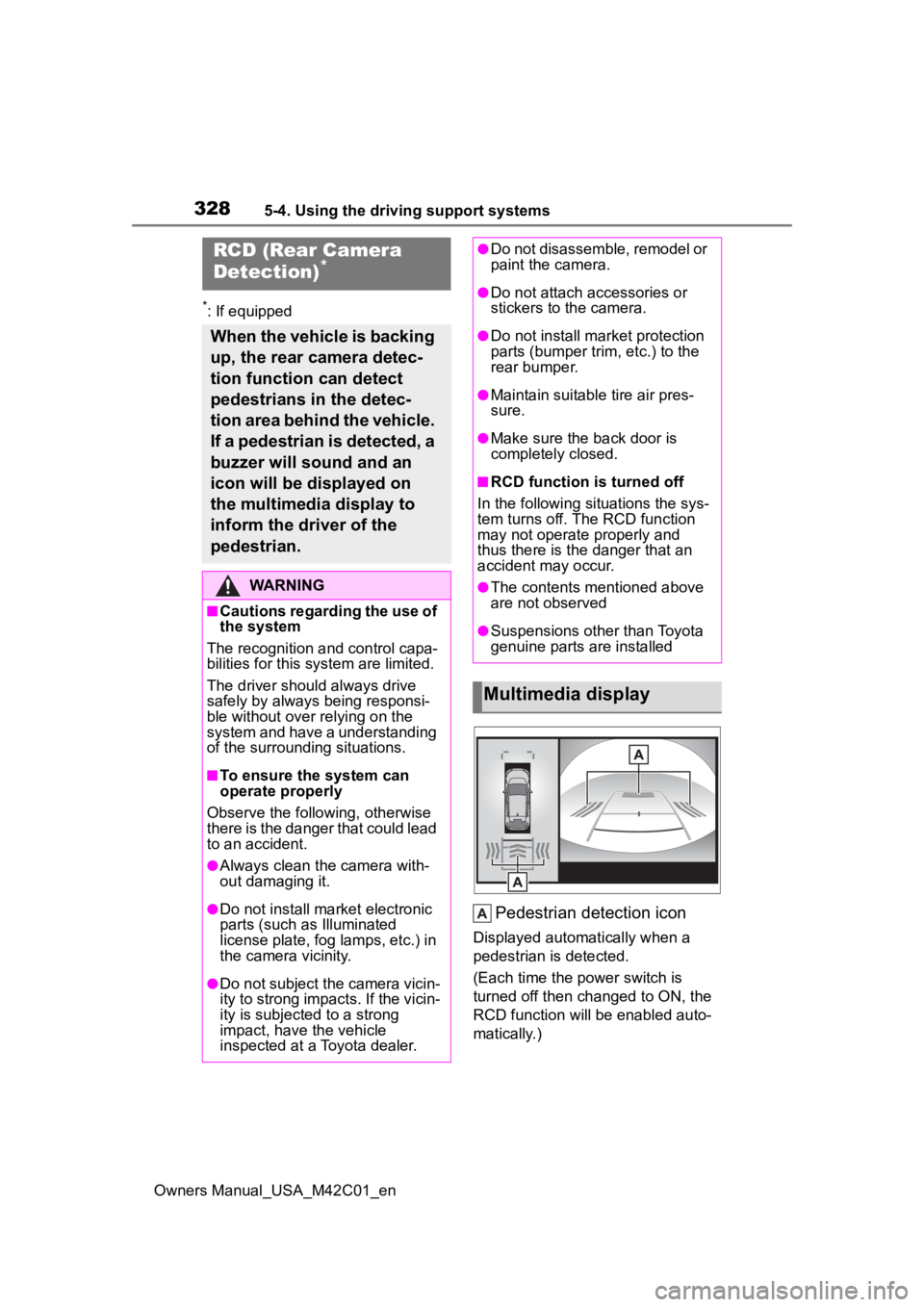
Pedestrian detection icon
Displayed automatically when a
pedestrian is detected.
(Each time the power switch is
turned off then changed to ON, the
RCD function will be enabled auto-
matically.)
RCD (Rear Camera
Detection)*
When the vehicle is backing
up, the rear camera detec-
tion function can detect
pedestrians in the detec-
tion area behind the vehicle.
If a pedestrian is detected, a
buzzer will sound and an
icon will be displayed on
the multimedia display to
inform the driver of the
pedestrian.
WARNING
■Cautions regarding the use of
the system
The recognition and control capa-
bilities for this system are limited.
The driver shoul d always drive
safely by always being responsi-
ble without over relying on the
system and have a understanding
of the surrounding situations.
■To ensure the system can
operate properly
Observe the follo wing, otherwise
there is the danger that could lead
to an accident.
●Always clean the camera with-
out damaging it.
●Do not install market electronic
parts (such as Illuminated
license plate, fog lamps, etc.) in
the camera vicinity.
●Do not subject the camera vicin-
ity to strong impacts. If the vicin-
ity is subjected to a strong
impact, have the vehicle
inspected at a Toyota dealer.
●Do not disassemble, remodel or
paint the camera.
●Do not attach accessories or
stickers to the camera.
●Do not install market protection
parts (bumper tr im, etc.) to the
rear bumper.
●Maintain suitable tire air pres-
sure.
●Make sure the back door is
completely closed.
■RCD function i s turned off
In the following situations the sys-
tem turns off. The RCD function
may not operate properly and
thus there is the danger that an
accident may occur.
●The contents mentioned above
are not observed
●Suspensions other than Toyota
genuine parts are installed
Multimedia display
Page 329 of 628
3295-4. Using the driving support systems
Owners Manual_USA_M42C01_en
5
Driving
Use the meter control switches
to enable/disable the RCD func-
tion. ( P.156)
1 Press or to select .
2 Press or to select
“RCD” and then press .
When the RCD function is disabled,
the driving assist information indi-
cator ( P.149) illuminates. At this
time, the RCD indi cator and “Rear
Camera Detection OFF” will be dis-
played on the multi-information dis-
play.
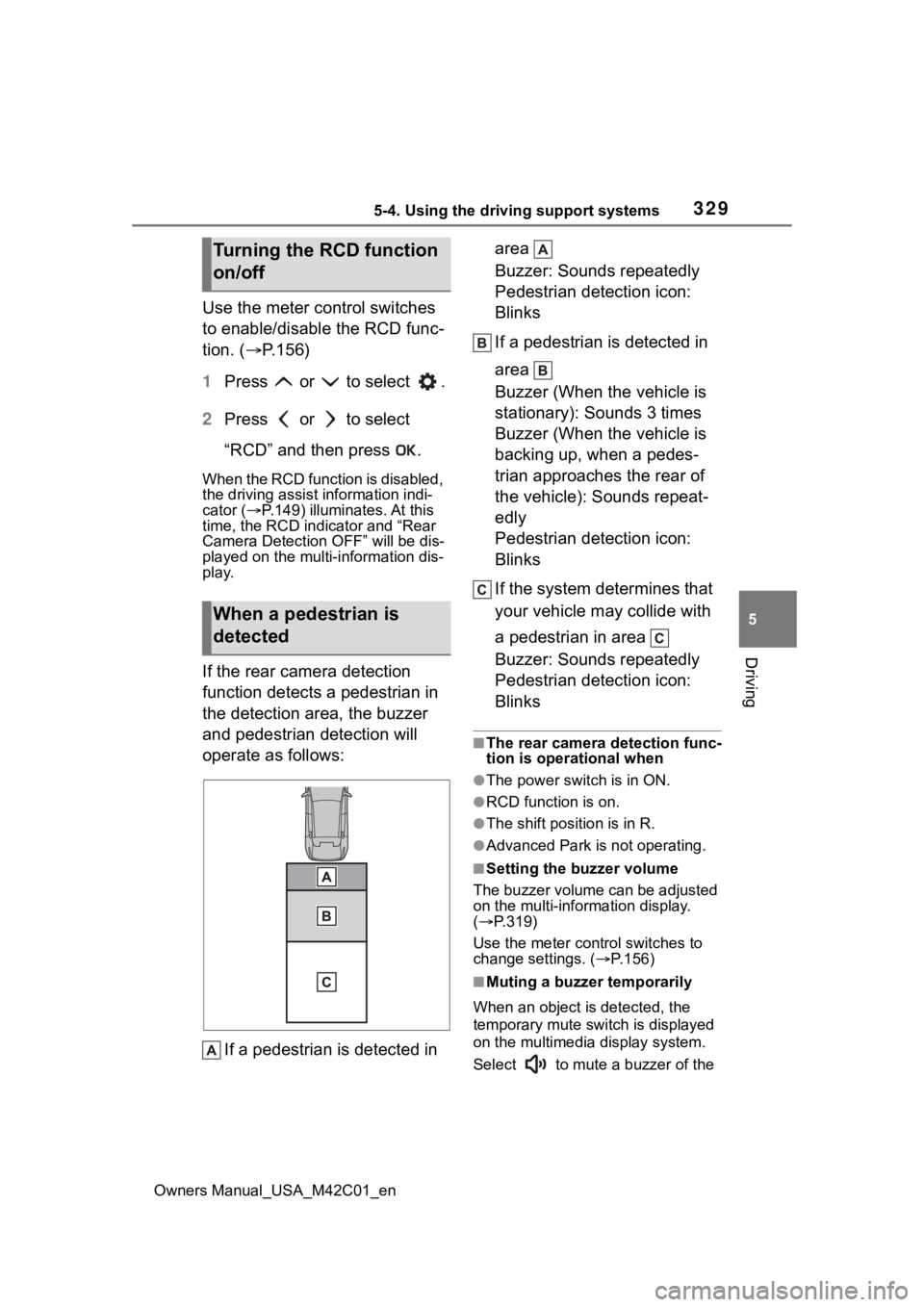
If the rear camera detection
function detects a pedestrian in
the detection area, the buzzer
and pedestrian detection will
operate as follows:
If a pedestrian is detected in area
Buzzer: Sounds repeatedly
Pedestrian detection icon:
Blinks
If a pedestrian is detected in
area
Buzzer (When the vehicle is
stationary): Sounds 3 times
Buzzer (When the vehicle is
backing up, when a pedes-
trian approaches the rear of
the vehicle): Sounds repeat-
edly
Pedestrian detection icon:
Blinks
If the system determines that
your vehicle may collide with
a pedestrian in area
Buzzer: Sounds repeatedly
Pedestrian detection icon:
Blinks
■The rear camera detection func-
tion is operational when
●The power switch is in ON.
●RCD function is on.
●The shift position is in R.
●Advanced Park is not operating.
■Setting the buzzer volume
The buzzer volume can be adjusted
on the multi-information display.
( P.319)
Use the meter control switches to
change settings. ( P.156)
■Muting a buzzer temporarily
When an object i s detected, the
temporary mute switch is displayed
on the multimedia display system.
Select to mute a buzzer of the
Turning the RCD function
on/off
When a pedestrian is
detected
Page 333 of 628
3335-4. Using the driving support systems
Owners Manual_USA_M42C01_en
5
Driving
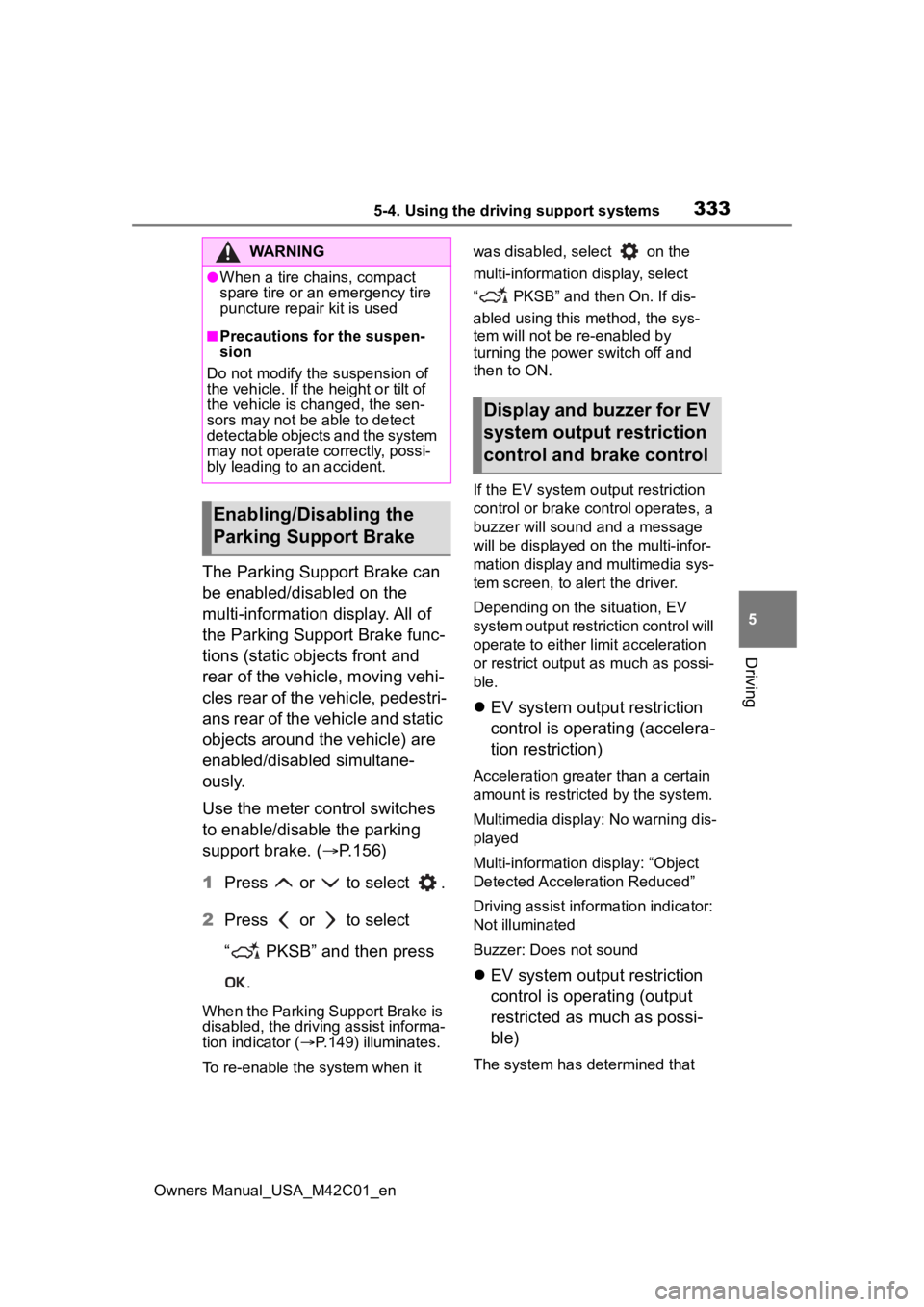
The Parking Support Brake can
be enabled/disabled on the
multi-information display. All of
the Parking Support Brake func-
tions (static objects front and
rear of the vehicle, moving vehi-
cles rear of the vehicle, pedestri-
ans rear of the vehicle and static
objects around the vehicle) are
enabled/disabled simultane-
ously.
Use the meter control switches
to enable/disable the parking
support brake. ( P.156)
1 Press or to select .
2 Press or to select
“ PKSB” and then press
.
When the Parking Support Brake is
disabled, the driving assist informa-
tion indicator ( P.149) illuminates.
To re-enable the system when it was disabled, select on the
multi-information display, select
“ PKSB” and then On. If dis-
abled using this method, the sys-
tem will not be re-enabled by
turning the power
switch off and
then to ON.
If the EV system output restriction
control or brake control operates, a
buzzer will sound and a message
will be displayed on the multi-infor-
mation display and multimedia sys-
tem screen, to alert the driver.
Depending on the situation, EV
system output restriction control will
operate to either limit acceleration
or restrict output as much as possi-
ble.
EV system output restriction
control is operating (accelera-
tion restriction)
Acceleration greater than a certain
amount is restric ted by the system.
Multimedia display: No warning dis-
played
Multi-information display: “Object
Detected Acceleration Reduced”
Driving assist information indicator:
Not illuminated
Buzzer: Does not sound
EV system output restriction
control is operating (output
restricted as much as possi-
ble)
The system has determined that
WARNING
●When a tire chains, compact
spare tire or an emergency tire
puncture repair kit is used
■Precautions for the suspen-
sion
Do not modify the suspension of
the vehicle. If the height or tilt of
the vehicle is changed, the sen-
sors may not be able to detect
detectable objects and the system
may not operate correctly, possi-
bly leading to an accident.
Enabling/Disabling the
Parking Support Brake
Display and buzzer for EV
system output restriction
control and brake control
Page 335 of 628
3355-4. Using the driving support systems
Owners Manual_USA_M42C01_en
5
Driving
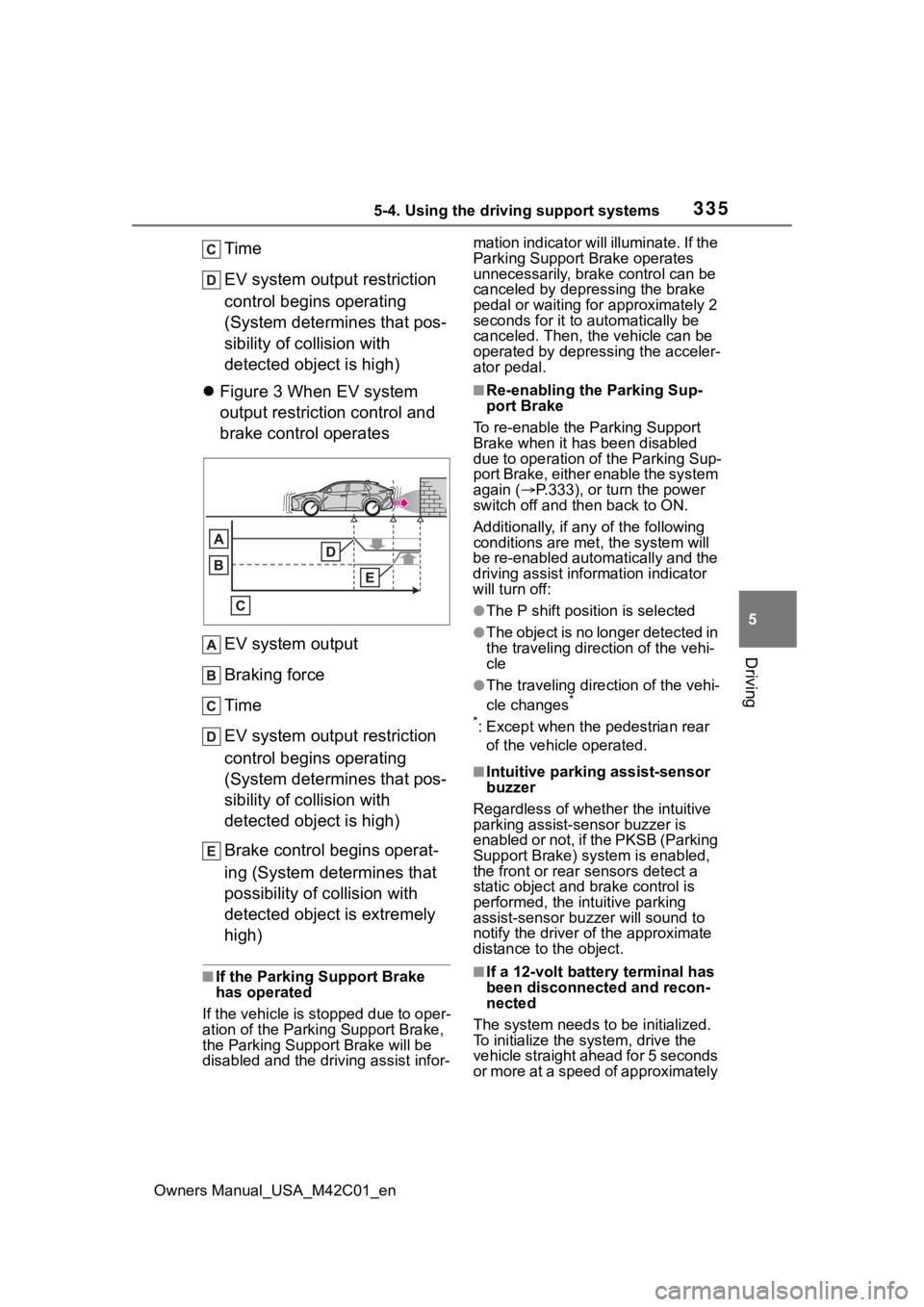
Time
EV system output restriction
control begins operating
(System determines that pos-
sibility of collision with
detected object is high)
Figure 3 When EV system
output restriction control and
brake control operates
EV system output
Braking force
Time
EV system output restriction
control begins operating
(System determines that pos-
sibility of collision with
detected object is high)
Brake control begins operat-
ing (System determines that
possibility of collision with
detected object is extremely
high)
■If the Parking Support Brake
has operated
If the vehicle is stopped due to oper-
ation of the Parki ng Support Brake,
the Parking Suppor t Brake will be
disabled and the driving assist infor- mation indicator will illuminate. If the
Parking Support Brake operates
unnecessarily, brake control can be
canceled by depre
ssing the brake
pedal or waiting for approximately 2
seconds for it to automatically be
canceled. Then, the vehicle can be
operated by depressing the acceler-
ator pedal.
■Re-enabling the Parking Sup-
port Brake
To re-enable the Parking Support
Brake when it has been disabled
due to operation of the Parking Sup-
port Brake, either enable the system
again ( P.333), or turn the power
switch off and then back to ON.
Additionally, if a ny of the following
conditions are m et, the system will
be re-enabled automatically and the
driving assist inf ormation indicator
will turn off:
●The P shift position is selected
●The object is no longer detected in
the traveling direction of the vehi-
cle
●The traveling direction of the vehi-
cle changes*
*
: Except when the pedestrian rear of the vehicle operated.
■Intuitive parkin g assist-sensor
buzzer
Regardless of whethe r the intuitive
parking assist-s ensor buzzer is
enabled or not, if the PKSB (Parking
Support Brake) system is enabled,
the front or rear s ensors detect a
static object and brake control is
performed, the intuitive parking
assist-sensor bu zzer will sound to
notify the driver o f the approximate
distance to the object.
■If a 12-volt battery terminal has
been disconnected and recon-
nected
The system needs to be initialized.
To initialize the system, drive the
vehicle straight ahead for 5 seconds
or more at a speed of approximately
Page 346 of 628
3465-4. Using the driving support systems
Owners Manual_USA_M42C01_en
WARNING
●Depending on the condition of
the road surface or the vehicle,
the distance between the vehi-
cle and a parking space, etc., it
may not be possible to detect a
parking space or the system
may not be able to provide
assistance to the point the vehi-
cle is fully parked.
●This system will guide the vehi-
cle to appropriate positions for
changing the direction of travel,
however, if you feel that the
vehicle is approaching too close
to an adjacent parked vehicle at
any time, depress the brake
pedal and change the shift posi-
tion. However, if this is per-
formed, the number of times the
vehicle changes direction may
increase, and the vehicle may
be parked at an angle.
●As following objects may not be
detected, make sure to check
the safety of the area around
your vehicle and depress the
brake pedal to stop the vehicle if
it may collide with an object.
• Thin objects such as wire, fences, rope, etc.
• Cotton, snow and other materi- als that absorb sound waves
• Sharply-angled objects
• Low objects (curb stones, park- ing blocks, etc.)
• Tall objects with upper sections that protrude outward
●Even if there is an object in the
target parking space, it may not
be detected and assistance
may be performed.
●While the system is operating, if
it is likely that your vehicle will
collide with a nearby vehicle,
parking block, object, or person,
depress the brake pedal to stop
the vehicle and press the
Advanced Park main switch to
disable the system.
●Never use only the multimedia
display to view the area behind
the vehicle. The image dis-
played may dif fer than the
actual situation. Using only the
screen when backing up may
lead to an accident, such as a
collision with another vehicle.
When backing up, make sure to
look directly or use the mirrors
to check the safe ty of the area
around your vehicle, especially
behind the vehicle.
●When the ambient temperature
is extremely low, the screen
may appear dark or the dis-
played image may become
unclear. Also, as moving objects
may appear distorted or may
not be able to be seen on the
screen, make sure to directly
check the safety of the area
around your vehicle.
In the following situations, while
the vehicle is stopped and held
by Advanced Park, it may be
canceled and th e vehicle may
start moving. Immediately
depress the brake pedal. Fail-
ure to do so may lead to an
accident.
• When the driver’s door is opened
• When operations instructed by the system are not performed
within a certain amount of time
• When the brake pedal is depressed and th e vehicle is
stopped for a certain amount of
time
Page 351 of 628
3515-4. Using the driving support systems
Owners Manual_USA_M42C01_en
5
Driving
NOTICE
●Check the battery charge level
of the smartphon e before using
Remote control function. If the
battery of the smartphone dies
while operating Remote control
function, assist will be sus-
pended. Also, if the battery
charge level of the smartphone
is 20% or less when attempting
to start Remote control function,
Remote control function will not
be started.
●Turn on the Bluetooth communi-
cation function of the smart-
phone before using Remote
control function. Remote con-
trol function cannot be used if
the Bluetooth function is off.
●Do not turn off the Bluetooth
function of the smartphone or
disconnect from the multimedia
system while using Remote
control function. If the vehicle
cannot be connected to via
Bluetooth, Remote control func-
tion cannot be used.
●While using Remote control
function, if a call is received,
etc., and another app is
opened, Remote control func-
tion will be suspended. Assist
can be resumed if the Remote
Park app is reopened within 3
minutes. If 3 minutes or more
elapse, assist will be canceled.
●While using Remote control
function, if the home button or
power button of the smartphone
is pressed and the screen is
locked, Remote control function
will be suspended. Assist can
be resumed if the Remote Park
app is reopened within 3 min-
utes. If 3 minutes or more
elapse, assist will be canceled.
●Do not use the Remote Park
app with devices other than
those which operation has been
confirmed by the maker. Other-
wise the system may not oper-
ate correctly.
●When the ambient temperature
is low, it may take time for the
system to start, due to 12-volt
battery charging.
●If the 12-volt battery voltage
drops, assistance will be can-
celed.
●When using Remote control
function on a slope, the vehicle
speed will be slower and the
distance that th e vehicle will
approach objects will become
longer than when on a level
road surface.
●If a system temporary failure
occurs, after th e vehicle is
stopped by the electronic park-
ing brake or the shift position
being changed to P, the power
switch may turn off and the sys-
tem may be canceled. In this
case, have the vehicle
inspected by your Toyota
dealer.
●If a system malfunction occurs,
assistance may be temporarily
suspended. If the system
returns to normal, operation can
be resumed. Follow the content
on the smartphone screen to
resume operation.
●Remote control function cannot
be started if the EV system has
been started using an aftermar-
ket remote starter.
Page 354 of 628
3545-4. Using the driving support systems
Owners Manual_USA_M42C01_en
■Situations in which parking
assistance may not operate
even if there is no possibility of
a collision
P. 3 1 5
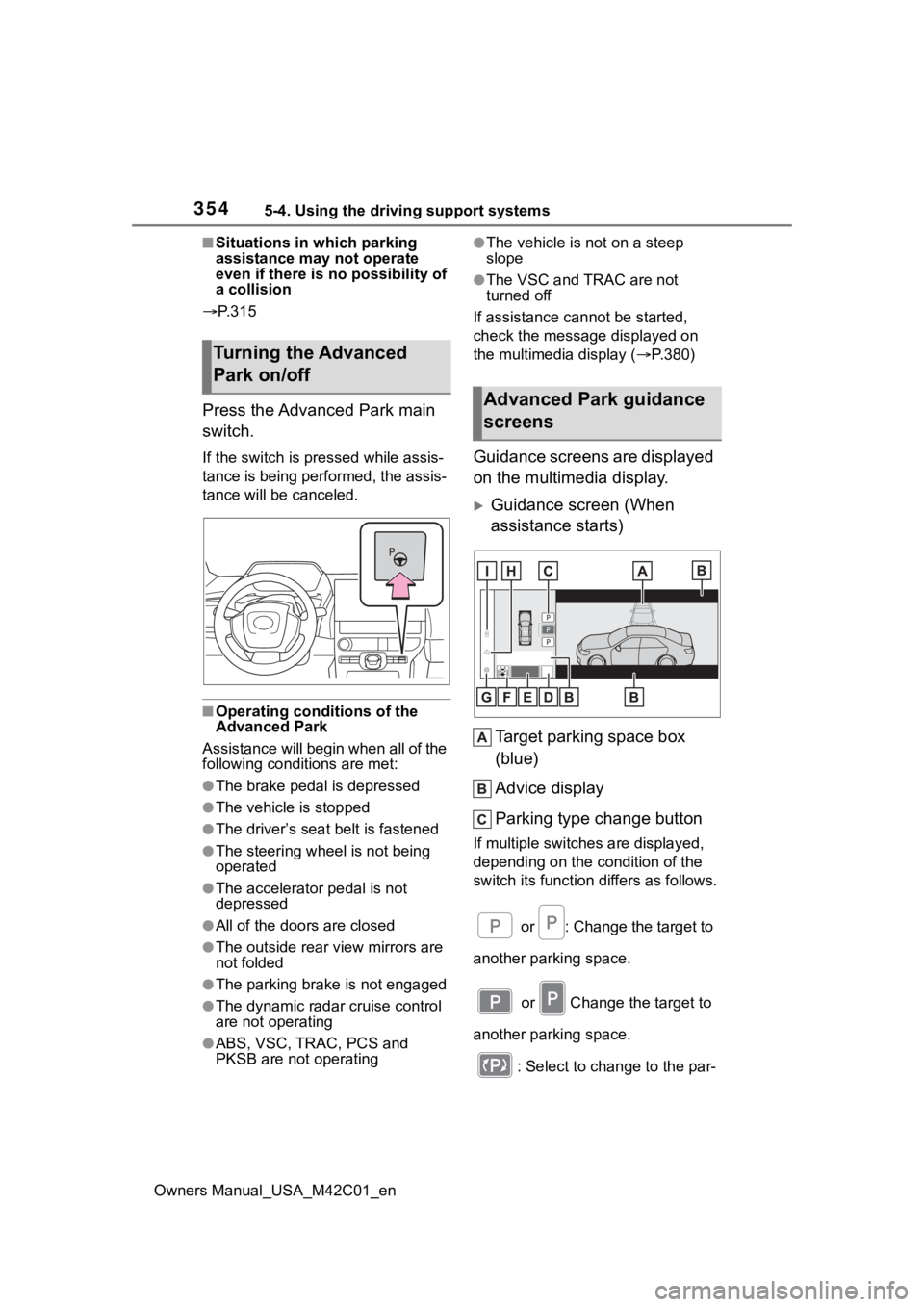
Press the Advanced Park main
switch.
If the switch is pr essed while assis-
tance is being performed, the assis-
tance will be canceled.
■Operating conditions of the
Advanced Park
Assistance will begin when all of the
following conditions are met:
●The brake pedal is depressed
●The vehicle is stopped
●The driver’s seat belt is fastened
●The steering wheel is not being
operated
●The accelerator pedal is not
depressed
●All of the doors are closed
●The outside rear view mirrors are
not folded
●The parking brake is not engaged
●The dynamic radar cruise control
are not operating
●ABS, VSC, TRAC, PCS and
PKSB are not operating
●The vehicle is not on a steep
slope
●The VSC and TRAC are not
turned off
If assistance can not be started,
check the message displayed on
the multimedia display ( P.380)
Guidance screens are displayed
on the multimedia display.
Guidance screen (When
assistance starts)
Target parking space box
(blue)
Advice display
Parking type change button
If multiple switches are displayed,
depending on the condition of the
switch its function differs as follows. or : Change the target to
another parking space.
or Change the target to
another parking space.
: Select to change to the par-
Turning the Advanced
Park on/off
Advanced Park guidance
screens
Page 356 of 628
3565-4. Using the driving support systems
Owners Manual_USA_M42C01_enbe displayed over the guidance dis-
play.
■Brake control operation when
Advanced Park is operating
While the Advanced Park is operat-
ing, if the system determines that
the possibility of collision with
detected moving or stationary object
is high, the EV system output
restriction control and brake control
will operate.
If brake control operates, Advanced
Park operation will be suspended
and a message will be displayed on
the multi-information display.
■Buzzer
Depending on surrounding sounds
or sounds from other systems, it
may be difficult to hear the buzzer of
this system.
■If a black screen is displayed on
the multimedia display when
the Advanced Park is operating
The system is being affected by
radio waves or may be malfunction-
ing. If a radio antenna is installed
near a camera, move it to a location
as far from the cameras as possible.
If a radio antenna is not installed
near a camera, and the screen does
not return to normal after turning the
power switch off and then starting
the EV system agai n, have the vehi-
cle inspected by your Toyota dealer.
■Function description
The perpendicular parking (for-
ward/reverse) function can be
used if the target parking space
can be detected when the vehi-
cle is stopped close and perpen-
dicular to the center of the parking space. Also, depending
on the condition of the parking
space, etc., if it is necessary to
change the direction of travel of
the vehicle, the shift position can
be changed by assistance con-
trol.
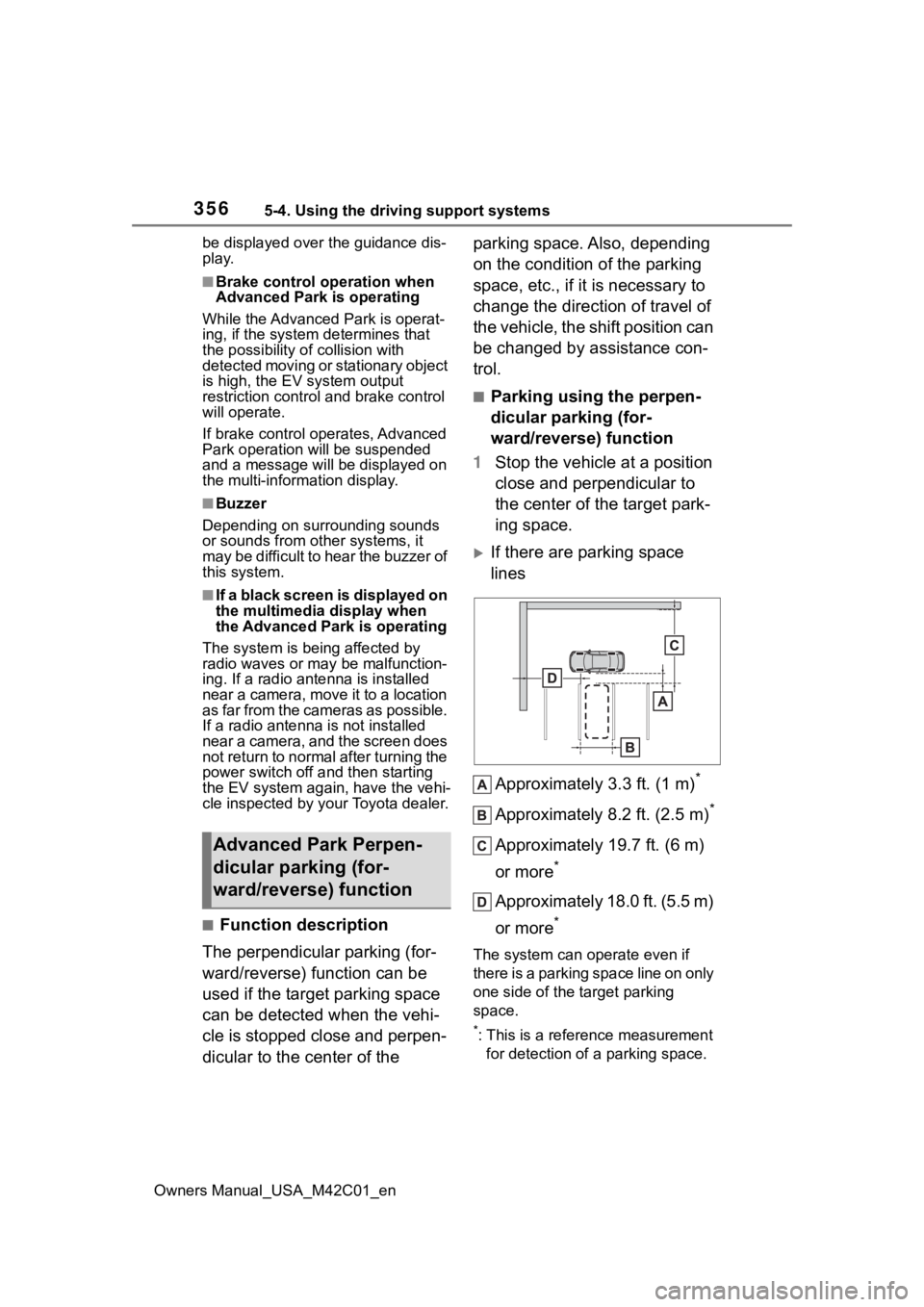
■Parking using the perpen-
dicular parking (for-
ward/reverse) function
1 Stop the vehicle at a position
close and perpendicular to
the center of the target park-
ing space.
If there are parking space
lines
Approximately 3.3 ft. (1 m)
*
Approximately 8.2 ft. (2.5 m)*
Approximately 19.7 ft. (6 m)
or more
*
Approximately 18.0 ft. (5.5 m)
or more
*
The system can o perate even if
there is a parking space line on only
one side of the target parking
space.
*: This is a reference measurement for detection of a parking space.
Advanced Park Perpen-
dicular parking (for-
ward/reverse) function