change time SUBARU SOLTERRA 2023 Owner's Guide
[x] Cancel search | Manufacturer: SUBARU, Model Year: 2023, Model line: SOLTERRA, Model: SUBARU SOLTERRA 2023Pages: 628, PDF Size: 11.91 MB
Page 231 of 628
2315-2. Driving procedures
Owners Manual_USA_M42C01_en
5
Driving
5-2.Driving procedures
1 Check that the charging
cable is disconnected.
( P.105, 113)
2 Pull the parking brake switch
to check that the parking
brake is set. ( P.243)
The parking brake indicator will
come on.
3Firmly depress the brake
pedal.
and a message will be dis-
played on the multi-information dis-
play.
If it is not displayed, the EV system
cannot be started.
When the shift position is in N, the
EV system cannot start. Shift the
shift position to P when starting the
EV system. ( P.237)
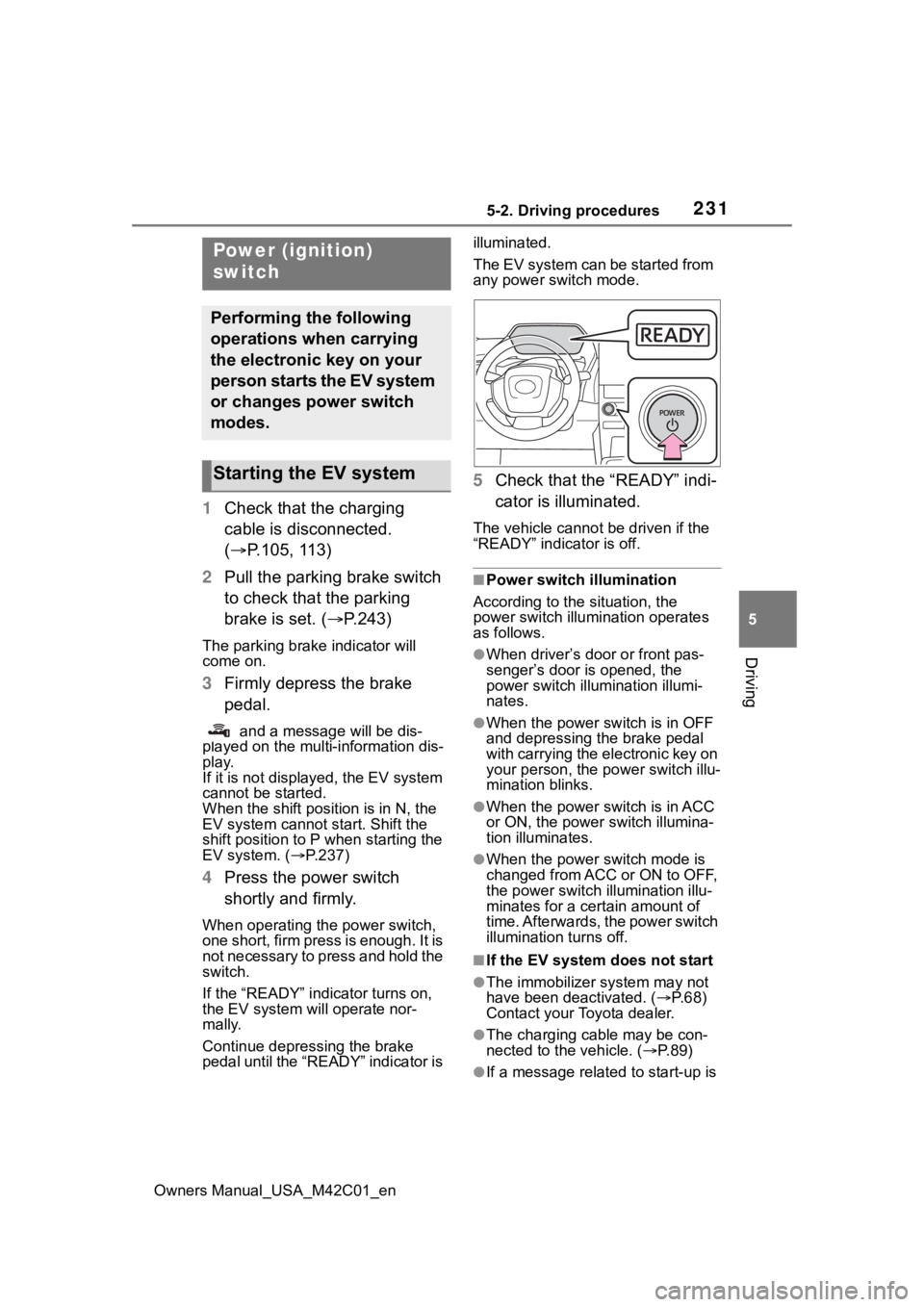
4 Press the power switch
shortly and firmly.
When operating the power switch,
one short, firm press is enough. It is
not necessary to press and hold the
switch.
If the “READY” indicator turns on,
the EV system will operate nor-
mally.
Continue depressing the brake
pedal until the “READY” indicator is illuminated.
The EV system can be started from
any power switch mode.
5
Check that the “READY” indi-
cator is illuminated.
The vehicle cannot be driven if the
“READY” indicator is off.
■Power switch illumination
According to the situation, the
power switch illu mination operates
as follows.
●When driver’s door or front pas-
senger’s door is opened, the
power switch illu mination illumi-
nates.
●When the power switch is in OFF
and depressing t he brake pedal
with carrying the electronic key on
your person, the power switch illu-
mination blinks.
●When the power switch is in ACC
or ON, the power switch illumina-
tion illuminates.
●When the power switch mode is
changed from ACC or ON to OFF,
the power switch illumination illu-
minates for a certain amount of
time. Afterwards, the power switch
illumination turns off.
■If the EV system does not start
●The immobilizer system may not
have been deactivated. ( P. 6 8 )
Contact your Toyota dealer.
●The charging cable may be con-
nected to the vehicle. ( P. 8 9 )
●If a message related to start-up is
Power (ignition)
switch
Performing the following
operations when carrying
the electronic key on your
person starts the EV system
or changes power switch
modes.
Starting the EV system
Page 232 of 628
2325-2. Driving procedures
Owners Manual_USA_M42C01_enshown on the multi-information
display, read the message and fol-
low the instructions.
●If the door is unlocked with the
mechanical key, the EV system
cannot be started using the smart
key system. Refer to P.540 to start
the EV system. However, if the
electronic key is carried inside the
vehicle and the do
ors are locked
( P.170), the EV system can be
started.
■When the ambient temperature
is low, such as during winter
driving conditions
●When starting the EV system, the
flashing time of the “READY” indi-
cator may be long. Leave the
vehicle as it is until the “READY”
indicator is steady on, as steady
means the vehicle is able to move.
●When the traction battery is
extremely cold (below approxi-
mately -22°F [-30°C]) under the
influence of the outside tempera-
ture, it may not be possible to start
the EV system. In this case, try to
start the EV system again after the
temperature of the traction battery
increases due to the outside tem-
perature increase, etc.
■Sounds and vibrations specific
to an battery electric vehicle
P. 7 4
■If the 12-volt battery is dis-
charged
The EV system cannot be started
using the smart key system. Refer
to P.541 to restart the EV system.
■Electronic key battery depletion
P. 1 6 2
■Conditions affecting operation
P. 1 8 8
■Note for the entry function
P. 1 8 9
■If there is a malfunction in the
smart key system
If “Smart Key System Malfunction”
is displayed on the multi-information
display, the system may be malfunc-
tioning. Have the vehicle inspected
by your Toyota dealer immediately.
■If the “READY” indicator does
not come on
In the event that the “READY” indi-
cator does not come on even after
performing the proper procedures
for starting the vehicle, contact your
Toyota dealer immediately.
■If the EV system is malfunction-
ing
P. 8 0
■Electronic key battery
P.497
■Operation of the power switch
●If the switch is not pressed shortly
and firmly, the power switch mode
may not change or the EV system
may not start.
●If attempting to restart the EV sys-
tem immediately after turning the
power switch to OFF, the EV sys-
tem may not start in some cases.
After turning the power switch to
OFF, please wait a few seconds
before restarti ng the EV system.
■Customization
If the smart key system has been
deactivated in a customized setting,
refer to P.540.
WARNING
■When starting the EV system
Always start the EV system while
sitting in the driver’s seat. Do not
depress the accelerator pedal
while starting the EV system
under any circumstances.
Doing so may cause an accident
resulting in death o r serious injury.
Page 233 of 628
2335-2. Driving procedures
Owners Manual_USA_M42C01_en
5
Driving
1 Stop the vehicle completely.
2 Set the parking brake.
( P.243)
3 Press the P position switch.
( P.237)
Check that the shift position indica-
tor shows P and the parking brake
indicator is illuminated.
4Press the power switch.
The EV system will stop, and the
meter display will be extinguished
(the shift position indicator will be
extinguished a few seconds after
the meter display).
5Release the brake pedal and
check that “ACCESSORY” or
“POWER ON” is not shown
on the meter.
■Automatic EV system shut off
feature
●The vehicle is equipped with a
feature that automatically shuts off
the EV system when the shift posi-
tion is in P with the EV system operating for an extended period.
●The EV system will automatically
shut off after approximately 1 hour
if it has been left operating while
the shift position is in P.
●The timer for the automatic EV
system shut off feature will reset if
the brake pedal is depressed or if
the shift position is in a position
other than P.
●After the vehicle
is parked, if the
door is locked with the door lock
switch ( P.170) from the inside or
the mechanical key (P.539) from
the outside, the automatic EV sys-
tem shut off feature will be dis-
abled. The timer for the automatic
EV system shut off feature will be
re-enabled if the driver’s door is
opened.
■When the shift control system
malfunctions
When attempting to turn the power
switch off while t here is a malfunc-
tion in the shift control system, the
power switch mode may change to
ACC. In this case, ACC may be
turned off by applying the parking
brake and pressing the power
switch again.
If there is a malfunction in the sys-
tem, have the vehicle inspected by
your Toyota dealer immediately.
■Automatic P position selection
function
P.238
NOTICE
■When starting the EV system
If the EV system becomes difficult
to start, have your vehicle
checked by your Toyota dealer
immediately.
■Symptoms indicating a mal-
function with the power
switch
If the power switch seems to be
operating somewh at differently
than usual, such as the switch
sticking slightly, there may be a
malfunction. Contact your Toyota
dealer immediately.
Stopping the EV system
Page 234 of 628
2345-2. Driving procedures
Owners Manual_USA_M42C01_en
Modes can be changed by
pressing the power switch with
the brake pedal released. (The
mode changes each time the
switch is pressed.)
WARNING
■Stopping the EV system in an
emergency
●If you want to stop the EV sys-
tem in an emergency while driv-
ing the vehicle, press and hold
the power switch for more than
2 seconds, or press it briefly 3
times or more in succession.
( P.505)
However, do not touch the
power switch while driving
except in an emergency. Turn-
ing the EV system off while driv-
ing will not cause a loss of
steering or braking control.
However, power assist for the
steering wheel may be lost mak-
ing it difficult to steer smoothly
before stopping the vehicle
depending on the remaining
charge in the 12-volt battery or
usage conditions. In this situa-
tion, you should pull over and
stop the vehicle as soon as it is
safe to do so.
●If the power switch is operated
while the vehicle is running, a
warning message will be shown
on the multi-info rmation display
and a buzzer sounds.
●When restarting the EV system
after an emergency shutdown,
press the power switch shortly
and firmly.
■When parking
Exhaust gases include harmful
carbon monoxide (CO), which is
colorless and odorless. Observe
the following precautions.
Failure to do so may cause
exhaust gases to enter the vehicle
and may lead to an accident
caused by light-headedness, or
may lead to death or a serious
health hazard.
●If the vehicle is in a poorly venti-
lated area or a closed area,
such as a garage, stop the EV
system.
●Do not leave the vehicle with
the EV system operating for a
long time. If such a situation
cannot be avoided, park the
vehicle in an open space and
ensure that exhaust fumes do
not enter the vehicle interior.
●Do not leave the EV system
operating in an area with snow
build-up, or where it is snowing.
If snowbanks build up around
the vehicle while the EV system
is operating, exhaust gases
may collect and enter the vehi-
cle.
Changing power switch
modes
Page 240 of 628
2405-2. Driving procedures
Owners Manual_USA_M42C01_en
position switch to change the
shift position to P.
If the automatic P position
switching operation selection
function is performed oper-
ated with the EV system
stopped, the automatic P
position selection function
may not operate.
Always perform the operation
with the EV system started.
*: To keep this state, do not operate
the power switch. If the power
switch is operated repeatedly, the
power switch will turn off after the
shift position has automatically
changed to P.
■“X-MODE”
P. 3 8 2
Acceleration/deceleration con-
trol can be performed only by
operating the accelerator pedal,
and the frequency of switching
to the brake pedal can be
greatly reduced. Since the
deceleration when the accelera-
tor pedal is released is stronger
than that of a conventional vehi-
cle, the vehicle can be deceler-
ated smoothly by slowly
releasing the pedal the acceler-
ator pedal without completely releasing it.
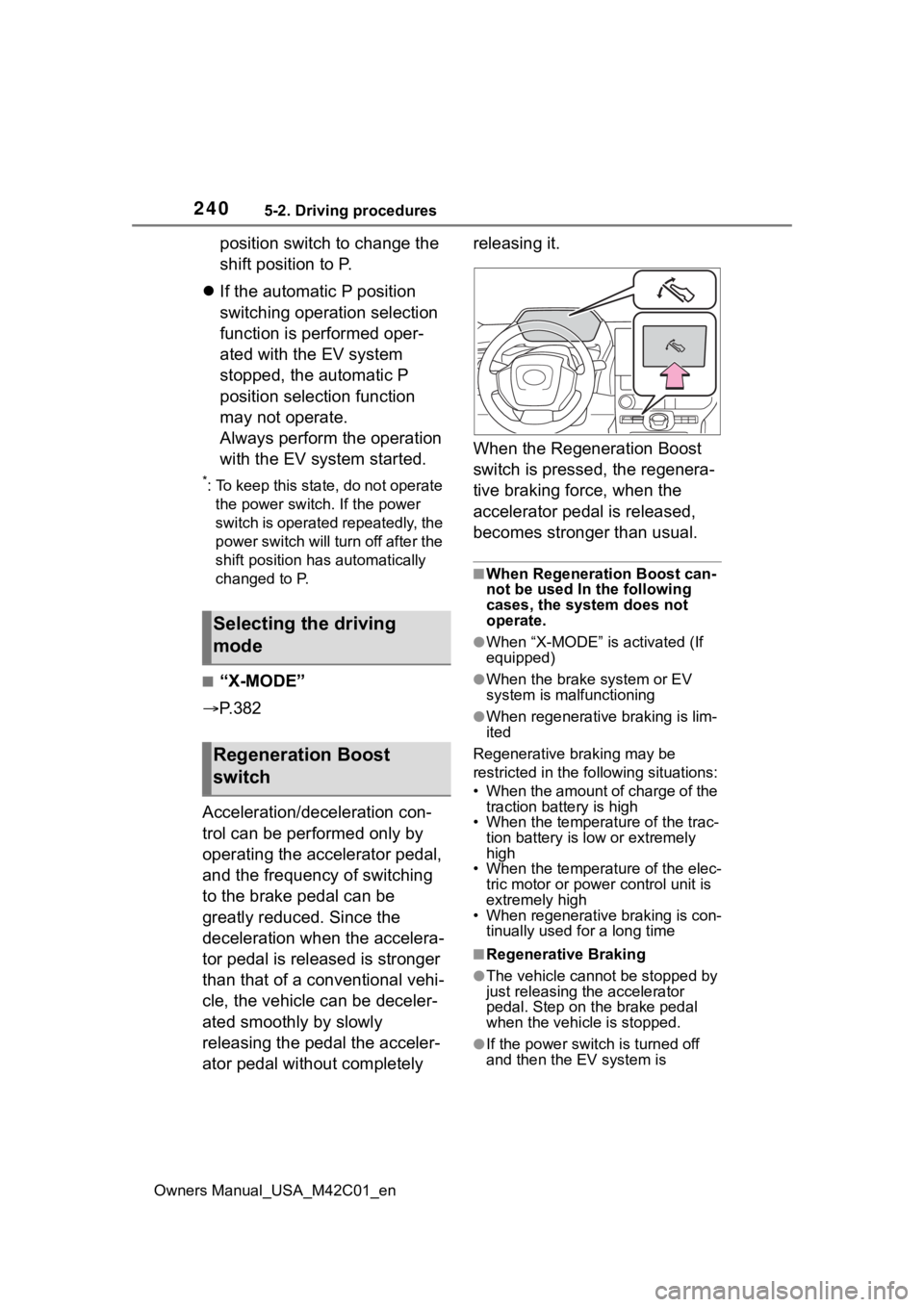
When the Regeneration Boost
switch is pressed, the regenera-
tive braking force, when the
accelerator pedal is released,
becomes stronger than usual.
■When Regeneration Boost can-
not be used In the following
cases, the system does not
operate.
●When “X-MODE” is activated (If
equipped)
●When the brake
system or EV
system is malfunctioning
●When regenerative braking is lim-
ited
Regenerative braking may be
restricted in the fo llowing situations:
• When the amount of charge of the traction battery is high
• When the temperature of the trac-
tion battery is low or extremely
high
• When the temperature of the elec-
tric motor or powe r control unit is
extremely high
• When regenerative braking is con- tinually used for a long time
■Regenerative Braking
●The vehicle cannot be stopped by
just releasing the accelerator
pedal. Step on the brake pedal
when the vehicle is stopped.
●If the power switch is turned off
and then the EV system is
Selecting the driving
mode
Regeneration Boost
switch
Page 242 of 628
2425-2. Driving procedures
Owners Manual_USA_M42C01_en
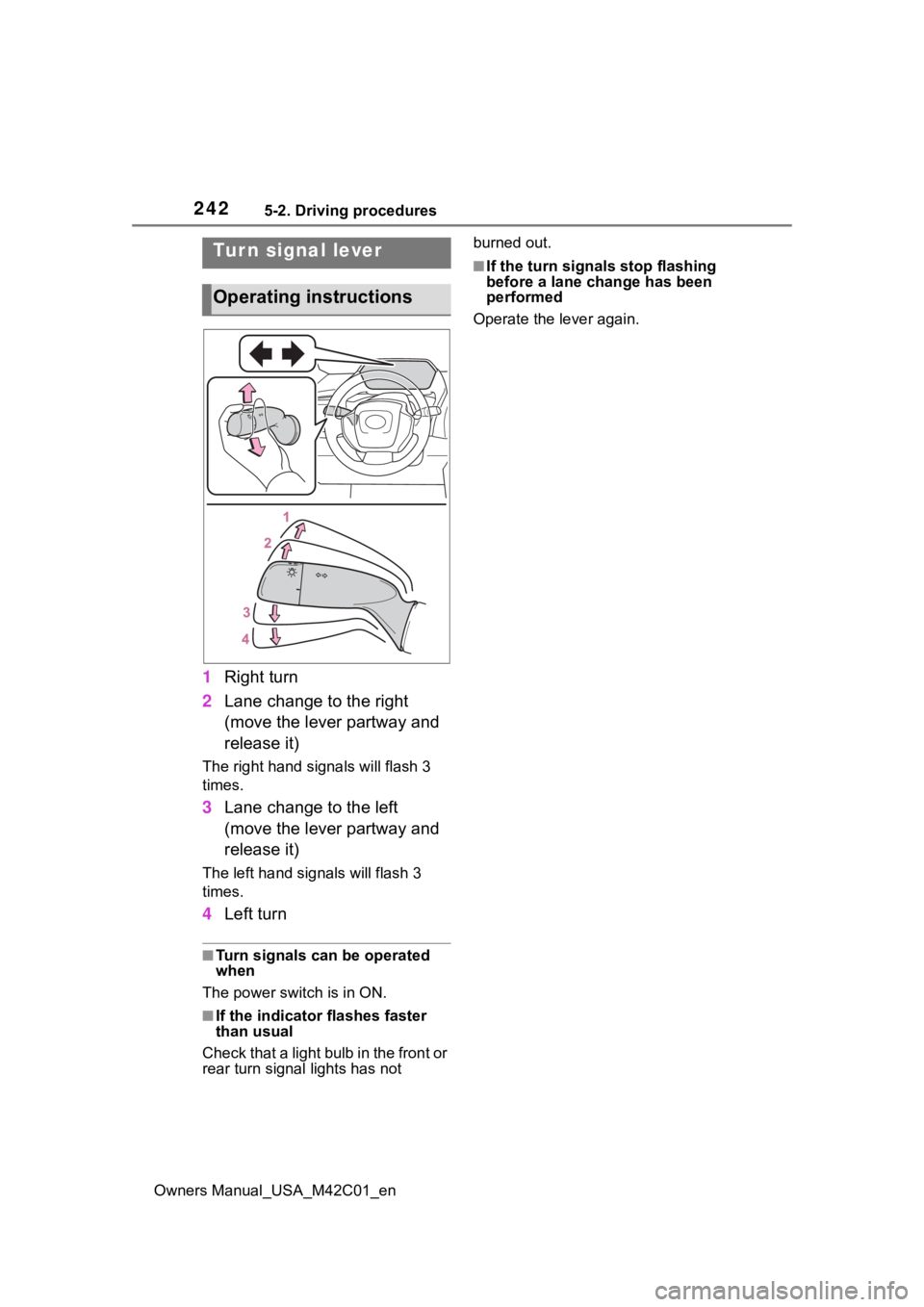
1Right turn
2 Lane change to the right
(move the lever partway and
release it)
The right hand signals will flash 3
times.
3Lane change to the left
(move the lever partway and
release it)
The left hand signals will flash 3
times.
4Left turn
■Turn signals can be operated
when
The power swit ch is in ON.
■If the indicator flashes faster
than usual
Check that a light bulb in the front or
rear turn signal lights has not burned out.
■If the turn signals stop flashing
before a lane change has been
performed
Operate the lever again.Tur n signal lever
Operating instructions
Page 249 of 628
2495-3. Operating the lights and wipers
Owners Manual_USA_M42C01_en
5
Driving
■Automatic light off system
●When the headlights are on: The
lights turn off 30 seconds after the
power switch is turned to ACC or
OFF and a door is opened and
closed. (The lights turn off immedi-
ately if on the key is
pressed after all the doors are
closed.)
●When only the tail lights are on:
The tail lights tu rn off automati-
cally if the power switch is turned
to ACC or OFF and the driver’s
door is opened.
To turn the lights on again, turn the
power switch to ON, or turn the light
switch to the or position
once and then back to or
position.
■Light reminder buzzer
A buzzer sounds when the power
switch is turned to ACC or OFF and
the driver’s door is opened while the
lights are turned on.
■Automatic headlight leveling
system
The level of the headlights is auto-
matically adjusted according to the
number of passengers and the load-
ing condition of the vehicle to
ensure that the headlights do not
interfere with other road users.
■Windshield wiper linked head-
light illumination
When driving during daytime with
the headlight switch turned to , if the windshield wipers are used, the
headlights will turn o
n automatically
after several seconds to help
enhance the visibility of your vehi-
cle.
■12-volt battery-saving function
In order to prevent the 12-volt bat-
tery of the vehicle from discharging,
if the headlights and/or tail lights are
on when the power switch is turned
to OFF, the battery saving function
will operate and au tomatically turn
off all the lights af ter approximately
20 minutes.
When any of the following are per-
formed, the 12-volt battery-saving
function is canceled once and then
reactivated. All the lights will turn off
automatically 20 minutes after the
12-volt battery-saving function has
been reactivated:
●When the headlight switch is oper-
ated
●When a door is opened or closed
■If “Headlight System Malfunc-
tion Visit Your Dealer” is dis-
played on the multi-information
display
The system may be malfunctioning.
Have the vehicle inspected by your
Toyota dealer.
■Customization
Settings (e.g. light sensor sensitiv-
ity) can be changed.
(Customizable features: P.572)
NOTICE
■To prevent 12-volt battery dis-
charge
Do not leave the lights on longer
than necessary when the EV sys-
tem is not operating.
Page 252 of 628
2525-3. Operating the lights and wipers
Owners Manual_USA_M42C01_endetect the brightness of the sur-
roundings. This may cause the
low beams to remain on or the
high beams to flash or dazzle
pedestrians or vehicles ahead. In
such a case, it is necessary to
manually change between the
high beams and low beams.
• When there are lights similar to
headlights or tail li ghts in the sur-
rounding area
• When headlights or tail lights of
vehicles ahead are turned off,
dirty, changing color, or not aimed
properly
• When the headlights are repeat- edly changing between the high
beams and low beams.
• When use of the high beams is inappropriate or when the high
beams may be flashing or daz-
zling pedestrians or other drivers.
• When the vehicle is used in an area in which vehicles travel on
the opposite side of the road of
the country for wh ich the vehicle
was designed, for example using
a vehicle designed for right-hand
traffic in a left-hand traffic area, or
vice versa
• When it is necessary to disable the system: P. 2 5 9
• Situations in which the sensors
may not operate properly: P. 2 6 3
■Temporarily reducing front
camera sensitivity
The sensitivity o f the front camera
can be temporarily reduced.
1 Turn the power switch off with
the following conditions met.
●The headlight switch is in or
position.
●The headlight switch lever is in the
low beam position.
●The Automatic High Beam switch
is on.
2 Turn the power switch to ON.
3 Within 60 seconds after perform-
ing step 2, push the headlight switch lever to the high beam
position then pull it to the original
position quickly 10 times, then
leave the lever in its original posi-
tion.
4 If the sensitivity is changed, the
Automatic High Beam indicator
will blink 3 times.
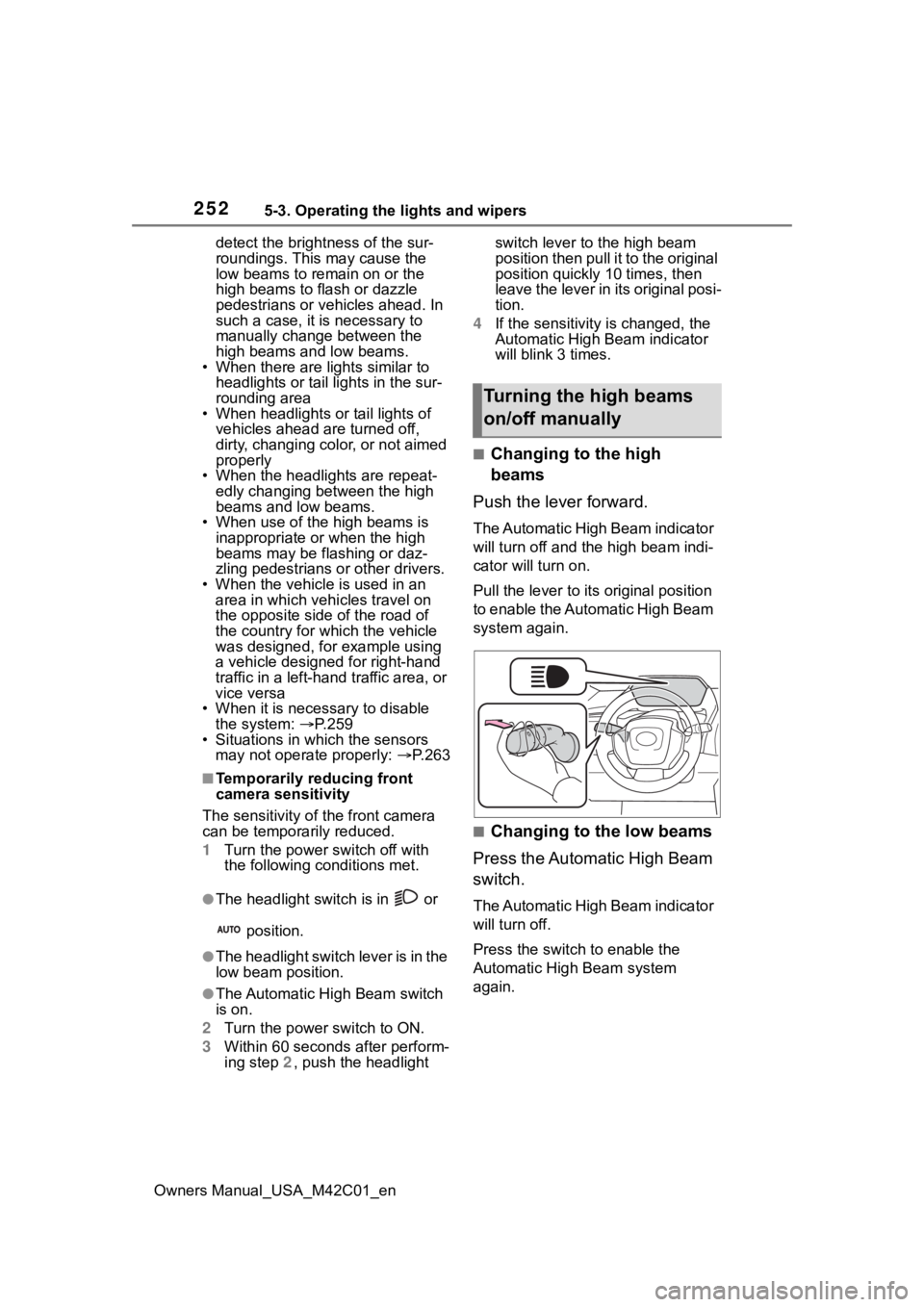
■Changing to the high
beams
Push the lever forward.
The Automatic High Beam indicator
will turn off and the high beam indi-
cator will turn on.
Pull the lever to its original position
to enable the Automatic High Beam
system again.
■Changing to the low beams
Press the Automatic High Beam
switch.
The Automatic High Beam indicator
will turn off.
Press the switch to enable the
Automatic High Beam system
again.
Turning the high beams
on/off manually
Page 276 of 628

2765-4. Using the driving support systems
Owners Manual_USA_M42C01_en
“Pre-Collision System OFF”
The pre-collision setting can
be changed on the customize
settings. ( P.572)
When the pre-collision warn-
ing timing is changed, the
emergency steering assist
timing will also be changed.
When “Later” is selected, the
emergency steering assist will
not operate in most cases.
When the dynamic radar
cruise control is operating, the
pre-collision warning will
operate at the “Earlier” timing,
regardless of the user setting.
When driving on a road with
clear lane lines with the
dynamic radar cruise control
operating, lane lines and pre-
ceding and surrounding vehi-
cles are detected using the
front camera and radar sen-
sor, and the steering wheel is
operated to maintain the vehi-
cle’s lane position.
Use the this function only on high-
ways and expressways.
If the dynamic radar cruise control
is not operating, the function will not
operate.
In situations where the lane lines
are difficult to see or are not visible,
such as when in a traffic jam, sup-
port will be provided using the path
of preceding and surrounding vehi-
cles.
If the system determines that the
steering wheel has not been oper-
ated for a certain amount of time or
the steering wheel is not being
firmly gripped, the driver will be
alerted via a display and this func-
tion will be temporarily canceled.
If the steering wheel is firmly
gripped, the func tion will begin
operating again.
LTA (Lane Tracing
Assist)
LTA functions
Page 278 of 628
2785-4. Using the driving support systems
Owners Manual_USA_M42C01_enthe following cond
itions are met:
●The LTA system detects lane lines
or the path of preceding or sur-
rounding vehicles (except when
the preceding vehicle is small,
such as a motorcycle).
●The dynamic radar cruise control
is operating.
●The lane width is approximately
10 to 13 ft. (3 to 4 m).
●The turn signal le ver is not being
operated.
●The vehicle is not being driven
around a sharp curve.
●The vehicle is not accelerating or
decelerating more than a certain
amount.
●The steering wheel is not being
turned with a large force.
●The hands off steering wheel
warning ( P.278) is not operat-
ing.
●The vehicle is being driven in the
center of a lane.
■Temporary cancelation of func-
tions
●When the operating conditions are
no longer met, a function may be
temporarily canceled. However,
when the operation conditions are
met again, operation of the func-
tion will automatically be restored.
( P.277)
●If the operating conditions of a
function are no longer met while
the function is operating, a buzzer
may sound to indicate that the
function has been temporarily
canceled.
●The steering assist operation of
the function can be overridden by
the steering wheel operation of
the driver.
■Lane departure warning func-
tion when the LTA is operating
●Even if the LDA warning method is
changed to vibration of the steer-
ing wheel, if the vehicle deviates from the lane while the LTA is
operating, the warning buzzer will
sound to aler
t the driver.
●If steering wheel operation equiv-
alent to that necessary for a lane
change is detected, the system
will determine the vehicle is not
deviating from the lane and the
warning will not operate.
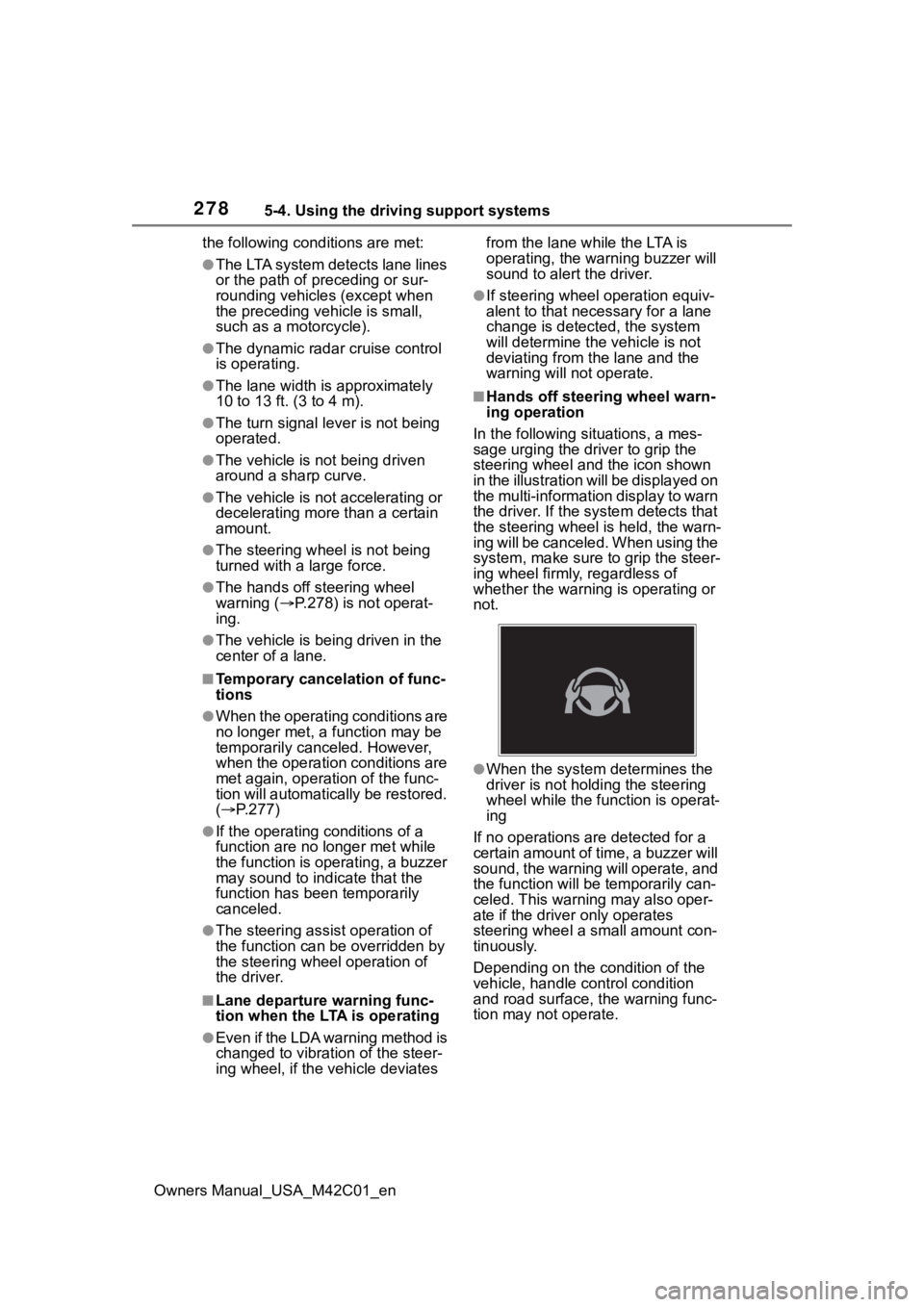
■Hands off steering wheel warn-
ing operation
In the following si tuations, a mes-
sage urging the driver to grip the
steering wheel and the icon shown
in the illustration will be displayed on
the multi-information display to warn
the driver. If the system detects that
the steering wheel is held, the warn-
ing will be canceled. When using the
system, make sure to grip the steer-
ing wheel firmly, regardless of
whether the warning is operating or
not.
●When the system determines the
driver is not hold ing the steering
wheel while the function is operat-
ing
If no operations are detected for a
certain amount of time, a buzzer will
sound, the warning will operate, and
the function will be temporarily can-
celed. This warnin g may also oper-
ate if the driver only operates
steering wheel a small amount con-
tinuously.
Depending on the condition of the
vehicle, handle control condition
and road surface, t he warning func-
tion may not operate.