ignition SUBARU TRIBECA 2009 1.G Service Workshop Manual
[x] Cancel search | Manufacturer: SUBARU, Model Year: 2009, Model line: TRIBECA, Model: SUBARU TRIBECA 2009 1.GPages: 2453, PDF Size: 46.32 MB
Page 198 of 2453
ET-12
Control Panel
ENTERTAINMENT
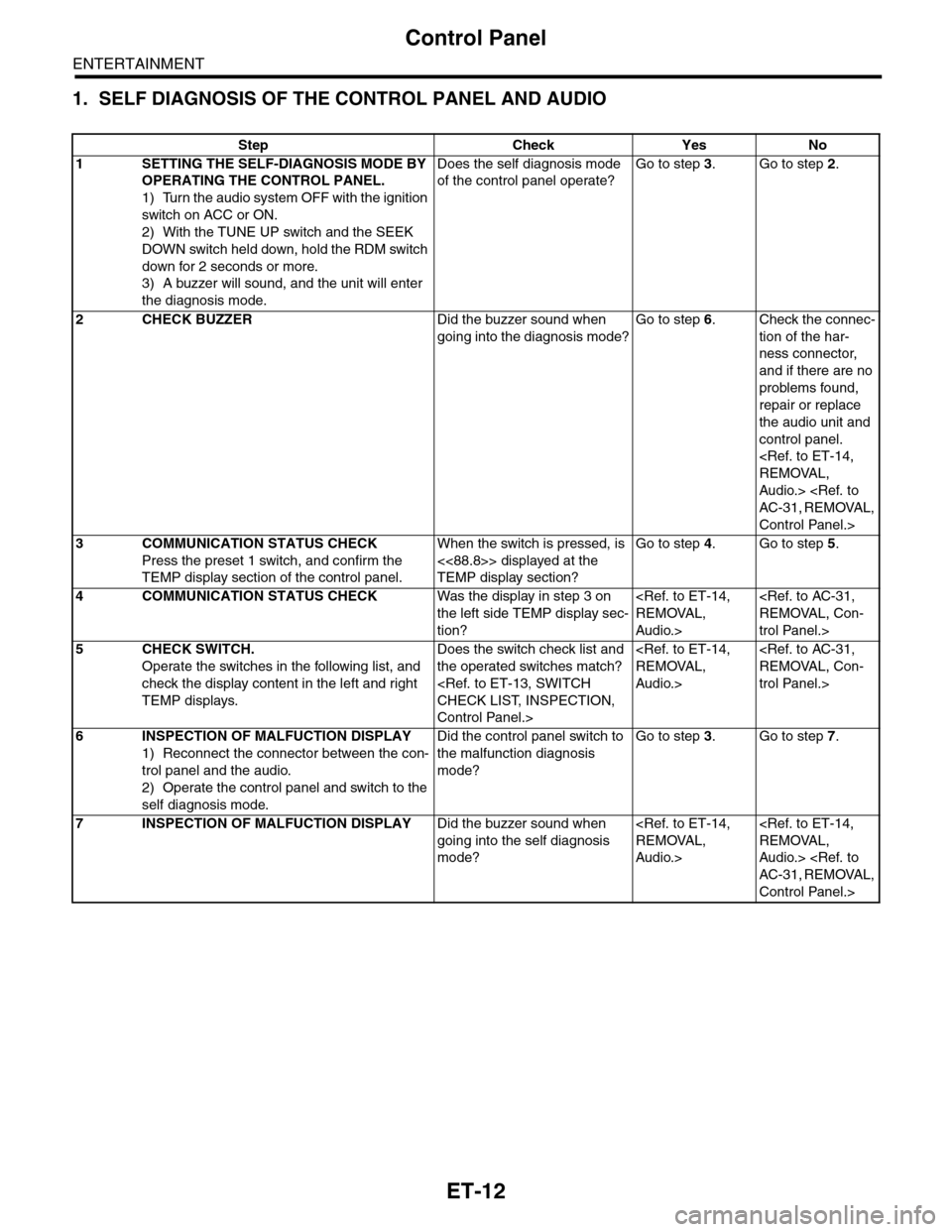
1. SELF DIAGNOSIS OF THE CONTROL PANEL AND AUDIO
Step Check Yes No
1SETTING THE SELF-DIAGNOSIS MODE BY
OPERATING THE CONTROL PANEL.
1) Turn the audio system OFF with the ignition
switch on ACC or ON.
2) With the TUNE UP switch and the SEEK
DOWN switch held down, hold the RDM switch
down for 2 seconds or more.
3) A buzzer will sound, and the unit will enter
the diagnosis mode.
Does the self diagnosis mode
of the control panel operate?
Go to step 3.Go to step 2.
2CHECK BUZZERDid the buzzer sound when
going into the diagnosis mode?
Go to step 6.Check the connec-
tion of the har-
ness connector,
and if there are no
problems found,
repair or replace
the audio unit and
control panel.
Audio.>
Control Panel.>
3COMMUNICATION STATUS CHECK
Press the preset 1 switch, and confirm the
TEMP display section of the control panel.
When the switch is pressed, is
<<88.8>> displayed at the
TEMP display section?
Go to step 4.Go to step 5.
4COMMUNICATION STATUS CHECKWas the display in step 3 on
the left side TEMP display sec-
tion?
Audio.>
trol Panel.>
5CHECK SWITCH.
Operate the switches in the following list, and
check the display content in the left and right
TEMP displays.
Does the switch check list and
the operated switches match?
Control Panel.>
Audio.>
trol Panel.>
6INSPECTION OF MALFUCTION DISPLAY
1) Reconnect the connector between the con-
trol panel and the audio.
2) Operate the control panel and switch to the
self diagnosis mode.
Did the control panel switch to
the malfunction diagnosis
mode?
Go to step 3.Go to step 7.
7INSPECTION OF MALFUCTION DISPLAYDid the buzzer sound when
going into the self diagnosis
mode?
Audio.>
Audio.>
Control Panel.>
Page 320 of 2453
GW-25
Rear Window Defogger
GLASS/WINDOWS/MIRRORS
17.Rear Window Defogger
A: INSPECTION
1. CHECK WITH SUBARU SELECT MONITOR
CAUTION:
Check that the rear window defogger timer is in initial setting or customize setting before performing
inspection.
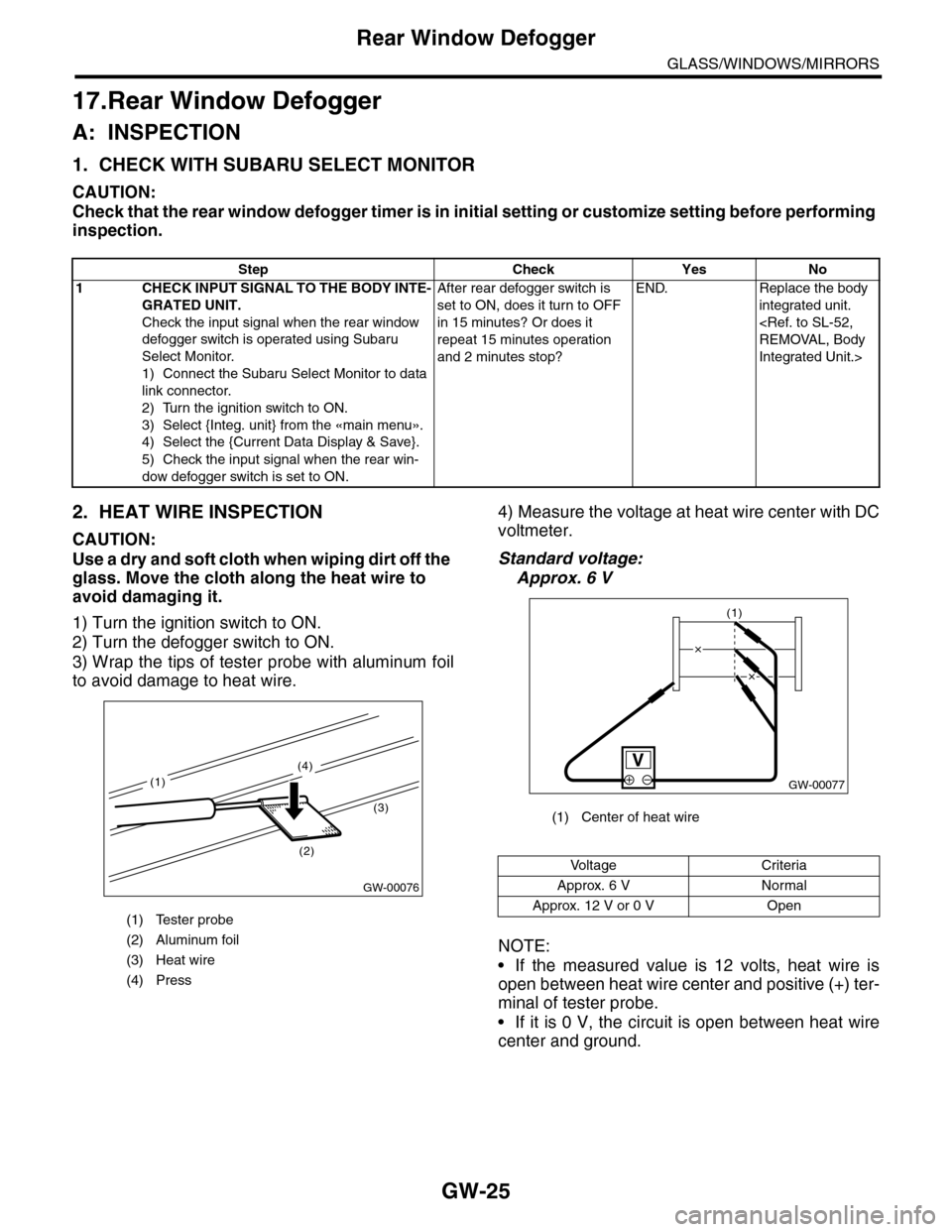
2. HEAT WIRE INSPECTION
CAUTION:
Use a dry and soft cloth when wiping dirt off the
glass. Move the cloth along the heat wire to
avoid damaging it.
1) Turn the ignition switch to ON.
2) Turn the defogger switch to ON.
3) Wrap the tips of tester probe with aluminum foil
to avoid damage to heat wire.
4) Measure the voltage at heat wire center with DC
voltmeter.
Standard voltage:
Approx. 6 V
NOTE:
•If the measured value is 12 volts, heat wire is
open between heat wire center and positive (+) ter-
minal of tester probe.
•If it is 0 V, the circuit is open between heat wire
center and ground.
Step Check Yes No
1CHECK INPUT SIGNAL TO THE BODY INTE-
GRATED UNIT.
Check the input signal when the rear window
defogger switch is operated using Subaru
Select Monitor.
1) Connect the Subaru Select Monitor to data
link connector.
2) Turn the ignition switch to ON.
3) Select {Integ. unit} from the «main menu».
4) Select the {Current Data Display & Save}.
5) Check the input signal when the rear win-
dow defogger switch is set to ON.
After rear defogger switch is
set to ON, does it turn to OFF
in 15 minutes? Or does it
repeat 15 minutes operation
and 2 minutes stop?
END. Replace the body
integrated unit.
Integrated Unit.>
(1) Tester probe
(2) Aluminum foil
(3) Heat wire
(4) Press
GW-00076
(2)
(3)
(4)
(1)
(1) Center of heat wire
Vo l t a g e C r i t e r i a
Approx. 6 V Normal
Approx. 12 V or 0 V Open
GW-00077
(1)
Page 326 of 2453
GW-31
Wiper Deicer Switch
GLASS/WINDOWS/MIRRORS
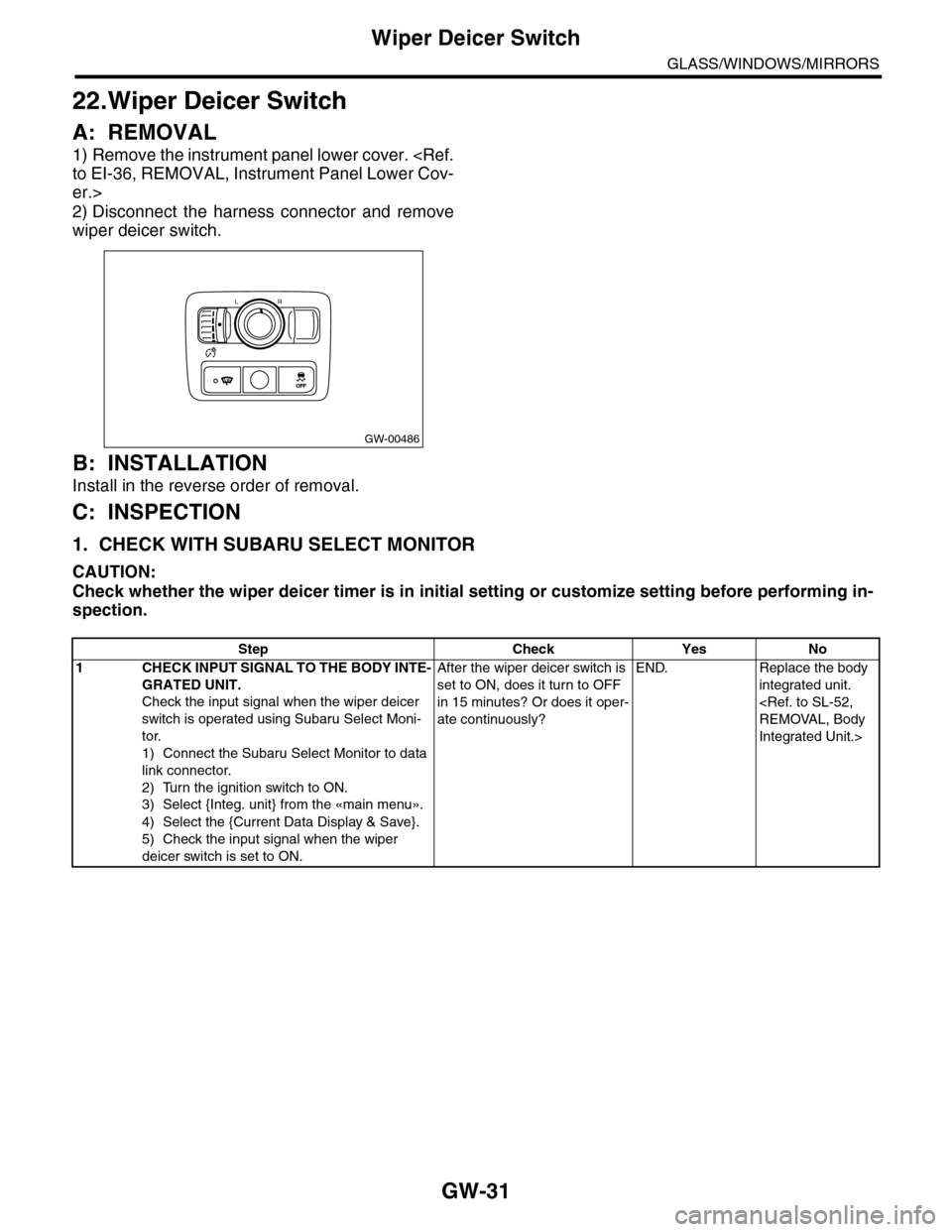
22.Wiper Deicer Switch
A: REMOVAL
1) Remove the instrument panel lower cover.
er.>
2) Disconnect the harness connector and remove
wiper deicer switch.
B: INSTALLATION
Install in the reverse order of removal.
C: INSPECTION
1. CHECK WITH SUBARU SELECT MONITOR
CAUTION:
Check whether the wiper deicer timer is in initial setting or customize setting before performing in-
spection.
GW-00486
LR
OFFOFF
Step Check Yes No
1CHECK INPUT SIGNAL TO THE BODY INTE-
GRATED UNIT.
Check the input signal when the wiper deicer
switch is operated using Subaru Select Moni-
tor.
1) Connect the Subaru Select Monitor to data
link connector.
2) Turn the ignition switch to ON.
3) Select {Integ. unit} from the «main menu».
4) Select the {Current Data Display & Save}.
5) Check the input signal when the wiper
deicer switch is set to ON.
After the wiper deicer switch is
set to ON, does it turn to OFF
in 15 minutes? Or does it oper-
ate continuously?
END. Replace the body
integrated unit.
Integrated Unit.>
Page 348 of 2453
AC-22
Refrigerant Charging Procedure
HVAC SYSTEM (HEATER, VENTILATOR AND A/C)
7) Note the low-pressure gauge reading.
8) Leave it at least 5 minutes, and then check the
low-pressure gauge reading for any changes.
If the gauge indicator shows near zero point, it is a
sign of leakage. Check pipe connector points, re-
pair them, and make sure there is no leakage.
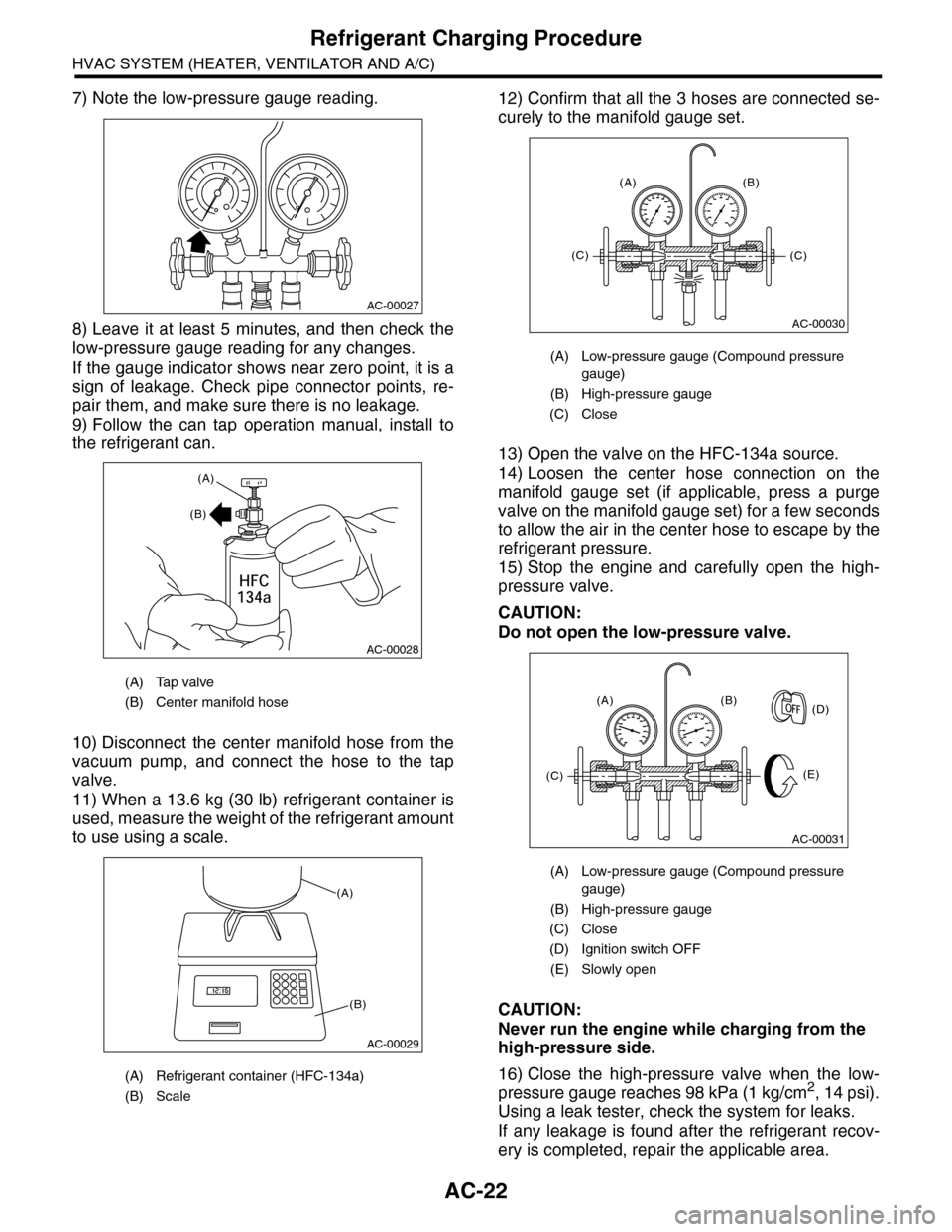
9) Follow the can tap operation manual, install to
the refrigerant can.
10) Disconnect the center manifold hose from the
vacuum pump, and connect the hose to the tap
valve.
11) When a 13.6 kg (30 lb) refrigerant container is
used, measure the weight of the refrigerant amount
to use using a scale.
12) Confirm that all the 3 hoses are connected se-
curely to the manifold gauge set.
13) Open the valve on the HFC-134a source.
14) Loosen the center hose connection on the
manifold gauge set (if applicable, press a purge
valve on the manifold gauge set) for a few seconds
to allow the air in the center hose to escape by the
refrigerant pressure.
15) Stop the engine and carefully open the high-
pressure valve.
CAUTION:
Do not open the low-pressure valve.
CAUTION:
Never run the engine while charging from the
high-pressure side.
16) Close the high-pressure valve when the low-
pressure gauge reaches 98 kPa (1 kg/cm2, 14 psi).
Using a leak tester, check the system for leaks.
If any leakage is found after the refrigerant recov-
ery is completed, repair the applicable area.
(A) Tap valve
(B) Center manifold hose
(A) Refrigerant container (HFC-134a)
(B) Scale
AC-00027
AC-00028
(A)
(B)
AC-00029
(A)
(B)
(A) Low-pressure gauge (Compound pressure
gauge)
(B) High-pressure gauge
(C) Close
(A) Low-pressure gauge (Compound pressure
gauge)
(B) High-pressure gauge
(C) Close
(D) Ignition switch OFF
(E) Slowly open
AC-00030
(A) (B)
(C)(C)
AC-00031
(A) (B)
(E)
(D)
(C)
Page 350 of 2453
AC-24
Refrigerant Leak Check
HVAC SYSTEM (HEATER, VENTILATOR AND A/C)
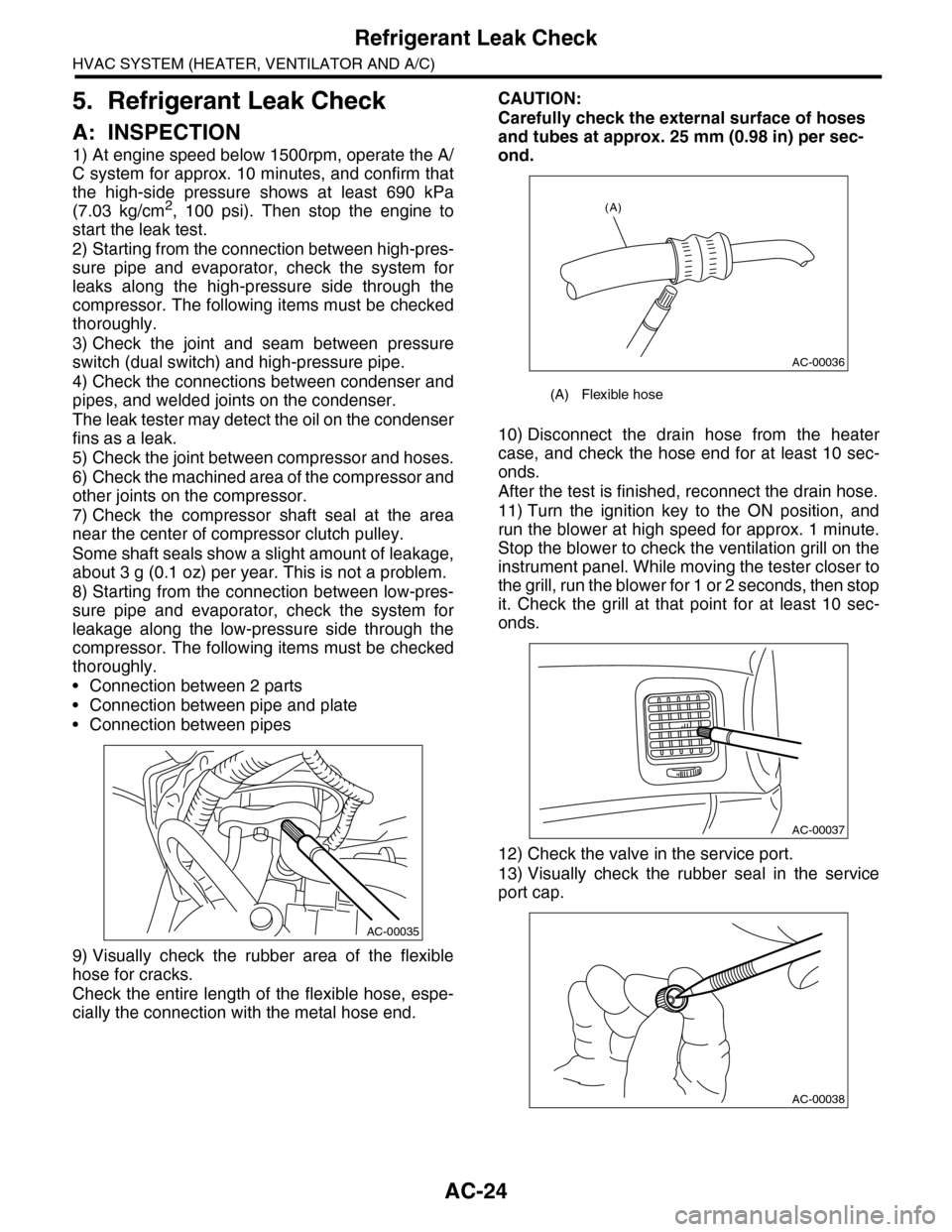
5. Refrigerant Leak Check
A: INSPECTION
1) At engine speed below 1500rpm, operate the A/
C system for approx. 10 minutes, and confirm that
the high-side pressure shows at least 690 kPa
(7.03 kg/cm2, 100 psi). Then stop the engine to
start the leak test.
2) Starting from the connection between high-pres-
sure pipe and evaporator, check the system for
leaks along the high-pressure side through the
compressor. The following items must be checked
thoroughly.
3) Check the joint and seam between pressure
switch (dual switch) and high-pressure pipe.
4) Check the connections between condenser and
pipes, and welded joints on the condenser.
The leak tester may detect the oil on the condenser
fins as a leak.
5) Check the joint between compressor and hoses.
6) Check the machined area of the compressor and
other joints on the compressor.
7) Check the compressor shaft seal at the area
near the center of compressor clutch pulley.
Some shaft seals show a slight amount of leakage,
about 3 g (0.1 oz) per year. This is not a problem.
8) Starting from the connection between low-pres-
sure pipe and evaporator, check the system for
leakage along the low-pressure side through the
compressor. The following items must be checked
thoroughly.
•Connection between 2 parts
•Connection between pipe and plate
•Connection between pipes
9) Visually check the rubber area of the flexible
hose for cracks.
Check the entire length of the flexible hose, espe-
cially the connection with the metal hose end.
CAUTION:
Carefully check the external surface of hoses
and tubes at approx. 25 mm (0.98 in) per sec-
ond.
10) Disconnect the drain hose from the heater
case, and check the hose end for at least 10 sec-
onds.
After the test is finished, reconnect the drain hose.
11) Turn the ignition key to the ON position, and
run the blower at high speed for approx. 1 minute.
Stop the blower to check the ventilation grill on the
instrument panel. While moving the tester closer to
the grill, run the blower for 1 or 2 seconds, then stop
it. Check the grill at that point for at least 10 sec-
onds.
12) Check the valve in the service port.
13) Visually check the rubber seal in the service
port cap.
AC-00035
(A) Flexible hose
AC-00036
(A)
AC-00037
AC-00038
Page 380 of 2453
AC(diag)-3
General Description
HVAC SYSTEM (AUTO A/C) (DIAGNOSTICS)
2. General Description
A: CAUTION
1) Never connect the battery in reverse polarity.
•Auto A/C control module may be destroyed in-
stantly.
2) Do not disconnect the battery terminals while the
engine is running.
•A large counter electromotive force will be gener-
ated in the generator, and this voltage may damage
electronic parts such as auto A/C control module
etc.
3) Before disconnecting the connectors of each
sensor and the auto A/C control module, be sure to
turn the ignition switch to OFF.
•Auto A/C control module may be damaged.
4) Every A/C-related part is a precision part. Do not
drop them.
5) Airbag system wiring harness is routed near the
A/C control panel and junction box.
CAUTION:
•For airbag system, yellow-colored wiring har-
ness and connectors are all used. Do not use
the electrical test equipment on these circuits.
•Be careful not to damage the airbag system
wiring harness when servicing the A/C control
panel and junction box.
B: INSPECTION
Before performing the diagnosis, check the follow-
ing items which might affect A/C system problems.
1. BATTERY
1) Measure the battery voltage and specific gravity
of electrolyte.
Standard voltage: 12 V
Specific gravity: 1.260 or more
2) Check the condition of the fuses for A/C system
power supply and other fuses.
3) Check the condition of harness and harness
connector connections.
2. ASPIRATOR HOSE
1) Turn the ignition switch to ON, and press the A/
C switch.
2) Turn the temperature control dial to maximum
hot position.
3) Turn the air flow control dial to “DEF” position.
4) Turn the fan speed control dial to 4th position.
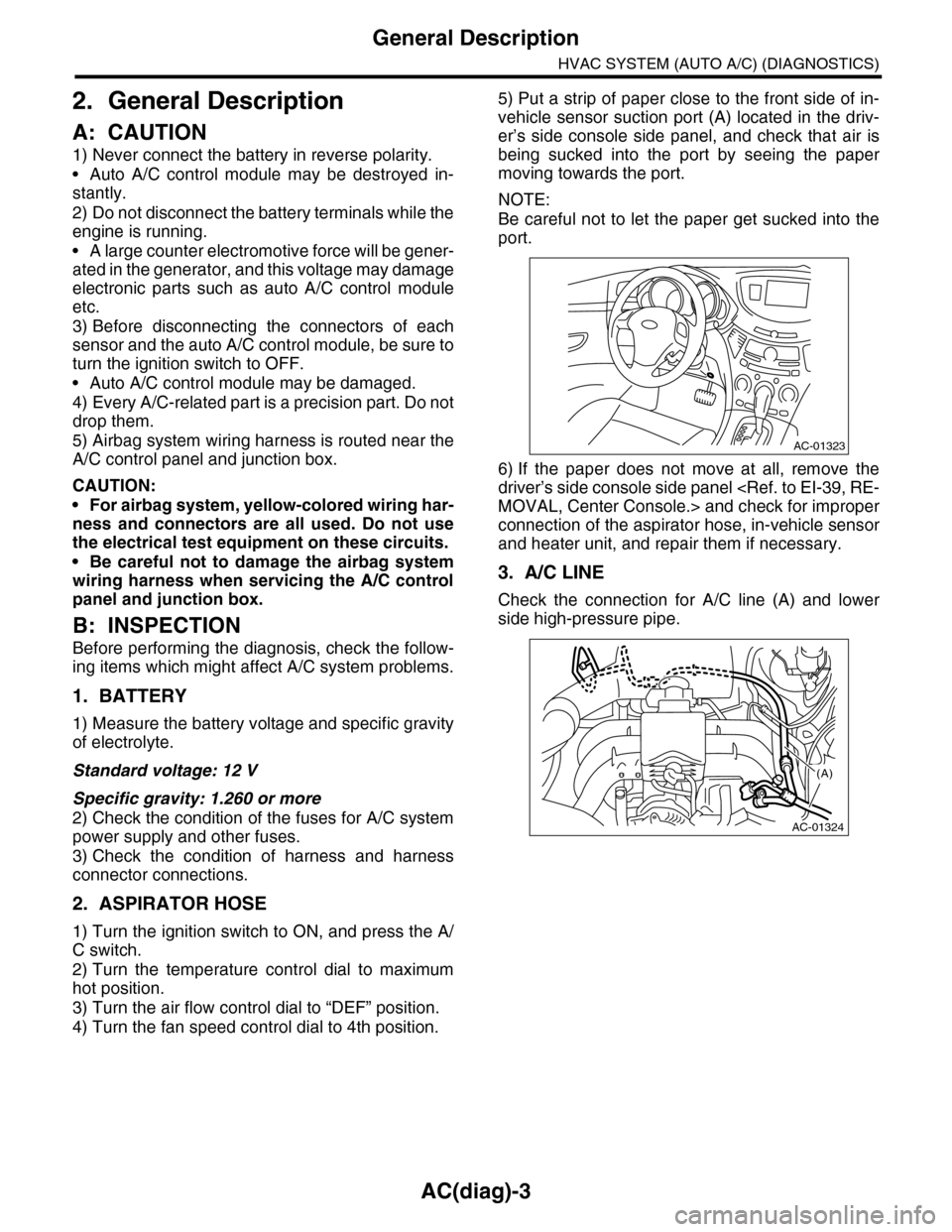
5) Put a strip of paper close to the front side of in-
vehicle sensor suction port (A) located in the driv-
er’s side console side panel, and check that air is
being sucked into the port by seeing the paper
moving towards the port.
NOTE:
Be careful not to let the paper get sucked into the
port.
6) If the paper does not move at all, remove the
driver’s side console side panel
connection of the aspirator hose, in-vehicle sensor
and heater unit, and repair them if necessary.
3. A/C LINE
Check the connection for A/C line (A) and lower
side high-pressure pipe.
AC-01323
AC-01324
(A)
Page 385 of 2453
AC(diag)-8
Auto A/C Control Module I/O Signal
HVAC SYSTEM (AUTO A/C) (DIAGNOSTICS)
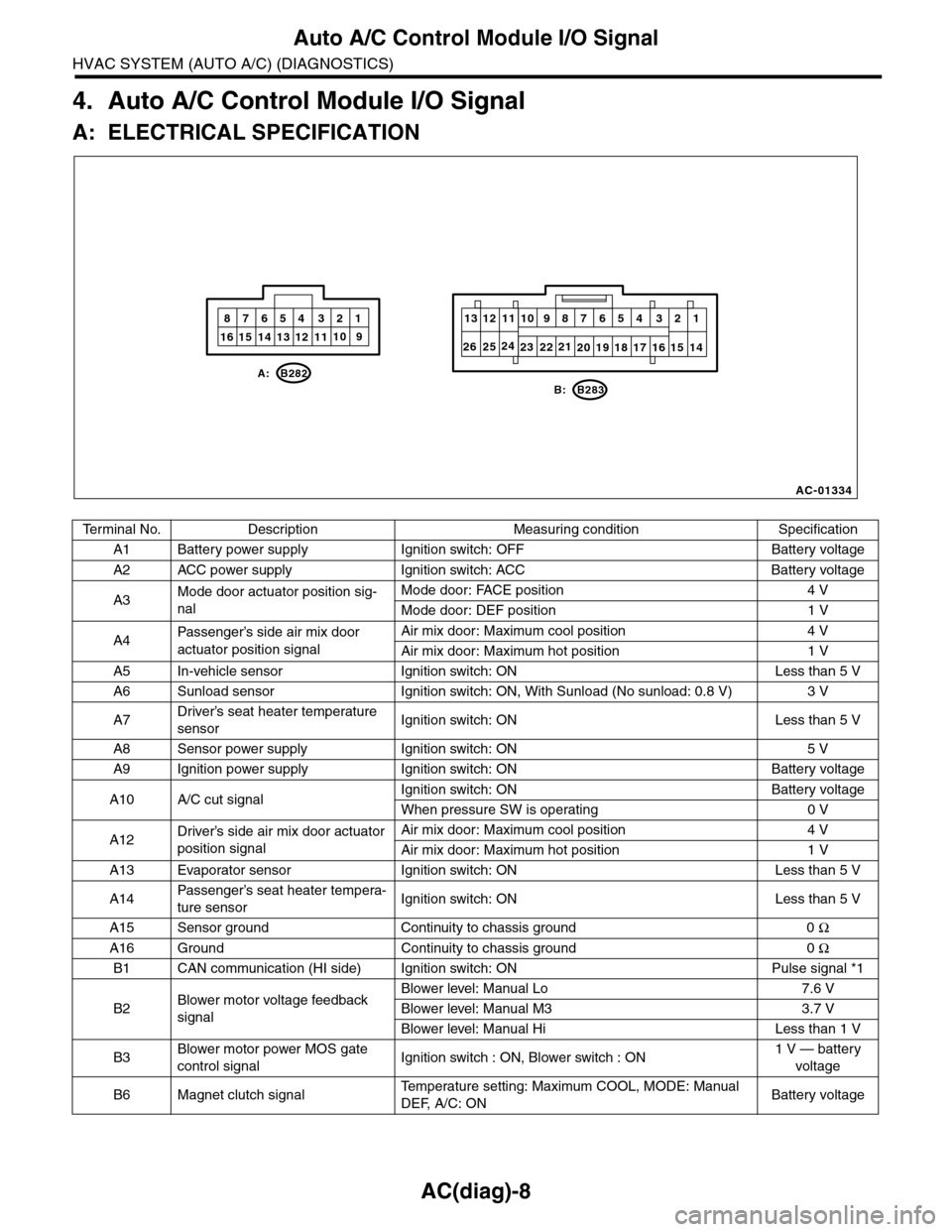
4. Auto A/C Control Module I/O Signal
A: ELECTRICAL SPECIFICATION
Te r m i n a l N o . D e s c r i p t i o n M e a s u r i n g c o n d i t i o n S p e c i f i c a t i o n
A1 Battery power supply Ignition switch: OFF Battery voltage
A2 ACC power supply Ignition switch: ACC Battery voltage
A3Mode door actuator position sig-
nal
Mode door: FACE position 4 V
Mode door: DEF position 1 V
A4Passenger’s side air mix door
actuator position signal
Air mix door: Maximum cool position 4 V
Air mix door: Maximum hot position 1 V
A5 In-vehicle sensor Ignition switch: ON Less than 5 V
A6 Sunload sensor Ignition switch: ON, With Sunload (No sunload: 0.8 V) 3 V
A7Driver’s seat heater temperature
sensorIgnition switch: ON Less than 5 V
A8 Sensor power supply Ignition switch: ON 5 V
A9 Ignition power supply Ignition switch: ON Battery voltage
A10 A/C cut signalIgnition switch: ON Battery voltage
When pressure SW is operating 0 V
A12Driver’s side air mix door actuator
position signal
Air mix door: Maximum cool position 4 V
Air mix door: Maximum hot position 1 V
A13 Evaporator sensor Ignition switch: ON Less than 5 V
A14Passenger’s seat heater tempera-
ture sensorIgnition switch: ON Less than 5 V
A15 Sensor ground Continuity to chassis ground 0 Ω
A16 Ground Continuity to chassis ground 0 Ω
B1 CAN communication (HI side) Ignition switch: ON Pulse signal *1
B2Blower motor voltage feedback
signal
Blower level: Manual Lo 7.6 V
Blower level: Manual M3 3.7 V
Blower level: Manual Hi Less than 1 V
B3Blower motor power MOS gate
control signalIgnition switch : ON, Blower switch : ON1 V — battery
voltage
B6 Magnet clutch signalTe m p e r a t u r e s e t t i n g : M a x i m u m C O O L , M O D E : M a n u a l
DEF, A/C: ONBattery voltage
AC-01334
10
20 19 18 17 16 15 14
13 12 11987654 321
1016 15 14 13 12 119
87654 321
B: B283
A: B282
232122242526
Page 386 of 2453
AC(diag)-9
Auto A/C Control Module I/O Signal
HVAC SYSTEM (AUTO A/C) (DIAGNOSTICS)
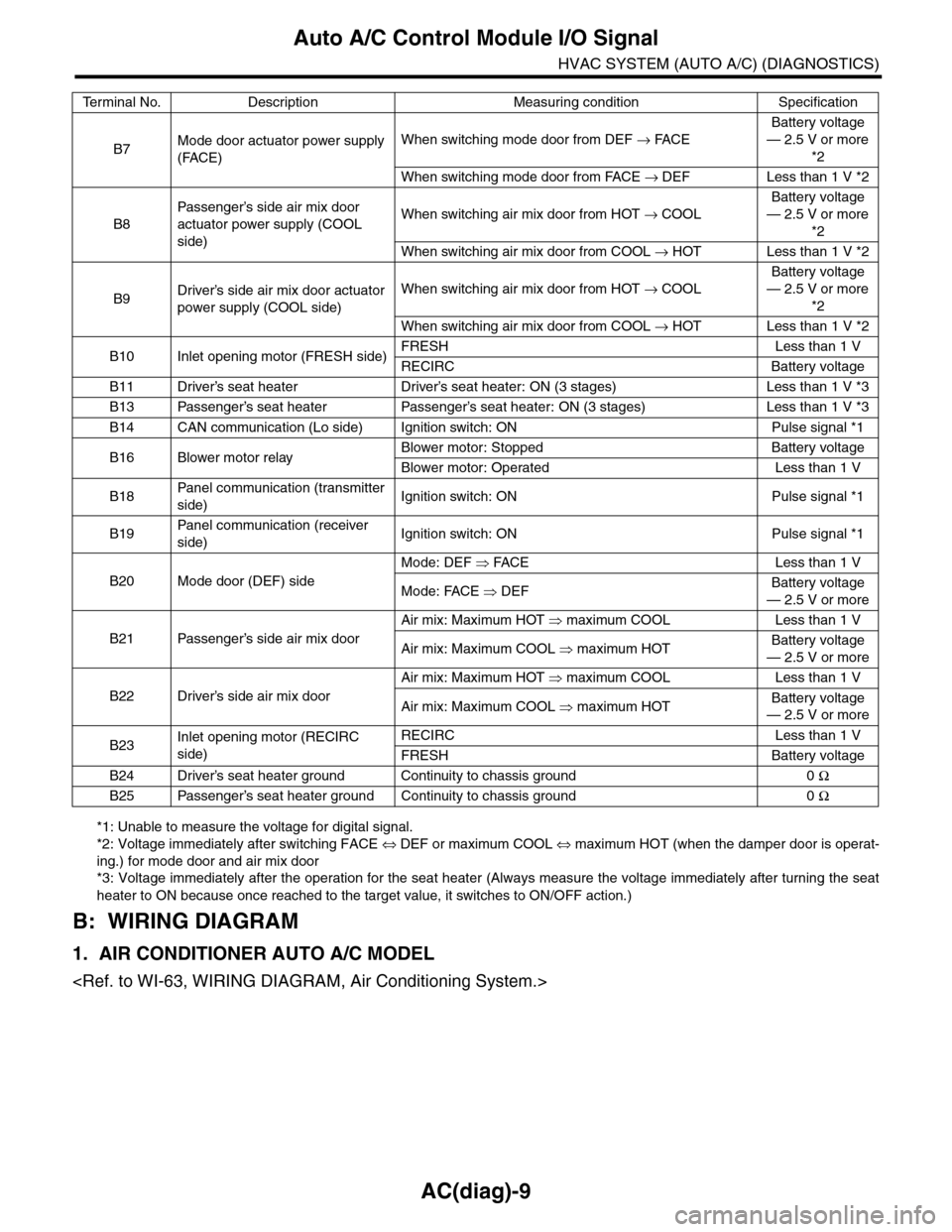
*1: Unable to measure the voltage for digital signal.
*2: Voltage immediately after switching FACE ⇔ DEF or maximum COOL ⇔ maximum HOT (when the damper door is operat-
ing.) for mode door and air mix door
*3: Voltage immediately after the operation for the seat heater (Always measure the voltage immediately after turning the seat
heater to ON because once reached to the target value, it switches to ON/OFF action.)
B: WIRING DIAGRAM
1. AIR CONDITIONER AUTO A/C MODEL
B7Mode door actuator power supply
(FACE)
When switching mode door from DEF → FACE
Battery voltage
— 2.5 V or more
*2
When switching mode door from FACE → DEF Less than 1 V *2
B8
Passenger’s side air mix door
actuator power supply (COOL
side)
When switching air mix door from HOT → COOL
Battery voltage
— 2.5 V or more
*2
When switching air mix door from COOL → HOT Less than 1 V *2
B9Driver’s side air mix door actuator
power supply (COOL side)
When switching air mix door from HOT → COOL
Battery voltage
— 2.5 V or more
*2
When switching air mix door from COOL → HOT Less than 1 V *2
B10 Inlet opening motor (FRESH side)FRESH Less than 1 V
RECIRC Battery voltage
B11 Driver’s seat heater Driver’s seat heater: ON (3 stages) Less than 1 V *3
B13 Passenger’s seat heater Passenger’s seat heater: ON (3 stages) Less than 1 V *3
B14 CAN communication (Lo side) Ignition switch: ON Pulse signal *1
B16 Blower motor relayBlower motor: Stopped Battery voltage
Blower motor: Operated Less than 1 V
B18Panel communication (transmitter
side)Ignition switch: ON Pulse signal *1
B19Panel communication (receiver
side)Ignition switch: ON Pulse signal *1
B20 Mode door (DEF) side
Mode: DEF ⇒ FACE Less than 1 V
Mode: FACE ⇒ DEFBattery voltage
— 2.5 V or more
B21 Passenger’s side air mix door
Air mix: Maximum HOT ⇒ maximum COOL Less than 1 V
Air mix: Maximum COOL ⇒ maximum HOTBattery voltage
— 2.5 V or more
B22 Driver’s side air mix door
Air mix: Maximum HOT ⇒ maximum COOL Less than 1 V
Air mix: Maximum COOL ⇒ maximum HOTBattery voltage
— 2.5 V or more
B23Inlet opening motor (RECIRC
side)
RECIRC Less than 1 V
FRESH Battery voltage
B24 Driver’s seat heater ground Continuity to chassis ground 0 Ω
B25 Passenger’s seat heater ground Continuity to chassis ground 0 Ω
Te r m i n a l N o . D e s c r i p t i o n M e a s u r i n g c o n d i t i o n S p e c i f i c a t i o n
Page 388 of 2453
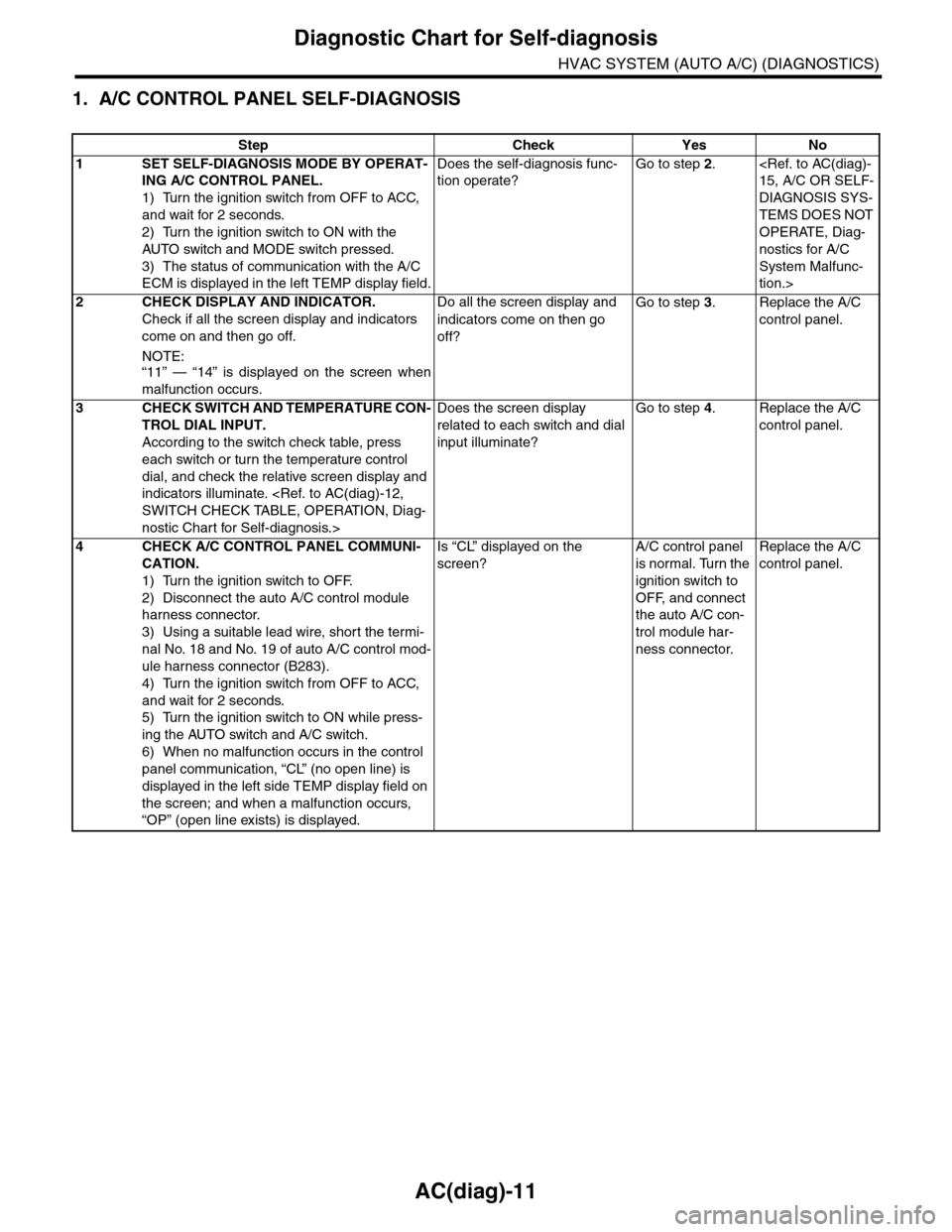
AC(diag)-11
Diagnostic Chart for Self-diagnosis
HVAC SYSTEM (AUTO A/C) (DIAGNOSTICS)
1. A/C CONTROL PANEL SELF-DIAGNOSIS
Step Check Yes No
1SET SELF-DIAGNOSIS MODE BY OPERAT-
ING A/C CONTROL PANEL.
1) Turn the ignition switch from OFF to ACC,
and wait for 2 seconds.
2) Turn the ignition switch to ON with the
AUTO switch and MODE switch pressed.
3) The status of communication with the A/C
ECM is displayed in the left TEMP display field.
Does the self-diagnosis func-
tion operate?
Go to step 2.
DIAGNOSIS SYS-
TEMS DOES NOT
OPERATE, Diag-
nostics for A/C
System Malfunc-
tion.>
2CHECK DISPLAY AND INDICATOR.
Check if all the screen display and indicators
come on and then go off.
NOTE:“11” — “14” is displayed on the screen when
malfunction occurs.
Do all the screen display and
indicators come on then go
off?
Go to step 3.Replace the A/C
control panel.
3CHECK SWITCH AND TEMPERATURE CON-
TROL DIAL INPUT.
According to the switch check table, press
each switch or turn the temperature control
dial, and check the relative screen display and
indicators illuminate.
nostic Chart for Self-diagnosis.>
Does the screen display
related to each switch and dial
input illuminate?
Go to step 4.Replace the A/C
control panel.
4CHECK A/C CONTROL PANEL COMMUNI-
CATION.
1) Turn the ignition switch to OFF.
2) Disconnect the auto A/C control module
harness connector.
3) Using a suitable lead wire, short the termi-
nal No. 18 and No. 19 of auto A/C control mod-
ule harness connector (B283).
4) Turn the ignition switch from OFF to ACC,
and wait for 2 seconds.
5) Turn the ignition switch to ON while press-
ing the AUTO switch and A/C switch.
6) When no malfunction occurs in the control
panel communication, “CL” (no open line) is
displayed in the left side TEMP display field on
the screen; and when a malfunction occurs,
“OP” (open line exists) is displayed.
Is “CL” displayed on the
screen?
A/C control panel
is normal. Turn the
ignition switch to
OFF, and connect
the auto A/C con-
trol module har-
ness connector.
Replace the A/C
control panel.
Page 390 of 2453
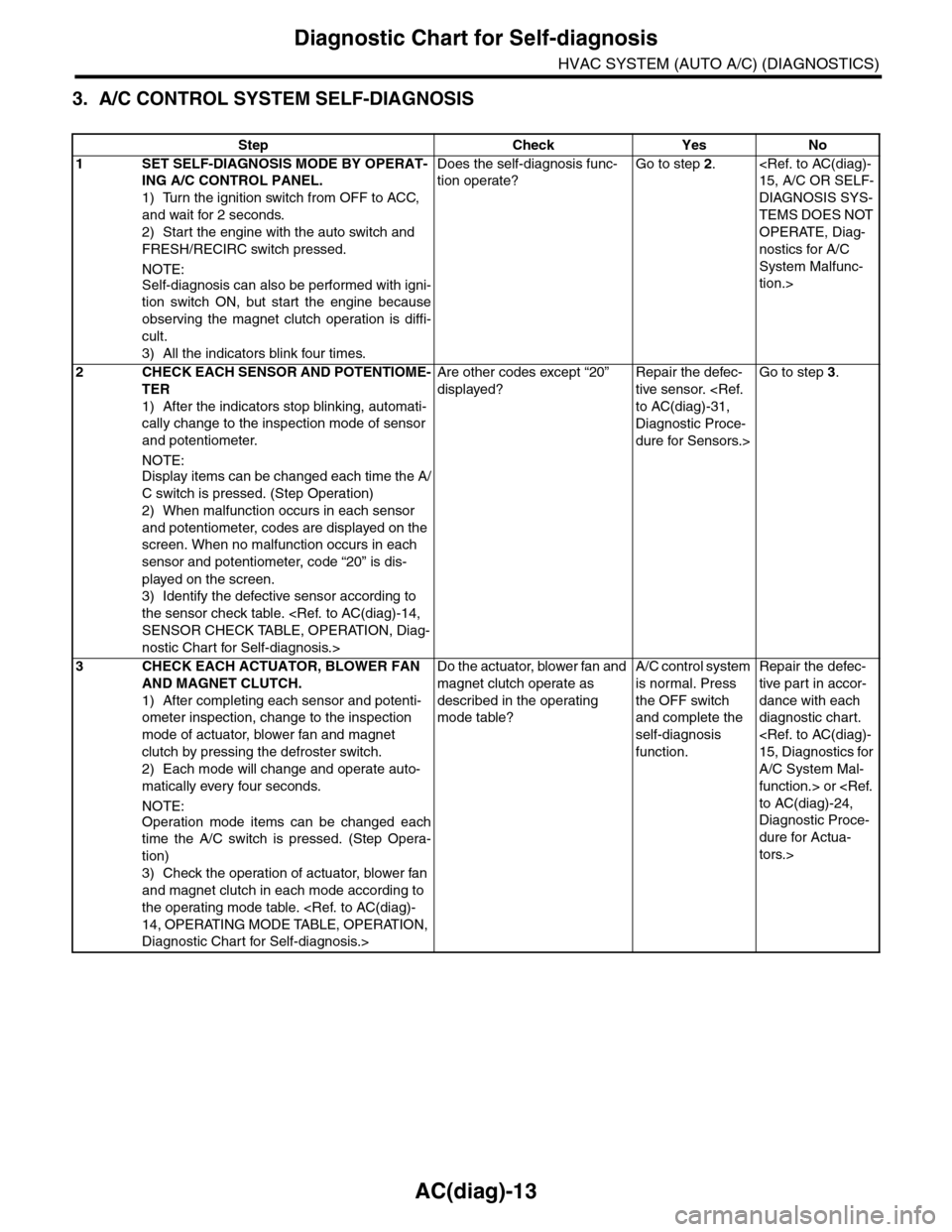
AC(diag)-13
Diagnostic Chart for Self-diagnosis
HVAC SYSTEM (AUTO A/C) (DIAGNOSTICS)
3. A/C CONTROL SYSTEM SELF-DIAGNOSIS
Step Check Yes No
1SET SELF-DIAGNOSIS MODE BY OPERAT-
ING A/C CONTROL PANEL.
1) Turn the ignition switch from OFF to ACC,
and wait for 2 seconds.
2) Start the engine with the auto switch and
FRESH/RECIRC switch pressed.
NOTE:
Self-diagnosis can also be performed with igni-
tion switch ON, but start the engine because
observing the magnet clutch operation is diffi-
cult.
3) All the indicators blink four times.
Does the self-diagnosis func-
tion operate?
Go to step 2.
DIAGNOSIS SYS-
TEMS DOES NOT
OPERATE, Diag-
nostics for A/C
System Malfunc-
tion.>
2CHECK EACH SENSOR AND POTENTIOME-
TER
1) After the indicators stop blinking, automati-
cally change to the inspection mode of sensor
and potentiometer.
NOTE:
Display items can be changed each time the A/
C switch is pressed. (Step Operation)
2) When malfunction occurs in each sensor
and potentiometer, codes are displayed on the
screen. When no malfunction occurs in each
sensor and potentiometer, code “20” is dis-
played on the screen.
3) Identify the defective sensor according to
the sensor check table.
nostic Chart for Self-diagnosis.>
Are other codes except “20”
displayed?
Repair the defec-
tive sensor.
Diagnostic Proce-
dure for Sensors.>
Go to step 3.
3CHECK EACH ACTUATOR, BLOWER FAN
AND MAGNET CLUTCH.
1) After completing each sensor and potenti-
ometer inspection, change to the inspection
mode of actuator, blower fan and magnet
clutch by pressing the defroster switch.
2) Each mode will change and operate auto-
matically every four seconds.
NOTE:
Operation mode items can be changed each
time the A/C switch is pressed. (Step Opera-
tion)
3) Check the operation of actuator, blower fan
and magnet clutch in each mode according to
the operating mode table.
Diagnostic Chart for Self-diagnosis.>
Do the actuator, blower fan and
magnet clutch operate as
described in the operating
mode table?
A/C control system
is normal. Press
the OFF switch
and complete the
self-diagnosis
function.
Repair the defec-
tive par t in accor-
dance with each
diagnostic chart.
A/C System Mal-
function.> or
Diagnostic Proce-
dure for Actua-
tors.>