ignition SUBARU TRIBECA 2009 1.G Service Workshop Manual
[x] Cancel search | Manufacturer: SUBARU, Model Year: 2009, Model line: TRIBECA, Model: SUBARU TRIBECA 2009 1.GPages: 2453, PDF Size: 46.32 MB
Page 446 of 2453
IDI-7
Combination Meter System
INSTRUMENTATION/DRIVER INFO
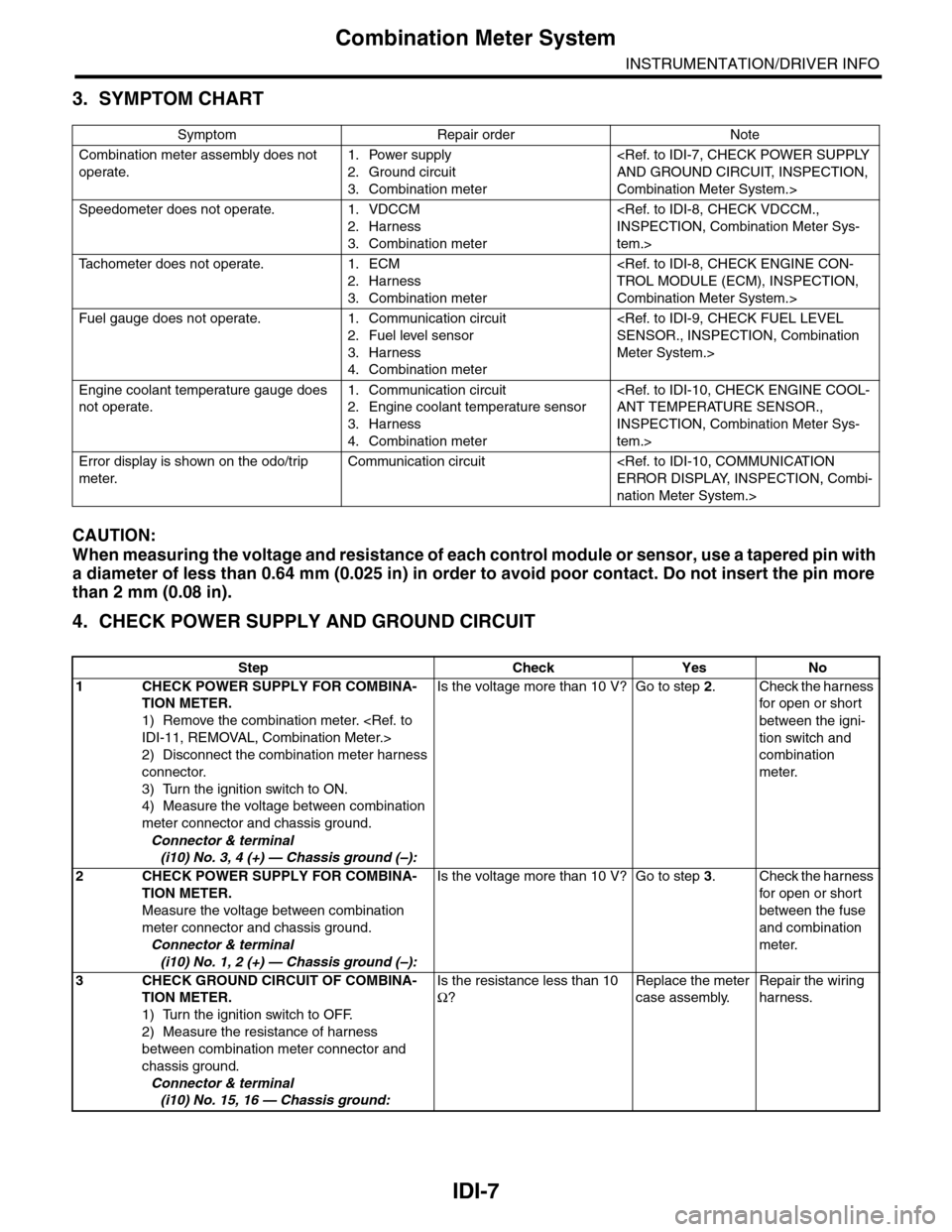
3. SYMPTOM CHART
CAUTION:
When measuring the voltage and resistance of each control module or sensor, use a tapered pin with
a diameter of less than 0.64 mm (0.025 in) in order to avoid poor contact. Do not insert the pin more
than 2 mm (0.08 in).
4. CHECK POWER SUPPLY AND GROUND CIRCUIT
Symptom Repair order Note
Combination meter assembly does not
operate.
1. Power supply
2. Ground circuit
3. Combination meter
Combination Meter System.>
Speedometer does not operate. 1. VDCCM
2. Harness
3. Combination meter
tem.>
Ta c h o m e t e r d o e s n o t o p e r a t e . 1 . E C M
2. Harness
3. Combination meter
Combination Meter System.>
Fuel gauge does not operate. 1. Communication circuit
2. Fuel level sensor
3. Harness
4. Combination meter
Meter System.>
Engine coolant temperature gauge does
not operate.
1. Communication circuit
2. Engine coolant temperature sensor
3. Harness
4. Combination meter
INSPECTION, Combination Meter Sys-
tem.>
Error display is shown on the odo/trip
meter.
Communication circuit
nation Meter System.>
Step Check Yes No
1CHECK POWER SUPPLY FOR COMBINA-
TION METER.
1) Remove the combination meter.
2) Disconnect the combination meter harness
connector.
3) Turn the ignition switch to ON.
4) Measure the voltage between combination
meter connector and chassis ground.
Connector & terminal
(i10) No. 3, 4 (+) — Chassis ground (–):
Is the voltage more than 10 V? Go to step 2.Check the harness
for open or shor t
between the igni-
tion switch and
combination
meter.
2CHECK POWER SUPPLY FOR COMBINA-
TION METER.
Measure the voltage between combination
meter connector and chassis ground.
Connector & terminal
(i10) No. 1, 2 (+) — Chassis ground (–):
Is the voltage more than 10 V? Go to step 3.Check the harness
for open or shor t
between the fuse
and combination
meter.
3CHECK GROUND CIRCUIT OF COMBINA-
TION METER.
1) Turn the ignition switch to OFF.
2) Measure the resistance of harness
between combination meter connector and
chassis ground.
Connector & terminal
(i10) No. 15, 16 — Chassis ground:
Is the resistance less than 10
Ω?
Replace the meter
case assembly.
Repair the wiring
harness.
Page 447 of 2453
IDI-8
Combination Meter System
INSTRUMENTATION/DRIVER INFO
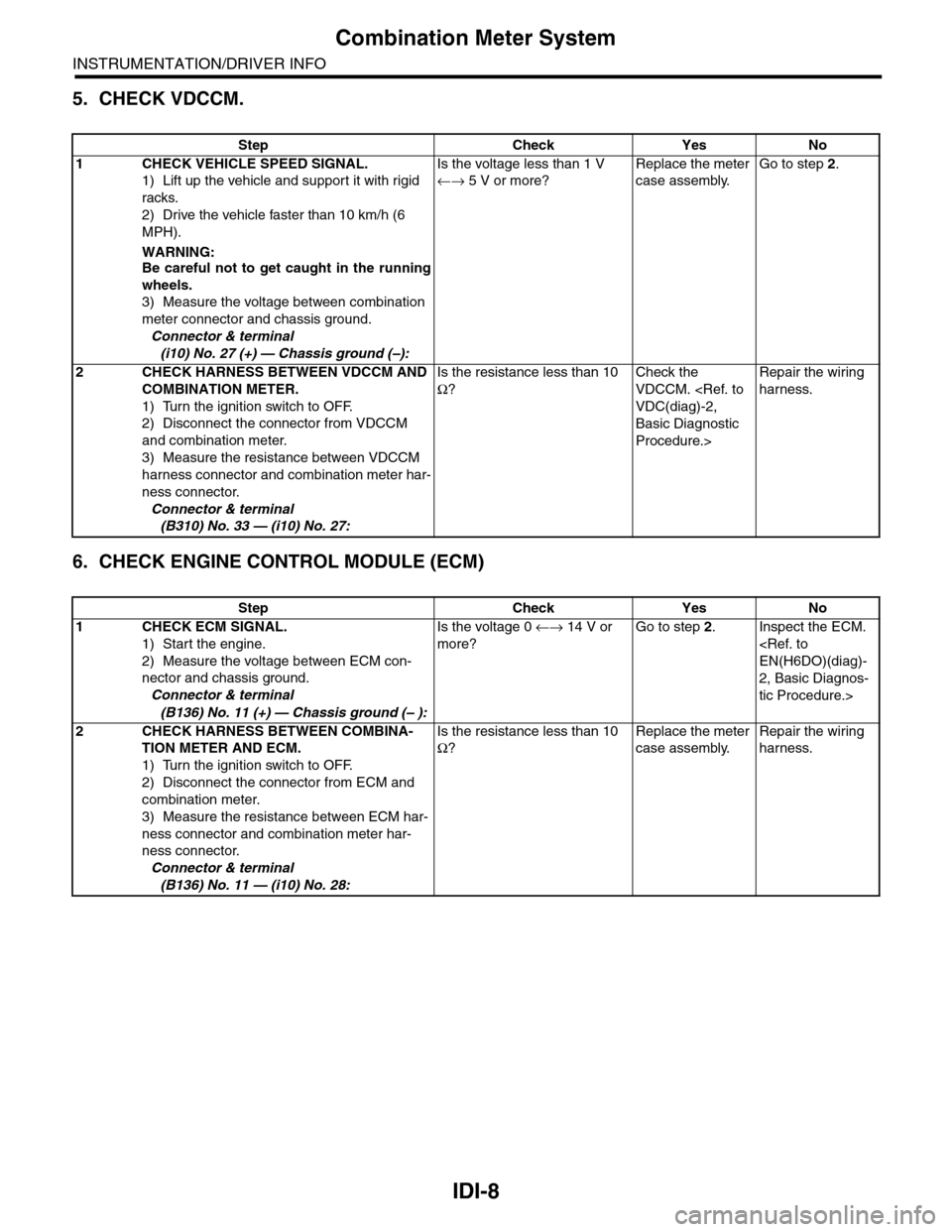
5. CHECK VDCCM.
6. CHECK ENGINE CONTROL MODULE (ECM)
Step Check Yes No
1CHECK VEHICLE SPEED SIGNAL.
1) Lift up the vehicle and support it with rigid
racks.
2) Drive the vehicle faster than 10 km/h (6
MPH).
WARNING:Be careful not to get caught in the running
wheels.
3) Measure the voltage between combination
meter connector and chassis ground.
Connector & terminal
(i10) No. 27 (+) — Chassis ground (–):
Is the voltage less than 1 V
←→ 5 V or more?
Replace the meter
case assembly.
Go to step 2.
2CHECK HARNESS BETWEEN VDCCM AND
COMBINATION METER.
1) Turn the ignition switch to OFF.
2) Disconnect the connector from VDCCM
and combination meter.
3) Measure the resistance between VDCCM
harness connector and combination meter har-
ness connector.
Connector & terminal
(B310) No. 33 — (i10) No. 27:
Is the resistance less than 10
Ω?
Check the
VDCCM.
Basic Diagnostic
Procedure.>
Repair the wiring
harness.
Step Check Yes No
1CHECK ECM SIGNAL.
1) Start the engine.
2) Measure the voltage between ECM con-
nector and chassis ground.
Connector & terminal
(B136) No. 11 (+) — Chassis ground (– ):
Is the voltage 0 ←→ 14 V or
more?
Go to step 2.Inspect the ECM.
2, Basic Diagnos-
tic Procedure.>
2CHECK HARNESS BETWEEN COMBINA-
TION METER AND ECM.
1) Turn the ignition switch to OFF.
2) Disconnect the connector from ECM and
combination meter.
3) Measure the resistance between ECM har-
ness connector and combination meter har-
ness connector.
Connector & terminal
(B136) No. 11 — (i10) No. 28:
Is the resistance less than 10
Ω?
Replace the meter
case assembly.
Repair the wiring
harness.
Page 448 of 2453
IDI-9
Combination Meter System
INSTRUMENTATION/DRIVER INFO
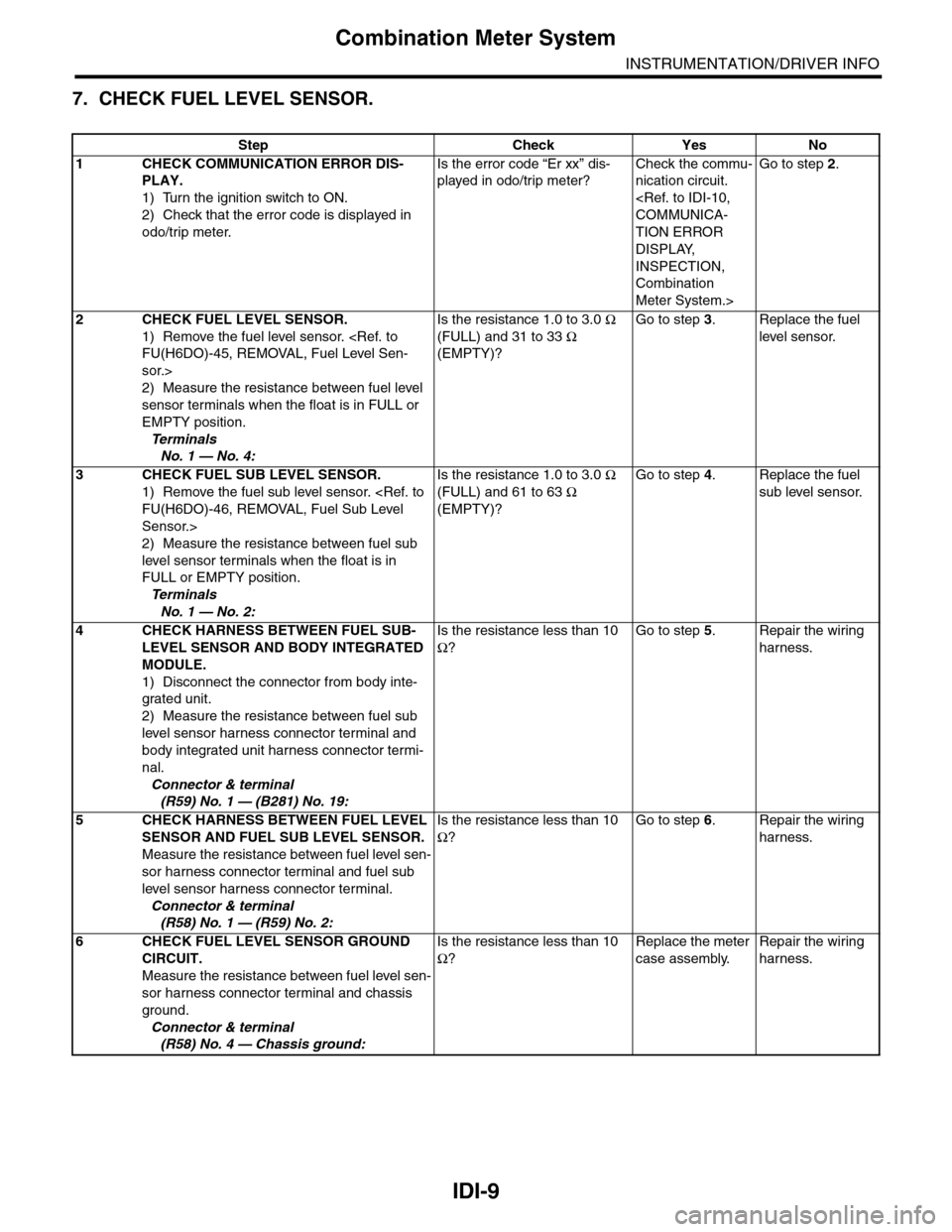
7. CHECK FUEL LEVEL SENSOR.
Step Check Yes No
1CHECK COMMUNICATION ERROR DIS-
PLAY.
1) Turn the ignition switch to ON.
2) Check that the error code is displayed in
odo/trip meter.
Is the error code “Er xx” dis-
played in odo/trip meter?
Check the commu-
nication circuit.
TION ERROR
DISPLAY,
INSPECTION,
Combination
Meter System.>
Go to step 2.
2CHECK FUEL LEVEL SENSOR.
1) Remove the fuel level sensor.
sor.>
2) Measure the resistance between fuel level
sensor terminals when the float is in FULL or
EMPTY position.
Te r m i n a l s
No. 1 — No. 4:
Is the resistance 1.0 to 3.0 Ω
(FULL) and 31 to 33 Ω
(EMPTY)?
Go to step 3.Replace the fuel
level sensor.
3CHECK FUEL SUB LEVEL SENSOR.
1) Remove the fuel sub level sensor.
Sensor.>
2) Measure the resistance between fuel sub
level sensor terminals when the float is in
FULL or EMPTY position.
Te r m i n a l s
No. 1 — No. 2:
Is the resistance 1.0 to 3.0 Ω
(FULL) and 61 to 63 Ω
(EMPTY)?
Go to step 4.Replace the fuel
sub level sensor.
4CHECK HARNESS BETWEEN FUEL SUB-
LEVEL SENSOR AND BODY INTEGRATED
MODULE.
1) Disconnect the connector from body inte-
grated unit.
2) Measure the resistance between fuel sub
level sensor harness connector terminal and
body integrated unit harness connector termi-
nal.
Connector & terminal
(R59) No. 1 — (B281) No. 19:
Is the resistance less than 10
Ω?
Go to step 5.Repair the wiring
harness.
5CHECK HARNESS BETWEEN FUEL LEVEL
SENSOR AND FUEL SUB LEVEL SENSOR.
Measure the resistance between fuel level sen-
sor harness connector terminal and fuel sub
level sensor harness connector terminal.
Connector & terminal
(R58) No. 1 — (R59) No. 2:
Is the resistance less than 10
Ω?
Go to step 6.Repair the wiring
harness.
6CHECK FUEL LEVEL SENSOR GROUND
CIRCUIT.
Measure the resistance between fuel level sen-
sor harness connector terminal and chassis
ground.
Connector & terminal
(R58) No. 4 — Chassis ground:
Is the resistance less than 10
Ω?
Replace the meter
case assembly.
Repair the wiring
harness.
Page 449 of 2453
IDI-10
Combination Meter System
INSTRUMENTATION/DRIVER INFO
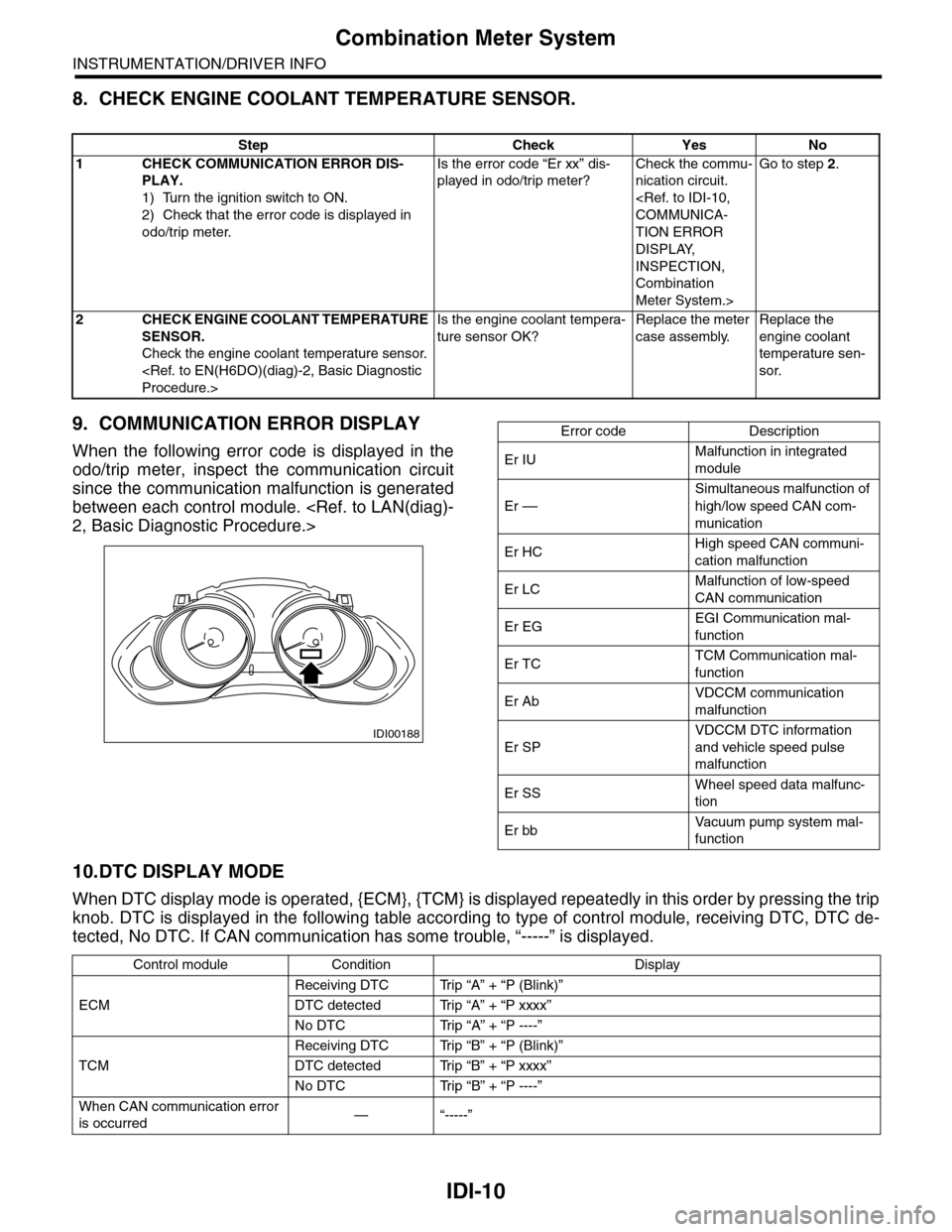
8. CHECK ENGINE COOLANT TEMPERATURE SENSOR.
9. COMMUNICATION ERROR DISPLAY
When the following error code is displayed in the
odo/trip meter, inspect the communication circuit
since the communication malfunction is generated
between each control module.
10.DTC DISPLAY MODE
When DTC display mode is operated, {ECM}, {TCM} is displayed repeatedly in this order by pressing the trip
knob. DTC is displayed in the following table according to type of control module, receiving DTC, DTC de-
tected, No DTC. If CAN communication has some trouble, “-----” is displayed.
Step Check Yes No
1CHECK COMMUNICATION ERROR DIS-
PLAY.
1) Turn the ignition switch to ON.
2) Check that the error code is displayed in
odo/trip meter.
Is the error code “Er xx” dis-
played in odo/trip meter?
Check the commu-
nication circuit.
TION ERROR
DISPLAY,
INSPECTION,
Combination
Meter System.>
Go to step 2.
2CHECK ENGINE COOLANT TEMPERATURE
SENSOR.
Check the engine coolant temperature sensor.
Is the engine coolant tempera-
ture sensor OK?
Replace the meter
case assembly.
Replace the
engine coolant
temperature sen-
sor.
IDI00188
Error code Description
Er IUMalfunction in integrated
module
Er ––
Simultaneous malfunction of
high/low speed CAN com-
munication
Er HCHigh speed CAN communi-
cation malfunction
Er LCMalfunction of low-speed
CAN communication
Er EGEGI Communication mal-
function
Er TCTCM Communication mal-
function
Er AbVDCCM communication
malfunction
Er SP
VDCCM DTC information
and vehicle speed pulse
malfunction
Er SSWheel speed data malfunc-
tion
Er bbVa c u u m p u m p s y s t e m m a l -
function
Control module Condition Display
ECM
Receiving DTC Trip “A” + “P (Blink)”
DTC detected Trip “A” + “P xxxx”
No DTC Trip “A” + “P ----”
TCM
Receiving DTC Trip “B” + “P (Blink)”
DTC detected Trip “B” + “P xxxx”
No DTC Trip “B” + “P ----”
When CAN communication error
is occurred—“-----”
Page 459 of 2453
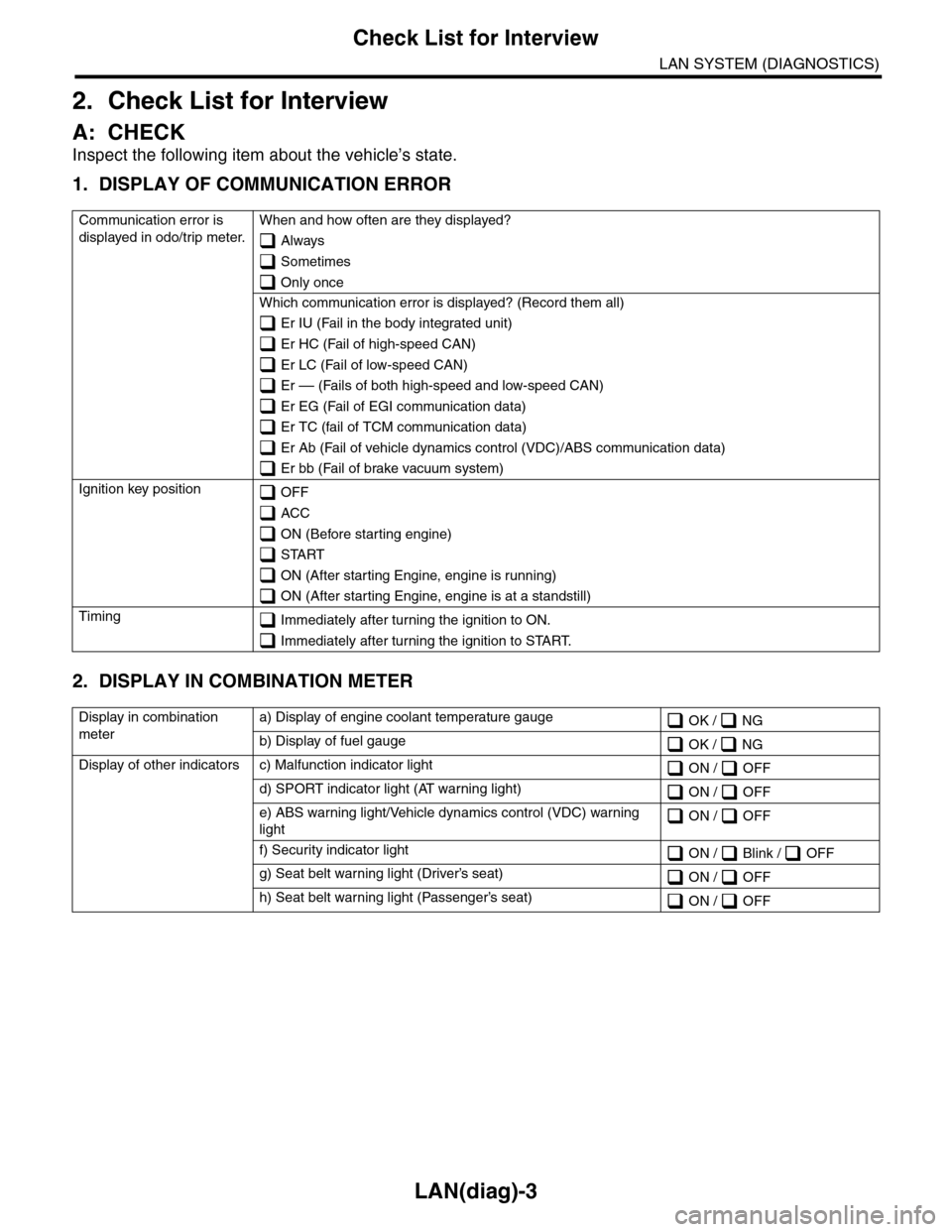
LAN(diag)-3
Check List for Interview
LAN SYSTEM (DIAGNOSTICS)
2. Check List for Interview
A: CHECK
Inspect the following item about the vehicle’s state.
1. DISPLAY OF COMMUNICATION ERROR
2. DISPLAY IN COMBINATION METER
Communication error is
displayed in odo/trip meter.
When and how often are they displayed?
Always
Sometimes
Only once
Which communication error is displayed? (Record them all)
Er IU (Fail in the body integrated unit)
Er HC (Fail of high-speed CAN)
Er LC (Fail of low-speed CAN)
Er –– (Fails of both high-speed and low-speed CAN)
Er EG (Fail of EGI communication data)
Er TC (fail of TCM communication data)
Er Ab (Fail of vehicle dynamics control (VDC)/ABS communication data)
Er bb (Fail of brake vacuum system)
Ignition key position OFF
ACC
ON (Before starting engine)
START
ON (After starting Engine, engine is running)
ON (After starting Engine, engine is at a standstill)
Timing Immediately after turning the ignition to ON.
Immediately after turning the ignition to START.
Display in combination
meter
a) Display of engine coolant temperature gauge OK / NG
b) Display of fuel gauge OK / NG
Display of other indicators c) Malfunction indicator light ON / OFF
d) SPORT indicator light (AT warning light) ON / OFF
e) ABS warning light/Vehicle dynamics control (VDC) warning
light ON / OFF
f) Security indicator light ON / Blink / OFF
g) Seat belt warning light (Driver’s seat) ON / OFF
h) Seat belt warning light (Passenger’s seat) ON / OFF
Page 465 of 2453
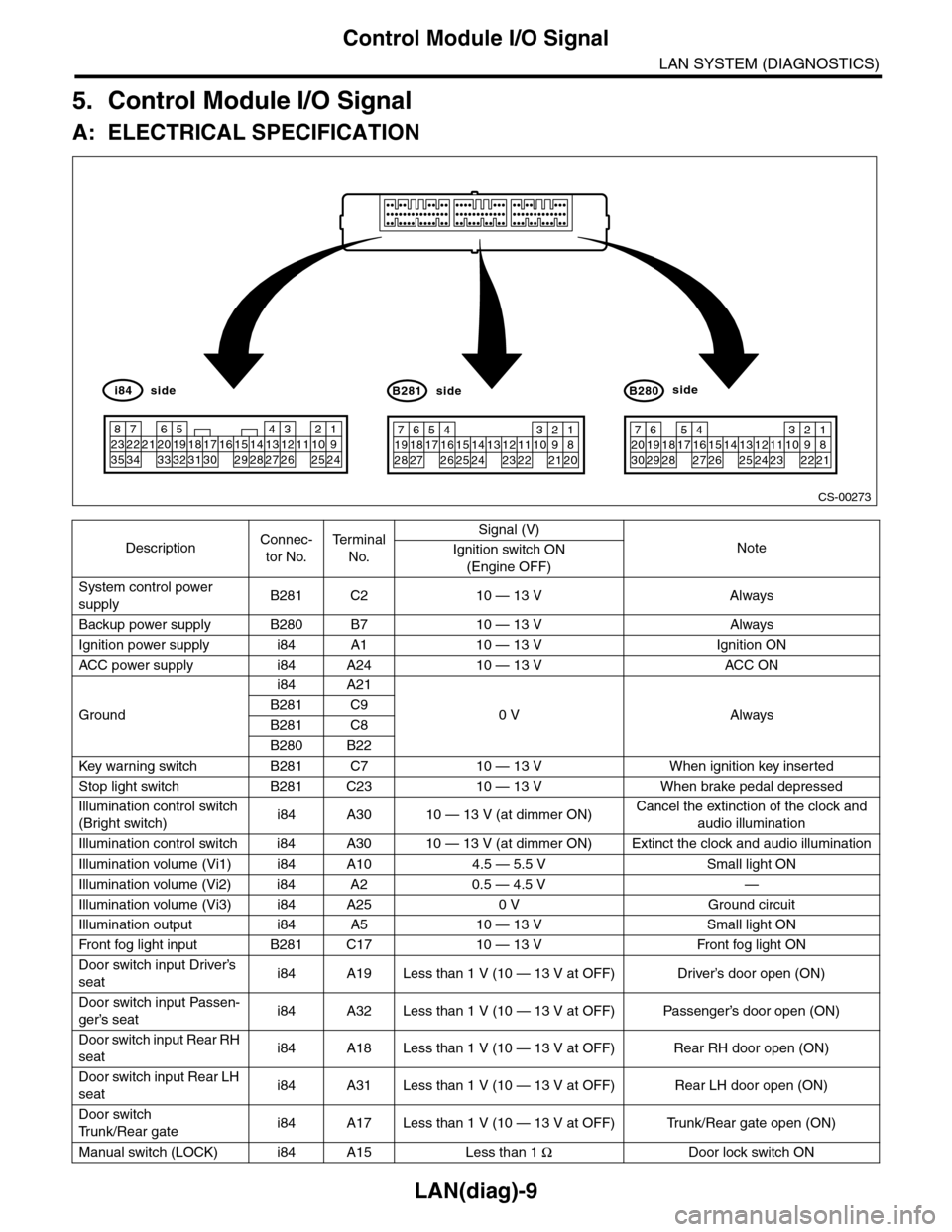
LAN(diag)-9
Control Module I/O Signal
LAN SYSTEM (DIAGNOSTICS)
5. Control Module I/O Signal
A: ELECTRICAL SPECIFICATION
DescriptionConnec-
tor No.
Te r m i n a l
No.
Signal (V)
NoteIgnition switch ON
(Engine OFF)
System control power
supplyB281 C2 10 — 13 V Always
Backup power supply B280 B7 10 — 13 V Always
Ignition power supply i84 A1 10 — 13 V Ignition ON
ACC power supply i84 A24 10 — 13 V AC C ON
Ground
i84 A21
0 V AlwaysB281 C9
B281 C8
B280 B22
Key war ning switch B281 C7 10 — 13 V When ignition key inser ted
Stop light switch B281 C23 10 — 13 V When brake pedal depressed
Illumination control switch
(Bright switch)i84 A30 10 — 13 V (at dimmer ON)Cancel the extinction of the clock and
audio illumination
Illumination control switch i84 A30 10 — 13 V (at dimmer ON) Extinct the clock and audio illumination
Illumination volume (Vi1) i84 A10 4.5 — 5.5 V Small light ON
Illumination volume (Vi2) i84 A2 0.5 — 4.5 V —
Illumination volume (Vi3) i84 A25 0 V Ground circuit
Illumination output i84 A5 10 — 13 V Small light ON
Fr o nt fog li g ht in p ut B 28 1 C1 7 1 0 — 1 3 V Fr o nt fo g l i gh t ON
Door switch input Driver’s
seati84 A19 Less than 1 V (10 — 13 V at OFF) Driver’s door open (ON)
Door switch input Passen-
ger’s seati84 A32 Less than 1 V (10 — 13 V at OFF) Passenger’s door open (ON)
Door switch input Rear RH
seati84 A18 Less than 1 V (10 — 13 V at OFF) Rear RH door open (ON)
Door switch input Rear LH
seati84 A31 Less than 1 V (10 — 13 V at OFF) Rear LH door open (ON)
Door switch
Tr u n k / R e a r g a t ei84 A17 Less than 1 V (10 — 13 V at OFF) Trunk/Rear gate open (ON)
Manual switch (LOCK) i84 A15 Less than 1 ΩDoor lock switch ON
CS-00273
71928
61827
51741626152514241312231122
3102921
1820
B281side
72030
619291828
51741627152614132512241123
3102922
1821
B280side
82335
722342162033
51932183117301615291428
41327
312261121025
1924
i84side
Page 466 of 2453
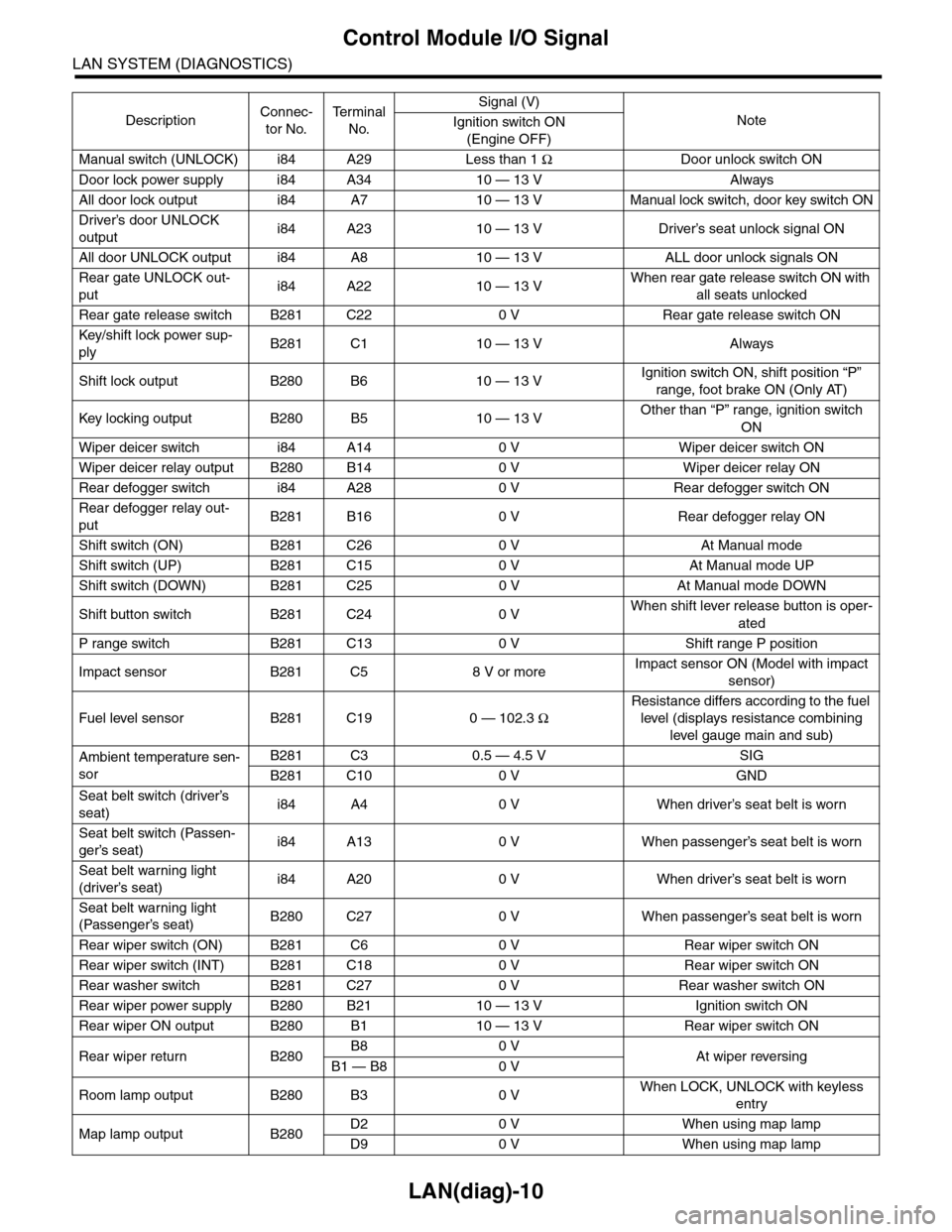
LAN(diag)-10
Control Module I/O Signal
LAN SYSTEM (DIAGNOSTICS)
Manual switch (UNLOCK) i84 A29 Less than 1 ΩDoor unlock switch ON
Door lock power supply i84 A34 10 — 13 V Always
All door lock output i84 A7 10 — 13 V Manual lock switch, door key switch ON
Driver’s door UNLOCK
outputi84 A23 10 — 13 V Driver’s seat unlock signal ON
All door UNLOCK output i84 A8 10 — 13 V ALL door unlock signals ON
Rear gate UNLOCK out-
puti84 A22 10 — 13 VWhen rear gate release switch ON with
all seats unlocked
Rear gate release switch B281 C22 0 V Rear gate release switch ON
Key/shift lock power sup-
plyB281 C1 10 — 13 V Always
Shift lock output B280 B6 10 — 13 VIgnition switch ON, shift position “P”
range, foot brake ON (Only AT)
Key locking output B280 B5 10 — 13 VOther than “P” range, ignition switch
ON
Wiper deicer switch i84 A14 0 V Wiper deicer switch ON
Wiper deicer relay output B280 B14 0 V Wiper deicer relay ON
Rear defogger switch i84 A28 0 V Rear defogger switch ON
Rear defogger relay out-
putB281 B16 0 V Rear defogger relay ON
Shift switch (ON) B281 C26 0 V At Manual mode
Shift switch (UP) B281 C15 0 V At Manual mode UP
Shift switch (DOWN) B281 C25 0 V At Manual mode DOWN
Shift button switch B281 C24 0 VWhen shift lever release button is oper-
ated
P range switch B281 C13 0 V Shift range P position
Impact sensor B281 C5 8 V or moreImpact sensor ON (Model with impact
sensor)
Fuel level sensor B281 C19 0 — 102.3 Ω
Resistance differs according to the fuel
level (displays resistance combining
level gauge main and sub)
Ambient temperature sen-
sor
B281 C3 0.5 — 4.5 V SIG
B281 C10 0 V GND
Seat belt switch (driver’s
seat)i84 A4 0 V When driver’s seat belt is worn
Seat belt switch (Passen-
ger’s seat)i84 A13 0 V When passenger’s seat belt is worn
Seat belt warning light
(driver’s seat)i84 A20 0 V When driver’s seat belt is worn
Seat belt warning light
(Passenger’s seat)B280 C27 0 V When passenger’s seat belt is worn
Rear wiper switch (ON) B281 C6 0 V Rear wiper switch ON
Rear wiper switch (INT) B281 C18 0 V Rear wiper switch ON
Rear washer switch B281 C27 0 V Rear washer switch ON
Rear wiper power supply B280 B21 10 — 13 V Ignition switch ON
Rear wiper ON output B280 B1 10 — 13 V Rear wiper switch ON
Rear wiper return B280B8 0 VAt wiper reversingB1 — B8 0 V
Room lamp output B280 B3 0 VWhen LOCK, UNLOCK with keyless
entry
Map lamp output B280D2 0 V When using map lamp
D9 0 V When using map lamp
DescriptionConnec-
tor No.
Te r m i n a l
No.
Signal (V)
NoteIgnition switch ON
(Engine OFF)
Page 467 of 2453
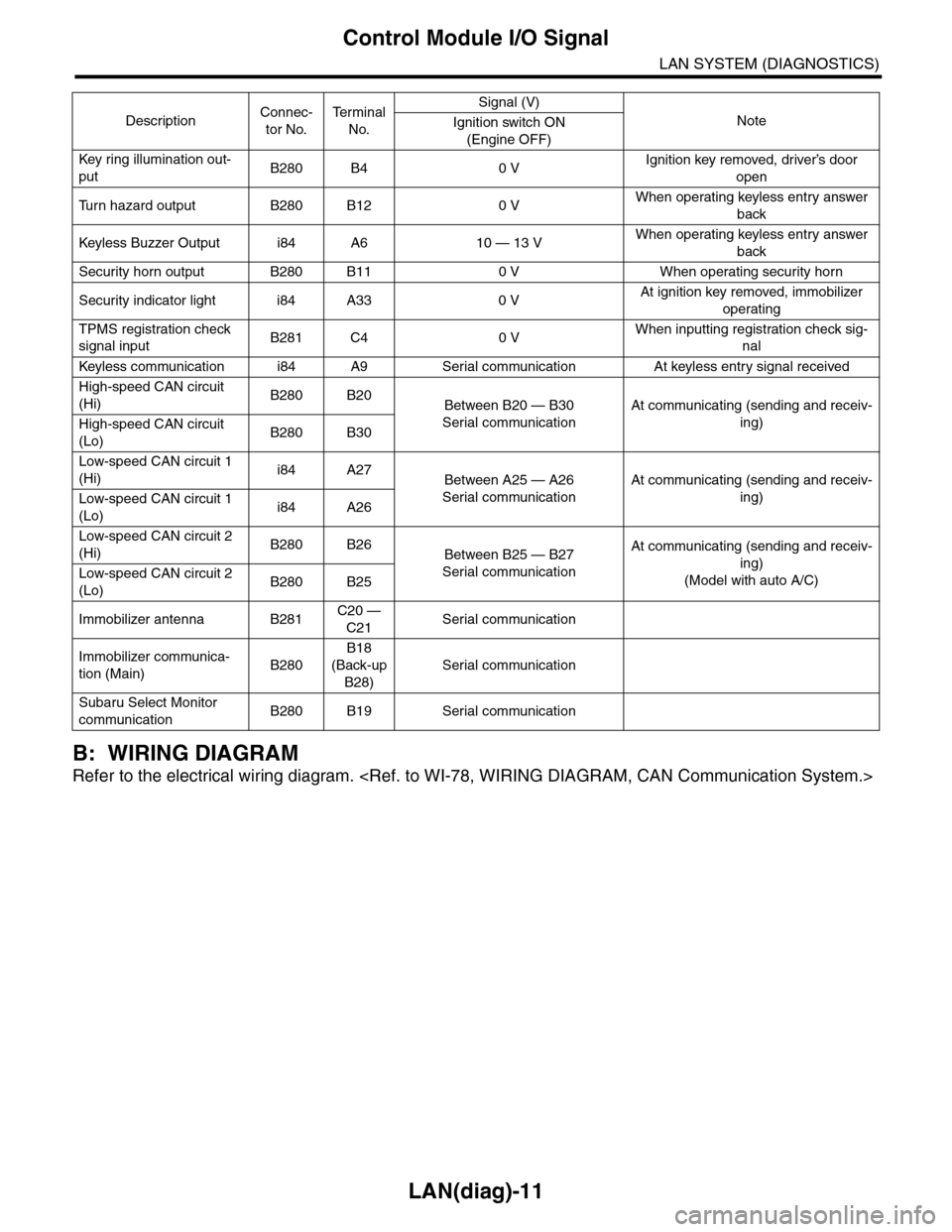
LAN(diag)-11
Control Module I/O Signal
LAN SYSTEM (DIAGNOSTICS)
B: WIRING DIAGRAM
Refer to the electrical wiring diagram.
Key r ing illumination out-
putB280 B4 0 VIgnition key removed, driver’s door
open
Tu r n h a z a r d o u t p u t B 2 8 0 B 1 2 0 VWhen operating keyless entry answer
back
Keyless Buzzer Output i84 A6 10 — 13 VWhen operating keyless entry answer
back
Security horn output B280 B11 0 V When operating security horn
Security indicator light i84 A33 0 VAt ignition key removed, immobilizer
operating
TPMS registration check
signal inputB281 C4 0 VWhen inputting registration check sig-
nal
Keyless communication i84 A9 Ser ial communication At keyless entr y signal received
High-speed CAN circuit
(Hi)B280 B20Between B20 — B30
Serial communication
At communicating (sending and receiv-
ing)High-speed CAN circuit
(Lo)B280 B30
Low-speed CAN circuit 1
(Hi)i84 A27Between A25 — A26
Serial communication
At communicating (sending and receiv-
ing)Low-speed CAN circuit 1
(Lo)i84 A26
Low-speed CAN circuit 2
(Hi)B280 B26Between B25 — B27
Serial communication
At communicating (sending and receiv-
ing)
(Model with auto A/C)Low-speed CAN circuit 2
(Lo)B280 B25
Immobilizer antenna B281C20 —
C21Serial communication
Immobilizer communica-
tion (Main)B280
B18
(Back-up
B28)
Serial communication
Subaru Select Monitor
communicationB280 B19 Serial communication
DescriptionConnec-
tor No.
Te r m i n a l
No.
Signal (V)
NoteIgnition switch ON
(Engine OFF)
Page 468 of 2453
LAN(diag)-12
Subaru Select Monitor
LAN SYSTEM (DIAGNOSTICS)
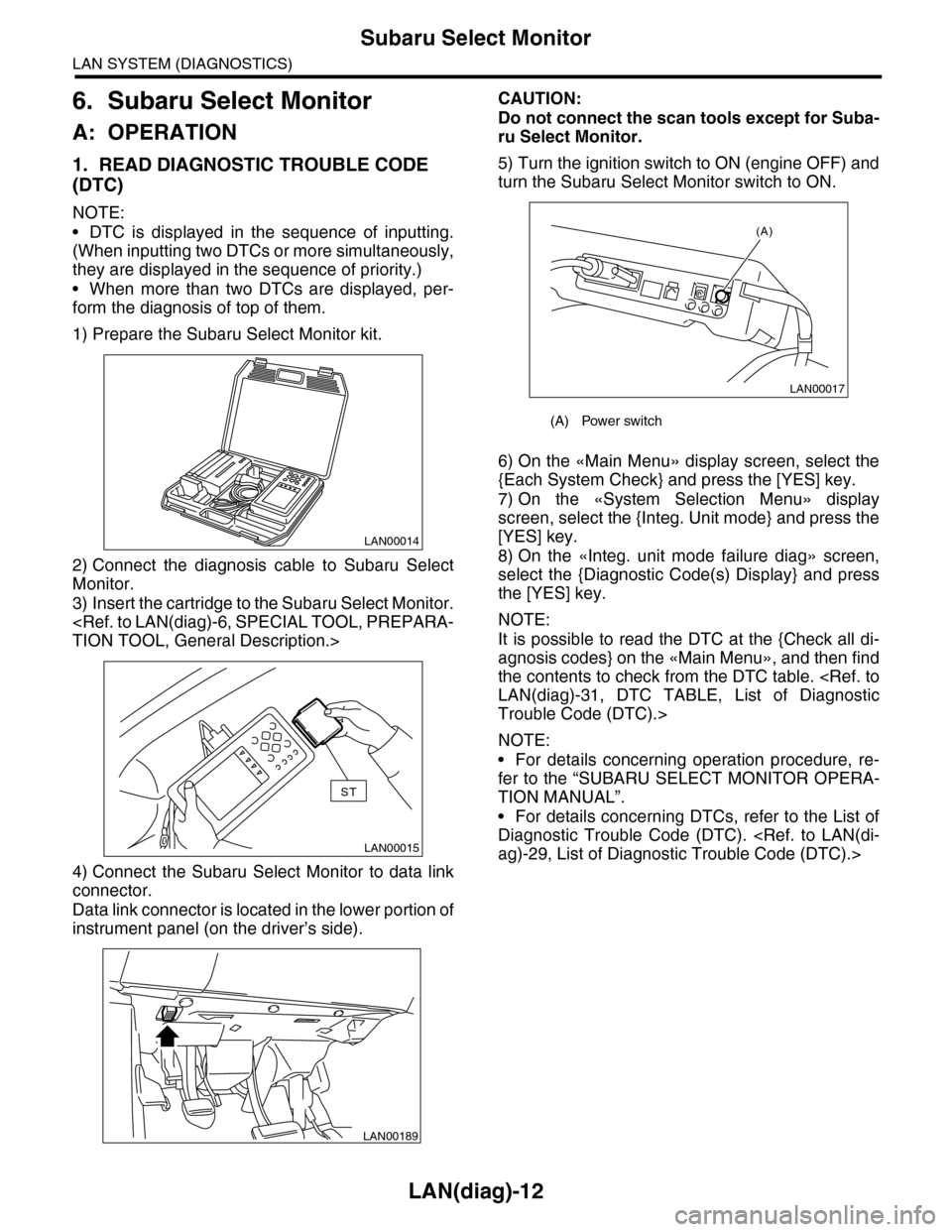
6. Subaru Select Monitor
A: OPERATION
1. READ DIAGNOSTIC TROUBLE CODE
(DTC)
NOTE:
•DTC is displayed in the sequence of inputting.
(When inputting two DTCs or more simultaneously,
they are displayed in the sequence of priority.)
•When more than two DTCs are displayed, per-
form the diagnosis of top of them.
1) Prepare the Subaru Select Monitor kit.
2) Connect the diagnosis cable to Subaru Select
Monitor.
3) Insert the cartridge to the Subaru Select Monitor.
4) Connect the Subaru Select Monitor to data link
connector.
Data link connector is located in the lower portion of
instrument panel (on the driver’s side).
CAUTION:
Do not connect the scan tools except for Suba-
ru Select Monitor.
5) Turn the ignition switch to ON (engine OFF) and
turn the Subaru Select Monitor switch to ON.
6) On the «Main Menu» display screen, select the
{Each System Check} and press the [YES] key.
7) On the «System Selection Menu» display
screen, select the {Integ. Unit mode} and press the
[YES] key.
8) On the «Integ. unit mode failure diag» screen,
select the {Diagnostic Code(s) Display} and press
the [YES] key.
NOTE:
It is possible to read the DTC at the {Check all di-
agnosis codes} on the «Main Menu», and then find
the contents to check from the DTC table.
Trouble Code (DTC).>
NOTE:
•For details concerning operation procedure, re-
fer to the “SUBARU SELECT MONITOR OPERA-
TION MANUAL”.
•For details concerning DTCs, refer to the List of
Diagnostic Trouble Code (DTC).
LAN00014
LAN00015
ST
LAN00189
(A) Power switch
LAN00017
(A)
Page 469 of 2453
![SUBARU TRIBECA 2009 1.G Service Workshop Manual LAN(diag)-13
Subaru Select Monitor
LAN SYSTEM (DIAGNOSTICS)
2. READ CURRENT DATA
1) On the «Main Menu» display screen, select the {Each System Check} and press the [YES] key.
2) On the «System Sele](/img/17/7322/w960_7322-468.png "SUBARU TRIBECA 2009 1.G Service Workshop Manual LAN(diag)-13
Subaru Select Monitor
LAN SYSTEM (DIAGNOSTICS)
2. READ CURRENT DATA
1) On the «Main Menu» display screen, select the {Each System Check} and press the [YES] key.
2) On the «System Sele")
LAN(diag)-13
Subaru Select Monitor
LAN SYSTEM (DIAGNOSTICS)
2. READ CURRENT DATA
1) On the «Main Menu» display screen, select the {Each System Check} and press the [YES] key.
2) On the «System Selection Menu» display screen, select the {Integ. Unit mode} and press the [YES] key.
3) On the «Integ. unit mode failure diag» display screen, select the {Current Data Display & Save} and press
the [YES] key.
4) On the «Current Data Display & Save» display screen, select the {12 Data Display} and press the [YES]
key.
5) Using the scroll key, scroll the display screen up or down until the desired data is shown.
•A support list contains both of analog and digital data, and they are shown in the following table.
3. DISPLAY OF ANALOG DATA
Items to be displayed Unit of measure Description Note
BATT Voltage (Control) 10 — 15 VBody integrated unit input
valueAlways
BATT Voltage (BACK UP) 10 — 15 VBody integrated unit input
valueAlways
IG power supply voltage 10 — 15 VBody integrated unit input
valueIgnition switch ON
ACC voltage 10 — 15 VBody integrated unit input
valueIgnition switch ACC
Illumination VR voltage 0 — 5 VBody integrated unit out-
put valueSmall light switch ON
Illumi. output d-ratio 0 — 100%Body integrated unit input
value
Small light ON
Illumination volume is other than bright.
Ambient temp sensor V 0 — 5 VBody integrated unit out-
put valueIgnition switch ON
Ambient temperature –40 — 87.5°CBody integrated unit out-
put valueIgnition switch ON
Fuel level voltage 0 — 8 VBody integrated unit input
valueIgnition switch ON
Fuel level resistance 0 — 102.3 ΩBody integrated unit input
valueIgnition switch ON
key-lock solenoid V 6 — 12 VBody integrated unit out-
put value
Other than parking range
Ignition ON
number of regist. 0 — 4 Key No. to register
Fr o nt W he e l S p ee d km / h C A N d a t a i np u t val u e R ec ep t io n f r o m V DC u ni t
VDC/ABS latest f-codeDTC display (Tempo-
rarily)CAN data input value
It is normal when DTC is not been input
even if this code is displayed.
Reception from VDC
Blower fan steps 0 — 2 levels CAN data input value0: OFF, 1: Low, 2: 2 levels or more
Reception from air conditioner ECM
Fuel level resistance2 0 — 102.3 ΩCAN data output value Reception from body integrated unit
Fuel consumption cc/s CAN data input valueReception from ECM and transmission to
center monitor
Coolant Temp. 40 — 130°C CAN data input value Reception from ECM
Ve h i c l e l a t e r a l Gm/s2CAN data input value Reception from VDC unit
SPORT Shift Stages 0 — 7 levels CAN data input value
(0: Light OFF; 1 — 5: Gear display; 6: Fail; 7:
AT F t e m p e r a t u r e H i g h / L o w )
Reception from TCM
Shift Position 0 — 7 levels CAN data input value
0: 1; 1: 2; 2: 3; 3: 4; 4: D; 5: N; 6: R; 7: P shift
position (There is no 8 input.)
Reception from TCM
Off delay timeOFF, Short, Normal,
Long
Body integrated unit set-
ting itemsCustomize setting
Auto lock time20, 30, 40, 50, 60 sec-
onds
Body integrated unit set-
ting itemsCustomize setting