er ss displayed SUBARU TRIBECA 2009 1.G Service Workshop Manual
[x] Cancel search | Manufacturer: SUBARU, Model Year: 2009, Model line: TRIBECA, Model: SUBARU TRIBECA 2009 1.GPages: 2453, PDF Size: 46.32 MB
Page 587 of 2453
OD(diag)-19
Subaru Select Monitor
OCCUPANT DETECTION SYSTEM (DIAGNOSTICS)
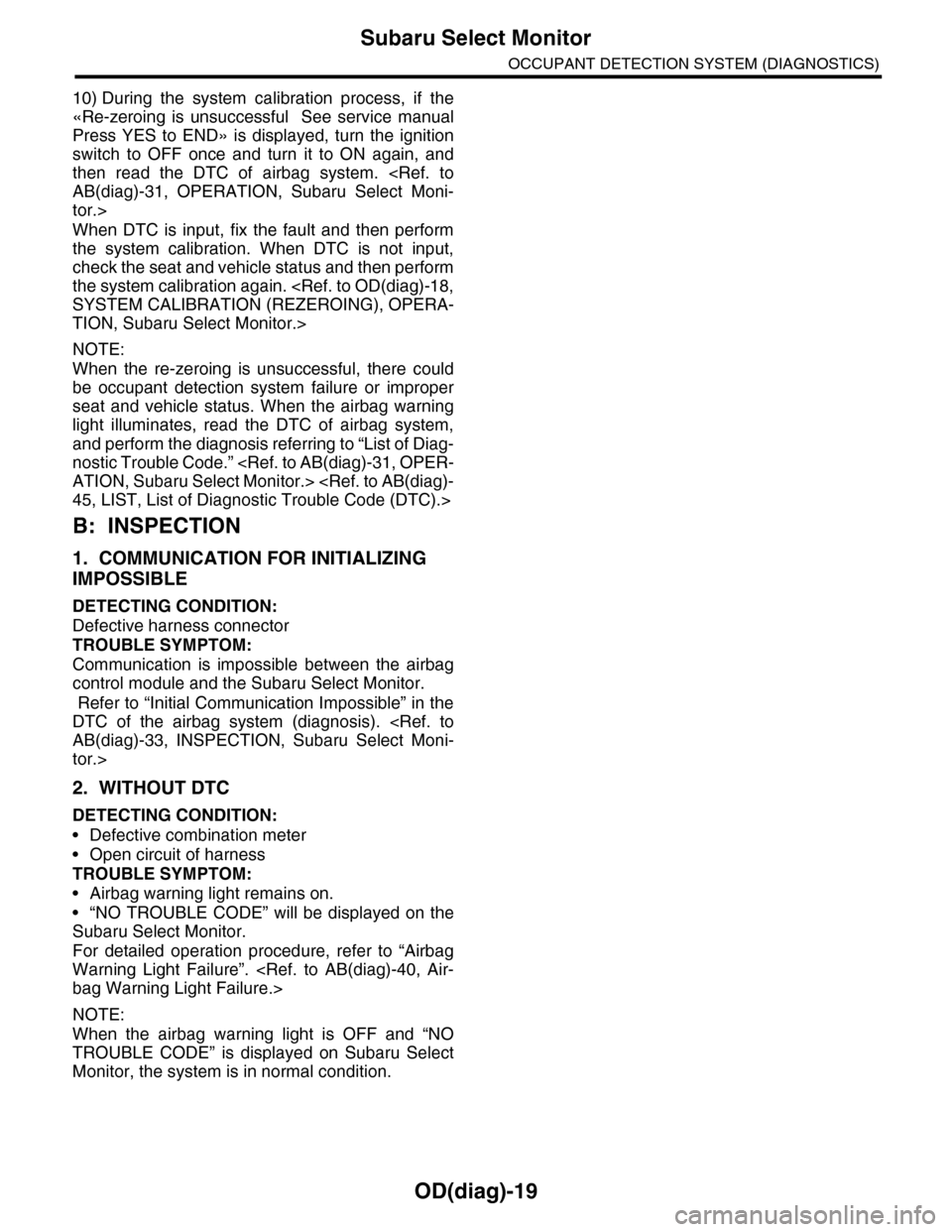
10) During the system calibration process, if the
«Re-zeroing is unsuccessful See service manual
Press YES to END» is displayed, turn the ignition
switch to OFF once and turn it to ON again, and
then read the DTC of airbag system.
tor.>
When DTC is input, fix the fault and then perform
the system calibration. When DTC is not input,
check the seat and vehicle status and then perform
the system calibration again.
TION, Subaru Select Monitor.>
NOTE:
When the re-zeroing is unsuccessful, there could
be occupant detection system failure or improper
seat and vehicle status. When the airbag warning
light illuminates, read the DTC of airbag system,
and perform the diagnosis referring to “List of Diag-
nostic Trouble Code.”
B: INSPECTION
1. COMMUNICATION FOR INITIALIZING
IMPOSSIBLE
DETECTING CONDITION:
Defective harness connector
TROUBLE SYMPTOM:
Communication is impossible between the airbag
control module and the Subaru Select Monitor.
Refer to “Initial Communication Impossible” in the
DTC of the airbag system (diagnosis).
tor.>
2. WITHOUT DTC
DETECTING CONDITION:
•Defective combination meter
•Open circuit of harness
TROUBLE SYMPTOM:
•Airbag warning light remains on.
•“NO TROUBLE CODE” will be displayed on the
Subaru Select Monitor.
For detailed operation procedure, refer to “Airbag
Warning Light Failure”.
NOTE:
When the airbag warning light is OFF and “NO
TROUBLE CODE” is displayed on Subaru Select
Monitor, the system is in normal condition.
Page 597 of 2453
OD(diag)-29
Diagnostic Procedure with Diagnostic Trouble Code (DTC)
OCCUPANT DETECTION SYSTEM (DIAGNOSTICS)
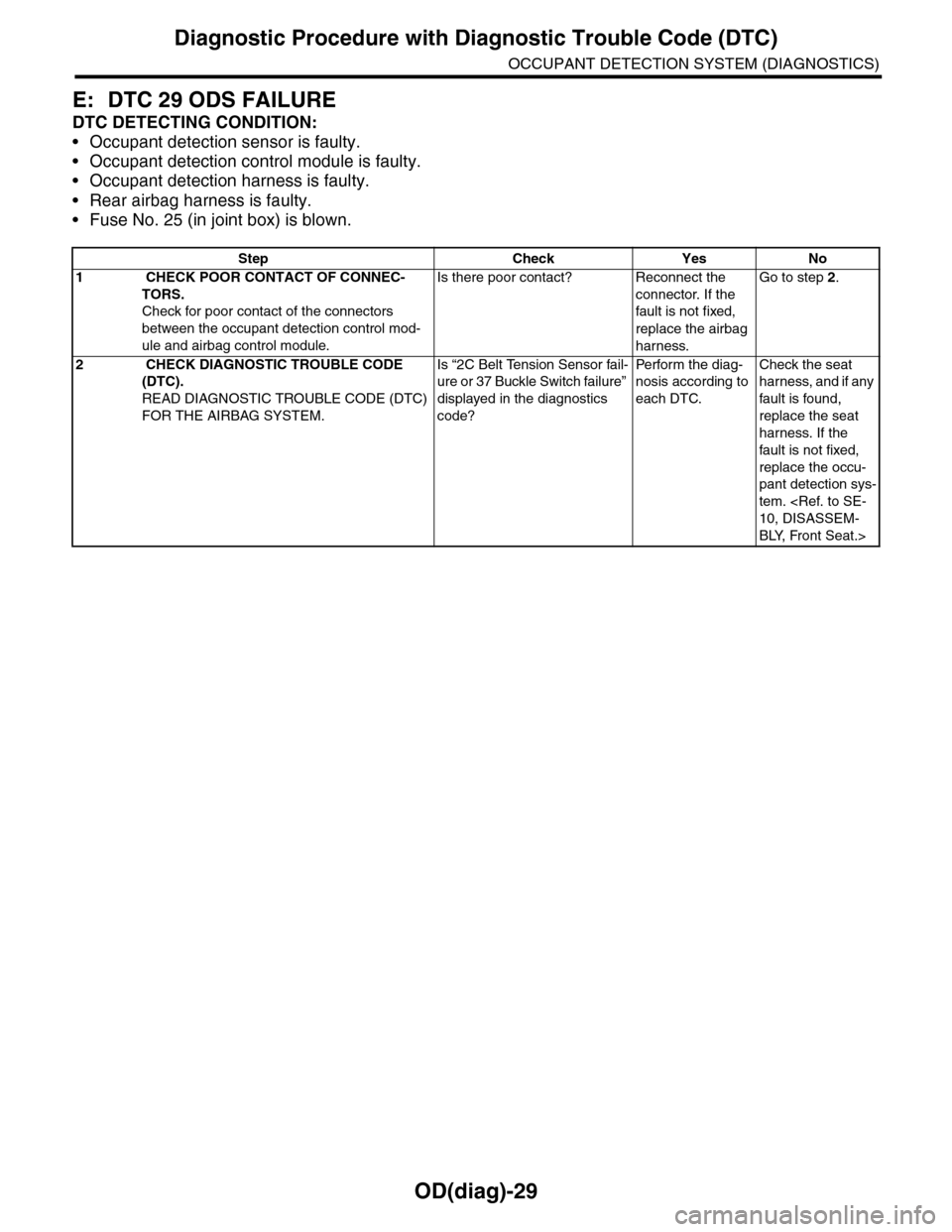
E: DTC 29 ODS FAILURE
DTC DETECTING CONDITION:
•Occupant detection sensor is faulty.
•Occupant detection control module is faulty.
•Occupant detection harness is faulty.
•Rear airbag harness is faulty.
•Fuse No. 25 (in joint box) is blown.
Step Check Yes No
1 CHECK POOR CONTACT OF CONNEC-
TORS.
Check for poor contact of the connectors
between the occupant detection control mod-
ule and airbag control module.
Is there poor contact? Reconnect the
connector. If the
fault is not fixed,
replace the airbag
harness.
Go to step 2.
2 CHECK DIAGNOSTIC TROUBLE CODE
(DTC).
READ DIAGNOSTIC TROUBLE CODE (DTC)
FOR THE AIRBAG SYSTEM.
Is “2C Belt Tension Sensor fail-
ure or 37 Buckle Switch failure”
displayed in the diagnostics
code?
Pe r for m t h e d ia g -
nosis according to
each DTC.
Check the seat
harness, and if any
fault is found,
replace the seat
harness. If the
fault is not fixed,
replace the occu-
pant detection sys-
tem.
BLY, Front Seat.>
Page 645 of 2453
SL-16
Keyless Entry System
SECURITY AND LOCKS
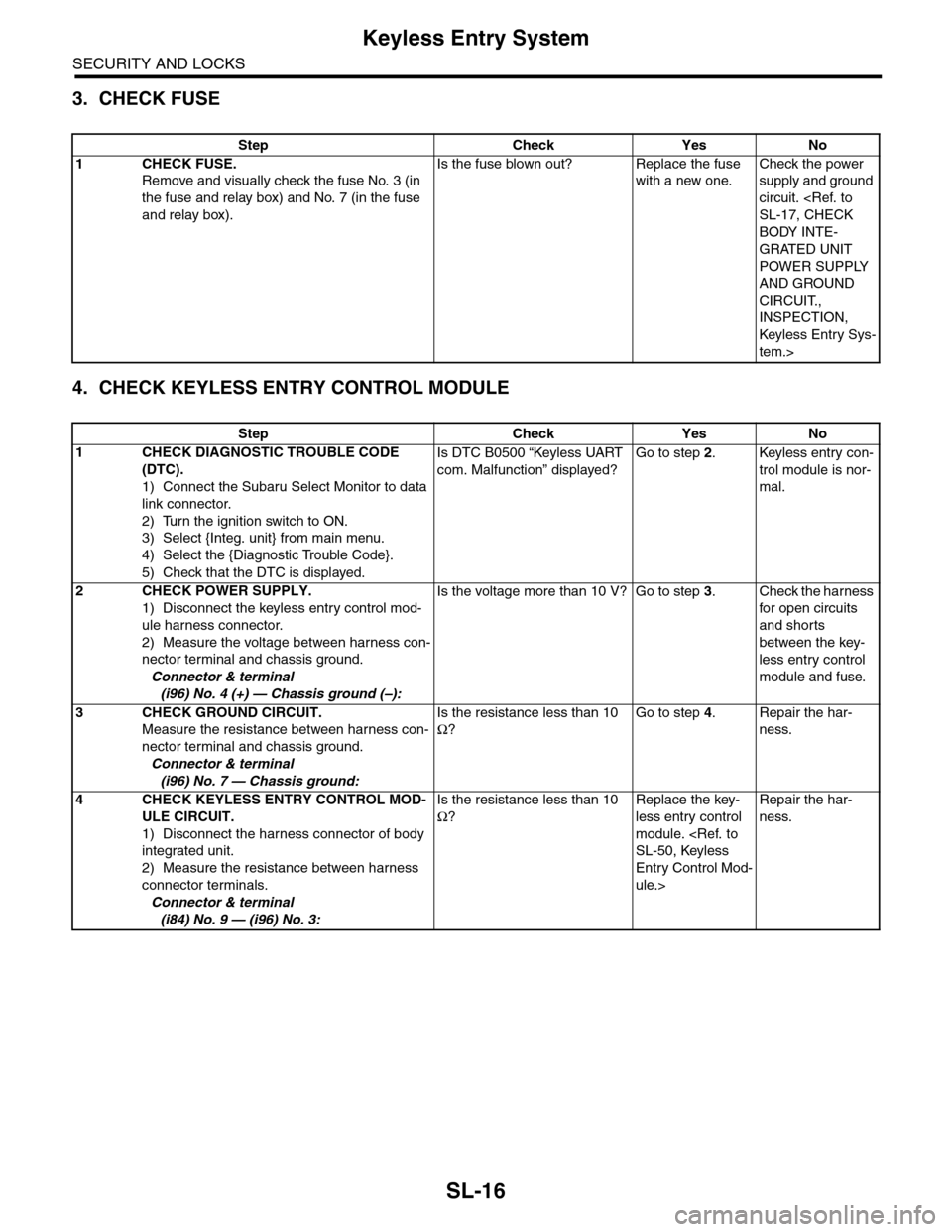
3. CHECK FUSE
4. CHECK KEYLESS ENTRY CONTROL MODULE
Step Check Yes No
1CHECK FUSE.
Remove and visually check the fuse No. 3 (in
the fuse and relay box) and No. 7 (in the fuse
and relay box).
Is the fuse blown out? Replace the fuse
with a new one.
Check the power
supply and ground
circuit.
BODY INTE-
GRATED UNIT
POWER SUPPLY
AND GROUND
CIRCUIT.,
INSPECTION,
Keyless Entr y Sys-
tem.>
Step Check Yes No
1CHECK DIAGNOSTIC TROUBLE CODE
(DTC).
1) Connect the Subaru Select Monitor to data
link connector.
2) Turn the ignition switch to ON.
3) Select {Integ. unit} from main menu.
4) Select the {Diagnostic Trouble Code}.
5) Check that the DTC is displayed.
Is DTC B0500 “Keyless UART
com. Malfunction” displayed?
Go to step 2.Keyless entry con-
trol module is nor-
mal.
2CHECK POWER SUPPLY.
1) Disconnect the keyless entry control mod-
ule harness connector.
2) Measure the voltage between harness con-
nector terminal and chassis ground.
Connector & terminal
(i96) No. 4 (+) — Chassis ground (–):
Is the voltage more than 10 V? Go to step 3.Check the harness
for open circuits
and shorts
between the key-
less entry control
module and fuse.
3CHECK GROUND CIRCUIT.
Measure the resistance between harness con-
nector terminal and chassis ground.
Connector & terminal
(i96) No. 7 — Chassis ground:
Is the resistance less than 10
Ω?
Go to step 4.Repair the har-
ness.
4CHECK KEYLESS ENTRY CONTROL MOD-
ULE CIRCUIT.
1) Disconnect the harness connector of body
integrated unit.
2) Measure the resistance between harness
connector terminals.
Connector & terminal
(i84) No. 9 — (i96) No. 3:
Is the resistance less than 10
Ω?
Replace the key-
less entry control
module.
Entry Control Mod-
ule.>
Repair the har-
ness.
Page 682 of 2453
SL-53
Transmitter
SECURITY AND LOCKS
24.Transmitter
A: REMOVAL
1. TRANSMITTER BATTERY
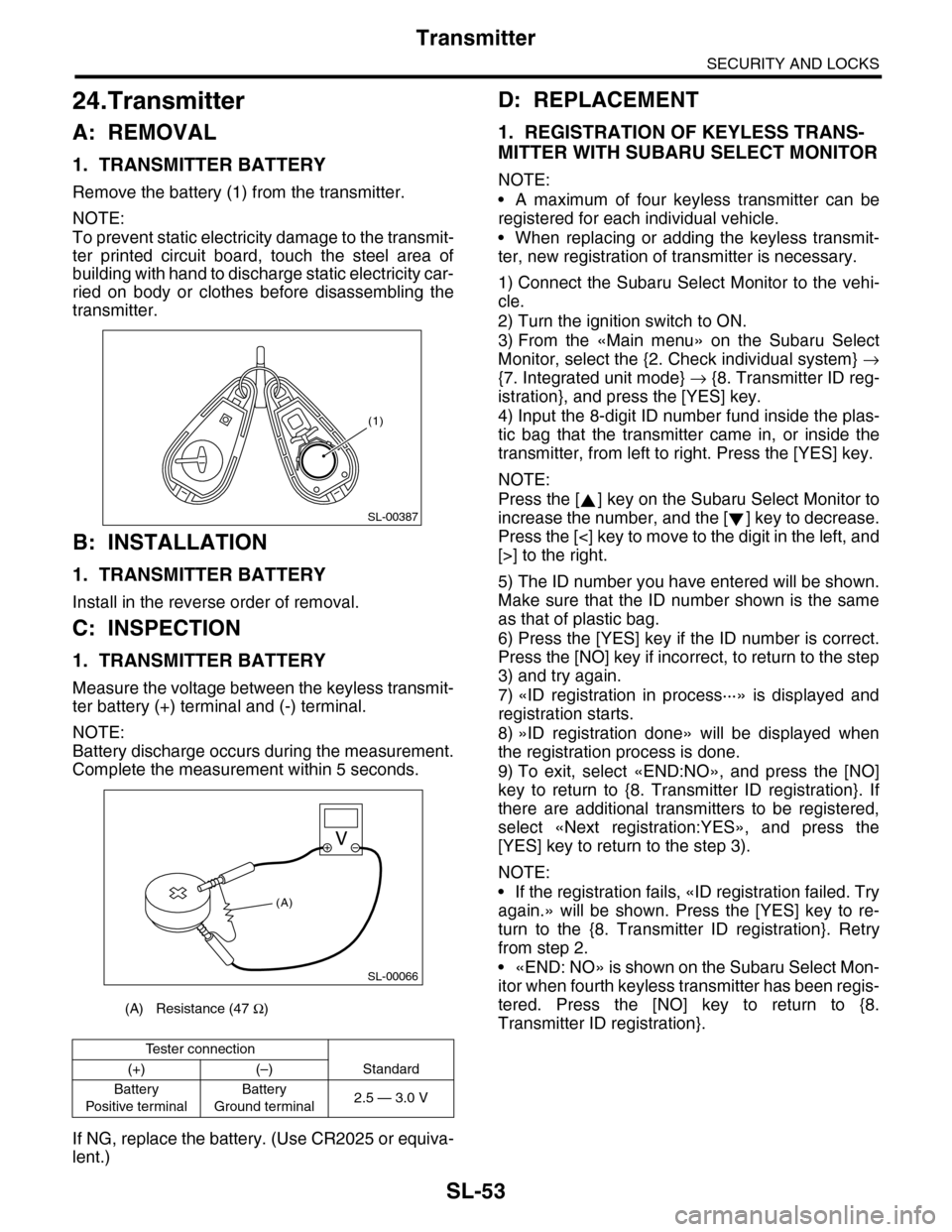
Remove the battery (1) from the transmitter.
NOTE:
To prevent static electricity damage to the transmit-
ter printed circuit board, touch the steel area of
building with hand to discharge static electricity car-
ried on body or clothes before disassembling the
transmitter.
B: INSTALLATION
1. TRANSMITTER BATTERY
Install in the reverse order of removal.
C: INSPECTION
1. TRANSMITTER BATTERY
Measure the voltage between the keyless transmit-
ter battery (+) terminal and (-) terminal.
NOTE:
Battery discharge occurs during the measurement.
Complete the measurement within 5 seconds.
If NG, replace the battery. (Use CR2025 or equiva-
lent.)
D: REPLACEMENT
1. REGISTRATION OF KEYLESS TRANS-
MITTER WITH SUBARU SELECT MONITOR
NOTE:
•A maximum of four keyless transmitter can be
registered for each individual vehicle.
•When replacing or adding the keyless transmit-
ter, new registration of transmitter is necessary.
1) Connect the Subaru Select Monitor to the vehi-
cle.
2) Turn the ignition switch to ON.
3) From the «Main menu» on the Subaru Select
Monitor, select the {2. Check individual system} →
{7. Integrated unit mode} → {8. Transmitter ID reg-
istration}, and press the [YES] key.
4) Input the 8-digit ID number fund inside the plas-
tic bag that the transmitter came in, or inside the
transmitter, from left to right. Press the [YES] key.
NOTE:
Press the [ ] key on the Subaru Select Monitor to
increase the number, and the [ ] key to decrease.
Press the [<] key to move to the digit in the left, and
[>] to the right.
5) The ID number you have entered will be shown.
Make sure that the ID number shown is the same
as that of plastic bag.
6) Press the [YES] key if the ID number is correct.
Press the [NO] key if incorrect, to return to the step
3) and try again.
7) «ID registration in process···» is displayed and
registration starts.
8) »ID registration done» will be displayed when
the registration process is done.
9) To exit, select «END:NO», and press the [NO]
key to return to {8. Transmitter ID registration}. If
there are additional transmitters to be registered,
select «Next registration:YES», and press the
[YES] key to return to the step 3).
NOTE:
•If the registration fails, «ID registration failed. Try
again.» will be shown. Press the [YES] key to re-
turn to the {8. Transmitter ID registration}. Retry
from step 2.
•«END: NO» is shown on the Subaru Select Mon-
itor when fourth keyless transmitter has been regis-
tered. Press the [NO] key to return to {8.
Transmitter ID registration}.(A) Resistance (47 Ω)
Te s t e r c o n n e c t i o n
(+) (–) Standard
Battery
Po si t ive t e r mi na l
Battery
Ground terminal2.5 — 3.0 V
(1)
SL-00387
SL-00066
(A)
Page 757 of 2453
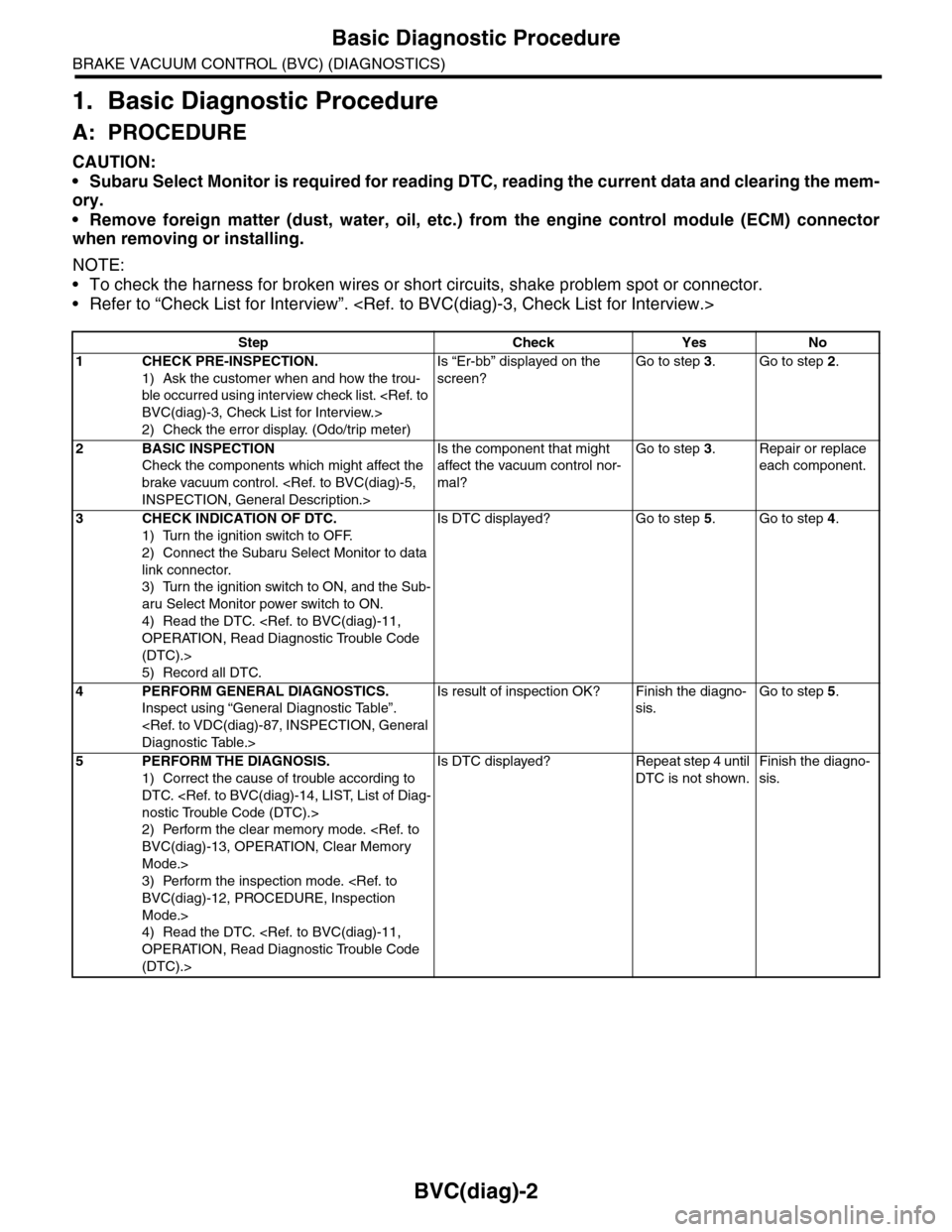
BVC(diag)-2
Basic Diagnostic Procedure
BRAKE VACUUM CONTROL (BVC) (DIAGNOSTICS)
1. Basic Diagnostic Procedure
A: PROCEDURE
CAUTION:
•Subaru Select Monitor is required for reading DTC, reading the current data and clearing the mem-
ory.
•Remove foreign matter (dust, water, oil, etc.) from the engine control module (ECM) connector
when removing or installing.
NOTE:
•To check the harness for broken wires or short circuits, shake problem spot or connector.
•Refer to “Check List for Interview”.
Step Check Yes No
1CHECK PRE-INSPECTION.
1) Ask the customer when and how the trou-
ble occurred using interview check list.
2) Check the error display. (Odo/trip meter)
Is “Er-bb” displayed on the
screen?
Go to step 3.Go to step 2.
2BASIC INSPECTION
Check the components which might affect the
brake vacuum control.
Is the component that might
affect the vacuum control nor-
mal?
Go to step 3.Repair or replace
each component.
3CHECK INDICATION OF DTC.
1) Turn the ignition switch to OFF.
2) Connect the Subaru Select Monitor to data
link connector.
3) Turn the ignition switch to ON, and the Sub-
aru Select Monitor power switch to ON.
4) Read the DTC.
(DTC).>
5) Record all DTC.
Is DTC displayed? Go to step 5.Go to step 4.
4PERFORM GENERAL DIAGNOSTICS.
Inspect using “General Diagnostic Table”.
Is result of inspection OK? Finish the diagno-
sis.
Go to step 5.
5PERFORM THE DIAGNOSIS.
1) Correct the cause of trouble according to
DTC.
2) Perform the clear memory mode.
Mode.>
3) Perform the inspection mode.
Mode.>
4) Read the DTC.
(DTC).>
Is DTC displayed? Repeat step 4 until
DTC is not shown.
Finish the diagno-
sis.
Page 758 of 2453
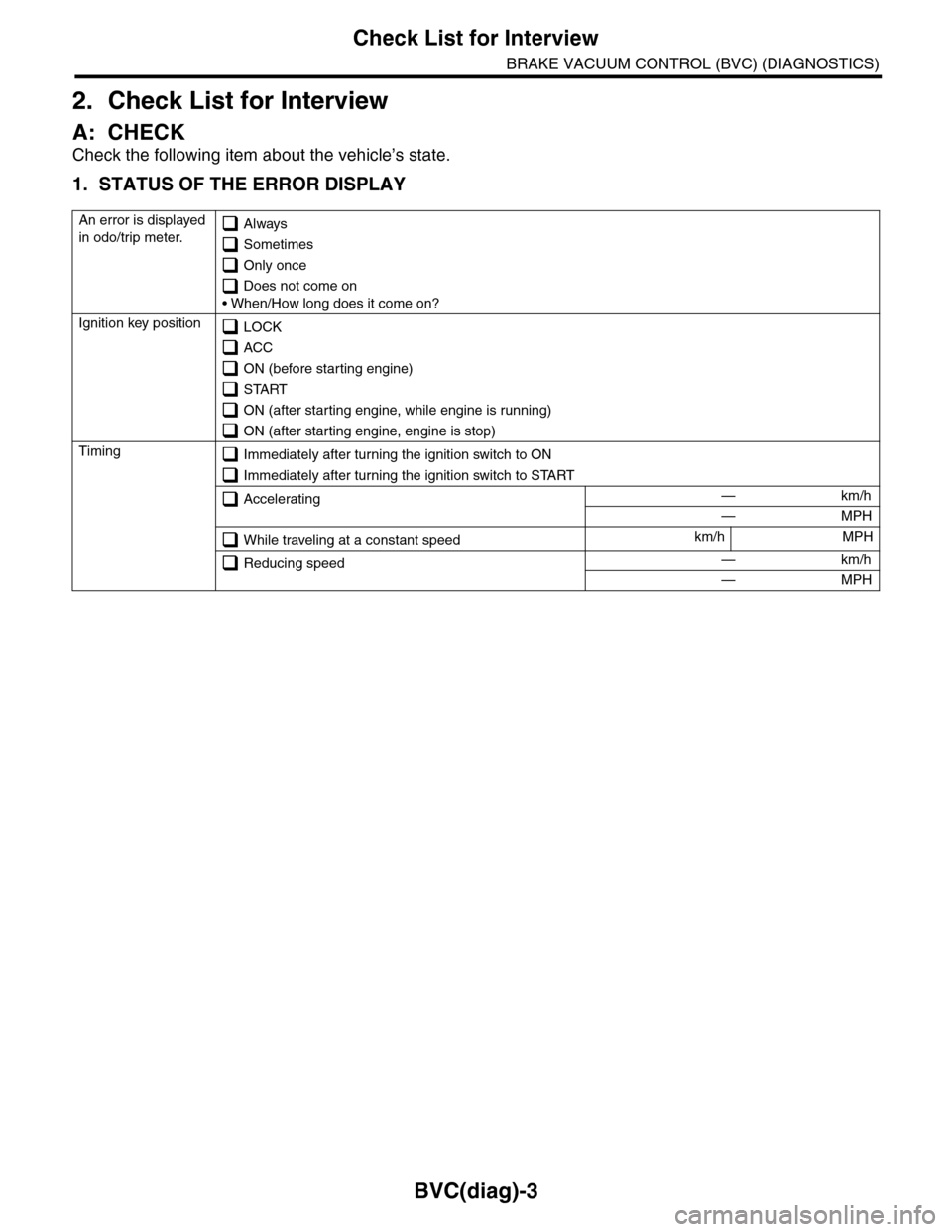
BVC(diag)-3
Check List for Interview
BRAKE VACUUM CONTROL (BVC) (DIAGNOSTICS)
2. Check List for Interview
A: CHECK
Check the following item about the vehicle’s state.
1. STATUS OF THE ERROR DISPLAY
An error is displayed
in odo/trip meter. Always
Sometimes
Only once
Does not come on
• When/How long does it come on?
Ignition key position LOCK
ACC
ON (before starting engine)
START
ON (after starting engine, while engine is running)
ON (after starting engine, engine is stop)
Timing Immediately after turning the ignition switch to ON
Immediately after turning the ignition switch to START
Accelerating — km/h
— MPH
While traveling at a constant speedkm/h MPH
Reducing speed — km/h
— MPH
Page 765 of 2453
![SUBARU TRIBECA 2009 1.G Service Workshop Manual BVC(diag)-10
Subaru Select Monitor
BRAKE VACUUM CONTROL (BVC) (DIAGNOSTICS)
2. READ CURRENT DATA
1) On the «Main Menu» display screen, select the {Each System Check} and press the [YES] key.
2) On t](/img/17/7322/w960_7322-764.png "SUBARU TRIBECA 2009 1.G Service Workshop Manual BVC(diag)-10
Subaru Select Monitor
BRAKE VACUUM CONTROL (BVC) (DIAGNOSTICS)
2. READ CURRENT DATA
1) On the «Main Menu» display screen, select the {Each System Check} and press the [YES] key.
2) On t")
BVC(diag)-10
Subaru Select Monitor
BRAKE VACUUM CONTROL (BVC) (DIAGNOSTICS)
2. READ CURRENT DATA
1) On the «Main Menu» display screen, select the {Each System Check} and press the [YES] key.
2) On the «System Selection Menu» display screen, select the {Brake Negative Pressure Pump System} and
press the [YES] key.
3) Press the [YES] key after the {3.0 DOHC} is displayed.
4) On the «Negative Pressure Diagnosis Menu» display screen, select the {Current Data Display/Save}, and
then press the [YES] key.
5) On the «Data Display Menu» screen, select the {Data Display} and press the [YES] key.
6) Using a scroll key, scroll the display screen up or down until necessary data is shown.
•A list of the support data is shown in the following table.
NOTE:
For details concerning operation procedure, refer to the “SUBARU SELECT MONITOR OPERATION MAN-
UAL”.
3. CLEAR MEMORY MODE
1) On the «Main Menu» display screen, select the
{Each System Check} and press the [YES] key.
2) On the «System Selection Menu» display
screen, select the {Brake Negative Pressure Pump
System} and press the [YES] key.
3) Press the [YES] key after the {3.0 DOHC} is dis-
played.
4) On the «Negative Pressure Pump Diagnosis
Menu» display screen, select the {Clear Memory}
and press the [YES] key.
5) When “Done” and “Turn ignition switch OFF” are
shown on the display screen, turn the Subaru Se-
lect Monitor and ignition switch to OFF.
NOTE:
For details concerning operation procedure, refer
to the “SUBARU SELECT MONITOR OPERATION
MANUAL”.
4. FUNCTION CHECK MODE
1) Connect the test mode connector located under
the glove box.
2) Turn the ignition switch to ON (engine OFF) and
turn the Subaru Select Monitor switch to ON.
3) On the «Main Menu» display screen, select the
{Each System Check} and press the [YES] key.
4) On the «System Selection Menu» display
screen, select the {Brake Negative Pressure Pump
System} and press the [YES] key.
5) Press the [YES] key after the {3.0 DOHC} is dis-
played.
6) On the «Negative Pressure Pump Diagnosis
Menu» display screen, select the {Function Check
Mode} and press the [YES] key.
7) When the “Start Function Check Mode” is shown
on the screen, press the [YES] key.
8) When the “Depress the Brake Pedal 5 Times” is
shown on the screen, depress the brake pedal 5
times, and press the [YES] key while brake pedal is
not depressed.
9) Press the [YES] key after the {OK} is displayed.
Display Contents to be monitored Unit of measure
Atmospheric pressure Atmospheric pressure is displayed. mmHg, kPa or psig
Brake booster pressure Brake booster pressure is displayed. mmHg, kPa or psig
Te s t m o d e t e r m i n a l Te s t m o d e t e r m i n a l c o n n e c t i o n s t a t u s i s d i s p l a y e d . D C h e c k o r U C h e c k
Negative pressure pump motor Negative pressure motor operating status is displayed. ON or OFF
Negative pressure pump motor relay Negative pressure pump motor relay operating status is displayed. ON or OFF
Display Contents to be monitored
Clear Memory? DTC deleting function
(A) Test mode connector
EN-03694
(4)
Page 952 of 2453
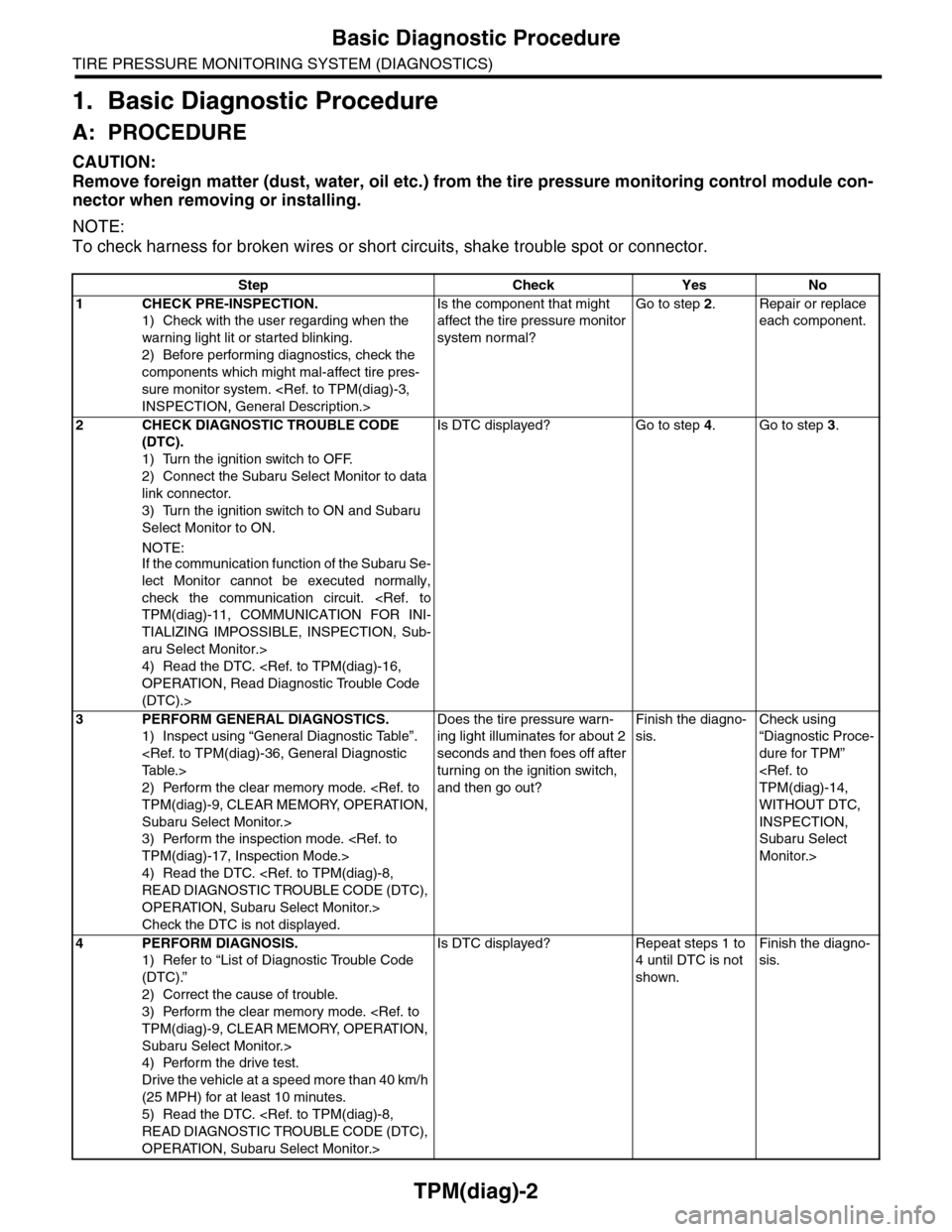
TPM(diag)-2
Basic Diagnostic Procedure
TIRE PRESSURE MONITORING SYSTEM (DIAGNOSTICS)
1. Basic Diagnostic Procedure
A: PROCEDURE
CAUTION:
Remove foreign matter (dust, water, oil etc.) from the tire pressure monitoring control module con-
nector when removing or installing.
NOTE:
To check harness for broken wires or short circuits, shake trouble spot or connector.
Step Check Yes No
1CHECK PRE-INSPECTION.
1) Check with the user regarding when the
warning light lit or started blinking.
2) Before performing diagnostics, check the
components which might mal-affect tire pres-
sure monitor system.
Is the component that might
affect the tire pressure monitor
system normal?
Go to step 2.Repair or replace
each component.
2CHECK DIAGNOSTIC TROUBLE CODE
(DTC).
1) Turn the ignition switch to OFF.
2) Connect the Subaru Select Monitor to data
link connector.
3) Turn the ignition switch to ON and Subaru
Select Monitor to ON.
NOTE:If the communication function of the Subaru Se-
lect Monitor cannot be executed normally,
check the communication circuit.
TIALIZING IMPOSSIBLE, INSPECTION, Sub-
aru Select Monitor.>
4) Read the DTC.
(DTC).>
Is DTC displayed? Go to step 4.Go to step 3.
3PERFORM GENERAL DIAGNOSTICS.
1) Inspect using “General Diagnostic Table”.
2) Perform the clear memory mode.
Subaru Select Monitor.>
3) Perform the inspection mode.
4) Read the DTC.
OPERATION, Subaru Select Monitor.>
Check the DTC is not displayed.
Does the tire pressure warn-
ing light illuminates for about 2
seconds and then foes off after
turning on the ignition switch,
and then go out?
Finish the diagno-
sis.
Check using
“Diagnostic Proce-
dure for TPM”
WITHOUT DTC,
INSPECTION,
Subaru Select
Monitor.>
4PERFORM DIAGNOSIS.
1) Refer to “List of Diagnostic Trouble Code
(DTC).”
2) Correct the cause of trouble.
3) Perform the clear memory mode.
Subaru Select Monitor.>
4) Perform the drive test.
Drive the vehicle at a speed more than 40 km/h
(25 MPH) for at least 10 minutes.
5) Read the DTC.
OPERATION, Subaru Select Monitor.>
Is DTC displayed? Repeat steps 1 to
4 until DTC is not
shown.
Finish the diagno-
sis.
Page 958 of 2453
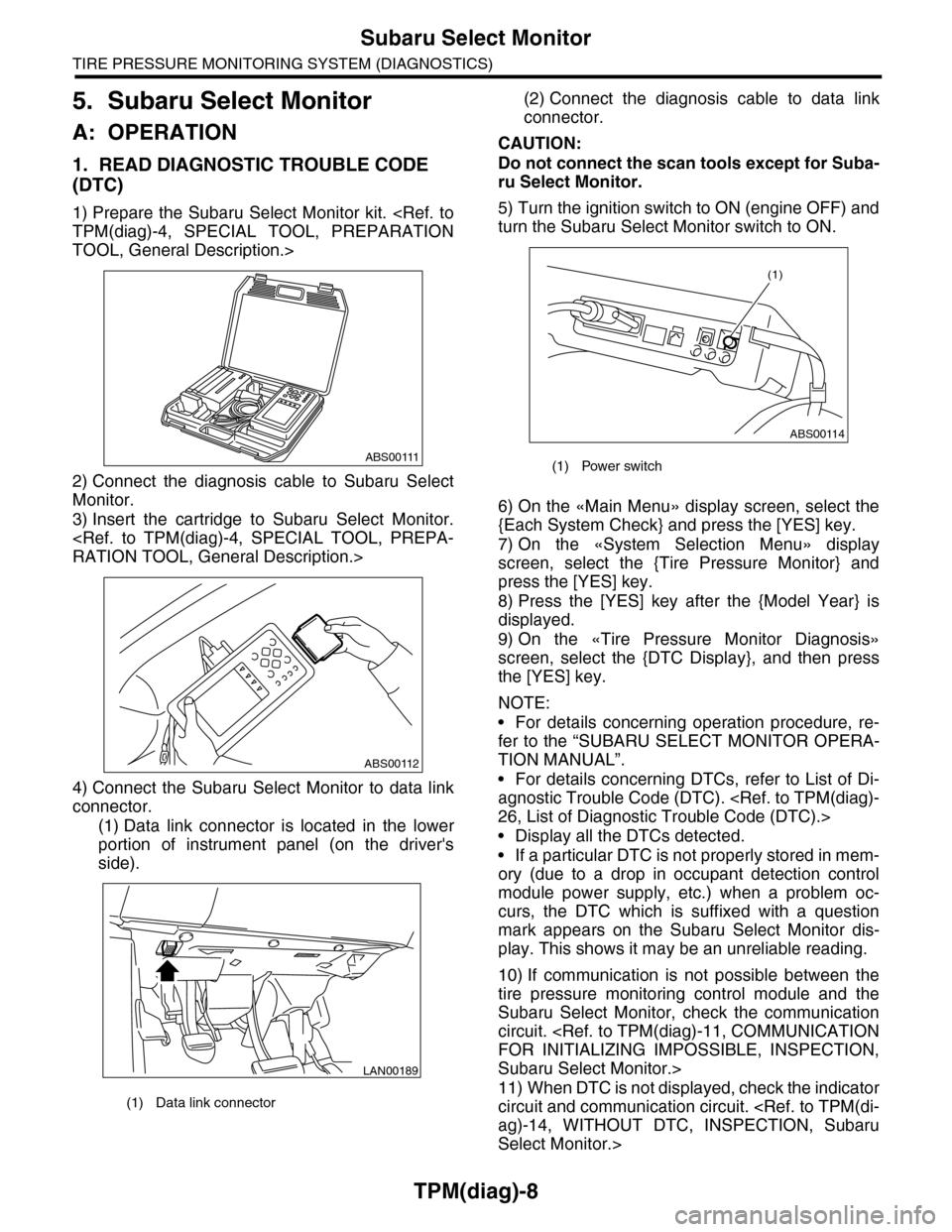
TPM(diag)-8
Subaru Select Monitor
TIRE PRESSURE MONITORING SYSTEM (DIAGNOSTICS)
5. Subaru Select Monitor
A: OPERATION
1. READ DIAGNOSTIC TROUBLE CODE
(DTC)
1) Prepare the Subaru Select Monitor kit.
TOOL, General Description.>
2) Connect the diagnosis cable to Subaru Select
Monitor.
3) Insert the cartridge to Subaru Select Monitor.
4) Connect the Subaru Select Monitor to data link
connector.
(1) Data link connector is located in the lower
portion of instrument panel (on the driver's
side).
(2) Connect the diagnosis cable to data link
connector.
CAUTION:
Do not connect the scan tools except for Suba-
ru Select Monitor.
5) Turn the ignition switch to ON (engine OFF) and
turn the Subaru Select Monitor switch to ON.
6) On the «Main Menu» display screen, select the
{Each System Check} and press the [YES] key.
7) On the «System Selection Menu» display
screen, select the {Tire Pressure Monitor} and
press the [YES] key.
8) Press the [YES] key after the {Model Year} is
displayed.
9) On the «Tire Pressure Monitor Diagnosis»
screen, select the {DTC Display}, and then press
the [YES] key.
NOTE:
•For details concerning operation procedure, re-
fer to the “SUBARU SELECT MONITOR OPERA-
TION MANUAL”.
•For details concerning DTCs, refer to List of Di-
agnostic Trouble Code (DTC).
•Display all the DTCs detected.
•If a particular DTC is not properly stored in mem-
ory (due to a drop in occupant detection control
module power supply, etc.) when a problem oc-
curs, the DTC which is suffixed with a question
mark appears on the Subaru Select Monitor dis-
play. This shows it may be an unreliable reading.
10) If communication is not possible between the
tire pressure monitoring control module and the
Subaru Select Monitor, check the communication
circuit.
Subaru Select Monitor.>
11) When DTC is not displayed, check the indicator
circuit and communication circuit.
Select Monitor.>
(1) Data link connector
ABS00111
ABS00112
LAN00189
(1) Power switch
ABS00114
(1)
Page 959 of 2453
![SUBARU TRIBECA 2009 1.G Service Workshop Manual TPM(diag)-9
Subaru Select Monitor
TIRE PRESSURE MONITORING SYSTEM (DIAGNOSTICS)
2. DATA DISPLAY
1) On the «Main Menu» display screen, select the {Each System Check} and press the [YES] key.
2) On th](/img/17/7322/w960_7322-958.png "SUBARU TRIBECA 2009 1.G Service Workshop Manual TPM(diag)-9
Subaru Select Monitor
TIRE PRESSURE MONITORING SYSTEM (DIAGNOSTICS)
2. DATA DISPLAY
1) On the «Main Menu» display screen, select the {Each System Check} and press the [YES] key.
2) On th")
TPM(diag)-9
Subaru Select Monitor
TIRE PRESSURE MONITORING SYSTEM (DIAGNOSTICS)
2. DATA DISPLAY
1) On the «Main Menu» display screen, select the {Each System Check} and press the [YES] key.
2) On the «System Selection Menu» display screen, select the {Tire Pressure Monitor} and press the [YES]
key.
3) Press the [YES] key after the {Tire Pressure Monitor} is displayed.
4) On the «Tire pressure monitor diagnosis» display screen, select the {Data Display}, and then press the
[YES] key, then necessary data will be displayed.
•A list of the support data is shown in the following table.
3. CLEAR MEMORY
1) On the «Main Menu», select the {2. Each Sys-
tem Check} and press the [YES] key.
2) On the «System Selection Menu» display
screen, select the {Tire Pressure Monitor} and
press the [YES] key.
3) Press the [YES] key after the {Tire Pressure
Monitor} is displayed.
4) On the «Tire Pressure Monitor Diagnosis» dis-
play screen, select the {Memory Clear} and press
the [YES] key.
5) When «Done» and «Turn ignition switch OFF»
are shown on the display screen, turn the Subaru
Select Monitor and ignition switch to OFF.
NOTE:
For details concerning operation procedure, refer
to the “SUBARU SELECT MONITOR OPERATION
MANUAL”.
4. REGISTER TRANSMITTER ID
Perform the procedures below to register the trans-
mitter.
•Transmitter replaced.
•Switched the position of the transmitter (rotated
tires)
•Replaced the tire pressure monitoring control
module.
NOTE:
•If registration of the transmitter ID is not possible
after 2 attempts, replace the tire pressure monitor-
ing control module.
REMOVAL, Tire Pressure Monitoring System.>
•If the ignition switch and Subaru Select Monitor
power are turned OFF while registering the trans-
mitter, or if registration is not possible for more than
5 minutes, the registration mode is cancelled.
•When rotating tires, there is no affect on the per-
formance or functions of the tire pressure monitor-
ing control module even if the transmitter (ID) is not
registered, however, the tire position displayed on
the Subaru Select Monitor will be incorrect.
1) Adjust all tire pressures to the specifications.
NOTE:
Refer to the tire caution label on the driver's side
door for the correct tire pressure.
Display Contents to be monitored Unit of measure
FR FN Code
LEARN, LOW BAT, OFF, WAKE, RE ME, NOR-
MAL
LEARN: Transmitted transmitter ID using the transmit-
ter registration tool
LOW BAT: Transmitter battery voltage running low
OFF: Transmitter function stops (no data transmission)
RE ME: Tire air changes ±8.4 kPa
WA K E : S t a r t ed tr an sm it t i ng da t a f r o m a s t op p ed st a te
NORMAL: Conditions other than above
FL FN Code
RR FN Code
RL FN Code
FR tire pressureVa l u e c o nve r t e d t o t i r e p r e s s u r e f r o m d a t a d e l i v -
ered from transmitter is displayed.
(It may be different from values measured by the
direct contact meter.)
kPa, psig, mmHg, inHg
FL tire pressurekPa, psig, mmHg, inHg
RR tire pressurekPa, psig, mmHg, inHg
RL tire pressurekPa, psig, mmHg, inHg
Ve h i c l e S p e e dVe h i c l e s p e e d s i g n a l w h i c h i s i n p u t i n c o n t r o l
module.km/h, MPH
Pressure warning Threshold where tire pressure warning light lights kPa, psig, mmHg, inHg
Return pressureThreshold where tire pressure warning light goes
outkPa, psig, mmHg, inHg