Display SUBARU TRIBECA 2009 1.G Service Workshop Manual
[x] Cancel search | Manufacturer: SUBARU, Model Year: 2009, Model line: TRIBECA, Model: SUBARU TRIBECA 2009 1.GPages: 2453, PDF Size: 46.32 MB
Page 524 of 2453
LAN(diag)-68
Diagnostic Procedure with Diagnostic Trouble Code (DTC)
LAN SYSTEM (DIAGNOSTICS)
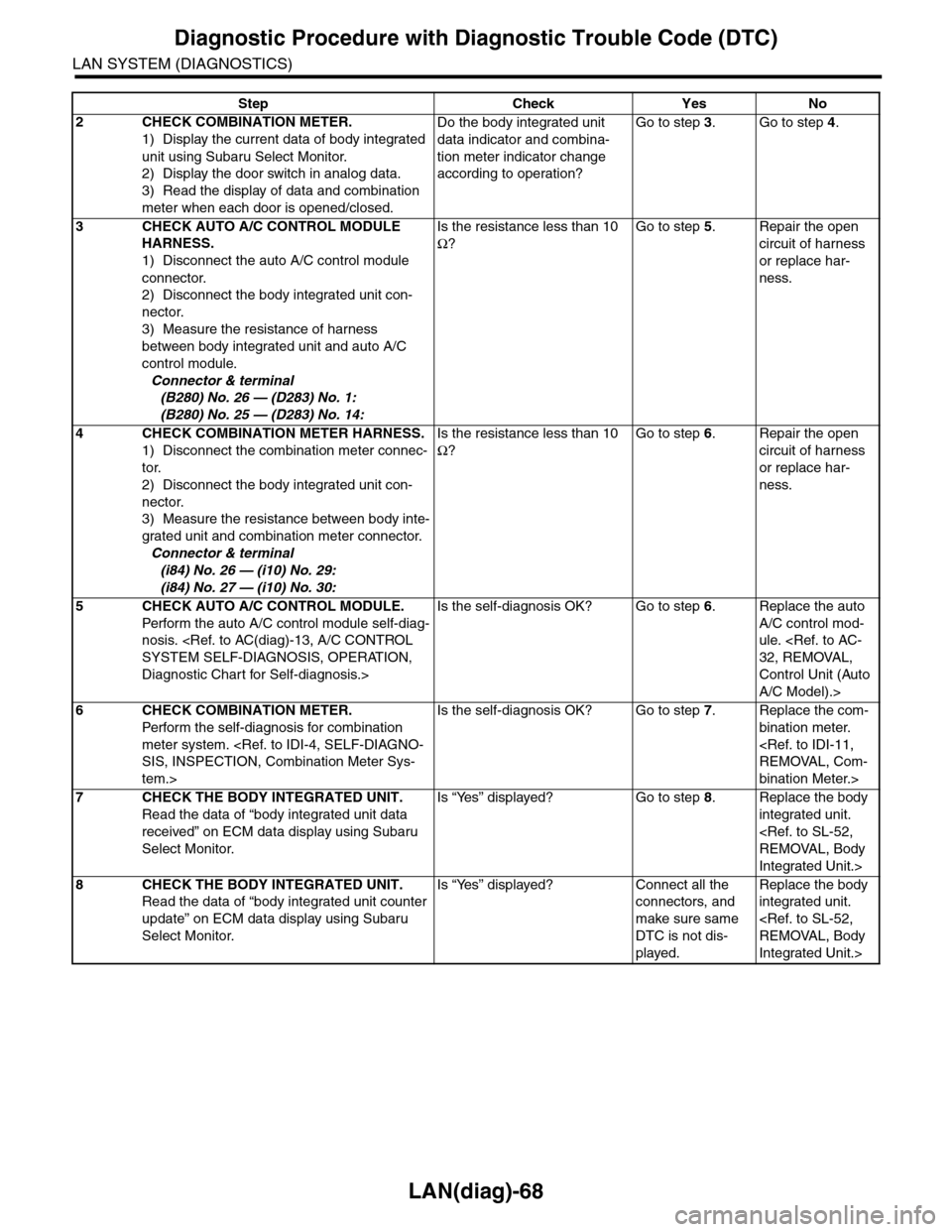
2CHECK COMBINATION METER.
1) Display the current data of body integrated
unit using Subaru Select Monitor.
2) Display the door switch in analog data.
3) Read the display of data and combination
meter when each door is opened/closed.
Do the body integrated unit
data indicator and combina-
tion meter indicator change
according to operation?
Go to step 3.Go to step 4.
3CHECK AUTO A/C CONTROL MODULE
HARNESS.
1) Disconnect the auto A/C control module
connector.
2) Disconnect the body integrated unit con-
nector.
3) Measure the resistance of harness
between body integrated unit and auto A/C
control module.
Connector & terminal
(B280) No. 26 — (D283) No. 1:
(B280) No. 25 — (D283) No. 14:
Is the resistance less than 10
Ω?
Go to step 5.Repair the open
circuit of harness
or replace har-
ness.
4CHECK COMBINATION METER HARNESS.
1) Disconnect the combination meter connec-
tor.
2) Disconnect the body integrated unit con-
nector.
3) Measure the resistance between body inte-
grated unit and combination meter connector.
Connector & terminal
(i84) No. 26 — (i10) No. 29:
(i84) No. 27 — (i10) No. 30:
Is the resistance less than 10
Ω?
Go to step 6.Repair the open
circuit of harness
or replace har-
ness.
5CHECK AUTO A/C CONTROL MODULE.
Perfor m the auto A/C control module self-diag-
nosis.
Diagnostic Chart for Self-diagnosis.>
Is the self-diagnosis OK? Go to step 6.Replace the auto
A/C control mod-
ule.
Control Unit (Auto
A/C Model).>
6CHECK COMBINATION METER.
Perfor m the self-diagnosis for combination
meter system.
tem.>
Is the self-diagnosis OK? Go to step 7.Replace the com-
bination meter.
bination Meter.>
7CHECK THE BODY INTEGRATED UNIT.
Read the data of “body integrated unit data
received” on ECM data display using Subaru
Select Monitor.
Is “Yes” displayed? Go to step 8.Replace the body
integrated unit.
Integrated Unit.>
8CHECK THE BODY INTEGRATED UNIT.
Read the data of “body integrated unit counter
update” on ECM data display using Subaru
Select Monitor.
Is “Yes” displayed? Connect all the
connectors, and
make sure same
DTC is not dis-
played.
Replace the body
integrated unit.
Integrated Unit.>
Step Check Yes No
Page 525 of 2453
LAN(diag)-69
Diagnostic Procedure with Diagnostic Trouble Code (DTC)
LAN SYSTEM (DIAGNOSTICS)
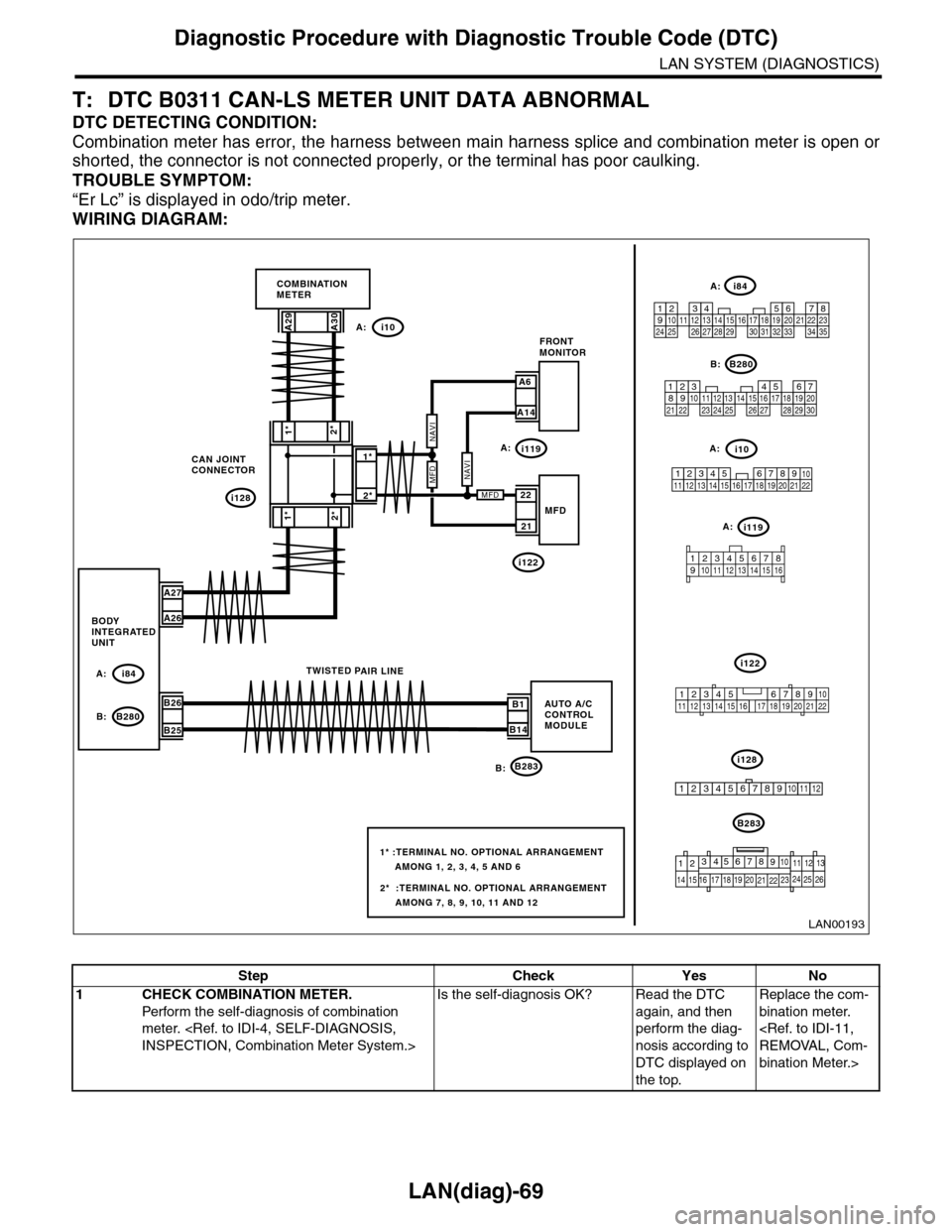
T: DTC B0311 CAN-LS METER UNIT DATA ABNORMAL
DTC DETECTING CONDITION:
Combination meter has error, the harness between main harness splice and combination meter is open or
shorted, the connector is not connected properly, or the terminal has poor caulking.
TROUBLE SYMPTOM:
“Er Lc” is displayed in odo/trip meter.
WIRING DIAGRAM:
i128
1*
2*1*
2*
CAN JOINTCONNECTOR
i10
B283
A29A30
A27
A26
B26
B25
A: i84
B: B280B1
B14
TWISTED PAIR LINE
5467821931022 231112131415242526 2716171828 29192021 30
B280
i84
1234567891011121314151617181920212223242526272829303132333435
2345 678912 13 14 15 16 17 18 19 20 21 2210111
B283
i10
COMBINATIONMETER
BODYINTEGRATEDUNIT
AUTO A/CCONTROLMODULE
123456789101112
LAN00193
A:
B:
2*
1*
A6
A14
FRONTMONITOR
21
22MFD
2* :TERMINAL NO. OPTIONAL ARRANGEMENT AMONG 7, 8, 9, 10, 11 AND 12
1* :TERMINAL NO. OPTIONAL ARRANGEMENT AMONG 1, 2, 3, 4, 5 AND 6
i119
i122
A:
A:
A:
i119A:
i122
i128B:
MFDNAVI
MFD
NAVI
9
19 20
105672143131211
14 15 16 17
8
18222125262423
12345678910 11 12 13 14 15 16
345 678919 20 2114 15 16 17 1812101211 13 22
Step Check Yes No
1CHECK COMBINATION METER.
Perfor m the self-diagnosis of combination
meter.
Is the self-diagnosis OK? Read the DTC
again, and then
perform the diag-
nosis according to
DTC displayed on
the top.
Replace the com-
bination meter.
bination Meter.>
Page 526 of 2453
LAN(diag)-70
Diagnostic Procedure with Diagnostic Trouble Code (DTC)
LAN SYSTEM (DIAGNOSTICS)
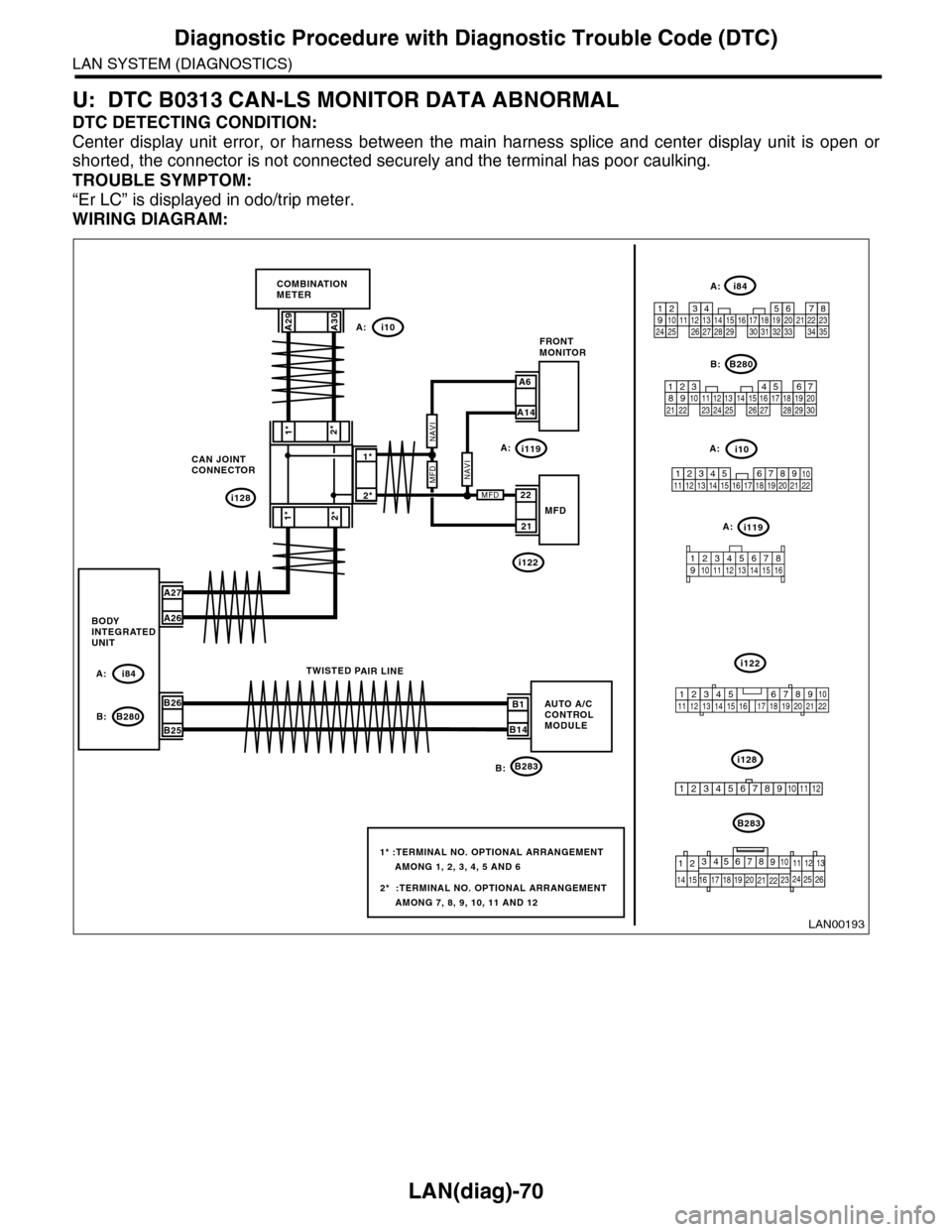
U: DTC B0313 CAN-LS MONITOR DATA ABNORMAL
DTC DETECTING CONDITION:
Center display unit error, or harness between the main harness splice and center display unit is open or
shorted, the connector is not connected securely and the terminal has poor caulking.
TROUBLE SYMPTOM:
“Er LC” is displayed in odo/trip meter.
WIRING DIAGRAM:
i128
1*
2*1*
2*
CAN JOINTCONNECTOR
i10
B283
A29A30
A27
A26
B26
B25
A: i84
B: B280B1
B14
TWISTED PAIR LINE
5467821931022 231112131415242526 2716171828 29192021 30
B280
i84
1234567891011121314151617181920212223242526272829303132333435
2345 678912 13 14 15 16 17 18 19 20 21 2210111
B283
i10
COMBINATIONMETER
BODYINTEGRATEDUNIT
AUTO A/CCONTROLMODULE
123456789101112
LAN00193
A:
B:
2*
1*
A6
A14
FRONTMONITOR
21
22MFD
2* :TERMINAL NO. OPTIONAL ARRANGEMENT AMONG 7, 8, 9, 10, 11 AND 12
1* :TERMINAL NO. OPTIONAL ARRANGEMENT AMONG 1, 2, 3, 4, 5 AND 6
i119
i122
A:
A:
A:
i119A:
i122
i128B:
MFDNAVI
MFD
NAVI
9
19 20
105672143131211
14 15 16 17
8
18222125262423
12345678910 11 12 13 14 15 16
345 678919 20 2114 15 16 17 1812101211 13 22
Page 527 of 2453
LAN(diag)-71
Diagnostic Procedure with Diagnostic Trouble Code (DTC)
LAN SYSTEM (DIAGNOSTICS)
Step Check Yes No
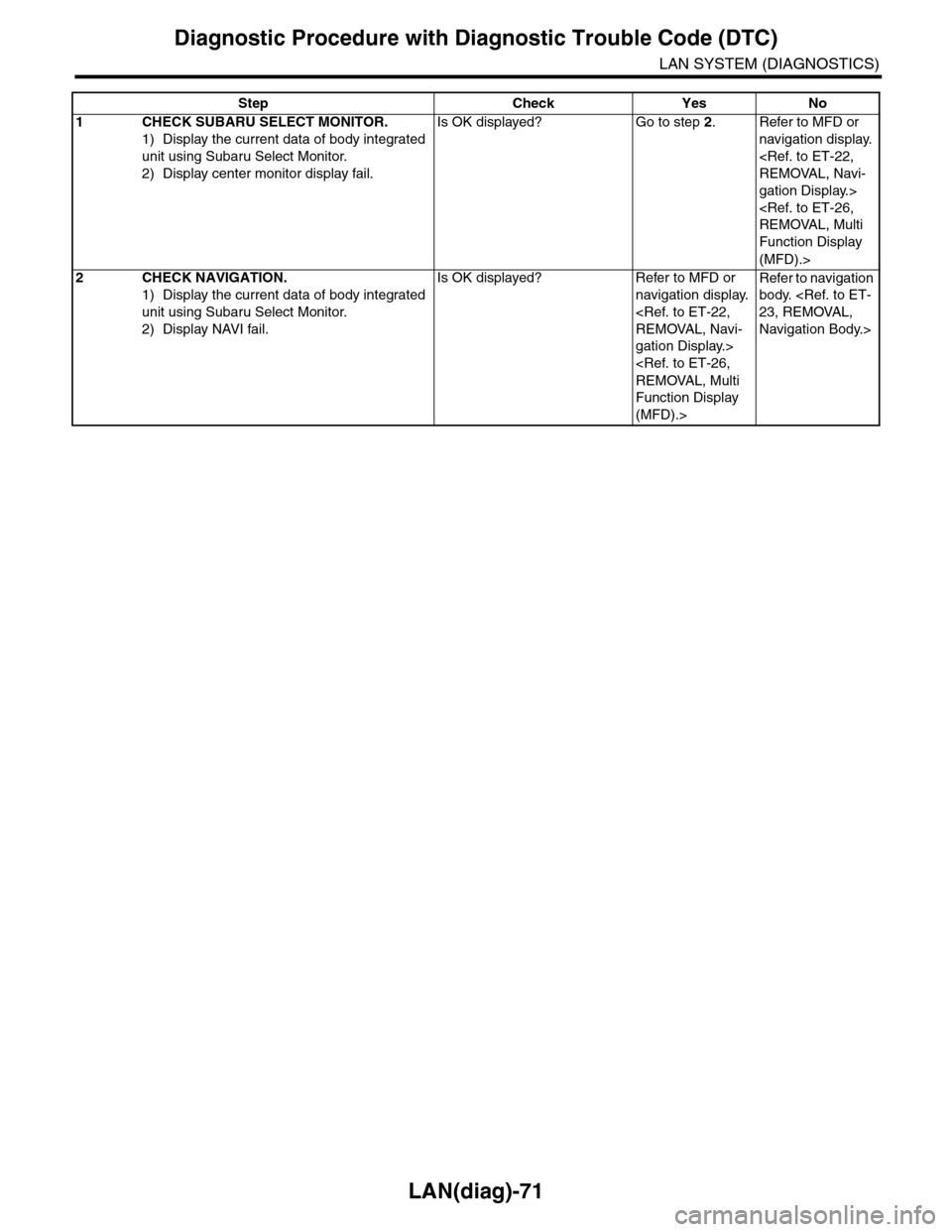
1CHECK SUBARU SELECT MONITOR.
1) Display the current data of body integrated
unit using Subaru Select Monitor.
2) Display center monitor display fail.
Is OK displayed? Go to step 2.Refer to MFD or
navigation display.
gation Display.>
Function Display
(MFD).>
2CHECK NAVIGATION.
1) Display the current data of body integrated
unit using Subaru Select Monitor.
2) Display NAVI fail.
Is OK displayed? Refer to MFD or
navigation display.
gation Display.>
Function Display
(MFD).>
Refer to navigation
body.
Navigation Body.>
Page 528 of 2453
LAN(diag)-72
Diagnostic Procedure with Diagnostic Trouble Code (DTC)
LAN SYSTEM (DIAGNOSTICS)
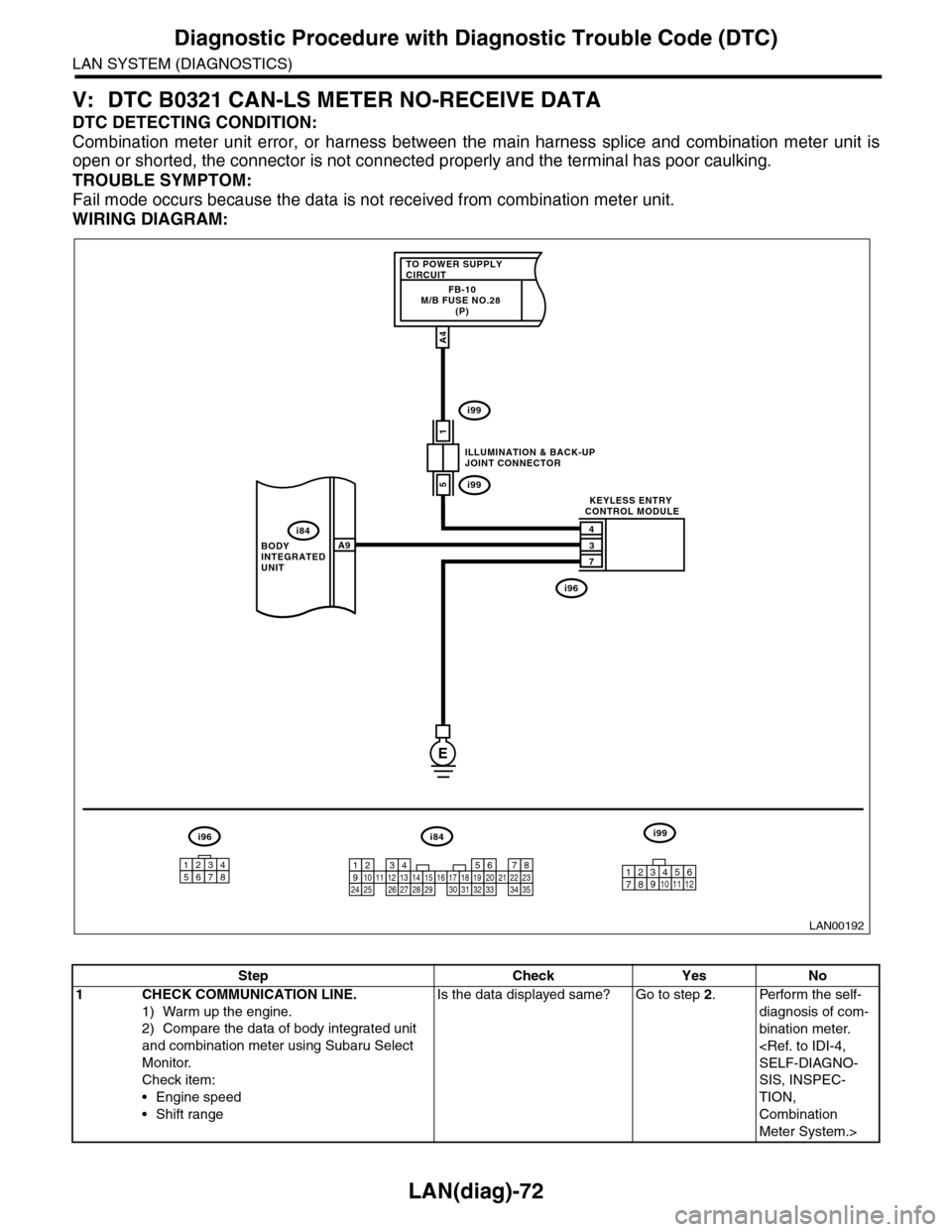
V: DTC B0321 CAN-LS METER NO-RECEIVE DATA
DTC DETECTING CONDITION:
Combination meter unit error, or harness between the main harness splice and combination meter unit is
open or shorted, the connector is not connected properly and the terminal has poor caulking.
TROUBLE SYMPTOM:
Fail mode occurs because the data is not received from combination meter unit.
WIRING DIAGRAM:
LAN00192
TO POWER SUPPLY CIRCUITFB-10M/B FUSE NO.28 (P)
1
4
3
7
A9
A4
5
BODY INTEGRATED UNIT
ILLUMINATION & BACK-UPJOINT CONNECTOR
KEYLESS ENTRY CONTROL MODULE
i84
i99
i99
i96
E
i84i96i99
123456789101112131415161718192021222324252627282930313233343510 11 12349561728
12345678
Step Check Yes No
1CHECK COMMUNICATION LINE.
1) Warm up the engine.
2) Compare the data of body integrated unit
and combination meter using Subaru Select
Monitor.
Check item:
•Engine speed
•Shift range
Is the data displayed same? Go to step 2.Perform the self-
diagnosis of com-
bination meter.
SIS, INSPEC-
TION,
Combination
Meter System.>
Page 532 of 2453
LAN(diag)-76
General Diagnostic Table
LAN SYSTEM (DIAGNOSTICS)
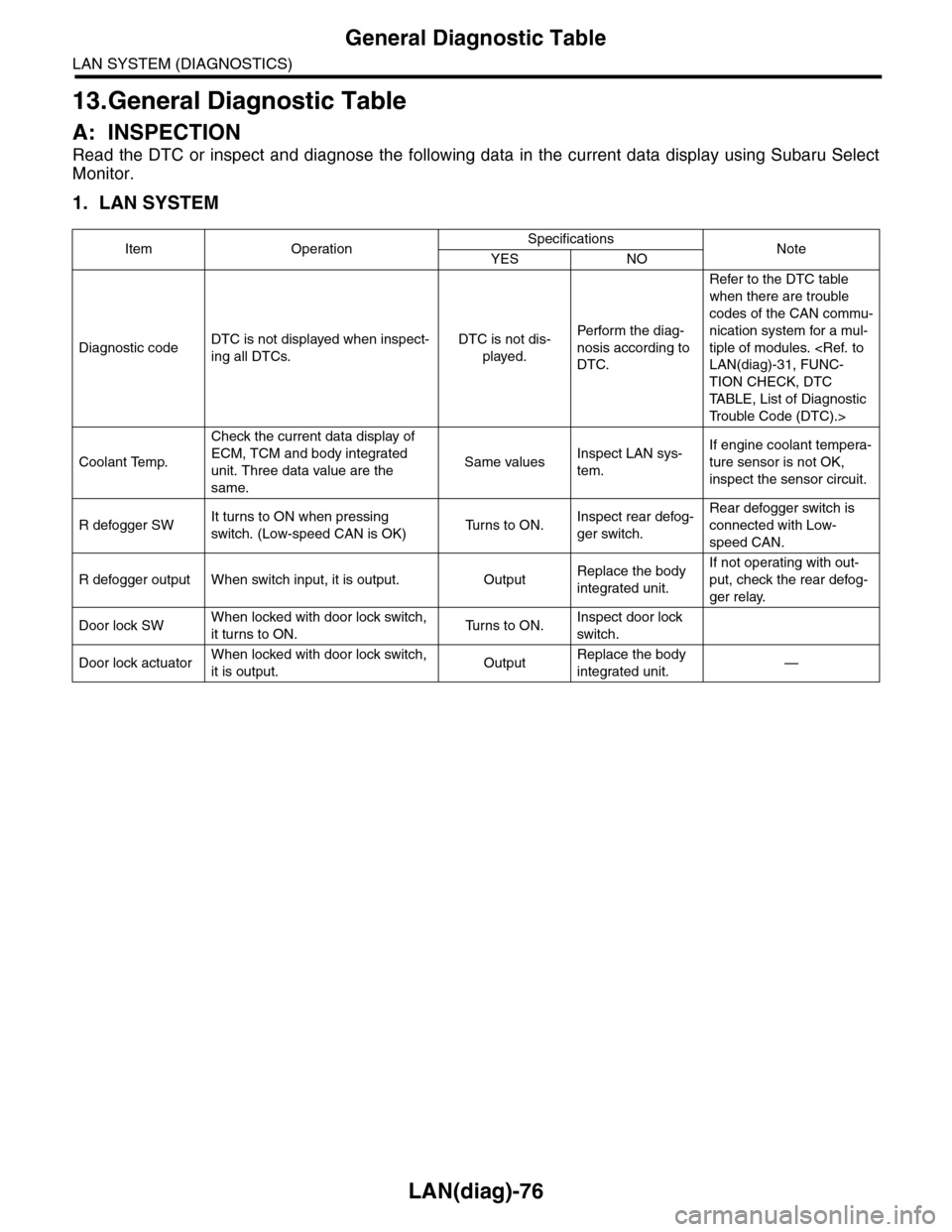
13.General Diagnostic Table
A: INSPECTION
Read the DTC or inspect and diagnose the following data in the current data display using Subaru Select
Monitor.
1. LAN SYSTEM
Item OperationSpecificationsNoteYES NO
Diagnostic codeDTC is not displayed when inspect-
ing all DTCs.
DTC is not dis-
played.
Perfor m the diag-
nosis according to
DTC.
Refer to the DTC table
when there are trouble
codes of the CAN commu-
nication system for a mul-
tiple of modules.
TION CHECK, DTC
TA B L E , L i s t o f D i a g n o s t i c
Tr o u b l e C o d e ( D T C ) . >
Coolant Temp.
Check the current data display of
ECM, TCM and body integrated
unit. Three data value are the
same.
Same valuesInspect LAN sys-
tem.
If engine coolant tempera-
ture sensor is not OK,
inspect the sensor circuit.
R defogger SWIt turns to ON when pressing
switch. (Low-speed CAN is OK)Tu r n s t o O N .Inspect rear defog-
ger switch.
Rear defogger switch is
connected with Low-
speed CAN.
R defogger output When switch input, it is output. OutputReplace the body
integrated unit.
If not operating with out-
put, check the rear defog-
ger relay.
Door lock SWWhen locked with door lock switch,
it turns to ON.Tu r n s t o O N .Inspect door lock
switch.
Door lock actuatorWhen locked with door lock switch,
it is output.OutputReplace the body
integrated unit.—
Page 533 of 2453
LAN(diag)-77
General Diagnostic Table
LAN SYSTEM (DIAGNOSTICS)
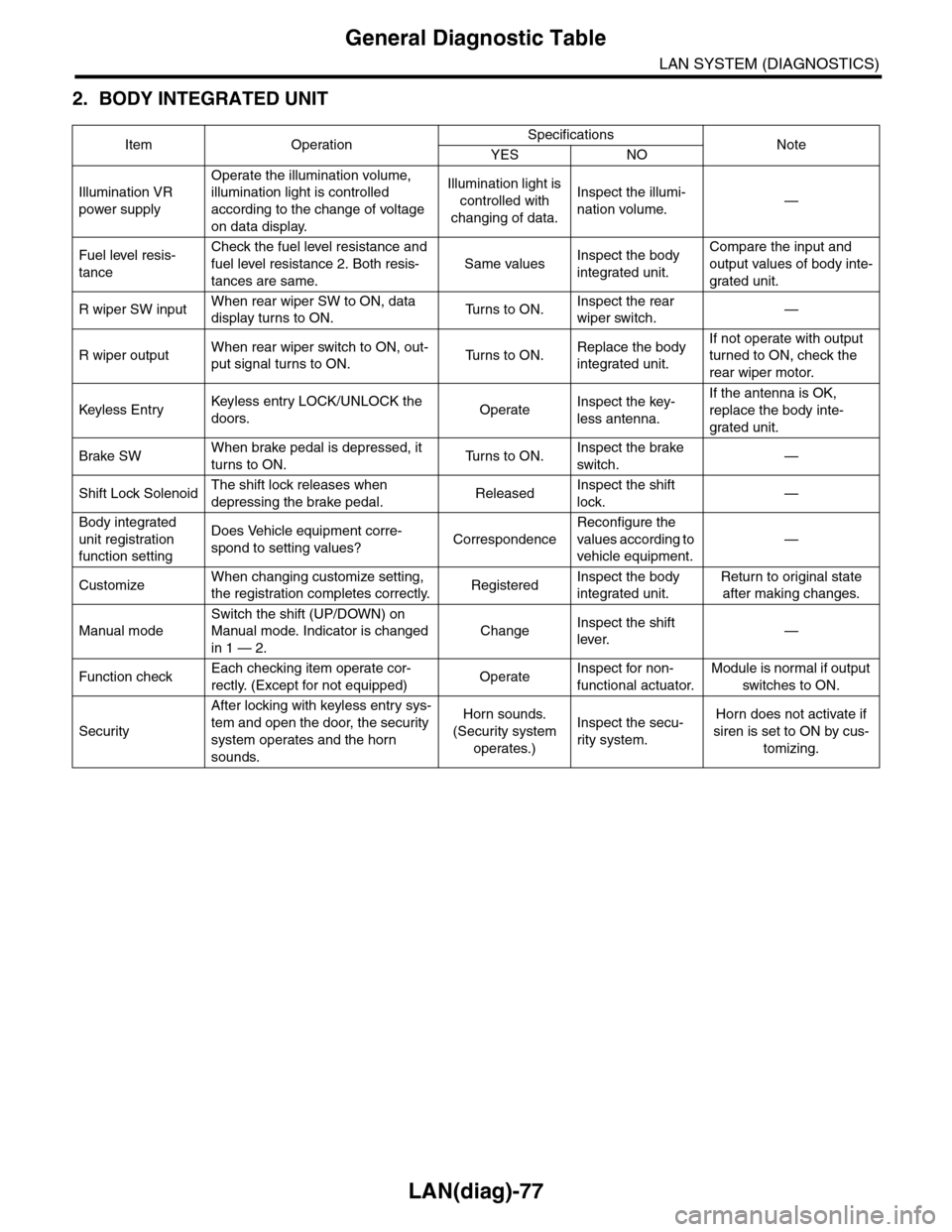
2. BODY INTEGRATED UNIT
Item OperationSpecificationsNoteYES NO
Illumination VR
power supply
Operate the illumination volume,
illumination light is controlled
according to the change of voltage
on data display.
Illumination light is
controlled with
changing of data.
Inspect the illumi-
nation volume.—
Fuel level resis-
tance
Check the fuel level resistance and
fuel level resistance 2. Both resis-
tances are same.
Same valuesInspect the body
integrated unit.
Compare the input and
output values of body inte-
grated unit.
R wiper SW inputWhen rear wiper SW to ON, data
display turns to ON.Tu r n s t o O N .Inspect the rear
wiper switch.—
R wiper outputWhen rear wiper switch to ON, out-
put signal turns to ON.Tu r n s t o O N .Replace the body
integrated unit.
If not operate with output
turned to ON, check the
rear wiper motor.
Keyless Entr yKeyless entr y LOCK/UNLOCK the
doors.OperateInspect the key-
less antenna.
If the antenna is OK,
replace the body inte-
grated unit.
Brake SWWhen brake pedal is depressed, it
turns to ON.Tu r n s t o O N .Inspect the brake
switch.—
Shift Lock SolenoidThe shift lock releases when
depressing the brake pedal.ReleasedInspect the shift
lock.—
Body integrated
unit registration
function setting
Does Vehicle equipment corre-
spond to setting values?Correspondence
Reconfigure the
values according to
vehicle equipment.
—
CustomizeWhen changing customize setting,
the registration completes correctly.RegisteredInspect the body
integrated unit.
Return to original state
after making changes.
Manual mode
Switch the shift (UP/DOWN) on
Manual mode. Indicator is changed
in 1 — 2.
ChangeInspect the shift
lever.—
Function checkEach checking item operate cor-
rectly. (Except for not equipped)OperateInspect for non-
functional actuator.
Module is normal if output
switches to ON.
Security
After locking with keyless entry sys-
tem and open the door, the security
system operates and the horn
sounds.
Horn sounds.
(Security system
operates.)
Inspect the secu-
rity system.
Horn does not activate if
siren is set to ON by cus-
tomizing.
Page 570 of 2453
OD(diag)-2
Basic Diagnostic Procedure
OCCUPANT DETECTION SYSTEM (DIAGNOSTICS)
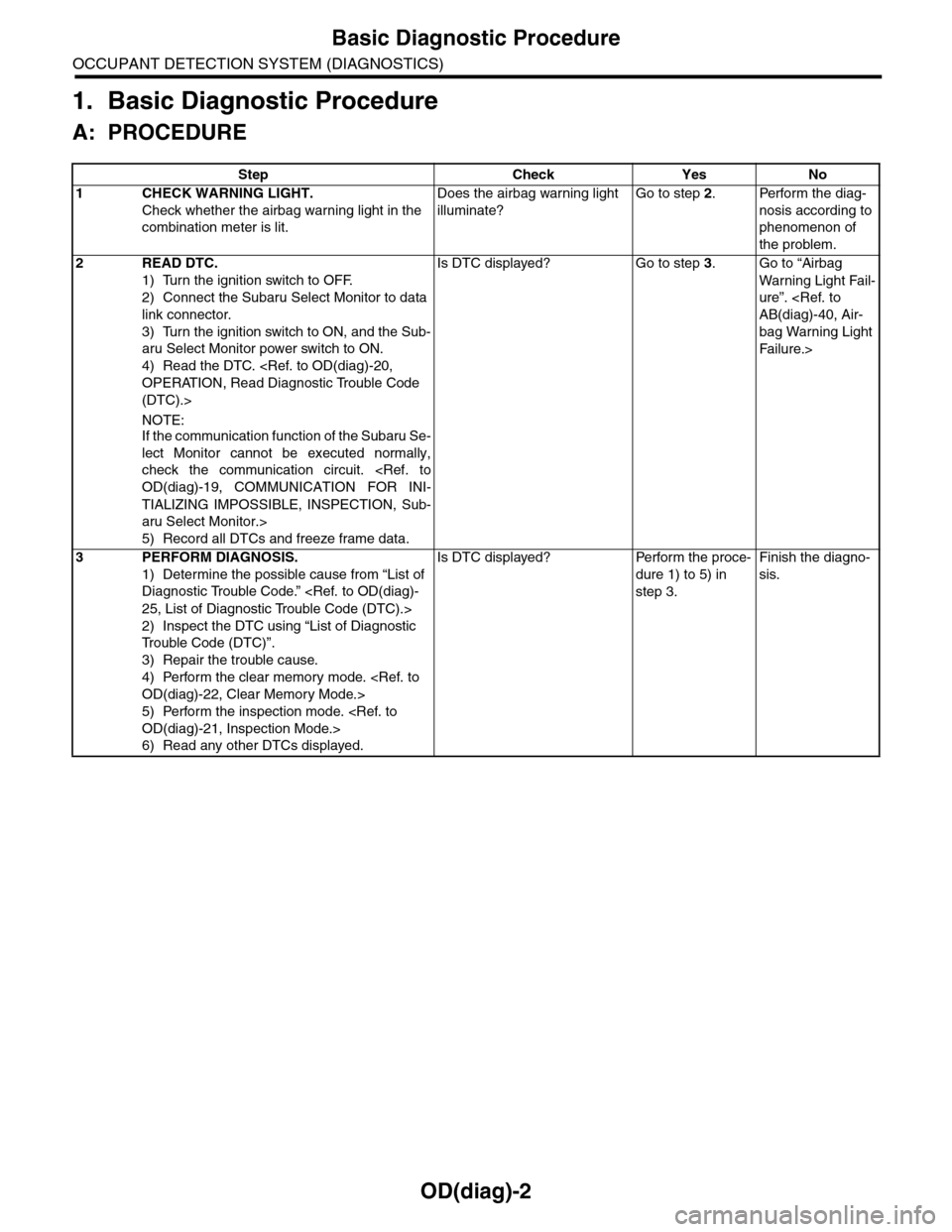
1. Basic Diagnostic Procedure
A: PROCEDURE
Step Check Yes No
1CHECK WARNING LIGHT.
Check whether the airbag warning light in the
combination meter is lit.
Does the airbag warning light
illuminate?
Go to step 2.Perform the diag-
nosis according to
phenomenon of
the problem.
2READ DTC.
1) Turn the ignition switch to OFF.
2) Connect the Subaru Select Monitor to data
link connector.
3) Turn the ignition switch to ON, and the Sub-
aru Select Monitor power switch to ON.
4) Read the DTC.
(DTC).>
NOTE:If the communication function of the Subaru Se-
lect Monitor cannot be executed normally,
check the communication circuit.
TIALIZING IMPOSSIBLE, INSPECTION, Sub-
aru Select Monitor.>
5) Record all DTCs and freeze frame data.
Is DTC displayed? Go to step 3.Go to “Airbag
Wa r ni n g L ig h t Fa i l-
ure”.
bag Warning Light
Fai lu r e.>
3PERFORM DIAGNOSIS.
1) Determine the possible cause from “List of
Diagnostic Trouble Code.”
2) Inspect the DTC using “List of Diagnostic
Tr o u b l e C o d e ( D T C ) ” .
3) Repair the trouble cause.
4) Perform the clear memory mode.
5) Perform the inspection mode.
6) Read any other DTCs displayed.
Is DTC displayed? Perform the proce-
dure 1) to 5) in
step 3.
Finish the diagno-
sis.
Page 585 of 2453
OD(diag)-17
Subaru Select Monitor
OCCUPANT DETECTION SYSTEM (DIAGNOSTICS)
7. Subaru Select Monitor
A: OPERATION
1. READ DIAGNOSTIC TROUBLE CODE (DTC)
When malfunction of the airbag system and the occupant detection system occur, the DTC stored in airbag
control module will be read out.
Refer to the DTC readout of the airbag system (diagnosis).
NOTE:
•For details concerning operation procedure, refer to the “SUBARU SELECT MONITOR OPERATION
MANUAL”.
•For details concerning DTCs, refer to the “List of Diagnostic Trouble Code (Airbag system, Occupant de-
tection system).”
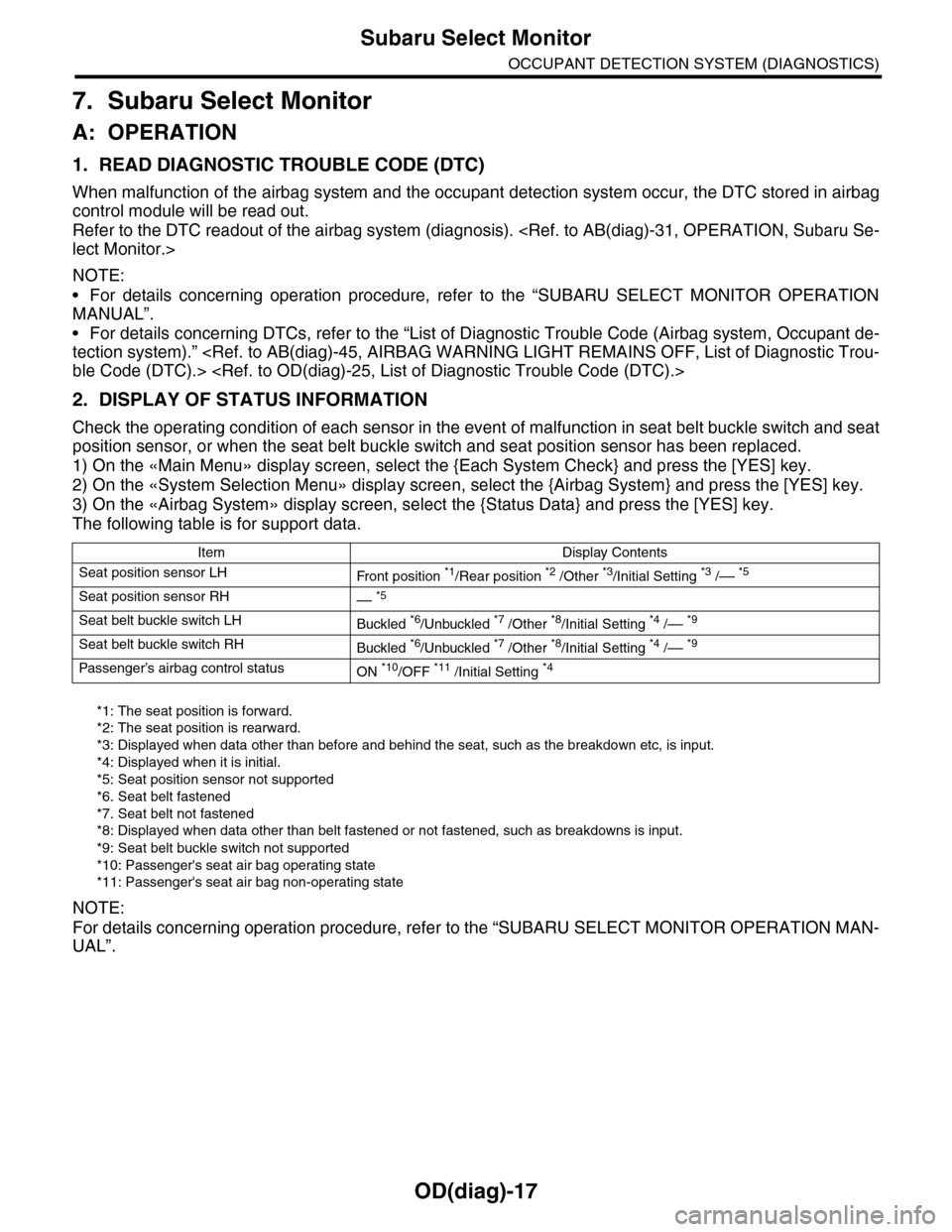
2. DISPLAY OF STATUS INFORMATION
Check the operating condition of each sensor in the event of malfunction in seat belt buckle switch and seat
position sensor, or when the seat belt buckle switch and seat position sensor has been replaced.
1) On the «Main Menu» display screen, select the {Each System Check} and press the [YES] key.
2) On the «System Selection Menu» display screen, select the {Airbag System} and press the [YES] key.
3) On the «Airbag System» display screen, select the {Status Data} and press the [YES] key.
The following table is for support data.
*1: The seat position is forward.
*2: The seat position is rearward.
*3: Displayed when data other than before and behind the seat, such as the breakdown etc, is input.
*4: Displayed when it is initial.
*5: Seat position sensor not supported
*6. Seat belt fastened
*7. Seat belt not fastened
*8: Displayed when data other than belt fastened or not fastened, such as breakdowns is input.
*9: Seat belt buckle switch not supported
*10: Passenger's seat air bag operating state
*11: Passenger's seat air bag non-operating state
NOTE:
For details concerning operation procedure, refer to the “SUBARU SELECT MONITOR OPERATION MAN-
UAL”.
Item Display Contents
Seat position sensor LHFr o nt p os it i on *1/Rear position *2 /Other *3/Initial Setting *3 /–– *5
Seat position sensor RH–– *5
Seat belt buckle switch LHBuckled *6/Unbuckled *7 /Other *8/Initial Setting *4 /–– *9
Seat belt buckle switch RHBuckled *6/Unbuckled *7 /Other *8/Initial Setting *4 /–– *9
Passenger’s airbag control statusON *10/OFF *11 /Initial Setting *4
Page 586 of 2453
OD(diag)-18
Subaru Select Monitor
OCCUPANT DETECTION SYSTEM (DIAGNOSTICS)
3. CLEAR MEMORY MODE
Clear the DTC stored in the airbag control module
after repairing the airbag system and occupant de-
tection system. (After the breakdown is recovered,
the breakdown code for completed recoveries are
read out when the next breakdown occurs if the
memory clear work is not performed.)
1) On the «Main Menu» display screen, select the
{Each System Check} and press the [YES] key.
2) On the «System Selection Menu» display
screen, select the {Airbag System} and press the
[YES] key.
3) On the {Airbag System} menu screen, select the
{Clear Memory} and press the [YES] key.
4) When the “Clear Memory?” is shown on the
screen, press the [YES] key.
5) When “Done” is displayed, turn the Subaru Se-
lect Monitor to OFF.
NOTE:
For details concerning operation procedure, refer
to the “SUBARU SELECT MONITOR OPERATION
MANUAL”.
4. SYSTEM CALIBRATION (REZEROING)
NOTE:
When replacing the occupant detection system, or
removing and disassembling the passenger’s seat,
always perform the system calibration after install-
ing a seat in the vehicle.
CAUTION:
When the trouble occurs in the system during
calibration process, “Occupant detection cali-
bration failure” is detected in the DTC 2A of the
airbag system and the airbag warning light
lights. In this case, after turning the ignition
switch to OFF once, redo the system calibration
(Rezeroing), or after clearing the cause of the
failure, perform the system calibration again.
1) Park empty vehicle on a level surface.
2) On the «Main Menu» display screen, select the
{Each System Check} and press the [YES] key.
3) On the «System Selection Menu» display
screen, select the {Occupant Detection System}
and press the [YES] key.
4) On the Occupant Detection System display
screen, select the {Zero Point Adjustment} and
press the [YES] key.
5) “See service manual. And check vehicle condi-
tion for successfully completing the rezeroing.” is
displayed. Check the following to adjust the condi-
tion of the vehicle.
•Adjust the seat backrest to be vertical. (Press the
power seat switch to put the seat in a position
where it will not move.)
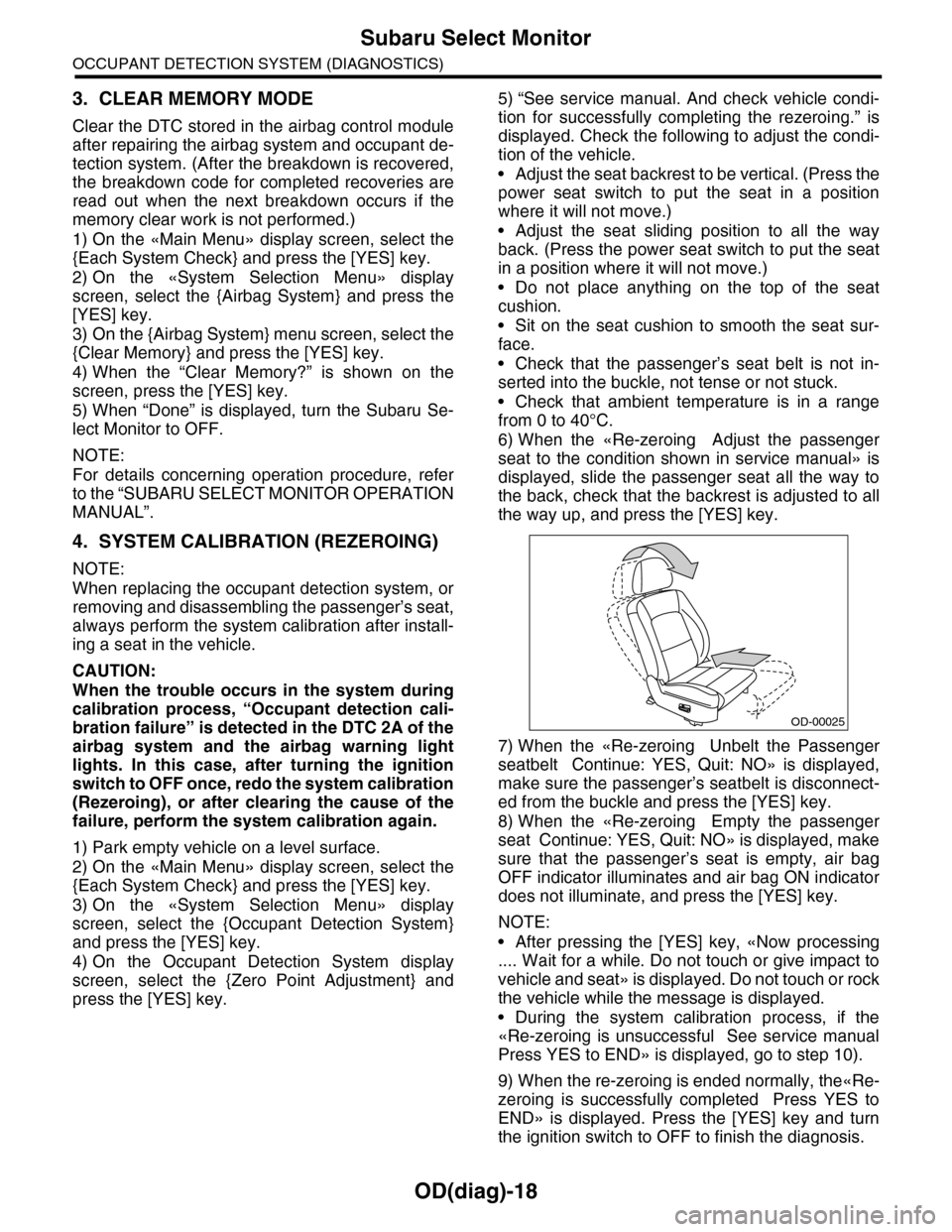
•Adjust the seat sliding position to all the way
back. (Press the power seat switch to put the seat
in a position where it will not move.)
•Do not place anything on the top of the seat
cushion.
•Sit on the seat cushion to smooth the seat sur-
face.
•Check that the passenger’s seat belt is not in-
serted into the buckle, not tense or not stuck.
•Check that ambient temperature is in a range
from 0 to 40°C.
6) When the «Re-zeroing Adjust the passenger
seat to the condition shown in service manual» is
displayed, slide the passenger seat all the way to
the back, check that the backrest is adjusted to all
the way up, and press the [YES] key.
7) When the «Re-zeroing Unbelt the Passenger
seatbelt Continue: YES, Quit: NO» is displayed,
make sure the passenger’s seatbelt is disconnect-
ed from the buckle and press the [YES] key.
8) When the «Re-zeroing Empty the passenger
seat Continue: YES, Quit: NO» is displayed, make
sure that the passenger’s seat is empty, air bag
OFF indicator illuminates and air bag ON indicator
does not illuminate, and press the [YES] key.
NOTE:
•After pressing the [YES] key, «Now processing
.... Wait for a while. Do not touch or give impact to
vehicle and seat» is displayed. Do not touch or rock
the vehicle while the message is displayed.
•During the system calibration process, if the
«Re-zeroing is unsuccessful See service manual
Press YES to END» is displayed, go to step 10).
9) When the re-zeroing is ended normally, the«Re-
zeroing is successfully completed Press YES to
END» is displayed. Press the [YES] key and turn
the ignition switch to OFF to finish the diagnosis.
OD-00025