Display SUBARU TRIBECA 2009 1.G Service Workshop Manual
[x] Cancel search | Manufacturer: SUBARU, Model Year: 2009, Model line: TRIBECA, Model: SUBARU TRIBECA 2009 1.GPages: 2453, PDF Size: 46.32 MB
Page 587 of 2453
OD(diag)-19
Subaru Select Monitor
OCCUPANT DETECTION SYSTEM (DIAGNOSTICS)
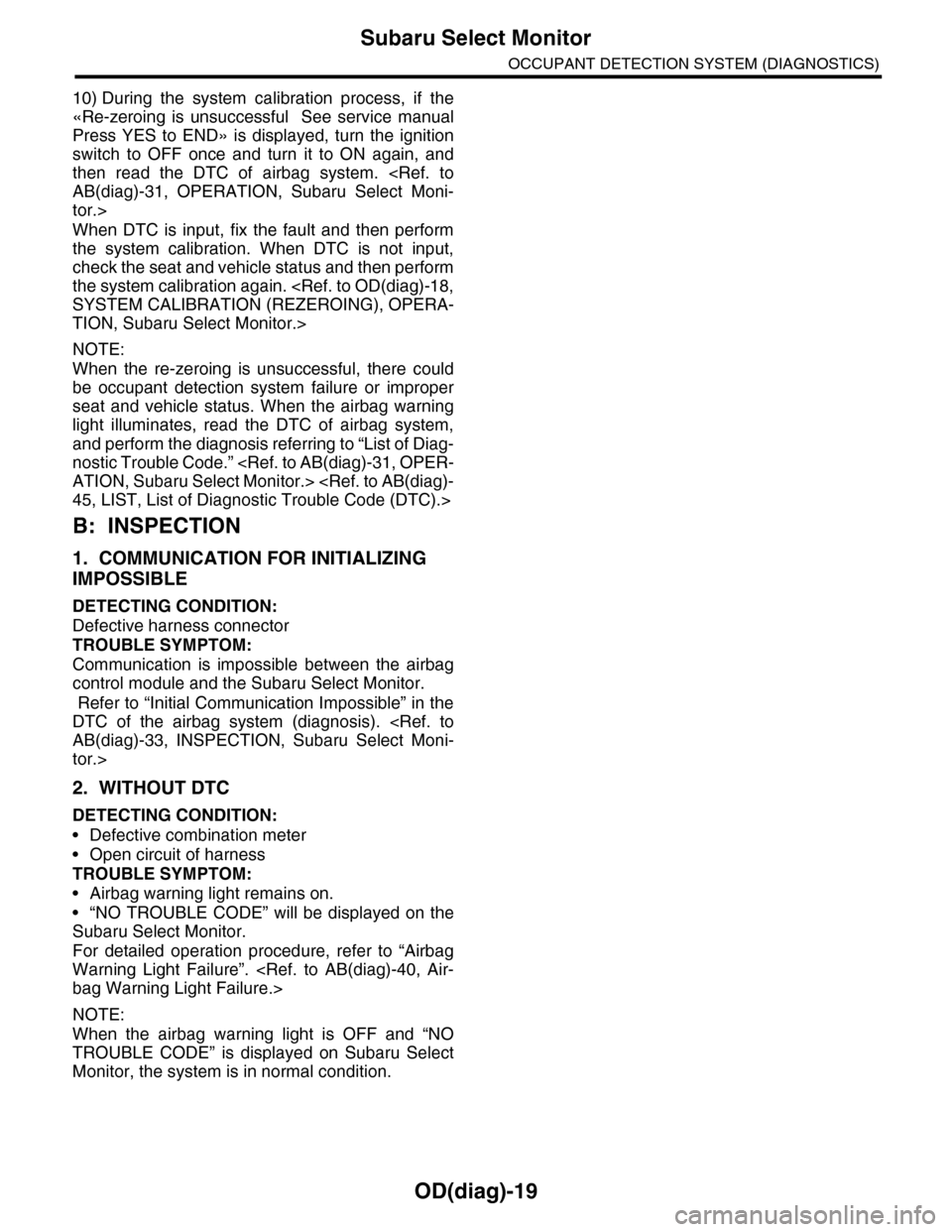
10) During the system calibration process, if the
«Re-zeroing is unsuccessful See service manual
Press YES to END» is displayed, turn the ignition
switch to OFF once and turn it to ON again, and
then read the DTC of airbag system.
tor.>
When DTC is input, fix the fault and then perform
the system calibration. When DTC is not input,
check the seat and vehicle status and then perform
the system calibration again.
TION, Subaru Select Monitor.>
NOTE:
When the re-zeroing is unsuccessful, there could
be occupant detection system failure or improper
seat and vehicle status. When the airbag warning
light illuminates, read the DTC of airbag system,
and perform the diagnosis referring to “List of Diag-
nostic Trouble Code.”
B: INSPECTION
1. COMMUNICATION FOR INITIALIZING
IMPOSSIBLE
DETECTING CONDITION:
Defective harness connector
TROUBLE SYMPTOM:
Communication is impossible between the airbag
control module and the Subaru Select Monitor.
Refer to “Initial Communication Impossible” in the
DTC of the airbag system (diagnosis).
tor.>
2. WITHOUT DTC
DETECTING CONDITION:
•Defective combination meter
•Open circuit of harness
TROUBLE SYMPTOM:
•Airbag warning light remains on.
•“NO TROUBLE CODE” will be displayed on the
Subaru Select Monitor.
For detailed operation procedure, refer to “Airbag
Warning Light Failure”.
NOTE:
When the airbag warning light is OFF and “NO
TROUBLE CODE” is displayed on Subaru Select
Monitor, the system is in normal condition.
Page 593 of 2453
OD(diag)-25
List of Diagnostic Trouble Code (DTC)
OCCUPANT DETECTION SYSTEM (DIAGNOSTICS)
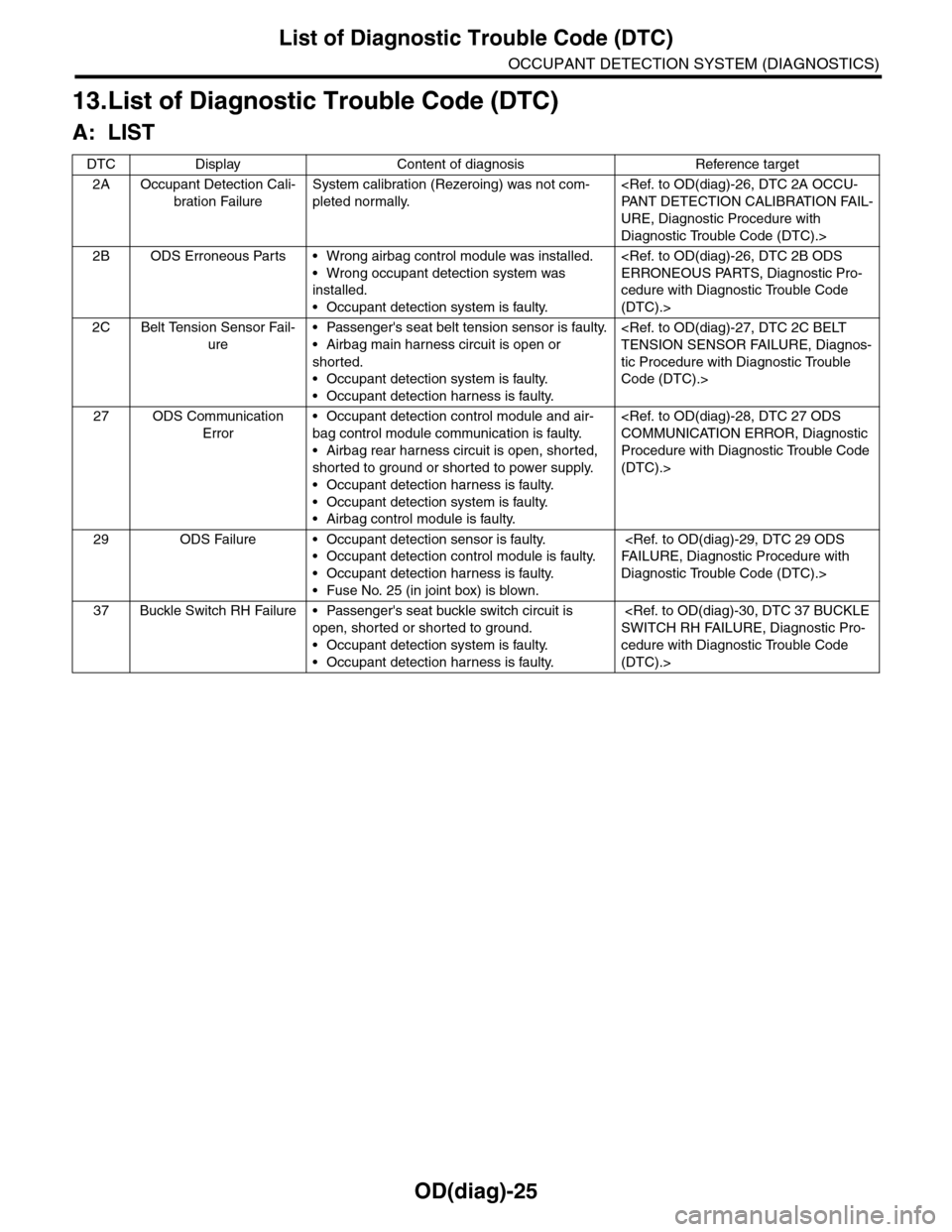
13.List of Diagnostic Trouble Code (DTC)
A: LIST
DTC Display Content of diagnosis Reference target
2A Occupant Detection Cali-
bration Failure
System calibration (Rezeroing) was not com-
pleted normally.
URE, Diagnostic Procedure with
Diagnostic Trouble Code (DTC).>
2B ODS Erroneous Parts • Wrong airbag control module was installed.
•Wrong occupant detection system was
installed.
•Occupant detection system is faulty.
cedure with Diagnostic Trouble Code
(DTC).>
2C Belt Tension Sensor Fail-
ure
•Passenger's seat belt tension sensor is faulty.
•Airbag main harness circuit is open or
shorted.
•Occupant detection system is faulty.
•Occupant detection harness is faulty.
tic Procedure with Diagnostic Trouble
Code (DTC).>
27 ODS Communication
Error
•Occupant detection control module and air-
bag control module communication is faulty.
•Airbag rear harness circuit is open, shorted,
shorted to ground or shorted to power supply.
•Occupant detection harness is faulty.
•Occupant detection system is faulty.
•Airbag control module is faulty.
Procedure with Diagnostic Trouble Code
(DTC).>
29 ODS Failure • Occupant detection sensor is faulty.
•Occupant detection control module is faulty.
•Occupant detection harness is faulty.
•Fuse No. 25 (in joint box) is blown.
Diagnostic Trouble Code (DTC).>
37 Buckle Switch RH Failure • Passenger's seat buckle switch circuit is
open, shorted or shorted to ground.
•Occupant detection system is faulty.
•Occupant detection harness is faulty.
cedure with Diagnostic Trouble Code
(DTC).>
Page 597 of 2453
OD(diag)-29
Diagnostic Procedure with Diagnostic Trouble Code (DTC)
OCCUPANT DETECTION SYSTEM (DIAGNOSTICS)
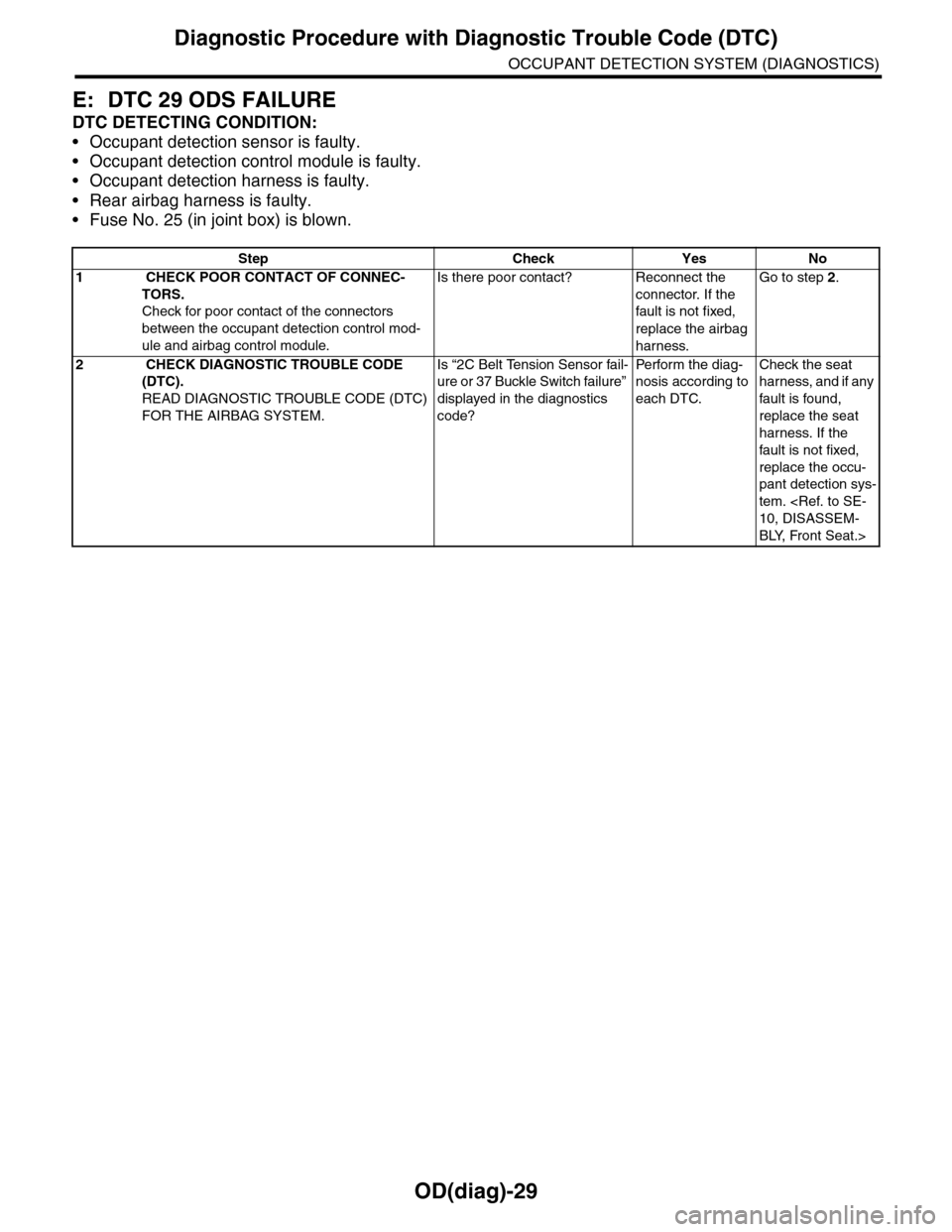
E: DTC 29 ODS FAILURE
DTC DETECTING CONDITION:
•Occupant detection sensor is faulty.
•Occupant detection control module is faulty.
•Occupant detection harness is faulty.
•Rear airbag harness is faulty.
•Fuse No. 25 (in joint box) is blown.
Step Check Yes No
1 CHECK POOR CONTACT OF CONNEC-
TORS.
Check for poor contact of the connectors
between the occupant detection control mod-
ule and airbag control module.
Is there poor contact? Reconnect the
connector. If the
fault is not fixed,
replace the airbag
harness.
Go to step 2.
2 CHECK DIAGNOSTIC TROUBLE CODE
(DTC).
READ DIAGNOSTIC TROUBLE CODE (DTC)
FOR THE AIRBAG SYSTEM.
Is “2C Belt Tension Sensor fail-
ure or 37 Buckle Switch failure”
displayed in the diagnostics
code?
Pe r for m t h e d ia g -
nosis according to
each DTC.
Check the seat
harness, and if any
fault is found,
replace the seat
harness. If the
fault is not fixed,
replace the occu-
pant detection sys-
tem.
BLY, Front Seat.>
Page 605 of 2453
SB-8
Seat Belt Warning System
SEAT BELT SYSTEM
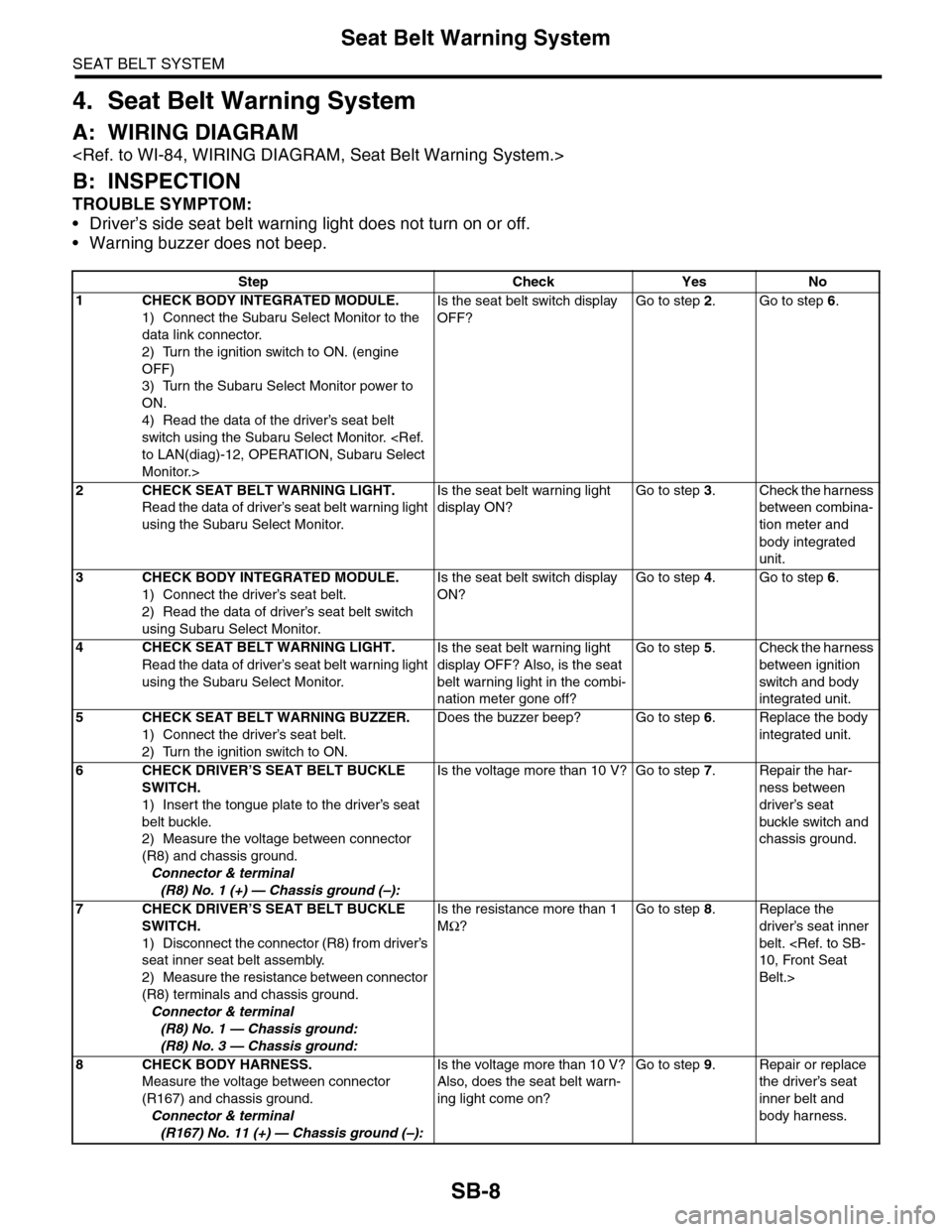
4. Seat Belt Warning System
A: WIRING DIAGRAM
B: INSPECTION
TROUBLE SYMPTOM:
•Driver’s side seat belt warning light does not turn on or off.
•Warning buzzer does not beep.
Step Check Yes No
1CHECK BODY INTEGRATED MODULE.
1) Connect the Subaru Select Monitor to the
data link connector.
2) Turn the ignition switch to ON. (engine
OFF)
3) Turn the Subaru Select Monitor power to
ON.
4) Read the data of the driver’s seat belt
switch using the Subaru Select Monitor.
Monitor.>
Is the seat belt switch display
OFF?
Go to step 2.Go to step 6.
2CHECK SEAT BELT WARNING LIGHT.
Read the data of driver’s seat belt warning light
using the Subaru Select Monitor.
Is the seat belt warning light
display ON?
Go to step 3.Check the harness
between combina-
tion meter and
body integrated
unit.
3CHECK BODY INTEGRATED MODULE.
1) Connect the driver’s seat belt.
2) Read the data of driver’s seat belt switch
using Subaru Select Monitor.
Is the seat belt switch display
ON?
Go to step 4.Go to step 6.
4CHECK SEAT BELT WARNING LIGHT.
Read the data of driver’s seat belt warning light
using the Subaru Select Monitor.
Is the seat belt warning light
display OFF? Also, is the seat
belt warning light in the combi-
nation meter gone off?
Go to step 5.Check the harness
between ignition
switch and body
integrated unit.
5CHECK SEAT BELT WARNING BUZZER.
1) Connect the driver’s seat belt.
2) Turn the ignition switch to ON.
Does the buzzer beep? Go to step 6.Replace the body
integrated unit.
6CHECK DRIVER’S SEAT BELT BUCKLE
SWITCH.
1) Insert the tongue plate to the driver’s seat
belt buckle.
2) Measure the voltage between connector
(R8) and chassis ground.
Connector & terminal
(R8) No. 1 (+) — Chassis ground (–):
Is the voltage more than 10 V? Go to step 7.Repair the har-
ness between
driver’s seat
buckle switch and
chassis ground.
7CHECK DRIVER’S SEAT BELT BUCKLE
SWITCH.
1) Disconnect the connector (R8) from driver’s
seat inner seat belt assembly.
2) Measure the resistance between connector
(R8) terminals and chassis ground.
Connector & terminal
(R8) No. 1 — Chassis ground:
(R8) No. 3 — Chassis ground:
Is the resistance more than 1
MΩ?
Go to step 8.Replace the
driver’s seat inner
belt.
Belt.>
8CHECK BODY HARNESS.
Measure the voltage between connector
(R167) and chassis ground.
Connector & terminal
(R167) No. 11 (+) — Chassis ground (–):
Is the voltage more than 10 V?
Also, does the seat belt warn-
ing light come on?
Go to step 9.Repair or replace
the driver’s seat
inner belt and
body harness.
Page 608 of 2453
SB-11
Front Seat Belt
SEAT BELT SYSTEM
B: INSTALLATION
1. OUTER SEAT BELT ASSEMBLY
Install in the reverse order of removal.
CAUTION:
•The parts of driver and passenger sides are
not the same. Before installation, make sure
that the correct part is used.
•Be careful not to twist the seat belts during
installation.
Tightening torque:
2. INNER SEAT BELT ASSEMBLY
Install in the reverse order of removal.
CAUTION:
•After the driver’s and passenger’s inner seat
belt assembly installation, check that the seat
belt buckle switch operates normally using the
Subaru Select Monitor in {Status Data} of “Air-
bag System”.
aru Select Monitor.>Improper buckle switch op-
eration may cause airbag system malfunction.
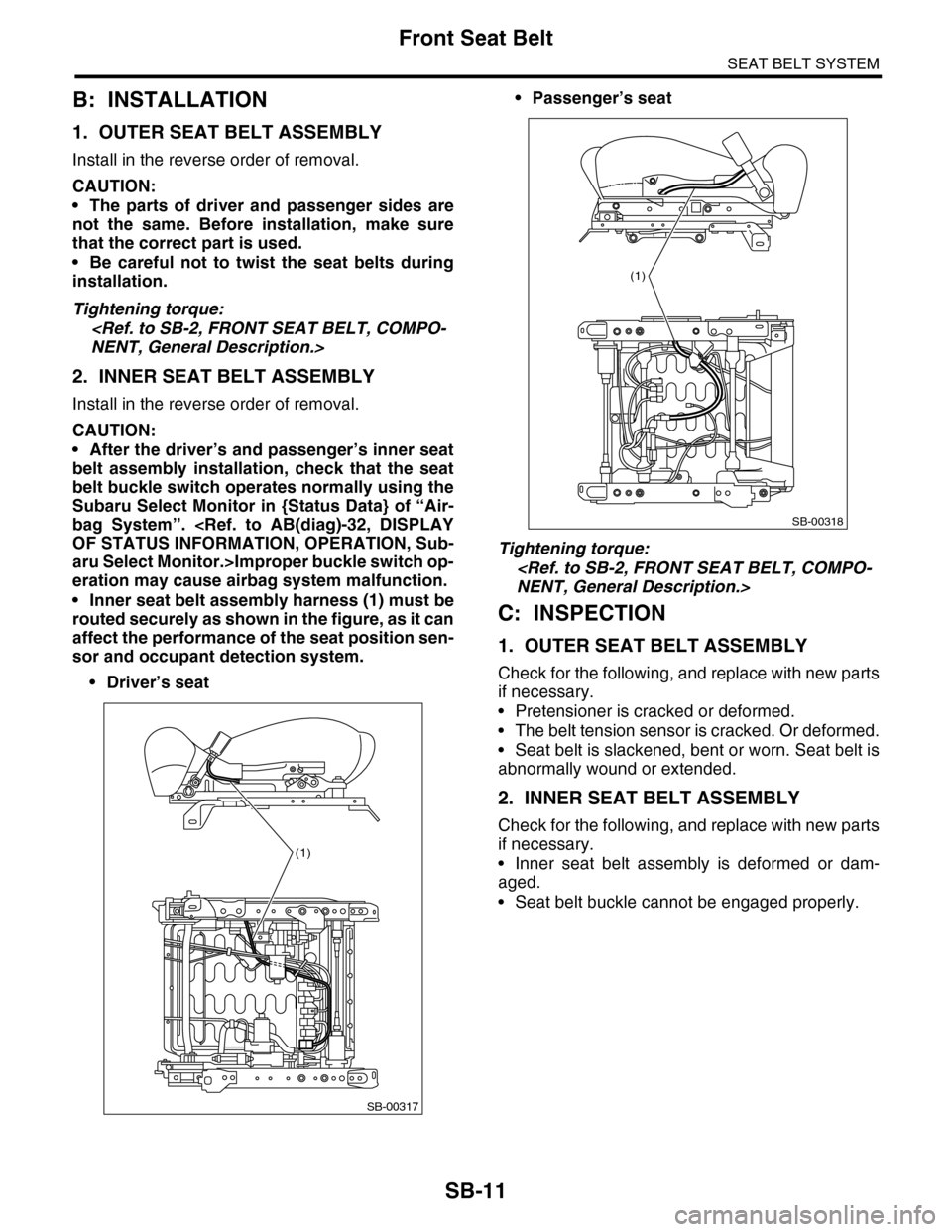
•Inner seat belt assembly harness (1) must be
routed securely as shown in the figure, as it can
affect the performance of the seat position sen-
sor and occupant detection system.
•Driver’s seat
•Passenger’s seat
Tightening torque:
C: INSPECTION
1. OUTER SEAT BELT ASSEMBLY
Check for the following, and replace with new parts
if necessary.
•Pretensioner is cracked or deformed.
•The belt tension sensor is cracked. Or deformed.
•Seat belt is slackened, bent or worn. Seat belt is
abnormally wound or extended.
2. INNER SEAT BELT ASSEMBLY
Check for the following, and replace with new parts
if necessary.
•Inner seat belt assembly is deformed or dam-
aged.
•Seat belt buckle cannot be engaged properly.
SB-00317
(1)
SB-00318
(1)
Page 617 of 2453
SE-7
Front Seat
SEATS
2. Front Seat
A: REMOVAL
CAUTION:
The airbag system is fitted with a backup power
source. After disconnecting the battery ground
cable, the airbag may deploy if you do not wait
for 20 seconds before starting the service of
airbag system.
1. DRIVER’S SEAT
1) Remove the headrest.
2) Tilt the backrest forward, and move the seat for-
ward.
3) Remove the rear leg cover, and remove the two
bolts at the rear side of slide rail.
4) Move the seat backward, remove the front leg
cover, and then remove the 2 bolts at the front side
of the slide rail.
5) Disconnect the ground cable from battery, and
wait for more than 20 seconds before starting work.
6) Disconnect the connector under the seat.
•Seat belt buckle switch connector
•Seat position sensor connector
•Side airbag connector
•Seat heater connector
•Power seat connector
7) Remove the seat from vehicle.
2. PASSENGER’S SEAT
CAUTION:
Refer to “CAUTION” of “General Description”
before starting the work.
1) Remove the headrest.
2) Tilt the backrest forward, and move the seat for-
ward.
3) Remove the rear leg cover, and remove the bolt
at the rear side of the slide rail.
4) Move the seat backward, remove the front leg
cover, and then remove the bolt at the front side of
the slide rail.
5) Disconnect the ground cable from battery, and
wait for more than 20 seconds before starting work.
6) Disconnect all the connectors of connector hold-
er in the backside of seat cushion.
•Harness connector of occupant detection control
module
•Side airbag connector
•Power seat connector
•Seat heater connector
7) Remove the seat belt anchor cover.
NOTE:
Tilt the seat back all the way to provide workspace.
8) Remove the seat from vehicle.
B: INSTALLATION
Install in the reverse order of removal.
NOTE:
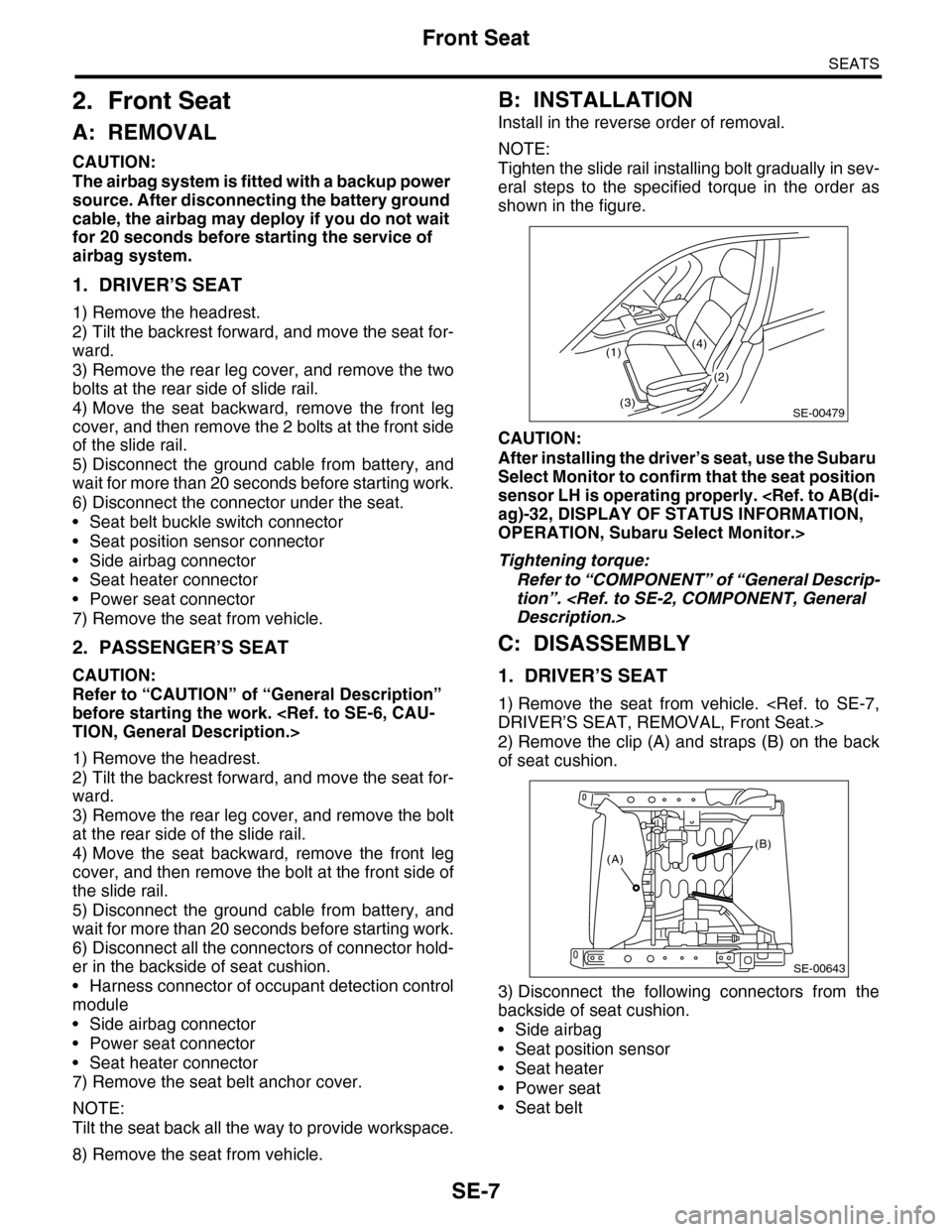
Tighten the slide rail installing bolt gradually in sev-
eral steps to the specified torque in the order as
shown in the figure.
CAUTION:
After installing the driver’s seat, use the Subaru
Select Monitor to confirm that the seat position
sensor LH is operating properly.
OPERATION, Subaru Select Monitor.>
Tightening torque:
Refer to “COMPONENT” of “General Descrip-
tion”.
C: DISASSEMBLY
1. DRIVER’S SEAT
1) Remove the seat from vehicle.
2) Remove the clip (A) and straps (B) on the back
of seat cushion.
3) Disconnect the following connectors from the
backside of seat cushion.
•Side airbag
•Seat position sensor
•Seat heater
•Power seat
•Seat belt
SE-00479
(1)
(3)
(4)
(2)
(B)(A)
SE-00643
Page 638 of 2453
SL-9
Door Lock Control System
SECURITY AND LOCKS
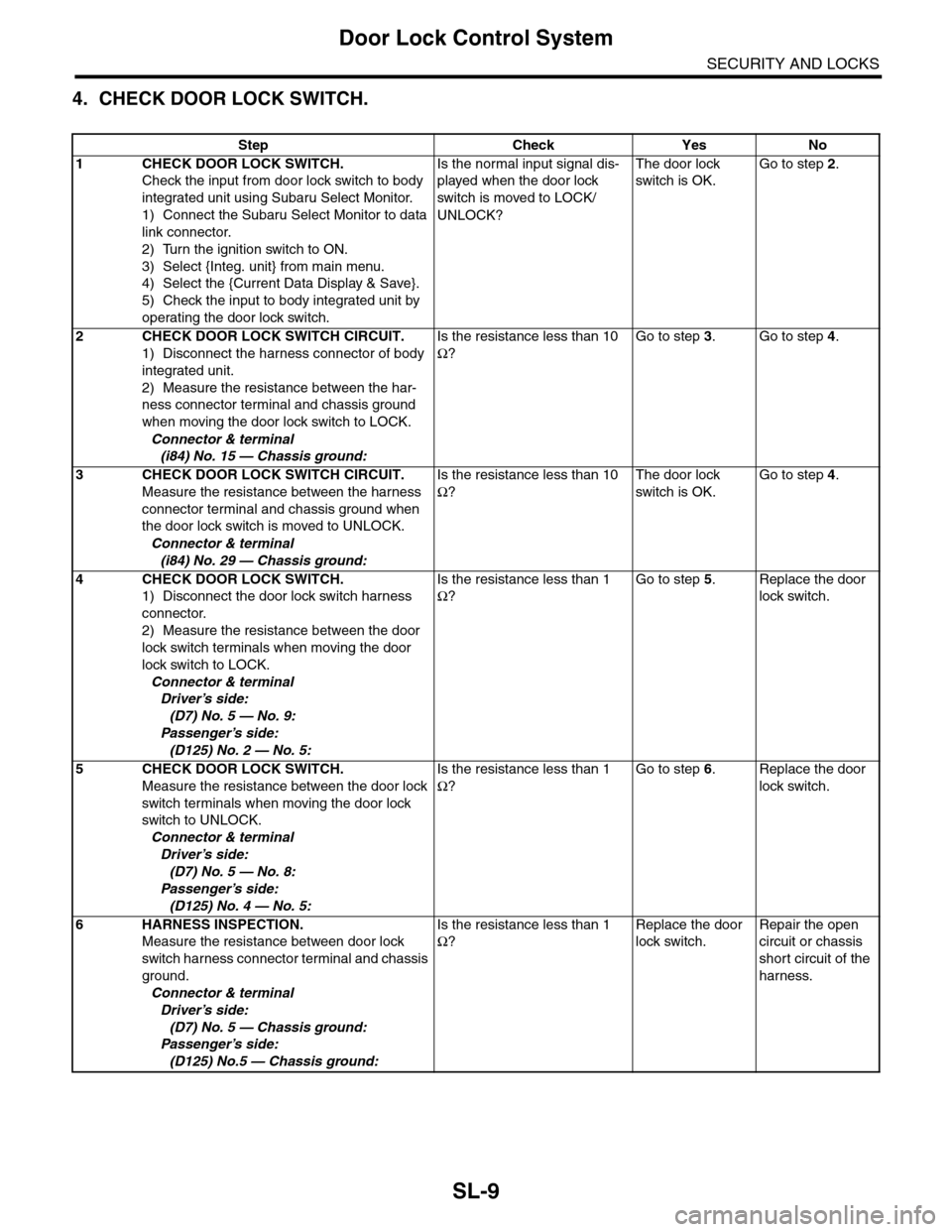
4. CHECK DOOR LOCK SWITCH.
Step Check Yes No
1CHECK DOOR LOCK SWITCH.
Check the input from door lock switch to body
integrated unit using Subaru Select Monitor.
1) Connect the Subaru Select Monitor to data
link connector.
2) Turn the ignition switch to ON.
3) Select {Integ. unit} from main menu.
4) Select the {Current Data Display & Save}.
5) Check the input to body integrated unit by
operating the door lock switch.
Is the normal input signal dis-
played when the door lock
switch is moved to LOCK/
UNLOCK?
The door lock
switch is OK.
Go to step 2.
2CHECK DOOR LOCK SWITCH CIRCUIT.
1) Disconnect the harness connector of body
integrated unit.
2) Measure the resistance between the har-
ness connector terminal and chassis ground
when moving the door lock switch to LOCK.
Connector & terminal
(i84) No. 15 — Chassis ground:
Is the resistance less than 10
Ω?
Go to step 3.Go to step 4.
3CHECK DOOR LOCK SWITCH CIRCUIT.
Measure the resistance between the harness
connector terminal and chassis ground when
the door lock switch is moved to UNLOCK.
Connector & terminal
(i84) No. 29 — Chassis ground:
Is the resistance less than 10
Ω?
The door lock
switch is OK.
Go to step 4.
4CHECK DOOR LOCK SWITCH.
1) Disconnect the door lock switch harness
connector.
2) Measure the resistance between the door
lock switch terminals when moving the door
lock switch to LOCK.
Connector & terminal
Driver’s side:
(D7) No. 5 — No. 9:
Passenger’s side:
(D125) No. 2 — No. 5:
Is the resistance less than 1
Ω?
Go to step 5.Replace the door
lock switch.
5CHECK DOOR LOCK SWITCH.
Measure the resistance between the door lock
switch terminals when moving the door lock
switch to UNLOCK.
Connector & terminal
Driver’s side:
(D7) No. 5 — No. 8:
Passenger’s side:
(D125) No. 4 — No. 5:
Is the resistance less than 1
Ω?
Go to step 6.Replace the door
lock switch.
6HARNESS INSPECTION.
Measure the resistance between door lock
switch harness connector terminal and chassis
ground.
Connector & terminal
Driver’s side:
(D7) No. 5 — Chassis ground:
Passenger’s side:
(D125) No.5 — Chassis ground:
Is the resistance less than 1
Ω?
Replace the door
lock switch.
Repair the open
circuit or chassis
short circuit of the
harness.
Page 645 of 2453
SL-16
Keyless Entry System
SECURITY AND LOCKS
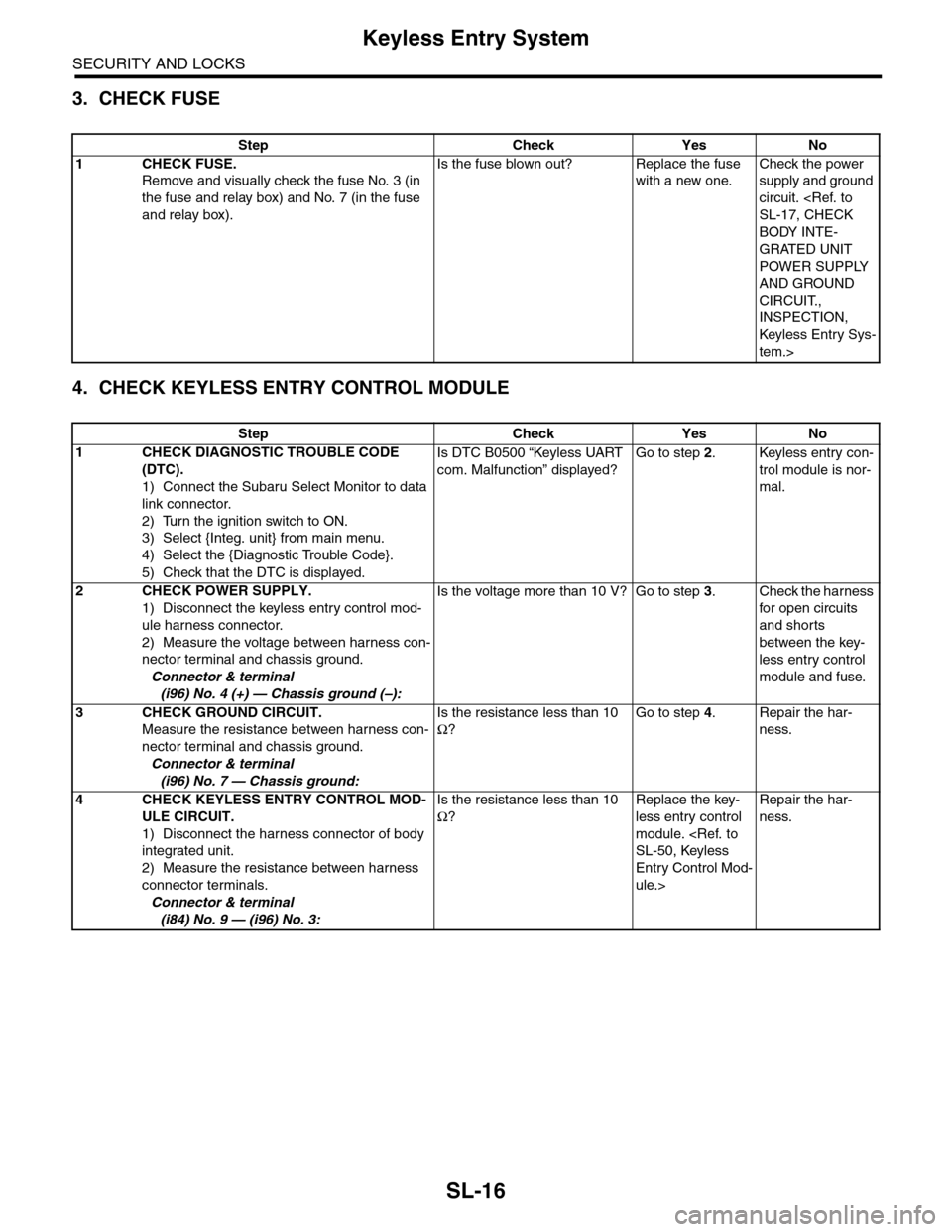
3. CHECK FUSE
4. CHECK KEYLESS ENTRY CONTROL MODULE
Step Check Yes No
1CHECK FUSE.
Remove and visually check the fuse No. 3 (in
the fuse and relay box) and No. 7 (in the fuse
and relay box).
Is the fuse blown out? Replace the fuse
with a new one.
Check the power
supply and ground
circuit.
BODY INTE-
GRATED UNIT
POWER SUPPLY
AND GROUND
CIRCUIT.,
INSPECTION,
Keyless Entr y Sys-
tem.>
Step Check Yes No
1CHECK DIAGNOSTIC TROUBLE CODE
(DTC).
1) Connect the Subaru Select Monitor to data
link connector.
2) Turn the ignition switch to ON.
3) Select {Integ. unit} from main menu.
4) Select the {Diagnostic Trouble Code}.
5) Check that the DTC is displayed.
Is DTC B0500 “Keyless UART
com. Malfunction” displayed?
Go to step 2.Keyless entry con-
trol module is nor-
mal.
2CHECK POWER SUPPLY.
1) Disconnect the keyless entry control mod-
ule harness connector.
2) Measure the voltage between harness con-
nector terminal and chassis ground.
Connector & terminal
(i96) No. 4 (+) — Chassis ground (–):
Is the voltage more than 10 V? Go to step 3.Check the harness
for open circuits
and shorts
between the key-
less entry control
module and fuse.
3CHECK GROUND CIRCUIT.
Measure the resistance between harness con-
nector terminal and chassis ground.
Connector & terminal
(i96) No. 7 — Chassis ground:
Is the resistance less than 10
Ω?
Go to step 4.Repair the har-
ness.
4CHECK KEYLESS ENTRY CONTROL MOD-
ULE CIRCUIT.
1) Disconnect the harness connector of body
integrated unit.
2) Measure the resistance between harness
connector terminals.
Connector & terminal
(i84) No. 9 — (i96) No. 3:
Is the resistance less than 10
Ω?
Replace the key-
less entry control
module.
Entry Control Mod-
ule.>
Repair the har-
ness.
Page 649 of 2453
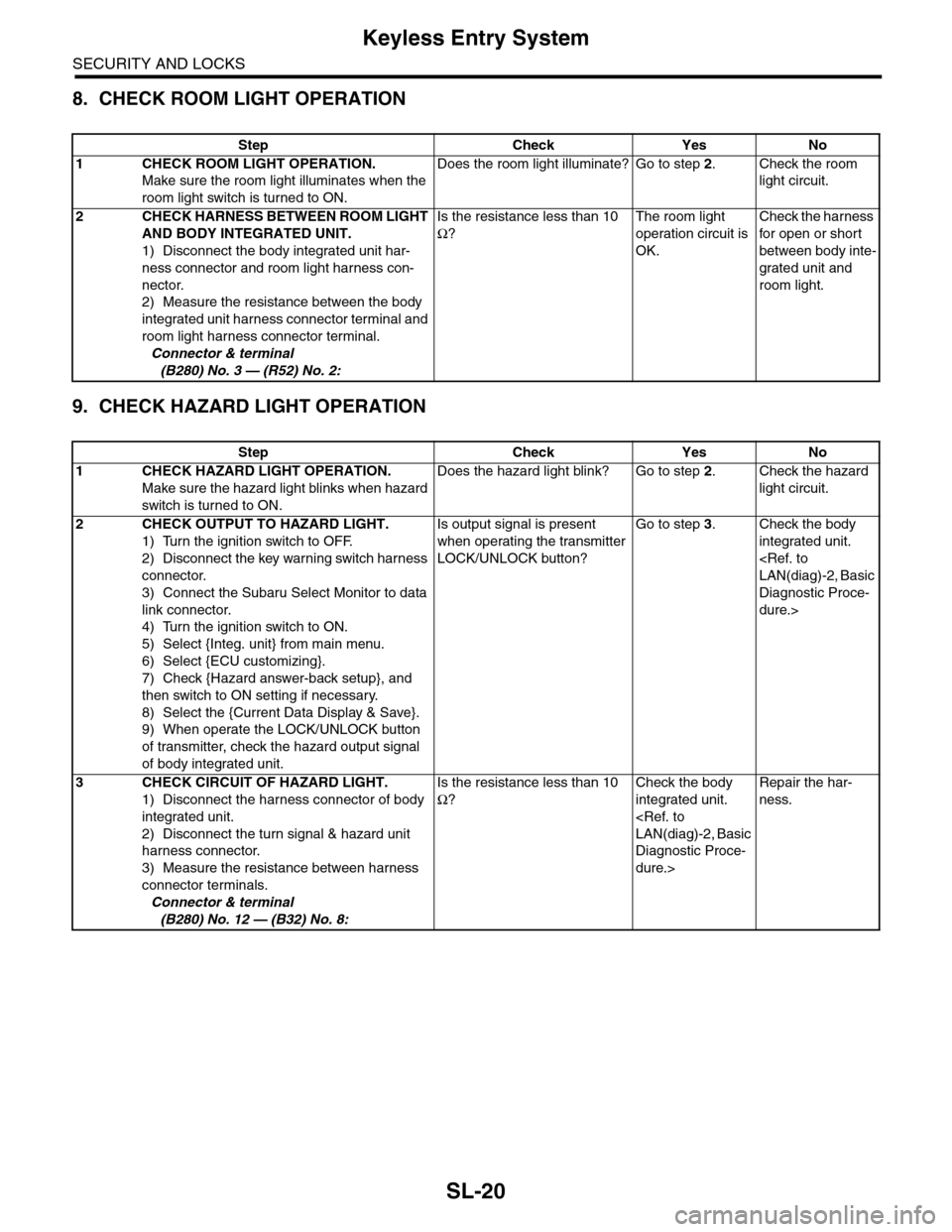
SL-20
Keyless Entry System
SECURITY AND LOCKS
8. CHECK ROOM LIGHT OPERATION
9. CHECK HAZARD LIGHT OPERATION
Step Check Yes No
1CHECK ROOM LIGHT OPERATION.
Make sure the room light illuminates when the
room light switch is turned to ON.
Does the room light illuminate? Go to step 2.Check the room
light circuit.
2CHECK HARNESS BETWEEN ROOM LIGHT
AND BODY INTEGRATED UNIT.
1) Disconnect the body integrated unit har-
ness connector and room light harness con-
nector.
2) Measure the resistance between the body
integrated unit harness connector terminal and
room light harness connector terminal.
Connector & terminal
(B280) No. 3 — (R52) No. 2:
Is the resistance less than 10
Ω?
The room light
operation circuit is
OK.
Check the harness
for open or shor t
between body inte-
grated unit and
room light.
Step Check Yes No
1CHECK HAZARD LIGHT OPERATION.
Make sure the hazard light blinks when hazard
switch is turned to ON.
Does the hazard light blink? Go to step 2.Check the hazard
light circuit.
2CHECK OUTPUT TO HAZARD LIGHT.
1) Turn the ignition switch to OFF.
2) Disconnect the key warning switch harness
connector.
3) Connect the Subaru Select Monitor to data
link connector.
4) Turn the ignition switch to ON.
5) Select {Integ. unit} from main menu.
6) Select {ECU customizing}.
7) Check {Hazard answer-back setup}, and
then switch to ON setting if necessary.
8) Select the {Current Data Display & Save}.
9) When operate the LOCK/UNLOCK button
of transmitter, check the hazard output signal
of body integrated unit.
Is output signal is present
when operating the transmitter
LOCK/UNLOCK button?
Go to step 3.Check the body
integrated unit.
Diagnostic Proce-
dure.>
3CHECK CIRCUIT OF HAZARD LIGHT.
1) Disconnect the harness connector of body
integrated unit.
2) Disconnect the turn signal & hazard unit
harness connector.
3) Measure the resistance between harness
connector terminals.
Connector & terminal
(B280) No. 12 — (B32) No. 8:
Is the resistance less than 10
Ω?
Check the body
integrated unit.
Diagnostic Proce-
dure.>
Repair the har-
ness.
Page 650 of 2453
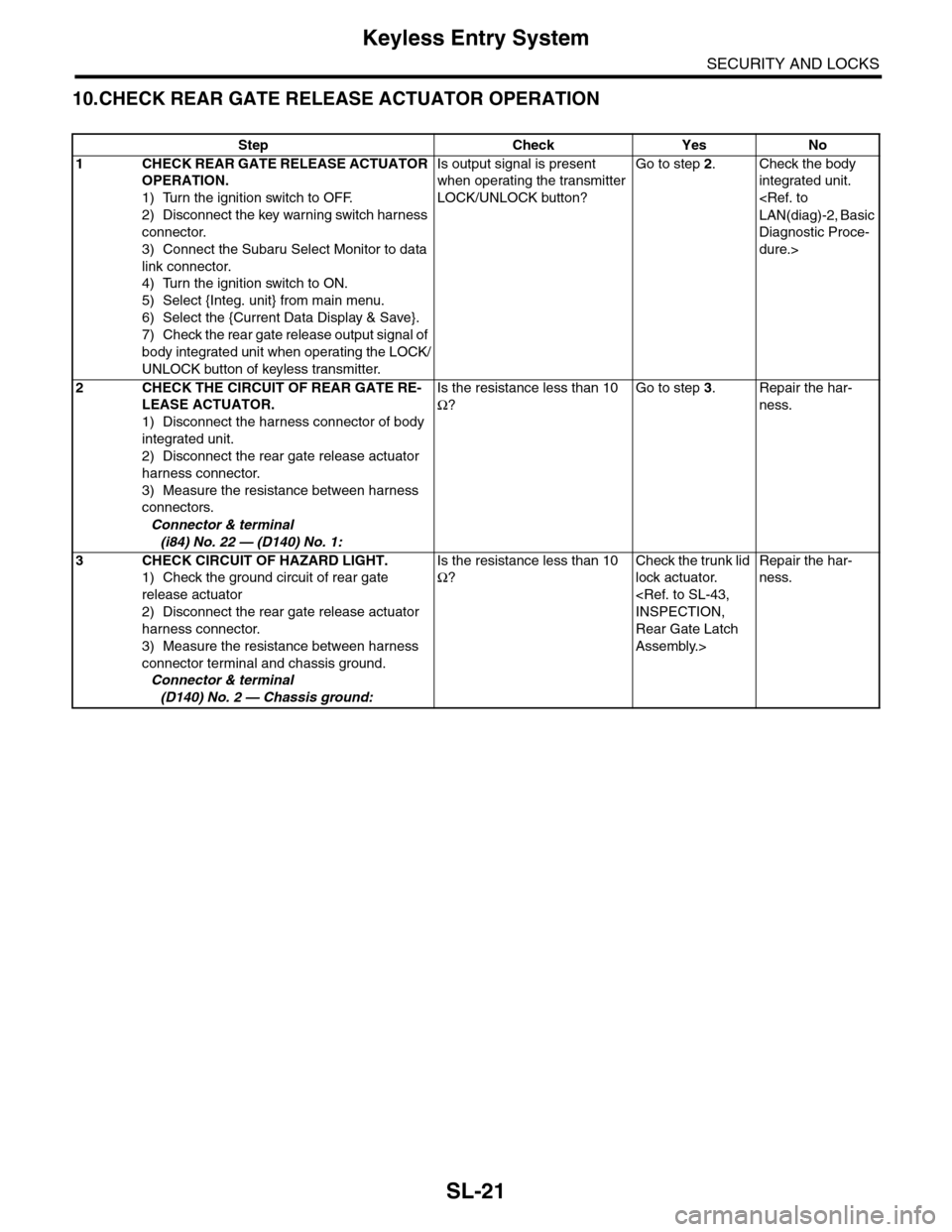
SL-21
Keyless Entry System
SECURITY AND LOCKS
10.CHECK REAR GATE RELEASE ACTUATOR OPERATION
Step Check Yes No
1CHECK REAR GATE RELEASE ACTUATOR
OPERATION.
1) Turn the ignition switch to OFF.
2) Disconnect the key warning switch harness
connector.
3) Connect the Subaru Select Monitor to data
link connector.
4) Turn the ignition switch to ON.
5) Select {Integ. unit} from main menu.
6) Select the {Current Data Display & Save}.
7) Check the rear gate release output signal of
body integrated unit when operating the LOCK/
UNLOCK button of keyless transmitter.
Is output signal is present
when operating the transmitter
LOCK/UNLOCK button?
Go to step 2.Check the body
integrated unit.
Diagnostic Proce-
dure.>
2CHECK THE CIRCUIT OF REAR GATE RE-
LEASE ACTUATOR.
1) Disconnect the harness connector of body
integrated unit.
2) Disconnect the rear gate release actuator
harness connector.
3) Measure the resistance between harness
connectors.
Connector & terminal
(i84) No. 22 — (D140) No. 1:
Is the resistance less than 10
Ω?
Go to step 3.Repair the har-
ness.
3CHECK CIRCUIT OF HAZARD LIGHT.
1) Check the ground circuit of rear gate
release actuator
2) Disconnect the rear gate release actuator
harness connector.
3) Measure the resistance between harness
connector terminal and chassis ground.
Connector & terminal
(D140) No. 2 — Chassis ground:
Is the resistance less than 10
Ω?
Check the trunk lid
lock actuator.
Rear Gate Latch
Assembly.>
Repair the har-
ness.