Abs harness SUBARU TRIBECA 2009 1.G Service User Guide
[x] Cancel search | Manufacturer: SUBARU, Model Year: 2009, Model line: TRIBECA, Model: SUBARU TRIBECA 2009 1.GPages: 2453, PDF Size: 46.32 MB
Page 994 of 2453
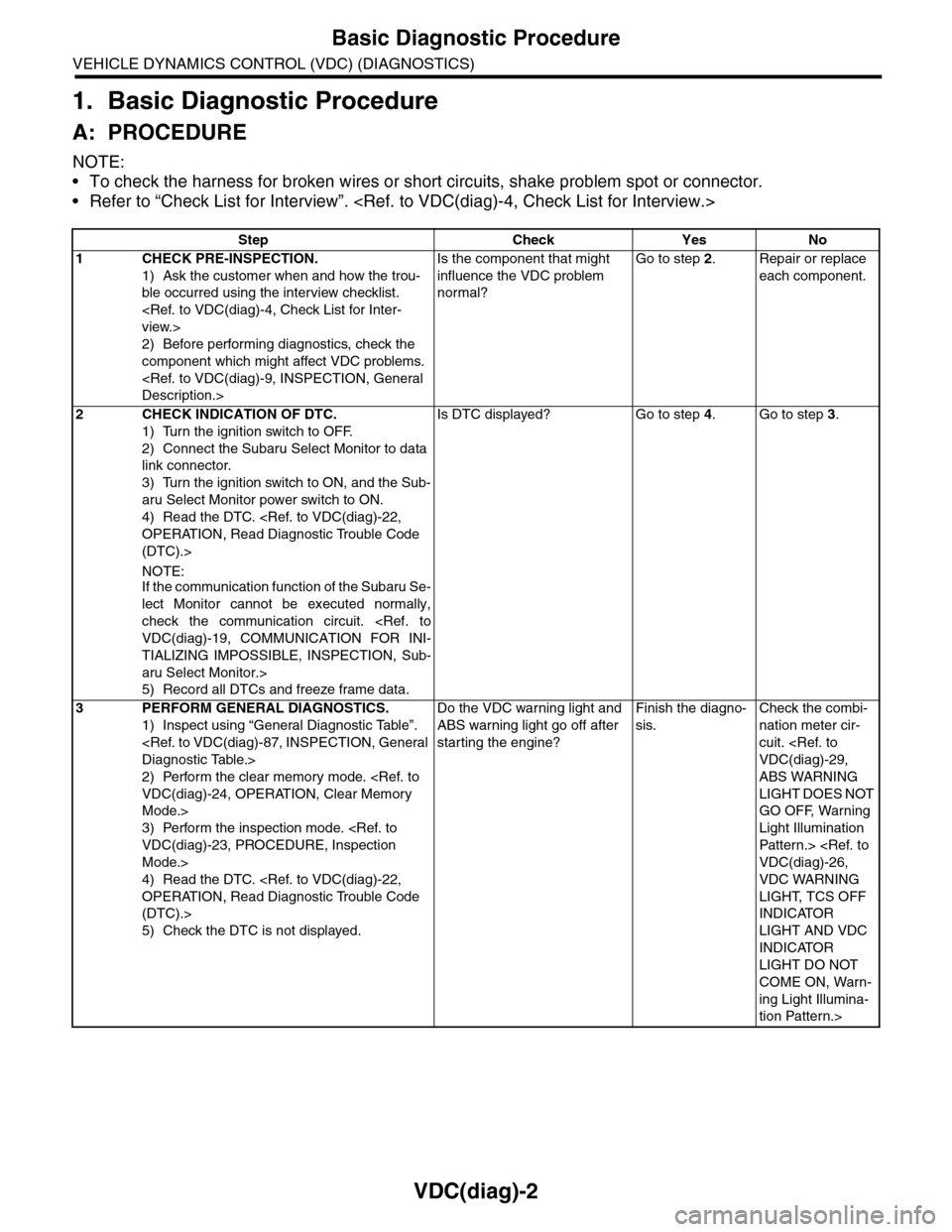
VDC(diag)-2
Basic Diagnostic Procedure
VEHICLE DYNAMICS CONTROL (VDC) (DIAGNOSTICS)
1. Basic Diagnostic Procedure
A: PROCEDURE
NOTE:
•To check the harness for broken wires or short circuits, shake problem spot or connector.
•Refer to “Check List for Interview”.
Step Check Yes No
1CHECK PRE-INSPECTION.
1) Ask the customer when and how the trou-
ble occurred using the interview checklist.
2) Before performing diagnostics, check the
component which might affect VDC problems.
Is the component that might
influence the VDC problem
normal?
Go to step 2.Repair or replace
each component.
2CHECK INDICATION OF DTC.
1) Turn the ignition switch to OFF.
2) Connect the Subaru Select Monitor to data
link connector.
3) Turn the ignition switch to ON, and the Sub-
aru Select Monitor power switch to ON.
4) Read the DTC.
(DTC).>
NOTE:If the communication function of the Subaru Se-
lect Monitor cannot be executed normally,
check the communication circuit.
TIALIZING IMPOSSIBLE, INSPECTION, Sub-
aru Select Monitor.>
5) Record all DTCs and freeze frame data.
Is DTC displayed? Go to step 4.Go to step 3.
3PERFORM GENERAL DIAGNOSTICS.
1) Inspect using “General Diagnostic Table”.
2) Perform the clear memory mode.
Mode.>
3) Perform the inspection mode.
Mode.>
4) Read the DTC.
(DTC).>
5) Check the DTC is not displayed.
Do the VDC warning light and
ABS warning light go off after
starting the engine?
Finish the diagno-
sis.
Check the combi-
nation meter cir-
cuit.
ABS WARNING
LIGHT DOES NOT
GO OFF, Warning
Light Illumination
Patter n.>
VDC WARNING
LIGHT, TCS OFF
INDICATOR
LIGHT AND VDC
INDICATOR
LIGHT DO NOT
COME ON, Warn-
ing Light Illumina-
tion Pattern.>
Page 1001 of 2453
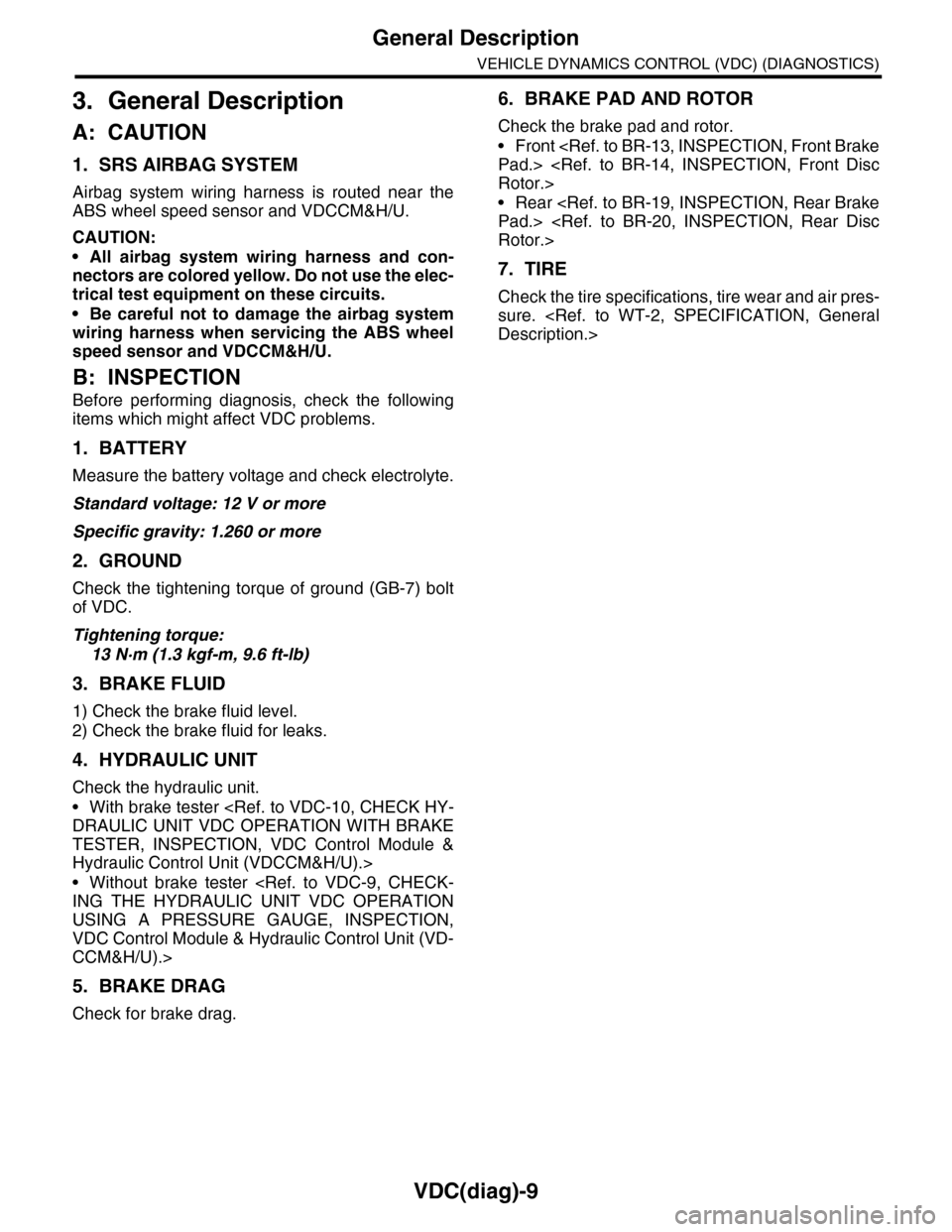
VDC(diag)-9
General Description
VEHICLE DYNAMICS CONTROL (VDC) (DIAGNOSTICS)
3. General Description
A: CAUTION
1. SRS AIRBAG SYSTEM
Airbag system wiring harness is routed near the
ABS wheel speed sensor and VDCCM&H/U.
CAUTION:
•All airbag system wiring harness and con-
nectors are colored yellow. Do not use the elec-
trical test equipment on these circuits.
•Be careful not to damage the airbag system
wiring harness when servicing the ABS wheel
speed sensor and VDCCM&H/U.
B: INSPECTION
Before performing diagnosis, check the following
items which might affect VDC problems.
1. BATTERY
Measure the battery voltage and check electrolyte.
Standard voltage: 12 V or more
Specific gravity: 1.260 or more
2. GROUND
Check the tightening torque of ground (GB-7) bolt
of VDC.
Tightening torque:
13 N·m (1.3 kgf-m, 9.6 ft-lb)
3. BRAKE FLUID
1) Check the brake fluid level.
2) Check the brake fluid for leaks.
4. HYDRAULIC UNIT
Check the hydraulic unit.
•With brake tester
TESTER, INSPECTION, VDC Control Module &
Hydraulic Control Unit (VDCCM&H/U).>
•Without brake tester
USING A PRESSURE GAUGE, INSPECTION,
VDC Control Module & Hydraulic Control Unit (VD-
CCM&H/U).>
5. BRAKE DRAG
Check for brake drag.
6. BRAKE PAD AND ROTOR
Check the brake pad and rotor.
•Front
•Rear
7. TIRE
Check the tire specifications, tire wear and air pres-
sure.
Page 1019 of 2453
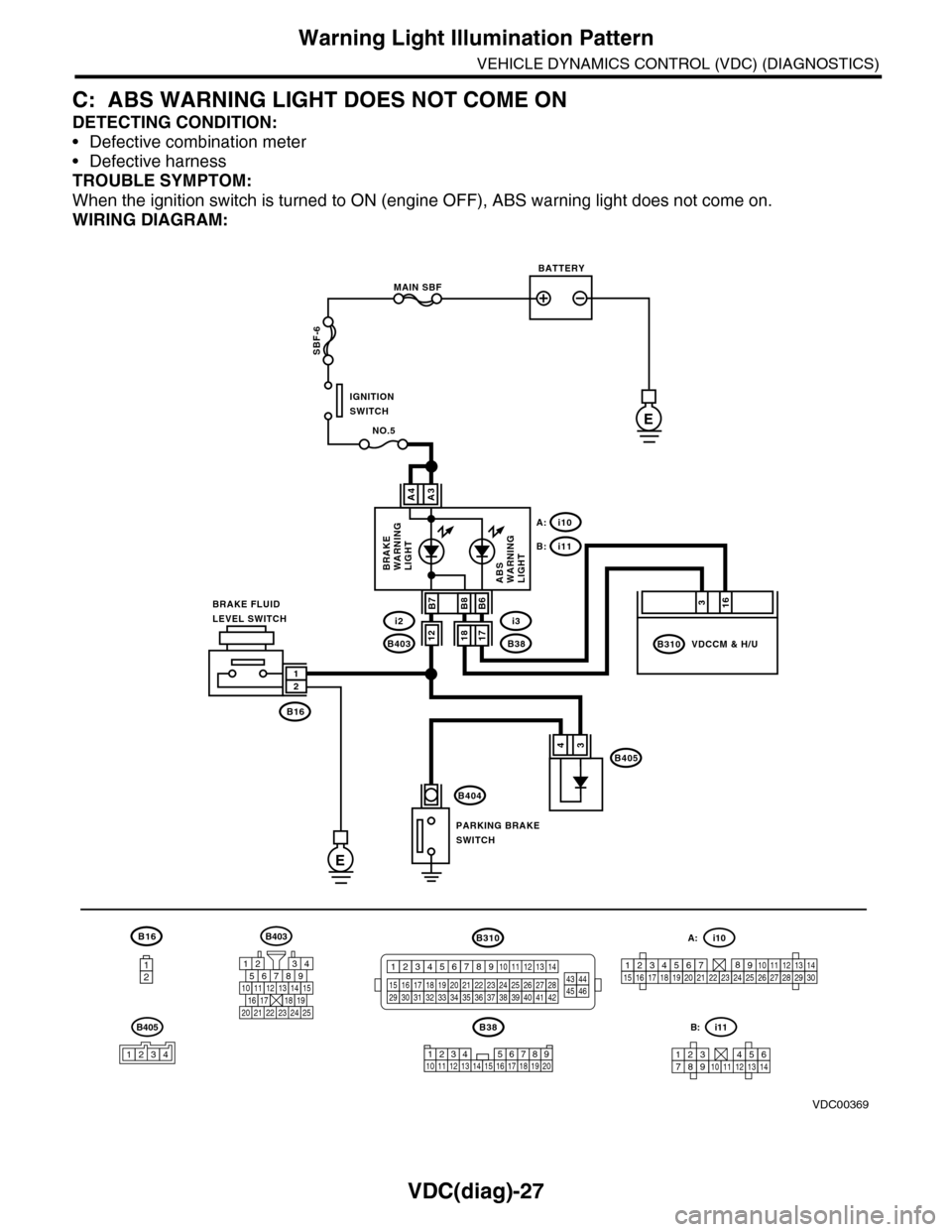
VDC(diag)-27
Warning Light Illumination Pattern
VEHICLE DYNAMICS CONTROL (VDC) (DIAGNOSTICS)
C: ABS WARNING LIGHT DOES NOT COME ON
DETECTING CONDITION:
•Defective combination meter
•Defective harness
TROUBLE SYMPTOM:
When the ignition switch is turned to ON (engine OFF), ABS warning light does not come on.
WIRING DIAGRAM:
B16
12
B38
E
MAIN SBF
SBF-6
E
NO.5
B16
B404
A3A4
12
34B405
1234 5678910 11 12 13 14 15 16 17 18 19 20
BATTERY
IGNITIONSWITCH
BRAKE FLUIDLEVEL SWITCH
PARKING BRAKESWITCH
BRAKEWARNINGLIGHTABSWARNINGLIGHT
316
B310B38
i3
i10A:
i11B:
VDCCM & H/U
B8
1817B403
i2B7B6
VDC00369
12
B405
1234
B403
567821943
10
2422 23 25
1112131415161718192021
B310
1234
1516171819202122232425262728293031323334353637383940414245464344568910 11 12 13 147
1234567891011121314
i11B:
123456789101112131415161718192021222324252627282930
i10A:
Page 1021 of 2453
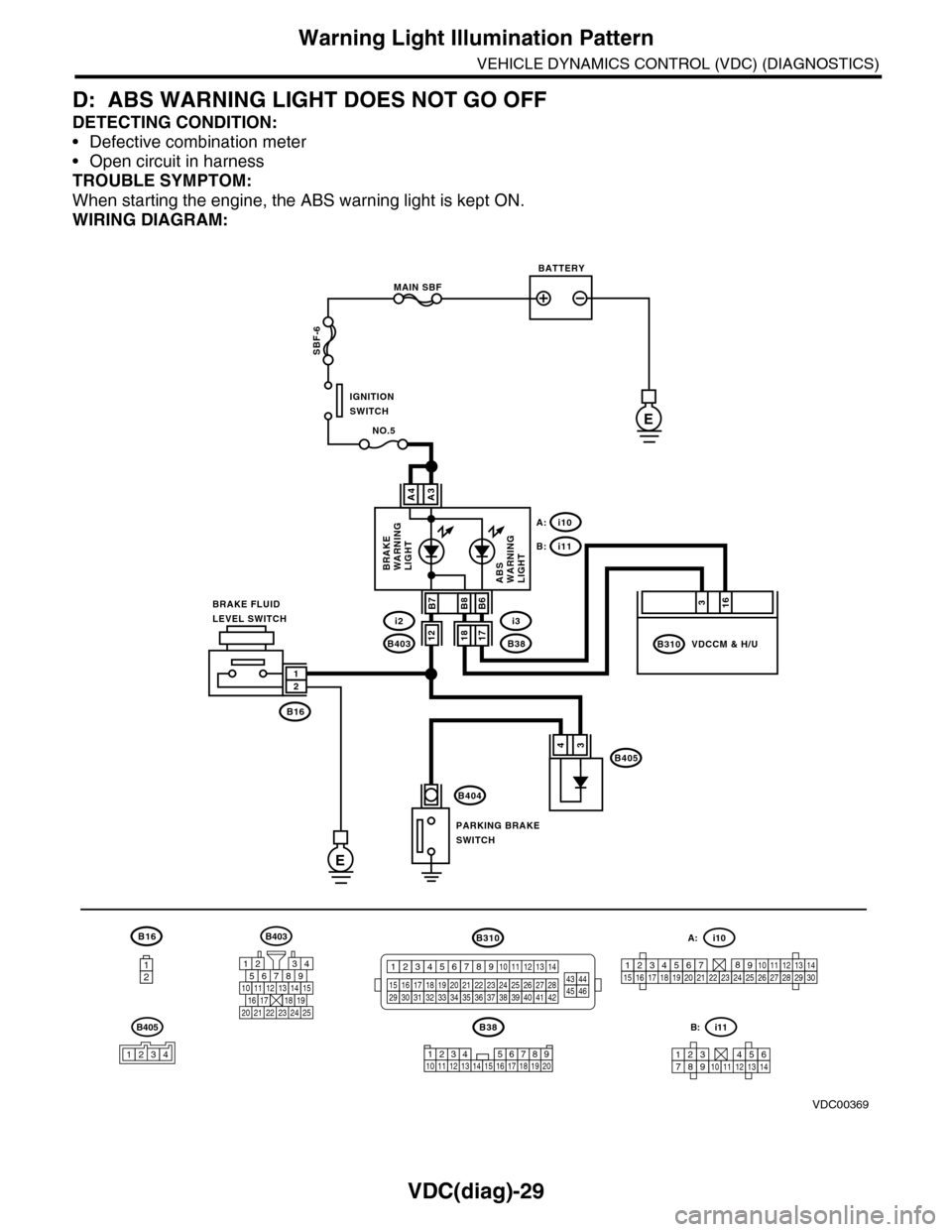
VDC(diag)-29
Warning Light Illumination Pattern
VEHICLE DYNAMICS CONTROL (VDC) (DIAGNOSTICS)
D: ABS WARNING LIGHT DOES NOT GO OFF
DETECTING CONDITION:
•Defective combination meter
•Open circuit in harness
TROUBLE SYMPTOM:
When starting the engine, the ABS warning light is kept ON.
WIRING DIAGRAM:
B16
12
B38
E
MAIN SBF
SBF-6
E
NO.5
B16
B404
A3A4
12
34B405
1234 5678910 11 12 13 14 15 16 17 18 19 20
BATTERY
IGNITIONSWITCH
BRAKE FLUIDLEVEL SWITCH
PARKING BRAKESWITCH
BRAKEWARNINGLIGHTABSWARNINGLIGHT
316
B310B38
i3
i10A:
i11B:
VDCCM & H/U
B8
1817B403
i2B7B6
VDC00369
12
B405
1234
B403
567821943
10
2422 23 25
1112131415161718192021
B310
1234
1516171819202122232425262728293031323334353637383940414245464344568910 11 12 13 147
1234567891011121314
i11B:
123456789101112131415161718192021222324252627282930
i10A:
Page 1031 of 2453
VDC(diag)-39
Diagnostic Procedure with Diagnostic Trouble Code (DTC)
VEHICLE DYNAMICS CONTROL (VDC) (DIAGNOSTICS)
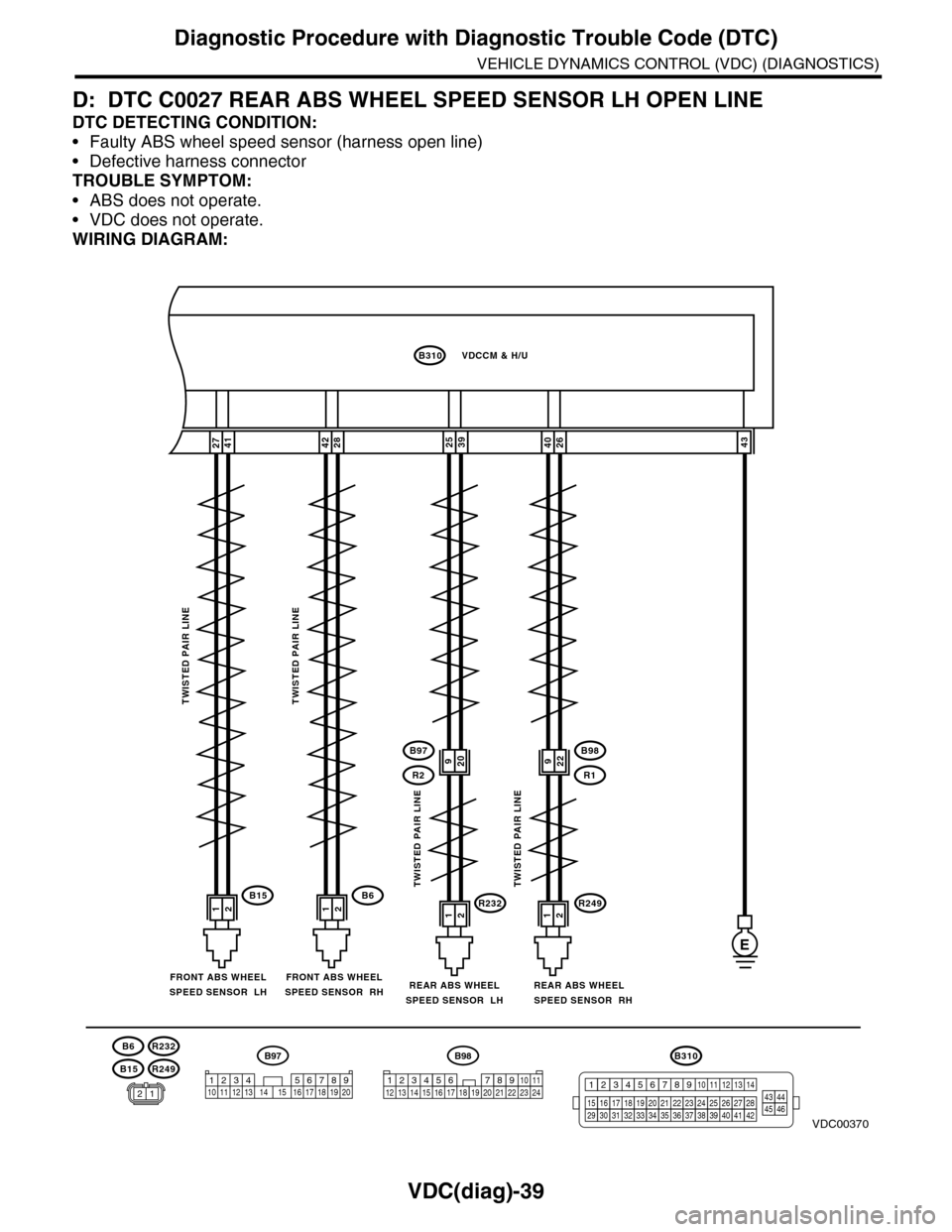
D: DTC C0027 REAR ABS WHEEL SPEED SENSOR LH OPEN LINE
DTC DETECTING CONDITION:
•Faulty ABS wheel speed sensor (harness open line)
•Defective harness connector
TROUBLE SYMPTOM:
•ABS does not operate.
•VDC does not operate.
WIRING DIAGRAM:
26404127392543
B98
R249R232
R1
B97
R2
E
12121212B6B15
2842
B310VDCCM & H/U
TWISTED PAIR LINETWISTED PAIR LINE
TWISTED PAIR LINETWISTED PAIR LINE
REAR ABS WHEELSPEED SENSOR RH
FRONT ABS WHEELSPEED SENSOR RHFRONT ABS WHEELSPEED SENSOR LHREAR ABS WHEELSPEED SENSOR LH
B15
B6
R249
R232
VDC00370
920922
B310
1234
1516171819202122232425262728293031323334353637383940414245464344568910 11 12 13 147
B98
3412 8910 1112 13 14 15 16 17 18 19 20 21 22 23 2456 7
B97
1234 5678910 11 12 13 14 15 16 17 18 19 2012
Page 1032 of 2453
VDC(diag)-40
Diagnostic Procedure with Diagnostic Trouble Code (DTC)
VEHICLE DYNAMICS CONTROL (VDC) (DIAGNOSTICS)
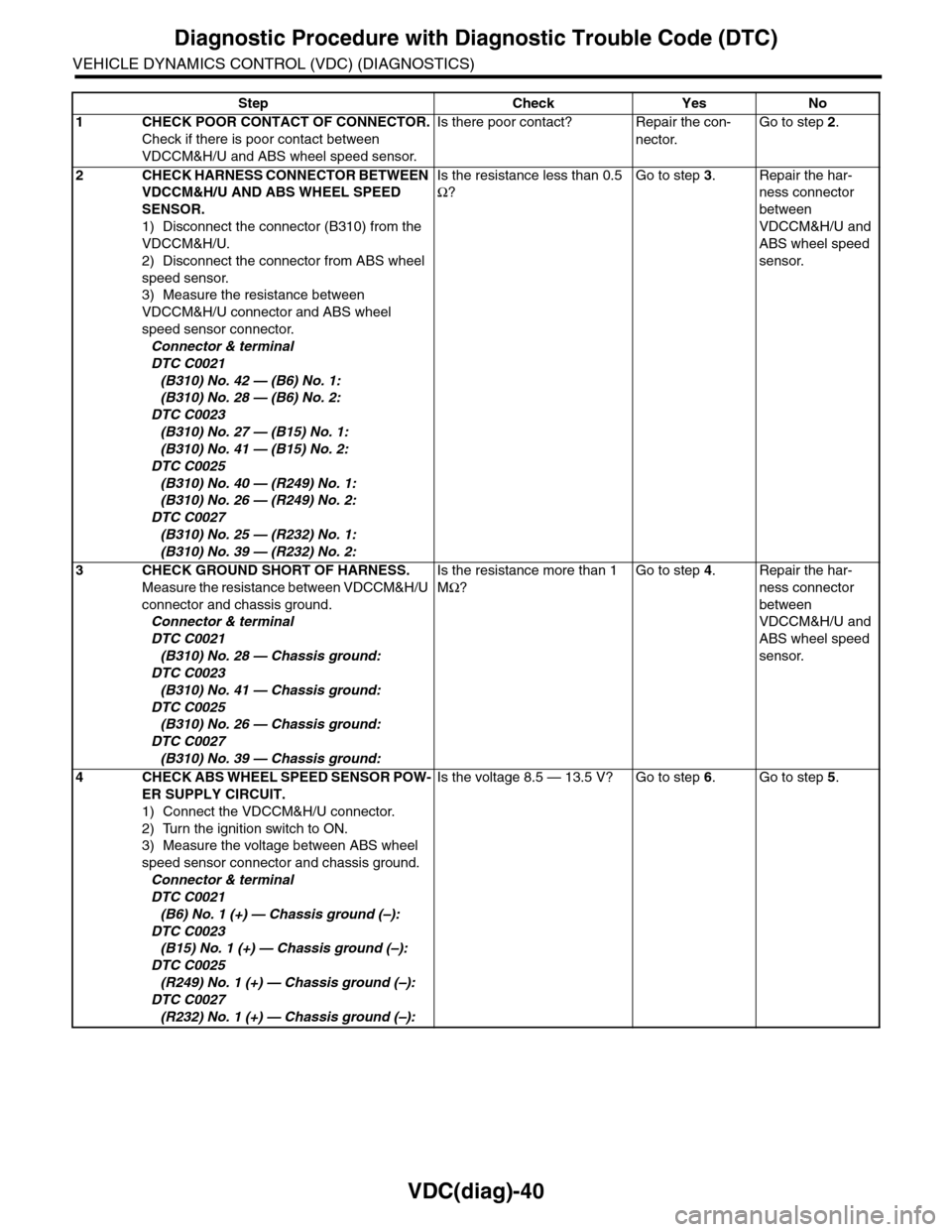
Step Check Yes No
1CHECK POOR CONTACT OF CONNECTOR.
Check if there is poor contact between
VDCCM&H/U and ABS wheel speed sensor.
Is there poor contact? Repair the con-
nector.
Go to step 2.
2CHECK HARNESS CONNECTOR BETWEEN
VDCCM&H/U AND ABS WHEEL SPEED
SENSOR.
1) Disconnect the connector (B310) from the
VDCCM&H/U.
2) Disconnect the connector from ABS wheel
speed sensor.
3) Measure the resistance between
VDCCM&H/U connector and ABS wheel
speed sensor connector.
Connector & terminal
DTC C0021
(B310) No. 42 — (B6) No. 1:
(B310) No. 28 — (B6) No. 2:
DTC C0023
(B310) No. 27 — (B15) No. 1:
(B310) No. 41 — (B15) No. 2:
DTC C0025
(B310) No. 40 — (R249) No. 1:
(B310) No. 26 — (R249) No. 2:
DTC C0027
(B310) No. 25 — (R232) No. 1:
(B310) No. 39 — (R232) No. 2:
Is the resistance less than 0.5
Ω?
Go to step 3.Repair the har-
ness connector
between
VDCCM&H/U and
ABS wheel speed
sensor.
3CHECK GROUND SHORT OF HARNESS.
Measure the resistance between VDCCM&H/U
connector and chassis ground.
Connector & terminal
DTC C0021
(B310) No. 28 — Chassis ground:
DTC C0023
(B310) No. 41 — Chassis ground:
DTC C0025
(B310) No. 26 — Chassis ground:
DTC C0027
(B310) No. 39 — Chassis ground:
Is the resistance more than 1
MΩ?
Go to step 4.Repair the har-
ness connector
between
VDCCM&H/U and
ABS wheel speed
sensor.
4CHECK ABS WHEEL SPEED SENSOR POW-
ER SUPPLY CIRCUIT.
1) Connect the VDCCM&H/U connector.
2) Turn the ignition switch to ON.
3) Measure the voltage between ABS wheel
speed sensor connector and chassis ground.
Connector & terminal
DTC C0021
(B6) No. 1 (+) — Chassis ground (–):
DTC C0023
(B15) No. 1 (+) — Chassis ground (–):
DTC C0025
(R249) No. 1 (+) — Chassis ground (–):
DTC C0027
(R232) No. 1 (+) — Chassis ground (–):
Is the voltage 8.5 — 13.5 V? Go to step 6.Go to step 5.
Page 1035 of 2453
VDC(diag)-43
Diagnostic Procedure with Diagnostic Trouble Code (DTC)
VEHICLE DYNAMICS CONTROL (VDC) (DIAGNOSTICS)
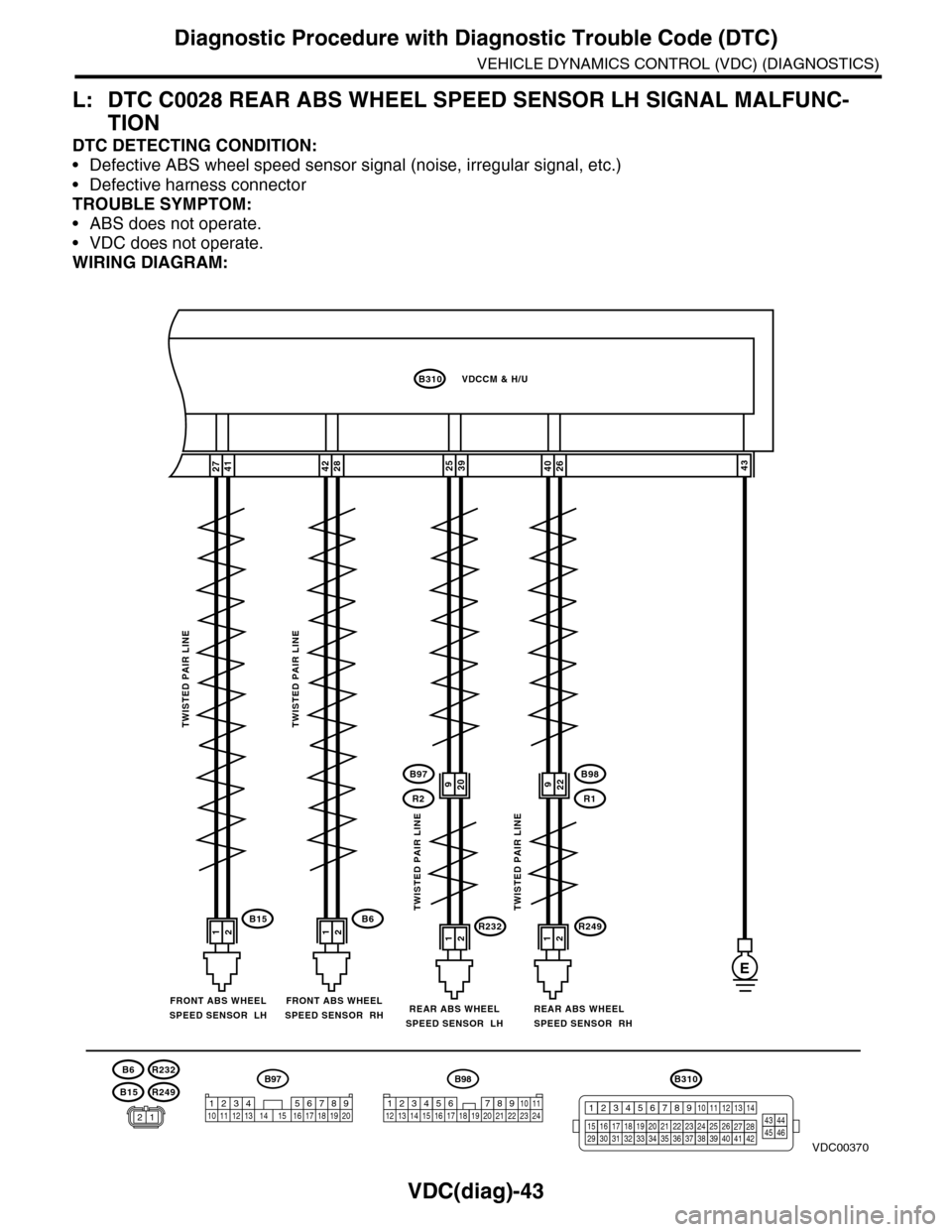
L: DTC C0028 REAR ABS WHEEL SPEED SENSOR LH SIGNAL MALFUNC-
TION
DTC DETECTING CONDITION:
•Defective ABS wheel speed sensor signal (noise, irregular signal, etc.)
•Defective harness connector
TROUBLE SYMPTOM:
•ABS does not operate.
•VDC does not operate.
WIRING DIAGRAM:
26404127392543
B98
R249R232
R1
B97
R2
E
12121212B6B15
2842
B310VDCCM & H/U
TWISTED PAIR LINETWISTED PAIR LINE
TWISTED PAIR LINETWISTED PAIR LINE
REAR ABS WHEELSPEED SENSOR RH
FRONT ABS WHEELSPEED SENSOR RHFRONT ABS WHEELSPEED SENSOR LHREAR ABS WHEELSPEED SENSOR LH
B15
B6
R249
R232
VDC00370
920922
B310
1234
1516171819202122232425262728293031323334353637383940414245464344568910 11 12 13 147
B98
3412 8910 1112 13 14 15 16 17 18 19 20 21 22 23 2456 7
B97
1234 5678910 11 12 13 14 15 16 17 18 19 2012
Page 1036 of 2453
VDC(diag)-44
Diagnostic Procedure with Diagnostic Trouble Code (DTC)
VEHICLE DYNAMICS CONTROL (VDC) (DIAGNOSTICS)
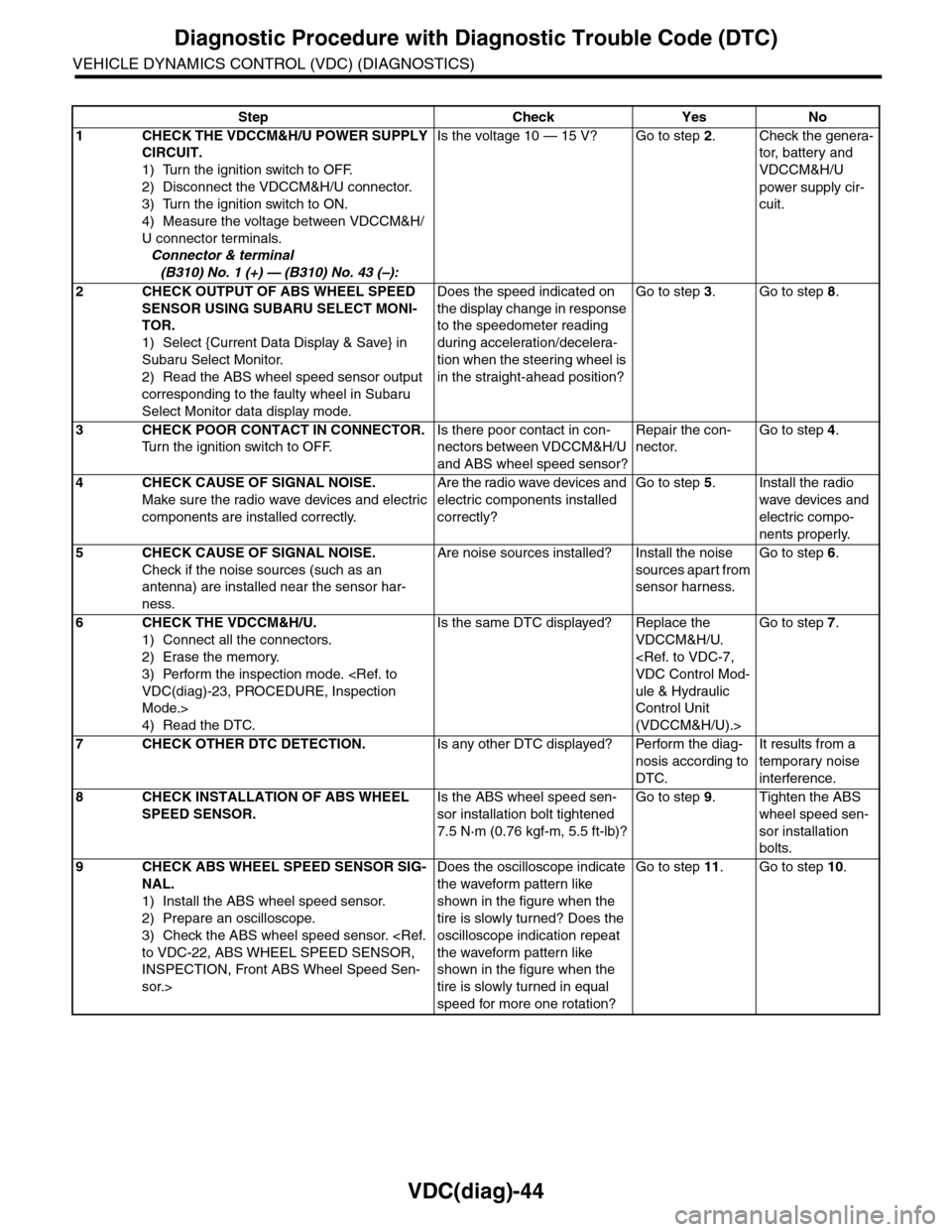
Step Check Yes No
1CHECK THE VDCCM&H/U POWER SUPPLY
CIRCUIT.
1) Turn the ignition switch to OFF.
2) Disconnect the VDCCM&H/U connector.
3) Turn the ignition switch to ON.
4) Measure the voltage between VDCCM&H/
U connector terminals.
Connector & terminal
(B310) No. 1 (+) — (B310) No. 43 (–):
Is the voltage 10 — 15 V? Go to step 2.Check the genera-
tor, batter y and
VDCCM&H/U
power supply cir-
cuit.
2CHECK OUTPUT OF ABS WHEEL SPEED
SENSOR USING SUBARU SELECT MONI-
TOR.
1) Select {Current Data Display & Save} in
Subaru Select Monitor.
2) Read the ABS wheel speed sensor output
corresponding to the faulty wheel in Subaru
Select Monitor data display mode.
Does the speed indicated on
the display change in response
to the speedometer reading
during acceleration/decelera-
tion when the steering wheel is
in the straight-ahead position?
Go to step 3.Go to step 8.
3CHECK POOR CONTACT IN CONNECTOR.
Tu r n t h e i g n i t i o n s w i t c h t o O F F.
Is there poor contact in con-
nectors between VDCCM&H/U
and ABS wheel speed sensor?
Repair the con-
nector.
Go to step 4.
4CHECK CAUSE OF SIGNAL NOISE.
Make sure the radio wave devices and electric
components are installed correctly.
Are the radio wave devices and
electric components installed
correctly?
Go to step 5.Install the radio
wave devices and
electric compo-
nents properly.
5CHECK CAUSE OF SIGNAL NOISE.
Check if the noise sources (such as an
antenna) are installed near the sensor har-
ness.
Are noise sources installed? Install the noise
sources apart from
sensor harness.
Go to step 6.
6CHECK THE VDCCM&H/U.
1) Connect all the connectors.
2) Erase the memory.
3) Perform the inspection mode.
Mode.>
4) Read the DTC.
Is the same DTC displayed? Replace the
VDCCM&H/U.
ule & Hydraulic
Control Unit
(VDCCM&H/U).>
Go to step 7.
7CHECK OTHER DTC DETECTION.Is any other DTC displayed? Perform the diag-
nosis according to
DTC.
It results from a
temporary noise
interference.
8CHECK INSTALLATION OF ABS WHEEL
SPEED SENSOR.
Is the ABS wheel speed sen-
sor installation bolt tightened
7.5 N·m (0.76 kgf-m, 5.5 ft-lb)?
Go to step 9.Tighten the ABS
wheel speed sen-
sor installation
bolts.
9CHECK ABS WHEEL SPEED SENSOR SIG-
NAL.
1) Install the ABS wheel speed sensor.
2) Prepare an oscilloscope.
3) Check the ABS wheel speed sensor.
INSPECTION, Front ABS Wheel Speed Sen-
sor.>
Does the oscilloscope indicate
the waveform pattern like
shown in the figure when the
tire is slowly turned? Does the
oscilloscope indication repeat
the waveform pattern like
shown in the figure when the
tire is slowly turned in equal
speed for more one rotation?
Go to step 11.Go to step 10.
Page 1037 of 2453
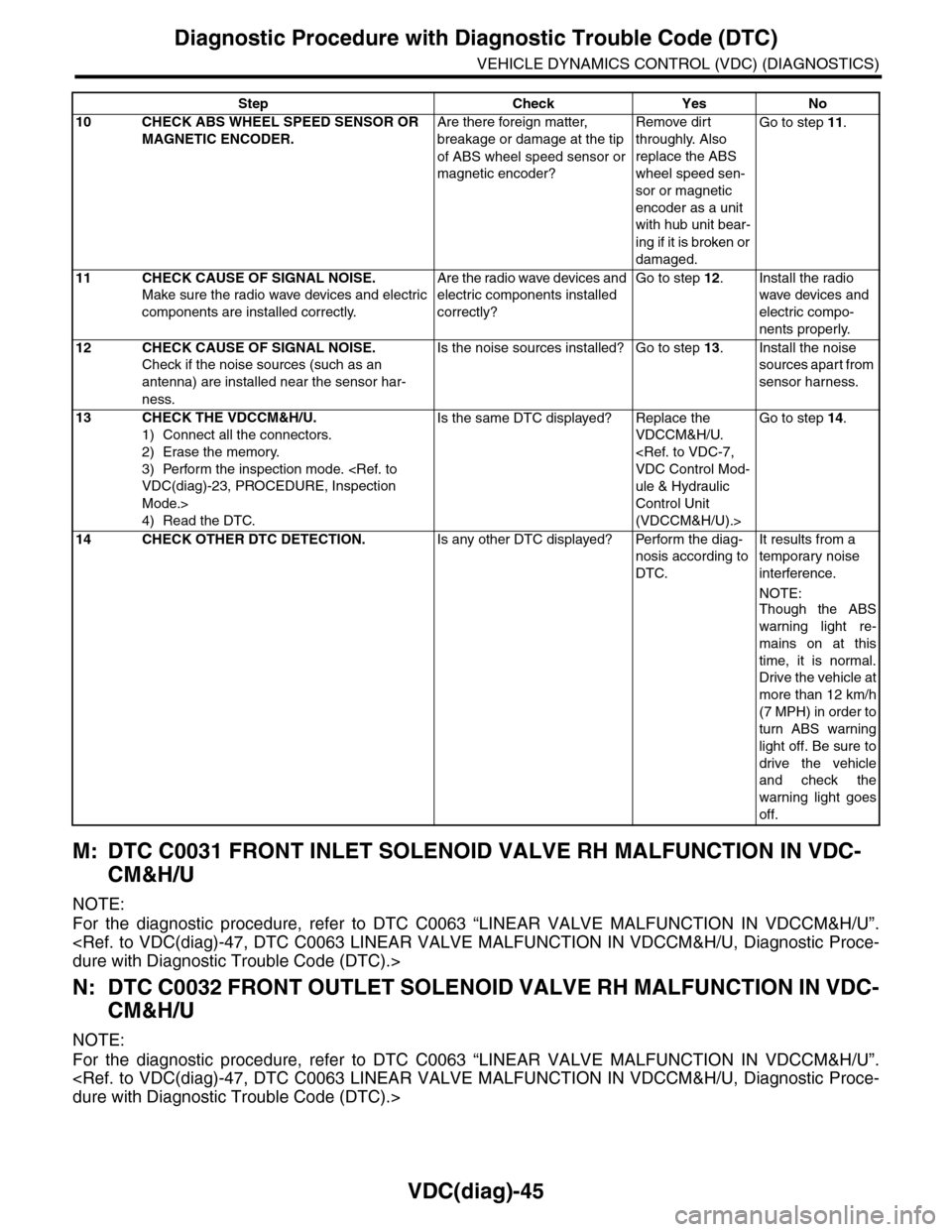
VDC(diag)-45
Diagnostic Procedure with Diagnostic Trouble Code (DTC)
VEHICLE DYNAMICS CONTROL (VDC) (DIAGNOSTICS)
M: DTC C0031 FRONT INLET SOLENOID VALVE RH MALFUNCTION IN VDC-
CM&H/U
NOTE:
For the diagnostic procedure, refer to DTC C0063 “LINEAR VALVE MALFUNCTION IN VDCCM&H/U”.
N: DTC C0032 FRONT OUTLET SOLENOID VALVE RH MALFUNCTION IN VDC-
CM&H/U
NOTE:
For the diagnostic procedure, refer to DTC C0063 “LINEAR VALVE MALFUNCTION IN VDCCM&H/U”.
10 CHECK ABS WHEEL SPEED SENSOR OR
MAGNETIC ENCODER.
Are there foreign matter,
breakage or damage at the tip
of ABS wheel speed sensor or
magnetic encoder?
Remove dirt
throughly. Also
replace the ABS
wheel speed sen-
sor or magnetic
encoder as a unit
with hub unit bear-
ing if it is broken or
damaged.
Go to step 11.
11 CHECK CAUSE OF SIGNAL NOISE.
Make sure the radio wave devices and electric
components are installed correctly.
Are the radio wave devices and
electric components installed
correctly?
Go to step 12.Install the radio
wave devices and
electric compo-
nents properly.
12 CHECK CAUSE OF SIGNAL NOISE.
Check if the noise sources (such as an
antenna) are installed near the sensor har-
ness.
Is the noise sources installed? Go to step 13.Install the noise
sources apart from
sensor harness.
13 CHECK THE VDCCM&H/U.
1) Connect all the connectors.
2) Erase the memory.
3) Perform the inspection mode.
Mode.>
4) Read the DTC.
Is the same DTC displayed? Replace the
VDCCM&H/U.
ule & Hydraulic
Control Unit
(VDCCM&H/U).>
Go to step 14.
14 CHECK OTHER DTC DETECTION.Is any other DTC displayed? Perform the diag-
nosis according to
DTC.
It results from a
temporary noise
interference.
NOTE:
Though the ABS
warning light re-
mains on at this
time, it is normal.
Drive the vehicle at
more than 12 km/h
(7 MPH) in order to
turn ABS warning
light off. Be sure to
drive the vehicle
and check the
warning light goes
off.
Step Check Yes No
Page 1039 of 2453
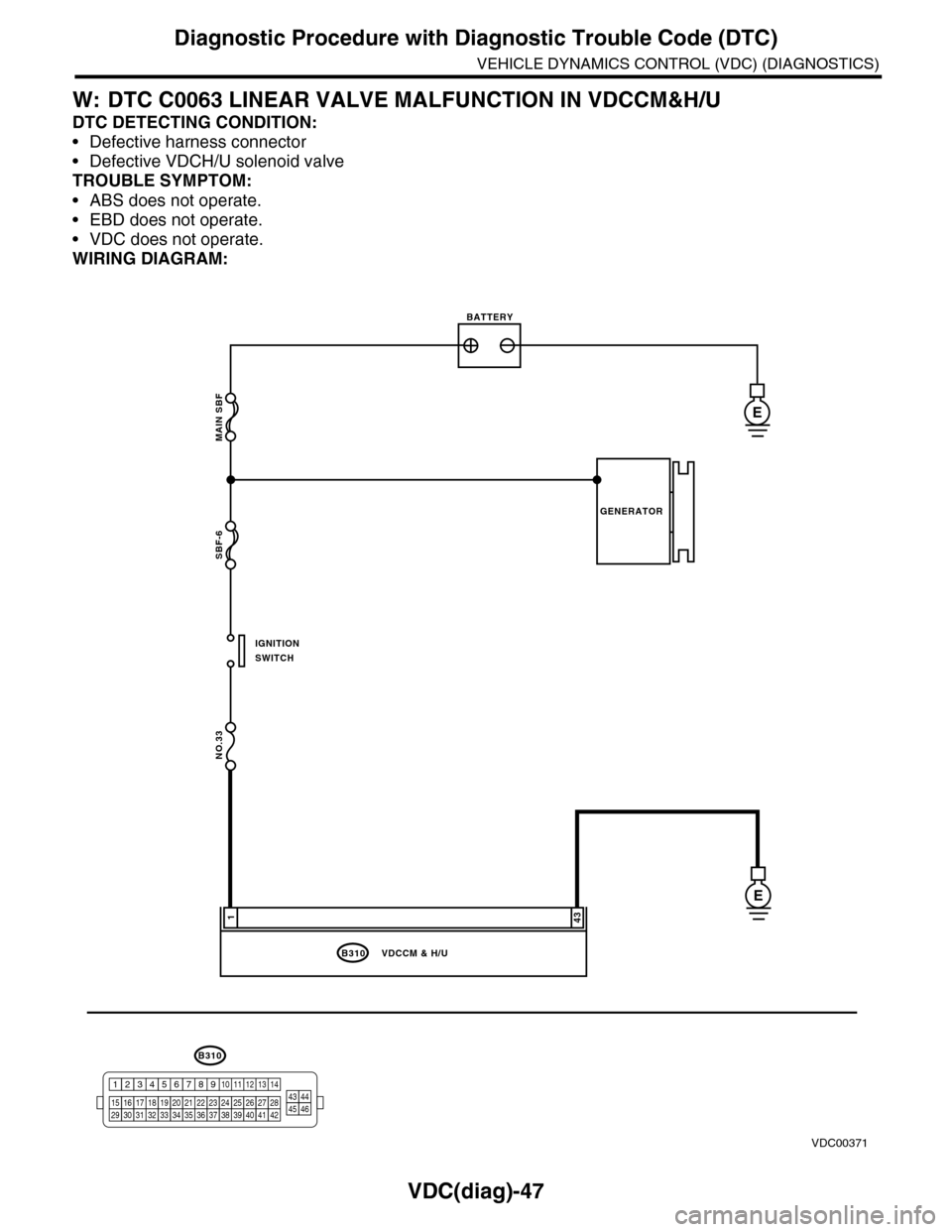
VDC(diag)-47
Diagnostic Procedure with Diagnostic Trouble Code (DTC)
VEHICLE DYNAMICS CONTROL (VDC) (DIAGNOSTICS)
W: DTC C0063 LINEAR VALVE MALFUNCTION IN VDCCM&H/U
DTC DETECTING CONDITION:
•Defective harness connector
•Defective VDCH/U solenoid valve
TROUBLE SYMPTOM:
•ABS does not operate.
•EBD does not operate.
•VDC does not operate.
WIRING DIAGRAM:
MAIN SBF
SBF-6
NO.33
B310
E
E
431
VDCCM & H/U
BATTERY
GENERATOR
IGNITIONSWITCH
VDC00371
B310
1234
1516171819202122232425262728293031323334353637383940414245464344568910 11 12 13 147