navigation SUBARU TRIBECA 2009 1.G Service User Guide
[x] Cancel search | Manufacturer: SUBARU, Model Year: 2009, Model line: TRIBECA, Model: SUBARU TRIBECA 2009 1.GPages: 2453, PDF Size: 46.32 MB
Page 335 of 2453
AC-9
General Description
HVAC SYSTEM (HEATER, VENTILATOR AND A/C)
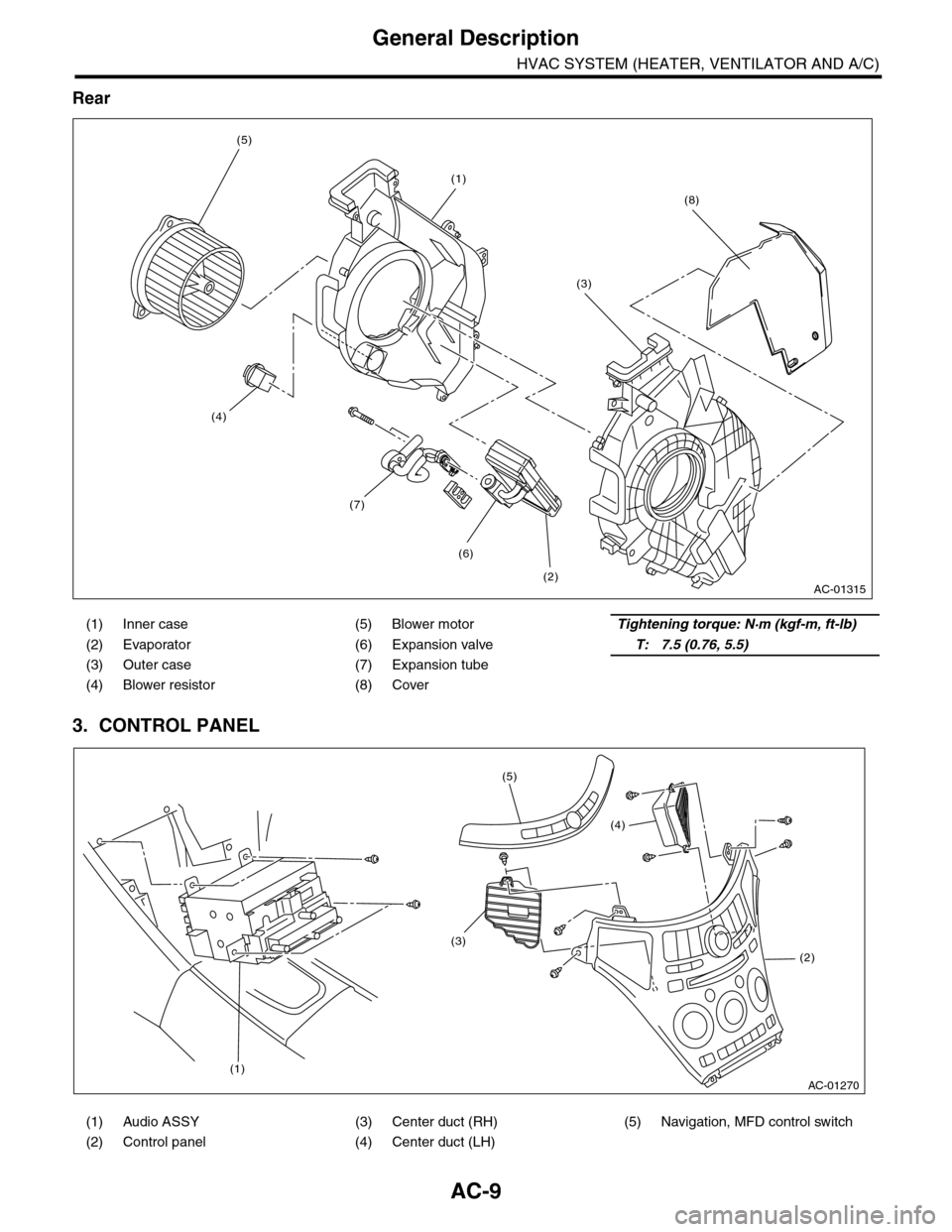
Rear
3. CONTROL PANEL
(1) Inner case (5) Blower motorTightening torque: N·m (kgf-m, ft-lb)
(2) Evaporator (6) Expansion valveT: 7.5 (0.76, 5.5)
(3) Outer case (7) Expansion tube
(4) Blower resistor (8) Cover
(1) Audio ASSY (3) Center duct (RH) (5) Navigation, MFD control switch
(2) Control panel (4) Center duct (LH)
AC-01315
(1)
(2)
(6)
(7)
(3)
(5)
(4)
(8)
AC-01270
(1)
(2)
(3)
(4)
(5)
Page 463 of 2453
LAN(diag)-7
Electrical Component Location
LAN SYSTEM (DIAGNOSTICS)
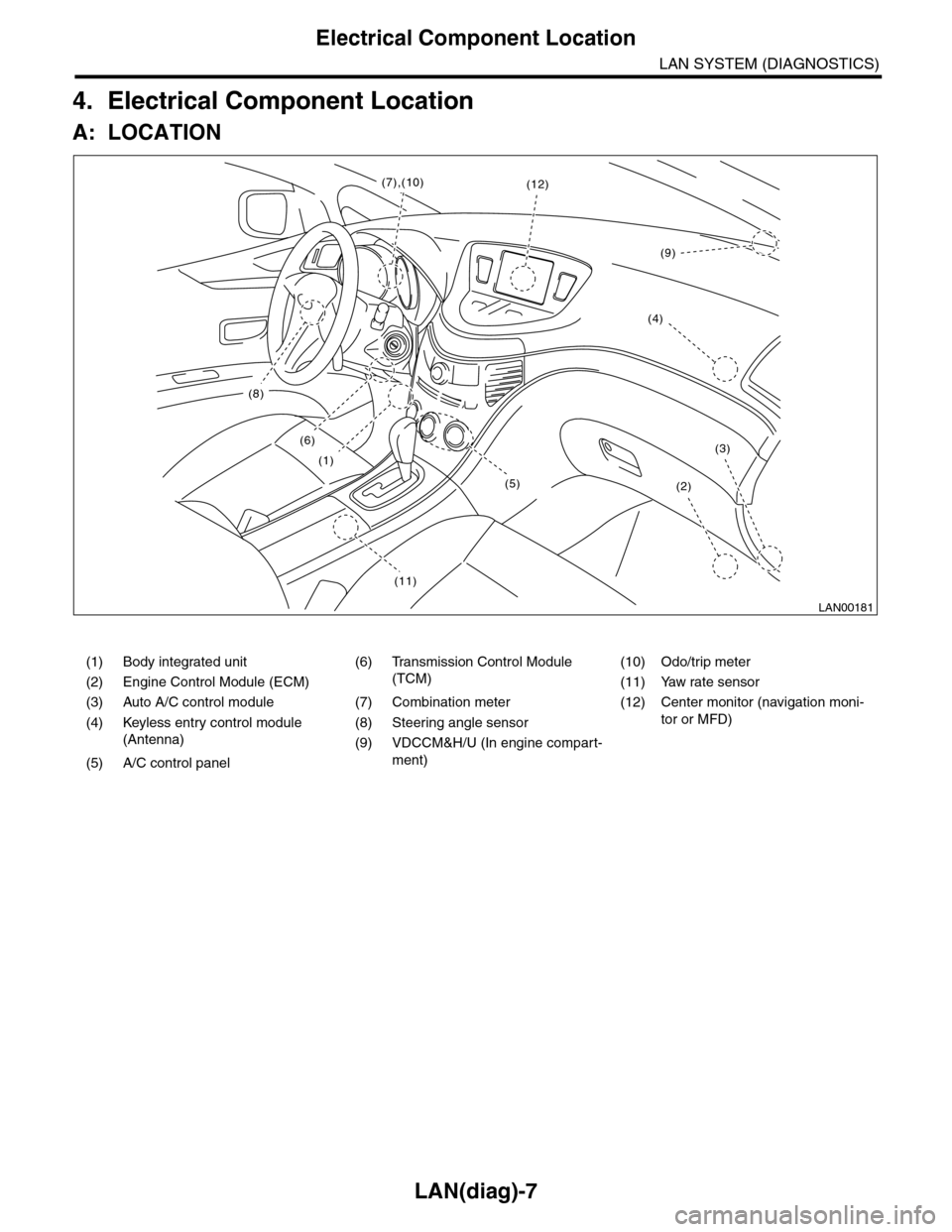
4. Electrical Component Location
A: LOCATION
(1) Body integrated unit (6) Transmission Control Module
(TCM)
(10) Odo/trip meter
(2) Engine Control Module (ECM) (11) Yaw rate sensor
(3) Auto A/C control module (7) Combination meter (12) Center monitor (navigation moni-
tor or MFD)(4) Keyless entry control module
(Antenna)
(8) Steering angle sensor
(9) VDCCM&H/U (In engine compart-
ment)(5) A/C control panel
LAN00181
(8)
(6)
(1)
(11)
(2)
(3)
(12)(7),(10)
(4)
(9)
(5)
Page 474 of 2453
![SUBARU TRIBECA 2009 1.G Service User Guide LAN(diag)-18
Subaru Select Monitor
LAN SYSTEM (DIAGNOSTICS)
5. CONFIRMATION OF CURRENT SETTING
1) On the «Main Menu» display screen, select the {Each System Check} and press the [YES] key.
2) On the](/img/17/7322/w960_7322-473.png "SUBARU TRIBECA 2009 1.G Service User Guide LAN(diag)-18
Subaru Select Monitor
LAN SYSTEM (DIAGNOSTICS)
5. CONFIRMATION OF CURRENT SETTING
1) On the «Main Menu» display screen, select the {Each System Check} and press the [YES] key.
2) On the")
LAN(diag)-18
Subaru Select Monitor
LAN SYSTEM (DIAGNOSTICS)
5. CONFIRMATION OF CURRENT SETTING
1) On the «Main Menu» display screen, select the {Each System Check} and press the [YES] key.
2) On the «System Selection Menu» display screen, select the {Integ. Unit mode} and press the [YES] key.
3) On the «Integ. unit mode failure diag» display screen, select the {Current Data Display & Save} and press
the [YES] key.
4) On the «Current Data Display & Save» display screen, select the {12 Data Display} and press the [YES]
key.
5) Using the scroll key, scroll the display screen up or down until the desired data is shown.
6) Display the following item and record the settings.
Required items for new registration (Except for system not equipped)
Item Item to confirm Remarks
Key No. to register 1 2 3 4 Registered ID type
Off delay OFF Long Normal Short Setting for lighting off time
Auto-lock 60, 50 40, 30, 20 OFF Not suppor ted by Nor th Amer ican specifications (Unit sec.)
Rr defogger op. mode Normal ContinuousNormal: Off at 15 minutes of operation
Continuous: Operations from switch on to off
Wiper deicer op. mode Normal Continuous
Normal: Off at 15 minutes of operation
Continuous: Operations from switch ON to OFF, repeats ON
for 15 minutes, OFF for 2 minutes
Security Alarm Setup ON OFFON: Warning device operation possible
OFF: Warning device does not operate
Impact Sensor Setup ON OFF
ON: Impact sensor operation possible
OFF: Impact sensor does not operate
Tu r n O F F f o r v e h i c l e s n o t e q u i p p e d w i t h a n I m p a c t S e n s o r
Alarm monitor delay set-
tingON OFF
ON: Monitor after a fixed period of time from reception of the
keyless lock signal
OFF: Monitor after reception of the keyless lock signal
Lockout prevention ON OFFON: Lockout prevention operation
OFF: Lockout prevention not operated
Impact Sensor Yes No
Ye s : I m p a c t s e n s o r e q u i p p e d
No: Impact sensor not equipped
Always set to no for vehicles not equipped with the impact sen-
sor.
Siren setting Yes No
Ye s : V e h i c l e e q u i p p e d w i t h s i r e n
No: Vehicle not equipped with siren
The horn does not honk when the warning operates if the vehi-
cle not equipped with a siren is set to ‘Yes’.
Answer-back buzzer
setupON OFFON: Answer-back buzzer operation possible
OFF: Answer-back buzzer not operated
Hazard answer-back
setupON OFFON: Hazard answer-back buzzer operation possible
OFF: Hazard answer-back buzzer not operated
Automatic locking setup ON OFF Not suppor ted by Nor th Amer ican specifications
Ans.-back Buzzer Yes NoYe s : V e h i c l e e q u i p p e d w i t h a n s w e r - b a c k b u z z e r
No: Vehicle not equipped with answer-back buzzer
Auto locking Yes No Not suppor ted by Nor th Amer ican specifications
Door open warning (pre-
vention of batter y run-
out)
Ye s N o
Ye s : D o o r i n t e r l o c k e d r o o m l i g h t g o e s o f f w h e n o n f o r 1 0 m i n -
utes consecutively when door is open.
No: Room light remains illuminated until door is closed.
A/C ECM setting Yes No Model with auto A/C (Set to ‘Yes’)
P/W ECM setting Yes No Not supported by North American specifications
Center display failure Yes NoYe s : V e h i c l e e q u i p p e d w i t h M F D a n d n a v i g a t i o n d i s p l a y
No: Vehicle not equipped with MFD nor navigation display
Wiper deicer Yes NoYe s : V e h i c l e e q u i p p e d w i t h w i p e r d e i c e r
No: Vehicle not equipped with wiper deicer
Rear fog light setting Yes No Not supported by North American specifications
Fac t or y in i ti a l s et t i ng Fa ct o r y M ar ke tDo not change to the factory mode. Set to market when using
normally.
Page 476 of 2453
LAN(diag)-20
Subaru Select Monitor
LAN SYSTEM (DIAGNOSTICS)
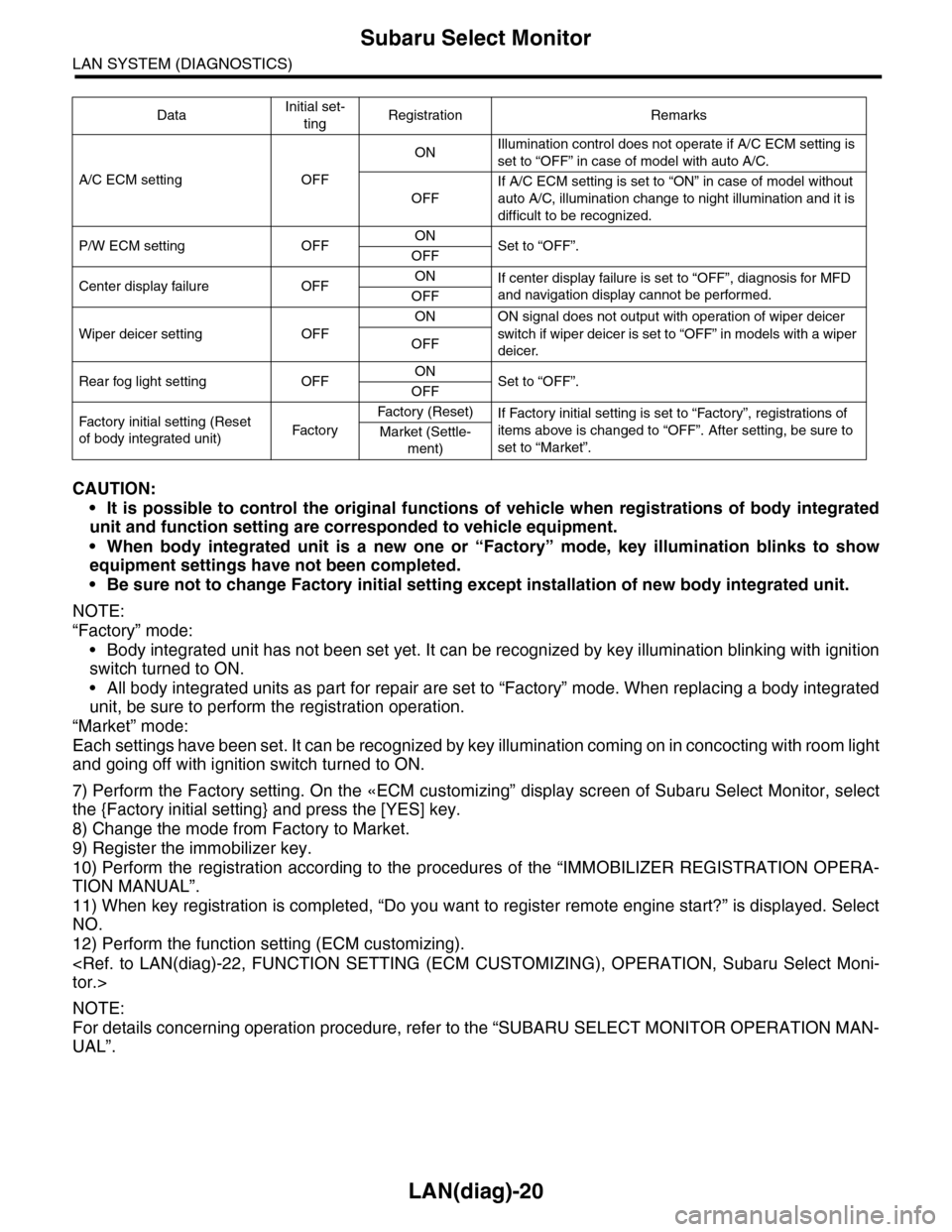
CAUTION:
•It is possible to control the original functions of vehicle when registrations of body integrated
unit and function setting are corresponded to vehicle equipment.
•When body integrated unit is a new one or “Factory” mode, key illumination blinks to show
equipment settings have not been completed.
•Be sure not to change Factory initial setting except installation of new body integrated unit.
NOTE:
“Factory” mode:
•Body integrated unit has not been set yet. It can be recognized by key illumination blinking with ignition
switch turned to ON.
•All body integrated units as part for repair are set to “Factory” mode. When replacing a body integrated
unit, be sure to perform the registration operation.
“Market” mode:
Each settings have been set. It can be recognized by key illumination coming on in concocting with room light
and going off with ignition switch turned to ON.
7) Perform the Factory setting. On the «ECM customizing” display screen of Subaru Select Monitor, select
the {Factory initial setting} and press the [YES] key.
8) Change the mode from Factory to Market.
9) Register the immobilizer key.
10) Perform the registration according to the procedures of the “IMMOBILIZER REGISTRATION OPERA-
TION MANUAL”.
11) When key registration is completed, “Do you want to register remote engine start?” is displayed. Select
NO.
12) Perform the function setting (ECM customizing).
NOTE:
For details concerning operation procedure, refer to the “SUBARU SELECT MONITOR OPERATION MAN-
UAL”.
DataInitial set-
tingRegistration Remarks
A/C ECM setting OFF
ONIllumination control does not operate if A/C ECM setting is
set to “OFF” in case of model with auto A/C.
OFF
If A/C ECM setting is set to “ON” in case of model without
auto A/C, illumination change to night illumination and it is
difficult to be recognized.
P/W ECM setting OFFONSet to “OFF”.OFF
Center display failure OFFONIf center display failure is set to “OFF”, diagnosis for MFD
and navigation display cannot be performed.OFF
Wiper deicer setting OFF
ON ON signal does not output with operation of wiper deicer
switch if wiper deicer is set to “OFF” in models with a wiper
deicer.OFF
Rear fog light setting OFFONSet to “OFF”.OFF
Fac t or y in i ti a l s et t i ng ( Res et
of body integrated unit)Fac to r y
Fa ct or y ( Re se t )If Factory initial setting is set to “Factory”, registrations of
items above is changed to “OFF”. After setting, be sure to
set to “Market”.Market (Settle-
ment)
Page 487 of 2453
LAN(diag)-31
List of Diagnostic Trouble Code (DTC)
LAN SYSTEM (DIAGNOSTICS)
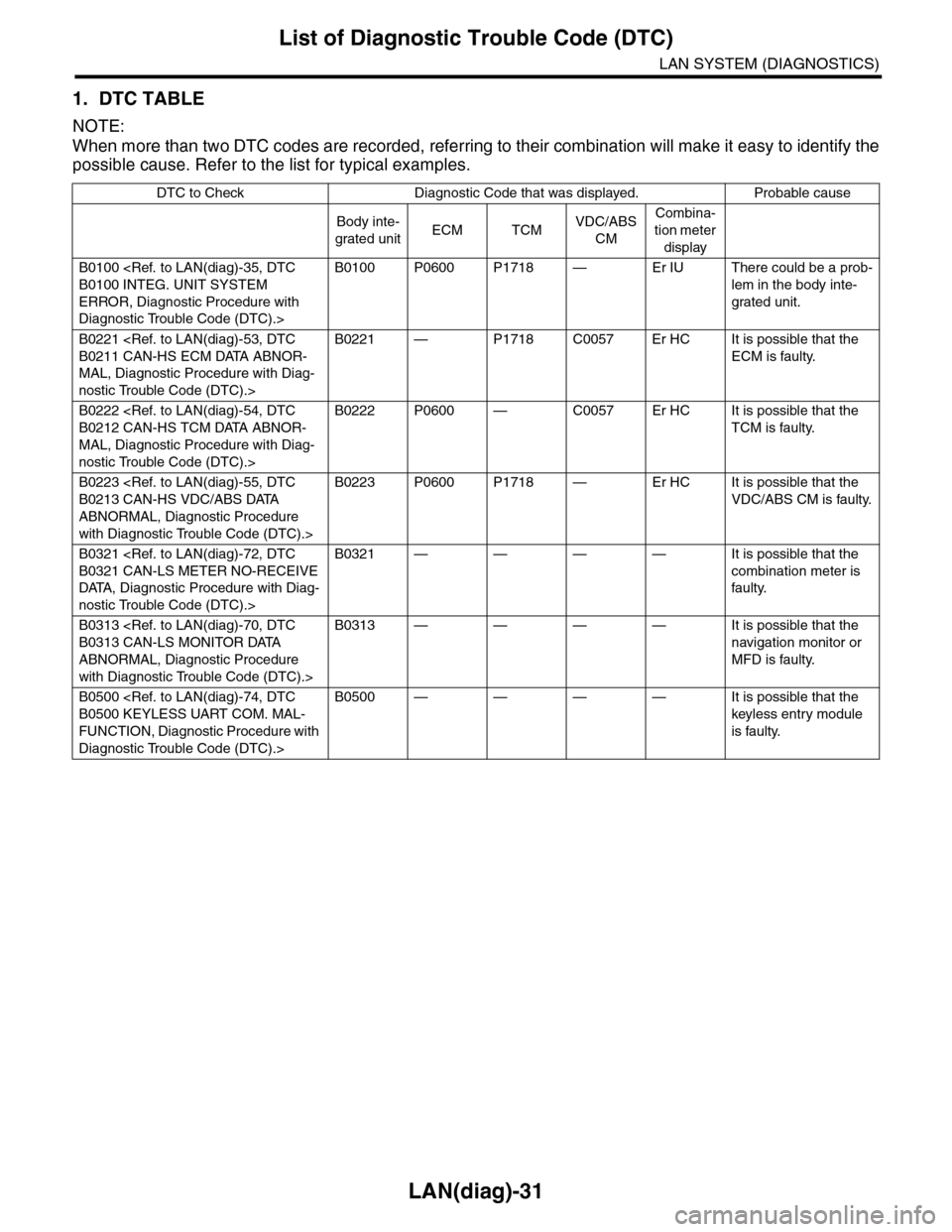
1. DTC TABLE
NOTE:
When more than two DTC codes are recorded, referring to their combination will make it easy to identify the
possible cause. Refer to the list for typical examples.
DTC to Check Diagnostic Code that was displayed. Probable cause
Body inte-
grated unitECM TCMVDC/ABS
CM
Combina-
tion meter
display
B0100
ERROR, Diagnostic Procedure with
Diagnostic Trouble Code (DTC).>
B0100 P0600 P1718 — Er IU There could be a prob-
lem in the body inte-
grated unit.
B0221
MAL, Diagnostic Procedure with Diag-
nostic Trouble Code (DTC).>
B0221 — P1718 C0057 Er HC It is possible that the
ECM is faulty.
B0222
MAL, Diagnostic Procedure with Diag-
nostic Trouble Code (DTC).>
B0222 P0600 — C0057 Er HC It is possible that the
TCM is faulty.
B0223
ABNORMAL, Diagnostic Procedure
with Diagnostic Trouble Code (DTC).>
B0223 P0600 P1718 — Er HC It is possible that the
VDC/ABS CM is faulty.
B0321
DATA, Diagnostic Procedure with Diag-
nostic Trouble Code (DTC).>
B0321 — — — — It is possible that the
combination meter is
faulty.
B0313
ABNORMAL, Diagnostic Procedure
with Diagnostic Trouble Code (DTC).>
B0313 — — — — It is possible that the
navigation monitor or
MFD is faulty.
B0500
FUNCTION, Diagnostic Procedure with
Diagnostic Trouble Code (DTC).>
B0500 — — — — It is possible that the
keyless entry module
is faulty.
Page 527 of 2453
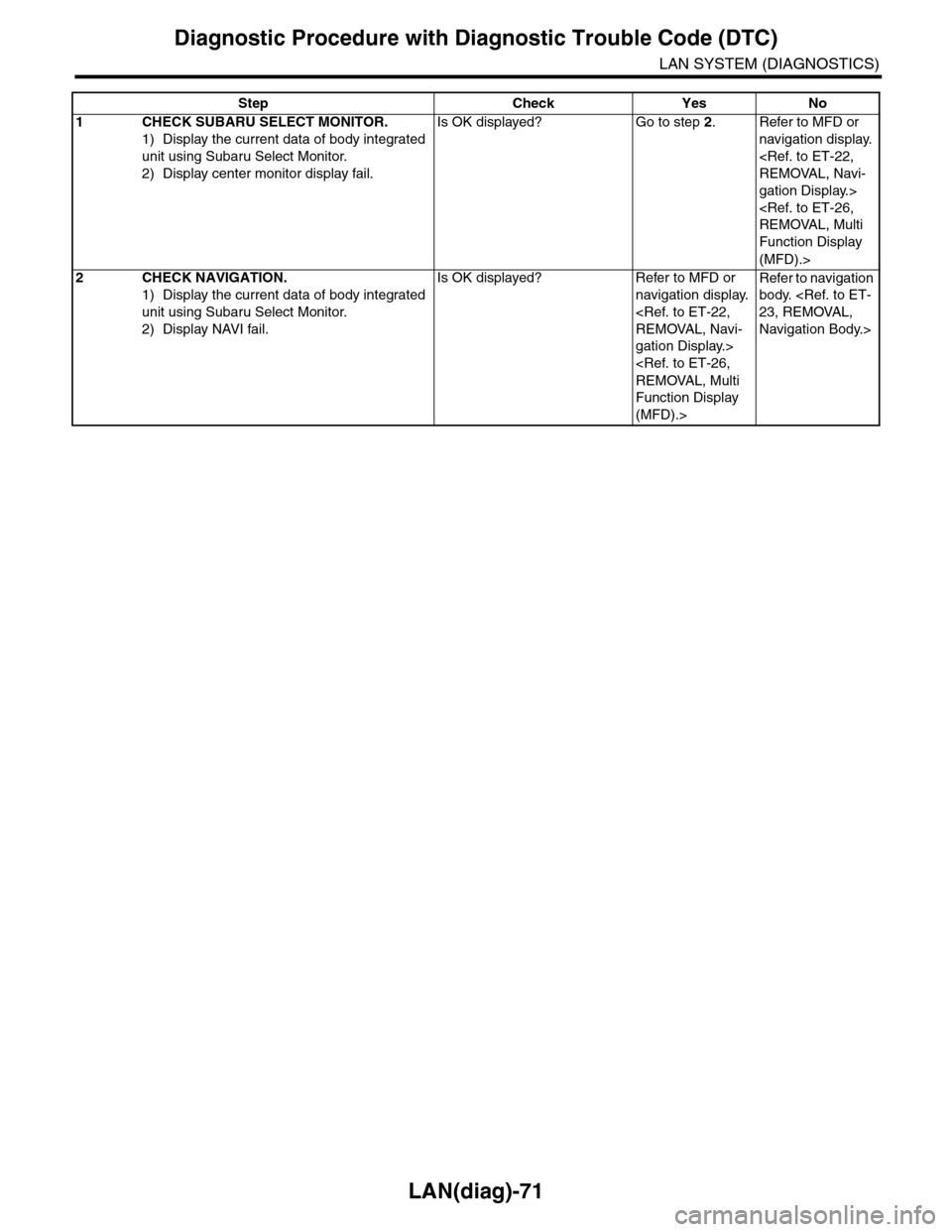
LAN(diag)-71
Diagnostic Procedure with Diagnostic Trouble Code (DTC)
LAN SYSTEM (DIAGNOSTICS)
Step Check Yes No
1CHECK SUBARU SELECT MONITOR.
1) Display the current data of body integrated
unit using Subaru Select Monitor.
2) Display center monitor display fail.
Is OK displayed? Go to step 2.Refer to MFD or
navigation display.
gation Display.>
Function Display
(MFD).>
2CHECK NAVIGATION.
1) Display the current data of body integrated
unit using Subaru Select Monitor.
2) Display NAVI fail.
Is OK displayed? Refer to MFD or
navigation display.
gation Display.>
Function Display
(MFD).>
Refer to navigation
body.
Navigation Body.>
Page 2304 of 2453
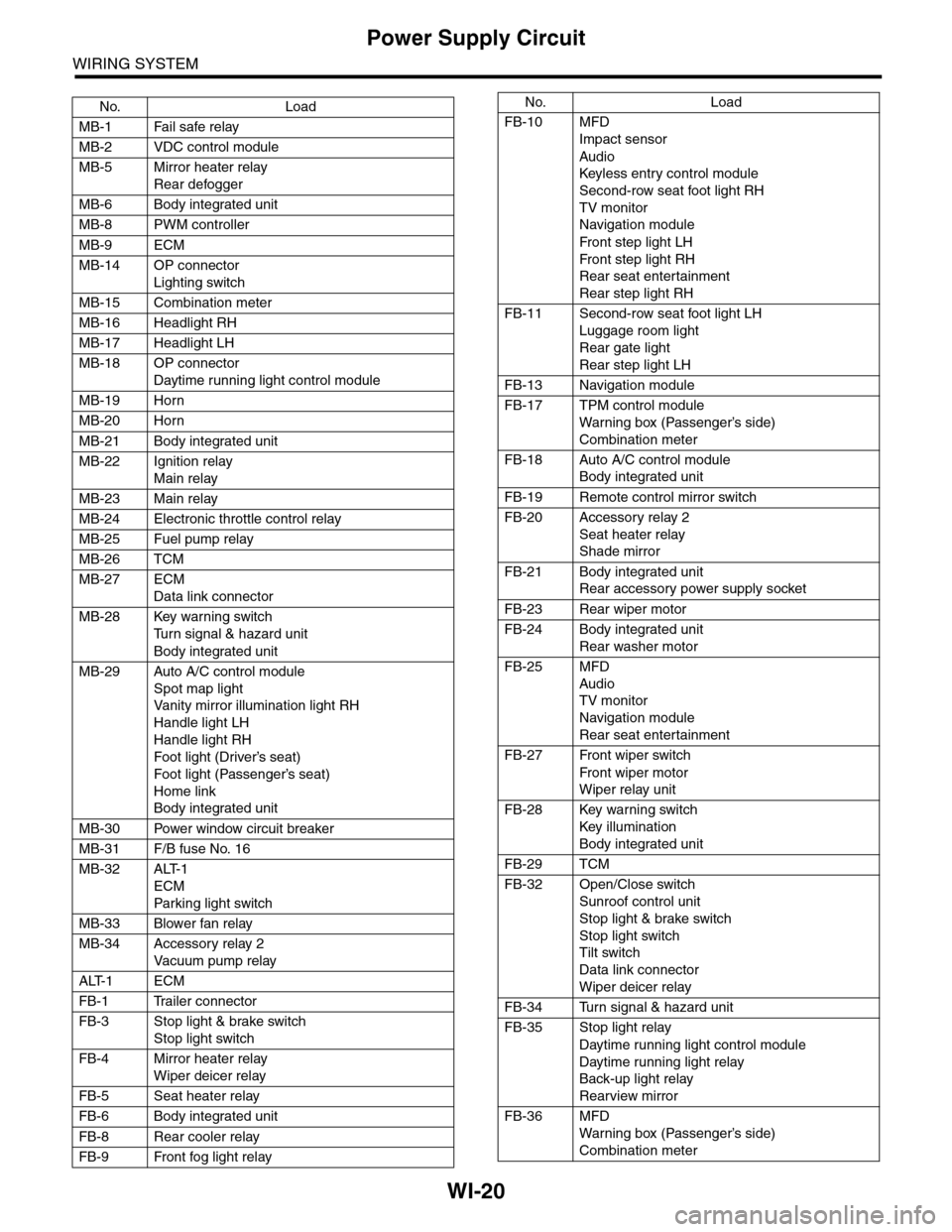
WI-20
Power Supply Circuit
WIRING SYSTEM
No. Load
MB-1 Fail safe relay
MB-2 VDC control module
MB-5 Mirror heater relay
Rear defogger
MB-6 Body integrated unit
MB-8 PWM controller
MB-9 ECM
MB-14 OP connector
Lighting switch
MB-15 Combination meter
MB-16 Headlight RH
MB-17 Headlight LH
MB-18 OP connector
Daytime running light control module
MB-19 Horn
MB-20 Horn
MB-21 Body integrated unit
MB-22 Ignition relay
Main relay
MB-23 Main relay
MB-24 Electronic throttle control relay
MB-25 Fuel pump relay
MB-26 TCM
MB-27 ECM
Data link connector
MB-28 Key warning switch
Tu r n s i g n a l & h a z a r d u n i t
Body integrated unit
MB-29 Auto A/C control module
Spot map light
Va n i t y m i r r o r i l l u m i n a t i o n l i g h t R H
Handle light LH
Handle light RH
Foot light (Driver’s seat)
Foot light (Passenger’s seat)
Home link
Body integrated unit
MB-30 Power window circuit breaker
MB-31 F/B fuse No. 16
MB-32 ALT-1
ECM
Par king light switch
MB-33 Blower fan relay
MB-34 Accessory relay 2
Va c u u m p u m p r e l ay
ALT-1 ECM
FB-1 Trailer connector
FB-3 Stop light & brake switch
Stop light switch
FB-4 Mirror heater relay
Wiper deicer relay
FB-5 Seat heater relay
FB-6 Body integrated unit
FB-8 Rear cooler relay
FB-9 Front fog light relay
FB-10 MFD
Impact sensor
Audio
Keyless entr y control module
Second-row seat foot light RH
TV monitor
Navigation module
Fr o n t s te p li gh t LH
Fr o n t s te p li gh t RH
Rear seat entertainment
Rear step light RH
FB-11 Second-row seat foot light LH
Luggage room light
Rear gate light
Rear step light LH
FB-13 Navigation module
FB-17 TPM control module
War ning box (Passenger’s side)
Combination meter
FB-18 Auto A/C control module
Body integrated unit
FB-19 Remote control mirror switch
FB-20 Accessory relay 2
Seat heater relay
Shade mirror
FB-21 Body integrated unit
Rear accessory power supply socket
FB-23 Rear wiper motor
FB-24 Body integrated unit
Rear washer motor
FB-25 MFD
Audio
TV monitor
Navigation module
Rear seat entertainment
FB-27 Front wiper switch
Fr o n t wi p er mo t or
Wiper relay unit
FB-28 Key warning switch
Key illumination
Body integrated unit
FB-29 TCM
FB-32 Open/Close switch
Sunroof control unit
Stop light & brake switch
Stop light switch
Tilt switch
Data link connector
Wiper deicer relay
FB-34 Turn signal & hazard unit
FB-35 Stop light relay
Daytime running light control module
Daytime running light relay
Back-up light relay
Rearview mirror
FB-36 MFD
War ning box (Passenger’s side)
Combination meter
No. Load
Page 2309 of 2453
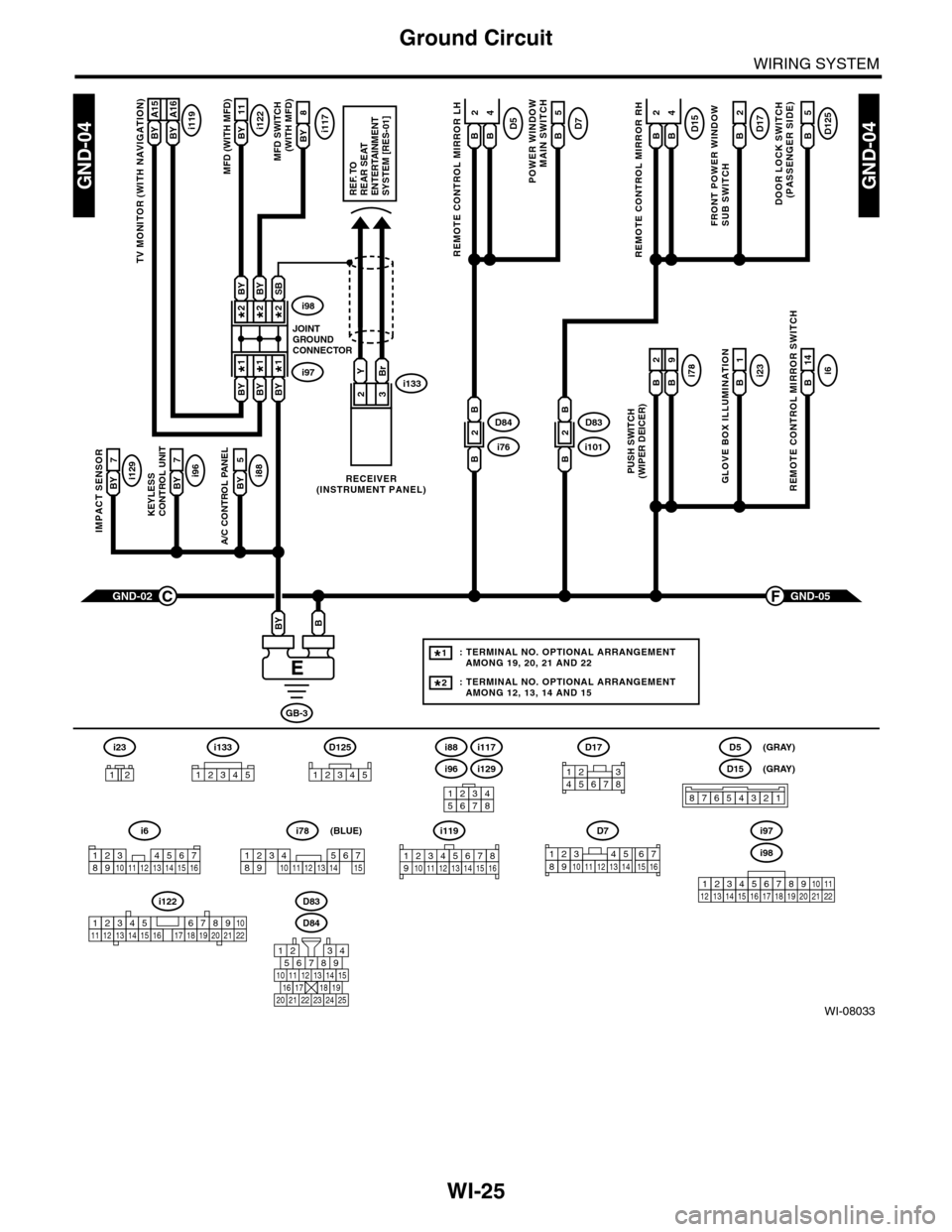
WI-25
Ground Circuit
WIRING SYSTEM
WI-08033
GND-04GND-04
i117BYi122BY 11
8
A/C CONTROL PANEL
i88BY 5
23
GND-05F
KEYLESS CONTROL UNIT
i96BY 7
IMPACT SENSOR
i129BY 7
TV MONITOR (WITH NAVIGATION)
i119BY A15BY A16
GND-02C
GB-3
BBY
D83
MFD (WITH MFD)MFD SWITCH (WITH MFD)
i96
12345678
i6
42
14
REMOTE CONTROL MIRROR SWITCH
i97i133
i98
JOINTGROUNDCONNECTOR
RECEIVER(INSTRUMENT PANEL)
2*2*
1*1*
2*
1*
BYBi231
GLOVE BOX ILLUMINATION
Bi789
PUSH SWITCH(WIPER DEICER)
B
2
BBYBY
SBBYBY
YBr
REF. TOREAR SEATENTERTAINMENT SYSTEM [RES-01]
: TERMINAL NO. OPTIONAL ARRANGEMENT AMONG 19, 20, 21 AND 22
: TERMINAL NO. OPTIONAL ARRANGEMENT AMONG 12, 13, 14 AND 15
1*
2*
D125
5
DOOR LOCK SWITCH(PASSENGER SIDE)
BD17
2
FRONT POWER WINDOW SUB SWITCH
POWER WINDOW
MAIN SWITCH
BD75
BD15
REMOTE CONTROL MIRROR RH
BB
42D5
REMOTE CONTROL MIRROR LH
BB
i1012D83
B
B
i762D84
B
B
D84
i88
i129
i117
567821943
10
2422 23 25
1112131415161718192021
i98
i97
12345678910111213141516171819202122
D7
12345689101112131514716
D17
12345678
D5
D15
87654321
(GRAY)
(GRAY)
i6
12345678910111213141516
i119
123 8910412 13 14 15 1656711
i133
12345
12345678910111213141516171819202122
i122
i78
123456789101112131415
(BLUE)
i23
12
D125
12345
Page 2310 of 2453
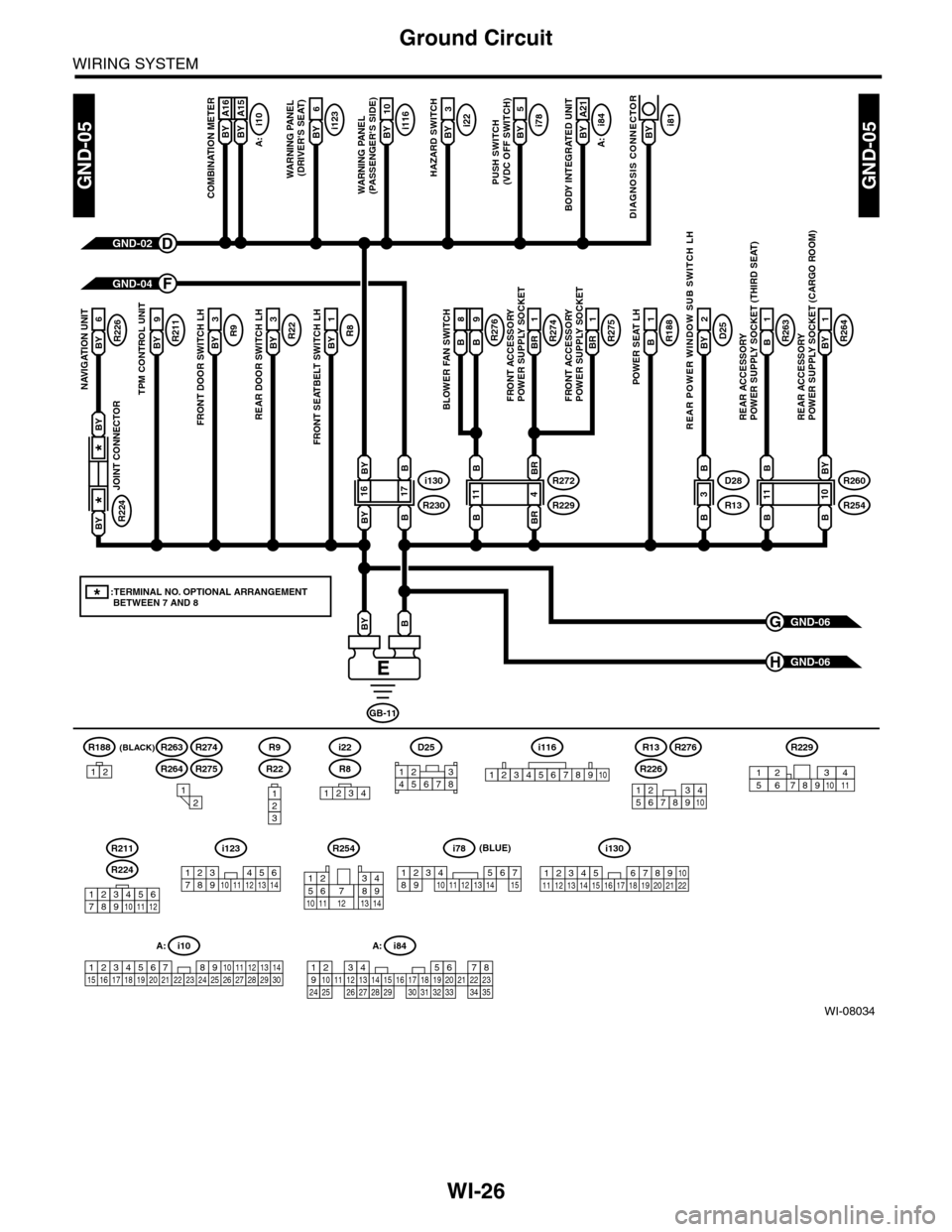
WI-26
Ground Circuit
WIRING SYSTEM
WI-08034
GND-05GND-05
GND-06G
GND-06H
(BLACK)R188
B A16
COMBINATION METER
GND-02D
GND-04F
GB-11
BBY
BY A16BY A15BY 2
A21
BODY INTEGRATED UNIT
i78BY 2
5
PUSH SWITCH(VDC OFF SWITCH)
i22BY 2
3
HAZARD SWITCH
i116BY 2
10
WARNING PANEL (PASSENGER'S SIDE)
R8BY 2
1
FRONT SEATBELT SWITCH LH
R22BY 2
3
REAR DOOR SWITCH LH
R9BY
3
FRONT DOOR SWITCH LH
R211BY
9
TPM CONTROL UNIT
R226BY
6
NAVIGATION UNIT
R264BY 2
1
REAR ACCESSORY POWER SUPPLY SOCKET (CARGO ROOM)
R263B2
1
REAR ACCESSORY POWER SUPPLY SOCKET (THIRD SEAT)
D25BY
2
REAR POWER WINDOW SUB SWITCH LH
R188B
1
POWER SEAT LH
R275BR
1
R274BR
1
FRONT ACCESSORY POWER SUPPLY SOCKETFRONT ACCESSORY POWER SUPPLY SOCKET
i123BY 2
6
WARNING PANEL (DRIVER'S SEAT)
A:
i10
B A16
BLOWER FAN SWITCH
B8B9R276
A:
i84
i130
R230
B
1716
B
BY
BY
R272
R229
BR
411
BR
B
B
R260
R254
BY
1011
B
B
B
D28
R13
B
3
B
i81BY
DIAGNOSIS CONNECTOR
R224
JOINT CONNECTOR
*
*
BY
BY
*:TERMINAL NO. OPTIONAL ARRANGEMENT BETWEEN 7 AND 8
1234
i116
12345678910
i10
19 20 2115 16 17 182223242526272829301234568910 11 12 13 147
A:
R8
i22
123
R22
R9
12
12345678910
A: i84
1234567891011121415161718192021222324252627282930313233343513
123456789101112
R224
R211
R226
R13R276
R264
R263R274
R275
R254
12
10115634897131412
R229
8791012543611
D25
12345678
123 8910411 12 13 14 15 16567171819202122
i130i123
123 45678910 11 12 13 14
i78
123456789101112131415
(BLUE)
12
Page 2362 of 2453
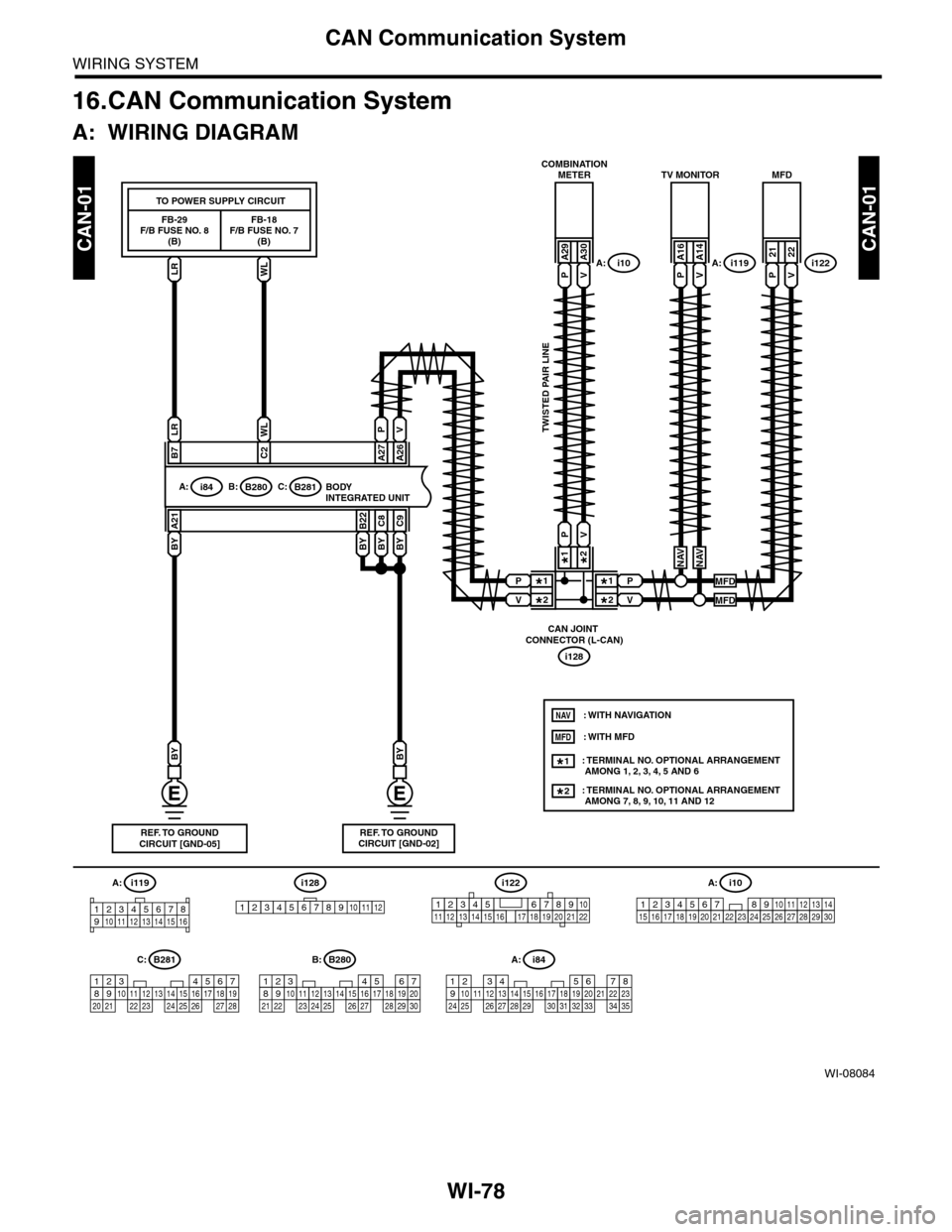
WI-78
CAN Communication System
WIRING SYSTEM
16.CAN Communication System
A: WIRING DIAGRAM
WI-08084
CAN-01CAN-01
BYBYBY
C9C8
BY
B22A21
BYBY
WLLR
A26B7C2A27
BODY INTEGRATED UNITi84A:B280B:B281C:
PV
COMBINATIONMETER
i10A:LR
FB-29F/B FUSE NO. 8(B)
WL
FB-18F/B FUSE NO. 7(B)
TO POWER SUPPLY CIRCUIT
TWISTED PAIR LINE
A: i84
1234567891011121415161718192021222324252627282930313233343513
REF. TO GROUNDCIRCUIT [GND-05]REF. TO GROUNDCIRCUIT [GND-02]
56782194310242223 25111213141526 27 281617181920 21
B281C:
A:
i128
CAN JOINT CONNECTOR (L-CAN)
2*
1*2*
1*P
V
P
V
2*1*
PV
PV
A29A30
TV MONITOR
i119A:PV
A16A14
MFD
i122PV
2122
NAVNAV
MFD
MFD
: TERMINAL NO. OPTIONAL ARRANGEMENT AMONG 1, 2, 3, 4, 5 AND 6
: TERMINAL NO. OPTIONAL ARRANGEMENT AMONG 7, 8, 9, 10, 11 AND 12
1*
2*
NAV
MFD: WITH MFD
: WITH NAVIGATION
i119
123 8910412 13 14 15 1656711
i128
123456789101112
i10
19 20 2115 16 17 182223242526272829301234568910 11 12 13 147
A:
12345678910111213141516171819202122
i122
5467821931022 23111213141524 25 26 2716171828 29192021 30
B280B: