light SUBARU TRIBECA 2009 1.G Service Workshop Manual
[x] Cancel search | Manufacturer: SUBARU, Model Year: 2009, Model line: TRIBECA, Model: SUBARU TRIBECA 2009 1.GPages: 2453, PDF Size: 46.32 MB
Page 809 of 2453
DI-25
Rear Differential (VA–type)
DIFFERENTIALS
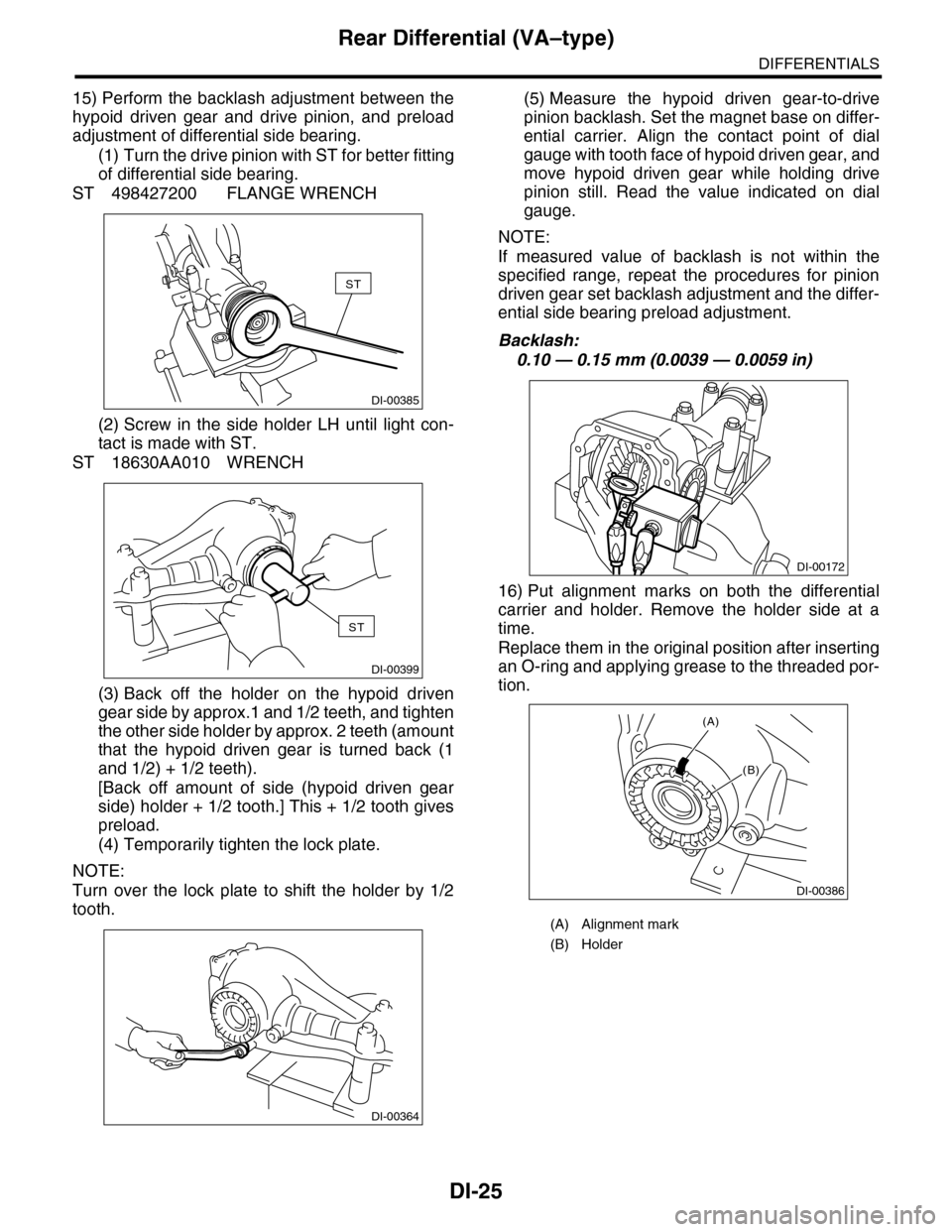
15) Perform the backlash adjustment between the
hypoid driven gear and drive pinion, and preload
adjustment of differential side bearing.
(1) Turn the drive pinion with ST for better fitting
of differential side bearing.
ST 498427200 FLANGE WRENCH
(2) Screw in the side holder LH until light con-
tact is made with ST.
ST 18630AA010 WRENCH
(3) Back off the holder on the hypoid driven
gear side by approx.1 and 1/2 teeth, and tighten
the other side holder by approx. 2 teeth (amount
that the hypoid driven gear is turned back (1
and 1/2) + 1/2 teeth).
[Back off amount of side (hypoid driven gear
side) holder + 1/2 tooth.] This + 1/2 tooth gives
preload.
(4) Temporarily tighten the lock plate.
NOTE:
Turn over the lock plate to shift the holder by 1/2
tooth.
(5) Measure the hypoid driven gear-to-drive
pinion backlash. Set the magnet base on differ-
ential carrier. Align the contact point of dial
gauge with tooth face of hypoid driven gear, and
move hypoid driven gear while holding drive
pinion still. Read the value indicated on dial
gauge.
NOTE:
If measured value of backlash is not within the
specified range, repeat the procedures for pinion
driven gear set backlash adjustment and the differ-
ential side bearing preload adjustment.
Backlash:
0.10 — 0.15 mm (0.0039 — 0.0059 in)
16) Put alignment marks on both the differential
carrier and holder. Remove the holder side at a
time.
Replace them in the original position after inserting
an O-ring and applying grease to the threaded por-
tion.
DI-00385
ST
ST
DI-00399
DI-00364
(A) Alignment mark
(B) Holder
DI-00172
DI-00386
(B)
(A)
Page 810 of 2453
DI-26
Rear Differential (VA–type)
DIFFERENTIALS
17) Tighten the bolt of lock plate to specified
torque.
Tightening torque:
25 N·m (2.5 kgf-m, 18.1 ft-lb)
18) Recheck the hypoid driven gear to pinion back-
lash.
Backlash:
0.10 — 0.15 mm (0.0039 — 0.0059 in)
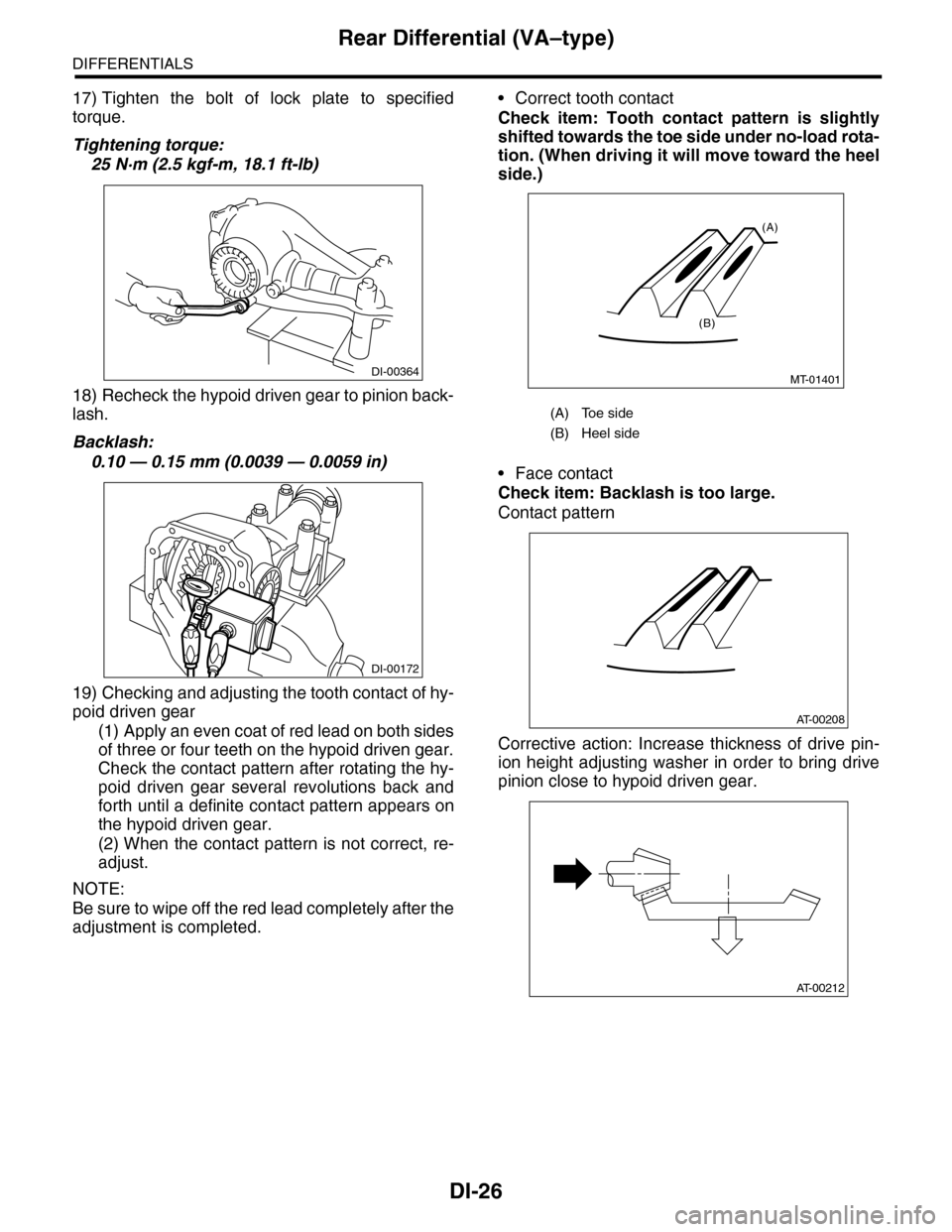
19) Checking and adjusting the tooth contact of hy-
poid driven gear
(1) Apply an even coat of red lead on both sides
of three or four teeth on the hypoid driven gear.
Check the contact pattern after rotating the hy-
poid driven gear several revolutions back and
forth until a definite contact pattern appears on
the hypoid driven gear.
(2) When the contact pattern is not correct, re-
adjust.
NOTE:
Be sure to wipe off the red lead completely after the
adjustment is completed.
•Correct tooth contact
Check item: Tooth contact pattern is slightly
shifted towards the toe side under no-load rota-
tion. (When driving it will move toward the heel
side.)
•Face contact
Check item: Backlash is too large.
Contact pattern
Corrective action: Increase thickness of drive pin-
ion height adjusting washer in order to bring drive
pinion close to hypoid driven gear.
DI-00364
DI-00172
(A) Toe side
(B) Heel side
MT-01401
(A)
(B)
AT-00208
AT-00212
Page 812 of 2453
DI-28
Rear Differential (VA–type)
DIFFERENTIALS
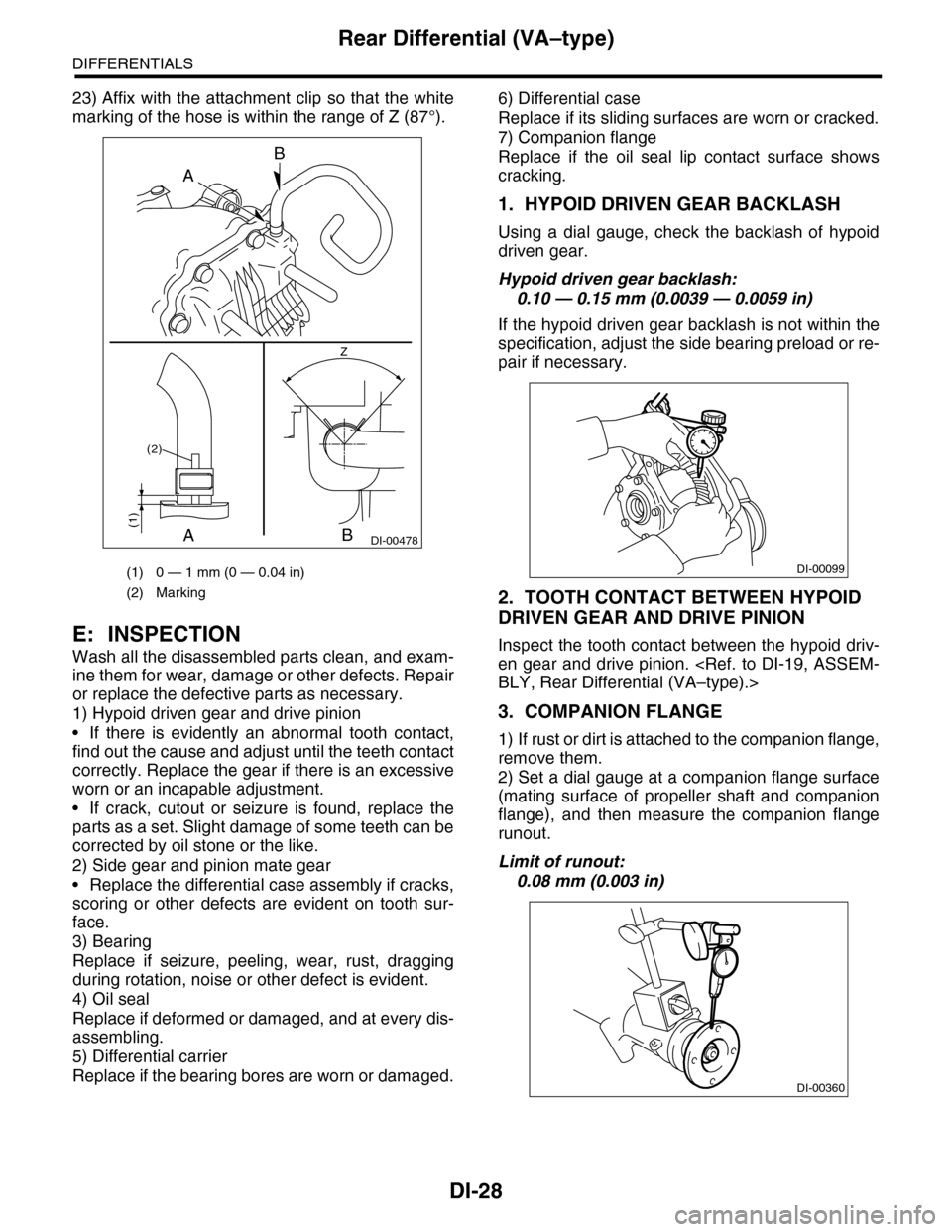
23) Affix with the attachment clip so that the white
marking of the hose is within the range of Z (87°).
E: INSPECTION
Wash all the disassembled parts clean, and exam-
ine them for wear, damage or other defects. Repair
or replace the defective parts as necessary.
1) Hypoid driven gear and drive pinion
•If there is evidently an abnormal tooth contact,
find out the cause and adjust until the teeth contact
correctly. Replace the gear if there is an excessive
worn or an incapable adjustment.
•If crack, cutout or seizure is found, replace the
parts as a set. Slight damage of some teeth can be
corrected by oil stone or the like.
2) Side gear and pinion mate gear
•Replace the differential case assembly if cracks,
scoring or other defects are evident on tooth sur-
face.
3) Bearing
Replace if seizure, peeling, wear, rust, dragging
during rotation, noise or other defect is evident.
4) Oil seal
Replace if deformed or damaged, and at every dis-
assembling.
5) Differential carrier
Replace if the bearing bores are worn or damaged.
6) Differential case
Replace if its sliding surfaces are worn or cracked.
7) Companion flange
Replace if the oil seal lip contact surface shows
cracking.
1. HYPOID DRIVEN GEAR BACKLASH
Using a dial gauge, check the backlash of hypoid
driven gear.
Hypoid driven gear backlash:
0.10 — 0.15 mm (0.0039 — 0.0059 in)
If the hypoid driven gear backlash is not within the
specification, adjust the side bearing preload or re-
pair if necessary.
2. TOOTH CONTACT BETWEEN HYPOID
DRIVEN GEAR AND DRIVE PINION
Inspect the tooth contact between the hypoid driv-
en gear and drive pinion.
3. COMPANION FLANGE
1) If rust or dirt is attached to the companion flange,
remove them.
2) Set a dial gauge at a companion flange surface
(mating surface of propeller shaft and companion
flange), and then measure the companion flange
runout.
Limit of runout:
0.08 mm (0.003 in)
(1) 0 — 1 mm (0 — 0.04 in)
(2) Marking
DI-00478
B
B
A
A
Z
(1)
(2)
DI-00099
DI-00360
Page 843 of 2453
DS-26
Front Drive Shaft
DRIVE SHAFT SYSTEM
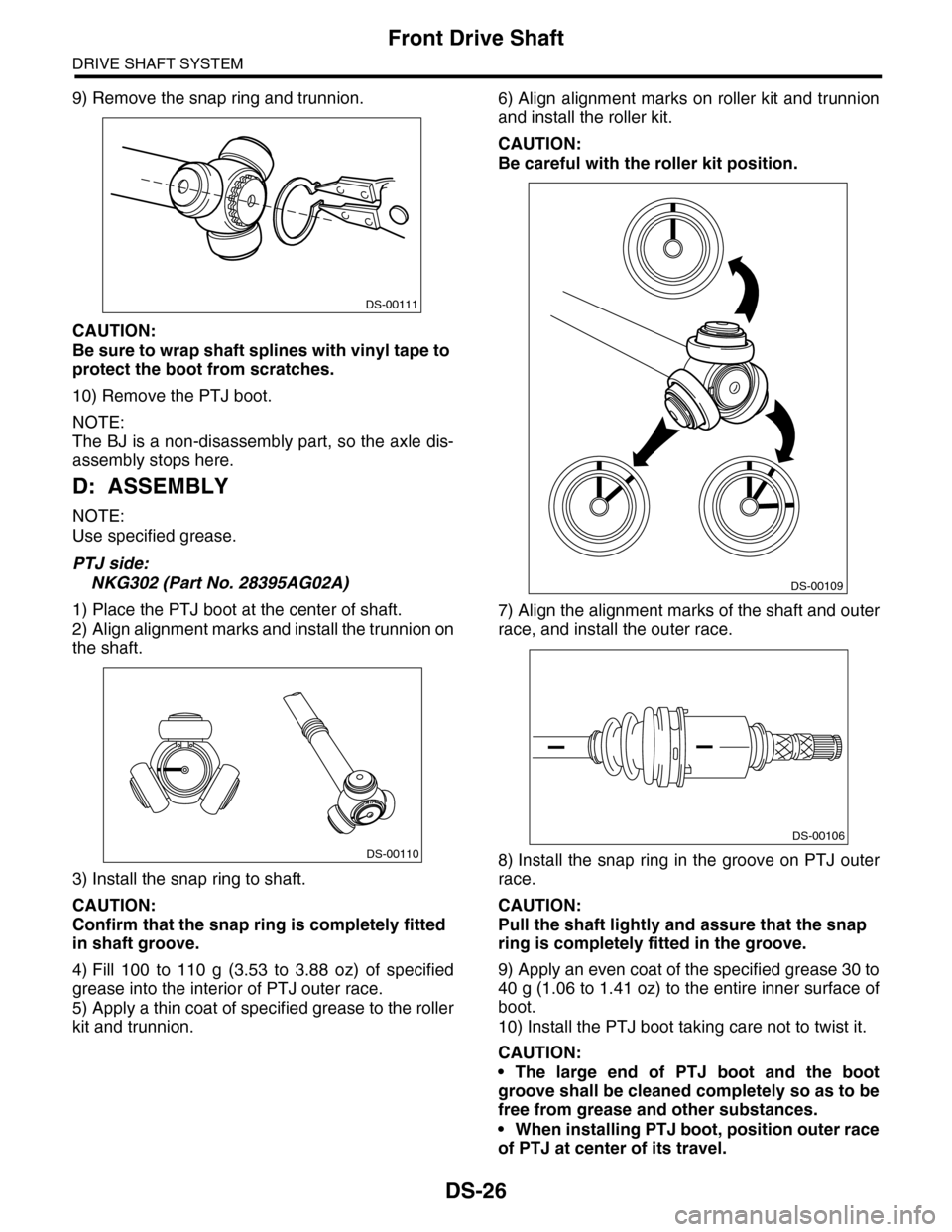
9) Remove the snap ring and trunnion.
CAUTION:
Be sure to wrap shaft splines with vinyl tape to
protect the boot from scratches.
10) Remove the PTJ boot.
NOTE:
The BJ is a non-disassembly part, so the axle dis-
assembly stops here.
D: ASSEMBLY
NOTE:
Use specified grease.
PTJ side:
NKG302 (Part No. 28395AG02A)
1) Place the PTJ boot at the center of shaft.
2) Align alignment marks and install the trunnion on
the shaft.
3) Install the snap ring to shaft.
CAUTION:
Confirm that the snap ring is completely fitted
in shaft groove.
4) Fill 100 to 110 g (3.53 to 3.88 oz) of specified
grease into the interior of PTJ outer race.
5) Apply a thin coat of specified grease to the roller
kit and trunnion.
6) Align alignment marks on roller kit and trunnion
and install the roller kit.
CAUTION:
Be careful with the roller kit position.
7) Align the alignment marks of the shaft and outer
race, and install the outer race.
8) Install the snap ring in the groove on PTJ outer
race.
CAUTION:
Pull the shaft lightly and assure that the snap
ring is completely fitted in the groove.
9) Apply an even coat of the specified grease 30 to
40 g (1.06 to 1.41 oz) to the entire inner surface of
boot.
10) Install the PTJ boot taking care not to twist it.
CAUTION:
•The large end of PTJ boot and the boot
groove shall be cleaned completely so as to be
free from grease and other substances.
•When installing PTJ boot, position outer race
of PTJ at center of its travel.
DS-00111
DS-00110
DS-00109
DS-00106
Page 848 of 2453
DS-31
Rear Drive Shaft
DRIVE SHAFT SYSTEM
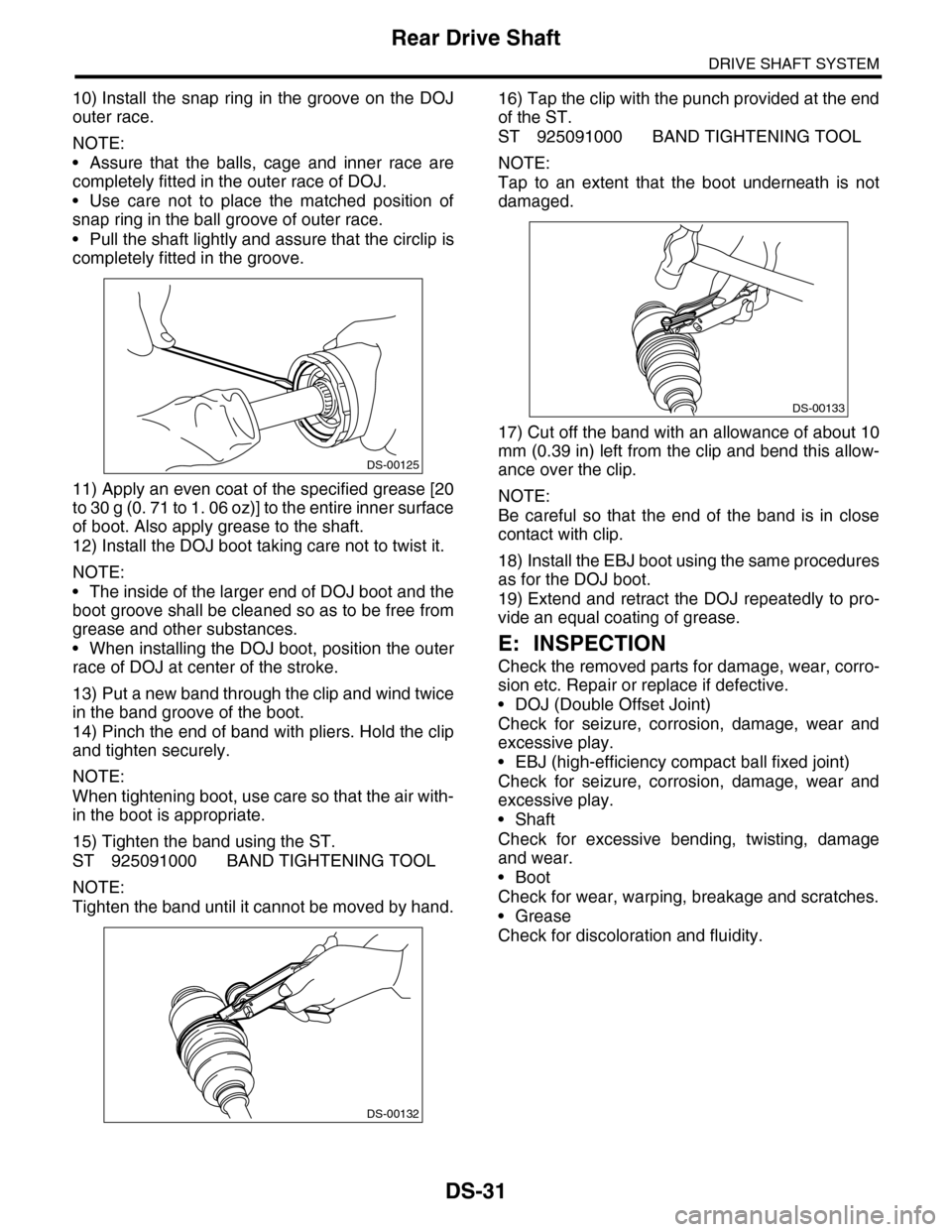
10) Install the snap ring in the groove on the DOJ
outer race.
NOTE:
•Assure that the balls, cage and inner race are
completely fitted in the outer race of DOJ.
•Use care not to place the matched position of
snap ring in the ball groove of outer race.
•Pull the shaft lightly and assure that the circlip is
completely fitted in the groove.
11) Apply an even coat of the specified grease [20
to 30 g (0. 71 to 1. 06 oz)] to the entire inner surface
of boot. Also apply grease to the shaft.
12) Install the DOJ boot taking care not to twist it.
NOTE:
•The inside of the larger end of DOJ boot and the
boot groove shall be cleaned so as to be free from
grease and other substances.
•When installing the DOJ boot, position the outer
race of DOJ at center of the stroke.
13) Put a new band through the clip and wind twice
in the band groove of the boot.
14) Pinch the end of band with pliers. Hold the clip
and tighten securely.
NOTE:
When tightening boot, use care so that the air with-
in the boot is appropriate.
15) Tighten the band using the ST.
ST 925091000 BAND TIGHTENING TOOL
NOTE:
Tighten the band until it cannot be moved by hand.
16) Tap the clip with the punch provided at the end
of the ST.
ST 925091000 BAND TIGHTENING TOOL
NOTE:
Tap to an extent that the boot underneath is not
damaged.
17) Cut off the band with an allowance of about 10
mm (0.39 in) left from the clip and bend this allow-
ance over the clip.
NOTE:
Be careful so that the end of the band is in close
contact with clip.
18) Install the EBJ boot using the same procedures
as for the DOJ boot.
19) Extend and retract the DOJ repeatedly to pro-
vide an equal coating of grease.
E: INSPECTION
Check the removed parts for damage, wear, corro-
sion etc. Repair or replace if defective.
•DOJ (Double Offset Joint)
Check for seizure, corrosion, damage, wear and
excessive play.
•EBJ (high-efficiency compact ball fixed joint)
Check for seizure, corrosion, damage, wear and
excessive play.
•Shaft
Check for excessive bending, twisting, damage
and wear.
•Boot
Check for wear, warping, breakage and scratches.
•Grease
Check for discoloration and fluidity.
DS-00125
DS-00132
DS-00133
Page 879 of 2453
PB-8
Parking Brake Assembly (Rear Disc Brake)
PARKING BRAKE
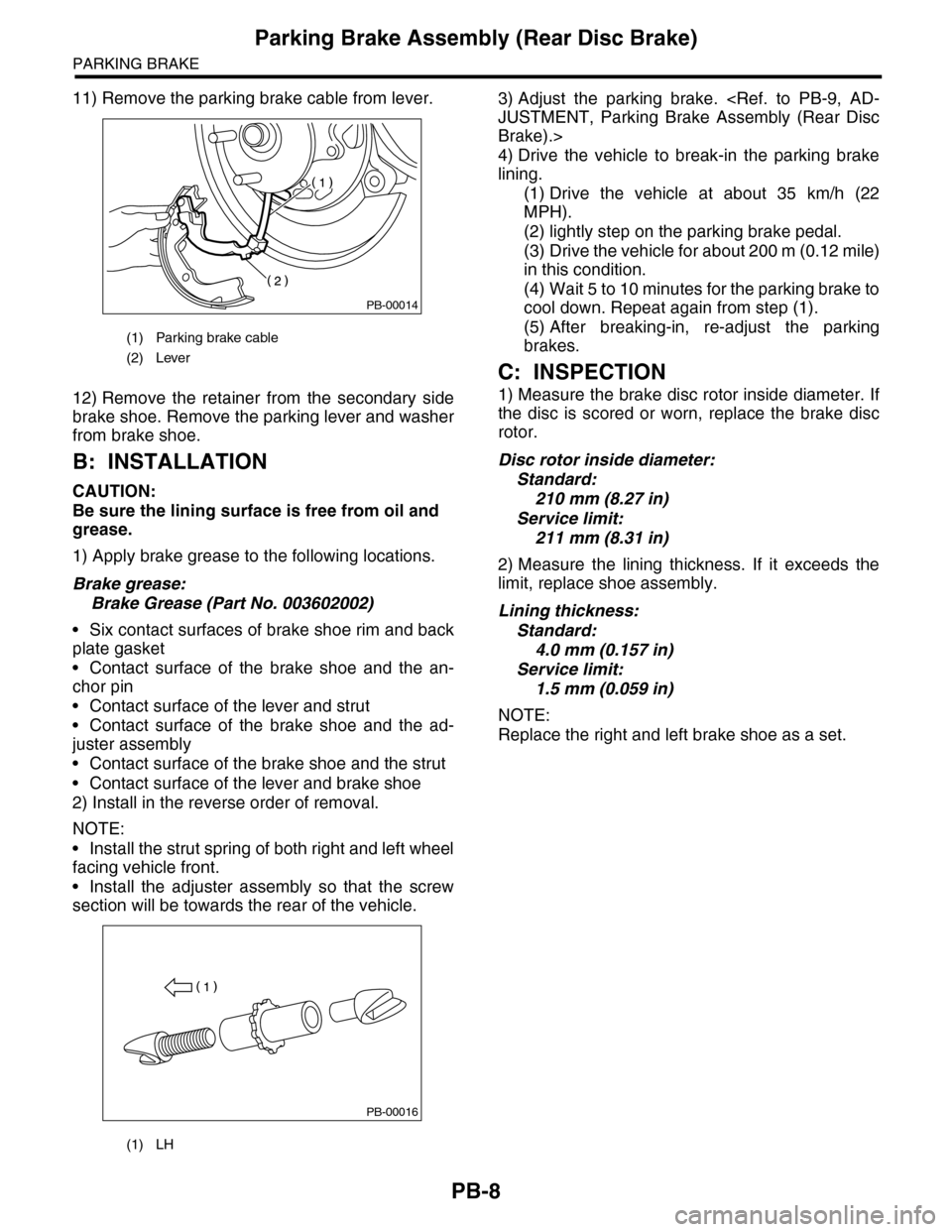
11) Remove the parking brake cable from lever.
12) Remove the retainer from the secondary side
brake shoe. Remove the parking lever and washer
from brake shoe.
B: INSTALLATION
CAUTION:
Be sure the lining surface is free from oil and
grease.
1) Apply brake grease to the following locations.
Brake grease:
Brake Grease (Part No. 003602002)
•Six contact surfaces of brake shoe rim and back
plate gasket
•Contact surface of the brake shoe and the an-
chor pin
•Contact surface of the lever and strut
•Contact surface of the brake shoe and the ad-
juster assembly
•Contact surface of the brake shoe and the strut
•Contact surface of the lever and brake shoe
2) Install in the reverse order of removal.
NOTE:
•Install the strut spring of both right and left wheel
facing vehicle front.
•Install the adjuster assembly so that the screw
section will be towards the rear of the vehicle.
3) Adjust the parking brake.
Brake).>
4) Drive the vehicle to break-in the parking brake
lining.
(1) Drive the vehicle at about 35 km/h (22
MPH).
(2) lightly step on the parking brake pedal.
(3) Drive the vehicle for about 200 m (0.12 mile)
in this condition.
(4) Wait 5 to 10 minutes for the parking brake to
cool down. Repeat again from step (1).
(5) After breaking-in, re-adjust the parking
brakes.
C: INSPECTION
1) Measure the brake disc rotor inside diameter. If
the disc is scored or worn, replace the brake disc
rotor.
Disc rotor inside diameter:
Standard:
210 mm (8.27 in)
Service limit:
211 mm (8.31 in)
2) Measure the lining thickness. If it exceeds the
limit, replace shoe assembly.
Lining thickness:
Standard:
4.0 mm (0.157 in)
Service limit:
1.5 mm (0.059 in)
NOTE:
Replace the right and left brake shoe as a set.
(1) Parking brake cable
(2) Lever
(1) LH
PB-00014
PB-00016
Page 919 of 2453
PS-39
Pipe Assembly
POWER ASSISTED SYSTEM (POWER STEERING)
C: INSPECTION
Check all disassembled parts for wear, damage or other problems. Repair or replace the defective parts as
necessary.
CAUTION:
Although the surface layer materials of rubber hoses have excellent weathering resistance, heat re-
sistance and resistance for low temperature brittleness, they are likely to be damaged chemically by
brake fluid, battery electrolyte, engine oil and automatic transmission fluid and their service lives are
to be very shortened. Wipe off hoses immediately if any of these come into contact with the hoses.
Since resistances for heat or low temperature brittleness are gradually declining according to time
accumulation of hot or cold conditions for the hoses and their service lives are shortening accord-
ingly, it is necessary to perform careful inspection frequently when the vehicle is used in hot weather
areas, cold weather areas and a driving condition in which many steering operations are required in
short time.
Particularly continuous work of relief valve over 5 seconds causes to reduce service lives of the hos-
es, the oil pump, the fluid, etc. due to over heat.
Par t Maintenance par ts Corrective action
Pipe
•O–ring fitting surface damage
•Nut damage
•Pipe damage
Replace with a new part.
Clamp • Loose clamps Replace with a new part.
Hose
•Flare surface damage
•Flare nut damage
•Outer surface cracks
•Outer surface wear
•Clip damage
•End coupling or adapter for deformation
Replace with a new part.
Tr o u b l e P o s s i b l e c a u s e C o r r e c t i v e a c t i o n
Pressure hose burst
Excessive holding time of relief status Instruct customers.
Malfunction of the relief valve Replace the oil pump.
Poor cold character istic of fluid R eplace fluid.
Disconnection of the return
hose
Improper connection Repair.
Loosening of the clip Retighten.
Poor cold character istic of fluid R eplace fluid.
Fluid slightly leaking out of
hose
Wrong layout, tensioned Replace the hose.
Excessive play of engine due to deterioration of
engine mounting rubberReplace the parts if defective.
Improper stop position of pitching stopper Replace the parts if defective.
Crack on hose
Excessive holding time of relief statusReplace.
Instruct customers.
Excessive tightening torque for return hose clip Replace.
Power steer ing fluid, engine oil, electrolyte adhere
on the hose surface
Replace.
Be careful during service work.
To o m a n y u s e s i n e x t r e m e l y c o l d w e a t h e rReplace.
Instruct customers.
Page 922 of 2453
PS-42
Oil Pump
POWER ASSISTED SYSTEM (POWER STEERING)
C: DISASSEMBLY
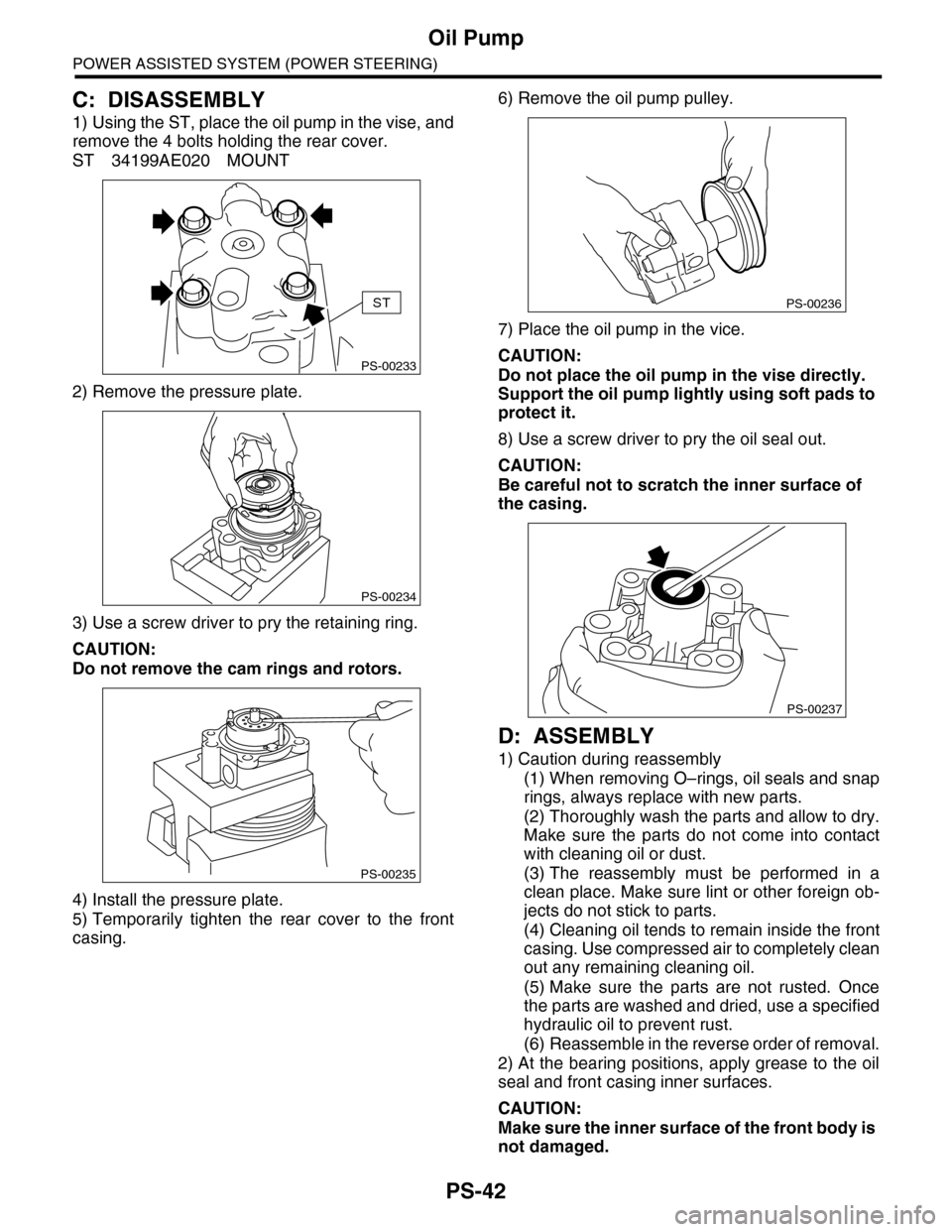
1) Using the ST, place the oil pump in the vise, and
remove the 4 bolts holding the rear cover.
ST 34199AE020 MOUNT
2) Remove the pressure plate.
3) Use a screw driver to pry the retaining ring.
CAUTION:
Do not remove the cam rings and rotors.
4) Install the pressure plate.
5) Temporarily tighten the rear cover to the front
casing.
6) Remove the oil pump pulley.
7) Place the oil pump in the vice.
CAUTION:
Do not place the oil pump in the vise directly.
Support the oil pump lightly using soft pads to
protect it.
8) Use a screw driver to pry the oil seal out.
CAUTION:
Be careful not to scratch the inner surface of
the casing.
D: ASSEMBLY
1) Caution during reassembly
(1) When removing O–rings, oil seals and snap
rings, always replace with new parts.
(2) Thoroughly wash the parts and allow to dry.
Make sure the parts do not come into contact
with cleaning oil or dust.
(3) The reassembly must be performed in a
clean place. Make sure lint or other foreign ob-
jects do not stick to parts.
(4) Cleaning oil tends to remain inside the front
casing. Use compressed air to completely clean
out any remaining cleaning oil.
(5) Make sure the parts are not rusted. Once
the parts are washed and dried, use a specified
hydraulic oil to prevent rust.
(6) Reassemble in the reverse order of removal.
2) At the bearing positions, apply grease to the oil
seal and front casing inner surfaces.
CAUTION:
Make sure the inner surface of the front body is
not damaged.
PS-00233
ST
PS-00234
PS-00235
PS-00236
PS-00237
Page 952 of 2453
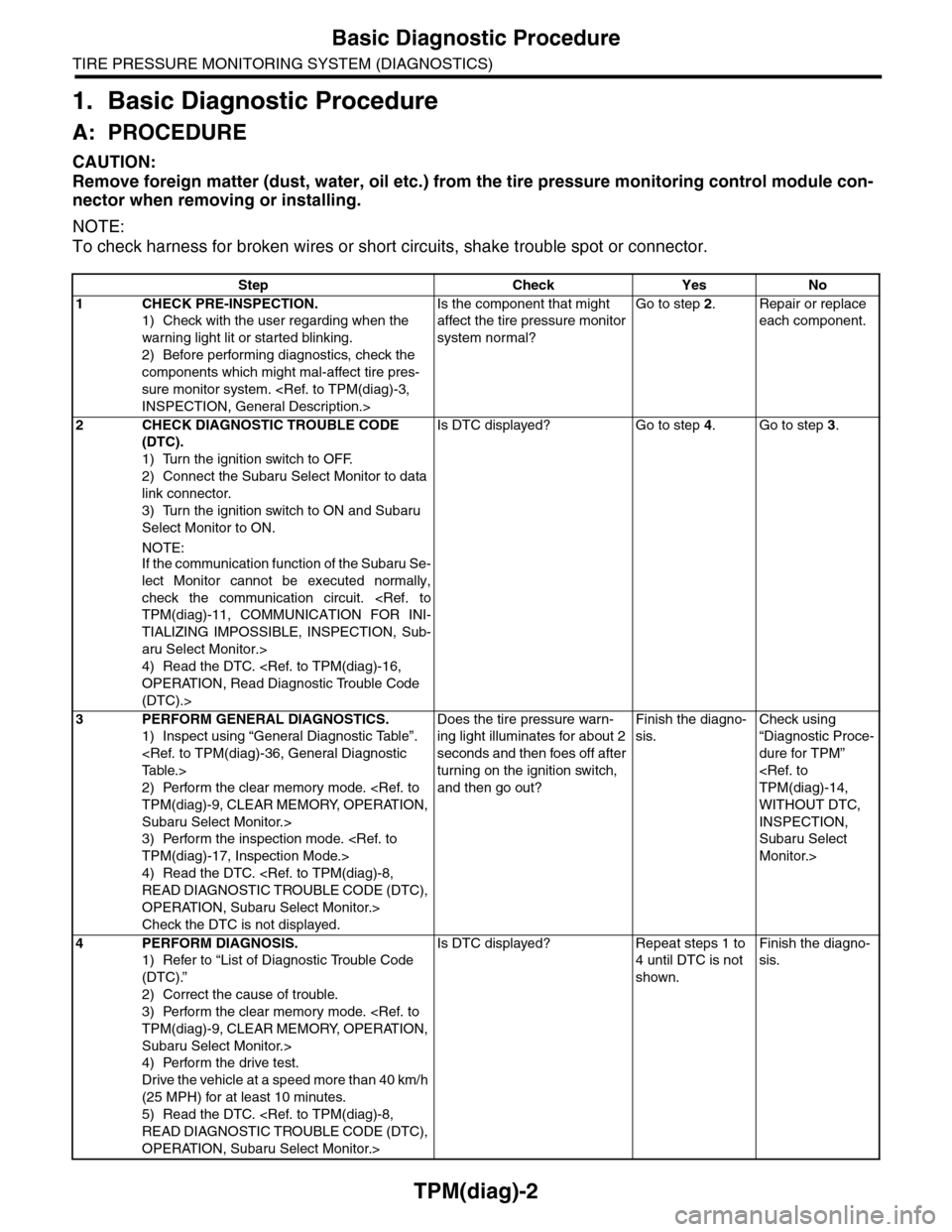
TPM(diag)-2
Basic Diagnostic Procedure
TIRE PRESSURE MONITORING SYSTEM (DIAGNOSTICS)
1. Basic Diagnostic Procedure
A: PROCEDURE
CAUTION:
Remove foreign matter (dust, water, oil etc.) from the tire pressure monitoring control module con-
nector when removing or installing.
NOTE:
To check harness for broken wires or short circuits, shake trouble spot or connector.
Step Check Yes No
1CHECK PRE-INSPECTION.
1) Check with the user regarding when the
warning light lit or started blinking.
2) Before performing diagnostics, check the
components which might mal-affect tire pres-
sure monitor system.
Is the component that might
affect the tire pressure monitor
system normal?
Go to step 2.Repair or replace
each component.
2CHECK DIAGNOSTIC TROUBLE CODE
(DTC).
1) Turn the ignition switch to OFF.
2) Connect the Subaru Select Monitor to data
link connector.
3) Turn the ignition switch to ON and Subaru
Select Monitor to ON.
NOTE:If the communication function of the Subaru Se-
lect Monitor cannot be executed normally,
check the communication circuit.
TIALIZING IMPOSSIBLE, INSPECTION, Sub-
aru Select Monitor.>
4) Read the DTC.
(DTC).>
Is DTC displayed? Go to step 4.Go to step 3.
3PERFORM GENERAL DIAGNOSTICS.
1) Inspect using “General Diagnostic Table”.
2) Perform the clear memory mode.
Subaru Select Monitor.>
3) Perform the inspection mode.
4) Read the DTC.
OPERATION, Subaru Select Monitor.>
Check the DTC is not displayed.
Does the tire pressure warn-
ing light illuminates for about 2
seconds and then foes off after
turning on the ignition switch,
and then go out?
Finish the diagno-
sis.
Check using
“Diagnostic Proce-
dure for TPM”
WITHOUT DTC,
INSPECTION,
Subaru Select
Monitor.>
4PERFORM DIAGNOSIS.
1) Refer to “List of Diagnostic Trouble Code
(DTC).”
2) Correct the cause of trouble.
3) Perform the clear memory mode.
Subaru Select Monitor.>
4) Perform the drive test.
Drive the vehicle at a speed more than 40 km/h
(25 MPH) for at least 10 minutes.
5) Read the DTC.
OPERATION, Subaru Select Monitor.>
Is DTC displayed? Repeat steps 1 to
4 until DTC is not
shown.
Finish the diagno-
sis.
Page 953 of 2453
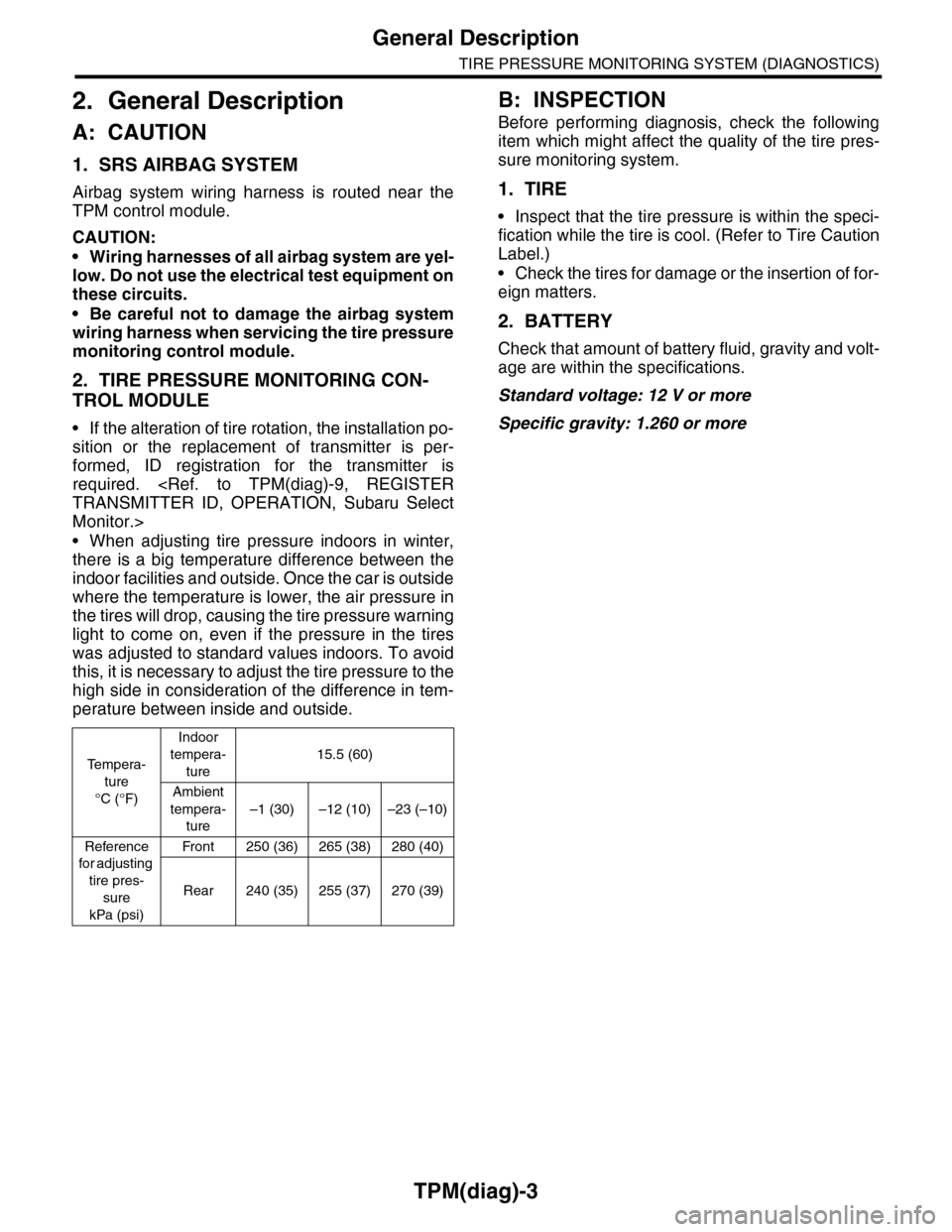
TPM(diag)-3
General Description
TIRE PRESSURE MONITORING SYSTEM (DIAGNOSTICS)
2. General Description
A: CAUTION
1. SRS AIRBAG SYSTEM
Airbag system wiring harness is routed near the
TPM control module.
CAUTION:
•Wiring harnesses of all airbag system are yel-
low. Do not use the electrical test equipment on
these circuits.
•Be careful not to damage the airbag system
wiring harness when servicing the tire pressure
monitoring control module.
2. TIRE PRESSURE MONITORING CON-
TROL MODULE
•If the alteration of tire rotation, the installation po-
sition or the replacement of transmitter is per-
formed, ID registration for the transmitter is
required.
Monitor.>
•When adjusting tire pressure indoors in winter,
there is a big temperature difference between the
indoor facilities and outside. Once the car is outside
where the temperature is lower, the air pressure in
the tires will drop, causing the tire pressure warning
light to come on, even if the pressure in the tires
was adjusted to standard values indoors. To avoid
this, it is necessary to adjust the tire pressure to the
high side in consideration of the difference in tem-
perature between inside and outside.
B: INSPECTION
Before performing diagnosis, check the following
item which might affect the quality of the tire pres-
sure monitoring system.
1. TIRE
•Inspect that the tire pressure is within the speci-
fication while the tire is cool. (Refer to Tire Caution
Label.)
•Check the tires for damage or the insertion of for-
eign matters.
2. BATTERY
Check that amount of battery fluid, gravity and volt-
age are within the specifications.
Standard voltage: 12 V or more
Specific gravity: 1.260 or more
Te m p e r a -
ture
°C (°F)
Indoor
tempera-
ture
15.5 (60)
Ambient
tempera-
ture
–1 (30) –12 (10) –23 (–10)
Reference
for adjusting
tire pres-
sure
kPa (psi)
Fr o n t 25 0 ( 36 ) 26 5 ( 3 8 ) 2 8 0 ( 4 0)
Rear 240 (35) 255 (37) 270 (39)