light SUBARU TRIBECA 2009 1.G Service Workshop Manual
[x] Cancel search | Manufacturer: SUBARU, Model Year: 2009, Model line: TRIBECA, Model: SUBARU TRIBECA 2009 1.GPages: 2453, PDF Size: 46.32 MB
Page 587 of 2453
OD(diag)-19
Subaru Select Monitor
OCCUPANT DETECTION SYSTEM (DIAGNOSTICS)
10) During the system calibration process, if the
«Re-zeroing is unsuccessful See service manual
Press YES to END» is displayed, turn the ignition
switch to OFF once and turn it to ON again, and
then read the DTC of airbag system.
tor.>
When DTC is input, fix the fault and then perform
the system calibration. When DTC is not input,
check the seat and vehicle status and then perform
the system calibration again.
TION, Subaru Select Monitor.>
NOTE:
When the re-zeroing is unsuccessful, there could
be occupant detection system failure or improper
seat and vehicle status. When the airbag warning
light illuminates, read the DTC of airbag system,
and perform the diagnosis referring to “List of Diag-
nostic Trouble Code.”
B: INSPECTION
1. COMMUNICATION FOR INITIALIZING
IMPOSSIBLE
DETECTING CONDITION:
Defective harness connector
TROUBLE SYMPTOM:
Communication is impossible between the airbag
control module and the Subaru Select Monitor.
Refer to “Initial Communication Impossible” in the
DTC of the airbag system (diagnosis).
tor.>
2. WITHOUT DTC
DETECTING CONDITION:
•Defective combination meter
•Open circuit of harness
TROUBLE SYMPTOM:
•Airbag warning light remains on.
•“NO TROUBLE CODE” will be displayed on the
Subaru Select Monitor.
For detailed operation procedure, refer to “Airbag
Warning Light Failure”.
NOTE:
When the airbag warning light is OFF and “NO
TROUBLE CODE” is displayed on Subaru Select
Monitor, the system is in normal condition.
Page 591 of 2453
OD(diag)-23
Airbag Warning Light Illumination Pattern
OCCUPANT DETECTION SYSTEM (DIAGNOSTICS)
11.Airbag Warning Light Illumi-
nation Pattern
A: INSPECTION
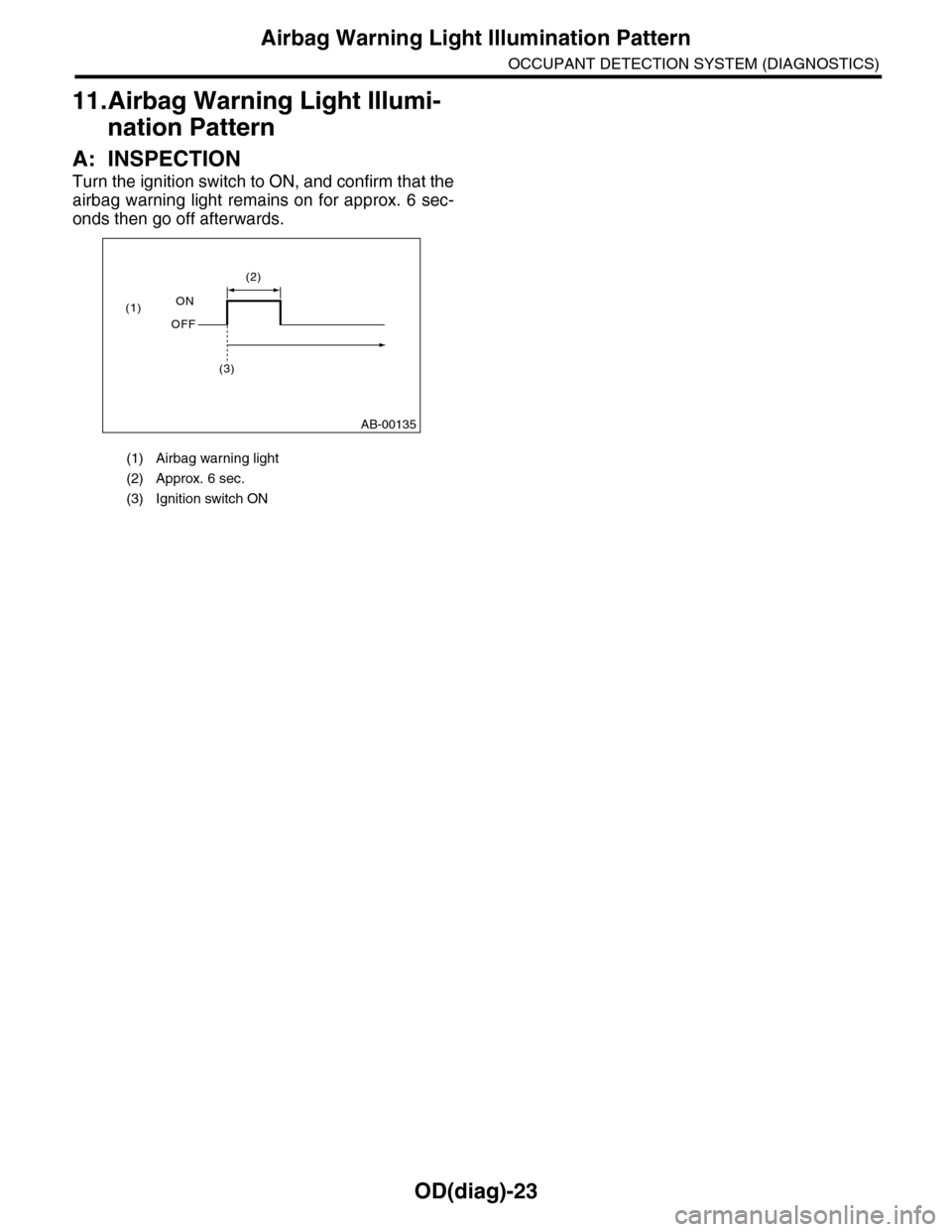
Turn the ignition switch to ON, and confirm that the
airbag warning light remains on for approx. 6 sec-
onds then go off afterwards.
(1) Airbag warning light
(2) Approx. 6 sec.
(3) Ignition switch ON
AB-00135
(1)
(2)
(3)
OFF
ON
Page 592 of 2453
OD(diag)-24
Passenger’s Airbag ON/OFF Indicator Illumination Pattern
OCCUPANT DETECTION SYSTEM (DIAGNOSTICS)
12.Passenger’s Airbag ON/OFF Indicator Illumination Pattern
A: INSPECTION
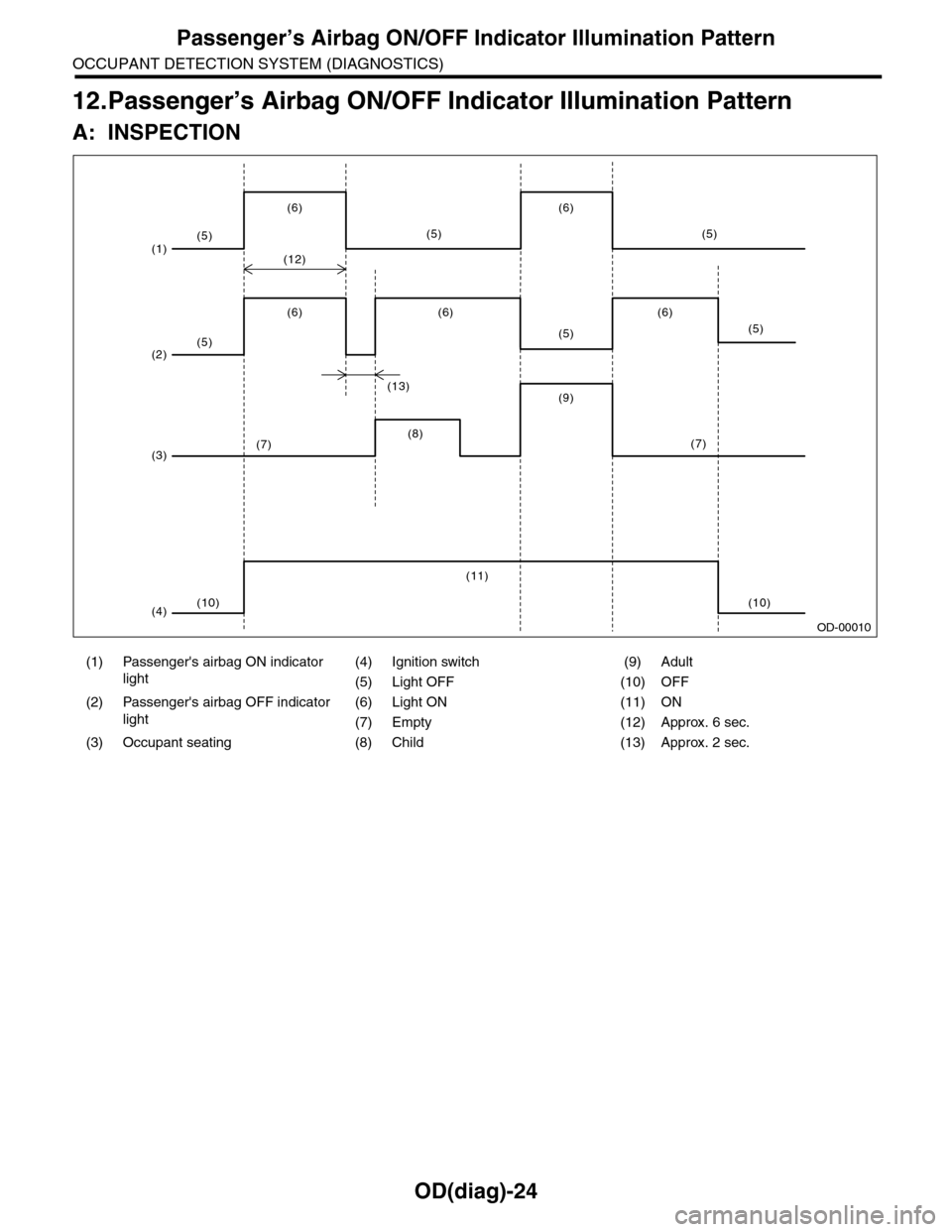
(1) Passenger's airbag ON indicator
light
(4) Ignition switch (9) Adult
(5) Light OFF (10) OFF
(2) Passenger's airbag OFF indicator
light
(6) Light ON (11) ON
(7) Empty (12) Approx. 6 sec.
(3) Occupant seating (8) Child (13) Approx. 2 sec.
(1)
(2)
(3)
(4)(10)
(5)
(5)
(6)
(12)
(6) (6)
(13)(9)
(5)(5)
(10)
(6)
(5)
(6)
(7)
(5)
(7)(8)
(11)
OD-00010
Page 595 of 2453
OD(diag)-27
Diagnostic Procedure with Diagnostic Trouble Code (DTC)
OCCUPANT DETECTION SYSTEM (DIAGNOSTICS)
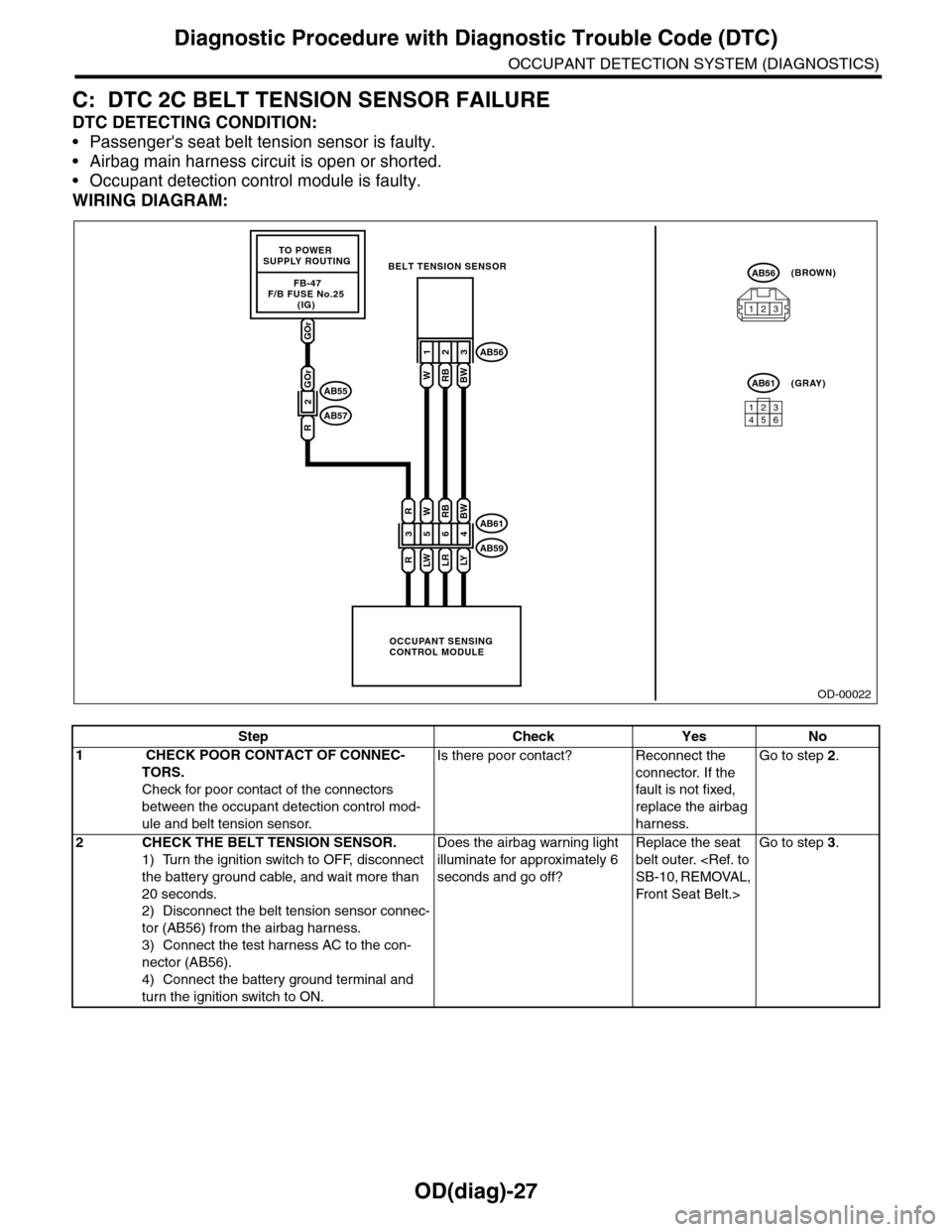
C: DTC 2C BELT TENSION SENSOR FAILURE
DTC DETECTING CONDITION:
•Passenger's seat belt tension sensor is faulty.
•Airbag main harness circuit is open or shorted.
•Occupant detection control module is faulty.
WIRING DIAGRAM:
OD-00022
GOr
FB-47F/B FUSE No.25 (IG)
TO POWER SUPPLY ROUTING
OCCUPANT SENSINGCONTROL MODULE
BELT TENSION SENSOR
3
R
R
5
LW
W
6
LR
RB
4
LY
BW
123
WRBBW
AB61
AB59
AB56
123456
AB61(GRAY)
AB56(BROWN)
123
2
GOr
R
AB55
AB57
Step Check Yes No
1 CHECK POOR CONTACT OF CONNEC-
TORS.
Check for poor contact of the connectors
between the occupant detection control mod-
ule and belt tension sensor.
Is there poor contact? Reconnect the
connector. If the
fault is not fixed,
replace the airbag
harness.
Go to step 2.
2CHECK THE BELT TENSION SENSOR.
1) Turn the ignition switch to OFF, disconnect
the battery ground cable, and wait more than
20 seconds.
2) Disconnect the belt tension sensor connec-
tor (AB56) from the airbag harness.
3) Connect the test harness AC to the con-
nector (AB56).
4) Connect the battery ground terminal and
turn the ignition switch to ON.
Does the airbag warning light
illuminate for approximately 6
seconds and go off?
Replace the seat
belt outer.
Front Seat Belt.>
Go to step 3.
Page 598 of 2453
OD(diag)-30
Diagnostic Procedure with Diagnostic Trouble Code (DTC)
OCCUPANT DETECTION SYSTEM (DIAGNOSTICS)
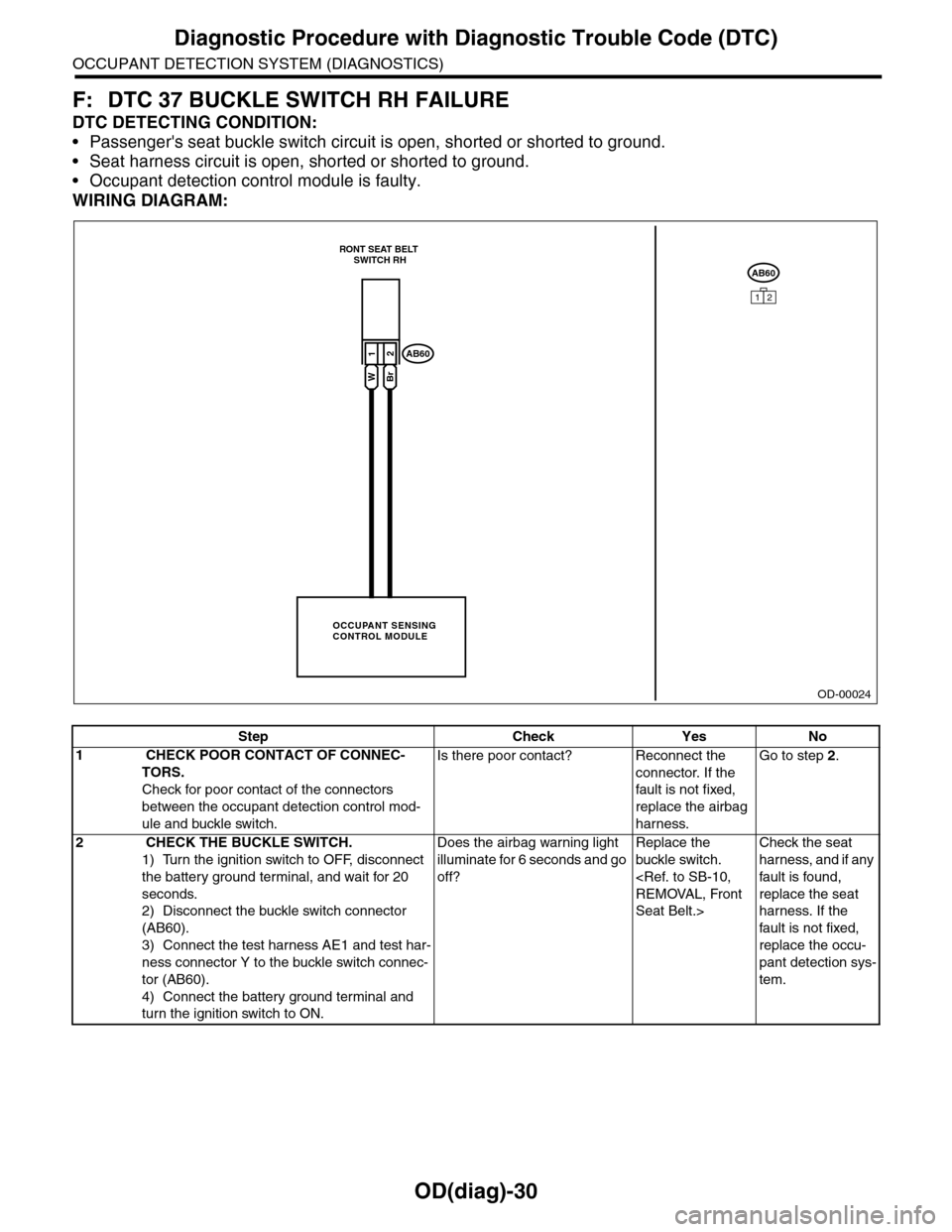
F: DTC 37 BUCKLE SWITCH RH FAILURE
DTC DETECTING CONDITION:
•Passenger's seat buckle switch circuit is open, shorted or shorted to ground.
•Seat harness circuit is open, shorted or shorted to ground.
•Occupant detection control module is faulty.
WIRING DIAGRAM:
OD-00024
AB60
12
OCCUPANT SENSINGCONTROL MODULE
RONT SEAT BELT SWITCH RH
12
WBr
AB60
Step Check Yes No
1 CHECK POOR CONTACT OF CONNEC-
TORS.
Check for poor contact of the connectors
between the occupant detection control mod-
ule and buckle switch.
Is there poor contact? Reconnect the
connector. If the
fault is not fixed,
replace the airbag
harness.
Go to step 2.
2 CHECK THE BUCKLE SWITCH.
1) Turn the ignition switch to OFF, disconnect
the battery ground terminal, and wait for 20
seconds.
2) Disconnect the buckle switch connector
(AB60).
3) Connect the test harness AE1 and test har-
ness connector Y to the buckle switch connec-
tor (AB60).
4) Connect the battery ground terminal and
turn the ignition switch to ON.
Does the airbag warning light
illuminate for 6 seconds and go
off?
Replace the
buckle switch.
Seat Belt.>
Check the seat
harness, and if any
fault is found,
replace the seat
harness. If the
fault is not fixed,
replace the occu-
pant detection sys-
tem.
Page 605 of 2453
SB-8
Seat Belt Warning System
SEAT BELT SYSTEM
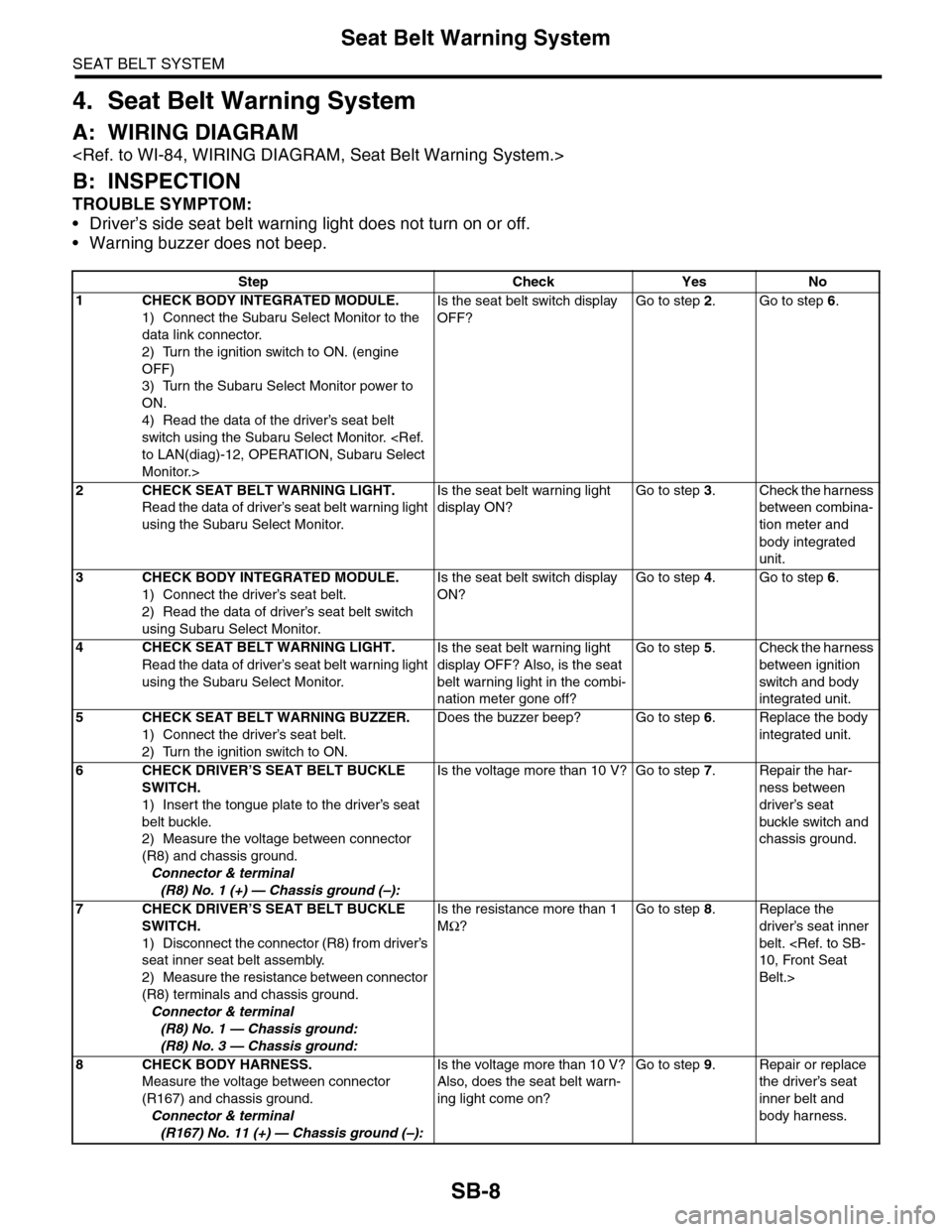
4. Seat Belt Warning System
A: WIRING DIAGRAM
B: INSPECTION
TROUBLE SYMPTOM:
•Driver’s side seat belt warning light does not turn on or off.
•Warning buzzer does not beep.
Step Check Yes No
1CHECK BODY INTEGRATED MODULE.
1) Connect the Subaru Select Monitor to the
data link connector.
2) Turn the ignition switch to ON. (engine
OFF)
3) Turn the Subaru Select Monitor power to
ON.
4) Read the data of the driver’s seat belt
switch using the Subaru Select Monitor.
Monitor.>
Is the seat belt switch display
OFF?
Go to step 2.Go to step 6.
2CHECK SEAT BELT WARNING LIGHT.
Read the data of driver’s seat belt warning light
using the Subaru Select Monitor.
Is the seat belt warning light
display ON?
Go to step 3.Check the harness
between combina-
tion meter and
body integrated
unit.
3CHECK BODY INTEGRATED MODULE.
1) Connect the driver’s seat belt.
2) Read the data of driver’s seat belt switch
using Subaru Select Monitor.
Is the seat belt switch display
ON?
Go to step 4.Go to step 6.
4CHECK SEAT BELT WARNING LIGHT.
Read the data of driver’s seat belt warning light
using the Subaru Select Monitor.
Is the seat belt warning light
display OFF? Also, is the seat
belt warning light in the combi-
nation meter gone off?
Go to step 5.Check the harness
between ignition
switch and body
integrated unit.
5CHECK SEAT BELT WARNING BUZZER.
1) Connect the driver’s seat belt.
2) Turn the ignition switch to ON.
Does the buzzer beep? Go to step 6.Replace the body
integrated unit.
6CHECK DRIVER’S SEAT BELT BUCKLE
SWITCH.
1) Insert the tongue plate to the driver’s seat
belt buckle.
2) Measure the voltage between connector
(R8) and chassis ground.
Connector & terminal
(R8) No. 1 (+) — Chassis ground (–):
Is the voltage more than 10 V? Go to step 7.Repair the har-
ness between
driver’s seat
buckle switch and
chassis ground.
7CHECK DRIVER’S SEAT BELT BUCKLE
SWITCH.
1) Disconnect the connector (R8) from driver’s
seat inner seat belt assembly.
2) Measure the resistance between connector
(R8) terminals and chassis ground.
Connector & terminal
(R8) No. 1 — Chassis ground:
(R8) No. 3 — Chassis ground:
Is the resistance more than 1
MΩ?
Go to step 8.Replace the
driver’s seat inner
belt.
Belt.>
8CHECK BODY HARNESS.
Measure the voltage between connector
(R167) and chassis ground.
Connector & terminal
(R167) No. 11 (+) — Chassis ground (–):
Is the voltage more than 10 V?
Also, does the seat belt warn-
ing light come on?
Go to step 9.Repair or replace
the driver’s seat
inner belt and
body harness.
Page 606 of 2453
SB-9
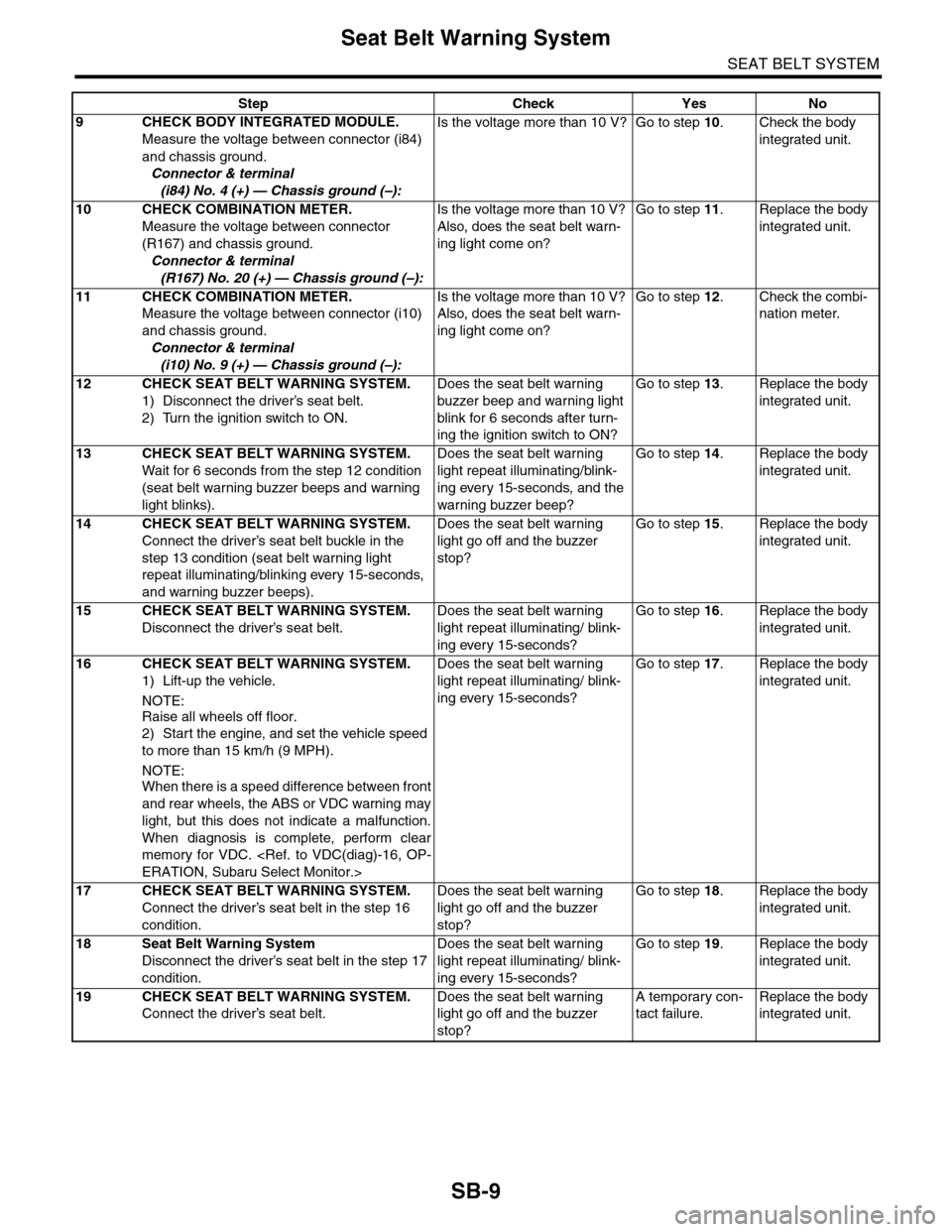
Seat Belt Warning System
SEAT BELT SYSTEM
9CHECK BODY INTEGRATED MODULE.
Measure the voltage between connector (i84)
and chassis ground.
Connector & terminal
(i84) No. 4 (+) — Chassis ground (–):
Is the voltage more than 10 V? Go to step 10.Check the body
integrated unit.
10 CHECK COMBINATION METER.
Measure the voltage between connector
(R167) and chassis ground.
Connector & terminal
(R167) No. 20 (+) — Chassis ground (–):
Is the voltage more than 10 V?
Also, does the seat belt warn-
ing light come on?
Go to step 11.Replace the body
integrated unit.
11 CHECK COMBINATION METER.
Measure the voltage between connector (i10)
and chassis ground.
Connector & terminal
(i10) No. 9 (+) — Chassis ground (–):
Is the voltage more than 10 V?
Also, does the seat belt warn-
ing light come on?
Go to step 12.Check the combi-
nation meter.
12 CHECK SEAT BELT WARNING SYSTEM.
1) Disconnect the driver’s seat belt.
2) Turn the ignition switch to ON.
Does the seat belt warning
buzzer beep and warning light
blink for 6 seconds after turn-
ing the ignition switch to ON?
Go to step 13.Replace the body
integrated unit.
13 CHECK SEAT BELT WARNING SYSTEM.
Wait for 6 seconds from the step 12 condition
(seat belt warning buzzer beeps and warning
light blinks).
Does the seat belt warning
light repeat illuminating/blink-
ing every 15-seconds, and the
warning buzzer beep?
Go to step 14.Replace the body
integrated unit.
14 CHECK SEAT BELT WARNING SYSTEM.
Connect the driver’s seat belt buckle in the
step 13 condition (seat belt warning light
repeat illuminating/blinking every 15-seconds,
and warning buzzer beeps).
Does the seat belt warning
light go off and the buzzer
stop?
Go to step 15.Replace the body
integrated unit.
15 CHECK SEAT BELT WARNING SYSTEM.
Disconnect the driver’s seat belt.
Does the seat belt warning
light repeat illuminating/ blink-
ing every 15-seconds?
Go to step 16.Replace the body
integrated unit.
16 CHECK SEAT BELT WARNING SYSTEM.
1) Lift-up the vehicle.
NOTE:
Raise all wheels off floor.
2) Start the engine, and set the vehicle speed
to more than 15 km/h (9 MPH).
NOTE:
When there is a speed difference between front
and rear wheels, the ABS or VDC warning may
light, but this does not indicate a malfunction.
When diagnosis is complete, perform clear
memory for VDC.
Does the seat belt warning
light repeat illuminating/ blink-
ing every 15-seconds?
Go to step 17.Replace the body
integrated unit.
17 CHECK SEAT BELT WARNING SYSTEM.
Connect the driver’s seat belt in the step 16
condition.
Does the seat belt warning
light go off and the buzzer
stop?
Go to step 18.Replace the body
integrated unit.
18 Seat Belt Warning System
Disconnect the driver’s seat belt in the step 17
condition.
Does the seat belt warning
light repeat illuminating/ blink-
ing every 15-seconds?
Go to step 19.Replace the body
integrated unit.
19 CHECK SEAT BELT WARNING SYSTEM.
Connect the driver’s seat belt.
Does the seat belt warning
light go off and the buzzer
stop?
A temporary con-
tact failure.
Replace the body
integrated unit.
Step Check Yes No
Page 607 of 2453
SB-10
Front Seat Belt
SEAT BELT SYSTEM
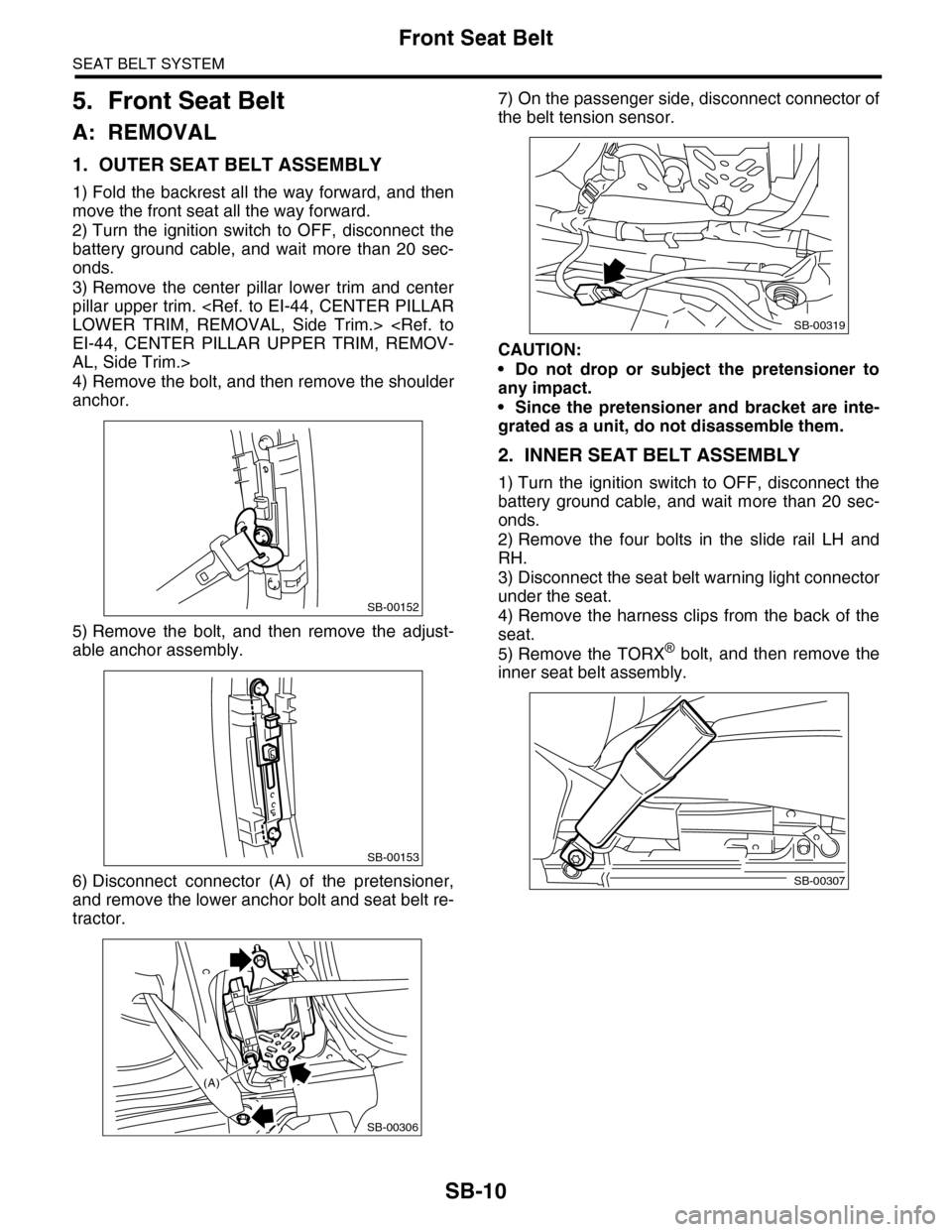
5. Front Seat Belt
A: REMOVAL
1. OUTER SEAT BELT ASSEMBLY
1) Fold the backrest all the way forward, and then
move the front seat all the way forward.
2) Turn the ignition switch to OFF, disconnect the
battery ground cable, and wait more than 20 sec-
onds.
3) Remove the center pillar lower trim and center
pillar upper trim.
AL, Side Trim.>
4) Remove the bolt, and then remove the shoulder
anchor.
5) Remove the bolt, and then remove the adjust-
able anchor assembly.
6) Disconnect connector (A) of the pretensioner,
and remove the lower anchor bolt and seat belt re-
tractor.
7) On the passenger side, disconnect connector of
the belt tension sensor.
CAUTION:
•Do not drop or subject the pretensioner to
any impact.
•Since the pretensioner and bracket are inte-
grated as a unit, do not disassemble them.
2. INNER SEAT BELT ASSEMBLY
1) Turn the ignition switch to OFF, disconnect the
battery ground cable, and wait more than 20 sec-
onds.
2) Remove the four bolts in the slide rail LH and
RH.
3) Disconnect the seat belt warning light connector
under the seat.
4) Remove the harness clips from the back of the
seat.
5) Remove the TORX® bolt, and then remove the
inner seat belt assembly.
SB-00152
SB-00153
SB-00306
(A)
SB-00319
SB-00307
Page 634 of 2453
SL-5
General Description
SECURITY AND LOCKS
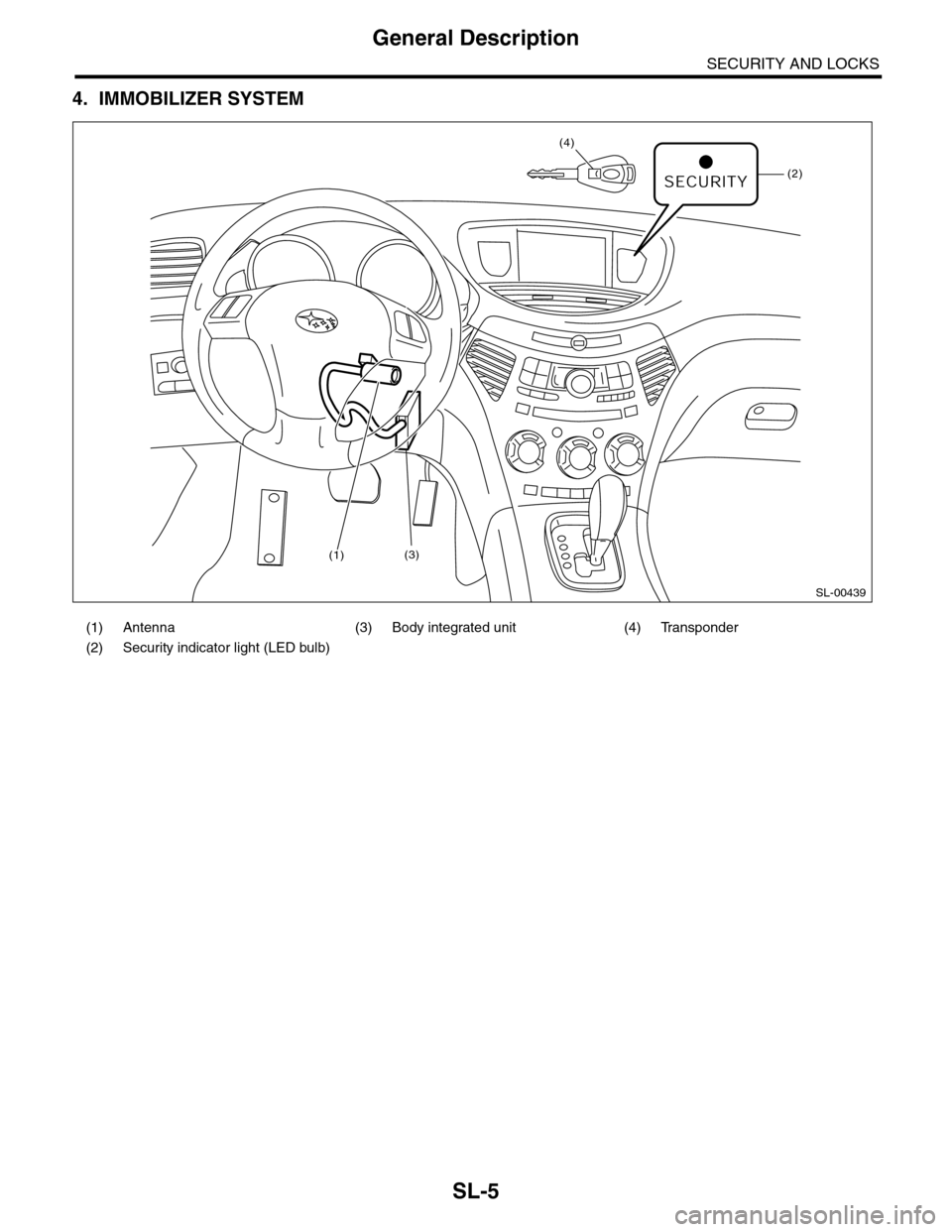
4. IMMOBILIZER SYSTEM
(1) Antenna (3) Body integrated unit (4) Transponder
(2) Security indicator light (LED bulb)
SL-00439
(2)
(4)
(1)(3)
Page 641 of 2453
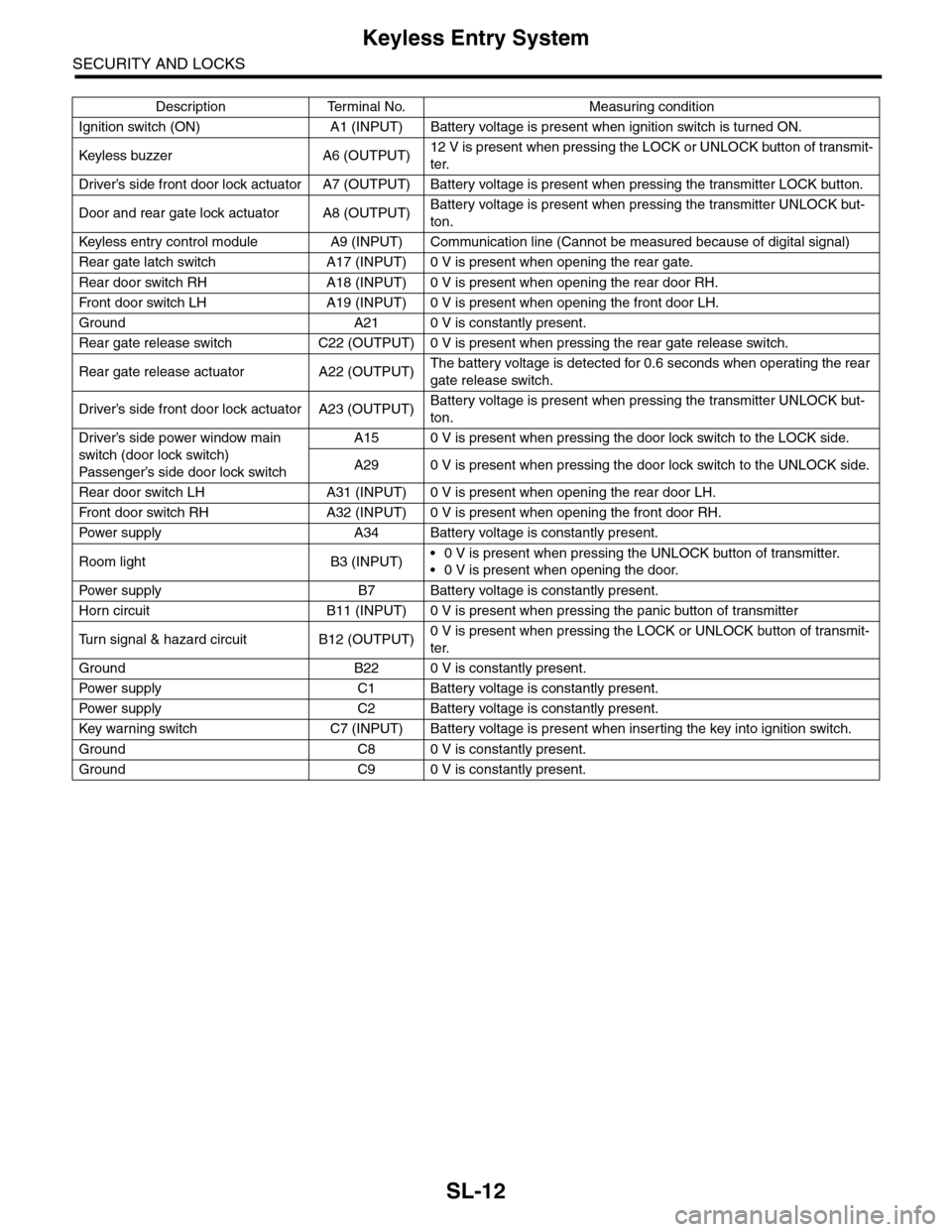
SL-12
Keyless Entry System
SECURITY AND LOCKS
Description Terminal No. Measuring condition
Ignition switch (ON) A1 (INPUT) Battery voltage is present when ignition switch is turned ON.
Keyless buzzer A6 (OUTPU T)12 V is present when pressing the LOCK or UNLOCK button of transmit-
ter.
Driver’s side front door lock actuator A7 (OUTPUT) Battery voltage is present when pressing the transmitter LOCK button.
Door and rear gate lock actuator A8 (OUTPUT)Battery voltage is present when pressing the transmitter UNLOCK but-
ton.
Keyless entr y control module A9 (INPUT) Communication line (Cannot be measured because of digital signal)
Rear gate latch switch A17 (INPUT) 0 V is present when opening the rear gate.
Rear door switch RH A18 (INPUT) 0 V is present when opening the rear door RH.
Fr o nt d oo r swi tc h L H A 19 ( I NP UT ) 0 V i s pr e se n t wh e n o p en in g th e f r o n t d oo r L H.
Ground A21 0 V is constantly present.
Rear gate release switch C22 (OUTPUT) 0 V is present when pressing the rear gate release switch.
Rear gate release actuator A22 (OUTPUT)The battery voltage is detected for 0.6 seconds when operating the rear
gate release switch.
Driver’s side front door lock actuator A23 (OUTPUT)Battery voltage is present when pressing the transmitter UNLOCK but-
ton.
Driver’s side power window main
switch (door lock switch)
Passenger’s side door lock sw itch
A15 0 V is present when pressing the door lock switch to the LOCK side.
A29 0 V is present when pressing the door lock switch to the UNLOCK side.
Rear door switch LH A31 (INPUT) 0 V is present when opening the rear door LH.
Fr o nt d oo r swi tc h RH A 32 ( I NP UT ) 0 V i s pr e se n t wh e n o p en in g th e f r o n t d oo r RH.
Pow er s up p ly A 34 B at t e r y vol t ag e i s c on s ta n tl y p r e se nt .
Room light B3 (INPUT)•0 V is present when pressing the UNLOCK button of transmitter.
•0 V is present when opening the door.
Pow er s up p ly B 7 B at t e r y vol t ag e i s c on s ta n tl y p r e se nt .
Horn circuit B11 (INPUT) 0 V is present when pressing the panic button of transmitter
Tu r n s i g n a l & h a z a r d c i r c u i t B 1 2 ( O U T P U T )0 V is present when pressing the LOCK or UNLOCK button of transmit-
ter.
Ground B22 0 V is constantly present.
Pow er s up p ly C 1 B at t e r y vol t ag e i s c on s ta n tl y p r e se nt .
Pow er s up p ly C 2 B at t e r y vol t ag e i s c on s ta n tl y p r e se nt .
Key war ning switch C7 (INPUT) Batter y voltage is present when inser ting the key into ignition switch.
Ground C8 0 V is constantly present.
Ground C9 0 V is constantly present.