light SUBARU TRIBECA 2009 1.G Service Workshop Manual
[x] Cancel search | Manufacturer: SUBARU, Model Year: 2009, Model line: TRIBECA, Model: SUBARU TRIBECA 2009 1.GPages: 2453, PDF Size: 46.32 MB
Page 565 of 2453
LI-32
Rear Gate Light
LIGHTING SYSTEM
30.Rear Gate Light
A: REMOVAL
1) Disconnect the ground cable from battery.
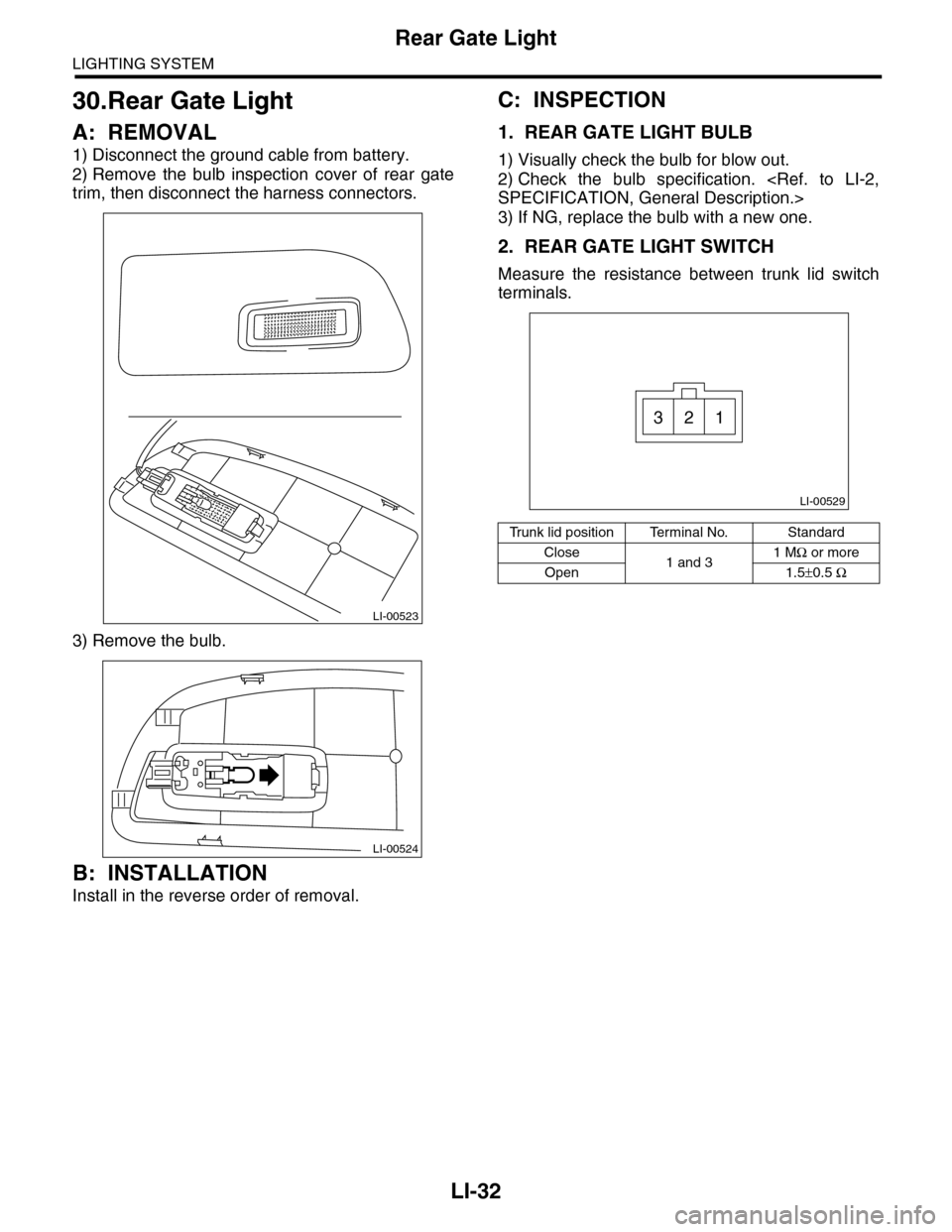
2) Remove the bulb inspection cover of rear gate
trim, then disconnect the harness connectors.
3) Remove the bulb.
B: INSTALLATION
Install in the reverse order of removal.
C: INSPECTION
1. REAR GATE LIGHT BULB
1) Visually check the bulb for blow out.
2) Check the bulb specification.
3) If NG, replace the bulb with a new one.
2. REAR GATE LIGHT SWITCH
Measure the resistance between trunk lid switch
terminals.
LI-00523
LI-00524
Tr u n k l i d p o s i t i o n Te r m i n a l N o . S t a n d a r d
Close1 and 31 MΩ or more
Open 1.5±0.5 Ω
LI-00529
321
Page 566 of 2453
LI-33
Glove Box Light
LIGHTING SYSTEM
31.Glove Box Light
A: REMOVAL
1) Disconnect the ground cable from battery.
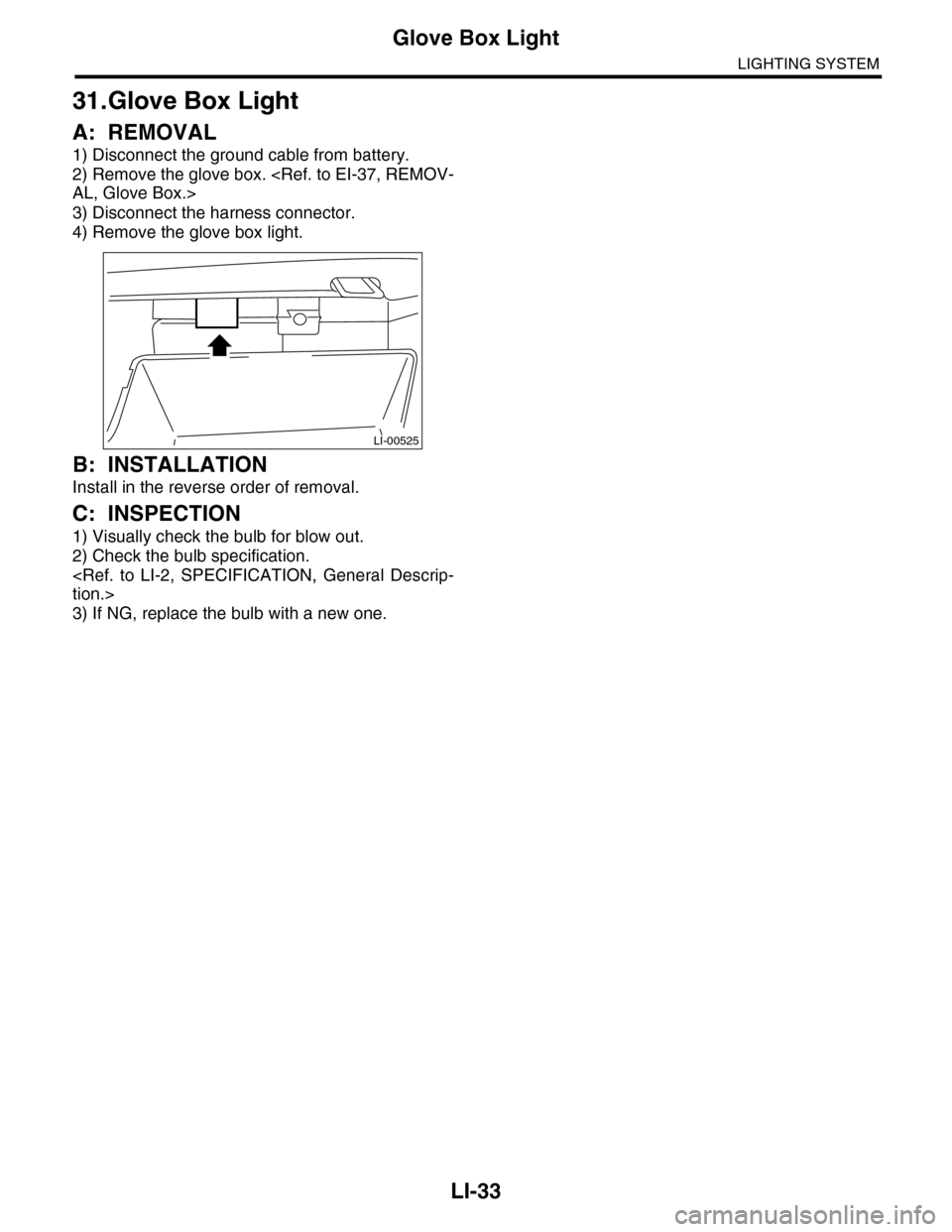
2) Remove the glove box.
3) Disconnect the harness connector.
4) Remove the glove box light.
B: INSTALLATION
Install in the reverse order of removal.
C: INSPECTION
1) Visually check the bulb for blow out.
2) Check the bulb specification.
3) If NG, replace the bulb with a new one.
LI-00525
Page 567 of 2453
LI-34
Door Step Light
LIGHTING SYSTEM
32.Door Step Light
A: REMOVAL
1) Disconnect the ground cable from battery.
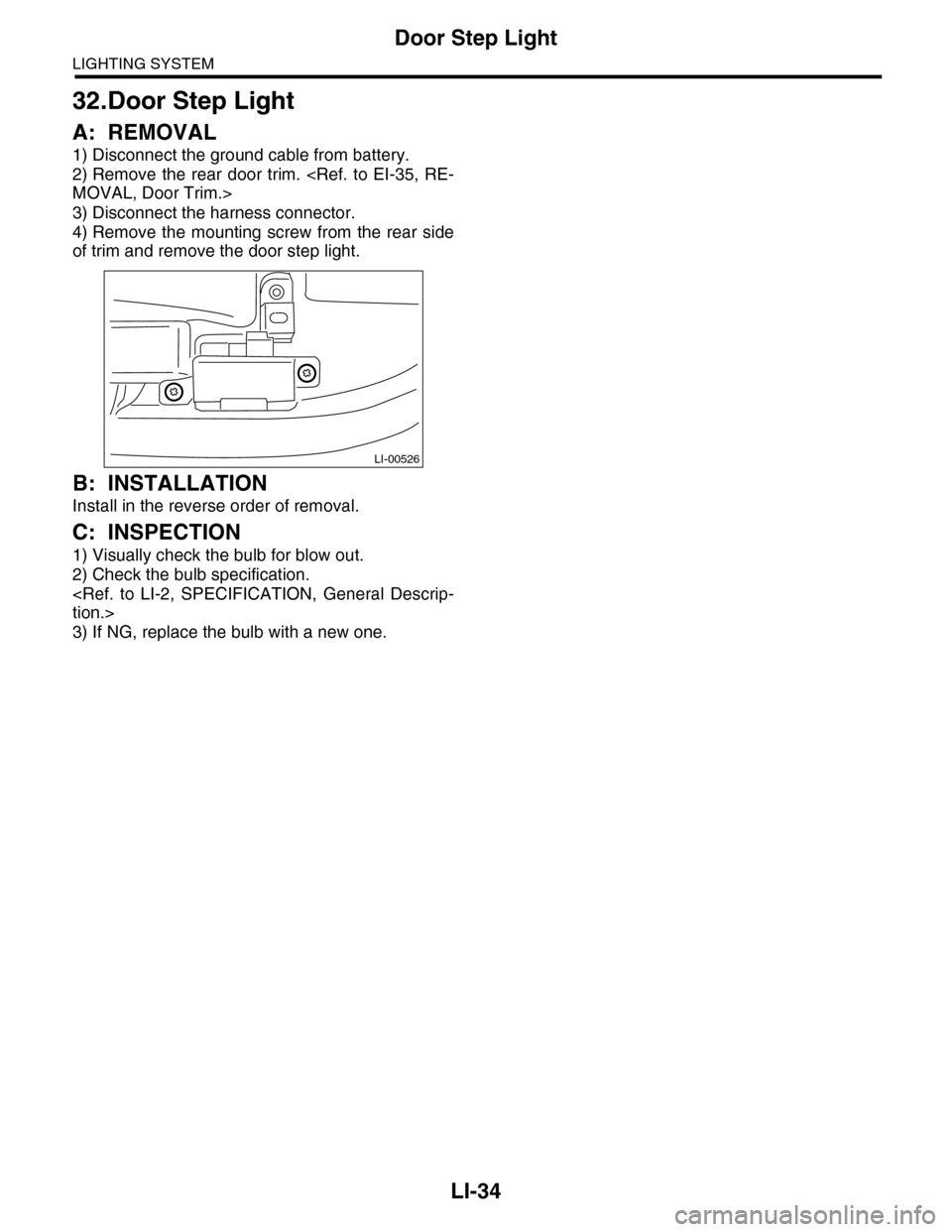
2) Remove the rear door trim.
3) Disconnect the harness connector.
4) Remove the mounting screw from the rear side
of trim and remove the door step light.
B: INSTALLATION
Install in the reverse order of removal.
C: INSPECTION
1) Visually check the bulb for blow out.
2) Check the bulb specification.
3) If NG, replace the bulb with a new one.
LI-00526
Page 568 of 2453
LI-35
Ignition Switch Illumination
LIGHTING SYSTEM
33.Ignition Switch Illumination
A: REMOVAL
1) Disconnect the ground cable from battery.
2) Remove the screws, and detach the upper col-
umn cover and lower column cover.
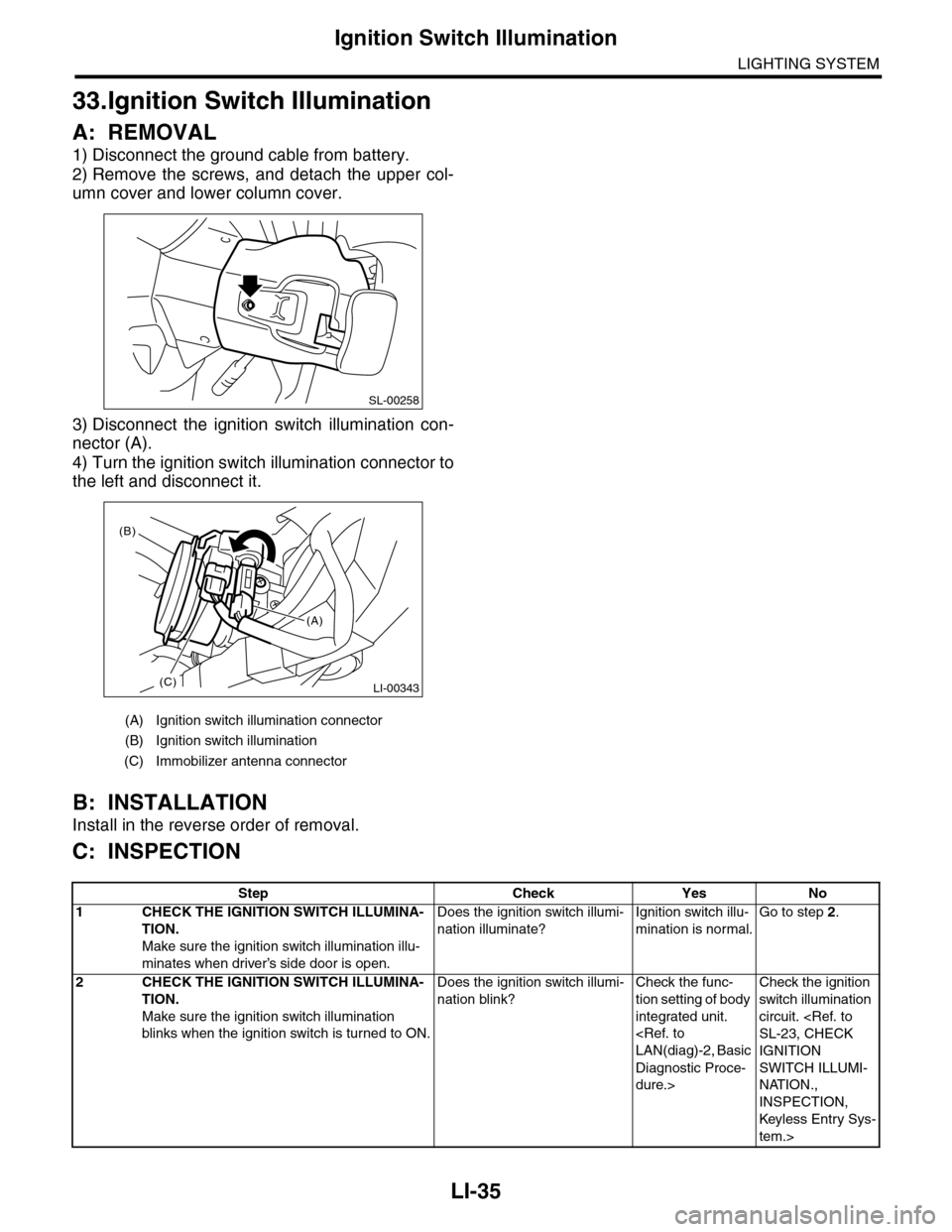
3) Disconnect the ignition switch illumination con-
nector (A).
4) Turn the ignition switch illumination connector to
the left and disconnect it.
B: INSTALLATION
Install in the reverse order of removal.
C: INSPECTION
(A) Ignition switch illumination connector
(B) Ignition switch illumination
(C) Immobilizer antenna connector
SL-00258
LI-00343(C)
(B)
(A)
Step Check Yes No
1CHECK THE IGNITION SWITCH ILLUMINA-
TION.
Make sure the ignition switch illumination illu-
minates when driver’s side door is open.
Does the ignition switch illumi-
nation illuminate?
Ignition switch illu-
mination is normal.
Go to step 2.
2CHECK THE IGNITION SWITCH ILLUMINA-
TION.
Make sure the ignition switch illumination
blinks when the ignition switch is turned to ON.
Does the ignition switch illumi-
nation blink?
Check the func-
tion setting of body
integrated unit.
Diagnostic Proce-
dure.>
Check the ignition
switch illumination
circuit.
IGNITION
SWITCH ILLUMI-
NATION.,
INSPECTION,
Keyless Entr y Sys-
tem.>
Page 569 of 2453
LI-36
Ignition Switch Illumination
LIGHTING SYSTEM
Page 570 of 2453
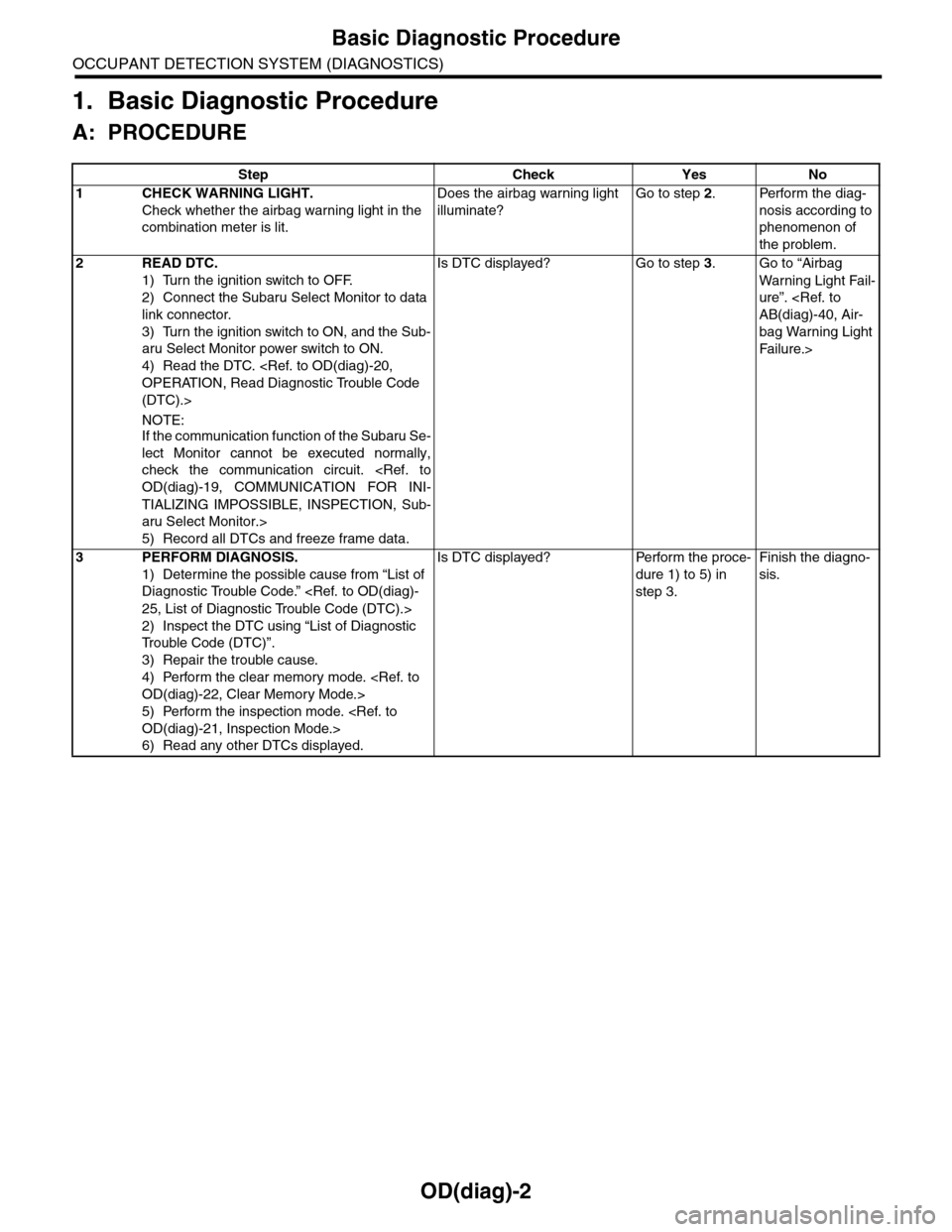
OD(diag)-2
Basic Diagnostic Procedure
OCCUPANT DETECTION SYSTEM (DIAGNOSTICS)
1. Basic Diagnostic Procedure
A: PROCEDURE
Step Check Yes No
1CHECK WARNING LIGHT.
Check whether the airbag warning light in the
combination meter is lit.
Does the airbag warning light
illuminate?
Go to step 2.Perform the diag-
nosis according to
phenomenon of
the problem.
2READ DTC.
1) Turn the ignition switch to OFF.
2) Connect the Subaru Select Monitor to data
link connector.
3) Turn the ignition switch to ON, and the Sub-
aru Select Monitor power switch to ON.
4) Read the DTC.
(DTC).>
NOTE:If the communication function of the Subaru Se-
lect Monitor cannot be executed normally,
check the communication circuit.
TIALIZING IMPOSSIBLE, INSPECTION, Sub-
aru Select Monitor.>
5) Record all DTCs and freeze frame data.
Is DTC displayed? Go to step 3.Go to “Airbag
Wa r ni n g L ig h t Fa i l-
ure”.
bag Warning Light
Fai lu r e.>
3PERFORM DIAGNOSIS.
1) Determine the possible cause from “List of
Diagnostic Trouble Code.”
2) Inspect the DTC using “List of Diagnostic
Tr o u b l e C o d e ( D T C ) ” .
3) Repair the trouble cause.
4) Perform the clear memory mode.
5) Perform the inspection mode.
6) Read any other DTCs displayed.
Is DTC displayed? Perform the proce-
dure 1) to 5) in
step 3.
Finish the diagno-
sis.
Page 571 of 2453
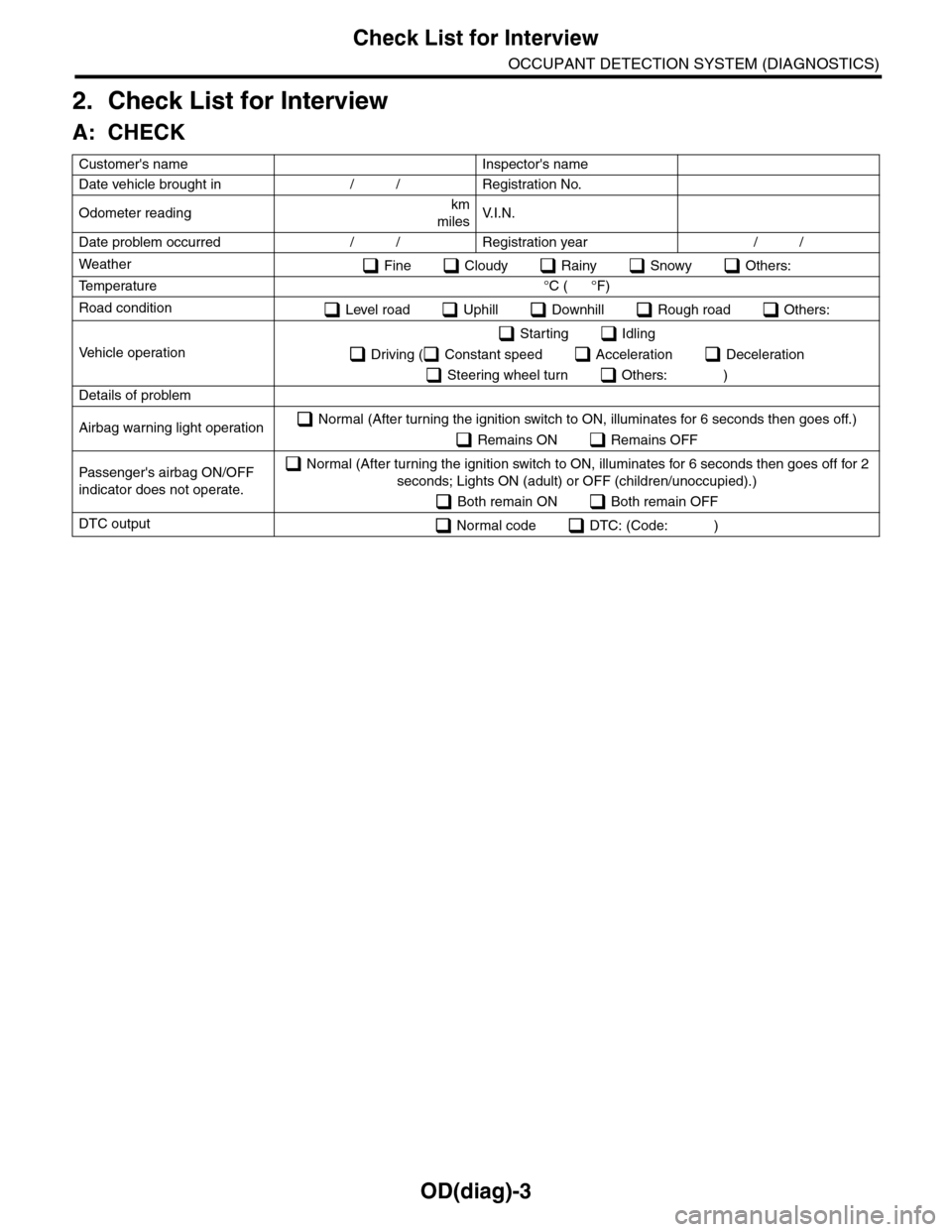
OD(diag)-3
Check List for Interview
OCCUPANT DETECTION SYSTEM (DIAGNOSTICS)
2. Check List for Interview
A: CHECK
Customer's name Inspector's name
Date vehicle brought in / / Registration No.
Odometer readingkm
milesV. I . N .
Date problem occurred / / Registration year / /
Weather Fine Cloudy Rainy Snowy Others:
Te m p e r a t u r e ° C ( ° F )
Road condition Level road Uphill Downhill Rough road Others:
Ve h i c l e o p e r a t i o n
Starting Idling
Driving ( Constant speed Acceleration Deceleration
Steering wheel turn Others: )
Details of problem
Airbag warning light operation Normal (After turning the ignition switch to ON, illuminates for 6 seconds then goes off.)
Remains ON Remains OFF
Passenger's airbag ON/OFF
indicator does not operate.
Normal (After turning the ignition switch to ON, illuminates for 6 seconds then goes off for 2
seconds; Lights ON (adult) or OFF (children/unoccupied).)
Both remain ON Both remain OFF
DTC output Normal code DTC: (Code: )
Page 582 of 2453
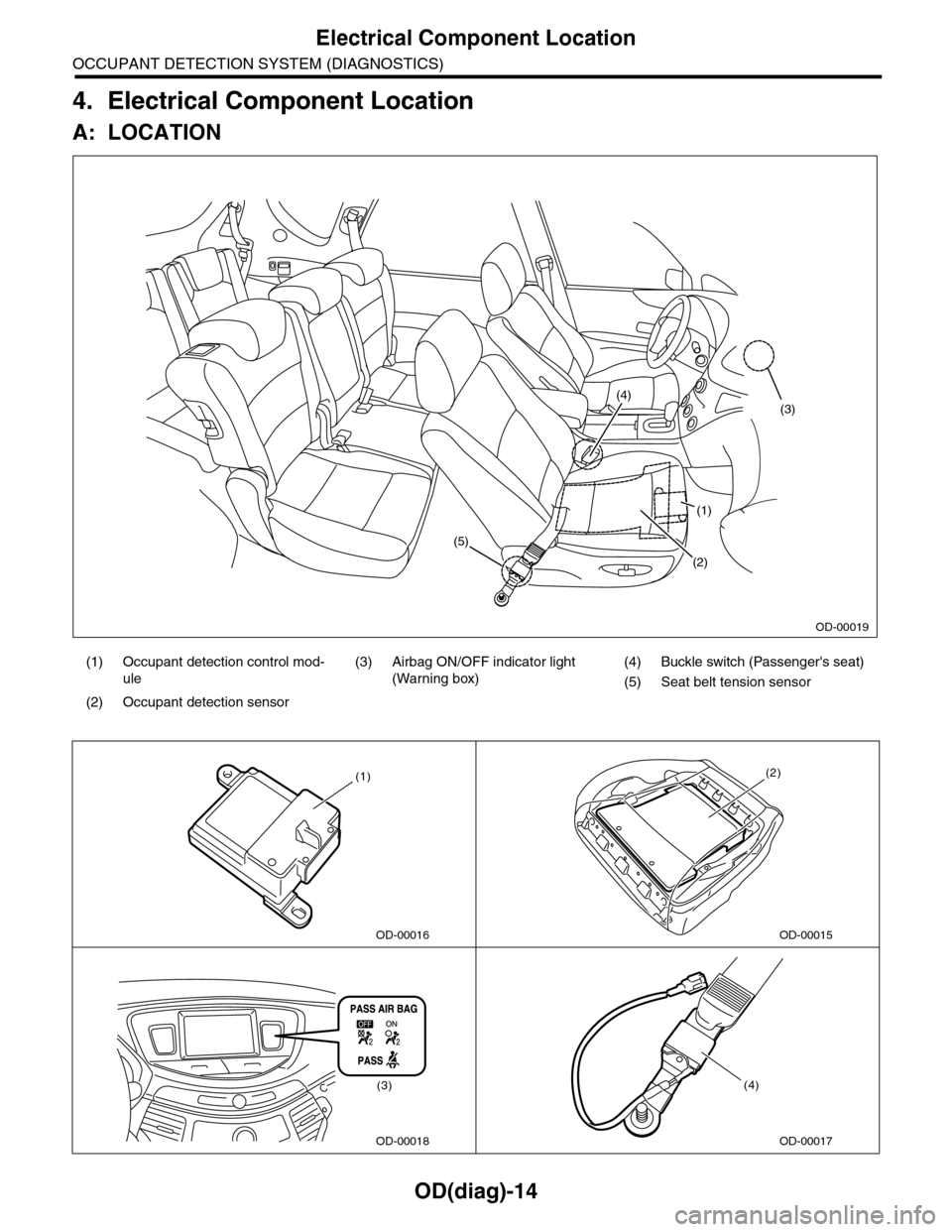
OD(diag)-14
Electrical Component Location
OCCUPANT DETECTION SYSTEM (DIAGNOSTICS)
4. Electrical Component Location
A: LOCATION
(1) Occupant detection control mod-
ule
(3) Airbag ON/OFF indicator light
(Warning box)
(4) Buckle switch (Passenger's seat)
(5) Seat belt tension sensor
(2) Occupant detection sensor
(1)
(2)
(5)
(4)(3)
OD-00019
OD-00016
(1)
OD-00015
(2)
OD-00018
(3)
OD-00017
(4)
Page 585 of 2453
OD(diag)-17
Subaru Select Monitor
OCCUPANT DETECTION SYSTEM (DIAGNOSTICS)
7. Subaru Select Monitor
A: OPERATION
1. READ DIAGNOSTIC TROUBLE CODE (DTC)
When malfunction of the airbag system and the occupant detection system occur, the DTC stored in airbag
control module will be read out.
Refer to the DTC readout of the airbag system (diagnosis).
NOTE:
•For details concerning operation procedure, refer to the “SUBARU SELECT MONITOR OPERATION
MANUAL”.
•For details concerning DTCs, refer to the “List of Diagnostic Trouble Code (Airbag system, Occupant de-
tection system).”
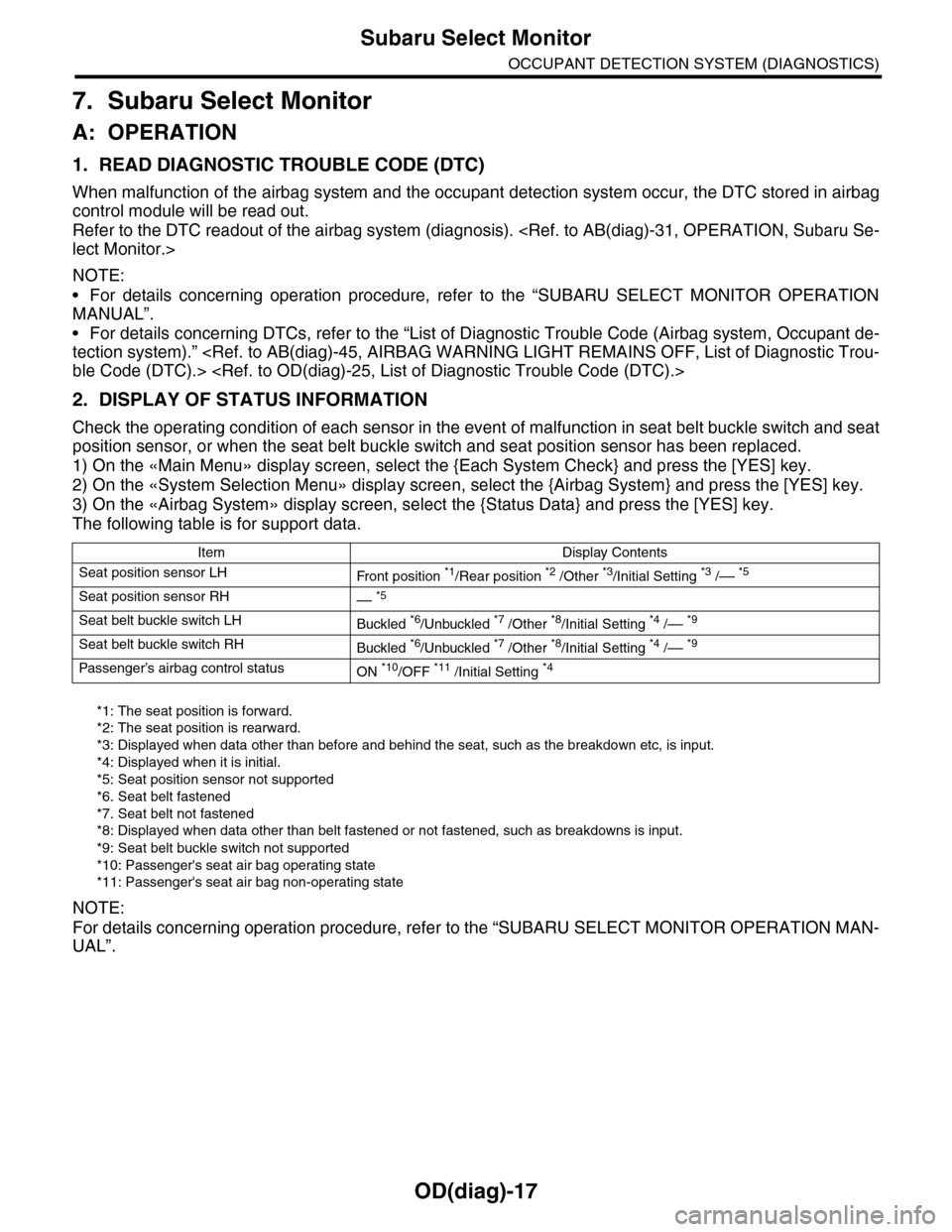
2. DISPLAY OF STATUS INFORMATION
Check the operating condition of each sensor in the event of malfunction in seat belt buckle switch and seat
position sensor, or when the seat belt buckle switch and seat position sensor has been replaced.
1) On the «Main Menu» display screen, select the {Each System Check} and press the [YES] key.
2) On the «System Selection Menu» display screen, select the {Airbag System} and press the [YES] key.
3) On the «Airbag System» display screen, select the {Status Data} and press the [YES] key.
The following table is for support data.
*1: The seat position is forward.
*2: The seat position is rearward.
*3: Displayed when data other than before and behind the seat, such as the breakdown etc, is input.
*4: Displayed when it is initial.
*5: Seat position sensor not supported
*6. Seat belt fastened
*7. Seat belt not fastened
*8: Displayed when data other than belt fastened or not fastened, such as breakdowns is input.
*9: Seat belt buckle switch not supported
*10: Passenger's seat air bag operating state
*11: Passenger's seat air bag non-operating state
NOTE:
For details concerning operation procedure, refer to the “SUBARU SELECT MONITOR OPERATION MAN-
UAL”.
Item Display Contents
Seat position sensor LHFr o nt p os it i on *1/Rear position *2 /Other *3/Initial Setting *3 /–– *5
Seat position sensor RH–– *5
Seat belt buckle switch LHBuckled *6/Unbuckled *7 /Other *8/Initial Setting *4 /–– *9
Seat belt buckle switch RHBuckled *6/Unbuckled *7 /Other *8/Initial Setting *4 /–– *9
Passenger’s airbag control statusON *10/OFF *11 /Initial Setting *4
Page 586 of 2453
OD(diag)-18
Subaru Select Monitor
OCCUPANT DETECTION SYSTEM (DIAGNOSTICS)
3. CLEAR MEMORY MODE
Clear the DTC stored in the airbag control module
after repairing the airbag system and occupant de-
tection system. (After the breakdown is recovered,
the breakdown code for completed recoveries are
read out when the next breakdown occurs if the
memory clear work is not performed.)
1) On the «Main Menu» display screen, select the
{Each System Check} and press the [YES] key.
2) On the «System Selection Menu» display
screen, select the {Airbag System} and press the
[YES] key.
3) On the {Airbag System} menu screen, select the
{Clear Memory} and press the [YES] key.
4) When the “Clear Memory?” is shown on the
screen, press the [YES] key.
5) When “Done” is displayed, turn the Subaru Se-
lect Monitor to OFF.
NOTE:
For details concerning operation procedure, refer
to the “SUBARU SELECT MONITOR OPERATION
MANUAL”.
4. SYSTEM CALIBRATION (REZEROING)
NOTE:
When replacing the occupant detection system, or
removing and disassembling the passenger’s seat,
always perform the system calibration after install-
ing a seat in the vehicle.
CAUTION:
When the trouble occurs in the system during
calibration process, “Occupant detection cali-
bration failure” is detected in the DTC 2A of the
airbag system and the airbag warning light
lights. In this case, after turning the ignition
switch to OFF once, redo the system calibration
(Rezeroing), or after clearing the cause of the
failure, perform the system calibration again.
1) Park empty vehicle on a level surface.
2) On the «Main Menu» display screen, select the
{Each System Check} and press the [YES] key.
3) On the «System Selection Menu» display
screen, select the {Occupant Detection System}
and press the [YES] key.
4) On the Occupant Detection System display
screen, select the {Zero Point Adjustment} and
press the [YES] key.
5) “See service manual. And check vehicle condi-
tion for successfully completing the rezeroing.” is
displayed. Check the following to adjust the condi-
tion of the vehicle.
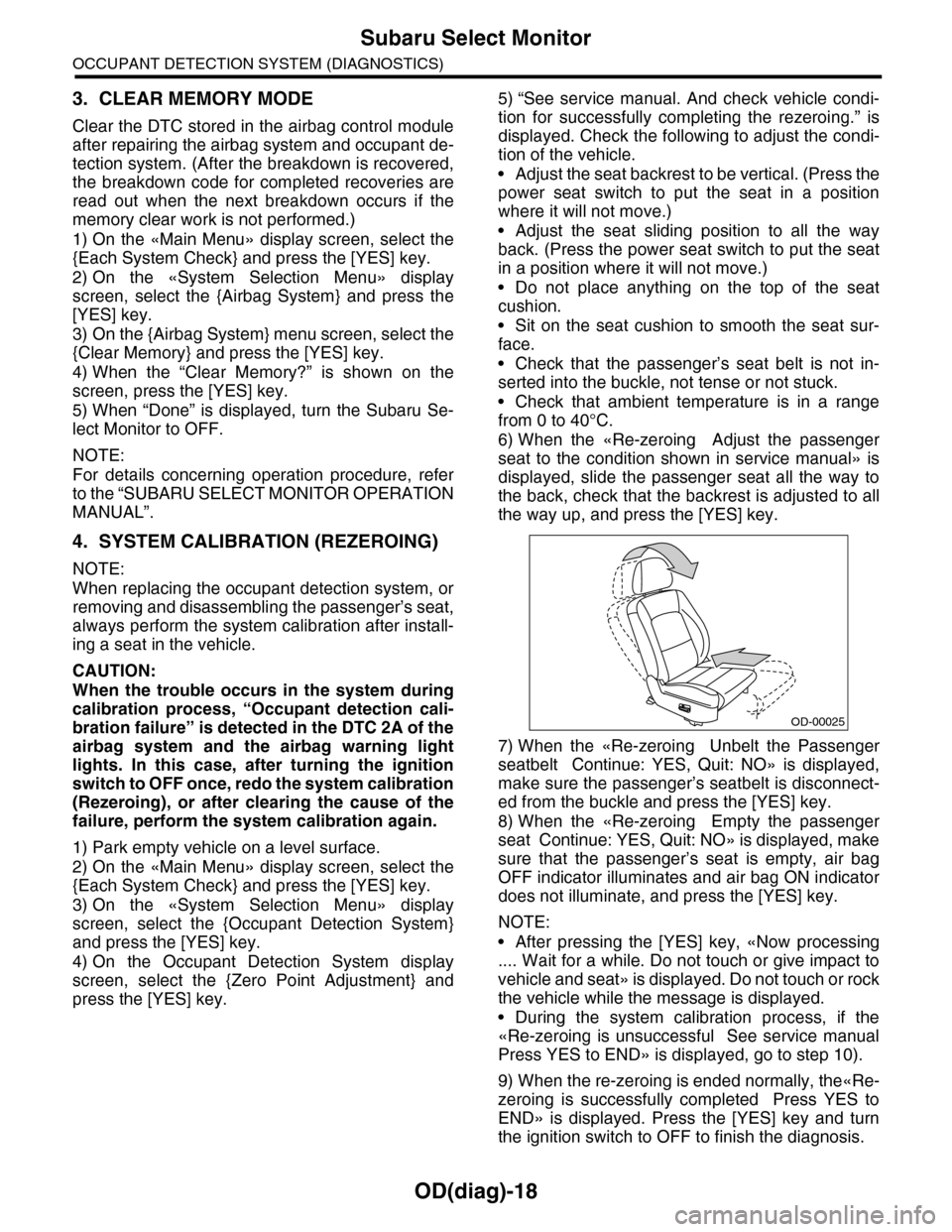
•Adjust the seat backrest to be vertical. (Press the
power seat switch to put the seat in a position
where it will not move.)
•Adjust the seat sliding position to all the way
back. (Press the power seat switch to put the seat
in a position where it will not move.)
•Do not place anything on the top of the seat
cushion.
•Sit on the seat cushion to smooth the seat sur-
face.
•Check that the passenger’s seat belt is not in-
serted into the buckle, not tense or not stuck.
•Check that ambient temperature is in a range
from 0 to 40°C.
6) When the «Re-zeroing Adjust the passenger
seat to the condition shown in service manual» is
displayed, slide the passenger seat all the way to
the back, check that the backrest is adjusted to all
the way up, and press the [YES] key.
7) When the «Re-zeroing Unbelt the Passenger
seatbelt Continue: YES, Quit: NO» is displayed,
make sure the passenger’s seatbelt is disconnect-
ed from the buckle and press the [YES] key.
8) When the «Re-zeroing Empty the passenger
seat Continue: YES, Quit: NO» is displayed, make
sure that the passenger’s seat is empty, air bag
OFF indicator illuminates and air bag ON indicator
does not illuminate, and press the [YES] key.
NOTE:
•After pressing the [YES] key, «Now processing
.... Wait for a while. Do not touch or give impact to
vehicle and seat» is displayed. Do not touch or rock
the vehicle while the message is displayed.
•During the system calibration process, if the
«Re-zeroing is unsuccessful See service manual
Press YES to END» is displayed, go to step 10).
9) When the re-zeroing is ended normally, the«Re-
zeroing is successfully completed Press YES to
END» is displayed. Press the [YES] key and turn
the ignition switch to OFF to finish the diagnosis.
OD-00025