harness SUBARU TRIBECA 2009 1.G Service Workshop Manual
[x] Cancel search | Manufacturer: SUBARU, Model Year: 2009, Model line: TRIBECA, Model: SUBARU TRIBECA 2009 1.GPages: 2453, PDF Size: 46.32 MB
Page 659 of 2453
SL-30
Security System
SECURITY AND LOCKS
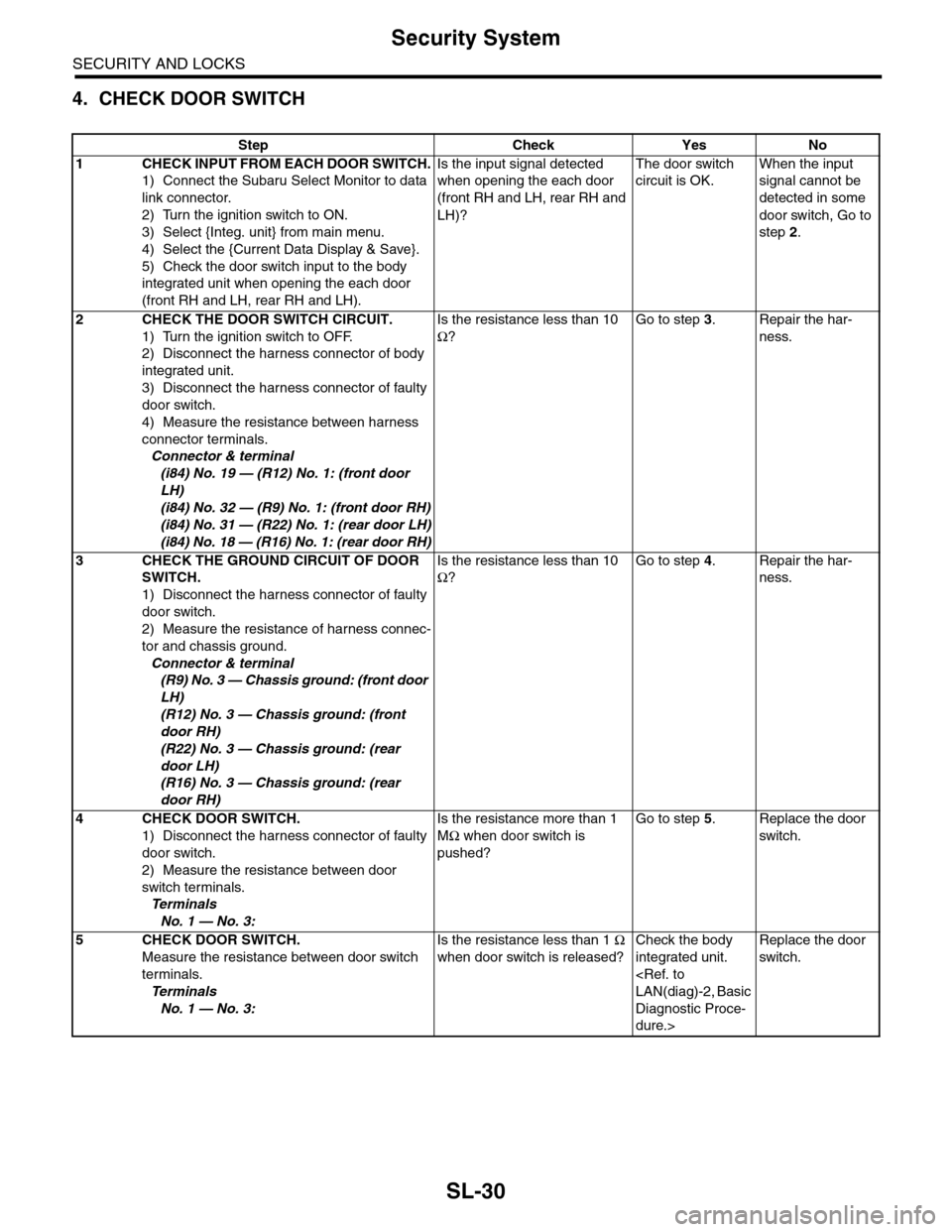
4. CHECK DOOR SWITCH
Step Check Yes No
1CHECK INPUT FROM EACH DOOR SWITCH.
1) Connect the Subaru Select Monitor to data
link connector.
2) Turn the ignition switch to ON.
3) Select {Integ. unit} from main menu.
4) Select the {Current Data Display & Save}.
5) Check the door switch input to the body
integrated unit when opening the each door
(front RH and LH, rear RH and LH).
Is the input signal detected
when opening the each door
(front RH and LH, rear RH and
LH)?
The door switch
circuit is OK.
When the input
signal cannot be
detected in some
door switch, Go to
step 2.
2CHECK THE DOOR SWITCH CIRCUIT.
1) Turn the ignition switch to OFF.
2) Disconnect the harness connector of body
integrated unit.
3) Disconnect the harness connector of faulty
door switch.
4) Measure the resistance between harness
connector terminals.
Connector & terminal
(i84) No. 19 — (R12) No. 1: (front door
LH)
(i84) No. 32 — (R9) No. 1: (front door RH)
(i84) No. 31 — (R22) No. 1: (rear door LH)
(i84) No. 18 — (R16) No. 1: (rear door RH)
Is the resistance less than 10
Ω?
Go to step 3.Repair the har-
ness.
3CHECK THE GROUND CIRCUIT OF DOOR
SWITCH.
1) Disconnect the harness connector of faulty
door switch.
2) Measure the resistance of harness connec-
tor and chassis ground.
Connector & terminal
(R9) No. 3 — Chassis ground: (front door
LH)
(R12) No. 3 — Chassis ground: (front
door RH)
(R22) No. 3 — Chassis ground: (rear
door LH)
(R16) No. 3 — Chassis ground: (rear
door RH)
Is the resistance less than 10
Ω?
Go to step 4.Repair the har-
ness.
4CHECK DOOR SWITCH.
1) Disconnect the harness connector of faulty
door switch.
2) Measure the resistance between door
switch terminals.
Te r m i n a l s
No. 1 — No. 3:
Is the resistance more than 1
MΩ when door switch is
pushed?
Go to step 5.Replace the door
switch.
5CHECK DOOR SWITCH.
Measure the resistance between door switch
terminals.
Te r m i n a l s
No. 1 — No. 3:
Is the resistance less than 1 Ω
when door switch is released?
Check the body
integrated unit.
Diagnostic Proce-
dure.>
Replace the door
switch.
Page 660 of 2453
SL-31
Security System
SECURITY AND LOCKS
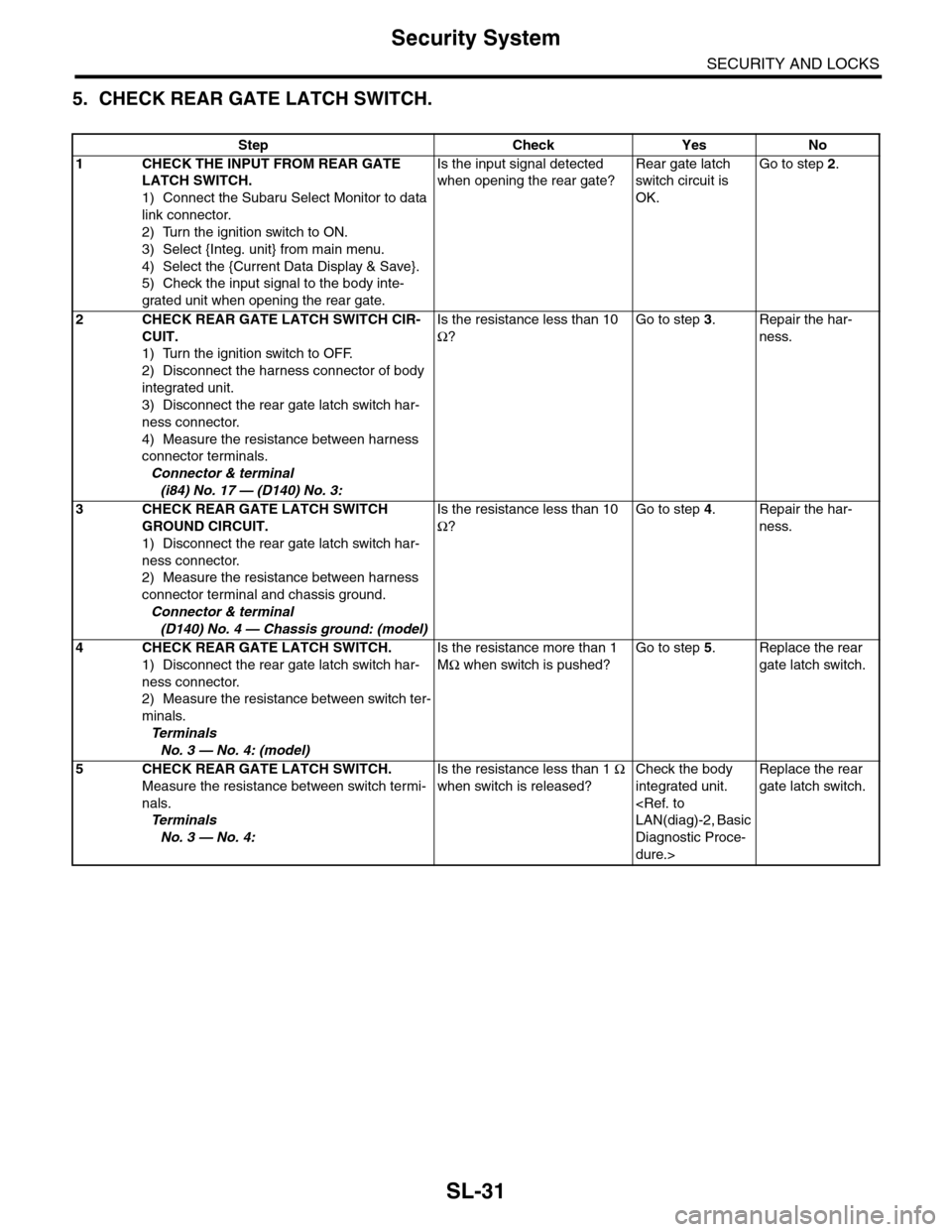
5. CHECK REAR GATE LATCH SWITCH.
Step Check Yes No
1CHECK THE INPUT FROM REAR GATE
LATCH SWITCH.
1) Connect the Subaru Select Monitor to data
link connector.
2) Turn the ignition switch to ON.
3) Select {Integ. unit} from main menu.
4) Select the {Current Data Display & Save}.
5) Check the input signal to the body inte-
grated unit when opening the rear gate.
Is the input signal detected
when opening the rear gate?
Rear gate latch
switch circuit is
OK.
Go to step 2.
2CHECK REAR GATE LATCH SWITCH CIR-
CUIT.
1) Turn the ignition switch to OFF.
2) Disconnect the harness connector of body
integrated unit.
3) Disconnect the rear gate latch switch har-
ness connector.
4) Measure the resistance between harness
connector terminals.
Connector & terminal
(i84) No. 17 — (D140) No. 3:
Is the resistance less than 10
Ω?
Go to step 3.Repair the har-
ness.
3CHECK REAR GATE LATCH SWITCH
GROUND CIRCUIT.
1) Disconnect the rear gate latch switch har-
ness connector.
2) Measure the resistance between harness
connector terminal and chassis ground.
Connector & terminal
(D140) No. 4 — Chassis ground: (model)
Is the resistance less than 10
Ω?
Go to step 4.Repair the har-
ness.
4CHECK REAR GATE LATCH SWITCH.
1) Disconnect the rear gate latch switch har-
ness connector.
2) Measure the resistance between switch ter-
minals.
Te r m i n a l s
No. 3 — No. 4: (model)
Is the resistance more than 1
MΩ when switch is pushed?
Go to step 5.Replace the rear
gate latch switch.
5CHECK REAR GATE LATCH SWITCH.
Measure the resistance between switch termi-
nals.
Te r m i n a l s
No. 3 — No. 4:
Is the resistance less than 1 Ω
when switch is released?
Check the body
integrated unit.
Diagnostic Proce-
dure.>
Replace the rear
gate latch switch.
Page 661 of 2453
SL-32
Security System
SECURITY AND LOCKS
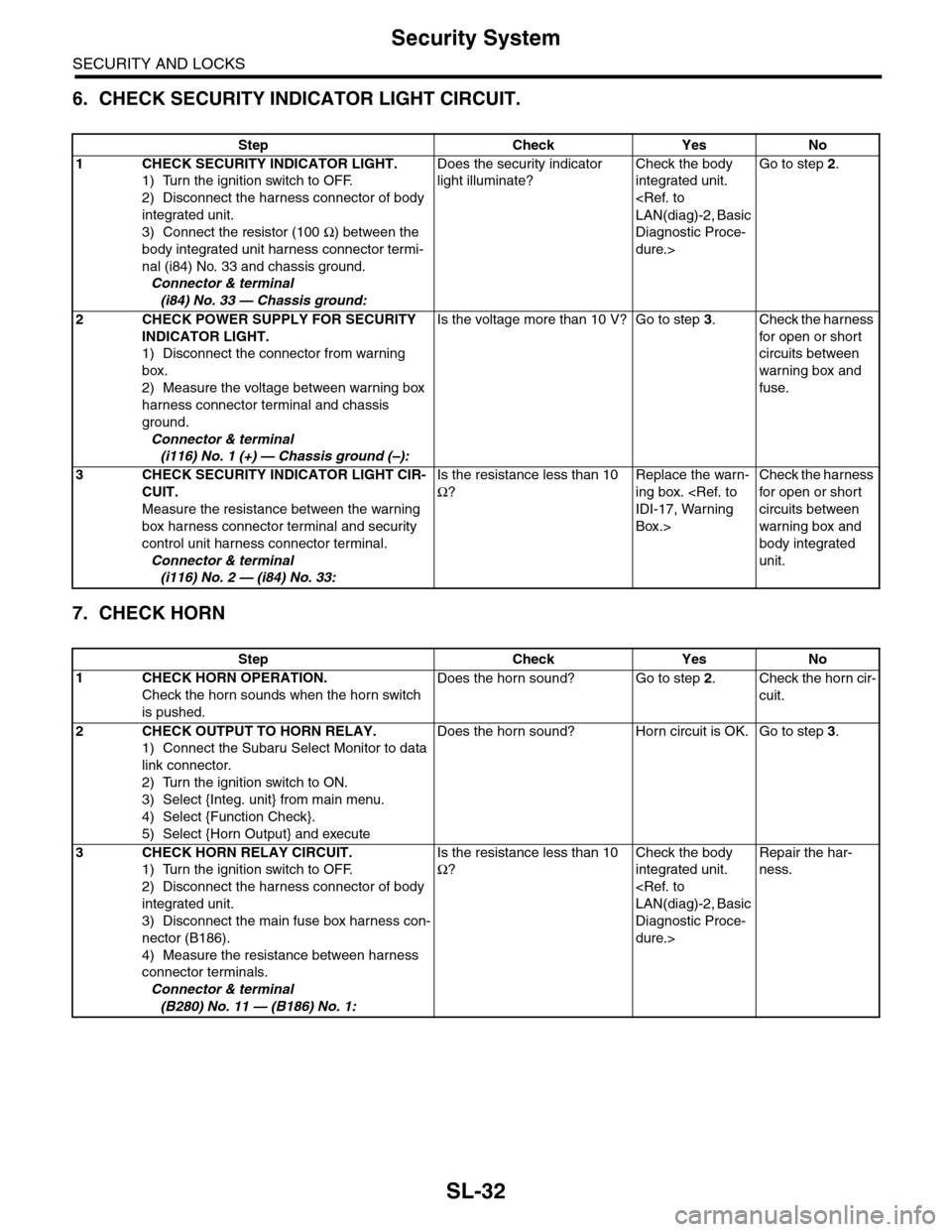
6. CHECK SECURITY INDICATOR LIGHT CIRCUIT.
7. CHECK HORN
Step Check Yes No
1CHECK SECURITY INDICATOR LIGHT.
1) Turn the ignition switch to OFF.
2) Disconnect the harness connector of body
integrated unit.
3) Connect the resistor (100 Ω) between the
body integrated unit harness connector termi-
nal (i84) No. 33 and chassis ground.
Connector & terminal
(i84) No. 33 — Chassis ground:
Does the security indicator
light illuminate?
Check the body
integrated unit.
Diagnostic Proce-
dure.>
Go to step 2.
2CHECK POWER SUPPLY FOR SECURITY
INDICATOR LIGHT.
1) Disconnect the connector from warning
box.
2) Measure the voltage between warning box
harness connector terminal and chassis
ground.
Connector & terminal
(i116) No. 1 (+) — Chassis ground (–):
Is the voltage more than 10 V? Go to step 3.Check the harness
for open or shor t
circuits between
warning box and
fuse.
3CHECK SECURITY INDICATOR LIGHT CIR-
CUIT.
Measure the resistance between the warning
box harness connector terminal and security
control unit harness connector terminal.
Connector & terminal
(i116) No. 2 — (i84) No. 33:
Is the resistance less than 10
Ω?
Replace the warn-
ing box.
Box.>
Check the harness
for open or shor t
circuits between
warning box and
body integrated
unit.
Step Check Yes No
1CHECK HORN OPERATION.
Check the horn sounds when the horn switch
is pushed.
Does the horn sound? Go to step 2.Check the horn cir-
cuit.
2CHECK OUTPUT TO HORN RELAY.
1) Connect the Subaru Select Monitor to data
link connector.
2) Turn the ignition switch to ON.
3) Select {Integ. unit} from main menu.
4) Select {Function Check}.
5) Select {Horn Output} and execute
Does the horn sound? Horn circuit is OK. Go to step 3.
3CHECK HORN RELAY CIRCUIT.
1) Turn the ignition switch to OFF.
2) Disconnect the harness connector of body
integrated unit.
3) Disconnect the main fuse box harness con-
nector (B186).
4) Measure the resistance between harness
connector terminals.
Connector & terminal
(B280) No. 11 — (B186) No. 1:
Is the resistance less than 10
Ω?
Check the body
integrated unit.
Diagnostic Proce-
dure.>
Repair the har-
ness.
Page 662 of 2453
SL-33
Security System
SECURITY AND LOCKS
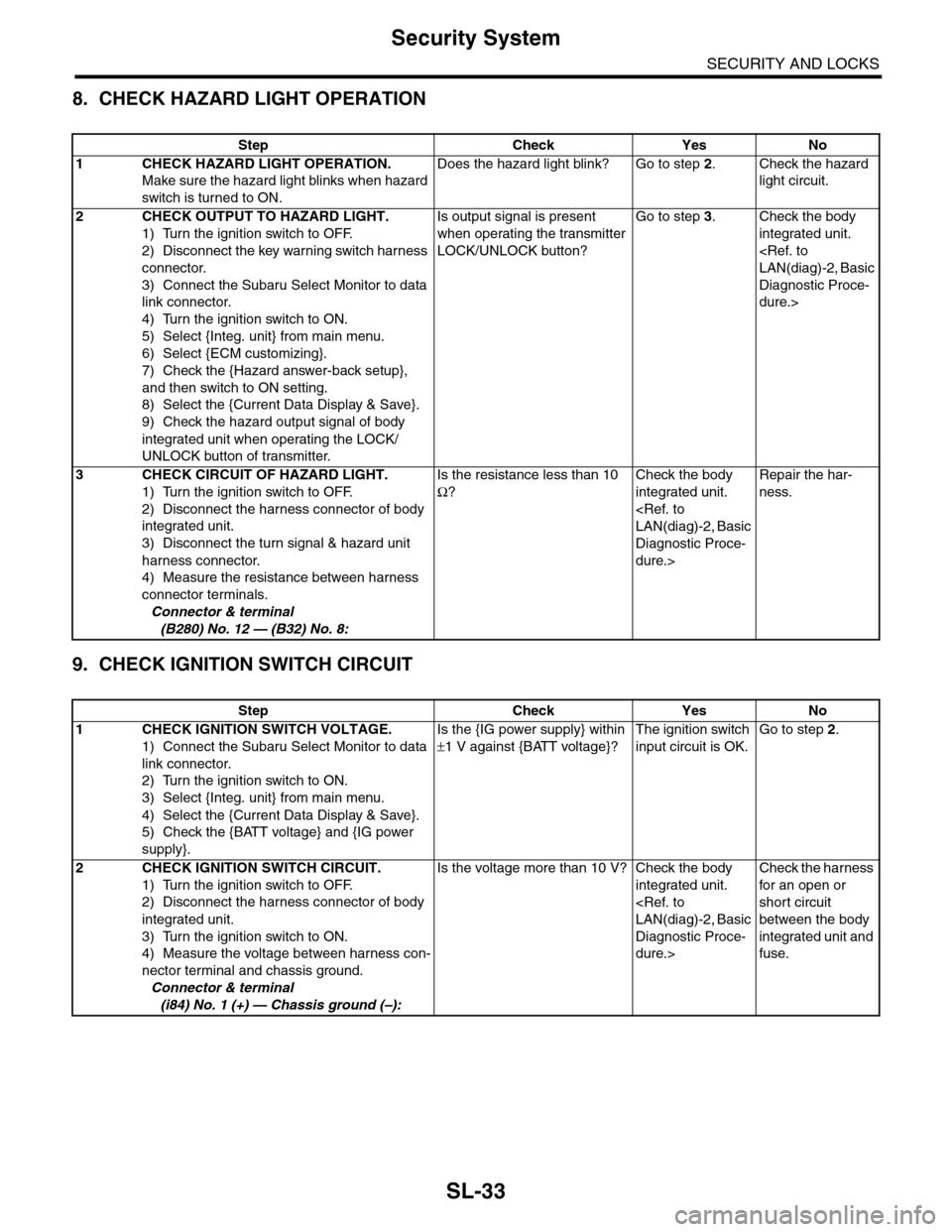
8. CHECK HAZARD LIGHT OPERATION
9. CHECK IGNITION SWITCH CIRCUIT
Step Check Yes No
1CHECK HAZARD LIGHT OPERATION.
Make sure the hazard light blinks when hazard
switch is turned to ON.
Does the hazard light blink? Go to step 2.Check the hazard
light circuit.
2CHECK OUTPUT TO HAZARD LIGHT.
1) Turn the ignition switch to OFF.
2) Disconnect the key warning switch harness
connector.
3) Connect the Subaru Select Monitor to data
link connector.
4) Turn the ignition switch to ON.
5) Select {Integ. unit} from main menu.
6) Select {ECM customizing}.
7) Check the {Hazard answer-back setup},
and then switch to ON setting.
8) Select the {Current Data Display & Save}.
9) Check the hazard output signal of body
integrated unit when operating the LOCK/
UNLOCK button of transmitter.
Is output signal is present
when operating the transmitter
LOCK/UNLOCK button?
Go to step 3.Check the body
integrated unit.
Diagnostic Proce-
dure.>
3CHECK CIRCUIT OF HAZARD LIGHT.
1) Turn the ignition switch to OFF.
2) Disconnect the harness connector of body
integrated unit.
3) Disconnect the turn signal & hazard unit
harness connector.
4) Measure the resistance between harness
connector terminals.
Connector & terminal
(B280) No. 12 — (B32) No. 8:
Is the resistance less than 10
Ω?
Check the body
integrated unit.
Diagnostic Proce-
dure.>
Repair the har-
ness.
Step Check Yes No
1CHECK IGNITION SWITCH VOLTAGE.
1) Connect the Subaru Select Monitor to data
link connector.
2) Turn the ignition switch to ON.
3) Select {Integ. unit} from main menu.
4) Select the {Current Data Display & Save}.
5) Check the {BATT voltage} and {IG power
supply}.
Is the {IG power supply} within
±1 V against {BATT voltage}?
The ignition switch
input circuit is OK.
Go to step 2.
2 CHECK IGNITION SWITCH CIRCUIT.
1) Turn the ignition switch to OFF.
2) Disconnect the harness connector of body
integrated unit.
3) Turn the ignition switch to ON.
4) Measure the voltage between harness con-
nector terminal and chassis ground.
Connector & terminal
(i84) No. 1 (+) — Chassis ground (–):
Is the voltage more than 10 V? Check the body
integrated unit.
Diagnostic Proce-
dure.>
Check the harness
for an open or
short circuit
between the body
integrated unit and
fuse.
Page 666 of 2453
SL-37
Front Door Lock Actuator
SECURITY AND LOCKS
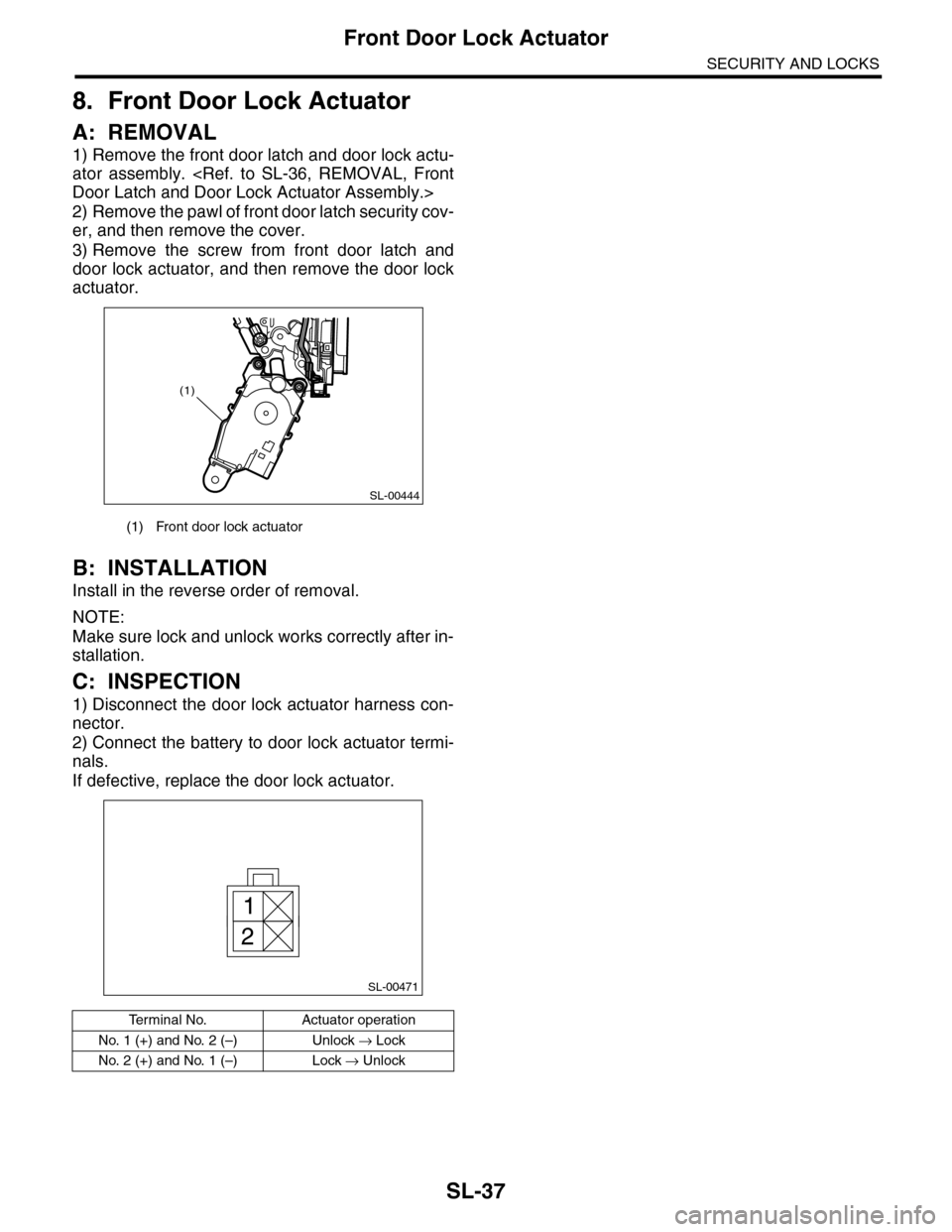
8. Front Door Lock Actuator
A: REMOVAL
1) Remove the front door latch and door lock actu-
ator assembly.
2) Remove the pawl of front door latch security cov-
er, and then remove the cover.
3) Remove the screw from front door latch and
door lock actuator, and then remove the door lock
actuator.
B: INSTALLATION
Install in the reverse order of removal.
NOTE:
Make sure lock and unlock works correctly after in-
stallation.
C: INSPECTION
1) Disconnect the door lock actuator harness con-
nector.
2) Connect the battery to door lock actuator termi-
nals.
If defective, replace the door lock actuator.
(1) Front door lock actuator
Te r m i n a l N o . A c t u a t o r o p e r a t i o n
No. 1 (+) and No. 2 (–) Unlock → Lock
No. 2 (+) and No. 1 (–) Lock → Unlock
SL-00444
(1)
SL-00471
1
2
Page 670 of 2453
SL-41
Rear Door Lock Actuator
SECURITY AND LOCKS
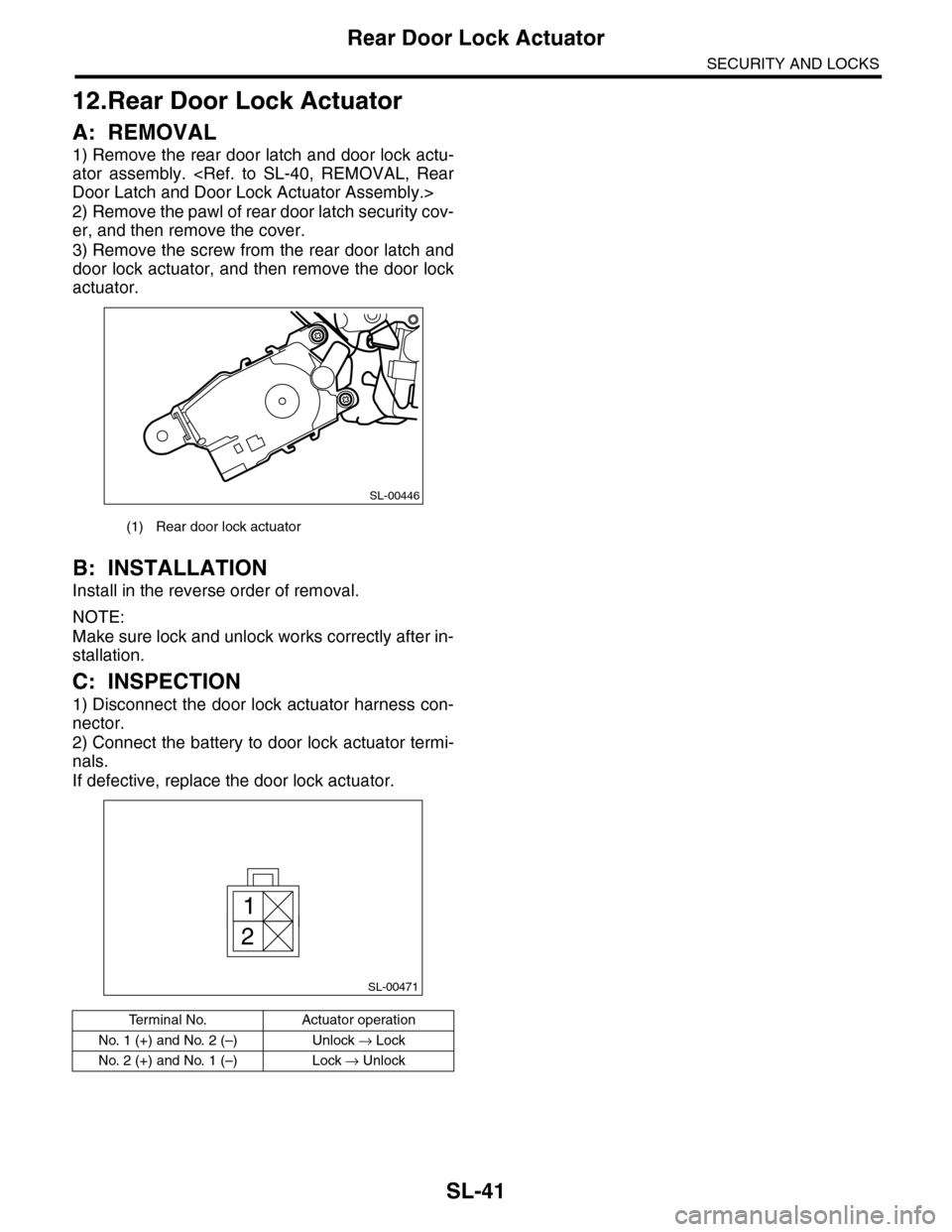
12.Rear Door Lock Actuator
A: REMOVAL
1) Remove the rear door latch and door lock actu-
ator assembly.
2) Remove the pawl of rear door latch security cov-
er, and then remove the cover.
3) Remove the screw from the rear door latch and
door lock actuator, and then remove the door lock
actuator.
B: INSTALLATION
Install in the reverse order of removal.
NOTE:
Make sure lock and unlock works correctly after in-
stallation.
C: INSPECTION
1) Disconnect the door lock actuator harness con-
nector.
2) Connect the battery to door lock actuator termi-
nals.
If defective, replace the door lock actuator.
(1) Rear door lock actuator
Te r m i n a l N o . A c t u a t o r o p e r a t i o n
No. 1 (+) and No. 2 (–) Unlock → Lock
No. 2 (+) and No. 1 (–) Lock → Unlock
SL-00446
SL-00471
1
2
Page 671 of 2453
SL-42
Rear Gate Release Switch
SECURITY AND LOCKS
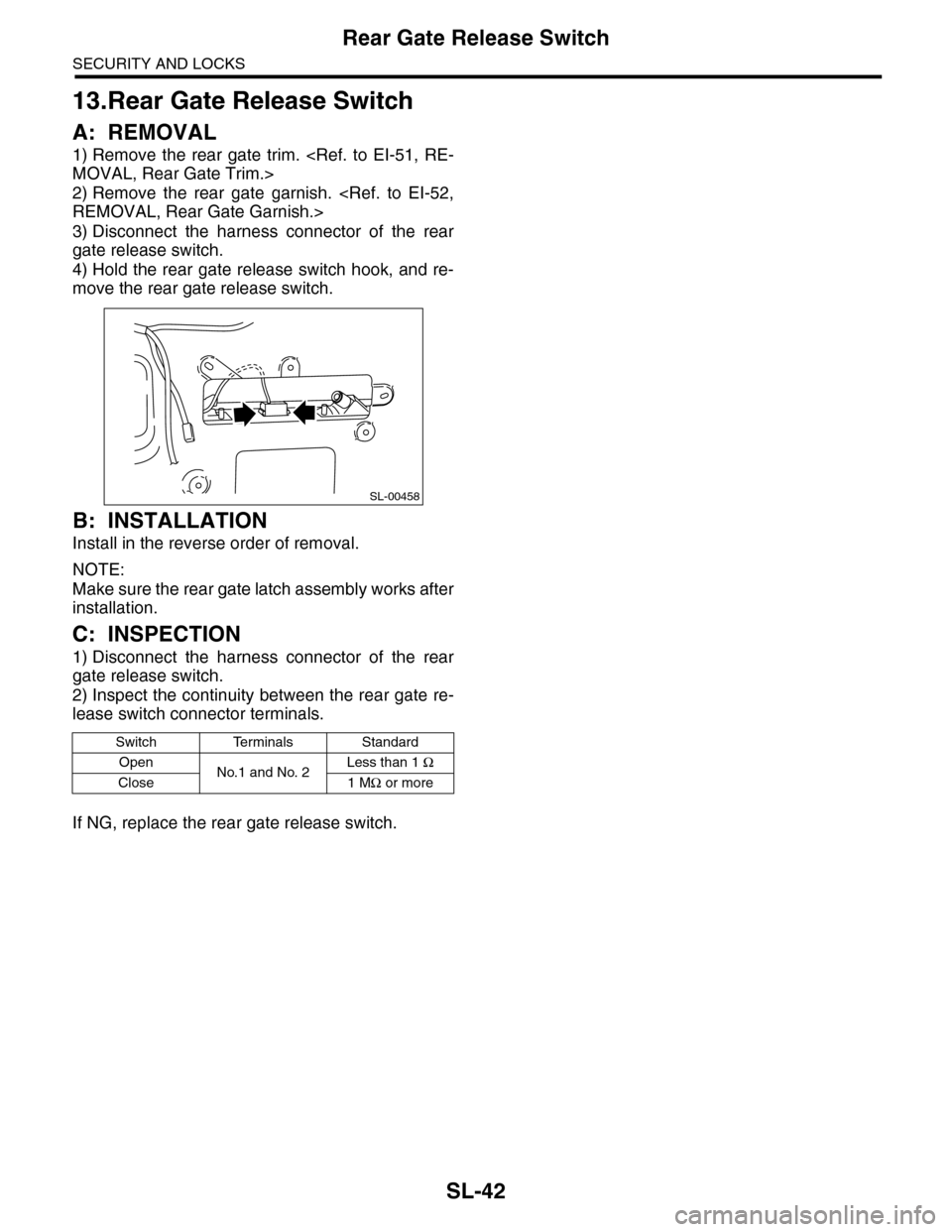
13.Rear Gate Release Switch
A: REMOVAL
1) Remove the rear gate trim.
2) Remove the rear gate garnish.
3) Disconnect the harness connector of the rear
gate release switch.
4) Hold the rear gate release switch hook, and re-
move the rear gate release switch.
B: INSTALLATION
Install in the reverse order of removal.
NOTE:
Make sure the rear gate latch assembly works after
installation.
C: INSPECTION
1) Disconnect the harness connector of the rear
gate release switch.
2) Inspect the continuity between the rear gate re-
lease switch connector terminals.
If NG, replace the rear gate release switch.
Switch Terminals Standard
OpenNo.1 and No. 2Less than 1 Ω
Close 1 MΩ or more
SL-00458
Page 672 of 2453
SL-43
Rear Gate Latch Assembly
SECURITY AND LOCKS
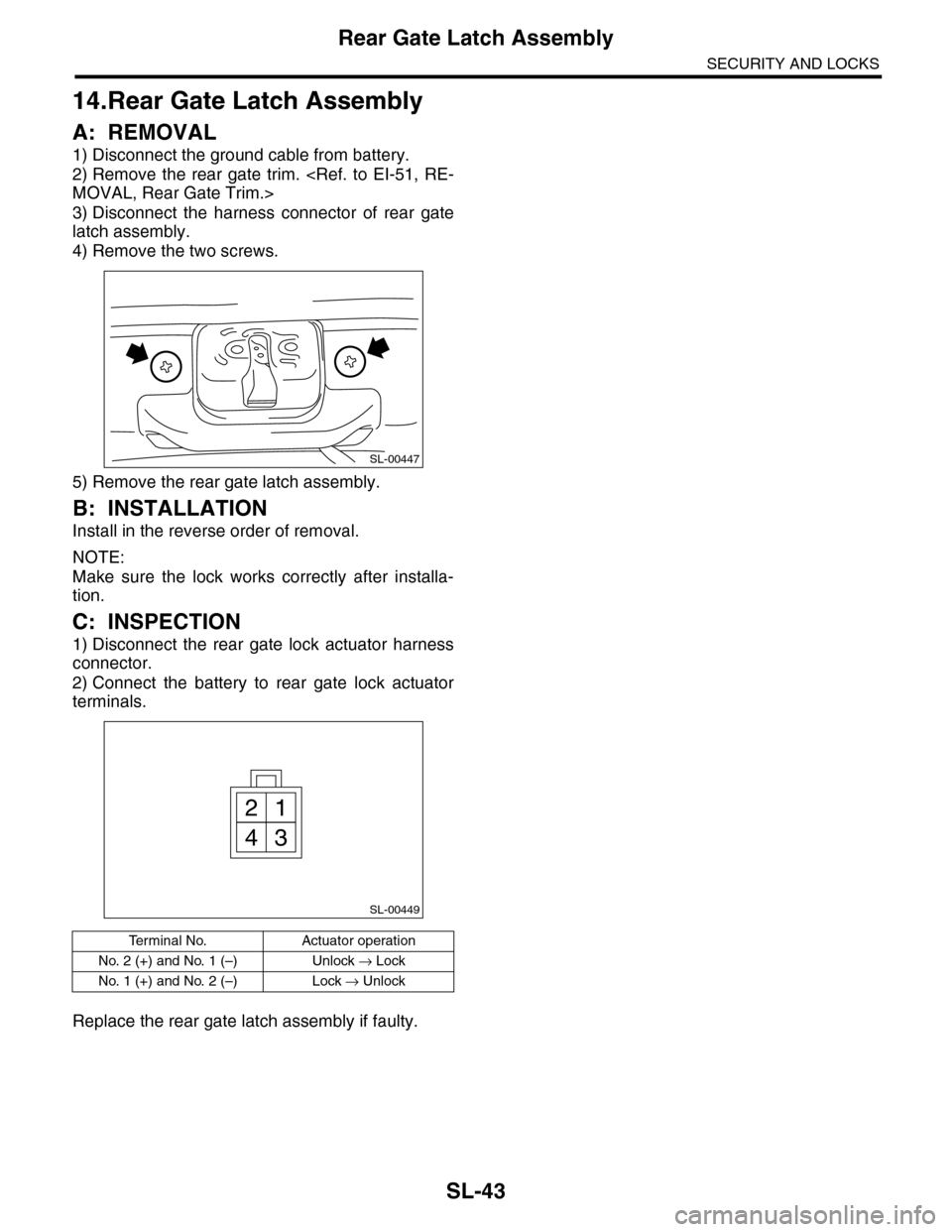
14.Rear Gate Latch Assembly
A: REMOVAL
1) Disconnect the ground cable from battery.
2) Remove the rear gate trim.
3) Disconnect the harness connector of rear gate
latch assembly.
4) Remove the two screws.
5) Remove the rear gate latch assembly.
B: INSTALLATION
Install in the reverse order of removal.
NOTE:
Make sure the lock works correctly after installa-
tion.
C: INSPECTION
1) Disconnect the rear gate lock actuator harness
connector.
2) Connect the battery to rear gate lock actuator
terminals.
Replace the rear gate latch assembly if faulty.
Te r m i n a l N o . A c t u a t o r o p e r a t i o n
No. 2 (+) and No. 1 (–) Unlock → Lock
No. 1 (+) and No. 2 (–) Lock → Unlock
SL-00447
SL-00449
21
43
Page 675 of 2453
SL-46
Ignition Key Lock
SECURITY AND LOCKS
17.Ignition Key Lock
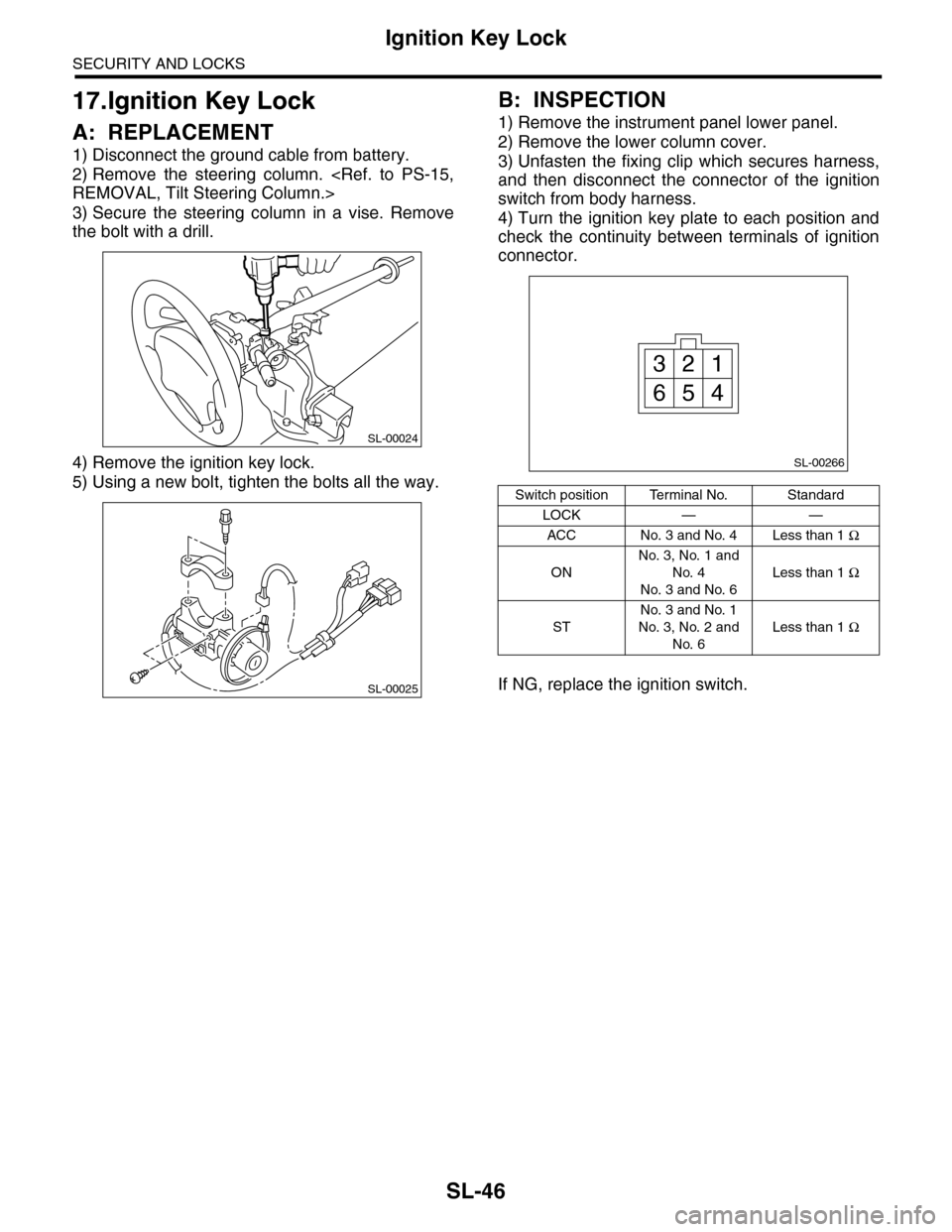
A: REPLACEMENT
1) Disconnect the ground cable from battery.
2) Remove the steering column.
3) Secure the steering column in a vise. Remove
the bolt with a drill.
4) Remove the ignition key lock.
5) Using a new bolt, tighten the bolts all the way.
B: INSPECTION
1) Remove the instrument panel lower panel.
2) Remove the lower column cover.
3) Unfasten the fixing clip which secures harness,
and then disconnect the connector of the ignition
switch from body harness.
4) Turn the ignition key plate to each position and
check the continuity between terminals of ignition
connector.
If NG, replace the ignition switch.
SL-00024
SL-00025
Switch position Terminal No. Standard
LOCK — —
ACC No. 3 and No. 4 Less than 1 Ω
ON
No. 3, No. 1 and
No. 4
No. 3 and No. 6
Less than 1 Ω
ST
No. 3 and No. 1
No. 3, No. 2 and
No. 6
Less than 1 Ω
SL-00266
13
456
2
Page 688 of 2453
SR-4
Sunroof Control System
SUNROOF/T-TOP/CONVERTIBLE TOP (SUNROOF)
2. Sunroof Control System
A: WIRING DIAGRAM
1. SUNROOF
B: INSPECTION
•Failure turn of glass lid while driving rough road.
Glass lid has auto-reverse function. When applied above specified force to the glass lid, the lid turns back
and stops. When operating the glass lid (open or close) while driving the rough road, the lid judges vibration
as a force and may causes failure turns. When the failure turn is occurred, need to perform the initialize op-
eration with following procedure.
1. INITIALIZE OPERATION
1) Tilt up the glass lid.
2) Release the switch once, and press the tilt up switch again for 15 seconds.
3) When the glass lid is raised a little and returned to tilt up position, release the switch for the moment. (Ini-
tialization of position detecting function)
4) Holding down the tilt up switch again within 5 seconds from releasing the switch will automatically perform
tilt down/slide open/slide close. (When more than 5 seconds pass, the position detecting function is can-
celled.)
5) Initialize operation is completed.
Symptom Inspection order
Wa t er l e ak ag e 1 . Che ck r o o f p a ne l a n d g la ss li d fo r i mp r o pe r or p oo r se al i ng .
2. Check drain tube for clogging.
3. Check sunroof frame seal and body for improper fit.
Booming noise, wind noise and other noise 1. Check glass lid and roof panel for improper clearance.
2. Check sunshade and roof trim for improper clearance.
Abnormal motor noise 1. Check installing part of motor for looseness.
2. Check gears and bearings for wear.
3. Check cable for wear.
4. Check cable pipe for deformities.
Fai l ur e of su n r oo f
(Motor operates properly.)
1. Check guide rail for foreign particles.
2. Check guide rail for improper installation.
3. Check parts for mutual interference.
4. Check cable slider for improper clinching.
5. Check cable for improper installation.
Motor does not rotate or rotate improperly. 1. Check fuse for blown out.
2. Check switch for improper function.
3. Check motor for incorrect terminal voltage.
4. Check the relay for improper operation.
5. Check poor grounding system.
6. Check harness for open or short and terminals for poor connections.
Fai l ur e tu r n o f gl a ss l i d Ch e ck gu i de ra il fo r fo r e ig n p a r ti cl e s.