ECO mode SUBARU TRIBECA 2009 1.G Service Owner's Manual
[x] Cancel search | Manufacturer: SUBARU, Model Year: 2009, Model line: TRIBECA, Model: SUBARU TRIBECA 2009 1.GPages: 2453, PDF Size: 46.32 MB
Page 158 of 2453
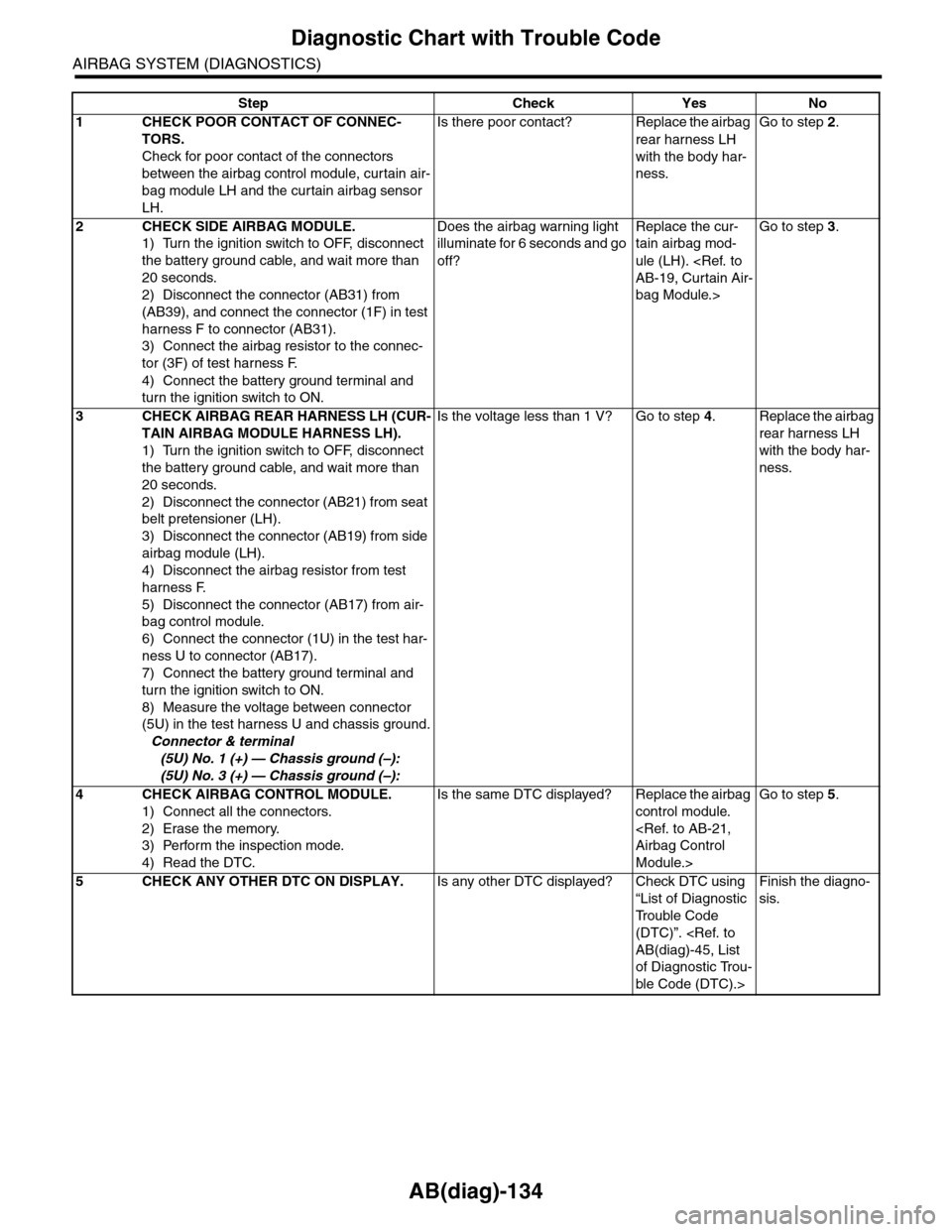
AB(diag)-134
Diagnostic Chart with Trouble Code
AIRBAG SYSTEM (DIAGNOSTICS)
Step Check Yes No
1CHECK POOR CONTACT OF CONNEC-
TORS.
Check for poor contact of the connectors
between the airbag control module, curtain air-
bag module LH and the curtain airbag sensor
LH.
Is there poor contact? Replace the airbag
rear harness LH
with the body har-
ness.
Go to step 2.
2CHECK SIDE AIRBAG MODULE.
1) Turn the ignition switch to OFF, disconnect
the battery ground cable, and wait more than
20 seconds.
2) Disconnect the connector (AB31) from
(AB39), and connect the connector (1F) in test
harness F to connector (AB31).
3) Connect the airbag resistor to the connec-
tor (3F) of test harness F.
4) Connect the battery ground terminal and
turn the ignition switch to ON.
Does the airbag warning light
illuminate for 6 seconds and go
off?
Replace the cur-
tain airbag mod-
ule (LH).
bag Module.>
Go to step 3.
3CHECK AIRBAG REAR HARNESS LH (CUR-
TAIN AIRBAG MODULE HARNESS LH).
1) Turn the ignition switch to OFF, disconnect
the battery ground cable, and wait more than
20 seconds.
2) Disconnect the connector (AB21) from seat
belt pretensioner (LH).
3) Disconnect the connector (AB19) from side
airbag module (LH).
4) Disconnect the airbag resistor from test
harness F.
5) Disconnect the connector (AB17) from air-
bag control module.
6) Connect the connector (1U) in the test har-
ness U to connector (AB17).
7) Connect the battery ground terminal and
turn the ignition switch to ON.
8) Measure the voltage between connector
(5U) in the test harness U and chassis ground.
Connector & terminal
(5U) No. 1 (+) — Chassis ground (–):
(5U) No. 3 (+) — Chassis ground (–):
Is the voltage less than 1 V? Go to step 4.Replace the airbag
rear harness LH
with the body har-
ness.
4CHECK AIRBAG CONTROL MODULE.
1) Connect all the connectors.
2) Erase the memory.
3) Perform the inspection mode.
4) Read the DTC.
Is the same DTC displayed? Replace the airbag
control module.
Module.>
Go to step 5.
5CHECK ANY OTHER DTC ON DISPLAY.Is any other DTC displayed? Check DTC using
“List of Diagnostic
Tr o u b l e C o d e
(DTC)”.
of Diagnostic Trou-
ble Code (DTC).>
Finish the diagno-
sis.
Page 197 of 2453
ET-11
Control Panel
ENTERTAINMENT
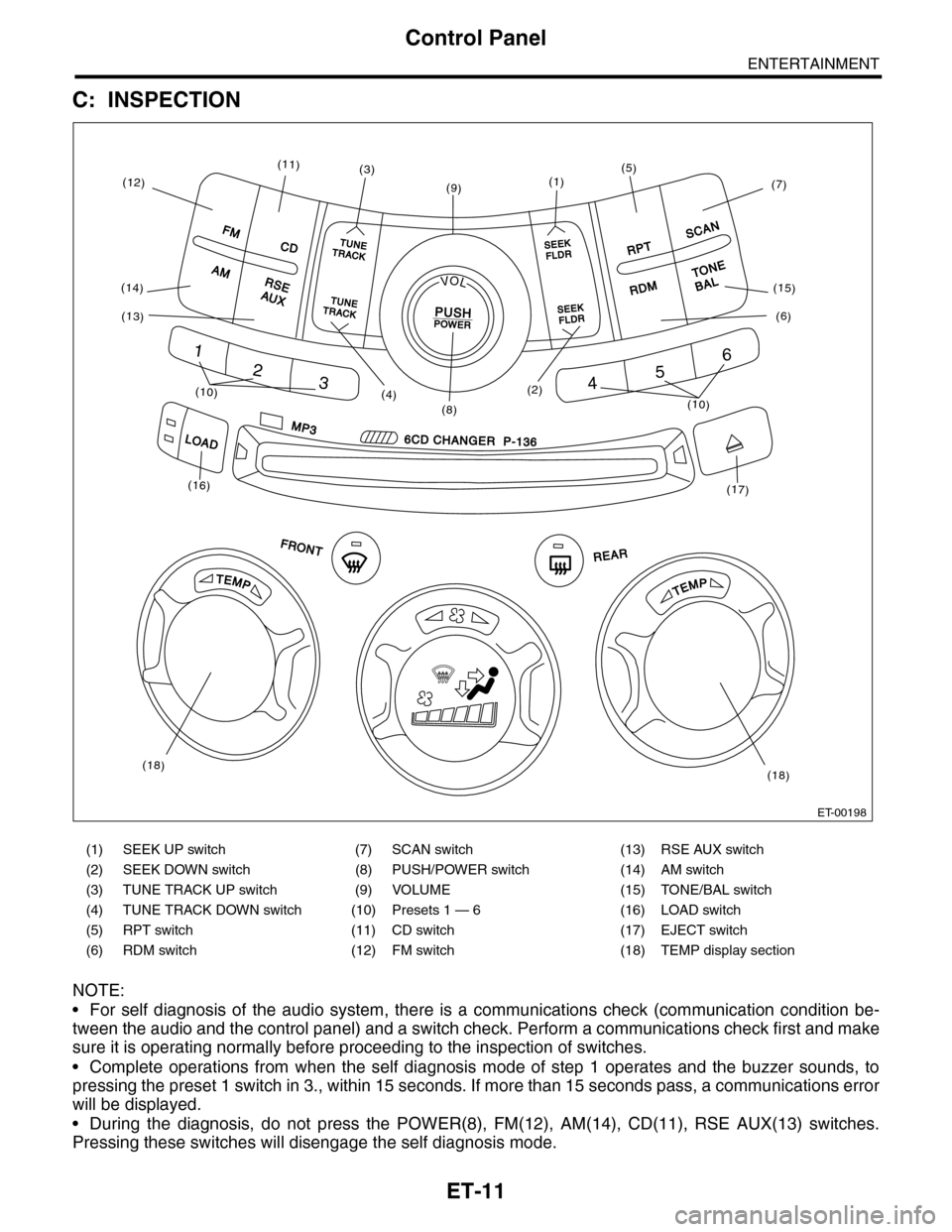
C: INSPECTION
NOTE:
•For self diagnosis of the audio system, there is a communications check (communication condition be-
tween the audio and the control panel) and a switch check. Perform a communications check first and make
sure it is operating normally before proceeding to the inspection of switches.
•Complete operations from when the self diagnosis mode of step 1 operates and the buzzer sounds, to
pressing the preset 1 switch in 3., within 15 seconds. If more than 15 seconds pass, a communications error
will be displayed.
•During the diagnosis, do not press the POWER(8), FM(12), AM(14), CD(11), RSE AUX(13) switches.
Pressing these switches will disengage the self diagnosis mode.
(1) SEEK UP switch (7) SCAN switch (13) RSE AUX switch
(2) SEEK DOWN switch (8) PUSH/POWER switch (14) AM switch
(3) TUNE TRACK UP switch (9) VOLUME (15) TONE/BAL switch
(4) TUNE TRACK DOWN switch (10) Presets 1 — 6 (16) LOAD switch
(5) RPT switch (11) CD switch (17) EJECT switch
(6) RDM switch (12) FM switch (18) TEMP display section
FMTUNETUNETRATRACKCKSEEKFLDRRPT
SCAN
TONE
BAL RDM
SEEKFLDR
TUNETUNETRATRACKCK
AM
CDCD
RSEAUX
LOAD
MP3
FRONTREARREAR
1
2345
6
6CD CHANGER P-1366CD CHANGER P-136
PMETPMET
LOV
PUSH PO POWERWER
(12)
(11)(3)
(9)
(2)(10)(10)
(16)
(18)(18)
(17)
(1)
(15)
(6)
(7)
(5)
(8)(4)
(14)
(13)
ET-00198
Page 198 of 2453
ET-12
Control Panel
ENTERTAINMENT
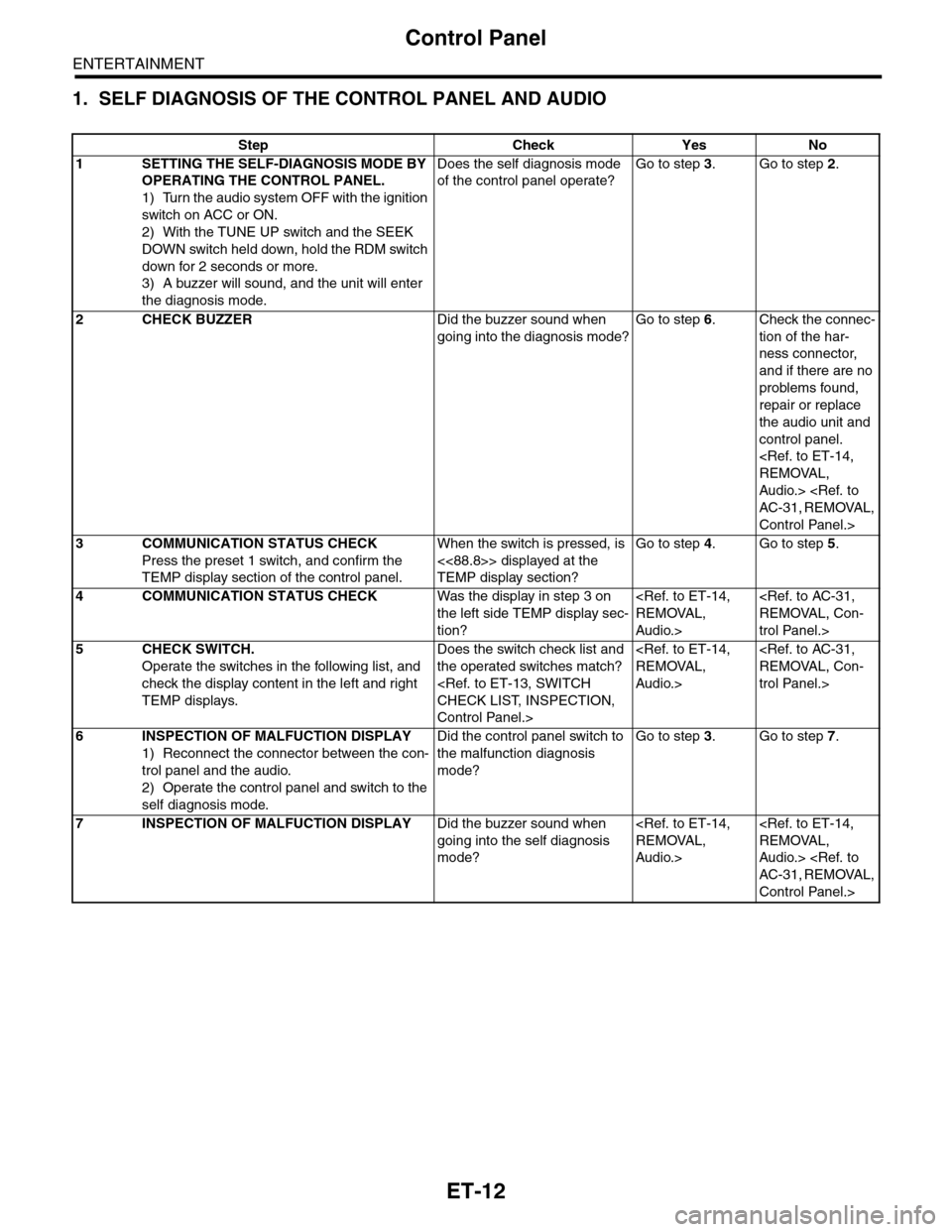
1. SELF DIAGNOSIS OF THE CONTROL PANEL AND AUDIO
Step Check Yes No
1SETTING THE SELF-DIAGNOSIS MODE BY
OPERATING THE CONTROL PANEL.
1) Turn the audio system OFF with the ignition
switch on ACC or ON.
2) With the TUNE UP switch and the SEEK
DOWN switch held down, hold the RDM switch
down for 2 seconds or more.
3) A buzzer will sound, and the unit will enter
the diagnosis mode.
Does the self diagnosis mode
of the control panel operate?
Go to step 3.Go to step 2.
2CHECK BUZZERDid the buzzer sound when
going into the diagnosis mode?
Go to step 6.Check the connec-
tion of the har-
ness connector,
and if there are no
problems found,
repair or replace
the audio unit and
control panel.
Audio.>
Control Panel.>
3COMMUNICATION STATUS CHECK
Press the preset 1 switch, and confirm the
TEMP display section of the control panel.
When the switch is pressed, is
<<88.8>> displayed at the
TEMP display section?
Go to step 4.Go to step 5.
4COMMUNICATION STATUS CHECKWas the display in step 3 on
the left side TEMP display sec-
tion?
Audio.>
trol Panel.>
5CHECK SWITCH.
Operate the switches in the following list, and
check the display content in the left and right
TEMP displays.
Does the switch check list and
the operated switches match?
Control Panel.>
Audio.>
trol Panel.>
6INSPECTION OF MALFUCTION DISPLAY
1) Reconnect the connector between the con-
trol panel and the audio.
2) Operate the control panel and switch to the
self diagnosis mode.
Did the control panel switch to
the malfunction diagnosis
mode?
Go to step 3.Go to step 7.
7INSPECTION OF MALFUCTION DISPLAYDid the buzzer sound when
going into the self diagnosis
mode?
Audio.>
Audio.>
Control Panel.>
Page 349 of 2453
AC-23
Refrigerant Charging Procedure
HVAC SYSTEM (HEATER, VENTILATOR AND A/C)
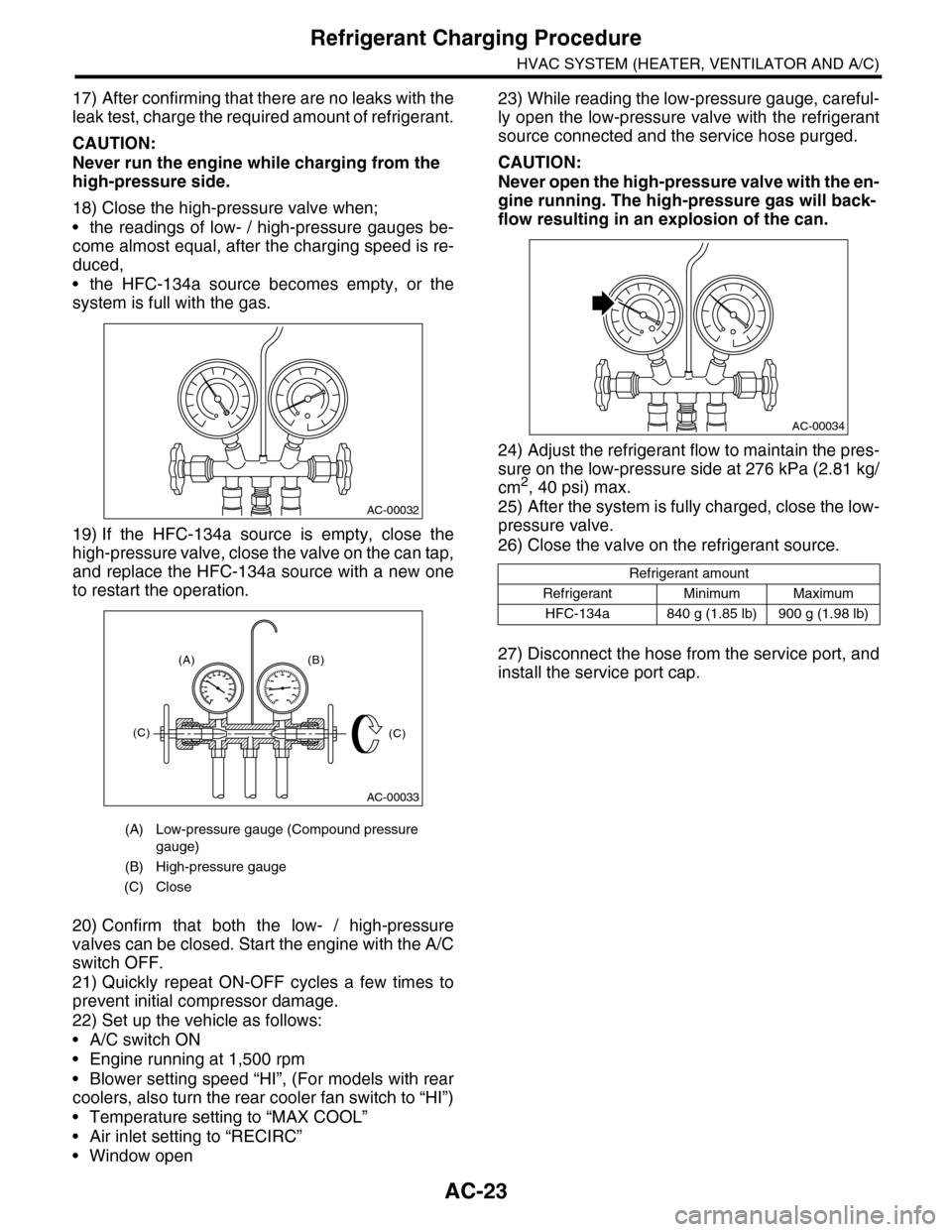
17) After confirming that there are no leaks with the
leak test, charge the required amount of refrigerant.
CAUTION:
Never run the engine while charging from the
high-pressure side.
18) Close the high-pressure valve when;
•the readings of low- / high-pressure gauges be-
come almost equal, after the charging speed is re-
duced,
•the HFC-134a source becomes empty, or the
system is full with the gas.
19) If the HFC-134a source is empty, close the
high-pressure valve, close the valve on the can tap,
and replace the HFC-134a source with a new one
to restart the operation.
20) Confirm that both the low- / high-pressure
valves can be closed. Start the engine with the A/C
switch OFF.
21) Quickly repeat ON-OFF cycles a few times to
prevent initial compressor damage.
22) Set up the vehicle as follows:
•A/C switch ON
•Engine running at 1,500 rpm
•Blower setting speed “HI”, (For models with rear
coolers, also turn the rear cooler fan switch to “HI”)
•Temperature setting to “MAX COOL”
•Air inlet setting to “RECIRC”
•Window open
23) While reading the low-pressure gauge, careful-
ly open the low-pressure valve with the refrigerant
source connected and the service hose purged.
CAUTION:
Never open the high-pressure valve with the en-
gine running. The high-pressure gas will back-
flow resulting in an explosion of the can.
24) Adjust the refrigerant flow to maintain the pres-
sure on the low-pressure side at 276 kPa (2.81 kg/
cm2, 40 psi) max.
25) After the system is fully charged, close the low-
pressure valve.
26) Close the valve on the refrigerant source.
27) Disconnect the hose from the service port, and
install the service port cap.
(A) Low-pressure gauge (Compound pressure
gauge)
(B) High-pressure gauge
(C) Close
AC-00032
AC-00033
(A) (B)
(C)(C)
Refrigerant amount
Refrigerant Minimum Maximum
HFC-134a 840 g (1.85 lb) 900 g (1.98 lb)
AC-00034
Page 362 of 2453
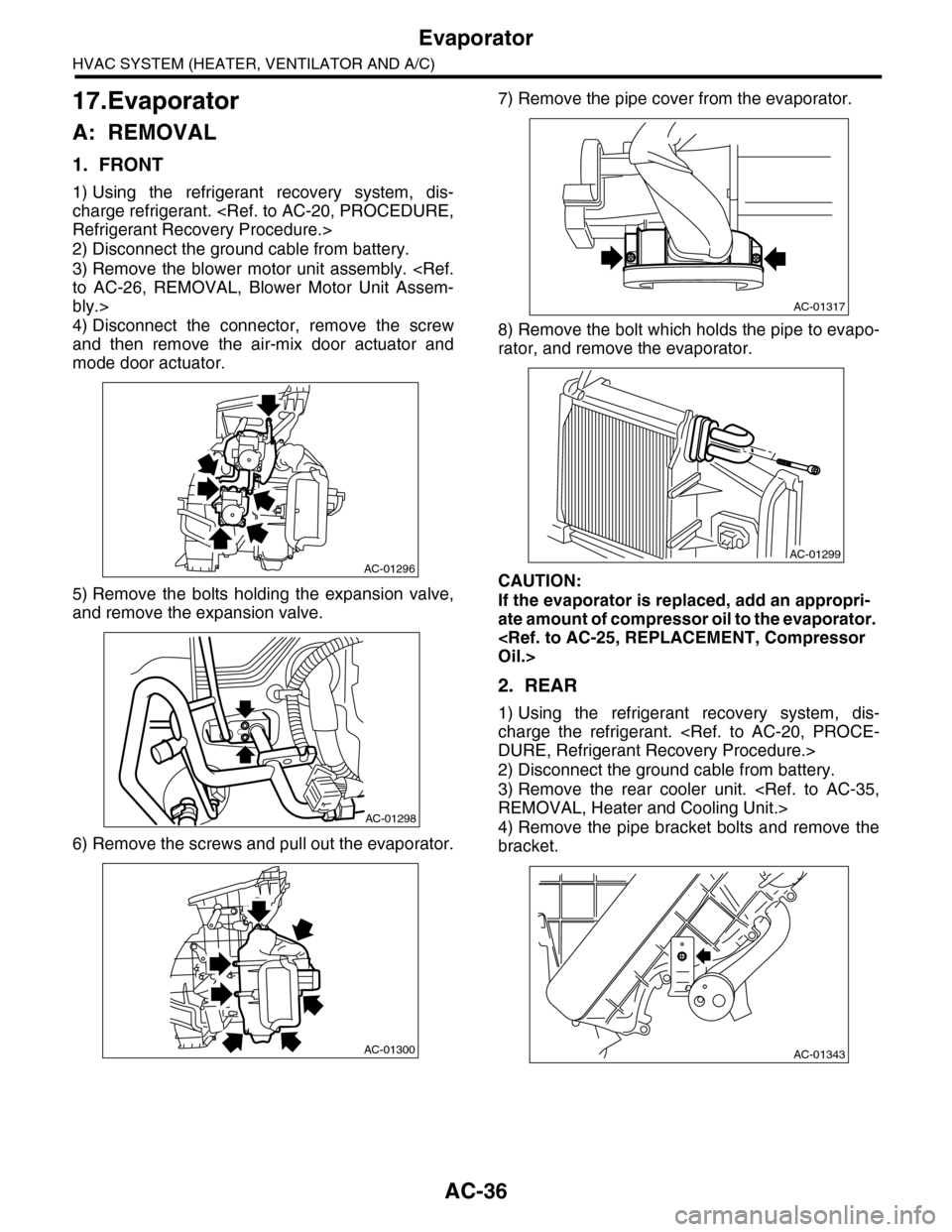
AC-36
Evaporator
HVAC SYSTEM (HEATER, VENTILATOR AND A/C)
17.Evaporator
A: REMOVAL
1. FRONT
1) Using the refrigerant recovery system, dis-
charge refrigerant.
2) Disconnect the ground cable from battery.
3) Remove the blower motor unit assembly.
bly.>
4) Disconnect the connector, remove the screw
and then remove the air-mix door actuator and
mode door actuator.
5) Remove the bolts holding the expansion valve,
and remove the expansion valve.
6) Remove the screws and pull out the evaporator.
7) Remove the pipe cover from the evaporator.
8) Remove the bolt which holds the pipe to evapo-
rator, and remove the evaporator.
CAUTION:
If the evaporator is replaced, add an appropri-
ate amount of compressor oil to the evaporator.
2. REAR
1) Using the refrigerant recovery system, dis-
charge the refrigerant.
2) Disconnect the ground cable from battery.
3) Remove the rear cooler unit.
4) Remove the pipe bracket bolts and remove the
bracket.
AC-01296
AC-01298
AC-01300
AC-01317
AC-01299
AC-01343
Page 388 of 2453
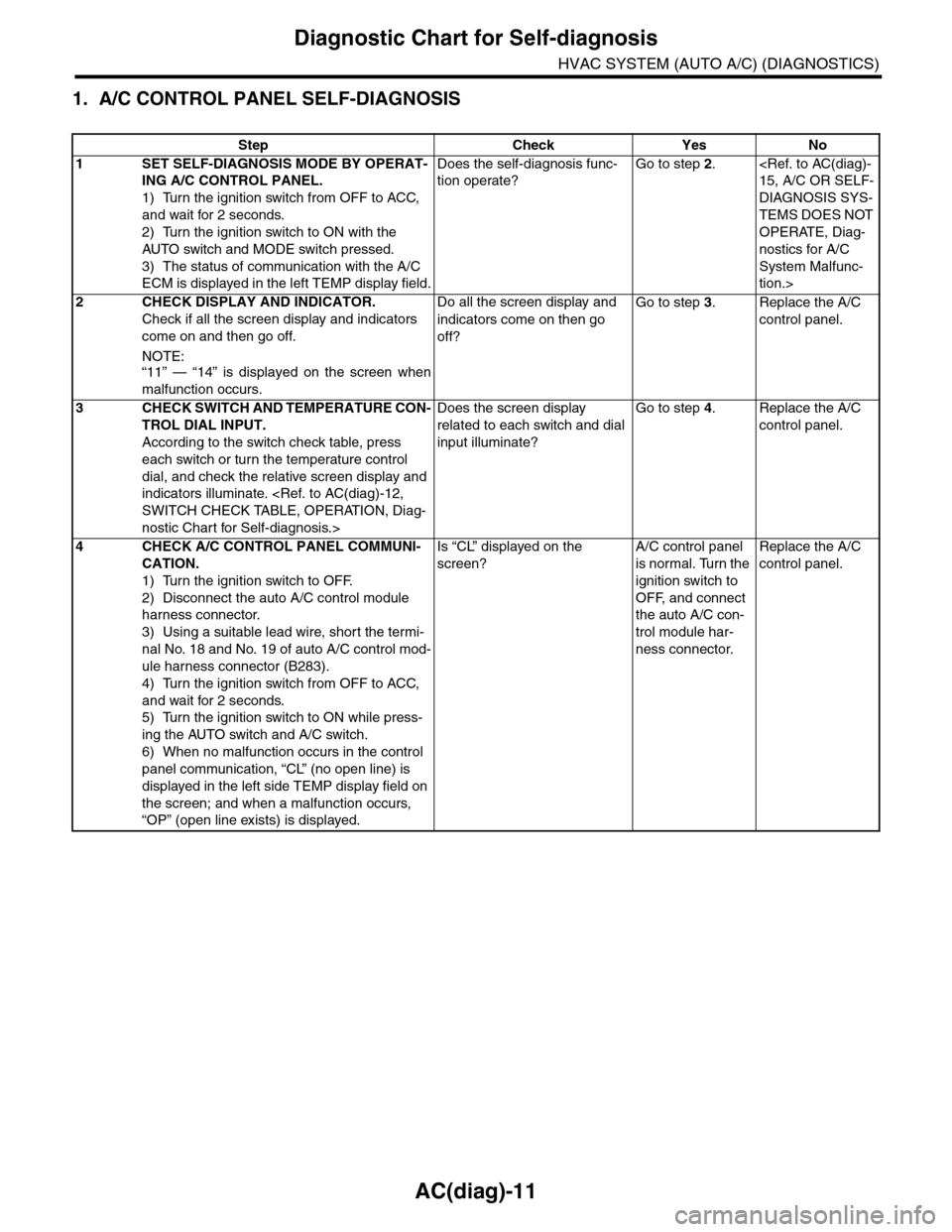
AC(diag)-11
Diagnostic Chart for Self-diagnosis
HVAC SYSTEM (AUTO A/C) (DIAGNOSTICS)
1. A/C CONTROL PANEL SELF-DIAGNOSIS
Step Check Yes No
1SET SELF-DIAGNOSIS MODE BY OPERAT-
ING A/C CONTROL PANEL.
1) Turn the ignition switch from OFF to ACC,
and wait for 2 seconds.
2) Turn the ignition switch to ON with the
AUTO switch and MODE switch pressed.
3) The status of communication with the A/C
ECM is displayed in the left TEMP display field.
Does the self-diagnosis func-
tion operate?
Go to step 2.
DIAGNOSIS SYS-
TEMS DOES NOT
OPERATE, Diag-
nostics for A/C
System Malfunc-
tion.>
2CHECK DISPLAY AND INDICATOR.
Check if all the screen display and indicators
come on and then go off.
NOTE:“11” — “14” is displayed on the screen when
malfunction occurs.
Do all the screen display and
indicators come on then go
off?
Go to step 3.Replace the A/C
control panel.
3CHECK SWITCH AND TEMPERATURE CON-
TROL DIAL INPUT.
According to the switch check table, press
each switch or turn the temperature control
dial, and check the relative screen display and
indicators illuminate.
nostic Chart for Self-diagnosis.>
Does the screen display
related to each switch and dial
input illuminate?
Go to step 4.Replace the A/C
control panel.
4CHECK A/C CONTROL PANEL COMMUNI-
CATION.
1) Turn the ignition switch to OFF.
2) Disconnect the auto A/C control module
harness connector.
3) Using a suitable lead wire, short the termi-
nal No. 18 and No. 19 of auto A/C control mod-
ule harness connector (B283).
4) Turn the ignition switch from OFF to ACC,
and wait for 2 seconds.
5) Turn the ignition switch to ON while press-
ing the AUTO switch and A/C switch.
6) When no malfunction occurs in the control
panel communication, “CL” (no open line) is
displayed in the left side TEMP display field on
the screen; and when a malfunction occurs,
“OP” (open line exists) is displayed.
Is “CL” displayed on the
screen?
A/C control panel
is normal. Turn the
ignition switch to
OFF, and connect
the auto A/C con-
trol module har-
ness connector.
Replace the A/C
control panel.
Page 390 of 2453
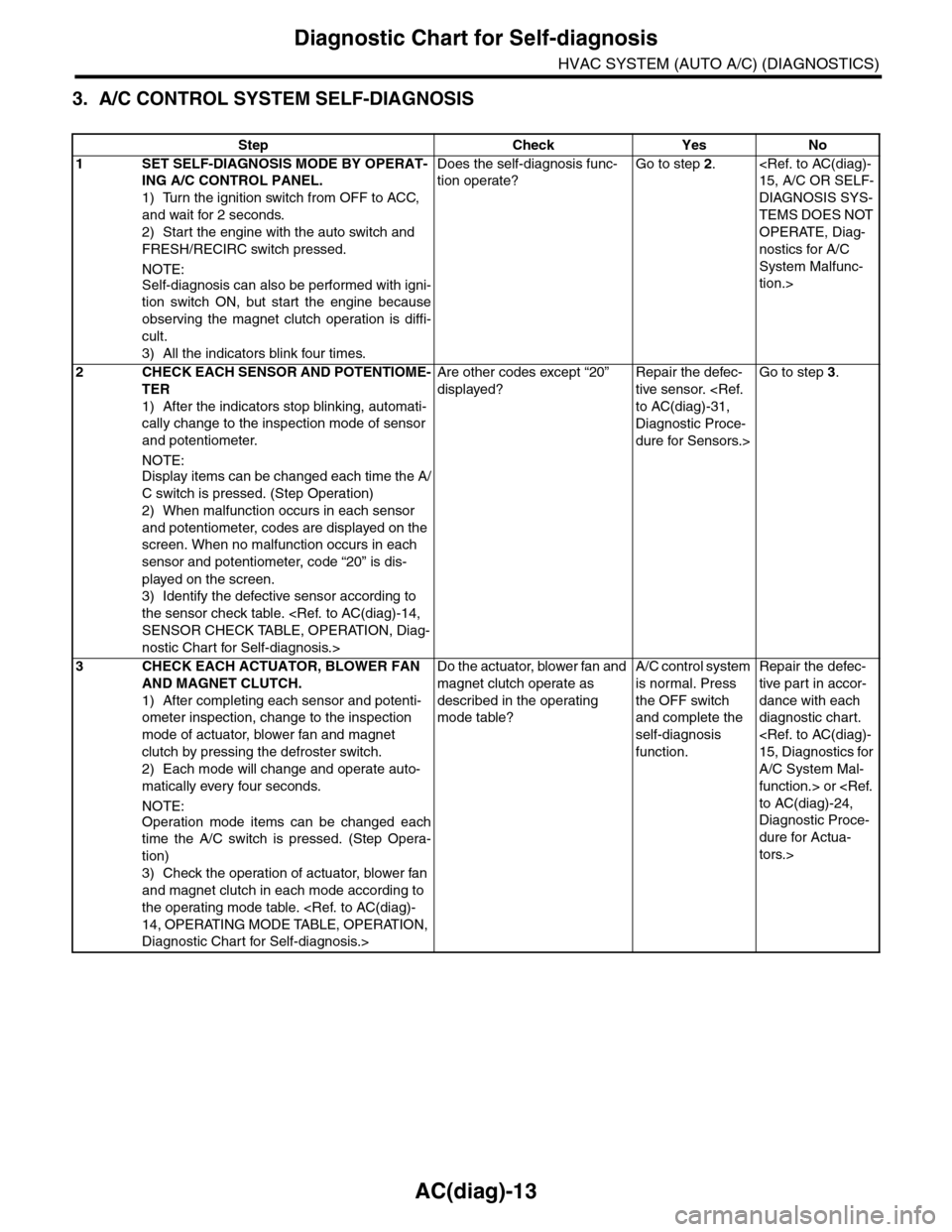
AC(diag)-13
Diagnostic Chart for Self-diagnosis
HVAC SYSTEM (AUTO A/C) (DIAGNOSTICS)
3. A/C CONTROL SYSTEM SELF-DIAGNOSIS
Step Check Yes No
1SET SELF-DIAGNOSIS MODE BY OPERAT-
ING A/C CONTROL PANEL.
1) Turn the ignition switch from OFF to ACC,
and wait for 2 seconds.
2) Start the engine with the auto switch and
FRESH/RECIRC switch pressed.
NOTE:
Self-diagnosis can also be performed with igni-
tion switch ON, but start the engine because
observing the magnet clutch operation is diffi-
cult.
3) All the indicators blink four times.
Does the self-diagnosis func-
tion operate?
Go to step 2.
DIAGNOSIS SYS-
TEMS DOES NOT
OPERATE, Diag-
nostics for A/C
System Malfunc-
tion.>
2CHECK EACH SENSOR AND POTENTIOME-
TER
1) After the indicators stop blinking, automati-
cally change to the inspection mode of sensor
and potentiometer.
NOTE:
Display items can be changed each time the A/
C switch is pressed. (Step Operation)
2) When malfunction occurs in each sensor
and potentiometer, codes are displayed on the
screen. When no malfunction occurs in each
sensor and potentiometer, code “20” is dis-
played on the screen.
3) Identify the defective sensor according to
the sensor check table.
nostic Chart for Self-diagnosis.>
Are other codes except “20”
displayed?
Repair the defec-
tive sensor.
Diagnostic Proce-
dure for Sensors.>
Go to step 3.
3CHECK EACH ACTUATOR, BLOWER FAN
AND MAGNET CLUTCH.
1) After completing each sensor and potenti-
ometer inspection, change to the inspection
mode of actuator, blower fan and magnet
clutch by pressing the defroster switch.
2) Each mode will change and operate auto-
matically every four seconds.
NOTE:
Operation mode items can be changed each
time the A/C switch is pressed. (Step Opera-
tion)
3) Check the operation of actuator, blower fan
and magnet clutch in each mode according to
the operating mode table.
Diagnostic Chart for Self-diagnosis.>
Do the actuator, blower fan and
magnet clutch operate as
described in the operating
mode table?
A/C control system
is normal. Press
the OFF switch
and complete the
self-diagnosis
function.
Repair the defec-
tive par t in accor-
dance with each
diagnostic chart.
A/C System Mal-
function.> or
Diagnostic Proce-
dure for Actua-
tors.>
Page 418 of 2453
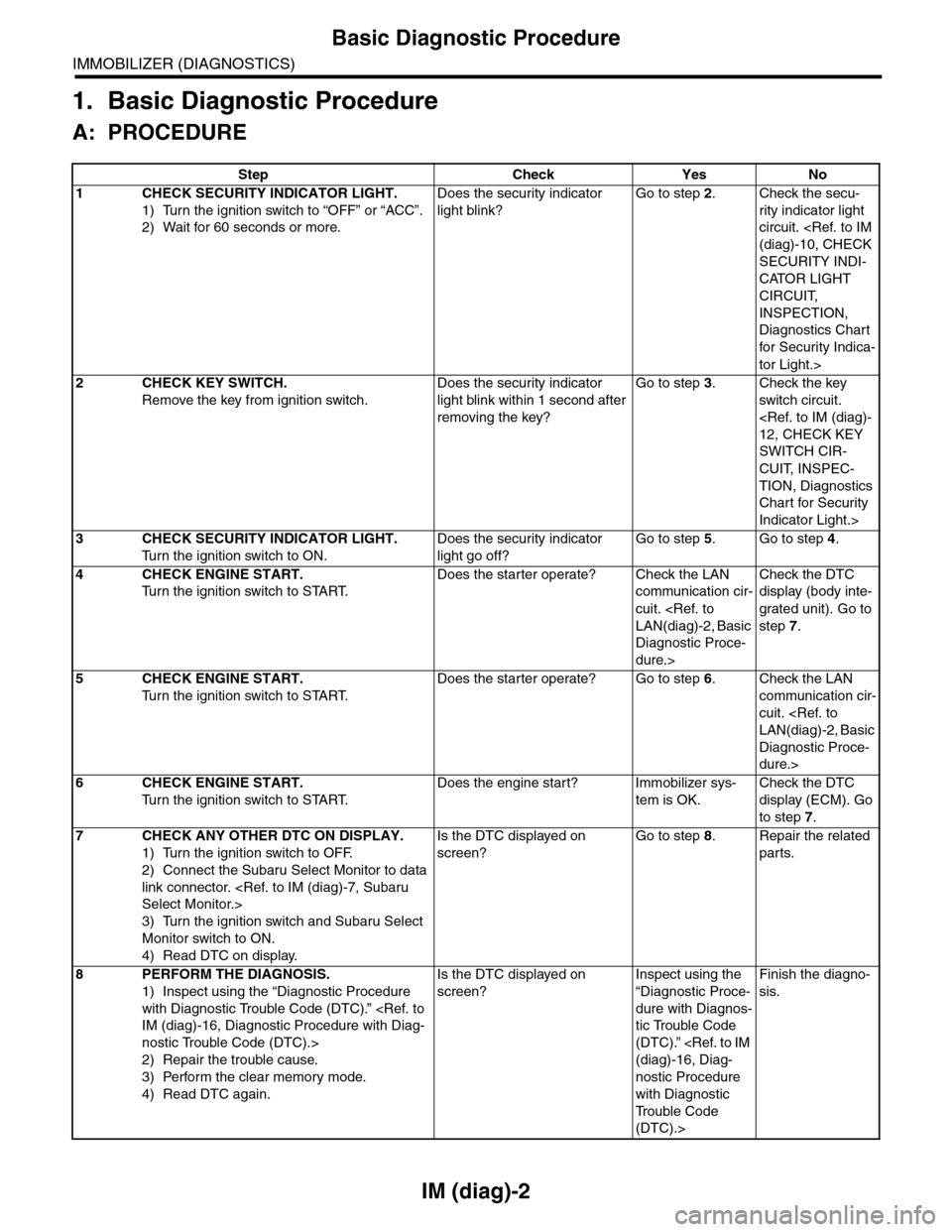
IM (diag)-2
Basic Diagnostic Procedure
IMMOBILIZER (DIAGNOSTICS)
1. Basic Diagnostic Procedure
A: PROCEDURE
Step Check Yes No
1CHECK SECURITY INDICATOR LIGHT.
1) Turn the ignition switch to “OFF” or “ACC”.
2) Wait for 60 seconds or more.
Does the security indicator
light blink?
Go to step 2.Check the secu-
rity indicator light
circuit.
SECURITY INDI-
CATOR LIGHT
CIRCUIT,
INSPECTION,
Diagnostics Chart
for Secur ity Indica-
tor Light.>
2CHECK KEY SWITCH.
Remove the key from ignition switch.
Does the security indicator
light blink within 1 second after
removing the key?
Go to step 3.Check the key
switch circuit.
SWITCH CIR-
CUIT, INSPEC-
TION, Diagnostics
Chart for Security
Indicator Light.>
3CHECK SECURITY INDICATOR LIGHT.
Tu r n t h e i g n i t i o n s w i t c h t o O N .
Does the security indicator
light go off?
Go to step 5.Go to step 4.
4CHECK ENGINE START.
Tu r n t h e i g n i t i o n s w i t c h t o S TA R T.
Does the starter operate? Check the LAN
communication cir-
cuit.
Diagnostic Proce-
dure.>
Check the DTC
display (body inte-
grated unit). Go to
step 7.
5CHECK ENGINE START.
Tu r n t h e i g n i t i o n s w i t c h t o S TA R T.
Does the starter operate? Go to step 6.Check the LAN
communication cir-
cuit.
Diagnostic Proce-
dure.>
6CHECK ENGINE START.
Tu r n t h e i g n i t i o n s w i t c h t o S TA R T.
Does the engine start? Immobilizer sys-
tem is OK.
Check the DTC
display (ECM). Go
to step 7.
7CHECK ANY OTHER DTC ON DISPLAY.
1) Turn the ignition switch to OFF.
2) Connect the Subaru Select Monitor to data
link connector.
3) Turn the ignition switch and Subaru Select
Monitor switch to ON.
4) Read DTC on display.
Is the DTC displayed on
screen?
Go to step 8.Repair the related
parts.
8PERFORM THE DIAGNOSIS.
1) Inspect using the “Diagnostic Procedure
with Diagnostic Trouble Code (DTC).”
nostic Trouble Code (DTC).>
2) Repair the trouble cause.
3) Perform the clear memory mode.
4) Read DTC again.
Is the DTC displayed on
screen?
Inspect using the
“Diagnostic Proce-
dure with Diagnos-
tic Trouble Code
(DTC).”
nostic Procedure
with Diagnostic
Tr o u b l e C o d e
(DTC).>
Finish the diagno-
sis.
Page 423 of 2453
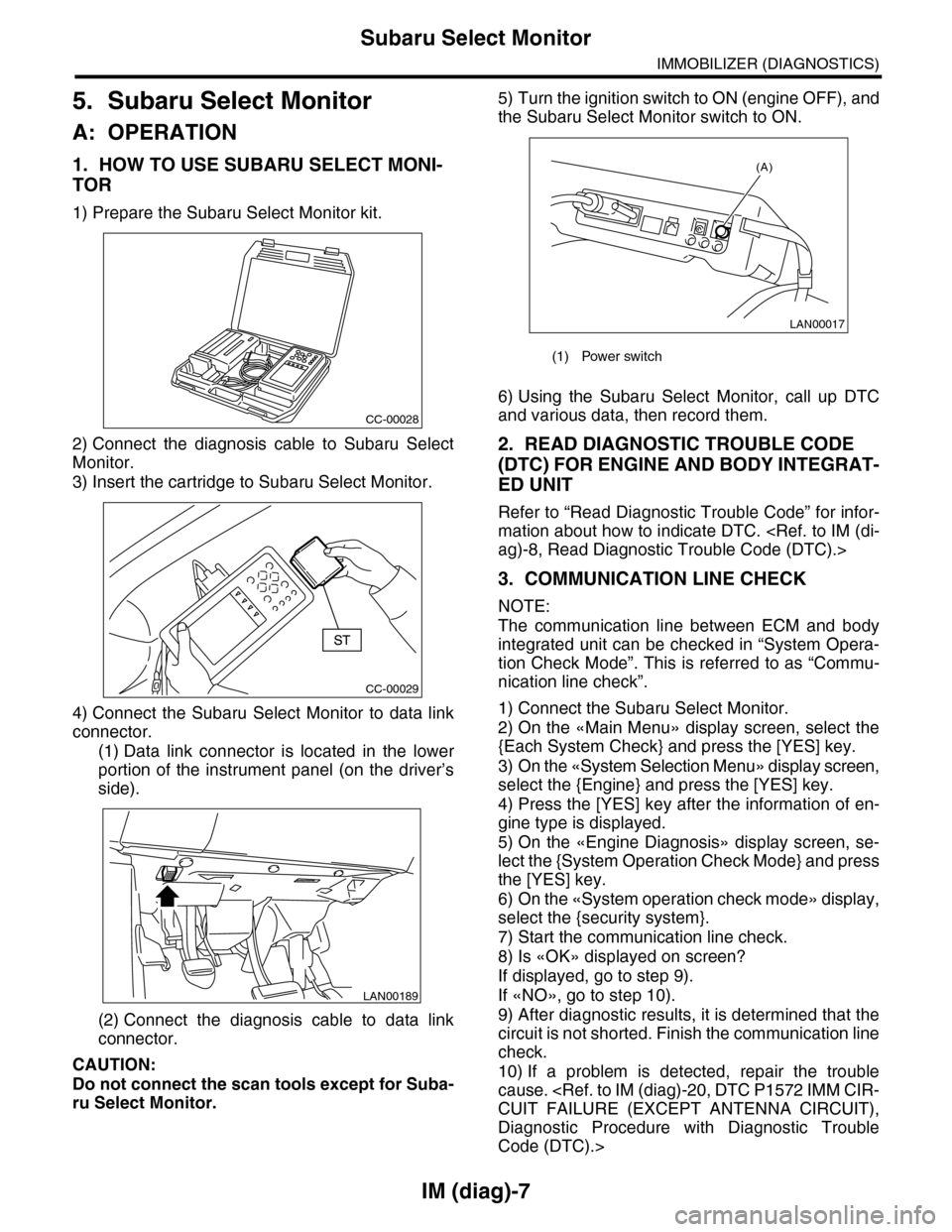
IM (diag)-7
Subaru Select Monitor
IMMOBILIZER (DIAGNOSTICS)
5. Subaru Select Monitor
A: OPERATION
1. HOW TO USE SUBARU SELECT MONI-
TOR
1) Prepare the Subaru Select Monitor kit.
2) Connect the diagnosis cable to Subaru Select
Monitor.
3) Insert the cartridge to Subaru Select Monitor.
4) Connect the Subaru Select Monitor to data link
connector.
(1) Data link connector is located in the lower
portion of the instrument panel (on the driver’s
side).
(2) Connect the diagnosis cable to data link
connector.
CAUTION:
Do not connect the scan tools except for Suba-
ru Select Monitor.
5) Turn the ignition switch to ON (engine OFF), and
the Subaru Select Monitor switch to ON.
6) Using the Subaru Select Monitor, call up DTC
and various data, then record them.
2. READ DIAGNOSTIC TROUBLE CODE
(DTC) FOR ENGINE AND BODY INTEGRAT-
ED UNIT
Refer to “Read Diagnostic Trouble Code” for infor-
mation about how to indicate DTC.
3. COMMUNICATION LINE CHECK
NOTE:
The communication line between ECM and body
integrated unit can be checked in “System Opera-
tion Check Mode”. This is referred to as “Commu-
nication line check”.
1) Connect the Subaru Select Monitor.
2) On the «Main Menu» display screen, select the
{Each System Check} and press the [YES] key.
3) On the «System Selection Menu» display screen,
select the {Engine} and press the [YES] key.
4) Press the [YES] key after the information of en-
gine type is displayed.
5) On the «Engine Diagnosis» display screen, se-
lect the {System Operation Check Mode} and press
the [YES] key.
6) On the «System operation check mode» display,
select the {security system}.
7) Start the communication line check.
8) Is «OK» displayed on screen?
If displayed, go to step 9).
If «NO», go to step 10).
9) After diagnostic results, it is determined that the
circuit is not shorted. Finish the communication line
check.
10) If a problem is detected, repair the trouble
cause.
Diagnostic Procedure with Diagnostic Trouble
Code (DTC).>
CC-00028
CC-00029
LAN00189
(1) Power switch
LAN00017
(A)
Page 425 of 2453
![SUBARU TRIBECA 2009 1.G Service Owners Manual IM (diag)-9
Clear Memory Mode
IMMOBILIZER (DIAGNOSTICS)
7. Clear Memory Mode
A: OPERATION
1. ECM
1) On the «Main Menu» display screen, select the
{Each System Check} and press the [YES] key.
2) On](/img/17/7322/w960_7322-424.png "SUBARU TRIBECA 2009 1.G Service Owners Manual IM (diag)-9
Clear Memory Mode
IMMOBILIZER (DIAGNOSTICS)
7. Clear Memory Mode
A: OPERATION
1. ECM
1) On the «Main Menu» display screen, select the
{Each System Check} and press the [YES] key.
2) On")
IM (diag)-9
Clear Memory Mode
IMMOBILIZER (DIAGNOSTICS)
7. Clear Memory Mode
A: OPERATION
1. ECM
1) On the «Main Menu» display screen, select the
{Each System Check} and press the [YES] key.
2) On the «System Selection Menu» display
screen, select the {Engine} and press the [YES]
key.
3) Press the [YES] key after the information of en-
gine type is displayed.
4) On the «Engine Diagnosis» display screen, se-
lect the {Memory Clear} and press the [YES] key.
5) When the ‘Done’ are shown on the display
screen, turn the Subaru Select Monitor and ignition
switch to OFF.
NOTE:
•After the memory has been cleared, the idle air
control solenoid valve must be initialized. To exe-
cute this procedure, turn the ignition switch to ON.
Wait for 3 seconds before starting the engine.
•For detailed operation procedure, refer to the
“SUBARU SELECT MONITOR OPERATION
MANUAL”.
2. BODY INTEGRATED UNIT
1) On the «Main Menu» display screen, select the
{Each System Check} and press the [YES] key.
2) On the «System Selection Menu» display
screen, select the {Integ. unit mode} and press the
[YES] key.
3) Press the [YES] key after the {Integ. unit mode}
is displayed.
4) On the «Integ. unit mode failure diag» display
screen, select the {Clear Memory} and press the
[YES] key.
5) When the ‘Done’ are shown on the display
screen, turn the Subaru Select Monitor and ignition
switch to OFF.
NOTE:
For detailed operation procedure, refer to the
“SUBARU SELECT MONITOR OPERATION
MANUAL”.