ECO mode SUBARU TRIBECA 2009 1.G Service Service Manual
[x] Cancel search | Manufacturer: SUBARU, Model Year: 2009, Model line: TRIBECA, Model: SUBARU TRIBECA 2009 1.GPages: 2453, PDF Size: 46.32 MB
Page 682 of 2453
SL-53
Transmitter
SECURITY AND LOCKS
24.Transmitter
A: REMOVAL
1. TRANSMITTER BATTERY
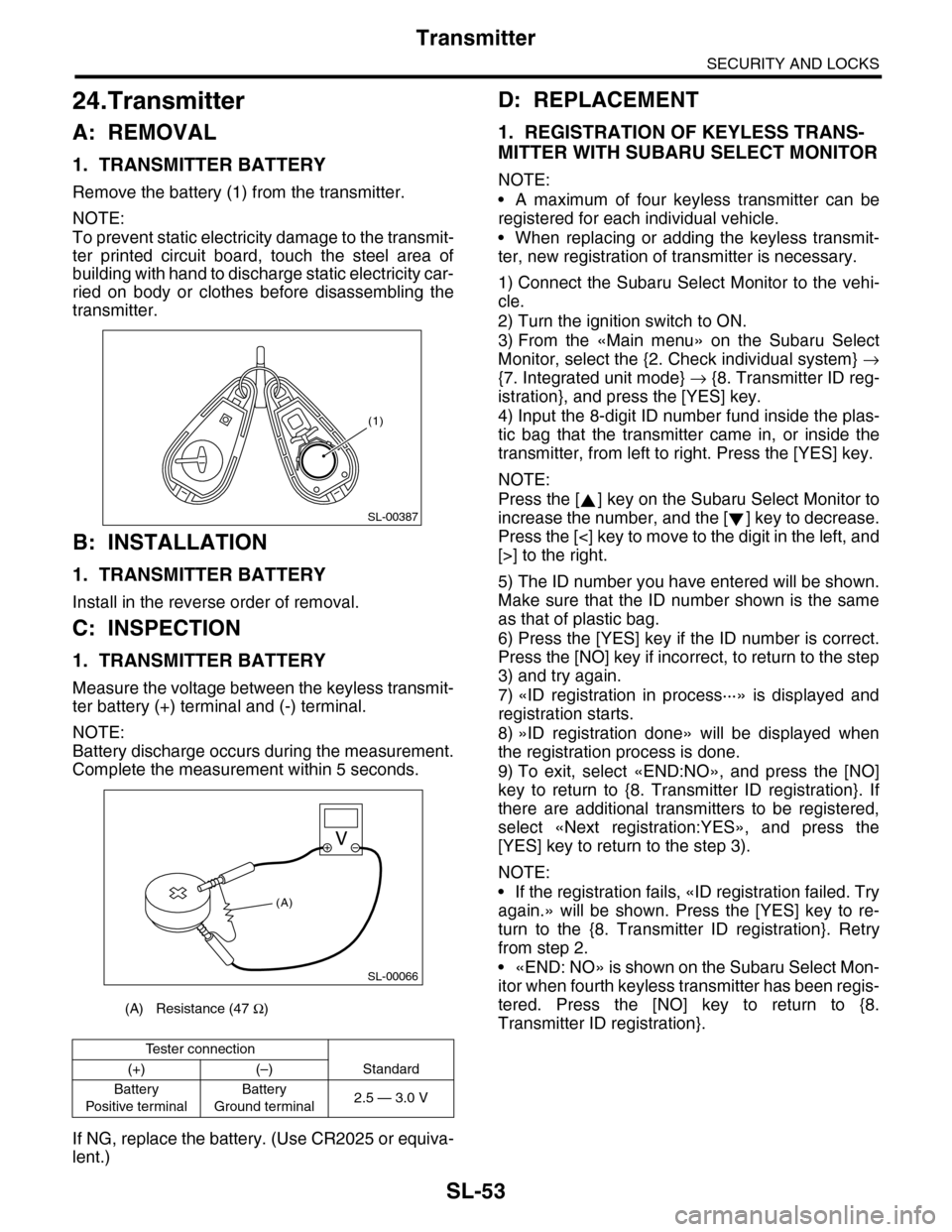
Remove the battery (1) from the transmitter.
NOTE:
To prevent static electricity damage to the transmit-
ter printed circuit board, touch the steel area of
building with hand to discharge static electricity car-
ried on body or clothes before disassembling the
transmitter.
B: INSTALLATION
1. TRANSMITTER BATTERY
Install in the reverse order of removal.
C: INSPECTION
1. TRANSMITTER BATTERY
Measure the voltage between the keyless transmit-
ter battery (+) terminal and (-) terminal.
NOTE:
Battery discharge occurs during the measurement.
Complete the measurement within 5 seconds.
If NG, replace the battery. (Use CR2025 or equiva-
lent.)
D: REPLACEMENT
1. REGISTRATION OF KEYLESS TRANS-
MITTER WITH SUBARU SELECT MONITOR
NOTE:
•A maximum of four keyless transmitter can be
registered for each individual vehicle.
•When replacing or adding the keyless transmit-
ter, new registration of transmitter is necessary.
1) Connect the Subaru Select Monitor to the vehi-
cle.
2) Turn the ignition switch to ON.
3) From the «Main menu» on the Subaru Select
Monitor, select the {2. Check individual system} →
{7. Integrated unit mode} → {8. Transmitter ID reg-
istration}, and press the [YES] key.
4) Input the 8-digit ID number fund inside the plas-
tic bag that the transmitter came in, or inside the
transmitter, from left to right. Press the [YES] key.
NOTE:
Press the [ ] key on the Subaru Select Monitor to
increase the number, and the [ ] key to decrease.
Press the [<] key to move to the digit in the left, and
[>] to the right.
5) The ID number you have entered will be shown.
Make sure that the ID number shown is the same
as that of plastic bag.
6) Press the [YES] key if the ID number is correct.
Press the [NO] key if incorrect, to return to the step
3) and try again.
7) «ID registration in process···» is displayed and
registration starts.
8) »ID registration done» will be displayed when
the registration process is done.
9) To exit, select «END:NO», and press the [NO]
key to return to {8. Transmitter ID registration}. If
there are additional transmitters to be registered,
select «Next registration:YES», and press the
[YES] key to return to the step 3).
NOTE:
•If the registration fails, «ID registration failed. Try
again.» will be shown. Press the [YES] key to re-
turn to the {8. Transmitter ID registration}. Retry
from step 2.
•«END: NO» is shown on the Subaru Select Mon-
itor when fourth keyless transmitter has been regis-
tered. Press the [NO] key to return to {8.
Transmitter ID registration}.(A) Resistance (47 Ω)
Te s t e r c o n n e c t i o n
(+) (–) Standard
Battery
Po si t ive t e r mi na l
Battery
Ground terminal2.5 — 3.0 V
(1)
SL-00387
SL-00066
(A)
Page 757 of 2453
BVC(diag)-2
Basic Diagnostic Procedure
BRAKE VACUUM CONTROL (BVC) (DIAGNOSTICS)
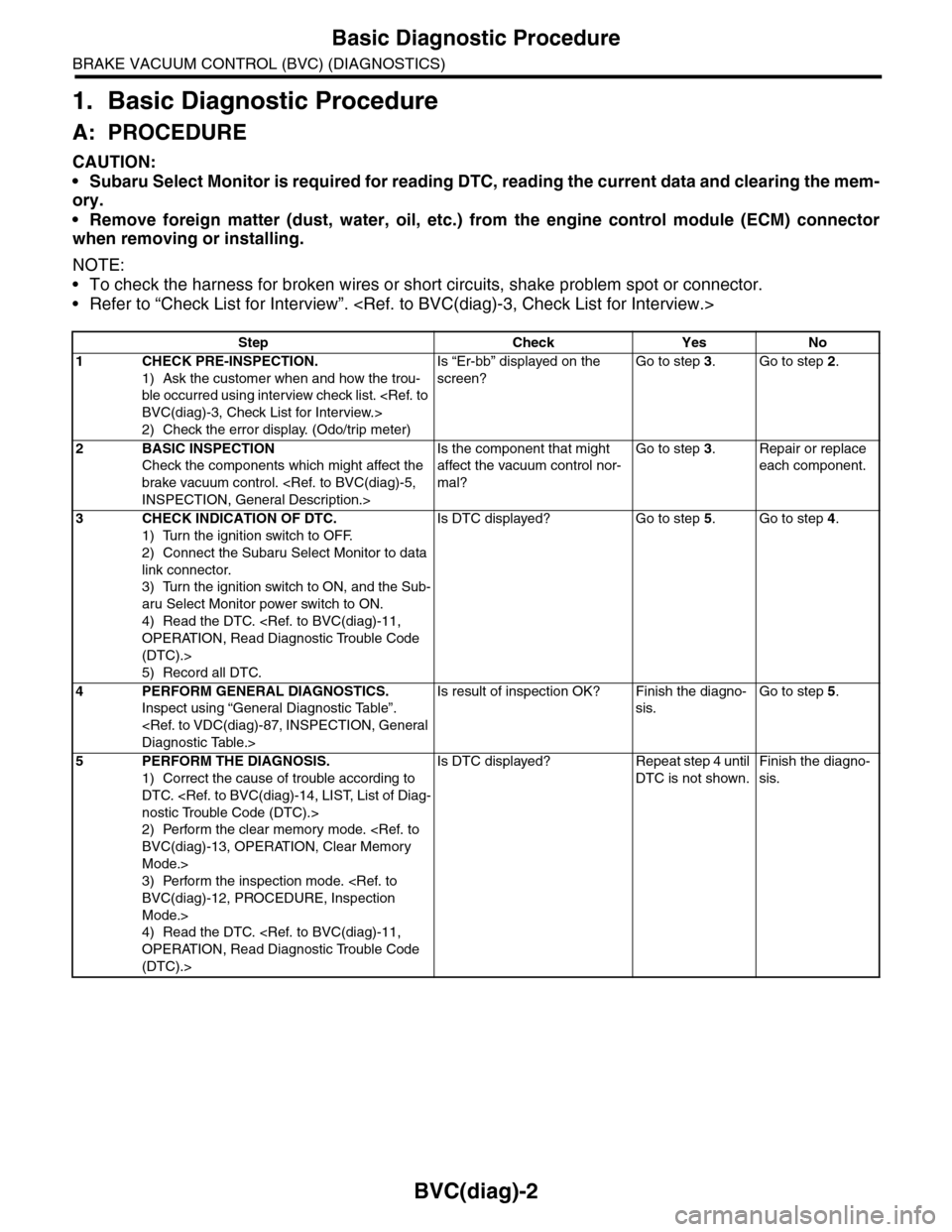
1. Basic Diagnostic Procedure
A: PROCEDURE
CAUTION:
•Subaru Select Monitor is required for reading DTC, reading the current data and clearing the mem-
ory.
•Remove foreign matter (dust, water, oil, etc.) from the engine control module (ECM) connector
when removing or installing.
NOTE:
•To check the harness for broken wires or short circuits, shake problem spot or connector.
•Refer to “Check List for Interview”.
Step Check Yes No
1CHECK PRE-INSPECTION.
1) Ask the customer when and how the trou-
ble occurred using interview check list.
2) Check the error display. (Odo/trip meter)
Is “Er-bb” displayed on the
screen?
Go to step 3.Go to step 2.
2BASIC INSPECTION
Check the components which might affect the
brake vacuum control.
Is the component that might
affect the vacuum control nor-
mal?
Go to step 3.Repair or replace
each component.
3CHECK INDICATION OF DTC.
1) Turn the ignition switch to OFF.
2) Connect the Subaru Select Monitor to data
link connector.
3) Turn the ignition switch to ON, and the Sub-
aru Select Monitor power switch to ON.
4) Read the DTC.
(DTC).>
5) Record all DTC.
Is DTC displayed? Go to step 5.Go to step 4.
4PERFORM GENERAL DIAGNOSTICS.
Inspect using “General Diagnostic Table”.
Is result of inspection OK? Finish the diagno-
sis.
Go to step 5.
5PERFORM THE DIAGNOSIS.
1) Correct the cause of trouble according to
DTC.
2) Perform the clear memory mode.
Mode.>
3) Perform the inspection mode.
Mode.>
4) Read the DTC.
(DTC).>
Is DTC displayed? Repeat step 4 until
DTC is not shown.
Finish the diagno-
sis.
Page 930 of 2453
PS-50
General Diagnostic Table
POWER ASSISTED SYSTEM (POWER STEERING)
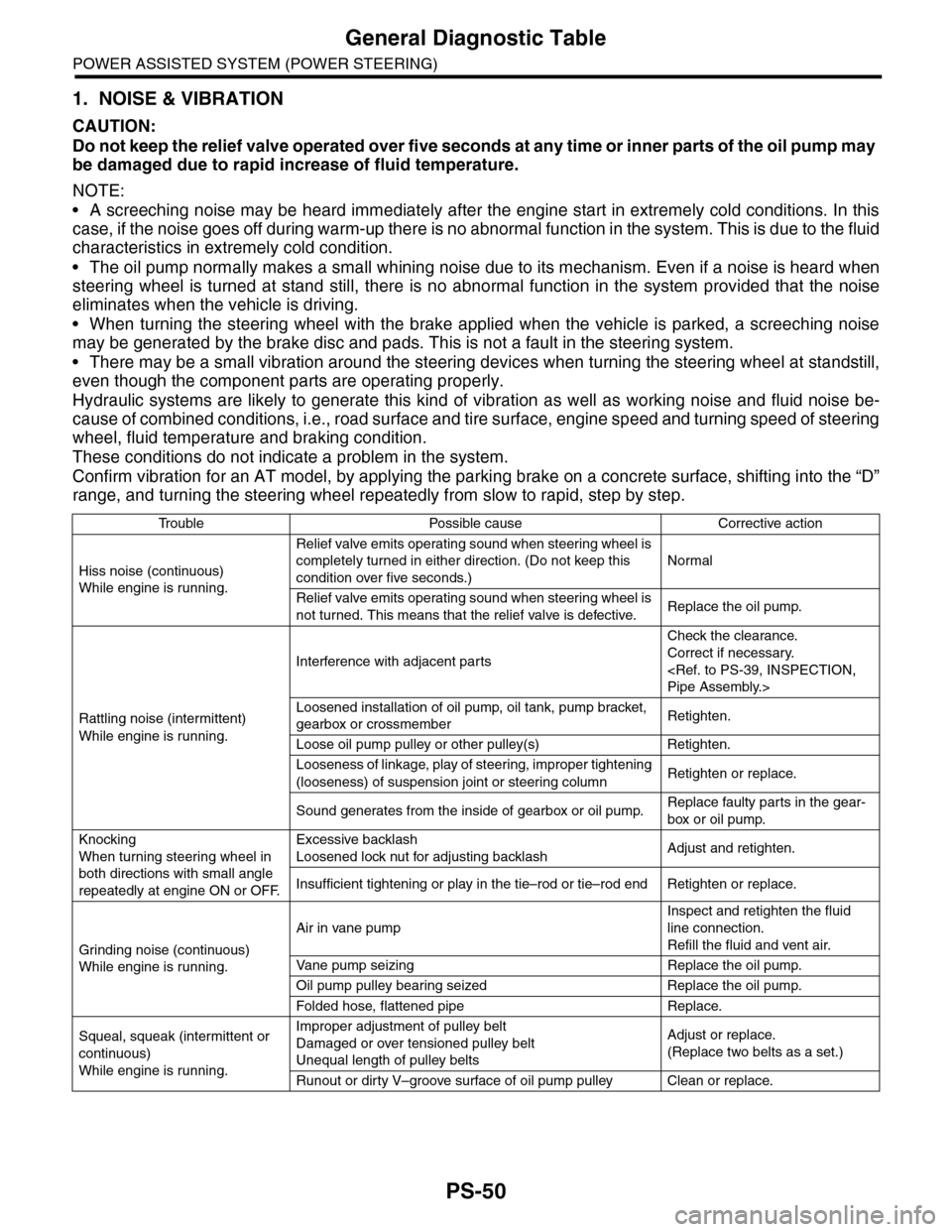
1. NOISE & VIBRATION
CAUTION:
Do not keep the relief valve operated over five seconds at any time or inner parts of the oil pump may
be damaged due to rapid increase of fluid temperature.
NOTE:
•A screeching noise may be heard immediately after the engine start in extremely cold conditions. In this
case, if the noise goes off during warm-up there is no abnormal function in the system. This is due to the fluid
characteristics in extremely cold condition.
•The oil pump normally makes a small whining noise due to its mechanism. Even if a noise is heard when
steering wheel is turned at stand still, there is no abnormal function in the system provided that the noise
eliminates when the vehicle is driving.
•When turning the steering wheel with the brake applied when the vehicle is parked, a screeching noise
may be generated by the brake disc and pads. This is not a fault in the steering system.
•There may be a small vibration around the steering devices when turning the steering wheel at standstill,
even though the component parts are operating properly.
Hydraulic systems are likely to generate this kind of vibration as well as working noise and fluid noise be-
cause of combined conditions, i.e., road surface and tire surface, engine speed and turning speed of steering
wheel, fluid temperature and braking condition.
These conditions do not indicate a problem in the system.
Confirm vibration for an AT model, by applying the parking brake on a concrete surface, shifting into the “D”
range, and turning the steering wheel repeatedly from slow to rapid, step by step.
Tr o u b l e P o s s i b l e c a u s e C o r r e c t i v e a c t i o n
Hiss noise (continuous)
While engine is running.
Relief valve emits operating sound when steering wheel is
completely turned in either direction. (Do not keep this
condition over five seconds.)
Normal
Relief valve emits operating sound when steering wheel is
not turned. This means that the relief valve is defective. Replace the oil pump.
Rattling noise (intermittent)
While engine is running.
Interference with adjacent parts
Check the clearance.
Correct if necessary.
Loosened installation of oil pump, oil tank, pump bracket,
gearbox or crossmemberRetighten.
Loose oil pump pulley or other pulley(s) Retighten.
Looseness of linkage, play of steering, improper tightening
(looseness) of suspension joint or steering columnRetighten or replace.
Sound generates from the inside of gearbox or oil pump.Replace faulty parts in the gear-
box or oil pump.
Knocking
When turning steering wheel in
both directions with small angle
repeatedly at engine ON or OFF.
Excessive backlash
Loosened lock nut for adjusting backlashAdjust and retighten.
Insufficient tightening or play in the tie–rod or tie–rod end Retighten or replace.
Grinding noise (continuous)
While engine is running.
Air in vane pump
Inspect and retighten the fluid
line connection.
Refill the fluid and vent air.
Va n e p u m p s e i z i n g R e p l a c e t h e o i l p u m p.
Oil pump pulley bearing seized Replace the oil pump.
Folded hose, flattened pipe Replace.
Squeal, squeak (intermittent or
continuous)
While engine is running.
Improper adjustment of pulley belt
Damaged or over tensioned pulley belt
Unequal length of pulley belts
Adjust or replace.
(Replace two belts as a set.)
Runout or dirty V–groove surface of oil pump pulley Clean or replace.
Page 952 of 2453
TPM(diag)-2
Basic Diagnostic Procedure
TIRE PRESSURE MONITORING SYSTEM (DIAGNOSTICS)
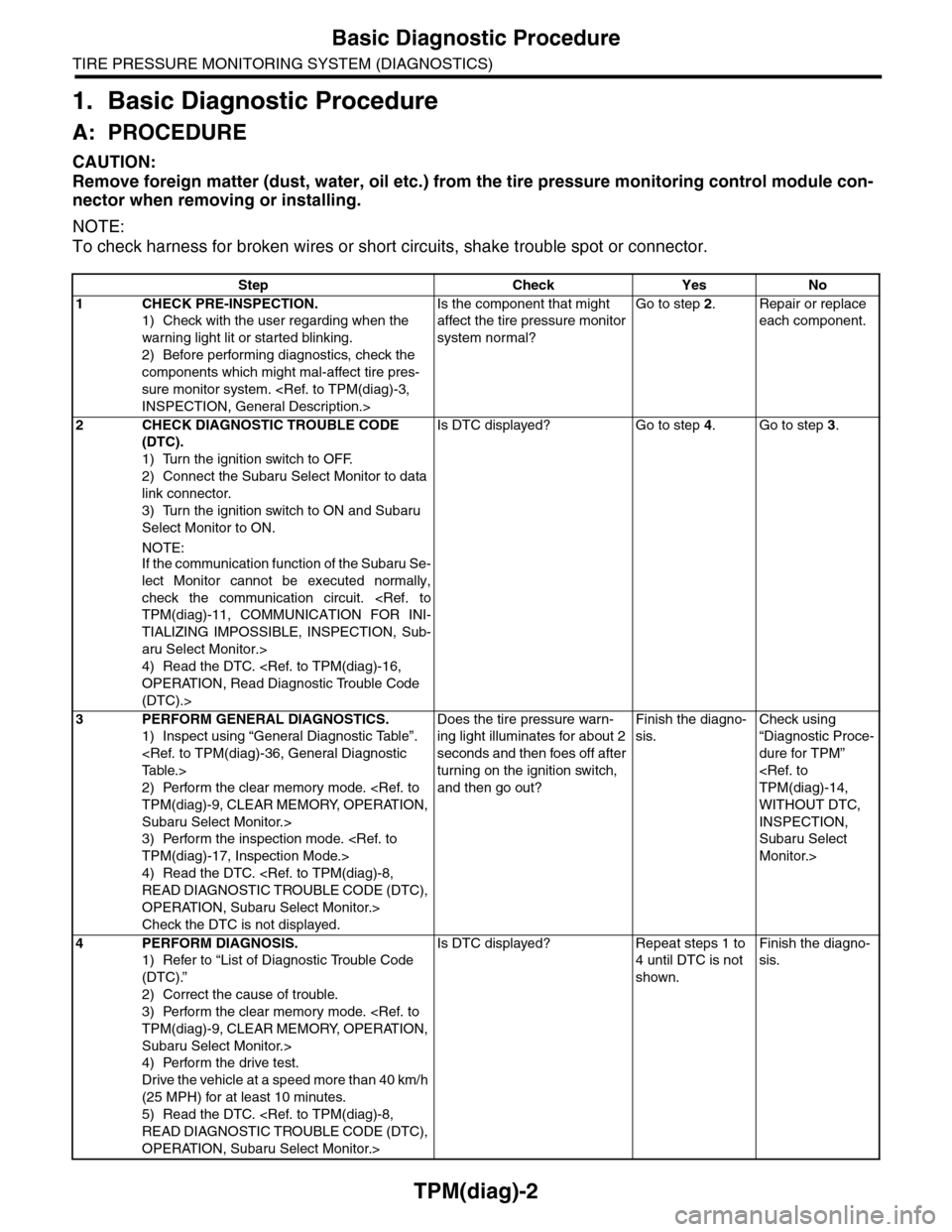
1. Basic Diagnostic Procedure
A: PROCEDURE
CAUTION:
Remove foreign matter (dust, water, oil etc.) from the tire pressure monitoring control module con-
nector when removing or installing.
NOTE:
To check harness for broken wires or short circuits, shake trouble spot or connector.
Step Check Yes No
1CHECK PRE-INSPECTION.
1) Check with the user regarding when the
warning light lit or started blinking.
2) Before performing diagnostics, check the
components which might mal-affect tire pres-
sure monitor system.
Is the component that might
affect the tire pressure monitor
system normal?
Go to step 2.Repair or replace
each component.
2CHECK DIAGNOSTIC TROUBLE CODE
(DTC).
1) Turn the ignition switch to OFF.
2) Connect the Subaru Select Monitor to data
link connector.
3) Turn the ignition switch to ON and Subaru
Select Monitor to ON.
NOTE:If the communication function of the Subaru Se-
lect Monitor cannot be executed normally,
check the communication circuit.
TIALIZING IMPOSSIBLE, INSPECTION, Sub-
aru Select Monitor.>
4) Read the DTC.
(DTC).>
Is DTC displayed? Go to step 4.Go to step 3.
3PERFORM GENERAL DIAGNOSTICS.
1) Inspect using “General Diagnostic Table”.
2) Perform the clear memory mode.
Subaru Select Monitor.>
3) Perform the inspection mode.
4) Read the DTC.
OPERATION, Subaru Select Monitor.>
Check the DTC is not displayed.
Does the tire pressure warn-
ing light illuminates for about 2
seconds and then foes off after
turning on the ignition switch,
and then go out?
Finish the diagno-
sis.
Check using
“Diagnostic Proce-
dure for TPM”
WITHOUT DTC,
INSPECTION,
Subaru Select
Monitor.>
4PERFORM DIAGNOSIS.
1) Refer to “List of Diagnostic Trouble Code
(DTC).”
2) Correct the cause of trouble.
3) Perform the clear memory mode.
Subaru Select Monitor.>
4) Perform the drive test.
Drive the vehicle at a speed more than 40 km/h
(25 MPH) for at least 10 minutes.
5) Read the DTC.
OPERATION, Subaru Select Monitor.>
Is DTC displayed? Repeat steps 1 to
4 until DTC is not
shown.
Finish the diagno-
sis.
Page 960 of 2453
TPM(diag)-10
Subaru Select Monitor
TIRE PRESSURE MONITORING SYSTEM (DIAGNOSTICS)
2) Connect the Subaru Select Monitor, on the
«Main Menu» display screen, select the {2. Each
System Check} and press the [YES] key.
3) On the «System Selection Menu» display
screen, select the {Tire Pressure Monitor} and
press the [YES] key.
4) Press the [YES] key after the {Tire Pressure
Monitor} is displayed.
5) On the «Tire Pressure Monitor Diagnosis» dis-
play screen, select the {Transmitter ID regist con-
firm} and press the [YES] key.
6) {When ID registration mode execute, Registered
ID is deleted Proceed?} is displayed then press the
[YES] key.
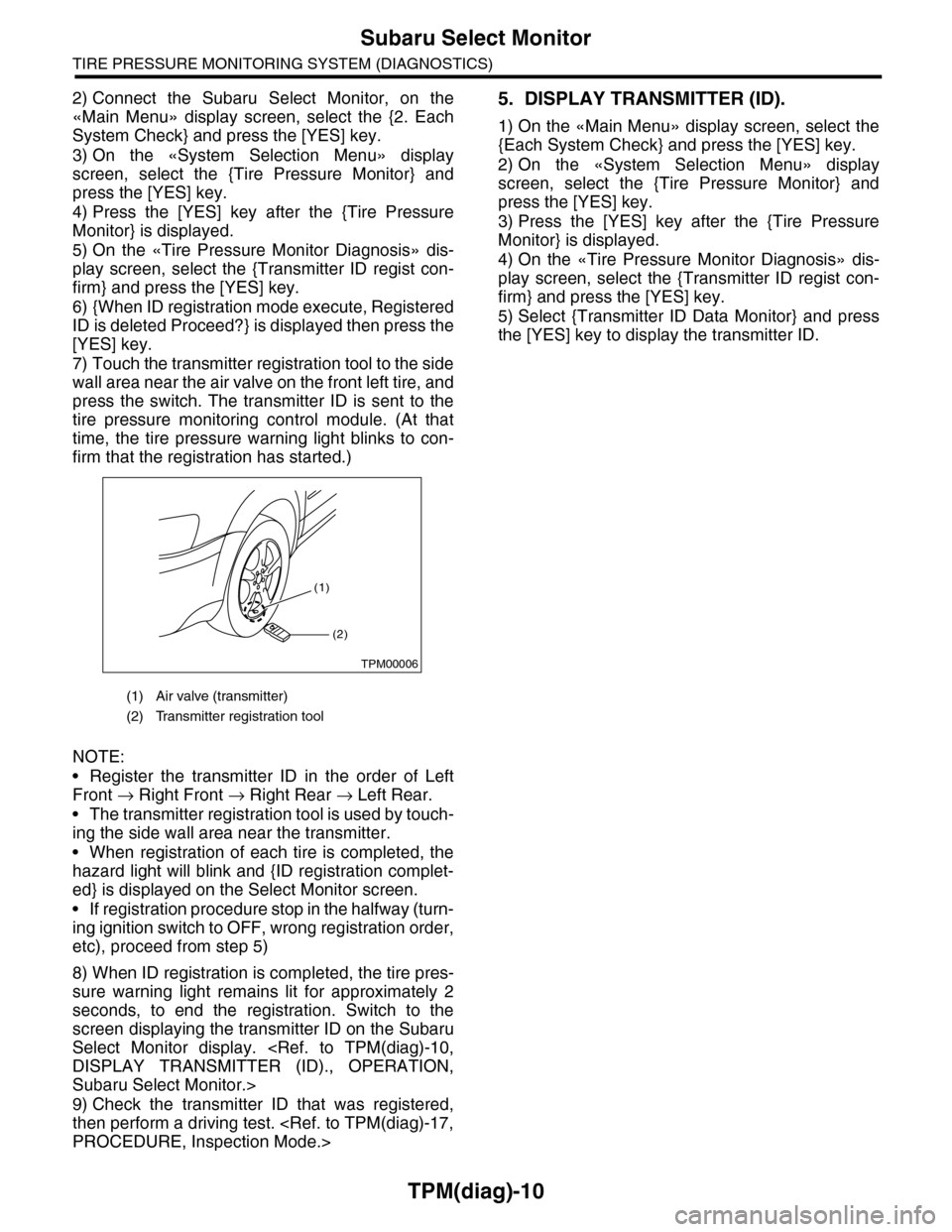
7) Touch the transmitter registration tool to the side
wall area near the air valve on the front left tire, and
press the switch. The transmitter ID is sent to the
tire pressure monitoring control module. (At that
time, the tire pressure warning light blinks to con-
firm that the registration has started.)
NOTE:
•Register the transmitter ID in the order of Left
Front → Right Front → Right Rear → Left Rear.
•The transmitter registration tool is used by touch-
ing the side wall area near the transmitter.
•When registration of each tire is completed, the
hazard light will blink and {ID registration complet-
ed} is displayed on the Select Monitor screen.
•If registration procedure stop in the halfway (turn-
ing ignition switch to OFF, wrong registration order,
etc), proceed from step 5)
8) When ID registration is completed, the tire pres-
sure warning light remains lit for approximately 2
seconds, to end the registration. Switch to the
screen displaying the transmitter ID on the Subaru
Select Monitor display.
Subaru Select Monitor.>
9) Check the transmitter ID that was registered,
then perform a driving test.
5. DISPLAY TRANSMITTER (ID).
1) On the «Main Menu» display screen, select the
{Each System Check} and press the [YES] key.
2) On the «System Selection Menu» display
screen, select the {Tire Pressure Monitor} and
press the [YES] key.
3) Press the [YES] key after the {Tire Pressure
Monitor} is displayed.
4) On the «Tire Pressure Monitor Diagnosis» dis-
play screen, select the {Transmitter ID regist con-
firm} and press the [YES] key.
5) Select {Transmitter ID Data Monitor} and press
the [YES] key to display the transmitter ID.
(1) Air valve (transmitter)
(2) Transmitter registration tool
(1)
(2)
TPM00006
Page 978 of 2453
TPM(diag)-28
Diagnostic Procedure with Diagnostic Trouble Code (DTC)
TIRE PRESSURE MONITORING SYSTEM (DIAGNOSTICS)
11.Diagnostic Procedure with Diagnostic Trouble Code (DTC)
A: DTC 11 FL AIR PRESSURE DECREASE
NOTE:
Refer to DTC 14 for diagnostic procedure.
B: DTC 12 FR AIR PRESSURE DECREASE
NOTE:
Refer to DTC 14 for diagnostic procedure.
C: DTC 13 RR AIR PRESSURE DECREASE
NOTE:
Refer to DTC 14 for diagnostic procedure.
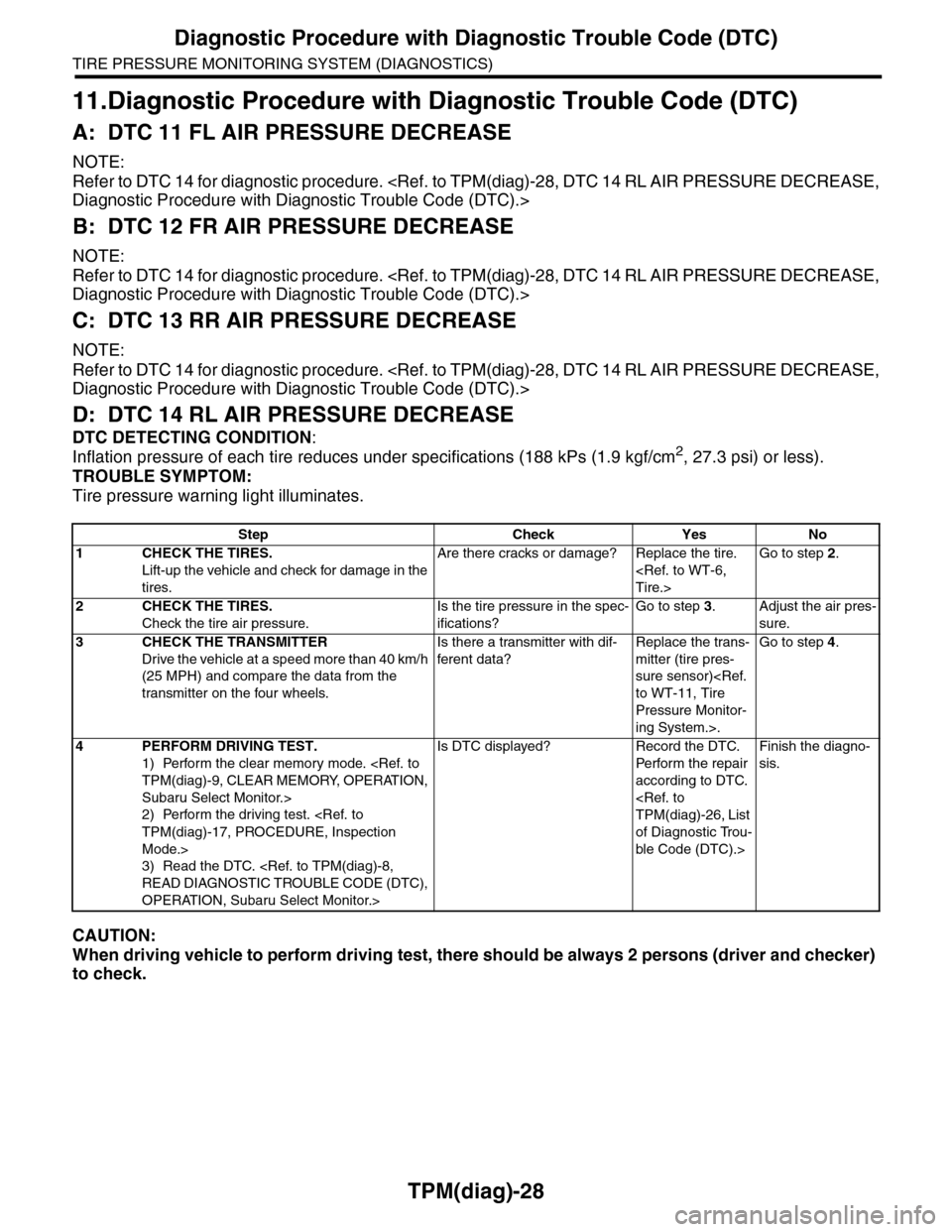
D: DTC 14 RL AIR PRESSURE DECREASE
DTC DETECTING CONDITION:
Inflation pressure of each tire reduces under specifications (188 kPs (1.9 kgf/cm2, 27.3 psi) or less).
TROUBLE SYMPTOM:
Tire pressure warning light illuminates.
CAUTION:
When driving vehicle to perform driving test, there should be always 2 persons (driver and checker)
to check.
Step Check Yes No
1CHECK THE TIRES.
Lift-up the vehicle and check for damage in the
tires.
Are there cracks or damage? Replace the tire.
Go to step 2.
2CHECK THE TIRES.
Check the tire air pressure.
Is the tire pressure in the spec-
ifications?
Go to step 3.Adjust the air pres-
sure.
3CHECK THE TRANSMITTER
Drive the vehicle at a speed more than 40 km/h
(25 MPH) and compare the data from the
transmitter on the four wheels.
Is there a transmitter with dif-
ferent data?
Replace the trans-
mitter (tire pres-
sure sensor)
Pressure Monitor-
ing System.>.
Go to step 4.
4PERFORM DRIVING TEST.
1) Perform the clear memory mode.
Subaru Select Monitor.>
2) Perform the driving test.
Mode.>
3) Read the DTC.
OPERATION, Subaru Select Monitor.>
Is DTC displayed? Record the DTC.
Pe r for m t h e r e pa i r
according to DTC.
of Diagnostic Trou-
ble Code (DTC).>
Finish the diagno-
sis.
Page 983 of 2453
TPM(diag)-33
Diagnostic Procedure with Diagnostic Trouble Code (DTC)
TIRE PRESSURE MONITORING SYSTEM (DIAGNOSTICS)
Q: DTC 51 FL TRANSMIT BATTERY LOW VOLTAGE
NOTE:
Refer to DTC 54 for diagnostic procedure.
R: DTC 52 FR TRANSMIT BATTERY LOW VOLTAGE
NOTE:
Refer to DTC 54 for diagnostic procedure.
S: DTC 53 RR TRANSMIT BATTERY LOW VOLTAGE
NOTE:
Refer to DTC 54 for diagnostic procedure.
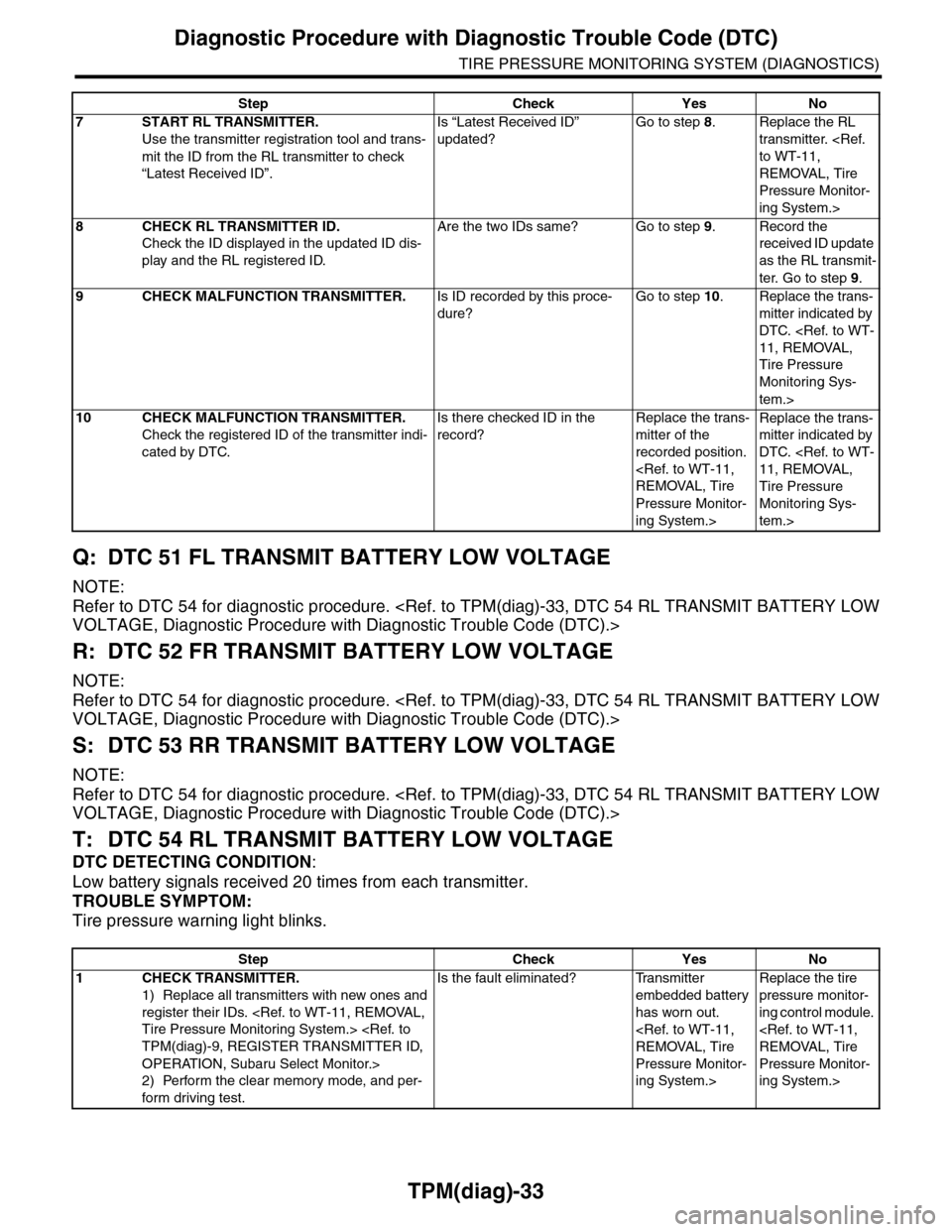
T: DTC 54 RL TRANSMIT BATTERY LOW VOLTAGE
DTC DETECTING CONDITION:
Low battery signals received 20 times from each transmitter.
TROUBLE SYMPTOM:
Tire pressure warning light blinks.
7START RL TRANSMITTER.
Use the transmitter registration tool and trans-
mit the ID from the RL transmitter to check
“Latest Received ID”.
Is “Latest Received ID”
updated?
Go to step 8.Replace the RL
transmitter.
REMOVAL, Tire
Pressure Monitor-
ing System.>
8CHECK RL TRANSMITTER ID.
Check the ID displayed in the updated ID dis-
play and the RL registered ID.
Are the two IDs same? Go to step 9.Record the
received ID update
as the RL transmit-
ter. Go to step 9.
9CHECK MALFUNCTION TRANSMITTER.Is ID recorded by this proce-
dure?
Go to step 10.Replace the trans-
mitter indicated by
DTC.
Tire Pressure
Monitoring Sys-
tem.>
10 CHECK MALFUNCTION TRANSMITTER.
Check the registered ID of the transmitter indi-
cated by DTC.
Is there checked ID in the
record?
Replace the trans-
mitter of the
recorded position.
Pressure Monitor-
ing System.>
Replace the trans-
mitter indicated by
DTC.
Tire Pressure
Monitoring Sys-
tem.>
Step Check Yes No
Step Check Yes No
1CHECK TRANSMITTER.
1) Replace all transmitters with new ones and
register their IDs.
OPERATION, Subaru Select Monitor.>
2) Perform the clear memory mode, and per-
form driving test.
Is the fault eliminated? Transmitter
embedded battery
has worn out.
Pressure Monitor-
ing System.>
Replace the tire
pressure monitor-
ing control module.
Pressure Monitor-
ing System.>
Page 994 of 2453
VDC(diag)-2
Basic Diagnostic Procedure
VEHICLE DYNAMICS CONTROL (VDC) (DIAGNOSTICS)
1. Basic Diagnostic Procedure
A: PROCEDURE
NOTE:
•To check the harness for broken wires or short circuits, shake problem spot or connector.
•Refer to “Check List for Interview”.
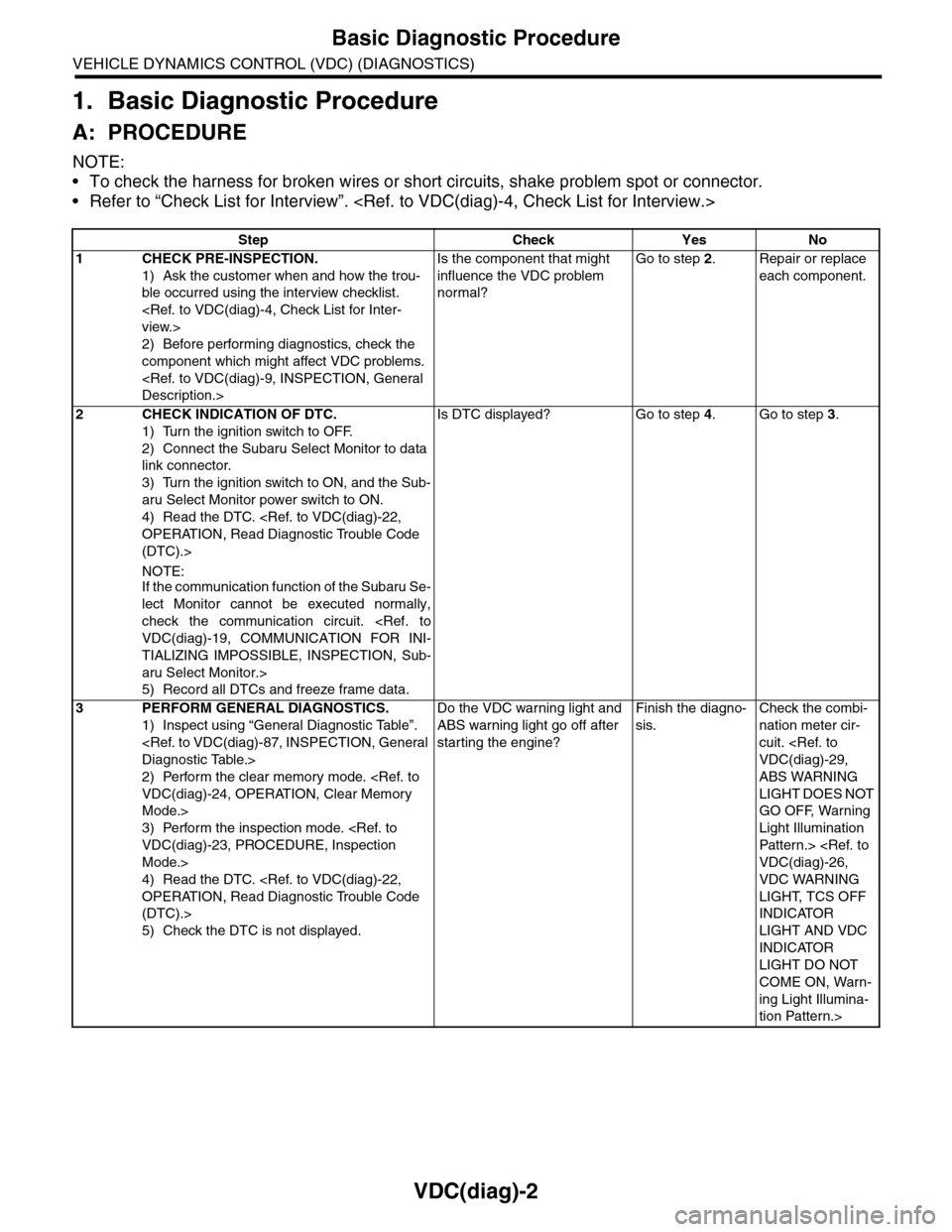
Step Check Yes No
1CHECK PRE-INSPECTION.
1) Ask the customer when and how the trou-
ble occurred using the interview checklist.
2) Before performing diagnostics, check the
component which might affect VDC problems.
Is the component that might
influence the VDC problem
normal?
Go to step 2.Repair or replace
each component.
2CHECK INDICATION OF DTC.
1) Turn the ignition switch to OFF.
2) Connect the Subaru Select Monitor to data
link connector.
3) Turn the ignition switch to ON, and the Sub-
aru Select Monitor power switch to ON.
4) Read the DTC.
(DTC).>
NOTE:If the communication function of the Subaru Se-
lect Monitor cannot be executed normally,
check the communication circuit.
TIALIZING IMPOSSIBLE, INSPECTION, Sub-
aru Select Monitor.>
5) Record all DTCs and freeze frame data.
Is DTC displayed? Go to step 4.Go to step 3.
3PERFORM GENERAL DIAGNOSTICS.
1) Inspect using “General Diagnostic Table”.
2) Perform the clear memory mode.
Mode.>
3) Perform the inspection mode.
Mode.>
4) Read the DTC.
(DTC).>
5) Check the DTC is not displayed.
Do the VDC warning light and
ABS warning light go off after
starting the engine?
Finish the diagno-
sis.
Check the combi-
nation meter cir-
cuit.
ABS WARNING
LIGHT DOES NOT
GO OFF, Warning
Light Illumination
Patter n.>
VDC WARNING
LIGHT, TCS OFF
INDICATOR
LIGHT AND VDC
INDICATOR
LIGHT DO NOT
COME ON, Warn-
ing Light Illumina-
tion Pattern.>
Page 1010 of 2453
![SUBARU TRIBECA 2009 1.G Service Service Manual VDC(diag)-18
Subaru Select Monitor
VEHICLE DYNAMICS CONTROL (VDC) (DIAGNOSTICS)
3. CLEAR MEMORY MODE
1) On the «Main Menu», select the {2. Each Sys-
tem Check} and press the [YES] key.
2) On](/img/17/7322/w960_7322-1009.png "SUBARU TRIBECA 2009 1.G Service Service Manual VDC(diag)-18
Subaru Select Monitor
VEHICLE DYNAMICS CONTROL (VDC) (DIAGNOSTICS)
3. CLEAR MEMORY MODE
1) On the «Main Menu», select the {2. Each Sys-
tem Check} and press the [YES] key.
2) On")
VDC(diag)-18
Subaru Select Monitor
VEHICLE DYNAMICS CONTROL (VDC) (DIAGNOSTICS)
3. CLEAR MEMORY MODE
1) On the «Main Menu», select the {2. Each Sys-
tem Check} and press the [YES] key.
2) On the «System Selection Menu» display
screen, select the {Brake Control} and press the
[YES] key.
3) Press the [YES] key after {VDC AWD AT} is dis-
played.
4) On the «Brake Control Diagnosis» display
screen, select the {Memory Clear} and press the
[YES] key.
5) When “Done” and “Turn ignition switch OFF” are
shown on the display screen, turn the Subaru Se-
lect Monitor and ignition switch to OFF.
NOTE:
For details concerning operation procedure, refer
to the “SUBARU SELECT MONITOR OPERATION
MANUAL”.
4. SEQUENCE CONTROL
5. FREEZE FRAME DATA
NOTE:
•Data stored at the time of trouble occurrence is
shown on display.
•Each time trouble occurs, the latest information
is stored in the freeze frame data in memory.
Display Contents to be monitored
Clear memory? DTC deleting function
Display Contents to be monitoredReference tar-
get
ABS
sequence
control
Operate the valve and
pump motor continuously
to perform the ABS
sequence control.
Sequence Con-
trol.>
VDC
sequence
control
Operate the valve and
pump motor continuously
to perform the VDC
sequence control.
Sequence Con-
trol.>
Display Contents to be monitored
IG CounterNumber of times ignition switch turned to
ON is displayed.
DTC The recorded failure code is displayed.
FR Wheel
Speed
Wheel speed detected by front ABS
wheel speed sensor RH is displayed in
km/h or MPH.
FL Wheel Speed
Wheel speed detected by front ABS
wheel speed sensor LH is displayed in
km/h or MPH.
RR Wheel
Speed
Wheel speed detected by rear ABS
wheel speed sensor RH is displayed in
km/h or MPH.
RL Wheel
Speed
Wheel speed detected by rear ABS
wheel speed sensor LH is displayed in
km/h or MPH.
Ve h i c l e S p e e dVe h i c l e s p e e d c a l c u l a t e d b y V D C c o n t r o l
module is displayed.
G Sensor First
ShaftThe sensor value for a 45° angle crossed
2 axis G sensor is displayed.G Sensor Sec-
ond Shaft
Ya w R a t e S e n -
sor
Ve h i c l e a n g u l a r s p e e d d e t e c t e d b y y a w
rate sensor is displayed.
IG power supply
voltage
Vo l t a g e s u p p l i e d t o V D C c o n t r o l m o d u l e
is displayed.
Steering Angle
Sensor
Steering angle detected by steering
angle sensor is displayed.
Pressure sen-
sor output
Brake fluid pressure detected by pres-
sure sensor is displayed.
Engine SpeedEngine speed on malfunction occur-
rence is displayed.
Acceleration
Opening AngleAcceleration opening is displayed.
Gear positionGear position on malfunction occurrence
is displayed.
Steering Angle
Sensor Malfunc-
tion Code
The recorded steering angle sensor fail-
ure code is displayed?
ABS Control
FlagABS control condition is displayed.
EBD Control
FlagEBD control condition is displayed.
Brake Switch Brake ON/OFF is displayed.
TCS Control
FlagTCS control condition is displayed.
VDC Control
FlagVDC control condition is displayed.
E/G Control Flag
Absolute angle
recognition flag
Whether the absolute angle was deter-
mined is displayed.
OFF Switch Sig-
nal
Operation condition of TCS OFF switch
is displayed.
Page 1018 of 2453
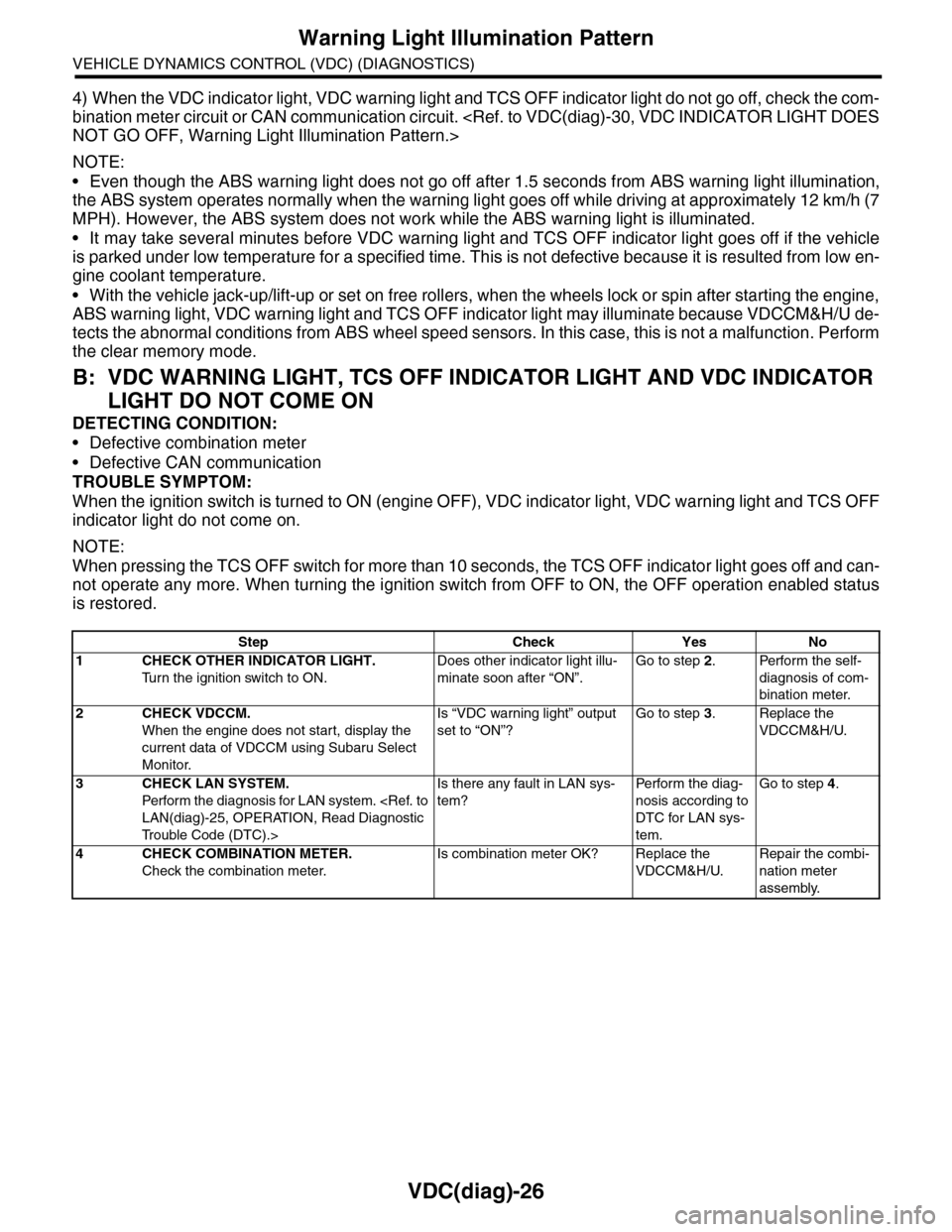
VDC(diag)-26
Warning Light Illumination Pattern
VEHICLE DYNAMICS CONTROL (VDC) (DIAGNOSTICS)
4) When the VDC indicator light, VDC warning light and TCS OFF indicator light do not go off, check the com-
bination meter circuit or CAN communication circuit.
NOTE:
•Even though the ABS warning light does not go off after 1.5 seconds from ABS warning light illumination,
the ABS system operates normally when the warning light goes off while driving at approximately 12 km/h (7
MPH). However, the ABS system does not work while the ABS warning light is illuminated.
•It may take several minutes before VDC warning light and TCS OFF indicator light goes off if the vehicle
is parked under low temperature for a specified time. This is not defective because it is resulted from low en-
gine coolant temperature.
•With the vehicle jack-up/lift-up or set on free rollers, when the wheels lock or spin after starting the engine,
ABS warning light, VDC warning light and TCS OFF indicator light may illuminate because VDCCM&H/U de-
tects the abnormal conditions from ABS wheel speed sensors. In this case, this is not a malfunction. Perform
the clear memory mode.
B: VDC WARNING LIGHT, TCS OFF INDICATOR LIGHT AND VDC INDICATOR
LIGHT DO NOT COME ON
DETECTING CONDITION:
•Defective combination meter
•Defective CAN communication
TROUBLE SYMPTOM:
When the ignition switch is turned to ON (engine OFF), VDC indicator light, VDC warning light and TCS OFF
indicator light do not come on.
NOTE:
When pressing the TCS OFF switch for more than 10 seconds, the TCS OFF indicator light goes off and can-
not operate any more. When turning the ignition switch from OFF to ON, the OFF operation enabled status
is restored.
Step Check Yes No
1CHECK OTHER INDICATOR LIGHT.
Tu r n t h e i g n i t i o n s w i t c h t o O N .
Does other indicator light illu-
minate soon after “ON”.
Go to step 2.Perform the self-
diagnosis of com-
bination meter.
2CHECK VDCCM.
When the engine does not start, display the
current data of VDCCM using Subaru Select
Monitor.
Is “VDC warning light” output
set to “ON”?
Go to step 3.Replace the
VDCCM&H/U.
3CHECK LAN SYSTEM.
Perfor m the diagnosis for LAN system.
Tr o u b l e C o d e ( D T C ) . >
Is there any fault in LAN sys-
tem?
Pe r for m t h e d ia g -
nosis according to
DTC for LAN sys-
tem.
Go to step 4.
4CHECK COMBINATION METER.
Check the combination meter.
Is combination meter OK? Replace the
VDCCM&H/U.
Repair the combi-
nation meter
assembly.