ECO mode SUBARU TRIBECA 2009 1.G Service Repair Manual
[x] Cancel search | Manufacturer: SUBARU, Model Year: 2009, Model line: TRIBECA, Model: SUBARU TRIBECA 2009 1.GPages: 2453, PDF Size: 46.32 MB
Page 1069 of 2453
VDC(diag)-77
Diagnostic Procedure with Diagnostic Trouble Code (DTC)
VEHICLE DYNAMICS CONTROL (VDC) (DIAGNOSTICS)
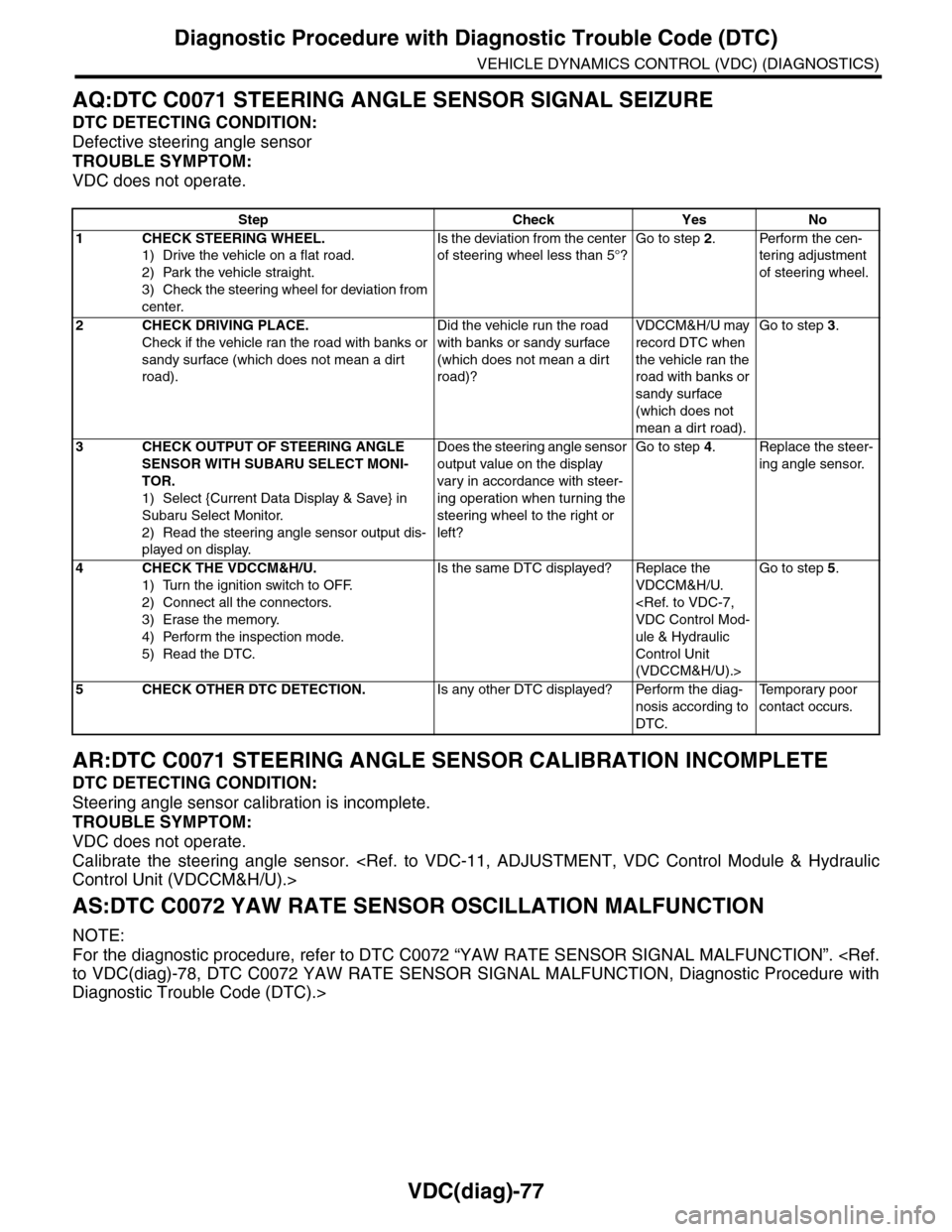
AQ:DTC C0071 STEERING ANGLE SENSOR SIGNAL SEIZURE
DTC DETECTING CONDITION:
Defective steering angle sensor
TROUBLE SYMPTOM:
VDC does not operate.
AR:DTC C0071 STEERING ANGLE SENSOR CALIBRATION INCOMPLETE
DTC DETECTING CONDITION:
Steering angle sensor calibration is incomplete.
TROUBLE SYMPTOM:
VDC does not operate.
Calibrate the steering angle sensor.
AS:DTC C0072 YAW RATE SENSOR OSCILLATION MALFUNCTION
NOTE:
For the diagnostic procedure, refer to DTC C0072 “YAW RATE SENSOR SIGNAL MALFUNCTION”.
Diagnostic Trouble Code (DTC).>
Step Check Yes No
1CHECK STEERING WHEEL.
1) Drive the vehicle on a flat road.
2) Park the vehicle straight.
3) Check the steering wheel for deviation from
center.
Is the deviation from the center
of steering wheel less than 5°?
Go to step 2.Perform the cen-
tering adjustment
of steering wheel.
2CHECK DRIVING PLACE.
Check if the vehicle ran the road with banks or
sandy surface (which does not mean a dirt
road).
Did the vehicle run the road
with banks or sandy surface
(which does not mean a dirt
road)?
VDCCM&H/U may
record DTC when
the vehicle ran the
road with banks or
sandy surface
(which does not
mean a dirt road).
Go to step 3.
3CHECK OUTPUT OF STEERING ANGLE
SENSOR WITH SUBARU SELECT MONI-
TOR.
1) Select {Current Data Display & Save} in
Subaru Select Monitor.
2) Read the steering angle sensor output dis-
played on display.
Does the steering angle sensor
output value on the display
var y in accordance with steer-
ing operation when turning the
steering wheel to the right or
left?
Go to step 4.Replace the steer-
ing angle sensor.
4CHECK THE VDCCM&H/U.
1) Turn the ignition switch to OFF.
2) Connect all the connectors.
3) Erase the memory.
4) Perform the inspection mode.
5) Read the DTC.
Is the same DTC displayed? Replace the
VDCCM&H/U.
ule & Hydraulic
Control Unit
(VDCCM&H/U).>
Go to step 5.
5CHECK OTHER DTC DETECTION.Is any other DTC displayed? Perform the diag-
nosis according to
DTC.
Te m p o r a r y p o o r
contact occurs.
Page 1070 of 2453
VDC(diag)-78
Diagnostic Procedure with Diagnostic Trouble Code (DTC)
VEHICLE DYNAMICS CONTROL (VDC) (DIAGNOSTICS)
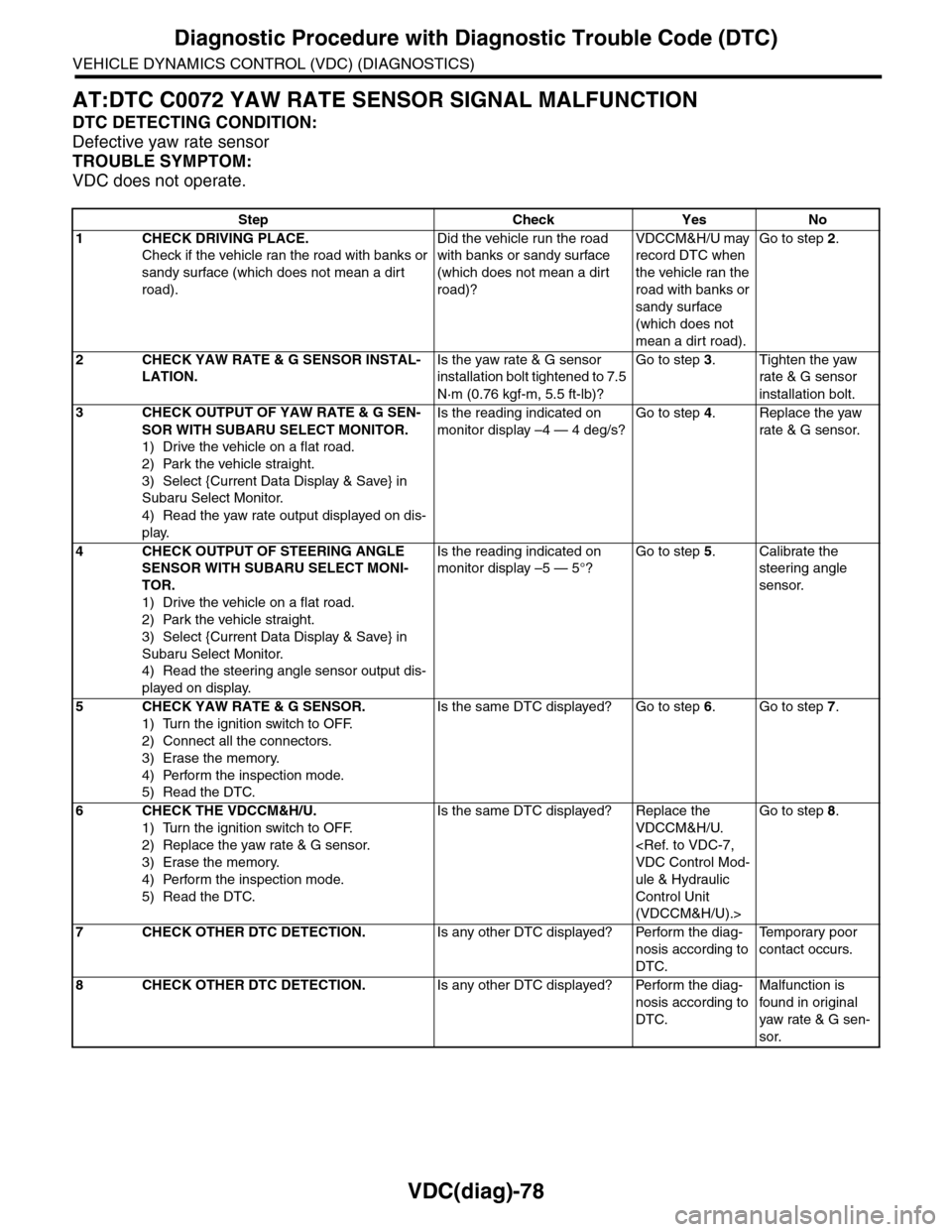
AT:DTC C0072 YAW RATE SENSOR SIGNAL MALFUNCTION
DTC DETECTING CONDITION:
Defective yaw rate sensor
TROUBLE SYMPTOM:
VDC does not operate.
Step Check Yes No
1CHECK DRIVING PLACE.
Check if the vehicle ran the road with banks or
sandy surface (which does not mean a dirt
road).
Did the vehicle run the road
with banks or sandy surface
(which does not mean a dirt
road)?
VDCCM&H/U may
record DTC when
the vehicle ran the
road with banks or
sandy surface
(which does not
mean a dirt road).
Go to step 2.
2CHECK YAW RATE & G SENSOR INSTAL-
LATION.
Is the yaw rate & G sensor
installation bolt tightened to 7.5
N·m (0.76 kgf-m, 5.5 ft-lb)?
Go to step 3.Tighten the yaw
rate & G sensor
installation bolt.
3CHECK OUTPUT OF YAW RATE & G SEN-
SOR WITH SUBARU SELECT MONITOR.
1) Drive the vehicle on a flat road.
2) Park the vehicle straight.
3) Select {Current Data Display & Save} in
Subaru Select Monitor.
4) Read the yaw rate output displayed on dis-
play.
Is the reading indicated on
monitor display –4 — 4 deg/s?
Go to step 4.Replace the yaw
rate & G sensor.
4CHECK OUTPUT OF STEERING ANGLE
SENSOR WITH SUBARU SELECT MONI-
TOR.
1) Drive the vehicle on a flat road.
2) Park the vehicle straight.
3) Select {Current Data Display & Save} in
Subaru Select Monitor.
4) Read the steering angle sensor output dis-
played on display.
Is the reading indicated on
monitor display –5 — 5°?
Go to step 5.Calibrate the
steering angle
sensor.
5CHECK YAW RATE & G SENSOR.
1) Turn the ignition switch to OFF.
2) Connect all the connectors.
3) Erase the memory.
4) Perform the inspection mode.
5) Read the DTC.
Is the same DTC displayed? Go to step 6.Go to step 7.
6CHECK THE VDCCM&H/U.
1) Turn the ignition switch to OFF.
2) Replace the yaw rate & G sensor.
3) Erase the memory.
4) Perform the inspection mode.
5) Read the DTC.
Is the same DTC displayed? Replace the
VDCCM&H/U.
ule & Hydraulic
Control Unit
(VDCCM&H/U).>
Go to step 8.
7CHECK OTHER DTC DETECTION.Is any other DTC displayed? Perform the diag-
nosis according to
DTC.
Te m p o r a r y p o o r
contact occurs.
8CHECK OTHER DTC DETECTION.Is any other DTC displayed? Perform the diag-
nosis according to
DTC.
Malfunction is
found in or iginal
yaw rate & G sen-
sor.
Page 1095 of 2453
VDC-14
ABS Sequence Control
VEHICLE DYNAMICS CONTROL (VDC)
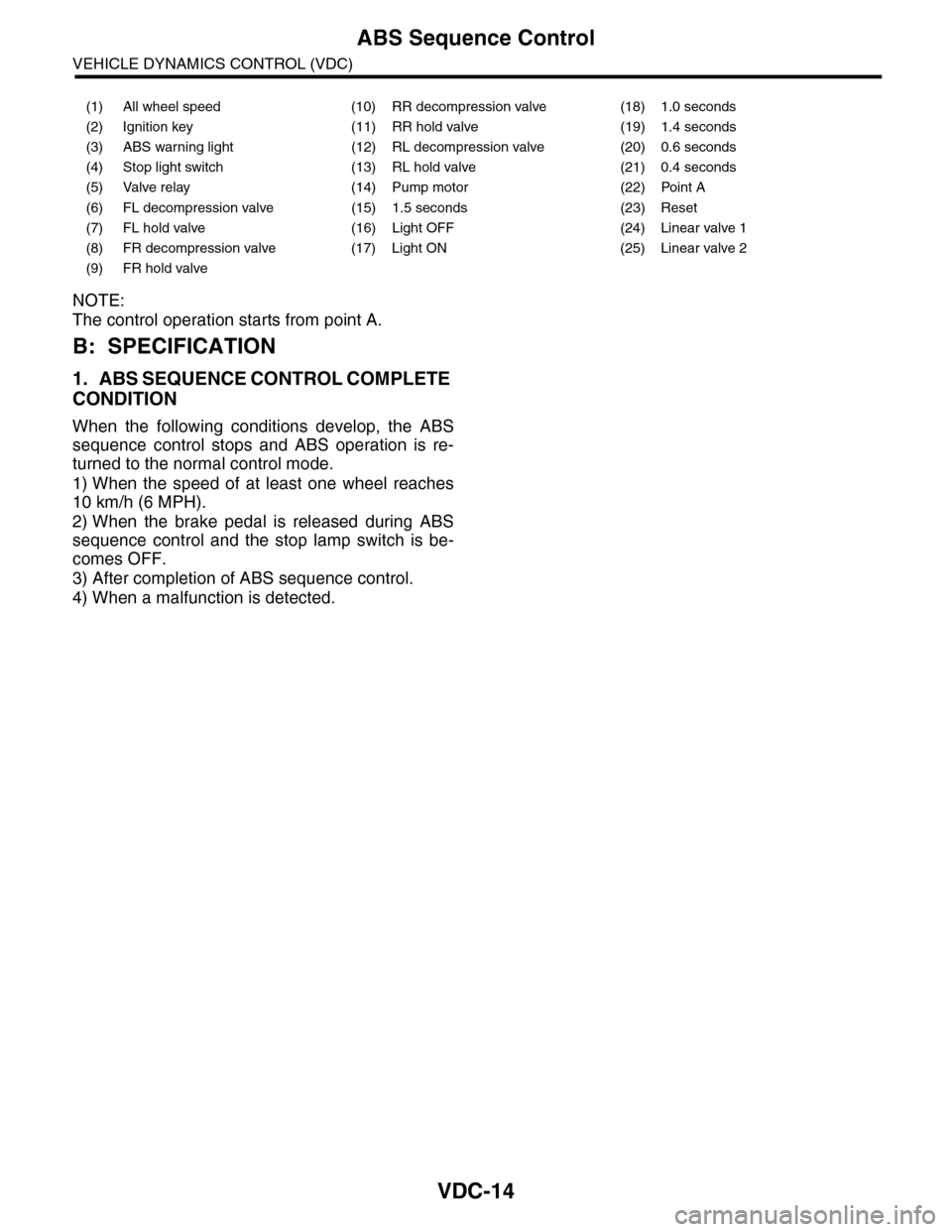
NOTE:
The control operation starts from point A.
B: SPECIFICATION
1. ABS SEQUENCE CONTROL COMPLETE
CONDITION
When the following conditions develop, the ABS
sequence control stops and ABS operation is re-
turned to the normal control mode.
1) When the speed of at least one wheel reaches
10 km/h (6 MPH).
2) When the brake pedal is released during ABS
sequence control and the stop lamp switch is be-
comes OFF.
3) After completion of ABS sequence control.
4) When a malfunction is detected.
(1) All wheel speed (10) RR decompression valve (18) 1.0 seconds
(2) Ignition key (11) RR hold valve (19) 1.4 seconds
(3) ABS warning light (12) RL decompression valve (20) 0.6 seconds
(4) Stop light switch (13) RL hold valve (21) 0.4 seconds
(5) Valve relay (14) Pump motor (22) Point A
(6) FL decompression valve (15) 1.5 seconds (23) Reset
(7) FL hold valve (16) Light OFF (24) Linear valve 1
(8) FR decompression valve (17) Light ON (25) Linear valve 2
(9) FR hold valve
Page 1098 of 2453
VDC-17
VDC Sequence Control
VEHICLE DYNAMICS CONTROL (VDC)
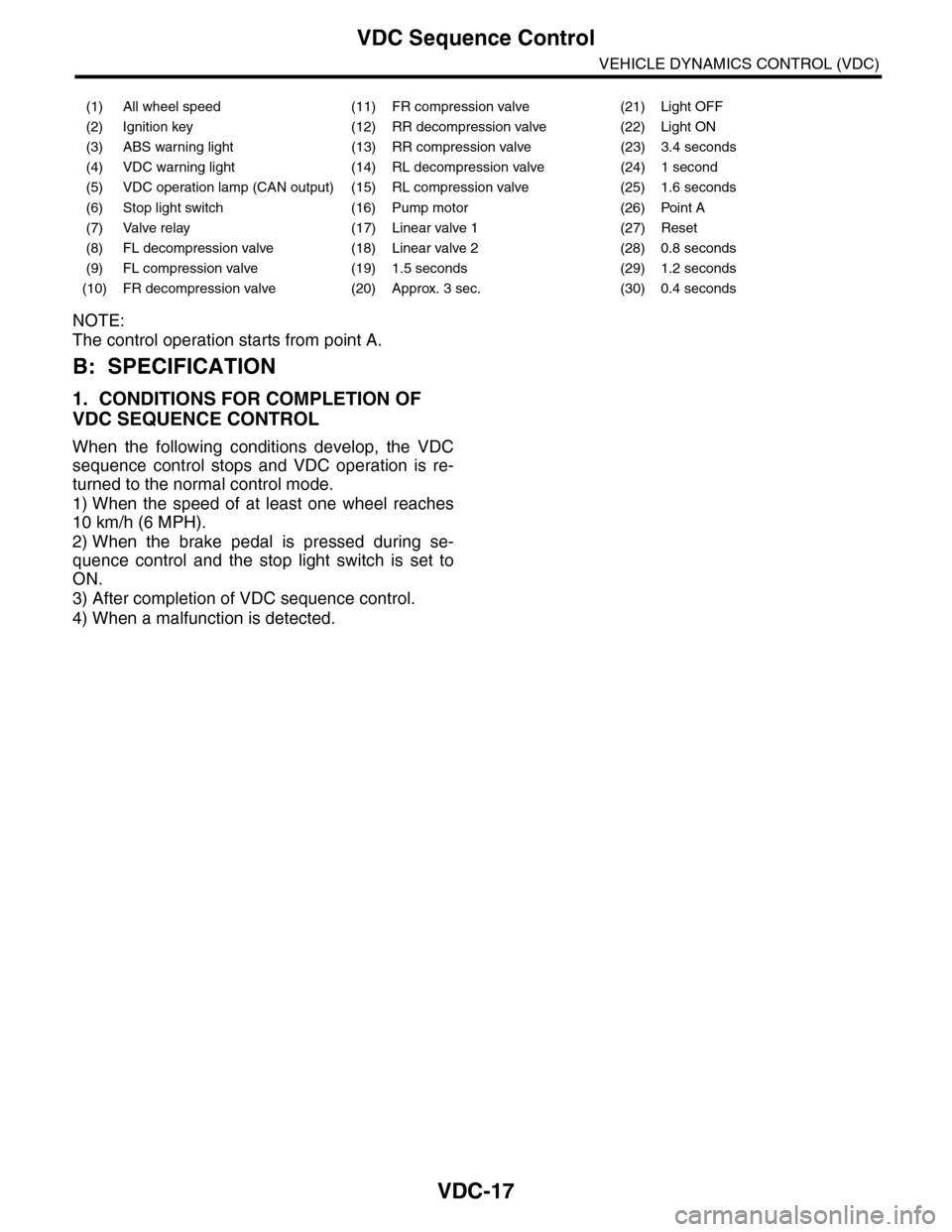
NOTE:
The control operation starts from point A.
B: SPECIFICATION
1. CONDITIONS FOR COMPLETION OF
VDC SEQUENCE CONTROL
When the following conditions develop, the VDC
sequence control stops and VDC operation is re-
turned to the normal control mode.
1) When the speed of at least one wheel reaches
10 km/h (6 MPH).
2) When the brake pedal is pressed during se-
quence control and the stop light switch is set to
ON.
3) After completion of VDC sequence control.
4) When a malfunction is detected.
(1) All wheel speed (11) FR compression valve (21) Light OFF
(2) Ignition key (12) RR decompression valve (22) Light ON
(3) ABS warning light (13) RR compression valve (23) 3.4 seconds
(4) VDC warning light (14) RL decompression valve (24) 1 second
(5) VDC operation lamp (CAN output) (15) RL compression valve (25) 1.6 seconds
(6) Stop light switch (16) Pump motor (26) Point A
(7) Valve relay (17) Linear valve 1 (27) Reset
(8) FL decompression valve (18) Linear valve 2 (28) 0.8 seconds
(9) FL compression valve (19) 1.5 seconds (29) 1.2 seconds
(10) FR decompression valve (20) Approx. 3 sec. (30) 0.4 seconds
Page 1114 of 2453
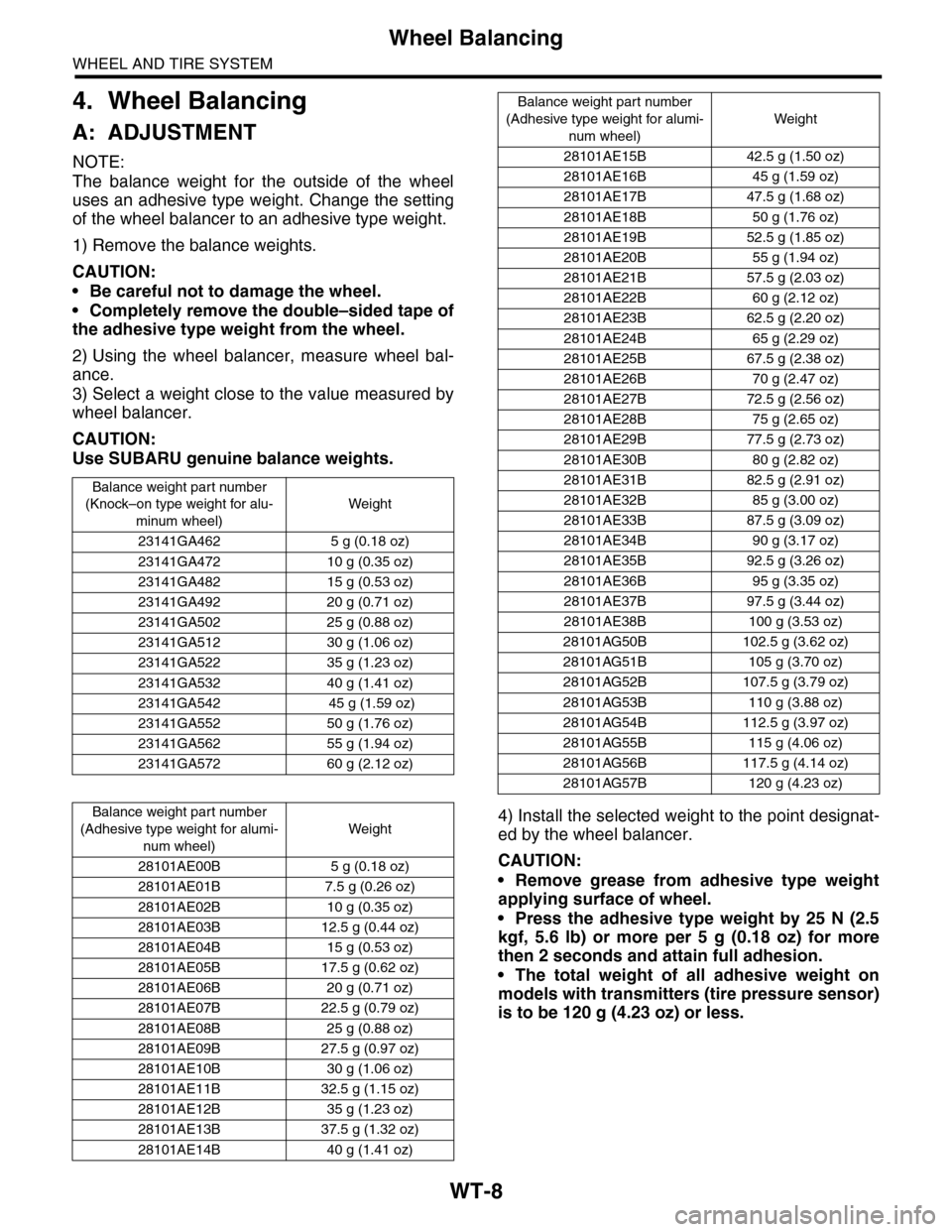
WT-8
Wheel Balancing
WHEEL AND TIRE SYSTEM
4. Wheel Balancing
A: ADJUSTMENT
NOTE:
The balance weight for the outside of the wheel
uses an adhesive type weight. Change the setting
of the wheel balancer to an adhesive type weight.
1) Remove the balance weights.
CAUTION:
•Be careful not to damage the wheel.
•Completely remove the double–sided tape of
the adhesive type weight from the wheel.
2) Using the wheel balancer, measure wheel bal-
ance.
3) Select a weight close to the value measured by
wheel balancer.
CAUTION:
Use SUBARU genuine balance weights.
4) Install the selected weight to the point designat-
ed by the wheel balancer.
CAUTION:
•Remove grease from adhesive type weight
applying surface of wheel.
•Press the adhesive type weight by 25 N (2.5
kgf, 5.6 lb) or more per 5 g (0.18 oz) for more
then 2 seconds and attain full adhesion.
•The total weight of all adhesive weight on
models with transmitters (tire pressure sensor)
is to be 120 g (4.23 oz) or less.
Balance weight par t number
(Knock–on type weight for alu-
minum wheel)
Weight
23141GA462 5 g (0.18 oz)
23141GA472 10 g (0.35 oz)
23141GA482 15 g (0.53 oz)
23141GA492 20 g (0.71 oz)
23141GA502 25 g (0.88 oz)
23141GA512 30 g (1.06 oz)
23141GA522 35 g (1.23 oz)
23141GA532 40 g (1.41 oz)
23141GA542 45 g (1.59 oz)
23141GA552 50 g (1.76 oz)
23141GA562 55 g (1.94 oz)
23141GA572 60 g (2.12 oz)
Balance weight par t number
(Adhesive type weight for alumi-
num wheel)
Weight
28101AE00B 5 g (0.18 oz)
28101AE01B 7.5 g (0.26 oz)
28101AE02B 10 g (0.35 oz)
28101AE03B 12.5 g (0.44 oz)
28101AE04B 15 g (0.53 oz)
28101AE05B 17.5 g (0.62 oz)
28101AE06B 20 g (0.71 oz)
28101AE07B 22.5 g (0.79 oz)
28101AE08B 25 g (0.88 oz)
28101AE09B 27.5 g (0.97 oz)
28101AE10B 30 g (1.06 oz)
28101AE11B 32.5 g (1.15 oz)
28101AE12B 35 g (1.23 oz)
28101AE13B 37.5 g (1.32 oz)
28101AE14B 40 g (1.41 oz)
28101AE15B 42.5 g (1.50 oz)
28101AE16B 45 g (1.59 oz)
28101AE17B 47.5 g (1.68 oz)
28101AE18B 50 g (1.76 oz)
28101AE19B 52.5 g (1.85 oz)
28101AE20B 55 g (1.94 oz)
28101AE21B 57.5 g (2.03 oz)
28101AE22B 60 g (2.12 oz)
28101AE23B 62.5 g (2.20 oz)
28101AE24B 65 g (2.29 oz)
28101AE25B 67.5 g (2.38 oz)
28101AE26B 70 g (2.47 oz)
28101AE27B 72.5 g (2.56 oz)
28101AE28B 75 g (2.65 oz)
28101AE29B 77.5 g (2.73 oz)
28101AE30B 80 g (2.82 oz)
28101AE31B 82.5 g (2.91 oz)
28101AE32B 85 g (3.00 oz)
28101AE33B 87.5 g (3.09 oz)
28101AE34B 90 g (3.17 oz)
28101AE35B 92.5 g (3.26 oz)
28101AE36B 95 g (3.35 oz)
28101AE37B 97.5 g (3.44 oz)
28101AE38B 100 g (3.53 oz)
28101AG50B 102.5 g (3.62 oz)
28101AG51B 105 g (3.70 oz)
28101AG52B 107.5 g (3.79 oz)
28101AG53B 110 g (3.88 oz)
28101AG54B 112.5 g (3.97 oz)
28101AG55B 115 g (4.06 oz)
28101AG56B 117.5 g (4.14 oz)
28101AG57B 120 g (4.23 oz)
Balance weight part number
(Adhesive type weight for alumi-
num wheel)
Weight
Page 1163 of 2453
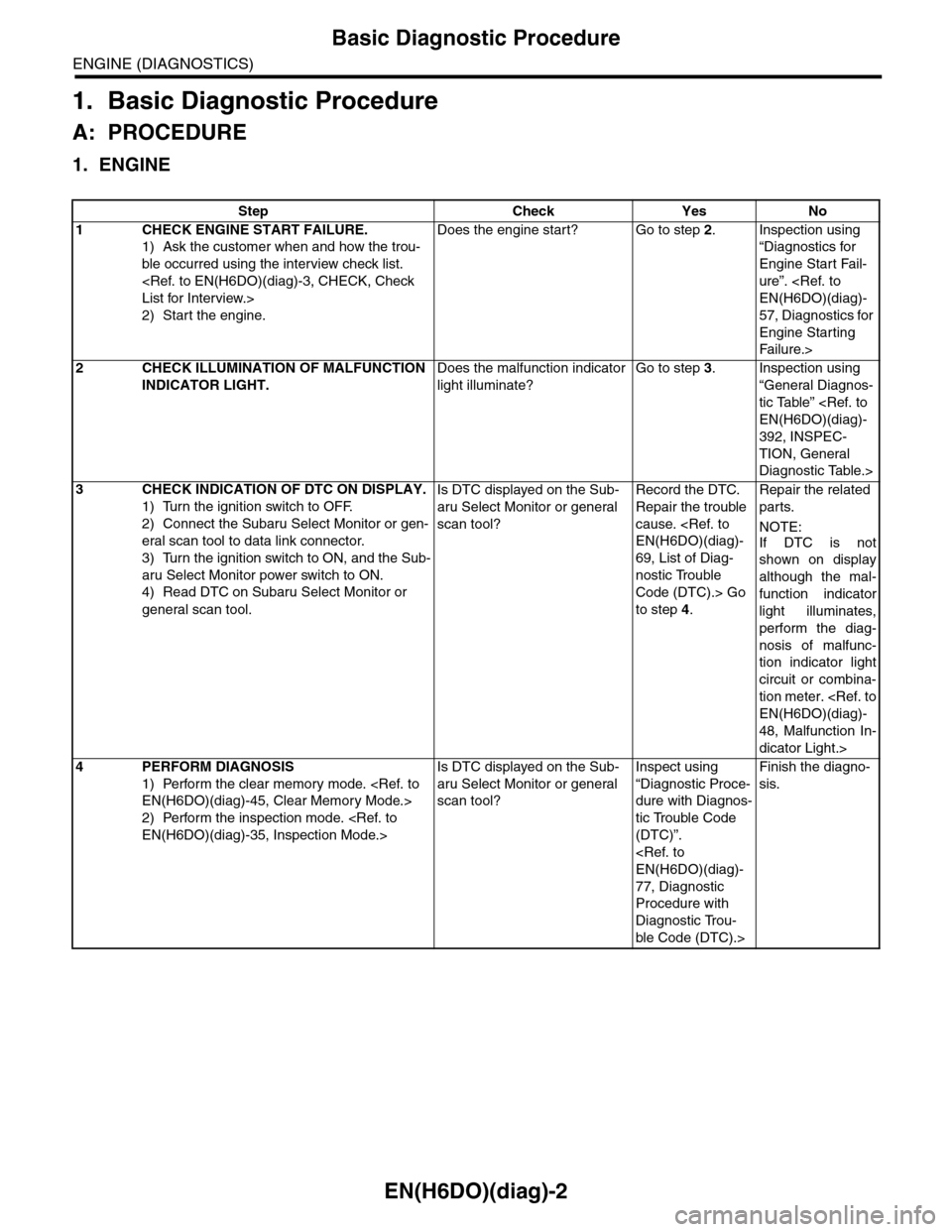
EN(H6DO)(diag)-2
Basic Diagnostic Procedure
ENGINE (DIAGNOSTICS)
1. Basic Diagnostic Procedure
A: PROCEDURE
1. ENGINE
Step Check Yes No
1CHECK ENGINE START FAILURE.
1) Ask the customer when and how the trou-
ble occurred using the interview check list.
2) Start the engine.
Does the engine start? Go to step 2.Inspection using
“Diagnostics for
Engine Start Fail-
ure”.
57, Diagnostics for
Engine Starting
Fai lu r e.>
2CHECK ILLUMINATION OF MALFUNCTION
INDICATOR LIGHT.
Does the malfunction indicator
light illuminate?
Go to step 3.Inspection using
“General Diagnos-
tic Table”
392, INSPEC-
TION, General
Diagnostic Table.>
3CHECK INDICATION OF DTC ON DISPLAY.
1) Turn the ignition switch to OFF.
2) Connect the Subaru Select Monitor or gen-
eral scan tool to data link connector.
3) Turn the ignition switch to ON, and the Sub-
aru Select Monitor power switch to ON.
4) Read DTC on Subaru Select Monitor or
general scan tool.
Is DTC displayed on the Sub-
aru Select Monitor or general
scan tool?
Record the DTC.
Repair the trouble
cause.
69, List of Diag-
nostic Trouble
Code (DTC).> Go
to step 4.
Repair the related
parts.
NOTE:
If DTC is not
shown on display
although the mal-
function indicator
light illuminates,
perform the diag-
nosis of malfunc-
tion indicator light
circuit or combina-
tion meter.
48, Malfunction In-
dicator Light.>
4PERFORM DIAGNOSIS
1) Perform the clear memory mode.
2) Perform the inspection mode.
Is DTC displayed on the Sub-
aru Select Monitor or general
scan tool?
Inspect using
“Diagnostic Proce-
dure with Diagnos-
tic Trouble Code
(DTC)”.
77, Diagnostic
Procedure with
Diagnostic Trou-
ble Code (DTC).>
Finish the diagno-
sis.
Page 1187 of 2453
EN(H6DO)(diag)-26
Subaru Select Monitor
ENGINE (DIAGNOSTICS)
9. Subaru Select Monitor
A: OPERATION
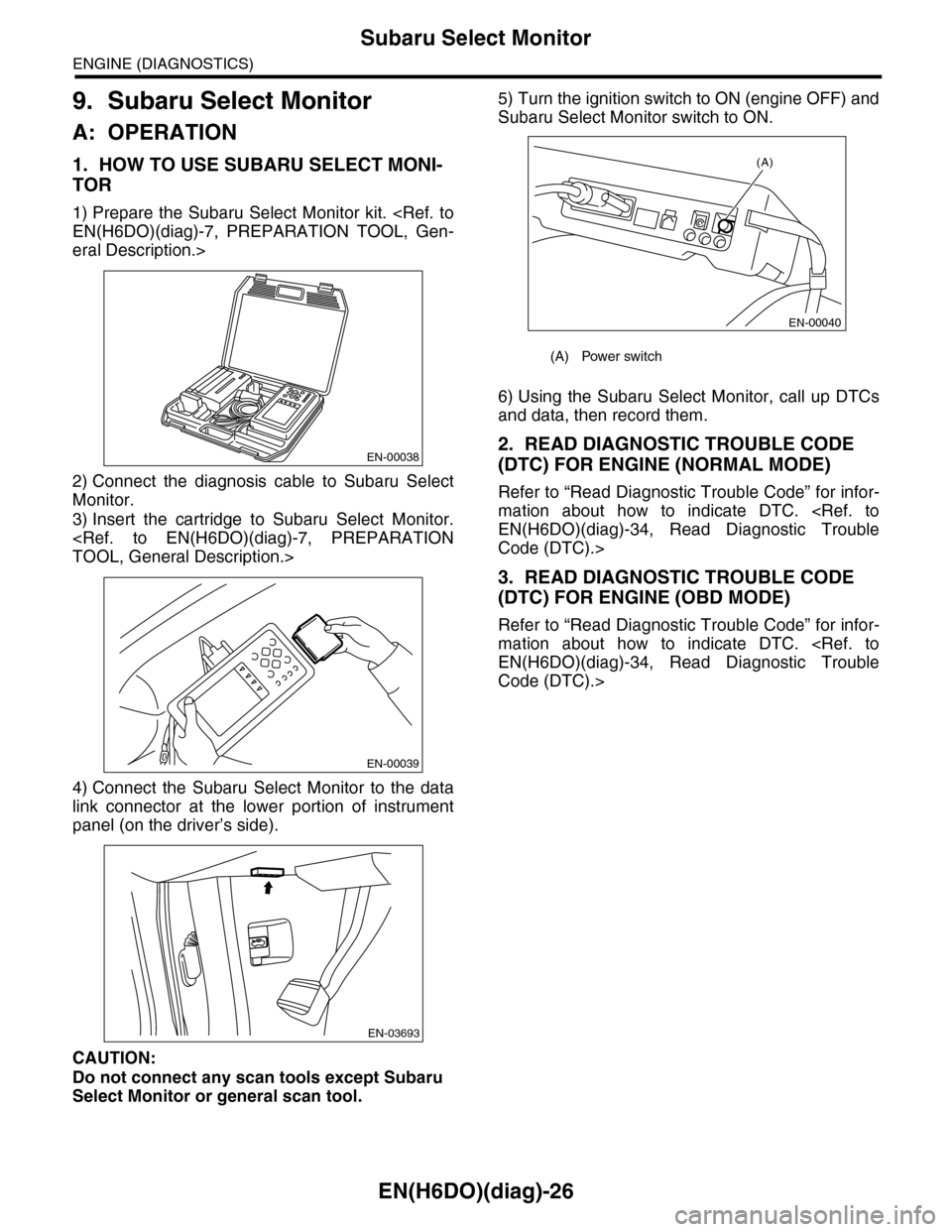
1. HOW TO USE SUBARU SELECT MONI-
TOR
1) Prepare the Subaru Select Monitor kit.
eral Description.>
2) Connect the diagnosis cable to Subaru Select
Monitor.
3) Insert the cartridge to Subaru Select Monitor.
4) Connect the Subaru Select Monitor to the data
link connector at the lower portion of instrument
panel (on the driver’s side).
CAUTION:
Do not connect any scan tools except Subaru
Select Monitor or general scan tool.
5) Turn the ignition switch to ON (engine OFF) and
Subaru Select Monitor switch to ON.
6) Using the Subaru Select Monitor, call up DTCs
and data, then record them.
2. READ DIAGNOSTIC TROUBLE CODE
(DTC) FOR ENGINE (NORMAL MODE)
Refer to “Read Diagnostic Trouble Code” for infor-
mation about how to indicate DTC.
Code (DTC).>
3. READ DIAGNOSTIC TROUBLE CODE
(DTC) FOR ENGINE (OBD MODE)
Refer to “Read Diagnostic Trouble Code” for infor-
mation about how to indicate DTC.
Code (DTC).>
EN-00038
EN-00039
EN-03693
(A) Power switch
(A)
EN-00040
Page 1200 of 2453
EN(H6DO)(diag)-39
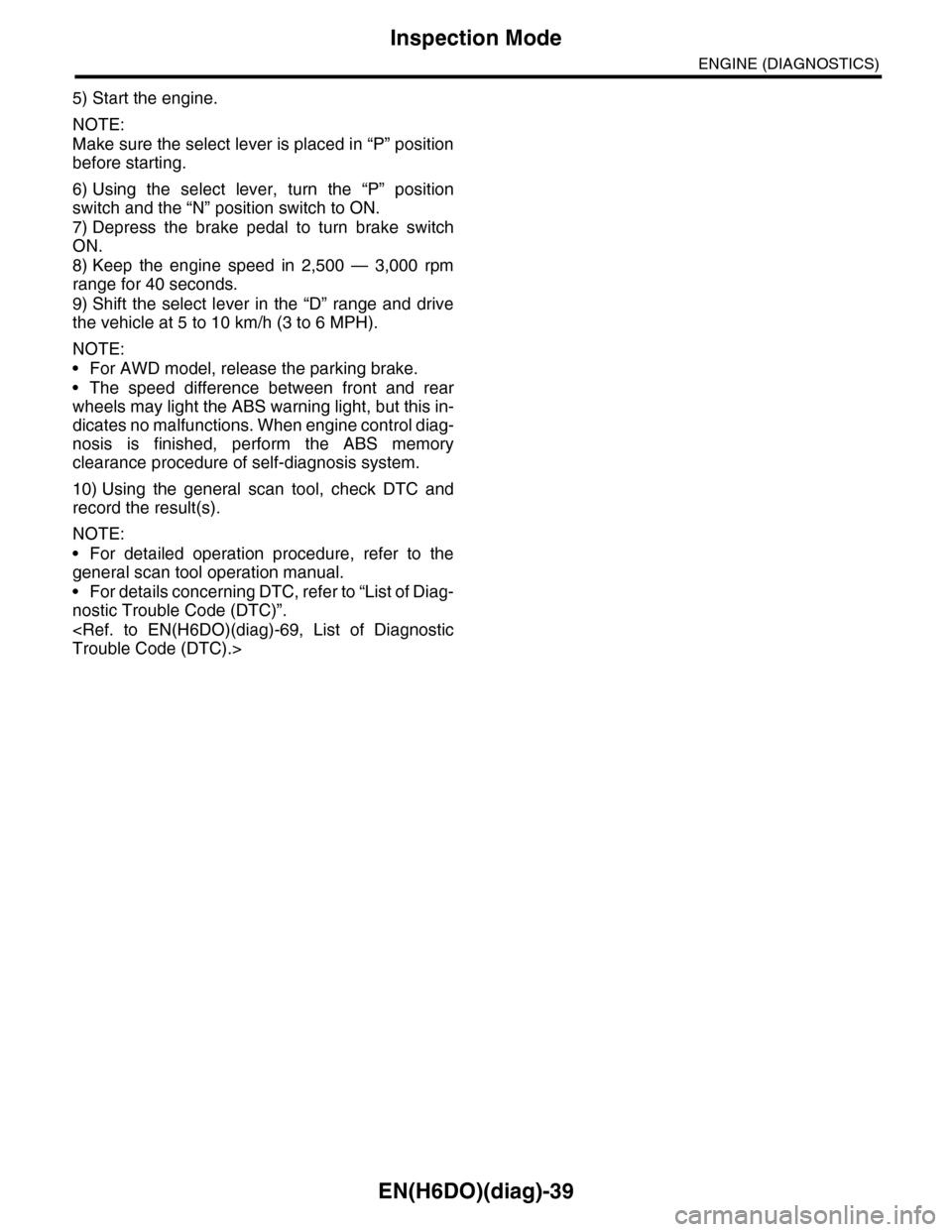
Inspection Mode
ENGINE (DIAGNOSTICS)
5) Start the engine.
NOTE:
Make sure the select lever is placed in “P” position
before starting.
6) Using the select lever, turn the “P” position
switch and the “N” position switch to ON.
7) Depress the brake pedal to turn brake switch
ON.
8) Keep the engine speed in 2,500 — 3,000 rpm
range for 40 seconds.
9) Shift the select lever in the “D” range and drive
the vehicle at 5 to 10 km/h (3 to 6 MPH).
NOTE:
•For AWD model, release the parking brake.
•The speed difference between front and rear
wheels may light the ABS warning light, but this in-
dicates no malfunctions. When engine control diag-
nosis is finished, perform the ABS memory
clearance procedure of self-diagnosis system.
10) Using the general scan tool, check DTC and
record the result(s).
NOTE:
•For detailed operation procedure, refer to the
general scan tool operation manual.
•For details concerning DTC, refer to “List of Diag-
nostic Trouble Code (DTC)”.
Page 1201 of 2453
EN(H6DO)(diag)-40
Drive Cycle
ENGINE (DIAGNOSTICS)
12.Drive Cycle
A: PROCEDURE
For the troubleshooting, there are five driving pat-
terns of drive cycles A to E. Driving in the specified
pattern allows to diagnose malfunctioning items
listed below. After the repair of the following trouble
items, be sure to drive the vehicle with the specified
drive patterns to check whether the function is re-
sumed correctly.
1. PREPARATION FOR DRIVE CYCLE
1) Check battery voltage is more than 12 V and fuel
remains half [20 to 40 2 (5.3 to 10.6 US gal, 4.4 to
8.8 Imp gal)].
2) After performing the diagnostics and clearing the
memory, check for any remaining unresolved trou-
ble data.
3) Disconnect the test mode connectors.
NOTE:
•Perform the diagnosis after warming up the en-
gine except when the engine coolant temperature
at starting is specified.
•Perform the diagnosis twice if the DTC marked
with *. After completing the first diagnosis, stop the
engine and perform second diagnosis in same con-
dition.
Page 1205 of 2453
EN(H6DO)(diag)-44
Drive Cycle
ENGINE (DIAGNOSTICS)
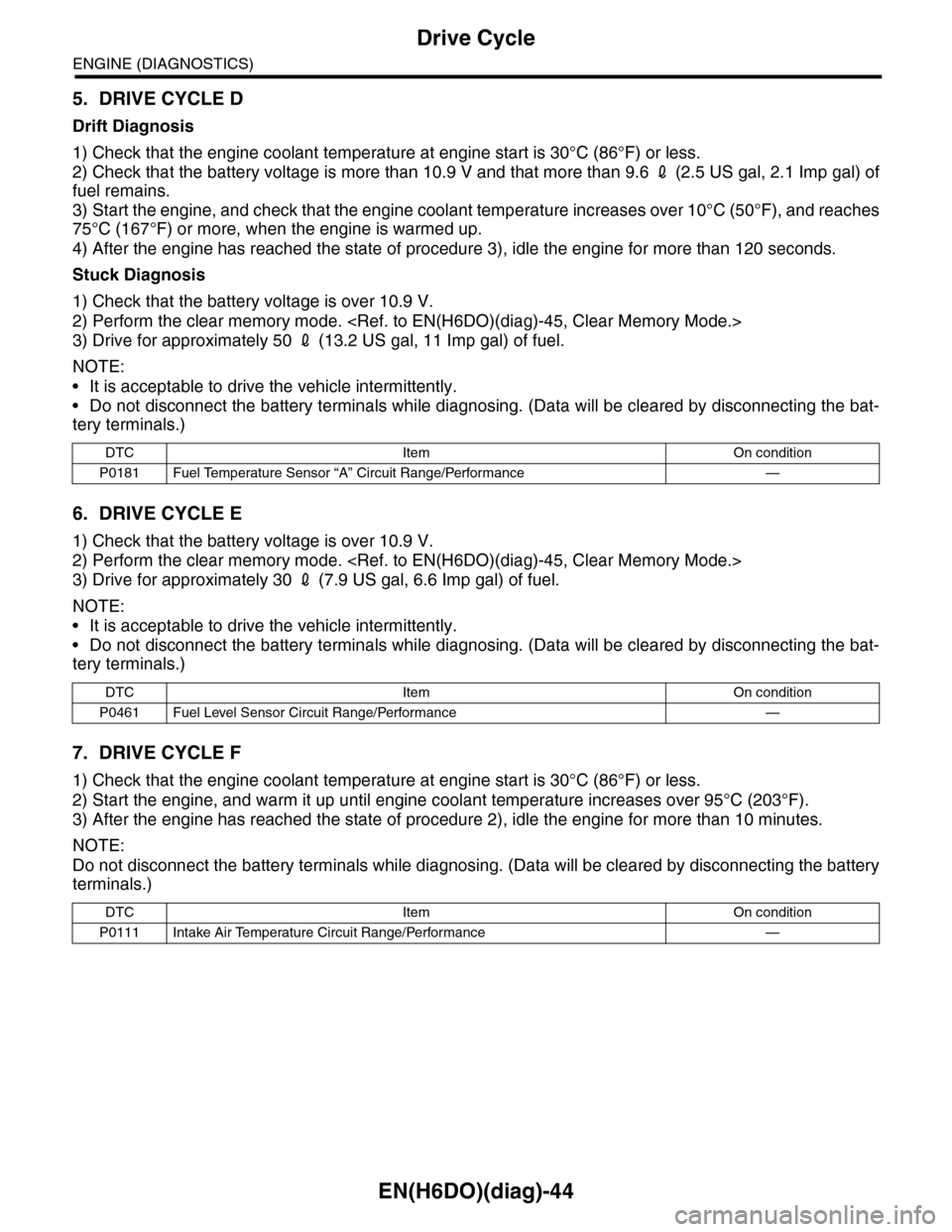
5. DRIVE CYCLE D
Drift Diagnosis
1) Check that the engine coolant temperature at engine start is 30°C (86°F) or less.
2) Check that the battery voltage is more than 10.9 V and that more than 9.6 2 (2.5 US gal, 2.1 Imp gal) of
fuel remains.
3) Start the engine, and check that the engine coolant temperature increases over 10°C (50°F), and reaches
75°C (167°F) or more, when the engine is warmed up.
4) After the engine has reached the state of procedure 3), idle the engine for more than 120 seconds.
Stuck Diagnosis
1) Check that the battery voltage is over 10.9 V.
2) Perform the clear memory mode.
3) Drive for approximately 50 2 (13.2 US gal, 11 Imp gal) of fuel.
NOTE:
•It is acceptable to drive the vehicle intermittently.
•Do not disconnect the battery terminals while diagnosing. (Data will be cleared by disconnecting the bat-
tery terminals.)
6. DRIVE CYCLE E
1) Check that the battery voltage is over 10.9 V.
2) Perform the clear memory mode.
3) Drive for approximately 30 2 (7.9 US gal, 6.6 Imp gal) of fuel.
NOTE:
•It is acceptable to drive the vehicle intermittently.
•Do not disconnect the battery terminals while diagnosing. (Data will be cleared by disconnecting the bat-
tery terminals.)
7. DRIVE CYCLE F
1) Check that the engine coolant temperature at engine start is 30°C (86°F) or less.
2) Start the engine, and warm it up until engine coolant temperature increases over 95°C (203°F).
3) After the engine has reached the state of procedure 2), idle the engine for more than 10 minutes.
NOTE:
Do not disconnect the battery terminals while diagnosing. (Data will be cleared by disconnecting the battery
terminals.)
DTC Item On condition
P0181 Fuel Temperature Sensor “A” Circuit Range/Performance —
DTC Item On condition
P0461 Fuel Level Sensor Circuit Range/Performance —
DTC Item On condition
P0111 Intake Air Temperature Circuit Range/Performance —