monitor SUBARU TRIBECA 2009 1.G Service Owner's Manual
[x] Cancel search | Manufacturer: SUBARU, Model Year: 2009, Model line: TRIBECA, Model: SUBARU TRIBECA 2009 1.GPages: 2453, PDF Size: 46.32 MB
Page 213 of 2453
ET-28
Rear Entertainment
ENTERTAINMENT
23.Rear Entertainment
A: REMOVAL
1) Disconnect the ground cable from battery.
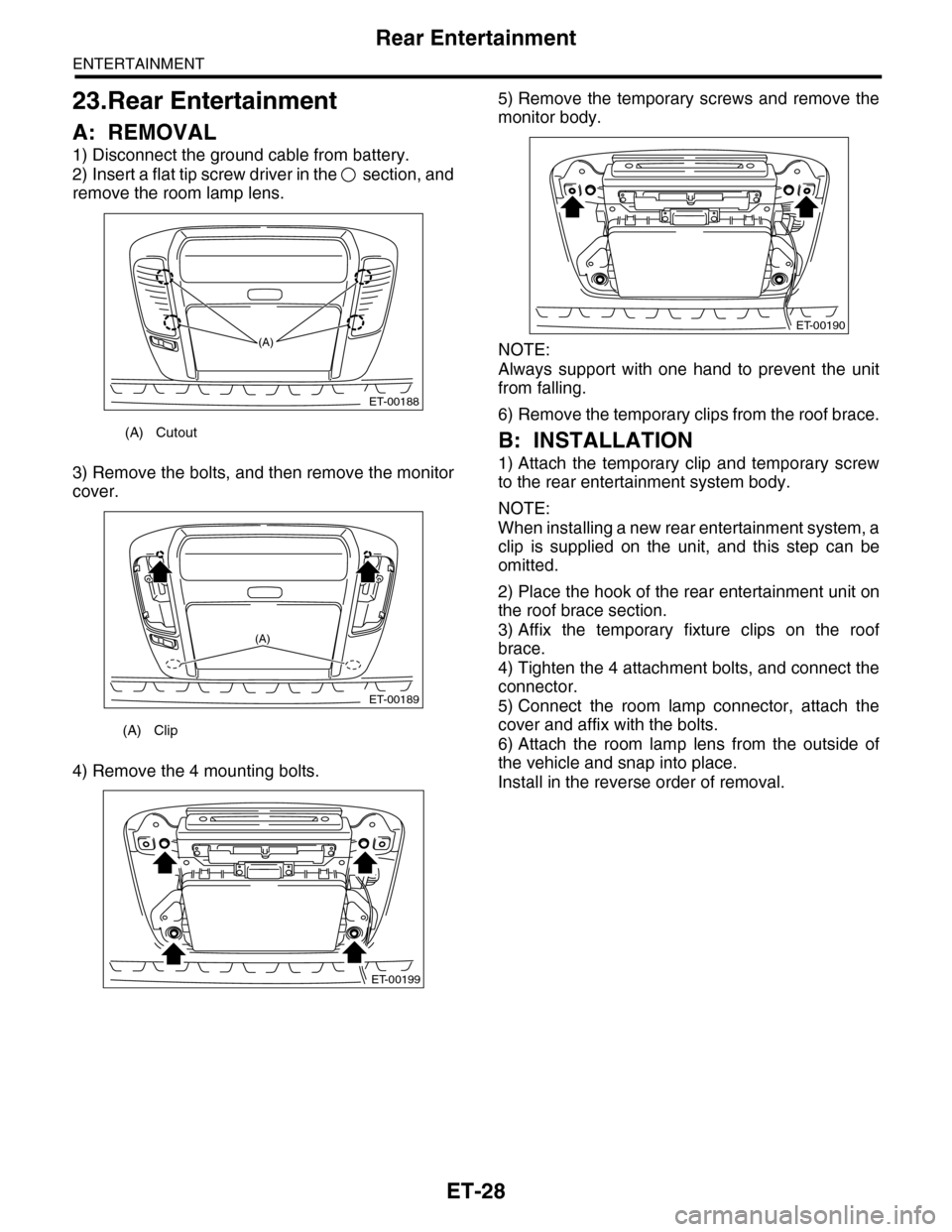
2) Insert a flat tip screw driver in the section, and
remove the room lamp lens.
3) Remove the bolts, and then remove the monitor
cover.
4) Remove the 4 mounting bolts.
5) Remove the temporary screws and remove the
monitor body.
NOTE:
Always support with one hand to prevent the unit
from falling.
6) Remove the temporary clips from the roof brace.
B: INSTALLATION
1) Attach the temporary clip and temporary screw
to the rear entertainment system body.
NOTE:
When installing a new rear entertainment system, a
clip is supplied on the unit, and this step can be
omitted.
2) Place the hook of the rear entertainment unit on
the roof brace section.
3) Affix the temporary fixture clips on the roof
brace.
4) Tighten the 4 attachment bolts, and connect the
connector.
5) Connect the room lamp connector, attach the
cover and affix with the bolts.
6) Attach the room lamp lens from the outside of
the vehicle and snap into place.
Install in the reverse order of removal.
(A) Cutout
(A) Clip
ET-00188
(A)
ET-00189
(A)
ET-00199
ET-00190
Page 282 of 2453
EI-40
Instrument Panel Assembly
EXTERIOR/INTERIOR TRIM
17.Instrument Panel Assembly
A: REMOVAL
CAUTION:
Take care of the following when removing the
instrument panel from the vehicle body.
•Refer to “CAUTION” of “General Description”
before starting the work.
•Be sure to disconnect each harness connec-
tor. Applying excessive pulling force may dam-
age the harness.
•Be careful to the harness of airbag system.
Damage of the harness may cause the air bag
system malfunction.
•Take care not to damage the interior trims
when removing the instrument panel from the
vehicle body.
NOTE:
•Putting alignment marks to each connector as
necessary facilitates the reassembly work.
•When storing the removed instrument panel, be
sure to prepare a table or the like to put the instru-
ment panel on in order to prevent damage.
1. INSTRUMENT PANEL UPPER
1) Disconnect the ground cable from battery and
wait for at least 20 seconds before starting work.
2) Remove the console box.
3) Remove the instrument panel lower cover.
er.>
4) Remove the glove box.
5) Remove the center console.
6) Remove the audio unit.
7) Remove the combination meter assembly.
8) Remove the upper grille.
9) Remove the multi function display or navigation
monitor, and warning box.
10) Remove the front pillar upper trim.
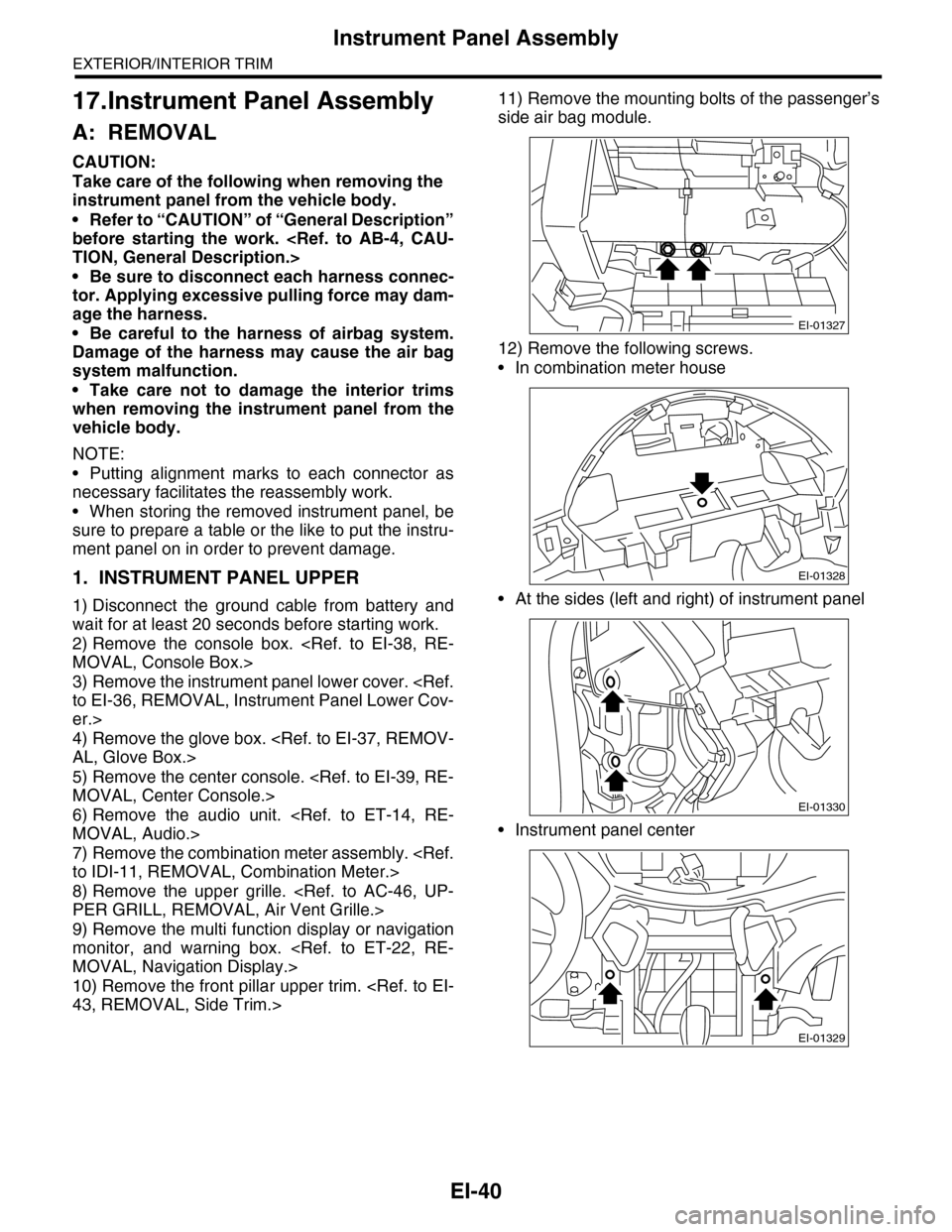
11) Remove the mounting bolts of the passenger’s
side air bag module.
12) Remove the following screws.
•In combination meter house
•At the sides (left and right) of instrument panel
•Instrument panel center
EI-01327
EI-01328
EI-01330
EI-01329
Page 319 of 2453
GW-24
Rear Window Defogger System
GLASS/WINDOWS/MIRRORS
16.Rear Window Defogger System
A: WIRING DIAGRAM
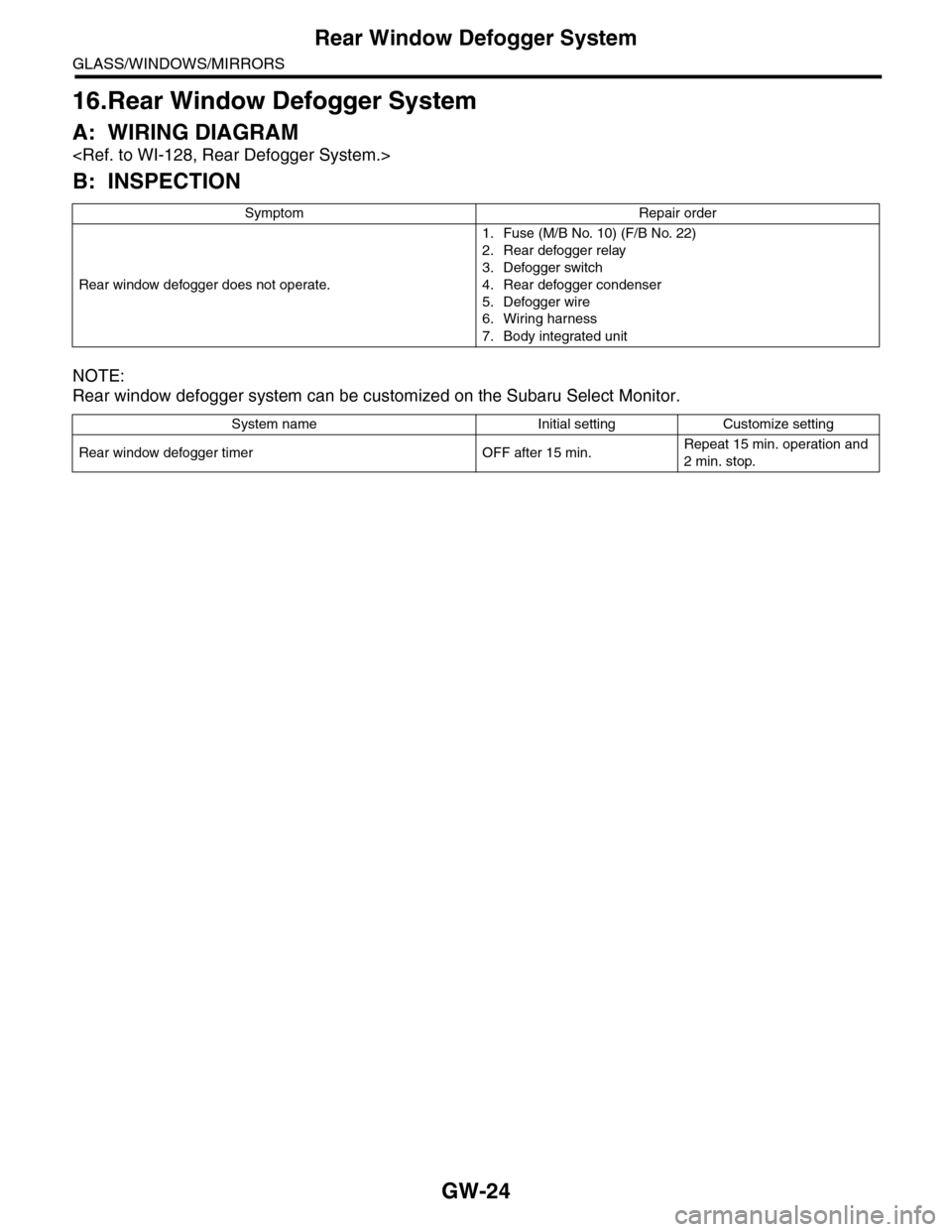
B: INSPECTION
NOTE:
Rear window defogger system can be customized on the Subaru Select Monitor.
Symptom Repair order
Rear window defogger does not operate.
1. Fuse (M/B No. 10) (F/B No. 22)
2. Rear defogger relay
3. Defogger switch
4. Rear defogger condenser
5. Defogger wire
6. Wiring harness
7. Body integrated unit
System name Initial setting Customize setting
Rear window defogger timer OFF after 15 min.Repeat 15 min. operation and
2 min. stop.
Page 320 of 2453
GW-25
Rear Window Defogger
GLASS/WINDOWS/MIRRORS
17.Rear Window Defogger
A: INSPECTION
1. CHECK WITH SUBARU SELECT MONITOR
CAUTION:
Check that the rear window defogger timer is in initial setting or customize setting before performing
inspection.
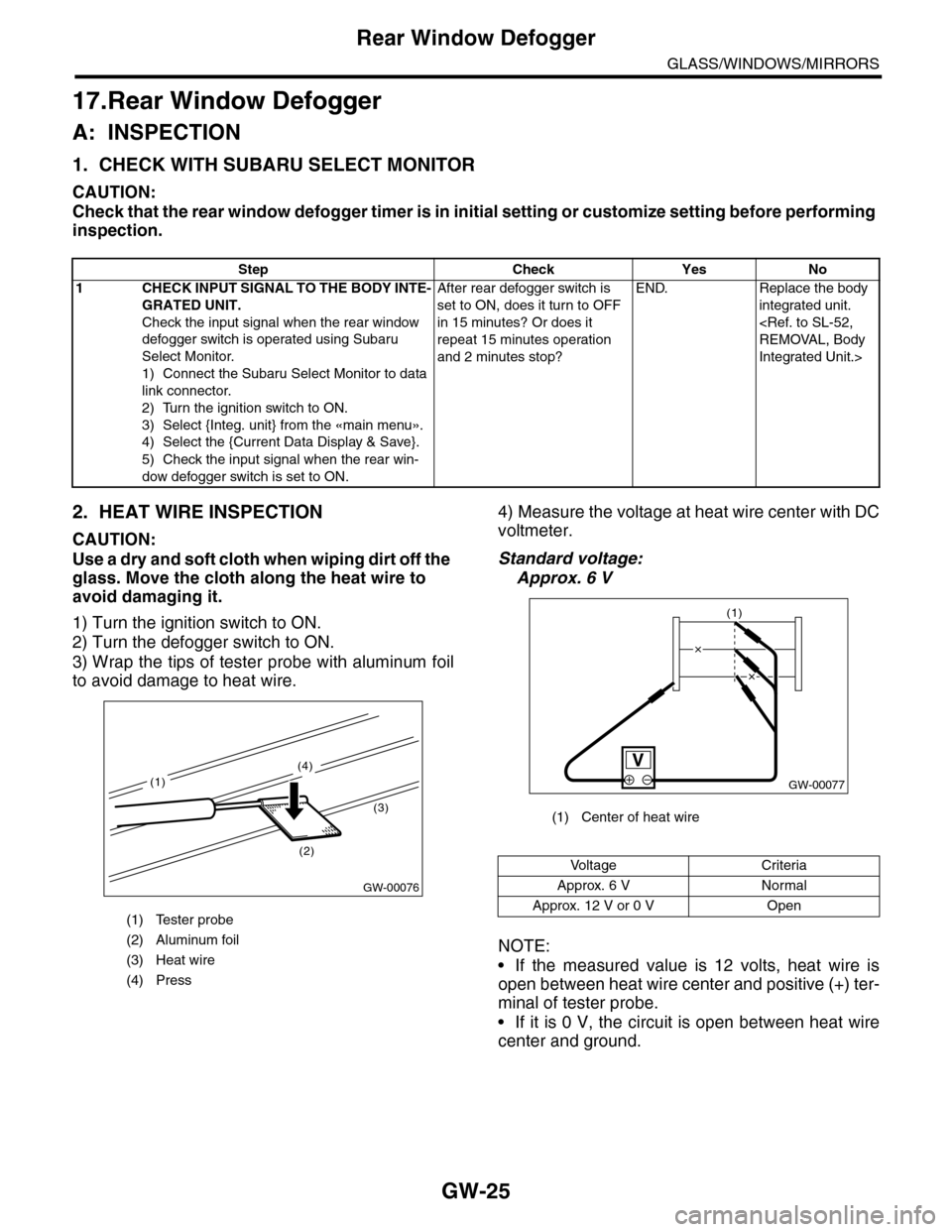
2. HEAT WIRE INSPECTION
CAUTION:
Use a dry and soft cloth when wiping dirt off the
glass. Move the cloth along the heat wire to
avoid damaging it.
1) Turn the ignition switch to ON.
2) Turn the defogger switch to ON.
3) Wrap the tips of tester probe with aluminum foil
to avoid damage to heat wire.
4) Measure the voltage at heat wire center with DC
voltmeter.
Standard voltage:
Approx. 6 V
NOTE:
•If the measured value is 12 volts, heat wire is
open between heat wire center and positive (+) ter-
minal of tester probe.
•If it is 0 V, the circuit is open between heat wire
center and ground.
Step Check Yes No
1CHECK INPUT SIGNAL TO THE BODY INTE-
GRATED UNIT.
Check the input signal when the rear window
defogger switch is operated using Subaru
Select Monitor.
1) Connect the Subaru Select Monitor to data
link connector.
2) Turn the ignition switch to ON.
3) Select {Integ. unit} from the «main menu».
4) Select the {Current Data Display & Save}.
5) Check the input signal when the rear win-
dow defogger switch is set to ON.
After rear defogger switch is
set to ON, does it turn to OFF
in 15 minutes? Or does it
repeat 15 minutes operation
and 2 minutes stop?
END. Replace the body
integrated unit.
Integrated Unit.>
(1) Tester probe
(2) Aluminum foil
(3) Heat wire
(4) Press
GW-00076
(2)
(3)
(4)
(1)
(1) Center of heat wire
Vo l t a g e C r i t e r i a
Approx. 6 V Normal
Approx. 12 V or 0 V Open
GW-00077
(1)
Page 325 of 2453
GW-30
Wiper Deicer System
GLASS/WINDOWS/MIRRORS
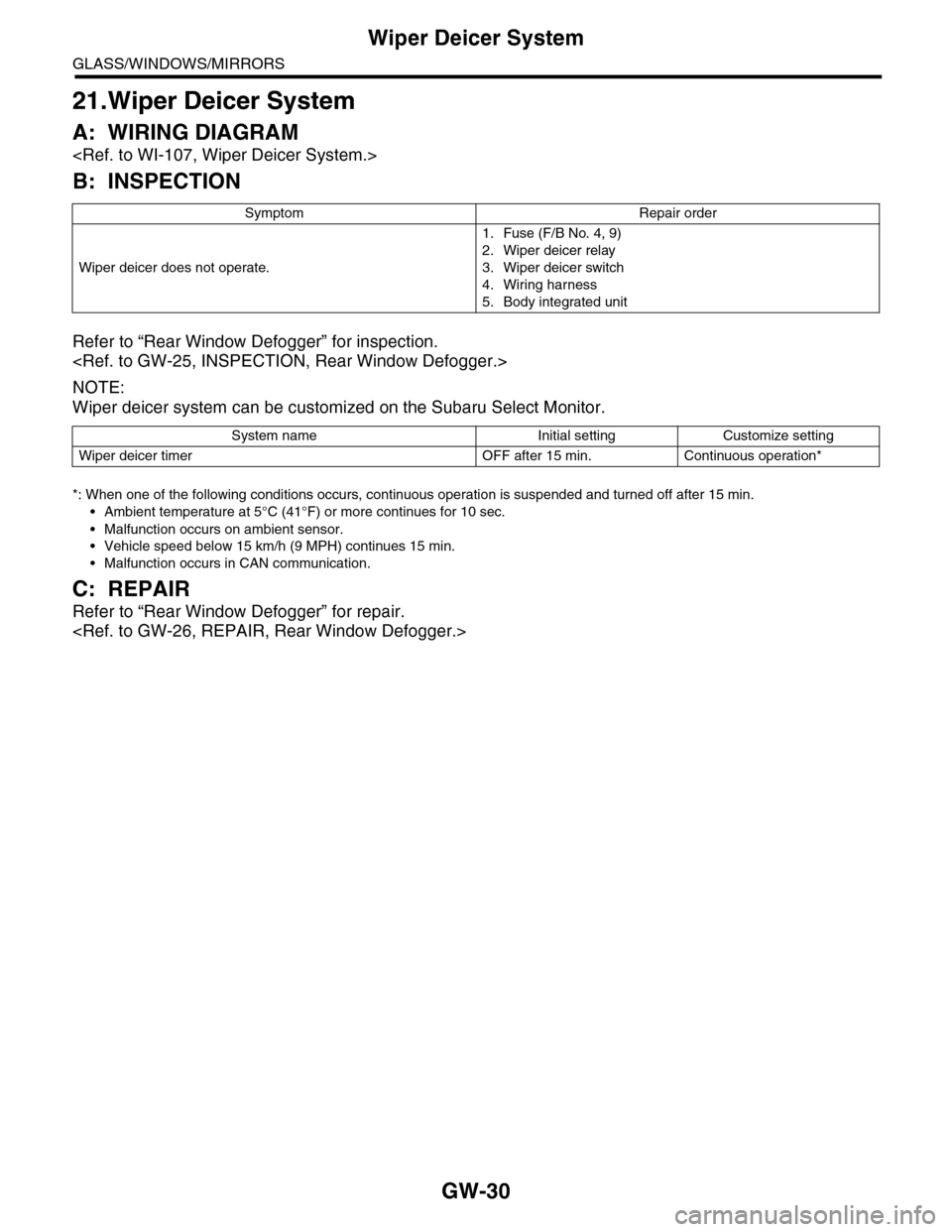
21.Wiper Deicer System
A: WIRING DIAGRAM
B: INSPECTION
Refer to “Rear Window Defogger” for inspection.
NOTE:
Wiper deicer system can be customized on the Subaru Select Monitor.
*: When one of the following conditions occurs, continuous operation is suspended and turned off after 15 min.
•Ambient temperature at 5°C (41°F) or more continues for 10 sec.
•Malfunction occurs on ambient sensor.
•Vehicle speed below 15 km/h (9 MPH) continues 15 min.
•Malfunction occurs in CAN communication.
C: REPAIR
Refer to “Rear Window Defogger” for repair.
Symptom Repair order
Wiper deicer does not operate.
1. Fuse (F/B No. 4, 9)
2. Wiper deicer relay
3. Wiper deicer switch
4. Wiring harness
5. Body integrated unit
System name Initial setting Customize setting
Wiper deicer timer OFF after 15 min. Continuous operation*
Page 326 of 2453
GW-31
Wiper Deicer Switch
GLASS/WINDOWS/MIRRORS
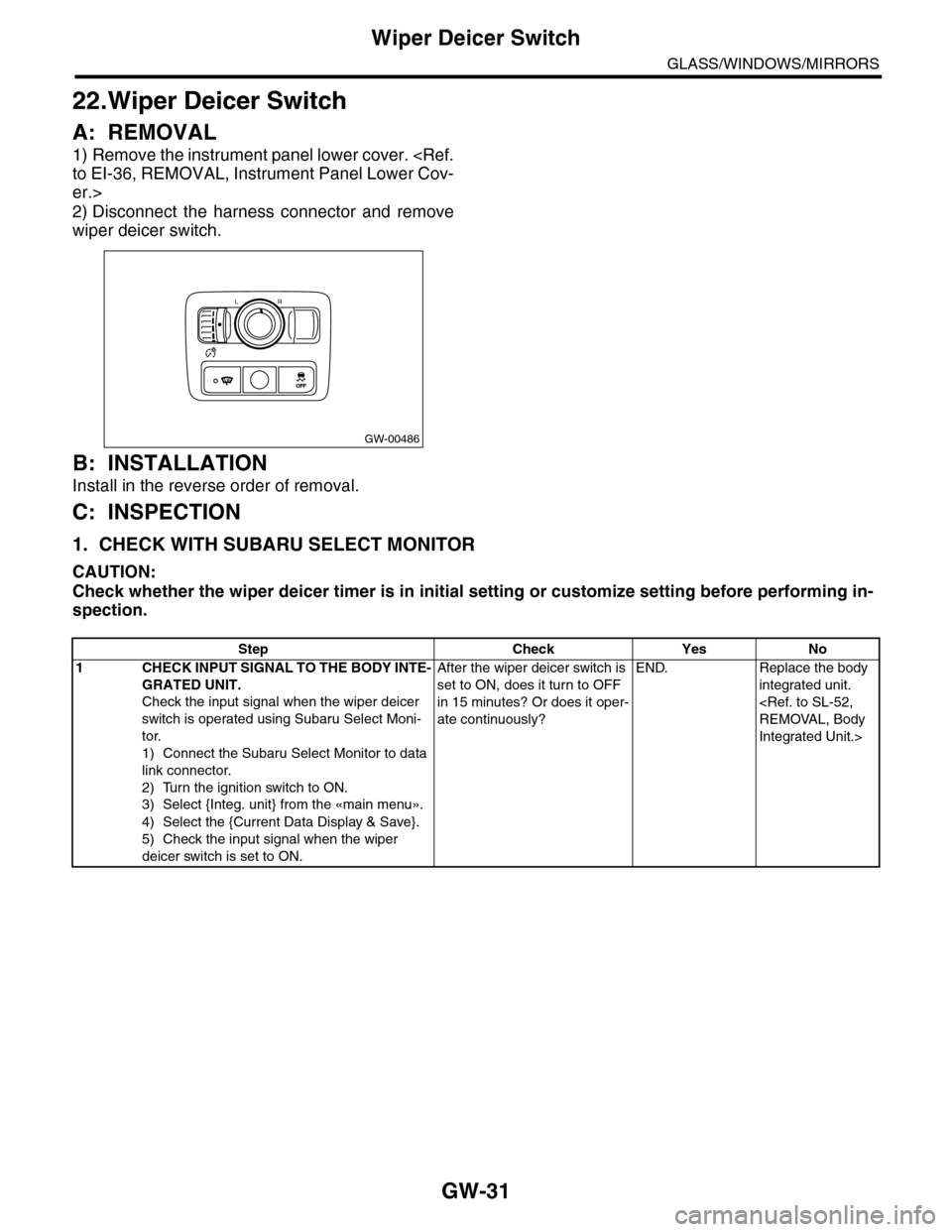
22.Wiper Deicer Switch
A: REMOVAL
1) Remove the instrument panel lower cover.
er.>
2) Disconnect the harness connector and remove
wiper deicer switch.
B: INSTALLATION
Install in the reverse order of removal.
C: INSPECTION
1. CHECK WITH SUBARU SELECT MONITOR
CAUTION:
Check whether the wiper deicer timer is in initial setting or customize setting before performing in-
spection.
GW-00486
LR
OFFOFF
Step Check Yes No
1CHECK INPUT SIGNAL TO THE BODY INTE-
GRATED UNIT.
Check the input signal when the wiper deicer
switch is operated using Subaru Select Moni-
tor.
1) Connect the Subaru Select Monitor to data
link connector.
2) Turn the ignition switch to ON.
3) Select {Integ. unit} from the «main menu».
4) Select the {Current Data Display & Save}.
5) Check the input signal when the wiper
deicer switch is set to ON.
After the wiper deicer switch is
set to ON, does it turn to OFF
in 15 minutes? Or does it oper-
ate continuously?
END. Replace the body
integrated unit.
Integrated Unit.>
Page 372 of 2453
AC-46
Air Vent Grille
HVAC SYSTEM (HEATER, VENTILATOR AND A/C)
25.Air Vent Grille
A: REMOVAL
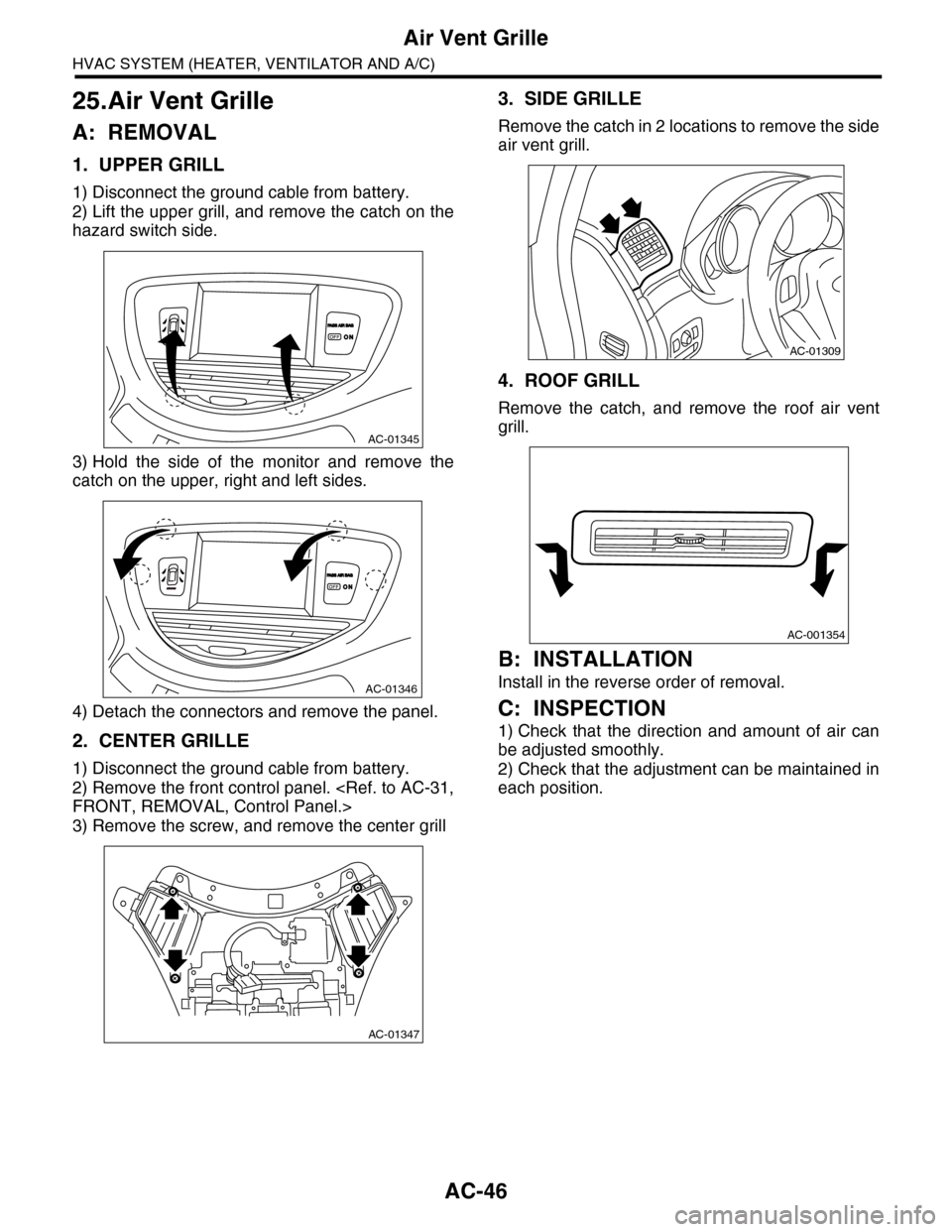
1. UPPER GRILL
1) Disconnect the ground cable from battery.
2) Lift the upper grill, and remove the catch on the
hazard switch side.
3) Hold the side of the monitor and remove the
catch on the upper, right and left sides.
4) Detach the connectors and remove the panel.
2. CENTER GRILLE
1) Disconnect the ground cable from battery.
2) Remove the front control panel.
3) Remove the screw, and remove the center grill
3. SIDE GRILLE
Remove the catch in 2 locations to remove the side
air vent grill.
4. ROOF GRILL
Remove the catch, and remove the roof air vent
grill.
B: INSTALLATION
Install in the reverse order of removal.
C: INSPECTION
1) Check that the direction and amount of air can
be adjusted smoothly.
2) Check that the adjustment can be maintained in
each position.
AC-01345
AC-01346
AC-01347
AC-01309
AC-001354
Page 418 of 2453
IM (diag)-2
Basic Diagnostic Procedure
IMMOBILIZER (DIAGNOSTICS)
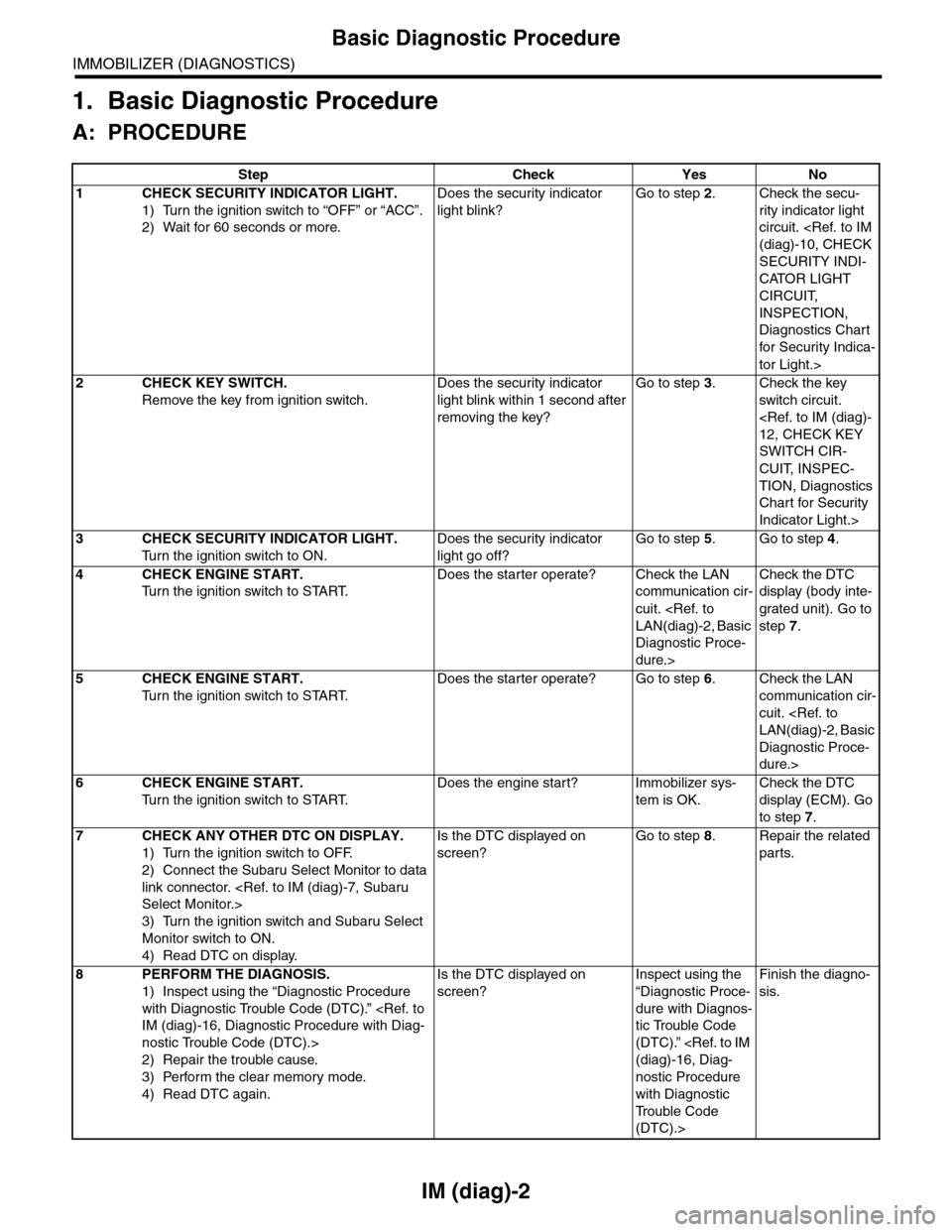
1. Basic Diagnostic Procedure
A: PROCEDURE
Step Check Yes No
1CHECK SECURITY INDICATOR LIGHT.
1) Turn the ignition switch to “OFF” or “ACC”.
2) Wait for 60 seconds or more.
Does the security indicator
light blink?
Go to step 2.Check the secu-
rity indicator light
circuit.
SECURITY INDI-
CATOR LIGHT
CIRCUIT,
INSPECTION,
Diagnostics Chart
for Secur ity Indica-
tor Light.>
2CHECK KEY SWITCH.
Remove the key from ignition switch.
Does the security indicator
light blink within 1 second after
removing the key?
Go to step 3.Check the key
switch circuit.
SWITCH CIR-
CUIT, INSPEC-
TION, Diagnostics
Chart for Security
Indicator Light.>
3CHECK SECURITY INDICATOR LIGHT.
Tu r n t h e i g n i t i o n s w i t c h t o O N .
Does the security indicator
light go off?
Go to step 5.Go to step 4.
4CHECK ENGINE START.
Tu r n t h e i g n i t i o n s w i t c h t o S TA R T.
Does the starter operate? Check the LAN
communication cir-
cuit.
Diagnostic Proce-
dure.>
Check the DTC
display (body inte-
grated unit). Go to
step 7.
5CHECK ENGINE START.
Tu r n t h e i g n i t i o n s w i t c h t o S TA R T.
Does the starter operate? Go to step 6.Check the LAN
communication cir-
cuit.
Diagnostic Proce-
dure.>
6CHECK ENGINE START.
Tu r n t h e i g n i t i o n s w i t c h t o S TA R T.
Does the engine start? Immobilizer sys-
tem is OK.
Check the DTC
display (ECM). Go
to step 7.
7CHECK ANY OTHER DTC ON DISPLAY.
1) Turn the ignition switch to OFF.
2) Connect the Subaru Select Monitor to data
link connector.
3) Turn the ignition switch and Subaru Select
Monitor switch to ON.
4) Read DTC on display.
Is the DTC displayed on
screen?
Go to step 8.Repair the related
parts.
8PERFORM THE DIAGNOSIS.
1) Inspect using the “Diagnostic Procedure
with Diagnostic Trouble Code (DTC).”
nostic Trouble Code (DTC).>
2) Repair the trouble cause.
3) Perform the clear memory mode.
4) Read DTC again.
Is the DTC displayed on
screen?
Inspect using the
“Diagnostic Proce-
dure with Diagnos-
tic Trouble Code
(DTC).”
nostic Procedure
with Diagnostic
Tr o u b l e C o d e
(DTC).>
Finish the diagno-
sis.
Page 420 of 2453
IM (diag)-4
General Description
IMMOBILIZER (DIAGNOSTICS)
B: PREPARATION TOOL
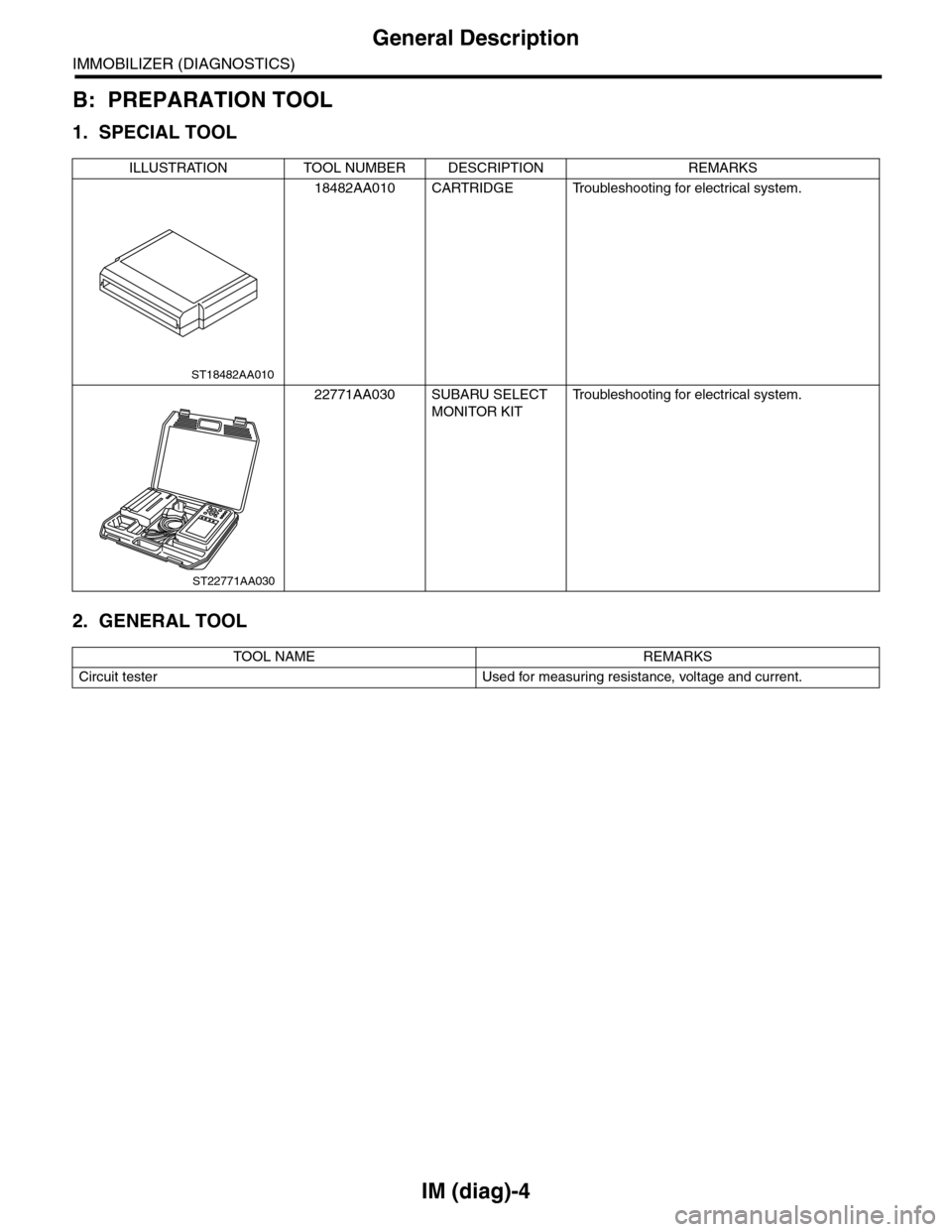
1. SPECIAL TOOL
2. GENERAL TOOL
ILLUSTRATION TOOL NUMBER DESCRIPTION REMARKS
18482AA010 CARTRIDGE Troubleshooting for electrical system.
22771AA030 SUBARU SELECT
MONITOR KIT
Tr o u b l e s h o o t i n g f o r e l e c t r i c a l s y s t e m .
TOOL NAME REMARKS
Circuit tester Used for measuring resistance, voltage and current.
ST18482AA010
ST22771AA030
Page 423 of 2453
IM (diag)-7
Subaru Select Monitor
IMMOBILIZER (DIAGNOSTICS)
5. Subaru Select Monitor
A: OPERATION
1. HOW TO USE SUBARU SELECT MONI-
TOR
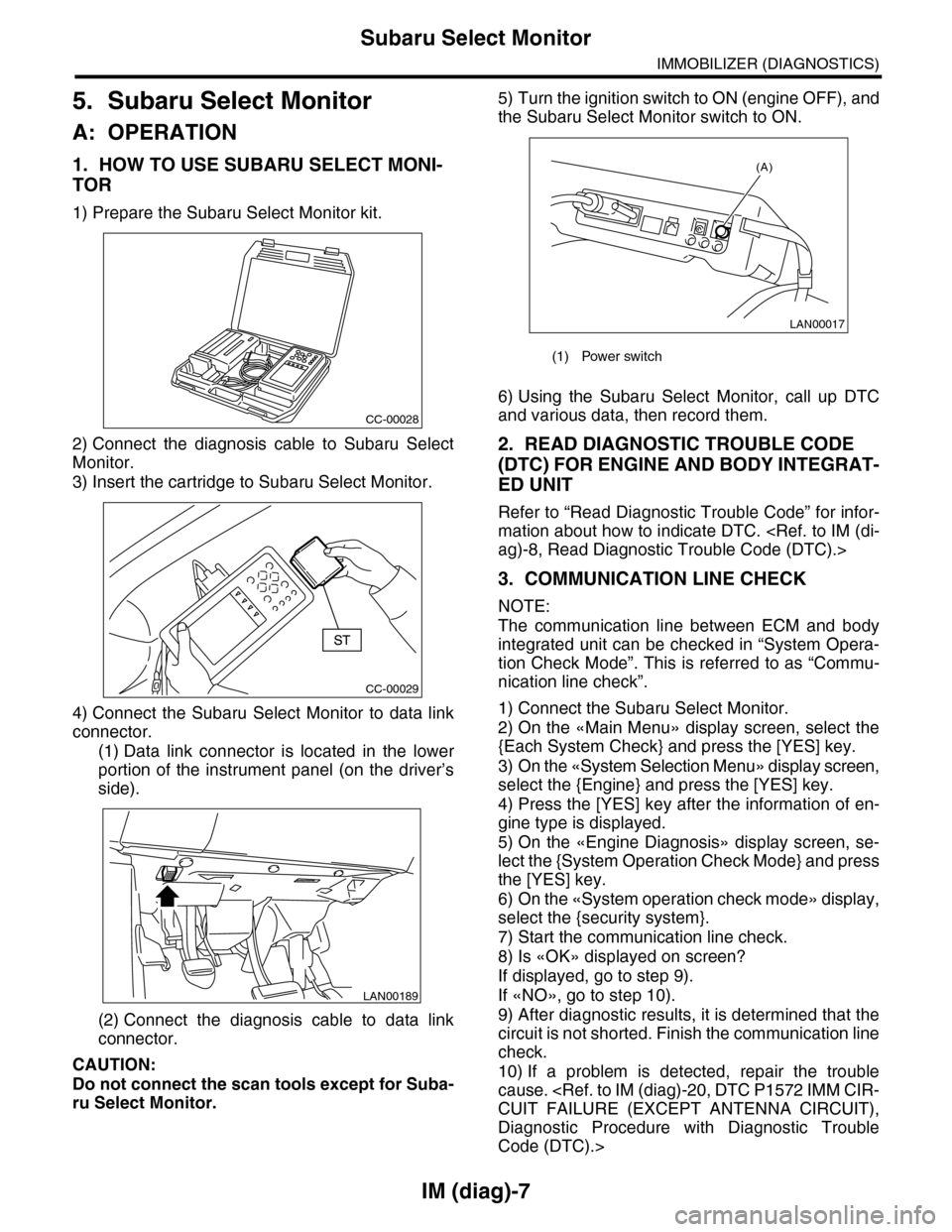
1) Prepare the Subaru Select Monitor kit.
2) Connect the diagnosis cable to Subaru Select
Monitor.
3) Insert the cartridge to Subaru Select Monitor.
4) Connect the Subaru Select Monitor to data link
connector.
(1) Data link connector is located in the lower
portion of the instrument panel (on the driver’s
side).
(2) Connect the diagnosis cable to data link
connector.
CAUTION:
Do not connect the scan tools except for Suba-
ru Select Monitor.
5) Turn the ignition switch to ON (engine OFF), and
the Subaru Select Monitor switch to ON.
6) Using the Subaru Select Monitor, call up DTC
and various data, then record them.
2. READ DIAGNOSTIC TROUBLE CODE
(DTC) FOR ENGINE AND BODY INTEGRAT-
ED UNIT
Refer to “Read Diagnostic Trouble Code” for infor-
mation about how to indicate DTC.
3. COMMUNICATION LINE CHECK
NOTE:
The communication line between ECM and body
integrated unit can be checked in “System Opera-
tion Check Mode”. This is referred to as “Commu-
nication line check”.
1) Connect the Subaru Select Monitor.
2) On the «Main Menu» display screen, select the
{Each System Check} and press the [YES] key.
3) On the «System Selection Menu» display screen,
select the {Engine} and press the [YES] key.
4) Press the [YES] key after the information of en-
gine type is displayed.
5) On the «Engine Diagnosis» display screen, se-
lect the {System Operation Check Mode} and press
the [YES] key.
6) On the «System operation check mode» display,
select the {security system}.
7) Start the communication line check.
8) Is «OK» displayed on screen?
If displayed, go to step 9).
If «NO», go to step 10).
9) After diagnostic results, it is determined that the
circuit is not shorted. Finish the communication line
check.
10) If a problem is detected, repair the trouble
cause.
Diagnostic Procedure with Diagnostic Trouble
Code (DTC).>
CC-00028
CC-00029
LAN00189
(1) Power switch
LAN00017
(A)