hvac SUBARU TRIBECA 2009 1.G Service Repair Manual
[x] Cancel search | Manufacturer: SUBARU, Model Year: 2009, Model line: TRIBECA, Model: SUBARU TRIBECA 2009 1.GPages: 2453, PDF Size: 46.32 MB
Page 388 of 2453
AC(diag)-11
Diagnostic Chart for Self-diagnosis
HVAC SYSTEM (AUTO A/C) (DIAGNOSTICS)
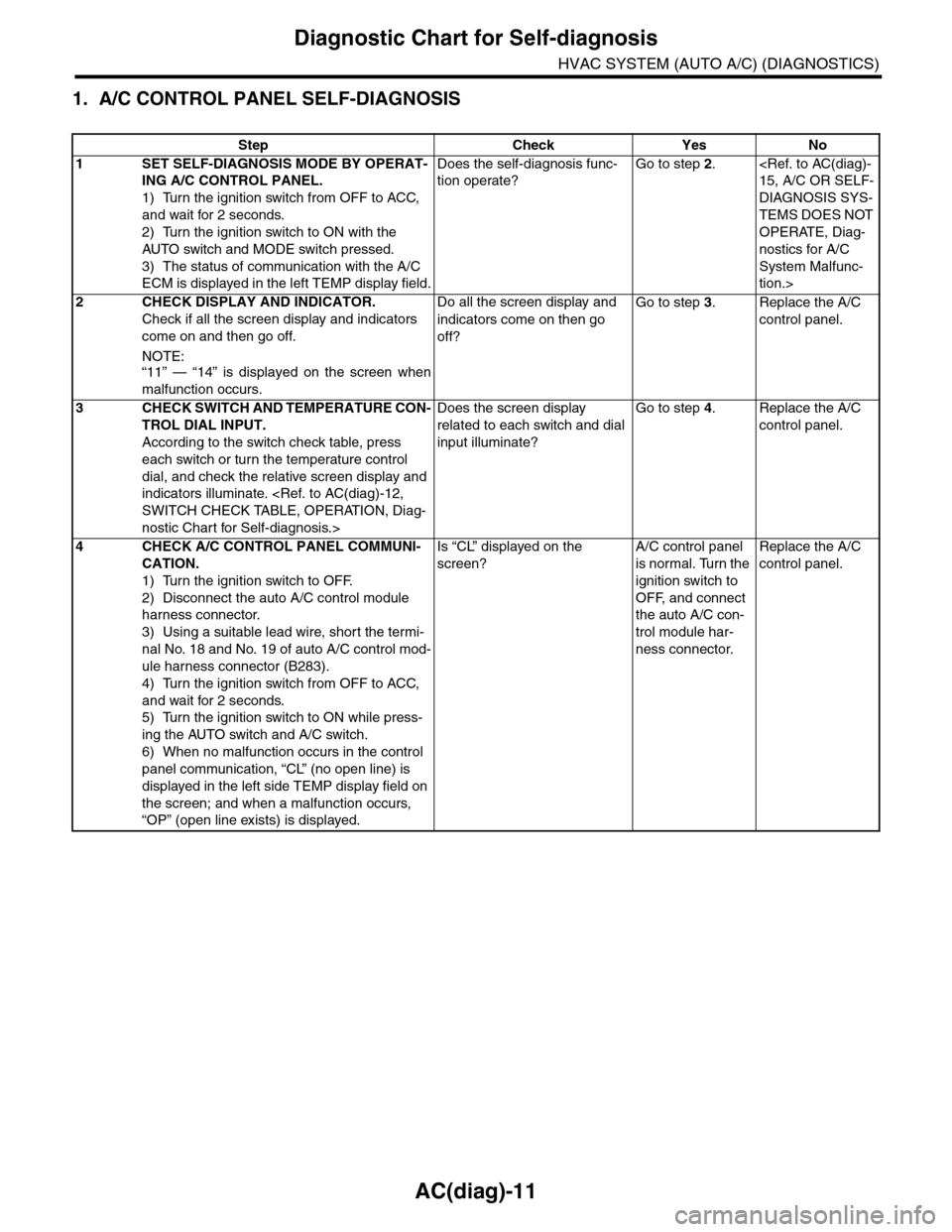
1. A/C CONTROL PANEL SELF-DIAGNOSIS
Step Check Yes No
1SET SELF-DIAGNOSIS MODE BY OPERAT-
ING A/C CONTROL PANEL.
1) Turn the ignition switch from OFF to ACC,
and wait for 2 seconds.
2) Turn the ignition switch to ON with the
AUTO switch and MODE switch pressed.
3) The status of communication with the A/C
ECM is displayed in the left TEMP display field.
Does the self-diagnosis func-
tion operate?
Go to step 2.
DIAGNOSIS SYS-
TEMS DOES NOT
OPERATE, Diag-
nostics for A/C
System Malfunc-
tion.>
2CHECK DISPLAY AND INDICATOR.
Check if all the screen display and indicators
come on and then go off.
NOTE:“11” — “14” is displayed on the screen when
malfunction occurs.
Do all the screen display and
indicators come on then go
off?
Go to step 3.Replace the A/C
control panel.
3CHECK SWITCH AND TEMPERATURE CON-
TROL DIAL INPUT.
According to the switch check table, press
each switch or turn the temperature control
dial, and check the relative screen display and
indicators illuminate.
nostic Chart for Self-diagnosis.>
Does the screen display
related to each switch and dial
input illuminate?
Go to step 4.Replace the A/C
control panel.
4CHECK A/C CONTROL PANEL COMMUNI-
CATION.
1) Turn the ignition switch to OFF.
2) Disconnect the auto A/C control module
harness connector.
3) Using a suitable lead wire, short the termi-
nal No. 18 and No. 19 of auto A/C control mod-
ule harness connector (B283).
4) Turn the ignition switch from OFF to ACC,
and wait for 2 seconds.
5) Turn the ignition switch to ON while press-
ing the AUTO switch and A/C switch.
6) When no malfunction occurs in the control
panel communication, “CL” (no open line) is
displayed in the left side TEMP display field on
the screen; and when a malfunction occurs,
“OP” (open line exists) is displayed.
Is “CL” displayed on the
screen?
A/C control panel
is normal. Turn the
ignition switch to
OFF, and connect
the auto A/C con-
trol module har-
ness connector.
Replace the A/C
control panel.
Page 389 of 2453
AC(diag)-12
Diagnostic Chart for Self-diagnosis
HVAC SYSTEM (AUTO A/C) (DIAGNOSTICS)
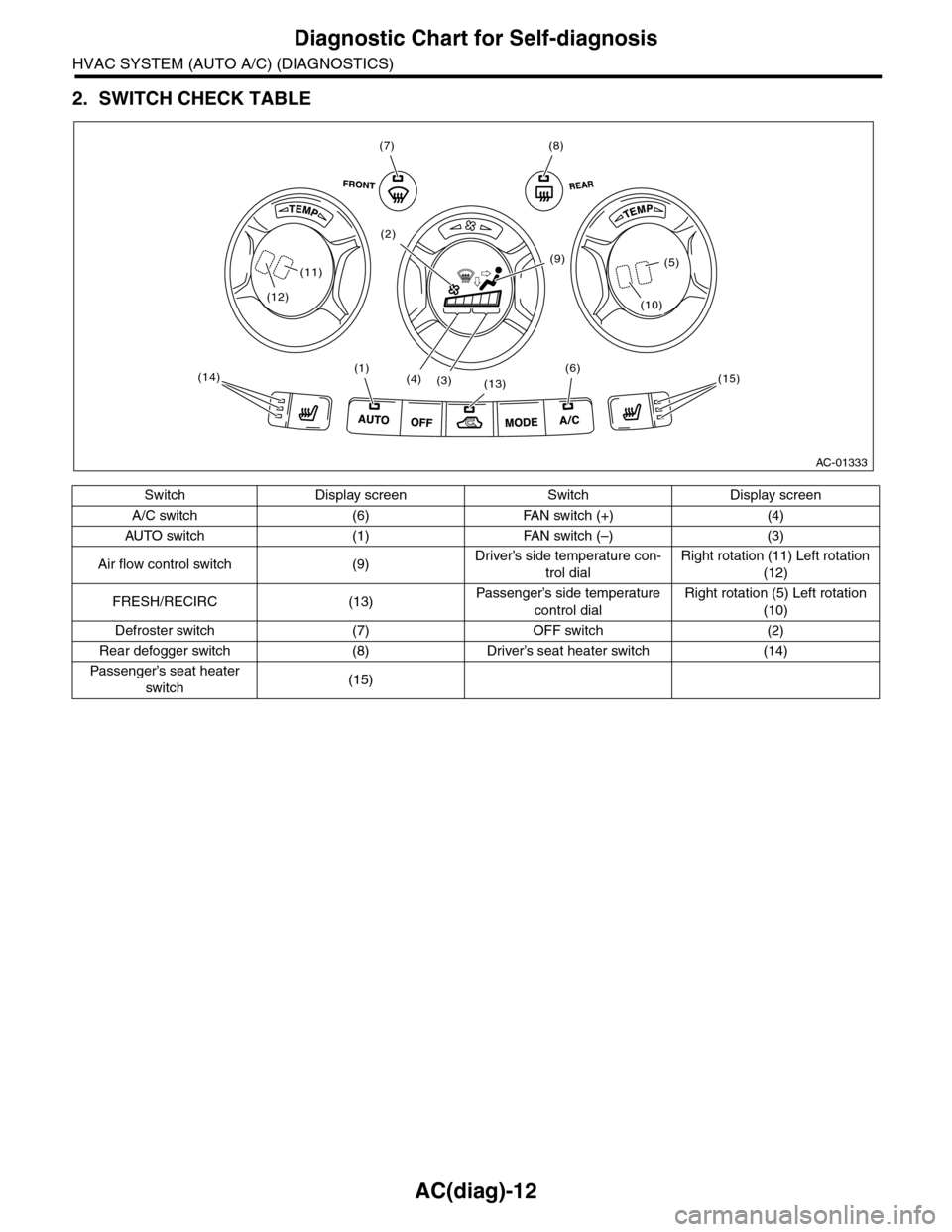
2. SWITCH CHECK TABLE
Switch Display screen Switch Display screen
A/C switch (6) FAN switch (+) (4)
AU TO sw i t ch ( 1 ) FA N sw it ch ( –) (3 )
Air flow control switch (9)Driver’s side temperature con-
trol dial
Right rotation (11) Left rotation
(12)
FRESH/RECIRC (13)Passenger’s side temperature
control dial
Right rotation (5) Left rotation
(10)
Defroster switch (7) OFF switch (2)
Rear defogger switch (8) Driver’s seat heater switch (14)
Passenger’s seat heater
switch(15)
AC-01333
(7)(8)
(6)(1)
(13)(4)(3)
(9)
(2)
(15)(14)
(12)
(11)
(10)
(5)
Page 390 of 2453
AC(diag)-13
Diagnostic Chart for Self-diagnosis
HVAC SYSTEM (AUTO A/C) (DIAGNOSTICS)
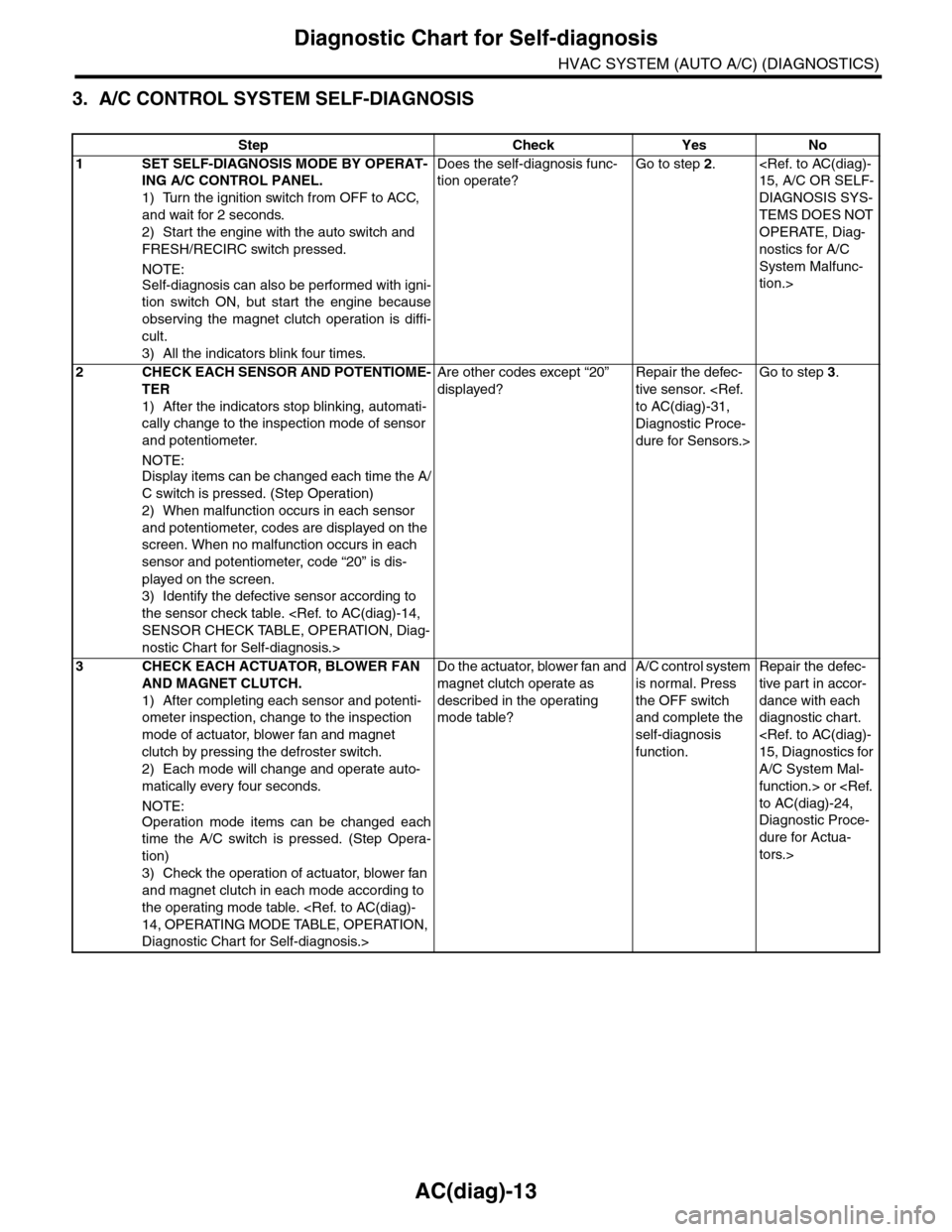
3. A/C CONTROL SYSTEM SELF-DIAGNOSIS
Step Check Yes No
1SET SELF-DIAGNOSIS MODE BY OPERAT-
ING A/C CONTROL PANEL.
1) Turn the ignition switch from OFF to ACC,
and wait for 2 seconds.
2) Start the engine with the auto switch and
FRESH/RECIRC switch pressed.
NOTE:
Self-diagnosis can also be performed with igni-
tion switch ON, but start the engine because
observing the magnet clutch operation is diffi-
cult.
3) All the indicators blink four times.
Does the self-diagnosis func-
tion operate?
Go to step 2.
DIAGNOSIS SYS-
TEMS DOES NOT
OPERATE, Diag-
nostics for A/C
System Malfunc-
tion.>
2CHECK EACH SENSOR AND POTENTIOME-
TER
1) After the indicators stop blinking, automati-
cally change to the inspection mode of sensor
and potentiometer.
NOTE:
Display items can be changed each time the A/
C switch is pressed. (Step Operation)
2) When malfunction occurs in each sensor
and potentiometer, codes are displayed on the
screen. When no malfunction occurs in each
sensor and potentiometer, code “20” is dis-
played on the screen.
3) Identify the defective sensor according to
the sensor check table.
nostic Chart for Self-diagnosis.>
Are other codes except “20”
displayed?
Repair the defec-
tive sensor.
Diagnostic Proce-
dure for Sensors.>
Go to step 3.
3CHECK EACH ACTUATOR, BLOWER FAN
AND MAGNET CLUTCH.
1) After completing each sensor and potenti-
ometer inspection, change to the inspection
mode of actuator, blower fan and magnet
clutch by pressing the defroster switch.
2) Each mode will change and operate auto-
matically every four seconds.
NOTE:
Operation mode items can be changed each
time the A/C switch is pressed. (Step Opera-
tion)
3) Check the operation of actuator, blower fan
and magnet clutch in each mode according to
the operating mode table.
Diagnostic Chart for Self-diagnosis.>
Do the actuator, blower fan and
magnet clutch operate as
described in the operating
mode table?
A/C control system
is normal. Press
the OFF switch
and complete the
self-diagnosis
function.
Repair the defec-
tive par t in accor-
dance with each
diagnostic chart.
A/C System Mal-
function.> or
Diagnostic Proce-
dure for Actua-
tors.>
Page 391 of 2453
AC(diag)-14
Diagnostic Chart for Self-diagnosis
HVAC SYSTEM (AUTO A/C) (DIAGNOSTICS)
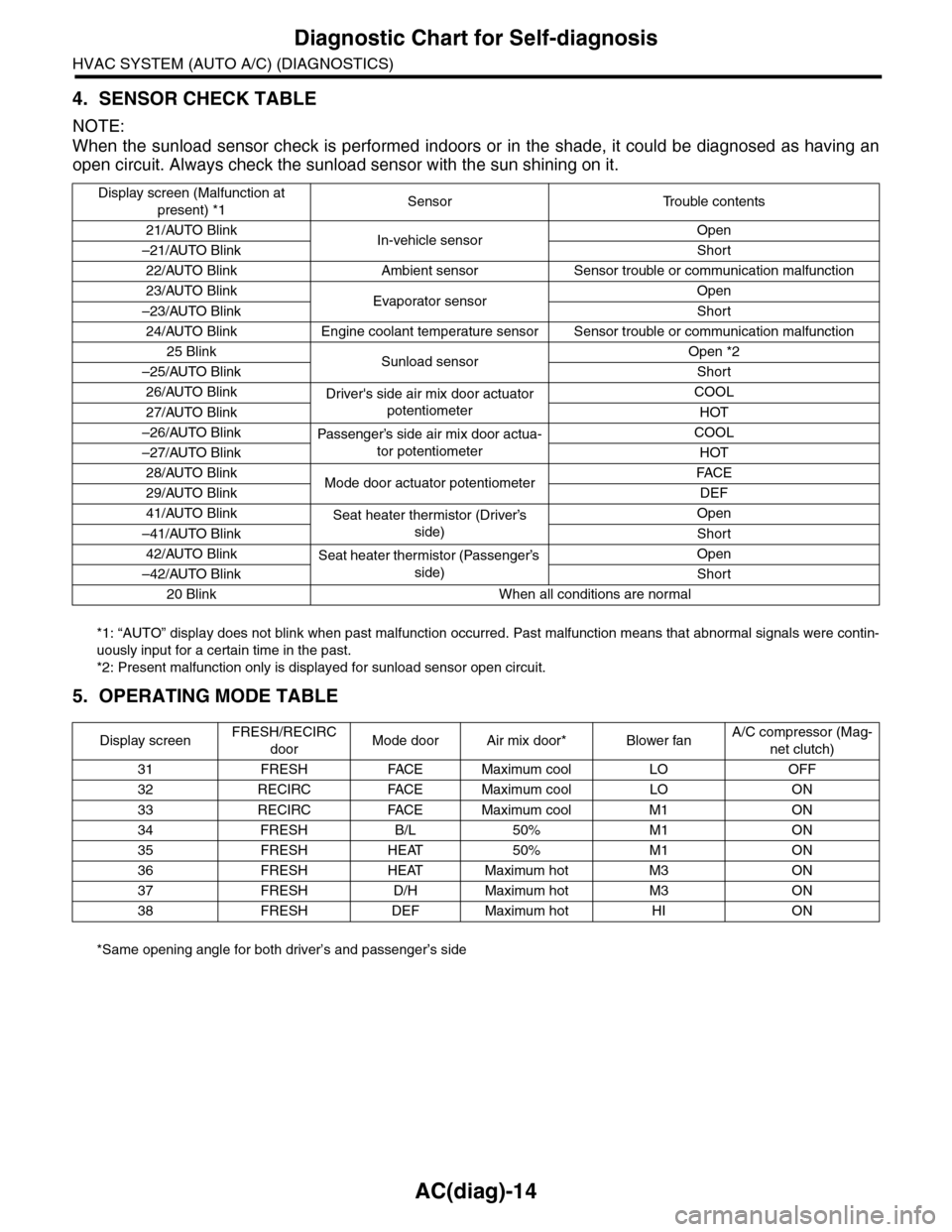
4. SENSOR CHECK TABLE
NOTE:
When the sunload sensor check is performed indoors or in the shade, it could be diagnosed as having an
open circuit. Always check the sunload sensor with the sun shining on it.
*1: “AUTO” display does not blink when past malfunction occurred. Past malfunction means that abnormal signals were contin-
uously input for a certain time in the past.
*2: Present malfunction only is displayed for sunload sensor open circuit.
5. OPERATING MODE TABLE
*Same opening angle for both driver’s and passenger’s side
Display screen (Malfunction at
present) *1Sensor Trouble contents
21/AUTO BlinkIn-vehicle sensorOpen
–21/AUTO BlinkShort
22/AUTO Blink Ambient sensor Sensor trouble or communication malfunction
23/AUTO BlinkEvaporator sensorOpen
–23/AUTO BlinkShort
24/AUTO Blink Engine coolant temperature sensor Sensor trouble or communication malfunction
25 BlinkSunload sensorOpen *2
–25/AUTO BlinkShort
26/AUTO BlinkDriver's side air mix door actuator
potentiometer
COOL
27/AUTO BlinkHOT
–26/AUTO BlinkPassenger’s side air mix door actua-
tor potentiometer
COOL
–27/AUTO BlinkHOT
28/AUTO BlinkMode door actuator potentiometerFA C E
29/AUTO BlinkDEF
41/AUTO BlinkSeat heater thermistor (Driver’s
side)
Open
–41/AUTO BlinkShort
42/AUTO BlinkSeat heater thermistor (Passenger’s
side)
Open
–42/AUTO BlinkShort
20 Blink When all conditions are normal
Display screenFRESH/RECIRC
doorMode door Air mix door* Blower fanA/C compressor (Mag-
net clutch)
31 FRESH FACE Maximum cool LO OFF
32 RECIRC FACE Maximum cool LO ON
33 RECIRC FACE Maximum cool M1 ON
34 FRESH B/L 50% M1 ON
35 FRESH HEAT 50% M1 ON
36 FRESH HEAT Maximum hot M3 ON
37 FRESH D/H Maximum hot M3 ON
38 FRESH DEF Maximum hot HI ON
Page 392 of 2453
AC(diag)-15
Diagnostics for A/C System Malfunction
HVAC SYSTEM (AUTO A/C) (DIAGNOSTICS)
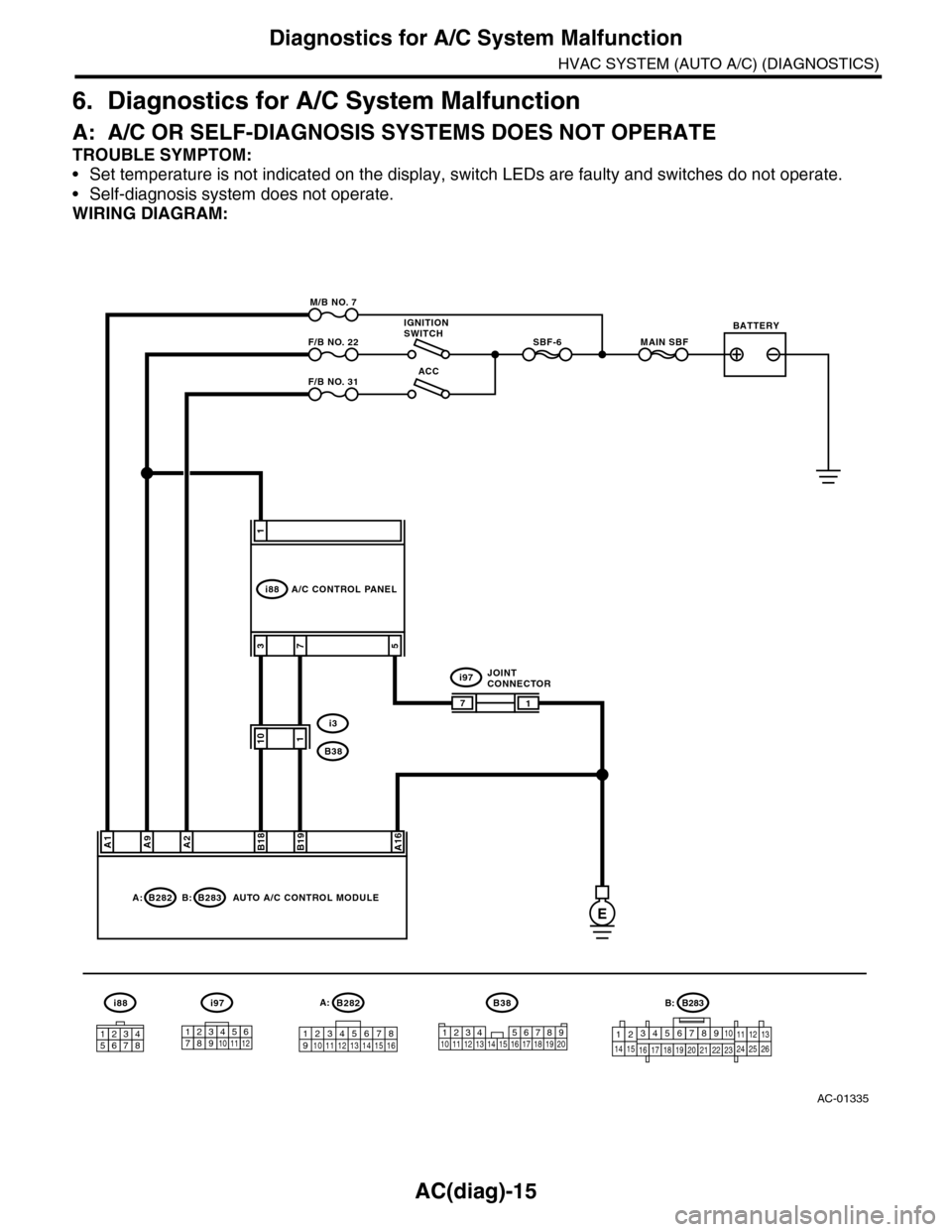
6. Diagnostics for A/C System Malfunction
A: A/C OR SELF-DIAGNOSIS SYSTEMS DOES NOT OPERATE
TROUBLE SYMPTOM:
•Set temperature is not indicated on the display, switch LEDs are faulty and switches do not operate.
•Self-diagnosis system does not operate.
WIRING DIAGRAM:
AC-01335
A1A9A2A16
B282A:B283B:
M/B NO. 7
F/B NO. 22
F/B NO. 31
MAIN SBFSBF-6
B282
12345678910 11 12 13 14 15 16
A:
E
ACC
i88
1
5
B18B19
37
101
1
i97
i3
B38
1234 5678910 11 12 13 14 15 16 17 18 19 20
B38
123456789101112
i97
12345678
i88
IGNITIONSWITCHBATTERY
AUTO A/C CONTROL MODULE
A/C CONTROL PANEL
JOINTCONNECTOR
7
B283B:
1234567891014151617181920212223111213242526
Page 393 of 2453
AC(diag)-16
Diagnostics for A/C System Malfunction
HVAC SYSTEM (AUTO A/C) (DIAGNOSTICS)
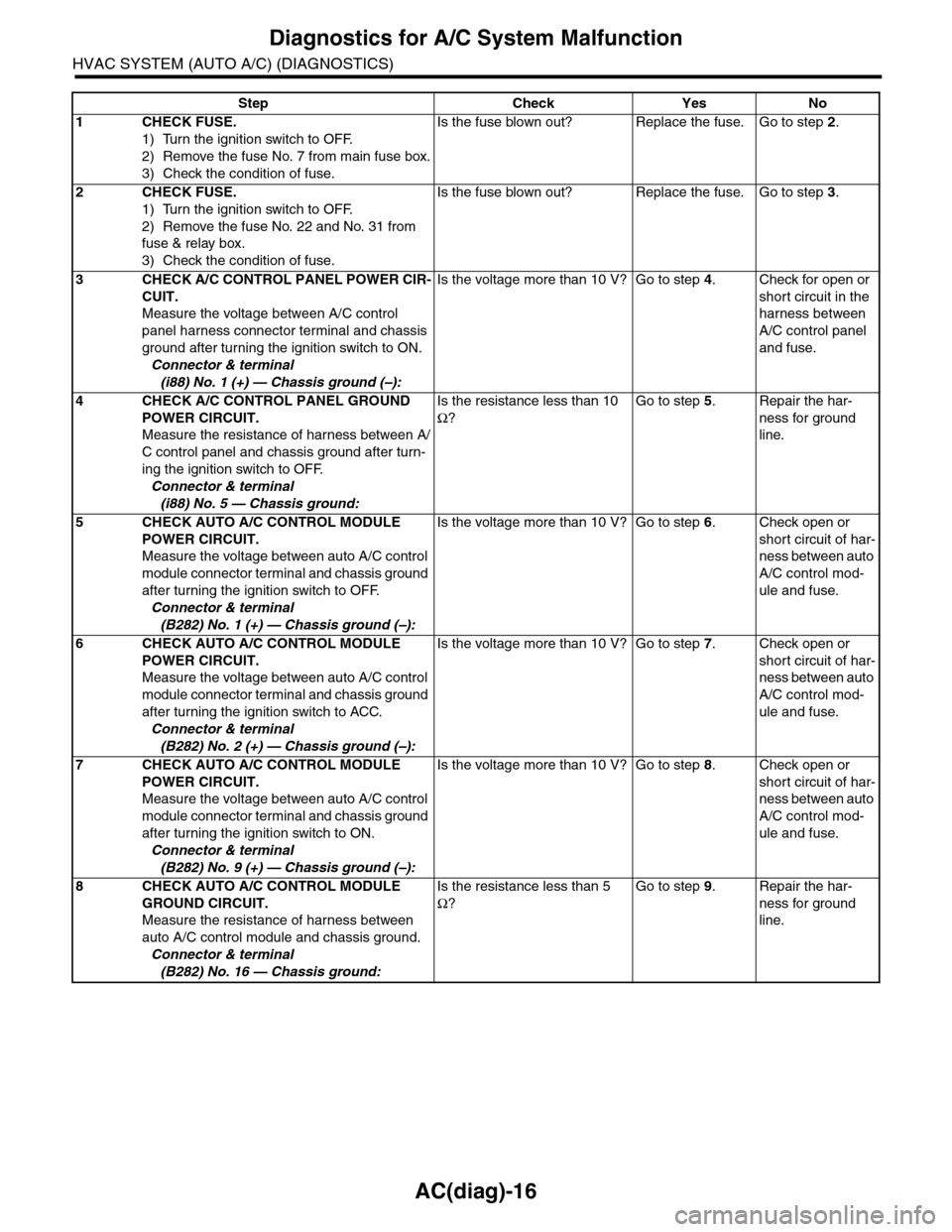
Step Check Yes No
1CHECK FUSE.
1) Turn the ignition switch to OFF.
2) Remove the fuse No. 7 from main fuse box.
3) Check the condition of fuse.
Is the fuse blown out? Replace the fuse. Go to step 2.
2CHECK FUSE.
1) Turn the ignition switch to OFF.
2) Remove the fuse No. 22 and No. 31 from
fuse & relay box.
3) Check the condition of fuse.
Is the fuse blown out? Replace the fuse. Go to step 3.
3CHECK A/C CONTROL PANEL POWER CIR-
CUIT.
Measure the voltage between A/C control
panel harness connector terminal and chassis
ground after turning the ignition switch to ON.
Connector & terminal
(i88) No. 1 (+) — Chassis ground (–):
Is the voltage more than 10 V? Go to step 4.Check for open or
short circuit in the
harness between
A/C control panel
and fuse.
4CHECK A/C CONTROL PANEL GROUND
POWER CIRCUIT.
Measure the resistance of harness between A/
C control panel and chassis ground after turn-
ing the ignition switch to OFF.
Connector & terminal
(i88) No. 5 — Chassis ground:
Is the resistance less than 10
Ω?
Go to step 5.Repair the har-
ness for ground
line.
5CHECK AUTO A/C CONTROL MODULE
POWER CIRCUIT.
Measure the voltage between auto A/C control
module connector terminal and chassis ground
after turning the ignition switch to OFF.
Connector & terminal
(B282) No. 1 (+) — Chassis ground (–):
Is the voltage more than 10 V? Go to step 6.Check open or
short circuit of har-
ness between auto
A/C control mod-
ule and fuse.
6CHECK AUTO A/C CONTROL MODULE
POWER CIRCUIT.
Measure the voltage between auto A/C control
module connector terminal and chassis ground
after turning the ignition switch to ACC.
Connector & terminal
(B282) No. 2 (+) — Chassis ground (–):
Is the voltage more than 10 V? Go to step 7.Check open or
short circuit of har-
ness between auto
A/C control mod-
ule and fuse.
7CHECK AUTO A/C CONTROL MODULE
POWER CIRCUIT.
Measure the voltage between auto A/C control
module connector terminal and chassis ground
after turning the ignition switch to ON.
Connector & terminal
(B282) No. 9 (+) — Chassis ground (–):
Is the voltage more than 10 V? Go to step 8.Check open or
short circuit of har-
ness between auto
A/C control mod-
ule and fuse.
8CHECK AUTO A/C CONTROL MODULE
GROUND CIRCUIT.
Measure the resistance of harness between
auto A/C control module and chassis ground.
Connector & terminal
(B282) No. 16 — Chassis ground:
Is the resistance less than 5
Ω?
Go to step 9.Repair the har-
ness for ground
line.
Page 394 of 2453
AC(diag)-17
Diagnostics for A/C System Malfunction
HVAC SYSTEM (AUTO A/C) (DIAGNOSTICS)
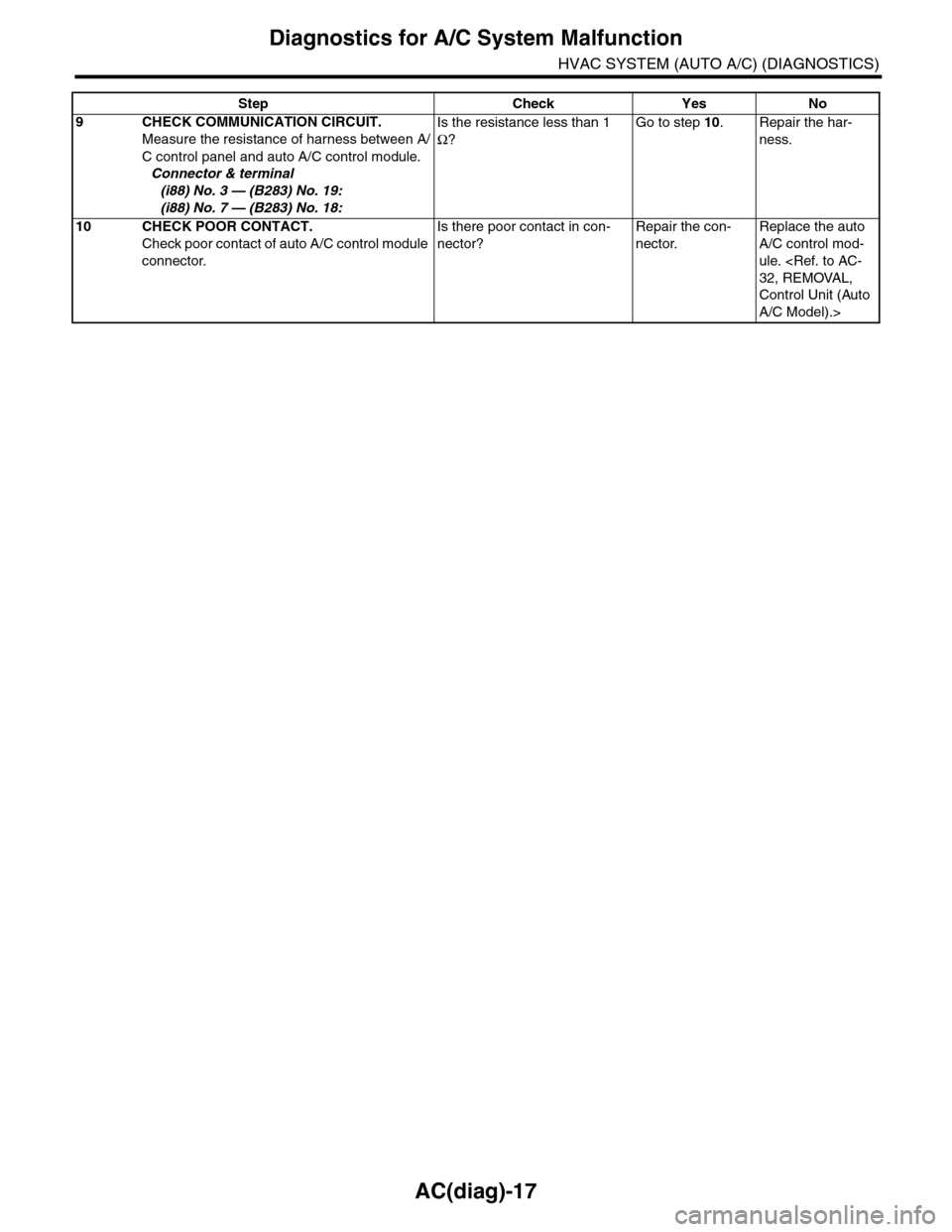
9CHECK COMMUNICATION CIRCUIT.
Measure the resistance of harness between A/
C control panel and auto A/C control module.
Connector & terminal
(i88) No. 3 — (B283) No. 19:
(i88) No. 7 — (B283) No. 18:
Is the resistance less than 1
Ω?
Go to step 10.Repair the har-
ness.
10 CHECK POOR CONTACT.
Check poor contact of auto A/C control module
connector.
Is there poor contact in con-
nector?
Repair the con-
nector.
Replace the auto
A/C control mod-
ule.
Control Unit (Auto
A/C Model).>
Step Check Yes No
Page 395 of 2453
AC(diag)-18
Diagnostics for A/C System Malfunction
HVAC SYSTEM (AUTO A/C) (DIAGNOSTICS)
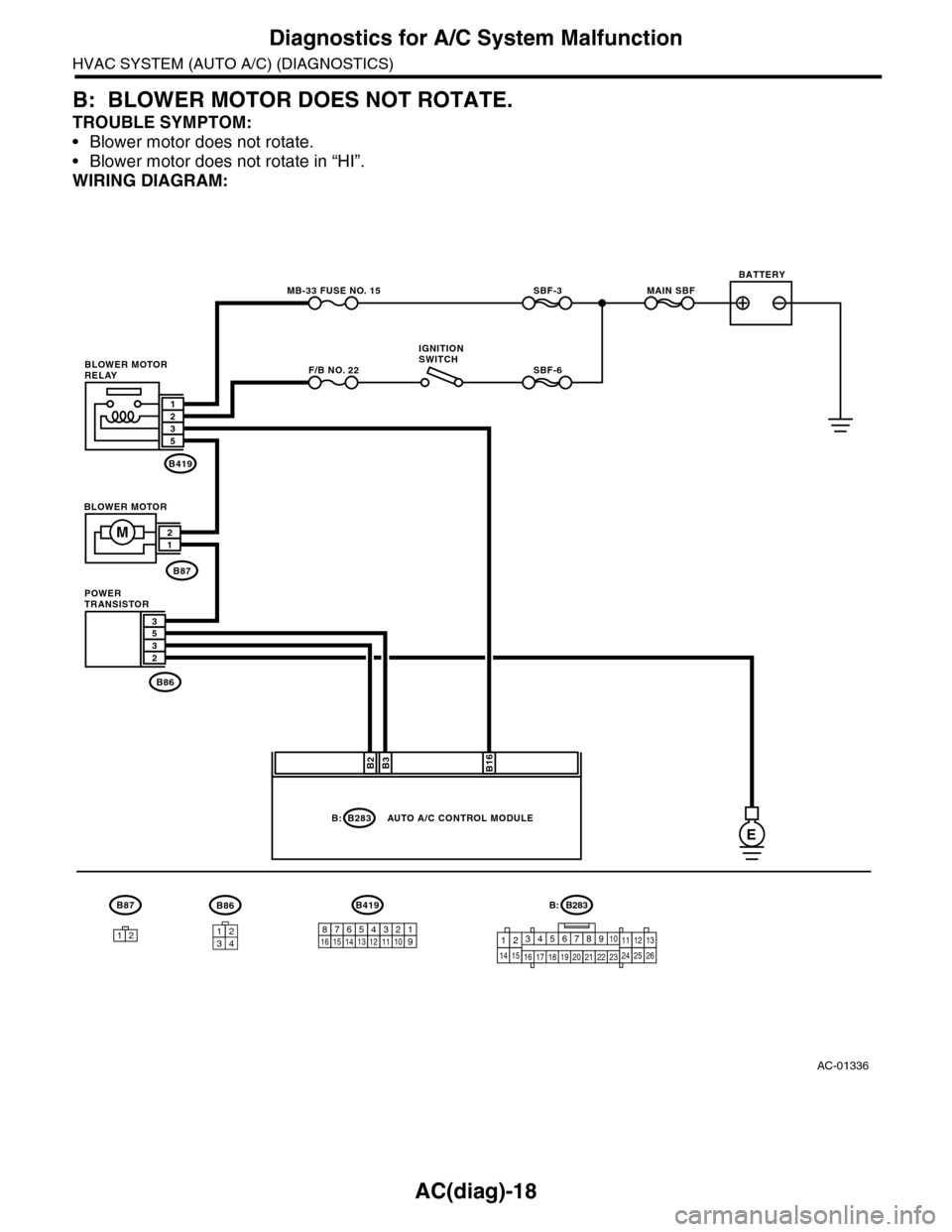
B: BLOWER MOTOR DOES NOT ROTATE.
TROUBLE SYMPTOM:
•Blower motor does not rotate.
•Blower motor does not rotate in “HI”.
WIRING DIAGRAM:
AC-01336
B2B3B16
B419
B87
B86
MB-33 FUSE NO. 15
F/B NO. 22
SBF-3MAIN SBF
SBF-6
532
1235
21
B87B86
3412
B283B:
E
M
3
12
BLOWER MOTOR
AUTO A/C CONTROL MODULE
BATTERY
IGNITIONSWITCHBLOWER MOTORRELAY
POWERTRANSISTOR
B283
345678910
16 17 18 19 20
121112132425262122231415
B:B419
12345678121314151610119
Page 396 of 2453
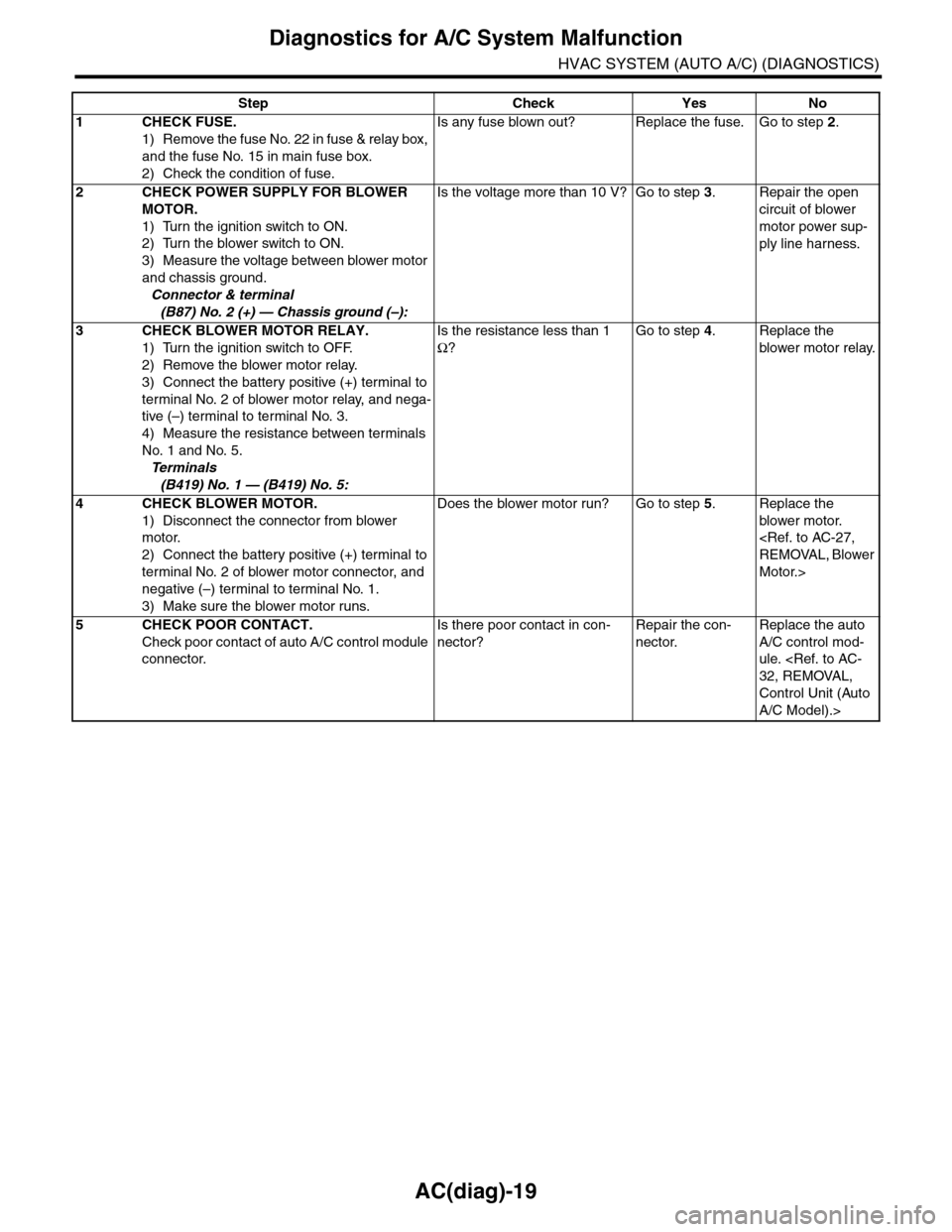
AC(diag)-19
Diagnostics for A/C System Malfunction
HVAC SYSTEM (AUTO A/C) (DIAGNOSTICS)
Step Check Yes No
1CHECK FUSE.
1) Remove the fuse No. 22 in fuse & relay box,
and the fuse No. 15 in main fuse box.
2) Check the condition of fuse.
Is any fuse blown out? Replace the fuse. Go to step 2.
2CHECK POWER SUPPLY FOR BLOWER
MOTOR.
1) Turn the ignition switch to ON.
2) Turn the blower switch to ON.
3) Measure the voltage between blower motor
and chassis ground.
Connector & terminal
(B87) No. 2 (+) — Chassis ground (–):
Is the voltage more than 10 V? Go to step 3.Repair the open
circuit of blower
motor power sup-
ply line harness.
3CHECK BLOWER MOTOR RELAY.
1) Turn the ignition switch to OFF.
2) Remove the blower motor relay.
3) Connect the battery positive (+) terminal to
terminal No. 2 of blower motor relay, and nega-
tive (–) terminal to terminal No. 3.
4) Measure the resistance between terminals
No. 1 and No. 5.
Te r m i n a l s
(B419) No. 1 — (B419) No. 5:
Is the resistance less than 1
Ω?
Go to step 4.Replace the
blower motor relay.
4CHECK BLOWER MOTOR.
1) Disconnect the connector from blower
motor.
2) Connect the battery positive (+) terminal to
terminal No. 2 of blower motor connector, and
negative (–) terminal to terminal No. 1.
3) Make sure the blower motor runs.
Does the blower motor run? Go to step 5.Replace the
blower motor.
Motor.>
5CHECK POOR CONTACT.
Check poor contact of auto A/C control module
connector.
Is there poor contact in con-
nector?
Repair the con-
nector.
Replace the auto
A/C control mod-
ule.
Control Unit (Auto
A/C Model).>
Page 397 of 2453
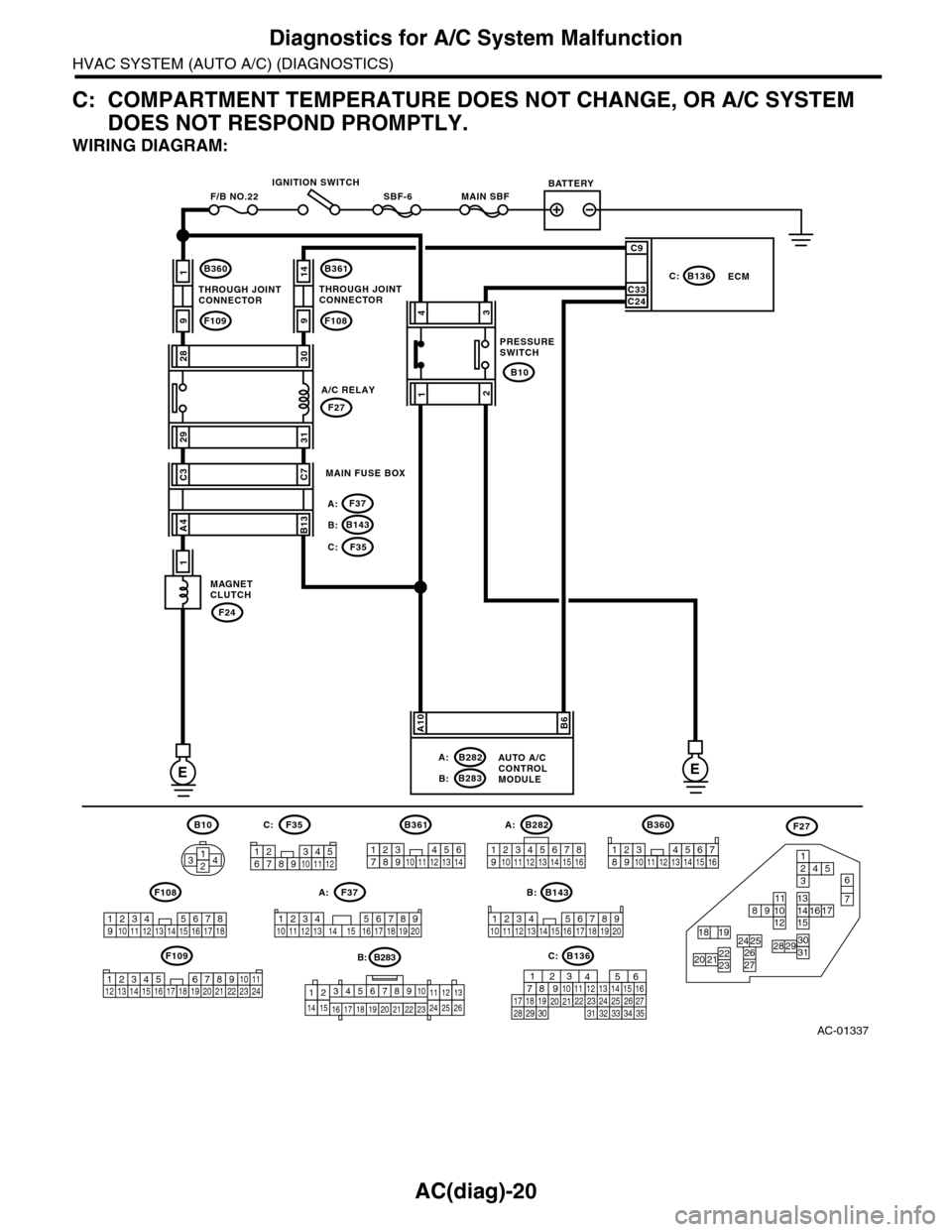
AC(diag)-20
Diagnostics for A/C System Malfunction
HVAC SYSTEM (AUTO A/C) (DIAGNOSTICS)
C: COMPARTMENT TEMPERATURE DOES NOT CHANGE, OR A/C SYSTEM
DOES NOT RESPOND PROMPTLY.
WIRING DIAGRAM:
AC-01337
MAIN SBFSBF-6F/B NO.22
B360
F109
B143B:
F37A:
F35C:
1
9
F24
1
B361
F108
B136C:ECM
B283B:
B282A:
F27
B10
14
9
2830
2931
EE
C3C7
A4B13
43
12
C9
C33C24
A10B6
AUTO A/CCONTROLMODULE
MAGNETCLUTCH
MAIN FUSE BOX
THROUGH JOINTCONNECTORTHROUGH JOINTCONNECTOR
IGNITION SWITCHBATTERY
PRESSURESWITCH
A/C RELAY
B282B10 A:
B143
B360
F109
F108B:F37A:
F35F27C:
12345678910 11 12 13 14 15 16
1234 5678910 11 12 13 14 15 16 17 18 19 20
1234567891011122314
234 567891112 13 14 17 18 19 201101516
B361
1234567891011121314
123 8910411 12 13 14 15 165671718
12389104111213 1415165671236
7
45
131415
11
3031
1617891012
2627
18 192928222320 21
24 25
3412 8910 1112 13 14 15 16 17 18 19 20 21 22 23 24567
B136C:
1289563410 11 121920 2129 3031
13 14 15161727281822 2324 25 267
32 3334 35
B283
345678910
16 17 18 19 20
121112132425262122231415
B: