engine SUBARU TRIBECA 2014 1.G Workshop Manual
[x] Cancel search | Manufacturer: SUBARU, Model Year: 2014, Model line: TRIBECA, Model: SUBARU TRIBECA 2014 1.GPages: 426, PDF Size: 6.37 MB
Page 262 of 426
the“P”position to any other positionbefore the brake pedal is depressed.Depress the brake pedal first, and thenoperate the select lever.
.Only the“P”position allows you to turnthe key from the“Acc”position to the“LOCK”position and remove the key fromthe ignition key cylinder.
.If the ignition switch is turned to the“LOCK”position while the select lever is inthe“N”position,the select lever may notbe moved to the“P”positionafter a periodof time. Therefore, move the select leverto the“P”position with the brake pedaldepressed soon after the ignition switch isturned to the“LOCK”position.
!Shift lock release
If the select lever cannot be operated, turnthe ignition switch back to the“ON”position then move the select lever to the“P”position with the select lever buttonpressed and brake pedal depressed.
If the select lever does not move afterperforming the above procedure, performthe following steps.
.When the select lever cannot beshifted from“P”to“N”:
Refer to“Shift lock release using the shiftlock release button”F7-15.
.When the select lever cannot beshifted from“N”to“R”or“P”:
Within 60 seconds after placing the igni-tion switch in the“Acc”position, move theselect lever to the“R”or“P”position withthe select lever button pressed and brakepedal depressed.
If you must perform the above procedure,the shift lock system (or the vehicle controlsystem) may be malfunctioning. Contact aSUBARU dealer for an inspection as soonas possible.
If the select lever does not move afterperforming the above procedure, refer to“Shift lock release using the shift lockrelease button”F7-15.
!Shift lock release using the shiftlock release button
Perform the following procedure to releasethe shift lock.
1. Apply the parking brake and stop theengine.
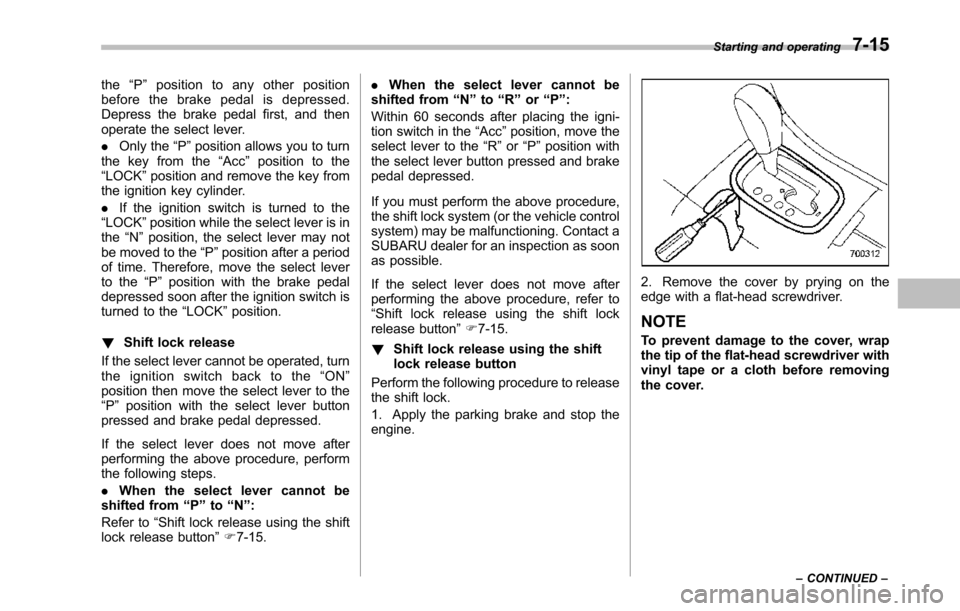
2. Remove the cover by prying on theedge with a flat-head screwdriver.
NOTE
To prevent damage to the cover, wrapthetip of the flat-head screwdriver withvinyl tape or a cloth before removingthe cover.
Starting and operating7-15
–CONTINUED–
Page 264 of 426
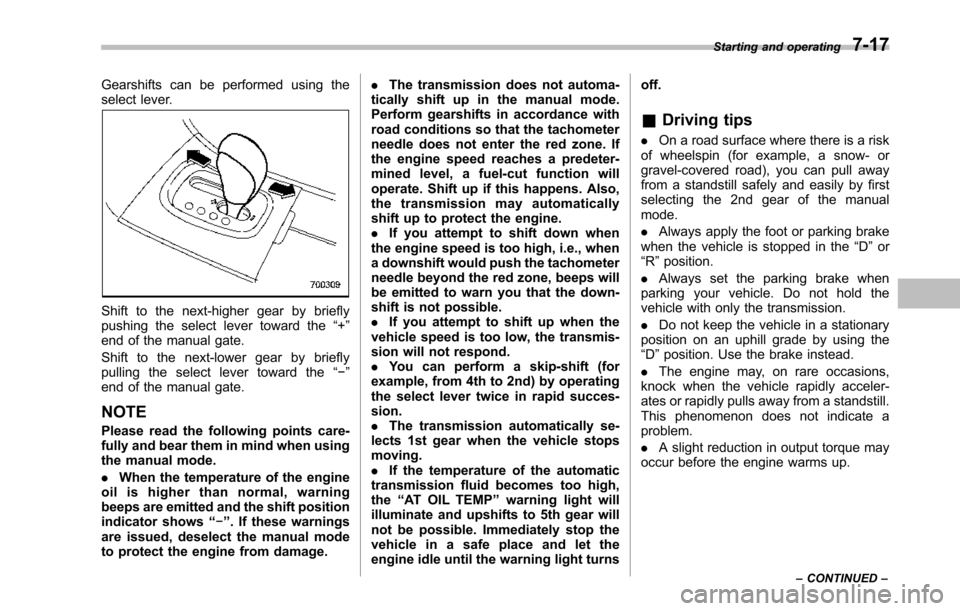
Gearshifts can be performed using theselect lever.
Shift to the next-higher gear by brieflypushing the select lever toward the“+”end of the manual gate.
Shift to the next-lower gear by brieflypulling the select lever toward the“!”end of the manual gate.
NOTE
Pleaseread the following points care-fully and bear them in mind when usingthe manual mode.
.When the temperature of the engineoil is higher than normal, warningbeeps are emitted and the shift positionindicator shows“!”. If these warningsare issued, deselect the manual modeto protect the engine from damage.
.The transmission does not automa-tically shift up in the manual mode.Perform gearshifts in accordance withroad conditions so that the tachometerneedle does not enter the red zone. Ifthe engine speed reaches a predeter-mined level, a fuel-cut function willoperate. Shift up if this happens. Also,the transmission may automaticallyshift up to protect the engine..If you attempt to shift down whenthe engine speed is too high, i.e., whena downshift would push the tachometerneedle beyond the red zone, beeps willbe emitted to warn you that the down-shift is not possible..If you attempt to shift up when thevehicle speed is too low, the transmis-sion will not respond..You can perform a skip-shift (forexample, from 4th to 2nd) by operatingthe select lever twice in rapid succes-sion..The transmission automatically se-lects 1st gear when the vehicle stopsmoving..If the temperature of the automatictransmission fluid becomes too high,the“AT OIL TEMP”warning light willilluminate and upshifts to 5th gear willnot be possible. Immediately stop thevehicle in a safe place and let theengineidle until the warning light turns
off.
&Driving tips
.On a road surface where there is a riskof wheelspin (for example, a snow- orgravel-covered road), you can pull awayfrom a standstill safely and easily by firstselecting the 2nd gear of the manualmode.
.Always apply the foot or parking brakewhen thevehicle is stopped in the“D”or“R”position.
.Always set the parking brake whenparking your vehicle. Do not hold thevehicle withonly the transmission.
.Do not keep the vehicle in a stationaryposition on an uphill grade by using the“D”position. Usethe brake instead.
.The engine may, on rare occasions,knock when the vehicle rapidly acceler-ates or rapidly pulls away from a standstill.This phenomenon does not indicate aproblem.
.A slight reduction in output torque mayoccur before the engine warms up.
Starting and operating7-17
–CONTINUED–
Page 265 of 426
7-18Starting and operating
&SPORT mode
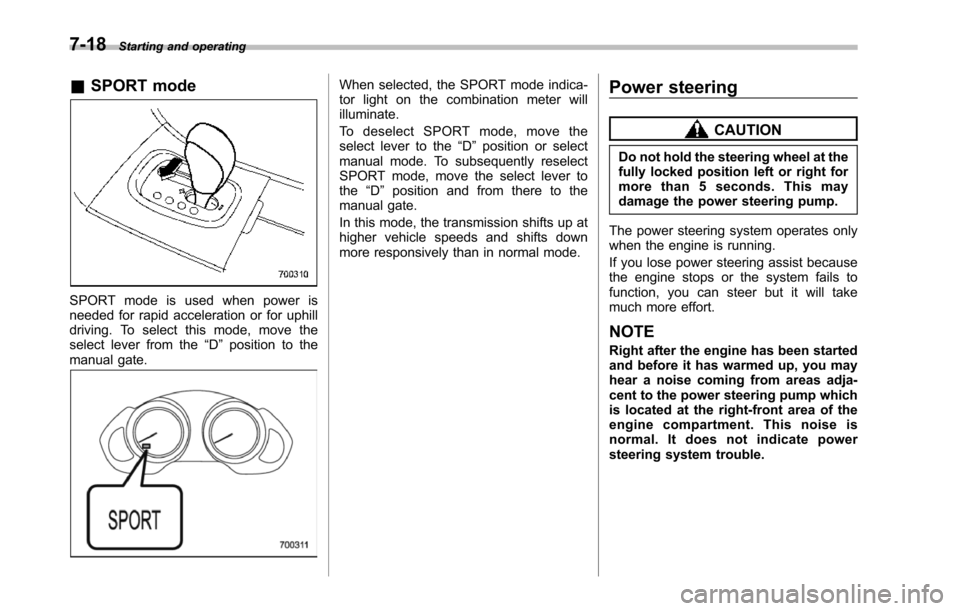
SPORT mode is used when power isneeded for rapid acceleration or for uphilldriving. To select this mode, move theselect lever from the“D”position to themanual gate.
When selected, the SPORT mode indica-tor light on the combination meter willilluminate.
To d e s e l e c t S P O R T m o d e , m o v e t h eselect lever to the“D”position or selectmanual mode. To subsequently reselectSPORT mode, move the select lever tothe“D”position and from there to themanual gate.
In this mode, the transmission shifts up athigher vehicle speeds and shifts downmore responsivelythan in normal mode.
Power steering
CAUTION
Do not hold the steering wheel at thefully locked position left or right formore than 5 seconds. This maydamage thepower steering pump.
The power steering system operates onlywhen the engine is running.
If you lose power steering assist becausethe engine stops or the system fails tofunction, you can steer but it will takemuch more effort.
NOTE
Right after the engine has been startedand before it has warmed up, you mayhear a noise coming from areas adja-centto the power steering pump whichis located at the right-front area of theengine compartment. This noise isnormal. It does not indicate powersteering system trouble.
Page 266 of 426
Braking
&Braking tips
WARNING
Never rest your foot on the brakepedal whiledriving. This can causedangerous overheating of thebrakes and needless wear on thebrake pads and linings.
!When the brakes get wet
When driving in rain or after washing thevehicle, the brakes may get wet. As aresult, brake stopping distance will belonger. To dry the brakes, drive the vehicleat a safe speed while lightly depressingthe brake pedal to heat up the brakes.
!Use of engine braking
Remember to make use of engine brakingin addition to foot braking. When descend-ing a grade, if only the foot brake is used,the brakes may start working improperlybecause of brake fluid overheating,caused by overheated brake pads. Tohelp prevent this, shift into a lower gear toget stronger engine braking.
!Brakingwhen a tire is punctured
Do not depress the brake pedal suddenlywhen a tire is punctured. This could cause
a loss of control of the vehicle. Keepdriving straight ahead while graduallyreducing speed. Then slowly pull off theroad to a safe place.
&Brake system
!Two separate circuits
Your vehicle has a dual circuit brakesystem. Each circuit works diagonallyacross the vehicle. If one circuit of thebrake system should fail, the other half ofthe system still works. If one circuit fails,the brake pedalwill go down much closerto the floor than usual and you will need todepress it down much harder. And a muchlonger distance will be needed to stop thevehicle.
!Brake booster
The brake booster uses engine manifoldvacuum to assist braking force. If enginemanifold vacuum becomes insufficient,such as when driving at high altitude, avacuum pump assures a sufficient va-cuum to operate the brake booster. Do notturn off the engine while driving becausethat will turn off the brake booster, result-ing in poor braking power.
The brakes will continue to work evenwhen the brake booster completely stopsfunctioning. If this happens, however, youwill have to depress the pedal much
harder than normal and the braking dis-tance will increase.
NOTE
Some sound accompanying operationof the vacuum pump may be heardfrom the engine compartment duringdriving. This does not indicate a mal-function.
!Brake assist system
WARNING
Do not be overconfident about thebrake assist. It is not a system thatbrings more braking ability to thevehicle beyond its braking capabil-ity. Always use the utmost carewhen driving regarding vehiclespeed and safe distance.
CAUTION
When you need to brake suddenly,continue depressing the brake pedalstrongly to bring the effect of thebrake assist.
Starting and operating7-19
–CONTINUED–
Page 268 of 426
constant brake pedal pressure.Do not pump the brake pedalsince doing so may defeat theoperation of the ABS system.
The ABS system prevents the lock-up ofwheels which may occur during suddenbraking or braking on slippery road sur-faces. This helps prevent the loss ofsteering control and directional stabilitycaused by wheel lock-up.
When the ABS system is operating, youmay hear a chattering noise or feel a slightvibration in the brake pedal. This is normalwhen the ABS operates.
The ABS system will not operate when thevehicle speed is below approximately 6mph (10 km/h).
&ABS system self-check
You may feel a slight shock in the brakepedal and hear the operating sound ofABS from the engine compartment justafter the vehicle is started. This is causedby an automatic functional test of the ABSsystem being carried out and does notindicate any abnormal condition.
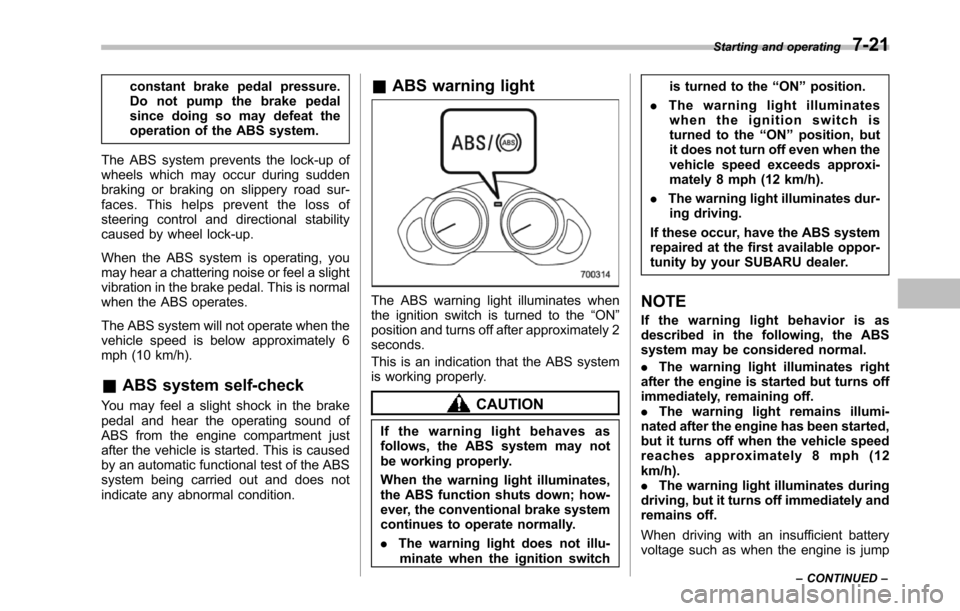
&ABS warning light
The ABS warning light illuminates whenthe ignition switch is turned to the“ON”position and turns off after approximately 2seconds.
This is an indication that the ABS systemis working properly.
CAUTION
If the warning light behaves asfollows, the ABS system may notbe working properly.
Whenthe warning light illuminates,the ABS function shuts down; how-ever, the conventional brake systemcontinues to operate normally.
.The warning light does not illu-minatewhen the ignition switch
is turned to the“ON”position.
.The warning light illuminateswhen the ignition switch isturned to the“ON”position, butit does not turn off even when thevehicle speed exceeds approxi-mately 8 mph (12 km/h).
.The warning light illuminates dur-ing driving.
If these occur, have the ABS systemrepaired at the first available oppor-tunity by your SUBARU dealer.
NOTE
If the warning light behavior is asdescribed in the following, the ABSsystem may be considered normal.
.The warning light illuminates rightafterthe engine is started but turns offimmediately, remaining off..The warning light remains illumi-nated after the engine has been started,but it turns off when the vehicle speedreaches approximately 8 mph (12km/h)..The warning light illuminates duringdriving, but it turns off immediately andremains off.
When driving with an insufficient batteryvoltage suchas when the engine is jump
Starting and operating7-21
–CONTINUED–
Page 270 of 426
warning light illuminate simultaneously,take the following steps.
1. Stop the vehicle in the nearest safe,flat location.
2. Shut down the engine, apply theparking brake, and then restart it.
3. Release the parking brake. If bothwarning lights turn off, the EBD systemmay be malfunctioning.
Drive carefully to the nearest SUBARUdealer and have the system inspected.
4. If both warning lights illuminate againand remain illuminated after the enginehas been restarted, shut down the engineagain, apply the parking brake, and checkthe brake fluid level. Refer to“Brake fluid”F11-17.
5. If the brake fluid level is not below the“MIN”mark, the EBD system may bemalfunctioning. Drive carefully to thenearest SUBARU dealer and have thesystem inspected.
6. If the brake fluid level is below the“MIN”mark, DO NOT drive the vehicle.Instead, have the vehicle towed to thenearest SUBARU dealer for repair.
WARNING
.Driving with the brake systemwarning light illuminated is dan-
gerous. This indicates your brakesystem may not be workingproperly. If the light remainsilluminated, have the brakes in-spected by a SUBARU dealerimmediately.
.If at all in doubt about whetherthe brakes are operating prop-erly, do not drive the vehicle.Have your vehicle towed to thenearest SUBARU dealer for re-pair.
Vehicle Dynamics Control
system
WARNING
Always use the utmost care indriving–overconfidence becauseyou are driving with a Vehicle Dy-namics Control system equippedvehicle could easily lead to a ser-ious accident.
CAUTION
.Even if your vehicle is equippedwith Vehicle Dynamics Controlsystem, winter tires should beused when driving on snow-cov-ered or icy roads; in addition,vehicle speed should be reducedconsiderably. Simply having aVehicle Dynamics Control sys-tem does not guarantee that thevehicle will be able to avoidaccidents in any situation.
.Activation of the Vehicle Dy-namics Control system is anindication that the road beingtravelled on has a slippery sur-face; since having Vehicle Dy-namics Control is no guarantee
Starting and operating7-23
–CONTINUED–
Page 271 of 426
7-24Starting and operating
that full vehicle control will bemaintained at all times and underall conditions, its activationshould be seen as a sign thatthe speed of the vehicle shouldbe reduced considerably.
.Whenever suspension compo-nents, steering components, oran axle are removed from avehicle equipped with VehicleDynamics Control system, havean inspection of that systemperformed by an authorizedSUBARU dealer.
.The following precautions shouldbe observed in order to ensurethat the Vehicle Dynamics Con-trol system is operating properly.
–All four wheels should befitted with tires of the samesize, type, and brand. Further-more, the amount of wearshould be the same for allfour tires.
–Keep the tire pressure at theproper level as shown on thevehicle placard attached tothe driver’s side door pillar.
In the event of wheelspin and/or skiddingon a slippery road surface and/or during
cornering and/or an evasive maneuver,the Vehicle Dynamics Control systemadjusts the engine’soutputandthewheels’respective braking forces to helpmaintain traction and directional control.
.Traction Control Function
The traction control function is designed toprevent spinning of the driving wheels onslippery road surfaces, thereby helping tomaintain traction and directional control.Activation of this function is shown bysteady illumination of the Vehicle Dy-namics Control operation indicator light.
.Skid Suppression Function
The skid suppression function is designedto help maintain directional stability bysuppressing the wheels’tendency to slidesideways during steering operations. Acti-vation of this function is shown by flashingof the Vehicle Dynamics Control operationindicator light.
NOTE
.Slight twitching of the brake pedalmay be felt when the Vehicle DynamicsControl system operates; a small de-gree of vehicle or steering wheel shak-ingmay also be noticed in this situa-tion. These are normal characteristicsof Vehicle Dynamics Control operationand are no cause for alarm..When driving off immediately after
starting the engine, a short operationnoise may be noticed coming from theengine compartment. This noise isgenerated as a result of a check beingperformed on the Vehicle DynamicsControl system and is normal..Depending on the timing of activa-tion of the brakes, the brake pedal mayseem to jolt when you drive off afterstarting the engine. This is a conse-quence of the Vehicle Dynamics Con-trol operational check and is normal..In the circumstances shown in thefollowing list, the vehicle may be lessstable than it feels to the driver. TheVehicle Dynamics Control System maytherefore operate. Such operation doesnot indicate a system malfunction.–on gravel-covered or ruttedroads–on unfinished roads–when the vehicle is towing atrailer–when the vehicle is fitted withsnow tires or winter tires.Activation of the Vehicle DynamicsControl system will cause operation ofthe steering wheel to feel slightlydifferent compared to that for normalconditions.
.Even if the vehicle is equipped witha Vehicle Dynamics Control system, it
Page 272 of 426
is important that winter tires be usedwhen driving on snow-covered or icyroads. (All four wheels should be fittedwith tires of the same size and brand).
.It is always important to reducespeed when approaching a corner,even if the vehicle is equipped withVehicle Dynamics Control.
.All four wheels should be fitted withtires of the same size, type, and brand;furthermore, the amount of wearshouldbe the same for all four tires. Ifthese precautions are not observedand non-matching tires are used, it isquite possible that the Vehicle Dy-namics Control system will be unableto operate correctly as intended.
.Always turn off the engine beforereplacing a tire as failure to do so mayrender the Vehicle Dynamics Controlsystem unable to operate correctly.
&Vehicle Dynamics Control
system monitor
Refer to the following sections.
.“Ve h i c l e D y n a m i c s C o n t r o l w a r n i n glight (U.S.-spec models and Canada-spec. models)/Vehicle Dynamics Controloperation indicator light (all models)”F3-18
.“Traction Control system OFF indicatorlight (U.S.-spec models and Canada-spec. models)”F3-19
.“Ve h i c l e D y n a m i c s C o n t r o l w a r n i n glight (Latin America-spec. models)/Trac-tion Control OFF indicator light (LatinAmerica-spec. models)”F3-19
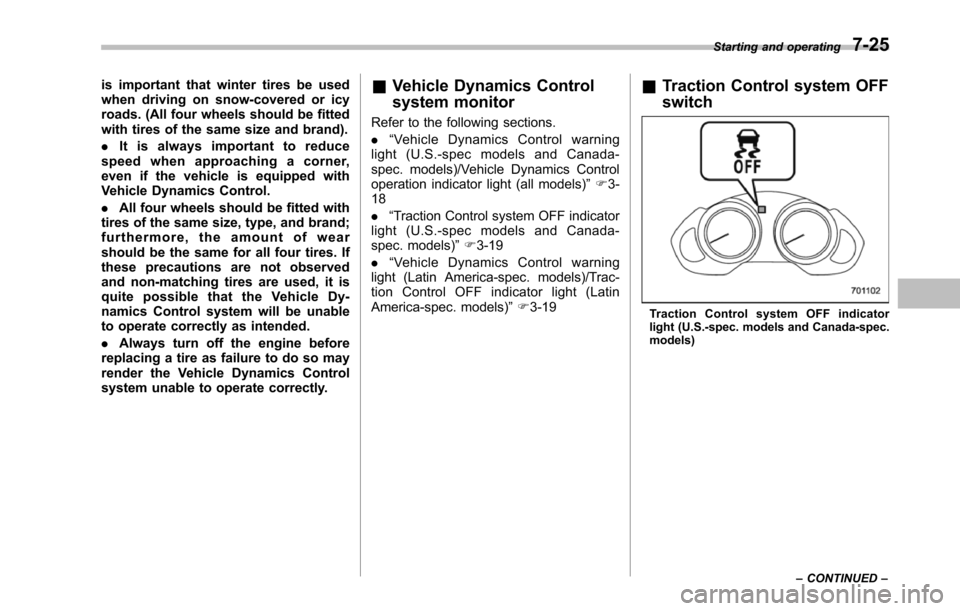
&Traction Control system OFF
switch
Tract io n Cont rol sy stem OFF indic atorlight (U.S.-spec. models and Canada-spec.models)
Starting and operating7-25
–CONTINUED–
Page 273 of 426
7-26Starting and operating
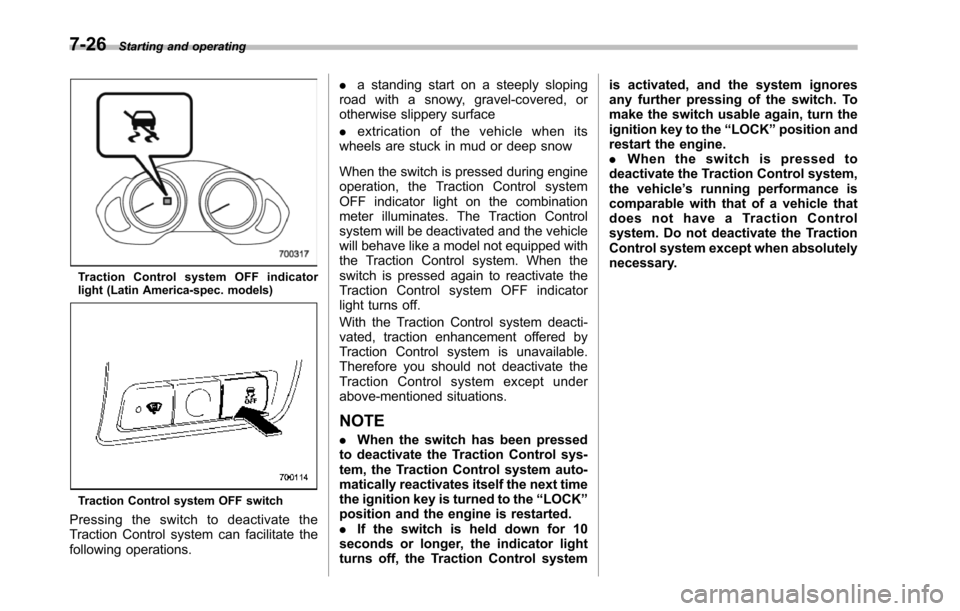
Tr a c t i o n C on t r o l s y s t e m O F F i nd i c a t o rlight (Latin America-spec. models)
Traction Control system OFF switch
Pressing the switch to deactivate theTraction Control system can facilitate thefollowing operations.
.a standing start on a steeply slopingroad with a snowy, gravel-covered, orotherwise slippery surface
.extrication of the vehicle when itswheels are stuck in mud or deep snow
When the switch is pressed during engineoperation, the Traction Control systemOFF indicator light on the combinationmeter illuminates. The Traction Controlsystem willbe deactivated and the vehiclewill behave like a model not equipped withthe Traction Control system. When theswitch is pressed again to reactivate theTraction Control system OFF indicatorlight turns off.
With the Traction Control system deacti-vated, traction enhancement offered byTraction Control system is unavailable.Therefore you should not deactivate theTraction Control system except underabove-mentioned situations.
NOTE
.When the switch has been pressedto deactivate the Traction Control sys-tem, the Traction Control system auto-matically reactivates itself the next timethe ignition key is turned to the“LOCK”position and the engine is restarted..If the switch is held down for 10seconds or longer, the indicator lightturns off,the Traction Control system
is activated, and the system ignoresany further pressing of the switch. Tomake the switch usable again, turn theignition key to the“LOCK”position andrestart the engine..When the switch is pressed todeactivate the Traction Control system,the vehicle’s running performance iscomparable with that of a vehicle thatdoes not have a Traction Controlsystem. Do not deactivate the TractionControl system except when absolutelynecessary.
Page 275 of 426
7-28Starting and operating
CAUTION
Do not place metal film or any metalparts under the driver’s seat. Thismay cause poor reception of thesignals from the tire pressure sen-sors, and the tire pressure monitor-ing system will not function prop-erly.
NOTE
This device complies with Part 15 ofthe FCC Rules and with RSS-210 ofIndustry Canada. Operation is subjectto the following two conditions: (1) Thisdevice may not cause harmful inter-ference, and (2) this device mustaccept any interference received, in-cluding interference that may causeundesired operation.
Changes or modifications not ex-pressly approved by the party respon-sible for compliance could void theuser’s authority to operate the equip-ment.
Parking your vehicle
WARNING
.Never leave unattended childrenor pets in the vehicle. They couldaccidentally injure themselves orothersthrough inadvertent op-eration of the vehicle. Also, onhot or sunny days, the tempera-ture in a closed vehicle couldquickly become high enough tocausesevere or possibly fatalinjuries to them.
.Do not park the vehicle overflammable materials such as drygrass, waste paper or rags, asthey mayburn easily if they comenear hot engine or exhaust sys-tem parts.
.Be sure to stop the engine if youtake a nap in the vehicle. Ifengine exhaust gas enters thepassenger compartment, occu-pants in the vehicle could diefromcarbon monoxide (CO) con-tained in the exhaust gas.
&Parking brake
CAUTION
.Never drive while the parkingbrake is set because this willcause unnecessary wear on thebrake linings. Before starting todrive, always make sure that theparking brake has been fullyreleased.
.Never drive with your foot on theparking brake pedal.
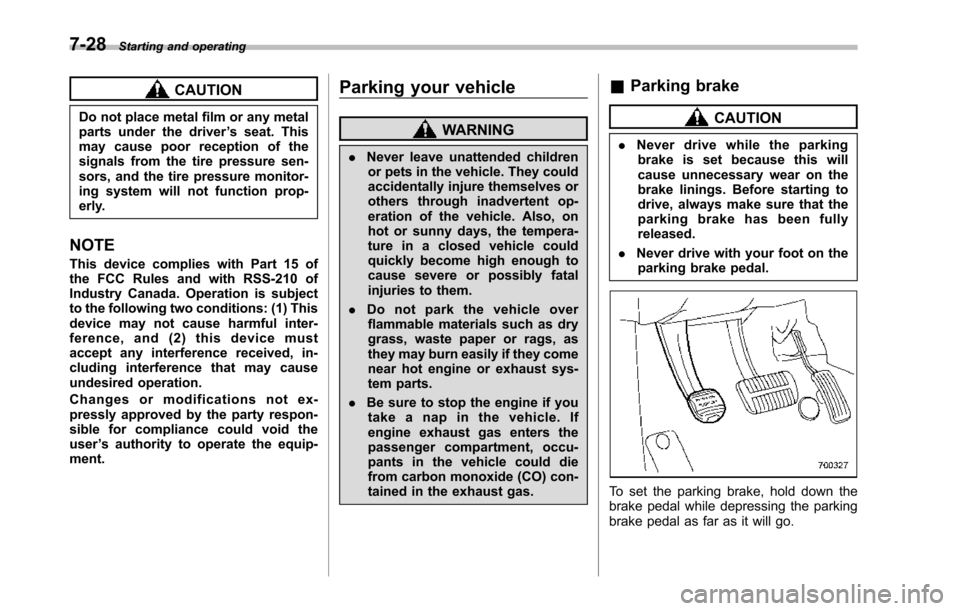
To set the parking brake, hold down thebrake pedal while depressing the parkingbrake pedal as far as it will go.