display SUBARU WRX 2016 Owners Manual
[x] Cancel search | Manufacturer: SUBARU, Model Year: 2016, Model line: WRX, Model: SUBARU WRX 2016Pages: 594, PDF Size: 19.43 MB
Page 297 of 594

Audio/Radio operation
In addition, the following caution messages appear. Caution Contents Display Message
If there is not enough memory in the digital audio “ Tag storage full ”
If the same information is stored in the digital
audio “ Already Stored ”
If the store process in the digital audio failed “ Storing Failed ”
If there is not enough memory in the iPod “ iPod full Tags cannot be stored ”
If the system starts to transmit music information
to an iPod “ Starting to transfer the Tag files. ”
If the transmitting process of music information
to an iPod failed “ Transferring Failed ”
If the transmitting process of music information
to an iPod is successful “ X Tag(s) Sent ” (X = number of transmitted
information) will be displayed. NOTE . The tag information can not be
preserved while scanning or caching
the radio station.
. If tagging the music information
fails, “ Saving the HD Radio tag was
unsuccessful. (Saving the HD Radio
tag was unsuccessful.) ” will be dis-
played on the screen. If this occurs, tag
the information again.
. HD Radio TM
stations can be preset.
. An orange
HD) (HD)) will be dis-
played on the screen when in digital.
The
HD) (HD)) will first appear in a gray
color indicating the station is indeed
(an analog and) a digital station. Once
the digital signal is acquired, the logo
will change to a bright orange color.
. The song title and artist name will
appear on the screen when available by
the radio station. The radio station can
send album pictures when available.
. As a user works through the analog
radio stations, (where applicable) the
radio receiver will automatically tune
from an analog signal to a digital signal
within 5 seconds.5-42
Page 301 of 594
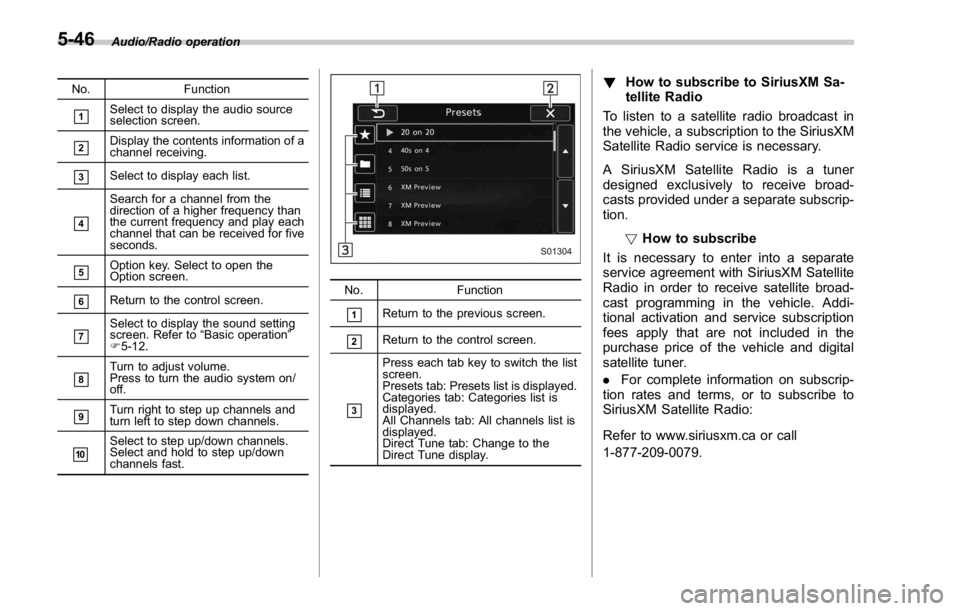
Audio/Radio operation
No. Function
& 1
Select to display the audio source
selection screen.
& 2
Display the contents information of a
channel receiving.
& 3
Select to display each list.
& 4
Search for a channel from the
direction of a higher frequency than
the current frequency and play each
channel that can be received for five
seconds.
& 5
Option key. Select to open the
Option screen.
& 6
Return to the control screen.
& 7
Select to display the sound setting
screen. Refer to “ Basic operation ”
F 5-12.
& 8
Turn to adjust volume.
Press to turn the audio system on/
off.
& 9
Turn right to step up channels and
turn left to step down channels.
& 10
Select to step up/down channels.
Select and hold to step up/down
channels fast. No. Function
& 1
Return to the previous screen.
& 2
Return to the control screen.
& 3Press each tab key to switch the list
screen.
Presets tab: Presets list is displayed.
Categories tab: Categories list is
displayed.
All Channels tab: All channels list is
displayed.
Direct Tune tab: Change to the
Direct Tune display. ! How to subscribe to SiriusXM Sa-
tellite Radio
To listen to a satellite radio broadcast in
the vehicle, a subscription to the SiriusXM
Satellite Radio service is necessary.
A SiriusXM Satellite Radio is a tuner
designed exclusively to receive broad-
casts provided under a separate subscrip-
tion.
! How to subscribe
It is necessary to enter into a separate
service agreement with SiriusXM Satellite
Radio in order to receive satellite broad-
cast programming in the vehicle. Addi-
tional activation and service subscription
fees apply that are not included in the
purchase price of the vehicle and digital
satellite tuner.
. For complete information on subscrip-
tion rates and terms, or to subscribe to
SiriusXM Satellite Radio:
Refer to www.siriusxm.ca or call
1-877-209-0079.5-46
Page 303 of 594
Audio/Radio operation
1-877-209-0079
. SiriusXM Satellite Radio is solely
responsible for the quality, availability
and content of the satellite radio ser-
vices provided, which are subject to
the terms and conditions of the
SiriusXM Satellite Radio customer ser-
vice agreement.
. Customers should have their radio
ID ready; the radio ID can be found by
tuning to “ Ch 000 ” on the radio. For
details, see “ DISPLAYING THE RADIO
ID ” below.
. All fees and programming are the
responsibility of SiriusXM Satellite
Radio and are subject to change.
! Displaying the Radio ID
Each SiriusXM tuner is identified with a
unique radio ID. The radio ID is required
when activating an SiriusXM Satellite
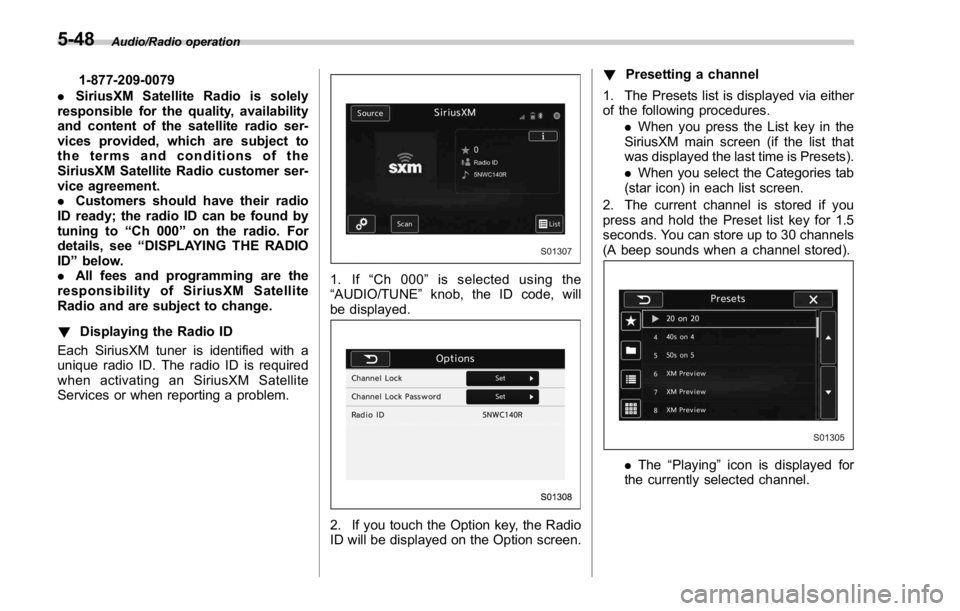
Services or when reporting a problem. 1. If “ Ch 000 ” is selected using the
“ AUDIO/TUNE ” knob, the ID code, will
be displayed.
2. If you touch the Option key, the Radio
ID will be displayed on the Option screen. ! Presetting a channel
1. The Presets list is displayed via either
of the following procedures.
. When you press the List key in the
SiriusXM main screen (if the list that
was displayed the last time is Presets).
. When you select the Categories tab
(star icon) in each list screen.
2. The current channel is stored if you
press and hold the Preset list key for 1.5
seconds. You can store up to 30 channels
(A beep sounds when a channel stored).
. The “ Playing ” icon is displayed for
the currently selected channel.5-48
Page 304 of 594
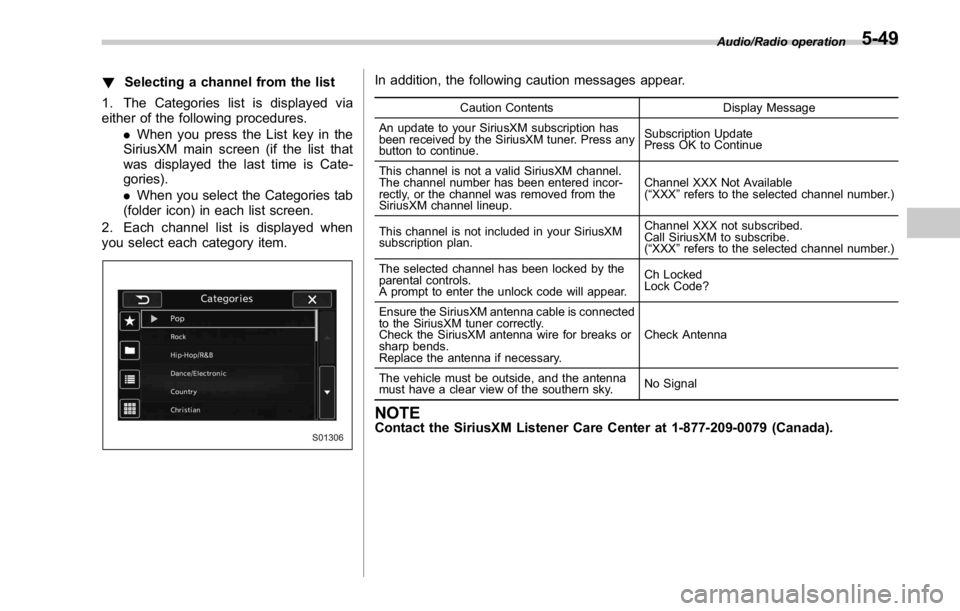
! Selecting a channel from the list
1. The Categories list is displayed via
either of the following procedures.
. When you press the List key in the
SiriusXM main screen (if the list that
was displayed the last time is Cate-
gories).
. When you select the Categories tab
(folder icon) in each list screen.
2. Each channel list is displayed when
you select each category item. In addition, the following caution messages appear. Caution Contents Display Message
An update to your SiriusXM subscription has
been received by the SiriusXM tuner. Press any
button to continue. Subscription Update
Press OK to Continue
This channel is not a valid SiriusXM channel.
The channel number has been entered incor-
rectly, or the channel was removed from the
SiriusXM channel lineup. Channel XXX Not Available
( “ XXX ” refers to the selected channel number.)
This channel is not included in your SiriusXM
subscription plan. Channel XXX not subscribed.
Call SiriusXM to subscribe.
( “ XXX ” refers to the selected channel number.)
The selected channel has been locked by the
parental controls.
A prompt to enter the unlock code will appear. Ch Locked
Lock Code?
Ensure the SiriusXM antenna cable is connected
to the SiriusXM tuner correctly.
Check the SiriusXM antenna wire for breaks or
sharp bends.
Replace the antenna if necessary. Check Antenna
The vehicle must be outside, and the antenna
must have a clear view of the southern sky. No Signal
NOTE Contact the SiriusXM Listener Care Center at 1-877-209-0079 (Canada). Audio/Radio operation
5-49
Page 306 of 594
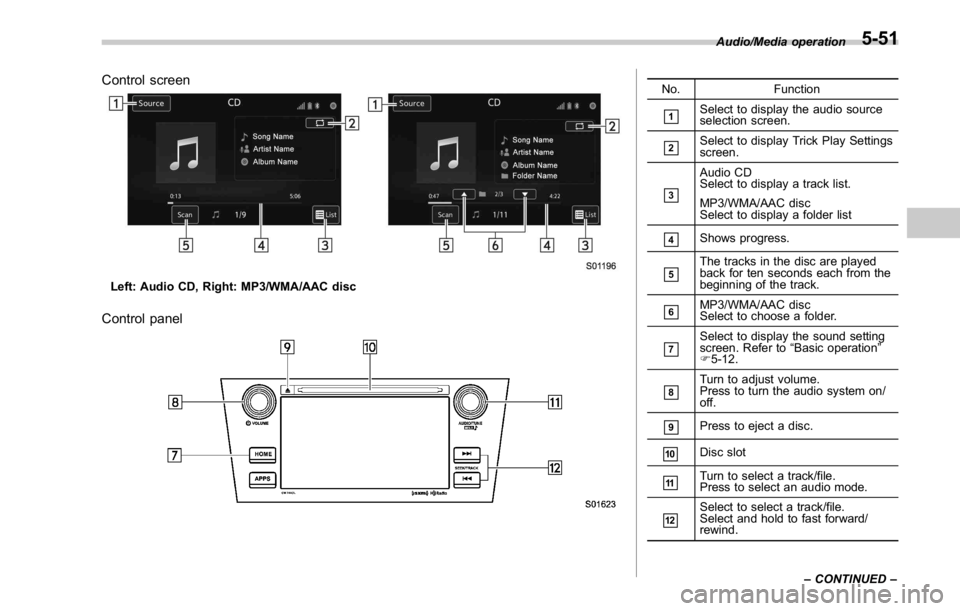
Control screen
Left: Audio CD, Right: MP3/WMA/AAC disc
Control panel No. Function
& 1
Select to display the audio source
selection screen.
& 2
Select to display Trick Play Settings
screen.
& 3
Audio CD
Select to display a track list.
MP3/WMA/AAC disc
Select to display a folder list
& 4
Shows progress.
& 5
The tracks in the disc are played
back for ten seconds each from the
beginning of the track.
& 6
MP3/WMA/AAC disc
Select to choose a folder.
& 7
Select to display the sound setting
screen. Refer to “ Basic operation ”
F 5-12.
& 8
Turn to adjust volume.
Press to turn the audio system on/
off.
& 9
Press to eject a disc.
& 10
Disc slot
& 11
Turn to select a track/file.
Press to select an audio mode.
& 12
Select to select a track/file.
Select and hold to fast forward/
rewind. Audio/Media operation
– CONTINUED –5-51
Page 307 of 594
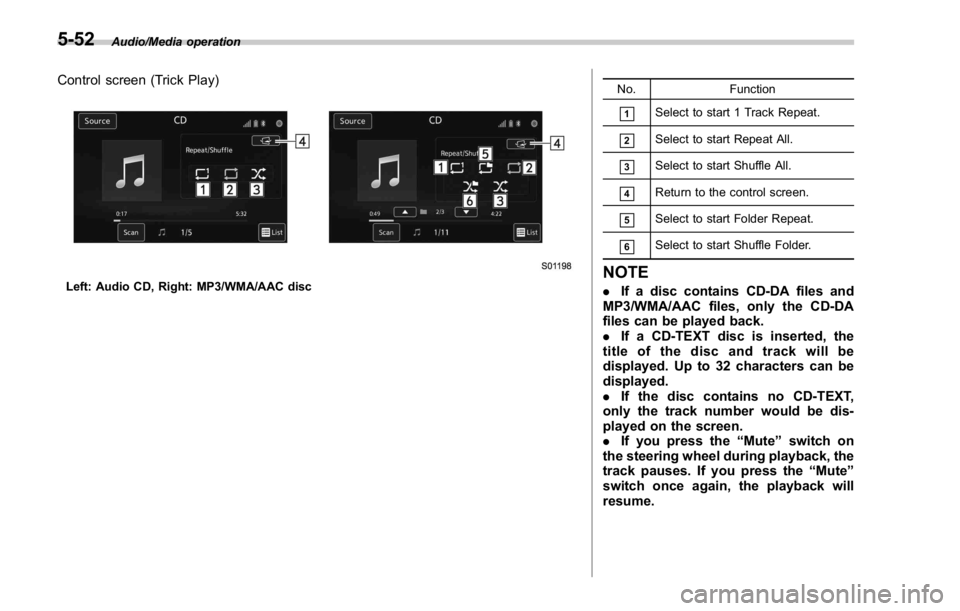
Audio/Media operation
Control screen (Trick Play)
Left: Audio CD, Right: MP3/WMA/AAC disc No. Function
& 1
Select to start 1 Track Repeat.
& 2
Select to start Repeat All.
& 3
Select to start Shuffle All.
& 4
Return to the control screen.
& 5
Select to start Folder Repeat.
& 6
Select to start Shuffle Folder.
NOTE . If a disc contains CD-DA files and
MP3/WMA/AAC files, only the CD-DA
files can be played back.
. If a CD-TEXT disc is inserted, the
title of the disc and track will be
displayed. Up to 32 characters can be
displayed.
. If the disc contains no CD-TEXT,
only the track number would be dis-
played on the screen.
. If you press the “ Mute ” switch on
the steering wheel during playback, the
track pauses. If you press the “ Mute ”
switch once again, the playback will
resume.5-52
Page 309 of 594
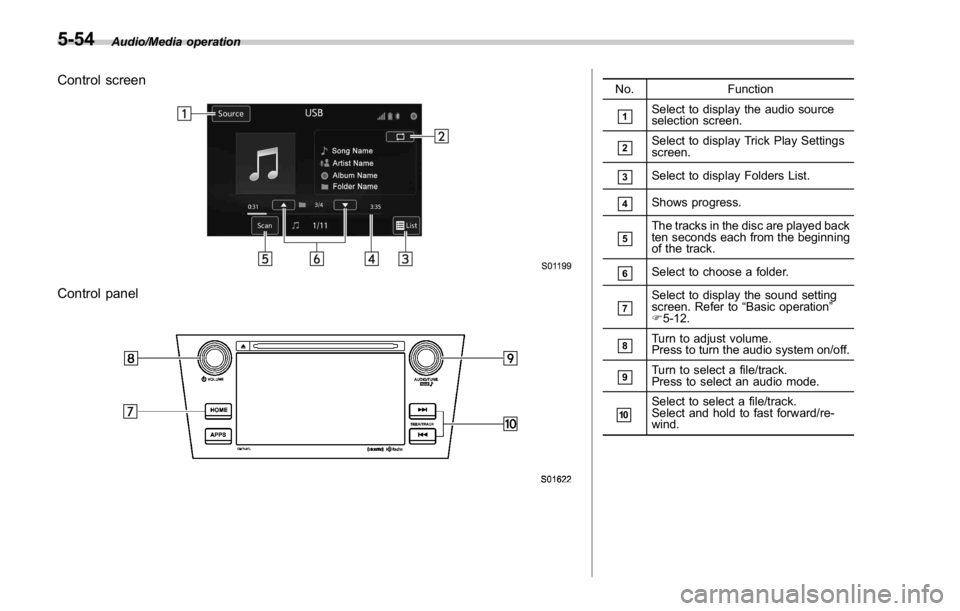
Audio/Media operation
Control screen
Control panel No. Function
& 1
Select to display the audio source
selection screen.
& 2
Select to display Trick Play Settings
screen.
& 3
Select to display Folders List.
& 4
Shows progress.
& 5
The tracks in the disc are played back
ten seconds each from the beginning
of the track.
& 6
Select to choose a folder.
& 7
Select to display the sound setting
screen. Refer to “ Basic operation ”
F 5-12.
& 8
Turn to adjust volume.
Press to turn the audio system on/off.
& 9
Turn to select a file/track.
Press to select an audio mode.
& 10
Select to select a file/track.
Select and hold to fast forward/re-
wind.5-54
Page 312 of 594
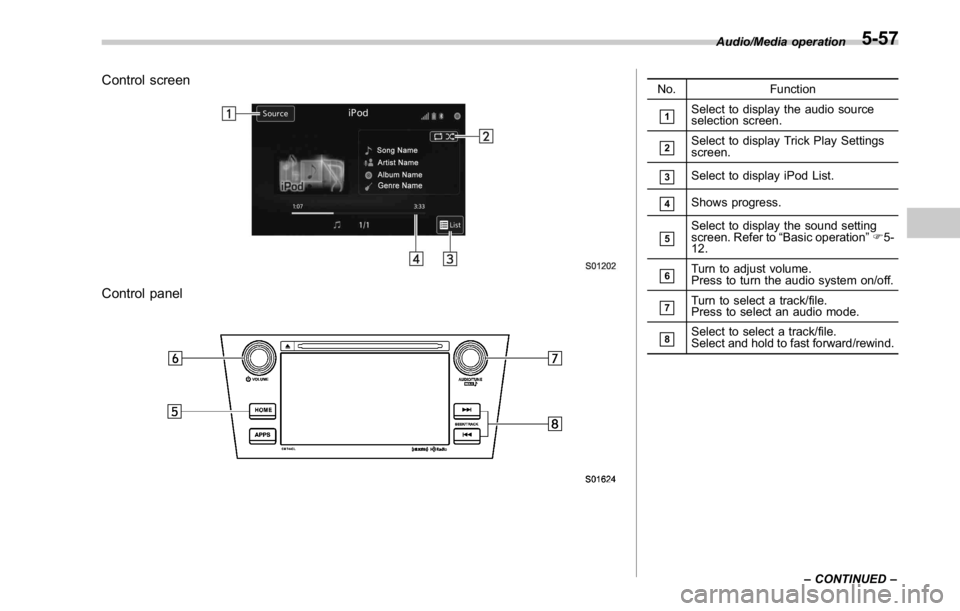
Control screen
Control panel No. Function
& 1
Select to display the audio source
selection screen.
& 2
Select to display Trick Play Settings
screen.
& 3
Select to display iPod List.
& 4
Shows progress.
& 5
Select to display the sound setting
screen. Refer to “ Basic operation ” F 5-
12.
& 6
Turn to adjust volume.
Press to turn the audio system on/off.
& 7
Turn to select a track/file.
Press to select an audio mode.
& 8
Select to select a track/file.
Select and hold to fast forward/rewind. Audio/Media operation
– CONTINUED –5-57
Page 314 of 594
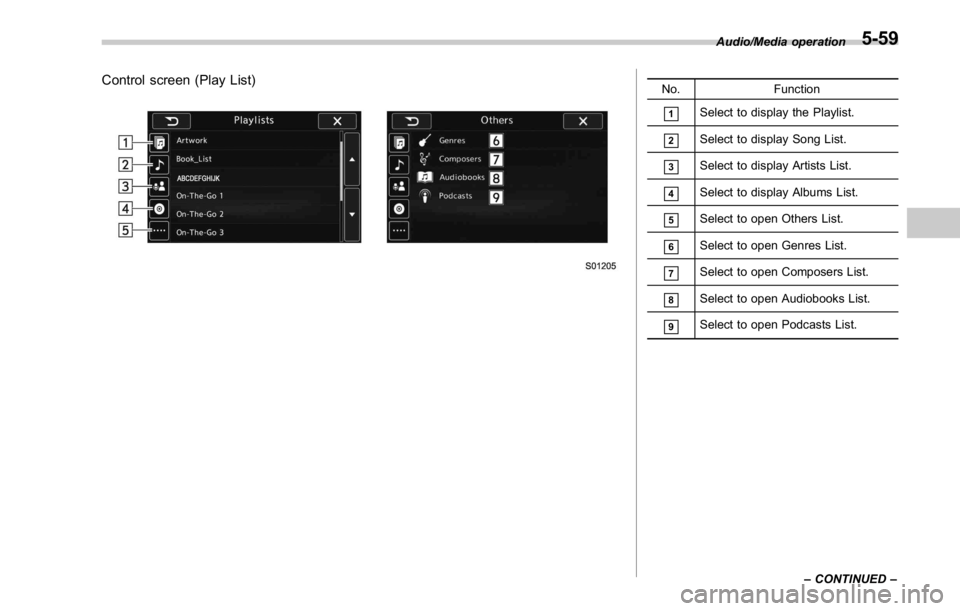
Control screen (Play List) No. Function
& 1
Select to display the Playlist.
& 2
Select to display Song List.
& 3
Select to display Artists List.
& 4
Select to display Albums List.
& 5
Select to open Others List.
& 6
Select to open Genres List.
& 7
Select to open Composers List.
& 8
Select to open Audiobooks List.
& 9
Select to open Podcasts List. Audio/Media operation
– CONTINUED –5-59
Page 315 of 594
Audio/Media operation
WARNINGDo not operate the player ’ s controls
or connect the iPod while driving.
CAUTION. Do not leave your portable player
in the car. In particular, high
temperatures inside the vehicle
may damage the portable player.
. Do not push down on or apply
unnecessary pressure to the por-
table player while it is connected
as this may damage the portable
player or its terminal.
. Do not insert foreign objects into
the port as this may damage the
portable player or its terminal.
NOTE . When an iPod is connected using a
genuine iPod cable, the iPod starts
charging its battery.
. When an iPod is connected and the
audio source is changed to iPod mode,
the iPod will resume playing from the
same point it was last used.
. Depending on the iPod that is con-
nected to the system, certain functions may not be available.
. Files/tracks selected by operating a
connected iPod may not be recognized
or displayed properly.
. If you press the “ Mute ” switch on
the steering wheel during playback, the
track pauses. If you press the “ Mute ”
switch once again, the playback will
resume.
& Bluetooth audio The Bluetooth audio system enables
users to enjoy listening to music that is
played on a portable player on the vehicle
speakers via wireless communication.
This audio system supports Bluetooth, a
wireless data system capable of playing
portable audio music without cables. If
your device does not support Bluetooth,
the Bluetooth audio system will not func-
tion.
! Overview
Select
BT Audio (BT Audio) on the “ Select
Audio Source (Select Audio Source) ”
screen. Refer to “ Selecting an audio
source ” F 5-13.
Depending on the type of portable player
connected, some functions may not be
available and/or the screen may look
differently than shown in this manual.5-60