change time SUBARU WRX 2016 User Guide
[x] Cancel search | Manufacturer: SUBARU, Model Year: 2016, Model line: WRX, Model: SUBARU WRX 2016Pages: 594, PDF Size: 19.43 MB
Page 113 of 594

Keys and doors/Remote keyless entry system
function display.
& Replacing the batteryRefer to “ Replacing battery ” F 11-50.
& Replacing lost transmittersIf you lose a transmitter or want to
purchase additional transmitters (up to
four can be programmed), your transmit-
ters should be reprogrammed for security
reasons. For details, contact your
SUBARU dealer and have the transmitters
programmed into the remote keyless entry
system.
& Welcome lighting (if
equipped)The welcome lighting turns on the head-
lights, interior lights, etc. for smooth
approaching to or exiting from the vehicle
at night or in a dark place.
NOTE . For the operation of the interior
lights, refer to “ Interior lights ” F 6-2.
. The factory setting (default setting)
of the operation duration of the head-
lights and the exterior lights is 30
seconds for both approaching and
exiting. This setting can be changed
to OFF (no operation), 30 seconds, 60
seconds, or 90 seconds, respectively for approaching and exiting at
SUBARU dealers. For more details,
contact a SUBARU dealer.
! Approaching
When it is dark and the light control switch
is in the “ AUTO ” position, if the doors are
unlocked using the unlock button on the
transmitter, the headlight low beams and
some exterior lights will illuminate. The
interior lights will also illuminate if the
dome light switch is in the “ DOOR ”
position.
The headlight low beams and the exterior
lights will illuminate for 30 seconds.
NOTE If the doors are locked using the lock
button on the transmitter or the lock
sensor on the door handle, the head-
lights and exterior lights will turn off.
! Exiting
When the light control switch is in the
“ AUTO ” position and the headlight indica-
tor light is on, if the ignition switch is turned
off or the key is removed from the ignition
switch, the headlight low beams and some
exterior lights will continue illuminating.
The headlights and exterior lights will turn
off under either of the following conditions. . 30 seconds have elapsed since the
driver ’ s door was opened and closed.
. The lock button on the transmitter or
the lock sensor on the door handle is
operated two times successively.
NOTE . If the light control switch is set to a
position other than “ AUTO ” position,
the headlights and the exterior lights
will turn off.
. When exiting from the vehicle, the
headlights and exterior lights will turn
off if the driver ’ s door is not opened
and closed within 3 minutes from turn-
ing on of the welcome lighting.
& Certification for Remote key-
less entry system ! U.S.-spec. models
FCC ID: CWTWB1U811
FCC ID: CWTWD1U781
CAUTION
FCC CAUTION
Changes or modifications not ex-
pressly approved by the party re-
sponsible for compliance could void
the user ’ s authority to operate the
equipment.2-24
Page 118 of 594
! To arm the system using the key-
less access function (if equipped)
1. Close all windows and the moonroof (if
equipped)
2. Turn the push-button ignition switch to
the “ OFF ” position.
3. Open the doors and get out of the
vehicle.
4. Make sure that the engine hood is
locked.
5. Close all doors and the trunk lid.
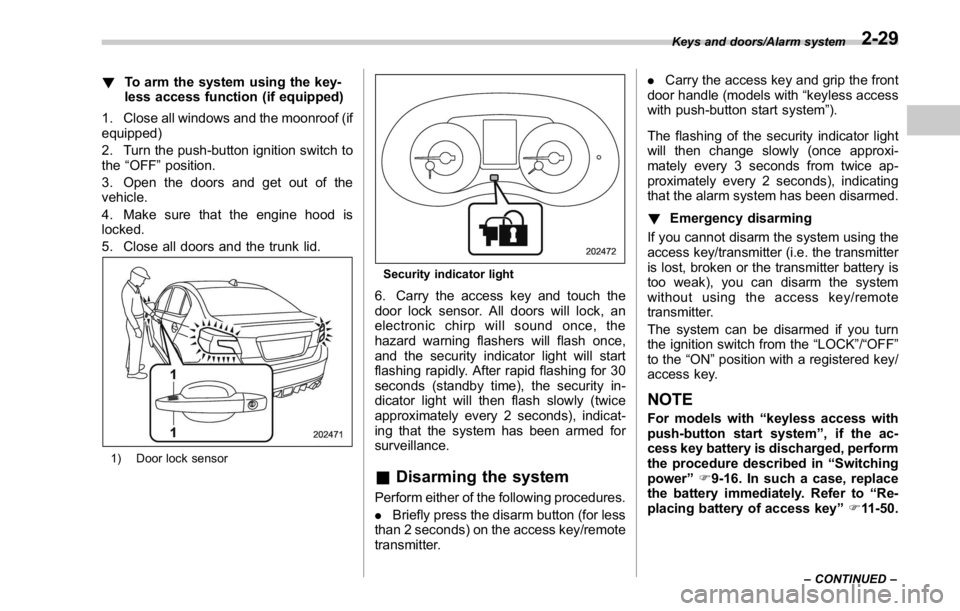
1) Door lock sensor Security indicator light
6. Carry the access key and touch the
door lock sensor. All doors will lock, an
electronic chirp will sound once, the
hazard warning flashers will flash once,
and the security indicator light will start
flashing rapidly. After rapid flashing for 30
seconds (standby time), the security in-
dicator light will then flash slowly (twice
approximately every 2 seconds), indicat-
ing that the system has been armed for
surveillance.
& Disarming the system Perform either of the following procedures.
. Briefly press the disarm button (for less
than 2 seconds) on the access key/remote
transmitter. . Carry the access key and grip the front
door handle (models with “ keyless access
with push-button start system ” ).
The flashing of the security indicator light
will then change slowly (once approxi-
mately every 3 seconds from twice ap-
proximately every 2 seconds), indicating
that the alarm system has been disarmed.
! Emergency disarming
If you cannot disarm the system using the
access key/transmitter (i.e. the transmitter
is lost, broken or the transmitter battery is
too weak), you can disarm the system
without using the access key/remote
transmitter.
The system can be disarmed if you turn
the ignition switch from the “ LOCK ” / “ OFF ”
to the “ ON ” position with a registered key/
access key.
NOTE For models with “ keyless access with
push-button start system ” , if the ac-
cess key battery is discharged, perform
the procedure described in “ Switching
power ” F 9-16. In such a case, replace
the battery immediately. Refer to “ Re-
placing battery of access key ” F 11-50.Keys and doors/Alarm system
– CONTINUED –2-29
Page 131 of 594

Instruments and controls
Warning chimes and warning indicator of the
keyless access with push-button start system (if
equipped) ......................................................... 3-28
Security indicator light ....................................... 3-33
SI-DRIVE indicator (if equipped) .......................... 3-34
Shift-up indicator (STI) ........................................ 3-34
Select lever/gear position indicator (CVT
models). ........................................................... 3-34
Turn signal indicator lights ................................. 3-35
High beam indicator light ................................... 3-35
Cruise control indicator ...................................... 3-35
Cruise control set indicator ................................ 3-35
Automatic headlight beam leveler warning light
(models with LED headlights) ........................... 3-35
Front fog light indicator light (if equipped) .......... 3-35
Headlight indicator light ..................................... 3-35
Driver ’ s control center differential auto indicator
(STI) ................................................................. 3-35
Driver ’ s control center differential indicator and
warning (STI) .................................................... 3-36
REV indicator light (STI) ..................................... 3-37
Steering responsive fog lights warning indicator/
Steering responsive fog lights OFF indicator (if
equipped) ......................................................... 3-37
BSD/RCTA warning indicator (if equipped) .......... 3-37
BSD/RCTA OFF indicator (if equipped) ................ 3-37
Multi information display ................................... 3-37
Basic operation .................................................. 3-38
Welcome screen ................................................. 3-38
Good-bye screen ................................................ 3-39
Warning screen .................................................. 3-39
Basic screens .................................................... 3-44 Menu screens .................................................... 3-45
Multi function display ........................................ 3-48Basic operation ................................................. 3-49
Welcome screen ................................................ 3-49
Date screen ....................................................... 3-50
Ending screen ................................................... 3-50
Self-check screen .............................................. 3-50
Interruption screen ............................................ 3-52
Basic screens .................................................... 3-52
Selection screen ................................................ 3-58
Date and time settings ....................................... 3-62
Image quality and volume settings ..................... 3-69
Screen settings. ................................................. 3-71
Maintenance settings ......................................... 3-79
Driving history registration ................................. 3-82
Car settings ....................................................... 3-83
Initialize ............................................................. 3-92
Light control switch ........................................... 3-94Headlights ......................................................... 3-95
High/low beam change (dimmer) ... ..................... 3-96
Headlight flasher ............................................... 3-96
Daytime running light system ............................. 3-97
Turn signal lever ................................................ 3-97
One-touch lane changer ..................................... 3-98
Illumination brightness control ......................... 3-98
Headlight beam leveler (if equipped) ............... 3-99
Automatic headlight beam leveler (models with
LED headlights) ............................................... 3-99
Fog light switch (if equipped) ........................... 3-99
Steering responsive fog lights system (models
with EyeSight system) ..................................... 3-99
Page 164 of 594
& Turn signal indicator
lightsThese lights show the operation of the turn
signal or lane change signal.
If the indicator lights do not blink or blink
rapidly, the turn signal bulb may be burned
out. Replace the bulb as soon as possible.
Refer to “ Replacing bulbs ” F 11-44.
& High beam indicator
lightThis light shows that the headlights are in
the high beam mode.
This indicator light also illuminates when
the headlight flasher is operated.
& Cruise control indica-
torThis indicator appears when the cruise
control main button is pressed to activate
the cruise control function. For details,
refer to “ To set cruise control ” F 7-53.
CAUTION
If the CHECK ENGINE warning light/
malfunction indicator light illumi-
nates, the cruise control indicator
flashes at the same time. At this
time, avoid driving at high speed and have your vehicle inspected at a
SUBARU dealer as soon as possi-
ble.
& Cruise control set in-
dicator This indicator appears when vehicle
speed has been set to use the cruise
control function. Refer to “ To set cruise
control ” F 7-53.
& Automatic headlight
beam leveler warning
light (models with LED
headlights) This light illuminates when the automatic
headlight beam leveler does not operate
normally.
If this light illuminates while driving or does
not turn off approximately 3 seconds after
turning the ignition switch to the “ ON ”
position, have your vehicle inspected at
your SUBARU dealer.
& Front fog light indicator
light (if equipped)
This indicator light illuminates while the
front fog lights are illuminated. & Headlight indicator
light This indicator light illuminates under the
following conditions.
. when the light switch is turned to the
“
” or “ ” position
. when the light control switch is in the
“ AUTO ” position and the headlights illumi-
nate automatically
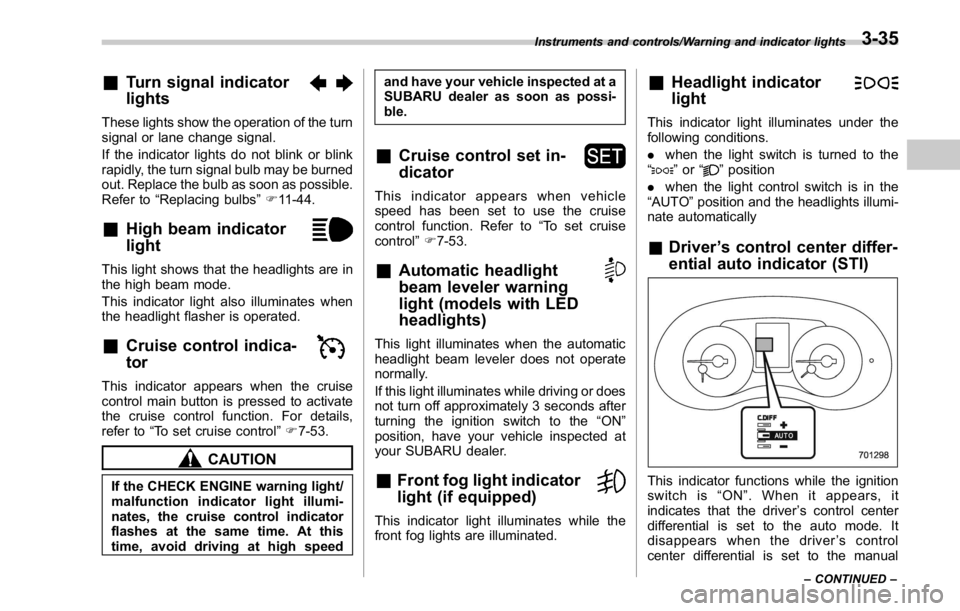
& Driver ’ s control center differ-
ential auto indicator (STI)
This indicator functions while the ignition
switch is “ ON ” . When it appears, it
indicates that the driver ’ s control center
differential is set to the auto mode. It
disappears when the driver ’ s control
center differential is set to the manualInstruments and controls/Warning and indicator lights
– CONTINUED –3-35
Page 173 of 594
Instruments and controls/Multi information display
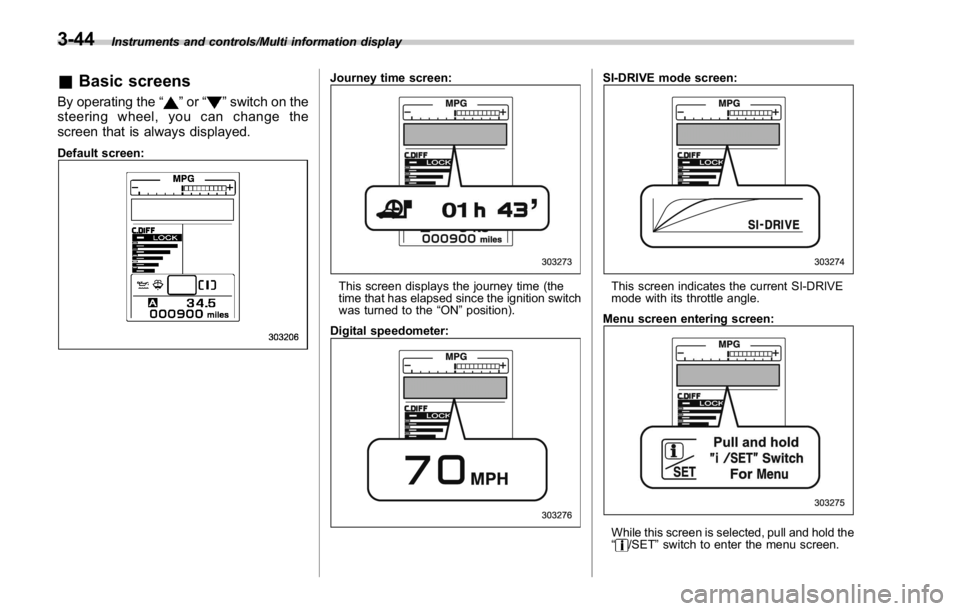
& Basic screensBy operating the “ ” or “ ” switch on the
steering wheel, you can change the
screen that is always displayed. Default screen: Journey time screen:
This screen displays the journey time (the
time that has elapsed since the ignition switch
was turned to the “ ON ” position).
Digital speedometer: SI-DRIVE mode screen:
This screen indicates the current SI-DRIVE
mode with its throttle angle.
Menu screen entering screen:
While this screen is selected, pull and hold the
“ /SET ” switch to enter the menu screen.3-44
Page 180 of 594
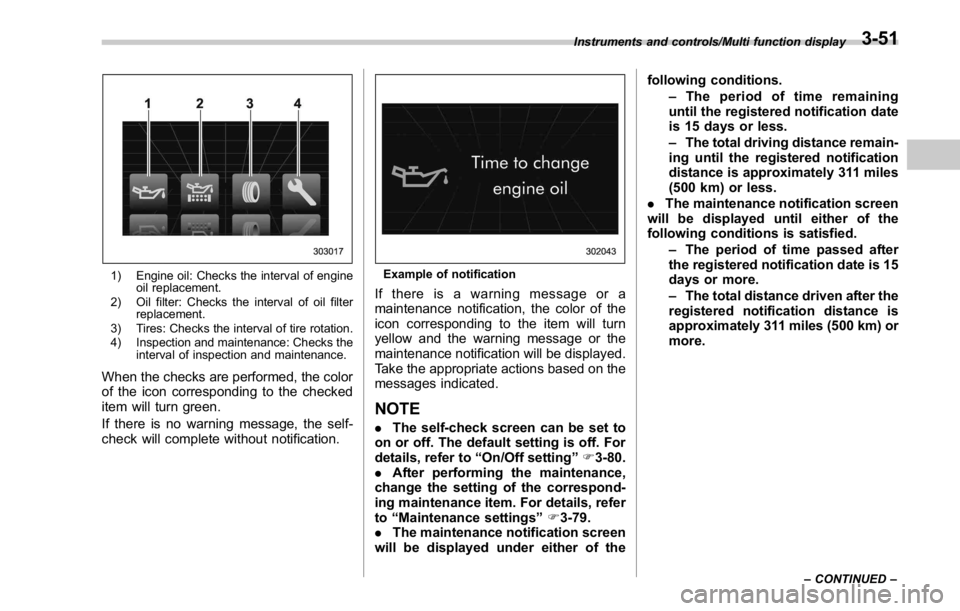
1) Engine oil: Checks the interval of engine
oil replacement.
2) Oil filter: Checks the interval of oil filter
replacement.
3) Tires: Checks the interval of tire rotation.
4) Inspection and maintenance: Checks the
interval of inspection and maintenance.
When the checks are performed, the color
of the icon corresponding to the checked
item will turn green.
If there is no warning message, the self-
check will complete without notification. Example of notification
If there is a warning message or a
maintenance notification, the color of the
icon corresponding to the item will turn
yellow and the warning message or the
maintenance notification will be displayed.
Take the appropriate actions based on the
messages indicated.
NOTE . The self-check screen can be set to
on or off. The default setting is off. For
details, refer to “ On/Off setting ” F 3-80.
. After performing the maintenance,
change the setting of the correspond-
ing maintenance item. For details, refer
to “ Maintenance settings ” F 3-79.
. The maintenance notification screen
will be displayed under either of the following conditions.
– The period of time remaining
until the registered notification date
is 15 days or less.
– The total driving distance remain-
ing until the registered notification
distance is approximately 311 miles
(500 km) or less.
. The maintenance notification screen
will be displayed until either of the
following conditions is satisfied.
– The period of time passed after
the registered notification date is 15
days or more.
– The total distance driven after the
registered notification distance is
approximately 311 miles (500 km) or
more.Instruments and controls/Multi function display
– CONTINUED –3-51
Page 185 of 594
Instruments and controls/Multi function display
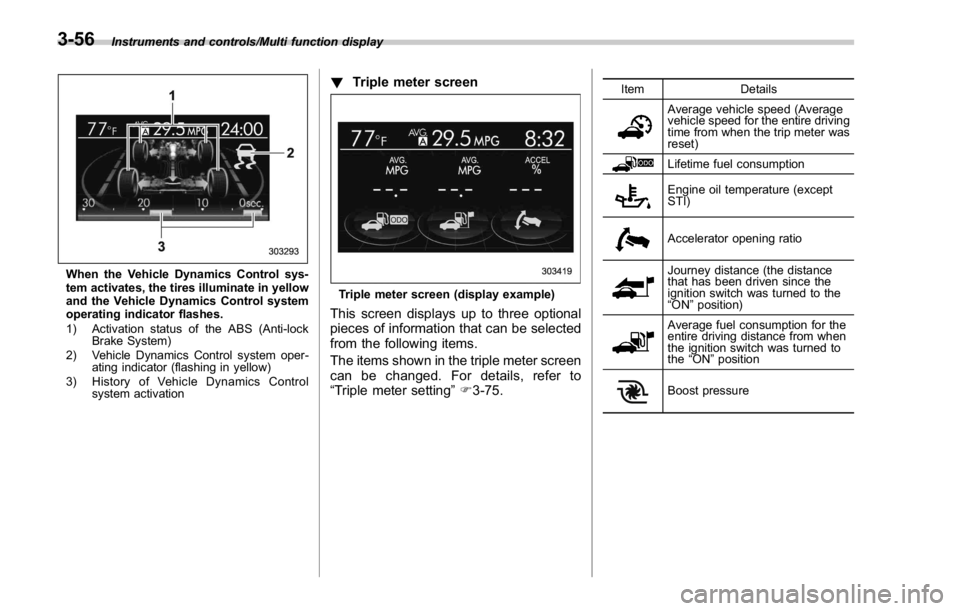
When the Vehicle Dynamics Control sys-
tem activates, the tires illuminate in yellow
and the Vehicle Dynamics Control system
operating indicator flashes.
1) Activation status of the ABS (Anti-lock
Brake System)
2) Vehicle Dynamics Control system oper-
ating indicator (flashing in yellow)
3) History of Vehicle Dynamics Control
system activation ! Triple meter screen
Triple meter screen (display example)
This screen displays up to three optional
pieces of information that can be selected
from the following items.
The items shown in the triple meter screen
can be changed. For details, refer to
“ Triple meter setting ” F 3-75. Item Details
Average vehicle speed (Average
vehicle speed for the entire driving
time from when the trip meter was
reset)
Lifetime fuel consumption
Engine oil temperature (except
STI)
Accelerator opening ratio
Journey distance (the distance
that has been driven since the
ignition switch was turned to the
“ ON ” position)
Average fuel consumption for the
entire driving distance from when
the ignition switch was turned to
the “ ON ” position
Boost pressure3-56
Page 191 of 594
Instruments and controls/Multi function display
& Date and time settingsThe items in the date and time settings
can be set. To change the items, operate
the “
” or “ ” switch.
NOTE . The “ Time/Date ” item must be set to
display the “ Birthday ” , “ Anniversary ”
and notifications for vehicle mainte-
nance.
. The “ Birthday ” and “ Anniversary ”
items can be entered after the “ Time/
Date ” item has been set.
. Dates that do not exist in the
Gregorian calendar cannot be set (for
example, April 31).
. If your vehicle is equipped with the
genuine SUBARU navigation system,
the clock of navigation system must be
set separately.
! Preparation for date setting
1. Turn the ignition switch to the “ ON ”
position.
2. Push and hold the
button to show
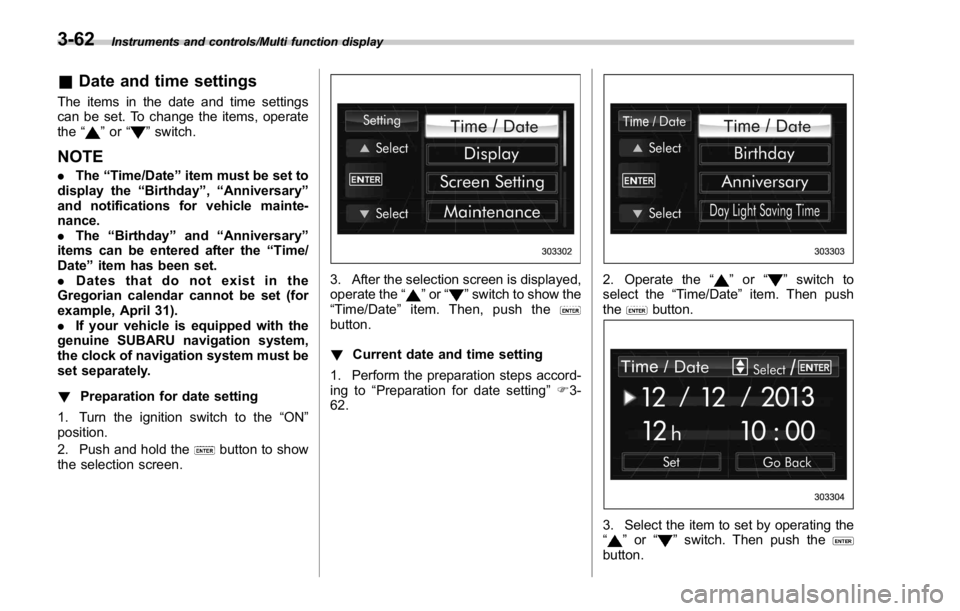
the selection screen. 3. After the selection screen is displayed,
operate the “
” or “ ” switch to show the
“ Time/Date ” item. Then, push the
button.
! Current date and time setting
1. Perform the preparation steps accord-
ing to “ Preparation for date setting ” F 3-
62. 2. Operate the “ ” or “ ” switch to
select the “ Time/Date ” item. Then push
the
button.
3. Select the item to set by operating the
“
” or “ ” switch. Then push the
button.3-62
Page 212 of 594
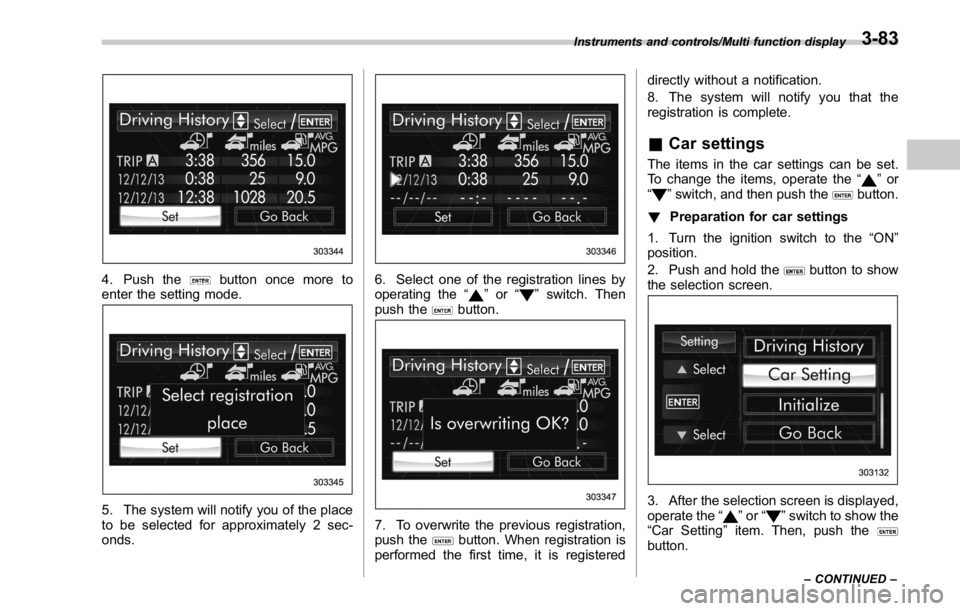
4. Push the button once more to
enter the setting mode.
5. The system will notify you of the place
to be selected for approximately 2 sec-
onds. 6. Select one of the registration lines by
operating the “
” or “ ” switch. Then
push the
button.
7. To overwrite the previous registration,
push the
button. When registration is
performed the first time, it is registered directly without a notification.
8. The system will notify you that the
registration is complete.
& Car settings The items in the car settings can be set.
To change the items, operate the “
” or
“
” switch, and then push the button.
! Preparation for car settings
1. Turn the ignition switch to the “ ON ”
position.
2. Push and hold the
button to show
the selection screen.
3. After the selection screen is displayed,
operate the “
” or “ ” switch to show the
“ Car Setting ” item. Then, push the
button.Instruments and controls/Multi function display
– CONTINUED –3-83
Page 226 of 594
& Daytime running light system WARNINGThe brightness of the illumination of
the high beam headlights is reduced
by the daytime running light system.
The light switch must always be
turned to the “
” position when it
is dark outside.
The high beam headlights will automati-
cally illuminate at reduced brightness
when the following conditions are fulfilled.
. The engine is running.
. The parking brake is fully released.
. The light control switch is in the
“ AUTO ” (if equipped), “
” or off position.
. For CVT models, the select lever is in a
position other than the “ P ” position.
NOTE . When the light switch is in the “ ”
position, the instrument panel illumina-
tion, front side marker lights, tail lights
and license plate lights are also illumi-
nated.
. For models with the auto on/off
headlights, while the light control
switch is in the “ AUTO ” position and
the system is activated to the auto-on
mode depending on the ambient light level, the high beam headlights that
have illuminated at reduced brightness
turn off, and the low beam headlights
turn on alternatively. At this time, the
instrument panel illumination, front
side marker lights, tail lights and
license plate lights are also illuminated.
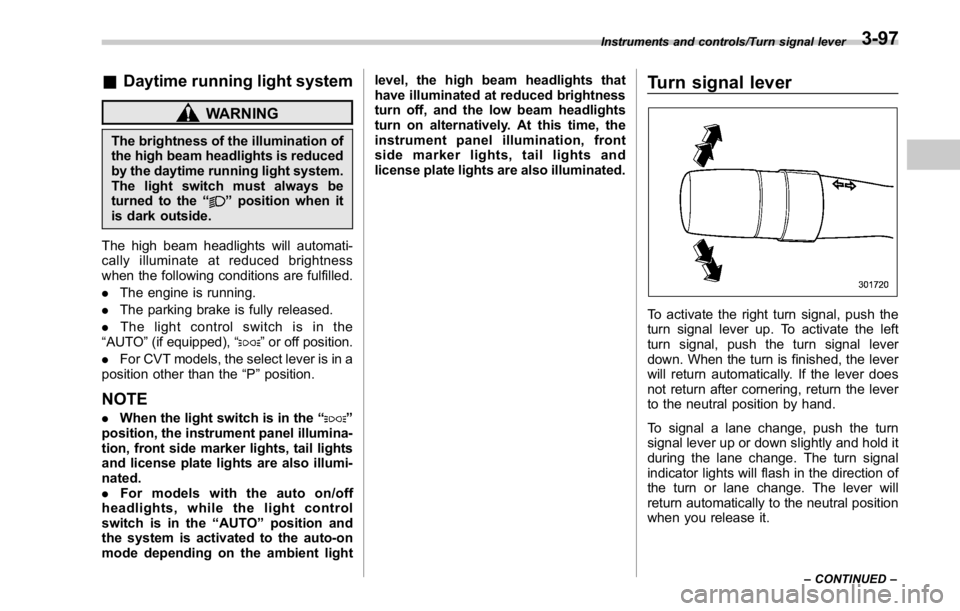
Turn signal lever
To activate the right turn signal, push the
turn signal lever up. To activate the left
turn signal, push the turn signal lever
down. When the turn is finished, the lever
will return automatically. If the lever does
not return after cornering, return the lever
to the neutral position by hand.
To signal a lane change, push the turn
signal lever up or down slightly and hold it
during the lane change. The turn signal
indicator lights will flash in the direction of
the turn or lane change. The lever will
return automatically to the neutral position
when you release it. Instruments and controls/Turn signal lever
– CONTINUED –3-97