phone SUBARU WRX 2016 User Guide
[x] Cancel search | Manufacturer: SUBARU, Model Year: 2016, Model line: WRX, Model: SUBARU WRX 2016Pages: 594, PDF Size: 19.43 MB
Page 258 of 594

Installation of accessories Always consult your SUBARU dealer
before installing a citizen band radio or
other transmitting device in your vehicle.
Such devices may cause the electronic
control system to malfunction if they are
incorrectly installed or if they are not
suited for the vehicle.
Audio set Your SUBARU may be equipped with one
of the following audio sets. Refer to the
pages indicated in this section for operat-
ing details.
NOTE If a cell phone is placed near the audio
set, it may cause the audio set to emit
noise when the phone receives calls.
This noise does not indicate an audio
set malfunction. Note that a cell phone
should be placed as far as possible
from the audio set. Audio/Installation of accessories
– CONTINUED –5-3
Page 263 of 594
Audio/Basic information before use
it again.
. Grayed-out screen buttons cannot
be operated.
. The displayed image may become
darkerandmovingimagesmaybe
slightly distorted when the screen is
cold.
. In extremely cold conditions, the
map may not be displayed and the data
input by a user may be deleted. Also,
the screen buttons may be harder than
usual to press.
. When you look at the screen
through polarized material such as
polarized sunglasses, the screen may
be dark and hard to see. If so, look at
the screen from different angles, adjust
the screen settings on the “ Display
Settings (Display Settings) ” screen or
take off your sunglasses.
& Entering letters and num-
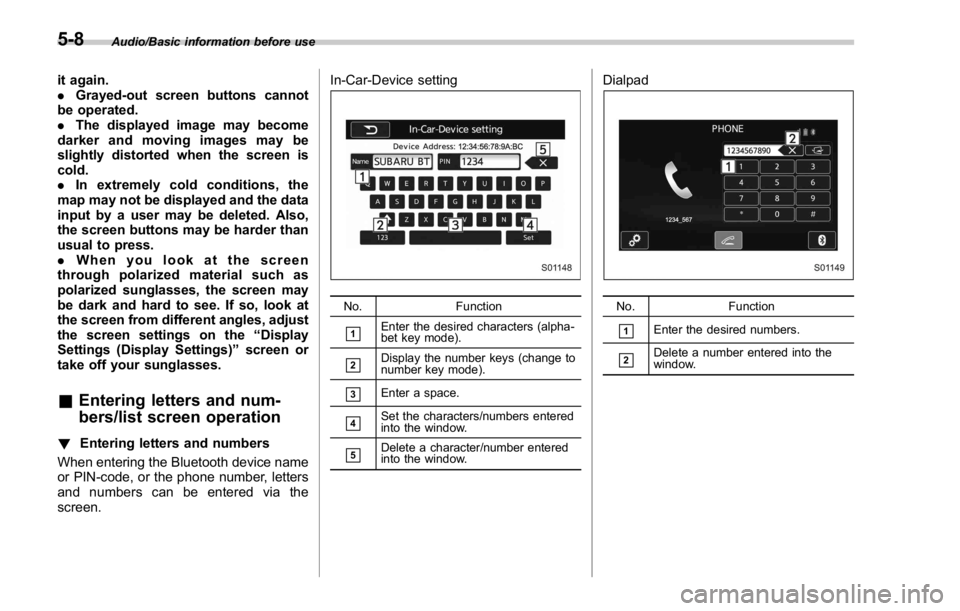
bers/list screen operation! Entering letters and numbers
When entering the Bluetooth device name
or PIN-code, or the phone number, letters
and numbers can be entered via the
screen. In-Car-Device setting
No. Function
& 1
Enter the desired characters (alpha-
bet key mode).
& 2
Display the number keys (change to
number key mode).
& 3
Enter a space.
& 4
Set the characters/numbers entered
into the window.
& 5
Delete a character/number entered
into the window. Dialpad
No. Function
& 1
Enter the desired numbers.
& 2
Delete a number entered into the
window.5-8
Page 264 of 594
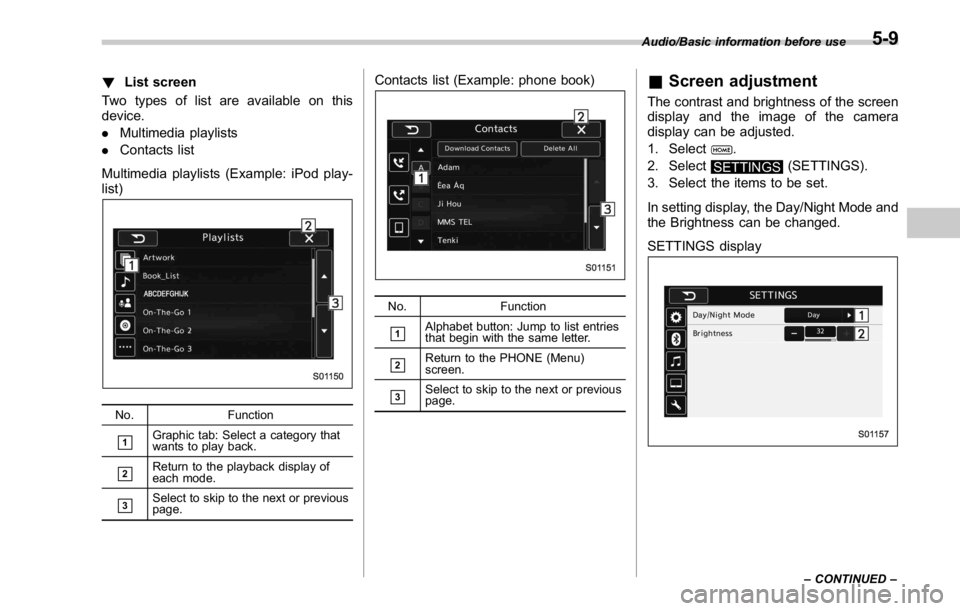
! List screen
Two types of list are available on this
device.
. Multimedia playlists
. Contacts list
Multimedia playlists (Example: iPod play-
list)
No. Function
& 1
Graphic tab: Select a category that
wants to play back.
& 2
Return to the playback display of
each mode.
& 3
Select to skip to the next or previous
page. Contacts list (Example: phone book)
No. Function
& 1
Alphabet button: Jump to list entries
that begin with the same letter.
& 2
Return to the PHONE (Menu)
screen.
& 3
Select to skip to the next or previous
page. & Screen adjustment The contrast and brightness of the screen
display and the image of the camera
display can be adjusted.
1. Select
.
2. Select
SETTINGS (SETTINGS).
3. Select the items to be set.
In setting display, the Day/Night Mode and
the Brightness can be changed.
SETTINGS display Audio/Basic information before use
– CONTINUED –5-9
Page 276 of 594

Tips for operating the audio/
visual system & Operating information CAUTION. To avoid damage to the audio/
visual system:
– Be careful not to spill bev-
erages over the audio/visual
system.
– Do not put anything other than
an appropriate disc into the
disc slot.
NOTE The use of a cellular phone inside or
near the vehicle may cause a noise
from the speakers of the audio/visual
system which you are listening to.
However, this does not indicate a
malfunction.
! Radio
Usually, a problem with radio reception
does not mean there is a problem with the
radio — it is just the normal result of
conditions outside the vehicle.
For example, nearby buildings and terrain can interfere with FM reception. Power
lines or phone wires can interfere with AM
signals. And of course, radio signals have
a limited range. The farther the vehicle is
from a station, the weaker its signal will
be. In addition, reception conditions
change constantly as the vehicle moves.
Here, some common reception problems
that probably do not indicate a problem
with the radio are described.
! FM
Fading and drifting stations: Generally, the
effective range of FM is about 25 miles (40
km). Once outside this range, you may
notice fading and drifting, which increase
with the distance from the radio transmit-
ter. They are often accompanied by
distortion.
Static and fluttering: These occur when
signals are blocked by buildings, trees or
other large objects. Increasing the bass
level may reduce static and fluttering.
Station swapping: If the FM signal being
listened to is interrupted or weakened, and
there is another strong station nearby on
the FM band, the radio may tune in the
second station until the original signal can
be picked up again. ! AM
Fading: AM broadcasts are reflected by
the upper atmosphere — especially at
night. These reflected signals can inter-
fere with those received directly from the
radio station, causing the radio station to
sound alternately strong and weak.
Station interference: When a reflected
signal and a signal received directly from
a radio station are very nearly the same
frequency, they can interfere with each
other, making it difficult to hear the broad-
cast.
Static: AM is easily affected by external
sources of electrical noise, such as high
tension power lines, lightening or electrical
motors. This results in static.
! SiriusXM
. Cargo loaded on the roof luggage
carrier, especially metal objects, may
adversely affect the reception of SiriusXM
Satellite Radio.
. Alternation or modifications carried out
without appropriate authorization may in-
validate the user ’ s right to operate the
equipment.Audio/Tips for operating the audio/visual system
– CONTINUED –5-21
Page 279 of 594

Audio/Tips for operating the audio/visual system
lens of the unit.
. It may not be possible to play discs
recorded on a personal computer depend-
ing on the application settings and the
environment. Record with the correct
format. (For details, contact the appropri-
ate application manufacturers of the ap-
plications.)
. CD-R/CD-RW discs may be damaged
by direct exposure to sunlight, high tem-
peratures or other storage conditions. The
unit may be unable to play some damaged
discs.
. If you insert a CD-RW disc into the
player, playback will begin more slowly
than with a conventional CD or CD-R disc.
. Recordings on CD-R/CD-RW cannot
be played using the DDCD (Double
Density CD) system.
! USB memory device
. USB communication formats: USB
1.1/2.0 HS (480 Mbps) and FS (12 Mbps)
. File formats: FAT 16/32
. Correspondence class: Mass storage
class
! iPod
The following iPod ®
, iPod nano ®
, iPod
classic ®
, iPod touch ®
and iPhone ®
de-
vices can be used with this system. Made for
. iPod touch (5th generation)*
. iPod touch (4th generation)
. iPod touch (3rd generation)
. iPod touch (2nd generation)
. iPod touch (1st generation)
. iPod classic
. iPod nano (7th generation)*
. iPod nano (6th generation)*
. iPod nano (5th generation)
. iPod nano (4th generation)
. iPod nano (3rd generation)
. iPod nano (2nd generation)*
. iPod nano (1st generation)*
. iPhone 5S*
. iPhone 5C*
. iPhone 5*
. iPhone 4S
. iPhone 4
. iPhone 3GS
. iPhone 3G
. iPhone
*: iPod video not supported
Depending on differences between mod-
els or software versions etc., some mod-
els might be incompatible with this sys-
tem. ! File information
Compatible compressed files (Audio) Item USB DISC
Compatible
file format MP3/WMA/AAC
Folders in the
device Maximum
512 Maximum
255
Files in the
device Maximum
8000 Maximum
512
Files per
folder Maximum
255 —
Corresponding sampling frequency
(Audio) File type Frequency (kHz)
MP3 files:
MPEG 1 LAYER 3 32/44.1/48
MP3 files:
MPEG 2 LSF LAYER 3 16/22.05/24
WMA files:
Ver. 7, 8, 9 (9.1/9.2) 32/48/64/80/96/128/
160/192
AAC files:
MPEG4/AAC-LC 48/44.1/32/24/22.05/
16/12/11.025/85-24
Page 285 of 594
Audio/Useful information
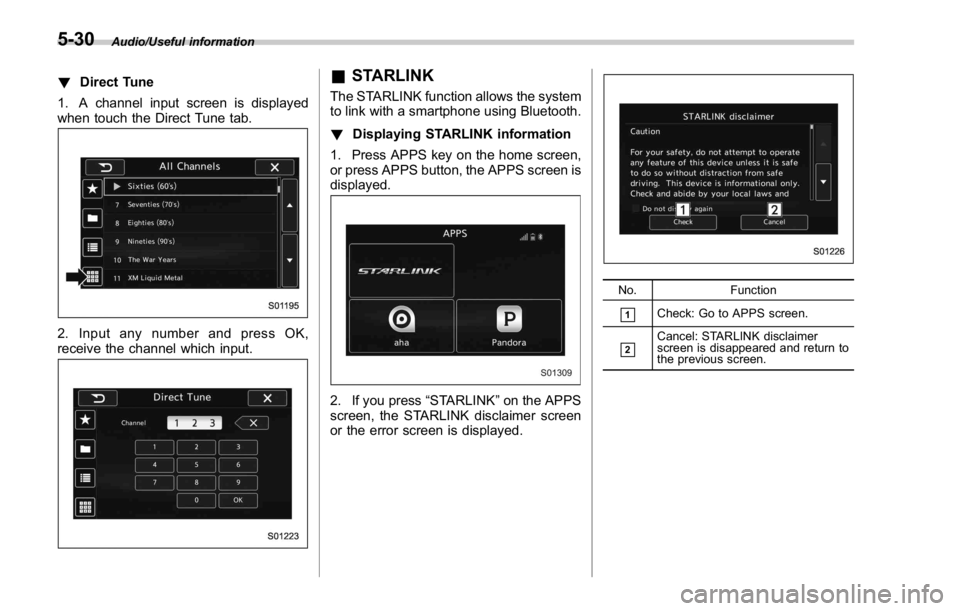
! Direct Tune
1. A channel input screen is displayed
when touch the Direct Tune tab.
2. Input any number and press OK,
receive the channel which input. & STARLINK The STARLINK function allows the system
to link with a smartphone using Bluetooth.
! Displaying STARLINK information
1. Press APPS key on the home screen,
or press APPS button, the APPS screen is
displayed.
2. If you press “ STARLINK ” on the APPS
screen, the STARLINK disclaimer screen
or the error screen is displayed. No. Function
& 1
Check: Go to APPS screen.
& 2
Cancel: STARLINK disclaimer
screen is disappeared and return to
the previous screen.5-30
Page 286 of 594
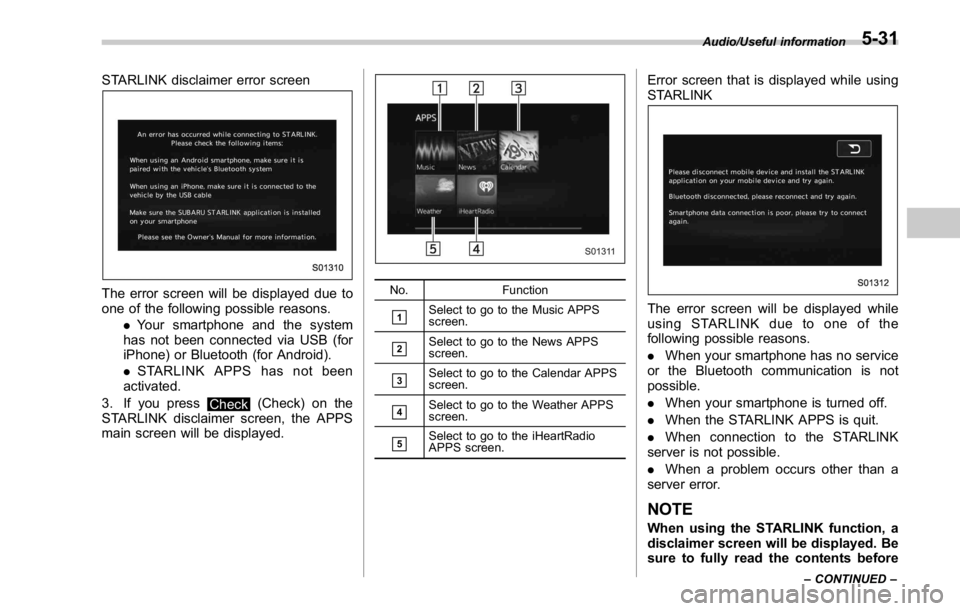
STARLINK disclaimer error screen
The error screen will be displayed due to
one of the following possible reasons.
. Your smartphone and the system
has not been connected via USB (for
iPhone) or Bluetooth (for Android).
. STARLINK APPS has not been
activated.
3. If you press
Check (Check) on the
STARLINK disclaimer screen, the APPS
main screen will be displayed. No. Function
& 1
Select to go to the Music APPS
screen.
& 2
Select to go to the News APPS
screen.
& 3
Select to go to the Calendar APPS
screen.
& 4
Select to go to the Weather APPS
screen.
& 5
Select to go to the iHeartRadio
APPS screen. Error screen that is displayed while using
STARLINK
The error screen will be displayed while
using STARLINK due to one of the
following possible reasons.
. When your smartphone has no service
or the Bluetooth communication is not
possible.
. When your smartphone is turned off.
. When the STARLINK APPS is quit.
. When connection to the STARLINK
server is not possible.
. When a problem occurs other than a
server error.
NOTE
When using the STARLINK function, a
disclaimer screen will be displayed. Be
sure to fully read the contents before Audio/Useful information
– CONTINUED –5-31
Page 287 of 594

Audio/Useful information
using the function.
NOTE Connection method
iPhone: USB
Android: Bluetooth
Supported devices
iPhone: iPhone 4/iPhone 4S/iPhone 5
(iOS Ver. 5.1 or later)
Android: (OS Ver. 4.0 or later)5-32
Page 293 of 594
Audio/Radio operation
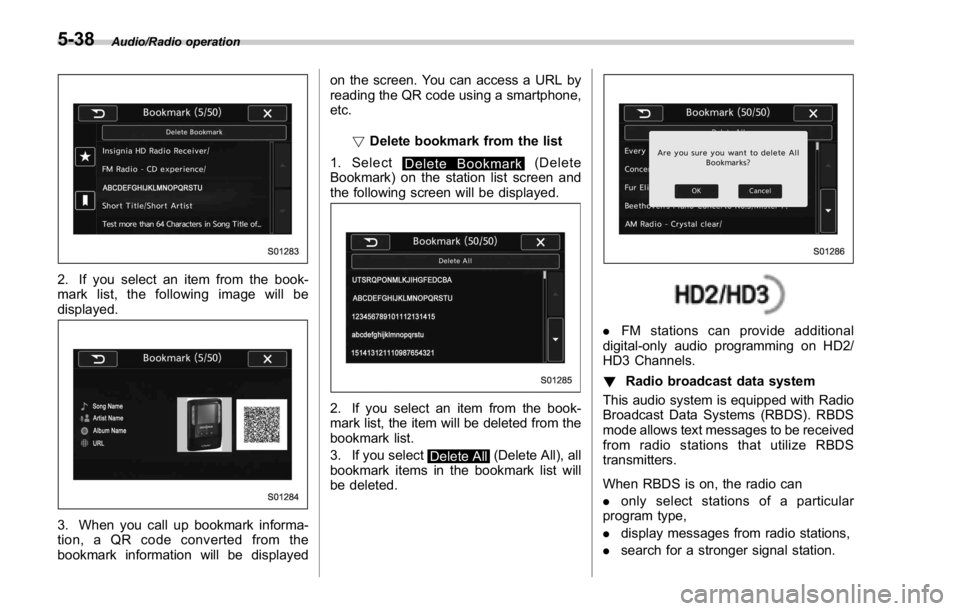
2. If you select an item from the book-
mark list, the following image will be
displayed.
3. When you call up bookmark informa-
tion, a QR code converted from the
bookmark information will be displayed on the screen. You can access a URL by
reading the QR code using a smartphone,
etc.
! Delete bookmark from the list
1. Select
Delete Bookmark (Delete
Bookmark) on the station list screen and
the following screen will be displayed.
2. If you select an item from the book-
mark list, the item will be deleted from the
bookmark list.
3. If you select
Delete All (Delete All), all
bookmark items in the bookmark list will
be deleted. . FM stations can provide additional
digital-only audio programming on HD2/
HD3 Channels.
! Radio broadcast data system
This audio system is equipped with Radio
Broadcast Data Systems (RBDS). RBDS
mode allows text messages to be received
from radio stations that utilize RBDS
transmitters.
When RBDS is on, the radio can
. only select stations of a particular
program type,
. display messages from radio stations,
. search for a stronger signal station.5-38
Page 318 of 594
WARNING. Do not operate the player ’ s con-
trols or connect to the Bluetooth
audio system while driving.
. Your audio unit is fitted with
Bluetooth antennas. People with
implantable cardiac pacemakers,
cardiac resynchronization ther-
apy-pacemakers or implantable
cardioverter defibrillators should
maintain a reasonable distance
between themselves and the
Bluetooth antennas. The radio
waves may affect the operation
of such devices.
. Before using Bluetooth devices,
users of any electrical medical
device other than implantable
cardiac pacemakers, cardiac re-
synchronization therapy-pace-
makers or implantable cardiover-
ter defibrillators should consult
the manufacturer of the device
for information about its opera-
tion under the influence of radio
waves. Radio waves could have
unexpected effects on the opera-
tion of such medical devices. CAUTIONDo not leave your portable player in
the vehicle. In particular, high tem-
peratures inside the vehicle may
damage the portable player.
NOTE . Depending on the Bluetooth device
that is connected to the system, the
music may start playing when selecting
while it is paused. Conversely, the
music may pause when selecting
while it is playing.
. In the following conditions, the sys-
tem may not function:
– The Bluetooth device is turned
off.
– The Bluetooth device is not con-
nected.
– The Bluetooth device has a low
battery.
. Itmaytaketimetoconnectthe
phone when Bluetooth audio is being
played.
. For operating the portable player,
see the instruction manual that comes
with it.
. If the Bluetooth device is discon-
nected due to poor reception from the
Bluetooth network when the ignition switch is in the “ ACC ” or “ ON ” posi-
tion, the system will automatically
reconnect to the portable player.
. If the Bluetooth device is discon-
nected on purpose, such as it was
turned off, this does not happen.
Reconnect the portable player manu-
ally.
. Bluetooth device information is re-
gistered when the Bluetooth device is
connected to the Bluetooth audio sys-
tem. When selling or disposing of the
vehicle, remove the Bluetooth audio
information from the system. Refer to
“ Other settings ” F 5-10.
! Connecting a Bluetooth device
To use the Bluetooth audio system, it is
necessary to register a Bluetooth device
with the system.
Registering an additional device
1. Select the Bluetooth Setting Key on
the BT Audio menu screen.
2. Select
Add (Add) on the BT Devices
Connection screen.
3. Register a Bluetooth device.
4. For more information: Refer to “ Regis-
tering a Bluetooth device ” F 5-84.
Selecting a registered device
1. Select the Bluetooth Setting Key on
the BT Audio menu screen. Audio/Media operation
– CONTINUED –5-63