warning SUZUKI IGNIS 2017 Workshop Manual
[x] Cancel search | Manufacturer: SUZUKI, Model Year: 2017, Model line: IGNIS, Model: SUZUKI IGNIS 2017Pages: 505, PDF Size: 8.36 MB
Page 179 of 505
3-26
OPERATING YOUR VEHICLE
75RM4-01E
Starting the engine
When starting the engine, always place the
gearshift lever in the “N” position and
depress the brake pedal firmly. The engine
cannot be started unless the gearshift
lever is in the “N” position and the brake
pedal is depressed.
If you parked vehicle with gear engaged on
last time (if you can see “1” or “R”), shift
into “N” (Neutral) and depress the brake
pedal. Hold the brake pedal while starting
the engine. You can hear buzzer in short
time.
NOTE:
If you start the engine without the gearshift
lever in the “N” position, the gear position
indicator in the instrument cluster will blink.
Clutch operation
You can select either the Drive (D) mode or
the Manual (M) mode. Since this vehicle
controls clutch operation electronically in
either mode, you do not need to operate
the clutch.Creeping function
This vehicle has a creeping function that
helps the vehicle to start smoothly by
engaging the clutch. When the gearshift
lever is in any of the positions “D”, “M” or
“R”, and you release your foot from the
brake pedal, the vehicle starts slowly with-
out depressing the accelerator pedal. The
creeping function is disabled if you
depress the brake pedal or pull up the
parking brake lever.
NOTE:
If the driver’s door is opened and/or the
parking brake lever is engaged with the
gear in the “M”, “D” or “R” position, the
creeping function will not operate.
Parking and Stopping the vehicle
Auto Gear Shift does not have a parking
position. Park the vehicle with a gear
engaged. Make sure that the gearshift
lever is “D”, “M”, or “R”.
Also, check the instrument cluster to make
sure that the transaxle is engaged in “1” or
“R” position.Drive (D) mode
When the Drive (D) mode is activated, the
most appropriate gear
position is automati-
cally selected upon operation of the accel-
erator pedal and variation of vehicle
speed.
Normal driving:
1) Start the engine as instructed in “Start- ing the engine” in this section.
2) With your foot on the brake pedal, shift the gearshift lever to the “D” position.
When the gearshift lever is shifted to
the “D” position, the gear will be shifted
to 1st.
NOTE:
• If 1st gear cannot be engaged even though the gearshift lever has been
shifted from the “N” to the “D” position,
the system will re-try shifting automati-
cally. This will take some time, noise
may be heard from the gears, and shift-
ing gear shock may occur. However,
they do not indicate malfunction.
• The “N” indicator will flush, the depress brake pedal indicator will come on and a
warning buzzer (long pulse sound) will
sound if any of the following cases
occur;
– If you shift the gearshift lever from the
“N” to the “D” position without depress-
ing the brake pedal
– If the system is unable to re-try shifting
You should depress the brake pedal and
shift the gearshift lever to “N” position,
then shift to “D” again.
NOTICE
A buzzer will sound continuously if
the vehicle is operated with the gear-
shift lever in-between of each shift
positions. The vehicle will become
inoperative if you continue to operate
the vehicle with the gearshift lever in-
between shift positions.
Page 180 of 505
3-27OPERATING YOUR VEHICLE
75RM4-01E
3) Release the parking brake and brakepedal.
4) Depress the accelerator pedal slowly. Starting off on an uphill/downhill:
Uphill
1) Apply the parking brake firmly so that
the vehicle does no t roll backwards.
2) Shift the gearshift lever to the “D” posi-
tion while depressing the brake pedal.
Make sure that the gea r position indica-
tor in the instrumental cluster displays
1st gear.
3) Release the brake pedal and depress the accelerator pedal gradually, and
when the vehicle starts to move,
release the parking brake and depress
the accelerator pedal to start off.
WA R N I N G
• While driving the vehicle, do notshift the gearshift lever to the “N”
position. The engine brake may not
work and you may get involved in
an unexpected accident. If you
return the gearshift lever from “N”
to “D” because of unintended shift-
ing, the gear position will be shifted
according to the current vehicle
speed.
• Always keep your foot on the brake pedal while stopped with the
engine running. This operation pre-
vents the vehicle from moving due
to unintended activation of the
creeping function.
NOTICE
If the gearshift lever cannot shift into
any position, or the gear is changed
to “N” position au tomatically when
the vehicle speed becomes less than
10 km/h (6 mph), there may be a sys-
tematic malfunction. In this case, ask
your SUZUKI dealer to inspect the
Auto Gear Shift system as soon as
possible.
NOTICE
Do not operate the system as
described below. The life cycle of the
clutch may be reduced.
• Using the accelerator pedal to hold the vehicle on an uphill slope with
the gearshift lever in the “D” or “M”
position. If you perform this opera-
tion for a certain period of time, a
warning buzzer will sound.
• Shifting the gearshift lever to the “D”, “M” or “R” position while rac-
ing the engine.
• Driving at low speed using a high
gear.
• Holding the vehicle on an uphill slope using the creeping function.
If you perform this operation for a
certain period of time, a warning
buzzer will sound.
NOTICE
On an uphill slope, never hold the
vehicle at a stop using only the accel-
erator pedal or the creeping function.
If you perform this operation for a
certain period of time, a warning
buzzer will sound, and in some cases
the engine will stall. This can also
cause excessive damage to the
clutch.
Page 182 of 505
3-29OPERATING YOUR VEHICLE
75RM4-01E
possible. However, if downshifting more
than 3 steps, gear shifting will take more
time.
• When the gear is shifting, a noise can be heard in some case. This is not malfunc-
tion. Starting off:
1) Start the engine as instructed in “Start-
ing the engine” in this section.
2) With your foot on the brake pedal, shift the gearshift lever to the “M” position.
When the gearshift lever is shifted to
the “M” position, the gear will be shifted
to 1st. Before starting off, always make
sure that the intended gear is engaged
by checking the gear position indicator,
then depress the accelerator pedal.
NOTE:
• If 1st gear cannot be engaged even though the gearshift lever has been
shifted from the “N” to the “M” position,
the system will re-try shifting automati-
cally. This will take some time, noise
may be heard from the gears, and shift-
ing gear shock may occur. However,
they do not indicate malfunction.
• The “N” indicator will flush, the depress brake pedal indicator will come on and a
warning buzzer (long pulse sound) will
sound if any of the following cases
occur;
– If you shift the gearshift lever from the “N” to the “M” position without
depressing the brake pedal
– If the system is unable to re-try shifting
You should depress the brake pedal and
shift the gearshift lever to “N” position,
then shift to “M” position again a few
seconds later.
WA R N I N G
• Be careful when accelerating, upshifting, downshifting or braking
on a slippery surface. Sudden
acceleration or engine braking
could cause the vehicle to spin or
skid.
• To drive down a long or steep hill,
reduce your speed and downshift.
Remember, if you ride the brakes
excessively, they may overheat and
fail.
• While driving the vehicle, do not shift the gearshift lever to “N” posi-
tion. The engine brake may not
work and you may get involved in
an unexpected accident. If you
return the gearshift lever from “N”
to “M” because of unintended shift-
ing, the gear position will be shifted
according to the current vehicle
speed.
• Do not apply the parking brake
while driving. Otherwise, it could
cause a skid and you may get
involved in an unexpected acci-
dent.
NOTICE
• If the gearshift lever cannot shiftinto any position, or the gear is
changed to “N” position automati-
cally when the vehicle speed
becomes less than 10 km/h (6
mph), there may be a systematic
malfunction. In this case, ask your
SUZUKI dealer to inspect the Auto
Gear Shift system as soon as pos-
sible.
• The manual (M) mode does not
upshift even if the engine speed
reaches the rev-limit.
• The system will not allow shifting up or down to a gear that would
cause engine over-revving or
under-revving.
• If frequently driving at low speed using a high gear position, the life
cycle of the clutch may be reduced.
• Frequent downshif ting (more than
3 positions consecutively) causes
the reduction of transaxle life.
Page 183 of 505
3-30
OPERATING YOUR VEHICLE
75RM4-01E
3) Release the parking brake and brakepedal. Depress the accelerator pedal
slowly for smooth starting. Starting off on an uphill/downhill slope:
Uphill
1) Apply the parking brake firmly so that
the vehicle does no t roll backwards.
2) Shift the gearshift lever to the “M” posi-
tion while depressing the brake pedal.
Make sure that the ge ar position indica-
tor in the instrumental cluster displays
1st gear.
3) Release the brake pedal and depress the accelerator pedal gradually, and
when the vehicle starts to move,
release the parking brake and depress
the accelerator pedal to start off.
Downhill
1) Depress the brake pedal and shift the gearshift lever to the “M” position.
Check the gear position indicator to
make sure that the gear is in 1st.
2) Release the brake pedal and depress the accelerator pedal slowly. Even
though the accelerator pedal is not
depressed, the clutch will be engaged
when the vehicle speed increases. Backing up
After the vehicle has stopped completely,
depress the brake pedal and shift the gear-
shift lever to the “R” position. Depress the
accelerator pedal slowly as when starting
off in 1st gear. Before backing up, make
sure that reverse gear is selected by
checking the gear position indicator.
NOTE:
• If reverse gear cannot be engaged even
though the gearshift lever has been
shifted from the “N” to the “R” position,
the system will re-try shifting automati-
cally. This will take some time, noise
may be heard from the gears, and shift-
ing gear shock may occur. However,
they do not indicate malfunction.
• The “N” indicator will flush, the depress brake pedal indicator will come on and a
warning buzzer (long pulse sound) will
sound if any of the following cases
occur;
– If you shift the gearshift lever from the “N” to the “R” position without depress-
ing the brake pedal
– If the system is unable to re-try shifting
You should depress the brake pedal and
shift the gearshift lever to “N” position,
then shift to “R” position again a few sec-
onds later.
WA R N I N G
Always keep your foot on the brake
pedal while stopped with the engine
running. These operations prevent
the vehicle from starting due to unin-
tended activation of the creeping
function.
NOTICE
Do not operate the system as
described below. The life cycle of the
clutch may be reduced.
• Using the accelerator pedal to hold the vehicle on an uphill slope oper-
ation with the gearshift lever in the
“M” or “D” position. If you perform
this operation for a certain period
of time, a warning buzzer will
sound.
• Shifting the gearshift lever to the
“M”, “D” or “R” po sition while rac-
ing the engine.
• Driving at low speed using a high
gear.
• Stopping on a slope using the creeping function. If you perform
this operation for a certain period
of time, a warning buzzer will
sound.
NOTICE
On an uphill slope, never hold the
vehicle at a stop using only the accel-
erator pedal or creeping function. If
you perform this operation for a cer-
tain period of time, a warning buzzer
will sound, and in some cases the
engine will stall. This can also cause
excessive damage to the clutch.
Page 184 of 505
3-31OPERATING YOUR VEHICLE
75RM4-01E
• The system will not allow shifting to the“R” position if the vehicle speed is over
about 3 km/h (2 mph). If the gearshift
lever is operated under this condition,
the “N” indicator in the instrument cluster
will blink. However, when the vehicle
speed drops below about 3 km/h (2
mph), the gear will be shifted to reverse.
Make sure that the vehicle has stopped
completely before shifting to the “R”
position. Stopping
The vehicle can be stopped by depressing
the brake pedal regardless of the gear
position. This is because the clutch is auto-
matically disengaged to prevent the engine
from stopping.
• If the gearshift lever is in the “D” position,
the gear will be downshifted to 1st when
the vehicle stops.
• If the gearshift lever is in the “M” posi- tion, the gear will be downshifted to 1st
when the vehicle stops.
NOTICE
On a downhill slope, never hold the
vehicle at a stop using only the accel-
erator pedal or the creeping function.
If you perform this operation for a
certain period of time, a warning
buzzer will sound, and in some cases
the engine will stall. This can also
cause excessive damage to the
clutch.
WA R N I N G
• When stopping, for example, at a
traffic light, be sure to depress the
brake pedal firmly. For your safety,
apply the parking brake, too, when
stopping on a hill.
• When racing the engine, make sure that the gear is in the “N” position
by checking the gear position indi-
cator. If the accelerator is operated
with the gear in any other position,
the vehicle may move resulting in
an unexpected accident.
• Do not leave your vehicle unat-
tended while the engine is running. (Continued)
WA R N I N G
(Continued)
• When leaving the vehicle, stop the
engine and park the vehicle with a
gear engaged. If you need to leave
the vehicle with the engine running,
apply the parking brakes firmly,
and shift the gearshift lever to the
“N” position. Otherwise, the vehi-
cle may move unexpectedly and
may cause an accident.
NOTICE
• On a slope, never hold the vehicleat a stop using only the accelerator
pedal or the creeping function. If
you perform this operation for a
certain period of time, a warning
buzzer will sound, and in some
cases the engine will stall. This can
also cause excessive damage to
the clutch.
• If the gearshift lever is operated
more than necessary, the system
may not allow operation of the
gearshift lever for a certain period
of time, and the gear may not be
shifted appropriately. Therefore, do
not operate the gearshift lever if not
necessary.
Page 185 of 505

3-32
OPERATING YOUR VEHICLE
75RM4-01E
Parking
Unlike an automatic transaxle, Auto Gear
Shift does not have a parking position.
Park the vehicle with a gear engaged.
1) Apply the parking brake firmly.
2) While depressing the brake pedal, shift
the gearshift lever to the “R” position on
a downhill slope, and to the 1st position
in the drive (D) mode or the “M” position
in the manual (M) mode on an uphill
slope and confirm the gear position by
checking the gear position indicator.
3) Stop the engine.
NOTE:
• After the engine is stopped, the gear in the transaxle does not change even if
you shift the gearshift lever in any posi-
tion. Always shift the gearshift lever
before stop the engine.
• Check the transaxle gear position by looking at the gear position indicator,
then turn the ignition switch to “LOCK”
position or press the engine switch to
change the ignition mode to LOCK
(OFF), to stop the engine. Release the
brake pedal after a few seconds. Parking cancel
Depress the brake pedal, turn the ignition
switch to “ON” position or press the engine
switch to change the ignition mode to ON,
and shift the gearshift lever to the “N” posi-
tion. The gear will be disengaged. Warning functions
A warning buzzer will sound or the indica-
tor will blink under the f
ollowing conditions.
Warning buzzer
• The clutch is heated due to excessive load.
• The creeping function is being activated for a long period of time.
• The ignition switch is turned to the “LOCK” position or the engine switch is
pressed to change the ignition mode to
LOCK (OFF) with the gear in 2nd, 3rd,
4th or 5th. In this case, turn the ignition
switch to “ON” position or press the
engine switch to change the ignition
mode to ON, and shift the gearshift lever
in the “N” position, shift it to the “D” or
“M” or “R” position, t hen turn the ignition
switch to “LOCK” position or press the
engine switch to change the ignition
mode to LOCK (OFF).
• During a stop, the driver’s door is opened with the gearshift lever in the
“R”, “D” or “M” positi on while the engine
is running.
WA R N I N G
• If the gear is not engaged properly and completely before the ignition
switch is turned to “LOCK” posi-
tion or the engine switch is pressed
to change the ignition mode to
LOCK (OFF), the vehicle may not
be parked with the gear engaged.
Always confirm the gear position
by checking the gear position indi-
cator when parking.
• On a downhill slope, the gear
should be put in reverse, and in 1st
gear on an uphill slope. Otherwise,
the vehicle may move, and cause
an unexpected accident. If the gear
is left in the “N” position, the vehi-
cle cannot be parked with a gear
engaged.
NOTICE
In the above cases, pull over to the
side of the road and stop the engine,
and then ask your SUZUKI dealer to
inspect your vehicle. Otherwise, the
clutch disc may be damaged.
Page 194 of 505
3-41OPERATING YOUR VEHICLE
75RM4-01E
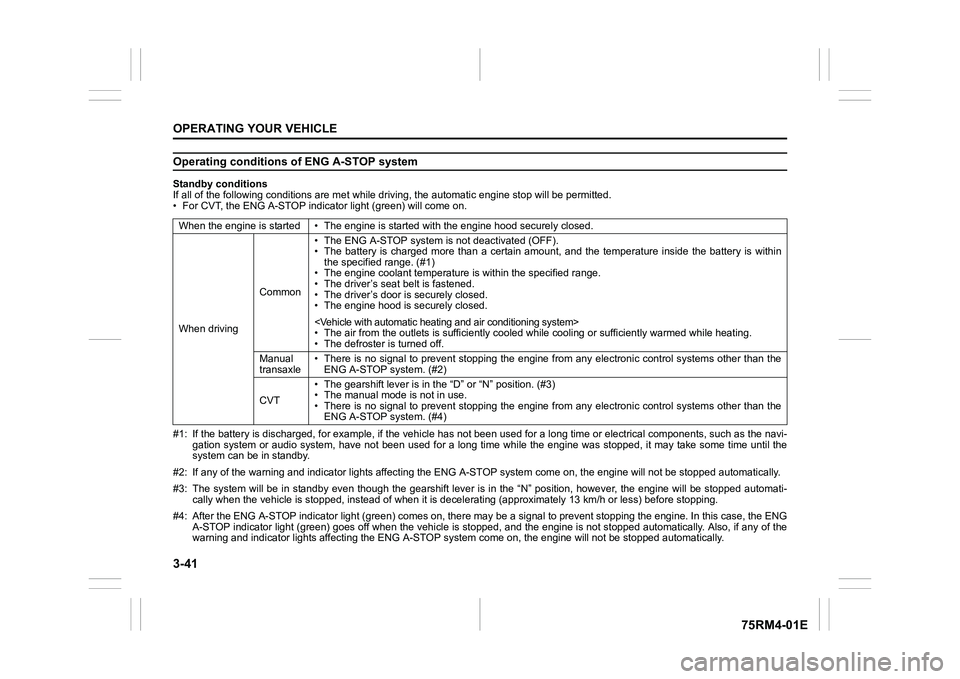
Operating conditions of ENG A-STOP systemStandby conditions
If all of the following conditions are met while driving, the automatic engine stop will be permitted.
• For CVT, the ENG A-STOP indicator light (green) will come on.
#1: If the battery is discharged, for example, if the vehicle has not been used for a long time or electrical components, such as the navi-
gation system or audio system, have not been used for a long ti me while the engine was stopped, it may take some time until th e
system can be in standby.
#2: If any of the warning and indi cator lights affecting the ENG A-STOP system come on, the e ngine will not be stopped automati cally.
#3: The system will be in standby even though the gearshift leve r is in the “N” position, however, the engine will be stopped automati-
cally when the vehicl e is stopped, instead of when it is decelerating (approximately 13 km/ h or less) before stopping.
#4: After the ENG A-STOP indicator light (green) comes on, there may be a signal to prevent stopping the engine. In this case, the ENG
A-STOP indicator light (green) goes off when the vehicle is sto pped, and the engine is not stopped automatically. Also, if any of the
warning and indi cator lights affecting the ENG A-STOP system co me on, the engine will not be stopped automatically.
When the engine is started • The
engine is started with the engine hood securely closed.
When driving Common• The ENG A-STOP system is
not deactivated (OFF).
• The battery is charged more than a certain amount, and the tem perature inside the battery is within
the specified range. (#1)
• The engine coolant temperature i s within the specified range.
• The driver’s seat belt is fastened.
• The driver’s door is securely closed.
• The engine hood is s ecurely closed.
• The air from the outlets is su fficiently cooled while cooling or sufficiently warmed while heating.
• The defroster is turned off.
Manual
transaxle • There is no signal to prevent stopping the engine from any ele
ctronic control systems other than the
ENG A-STOP system. (#2)
CVT • The gearshift lever is in the
“D” or “N” position. (#3)
• The manual mode is not in use.
• There is no signal to prevent stopping the engine from any ele ctronic control systems other than the
ENG A-STOP system. (#4)
Page 203 of 505
3-50
OPERATING YOUR VEHICLE
75RM4-01E
Be careful of the following when operat-
ing with the cruise control
Even if your vehicle is equipped with the
dual camera brake support, it cannot auto-
matically adjust to the speed of the vehicle
in front of you. Turn off the cruise control
system if you cannot operate safely at a
cruising speed.
Even in the following conditions, the set
indicator (5) will not go off and the cruising
speed will not be canceled.
• When the frontal collision warning isworking. If you depress the brake pedal,
the cruise speed will be canceled tempo-
rarily.
• When the stereo camera detects dirt on
the windshield and the dual camera
brake support stops functioning. For
safety purposes, push the cruise switch
(1) to turn off the cru ise indicator (4).
If the automatic brake system is working,
the cruise indicator (4) will turn off and the
cruise control system will be canceled.
Once you have determined that the condi-
tions are once again safe, reset the cruise
speed.
Changing speed temporarilyWhen the cruising speed is maintained,
you can temporarily accelerate or deceler-
ate.
To accelerate, depre ss the accelerator
pedal. When you take your foot off the
pedal, your vehicle will return to the set
speed.
To decelerate, depress the brake pedal.
The set speed will be canceled and the set
indicator (5) or “SET” indicator light (7) will
go off.
To resume the previously set speed, push
up the “RES +/SET –” switch (3) and turn
on the set indicator (5) or “SET” indicator
light (7) again when vehicle speed is
above 45 km/h (28 mph). The vehicle will
accelerate to and maintain the previously
set speed.
NOTE:
For CVT with manual mode or Auto Gear
Shift vehicle, when the cruising speed is
maintained, you cannot decelerate by
using the engine brake even if you down-
shift from higher gear to 3rd in the manual
mode.
To decelerate while the cruise control is
on, depress the brake pedal or push down
the “RES +/SET –” switch (3).
Changing cruising speedUsing the accelerator pedal
To reset at a faster cruising speed, accel-
erate to the desired speed using the accel-
erator pedal and push down the “RES +/
SET –” switch (3). The new speed will be
maintained.
Using the brake pedal
To reset at a slower cruising speed, decel-
erate to the desired speed using the brake
pedal and push down the “RES +/SET –”
switch (3). The new speed will be main-
tained.
NOTE:
When the brake pedal is depressed, the
set indicator (5) or “ SET” indicator light (7)
goes off until the cruising speed is reset.
Using “RES +/ SET –” switch
To reset at a faster cruising speed, press
repeatedly or hold push up the “RES +/
SET –” switch (3). Vehicle speed will
steadily increase. When you release the
switch, the new speed will be maintained.
To reset at a slower cruising speed, press
repeatedly or hold push down the “RES +/
SET –” switch (3) until the vehicle has
slowed to the desired speed, and then
release the switch. The new speed will be
maintained.
Page 207 of 505

3-54
OPERATING YOUR VEHICLE
75RM4-01E
Frontal collision warning
When there is a risk of a frontal crash, a warning will be given through the information dis-
play and sound.
75RM282
Warning brake system
If the driver cannot take or is insufficient to take evasive ac tion such as brake operation
and steering operation after frontal collision warning activate s, the system applies brake
lightly.
75RM283
EXAMPLE
buzzer
with tachometer without
tachometer
Information display
EXAMPLE
buzzer
with tachometer without
tachometer
Information display
Indicator
light
Page 208 of 505
3-55OPERATING YOUR VEHICLE
75RM4-01E
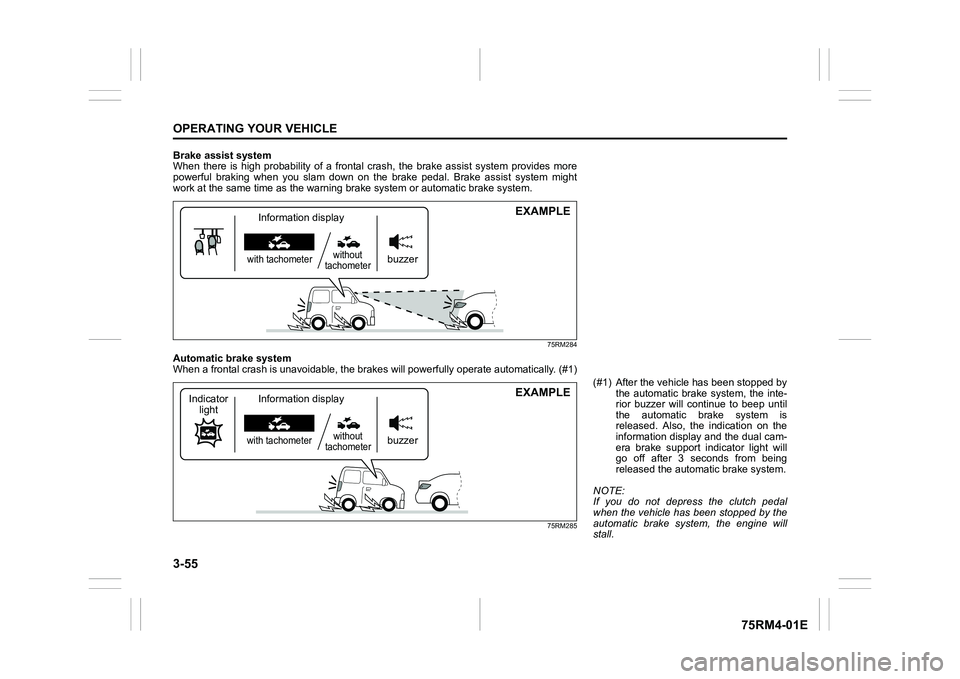
Brake assist system
When there is high probability of a frontal crash, the brake assist system provides more
powerful braking when you slam down on the brake pedal. Brake a ssist system might
work at the same tim e as the warning brak e system or automatic brake system.
75RM284
Automatic brake system
When a frontal crash is unavoidable, the brakes will powerfully operate automatically. (#1)
75RM285
EXAMPLE
buzzer
with tachometerwithout
tachometerInformation display
EXAMPLE
buzzer
with tachometer without
tachometer
Information display
Indicator
light
(#1) After the vehicl e has been stopped by
the automatic brake system, the inte-
rior buzzer will continue to beep until
the automatic brake system is
released. Also, the indication on the
information display and the dual cam-
era brake support indicator light will
go off after 3 seconds from being
released the automatic brake system.
NOTE:
If you do not depress the clutch pedal
when the vehicle has been stopped by the
automatic brake system, the engine will
stall.