Speed SUZUKI IGNIS 2022 Manual Online
[x] Cancel search | Manufacturer: SUZUKI, Model Year: 2022, Model line: IGNIS, Model: SUZUKI IGNIS 2022Pages: 505, PDF Size: 8.36 MB
Page 297 of 505
5-42
OTHER CONTROLS AND EQUIPMENT
75RM4-01E
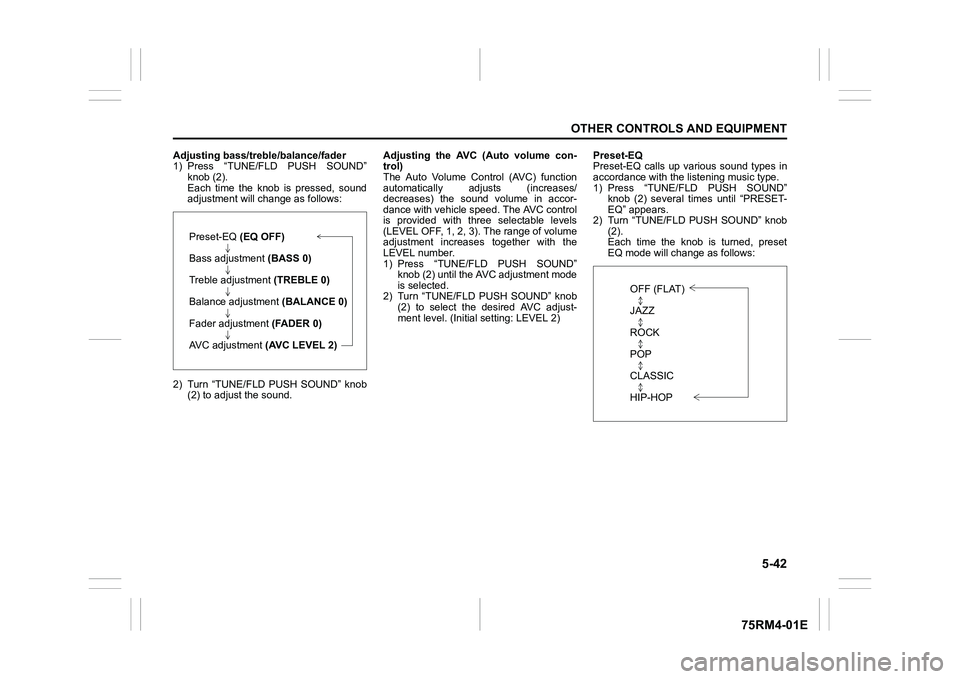
Adjusting bass/treble/balance/fader
1) Press “TUNE/FLD PUSH SOUND”knob (2).
Each time the knob is pressed, sound
adjustment will c hange as follows:
2) Turn “TUNE/FLD PUSH SOUND” knob (2) to adjust the sound. Adjusting the AVC (Auto volume con-
trol)
The Auto Volume Control (AVC) function
automatically adjusts (increases/
decreases) the sound volume in accor-
dance with vehicle speed. The AVC control
is provided with three selectable levels
(LEVEL OFF, 1, 2, 3). The range of volume
adjustment increases
together with the
LEVEL number.
1) Press “TUNE/FLD PUSH SOUND” knob (2) until the AV C adjustment mode
is selected.
2) Turn “TUNE/FLD PUSH SOUND” knob (2) to select the desired AVC adjust-
ment level. (Initi al setting: LEVEL 2) Preset-EQ
Preset-EQ calls up various sound types in
accordance with the listening music type.
1) Press “TUNE/FLD PUSH SOUND”
knob (2) several times until “PRESET-
EQ” appears.
2) Turn “TUNE/FLD PUSH SOUND” knob (2).
Each time the knob is turned, preset
EQ mode will change as follows:
Preset-EQ (EQ OFF)
Bass adjustment (BASS 0)
Treble adjustment (TREBLE 0)
Balance adjustment (BALANCE 0)
Fader adjustment (FADER 0)
AVC adjustment (AVC LEVEL 2)
OFF (FLAT)
JAZZ
ROCK
POP
CLASSIC
HIP-HOP
Page 314 of 505
5-59OTHER CONTROLS AND EQUIPMENT
75RM4-01E
Notes on USB deviceCompatible USB devices
• USB mass storage classFor details as to whether your USB
memory/USB audio is compatible with
USB mass storage class, please contact
the USB memory/USB audio manufac-
turer.
• USB standard compatibility 1.1/2.0 full
speed
• File system FAT12/16/32, VFAT
• Maximum current less than 1.0 A
• If devices such as USB hub, extension cable are connected to the audio sys-
tem, it may not be recognized. In such
case, connect the USB device directly to
the audio system.
• Devices such as MP3 player/mobile
phone/digital camera may not be recog-
nized by the audio system for playing
music. USB device connection
• When connecting a USB device, check
that the connector is pushed all the way
into the port.
• Do not leave the USB device for long periods of time inside the vehicle where
the temperature can rise too high.
• Back up any important data beforehand. We cannot accept responsibility for any
lost data.
• It is recommended not to connect a USB device that contains data files other than
MP3/WMA/AAC format.
Recording MP3/WMA/AAC files on a
USB device
• Playback or display may not be possible depending on the type of USB device in
use or the condition of the recording.
• Depending on the connected USB mem-
ory, the files may be played in different
order from the stored one. Compression formats
MP3
• Bit rate
:
MPEG1 Audio Layer III: 32 k - 320 kbps
MPEG2 Audio Layer III: 8 k - 160 kbps
MPEG2.5 Audio Layer III: 8 k - 160 kbps
• Sampling frequency
:
MPEG1 Audio Layer III: 32 k/44.1 k/48 kHz
MPEG2 Audio Layer III: 16 k/22.05 k/24 kHz
MPEG2.5 Audio Layer III: 8 k/11.025 k/12 kHzWMA (Ver. 7, Ver. 8, Ver. 9*)
• Bit rate: CBR 32 k - 320 kbps
• Sampling frequency: 32 k/44.1 k/48 kHz
* WMA 9 Professional/LossLess/Voice are
not supported.
AAC*
• Bit rate: ABR 16 k - 320 kbps
• Sampling frequency: 32 k/44.1 k/48 kHz
* Apple Lossless is not supported.
Maximum number o f files/folders
• Maximum number of files: 2500
• Maximum number of files in a folder: 255
• Maximum depth of tree structure: 8
• Maximum number of folders: 255 (Root folder is included.)
Page 322 of 505
5-67OTHER CONTROLS AND EQUIPMENT
75RM4-01E
Adjusting the call or ringtone volume
Follow the instructions below to adjust the
call or ringtone volume.
1) Press the Bluetooth
® setup button (5)
or (6).
The Bluetooth
® setup menu will be dis-
played.
2) Turn “TUNE/FLD PUSH SOUND” knob (1) to select “Setup Telephone”, and
press the knob (1) to determine the
selection.
3) Turn “TUNE/FLD PUSH SOUND” knob
(1) to select “Sound Setting”, and press
the knob (1) to dete rmine the selection.
4) Turn “TUNE/FLD PUSH SOUND” knob
(1) to select “Call Volume” or “Ringtone
Volume”, and press the knob (1) to
determine the selection.
The current call or ringtone volume will
be displayed.
5) Turn “TUNE/FLD PUSH SOUND” knob (1) to select the desired call or ringtone
volume, and press the knob (1) to
determine the selection.
NOTE:
When selecting “Go Back” or pressing
BACK button (4), the previous menu will
be displayed. Dialing using missed/incoming/
outgoing calls
Follow the instructions below to dial to the
previously dialed number again.
NOTE:
Up to 30 phone numbers of the latest calls
can be stored. (30 ca
lls including missed,
received and dialed call)
1) Press OFF HOOK button (7). The Bluetooth
® phonebook menu will
be displayed.
2) Turn “TUNE/FLD PUSH SOUND” knob (1) to select “All Ca lls”, “Missed Calls”,
“Incoming Calls” or “Outgoing Calls”,
and press the knob (1) to determine the
selection.
To dial from the dialed history or the
received history, select “All Calls”,
“Missed Calls”, “Incoming Calls” or
“Outgoing Calls” respectively.
3) Turn “TUNE/FLD PUSH SOUND” knob
(1) to select the desired number, and
press the knob (1) to determine the
selection.
4) Turn “TUNE/FLD PUSH SOUND” knob (1) to select “Dial”, and press the knob
(1) or OFF HOOK button (7) to dial to
the selected number.
NOTE:
• When selecting “Go Back” or pressing BACK button (4), the previous menu will
be displayed. • Pressing “Confirm” after selecting “Add
Speed Dial” can register the selected
number in the speed dial.
• Pressing “Confirm” after selecting
“Delete” can delete the selected number
from the call history.
Deletion of call history
Follow the instructions below to delete a
missed/incoming/outgoing call history.
1) Press the Bluetooth
® setup button (5)
or (6).
The Bluetooth
® setup menu will be dis-
played.
2) Turn “TUNE/FLD PUSH SOUND” knob
(1) to select “Setup Telephone”, and
press the knob (1) to determine the
selection.
3) Turn “TUNE/FLD PUSH SOUND” knob (1) to select “Setup Phonebook”, and
press the knob (1) to determine the
selection.
4) Turn “TUNE/FLD PUSH SOUND” knob
(1) to select “Delete History”, and press
the knob (1) to dete rmine the selection.
5) Turn “TUNE/FLD PUSH SOUND” knob
(1) to select “Missed Calls”, “Incoming
Calls”, or “Outgoing Calls”, and press
the knob (1) to dete rmine the selection.
6) Turn “TUNE/FLD PUSH SOUND” knob (1) to select a number to be deleted or
“ALL”, and press the knob (1) to deter-
mine the selection.
Page 325 of 505

5-70
OTHER CONTROLS AND EQUIPMENT
75RM4-01E
NOTE:
When selecting “Go Back” or pressing
BACK button (4), the previous menu will
be displayed.
Registration in speed dial
Follow the instructions below to assign a
number to one of PRESET buttons (3) to
use as the speed dial.
1) Press the Bluetooth
® setup button (5)
or (6).
The Bluetooth
® setup menu will be dis-
played.
2) Turn “TUNE/FLD PUSH SOUND” knob (1) to select “Setup Telephone”, and
press the knob (1) to determine the
selection.
3) Turn “TUNE/FLD PUSH SOUND” knob (1) to select “Setup Phonebook”, and
press the knob (1) to determine the
selection.
4) Turn “TUNE/FLD PUSH SOUND” knob (1) to select “Add Speed Dial”, and
press the knob (1) to determine the
selection.
5) Turn “TUNE/FLD PUSH SOUND” knob
(1) to select the initial of the name you
would like to register in speed dial, and
press the knob (1) to determine the
selection.
The registered numbers will be dis-
played in sequence. If names have
been registered tog ether with numbers,
the names will be displayed.
Turn “TUNE/FLD PUSH SOUND” knob
(1) to select the name you would like to register in speed dial, and press the
knob (1) to determine the selection.
6) Turn “TUNE/FLD PUSH SOUND” knob
(1) to select “Choose Preset”, and
press one of PRESET buttons (3) to
which the selected number is to be
assigned. If a number is already
assigned to the selected button, a con-
firmation message will be displayed.
Turn “TUNE/FLD PUSH SOUND” knob
(1) to select a confirmation message,
and press the knob (1) to complete the
assignment.
Turn “TUNE/FLD PUSH SOUND” knob
(1) to select “Confirm”, and press the
knob (1) to complete the assignment.
When the assignment is completed, the
“Setup Phonebook” will be displayed.
NOTE:
When selecting “Go Back” or pressing
BACK button (4), the previous menu will
be displayed. One-touch call (Speed dial)
Follow the instructions below to dial the
number assigned to each of the PRESET
buttons (3).
1) Press OFF HOOK
button (7).
The Bluetooth
® phonebook menu will
be displayed.
Pressing one of PRESET buttons (3)
can skip step 2) and the 1st line of step
3).
2) Turn “TUNE/FLD PUSH SOUND” knob (1) to select “Speed Dials”, and press
the knob (1) to dete rmine the selection.
3) Press one of PRESET buttons (3). The assigned number will be displayed.
If no number is assigned, “No Entry” is
displayed.
4) Press OFF HOOK button (7).
The selected num ber will be dialed.
Page 326 of 505

5-71OTHER CONTROLS AND EQUIPMENT
75RM4-01E
Deletion of speed dial (Del Speed Dial)
Follow the instructions below to delete the
number assigned for the speed dial.
1) Press OFF HOOK button (7).
The Bluetooth
® phonebook menu will
be displayed.
2) Turn “TUNE/FLD PUSH SOUND” knob (1) to select “Speed Dials”, and press
the knob (1) to dete rmine the selection.
3) Press one of PRESET buttons (3) to which the number to be deleted is
assigned.
If the number is not registered, “No
Entry” is displayed.
4) Turn “TUNE/FLD PUSH SOUND” knob
(1) to select “Delete”, and press the
knob (1) to determine the selection.
5) Turn “TUNE/FLD PUSH SOUND” knob (1) to select “Del Speed Dial”, and
press the knob (1) to determine the
selection.
6) Turn “TUNE/FLD PUSH SOUND” knob (1) to select “Confirm”, and press the
knob (1) to complete the deletion.
NOTE:
When selecting “Go Back” or pressing
BACK button (4), the previous menu will
be displayed. Display of device
data (Device Name)
Follow the instructions below to display the
BD (Bluetooth
® Device) address and
device name.
1) Press the Bluetooth
® setup button (5)
or (6).
The Bluetooth
® setup menu will be dis-
played.
2) Turn “TUNE/FLD PUSH SOUND” knob
(1) to select “Setup Bluetooth”, and
press the knob (1) to determine the
selection.
3) Turn “TUNE/FLD PUSH SOUND” knob (1) to select “Bluetooth Info”, and press
the knob (1) to dete rmine the selection.
4) Turn “TUNE/FLD PUSH SOUND” knob (1) to select “Device Name” or “Device
Address”, and press the knob (1) to dis-
play the device name or the BD (Blue-
tooth
® Device) address.
NOTE:
When selecting “Go Back” or pressing
BACK button (4), the previous menu will
be displayed. Reset to the factory defaults
Follow the instructions below to reset all
the settings to the factory defaults.
1) Press the Bluetooth
® setup button (5)
or (6).
The Bluetooth
® setup menu will be dis-
played.
2) Turn “TUNE/FLD PUSH SOUND” knob (1) to select “Setup Bluetooth”, and
press the knob (1) to determine the
selection.
3) Turn “TUNE/FLD PUSH SOUND” knob
(1) to select “Initialize”, and press the
knob (1) to determine the selection.
4) Turn “TUNE/FLD PUSH SOUND” knob
(1) to select “All Initialize”, and press
the knob (1) to dete rmine the selection.
5) Turn “TUNE/FLD PUSH SOUND” knob (1) to select “Confirm”, and press the
knob (1) to start the reset.
NOTE:
When selecting “Go Back” or pressing
BACK button (4), the previous menu will
be displayed.
Page 345 of 505
6-4
VEHICLE LOADING AND TOWING
75RM4-01E
Additional trailer towing warnings
WA R N I N G
Connect trailer lights and hook up
safety chains every time you tow.
NOTICE
Because towing a trailer puts addi-
tional stress on your vehicle, more
frequent maintenance will be
required than under normal driving
conditions. Follow the schedule in
“Maintenance recommended under
severe driving conditions”.
WA R N I N G
Your vehicle should be handled in a
different way when towing a trailer.
For the safety of yourself and others,
observe the following precautions:
• Practice turning, stopping, andreversing before you begin towing
a trailer in traffi c. Do not tow a
trailer in traffic until you are confi-
dent that you can handle the vehi-
cle and trailer safely.
• Never exceed towing speed limits
or 80 km/h (50 mph), whichever is
lower.
• Never drive at a speed that causes shaking or swaying of the trailer. If
you notice even the slightest sign
of shaking or sw aying, slow down.
• When roads are wet, slippery or rough, drive at a slower speed than
you would on dry or smooth roads.
Failure to slow down when road
conditions are bad can result in
loss of control.
• Always have someone guide you when reversing.
(Continued)
WA R N I N G
(Continued)
• Allow adequate stopping distance.Stopping distance is increased
when you tow a trailer. For each 16
km/h (10 mph) of speed, allow at
least one vehicle and trailer length
between you and the vehicle
ahead. Allow a greater stopping
distance if roads are wet or slip-
pery.
• If the trailer has over-run brakes,
apply the brakes gradually to avoid
snatching caused by the trailer
wheels locking.
• Slow down before corners and maintain a steady speed while cor-
nering. Deceleration or accelera-
tion while cornering can result in
loss of control. Remember that a
larger than normal turning radius is
needed because the trailer wheels
will be closer than vehicle wheels
to the inside of the turn.
• Avoid sudden acceleration and stopping of the vehicle. Do not
make quick maneuvers unless they
are necessary.
• Slow down in cross winds and be
prepared for gusts of wind from
large passing vehicles. (Continued)
Page 357 of 505
7-8
INSPECTION AND MAINTENANCE
75RM4-01E
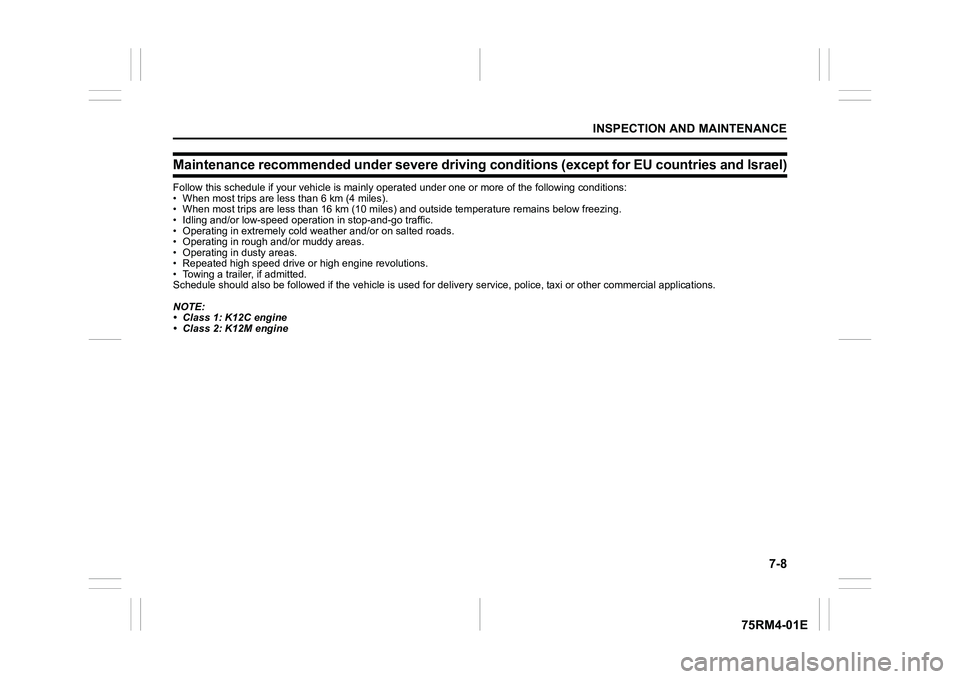
Maintenance recommended under severe driving conditions (except for EU countries and Israel)Follow this schedule if your vehicle is mainly operated under o ne or more of the following conditions:
• When most trips are le ss than 6 km (4 miles).
• When most trips are less than 16 km (10 miles) and outside temperature remains below freezing.
• Idling and/or low-speed operat ion in stop-and-go traffic.
• Operating in extremely cold we ather and/or on salted roads.
• Operating in rough and/or muddy areas.
• Operating in dusty areas.
• Repeated high speed drive or high engine revolutions.
• Towing a trailer, if admitted.
Schedule should also be followed if the vehicle is used for del ivery service, police, taxi or other commercial applications.
NOTE:
• Class 1: K12C engine
• Class 2: K12M engine
Page 361 of 505
7-12
INSPECTION AND MAINTENANCE
75RM4-01E
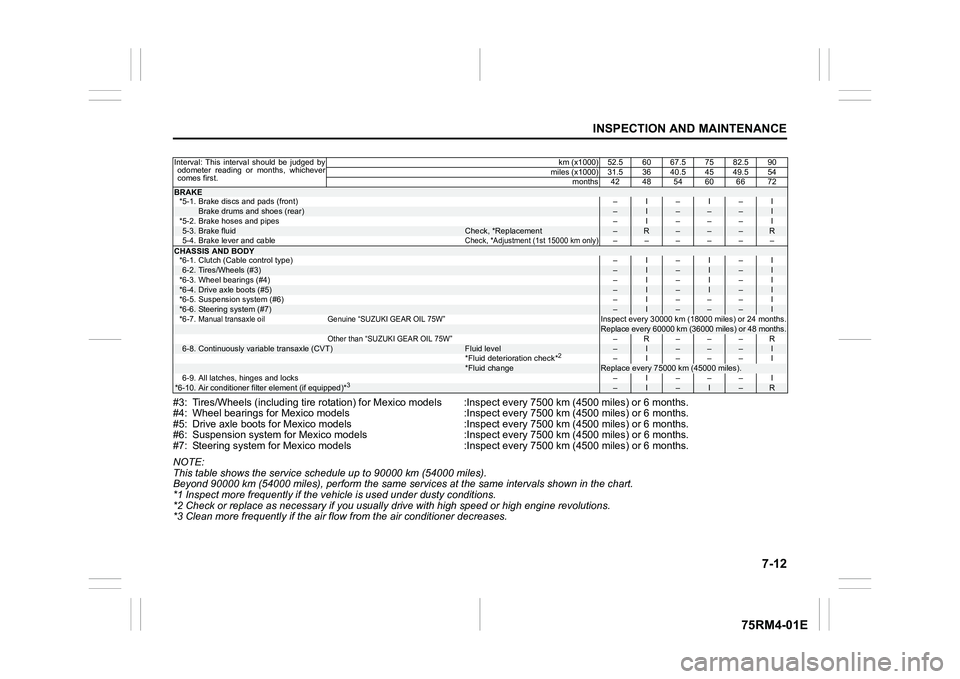
#3: Tires/Wheels (including tire rotation) for Mexico models :Inspect every 7500 km (4500 miles) or 6 months.
#4: Wheel bearings for Mexico models :Inspect every 7500 km (4500 miles) or 6 months.
#5: Drive axle boots for Mexico models :Inspect every 7500 km (45 00 miles) or 6 months.
#6: Suspension system for Mexico models :Inspect every 7500 km (4 500 miles) or 6 months.
#7: Steering system for Mexico m odels :Inspect every 7500 km (450 0 miles) or 6 months.
NOTE:
This table shows the service schedule up to 90000 km (54000 miles).
Beyond 90000 km (54000 miles), perform the same serv ices at the same intervals shown in the chart.
*1 Inspect more frequently if the v ehicle is used under dusty conditions.
*2 Check or replace as necessary if you usually drive with high speed or high engine revolutions.
*3 Clean more frequently if the air flow from the air conditioner decreases.Interval: This interval should be judged by odometer reading or months, whichever
comes first. km (x1000) 52.5 60 67.5 75 82.5 90
miles (x1000) 31.5 36 40.5 45 49.5 54 months 42 48 54 60 66 72BRAKE*5-1. Brake discs and pads (front) –I–I–I
Brake drums and shoes (rear)
–
I
–
–
–
I
*5-2. Brake hoses and pipes –I–––I
5-3.
Brake fluid
Check, *Replacement
–
R
–
–
–
R
5-4. Brake lever and cable
Check, *Adjustment (1st 15000 km only)
––––––
CHASSIS AND BODY *6-1. Clutch (Cable control type) –I–I–I6-2.
Tires/Wheels (#3)
–
I
–
I
–
I
*6-3. Wheel bearings (#4) –I–I–I
*6-4.
Drive axle boots (#5)
–
I
–
I
–
I
*6-5. Suspension system (#6) –I–––I
*6-6.
Steering system (#7)
–
I
–
–
–
I
*6-7.
Manual transaxle oil Genuine “SUZUKI GEAR OIL 75W”
Inspect every 30000 km (18000 miles) or 24 months.Replace every 60000 km (36000 miles) or 48 months.
Other than “SUZUKI GEAR OIL 75W”
–R– – –R
6-8.
Continuously variable transaxle (CVT)
Fluid level
–
I
–
–
–
I
*Fluid deterioration check*
2
–I–––I
*Fluid change
Replace every 75000 km (45000 miles).
6-9. All latches, hinges and locks –I–––I
*6-10.
Air conditioner filter element (if equipped)*
3
–
I
–
I
–
R
Page 367 of 505
7-18
INSPECTION AND MAINTENANCE
75RM4-01E
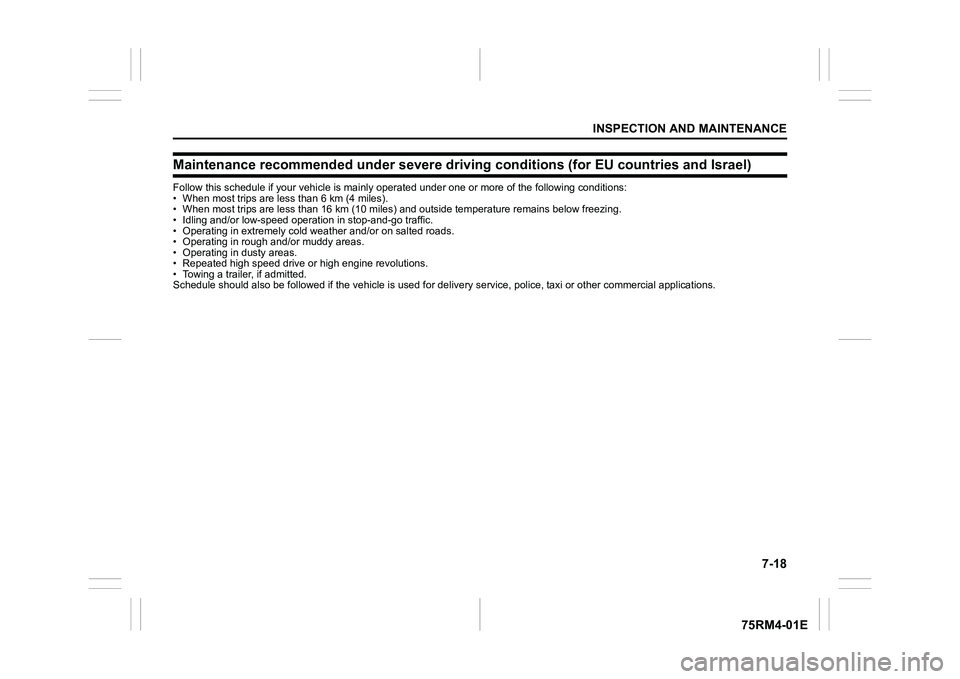
Maintenance recommended under severe driving conditions (for EU countries and Israel)Follow this schedule if your vehicle is mainly operated under o ne or more of the following conditions:
• When most trips are le ss than 6 km (4 miles).
• When most trips are less than 16 km (10 miles) and outside temperature remains below freezing.
• Idling and/or low-speed operat ion in stop-and-go traffic.
• Operating in extremely cold we ather and/or on salted roads.
• Operating in rough and/or muddy areas.
• Operating in dusty areas.
• Repeated high speed drive or high engine revolutions.
• Towing a trailer, if admitted.
Schedule should also be followed if the vehicle is used for del ivery service, police, taxi or other commercial applications.
Page 371 of 505
7-22
INSPECTION AND MAINTENANCE
75RM4-01E
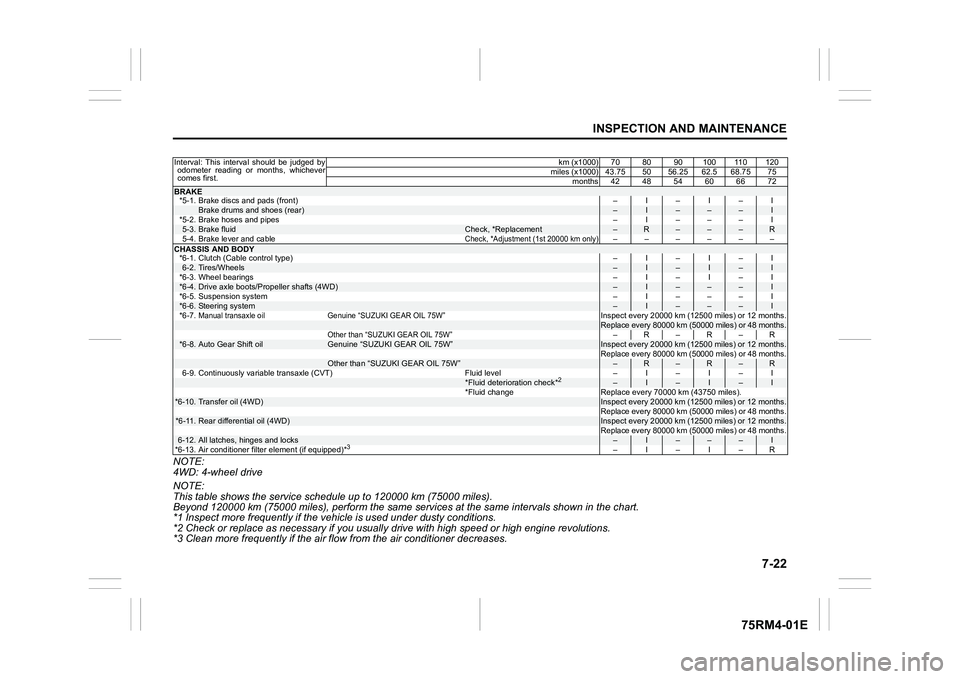
NOTE:
4WD: 4-wheel drive
NOTE:
This table shows the service schedule up to 120000 km (75000 miles).
Beyond 120000 km (75000 miles), perform the same services at the same intervals shown in the chart.
*1 Inspect more frequently if the v ehicle is used under dusty conditions.
*2 Check or replace as necessary if you usually drive with high speed or high engine revolutions.
*3 Clean more frequently if the air flow from the air conditioner decreases.Interval: This interval should be judged by odometer reading or months, whichever
comes first. km (x1000) 70 80 90 100 110 120
miles (x1000) 43.75 50 56.25 62.5 68.75 75 months 42 48 54 60 66 72BRAKE*5-1. Brake discs and pads (front) –I–I–I
Brake drums and shoes (rear)
–
I
–
–
–
I
*5-2. Brake hoses and pipes –I–––I
5-3.
Brake fluid
Check, *Replacement
–
R
–
–
–
R
5-4. Brake lever and cable
Check, *Adjustment (1st 20000 km only)
––––––
CHASSIS AND BODY *6-1. Clutch (Cable control type) –I–I–I6-2.
Tires/Wheels
–
I
–
I
–
I
*6-3. Wheel bearings –I–I–I
*6-4.
Drive axle boots/Propeller shafts (4WD)
–
I
–
–
–
I
*6-5. Suspension system –I–––I
*6-6.
Steering system
–
I
–
–
–
I
*6-7.
Manual transaxle oil Genuine “SUZUKI GEAR OIL 75W”
Inspect every 20000 km (12500 miles) or 12 months.Replace every 80000 km (50000 miles) or 48 months.
Other than “SUZUKI GEAR OIL 75W”
–R–R–R
*6-8.
Auto Gear Shift oil
Genuine “SUZUKI GEAR OIL 75W”
Inspect every 20000 km (12500 miles) or 12 months.Replace every 80000 km (50000 miles) or 48 months.
Other than “SUZUKI GEAR OIL 75W”
–
R
–
R
–
R
6-9. Continuously variable transaxle (CVT) Fluid level – I – I – I
*Fluid deterioration check*
2
–
I
–
I
–
I
*Fluid change Replace every 70000 km (43750 miles).
*6-10.
Transfer oil (4WD)
Inspect every 20000 km (12500 miles) or 12 months.
Replace every 80000 km (50000 miles) or 48 months.
*6-11.
Rear differential oil (4WD)
Inspect every 20000 km (12500 miles) or 12 months.
Replace every 80000 km (50000 miles) or 48 months.
6-12.
All latches, hinges and locks
–
I
–
–
–
I
*6-13. Air conditioner filter element (if equipped)*
3
–I–I–R